battery AUDI S8 2008 User Guide
[x] Cancel search | Manufacturer: AUDI, Model Year: 2008, Model line: S8, Model: AUDI S8 2008Pages: 404, PDF Size: 52.7 MB
Page 63 of 404
& WARNING (continued)
lock the vehicle from the outside the windows cannot be opened
from the inside.
• When you leave the vehicle, always remove the ignition key and
take it with you. This will prevent passengers (children, for example) from accidentally being locked in the vehicle should they
accidentally press the power locking switch in the doors.
• Do not leave children inside the vehicle unsupervised. In an
emergency it would be impossible to open the doors from the
outside without the key.
[ i] Tips
It is not possible to open the door immediately after it has been
locked. This is intentional to allow you to check proper locking of all
vehicle doors. •
Anti-theft alarm system
The anti-theft alarm triggers an alarm if anyone attempts
to break into the vehicle.
The anti-theft alarm system triggers an audible alarm and turns on
the emergency flasher if an unauthorized interference with the
vehicle is sensed by the system.
How is the anti-theft alarm system switched on?
The anti-theft alarm system is switched on when you lock the
vehicle. The system is activated approximately 30 seconds after the
vehicle is locked . The indicator lights on top of the driver's and front
passenger's door trim start flashing rapidly for 30 seconds and then
blink slowly.
Controls and equip ment
Opening and closing
How is the anti-theft alarm system switched off?
The anti-theft alarm system is switched off only when you unlock
your vehicle . If you do not open a door within 60 seconds after you
have unlocked with the remote control, the vehicle will lock itself
again automatically.
When will the anti-theft alarm system be triggered?
When the vehicle is locked, the alarm system monitors and protects
the following parts of the vehicle:
• engine compartment
• luggage compartment
• doors
• ignition
When the system is activated, the alarm will be triggered if one of
the doors, the engine hood or the rear lid are opened, or if the igni
tion is turned on. The anti-theft alarm system will also go off when
the battery is disconnected.
Unlocking the rear lid by inserting and turning the key inside the
rear lid locking cylinder will trigger the optical and acoustic alarm .
You can also trigger the alarm by pressing the PANIC button on your
remote control. This will alert other people in case of emergency.
Press the
PANIC button again to turn off the alarm.
How is the anti-theft alarm switched off when
triggered?
The alarm system is switched off when you unlock the vehicle or
when the ignition is switched on. The alarm will also switch itself off
when it comes to the end of its cycle .
Emergency flasher and horn
The emergency flasher will blink briefly and the horn sounds when
the doors, engine hood and rear lid are properly closed.
If the emergency flashers do not blink, or the horn does not sound,
check the doors, engine hood and rear lid to make sure they are
properly closed. If you close a door, the hood or the rear lid with the
.,,.
Page 67 of 404
Settings
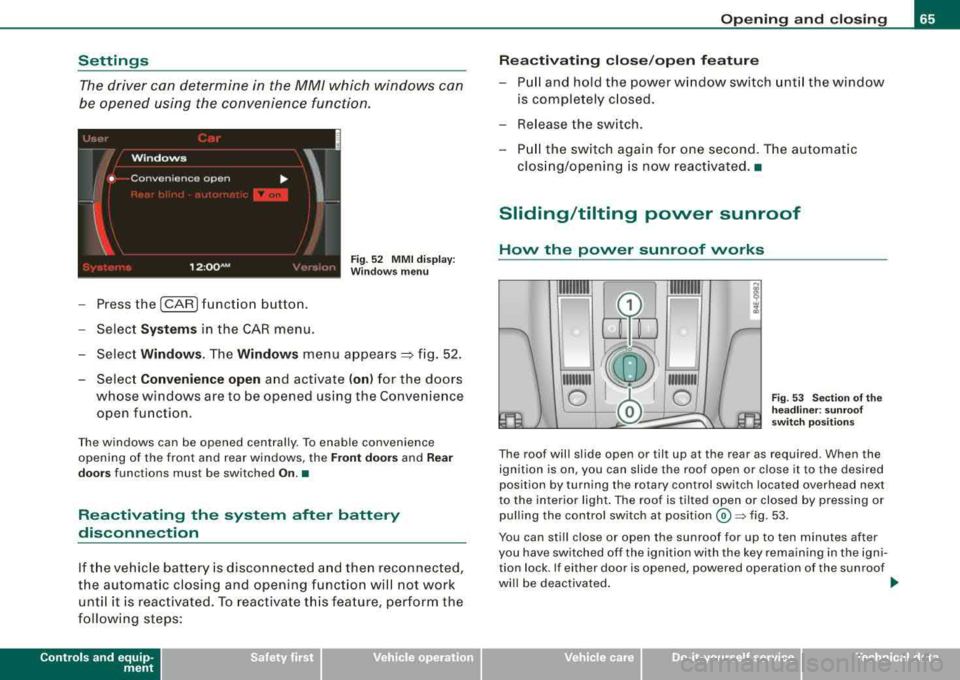
The driver can determine in the MM/ which windows can
be opened using the convenience functio n.
Fig. 5 2 MMI dis pla y:
W indows menu
- Press the (CAR ) funct ion b utton.
- Sele ct
System s in the CAR menu .
- Selec t
Window s. The Window s menu appears =} fig . 52 .
- Select
Convenience open and activate ( on) for the doors
whose windows are to be opened using the Convenience open function .
The windows can be opened centra lly . To enab le convenience
opening of the front and rear w indows, the
Front door s and Rear
door s
functions must be switched On.•
Reactivating the system after battery
disconnection
If t he ve hicle batter y is disco nnected a nd then reconnected,
the au tomat ic c losing and opening functio n will no t work
unt il it is rea ctivated. To reactivate t his fea ture, perform th e
f o llow ing steps:
Contro ls a nd eq uip
ment
Op ening and clo sing
Re activating clos e/open f eature
- Pull and hold the power w indow switch unt il the window
is comple tely c losed.
- Re lease the sw itch .
- Pull the switch aga in for one second. T he automat ic
clos ing/opening is now reactivated. •
Sliding/tilting power sunroof
Hovv the povver sunroof vvorks
111111111
0
111111111
0 Fig . 53 Sec tio n of th e
he adline r: sun roof
swi tch po siti ons
The roof wil l slide open or til t up at the rear as required . When the
ignition is on, you can slide the roof open or close it to the desired
position by turning the ro tary control switch located overhead next
to the interior light . The roof is tilted open or closed by pressing or
pull ing the control switch at
posit ion © ~ fig. 53 .
You can still close or open the sunroof for up to ten minutes after
you have sw itched off the ignition with the key remaining in the igni
tion lock . If either door is opened , powered operation of the sunroof
wi ll be deactivated . _.,
Vehicle care I I irechnical data
Page 77 of 404
-Press the CD button to turn on the interior lights. If you
press the button a second time, the interior lights in the
rear are also turned on.
Reading lights ~
Press the switch to turn the right or left reading light on
or
off=:> page 74, fig. 64.
With the door contact circuit, 00 the interior lights turn on as soon
as you unlock the vehicle or open the doors. The interior lights are
also turned on when the ignition key is removed. The light goes out
about 2 minutes after the doors are closed. When the vehicle is
locked or when the ignition is turned on, the interior lights are
turned off .
When a door is open, the interior lights are turned off after about 10
minutes to prevent draining the battery .
[ i] Tips
The interior lights can be dimmed by holding the [D switch pressed
down. If the interior lights in the rear were turned on by pressing the
switch twice, the rear interior lights are also dimmed .•
Contro ls a nd eq uip
ment
Clear vision
Rear Interior Lights
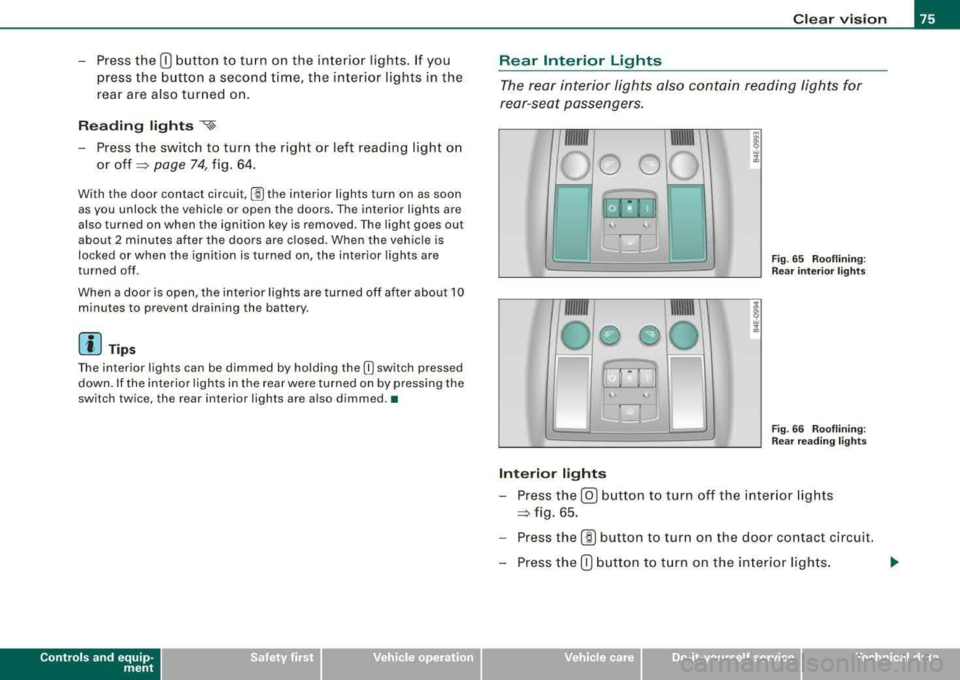
The rear interior lights also contain reading lights for
rear-seat passengers.
Fig. 65 Rooflining:
Rear interior lights
Fig . 66 Rooflining:
Rear reading lights
Interior lights
-Press the@) button to turn off the interior lights
=:> fig. 65.
-Press the (ID button to turn on the door contact circuit.
-Press the CD button to turn on the interior lights.
Vehicle care I I irechnical data
Page 78 of 404
Clear vision
Reading lights
~
Press one of the switches to turn the right or left reading
light on or
off~ page 75, fig. 66.
With the door contact circuit, 00 the interior lights turn on as soon
as you unlock the vehicle or open the doors. The interior lights are
also turned on when the ignition key is removed . The light goes out
about 2 minutes after the doors are closed. When the vehicle is
locked or when the ignition is turned on, the interior lights are
turned off.
When a door is open, the interior lights are turned off after about 10 minutes to prevent draining the battery .
[ i) Tips
• By pressing the safety switch @~ page 62, fig. 48, the function
of some switches in the rear can be turned off. If the symbol in
the safety switch illuminates, the window regulators in the rear
doors, the switches for the interior lights and the switch for the elec
tric sun shade* are inoperative.
• The interior lights can be dimmed by holding the
(I] switch
pressed down. •
Applies to vehic les: w ith backg round lightin g
Background lighting
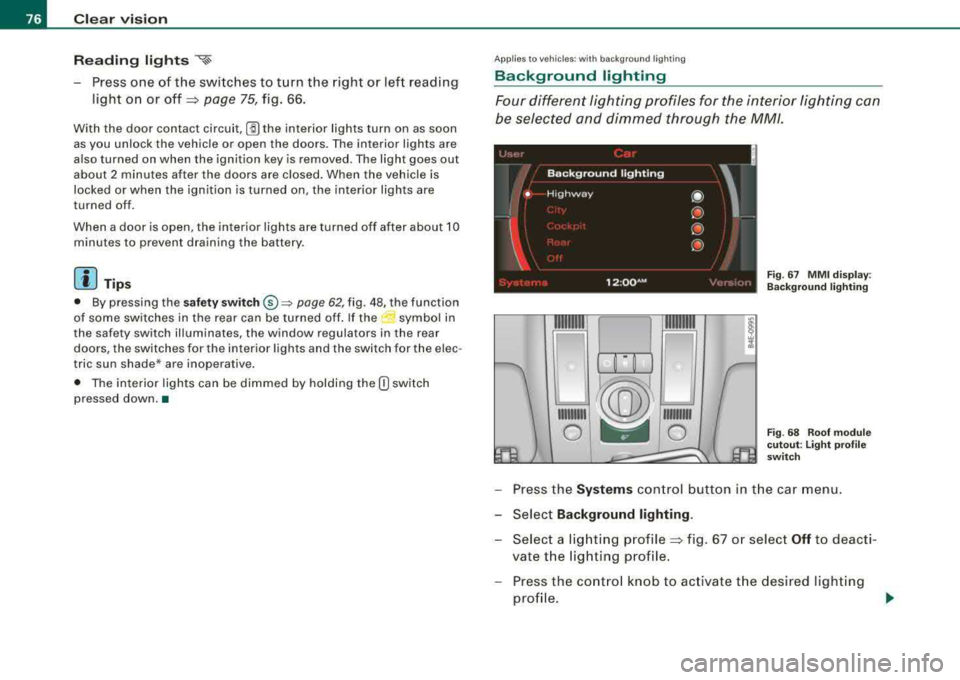
Four different lighting profiles for the interior lighting can
be selected and dimmed through the MM/.
~/®~~
111111111 ~ 111111111
0 ~ 0
Fig . 67 MMI display :
Background lighting
Fig. 68 Roof module
cutout: Light profile
switch
- Press the Systems control button in the car menu.
- Select
Background lighting .
- Select a lighting profile~ fig. 67 or select Off to deacti-
vate the lighting profile.
- Press the control knob to activate the desired lighting
profile .
Page 110 of 404
___ S_ e
_ a_t_s _ a_n_ d
__ s _t _o _r _a ...::g:::.... e ________________________________________________ _
-Plu g in applian ce to be use d.
The socket of the ci gare tte l ighter may be used for 12-volt appli
ances with maximum consumption of up to 100 watts , such as a
flash light, small vacuum c leaner, etc .
Before you purchase any accessories , always read and fo llow the
in fo rm ati on in
~ page 382 , "Additiona l ac cess ories a nd parts
replacement".
& WARNING
Improper use of the cigarette lighter can cause ser ious injury or
start a fire .
• Be careful when using the cigarette lighter . If you do not pay
attention to what you are do ing when you are using the cigarette
lighter you can burn yourself .
• The cigarette lighter and socket remain functional even if the
ignition is switched off or the ignition key is removed. Never leave
c hildren inside the vehi cle without supervision.
0 Note
• To avoid damaging the s ocket , only use plugs tha t fit pr operly.
• Only use the cigarette lighter socket as a power source for elec
tr ical accesso ries for sh ort du rations. Use the sockets in the vehic le
when a power source is needed for longer durations .
[ i J Tips
When the engine is off and accessories are sti ll plugged in and are
on, the v ehicle battery ca n st ill be d raine d.•
Long center console
Ap plies to veh ic les : w ith lon g cen ter co nso le
Overview
Fig . 116 Long re ar
cen ter con sole
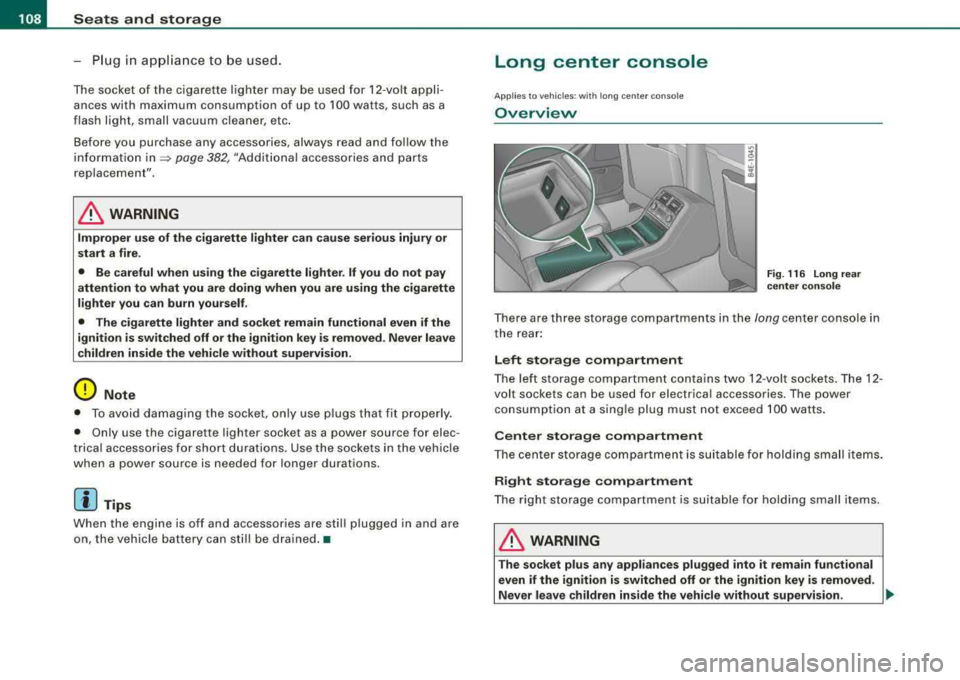
T here are three storage co mpartments in the long center console in
t he rear :
Left storage compartment
The le ft sto rage c om partm ent co ntain s two 12 -v o lt so ckets. The 12 -
volt sockets can be used for electrica l accessories. The power
co nsumption a t a sing le plug mus t no t exceed 100 watts .
Center storage compartment
Th e cen te r storag e compar tment is suitabl e fo r hol ding small items .
Right storage compartment
T he right storage co mpart ment is suita ble for hold ing smal l items.
& WARNING
T he socket plus any appliances plugged into it remain functional
even if the ignition is switched off or the ignition key is removed.
Never leave children in side the vehicle without supervision.
~
Page 111 of 404
![AUDI S8 2008 User Guide ________________________________________________ S_ e_ a_t _
s _a_ n_d _ s_t _o _ r_ a_ g~ e __ fflll
0 Note
To avoid damaging the socket, only use plugs that fit properly.
[ i] Tips
Wh](/img/6/57619/w960_57619-110.png "AUDI S8 2008 User Guide ________________________________________________ S_ e_ a_t _
s _a_ n_d _ s_t _o _ r_ a_ g~ e __ fflll
0 Note
To avoid damaging the socket, only use plugs that fit properly.
[ i] Tips
Wh")
________________________________________________ S_ e_ a_t _
s _a_ n_d _ s_t _o _ r_ a_ g~ e __ fflll
0 Note
To avoid damaging the socket, only use plugs that fit properly.
[ i] Tips
When the engine is off and accessories are still plugged in and are
on, the vehicle battery can still be drained. •
Storage
General overview
There are numerous places to store items in your vehicle.
Glove compartment
Storage compartment
Pockets in the front seats*
Compartments in the door trim panels
Compartments in the rear doors*
Coat hooks => page 109
=> page 110
=> page 110
=> page 111
=> page 111
Left side storage compartment in the => page 112
trunk
--Right side storage compartment in the => page 113
trunk
Emergency warning triangle
=> page 348
& WARNING
• Always remove objects from the instrument panel. Any items
not stored could slide around inside the vehicle while driving or
Controls and equip ment
&, WARNING (continued)
when accelerating or when applying the brakes or when driving
around a corner.
• When you are driving make sure that anything you may have
placed in the center console or other storage locations cannot fall
out into the footwells. In case of sudden braking you would not be
able to brake or accelerate.
• Any articles of clothing that you have hung up must not inter
fere with the driver's view. The coat hooks are designed only for
lightweight clothing . Never hang any clothing with hard, pointed
or heavy objects in the pockets on the coat hooks. During sudden
braking or in an accident -especially if the airbag is deployed -
these objects could injure any passengers inside the vehicle. •
Glove compartment
Your Owner's Literature and the media player are stored
in the lockable glove compartment.
t------.-,.---------. l
i
Fig. 117 Glove
compartment
Page 115 of 404
Seats and storage -______________ ___,;.____.
Right-side c omp artm ent
Fig . 127 Right-side
storage compartment
Fig . 128 Right-side
storage compartment:
Battery
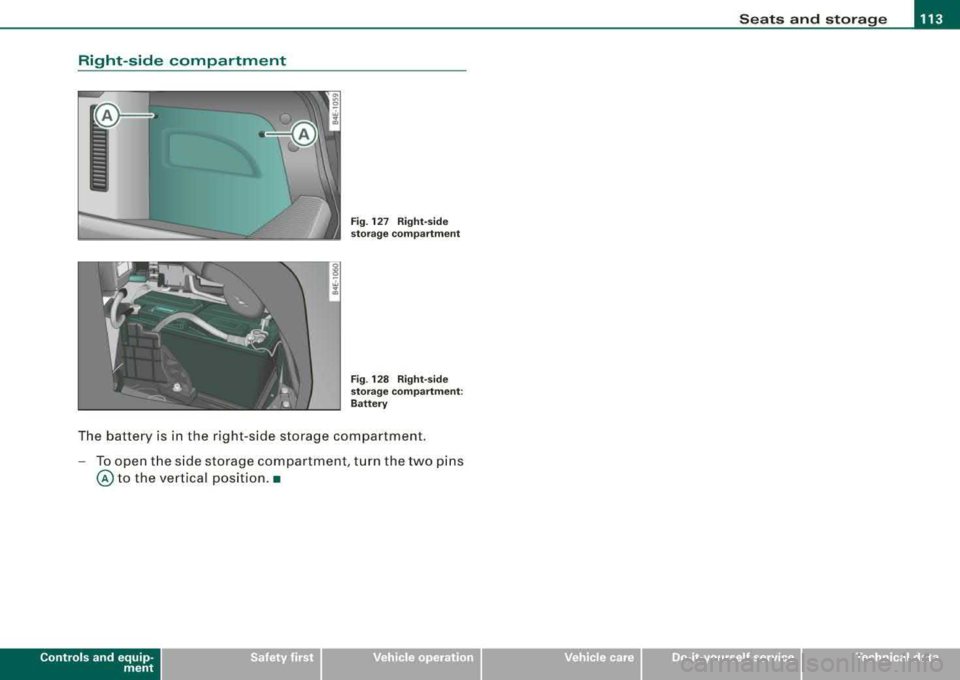
The battery is in the right -side storage compartment.
- To open the side storage compartment , turn the two pins
@ to the vertical positio n.•
Contro ls a nd eq uip
ment Vehicle care I I irechnical data
Page 116 of 404
___ w_ a
_ r_m _ a_ n_d_ c_ o_ ld __________________________________________________ _
Warm and cold
Climate controls
Description
The air conditioner is fully automatic and is designed to
maintain a comfortable and uniform climate inside the
vehicle.
We recommend the following settings:
- Set the temperature to 75 °F (+23 °C).
- Press the !AUTO
I button.
With this setting, you attain maximum comfort in the least amount
of time. Change this setting, as desired, to meet your personal needs.
The climate controls are a combination of heating, ventilation and cooling systems, which automatically reduce humidity and cool the
air inside your vehicle.
The air temperature, air flow and air distribution are automatically
regulated to achieve and maintain the desired passenger compart
ment temperature as quickly as possible.
The system automatically compensates for changes in outside
temperature and for the intensity of the sunlight entering the
vehicle. We recommend you use the
Automatic mode=> page 117
for year -round comfort.
Please note the following:
Turn on the air conditioner to reduce humidity in the vehicle. This also prevents the windows from fogging up.
When the outside temperature is high and the air is very humid ,
condensation from the evaporator may drip under the vehicle. This
is normal and does not indicate a leak. If the outside temperature is
low, the fan normally only switches to
a higher speed once the engine coolant has warmed up sufficiently.
The air conditioner temporarily switches off when you drive off from
a standstill using full throttle to save engine power.
The compressor also switches off if the coolant temperature is too high, so that the engine can be adequately cooled under extreme
loads.
Air pollutants filter
The air pollutants filter (a combined particle filter and activated
charcoal filter) reduces or prevents outside air pollution (dust, or pollen) from entering the vehicle.
The air pollutants filter must be changed at the intervals specified
in your Warranty
& Maintenance booklet, so that the air conditioner
can properly work.
If you drive your vehicle in an area with high air pollution, the filter
may need to be changed more frequently than specified in your
Audi Warranty
& Maintenance booklet. If in doubt, ask your autho
rized Audi Service Advisor for advice.
Key coded settings
The air conditioner settings selected are automatically stored and
assigned to the key being used. When the vehicle is started, the air
conditioner automatically selects the settings assigned to that key.
This way every driver will maintain his/her own personal settings
and does not have to reset them manually.
If a different driver uses your key and changes the air conditioner
settings, the latest adjustments will erase and replace the settings
you have stored.
Energy management
To prevent the battery from being discharged and to restore the
balance of energy, components which require large amounts of
Page 163 of 404
_________________________________________________ A
_ u_ d_ i _s _ i_d _e _ a_s_ s_ i_ s _t __ lJIII
Fig . 182 Narr ow lane s:
Si de ass is t m ay detec t
vehi cle s two la ne s
a w ay
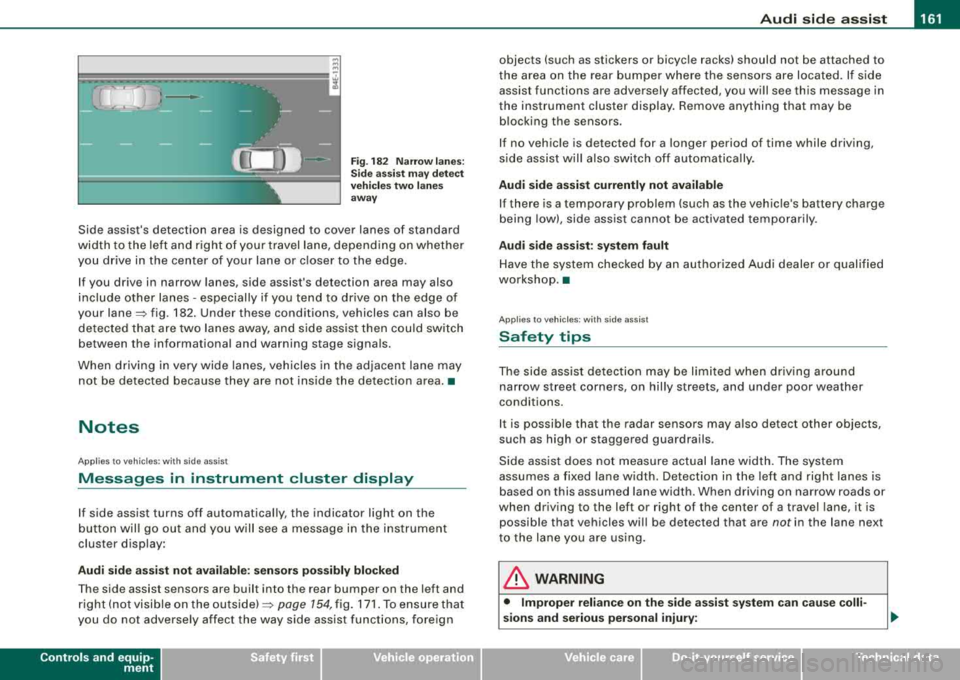
Side assist's detection area is designed to cover lanes of standard
width to the left and r ight of your travel lane, depend ing on whethe r
you drive in the center of your lane or c loser to the edge .
I f you drive in narrow lanes, side assist's detection area may also
include other lanes - especially if you tend to dr ive on the edge of
your
lane~ fig . 182. Under these conditions, vehicles can also be
de tec ted tha t are two lanes away, and side ass ist then c ould switch
between the informational and warning stage signa ls.
When d riving in very wide lanes, vehicles in t he adjacent lane may
not be detected because they are not ins ide the detection area. •
Notes
Applies to vehicles: with side ass is t
Messages in instrument cluster display
If side assist turns off automatically, the indicator light on the
b utton wil l go out a nd you w ill see a message in the i nstrument
cluster disp lay :
Audi side a ssist not available : sen sor s pos sibly blocked
T he side assist sensors are bui lt into the rear bumper on the left and
r ight ( not visi ble on the
ou ts id e) ~ page 154, fig. 171 . To ensure t hat
you do not adverse ly affect the way side assist functions, foreign
Controls and equip
ment
objects (such as stickers or bicyc le racks) should not be attached to
t he area on the rear bumper where the sens ors are loca ted. If s ide
assist functions are adversely affected, you will see this message in
the instrument cluster display. Remove anything that may be b locking the sensors .
I f no vehic le is detected for a longer period of time while driving,
s ide assist wil l also switch o ff automatica lly.
Audi side a ssist currently not available
If there is a temporary prob lem (such as the vehic le's battery charge
being low), side assist cannot be activated temporarily .
Audi side assis t : sy stem fault
Have t he system chec ked by an autho rized Audi dealer o r qualified
workshop. •
Applies to vehic les: with side assist
Safety tips
The side ass ist detec tion may be li mit ed when dr iv ing a round
narrow street corners, on hilly streets, and under poor weather
conditions.
I t is possible that the radar sensors may a ls o detec t other objects,
such as high or staggered guardrails.
Side ass ist does not measu re actual la ne w idth. The system
assumes a fixed lane width. Detection in the left and right lanes is
based on this assumed lane width. When driving on narrow roads or
when driv ing to the left or right of the center of a travel lane, it is
possible that vehicles wi ll be detected that are
not in the lane next
to the lane you are using.
& WARNING
• Improper relian ce on the side assi st system c an cau se colli
sions and serious personal injury:
Page 171 of 404
_______________________________________________ A_ u_t _o _m_ a_ t_ i_ c _ t_r _
a _n _s_ m_ i_ s _ s_ i_ o _ n _ ___.ltllll
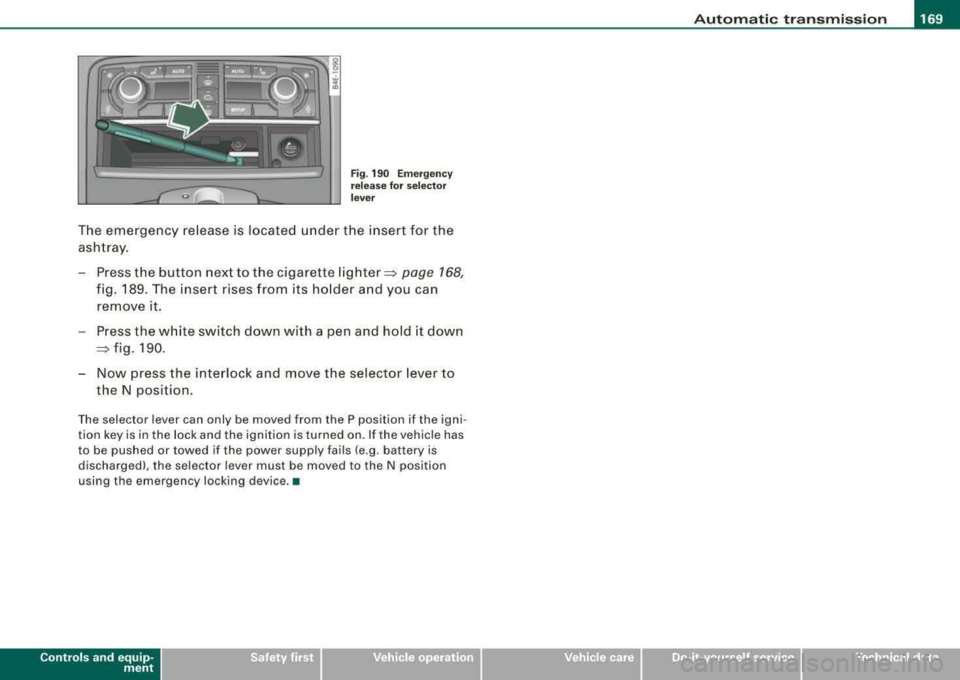
Fig . 190 Emergency
release for selector
lever
The emergency release is located under the insert for the
ashtray.
- Press the button next to the cigarette
lighter~ page 168,
fig. 189. The insert rises from its holder and you can
remove it.
- Press the white switch down with a pen and hold it down
~ fig. 190.
- Now press the interlock and move the selector lever to
the N position.
The selector lever can only be moved from the P position if the igni
tion key is in the lock and the ignition is turned on. If the vehicle has
to be pushed or towed if the power supply fails (e .g . battery is
discharged), the selector lever must be moved to the N position
using the emergency locking device. •
Controls a nd eq uip
ment Vehicle care I I irechnical data