brake light AUDI S8 2008 User Guide
[x] Cancel search | Manufacturer: AUDI, Model Year: 2008, Model line: S8, Model: AUDI S8 2008Pages: 404, PDF Size: 52.7 MB
Page 36 of 404
Driver inf orma tio n displ ay
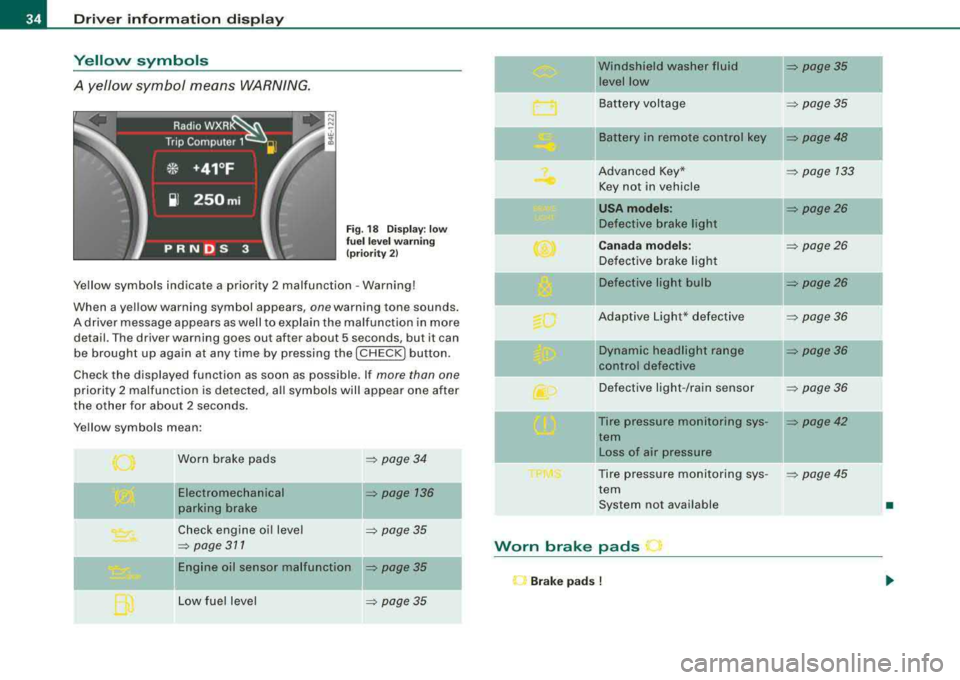
Yellow symbols
A yellow symbol means WARNING.
Fig . 18 Display: low
fu el l eve l warn in g
(pr iori ty 2)
Yellow symbols indicate a priority 2 malfunction - Warning!
When a yellow warning symbol appears,
one warning tone sounds.
A driver message appears as well to explain the malfunction in more detail . The driver warning goes out after about 5 seconds, but it can
be brought up again at any time by pressing the [ CHECK
I button.
Check the displayed function as soon as possible . If
more than one
priority 2 malfunction is detected, all symbols will appear one after
the other for about 2 seconds .
Yellow symbols mean:
Worn brake pads
Electromechanical
parking brake
Check engine oi l level
=> page 311
= page 34
=> page 136
=> page 35
Engine oil sensor malfunction => page 35
Low fue l level => page 35
-
Windshield washer fluid = page35
level low ~
Battery voltage => page35
-
II Battery in remote control key = page48
Advanced Key* = page 133
Key not in vehicle
USA mod els: = page26
Defective brake light
Canad a m od els: => page26
Defective brake light
Defective light bulb
=> page26
Adaptive Light* defective => page36
-
Dynamic headlight range => page36
ll contro l defective
Defective light -/rain sensor
= page36
--Tire pressure monitoring sys-= page42
tern
II Loss of air pressure
Tire pressure monitoring sys -
= poge45
tern
System not available
•
Worn brake pads
l"J Br ake pad s !
Page 37 of 404
If the symbol illuminates, contact your authorized Audi dea ler to
have the front brake pads inspected (on that occas ion have the rear
brakes inspected as wel l to be
safe!. •
Checking the engine oil level ~
~-Please c hec k oil le vel
When the symbo l illuminates, check the engine oi l leve l as soon as
possible=> page 311 . Add oil if necessary=> page 312 . •
Engine oil sensor defective ~ ....
~ ... Oil le vel ! sen sor defe cti ve
If the symbo l illuminates, contact your authorized Audi dea ler and
have the oi l sensor inspected . Unt il you have this done, check the o il
level each time you refuel just to be on the safe
side => page 311. •
Fuel supply too low Bil
Bu Please refuel
When the symbol i lluminates, th is means there are abou t 2.4
gallons (9 l itres) of fue l left in the fue l tank . Time to refuel.
=> page 302 .
If the symbo l lights up, even when there is ample fuel in the tank,
and the text
Tan k sys tem m alfunct ion ! Conta ct w ork shop appears
in the disp lay, there is a fault in the system. Contact a qual ified work
shop to have the fau lt rectified .•
Windshield washer fluid level too low ~
~ Ple ase top up washer fluid
Controls and equip ment
Driver information di splay
If the symbo l illuminates, add windshie ld washer fluid to the washer
system and a lso to the headlig ht washer
sys tem => page 323. •
Battery voltage 0
If the battery 's state o f charge is not in the optimal range, the 0
symbo l is shown in the display and the driver message L ow batter y
charge: b attery will be charged while driving
appears .
Whi le this driver not ification is displayed, you have to be prepared
for limited starting capability .
Drive r m essa ge a ppear s a nd go es out ag ain
If th is d rive r message appears after the ign ition is turned on or
wh ile dr iving and it goes out again after a wh ile, the battery has
been adequately recharged.
Dri ver messa ge ap pears a nd does not g o out ag ain
If t his drive r notif ication appea rs after the ignition is t urned o n or
wh ile driving and does not go out again, the battery's state of
charge is not in the opti mal range. Start ing capab ility is restricted.
Have the battery c hecked at a dea lership as soon as possible. •
Applies to vehi cles : with Advanced Key
Key not in vehicle ..?c
.,J. Key not in vehi cle
This message appears toget her with the ..J. symbol when the
remote control key is removed from the vehicle whi le the engine is
run ning. This is to remind you that you s hould not continue your trip
without your key.
I f the remote control key is no longer i n the vehicle, you w ill not be
able to start the engine aga in after you have switched off the igni
tion. In addition to this, you will not be able to lock the vehic le from
the outside. •
Page 111 of 404
![AUDI S8 2008 User Guide ________________________________________________ S_ e_ a_t _
s _a_ n_d _ s_t _o _ r_ a_ g~ e __ fflll
0 Note
To avoid damaging the socket, only use plugs that fit properly.
[ i] Tips
Wh](/img/6/57619/w960_57619-110.png "AUDI S8 2008 User Guide ________________________________________________ S_ e_ a_t _
s _a_ n_d _ s_t _o _ r_ a_ g~ e __ fflll
0 Note
To avoid damaging the socket, only use plugs that fit properly.
[ i] Tips
Wh")
________________________________________________ S_ e_ a_t _
s _a_ n_d _ s_t _o _ r_ a_ g~ e __ fflll
0 Note
To avoid damaging the socket, only use plugs that fit properly.
[ i] Tips
When the engine is off and accessories are still plugged in and are
on, the vehicle battery can still be drained. •
Storage
General overview
There are numerous places to store items in your vehicle.
Glove compartment
Storage compartment
Pockets in the front seats*
Compartments in the door trim panels
Compartments in the rear doors*
Coat hooks => page 109
=> page 110
=> page 110
=> page 111
=> page 111
Left side storage compartment in the => page 112
trunk
--Right side storage compartment in the => page 113
trunk
Emergency warning triangle
=> page 348
& WARNING
• Always remove objects from the instrument panel. Any items
not stored could slide around inside the vehicle while driving or
Controls and equip ment
&, WARNING (continued)
when accelerating or when applying the brakes or when driving
around a corner.
• When you are driving make sure that anything you may have
placed in the center console or other storage locations cannot fall
out into the footwells. In case of sudden braking you would not be
able to brake or accelerate.
• Any articles of clothing that you have hung up must not inter
fere with the driver's view. The coat hooks are designed only for
lightweight clothing . Never hang any clothing with hard, pointed
or heavy objects in the pockets on the coat hooks. During sudden
braking or in an accident -especially if the airbag is deployed -
these objects could injure any passengers inside the vehicle. •
Glove compartment
Your Owner's Literature and the media player are stored
in the lockable glove compartment.
t------.-,.---------. l
i
Fig. 117 Glove
compartment
Page 133 of 404

On the road -
-----------------'
Stopping the engine
-Turn the ignition key to position®~ page 130, fig. 145.
& WARNING
• Never turn off the engine until the vehicle has come to a
complete stop.
• The brake booster and servotronic only work when the engine
is running. With the ignition turned off, you have to apply more
force when steering or braking. Since you cannot steer and stop normally, this can lead to accidents and serious injuries .
• The radiator fan can continue to run for up to 10 minutes even
after you have turned off the engine and removed the ignition key.
The radiator fan can also turn on again if the engine coolant heats
up because of intense sunlight or heat build-up in the engine
compartment.
0 Note
Do not stop the engine immediately after hard or extended driving.
Keep the engine running for approximately two minutes to prevent
excessive heat build-up.•
Contro ls a nd eq uip
ment
Starting and stopping the engine
using the Advanced Key
A pp lies to veh ic les: with Advanced Key
Starting the engine using the [ START] button
Using this button, you can switch on the ignition and start
the engine.
0
0
Fig . 146 Advanced
Key: START button
The [ START] button has a two position feature. ~ fig. 146.
Switching on the ignition
-Press the [START] button to the first position. Only the
ig nition switches on .
Starting the engine
-Depress the foot brake.
- Move the selector lever into the P or N position
~ &.
- Press the [ START] button to the second position. The
engine starts.
Vehicle care I I irechnical data
Page 136 of 404
___ O_ n_t_ h_ e_ ro_ a_d __________________________________________________ _
Electromechanical parking brake
Operation
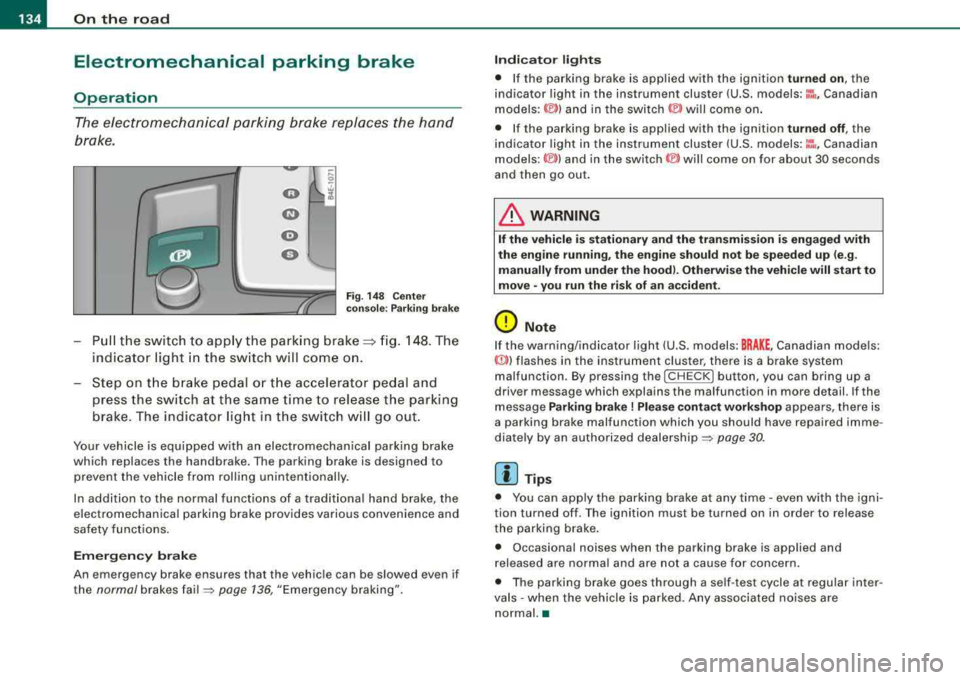
The electromechani ca l parking brake replaces the hand
brake.
F ig. 148 C enter
co nso le: P arki ng b ra ke
Pu ll the switch to app ly the parking brake==> fig. 148. The
indicator light in the sw itch will come on.
Step on t he brake pedal o r th e acce lerator pedal and
press th e switch at the s am e time to rel eas e the parking
brake . The indicator light in t he switch w ill go out .
Your vehicle is equ ipped w ith an electromechanical parking brake
which replaces the handbrake . The parking brake is designed to
prevent the vehicle from rolling unintentionally .
In addition to the norma l functions of a trad itiona l hand brake, the
e lectromechanical parking brake provides various convenience and
safety functions.
Em erg ency brake
An emergency brake ensures that the vehicle can be slowed even if
the
normal brakes fa il=> page 136, "Emergency braking".
Indi cat or light s
• If the pa rking brake is app lied with the ignition turned on , the
indicator light in the instrument cluster (U.S. models:
::i , Canadian
models: ©) and in the switch © will come on .
• If the parking brake is applied with the ignition
tu rn ed off , the
indicator light in the instrument cluster (U .S .
models :~~ . Canadian
models :(®) ) and in the
switch (®) will come on for about 30 seconds
and then go out.
& WARNING
I f the vehicle i s stati onary and the transmis sion i s engaged with
the eng ine runnin g, the engine should n ot b e speeded up (e .g .
manu ally from under the ho od). Otherw ise th e vehi cle w ill start to
mo ve
-you r un the ris k of an ac cident .
0 Note
If the warning/indicator light (U .S . models: BRAKE , Canadian models:
«D>) flashes in the instrument cluster, there is a brake system
malfunction . By pressing the
I CH ECK] button , you can bring up a
driver message which explains the malfunction in more detail. If the
message
Parking brake! Plea se conta ct w ork shop appears, there is
a parking brake malfunction which you should have repaired imme
diate ly by an authorized dealership =>
page 30.
[ i] Tips
• You can app ly the parking brake at any time -even with the igni
tion turned off . T he ignition must be turned on in order to release
the parking brake.
• Occasional noises when the parking brake is applied and
released are norma l and are not a cause for concern .
• The parking brake goes through a se lf -test cycle at regular inter
va ls
-when the vehicle is parked. Any associated no ises are
normal. •
Page 139 of 404
_________________________________________________ O_ n_ t_h _e _ ro_ a_d _ ___._
0 Note
If the warning/indicator light (U.S. models : BRAKE, Canadian models:
malfunction. By pressing the
I CHECK] button , you can bring up a
driv er m essage which explains the malfunction in more detail. If the
message
Parking brake! Please contact workshop appears, there is
a parking brake malfunction which you should have r epaired imme
diately by an authorized
dealership => page 30. •
Cruise control
Switching the system on
The cruise control system makes it possible to drive at a
constant speed starting at 20 mph (30 km/h).
rr- -- ...--,,-~------ -~ ----,-~
Contro ls a nd eq uip
ment
.... S? w ;f,
Fig . 149 Control lever
with set button Fig
. 150 Display:
Selected speed
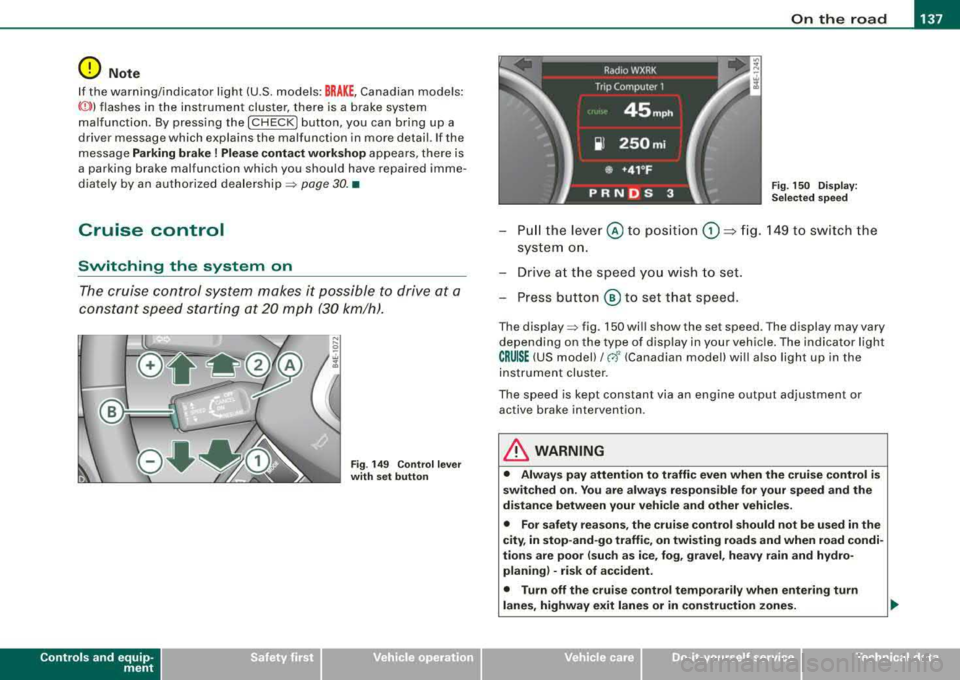
Pull the lever © to position G) ~ fig. 149 to switch the
system on.
Drive at the speed you wish to set.
- Press button
® to set that speed.
The display => fig. 150 will show the set speed . The display may vary
depending on the type of display in your vehicle. The indicator light
CRUISE (US model)/ 0 (Canadian model) will also ligh t up in the
instrument cluster .
The speed is kept constant via an engine output adjustment or active brake intervention .
& WARNING
• Always pay attention to traffic even when the cruise control is
switched on. You are always responsible for your speed and the
distance between your vehicle and other vehicles.
• For safety reasons, the cruise control should not be used in the
city, in stop-and-go traffic, on twisting roads and when road condi
tions are poor (such as ice, fog, gravel, heavy rain and hydro
planing) -risk of accident.
• Turn off the cruise control temporarily when entering turn
lanes, highway exit lanes or in construction zones.
Vehicle care
I I irechnical data
Page 140 of 404
___ o_ n_ t_
h _e _ ro_ a_d __________________________________________________ _
&, WARNING (continued)
• Please note that inadvertently "resting" your foot on the accel
erator pedal causes the cruise control not to brake . This is because
the cruise control is overridden by the driver's acceleration.
[ i] Tips
The brake lights illumin ate as soon as the brakes decelerate
automatically. •
Changing speed
-Press lever@in the 0 or Q direction=> page 137,
fig. 149 to increase or decrease your speed.
-Release the lever to save that speed.
Change speed in increments of 1 mph (1 km/h) by lightly pressing
the lever . If you keep the lever pressed down, you will alter your
speed in 5 mph (10 km/h) increments.
You can also press the accelerator pedal down to increase your
speed, e.g. if you want to pass someone. The speed you saved
earlier will resume as soon as you release the accelerator pedal.
If, however, you exceed your saved speed by 5 mph (10 km/h) for
longer than 5 minutes, the cruise control will turn off temporarily.
The green symbol in the
display=> page 137, fig . 150 is replaced
with a white symbol. The saved speed remains the same. •
Presetting your speed
You can preset your desired speed while the vehicle is not
moving.
-Turn on the ignition .
-Pull lever@ into position G) => page 137, fig. 149 .
-Press the lever in the 0 or Q direction to increase or
decrease your speed.
-Release the lever to save that speed.
This function makes it possible, for example, to save the speed you
want before driving on the highway. Once on the highway, activate
the cruise contro l by pulling the lever toward
G). •
Switching the system off
Temporary deactivation
-Press the brake pedal, or
-Press the lever @into position ® (not clicked into place)
=> page 137, fig. 149, or
-Drive for longer than 5 minutes at more than 5 mph
(10 km/h) above the stored speed.
Switching off completely
-Press lever@ into position ® (clicked into place), or
-Switch the ignition off.
The system retains the saved speed if you deactivate the cruise
control temporarily . To resume the saved speed , release the brake
pedal and pull the lever to position
G) .
Switching the ignition off erases the saved speed.
& WARNING
You should only return to the saved speed if it is not too fast for
the current traffic conditions -risk of an accident!
•
Page 147 of 404
_____________________________________________ A_ d..:.a..! p..:. t
_ i_ v _ e.;__ C.,...._ ru.;__ is..:. e.;__ C.::..: o..:.n..:.. t:.:. r..: o ..:. I_--..J_
This information is always displayed. Display area © is therefore
called the
primary di sp la y .
© S upple men tary displ ay
In display area @ information from the navigation system and the
trip computer is disp layed in addition to information about Adaptive
Cruise Control.
You can select among the different information by repeated brief taps on the RESET button on the windshield wiper
lever => page 39,
"Operation ".
Particularly on your first trips with Adaptive Cruise Control, the
s uppl em en ta ry di spla y should be turned on.
@ Message
The information in area © is not displayed permanently. Informa
tion is displayed on ly if you change the time interval , if there is a
malfunction or if the Adaptive Cruise Control is turned off. •
Applies to vehicles : with Ada ptive C ruise Cont rol
Primary display in the speedometer
De sire d sp eed
Fig . 159 Prim ary
di spl ay
in the s pee d
o m ete r
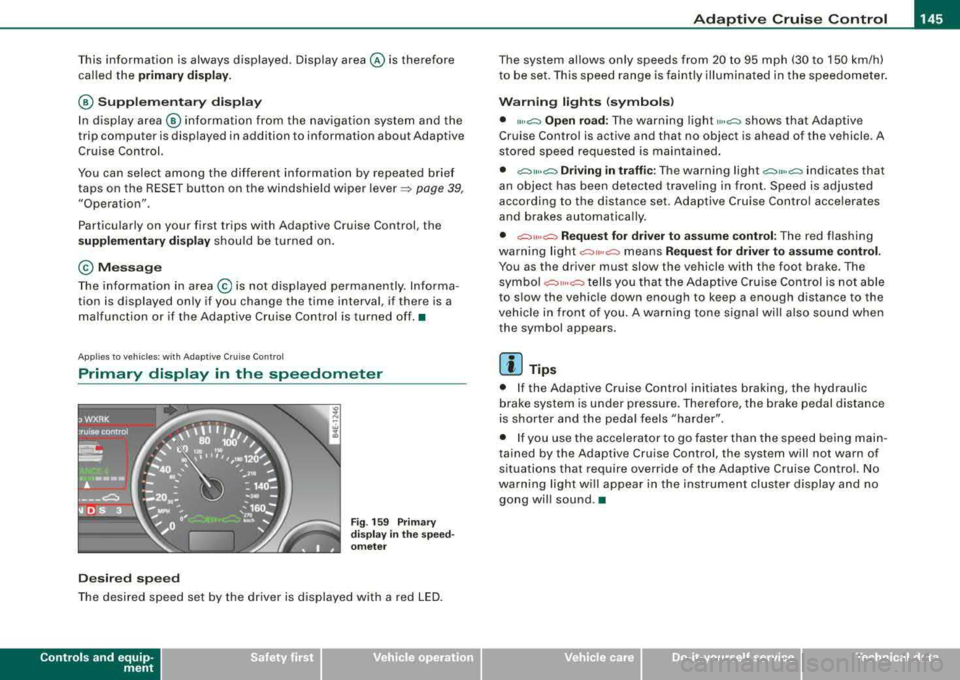
The desired speed set by the driver is displayed with a red LED.
Contro ls a nd eq uip
ment
The system al lows only speeds from 20 to 95 mph (30 to 150 km/h)
to be set. This speed range is faintly illuminated in the speedometer.
W arn ing lights (symbols )
• ""c:::, Open road: The warning light ,,.,c:::, shows that Adaptive
Cruise Control is active and that no object is ahead of the vehicle . A
stored speed requested is maintained .
• c::::,11 .. c:::, Driving i n tr aff ic: The warning light c:::,11«c:::, indicates that
an object has been detected travel ing in front . Speed is adjus ted
according to the distance set. Adaptive Cruise Control accelerates
and brakes automatica lly.
• c:::,,, ,,c:::, Re quest f or driver t o assume control : The red flashing
warning light
c::::,11 .. c:::, means Reque st for driver to assume control .
You as the driver must slow the vehicle with the foot brake . The
symbo l
c::::,11,,c:::, tells you that the Adaptive Cruise Control is not able
to s low the vehic le down enough to keep a enough distance to the
vehicle in front o f you . A warning tone signal wi ll also sound when
the symbol appears.
[ i ] Tip s
• If the Adaptive Cruise Control initiates braking, the hydraulic
brake system is under pressure. Therefore, the brake pedal distance
is shorter and the peda l feels "harder" .
• I f you use the accelerator to go faster than the speed being main
tained by the Adaptive Cruise Control, the system will not warn of
situations that require override of the Adaptive Cruise Control. No
warning light will appear in the instrument cluster display and no gong wil l sound .•
Vehicle care I I irechnical data
Page 149 of 404
_____________________________________________ A_ d_a ....: p_ t_ i_ v _e_ C_ ru_ is_ e_ C_ o_n_ t_ r_o _ l _ __._
Ap plie s to vehic les: with Adaptive Cru ise Co nt rol
Messages
The text messages and symbols shown in this area of the
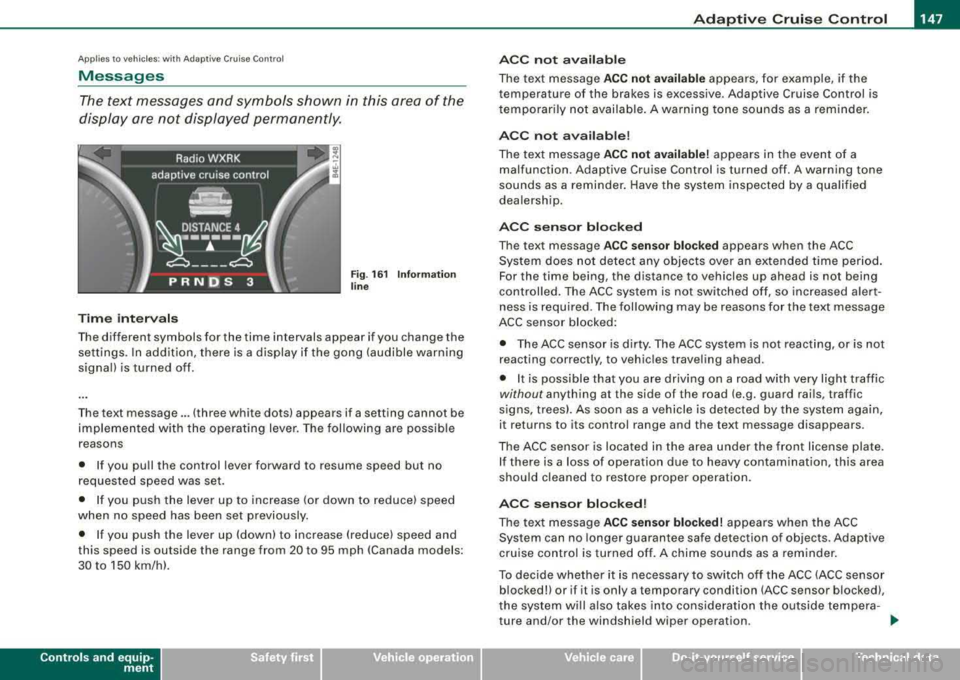
display are not displayed perm anently .
Time interval s
Fig . 16 1 Informa tion
lin e
The different symbols for the time intervals appear if you change the
settings. In addition, there is a display if the gong (audible warning
signa l) is turned off.
The text message ... (three white dots) appears if a setting cannot be
implemented with the operat ing lever. The fol lowing are possible
reasons
• If you pu ll the control lever forward to resume speed but no
requested speed was set.
• I f you push the lever up to increase (or down to reduce) speed
when no speed has been set previously.
• I f you push the lever up (down) to increase (reduce) speed and
this speed is outside the range from 20 to 95 mph !Canada models:
30 to 150 km/h) .
Controls a nd eq uip
ment
A CC not a vailab le
The text message ACC not av ailabl e appears, for example, if the
temperature of the brakes is excessive . Adaptive Cruise Control is
t emporarily not availab le . A warning tone sounds as a rem inder.
A CC not available !
The text message ACC not av ailabl e! appears in the event of a
malfunction. Adaptive Cruise Control is turned off . A warning tone
sounds as a reminder. Have the system inspected by a qua lified
dea lersh ip.
ACC senso r blocked
The text message AC C s en so r blo cked appears when the ACC
System does not detect any objects over an extended time period .
For the time being, the distance to vehicles up ahead is not being
cont rolled . The ACC system is not switched off, so increased alert
ness is required. The following may be reasons for the text message
ACC sensor blocked:
• The ACC sensor is dirty. The ACC system is not react ing, or is not
reacting correctly, to vehic les traveling ahead.
• It is possible that you are driving on a road with very light traffic
without any thing at the side of the road (e.g. guard rai ls, traffic
s igns, trees). As soon as a vehicle is detected by the system again,
it returns to its control range and the text message d isappears .
The ACC sensor is located in the area under the front license plate .
I f there is a loss of operation due to heavy contamination, this area
should cleaned to restore proper operation.
AC C senso r bl ock ed!
The text message ACC sensor blocked! appears when the ACC
System can no longer guarantee safe detection of objects . Adaptive
cruise control is turned off . A chime sounds as a reminder.
To decide whether it is necessary to switch off t he ACC (ACC sensor
blocked!) or if it is only a temporary condition (ACC sensor blocked),
the system wi ll a lso takes into cons ideration the outside tempera -
ture and/or the windshield wiper operation .
.,_
Vehicle care I I irechnical data
Page 165 of 404

_____________________________________________ A_ u_t _o _m_ a_ t_ i_c _ t_ r_ a_ n_ s_m _ is_ s_ io_ n _ ___.11111
Automatic transmission
tiptronic ® (6-speed automatic
transmission)
Gener al information
Your vehicle is equipped with an electronically controlled 6-speed
automatic transmission. Upshifting and downshifting takes place
automatically.
The transmission is also equipped with tiptronic®. It allows the
driver to shift gears
manually if desired ~ page 167. •
Driving th e autom ati c transmission
Starting the engine
- The selector lever must be in Nor P.
Starting off
-Press and hold the brake pedal.
Contro ls a nd eq uip
ment
Fig . 183 Shift gate on
the center console:
selector lever with
release button
- Press and hold the release button in the selector lever
handle and move the selector lever from
P or N to D and
release the button
=> & .
- Wait briefly until the transmission has shifted (you will
feel a slight movement).
- Remove your foot from the brake pedal and accelerate.
Rocking back and forth to become unstuck
- Shift only between D and R when the vehicle is at a full
stop and the engine is running at idle speed.
Stopping
- Press and hold the brake pedal until the vehicle has come
to a complete stop.
Keep the brake pedal depressed so that the vehicle
cannot roll forward or backward while it is
idling=>& .
-Once stopped, do not depress the accelerator pedal to
rev up the
engine=> &.
Parking
- Press and hold the brake pedal until the vehicle has come
to a complete stop.
- Set the parking brake
firmly=> page 135, "Parking".
- Press and hold the release button in the selector lever
handle, move the selector lever into
P and then let go of
the release button
=> &. ._
Vehicle care I I irechnical data