lane assist AUDI S8 2008 User Guide
[x] Cancel search | Manufacturer: AUDI, Model Year: 2008, Model line: S8, Model: AUDI S8 2008Pages: 404, PDF Size: 52.7 MB
Page 158 of 404
___ A_ u_ d_ i_s _i_d _e_ a_ s_ s
_ is_ t __________________________________________________ _
The detection ~ page 155, fig. 174 of the radar sensor detection
area is made up of:
• the approach area (light green area)
G), about 55 yards (50 m)
behind the vehic le, and
• the "blind spot" (dark green
areal@.
The radar sensors cover the adjacent left and right lanes. Other
lanes are
not covered by the radar sensors.
[ i] Tips
S ide ass ist does not measure actual lane width. The system
assumes a fixed lane width. Detection in the left and right lanes is
based on this assumed lane width . When driving on narrow roads or
when driving to the left or right of the center of a travel lane, it is
possible that vehicles wi ll be detected that are
not in the lane next
to the lane you are
using~ page 160 . •
Applies to vehicles: with side assist
Operation
Side assist compares the distance and difference in speed of
detected vehicles with the speed of your vehicle . Whenever the
difference in speed and distance is registered as notable if you were
to change lanes, a signal light appears on the respective m irror.
The signal can light up if you are passed by a vehicle or if you are
passing another vehicle.
If you pass another vehicle slowly (difference in speed less than 9
mph, or
15 km/h), the signal light will come on as soon as the other
vehic le is in your b lind spot and is detected by side assist . When the
difference in speed is greater, the signal light wil l not come on.•
Applies to vehi cles: with side assist
Informational and alert stage signals
Side assist has two signa l stages:
• the informational stage signal, and
• th e alert stage signal.
Side assist helps you by using the appropriate signa l stage,
depending on whether or not you have activated the turn signal,
and thus have indicated that you are or are not changing lanes.
Informational stage signal
As long as you have not activated the turn signa l, side assist informs
you of detected vehicles that are registered as being in a notable
location if you were to change lanes. Whenever the detected
vehic le 's difference in speed and distance is registered by side
assist as notable, the signa l light on the respective mirror produces
muted il lumination .
The brightness of the informationa l stage signa l is designed not to
be as intense, so that it does not interfere with your view of the road
when you are driving and have no intention of changing lanes.
When you look in the outside mirror, you can clearly see the infor
mational stage signal.
Alert stage signal
When you ac tiva te the turn signal, and side assis t has detected a
vehic le in a notable location on that particular side, the signal light
on this side mirror flashes brightly. The repeated brief and bright
flashing of the alert stage signal reminds you to careful ly check
traffic to the rear in the outside mirror and over your shou lder, so
that you can safe ly complete the lane
change~ & in "Safety tips"
on page
161.
[ i] Tips
The brightness of the signal light on the outside mirrors can be
adjusted with the MMI
~ page 159. •
Page 159 of 404
_________________________________________________ A_ u_ d_ i _s _i_
d _e _ a_s_ s_ i_ s _t _ __._
Ap plies to vehicle s: with side assist
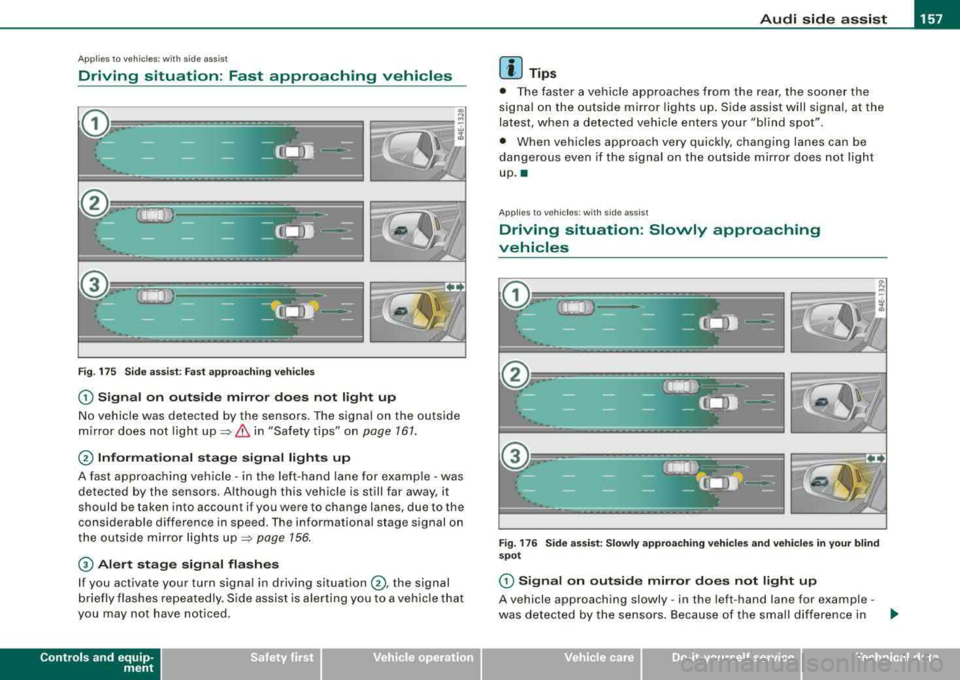
Driving situation: Fast approaching vehicles
Fig. 175 S ide ass ist: Fast a ppro achi ng ve hicles
G) S ig nal on outside mirror do es not l ight up
No vehicle was detected by the sensors. The signal on the outside
m irror does not ligh t
up ~ & in "Safety tips" on page 161.
@ Informational stag e s ignal lights up
A fast approaching vehicle -in the left-hand lane for example -was
detected by the sensors. Although this vehic le is still far away, it
should be taken into account if you were to change lanes, due to the
considerable difference in speed. The informational stage signal on
the outside mirror lights
up ~ page 156 .
© Alert stage signal flashe s
If you activate your turn signal in driving situation @, the signal
b riefly flashes repeatedly. S ide assist is alerting you to a vehicle that
you may not have not iced .
Contro ls a nd eq uip
ment
[ i ] Tips
• The faster a vehicle approaches from the rear, the soone r the
signal on the outside mirror lights up. Side assist will signal, at the
latest, when a detected vehicle enters your "bl ind spot".
• When vehicles approach very quickly, changing lanes can be
dangerous even if the signa l on the outside mirror does not light
up .•
Ap plies to veh ic les: with side ass ist
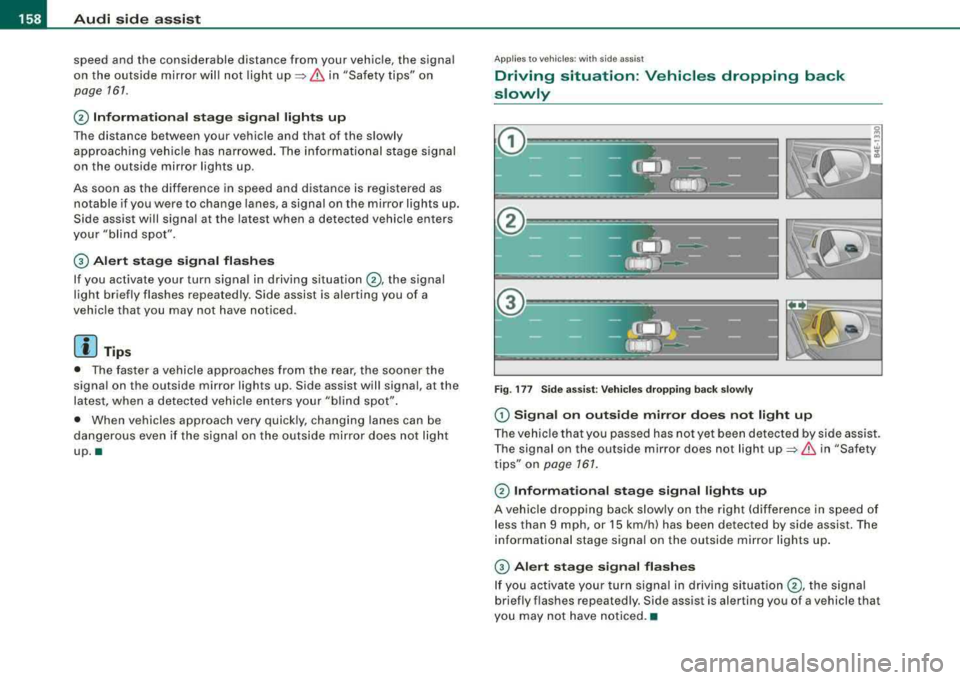
Driving situation : Slowly approaching
vehicles
F ig . 1 76 Side a ssist: Slowly a pproa ching v ehi cle s and v ehi cle s in y our b li nd
spot
G) Signa l on out side mirror doe s not light up
A vehicle approaching s lowly -in the left-hand lane for example -
was detected by the sensors . Because of the small differe nce in .._
Vehicle care I I irechnical data
Page 160 of 404
___ A_ u_d_ i _s _id _ e_ a_ s_ s_ is_t __________________________________________________ _
speed and the considerable distance from your vehicle, the signal
on the outside mirror will not light
up::::> & in "Safety tips" on
page 161 .
0 Informational stage signal lights up
The distance between your vehicle and that of the slowly
approaching vehicle has narrowed. The informational stage signal
on the outside mirror lights up .
As soon as the difference in speed and distance is registered as
notable if you were to change lanes , a signal on the mirror lights up.
Side assist will signal at the latest when a detected vehicle enters
your "blind spot".
© Alert stage signal flashes
If you activate your turn signal in driving situation 0 , the signal
light briefly flashes repeatedly. Side assist is alerting you of a
vehicle that you may not have noticed .
[ i J Tips
• The faster a vehicle approaches from the rear, the sooner the
signal on the outside mirror lights up . Side assist will signal , at the
latest, when a detected vehicle enters your "blind spot".
• When vehicles approach very quickly, changing lanes can be
dangerous even if the signal on the outside mirror does not light
up.•
App lies to vehi cles : wi th side assist
Driving situation: Vehicles dropping back
slowly
Fig. 177 Side assist: Vehicles dropping back slowly
(D Signal on outside mirror does not light up
The vehicle that you passed has not yet been detected by side assist.
The signal on the outside mirror does not light
up::::> & in "Safety
tips" on
page 161.
0 Informational stage signal lights up
A vehicle dropping back slowly on the right (difference in speed of
less than 9 mph, or 15 km/h) has been detected by side assist. The
informational stage signal on the outside mirror lights up.
© Alert stage signal flashes
If you activate your turn signal in driving situation 0, the signal
briefly flashes repeatedly. Side assist is alerting you of a vehicle tha t
you may not have noticed. •
Page 161 of 404
___________________________________________________ A_u_ d_i_ s_ id_e_ a_ s_s _i_s _t _ __.ffllll
Ap plies to vehi cles: w ith side ass is t
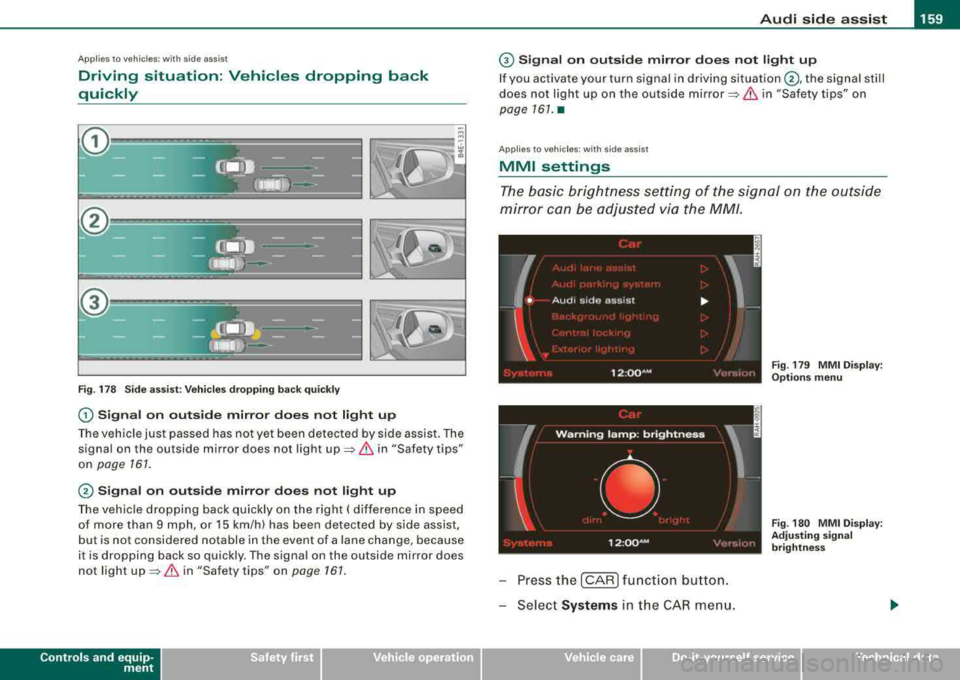
Driving situation: Vehicles dropping back
quickly
Fig . 178 Side assist: Vehicles dropping back quickly
0 Signal on outside mirror does not light up
The vehicle just passed has not yet been detected by side assist. The
signal on the ou tside mirror does not light
up => & in "Safety tips"
on
page 161 .
@ Signal on outside mirror does not light up
The vehicle dropping back quickly on the right ( difference in speed
of more than 9 mph , or 15 km/h) has been detected by side assis t,
but is not considered notable in the event of a lane change, because
it is dropping back so quick ly . The signal on the outside mirror does
not light
up => & in "Safety tips " on page 161.
Controls and equip
ment
G) Signal on outside mirror does not light up
If you activate your turn signal in driving situation @, the signal still
does not ligh t up on the outside
mirror=> & in "Safety tips" on
page 161. •
Applies to veh ic les: w it h side ass ist
MMI settings
The basic brightness setting of the signal on the outside
mirror can be adjusted via the MM/.
I
W arn in g lam p: brightn ess
' •
12 :oo~M • <: ''·,.I,,
Press the [CAR ] function button.
Select
Systems i n the CAR menu.
Vehicle care I I
-
Fig . 179 MMI Display :
Options menu
Fig . 180 MMI Display :
Adjusting signal
brightness
irechnical data
Page 162 of 404
___ A_ u_ d_ i_s _i_d _e_ a_ s_ s
_ is_ t __________________________________________________ _
-Select Audi sid e ass is t.
-Select W arning l amp : brightn ess.
-Rotate the control knob to adjust the displayed bright -
ness of the signal l ight on the outside mirrors
=> page 159, fig. 180 .
Th e brightn ess o f th e signal light for both th e informational and
a lert stages is automatica lly adj usted to ambient light conditions. In
addition, you can adjust the
basic brightness separately, via the
brightness function
=> page 159, f ig. 180.
While mak ing the adjustment , the new br ig htness setting is
displayed briefly. The brightn ess disp layed is that of the informa
tiona l stage s ignal. The alert stage signal brightness is linked to the
in formational stag e signal brightness .
The infor mationa l stage signal br ightness should be adjusted so
that you notice the signa l illumination when you look in the outside
m irror, but not when you look forward through the windsh ield.
In very dark or light surround ings , the automat ic brightness setting
adjusts signal light brightness to maximum or minimum intensity ,
as needed . In circumstances such as these, you may not not ice any
change in the brightness on the outside m irror wh en adjusting the
basic brightness .
You may not notice the change until ligh ting conditions are normal
aga in .
[ i ] Tip s
• Side assist is not active wh en the basic brightness is adjusted .
The signal l ight comes on briefly to help you make the adjustment.
• Your settings are automatically s tored and assigned to the
remote contro l key being used. •
App lies to ve hicles: w ith s ide assis t
General information
Side assist has lim its and cannot detect vehicles under all road and
weather conditions. Please remember system limit ations and never
rely on the system, especia lly when:
• driving through
curves=> page 160,
• l anes are of different widths => page 160. •
Applies to ve hicles : w ith sid e as sist
When driving through curves
Side assist cannot detect vehic les in curves with a turning radius of
l ess than
218 yards (200 m) .
When driving through a curve , it is poss ib le that side assist may
register a vehicl e two lanes over, and the signal on the outside
m irror w ill light up .•
A pplies to vehicle s: w ith sid e ass is t
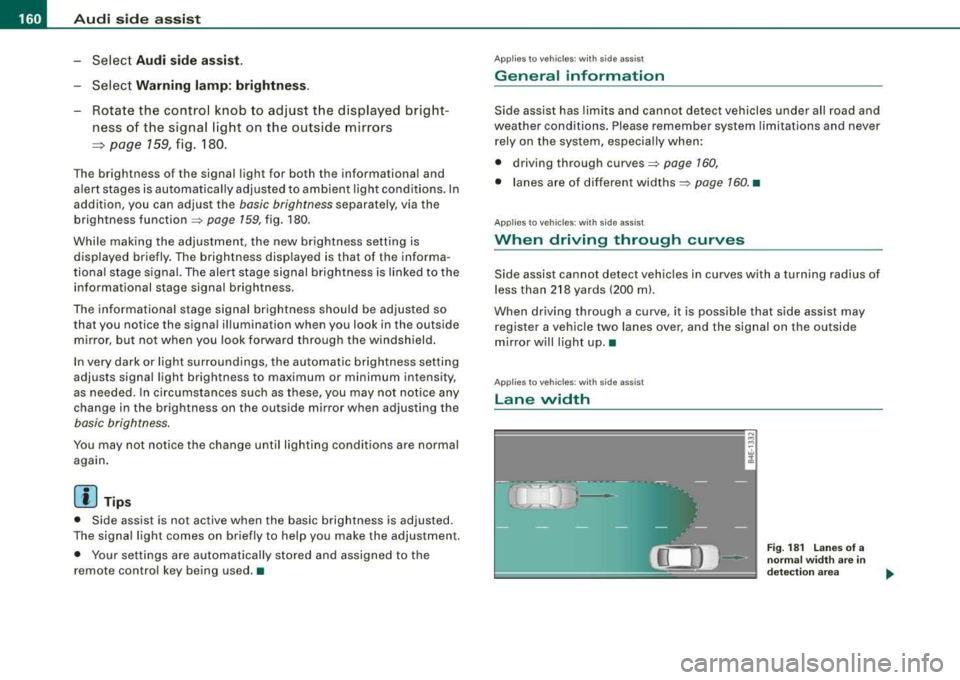
Lane width
w cl,
Fig . 18 1 L an es of a
norma l widt h are i n
d etec tion area
Page 163 of 404
_________________________________________________ A
_ u_ d_ i _s _ i_d _e _ a_s_ s_ i_ s _t __ lJIII
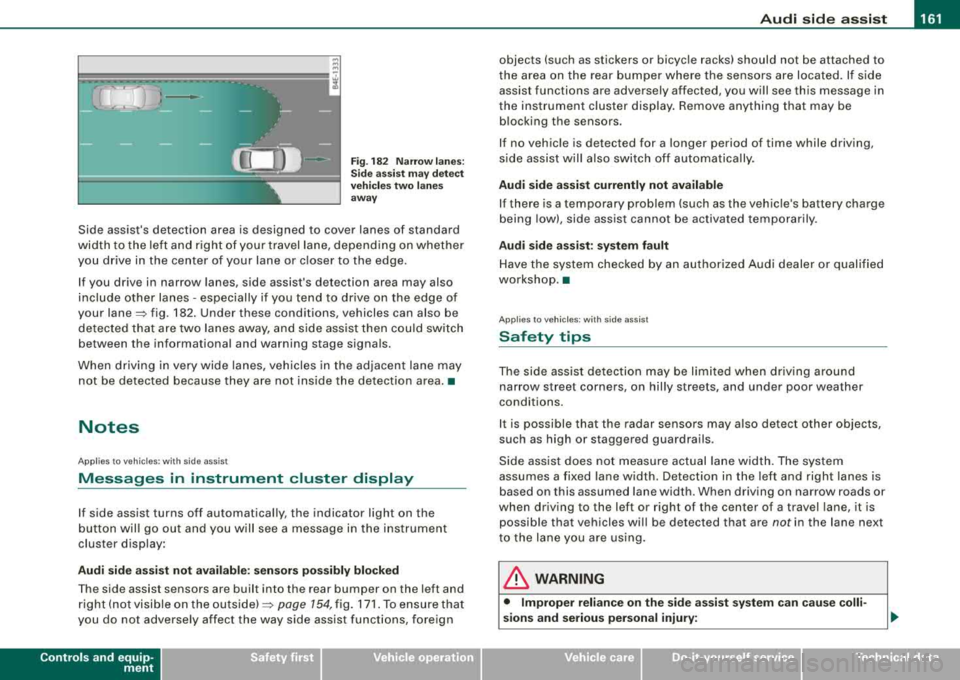
Fig . 182 Narr ow lane s:
Si de ass is t m ay detec t
vehi cle s two la ne s
a w ay
Side assist's detection area is designed to cover lanes of standard
width to the left and r ight of your travel lane, depend ing on whethe r
you drive in the center of your lane or c loser to the edge .
I f you drive in narrow lanes, side assist's detection area may also
include other lanes - especially if you tend to dr ive on the edge of
your
lane~ fig . 182. Under these conditions, vehicles can also be
de tec ted tha t are two lanes away, and side ass ist then c ould switch
between the informational and warning stage signa ls.
When d riving in very wide lanes, vehicles in t he adjacent lane may
not be detected because they are not ins ide the detection area. •
Notes
Applies to vehicles: with side ass is t
Messages in instrument cluster display
If side assist turns off automatically, the indicator light on the
b utton wil l go out a nd you w ill see a message in the i nstrument
cluster disp lay :
Audi side a ssist not available : sen sor s pos sibly blocked
T he side assist sensors are bui lt into the rear bumper on the left and
r ight ( not visi ble on the
ou ts id e) ~ page 154, fig. 171 . To ensure t hat
you do not adverse ly affect the way side assist functions, foreign
Controls and equip
ment
objects (such as stickers or bicyc le racks) should not be attached to
t he area on the rear bumper where the sens ors are loca ted. If s ide
assist functions are adversely affected, you will see this message in
the instrument cluster display. Remove anything that may be b locking the sensors .
I f no vehic le is detected for a longer period of time while driving,
s ide assist wil l also switch o ff automatica lly.
Audi side a ssist currently not available
If there is a temporary prob lem (such as the vehic le's battery charge
being low), side assist cannot be activated temporarily .
Audi side assis t : sy stem fault
Have t he system chec ked by an autho rized Audi dealer o r qualified
workshop. •
Applies to vehic les: with side assist
Safety tips
The side ass ist detec tion may be li mit ed when dr iv ing a round
narrow street corners, on hilly streets, and under poor weather
conditions.
I t is possible that the radar sensors may a ls o detec t other objects,
such as high or staggered guardrails.
Side ass ist does not measu re actual la ne w idth. The system
assumes a fixed lane width. Detection in the left and right lanes is
based on this assumed lane width. When driving on narrow roads or
when driv ing to the left or right of the center of a travel lane, it is
possible that vehicles wi ll be detected that are
not in the lane next
to the lane you are using.
& WARNING
• Improper relian ce on the side assi st system c an cau se colli
sions and serious personal injury:
Page 164 of 404
___ A_ u_ d_ i_s _i_d _e_ a_ s_ s
_ is_ t __________________________________________________ _
&, WARNING (continued )
-Never rely only on side assist when changing lanes .
- Always check rear view mirrors to make sure that it is safe to
change lanes .
• Side a ssist cannot detect all vehicle s under all conditions
danger of a cc ident!
• Side assist cannot detect vehicles in time to alert you when
they approach from behind at very high speed, or fall drop back
very quickly.
• The radar sensor 's
vi sion can be reduced or entirely blocked by
rain , snow , and heavy spray . This can result in side as sist not
adequately detecting vehicles or , in some cases , not dete cting
them at all . Always keep an eye on the direction you are traveling
and the relevant area around the vehicle .
• Please note that side assist indicates there are approaching
vehicles , or vehicles in your blind spot , only after your vehicle has
reached a driving speed of at lea st 37 mph (60 km /h).
• Side assist signal does not work around tight corners (turning
radius less than 218 yards , or 200
ml.
• Side a ssist is no replacement for the driver's full attention . The
driver alone is responsible for lane changes and similar driving
maneuvers. Always keep an eye on the direction you are traveling
and the relevant area around the vehicle .
0 Note
To ensure that s ide assist is not adv ers ely affected, you should not
b lock the area on the rea r bumper where the radar sensors are
located with for eign objects (such as wit h stickers or b icycle rac ks).
[ i ] Tips
If th e pos it ions of the rada r se nsors have bee n changed as a resu lt
of a rear end -collision, for instance, have side as sist checked by an
autho rized Aud i dea ler fo r sa fety reaso ns.•
A pplies to veh icles : w ith side ass is t
Declaration of compliance
Th e Audi side assist system is based o n radar sensors which operate
i n o ne of t wo fr eque ncy ban ds a t 24 GH z. In so me countr ies only one
of both bands is a llowed . D epending on the country in which you
are dr iving, the A ud i s ide ass is t syste m may not be legal ly act ivated
unless the frequency band permitted has been set by an authorized
A ud i dea ler . O pera tion in th e US a nd Cana da is o nly perm itte d on
the 240 75 MHz to 24 175 M Hz frequenc y band. The correct frequency
b and was se t by A udi or an a utho rized Aud i deale r in the coun try
where your ve hicle was originally purchased and may have been
rese t if the ve hicle was ope ra ted outside the US o r Canada . Cha nge s
or modi fications not expressl y approved b y Aud i can void the us er's
authority to operate the Audi side assist system .
T his dev ice co m plies wi th Pa rt 15 of th e FCC Rules. Operat ion is
subject to the fo llowing two condit ions :
• this device may not cause ha rm ful in te rfe re nc e, a nd
• this device must accept any interference received, inc luding
i nter fere nce t hat m ay ca use un des ired ope ration .•
Page 361 of 404
_________________________________________________ F_ u_ s_ e_s _ a_n _d_ b_ u
_ lb_ s _ __.11111
[ i J Tips
You are well advised to keep a supply of spare fuses in your vehicle.
Fuses with the proper ampere ratings are available at your Audi
dealer. •
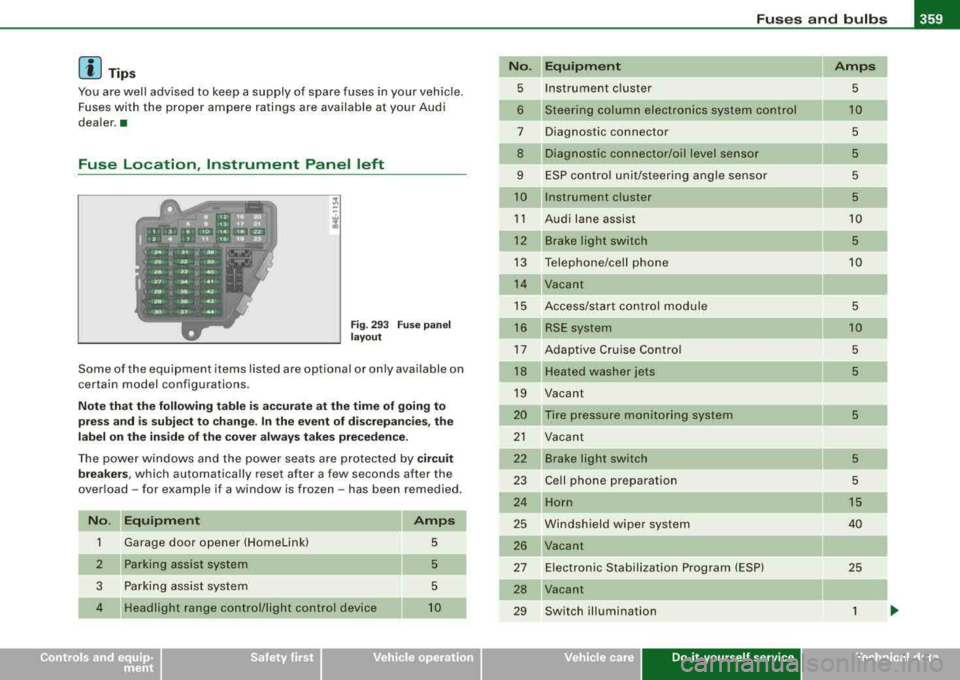
Fuse Location , Instrument Panel left
Fig . 293 Fuse panel
layout
Some of the equipment items listed are optional or only available on
certain model configurations.
Note that the following table is accurate at the time of going to
press and is subject to change. In the event of discrepancies, the
label on the inside of the cover always takes precedence.
The power windows and the power seats are protected by circuit
breakers, which automatically reset after a few seconds after the
overload -for example if a window is frozen -has been remedied.
No. Equipment
1 Garage door opener (Homelinkl 5
2
Parking assist system 5
3
Parking assist system 5
4
Headlight range control/light control device 10
No.
5
6
7
8
9
10
11
12
13
14
15
16
17
18
19
20
21
22
23
24
25
26
27
28
29
Equipment Amps
Instrument cluster 5
Steering column electronics system control 10
Diagnostic connector 5
Diagnostic connector/oil level sensor 5
ESP control unit/steering angle sensor 5
Instrument cluster 5
Audi lane assist 10
Brake light switch 5
Telephone/cell phone 10
Vacant
Access/start control module
5
RSE system 10
Adaptive Cruise Control 5
Heated washer jets 5
Vacant
Tire pressure mon itoring system
5
Vacant
Brake light switch
5
Cell phone preparation 5
Horn 15
Windshield wiper system 40
Vacant Electronic Stabilization Program (ESP)
25
Vacant
Switch illumination
1
Vehicle care Do-it-yourself service irechnical data
Page 394 of 404
111'1_....:..A..:.;l~ p :..;h..:.; a= b..:e :..;t:.:..i c::..:: a.:..l .,;. in :..:..:. d:..;e :..;x..:..,_ ___________________________________________ _
Switching off ....... .... .... .... .. 69 I
Switching on . .... .... .... ...... .. 69
Washer reservoir . . . . . . . . . . . . . . . . . 323
Washer system . . . . . . . . . . . . . . . . . . . 81
Xenon headl ights . ..... .. .... .... . 69
Heated Fron t seats . . . . . . . . . . . . . . . . . . . . . . 118
Rear seats . . . . . . . . . . . . . . . . . . . . . . 119
Windshield .... ...... .... .... .... 123
Heated outside mirrors . . . . . . . . . . . . . . . 84
Heated seats Front . . . . . . . . . . . . . . . . . . . . . . . . . . . 1 18
Rear seats . . . . . . . . . . . . . . . . . . 11 9, 125
Heated stee ring whee l . . . . . . . . . . . . . . . 119
H eated washer jets
Wiper and washer system . . . . . . . . . . 80
Heavy c lothing and sa fety belts . ...... 212
High beam .. ...... .... .... .... ... 69, 73
Warning/indicator ligh ts .. ... .... .. 19
H igh vo ltage warn ing label .... .. .. ... 374
Ho melink® universal remote control
Hood 191
Opening ........ ... .. .... ...... . 306
Re lease lever .... .... .... .... .... 306
H orn . . . . . . . . . . . . . . . . . . . . . . . . . . . . . . . 11
How many airbags does my vehicle have? ..
225
H ow of ten shoul d I check my tire pressures?
332
H ow safety be lt pre tens io ners work . . . 216 Ignition key
129
Ignition lock ...... .... .... .... .... .. 129
Malfunction .. .... ... .... .... .... . 33
Ig nition lock pos it ions .. ...... .... ... 12 9
Immobi lizer .. ... ....... .... .... .... . 14
Important things to do before dr iving .. 199
Improper ly worn safety be lts ..... .. .. 216
Indicator light
Airbag system . .......... .... 229, 230
PASSENGER AIR BAG OFF ........ . 230
Ind ica tor lights ...... .... .... .... ... . 16
Infant seat ...... ....... .... .... ... . 248
How do I properly insta ll an infant seat in
my vehic le? .. .... .... .... ...... 248
Safety instruct ions .......... .... . 248
Installing a child safe ty seat
Safety be lts ...... ... .... .... .... 253
Instruments and controls General illustration . .... .... .... ... 1 1
Illu mination ...... .... .... .... .... 15
Instrument cluster . . . . . . . . . . . . . . . . . 12
Inte rior lights
Background lighting .. ... .... .... .. 76
F ront . ...... .. ...... .... ... .. .... 74
Rear .. ... .... ....... .... .... .... . 75
Intermitt ent w iping
Rain sensor ... ...... ....... .... .. 80
Hydroplaning ..... .. ...... .... ... .. 336
J
Jack ...... .... .... ........... .... . 349 Jumper cables
.... .... .... ...... .... 365
Jump -star ting 36
4
K
Key ...... .... .... .... ... .... ..... .. 4 7
Battery replacement master key ... .. 4 8
Coded settings ...... ... .... .... .. 114
Emergency key . .... ....... .... .... 47
Key replacement ... .... ...... .... . 47
Mast er key ...... .... .... ... .. .... 47
Valet key .... .... .... .... .... ..... 47
Key c oded setti ngs
Climate controls ...... .... .... ... 114
Key less entry remote co ntro l ... .... .... 48
Kick-down ......... .... .... .... ... . 166
Knee a irbags ...... .... ... ....... .. . 234
Descrip tion ..... ... .... .... .... .. 23 4
H ow they work . . . . . . . . . . . . . . . . . . . 235
I mportant safety instructions
236
L
Lane assist
Activating and deactivating 151
Description ....... ... .. ...... .... 151
I nstrumen t clus ter indicator ligh t .. . 151
MM I settings ... .. .... .... .... ... 152
Notes on instrument c luster disp lay. 15 1
LA TCH .... .... .... ....... .... .... .. 258
Description .... .... .... ...... .... 258
Guidance fix tur es for low er anchorages ..
2 59
I nstalling a ch ild restraint ...... ... 261