suspension AUDI S8 2008 User Guide
[x] Cancel search | Manufacturer: AUDI, Model Year: 2008, Model line: S8, Model: AUDI S8 2008Pages: 404, PDF Size: 52.7 MB
Page 186 of 404
___ A_ d
_ v_a _ n_ c_ e_d _ P_a _ r_ k _i_n ~g _ S_y _ s_ t_ e_ m _________________________________________ _
&, WARNING (continued)
Be especially careful to check for small children and animals
before backing up. Small children and animals will not always be
shown in the rear-view display .
• The Audi parking system is not a substitute for being careful
and alert when backing up. Be especially careful during parking
and similar maneuvers. Always watch where you are driving and
make sure that nothing is in the way.
• Do not allow yourself to be distracted from traffic by the rear
view camera pictures.
• When maneuvering or parking, do not only use the MMI Display
for orientation . Certain objects
-depending on the screen resolu
tion
-may not, or not entirely, be displayed; for example trailer
hitches, chains, narrow posts, or fences .
• Only use the rear -view camera for aid if it shows a good, clear
picture. The image may be obscured, for example, by the sun
shining into the lens, dirt on the lens, or as the result of a defect -
danger of accident!
• If the image is hazy when the MMI Display is switched on or the
area behind the vehicle is not visible (for example, as the result of
a dirty or defective lens), the rear-view camera must not be used
for aid in maneuvering
-danger of accident!
• The rear-view camera generates two -dimensional images . For
this reason, please note that recesses in the ground and
protruding parts on another vehicle, or protruding objects fixed to
the ground, will be more difficult or impossible to recognize on the
MMI Display, due to the missing spacial depth.
• If the position and the installation angle of the camera has
changed, for example, after a rear end collision, do not continue to
use the system for safety reasons. Have it checked by an autho
rized Audi dealer or qualified workshop.
• Only use the rear-view camera when the rear lid is fully closed.
Make sure that objects mounted on the rear are not obscuring the
camera view .
&, WARNING (continued)
• Remove ice, preferably with de-icing spray.
0 Note
• Never use warm or hot water to remove snow or ice from the
rear-view camera lens
-danger of crack formation on the lens!
• When cleaning the lens, never use care products with an abra
sive effect.
[ i] Tips
The positions of the orientation lines/ surfaces are displaced up or
down if the parking process is carried out with the rear -view camera
in Adaptive Air
Suspension=> page 21 dynamic or lift mode. There
fore, the accuracy is reduced .•
Page 187 of 404
Adaptiv e Air Su spension 11!11
-------------------------------------=------=-------
Ad apt iv e Air Suspension
Adaptive Air Suspension and
Damping
Description
Adaptive Air Suspension and damping can be regulated
and they adapt automatically to a request from the driver
and the driving situation at the time.
Adaptive Air Suspension is an electronica lly contro lled springing
and damping system. T his chassis system makes it eas ier on the
driver by adapting to the particu lar situation through imperceptible
control processes.
The
Ad apti ve Air Suspen sion component regu lates ground c lear
ance depending on vehicle speed, load condition and driver input .
Acce lerat ing to a speed above a predetermined limit wil l make the
vehic le lower i tself. On the other hand, driving more slowly results
in the vehic le rais ing again at specific speeds .
T he
d amp in g component provides individual contro l of the
damping forces. For examp le, with damping characteristics set to
provide greater comfort, damping is set somewhat harder for a brief
period only as required, for example, when going around a curve or
over rough road surfaces as well as when brak ing.
S ett ing s
Adaptive Air Suspension provides the driver with the opportunity to
set the chassis characteristics a lso to their individua l preference .
With the driving modes
standard, automatic and dynamic the driver
has three chassis settings availab le, ranging from comfort to sporty.
In addition,
lift provides a fourth mode wh ich can be selecting for
driving over poor stretches of
road~ page 186, "Chassis Contro ls" .
The modes are se t in MMI
~ page 188.
Controls and equip ment
On vehicles equipped with the sport su sp en sion Adaptive Air
Suspension -Sport *, there is genera lly more emphasis on a sporty
chassis sett ing. Settings range from comfortable to firm
~ page 187, "Sport Chassis Contro ls".
0 Note
• Whenever you park your vehicle, always make sure there is
adequate c learance above and be low the vehicle . The height of the
parked vehicle can change as the result of temperature fluctuations,
changes in l oad condition and c hanges in the driv ing m ode (ground
c learance).
• Mount the tie -down cha ins/cab les over the running surface
(circumference) of the tires . Never secure the vehicle by the axle, the
suspens ion stru ts or the front or rear towline eye . For tec hn ica l
reasons , the pressure in the suspension struts may change during
the transport and this wil l adversely affect vehicle handling.
• To prevent damage to the vehic le underbody, remember that
your vehicle is not a n off -road vehicle, even in the lift mode . The
ground clearance is insufficient for this type of operation .
• If you are going to tow a tra iler, you mus t activate the trailer oper
ation
mode~ page 189 .
[ i ] Tip s
Before you can raise your vehic le using the vehicle jack (for
examp le, when changing a flat tire) you must activate the jacking
mode
~ page 188 . •
Page 188 of 404
___ A_ d_a_ p_ ti_v _ e_ A_ ir_ S_u_ s_ p_e _n_ s_ io_n ___________________________________________ _
Chassis Controls
Four different driving modes can be set by the driver.
The automatic control processes are speed -and time -dependent.
For example, it is not possible to raise the suspension to the lift
mode above certain speeds .
When a speed of about 75 mph (120 km/h) is exceeded for more than 30 seconds, the vehicle is automatically lowered approximate ly 1
inch (25 mm) to a level suitable for highway speeds, except in the
standard mode . Road holding is optim ized as a result of the lower
center of gravity and fuel consumption is reduced as a result of
reduced wind resistance .
Level adjustment
lift
standard
automatic
dynam ic
automatic Ground
clearan ce
about 5 .7 inches (145 mm)
a bout 4.7 inches ( 120 m m)
about 4 .7 inches (120 mm)
about 3.9 inches (100 mm)
Se lect the automatic mode if you prefer a suspension setting
e m phas izing comfort . Damping characterist ics emphasiz ing
comfort are selected in this mode.
• Lowering : When a speed of abou t 75 mph ( 120 km/h) is excee ded
for more than 30 seconds, the vehic le is automatically lowered by
about 1 inch (25 mm) .
• Raising : The vehic le is automat ical ly raised again if the speed
fa lls bel ow about 44 mph (70 km/h) for a per iod of 120 seconds. The
vehic le is raised immediate ly when speed fa lls below about 22 mph
(35 km/h) .
dynami c
Select the sport mode if you prefer a sporty suspensio n setting . In
this mode, the veh ic le is lowered whi le it is still stationary and sporty damping characteristics are selected
. The warning
light ~
in the instrument cluster will c ome on for a few seconds just to
remind you of the reduced ground clearance .
I f you switch off the engine while the vehic le is in the dynamic mode
and then switc h on the ign it ion once aga in,
t h e ~ warning lig ht
wi ll also come on again for a few seconds.
• Lowering : When a speed of abou t 75 mph (120 km/h) is exceeded
for more than 30 seconds , the vehicle is automatica lly lowered by an
addi tiona l 0 .2 in (5 mm).
• Raising : The vehic le is automatically raised again if the speed
f alls below ab out 44 mph (70 km/ h) for a per iod of 120 seconds . The
vehic le is raised immediate ly when speed fa lls below about 22 mph
(35 km/h) .
sta nd ard
Se lect the s tandard mode if you desire a suspensi on se tt ing with a
special emphasis on comfort . In the standard mode there is
n o
lo wer ing of t he suspension . Even at high speeds, the vehicle stays
at the same level. Damping characteristics with a decided emphasis
on com fort are selected in this mode.
lift
Se lec t t he lif t mode when you have to travel over poor secti ons of
road (e .g . trails). In the lift mode, the vehic le is raised by 1 inch (25
mm ) compared to norma l level wh ile it is st ill stati onary a nd
damping characteristics are ad justed to emphasize comfort.
T he lift mode can be act ivated on ly at speeds below 50 mph (80
k m/h). When a speed of about 62 mph (100 km/h) is exceeded, the
system automatical ly leaves lift mode and the mode set previously
(standard, au tomat ic, dynamic) is activated aga in. •
Page 189 of 404
____________________________________________ A_ d_a_ p_ t_iv _e_ A_ ir_ S_ u_ s_ p_e _ n_ s
_ io_ n __ ffllll
Ap plies to vehi cles: wit h Adapti ve Air S uspension -Sp ort
Sport Chassis Controls
Four different driving modes can be set by the driver.
The au tomat ic contro l processes are speed -and time -dependent .
For example, it is not possib le to raise the suspension to the lift
mode above certa in speeds.
When a speed of about 75 mph (120 km/hl is exceeded for more than 30 seconds, the vehicle is automatica lly lowered approximately 0.2
inc h (5 mm) to a level suitab le for highway speeds, except in the
standard mode.
L ev el a dju stm ent
lift
standard
a utomatic
d ynamic
a utom ati c Gr
ound clea ra nce
about 4 .9 inches (125 mm)
abou t 3.9 inches (100 mml
about 3.9 inches (100 mm)
abou t 3.9 inches (100 mm)
Se lect the automatic mode if you pre fer a sporty suspension
setting. Sporty damping characteristics are se lected in this mode.
• Lowering : When a speed of about 75 mph (120 km/h) is exceeded
for more than 30 seconds, the vehicle is automatically lowered by about 0 .2 inch (5
mml.
• Rais ing : The vehic le is automa tically raised again if the speed
falls be low about 44 mph (70 km/h) for a period of 120 seconds. The
vehicle is raised immediately when speed fa lls below about 22 mph
(35 km/h).
d yn ami c
Select the dynamic mode if you prefer a firm suspe nsion sett ing and
damping characterist ics.
Controls and equip
ment •
Loweri ng:
When a speed of about 75 mph (120 km/h) is exceeded
for more than 30 seconds, the vehicle is automatica lly lowered by an
additional 0 .2 in (5
mml.
• Raising: The vehicle is a utomatically ra ised again if the speed
fa lls below about 44 mph (70 km/hl for a period of 120 seconds . The
veh ic le is raised immediately when speed fal ls below about 22 mph
(35 km/h) .
standard
Select the standard mode if you want a comfortab le suspension
sett ing. In the standard mode t here is
n o lowering of the suspen
sion . Even at high speeds, the veh ic le stays at the same level.
Comfo rtab le but firm damping characteristics are selected in t his
mode .
lift
Select the lift mod e when you hav e to travel over poor sections of
road (e .g. trai ls) . In the l ift mode, the vehicle is raised by 1 inch (25
mml compared to norma l leve l and the setting goes to sporty
damping characteristics.
The lift mode can be activated only at speeds be low 50 mp h (80
km/h). When a speed of about 62 mph (100 km/h) is exceeded, the
system automat ical ly leaves lif t mode and the mode se t previously
(standard , automatic , dynamic) is activated again .•
Page 190 of 404
___ A_ d_a_ p=--- t_iv _ e_ A
_ i_ r _ S_ u_s--= p'--- e_n _ s_ i
_ o _ n _____________________________________________ _
Setting the Driving Modes
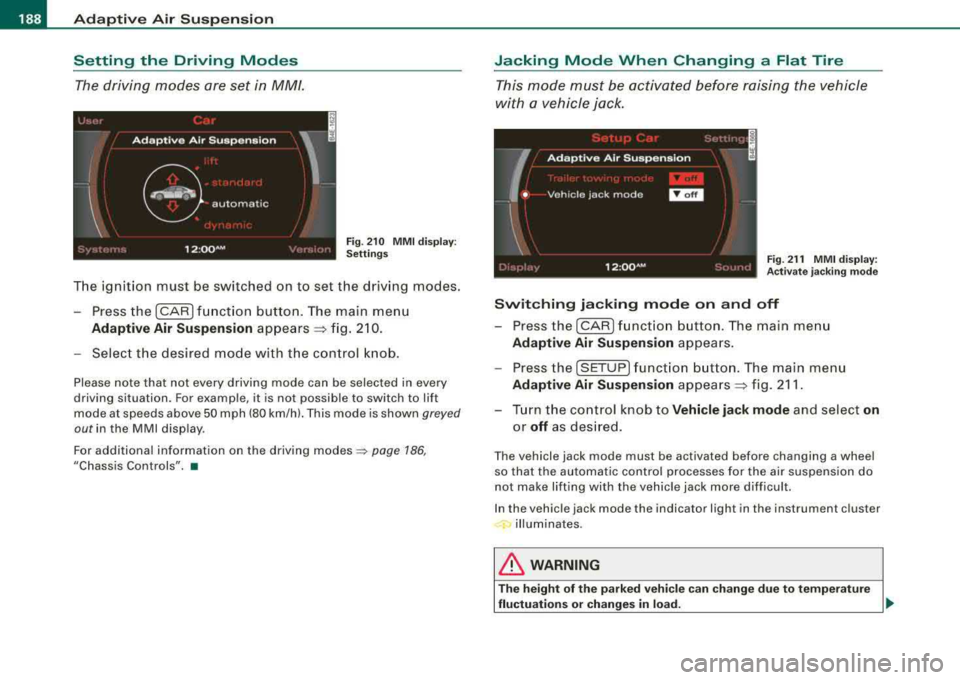
The driving modes are set in MM/.
F ig . 2 10 MM I d is pl ay:
Setti ngs
The ignition must be switched on to set the driving modes .
- Press the (CAR] f unction button . The main menu
Ad aptive Air Suspension appears ~ fig. 2 10.
- Select the desired mode with the c ontrol k nob .
Please note that not every driving mode can be selected in every
driving situation. For examp le, it is not possible to switch to lift
mode at speeds above 50 mph (80 km/h). This mode is shown
greyed
out in the MMI disp lay .
For additional information on the driving
modes ~ page 186,
"Chassis Controls". •
Jacking Mode When Changing a Flat Tire
This mode must be activated before raising the vehicle
with a vehicle jack .
Fig. 21 1 MMI displ ay:
Ac tivat e ja ckin g m od e
Switching jacking mod e on and off
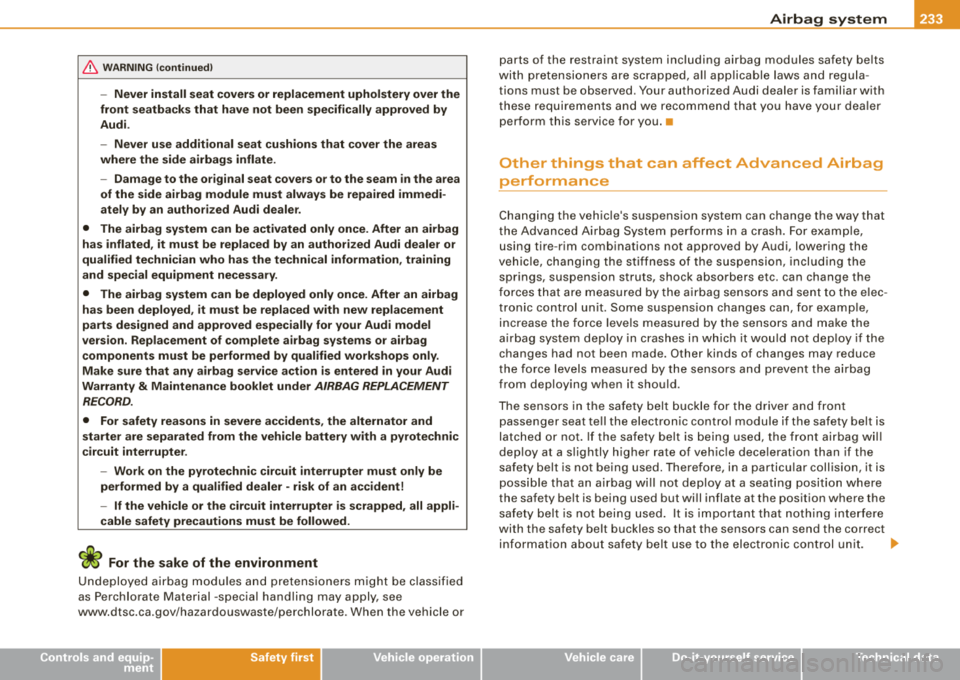
- Press the
I CAR ) fu nct io n bu tton. The main me nu
Adaptive Air Su spen sion appea rs .
- Press the
[SETUP] f unct io n button . The main menu
Adaptive Air Su spen sion appea rs ~ fig. 211 .
- Turn the co ntrol knob to
Vehicle jack mode and select on
or off as des ired .
The vehicle jack mode must be activated before changing a wheel
so that the automatic control processes fo r the air suspension do
not make lifting with the vehicle jack more difficult.
In the vehic le jack mode the indicator light in the instrument cluster
illuminates.
& WARNING
T he height of the p arked vehic le c an change du e to te mpera ture
fluctu ation s or change s in lo ad.
~
Page 191 of 404
![AUDI S8 2008 User Guide ____________________________________________ A_ d_ a_ p
=--- t_iv _ e_ A_ ir_ S_ u_ s
-=- p_e_ n_ s_io _ n __ fflll
[ i ] Tips
The veh ic le jack mode is switched off automatica lly at speeds](/img/6/57619/w960_57619-190.png "AUDI S8 2008 User Guide ____________________________________________ A_ d_ a_ p
=--- t_iv _ e_ A_ ir_ S_ u_ s
-=- p_e_ n_ s_io _ n __ fflll
[ i ] Tips
The veh ic le jack mode is switched off automatica lly at speeds")
____________________________________________ A_ d_ a_ p
=--- t_iv _ e_ A_ ir_ S_ u_ s
-=- p_e_ n_ s_io _ n __ fflll
[ i ] Tips
The veh ic le jack mode is switched off automatica lly at speeds above
9 mph (15 km/h) .•
Towing a Trailer
Automatic lowering is not desirable when towing a trailer.
Fig . 212 MMI displ ay:
Activate towing opera·
tion
If you are going to tow a trailer, you must activate the trailer
towing mode .
Switching the trailer towing mode on and off
manually
-Pressthe(CAR] function button. The main menu
Adaptive Air Suspension appears .
-Press the I SETUP] function button. The menu Adaptive
Air Suspension
appears => fig. 212.
-Select Trailer towing mode on or off as desired.
Level Adjustment when Towing a Trailer
The following applies to veh ic les wi th Adaptive Air Suspension:
Controls and equip
ment
• Before hitching up the trai ler and before adjusting the tongue
weight at the trailer, the automat ic or standard mode
must be
selected, so that the vehicle is at normal leve l
~ page 188, "Setting
the Driving Modes".
• If driving in dynamic mode is desired, this mode
must be
se lected before hitching up the trailer and before adjusting the
tongue weight . However, note that your vehic le is lowered and
ground c learance is reduced.
• If you have to drive under difficult road conditions, you can
select lift mode after hitching up the trailer or after adjusting the
tongue weight .
The following applies to vehicles with
sport suspension Adaptive Air
Suspension
· Sport*:
• Before hitching up the trai ler
and before adjusting the tongue
weight at the trailer, the automatic, standard or dynamic mode
must
be selected, so that the vehic le is at normal level~ page 188,
"Setting the Driving Modes".
• If you have to drive under difficult road conditions, you can
select lift mode after hitching up the trailer or after adjusting the
tongue weight .
Restrictions when Operating with a Trailer
When operating with a trailer, the lift mode can on ly be se lected up
to about 25 mph (40 km/h). The system automatical ly goes out of lift
mode when speed exceeds about 31 mph (50 km/h).
I f the vehic le is in automatic, standard or lift mode before the trai ler
towing mode is activated, the dynamic mode cannot be activated ·
except on vehicles with
sport suspension Adaptive Air Suspension -
Sport*.
If the vehic le is in dynamic mode before towing operation is acti·
vated, it can be driven in this mode. If the suspension is shifted from
this mode to automatic mode, dynamic mode cannot be
re-selected .~
Page 235 of 404
Airbag system -
--------------=---=--
& WARNING (continued )
-Never install seat covers or replacement upholstery over the
front seatbacks that have not been specifically approved by
Audi .
- Never use additional seat cushions that cover the areas
where the side airbags inflate.
- Damage to the original seat covers or to the seam in the area
of the side airbag module must always be repaired immedi
ately by an authorized Audi dealer .
• The airbag system can be activated only once. After an airbag
has inflated , it must be replaced by an authorized Audi dealer or
qualified technician who has the technical information , training
and special equipment necessary .
• The airbag system can be deployed only once . After an airbag
has been deployed , it must be replaced with new replacement
parts designed and approved especially for your Audi model
version . Replacement of complete airbag systems or airbag
components must be performed by qualified workshops only .
Make sure that any airbag service action is entered in your Audi
Warranty
& Maintenance booklet under AIRBAG REPLACEMENT
RECORD .
• For safety reasons in severe accidents , the alternator and
starter are separated from the vehicle battery with a pyrotechnic
circuit interrupter .
- Work on the pyrotechnic circuit interrupter must only be
performed by a qualified dealer
-risk of an accident!
- If the vehi cle or the circuit interrupter is scrapped, all appli
cable safety precautions must be followed .
For the sake of the environment
Undeployed ai rbag mod ule s and pr etensione rs mi ght b e cla ssi fied
as Perchlorate Material -sp ecial handling may ap ply, s ee
www .dtsc.ca.gov/hazardouswaste/perchlorate. When the vehicle or
Controls and equip
ment Safety first Vehicle operation
parts of th
e restraint syst em incl uding airbag modules saf ety be lts
w ith preten sio ne rs a re sc rapped, a ll a pp lic ab le laws a nd re g ul a
tions must be observ ed. Your authorized Audi deale r is fam iliar with
t hese req uir e m ents a nd we rec ommend tha t yo u have yo ur dea ler
perfor m this service for you .•
Other things that can affect Advanced Airbag
performance
C han ging the vehic le 's suspens ion system can change the way that
t h e Ad va n ce d Ai rbag Sys tem perfo rm s in a crash. F or e xam ple,
using ti re -r im comb inations not app rov ed by Audi, lower ing the
ve hic le , ch angi ng th e st iff ne ss of the su sp en sion , in cludin g the
springs, suspension struts, shock absorbers etc . can cha nge the
forc es that are measu re d b y th e a irbag sens ors a nd sen t to the e lec
t ronic con trol un it. Some suspens ion chan ges can, for exa mple,
i nc rea se the force le v e ls mea sured by the sen so rs and make the
a irb ag sys tem de plo y i n cras hes in whi ch it wo uld not de plo y if the
changes had not been made . Other kinds of changes may reduce
t h e force leve ls m easured by t he se nso rs a nd p reve nt t he a irba g
from deploy ing when it should .
T he se nsor s in th e safe ty bel t buc kle for th e dr ive r a nd fr ont
passen ger seat te ll th e electron ic control module if t he safety belt is
l a tc h e d or n ot. If t he safety belt is b ein g use d, th e fr ont ai rbag will
dep loy at a s lig htly h igher rate of veh ic le dece lerat ion t han if t he
safety belt is not being use d. Therefore, in a partic ular collision, it is
poss ible t hat an airba g w ill not deplo y at a s eat ing pos itio n where
the safety be lt is being used but wi ll inflate at the position where t he
sa fe ty be lt is no t bein g used. It i s im por ta nt th at n othi ng i nterfe re
with t he safety belt buc kles so that the sensors can send the correct
info rm ati on abou t sa fet y bel t use to th e ele ctr on ic co ntrol unit.
~
Vehicle care Do-it-yourself service Technical data
Page 337 of 404
Tires and wheels -
-----------------'
Tire service life
The service life of tires depends on a lot of different things
including proper installation and balancing, correct tire
pressure and driving style .
Tread Wear Ind icator (TWI)
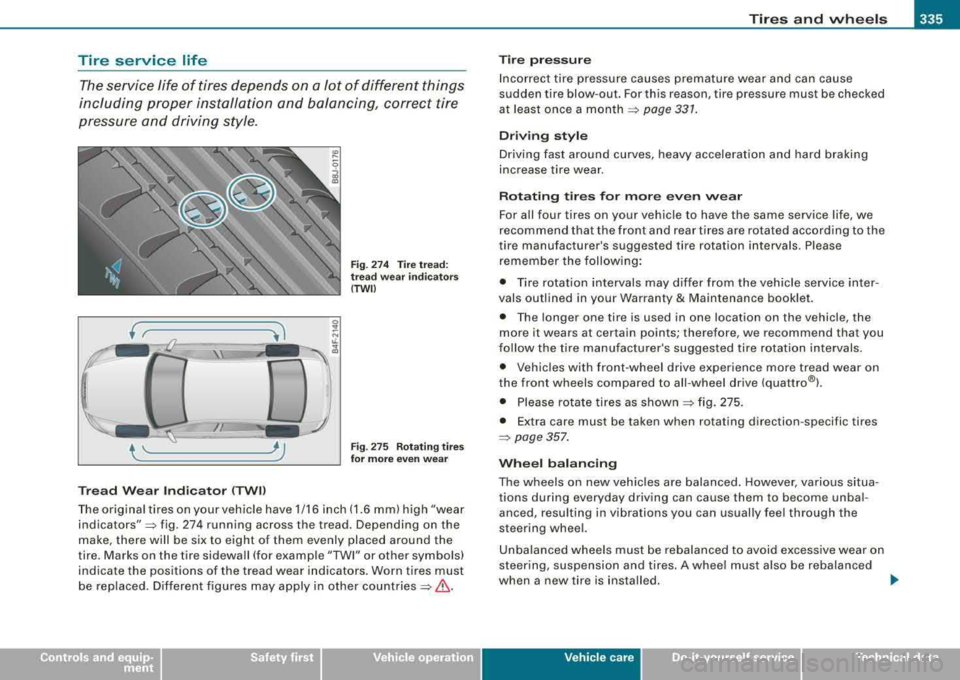
Fig. 274 Tire tread:
tread wear indicators
(TWII
Fig . 275 Rotating tires
for more even wear
The origina l tires on your vehic le have 1/16 inch (1.6 mm) high "wear
indicators"::::, fig. 274 running across the tread. Depending on the
make, there will be six to eight of them evenly placed around the
tire. Marks on the tire sidewall (for example
"TWI" or other symbols)
indicate the positions of the tread wear indicators. Worn tires must
be rep laced. Different figures may apply in other
countries::::, &-
Tire pressure
Incorrect tire pressure causes premature wear and can cause
sudden tire blow-out. For this reason, tire pressure must be checked
at least once a
month ::::, page 331.
Driving style
Driving fast around curves, heavy accele ration and hard braking
increase tire wear .
Rotating tires for more even wear
For all four tires on your vehicle to have the same service life, we
recommend that the front and rear tires are rotated according to the
tire manufacturer's suggested tire rotation intervals. Please
remember the following:
• Tire rotation intervals may differ from the vehicle service inter
vals outlined in your Warranty
& Maintenance booklet.
• The longer one tire is used in one location on the vehicle, the
more it wears at certain points; therefore, we recommend that you
follow the tire manufacturer 's suggested tire rotation intervals .
• Vehicles with front-wheel drive experience more tread wear on
the front wheels compared to all -wheel drive (quattro®l .
• Please rotate tires as shown
~ fig. 275.
• Extra care must be taken when rotating direction -specific tires
::::, page 357.
Wheel balancing
The wheels on new vehicles are balanced. However, various situa
tions during everyday driving can cause them to become unbal
anced, resu lting in vibrations you can usually feel through the
steering wheel.
Unbalanced wheels must be rebalanced to avoid excessive wear on
steering, suspension and tires. A whee l must also be rebalanced
when a new tire is insta lled.
...
Vehic le care I I Technical data
Page 344 of 404
lllftl __ T_ ir_e _s_ a_n_ d_ w_ h
_ e_e_ l_ s _______________________________________________ _
&, WARNING (continued )
• Never drive faster than the speed for which the winter or other
tires in stalled on your vehicle are rated.
& WARNING
Always adjust your driving to the road and traffic condit ions .
Never let the good acceleration of the winter tires and all -wheel
dri ve tempt you into taking extra risks. Always remember :
• When braking , an all -wheel drive vehicle handles in the same
way as a front drive vehicle .
• Drive carefully and reduce your speed on icy and slippery roads ,
even winter tires cannot help under bla ck ice conditions.
c£> For the sake of the environment
Use summer tires when weather conditions permit. They are
q uiete r, d o not wear as qui ckly a nd r educe fuel cons ump tion.•
Snow chains
Sn ow c hain s may be fitte d only to the fron t w heel s, an d on ly to
certain tire sizes. Ask your authorized Audi dealer on which tire
s iz es snow c hains can be used.
If you are going to use snow cha ins, then you must instal l them on
the front wheels at least.
Th e sn ow c hains mus t h ave low-pro file l inks and mus t n ot be t hic ke r
than 0. 53 inch ( 13. 5 mm), including the lock.
Remove wheel ce nter c ove rs a nd tr im dis cs be fore putti ng sn ow
c h ains on your
veh ic le:::::, 0. For safety reasons cover caps must
then be fitted ove r the wheel bo lts . These are avai lable from autho
rized Audi dealers.
& WARNING
Using the wrong snow chains for your vehicle or installing them
incorrectly can in crease the risk of loss of control leading to
serious personal injury .
• Snow chains are available in different sizes. Alway s make sure
to follo w the instructions provided by the snow chain manufac
turer.
• When driving with snow cha ins never drive faster than the
speed permitted for your specific snow chains .
• Always observe local regulations .
0 Note
• Remove snow chains before driving on roads not covered with
snow to av oid da magi ng t ires a nd weari ng th e snow cha ins dow n
unnecessari ly .
• Snow c hains, w hich
come int o direct co ntact w it h the w heel r im,
can scratch or damage it. Th erefore, make sure that the snow chains
are suitab ly cov ere d.
• I f the Adaptive Air Suspension should malfunction, do not
mo unt or use snow cha ins because t he veh icle w ill be ext re me ly
l ow. If you do drive with snow chains on while the vehicle is at this
l ev el, the s now c hai ns mig ht sev erely da mag e th e wheel house an d
other parts of the vehicle .
[ i ] Tips
Where snow chains are mandatory on certain roads, this norma lly
a lso ap plies t o veh icle s wi th All Wheel D rive .•
Page 354 of 404
-What do I do now? PW-------------------------
&, WARNING (continued)
front wheel is lifted off the ground, placing the Automatic Trans
mission in
"P" (Park) will not prevent the vehicle from moving.
• Before you change a wheel, be sure the ground is level and firm.
If necessary, use a sturdy board under the jack.
• After installing the spare wheel, make sure that you replace the
flat tire/wheel in its storage area properly and tighten the knurled
retaining screw securely.
[ i] Tips
Before changing the wheel, you must activate the jacking mode, so
that the automatic controls for the Adaptive Air Suspension do not
make it more difficult to lift the vehicle with the
jack ~ page 7 88. •
Changing a wheel
When you change a wheel, follow the sequence described
below step-by-step and in exactly that order.
1. Activate the vehicle jacking mode => page 188.
2. Remove the decorative wheel cover*. For more details
see also
=> page 353, "Decorative wheel covers" or
=> page 353, "Wheels with wheel bolt caps" .
3. Loosen the wheel bolts => page 354.
4. Locate the proper mounting point for the jack and align
the jack below that
point=> page 354.
5. Lift the car with the jack=> page 354.
6. Remove the wheel with the flat tire and then install the
spare
=> page 356 .
7. Tighten all wheel bolts lightly. 8.
Lower the vehicle with the jack.
9. Use the wheel bolt wrench and firmly tighten all wheel
bolts
=> page 354.
10. Replace the decorative wheel cover*.
11. Deactivate the vehicle jacking mode => page 188 .
& WARNING
Always read and follow all WARNINGS and information ~ & in
"Raising the vehicle" on
page 354 and ~ page 357. •
After changing a wheel
A wheel change is not complete without the doing the
following.
-Store and secure the wheel you replaced in the spare
wheel well.
-Replace the tools and the jack in their proper location.
-Check the tire pressure on the spare wheel immediately
after mounting it.
-As soon as possible , have the tightening torques on all
wheel bolts checked with a torque wrench. The correct
tightening torque is 90 ft lb (120 Nm) .
-Have the flat tire replaced as soon as possible.
[ i] Tips
• If you notice that the wheel bolts are corroded and difficult to
turn while changing a tire, they should be replaced before you check
the tightening torque . .,_