door lock AUDI S8 2008 Owner's Manual
[x] Cancel search | Manufacturer: AUDI, Model Year: 2008, Model line: S8, Model: AUDI S8 2008Pages: 404, PDF Size: 52.7 MB
Page 67 of 404
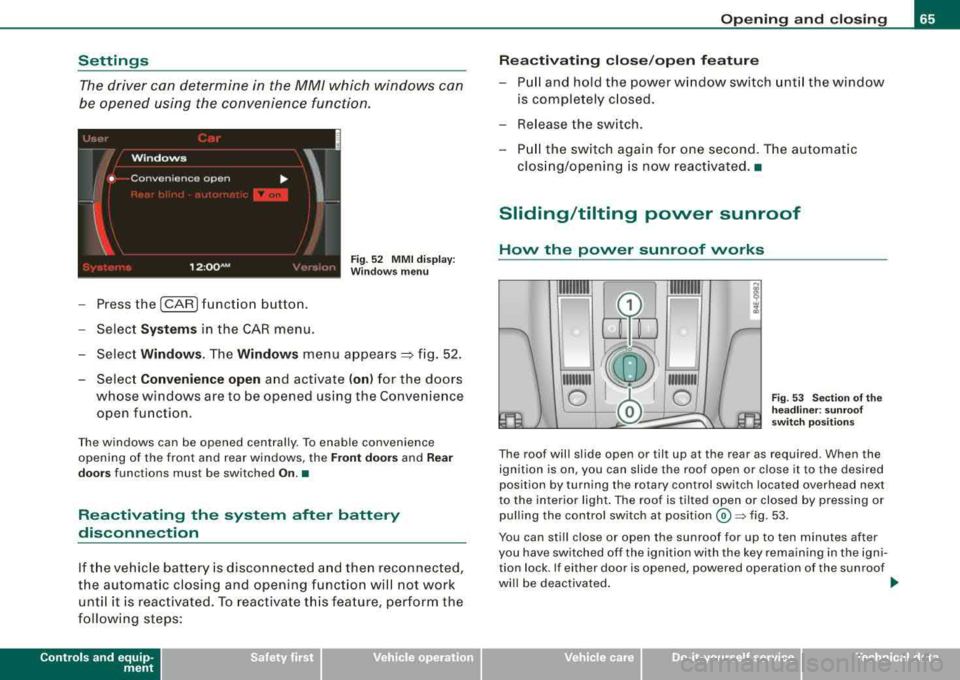
Settings
The driver can determine in the MM/ which windows can
be opened using the convenience functio n.
Fig. 5 2 MMI dis pla y:
W indows menu
- Press the (CAR ) funct ion b utton.
- Sele ct
System s in the CAR menu .
- Selec t
Window s. The Window s menu appears =} fig . 52 .
- Select
Convenience open and activate ( on) for the doors
whose windows are to be opened using the Convenience open function .
The windows can be opened centra lly . To enab le convenience
opening of the front and rear w indows, the
Front door s and Rear
door s
functions must be switched On.•
Reactivating the system after battery
disconnection
If t he ve hicle batter y is disco nnected a nd then reconnected,
the au tomat ic c losing and opening functio n will no t work
unt il it is rea ctivated. To reactivate t his fea ture, perform th e
f o llow ing steps:
Contro ls a nd eq uip
ment
Op ening and clo sing
Re activating clos e/open f eature
- Pull and hold the power w indow switch unt il the window
is comple tely c losed.
- Re lease the sw itch .
- Pull the switch aga in for one second. T he automat ic
clos ing/opening is now reactivated. •
Sliding/tilting power sunroof
Hovv the povver sunroof vvorks
111111111
0
111111111
0 Fig . 53 Sec tio n of th e
he adline r: sun roof
swi tch po siti ons
The roof wil l slide open or til t up at the rear as required . When the
ignition is on, you can slide the roof open or close it to the desired
position by turning the ro tary control switch located overhead next
to the interior light . The roof is tilted open or closed by pressing or
pull ing the control switch at
posit ion © ~ fig. 53 .
You can still close or open the sunroof for up to ten minutes after
you have sw itched off the ignition with the key remaining in the igni
tion lock . If either door is opened , powered operation of the sunroof
wi ll be deactivated . _.,
Vehicle care I I irechnical data
Page 69 of 404
-To tilt the roof down to any intermediate position pull and
hold
the switch until the roof reaches the desired posi
tion.
& WARNING
Improper use of the power sunroof can cause serious personal
injury.
• Be careful when closing the power sunroof. Not paying atten
tion could cause you or others to be trapped and injured as the
roof closes.
• Always take the key with you when you leave the vehicle to
prevent injuries caused by the roof closing
• Never leave children or persons requiring assistance alone in
the vehicle, especially when they could access the vehicle keys.
Unsupervised use of the keys can result in the engine being
started or use of vehicle systems such as the power windows, etc.
which could result in serious injury. The doors could be locked
with the remote key, delaying help in an emergency.
• The power sunroof will continue to operate until the ignition
key has been removed and one of the front doors has been
opened. •
Power emergency closing
The sunroof can still be closed electrically if for some
reason the overload protection function becomes acti
vated.
The power sunroof is equipped with an overload protection
feature. If, under normal conditions, the power sunroof will
not close, you can close it using this feature .
-Turn the rotary switch to position @=>page 65, fig. 53.
Controls and equip
ment
Opening and closing
-Now pull the switch and hold it in this position until the
power sunroof closes completely.
& WARNING
Improper use of the power sunroof can cause serious personal
injury.
• Be careful when closing the power sunroof. Not paying atten
tion could cause you or others to be trapped and injured as the
roof closes.
• Always take the key with you when you leave the vehicle to
prevent injuries caused by the roof closing
• Never leave children or persons requiring assistance alone in
the vehicle, especially when they could access the vehicle keys.
Unsupervised use of the keys can result in the engine being
started or use of vehicle systems such as the power windows, etc.
which could result in serious injury. The doors could be locked
with the remote key, delaying help in an emergency.
• The power sunroof will continue to operate until the ignition
key has been removed and one of the front doors has been
opened. •
Page 72 of 404
Clear vision
control is activated. The high beam function must first be switched
on in the MMI
=> page 70 .
Light Sensor Malfunction
In the event of a light sensor mal fu n ct ion, the driver is notified i n the
instrument cluster display :
@ Automatic headlights/automatic wipers defe ctive
For safety reasons the low beams are turned on permanently with
the switch in
AUTO . However, you can continue to turn the lights on
and off us ing the light switch . Have the light sensor checked as soon
as possib le at a dealership .
& WARNING
• Never use dayt ime running lights to see where you are going .
The y are not bright enough and will not let you see f ar enough
ahead for s afet y, espe cially at du sk or when it is d ark. Alwa ys
switch on the low beams at dusk or when it is dark .
• Autom atic he adlight s are onl y intended to a ssist the dr iver.
The y do n ot relie ve the dri ver of his re spon sibility to che ck the
headlights and to turn them on manuall y according to the current
light and vi sibility condi tion s. For example , fog and rain cannot be
dete cted b y the l ight sen sors . S o alway s switch on the he adlights
under these wea the r condition s and when driving in the dark
gD .
• Cra shes can h appen when you c annot see the road ahead and
when you cannot be seen b y other motori sts .
- Alway s turn on the headlight s so that you can see ahead and
s o that others c an see your c ar from the ba ck.
[ i ] Tips
• With the switch in AUTO front fog lights and rear fog lights
cannot be turned on in addition. • I
f you remove the ignition from the ignition lock while the head
li ghts are s til l on, a bu zzer w ill sound as long as the driver's door is
open to remind you to turn off the lights .
• Always observe t he specific local regulations for your area as to
when to use your lights .•
Adjusting exterior lighting
The functions are set in the MM/.
F ig . 57 MM I di spla y:
E xt eri or ligh ting
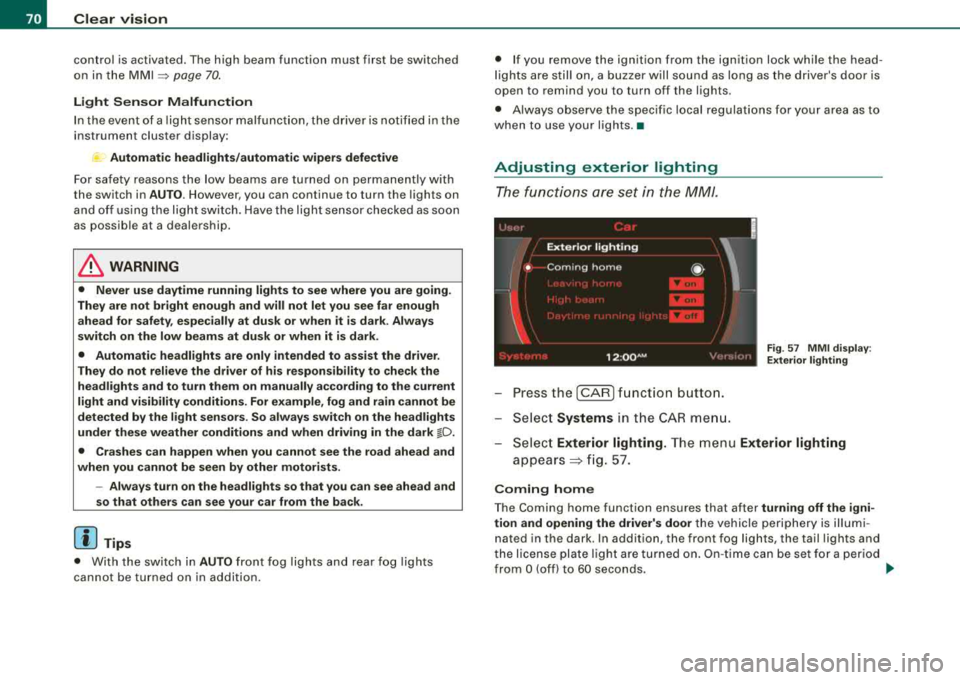
- Pressthe [CAR ]function button.
- Select
Systems in the CAR me nu.
- Selec t
Exterior lighting. The menu Exterior lighting
appears => fig. 57.
C oming home
The Coming home function ensures that after turning off the igni
tion and op ening the driv er's door
the vehicle periphery is il lum i
nated in the dark . In addition, the front fog lights, the tail lights and
t he license plate lig ht are turned on . O n-t ime can be set fo r a period
from
O (off) to 60 seconds. ~
Page 77 of 404
-Press the CD button to turn on the interior lights. If you
press the button a second time, the interior lights in the
rear are also turned on.
Reading lights ~
Press the switch to turn the right or left reading light on
or
off=:> page 74, fig. 64.
With the door contact circuit, 00 the interior lights turn on as soon
as you unlock the vehicle or open the doors. The interior lights are
also turned on when the ignition key is removed. The light goes out
about 2 minutes after the doors are closed. When the vehicle is
locked or when the ignition is turned on, the interior lights are
turned off .
When a door is open, the interior lights are turned off after about 10
minutes to prevent draining the battery .
[ i] Tips
The interior lights can be dimmed by holding the [D switch pressed
down. If the interior lights in the rear were turned on by pressing the
switch twice, the rear interior lights are also dimmed .•
Contro ls a nd eq uip
ment
Clear vision
Rear Interior Lights
The rear interior lights also contain reading lights for
rear-seat passengers.
Fig. 65 Rooflining:
Rear interior lights
Fig . 66 Rooflining:
Rear reading lights
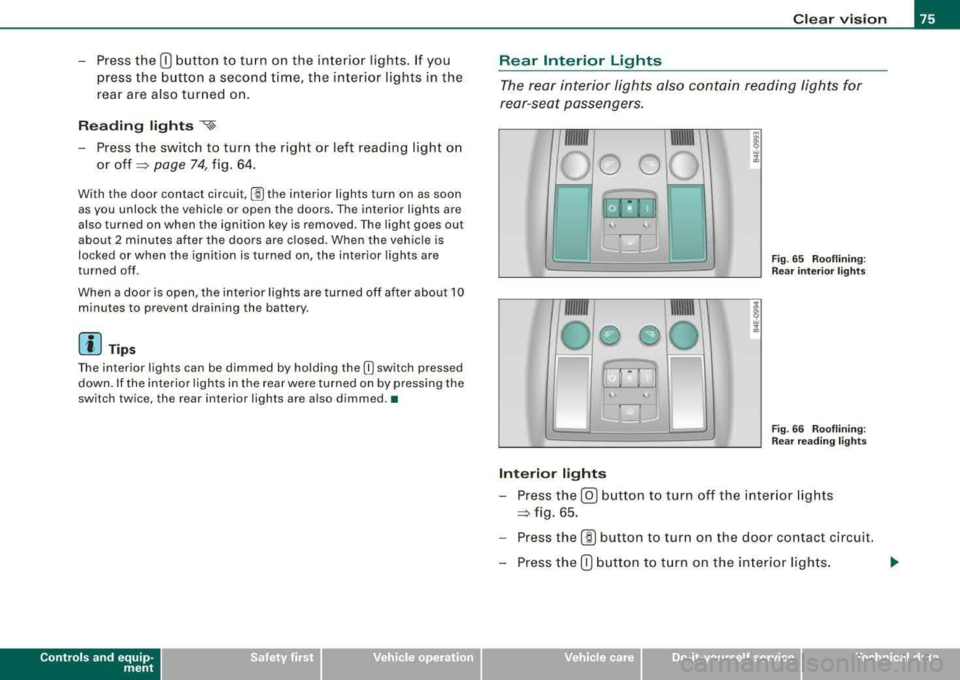
Interior lights
-Press the@) button to turn off the interior lights
=:> fig. 65.
-Press the (ID button to turn on the door contact circuit.
-Press the CD button to turn on the interior lights.
Vehicle care I I irechnical data
Page 78 of 404
Clear vision
Reading lights
~
Press one of the switches to turn the right or left reading
light on or
off~ page 75, fig. 66.
With the door contact circuit, 00 the interior lights turn on as soon
as you unlock the vehicle or open the doors. The interior lights are
also turned on when the ignition key is removed . The light goes out
about 2 minutes after the doors are closed. When the vehicle is
locked or when the ignition is turned on, the interior lights are
turned off.
When a door is open, the interior lights are turned off after about 10 minutes to prevent draining the battery .
[ i) Tips
• By pressing the safety switch @~ page 62, fig. 48, the function
of some switches in the rear can be turned off. If the symbol in
the safety switch illuminates, the window regulators in the rear
doors, the switches for the interior lights and the switch for the elec
tric sun shade* are inoperative.
• The interior lights can be dimmed by holding the
(I] switch
pressed down. •
Applies to vehic les: w ith backg round lightin g
Background lighting
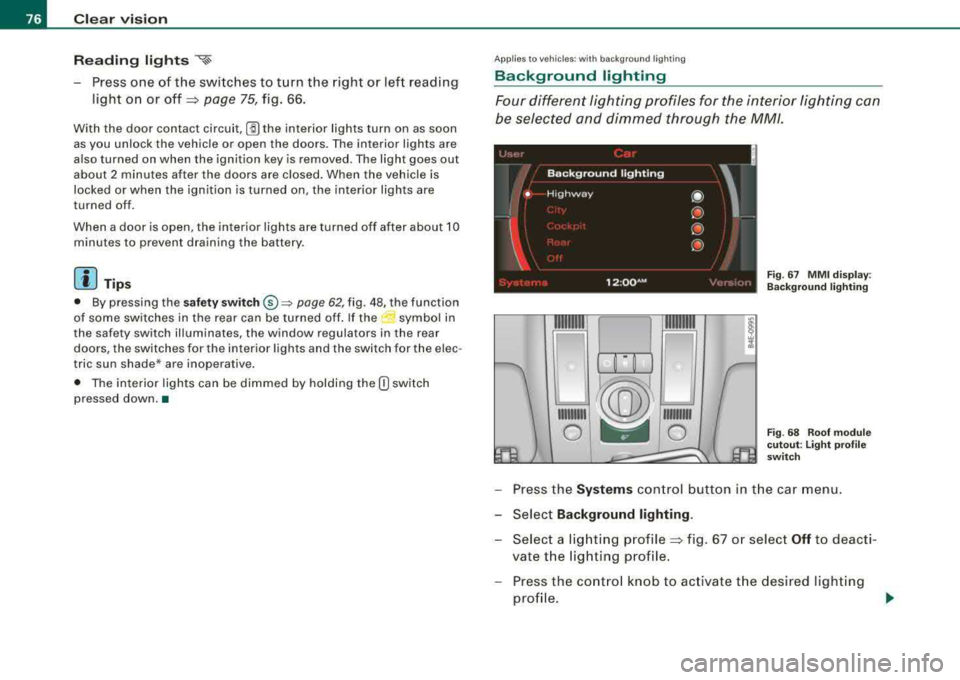
Four different lighting profiles for the interior lighting can
be selected and dimmed through the MM/.
~/®~~
111111111 ~ 111111111
0 ~ 0
Fig . 67 MMI display :
Background lighting
Fig. 68 Roof module
cutout: Light profile
switch
- Press the Systems control button in the car menu.
- Select
Background lighting .
- Select a lighting profile~ fig. 67 or select Off to deacti-
vate the lighting profile.
- Press the control knob to activate the desired lighting
profile .
Page 79 of 404
-Rotate the control knob clockwise to increase the bright
ness, and
Rotate the control knob
counterclockwise to reduce the
brightness.
When the vehicle is unlocked, the standard lighting turns on auto
matically and dims after approx. 2 minutes, and when the ignition is
turned on it switches off immediate ly.
A background lighting profile can be switched on manually using
the light profile
switch ~ page 76, fig. 68. This wi ll turn off automat
ically after 30 minutes when the ignition is off. To reac tivate , press
the lighting profile switch.
Lighting profiles that were selected while driving remain active
during the course of travel.
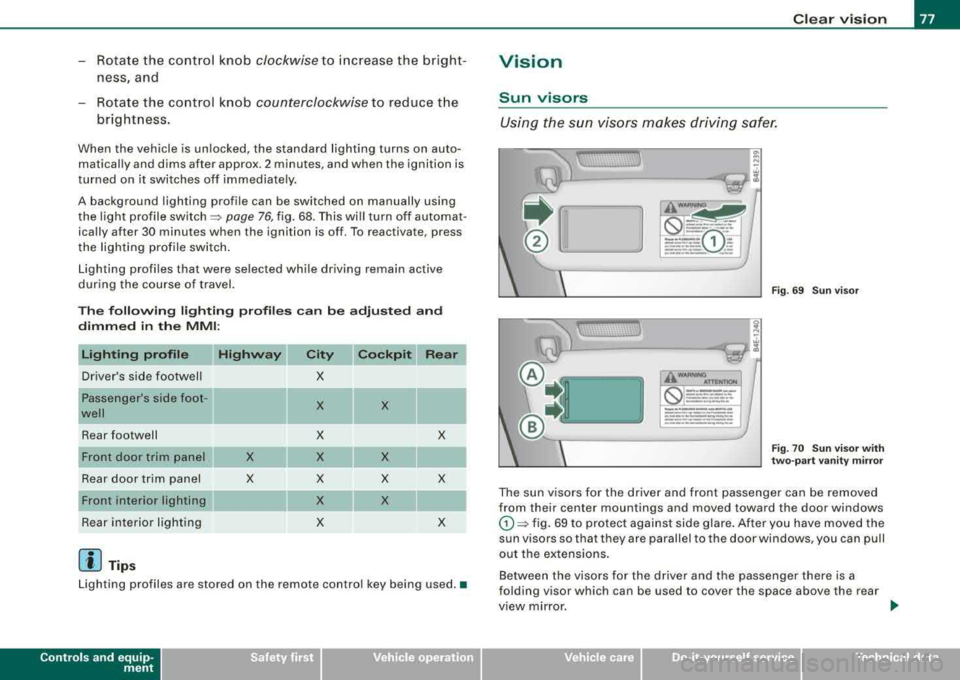
The following lighting profiles can be adjusted and
dimmed in the MMI:
Driver's side footwell
Passenger's side foot -
well
Rear footwell
Rear door trim panel
Front interior lighting
Rear interior lighting
[ i J Tips
Highway
X
X
X
X X
X X
X
X
Cockpit Rear
X
X
X
X
X
X
X
Lighting profiles are stored on the remote control key being used. •
Controls a nd eq uip
ment
Clear vision
Vision
Sun visors
Using the sun visors makes driving safer.
] ~
J_~---~..r-:::Jli
WAANINO ..,
f,":a(S) ::-,....= ~ =
=:.:=-..:GJ
- -, - ~~ ,.. __ ..... _ ... -----__ ..., ______ ---
~
,l,
\,;....l--------:.:r.::Jli
WAANINO ATTENTIOH
-- ---
_____ ,.. ..
-----··
___ .. _
-·- ------------- ·----·---... -------------·-----
Fig . 69 Sun visor
Fig. 70 Sun visor with
two-part vanity mirror
The sun visors for the driver and front passenger can be removed
from their center mountings and moved toward the door windows
G) ~ fig. 69 to protect against side glare. After you have moved the
sun visors so that they are parallel to the door windows, you can pull
out the extensions.
Between the visors for the driver and the passenger there is a
folding visor which can be used to cover the space above the rear
view mirror.
Vehicle care I I Technical data
Page 96 of 404
Seats and storage
Seat memory
Driver's seat memory
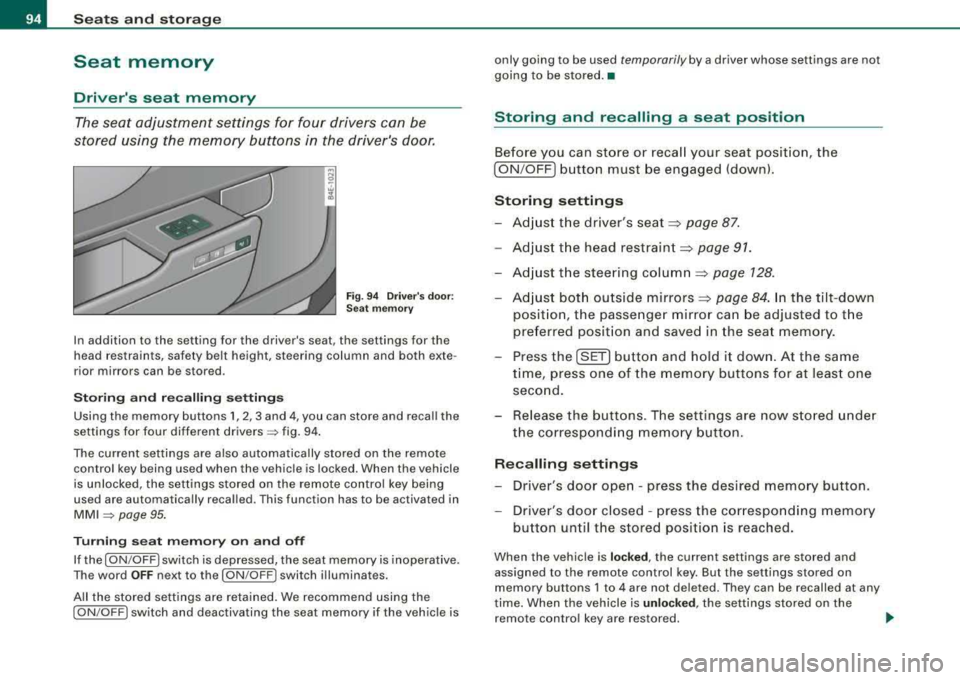
The seat adjustment settings for four drivers can be
stored using the memory buttons in the driver's door.
Fig. 94 Driver's door:
Seat memory
In addition to the setting for the driver's seat, the settings for the
head restraints, safety belt height, steering column and both exte
rior mirrors can be stored .
Storing and recalling settings
Using the memory buttons 1, 2, 3 and 4, you can store and recall the
settings for four different
drivers => fig. 94.
The current settings are also automatically stored on the remote
control key being used when the vehicle is locked. When the vehicle
is unlocked, the settings stored on the remote control key being
used are automatically recalled. This function has to be activated in
MMI => page 95.
Turning seat memory on and off
If the [ ON/OFF I switch is depressed, the seat memory is inoperative.
The word
OFF next to the [ON /OFF ! switch illuminates.
All the stored settings are retained. We recommend using the
[ ON /OFF! switch and deactivating the seat memory if the vehicle is only going to be used
temporarily by a driver whose settings are not
going to be stored. •
Storing and recalling a seat position
Before you can store or recall your seat position, the
[ ON /OFF] button must be engaged (down).
Storing settings
-Adjust the driver's seat => page 87.
-Adjust the head restraint => page 91.
-Adjust the steering column => page 128.
-Adjust both outside mirrors=> page 84. In the tilt-down
position, the passenger mirror can be adjusted to the
preferred position and saved in the seat memory.
-Press the [SET] button and hold it down. At the same
time, press one of the memory buttons for at least one
second.
-Release the buttons. The settings are now stored under
the corresponding memory button.
Recalling settings
-Driver's door open - press the desired memory button .
-Driver's door closed - press the corresponding memory
button until the stored position is reached.
When the vehicle is locked, the current settings are stored and
assigned to the remote control key. But the settings stored on
memory buttons 1 to 4 are not deleted. They can be recalled at any
time. When the vehicle is
unlocked , the settings stored on the
remote control key are restored. .,_
Page 97 of 404

If your vehicle is driven by other persons using your remote control
key, you should save your individual seat posi tion on one of the
memory buttons. You can recall your settings again simply and
conveniently by pressing the corresponding memory bu tt o n. When
the vehicle is locked, these settings are automatically re -assigned to
the remote control key and stored .
& WARNING
• For safety reasons, the seat s etting can only be recalled whe n
the vehi cle i s sta tiona ry
-otherwi se you ri sk h aving an accident .
• In an emergency , the recall operation can be stopped by
pre ssing the
I ON /OF F) button or b y briefly pre ssing an y given
mem ory button . •
Activating remote control key memory
To be able to recall the stored settings with the remo te
con trol key, the function has to be activated in
MM/ .
-Selec t Systems in the CAR menu .
-Select Seat adjustment .
-Select Driver's seat.
Controls a nd eq uip
ment
Fig . 9 5 MMI disp lay :
Drive rs' seat
Seats and storage
Sel ect Remote control key on to activate the rem ote
contro l key
mem ory ~ fig. 95 .
Passenger's seat memory
Using the memory but tons in the passenger's door, you
ca n sto re an d rec all f our se at sett ings.
Storing and recalling settings
Fi g. 9 6 Pa ssenger's
d oo r: s eat m emo ry
Using the memory buttons 1, 2 , 3 and 4, you can store and recall the
settings for four di fferent
passengers ~ fig. 96 .
Tu rning s eat m emory on and off
If the I ON /OFF ) switch is depressed, the seat memory is inoperative .
The word
OFF next to the I ON /OFF ) swi tch illuminat es.
All the s tored settings are retained. Now the seat can on ly be
adjusted electrically in the normal way. •
Vehicle care I I irechnical data
Page 111 of 404
![AUDI S8 2008 Owners Manual ________________________________________________ S_ e_ a_t _
s _a_ n_d _ s_t _o _ r_ a_ g~ e __ fflll
0 Note
To avoid damaging the socket, only use plugs that fit properly.
[ i] Tips
Wh](/img/6/57619/w960_57619-110.png "AUDI S8 2008 Owners Manual ________________________________________________ S_ e_ a_t _
s _a_ n_d _ s_t _o _ r_ a_ g~ e __ fflll
0 Note
To avoid damaging the socket, only use plugs that fit properly.
[ i] Tips
Wh")
________________________________________________ S_ e_ a_t _
s _a_ n_d _ s_t _o _ r_ a_ g~ e __ fflll
0 Note
To avoid damaging the socket, only use plugs that fit properly.
[ i] Tips
When the engine is off and accessories are still plugged in and are
on, the vehicle battery can still be drained. •
Storage
General overview
There are numerous places to store items in your vehicle.
Glove compartment
Storage compartment
Pockets in the front seats*
Compartments in the door trim panels
Compartments in the rear doors*
Coat hooks => page 109
=> page 110
=> page 110
=> page 111
=> page 111
Left side storage compartment in the => page 112
trunk
--Right side storage compartment in the => page 113
trunk
Emergency warning triangle
=> page 348
& WARNING
• Always remove objects from the instrument panel. Any items
not stored could slide around inside the vehicle while driving or
Controls and equip ment
&, WARNING (continued)
when accelerating or when applying the brakes or when driving
around a corner.
• When you are driving make sure that anything you may have
placed in the center console or other storage locations cannot fall
out into the footwells. In case of sudden braking you would not be
able to brake or accelerate.
• Any articles of clothing that you have hung up must not inter
fere with the driver's view. The coat hooks are designed only for
lightweight clothing . Never hang any clothing with hard, pointed
or heavy objects in the pockets on the coat hooks. During sudden
braking or in an accident -especially if the airbag is deployed -
these objects could injure any passengers inside the vehicle. •
Glove compartment
Your Owner's Literature and the media player are stored
in the lockable glove compartment.
t------.-,.---------. l
i
Fig. 117 Glove
compartment
Page 132 of 404
___ O_ n_ t_h _e_ r_o _ a_ d ____________________________________________________ _
[ i J Tips
• If you release the ignition key in positions G) ,@ or G) , the key
automatically returns to pos ition @.
• If you open the driver 's door when the ignition is switched on , a
buzzer sounds and the message
Ignition is on appears in the instru
ment cluster display. Please switch the ignition off .•
Ignition key safety lock
The igni tio n key can only be re move d when the selector
lever is in the
"P" (P ark) posi tion.
After turning off the ignition , the igni tion key can only be removed
from the ignition lock when the selec tor lever is in the
"P" (Park)
position . Af ter you have removed the key , the selector lever is locked
and cannot be moved .•
Starting and stopping the engine
Starting the engine
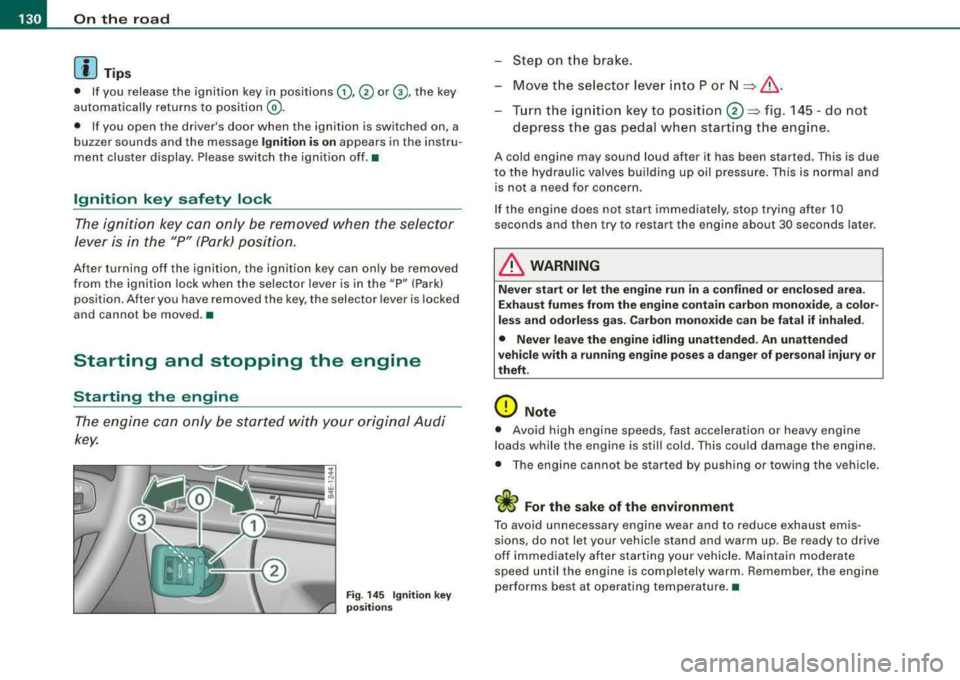
The engine ca n only be st arted with y our or iginal A udi
key.
Fig . 14 5 Ignit ion key
po sitions
-St ep o n the brake.
- Move t he selector lever into P or
N => &, .
-Turn the ign ition key to position 0 => fig . 14 5 -do not
depress the gas pedal when start ing t he engine .
A cold engine may sound loud after it has be en started. This is due
to the hydrau lic valves building up oil pressure. This is normal and
is not a n eed fo r concern .
I f the engine does not start immediately, stop trying after 10
seconds and then try to restart the engine about 30 seconds later .
& WARNING
Never start or let the engine run in a confined or en clo sed are a.
Exhaust fumes from the engine contain carbon monoxide, a color
less and odorle ss gas . Carbon mono xide can be fatal if inhaled.
• Never leave the engine idling unattended. An unattended
vehicle with a running engine po ses a dange r of person al injury or
theft.
0 Note
• Avo id high e ngine speeds, fast accelerati on or heavy eng ine
loads while the engine is still cold. This could damage the engine.
• The eng ine ca nnot be s tarted by push ing or towi ng the ve hicle.
sions, do not let your vehic le stand and warm up. Be ready to drive
off im mediately afte r starting your vehicle . Maintain modera te
speed until the engine is completely warm . Remember , the engine
performs best at operating temperature. •