engine AUDI S8 2008 Owner's Manual
[x] Cancel search | Manufacturer: AUDI, Model Year: 2008, Model line: S8, Model: AUDI S8 2008Pages: 404, PDF Size: 52.7 MB
Page 49 of 404
Opening and closing
Keys
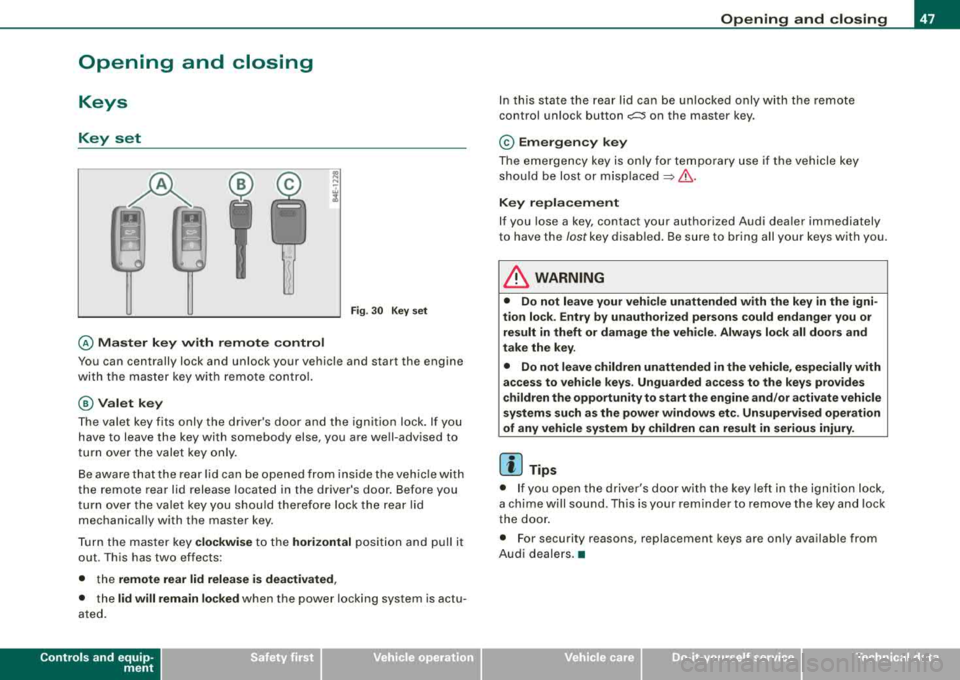
Key set
@ Master key with remote control
Fig. 30 Key set
You can centrally lock and unlock your vehicle and start the engine
with the master key with remote control.
@Valet key
The valet key fits only the driver's door and the ignition lock. If you
have to leave the key with somebody else, you are well-advised to
turn over the valet key only.
Be aware that the rear lid can be opened from inside the vehicle with
the remote rear lid release located in the driver's door. Before you
turn over the valet key you should therefore lock the rear lid
mechanically with the master key.
Turn the master key
clockwise to the horizontal position and pull it
out . This has two effects:
• the
remote rear lid release is deactivated,
• the lid will remain locked when the power locking system is actu
ated.
Controls and equip ment
Opening and closing
In this state the rear lid can be unlocked only with the remote
control unlock button
c:::::5 on the master key.
© Emergency key
The emergency key is only for temporary use if the vehicle key
should be lost or misplaced
=> &.
Key replacement
If you lose a key, contact your authorized Audi dealer immediately
to have the /ostkey disabled. Be sure to bring all your keys with you.
& WARNING
• Do not leave your vehicle unattended with the key in the igni
tion lock. Entry by unauthorized persons could endanger you or
result in theft or damage the vehicle. Always lock all doors and
take the key.
• Do not leave children unattended
in the vehicle, especially with
access to vehicle keys. Unguarded access to the keys provides
children the opportunity to start the engine and/or activate vehicle
systems such as the power windows etc. Unsupervised operation
of any vehicle system by children can result in serious injury.
[ i] Tips
• If you open the driver 's door with the key left in the ignition lock,
a chime will sound . This is your reminder to remove the key and lock
the door.
• For security reasons, replacement keys are only available from
Audi dealers.
•
Page 51 of 404
is pressed. If the check light does not flash, the battery is dead and
has to be replaced .
In addition, when the battery is dead the
!i, symbol appears in the
instrument cluster display as well as the message:
!i, Pl ease chang e key batte ry
We recommend having the battery changed by an Audi Dealer .•
Electronic immobilizer
The immobilizer helps to prevent unauth orized use of
y o ur vehicle.
A computer chip inside your key automatica lly deactivates the e lec
t ronic immobilizer when you insert the key in the ignition lock, or on
vehic les with Advanced Key*, when the key is inside the vehicle .
When you remove the key from the ignition lock, or on vehicles with
Advanced Key, when you remove the key from the vehicle, the elec
t ronic immobilizer is automatically activated once again.
If an unauthorized key was used,
S AFE is disp layed continuous ly in
the odometer disp lay field.
& WARNING
Alw ays tak e the k ey with you wh en you le ave th e vehicl e. The k ey
ca n di sarm th e ele ctr onic engin e immobili zer and permit an un au
thorized p ers on to start th e eng in e and enable opera tion of the
v ehicle system s such as power window or power sunroof l eading
to ser iou s per son al in jur y.
[ i ] Tip s
• Your engine can on ly be started using the factory -equipped key.
• You may not be able to start your vehic le if an ignition key of a
different vehicle make is also located on your set of keys .•
Controls and equip
ment
Openin g and clo sing
Certification
The remote control device comp lies with
• USA models: Part 15 of the FCC Rules .
• Can ad a m odels: RSS -210 of Industry Canada .
Operation is subject to the f ollowing conditi ons :
• this device may not cause harmful interference, and
• t his device must accept any interfere nce rece ived, i ncluding
interference that may cause undes ired operation.
0 Note
The manufacturer is not responsib le for ANY RA DIO OR TV interfer
ence caused by unauthorized modifications to this equipment .
Changes or modifications to this unit not express ly approved by the
party responsible for compliance could void the user's authority to
operate the equipment. •
Power locking system
General description
The power locking system locks or unlocks all doors and
the rear lid simultaneously.
The power locki ng system in your veh ic le incorporates the following
functions:
• Central lock ing function
• Selective unlock
feature=> page 52
• Remote contro l feature=> page 48
• Advanced Key *=> page 59
• Anti -theft alarm system=> page 67
Page 54 of 404
Opening and closing
[ i J Tips
• In order to make sure the locking function is working, you should
always keep your eye on the vehicle to make sure it is properly
locked .
• Do not use the remote control if you are inside the car, otherwise
you may unintentionally lock the vehicle, and then you would set off
the anti -theft alarm when you try to start the engine or open a door.
In case this happens anyhow, push the unlock button
0 .
• Use the panic function only if you are in an emergency
situation. •
Operating locks with the key
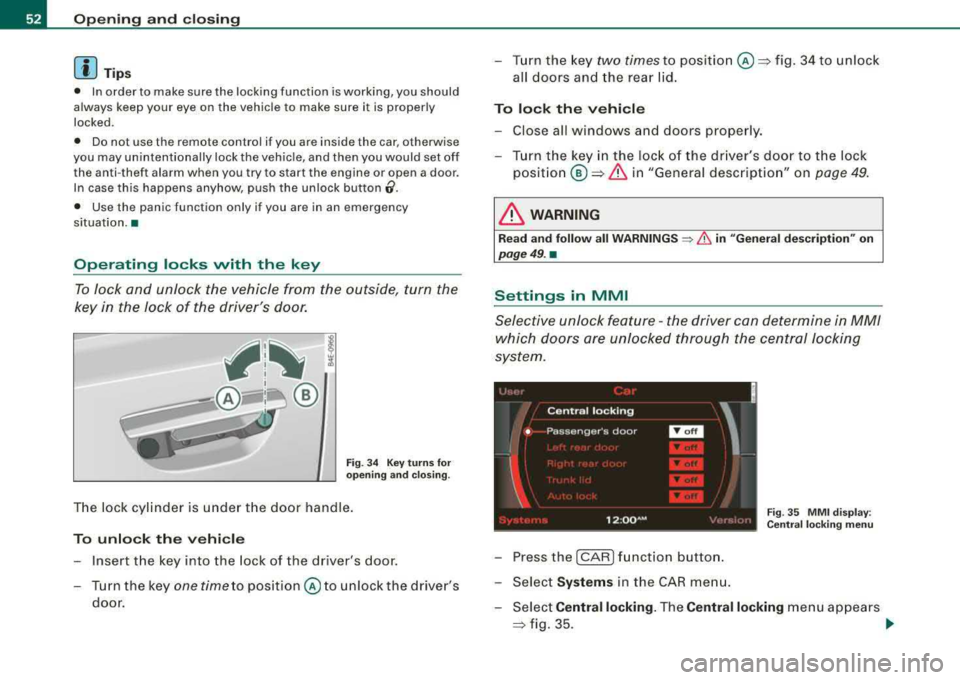
To lock and unlock the vehicle from the outside, turn the
key in the lock of the driver's door.
Fig. 34 Key turns for
opening and closing .
The lock cylinder is under the door handle.
To unlock the vehicle
Insert the key into the lock of the dr iver's door.
Turn the key
one time to position © to unlock the driver's
door.
-Turn the key two times to position@=> fig. 34 to unlock
all doors and the rear lid.
To lock the vehicle
-Close all windows and doors properly.
-Turn the key in the lock of the driver's door to the lock
position®=> & in "General description" on page 49.
& WARNING
Read and follow all WARNINGS ~ & in "General description" on
page 49. •
Settings in MMI
Selective unlock feature -the driver can determine in MM/
which doors are unlocked through the central locking
system.
Fig . 35 MMI display :
Central locking menu
-Pressthe(CAR )function button.
-Select Systems in the CAR menu.
-Select Central locking. The Central locking menu appears
=> fig. 35. _,.
Page 61 of 404
for the power sun blinds* in the side windows . In addition to this,
t he rear climate contro l* is set to the
PA SS IV E mode. This means
that the climate controls in the front adjust the heating and venti la
tion in the rear of the
ve hicle => page 125.
[ i ] Tips
• I n order to activate the child safety lock on the left and the right
s ide, you have to press the two safety buttons in succession.
• Make certa in that the indica tor light in the corresponding safety
button illuminates when the child safety lock is activated .•
Advanced Key
A pplies to vehicles : with Advance d Key
Description
Opening your vehicle and starting the engine with the key
still in your pocket.
T he Advanced Key features is a keyless system which gives you the
possibility to lock and unlock your vehic le, as wel l as to start the
engine without having to use your key.
It does not matter if you have your key in your jacket pocket or in
your briefcase. As soon as you get within a certain distance to the
vehic le, t he system senses that your are approaching, it makes a
quick check to see if you are "authorized" and then it does the
following:
• unlocks the
veh ic le => page 60 .
• locks the vehicle => page 60.
• switches on the ignition and starts the engine when you press
t he [ START] button. You do not have to insert your key into the ign i
tion
lock=> page 131.
Controls and equip ment
Openin g and clo sing
& WARNING
• When you lock your vehi cle from out side , nobod y -espe cially
c hildren - should remain in side the vehicle. Remembe r, when you
lock the vehi cle from the out side the windo ws cannot be opened
from the in side.
• Wh en yo u le ave the vehi cle , al ways remove the ignition ke y and
t ak e it with you. Thi s will prevent pa ssenger s (children , for
e x ample ) from accident ally bein g locked in th e vehicle should the y
accid entally pre ss the powe r lo cking swit ch in the door s.
• Do not l eav e children in side the vehi cle un super vis ed . In an
emerg ency it would be impo ssible to open the doors from the
out side without the key .
[ i ] Tip s
• For the Advanced Key to properly work, you must a lways have
your vehicle key with you .
• The vehic le will lock or un lock the doors only if an authorized key
comes within 5 ft (1 .5 meters) from one of the vehic le doors or the
rear lid .
• You can st ill lock or unlock your vehic le using the remote control
key buttons, however the se lector lever must in the P position .•
Page 63 of 404
& WARNING (continued)
lock the vehicle from the outside the windows cannot be opened
from the inside.
• When you leave the vehicle, always remove the ignition key and
take it with you. This will prevent passengers (children, for example) from accidentally being locked in the vehicle should they
accidentally press the power locking switch in the doors.
• Do not leave children inside the vehicle unsupervised. In an
emergency it would be impossible to open the doors from the
outside without the key.
[ i] Tips
It is not possible to open the door immediately after it has been
locked. This is intentional to allow you to check proper locking of all
vehicle doors. •
Anti-theft alarm system
The anti-theft alarm triggers an alarm if anyone attempts
to break into the vehicle.
The anti-theft alarm system triggers an audible alarm and turns on
the emergency flasher if an unauthorized interference with the
vehicle is sensed by the system.
How is the anti-theft alarm system switched on?
The anti-theft alarm system is switched on when you lock the
vehicle. The system is activated approximately 30 seconds after the
vehicle is locked . The indicator lights on top of the driver's and front
passenger's door trim start flashing rapidly for 30 seconds and then
blink slowly.
Controls and equip ment
Opening and closing
How is the anti-theft alarm system switched off?
The anti-theft alarm system is switched off only when you unlock
your vehicle . If you do not open a door within 60 seconds after you
have unlocked with the remote control, the vehicle will lock itself
again automatically.
When will the anti-theft alarm system be triggered?
When the vehicle is locked, the alarm system monitors and protects
the following parts of the vehicle:
• engine compartment
• luggage compartment
• doors
• ignition
When the system is activated, the alarm will be triggered if one of
the doors, the engine hood or the rear lid are opened, or if the igni
tion is turned on. The anti-theft alarm system will also go off when
the battery is disconnected.
Unlocking the rear lid by inserting and turning the key inside the
rear lid locking cylinder will trigger the optical and acoustic alarm .
You can also trigger the alarm by pressing the PANIC button on your
remote control. This will alert other people in case of emergency.
Press the
PANIC button again to turn off the alarm.
How is the anti-theft alarm switched off when
triggered?
The alarm system is switched off when you unlock the vehicle or
when the ignition is switched on. The alarm will also switch itself off
when it comes to the end of its cycle .
Emergency flasher and horn
The emergency flasher will blink briefly and the horn sounds when
the doors, engine hood and rear lid are properly closed.
If the emergency flashers do not blink, or the horn does not sound,
check the doors, engine hood and rear lid to make sure they are
properly closed. If you close a door, the hood or the rear lid with the
.,,.
Page 64 of 404
![AUDI S8 2008 Owners Manual Opening and closing
anti-theft a larm switched on, the emergency flashe rs wi ll blink and
t he horn wil l so un d only a fter y ou have cl ose d t he do or or lid.
[ i ] Tips
For](/img/6/57619/w960_57619-63.png "AUDI S8 2008 Owners Manual Opening and closing
anti-theft a larm switched on, the emergency flashe rs wi ll blink and
t he horn wil l so un d only a fter y ou have cl ose d t he do or or lid.
[ i ] Tips
For")
Opening and closing
anti-theft a larm switched on, the emergency flashe rs wi ll blink and
t he horn wil l so un d only a fter y ou have cl ose d t he do or or lid.
[ i ] Tips
For t he anti -th eft a larm sy stem to func tion p roperl y, ma ke su re a ll
veh ic le doors and windows are closed before leaving the vehicle .•
Power windows
Controls
Fig . 48 Driver' s doo r:
power window
switches
Fig . 49 Driver' s door :
S w itches (veh icl es
with power child safety
lock )
Switches for front door windows
© opera tes the wi ndow in the driver 's d oor.
@ opera tes the windo w in the fr ont pass enger's door.
Switches for rear windows
© operates t he left rea r w in dow.
@ operates the r ight rear window.
Safety switch
© Safety switch for rear window operation .
& WARNING
• Do not leave children unattended in the vehicle , especially with
access to vehicle keys. Unsupervised use of the keys can result in
starting of the engine and use of vehicle systems such as power
windows , etc. which could result in serious injury.
• Remember -you can still open or close the power windows for
about ten minutes after the ignition is switched off . Only when
either of the front doors are opened are the power windows
switched off .
• Be careful when closing the windows. Check to see that no one
is in the way, or serious injury could result!
• Always remove the ignition key whenever you leave your
vehicle.
• If you lock your vehicle from the outside , no one , especially chil
dren , should remain in the vehicle.
• Do not stick anything on the windows or the windshield that
may interfere with the driver 's field of vision .
[ i] Tips
• I n addition to the switches in the driver 's door there is a separate
switch in each doo r fo r the powe r window in that
door => page 6 4,
fi g. 50 . ..
Page 69 of 404
-To tilt the roof down to any intermediate position pull and
hold
the switch until the roof reaches the desired posi
tion.
& WARNING
Improper use of the power sunroof can cause serious personal
injury.
• Be careful when closing the power sunroof. Not paying atten
tion could cause you or others to be trapped and injured as the
roof closes.
• Always take the key with you when you leave the vehicle to
prevent injuries caused by the roof closing
• Never leave children or persons requiring assistance alone in
the vehicle, especially when they could access the vehicle keys.
Unsupervised use of the keys can result in the engine being
started or use of vehicle systems such as the power windows, etc.
which could result in serious injury. The doors could be locked
with the remote key, delaying help in an emergency.
• The power sunroof will continue to operate until the ignition
key has been removed and one of the front doors has been
opened. •
Power emergency closing
The sunroof can still be closed electrically if for some
reason the overload protection function becomes acti
vated.
The power sunroof is equipped with an overload protection
feature. If, under normal conditions, the power sunroof will
not close, you can close it using this feature .
-Turn the rotary switch to position @=>page 65, fig. 53.
Controls and equip
ment
Opening and closing
-Now pull the switch and hold it in this position until the
power sunroof closes completely.
& WARNING
Improper use of the power sunroof can cause serious personal
injury.
• Be careful when closing the power sunroof. Not paying atten
tion could cause you or others to be trapped and injured as the
roof closes.
• Always take the key with you when you leave the vehicle to
prevent injuries caused by the roof closing
• Never leave children or persons requiring assistance alone in
the vehicle, especially when they could access the vehicle keys.
Unsupervised use of the keys can result in the engine being
started or use of vehicle systems such as the power windows, etc.
which could result in serious injury. The doors could be locked
with the remote key, delaying help in an emergency.
• The power sunroof will continue to operate until the ignition
key has been removed and one of the front doors has been
opened. •
Page 71 of 404
Clear vision
Lights
Switching the headlights on and off -'t/-·
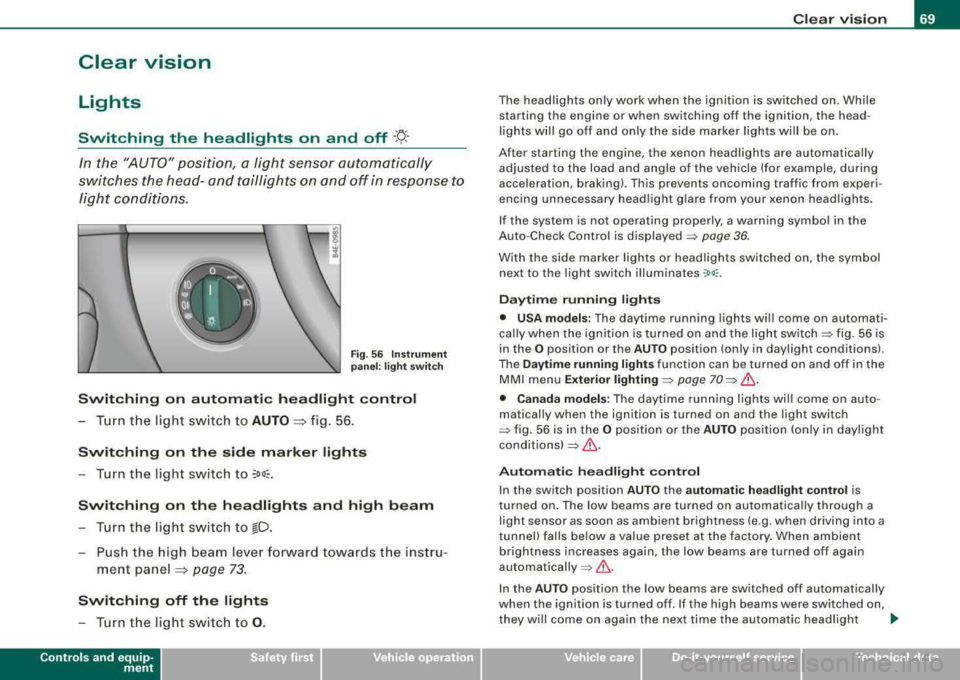
In the "AUTO" position, a light sensor automatically
s w itches t he head- and taillights on and off in respo nse to
l igh t con ditions.
Fig . 56 In stru ment
pan el: lig ht sw itch
Switching on automatic headlight control
- T urn th e light switch to AUTO => fig. 56 .
Switching on the side marker lights
- Turn the light switch to ~oo~.
Switching on th e headlights and high beam
- T urn t he light swi tch to io.
- Push the high beam leve r forw ard towards t he instru -
me nt panel
=> page 73 .
Switching off the lights
- T urn t he light switch to 0 .
Contro ls a nd eq uip
ment
Clear vision
The head lights only work when the ignition is switched on . While
starting the engine or when switching off the ignition, the head
lights will go off and only the side marker lights will be on.
After starting the engine, the xenon headlights are automatically
adjus ted to the load and angle of the vehic le (for example, during
acceleration, braking) . This prevents oncoming traffic from experi
encing unnecessary headlig ht g lare from your xenon head ligh ts .
If the system is not operating properly, a warning symbol in the
Auto -Check Control is displayed
=> page 36.
With the side marker lights or head ligh ts switched on, the sym bol
next to the light switch illuminates
:oo: .
Daytime running lights
• USA models : The daytime running lights wi ll come on automati
ca lly when the ig nition is turned on and the ligh t
switch=> fig. 56 is
in the
O position or the AUTO position (only in day light conditions).
The
Daytime running lights function can be turned on and off in the
MMI menu
Exterior lighti ng => page 70 => & .
• Canada models: The dayti me ru nn ing lights wi ll come on auto
matically when the ignition is turned on and the light switch
::::> fig. 56 is in the O position or the AUTO p o siti on (only in daylight
conditions)
=> & .
Automati c headligh t control
In the switch position AUTO the a utomatic headligh t cont rol is
turned on . The low beams are turned on automa tica lly through a
light sensor as soon as ambient brightness (e.g . when driving into a
tunnel) fa lls below a value preset at the factory . When ambient
brightness increases again, the low beams are turned off again
automatically =>& .
In the AUTO pos it ion the low beams are switched off automatically
when the ignition is turned off. If the high beams were switched on,
they w ill come o n again the next time the automatic head ligh t
~
Vehicle care I I irechnical data
Page 83 of 404
ture on the windshield. The rain sensor wiper intervals depend on
t he sensitivi ty setting as well as vehic le speed . Dur ing brief s tops,
wiper motion wil l adjust in re lation to the amount of rain on the
windshield .
During br ief stops, e.g. at a red light, wiper mot ion wil l auto mati
ca lly be reduced to the next lower speed . Wipers a lready turning at
low speed. change to i nterm ittent w ip ing.
When the ignition is turned on, the washer jets are heated .
With the low beam headlights switched on, p ull the wiper lever
towards you only briefly to clean the windshield. Ho ld ing the w iper
lever wou ld a lso engage the headlight washer system each time you
clean the w inds hie ld and wou ld dra in t he washer flu id reservoir
pr ematurely .
& WARNING
• Wiper bl ade s are cruc ial for safe driving! Only when they are in
good condition are they able to clear the window s properly to
provide uncompromising visibilit y. Worn or damaged wiper blades
are a safety hazard
::::> page 82 , "In stalling new wiper blade s"!
• The rain sensor is only designed to a ssist and support the
driver . It r em ains entirely th e driver' s respon sibility to monitor
outside weather condit ions and to manually activate the wipers as
s oon a s rain or drizzle reduces visibility through the windshield.
• The windshield mu st not be treated with water-repellent mate
rials . They c an in crea se gl are under poor visibility condition s such
as wetness , darkness , or when the sun is low on the horizon. In
addition , they can cau se the wind shield wipers to chatter.
0 Note
In free zing or near freezing conditions:
• Always check that the wiper b lades are not frozen to the glass
be fore you turn the w ipe rs on. Loosen a wiper b lade w hich is frozen
Controls and equip ment
Clea r vision
in place before operating the wipers to prevent damage to the wiper
bl ade or the wiper motor.
• Do not use the wipers to clear a frosted window. Using the
wipers as a conve nien t ice scraper will des troy the wiper blades .
• Before you take your vehic le to an automatic car wash, make sure
you have the w inds hield w iper system switched o ff (lever in p osition
O), otherwise the windshield wiper system could get damaged in the
car was h if it should suddenly come o n.
[ i ] Tips
• Make sure the washer flu id reservo ir in the engine compartmen t
is topped off before going on a long trip . Look
up:::> page 323 for
check ing and f illing the washer conta iner.
• I f you sw itch off the ignition with the windshield wiper lever st ill
in the inte rval wi pe pos ition and t hen com e back a wh ile la ter a nd
drive off, the rain sensor wil l reactivate itself after the vehicle speed
has e xceeded 4 mph (6 km/h) .
• Worn or dirty windshie ld wiper b lades cause smearing which
ca n affect t he opera tion of the ra in senso r. Check the condi tion of
your windshield wiper b lades regu lar ly . •
Headlight washer system
The he adlight washer sy stem cle ans the he adlig h ts.
-Oper ate the win dshiel d w ip er/was her sy stem G) wit h th e
hea dlights t urned o n by ho ld ing th e l ever fo r lo nge r than
on e seco nd ::::.,
page 80, fig. 76.
The washe r jets extend f orward out of the fron t bumper dr iven by
water pressure to spray the front head lights with water .
You should inspect the head lights regu lar ly (for examp le when refu -
e ling) a nd c lean o ff any sol id dirt or i nsects from the lenses.
~
Page 84 of 404
Clear vision
To ensure the system works properly in winter, keep the washer jets
free of snow and remove any ice using a de -icing spray. •
Service position
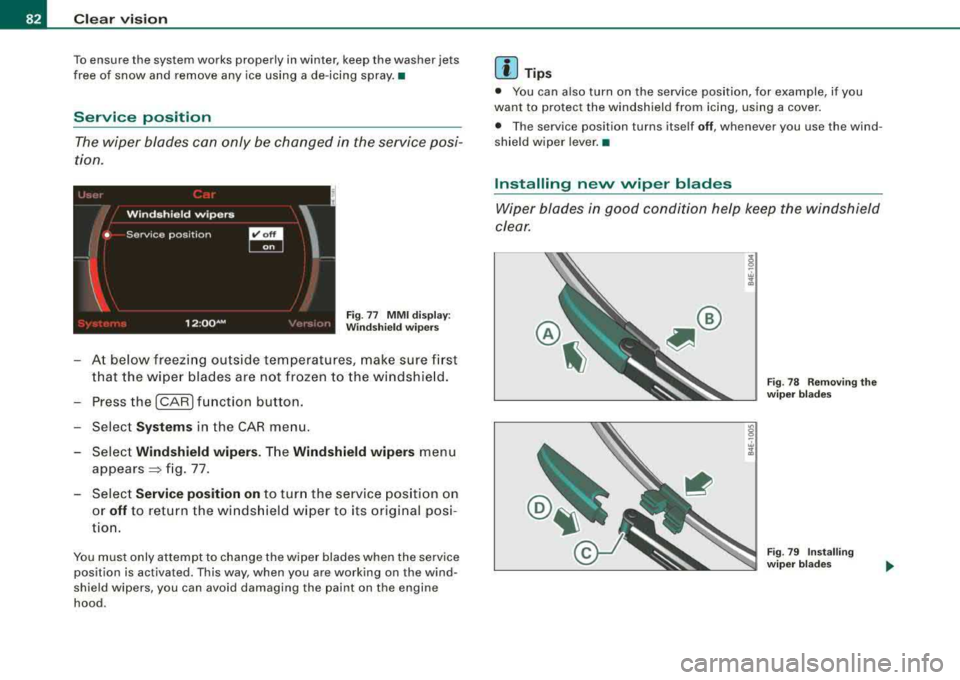
The wiper blades can only be changed in the service posi
tion.
Windshield wipers
'
• Serv ice posit ion
~ I I
12 :00 AM • ·I , I; J:: Fig . 77 MMI display :
Windshield wipers
-At below freezing outside temperatures, make sure first
that the wiper blades are not frozen to the windshield.
- Press the
I CAR I function button.
Select
Systems in the CAR menu.
Select
Windshield wipers . The Windshield wipers menu
appears~ fig. 77.
- Select
Service position on to turn the service position on
or
off to retu rn the windshield wiper to its original posi
tion.
You must only attempt to change the wiper blades when the service position is activated. This way, when you are working on the wind
shield wipers, you can avoid damaging the paint on the engine
hood.
[ i ] Tips
• You can also turn on the service position, for example, if you
want to protect the windshield from icing, using a cover.
• The service position turns itself
off, whenever you use the wind
shield wiper lever.•
Installing new wiper blades
Wiper blades in good condition help keep the windshield
clear.
g
. = .!i
Fig . 78 Removing the
wiper blades
Fig. 79 Installing
wiper blades