engine AUDI S8 2008 Workshop Manual
[x] Cancel search | Manufacturer: AUDI, Model Year: 2008, Model line: S8, Model: AUDI S8 2008Pages: 404, PDF Size: 52.7 MB
Page 170 of 404
___ A_ u_ t_ o_ m_ a_ t_ i_c _ t_r _
a _n _ s_ m_ is_ s_ io_ n _______________________________________________ _
Applies to vehicles: with tipt ronic-steeri ng wheel
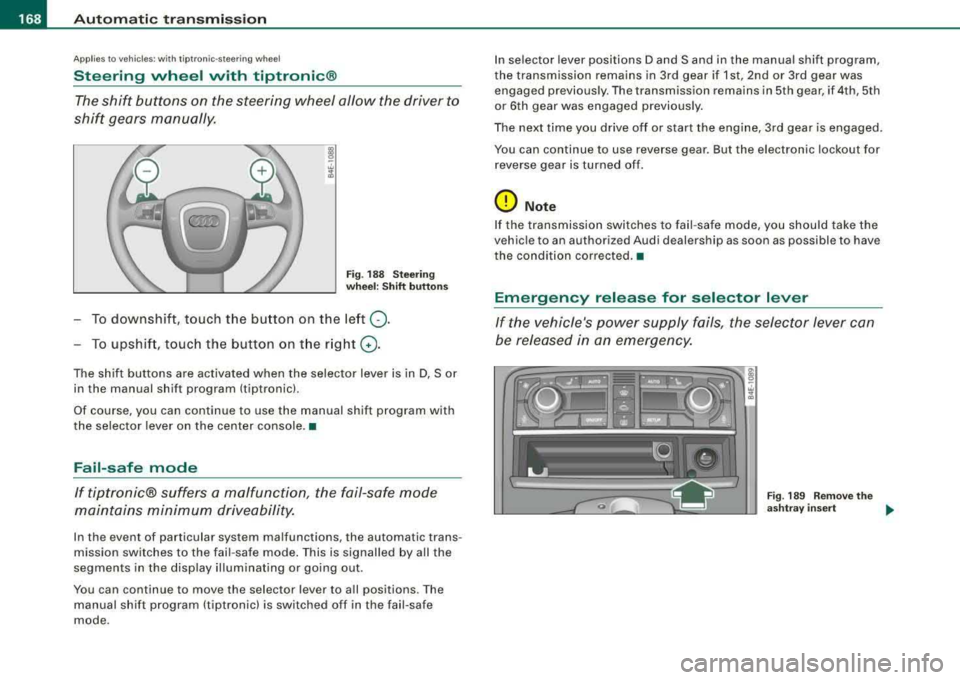
Steering wheel vvith tiptronic ®
The shift buttons on the steering wheel allow the driver to
shif t gears manually .
Fig . 18 8 S te ering
w heel : Shift button s
To downshift, touch the button on the left 0-
To upshif t, touc h the button on t he r ight G) .
The shift buttons are activated when the selector lever is in D, Sor
in the manual shift program (tiptronic).
Of course, you can continue to use the manual shift program with
the selector lever on the center console. •
Fail-safe mode
If tiptronic® suffers a ma/function, the fail-safe mode
maint ains minimum driveability.
In the event of particular system malfunctions, the automatic trans
mission switches to the fail -safe mode . This is signalled by all the
segments in the disp lay il lum inating or going out .
You can continue to move the selector lever to a ll positions. The
manual shift program (tiptronic) is switched off in the fail-safe
mode . I
n selector lever positions D and Sand in the manual shift program,
the transmission remains in 3rd gear if 1st, 2nd or 3rd gear was engaged previous ly. The transmission rema ins in 5th gear, if 4th, 5th
or 6th gear was engaged previous ly .
The next time you drive o ff or start the engine, 3rd gear is engaged .
You can continue to use reverse gear . But the electronic lockout for
r everse gear is turne d of f.
0 Note
If the transmission switches to fail -safe mode, you should ta ke the
vehic le to an authori zed Audi dealership as soon as possible to have
the condition co rrected. •
Emergency release for selector lever
If the vehicle's power supply fails , the selector lever can
be released in an emergency.
Fig . 18 9 R emo ve the
a sh tray insert
..
Page 188 of 404
___ A_ d_a_ p_ ti_v _ e_ A_ ir_ S_u_ s_ p_e _n_ s_ io_n ___________________________________________ _
Chassis Controls
Four different driving modes can be set by the driver.
The automatic control processes are speed -and time -dependent.
For example, it is not possible to raise the suspension to the lift
mode above certain speeds .
When a speed of about 75 mph (120 km/h) is exceeded for more than 30 seconds, the vehicle is automatically lowered approximate ly 1
inch (25 mm) to a level suitable for highway speeds, except in the
standard mode . Road holding is optim ized as a result of the lower
center of gravity and fuel consumption is reduced as a result of
reduced wind resistance .
Level adjustment
lift
standard
automatic
dynam ic
automatic Ground
clearan ce
about 5 .7 inches (145 mm)
a bout 4.7 inches ( 120 m m)
about 4 .7 inches (120 mm)
about 3.9 inches (100 mm)
Se lect the automatic mode if you prefer a suspension setting
e m phas izing comfort . Damping characterist ics emphasiz ing
comfort are selected in this mode.
• Lowering : When a speed of abou t 75 mph ( 120 km/h) is excee ded
for more than 30 seconds, the vehic le is automatically lowered by
about 1 inch (25 mm) .
• Raising : The vehic le is automat ical ly raised again if the speed
fa lls bel ow about 44 mph (70 km/h) for a per iod of 120 seconds. The
vehic le is raised immediate ly when speed fa lls below about 22 mph
(35 km/h) .
dynami c
Select the sport mode if you prefer a sporty suspensio n setting . In
this mode, the veh ic le is lowered whi le it is still stationary and sporty damping characteristics are selected
. The warning
light ~
in the instrument cluster will c ome on for a few seconds just to
remind you of the reduced ground clearance .
I f you switch off the engine while the vehic le is in the dynamic mode
and then switc h on the ign it ion once aga in,
t h e ~ warning lig ht
wi ll also come on again for a few seconds.
• Lowering : When a speed of abou t 75 mph (120 km/h) is exceeded
for more than 30 seconds , the vehicle is automatica lly lowered by an
addi tiona l 0 .2 in (5 mm).
• Raising : The vehic le is automatically raised again if the speed
f alls below ab out 44 mph (70 km/ h) for a per iod of 120 seconds . The
vehic le is raised immediate ly when speed fa lls below about 22 mph
(35 km/h) .
sta nd ard
Se lect the s tandard mode if you desire a suspensi on se tt ing with a
special emphasis on comfort . In the standard mode there is
n o
lo wer ing of t he suspension . Even at high speeds, the vehicle stays
at the same level. Damping characteristics with a decided emphasis
on com fort are selected in this mode.
lift
Se lec t t he lif t mode when you have to travel over poor secti ons of
road (e .g . trails). In the lift mode, the vehic le is raised by 1 inch (25
mm ) compared to norma l level wh ile it is st ill stati onary a nd
damping characteristics are ad justed to emphasize comfort.
T he lift mode can be act ivated on ly at speeds below 50 mph (80
k m/h). When a speed of about 62 mph (100 km/h) is exceeded, the
system automatical ly leaves lift mode and the mode set previously
(standard, au tomat ic, dynamic) is activated aga in. •
Page 193 of 404

___________________________________________________ H_ o_m_ e_ L_ i_ n _ k_ ®_ R __ l!III
Homelink ®
Universal remote control
Applies to vehicles: w ith Home link® unive rsa l remo te cont rol
General information
The HomeLink® feature can learn up to three radio
frequency codes for most current transmitters used for
operating garage doors, estate gates, home or outdoor
lighting systems, and other devices.
You must first program the Homelink® transmitter before you can
use the
system=> page 191, "Programming the Homelink® trans
mitter".
In order to program the Homelink® transmitter for devices utilizing
rolling code , a second person on a ladder who can safely reach the
garage door opener motor is recommended. It is also necessary to
locate the
"learn" button on your garage door opener motor . Refer
to the operating instructions for the opener, as the location and
color of this button may
vary by manufacturer.
You can still use the original remote control for the device at any
time.
& WARNING
• Never use the Homelink"" transmitter with any garage door
opener that does have not the safety stop and reverse feature as
required by federal safety standards. This includes any garage
door opener model manufactured before April 1, 1982.
• A garage door opener which cannot detect an object, signaling
the door to stop and reverse does not meet current federal safety standards . Using a garage door opener without these features
increases risk of serious injury or death.
Controls and equip ment
& WARNING (continued)
• For safety reasons never release the parking brake or start the
engine while anyone is standing in front of the vehicle.
• A garage door or an estate gate may sometimes be set in
motion when the Homelink® remote control is being
programmed. If the device is repeatedly activated, this can over
strain motor and damage its electrical components -an over
heated motor is a fire hazard!
• To avoid possible injuries or property damage, please always
make absolutely certain that no persons or objects are located in
the range of motion of any equipment being operated. •
Applies to vehicles : wit h Home link ® uni vers al remote con trol
Programming the Homelink ® transmitter
The transmitter is programmed in two phases. For rolling
code transmitters, a third phase is also necessary.
f ( ~ ~
i
s: 0
,1, .., Cl)
ll
Fig . 213 Overhead
console: Homelink®
keypad
~
Page 194 of 404
--~H~o~m~e:_!L~i~n~k~®~ ----------------------------------------------
Fig. 214 Front bumper,
driver side: location of
transmitter unit
Phase 1: programming the overhead keypad
1. Make sure your vehicle is w ithin operat ing range of the
remote controlled garage door opener .
2. Set the parking
brake ::::,&, in "General information".
3. Turn the ignition on. Do not start the engine!
4. Press and hold the two outside Homelink ® buttons
(D
and @ for approxim~tely 20 sec _onds until indicator
light @::::,
page 191, fig. 213 begins to flash. Then
release both buttons. Do not hold the buttons for longer
than
30 seconds.
- This procedure only needs to be performed
once. It
erases the factory-set default codes and does not have to
be repeated to program add itional remote controls.
5. Press and hold the Homelink ® button
(D , ® or @ until
the indicator light @starts flashing
slowly. Release the
button.
- The system will remain in programming mode for 5
minutes.
Go to the front of the vehicle and proceed with
phase 2.
Phase 2:
programming the bumper mounted transmitter
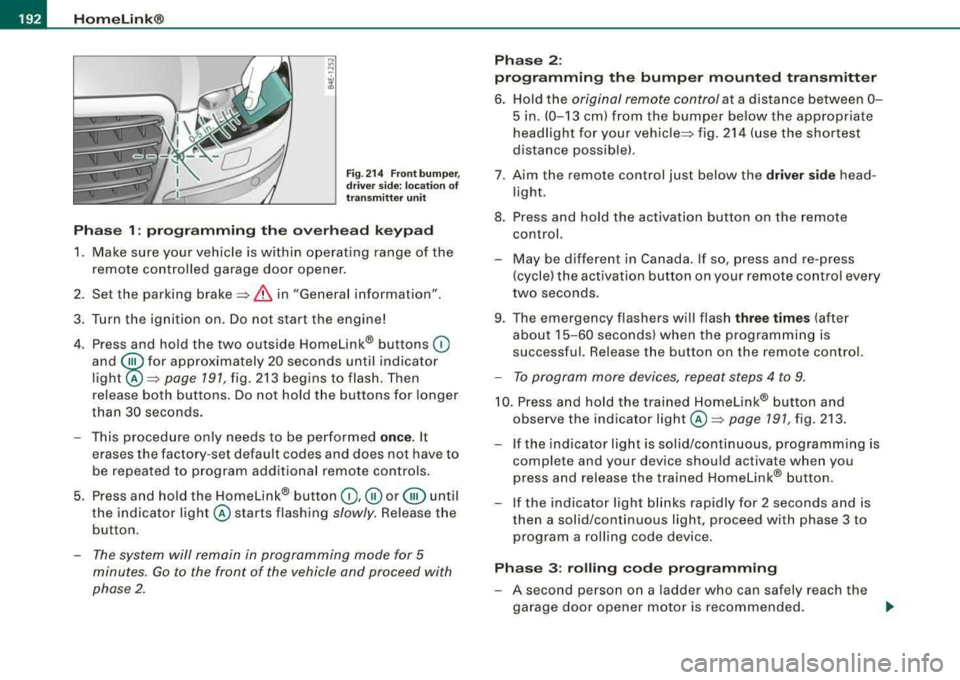
6. Hold the original remote control at a d istance between 0 -
5 in. (0-13 cm) from the bumper below the appropriate
headlight for your
vehicle ::::, fig. 214 (use the shortest
distance possible).
7 . A im the remote control just below the
driver side head
l ight.
8. Press and hold the activation button on the remote control.
- May be different in Canada. If so , press and re-press
(cycle) the activation button on your remote control every
two seconds .
9. The emergency flashers will flash
three times (after
about
15-60 seconds) when the programming is
successful. Release the button on the remote control.
- To program more devices, repeat steps 4 to 9.
10. Press and hold the trained Homelink® button and
observe the indicator
light @=:> page 191, fig. 213.
If t he indicator light is solid/continuous, programming is
complete and your device should activate when you
press and release the tra ined Homelink® button.
-If the indicator light blinks rapidly for 2 seconds and is
then a solid/continuous light, proceed with phase 3 to
program a roll ing code device.
Phase 3: rolling code programming
-A second person on a ladder who can safely reach the
garage door opener motor is recommended.
..,
Page 212 of 404
___ s_a_ f_ e_ t-= y_ b_e_ l_ t _s _______________________________________________ _
-Make sure that your passengers also b uckle up and pro p
erly wea r th eir sa fety be lts.
Protect children wit h a c hild restraint sys tem appropriate
for the size and age.
The warning light ~ in the instrument cluster lights up when the
ignition is switched on as a reminder to fasten the safety belts. In
addition , you will hear a warning tone.
After the ignition is switched on, the warning light in the instrument cluster will a lways come on for about 6 seconds and if the driver has
not fastened the safety belt, a warning tone will also sound for
about 6 seconds . As soon as the driver has fastened the safety belt,
the warning tone will stop and the warning light will go out .
If the driver or front seat passenger have not buckled -up within
about 10 seconds after the warning tone has stopped and the
vehicle is moving faster than about 15 mph, the warning tone will
sound again for about 6 seconds and then s top for 24 seconds and
then repeat this reminder sequence for a maximum of 2 minutes. At
speeds be low 5 mph, the warning to ne will not sound.
Fa sten your safe ty belt and make su re that your p assengers al so
properl y put on their s afet y belts .
& WARNING
• Safety belts are the single mo st effective mean s available to
reduce th e risk of ser ious in jur y a nd death in aut omobile acci
dent s. For your prote ction and that of your pas sengers , alway s
c orrectly wear safety belt s when t he v ehicle is moving .
• Failure t o pay attention to th e warning light that come on,
c ould lead to per sonal injur y.•
Why safety belts?
Frontal collisions and the law of physics
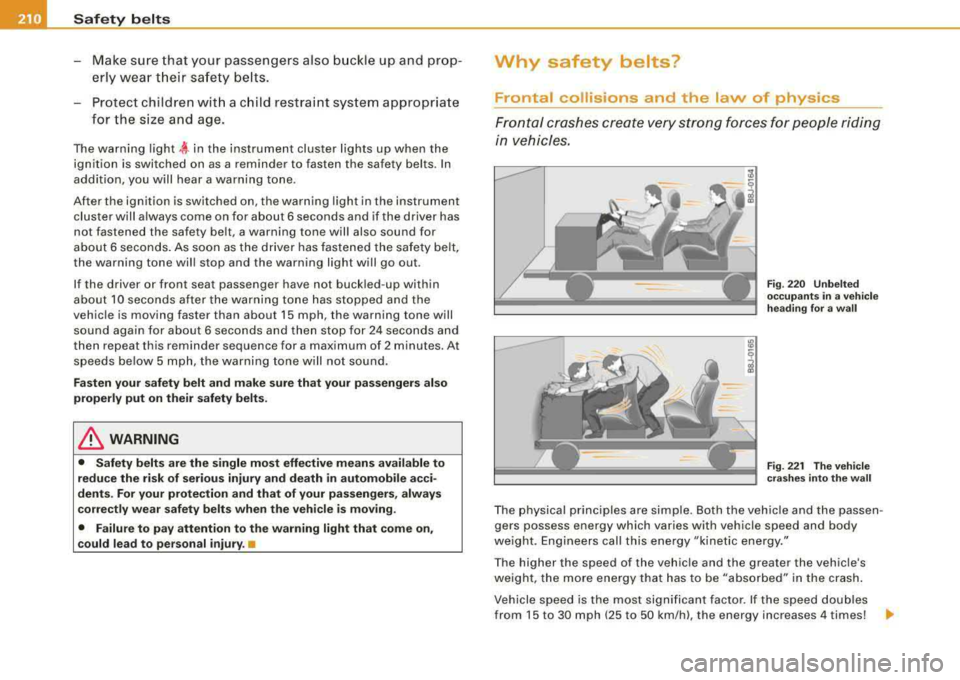
Frontal cras hes cre ate very strong forces for people ridi ng
in vehicles.
F ig . 22 0 Unbel te d
occ upants in a ve hicle
h ead ing for a w all
F ig . 22 1 The vehi cle
c ras hes in to th e wa ll
The physical principles are simple. Both the vehicle and the passen
gers possess energy which varies with vehicle speed and body
we ight . Engineers call this energy "kinetic energy ."
T he higher the speed of the vehicle and the greater the vehic le's
we ight, the more energy that has to be "absorbed" in the crash .
Vehicle speed is the most signi fican t factor. If the speed doubles
from 15 to 30 mph (25 to 50 km/h), the energy increases 4 times!
.,
Page 214 of 404
lfflJ _ ___.:::S:,::a ~f ..::e :..::t Ly _ b~ e:.:.:lt ~s::._ _____________________________________________ _
Safety belts protect
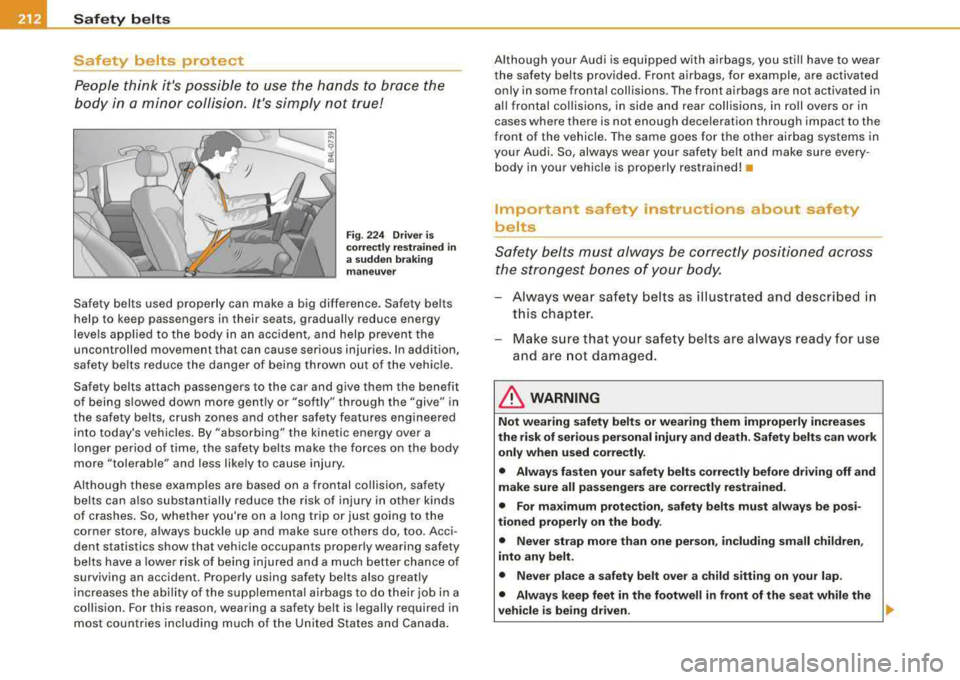
People think it's possible to use the hands to brace the
body in a min or c ollision . It's simply not true!
Fig . 22 4 Driv er is
c orr ectly r est rai ned in
a su dd en braki ng
m aneuver
Safety belts used properly can make a big difference. Sa fety belts
help to keep passengers in their seats, gradually reduce energy
levels app lied to the body in an accident, and help prevent the
uncontrolled movement that can cause serious injuries. In addition,
safety be lts re duce the danger of being thrown out of the vehic le .
Safety belts attach passengers to the car and give them the benefit
of being s lowed down more gently or "softly" through the "give" in
the safety belts, crush zones and other sa fety features engineered
into today's vehicles. By "absorbing" the kinetic energy over a
longer pe riod of time, the sa fety belts make the forces on the body
more "tolerable" and less likely to cause injury .
Altho ugh these examples are based on a frontal co llision, safety
belts can a lso substantially reduce the risk of injury in other kinds
of crashes . So, whether you're on a long trip or just going to the
corner store, a lways buckle up and make sure others do, too. Acci
dent statistics show that vehicle occupants properly wearing safety
belts have a lower ris k of being injured and a much better chance of
surviving an accident. Properly using safety belts also greatly
increases the abi lity of the supplementa l airbags to do their job in a
collision . For th is reason, wearing a safety belt is legally required in
most countries including much of the United States and Canada. Although your Audi is equipped with airbags, you sti
ll have to wear
t he safety belts provided . Fron t air bags, for example, are activated
only in some frontal collisions. The front a irbags are not activated in
a ll fro ntal co llisions, in side and rear coll isions, in ro ll ove rs or in
cases where there is not enough dece leration through impact to the
front of the vehicle . The sa me goes for the other airbag systems in
you r Aud i. So, always wear your safety belt and make sure every
body in your vehic le is properly restrained! •
Important safety instructions about safety
belts
Safety belts must always be correctly posi tio ned across
t he strongest bones of your body.
- Al ways wear safety belts as illust rated and described in
th is chapte r.
-Make s ure tha t yo ur sa fety be lts ar e always ready for us e
and are not damage d.
& WARNING
Not wearing safety belts or w earing them improperl y increas es
the risk of serious per sonal injury and death . S afety belts ca n work
onl y when used corre ctl y.
• Alway s fa sten your s afety belt s correctly before driving off and
make sure all p assengers ar e correctly restrain ed.
• For ma ximum protect ion , safet y belts must always be po si
tioned properly on the body .
• Never strap more than one person , including sm all ch ildren ,
into any belt.
• Never pla ce a safety belt ove r a child sitting on your lap .
• Alway s keep feet
in the footwell in front of the seat while the
vehicle is being driven .
.,_
Page 270 of 404
lll.___l_n _t _e _ll _ig=- e_n _ t_ te_ c_h _n_ o_ lo...; g'"'-=- y ___________________________________________ _
Intelligent technology
Notice about data recorded by
vehicle control modules
Your vehicle is not equipped with an Event Data Recorder (EDRl,
installed by some manufacturers for the express purpose of
capturing data for retrieval after an accident or crash event . EDR's
are sometimes called "crash recorders".
Some state laws restrict the retrieva l or downloading of data stored
by EDR's that were insta lled in a vehicle for the express purpose of
retrieving data after an accident or cras h event without the owner's
consent.
Although your vehicle is not equipped with an EDR, it is equipped
with a number of electronic control modules for various vehicle systems such as, for example, engine function, emission contro l, as
we ll
as for the a irbags and safety belts.
These electronic control modules also record vehic le-related data
dur ing norma l ve hicle opera tion for diagnost ic and repair purposes .
The recording capacity of the electronic control modules is limited
t o data (no sound is recorded) and only a small amount of data is
actua lly recorded over a very limited period of time and stored when
a system fault or other condition is sensed by a control unit. Some
of the data then stored may relate to vehic le speed, d irection,
braking as we ll as restraint system use and performance in the
event of a crash o r other condition . Stored data can only be read and
downloaded with special equipment. •
Electronic Stabilization Program (ESP)
General information
The ESP improves the vehicle stability.
I~
" "'
( ~ 1~ IA I 3-)
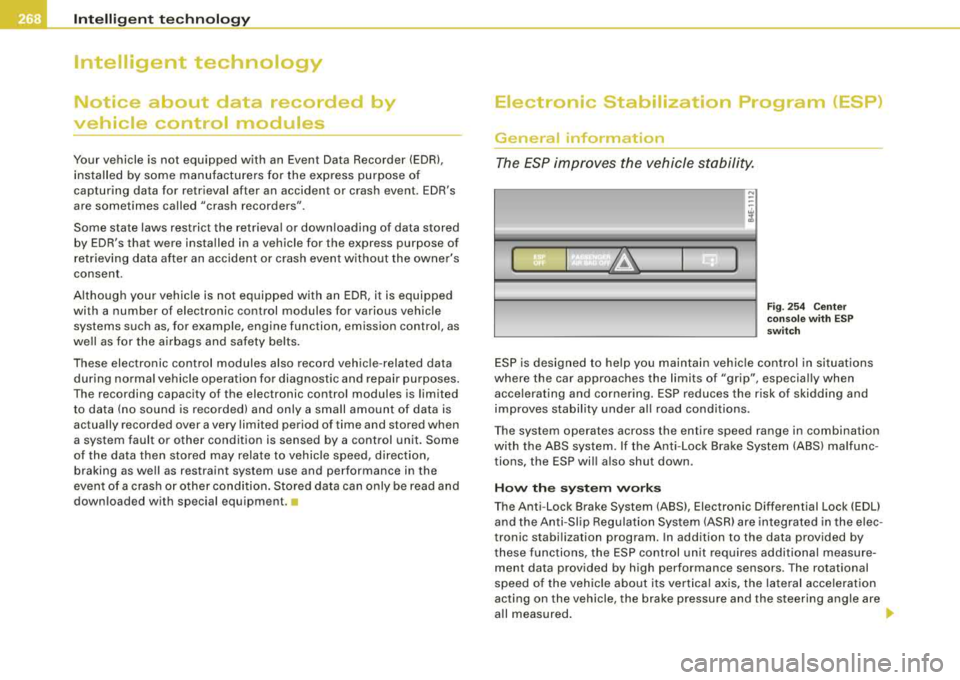
Fi g. 25 4 Cen ter
co nso le w it h ES P
sw itch
ESP is designed to he lp you maintain vehic le control in situations
where the car approaches the limits of "grip", especia lly when
acce lerating and cornering . ESP reduces the risk of skidding and
improves stabil ity under al l road conditions.
T he system operates across the entire speed range in combination
with the ABS system. If the Ant i-Lock Brake System (ABS) malfunc
tions, the ESP wi ll also shut down .
How the syste m w ork s
The Anti -Lock Brake System (ABS), Electronic Differential Lock (EDU
and the Anti-Sl ip Regulation System (ASR) are integrated in the e lec
tronic stabi lization program. In addition to the data provided by
t hese functions, the ESP control unit requires additional measure
ment data provided by high performance sensors . The rotational
speed of the veh ic le about its vertica l axis, the lateral acce lerat ion
acting on the vehicle, the brake pressure and the steering angle are
a ll measured . _,,,,
Page 272 of 404

llll.___l_n _t _e _ll _ig=- e_n _ t_ te_ c_h _n_ o_ lo...;g'"'-=- y ___________________________________________ _
Overheating of brakes
To prevent the disc brake of the braked wheel from overheating if
subjected to excessive loads, the EDL cuts out temporarily . The
vehicle remains operational and behaves in the same way as a
vehicle without EDL.
As soon as the brake has cooled down, EDL switches on again auto
matically.
& WARNING
• When accelerating on slippery surfaces, such as on ice or snow,
always be careful when depressing the accelerator pedal. Even
with the EDL working, the drive wheels can spin and reduce your ability to control your car. Risk of crash!
• The increased safety afforded by
EDL does not mean that you
can take safety risks. Always adapt your driving style to the road
conditions and traffic situation.
[ i] Tips
If a fault occurs in the ABS, the EDL is also not functioning. This is
indicated by the ABS warning
light => page 21. •
Anti-Slip Regulation System (ASR)
The Anti-Slip Regulation System prevents the driven
wheels from spinning when the car is accelerating.
General notes
The Anti-Slip Regulation System (ASR) is integrated in the electronic
stabili zation program (ESP) . When the vehicle starts up and acceler
ates, the wheels are prevented from spinning by adjusting the
engine power to match the amount of grip available from the road
surface.
How the system works
ASR performs automatically, i.e. without the driver's intervention.
With the aid of the ABS
sensors=> page 272, ASR monitors the
speed of the driven wheels. If the wheels start to spin, the engine
power is reduced automatically until the tires find enough grip to
lock onto the road surface . The system is active across the entire
speed range.
The ASR works in conjunction with the ABS. If a malfunction should
occur in the ABS, the ASR will also be out of action.
& WARNING
The increased safety afforded by ASR does not mean that you can
take safety risks. Always adapt your driving style to the road
conditions and traffic situation.
[ i] Tips
To ensure that the ASR works properly, all four wheels must be fitted
with identical tires Any differences in rolling radius of the tires can
cause the system to reduce engine power when this is not desired.
See
also=> page 336, "New tires and replacing tires and wheels ".•
Braking
General information
What affects braking efficiency?
Operating conditions and driving habits
The brakes on today's automobiles are still subject to wear,
depending largely on operating conditions and driving
habits=:,& .
On vehicles which are driven mostly in stop-and-go city traffic or
which are driven hard, the brake pads should be checked by your
authorized Audi dealer more often than specified in the
Warranty &
Maintenance booklet. _,,,
Page 273 of 404
_________________________________________ ___..!l~ n ~t ~e :..!.ll ~ig ~ e:.!::n ~t ~ t~ e~ c~ h~ n~o ~l~o ~g !Jy ~ --
•
On steep slo pes, you shou ld use th e braking effect of the engine .
This way, yo u preve nt u nn ecessary wear on the bra ke sys te m. If you
must use your brakes, do not hold the brakes down cont inuous ly .
Pu mp the brakes at in terval s.
Moisture or road salt
U nder ce rtain cond itions, for e xa m ple, w hen drivi ng thro ug h w ate r
or v ery h eavy rain, or even after washing your vehicle, the braking
e ff ect can be red uce d du e to mo is tu re ( or in fr eezin g c ond it ions ice)
on t he b rake pads . A few carefu l brake applicatio ns should dry off
t h e br ake pads o r rem ove a ny ice coatings .
The e ffective ness of t he b ra kes ca n b e red uced wh en th e ve hicle is
driven o n a salt -covered road and t he brakes are not used. Here too,
yo u should cle an off acc umulate d sa lt co atin g from b rake di scs a nd
pads w ith a few careful app lications of th e
brake=>&.
Corrosion
T here may be a tendency for dirt to build up on t he bra ke pads and
c o rr os ion t o form on th e dis cs if t he car is not driven reg ular ly or
only for short trips with little use of the bra kes .
If th e bra ke s are not us ed fr equ ent ly , or if corro sion h as form ed on
th e discs, it is adv isab le to cl ean off the pa ds and discs by braking
firm ly a few times from a moderate ly h igh
speed =>& .
Faults in the brake system
If y ou s ho uld n oti ce a
sud d en inc rea se in b rake pe dal trave l, then
one of the two b rake c ircuits may h ave
fai led =>& .
Low brake fluid level
M alfunctions can occur in the brake system if the b ra ke fluid leve l is
t oo low. Th e br ake fluid level is monitor ed ele ctr onic a lly .
& WARNING
• You should perform braking maneuvers for the purpose of
cleaning the brake system only if road conditions permit. Other
road users must not be put at risk -you may cause an accident!
& WARNING (continued )
• Before descending a steep grade , reduce speed and shift trans
mission into a lower gear or lower driving range . Do not ride the
brakes or hold the pedal down too long or too often . This could
cause the brakes to get hot and diminish braking efficiency .
• Do not "ride the brakes" by resting your foot on the pedal when
you do not intend to brake . This may cause the brakes to overheat ,
premature wear and increased stopping distance .
• Under certain climatic and operating conditions such as
passing through water, driving in heavy rain or after washing the
vehicle , the effectiveness of the brakes can be reduced . In winter,
ice can accumulate on the brake pads , linings , discs and drums .
Carefully apply brakes for a test. Brakes will dry and ice coatings
will be cleaned off after a few careful brake applications .
• Driving for an extended period of time on salt-covered roads
without using your brakes can also affect braking efficiency. Clean
off accumulated salt coating from brake discs and pads with a few
careful brake applications .
• If you damage the front spoiler , or if you install a different
spoiler, be sure the air flow to the front brakes is not obstructed.
Otherwise the brake system could overheat reducing the effective
ness of the entire brake system.
• Failure of one brake circuit will impair the braking capability
resulting in an increased stopping distance. Avoid driv ing the
vehicle and have it towed to the nearest Audi dealer or qualified
workshop. •
Brake booster
Th e brake boo ster adds ex tra braking po wer.
The b ra ke booster works wit h vacuu m press ure which is created
on ly wh en th e e ngi ne is
r un ning => & .
Page 274 of 404
-Intelligent technology
P:V:1--------=-- --=-=-------------
& WARNING
• Never let the vehi cle roll to a stop with the engine shut off .
• If the brake boo ster i s not working, for example when towing
your vehicle , or because the brake booster has so mehow been
damaged, the brake pedal must be pres sed considerably harder to
make up for the la ck of booster as sistan ce . •
Functioning of Anti-Lock Brake System (ABS)
AB S pre vent s th e wh eels fr o m lo ckin g up un der braking .
The ABS contributes effective ly to ve hicle control s ince it prevents
th e whee ls from
lo cking w hen t he brakes are a ppl ied. This mea ns
that the vehicle remains steerable and is less likely to skid.
With ABS you do not need to pump the brake . Just hold the brake
pedal down.
H owever, do not expect the ABS to shorten braking distance under
all cir cum stances. W hen drivin g on g ravel o r on new ly fallen s now
on top of icy surfac es, bra king distance may be even longer, there
fo re, unde r th ese circum stances, i t is especially i mporta nt th a t yo u
drive slow ly and with great care .
How the ABS system works
An automatic check is made when a speed of about 4 mph (6 km/h)
is reac hed . When this ha p pens, a pumping n oise can be hea rd.
If an indiv idua l wheel begins to rotate too s lowly in relation to
vehic le speed and tends to lock, the ABS automatica lly reduces
brake pressure to prevent that whee l from loc king .
T his automat ic adjustment process wil l cause a
slight vibration of
th e br ak e pe dal a nd some noises to ale rt you th at ve hic le sp eed
must be adapted to existing road and traffic conditions.
& WARNING
Although the ABS is very effe ctive , always remember that braking
capability is limited by tire traction. Alway s adjust your driving
speed a ccording to the road and traffi c conditions . Do not let the
extra safety afforded by the ABS tempt you into taking extra risks.
The ABS cannot overcome the laws of physics.
[ i ] Tips
• I f ABS is not funct io ni ng properl y, a wa rn ing li ght will co me o n.
See ~ page 21.
• I f a fault occurs in the A BS, the EDL is also not functioning. This
i s indica ted by the ABS wa rn ing l igh t.•
Brake assistant
The brake assis tant is desig ned to ach ieve the o ptim um
brakin g eff ec t.
The br ake assistan t helps to in cr eas e the effec tive b raki ng pow er
and thus to achieve a shorter stopping distance . If the driver
p re sses the b rake pe dal very q uick ly, the brake assistan t auto mati
ca lly boosts the brakin g force to the maximum level, up to th e point
whe re the a nti-lock b rake functi on (AB S) int ervenes to sto p the
w hee ls from loc king . You s hou ld t hen k eep th e br ake pedal pressed
until t he vehicle ha s braked to the required speed . The brake a ssis
t ant s witches itse lf off as soo n as you re lease t he bra ke pedal.
T he b rake assistant will not be ope rative if there is a malfunction in
th e ABS .
& WARNING
Please remember that the accident risk always increases if you
drive too fast , especially in corners or on a slippery road , or if you
follow the vehicle ahead of you too closely . Increased risk of an
~