brake sensor AUDI S8 2008 Owners Manual
[x] Cancel search | Manufacturer: AUDI, Model Year: 2008, Model line: S8, Model: AUDI S8 2008Pages: 404, PDF Size: 52.7 MB
Page 36 of 404
Driver inf orma tio n displ ay
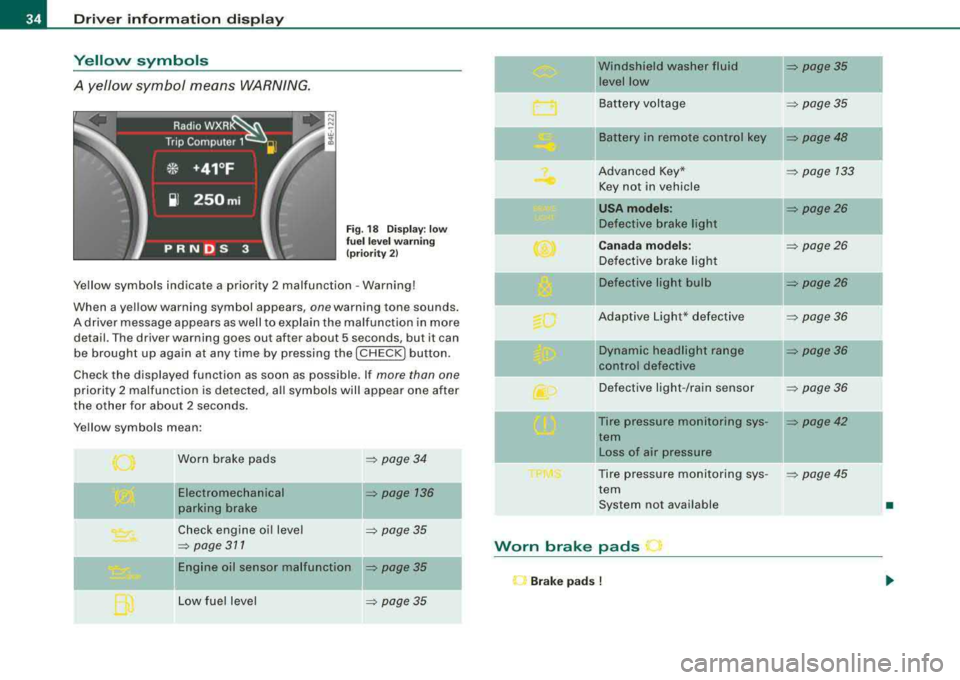
Yellow symbols
A yellow symbol means WARNING.
Fig . 18 Display: low
fu el l eve l warn in g
(pr iori ty 2)
Yellow symbols indicate a priority 2 malfunction - Warning!
When a yellow warning symbol appears,
one warning tone sounds.
A driver message appears as well to explain the malfunction in more detail . The driver warning goes out after about 5 seconds, but it can
be brought up again at any time by pressing the [ CHECK
I button.
Check the displayed function as soon as possible . If
more than one
priority 2 malfunction is detected, all symbols will appear one after
the other for about 2 seconds .
Yellow symbols mean:
Worn brake pads
Electromechanical
parking brake
Check engine oi l level
=> page 311
= page 34
=> page 136
=> page 35
Engine oil sensor malfunction => page 35
Low fue l level => page 35
-
Windshield washer fluid = page35
level low ~
Battery voltage => page35
-
II Battery in remote control key = page48
Advanced Key* = page 133
Key not in vehicle
USA mod els: = page26
Defective brake light
Canad a m od els: => page26
Defective brake light
Defective light bulb
=> page26
Adaptive Light* defective => page36
-
Dynamic headlight range => page36
ll contro l defective
Defective light -/rain sensor
= page36
--Tire pressure monitoring sys-= page42
tern
II Loss of air pressure
Tire pressure monitoring sys -
= poge45
tern
System not available
•
Worn brake pads
l"J Br ake pad s !
Page 37 of 404
If the symbol illuminates, contact your authorized Audi dea ler to
have the front brake pads inspected (on that occas ion have the rear
brakes inspected as wel l to be
safe!. •
Checking the engine oil level ~
~-Please c hec k oil le vel
When the symbo l illuminates, check the engine oi l leve l as soon as
possible=> page 311 . Add oil if necessary=> page 312 . •
Engine oil sensor defective ~ ....
~ ... Oil le vel ! sen sor defe cti ve
If the symbo l illuminates, contact your authorized Audi dea ler and
have the oi l sensor inspected . Unt il you have this done, check the o il
level each time you refuel just to be on the safe
side => page 311. •
Fuel supply too low Bil
Bu Please refuel
When the symbol i lluminates, th is means there are abou t 2.4
gallons (9 l itres) of fue l left in the fue l tank . Time to refuel.
=> page 302 .
If the symbo l lights up, even when there is ample fuel in the tank,
and the text
Tan k sys tem m alfunct ion ! Conta ct w ork shop appears
in the disp lay, there is a fault in the system. Contact a qual ified work
shop to have the fau lt rectified .•
Windshield washer fluid level too low ~
~ Ple ase top up washer fluid
Controls and equip ment
Driver information di splay
If the symbo l illuminates, add windshie ld washer fluid to the washer
system and a lso to the headlig ht washer
sys tem => page 323. •
Battery voltage 0
If the battery 's state o f charge is not in the optimal range, the 0
symbo l is shown in the display and the driver message L ow batter y
charge: b attery will be charged while driving
appears .
Whi le this driver not ification is displayed, you have to be prepared
for limited starting capability .
Drive r m essa ge a ppear s a nd go es out ag ain
If th is d rive r message appears after the ign ition is turned on or
wh ile dr iving and it goes out again after a wh ile, the battery has
been adequately recharged.
Dri ver messa ge ap pears a nd does not g o out ag ain
If t his drive r notif ication appea rs after the ignition is t urned o n or
wh ile driving and does not go out again, the battery's state of
charge is not in the opti mal range. Start ing capab ility is restricted.
Have the battery c hecked at a dea lership as soon as possible. •
Applies to vehi cles : with Advanced Key
Key not in vehicle ..?c
.,J. Key not in vehi cle
This message appears toget her with the ..J. symbol when the
remote control key is removed from the vehicle whi le the engine is
run ning. This is to remind you that you s hould not continue your trip
without your key.
I f the remote control key is no longer i n the vehicle, you w ill not be
able to start the engine aga in after you have switched off the igni
tion. In addition to this, you will not be able to lock the vehic le from
the outside. •
Page 141 of 404
____________________________________________ ..:.A..:.= d:.:a:.! p::. t
.:.: i:..: v :..: e::......: C::.:..: ru=.:.: is::.:e::.....: C::.::: o:..:.n.:..: t:.: r..: o :.: l:...__J9I
Adaptive Cruise Control
Speed and distance control system
Applies to vehicles : with Adaptive C ruise Cont rol
Description
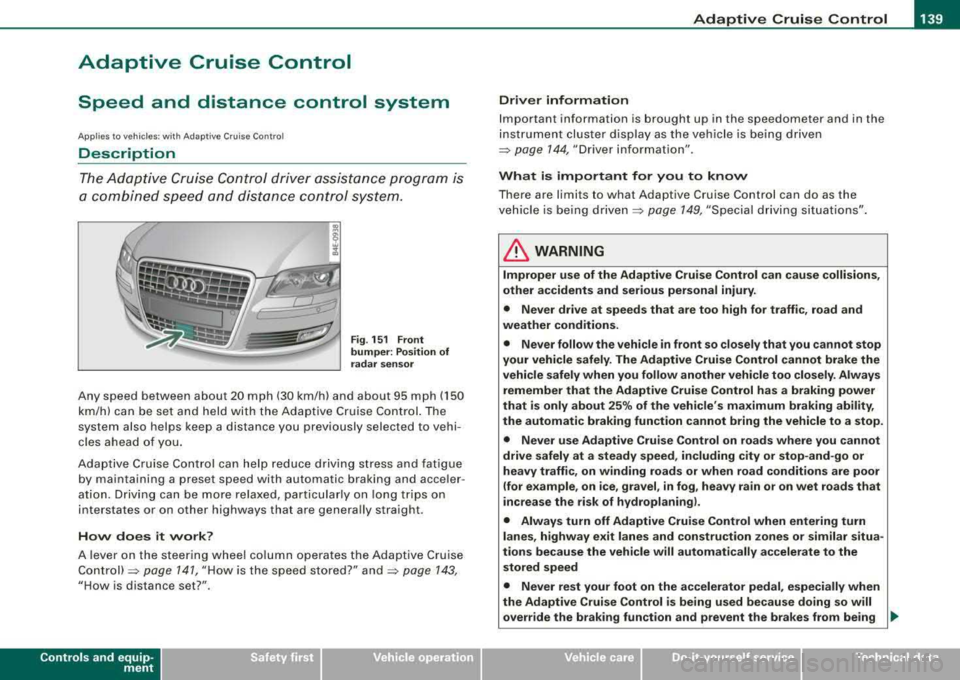
The Adaptive Cruise Control driver assistance program is
a combined speed and distance control system .
Fig. 151 Front
bumper: Position of
radar sensor
Any speed between about 20 mph (30 km/h) and about 95 mph (150
km/h) can be set and held with the Adaptive Cruise Control. The
system also helps keep a distance you previously selected to vehi
cles ahead of you.
Adaptive Cruise Control can help reduce driving stress and fatigue
by maintaining a preset speed with automatic braking and acce ler
ation. Driving can be more relaxed, particularly on long trips on
interstates or on other highways that are genera lly straight.
How does it work?
A lever on the steering wheel column operates the Adaptive Cruise
Control)=> page 141, "How is the speed stored?" and=> page 143,
"How is distance set?".
Contro ls a nd eq uip
ment
Driver information
Important information is brought up in the speedometer and in the
instrument cluster display as the vehicle is being driven
=> page 144, "Driver information".
What is important for you to know
There are limits to what Adaptive Cruise Control can do as the
vehicle is being
driven => page 149, "Special driving situations" .
LJ}. WARNING
Improper use of the Adaptive Cruise Control can cause collisions,
other accidents and serious personal injury.
• Never drive at speeds that are too high for traffic, road and
weather conditions.
• Never follow the vehicle in front so closely that you cannot stop
your vehicle safely. The Adaptive Cruise Control cannot brake the
vehicle safely when you follow another vehicle too closely. Always
remember that the Adaptive Cruise Control has a braking power
that is only about 25% of the vehicle's maximum braking ability,
the automatic braking function cannot bring the vehicle to a stop.
• Never use Adaptive Cruise Control on roads where you cannot
drive safely at a steady speed, including city or stop-and -go or
heavy traffic, on winding roads or when road conditions are poor
(for example , on ice, gravel , in fog , heavy rain or on wet roads that
increase the risk of hydroplaning).
• Always turn off Adaptive Cruise Control when entering turn
lanes , highway exit lanes and construction zones or similar situa
tions because the vehicle will automatically accelerate to the
stored speed
• Never rest your foot on the accelerator pedal, especially when
the Adaptive Cruise Control is being used because doing so will
override the braking function and prevent the brakes from being _.,
Vehicle care I I irechnical data
Page 142 of 404

___ A_ d_a_ p_ ti_v _ e_ C_ ru_ is_ e_ C_ o_n_ t_ r_ o _ l ___________________________________________ _
&, WARNING (continued )
appl ied b y the s ystem when it det ects a situation when the brakes
mu st be applied.
• Alway s remember th at Ad aptive Cru ise Control has limits - it
doe s not rea ct when you dri ve toward s an ob stac le or something
e lse on or near the road th at is not mov ing , such as ve hic le s
s topped in a traffic jam , a sta lled or di sabled vehicle.
• Alway s remember th at the Ad aptive Cru ise Control cannot
detect a vehicle that i s driving to wards you in your tr affi c la ne and
that it cannot det ect narrow veh icles su ch a s motor cycles and
bicycle s.
[ i] Tips
• For sa fety reasons, the stored speed is deleted when the ign it ion
is turned off .
• When Adaptive Cru ise Control is switched on, the Electronic
Stabilization Program (ESP) is also automatically activated.
• Damage caused by accidents (e.g . if the vehic le is damaged
when parking) can affect the radar sensor settings. This can cause
the system to malfunct ion or switch off completely.
• In winter conditions, you should check the radar sensor cover
before driving to make sure it is free of ice and snow. If necessary ,
clean the area near the radar sensor
carefully => page 139, fig. 151.
• To ensure that the radar sensor is not blocked, foreign objects
(e.g. stickers, larger license plate mounts, add -on parts) must not
cover the area near the radar
sensor=> page 139, fig . 151. The area
near the radar sensor must not be painted, either .•
Ap plies to vehicles: with Ad aptive Crui se Co nt rol
How does Adaptive Cruise Control work?
Vehicles traveling ahead are detected with the aid of the
radar sensor.
Fi g. 152 Ra dar sens or
me asuremen t range
A forward -look ing radar sens or in the fro nt b umper monitors the
traffic situation ahead . Vehicles moving in your direction can be
de tec ted up to a distance of a bout 140 yards ( 130 meters) but the
Adaptive Cruise Contro l cannot detect vehicles that are stopped or
stal led, obstac les that do not move or narrow vehic les like motorcy
cles and
bicycles.=> fig. 152 .
Open road
When the road is clear, Adaptive Cruise Contro l works like cruise
co ntrol. The stored speed requested is main tained .
Driving in tr affi c
If you start to catch up with a vehic le in front of you, Adap tive Cruise
Control automatically slows your vehic le to a speed that will he lp
you stay a safe distance back .
If the vehicle in front acce lerates, Adaptive Cruise Control a lso accel -
erates up to the speed that you have set . .,_
Page 149 of 404
_____________________________________________ A_ d_a ....: p_ t_ i_ v _e_ C_ ru_ is_ e_ C_ o_n_ t_ r_o _ l _ __._
Ap plie s to vehic les: with Adaptive Cru ise Co nt rol
Messages
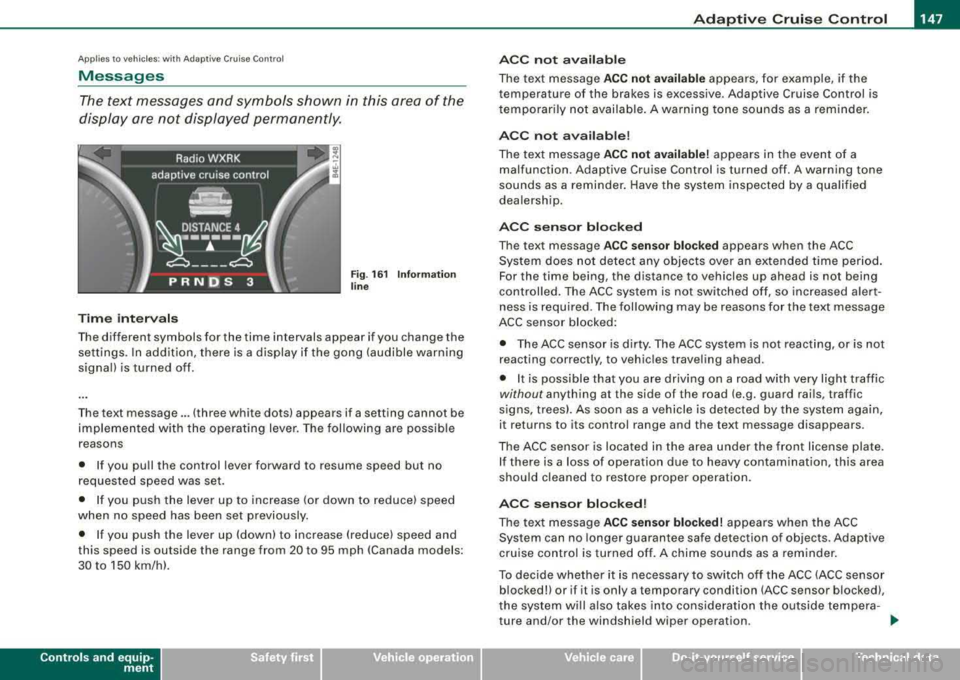
The text messages and symbols shown in this area of the
display are not displayed perm anently .
Time interval s
Fig . 16 1 Informa tion
lin e
The different symbols for the time intervals appear if you change the
settings. In addition, there is a display if the gong (audible warning
signa l) is turned off.
The text message ... (three white dots) appears if a setting cannot be
implemented with the operat ing lever. The fol lowing are possible
reasons
• If you pu ll the control lever forward to resume speed but no
requested speed was set.
• I f you push the lever up to increase (or down to reduce) speed
when no speed has been set previously.
• I f you push the lever up (down) to increase (reduce) speed and
this speed is outside the range from 20 to 95 mph !Canada models:
30 to 150 km/h) .
Controls a nd eq uip
ment
A CC not a vailab le
The text message ACC not av ailabl e appears, for example, if the
temperature of the brakes is excessive . Adaptive Cruise Control is
t emporarily not availab le . A warning tone sounds as a rem inder.
A CC not available !
The text message ACC not av ailabl e! appears in the event of a
malfunction. Adaptive Cruise Control is turned off . A warning tone
sounds as a reminder. Have the system inspected by a qua lified
dea lersh ip.
ACC senso r blocked
The text message AC C s en so r blo cked appears when the ACC
System does not detect any objects over an extended time period .
For the time being, the distance to vehicles up ahead is not being
cont rolled . The ACC system is not switched off, so increased alert
ness is required. The following may be reasons for the text message
ACC sensor blocked:
• The ACC sensor is dirty. The ACC system is not react ing, or is not
reacting correctly, to vehic les traveling ahead.
• It is possible that you are driving on a road with very light traffic
without any thing at the side of the road (e.g. guard rai ls, traffic
s igns, trees). As soon as a vehicle is detected by the system again,
it returns to its control range and the text message d isappears .
The ACC sensor is located in the area under the front license plate .
I f there is a loss of operation due to heavy contamination, this area
should cleaned to restore proper operation.
AC C senso r bl ock ed!
The text message ACC sensor blocked! appears when the ACC
System can no longer guarantee safe detection of objects . Adaptive
cruise control is turned off . A chime sounds as a reminder.
To decide whether it is necessary to switch off t he ACC (ACC sensor
blocked!) or if it is only a temporary condition (ACC sensor blocked),
the system wi ll a lso takes into cons ideration the outside tempera -
ture and/or the windshield wiper operation .
.,_
Vehicle care I I irechnical data
Page 150 of 404
___ A_ d_a_ p_ ti_v _ e_ C_ ru_ is_ e_ C_ o_n_ t_ r_ o _ l ___________________________________________ _
The ACC sensor is dirty or blocked (e.g. leaves, snow).
The ACC sensor is located in the area under the front license plate.
If there is a loss of operation due to heavy contamination, this area
should cleaned to restore proper operation.
EPB activation
The text message EPB activation appears if emergency braking was
initiated with the Electromechanical Parking Brake (EPBl. Adaptive
Cruise Control is turned off. A gong sounds as a reminder.
ESP activation
The text message ESP activation appears if the Electronic Stabiliza
tion Program (ESP) has intervened to take control in a critical driving
situation. In this case Adaptive Cruise Control is automatically
turned off . A gong sounds as a reminder .
Speed range
The text message Speed range appears if the current speed is too
low to set or to hold the requested speed.
When setting a desired speed, it must be at least 20 mph (30 km/h).
At speeds below 17 mph (25 km/h), the cruise control is turned off.
Shift lever position!
The text message Shift lever position! appears when the shift select
lever is moved to position
N. In this position, Adaptive Cruise
Control is not available. •
Applies to veh ic les: with Ad apt ive Crui se Contro l
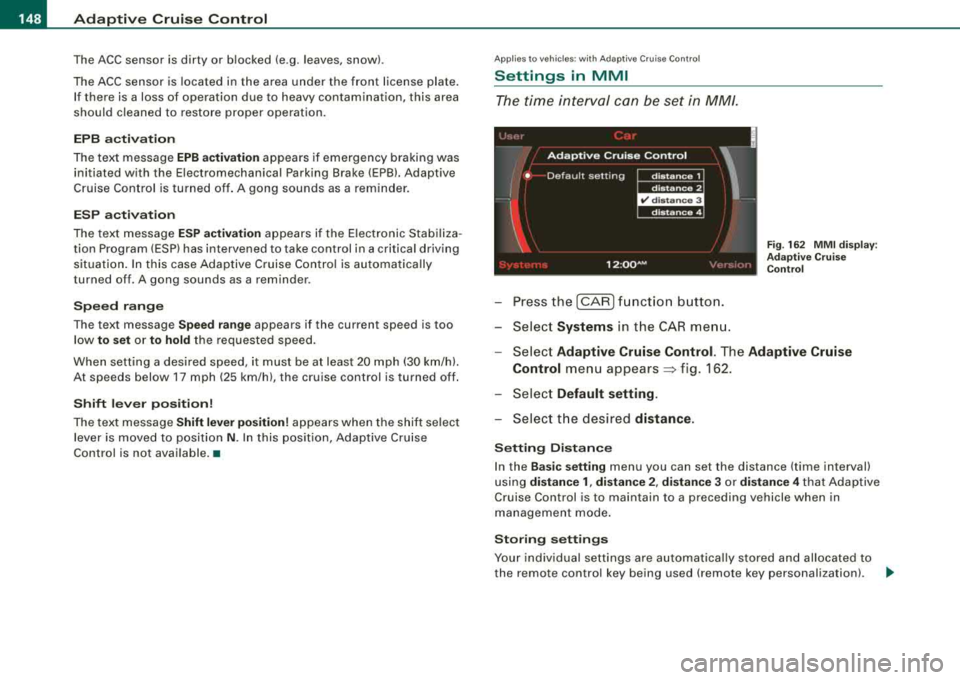
Settings in MMI
The time interval can be set in MM/.
-Press the [CAR] function button.
-Select Systems in the CAR menu.
Fig. 162 MMI display :
Adaptive Cruise Control
-Select Adaptive Cruise Control. The Adaptive Cruise
Control
menu appears~ f ig . 162.
-Select Default setting .
-Select the desired distance.
Setting Distance
In the Basic setting menu you can set the distance (time interval)
using
distance 1, distance 2, distance 3 or distance 4 that Adaptive
Cruise Control is to maintain to a preceding vehicle when in
management mode.
Storing settings
Your individual settings are automatically stored and allocated to
the remote control key being used (remote key personalization) .
~
Page 151 of 404
_____________________________________________ A_ d_a ....: p_ t_ i_ v _e_ C_ ru_ is_ e_ C_ o_n_ t_ r_o _ l _ __.9'
[ i J Tip s
Settings in the Adapt ive Crui se C ontrol menu are possib le only with
the engine running and the vehicle stationary .•
Special driving situations
Applies to vehic les: with Adaptive Cru ise Control
General
Some driving situations which affect the function of the
radar sensor are described below.
There are l imits to what Adap tive Cruise Control can do as the
vehicle is driven. So be especially attentive :
• when driving around curves => page
149.
• when driving in staggered lanes of traffic~ page 150.
• when other vehicles are changing lanes::> page 150.
• when other vehicles are difficu lt to detect ~ page 150.
& WARNING
The radar s en sor 's visi on can b e re du ced by rain , snow and h eav y
sp ray. Thi s can re sult in ve h ic les driving ahe ad be ing inade quately
detect ed or , in some cir cum stan ce s, not det ected a t all . •
Contro ls a nd eq uip
ment
Ap plie s to vehicles: with Adapt ive Cru ise Co nt rol
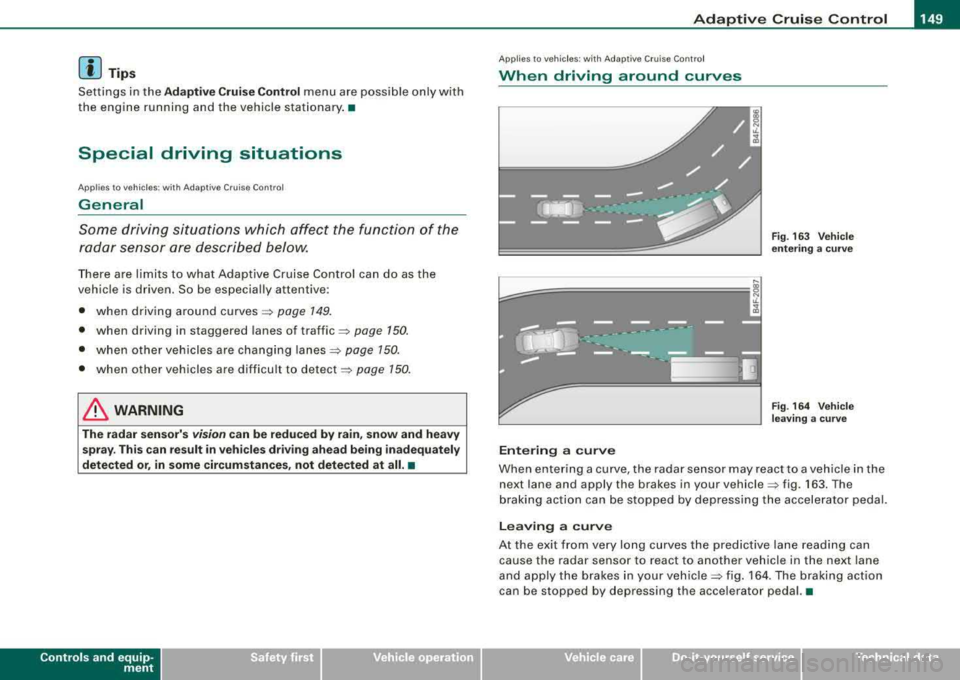
When driving around curves
~============, J
;g
j
Entering a curve
Fig . 16 3 Ve hicle
e nt erin g a c urv e
F ig . 164 Vehicle
l eav ing a cu rve
When entering a curve, the radar sensor may react to a vehic le in the
next lane and apply the brakes in your
vehicle ~ fig. 163. The
braking action can be stopped by depressing the accelerator pedal.
Lea ving a curve
At the exit from very long curves the pred ictive lane reading can
cause the radar sensor to react to another vehicle in the next lane
and apply the brakes in your
vehic le => fig. 164 . The braking act ion
can be stopped by depressing the accelerator pedal. •
Vehicle care I I irechnical data
Page 270 of 404
lll.___l_n _t _e _ll _ig=- e_n _ t_ te_ c_h _n_ o_ lo...; g'"'-=- y ___________________________________________ _
Intelligent technology
Notice about data recorded by
vehicle control modules
Your vehicle is not equipped with an Event Data Recorder (EDRl,
installed by some manufacturers for the express purpose of
capturing data for retrieval after an accident or crash event . EDR's
are sometimes called "crash recorders".
Some state laws restrict the retrieva l or downloading of data stored
by EDR's that were insta lled in a vehicle for the express purpose of
retrieving data after an accident or cras h event without the owner's
consent.
Although your vehicle is not equipped with an EDR, it is equipped
with a number of electronic control modules for various vehicle systems such as, for example, engine function, emission contro l, as
we ll
as for the a irbags and safety belts.
These electronic control modules also record vehic le-related data
dur ing norma l ve hicle opera tion for diagnost ic and repair purposes .
The recording capacity of the electronic control modules is limited
t o data (no sound is recorded) and only a small amount of data is
actua lly recorded over a very limited period of time and stored when
a system fault or other condition is sensed by a control unit. Some
of the data then stored may relate to vehic le speed, d irection,
braking as we ll as restraint system use and performance in the
event of a crash o r other condition . Stored data can only be read and
downloaded with special equipment. •
Electronic Stabilization Program (ESP)
General information
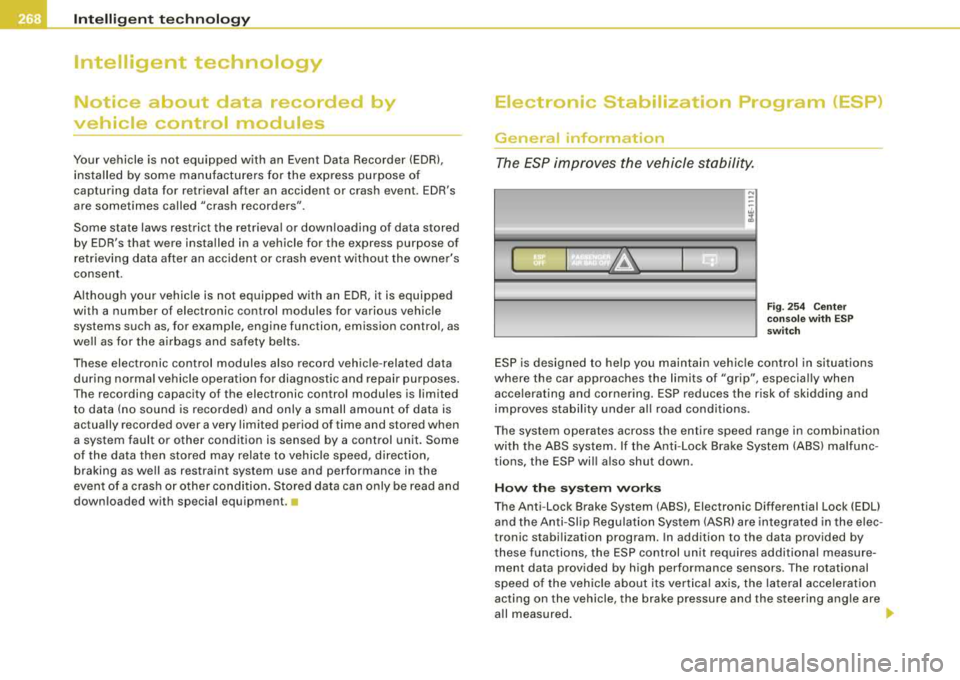
The ESP improves the vehicle stability.
I~
" "'
( ~ 1~ IA I 3-)
Fi g. 25 4 Cen ter
co nso le w it h ES P
sw itch
ESP is designed to he lp you maintain vehic le control in situations
where the car approaches the limits of "grip", especia lly when
acce lerating and cornering . ESP reduces the risk of skidding and
improves stabil ity under al l road conditions.
T he system operates across the entire speed range in combination
with the ABS system. If the Ant i-Lock Brake System (ABS) malfunc
tions, the ESP wi ll also shut down .
How the syste m w ork s
The Anti -Lock Brake System (ABS), Electronic Differential Lock (EDU
and the Anti-Sl ip Regulation System (ASR) are integrated in the e lec
tronic stabi lization program. In addition to the data provided by
t hese functions, the ESP control unit requires additional measure
ment data provided by high performance sensors . The rotational
speed of the veh ic le about its vertica l axis, the lateral acce lerat ion
acting on the vehicle, the brake pressure and the steering angle are
a ll measured . _,,,,
Page 272 of 404

llll.___l_n _t _e _ll _ig=- e_n _ t_ te_ c_h _n_ o_ lo...;g'"'-=- y ___________________________________________ _
Overheating of brakes
To prevent the disc brake of the braked wheel from overheating if
subjected to excessive loads, the EDL cuts out temporarily . The
vehicle remains operational and behaves in the same way as a
vehicle without EDL.
As soon as the brake has cooled down, EDL switches on again auto
matically.
& WARNING
• When accelerating on slippery surfaces, such as on ice or snow,
always be careful when depressing the accelerator pedal. Even
with the EDL working, the drive wheels can spin and reduce your ability to control your car. Risk of crash!
• The increased safety afforded by
EDL does not mean that you
can take safety risks. Always adapt your driving style to the road
conditions and traffic situation.
[ i] Tips
If a fault occurs in the ABS, the EDL is also not functioning. This is
indicated by the ABS warning
light => page 21. •
Anti-Slip Regulation System (ASR)
The Anti-Slip Regulation System prevents the driven
wheels from spinning when the car is accelerating.
General notes
The Anti-Slip Regulation System (ASR) is integrated in the electronic
stabili zation program (ESP) . When the vehicle starts up and acceler
ates, the wheels are prevented from spinning by adjusting the
engine power to match the amount of grip available from the road
surface.
How the system works
ASR performs automatically, i.e. without the driver's intervention.
With the aid of the ABS
sensors=> page 272, ASR monitors the
speed of the driven wheels. If the wheels start to spin, the engine
power is reduced automatically until the tires find enough grip to
lock onto the road surface . The system is active across the entire
speed range.
The ASR works in conjunction with the ABS. If a malfunction should
occur in the ABS, the ASR will also be out of action.
& WARNING
The increased safety afforded by ASR does not mean that you can
take safety risks. Always adapt your driving style to the road
conditions and traffic situation.
[ i] Tips
To ensure that the ASR works properly, all four wheels must be fitted
with identical tires Any differences in rolling radius of the tires can
cause the system to reduce engine power when this is not desired.
See
also=> page 336, "New tires and replacing tires and wheels ".•
Braking
General information
What affects braking efficiency?
Operating conditions and driving habits
The brakes on today's automobiles are still subject to wear,
depending largely on operating conditions and driving
habits=:,& .
On vehicles which are driven mostly in stop-and-go city traffic or
which are driven hard, the brake pads should be checked by your
authorized Audi dealer more often than specified in the
Warranty &
Maintenance booklet. _,,,
Page 341 of 404
________________________________________________ T_ i
_ r_e _s_ a_n_ d_ w_ h_ e_e _ l_s __ l'III
•
• T he batt ery inside of the tire pressure sensor has a l imited
s er vice l ife.
• Al ways drive with the va lve stem ca ps sec ure ly m ounted. We
r ec om mend u sin g fa ctor y in sta lle d v alv e stem caps. Ask your autho
rized Audi d ealer to replac e lost valve stem caps .
T he in stalla tio n of replacement ti res with steel cord body plies i n
th e tire s id ewal l may cause malfunct ion of the tire pressure moni
toring sy ste m, and is not recommended (c ord mate ria l infor mation
i n mo lded on the tire s idewa ll).
Al ways check your tir e pressure monitor ing system indicator after
r eplac ing on e o r m ore tire s on y our vehi cle. If the tire pressu re
monitorin g system indicator flashes, or is on, your system is not
w orki ng pr ope rly. You r rep lace ment tir e mi ght be in co m pati ble w ith
your t ire pr essure monitoring system, or some component of the
t ir e pr ess ure m oni to ring sys te m m ay be damaged .
& WARNING
• Using incorrect or unmatched tires and / or wheels or improper
tire and wheel combinations can lead to loss of control , collision
and serious personal injury .
• Always use tires , rims and wheel bolts that meet the specifica
tions of original factory -installed tires or other combinations that
have been specifically approved by the vehi cle manufacturer .
• Tires age even if they are not being used and can fail suddenly,
espe cially at high speeds . Tires that are more than 6 years old can
only be used in an emergency and then with special care and at
lower speeds .
• Never mount used tires on your vehicle if you are not sure of
their "previous history ." Old used tires may have been damaged
even though the damage cannot be seen that can lead to sudden
tire failure and loss of vehicle control.
• All four wheels must be fitted with radial tires of the same type ,
size (rolling cir cumference ) and the same tread pattern . Driving
&, WARNING (continued )
with different tires reduces vehicle handling and can lead to a loss
of control.
• If the spare tire is not the same as the tires that are mounted
on the vehicle
-for example with winter tires -only use the spare
tire for a short period of time and drive with extra care . Refit the
normal road wheel as soon as safely possible.
• Never drive faster than the maximum speed for which the tires
on your vehicle are rated because tires that are driven faster than
their rated speed can fail suddenly.
• Overloading tires cause heat build -up , sudden tire failure,
including a blowout and sudden deflation and loss of control.
• Temperature grades apply to tires that are properly inflated and
not over or underinflated.
• For techni cal reasons it is not always possible to use wheels
from other vehicles -in some cases not even wheels from the
same vehicle model.
• If you install wheel trim discs on the vehicle wheels , make sure
that the air flow to the brakes is not blocked . Reduced airflow to
the brakes can them to overheat , increasing stopping distances
and causing a collision.
• Run flat tires may only be used on vehicles that were equipped
with them at the factory . The vehicle must have a chassis designed
for run flat tires and a factory-installed tire pressure monitoring
system that indicates a loss of tire pressure. Incorrect use of run
flat tires can lead to vehicle damage or accidents . Check with an
authorized Audi dealer or tire specialist to see if your vehicle can
be equipped with run flat tires . If run flat tires are used , they must
be installed on all four wheels . Mixing tire types is not permitted.
0 Note
• Fo r tec hnica l reaso ns, i t is not gene rally p oss ibl e to use the
whee l rims from other vehicles . T his can hold true for wheels of t he
sa me v ehicl e typ e.
Vehicle care