center console AUDI S8 2008 Owners Manual
[x] Cancel search | Manufacturer: AUDI, Model Year: 2008, Model line: S8, Model: AUDI S8 2008Pages: 404, PDF Size: 52.7 MB
Page 4 of 404
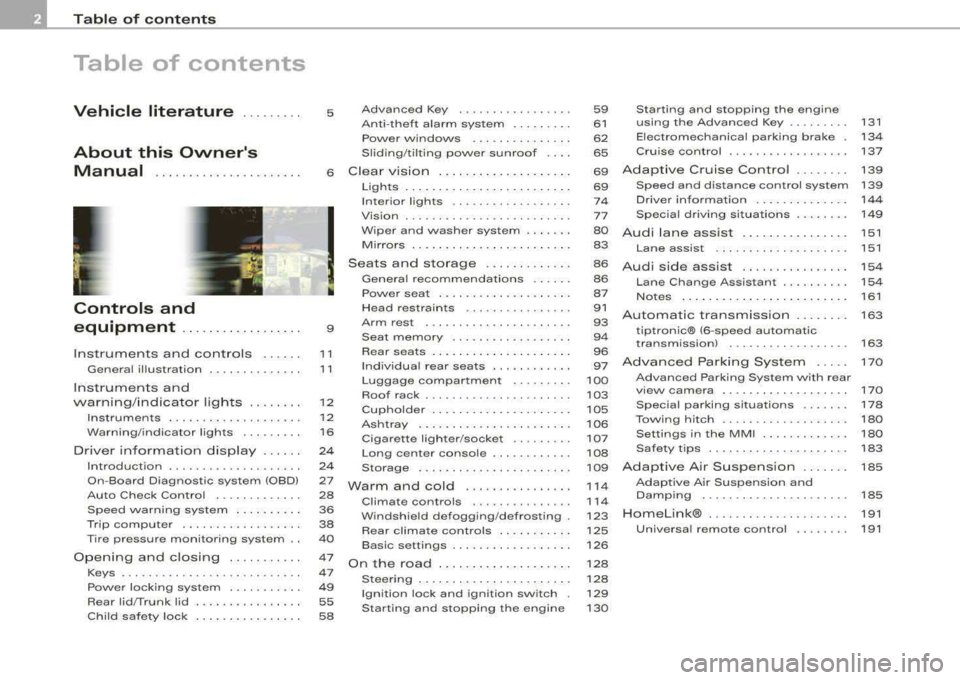
Table of contents
Table of contents
Vehicle literature ........ .
About this Owner's Manual ..................... .
Controls and
equipment .. ... ... ..... ... . .
Inst rumen ts and contr ols ..... .
Genera l ill ustration ............. .
Instruments and
warning/indica tor lig hts ....... .
Instruments ................... .
Warning/indicator lights ........ .
Driver informa tio n d isplay ..... .
Introduction ................... .
On-Board Diagnostic system
(080)
Auto Check Control ............ .
Speed war ning system ... ...... .
Trip computer ..... ............ .
Tire pressure monitoring system ..
Opening and closing .......... .
Keys ............ ... .. ... · · · · · · ·
Power locking system .......... .
Rear lid/Trunk lid .......... ..... .
Ch ild safety loc k .... ... .... .... . 5 Advanced Key
................ .
Anti-theft a larm system ..... ... .
Powe r w indows ... ... ... ... .. .
S lid ing/ti lt ing power sunroof ... .
6 Clear vision ... .... .. ... .. ..... .
9
11
1 1
1 2
12
1 6
2 4
2 4
27
28
36
38
40
47
47
49
55 58 Lights
..................... ... .
Interior lights ... ...... .. .. .. .. .
V is ion ........... ........... .. .
W iper and washer system ... ... .
Mirrors .. .. ... ......... ..... .. .
Seats and storage ......... ... .
Genera l recommendat ions ..... .
Powe r seat . ... ... ......... ... .
Head restraints .............. . .
Arm rest ..................... .
Seat memory ... ... ...... ..... .
Rear sea ts . ... ... ... ... ... .. .. .
Ind ividua l rear seats ........ ... .
Luggage compartment ........ .
Roof rack ........ ... .... .... .. .
Cup holder .................... .
As htray . ... ... ... ......... ... .
Cigarette lighter/socket ........ .
Long center console ........... .
Storage .... ...... ............ .
Warm and cold ............... .
Climate controls .............. .
W indshield defogg ing /defrosting .
Rear clim ate controls ..... ..... .
Basic settings ......... ... ... .. .
On the road ... ... . .. ... .. ... .. .
Stee ring .... ... ... ............ .
Ignition lock and ignition sw itch .
Starting and stopping the engine 59
Starting and stopping the engine
61 using t he Advanced Key . . . . . . . . . 131
62 Electromechanical parking brake . 134
65 Cru ise control . . . . . . . . . . . . . . . . . . 137
69
A dapt ive Cruise Control . . . . . . . . 139
69 Speed and distance control system 139
7 4 Driver informat ion . . . . . . . . . . . . . . 144
77 Specia l driving si tua tions . . . . . . . . 14 9
80
Audi lane assist . . . . . . . . . . . . . . . . 151
83 Lane assist . . . . . . . . . . . . . . . . . . . . 151
86
A udi side assist . . . . . . . . . . . . . . . . 15 4
86
87
91
93
9 4
96
97
100
103
105
106
107
108
109
1 14
11 4
123
125
126
128
128
129
130 Lane Change Assistant ........
. .
No tes ........ ...... ........ .. .
Automatic transmission ...... . .
tiptron ic® (6-speed automatic
transm ission) ................. .
Advanced Parking System .... .
Advanced Parking System with rear
v iew camera .................. .
Specia l parking situations ...... .
Towing hitch .. ....... ......... .
Settings in the MM I ..... ...... . .
Safety t ips .............. ...... .
Adaptive A ir Suspension ...... .
Adaptive Air Suspension and
Damping ..... .. .............. .
Homelink® ................... . .
Universa l remo te control ....... . 154
161
163
163
170
170
178
180
180
183
185
185
191
191
Page 17 of 404
There is still approximately 2.4 gallons (9 liters) of fuel left. This message is meant to remind you to
re fuel .
(D Note
Never run the tank completely dry . An irregular supp ly of fuel can
cause engine misfiring and fuel could enter the exhaust system . T he
cata lytic converter could then overheat and be damaged .•
[ C HECK] button
You can perform different functions with this button .
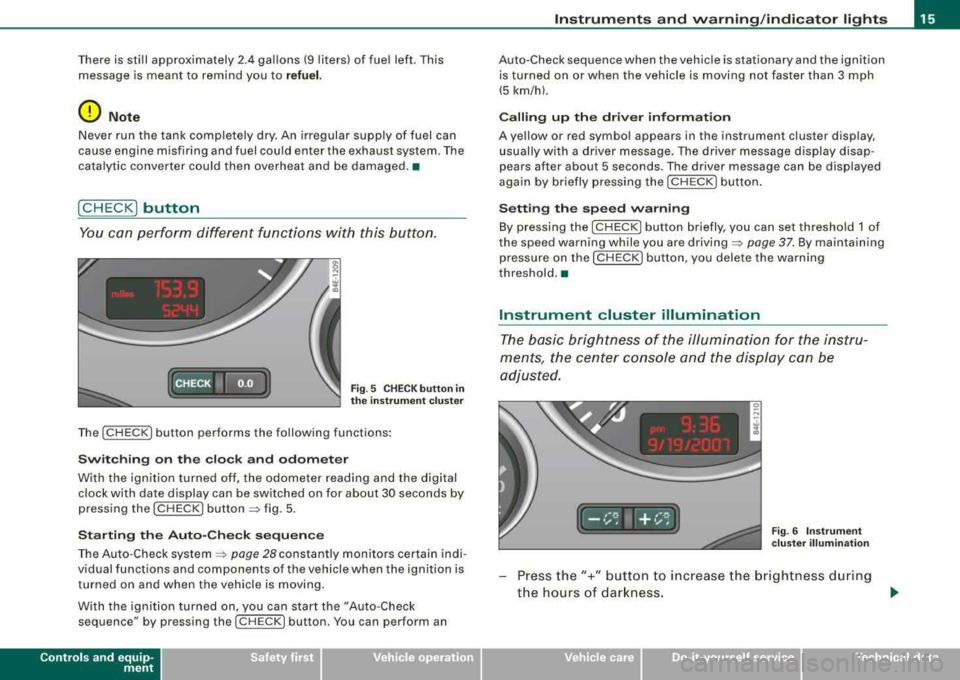
Fig . 5 CHECK butto n in
th e instr um ent clu ste r
The [ CHECK ] button performs the fo llowing functions:
Swi tch ing on th e clock and odom ete r
With the ignition turned off, the odometer reading and the digital
clock with date display can be sw itched on for about 30 seconds by
pressing the
I C HE CK I but ton ~ fig. 5 .
Sta rtin g the Au to-C heck se quen ce
The Auto -Check system ~ page 28 constantly monitors certain indi
vidual functions and components of the vehicle when the ignition is
turned on and when the vehicle is moving.
W ith the ignition turned on, you can start the "Auto -Check
sequ ence" by pr essing the !CH ECK ] bu tton . You can p erform an
Controls and equip
ment
Inst rum ents and warning /indi cator light s
Auto-Che ck sequence when the vehicle is stationary and the ignition
is turned on or when the vehicle is moving no t faster than 3 mph
(5 km/h).
C alling up the dri ver inf ormatio n
A yellow or red symbol appears in the instrument cluster display ,
usually with a driver message. The driver message display disap
pears after about 5 seconds . The driver message can be displayed
again by briefly pressing the
I CHECK ] button .
Setting th e sp eed w arni ng
By pressing the [ CHECK! but ton briefly, you can set threshold 1 of
the speed warning while you are
driving ~ page 37. By maintaining
pressure on the [CHECK ! button, you delete the warning
threshold. •
Instrument cluster illumination
The basic brightness of the illuminati on f or the instru
ments, the center console and the display can be
adjusted .
Ir ,-i:,.-.. I+ ,- i:,.--•/, ,,,,
Fig. 6 Instr ume nt
c lus te r ill umi nation
Press the"+" button to increase the brightness d uring
the hours of dar kness.
~
Vehicle care I I irechnical data
Page 18 of 404
Instruments and warning /indicator lights
-Press the"-" button to decrease the brightness during
the hours of darkness.
A light sensor in the instrument cluster controls the illumination for
the instrument clust er, the center console and the displays . In a
bright environment , using the buttons to change the brightness has
no effect .
[ i] Tips
The illumination for the instrument cluster lights up whenever you
switch on the ignition with the
vehicle headlights off. As the
daylight fades, the instrument cluster illumination likewise dims
automatically and will go out completely when the outside light is
very low. This feature is meant to remind you to switch on the head
lights when outside light conditions become poor. •
Warning/indicator lights
Overview
The warning/indicator lights indicate different functions
or a possible malfunction.
iWiii i ·i l· i hii
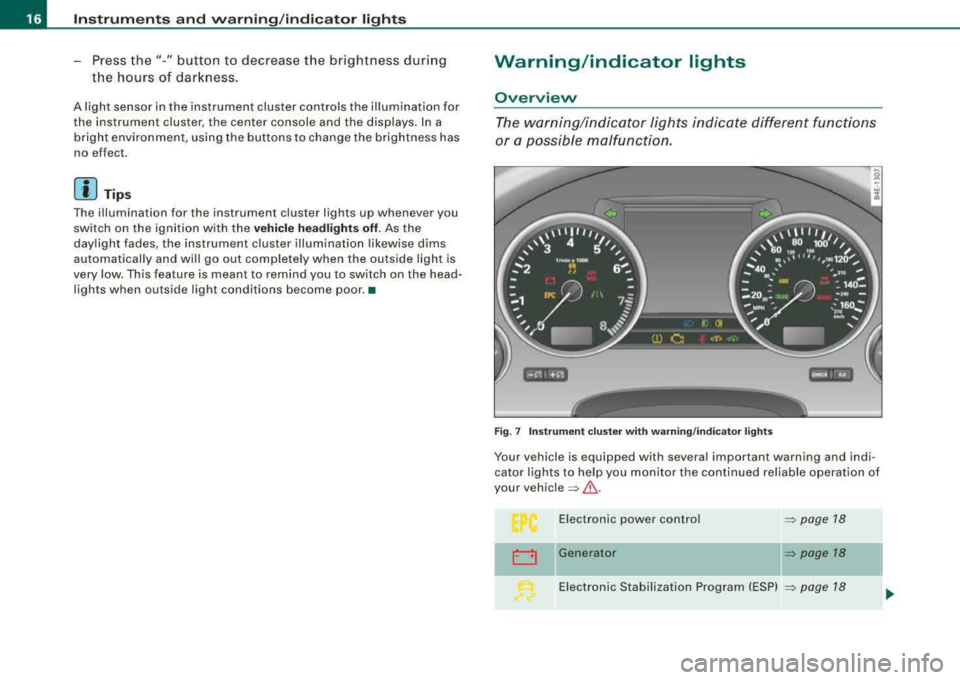
Fig. 7 Instrument cluster with warning/indicator lights
Your vehicle is equipped with several important warning and indi
cator lights to help you monitor the continued reliab le operation of
your
vehicle => &-
0
Electronic power control
Generator => page 18
=> page 18
Electronic Stabilization Program (ESP) => page 18
Page 75 of 404
Emergency flasher ~
The emergency flasher makes other motorists aware that
you or your vehicle are in an emergency situation.
I
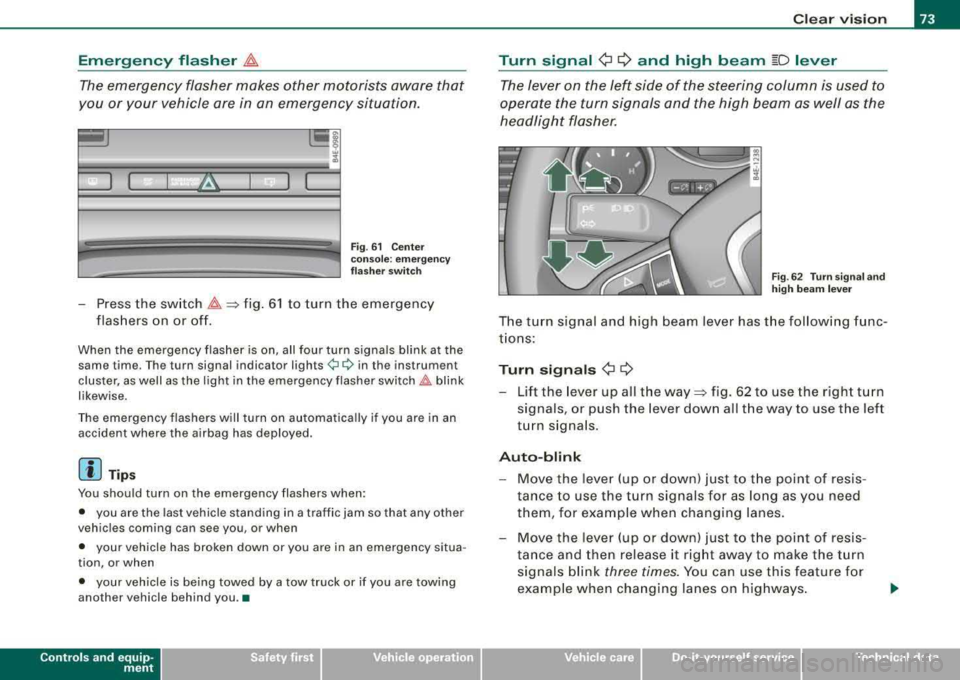
Fig . 61 Center
console : emergency
flasher switch
- Press the switch ~=>fig. 61 to turn the emergency
flashers on or off.
When the emergency flasher is on, all four turn signals blink at the
same time . Th e turn signal indi cator
ligh ts ¢¢ in th e instrum en t
cluster, as well as the light in the emergency flasher
switch~ blink
likewise .
The emergency flashers will turn on automatically if you are in an
accident where the airbag has deployed.
[ i] Tips
You should turn on the emergency flashers when:
• you are the last vehicle standing in a traffic jam so that any other
vehicles coming can see you , or when
• your vehicle has broken down or you are in an emergency situa
tion , or when
• your vehicle is being towed by a tow truck or if you are towing
another vehicle behind you .•
Contro ls a nd eq uip
ment
Clear vision
Turn signal
¢ ¢ and high beam [D lever
The lever on the left side of the steering column is used to
operate the turn signals and the high beam as well as the
headlight flasher.
Fig . 62 Turn signal and
high beam lever
The turn s ignal and high beam lever has the following func
tions:
Turn signals ¢ ¢
- Lift the lever up all the way=> fig. 62 to use the right turn
signals, or push the lever down all the way to use the left
turn signals .
Auto-blink
-Move the lever (up or down) just to the point of resis
tance to use the turn signals for as long as you need
them, for example when chang ing lanes.
- Move the lever (up or down) just to the point of resis
tance and then release it right away to make the turn
signals blink
three times. You can use this feature for
example when changing lanes on highways.
Vehicle care I I irechnical data
Page 95 of 404
'
~
--~ _
- _-----:::: =---1 ~
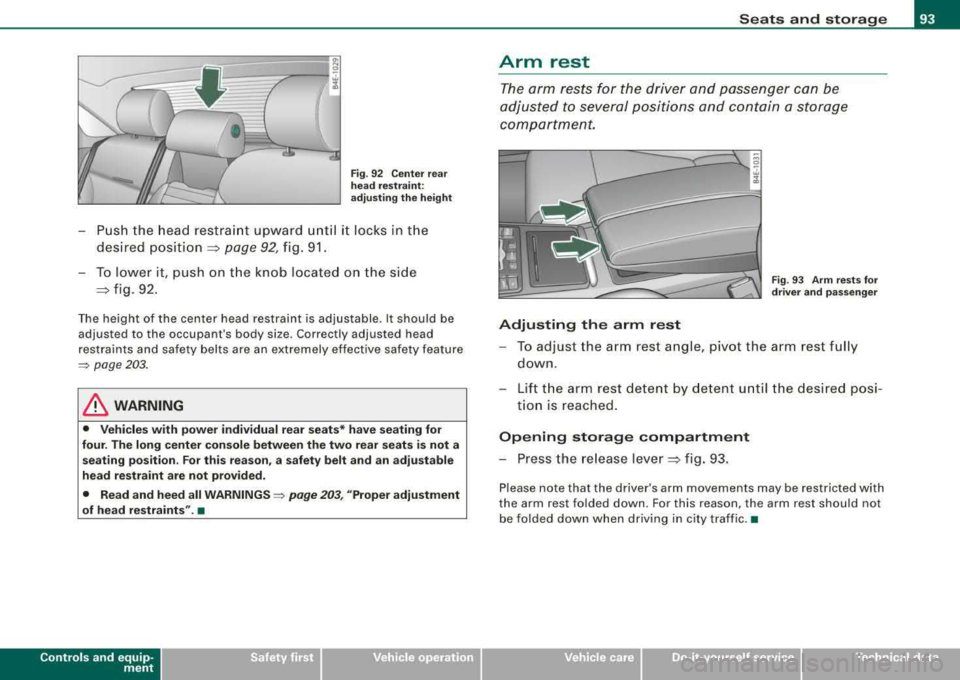
Fig. 92 Center rear
head restraint:
adjusting the height
- Push the head restraint upward until it locks in the
desired
position =:> page 92, fig. 91.
- To lower it, push on the knob located on the side
=:> fig. 92.
The height of the center head restraint is adjustable . It should be
adjusted to the occupant's body size. Correctly adjusted head
restraints and safety belts are an extremely effective safety feature
=> page 203.
& WARNING
• Vehicles with power individual rear seats* have seating for
four. The long center console between the two rear seats is not a
seating position . For this reason, a safety belt and an adjustable
head restraint are not provided.
• Read and heed all WARNINGS =>
page 203, "Proper adjustment
of head restraints". •
Contro ls a nd eq uip
ment
Seats and storage
Arm rest
The arm rests for the driver and passenger can be
adjusted to several positions and contain a storage
compartment.
"' 0
-. w ;l!i
Fig . 93 Arm rests for
driver and passenger
Adjusting the arm rest
-To adjust the arm rest angle, pivot the arm rest fully
down.
- Lift the arm rest detent by detent until the desired posi-
tion is reached .
Opening storage compartment
- Press the release lever =:> fig. 93.
Please note that the driver's arm movements may be restricted with
the arm rest folded down. For this reason, the arm rest should not
be folded down when driving in city traffic. •
Vehicle care
I I irechnical data
Page 100 of 404
Seats and storage
& WAR N IN G ( continued )
• Exercise caution when adjusting the seats . Unsupervised or
careless seat adjustment can p inch fingers or hands causing
injuries .•
App lies to veh icles: with indiv idual rear seats
Seat adjustment
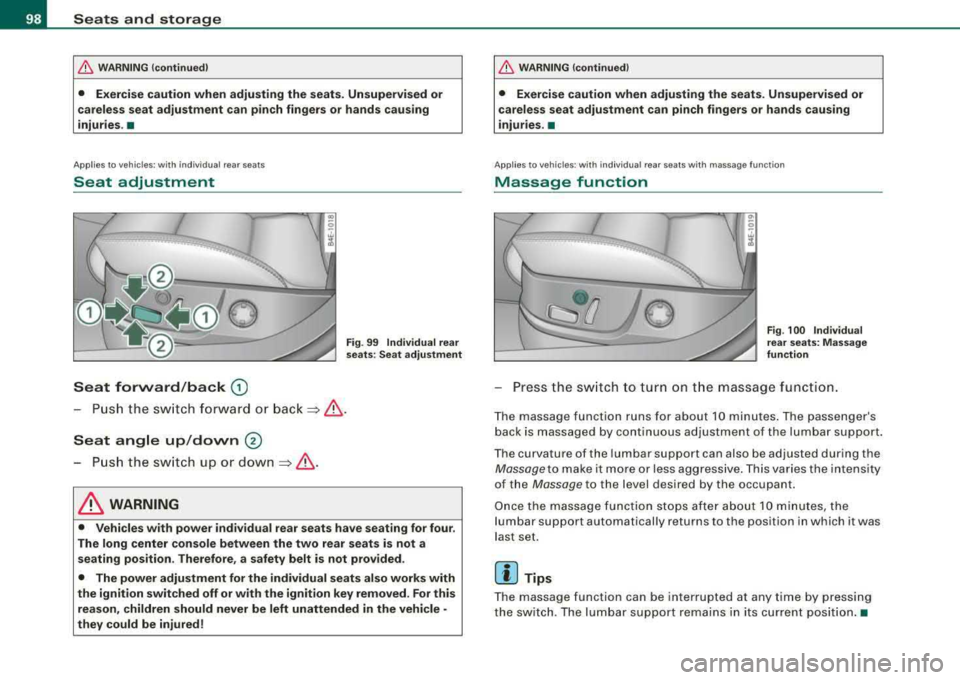
Seat forward /back G)
Fig . 99 Individual rear
s eat s: Se at adju stmen t
-Push t he swi tch fo rward or bac k=> & .
Seat angle up /down ®
-P u sh the s witch up o r down =>& .
& WARNING
• Vehicles with power individual rear seats have seating for four .
The long center console between the two rear seats is not a seating position . Therefore, a safety belt is not provided .
• The power adjustment for the individual seats also works with
the ignition switched off or with the ignition key removed . For this
reason , children should never be left unattended in the vehicle •
they could be injured !
& WAR N ING (continued )
• Exercise caution when adjusting the seats. Unsupervised or
careless seat adju stment can pinch fingers or hands causing
injuries.
•
Appl ies to vehicles: w ith ind iv idual rear seats with massage function
Massage function
F ig . 100 Individ ual
rear s eats: Massage
function
Pr ess th e swi tch to tu rn on t he massag e functi on.
T he massage function runs for ab out 10 minutes . The pa ssenger's
bac k is massaged by continuous ad justment of the lumbar support.
T he curvature of the lumbar support can also be ad justed during the
Mas sag e to mak e it mo re or less aggr ess ive . T hi s va ries the in tens ity
of the
Massage to the level desired by the occupant.
O nce the mas sage func tion s tops after abou t 10 m inutes, the
l umbar support automatically returns to th e position in which it was
l a st set.
[ i ] Tips
T he mas sage function ca n be interrupted at any time by p re ssi ng
the switc h. T he lum bar support r emains i n its cu rr en t pos it io n.•
Page 107 of 404
__________________________________________________ S_ e_ a_t _s _ a_n _ d_ s_ t
_ o_ r_a ""'g :c.. e _ ___.ffllll
fl::. W ARNING (continued )
• Never exceed the maximum permi ssible load carrying capa city
of the roof of you r vehi cle , the p ermi ssible axle weight s and the
permissible tot al w eig ht of your
vehicle ~ page 375, "Weight s".
• Alwa ys drive slo wly, av oid sudden brak ing and maneuver s
when transporting cargo on th e roof of your vehicle.
<£> For the sake of the environment
Sometimes it may be easier to leave a roof rack insta lled even
though you are not using it. Due to the increased a ir resistance your
veh icle wi ll unnecessarily use more fuel. Remove the roof rack if you
a re no t going to use it .•
Cupholder
Cupholder in center console
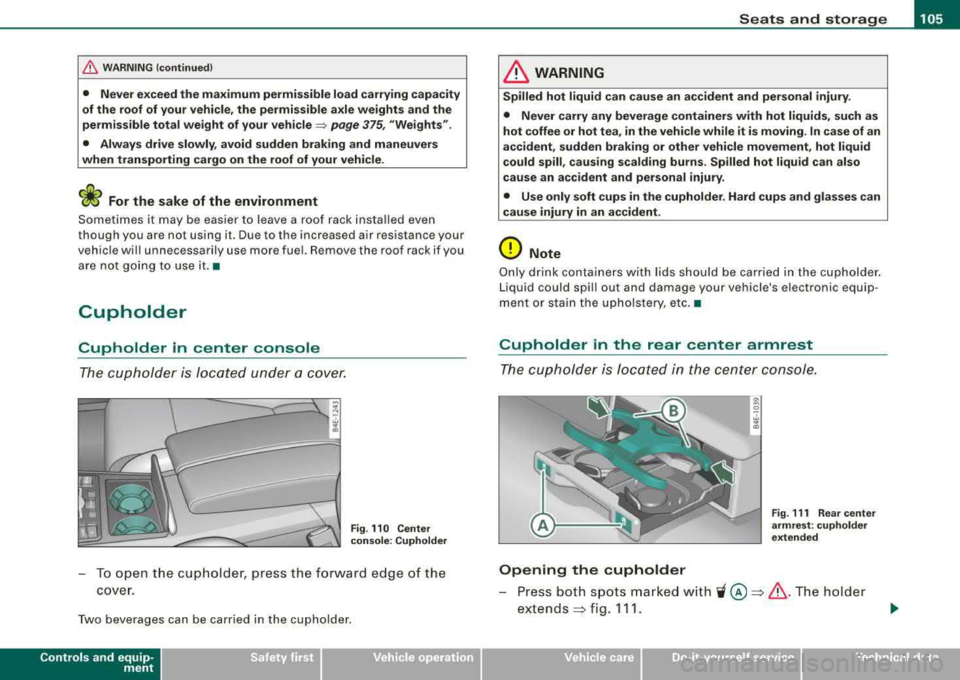
The cupholder is located under a cover.
Fi g. 110 Cente r
c on sole : Cuphold er
To o pen t he cup holder, press the forward edge of the
cover.
Two beverages can be carried in the cupholder.
Contro ls a nd eq uip
ment
& WARNING
Spilled hot l iqui d can c ause a n accident and pe rsona l injur y.
• Never car ry any b everage con tainer s with hot liquid s, such as
hot coffee or hot tea , in the veh icle w hile it i s mov ing . In c ase of an
accident, sudden brakin g or other vehicle movement, h ot liquid
c ould spill , cau sing scald ing bu rn s. Spilled hot liquid can also
cause an ac cident and per sonal injury .
• Use only s oft cups in the cuph older. Hard cups and glasses c an
cause injury in an accid ent.
0 Note
Only drink containers wi th lids should be carried in the cupholder .
Liquid could spi ll out and damage your vehicle's electronic equip
ment or stain the upho lstery, etc. •
Cupholder in the rear center armrest
The cupholder is located in the center console .
Opening the cupholder
8 . w 1li
Fig. 111 Rea r cen te r
a rm re st : c uph olde r
e xt end ed
Press both spots marked with 'i @ ~ & .The holder
extends
~ fig . 111.
Vehicle care I I Technical data
Page 109 of 404
________________________________________________ S_e_ a_ ts_ a_ n_d _ s_t _o _r_ a _, g:. e _ ___,_
Rear ashtray
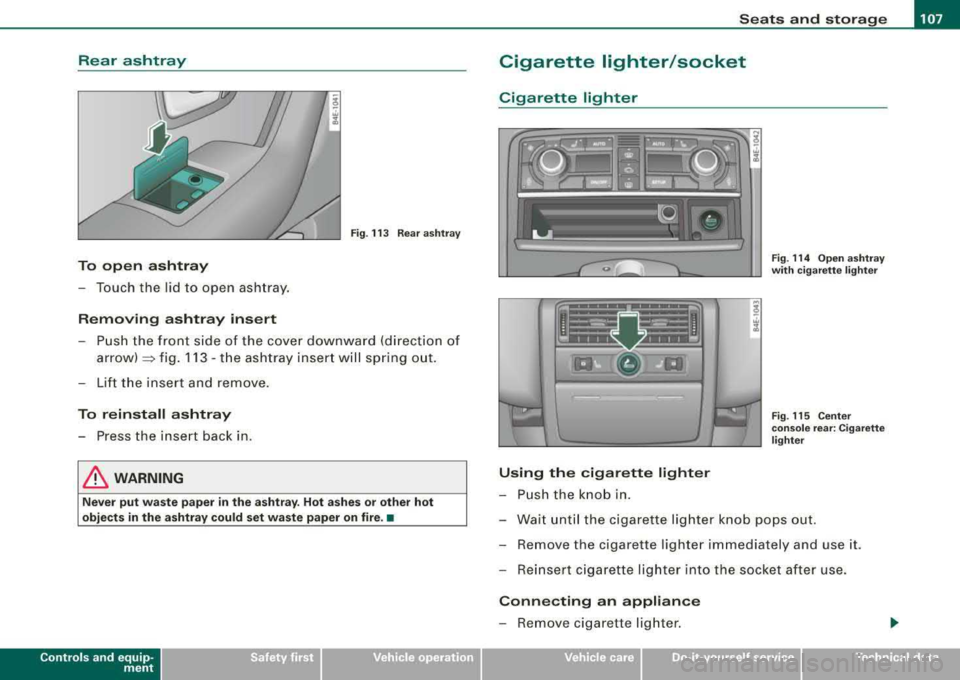
Fig . 113 Rear ashtray
To open ashtray
-Touch the lid to open ashtray.
Removing ashtray insert
-Push the front side of the cover downward (direction of
arrow)::::::, fig. 113 -the ashtray insert will spring out.
-Lift the insert and remove.
To reinstall ashtray
-Press the insert back in .
& WARNING
Never put waste paper in the ashtray. Hot ashes or other hot
objects in the ashtray could set waste paper on fire. •
Contro ls a nd eq uip
ment
Cigarette lighter/socket
Cigarette lighter
Using the cigarette lighter
-Push the knob in.
Fig. 114 Open ashtray
with cigarette lighter
Fig . 115 Center
console rear: Cigarette
lighter
-Wait until the cigarette lighter knob pops out.
-Remove the cigarette lighter immediately and use it.
-Reinsert cigarette lighter into the socket after use.
Connecting an appliance
-Remove cigarette lighter.
Vehicle care I I irechnical data
Page 110 of 404
___ S_ e
_ a_t_s _ a_n_ d
__ s _t _o _r _a ...::g:::.... e ________________________________________________ _
-Plu g in applian ce to be use d.
The socket of the ci gare tte l ighter may be used for 12-volt appli
ances with maximum consumption of up to 100 watts , such as a
flash light, small vacuum c leaner, etc .
Before you purchase any accessories , always read and fo llow the
in fo rm ati on in
~ page 382 , "Additiona l ac cess ories a nd parts
replacement".
& WARNING
Improper use of the cigarette lighter can cause ser ious injury or
start a fire .
• Be careful when using the cigarette lighter . If you do not pay
attention to what you are do ing when you are using the cigarette
lighter you can burn yourself .
• The cigarette lighter and socket remain functional even if the
ignition is switched off or the ignition key is removed. Never leave
c hildren inside the vehi cle without supervision.
0 Note
• To avoid damaging the s ocket , only use plugs tha t fit pr operly.
• Only use the cigarette lighter socket as a power source for elec
tr ical accesso ries for sh ort du rations. Use the sockets in the vehic le
when a power source is needed for longer durations .
[ i J Tips
When the engine is off and accessories are sti ll plugged in and are
on, the v ehicle battery ca n st ill be d raine d.•
Long center console
Ap plies to veh ic les : w ith lon g cen ter co nso le
Overview
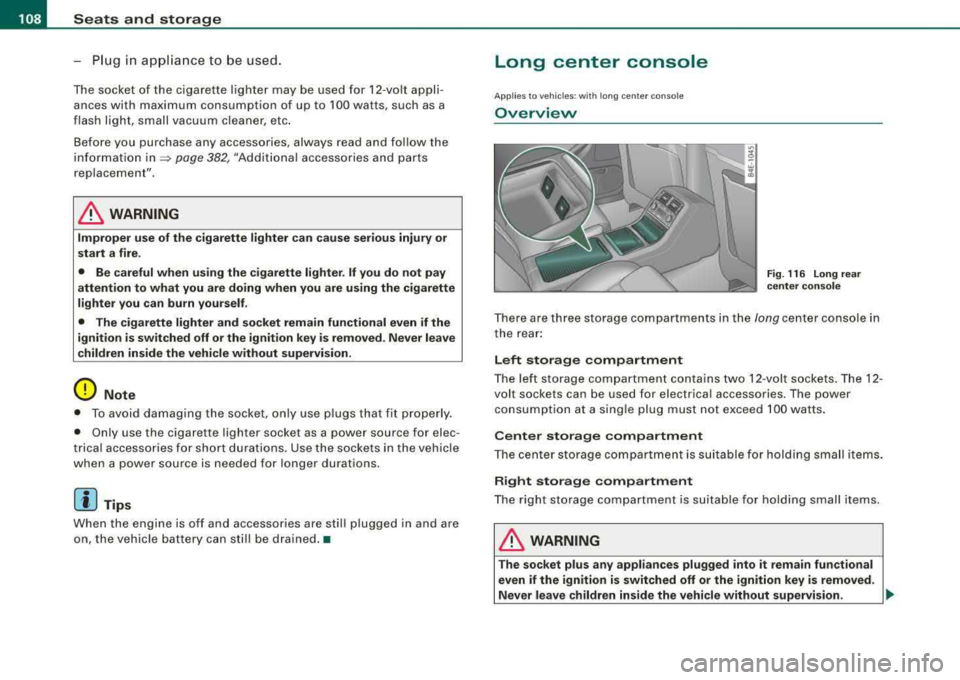
Fig . 116 Long re ar
cen ter con sole
T here are three storage co mpartments in the long center console in
t he rear :
Left storage compartment
The le ft sto rage c om partm ent co ntain s two 12 -v o lt so ckets. The 12 -
volt sockets can be used for electrica l accessories. The power
co nsumption a t a sing le plug mus t no t exceed 100 watts .
Center storage compartment
Th e cen te r storag e compar tment is suitabl e fo r hol ding small items .
Right storage compartment
T he right storage co mpart ment is suita ble for hold ing smal l items.
& WARNING
T he socket plus any appliances plugged into it remain functional
even if the ignition is switched off or the ignition key is removed.
Never leave children in side the vehicle without supervision.
~
Page 111 of 404
![AUDI S8 2008 Owners Manual ________________________________________________ S_ e_ a_t _
s _a_ n_d _ s_t _o _ r_ a_ g~ e __ fflll
0 Note
To avoid damaging the socket, only use plugs that fit properly.
[ i] Tips
Wh](/img/6/57619/w960_57619-110.png "AUDI S8 2008 Owners Manual ________________________________________________ S_ e_ a_t _
s _a_ n_d _ s_t _o _ r_ a_ g~ e __ fflll
0 Note
To avoid damaging the socket, only use plugs that fit properly.
[ i] Tips
Wh")
________________________________________________ S_ e_ a_t _
s _a_ n_d _ s_t _o _ r_ a_ g~ e __ fflll
0 Note
To avoid damaging the socket, only use plugs that fit properly.
[ i] Tips
When the engine is off and accessories are still plugged in and are
on, the vehicle battery can still be drained. •
Storage
General overview
There are numerous places to store items in your vehicle.
Glove compartment
Storage compartment
Pockets in the front seats*
Compartments in the door trim panels
Compartments in the rear doors*
Coat hooks => page 109
=> page 110
=> page 110
=> page 111
=> page 111
Left side storage compartment in the => page 112
trunk
--Right side storage compartment in the => page 113
trunk
Emergency warning triangle
=> page 348
& WARNING
• Always remove objects from the instrument panel. Any items
not stored could slide around inside the vehicle while driving or
Controls and equip ment
&, WARNING (continued)
when accelerating or when applying the brakes or when driving
around a corner.
• When you are driving make sure that anything you may have
placed in the center console or other storage locations cannot fall
out into the footwells. In case of sudden braking you would not be
able to brake or accelerate.
• Any articles of clothing that you have hung up must not inter
fere with the driver's view. The coat hooks are designed only for
lightweight clothing . Never hang any clothing with hard, pointed
or heavy objects in the pockets on the coat hooks. During sudden
braking or in an accident -especially if the airbag is deployed -
these objects could injure any passengers inside the vehicle. •
Glove compartment
Your Owner's Literature and the media player are stored
in the lockable glove compartment.
t------.-,.---------. l
i
Fig. 117 Glove
compartment