center console AUDI S8 2008 User Guide
[x] Cancel search | Manufacturer: AUDI, Model Year: 2008, Model line: S8, Model: AUDI S8 2008Pages: 404, PDF Size: 52.7 MB
Page 112 of 404
___ S_ e
_ a_t_s _ a_n_ d
__ s _t _o _r _a ...::g:::.... e ________________________________________________ _
"' 'IZ::mimr::a ..
-
-
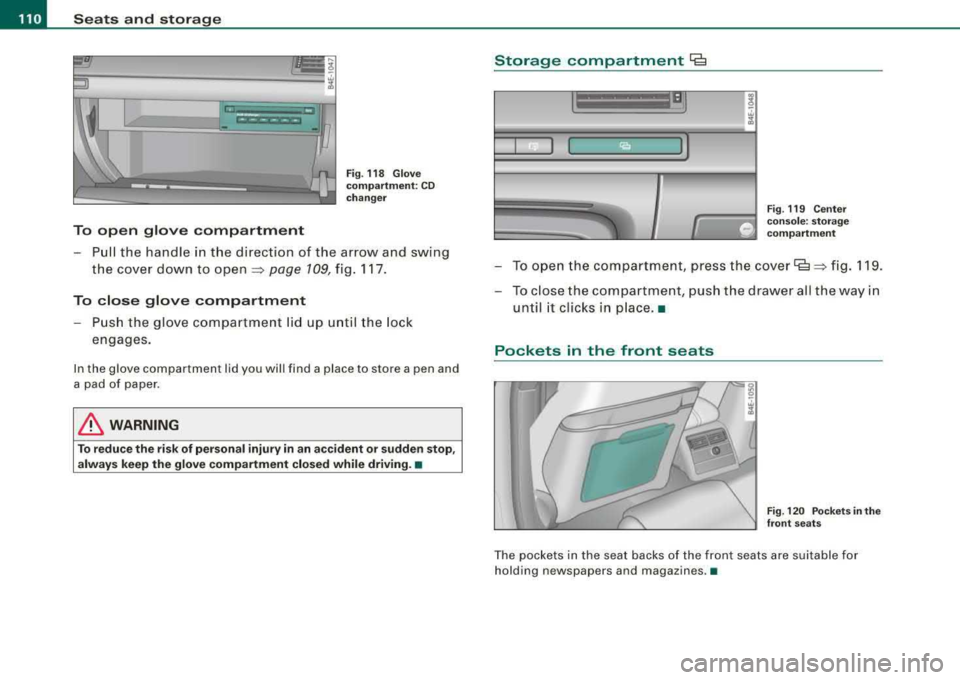
To open glove compartment
Fig. 118 Glove
compartment: CD
changer
- Pull the handle in the direction of the arrow and swing
the cover down to
open ~ page 109, fig. 117.
To close glove compartment
- Push the glove compartment lid up until the lock
engages.
In the glove compa rtm ent lid you will find a place to store a p en and
a pad of paper.
& WARNING
To reduce the risk of personal injury in an accident or sudden stop,
always keep the glove compartment closed while driving. •
Storage compartment Cg
. w :;
Fig. 119 Center
console: storage compartment
- To open the compartment, press the cover~ ~ fig. 119.
- To close the compartment, push the drawer all the way in
until it clicks in place .•
Pockets in the front seats
Fig . 120 Pockets in the
front seats
The pockets in the seat backs of the front seats are suitable for
holding n ewspapers and magazines .•
Page 125 of 404
Warm and cold -
------------------------------..J
[ i J Tip s
If the climate control system is operating in cool ing mode, air flows
primarily from the outlets in the center console and in the door
pillars . To achieve adequate cooling, you should never close the
out lets completely. •
Using climate controls economically
Using the climate controls prudently can help save fuel.
When you use t he a ir conditioner, engine power is reduced
and fuel consumption increases. To save fuel, you should
use the a ir co nditioner only when necessary. Also please
note the follow ing po ints:
- If you want to save fuel, activate ECON.
If you are going to drive with the windows open, use ECON.
W For the s ake of the environm ent
By reducing the amount of fuel you use, you also reduce the amount
of pollutants emitted into the air. •
Applies to v ehicl es: with so lar slidi ng /tilt ing sunr oof
Solar blower fan /solar roof
With sufficient sunlight, the blower fan continues to
operate with solar energy to bring in fresh air after the
ignition has been switched off.
T he fan motor is operated by solar energy through the solar roof
after the igni tion is turned off. P lease make certa in that
vents ©
and© are open to achieve optimal ventilation ~ page 122, fig. 137 .
Controls a nd eq uip
ment
The ventilation operates only with the sunroof c losed or in the tilted
position.
If the vehicle was switched off in the recirculation mode, the air
conditioning automatica lly switches to fresh air operation .
Solar operation is not activated at low outside temperatures .•
Windshield defogging/defrosting
Ap plie s to v ehic le s : with windsh ield defogg er/defr oste r
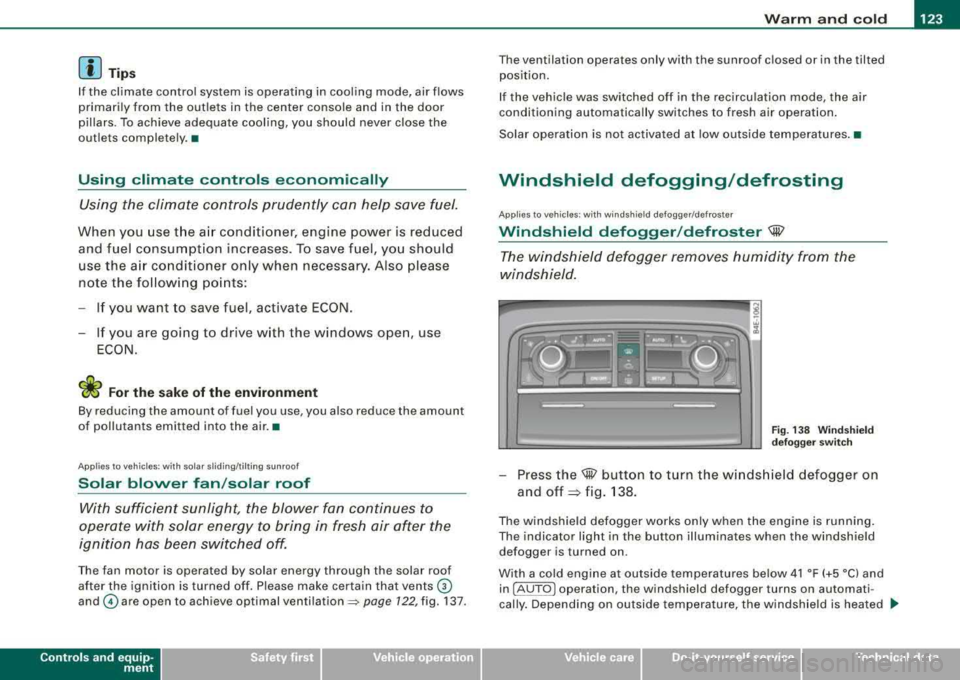
Windshield defogger /defroster ®
The win dshield defogger rem oves humidity from the
windshield.
F ig. 138 Win dsh ield
d efogger sw itc h
- Press the@ button to turn the w indshield defogger on
and
off ~ fig. 138 .
The w indshield defogger works only when the engine is running .
The indicator light in the button illuminates when the windshield defogger is turned on .
With a cold engine at outside temperatures below 41 °F (+5 °C) and in !AU TO
l operation , the windshield defogger turns on automati
cally . Depending on outside temperature, the windshie ld is heated .._
Vehicle care I I irechnical data
Page 127 of 404
Warm and cold -
-----------------'
Rear climate controls
Ap plies to vehic les: with rear a ir co ndition ing
Controls
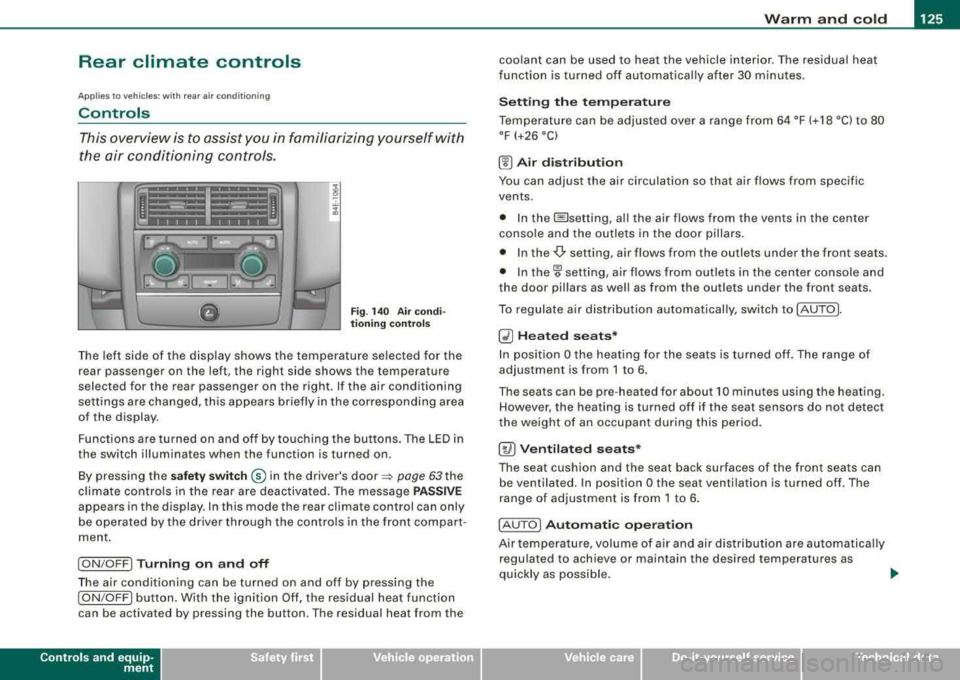
This overview is to assist you in familiarizing yourself with
the air conditioning controls .
Fig . 140 Air co ndi
t io ning contr ols
The left side of the display shows the temperature selected for the
rear passenger on the left, the right side shows the temperature
selected for the rear passenger on the right . If the air conditioning
settings are changed, this appears briefly in the corresponding area
of the display.
Functions are turned on and off by to uching the buttons . The LED in
the switch illuminates when the function is turned on .
By pressing the
sa fet y swi tc h ® in the driver's door ~ page 63 the
climate controls in the rear are deactiva ted. The message
P AS SIV E
appears in the display. In this mode the rear climate control can only
be operated by the driver through the contro ls in the front compar t
ment.
I ON /OFF] Tu rni ng o n and off
The air conditioning can be turned on and off by pressing the
I ON /OFF] button. With the ignit ion Off, the residual heat function
can be activated by pressing the button . The residual heat from the
Contro ls a nd eq uip
ment
coolant can be used to heat the vehicle interior. The residual heat
f unction is turned off au tomatica lly after 30 minu tes .
Se tting th e te mp era tu re
Temperature can be adjus ted over a range from 64 °F (+ 18 °C) to 80
°F (+26 °C)
(!) A ir di st ribu tion
You can adjust the air circulation so that air flows from specific
vents.
• In the @setting, al l the air flows from the v ents in the center
conso le and the outlets in the door pillars.
• In the
-Or setting, air flows from the outlets under the front seats.
• In
the~ setting, air flows from ou tlets in the center console and
the door pil lars as we ll as from the outlets under the front seats .
To regulate air distribution automatical ly, swi tch to !AUTO].
~ H ea ted se ats*
In posit ion O the heating for the seats is turned off. The range of
adjustment is from 1 to 6 .
The seats can be pre -heated for about 10 minutes us ing the heating.
However , the heating is turned off if the seat sensors do not detect
the weight of an occupant during this period .
[ty) Ventil ate d seats*
The seat cushion and the seat back surfaces of the fron t seats can
be ventilated. In position
O the seat ventilation is turned off. The
range of adjustment is from 1 to 6 .
! AU TO
I Autom ati c o pera tion
Air tempe rature, volume of air and air dis tribu tion are automatically
regulated to achieve or maintain the desired temperatures as
quickly as possible .
.,
Vehicle care I I irechnical data
Page 165 of 404

_____________________________________________ A_ u_t _o _m_ a_ t_ i_c _ t_ r_ a_ n_ s_m _ is_ s_ io_ n _ ___.11111
Automatic transmission
tiptronic ® (6-speed automatic
transmission)
Gener al information
Your vehicle is equipped with an electronically controlled 6-speed
automatic transmission. Upshifting and downshifting takes place
automatically.
The transmission is also equipped with tiptronic®. It allows the
driver to shift gears
manually if desired ~ page 167. •
Driving th e autom ati c transmission
Starting the engine
- The selector lever must be in Nor P.
Starting off
-Press and hold the brake pedal.
Contro ls a nd eq uip
ment
Fig . 183 Shift gate on
the center console:
selector lever with
release button
- Press and hold the release button in the selector lever
handle and move the selector lever from
P or N to D and
release the button
=> & .
- Wait briefly until the transmission has shifted (you will
feel a slight movement).
- Remove your foot from the brake pedal and accelerate.
Rocking back and forth to become unstuck
- Shift only between D and R when the vehicle is at a full
stop and the engine is running at idle speed.
Stopping
- Press and hold the brake pedal until the vehicle has come
to a complete stop.
Keep the brake pedal depressed so that the vehicle
cannot roll forward or backward while it is
idling=>& .
-Once stopped, do not depress the accelerator pedal to
rev up the
engine=> &.
Parking
- Press and hold the brake pedal until the vehicle has come
to a complete stop.
- Set the parking brake
firmly=> page 135, "Parking".
- Press and hold the release button in the selector lever
handle, move the selector lever into
P and then let go of
the release button
=> &. ._
Vehicle care I I irechnical data
Page 169 of 404
_______________________________________________ A_ u_t _o _m_ a_ t_ i_ c _ t_r _
a _n _s_ m_ i_ s _ s_ i_ o _ n _ ___._
gear when the driver presses the brake pedal on a downhill
gradient. This makes use of the braking effect of the engine without
the need to shift down manually. •
Manual shift program
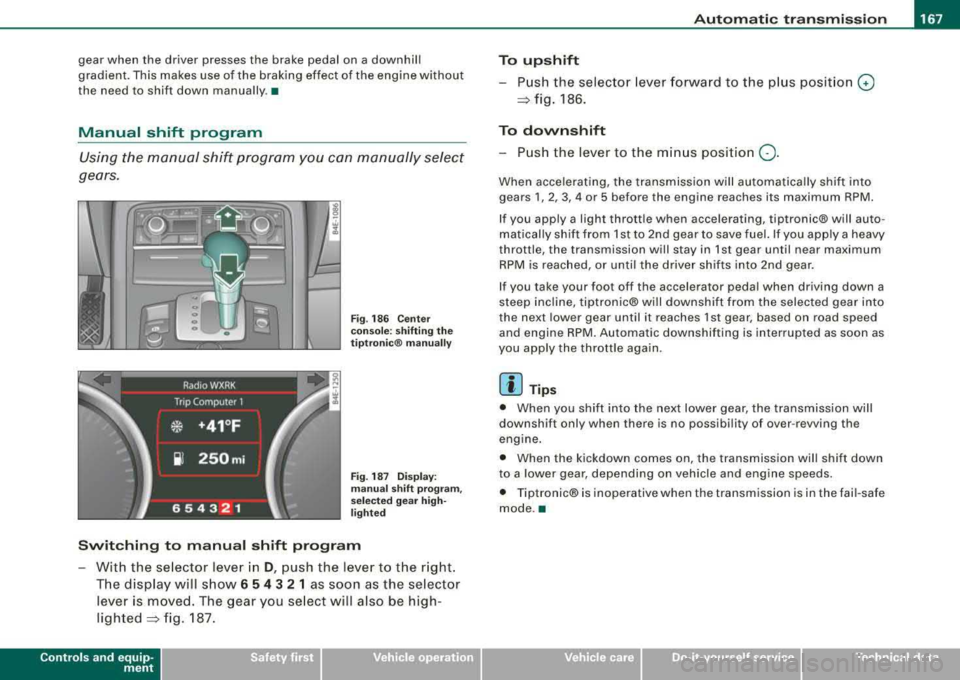
Using the manual shift program you can manually select
gears.
Fi g. 186 Center
console: shifting the
tiptr onic ® manually
Fig. 187 Display:
man ual shift pr ogra m ,
selected gear high
li ghted
Switching to manual shift program
With the se lector lever in D, push the lever to the right.
The display will show
6 5 4 3 2 1 as soon as the selector
lever is
moved. The gear you select will also be high
lighted~ fig. 187.
Controls a nd eq uip
ment
To upshift
Push the selector lever forward to the plu s position 0
~ fig. 186.
To downshift
- Push the lever to the minus position Q.
When accelerating, the transmission will automatically shift into
gears
1, 2, 3, 4 or 5 before the engine reaches its maximum RPM.
If you apply a light thrott le when accelerating, tiptronic® will auto
matically shift from 1st to 2nd gear to save fuel. If you app ly a heavy
throttle, the transmission will stay in 1st gear until near maximum
RPM is reached, or until the driver shifts into 2nd gear.
If you take your foot off the accelerator peda l when driving down a
steep inc line, tiptronic® wi ll downshift from the selected gear into
the next lower gear until it reaches 1st gear, based on road speed
and engine RPM. Automatic downshifting is interrupted as soon as
you apply the throttle again.
[ i ] Tips
• When you shift into the next lower gear, the transmission will
downshift only when there is no possibi lity of over -revving the
engine.
• When the kickdown comes on, the transmission will shift down
to a lower gear, depending on vehicle and eng ine speeds.
• Tiptronic® is inoperative when the transmission is in the fai l-safe
mode .•
Vehicle care I I irechnical data
Page 170 of 404
___ A_ u_ t_ o_ m_ a_ t_ i_c _ t_r _
a _n _ s_ m_ is_ s_ io_ n _______________________________________________ _
Applies to vehicles: with tipt ronic-steeri ng wheel
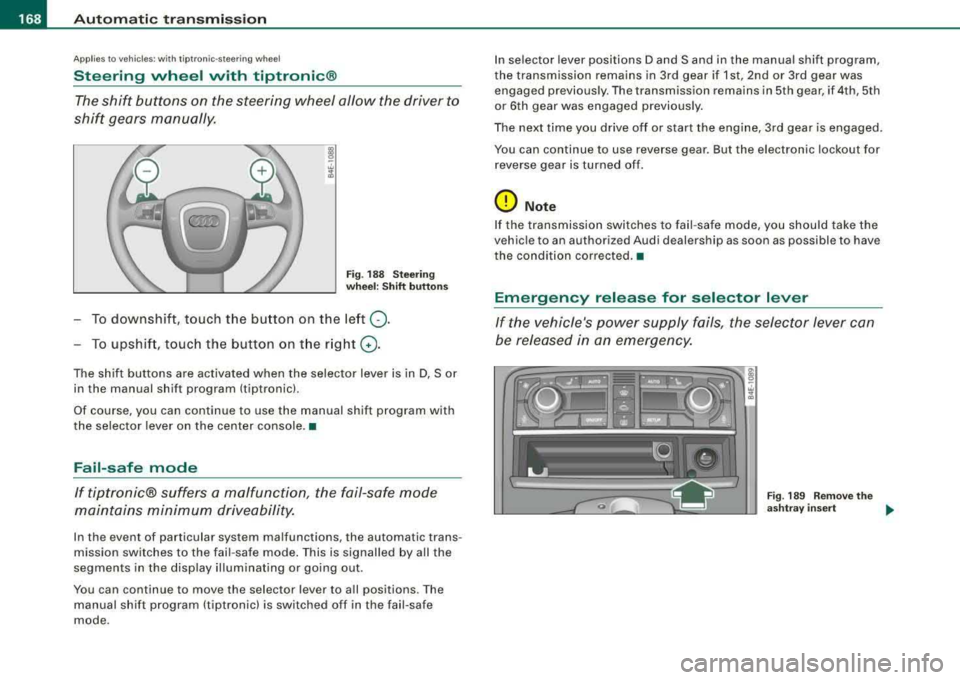
Steering wheel vvith tiptronic ®
The shift buttons on the steering wheel allow the driver to
shif t gears manually .
Fig . 18 8 S te ering
w heel : Shift button s
To downshift, touch the button on the left 0-
To upshif t, touc h the button on t he r ight G) .
The shift buttons are activated when the selector lever is in D, Sor
in the manual shift program (tiptronic).
Of course, you can continue to use the manual shift program with
the selector lever on the center console. •
Fail-safe mode
If tiptronic® suffers a ma/function, the fail-safe mode
maint ains minimum driveability.
In the event of particular system malfunctions, the automatic trans
mission switches to the fail -safe mode . This is signalled by all the
segments in the disp lay il lum inating or going out .
You can continue to move the selector lever to a ll positions. The
manual shift program (tiptronic) is switched off in the fail-safe
mode . I
n selector lever positions D and Sand in the manual shift program,
the transmission remains in 3rd gear if 1st, 2nd or 3rd gear was engaged previous ly. The transmission rema ins in 5th gear, if 4th, 5th
or 6th gear was engaged previous ly .
The next time you drive o ff or start the engine, 3rd gear is engaged .
You can continue to use reverse gear . But the electronic lockout for
r everse gear is turne d of f.
0 Note
If the transmission switches to fail -safe mode, you should ta ke the
vehic le to an authori zed Audi dealership as soon as possible to have
the condition co rrected. •
Emergency release for selector lever
If the vehicle's power supply fails , the selector lever can
be released in an emergency.
Fig . 18 9 R emo ve the
a sh tray insert
..
Page 173 of 404

Advan ce d Parkin g Sy ste m Ill
-------------~--
-Press the sw it c h P111! in t he cen ter console =:> page 170,
fig. 192 to activate the Aud i pa rking system manually.
Activation of the acoustic park ing system is confirmed by
a brief acknowledgement sound. The indicator light in
the switc h lights up.
De activation
-If yo u drive forwa rds faster t han approx. 6 mph (1 0 km/h},
or
-if you switc h the ignition off, the entire acoustic parking
assist is automatically deactivated, or
-you can press the switch P111A. in the center console
=:> page 170, fig. 192 to deact ivate the Audi parking
system. The indicator light in the switch goes out.
You have to turn on the acoustic parking assist manuall y if you wish
to park the vehicle forwards or if you wish to approach an obstacle
forwards and want a distance warning .
The range at whic h the sensors start to measure is about:
Front
Rear
W arn in g tone s side
cen ter
side
cen ter 3
ft
(0 .90 ml
4f t
(1 .20 ml
2 ft (0.60 ml
Dis tance wa rn ing is given by chimes which are generated by a
signal generator . The volume and the pitch of the chimes can be
adjusted in the MM I
=> page 180.
Mute
I n t he case of vehic les with automatic transmission, an acoustic
distance warning is discontinued when the transmission selector
Controls and equip ment lever is moved to the P position
. However, the system remains
active . As soon as the selector lever is moved fro m the
P pos it ion
and the vehicle approaches an obstacle, the acoustic distance
warning resumes.
Dr iving fo rw ard /b ac kw ard
Dista nce warn ing w hen driving fo rward/ backward is based on
detection of an obstac le in the range of the parking assist. As the
distance decreases, t he time interval betwee n the aud ible t ones
becomes shorter.
When the distance is less than approx .
1 ft (0.30 m), the tone
becomes cont inuous. At th is po int you shou ld stop backing up or
driving forward .
I f the distance to an obstacle re m ains the same, the vo lume of the
distance warning is gradua lly reduced after about
4 seconds (does
not app ly to the zone for the continuous tone). If you start to
approach the detected obstacle again, the distance warning will
sound at the norma l volume again.
P arking
When you se lect another gear when park ing (e .g . reverse/forwa rd),
the warning tones are temporarily suppressed, but the visua l
display remains on the MMI display . If you start approaching a
detected obstac le again, the distance warning wi ll sound at the
normal volume again .
Vi su a l displa y
The segments on t he MMI d isp lay indicate a change in the distance
between the vehicle and an obstacle . The number of segments
displayed depends on the obstac les in front of or behind the
vehic le. The c loser the vehic le comes to the obstacle, the closer t he
segments approach the
vehic le => page 170, fig. 193. When the
seg ment before last is d isplaye d, the ve hicle has reac hed the coll i
sion zone. At this point you should stop backing up or driving
f orward
=> & . ~
Page 396 of 404
lll'ft __ A_l-=- p _h_ a_ b_e _t_ic _ a_l _in _ d_e _x ____________________________________________ _
p
Paint
Touch-up 292
Paint No. . . . . . . . . . . . . . . . . . . . . . . . . . . 374
Parking . . . . . . . . . . . . . . . . . . . . . . . . . . . . 135
Automatic transmission ... .... .... 163
Caution when parking near a parking bar -
rier or curb .. .... ....... .... ... 135
Low bumper cover, spoilers and suspension . . . . . . . . . . . . . . . . . . . . 135
Parking brake
See Electromechanica l parking brake 134
P arking on a dec line (downhill) ....... 135
Parking on an incline (uphill) ... .. .... 135
Parts replacement . . . . . . . . . . . . . . . . . . 382
PASSENGER AIR BAG OFF ligh t ........ 230
Passenger's seat . . . . . . . . . . . . . . . . . . . . . 87
Passenger's seat memory . . . . . . . . . . . . . 95
Passive safety system . . . . . . . . . . . . . . . 198
Pedals ............................ 204
Physical principles of a frontal collision 210
Pockets . . . . . . . . . . . . . . . . . . . . . . . . . . . 110
Polishing .... ..... .. .... .... ...... . 291
Power locking switch . . . . . . . . . . . . . . . . . 53
Power locking system . . . . . . . . . . . . . . . . 49
Conven ience open feature .......... 64
Locking and unlocking the vehicle from
inside ........... ....... .... .... 53
Opening and closing the windows .. . 64
Rear lid/trunk lid ...... .... .... .... 55
Remote control . . . . . . . . . . . . . . . . . . . 48
Selective unlock feature . . . . . . . . . . . . 52 Settings
. . . . . . . . . . . . . . . . . . . . . . . . . 52
Unlocking and locking vehicle ... .... 51
Power roof . . . . . . . . . . . . . . . . . . . . . . . . . . 65
Power seat Contro ls .. .... ... .... .... .... .... 87
Massage function ....... ...... .... 89
Seat adjustment ........ ....... ... 88
Upper thigh support .. ...... .... ... 88
Power side door closer . . . . . . . . . . . . . . . 53
Power steering ..................... 273
Power sunroo f
Emergency c losing ............. 67, 68
Power window switche·s ... .... ....... 62
In the driver's door ................ 63
In the front passenger's door . . . . . . . 64
Reactivating the system ............ 65
Power windows Settings . . . . . . . . . . . . . . . . . . . . . . . . . 65
Pregnant women Specia l considerations when wearing a
safety belt ..................... 215
Programming the Homelink® universal re-
mote control . . . . . . . . . . . . . . . . . . . 191
Prop er occupant seating positions .... 200
Proper safety be lt position .. .... ... .. 214
Proper seating position Front passenger ................. 201
Occupants ...................... 200
Rear passengers 202
a
Quartz clock . . . . . . . . . . . . . . . . . . . . . . . . . 13 quattro®
See All Wheel Drive
............... 273
Question
R
What happens to unbelted occupants? . .
211
Why safety belts? ................ 209
Radiator fan ........................ 317
Rain sensor ......................... 80
Rain sensor defective ... .. .... .... .... 36
Reading lights
Front . .... .... .... .... ....... .... 74
Rear ............................. 75
Rear ashtray ....................... 107
Rear center console ...... .... .... ... 108
Rear c limate controls ................ 125
Air distribution .... ....... .... ... 125
Automatic operation . ...... .... ... 125
Contro ls . ...... ..... .. .... .... .. 125
Heated seats . . . . . . . . . . . . . . . . . . . . 125
PASSIVE . ... .. .... .... ...... .... 125
Switching on and off . ...... .... ... 125
Temperature ...... .... .... .... .. 125
Ventilated seats .................. 125
Rear fog lights .. ...... .... ...... .... . 71
Rear lid
Automatic operation ............... 56
Escape handle .... .... .... .... ... 348
Opening and clos ing ... .... .... .... 55
Opening manual ly ...... .... .... ... 56