warning AUDI S8 2009 Owners Manual
[x] Cancel search | Manufacturer: AUDI, Model Year: 2009, Model line: S8, Model: AUDI S8 2009Pages: 408, PDF Size: 91.63 MB
Page 188 of 408
• .___A_ d_v_ a_ n_c_ e_ d_ P _a_r_k _i_ n -=g ,_ S-=y"- s_ t_ e_ m __________________________________________ _
"Off" sett ing
If you have set the off function, both the rear -view camera and the
visual display will be deac tiva ted . The acous tic pa rking assist
remains active .
[ i J Tip s
If you change the sett ings in the MM I, the new settings do not
become active unti l the parking assist is switched on aga in. •
Safety tips
Applie s to ve hic le s: wit h Advance d Par king Sy ste m wit h re ar vie w ca me ra
Acoustic parking system error message
If you hear a continuous tone for several seconds while the front
and back parking assist with visual display is activated and the LED
in the switch
P wA flashes when you engage the reverse gear , there is
a malfunction in the acoustic parking assist .
This system error is immediately output after: • Every manual activation via the switch
P wA ~ pag e 173,
• Reverse gear is engaged for the first time during an ign ition
cycle, or
• An error is detected during operation.
[ i J Tips
If the system reports an error, have an Audi dea ler or an authorized
dea le rship corr ect this system error. •
Applies to vehicles: w it h A dvanced Par king S ystem w it h rea r view ca mera
Rear-view camera tips
We recommend that you practice park ing with the rear -view camera
in a traffic -free location , or parking lot , to become familiar with the
system, the orientation lines, and their function . When doing this,
there should be good light and weather conditions .
I n the MM I Display, objects or vehicles appea r c loser or further away
if :
• you are driving in reverse g ear from a level surface onto an
incline, or a downward slope,
• you are driv ing in reverse gear toward protruding objects,
• the vehic le is carrying too much load in the rear.
T he accuracy of the orientation lines and b lue surfaces diminishes
if :
• the Adaptive Air Suspension is defective, or the dynamic or lift
mode is switched on,
• the rear -view camera does not provide a reliable image, for
example, in poor visibility condit ions or if the lens is d irty,
• the image on the screen is not visible due to sun glare and reflec
tion .
Car ing for the rear- vie w c amera l en s:
• Damp en the lens with a hous ehold a lcohol -based glass cleaner,
and c lean the lens w ith a dry cloth.
• Remove snow with a hand brush.
• Remove ice , preferably with de -icing spray~
0.
ln. WARNING
• The rear-view ca m era doe s not replace the view to the rear and
the rear view mirror s.
• The rea r-view camer a - be cause of t echni cal limit ation s - does
not show the ent ire area behind the vehicle
~ page 17 7, fig. 199. ~
Page 189 of 408
__________________________________________ A_ d_v _a_ n_ c_e _d _ P_a_ r_ k_ i_n ..:g =-- S...:y:- s_ t_ e_ m ___ !II
& WARNING (continued )
Be especially careful to check for small children and animals
before backing up . Small children and animals will not always be
shown in the rear-view display .
• The Audi parking system is not a substitute for being careful
and alert when backing up . Be especially careful during parking
and similar maneuvers . Always watch where you are driving and
make sure that nothing is in the way .
• Do not allow yourself to be distracted from traffic by the rear
v iew camera pictures.
• When maneuvering or parking , do not only use the MMI Display
for or ientation . Certa in objects -depending on the screen resolu
tion -may not , or not entirely , be di splayed; for example trailer
hitches , chains , narrow posts , or fences .
• Only use the rear -view camera for aid if it shows a good, clear
picture . The image may be obscured , for example , by the sun
shining into the lens, dirt on the lens , or as the result of a defect ·
danger of accident!
• If the image is hazy when the MMI Display is switched on or the
area behind the vehicle is not visible (for example , as the result of
a dirty or defective lens ), the rear -view camera must not be used
for aid in maneuvering -danger of ac cident!
• The rear -view camera generates two -dimensional images . For
this reason, please note that recesses in the ground and
protruding parts on another vehicle , or protruding objects fixed to
the ground , will be more difficult or impossible to recognize on the
MMI Display, due to the missing spacial depth.
• If the position and the installation angle of the camera has
changed , for example, after a rear end collision, do not continue to
use the system for safety reasons . Have it checked by an autho
rized Audi dealer or qualified workshop .
• Only use the rear-v iew camera when the rear lid is fully closed.
Make sure that objects mounted on the rear are not obscuring the
camera v iew .
Controls and equip
ment
& WARNING (continued )
• Remove ice, preferably with de-icing spray .
0 Note
• Never use warm or hot water to remove snow or ice from the
rear -view camera lens -danger of crack format ion on t he lens!
• Whe n cleani ng t he le ns, neve r use care p ro d uc ts wi th a n abr a
s ive effect.
[ i ] Tips
The positio ns of t he orientation lines/ surfaces are disp laced up or
down if the par king p rocess is car ried out with the rear -view camera
i n A dap tive A ir Susp ens ion
=> p ag e 2 1 dyna m ic or lift mode. T here
fore , the accuracy is red uced. •
I • •
Page 191 of 408
____________________________________________ A_ d_a--' p=-- t_iv _e_ A_ ir_ S_u_ s-=- p_e _ n_ s _ io_ n __ JIIII
Chassis Controls
Four different driving modes can be set by the driver.
The automatic control processes are speed -and time -dependent.
For example, it is not possib le to raise the suspension to the lift
mode above certain speeds .
When a speed of about 75 mph ( 120 km/h) is exceeded for more than
30 seconds, the vehicle is automatically lowered approximately 1
inch (25 mm) to a level suitable for highway speeds, except in the
standard mode . Road holding is optim ized as a result of the lower
center of gravity and fue l consumption is reduced as a result of
reduced wind resistance .
Level adjustment
lift
automatic
dynamic
a utomati c Ground
clear ance
about 5 .7 inches (145 mm)
a bout 4.7 inches ( 120 mm)
about 4 .7 inches (120 mm)
about 3 .9 inches (100 mm)
Select the automatic mode if you prefer a suspension setting
e m phasizing comfort. Damping characteristics emphasizing
comfort are selected in this mode.
• Lower ing : When a speed of about 75 mph (120 km/h) is exceeded
for more than 30 seconds, the vehicle is automatically lowered by about 1 inch (25 mm) .
• Rais ing : The vehicle is automatically raised again if the speed
falls be low about 44 mph (70 km/h) for a period of 120 seconds. The
vehicle is raised immediately when speed falls below about 22 mph (35 km/h) .
dynami c
Select the sport mode if you prefer a sporty suspension setting. In
this mode, the vehic le is lowered whi le it is still stationary and
Controls and equip
ment
sporty damping characteristics are selected. The warning light ~
in the instrument cluster will come on for a few seconds just to
remind you of the reduced ground clearance .
I f you switch off the engine while the vehicle is in the dynamic mode
and then switch on the ignition once again, the~ warning light
wi ll also come on again for a few seconds.
• Lowering : When a speed of abou t 75 mph (120 km/h) is exceeded
for more than 30 seconds, the vehicle is automatically lowered by an addi tional 0 .2 in (5 mml.
• Raising : The vehicle is automatically raised again if the speed
falls bel ow about 44 mph (70 km/h) for a period o f 120 seconds . The
vehic le is raised immediately when speed falls below about 22 mph
(35 km/h).
s ta nd ard
Select the standard mode if you desire a suspension setting with a
special emphasis on comfort . In the standard mode there is
no
lowering o f the suspension. Even at high speeds, the veh icle stays
at the same level. Damping characteristics with a decided emphasis
on comfort are selected in this mode .
lift
Select the lift mode when you have to travel over poo r sections of
road (e .g . trai ls). In the lift mode, the vehic le is raised by 1 inch (25
mm) compared to norma l leve l while it is still stationary and
damping characteristics are adjusted to emphasize comfort.
The lift mode can be act ivated only at speeds be low 50 mph (80
km/h). When a speed of about 62 mph (100 km/h) is exceeded, the
system automatically leaves lift mode and the mode set previously
(standard, automa tic, dynamic) is activated again. •
I • •
Page 193 of 408
____________________________________________ A_ d_a--' p'-- t·_ ,v _e_ A_ ir_ S_u_ s_,_ p_e _n_ s_ io_ n _ __._
Setting the Driving Modes
The driving modes are set in MM/.
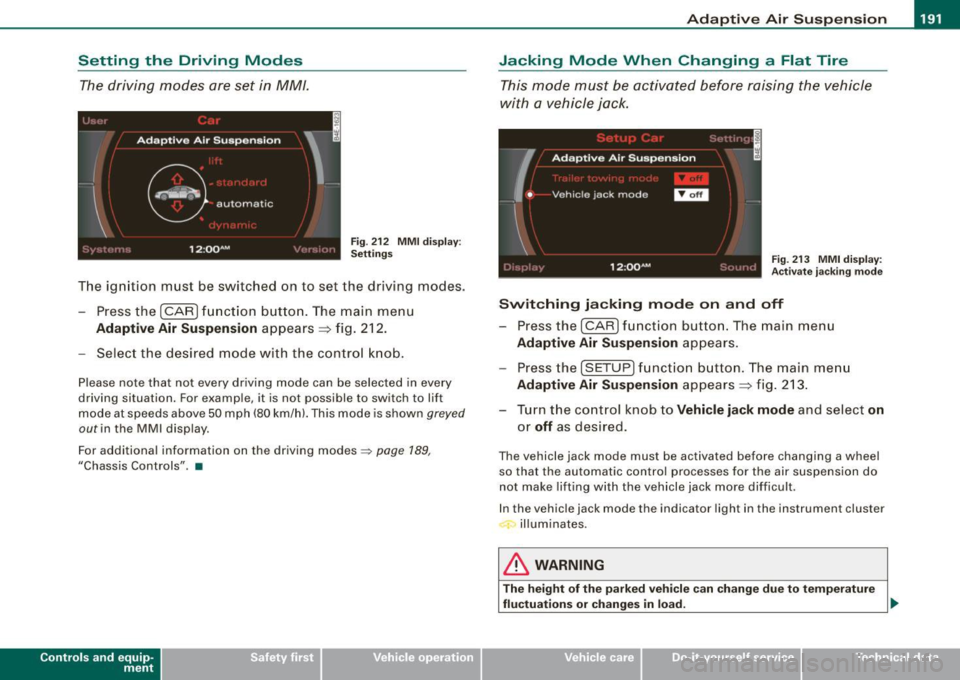
Fig . 212 MMI display:
Settings
The ignition must be switched on to set the driv ing modes.
- Pressthe(CAR]fu nction button. The main menu
Adaptive Air Suspension appears => fig. 212.
- Select the desired mode with the control knob.
Please note that not every driving mode can be selected in every
driving situation. For example, it is not possible to switch to lift
mode at speeds above 50 mph (80 km/h). This mode is shown
greyed
out in the MMI display.
For additional information on the driving modes::;>
page 189,
"Chassis Controls" . •
Con tro ls and eq uip
ment
Jacking Mode When Changing a Flat Tire
This mode must be activated before raising the vehicle
with a vehicle jack.
Fig. 213 MMI display:
Activate jacking mode
Switching jacking mode on and off
- Press the (CAR] function button. The main menu
Adaptive Air Suspension appears.
Press the (SETUP) function button. The main menu
Adaptive Air Suspension appears => fig. 213.
- Turn the control knob to
Vehicle jack mode and select on
or off as desired.
The vehicle jack mode must be activated before changing a wheel
so that the automatic control processes for the air suspension do
not make lifting with the vehicle jack more difficult .
In the vehicle jack mode the indicator light in the instrument cluster
illuminates.
& WARNING
The height of the parked vehicle can change due to temperature
fluctuations or changes in load. _,,
Vehicle care I I irechnical data
Page 196 of 408
• .___H_ o_ m _ e _L_i _ n _k _® ____________________________________________________ _
Homelink®
Universal remote control
Applies to vehic les: w ith Home link ® universal remote cont ro l
General information
The HomeLink® fe ature can le arn up to th ree r adio
fre quency codes for m ost c urrent transmitters used for
operating garage doors, es tate gates , home or outdoor
ligh ting sy stems, and other devices .
You m ust first pro gram the H omel in k® trans mitter befor e you can
use the system=>
page 195, "Programm ing th e Homelink® trans
m itter".
In order to pro gram t he Homelink® transmitter fo r devices utilizing
ro lling code, a second person on a ladder who can safe ly reach the
ga rage door o pene r m oto r is rec omm ended . It is also necessa ry to
locate the "learn" button on your garage door opener motor. Refer
to t he op era ting instructions for the opene r, as the loca tion and
co lor of this button may vary by manufacturer .
Y ou can still use the o rigina l remote c ontrol fo r th e dev ice at any
time.
& WARNING
• Never use the Homelinkl1JI transmitter with any garage door
opener that does have not the safety stop and reverse feature as
requ ired by federal safety standards . This in cludes any garage
door opener model manufactured before April 1, 1982.
• A garage door opener which cannot detect an object , signaling
the door to stop and reverse does not meet current federal safety
standards . Using a garage door opener without these features
increases risk of serious injury or death .
& WARNING (continued)
• For safety reasons never release the parking brake or start the
engine while anyone is standing in front of the vehicle.
• A garage door or an estate gate may sometimes be set in
motion when the Homelink ® remote control is being
programmed . If the devi ce is repeatedly activated , this can over
strain motor and damage its electrical components -an over
heated motor is a fire hazard!
• To avoid possible injuries or property damage , please always
make absolutely certain that no persons or objects are located in
the range of motion of any equipment being operated.
[ i ] Tips
• I f you wou ld l ik e mor e infor mation o n Hom elink®, w here to
purchase the Homelink ® compatib le products, or wou ld li k e to
pu rchase the Homeli nk® Home Ligh ting Package, please call t oll
free: 1 -8 0 0 -355 -3515.
• F or Dec lara tion of Compliance to U nite d Sta tes FCC an d Indu stry
C anada regulations=>
page 385 . •
Page 202 of 408
........ _o_ r_iv _i_ n""' g::;._ S_ a_f _e _ly =---------------------------------------------------
Driving Safely
General notes
Safe driving habits
Please remember -safety first!
This chapter contains important information , tips, instructions and
warnings that you need to read and observe for your own safety, the
safety of your passengers and others. We have summarized here
what you need to know about safety belts, airbags, child restraints as well as child safety. Your safety is for us
priority number 1. Always
observe the information and warnings in this section -for your own
safety as well as that of your passengers.
The information in this section applies to all model versions of your
vehicle. Some of the features described in this sections may be
standard equipment on some models, or may be optional equip
ment on others. If you are not sure, ask your authorized Audi dealer.
& WARNING
• Always make sure that you follow the instructions and heed
the WARNINGS in this Manual. It is in your interest and in the interest of your passengers.
• Always keep the complete Owner's Literature in your Audi
when you lend or sell your vehicle so that this important informa
tion will always be available to the driver and passengers.
• Always keep the Owner's literature handy so that you can find
it easily if you have questions. •
Safety equipment
The safety features are part of the occupant restraint
system and work together to help reduce the risk of injury
in a wide variety of accident situations.
Your safety and the safety of your passengers should not be left to
chance. Advances in technology have made a variety of features
available to help reduce the risk of injury in an accident. The
following is a list of just a few of the safety features in your Audi:
• sophisticated safety belts for driver and all passenger seating
positions,
• safety belt pretensioners,
• safety belt force limiters for the front seats,
• safety belt height adjustment systems for the front seats,
• front airbags,
• knee airbags for the front seats
• side airbags in the front seats and outer rear seats,
• side curtain airbags,
• special LATCH anchorages for child restraints,
• head restraints for each seating position,
• adjustable steering column.
These individual safety features, can work together as a system to
help protect you and your passengers in a wide range of accidents.
These features cannot work as a system if they are not always correctly adjusted and correctly used.
Safety is everybody's responsibility! •
Page 203 of 408
__________________________________________________ D _r_iv _ in_ g~ S_ a_f _e _l_ y __ llll
Important things to do before driving
Safety is everybody's job! Vehicle and occupant safety
always depends on the informed and careful driver.
For your safety and the safety of your passengers, before
driving always:
-Make sure that all lights and signals are operat ing
correctly.
- Make sure that the tire pressure is correct.
- Make sure that all windows are clean and afford good
visibility to the outside.
- Secure all luggage and other items carefully~
page 109.
-Make sure that noth ing can interfere w ith the pedals.
- Adjust front seat, head restraint and mirrors correctly for your height .
- Instruct passengers to adjust the head restraints
according to their height.
- Make sure to use the right ch ild restraint correctly to
protect children ~
page 245, "Child Safety ".
- Sit properly in your seat and make sure that your passen
gers do the same~
page 86, "General recommenda
tions".
- Fasten your safety belt and wear it p roperly. Also instruct
your passengers to fasten the ir safety belts properly
~ page 217. •
Controls and equip
ment Safety first
Vehicle operation
What impairs driving safety?
Safe driving is directly related to the condition of the
vehicle, the driver as well as the driver's ability to concen
trate on the road without being distracted.
The driver is responsible for the safety of the vehicle and all
of its occupants. If your ability to drive is impaired, safety
risks for everybody in the vehicle increase and you also
become a hazard to everyone else on the road ~& .There
fore:
Do not let yourself be distracted by passengers or by
using a cellular telephone .
NEVER drive when your driving ability is impaired (by
medications, alcohol, drugs, etc.).
- Observe all traffic laws, rules of the road and speed limits
and plain common sense .
- ALWAYS adjust your speed to road, traffic and weather
conditions.
- Take frequent breaks on long trips. Do not drive for more
than two hours at a stretch.
- Do NOT drive when you are tired, under pressure or when
you are stressed .
& WARNING
Impaired driving safety increases the risk of serious personal
injury and death whenever a vehicle is being used. •
Vehicle care Do-it-yourself service Technical data
Page 204 of 408
-Driving Safely --=------'---------------
Proper occupant seating positi
·ons
Proper seating position for the driver
The proper driver seating position is important for safe,
relaxed driving.
"' N
;
Fig. 218 The correct
distance between
driver and steering
wheel
Fig . 219 Correct head
restraint position for
driver
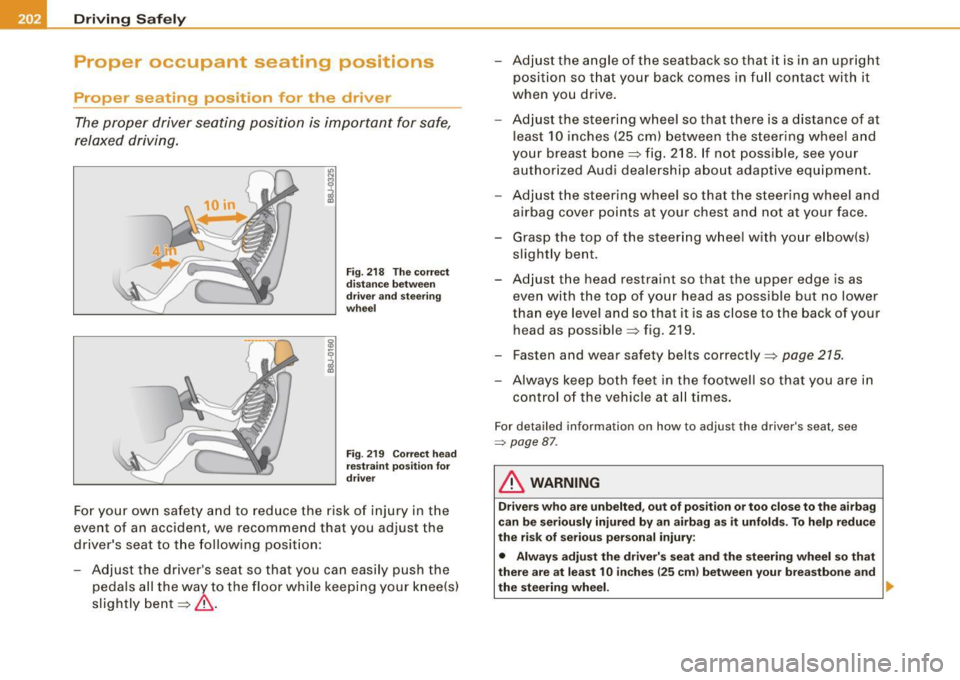
For your own safety and to reduce the risk of injury in the
event of an accident, we recommend that you adjust the
driver's seat to the following position:
- Adjust the driver's seat so that you can easily push the
pedals all the way to the floor while keeping your knee(s)
slightly bent=:>& . - Adjust the angle of the seatback so that it is in an upright
position so that your back comes in full contact with it
when you drive.
- Adjust the steering wheel so that there is a distance of at
least 10 inches (25 cm) between the steering wheel and
your breast bone=:> fig. 218. If not possible, see your
authorized Audi dealership about adaptive equipment.
- Adjust the steering wheel so that the steering wheel and
airbag cover points at your chest and not at your face.
- Grasp the top of the steering wheel with your elbow(s)
slightly bent.
- Adjust the head restraint so that the upper edge is as even with the top of your head as possible but no lower
than eye level and so that it is as close to the back of your
head as possible =:> fig . 219.
- Fasten and wear safety belts correctly=:>
page 215.
- Always keep both feet in the footwell so that you are in
control of the vehicle at all times.
For detailed information on how to adjust the driver's seat, see
=> page 87 .
& WARNING
Drivers who are unbelted, out of position or too close to the airbag
can be seriously injured by an airbag as it unfolds. To help reduce
the risk of serious personal injury:
• Always adjust the driver's seat and the steering wheel so that
there are at least 10 inches
125 cm) between your breastbone and
the steering wheel. ..
Page 205 of 408
________________________________________________ D_r_iv _ i _n_ g~ S_ a_ fe_ ly __ l!III
& WARNING (continued)
• Always adjust the driver's seat and the steering wheel so that
there are at least 4 inches (10 cm) between the knees and the
lower part of the instrument panel.
• Always hold the steering wheel on the outside of the steering
wheel rim with your hands at the 9 o'clock and 3 o'clock positions
to help reduce the risk of personal injury if the driver's airbag inflates .
• Never hold the steering wheel at the 12 o'clock position or with
your hands at other positions inside the steering wheel rim or on
the steering wheel hub. Holding the steering wheel the wrong way
can cause serious injuries to the hands, arms and head if the
driver's airbag inflates
• Pointing the steering wheel toward your face decreases the
ability of the supplemental driver's airbag to protect you in a colli
sion .
• Always sit in an upright position and never lean against or
place any part of your body too close to the area where the airbags
are located.
• Before driving, always adjust the front seats and head
restraints properly and make sure that all passengers are properly
restrained .
• Never adjust the seats while the vehicle is moving. Your seat
may move unexpectedly and you could lose control of the vehicle.
• Never drive with the backrest reclined or tilted far back! The
farther the backrests are tilted back, the greater the risk of injury due to incorrect positioning of the safety belt and improper
seating position.
• Children must always ride in child seats
=> page 245. Special
precautions apply when installing a child seat on the front
passenger seat
=> page 220. •
Controls and equip
ment Safety first
Vehicle operation
Proper seating position for the front
passenger
The proper front passenger seating position is important
for safe, relaxed driving.
For your own safety and to reduce the ris k of injury in the
event of an accident, we recommend that you adjust the
seat for the front passenger to the following pos ition:
- Move the front passenger seat back as far as possible.
There must be a minimum of 10 inches (25 cm) between
the breastbone and the instrument panel =>
&.
- Adjust the angle of the seatback so that it is in an upright
position and your back comes in full contact with it
whenever the vehicle is moving.
- Adjust the head restraint so that the upper edge is as
even with the top of your head as possible but not lower
than eye level and so that it is as close to the back of your
head as possible =>
page 205.
-Keep both feet flat on the floor in front of the front
passenger seat.
- Fasten and wear safety belts correctly=:>
page 215.
For detailed information on how to adjust the front passenger's
seat, see => page 86.
& WARNING
Front seat passengers who are unbelted, out of position or too
close to the airbag can be seriously injured or killed by the airbag
as it unfolds. To help reduce the risk of serious personal injury : .,
Vehicle care Do-it-yourself service Technical data
Page 206 of 408
lffll..,___D_ r_iv _i_ n""' g::;._ S_ a_f _e _ly =---------------------------------------------------
& WARNING (continued)
• Passengers must always sit in an upright position and never
lean against or place any part of their body too close to the area
where the airbags are located.
• Passengers who are unbelted, out of position or too close to the
airbag can be seriously injured by an airbag as it unfolds with
great force in the blink of an eye .
• Always make sure that there are at least 10 inches (25 cm)
between the front passenger's breastbone and the instrument
panel.
• Always make sure that there are at least 4 inches (10 cm)
between the front passenger's knees and the lower part of the
instrument panel .
• Each passenger must always sit on a seat of their own and
properly fasten and wear the safety belt belonging to that seat .
• Before driving, always adjust the front passenger seat and
head restraint properly.
• Always keep your feet on the floor in front of the seat. Never
rest them on the seat, instrument panel, out of the window, etc .
The airbag system and safety belt will not be able to protect you properly and can even increase the risk of injury in a crash .
• Never drive with the backrest reclined or tilted far back! The
farther the backrests are tilted back, the greater the risk of injury
due to incorrect positioning of the safety belt and improper
seating position.
• Children must always ride in child seats :::::,
page 245. Special
precautions apply when installing a child seat on the front
passenger seat
=:> page 220. •
Proper seating positions for passengers in
rear seats
Rear seat passengers must sit upright with both feet on
the floor consistent with their physical size and be prop
erly restrained whenever the vehicle is in use.
To reduce the risk of injury caused by an incorrect seating
position in the event of a sudden braking maneuver or an
accident, your passengers on the rear bench seat must
always observe the following:
- Adjust the head restraint so that the upper edge is as
even with the top of your head as possible but no lower
than eye level
=> page 205.
- Keep both feet flat in the footwell in front of the rear seat.
Fasten and wear safety belts properly =>
page 215.
Make sure that children are always properly restrained in
a child restraint that is appropriate for their size and age
=>
page 245.
& WARNING
Passengers who are improperly seated on the rear seat can be
seriously injured in a crash.
• Each passenger must always sit on a seat of their own and
properly fasten and wear the safety belt belonging to that seat.
• Safety belts only offer maximum protection when the safety
belts are properly positioned on the body and securely latched. By
not sitting upright , a rear seat passenger increases the risk of
personal injury from improperly positioned safety belts!
• Always adjust the head restraint properly so that it can give
maximum protection. •