battery AUDI S8 2009 User Guide
[x] Cancel search | Manufacturer: AUDI, Model Year: 2009, Model line: S8, Model: AUDI S8 2009Pages: 408, PDF Size: 91.63 MB
Page 63 of 408
How is the anti-theft alarm system switched off?
The anti-theft alarm system is switched off only when you unlock
your vehicle. If you do not open a door within 60 seconds after you have unlocked with the remote control, the vehicle will lock itself
again automatically.
When will the anti-theft alarm system be triggered?
When the vehicle is locked, the alarm system monitors and protects
the follow ing parts of the vehicle:
• engine compartment
• luggage compartment
• doors
• ignition
When the system is activated, the alarm will be triggered if one of
the doors, the engine hood or the rear lid are opened, or if the igni
tion is turned on. The anti-theft alarm system will also go off when
the battery is disconnected.
Unlocking the rear lid by inser ting and turning the key inside the
rear lid locking cylinder will trigger the optical and acoustic alarm .
You can also trigger the alarm by pressing the PANIC button on your
remote control. This will a lert other people in case of emergency .
Press the
PANIC button again to turn off the alarm.
How is the anti -theft alarm switched off when
triggered?
The alarm system is switched off when you unlock the vehicle or
when the ignition is switched on. The alarm will a lso switch itself off
when it comes to the end of its cycle .
Emergency flasher and horn
The emergency flasher will blink briefly and the horn sounds when
the doors, engine hood and rear lid are properly closed.
If the emergency flashers do not b link , or the horn does not sound,
check the doors, engine hood and rear lid to make sure they are
properly closed . If you close a door, the hood or the rear lid with the
Con tro ls and eq uip
ment
Opening and closing
anti-theft alarm switched on, the emergency flashers will blink and
the horn will sound only a fter you have closed the door or lid .
[ i ] Tips
For the anti-theft alarm system to function properly, make sure all
vehicle doors and windows are closed before leaving the vehicle .•
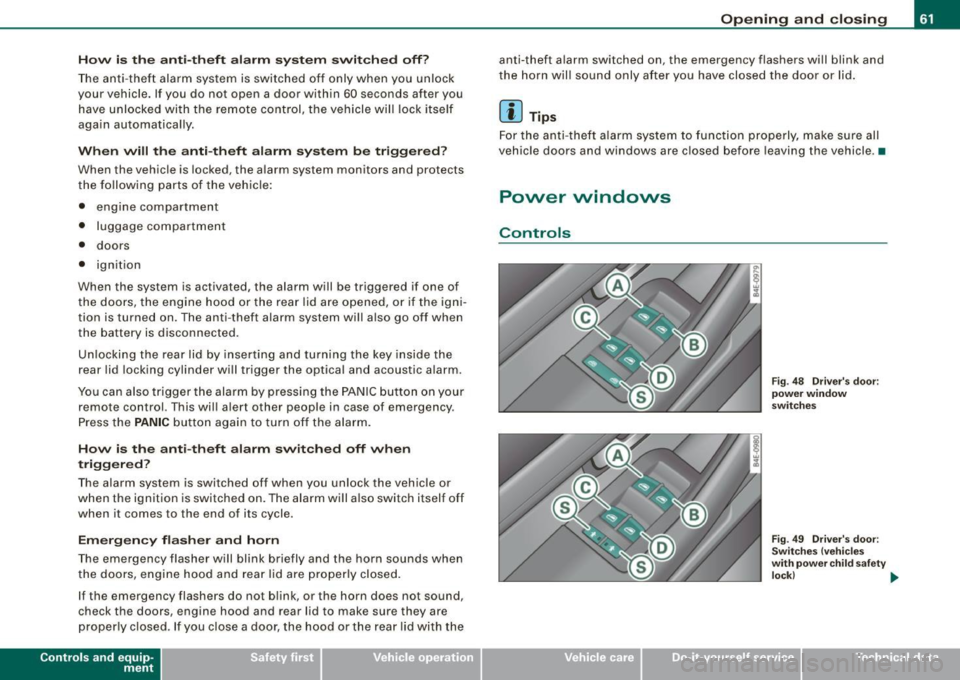
Power windows
Controls
Vehicle care I I
Fig. 48 Driver's door:
power window
switches
Fig . 49 Driver's door:
Switches (vehicles
with power child safety
lock ) _,.
irechnical data
Page 66 of 408
Opening and closing
- Pull the sw itch q uickly to the second position and the
window will a uto ma tically close all t he way .
[ i ) Tips
The windows can sti ll be opened and closed for about ten minutes
after the ignition has been turned off . The power windows are not
shut off until one of the front doors is opened .•
Convenience open feature
The driver con open all windows.
Fig . 51 Driv er's do or:
po wer wind ow
swit che s
The Convenience open funct io n is only av ailable if it is act i
vated in the MM I Window s men u=>
page 64, "Settings".
With the ignit ion off and the driver's door open, push the
power window switch
@ to the second stage fo r more
tha n 2 seconds to open a ll the windows automatica lly.
The opening procedure is terminated if the power window switch is
released. For safety reasons it is not possible to open the windows
with the remote control. •
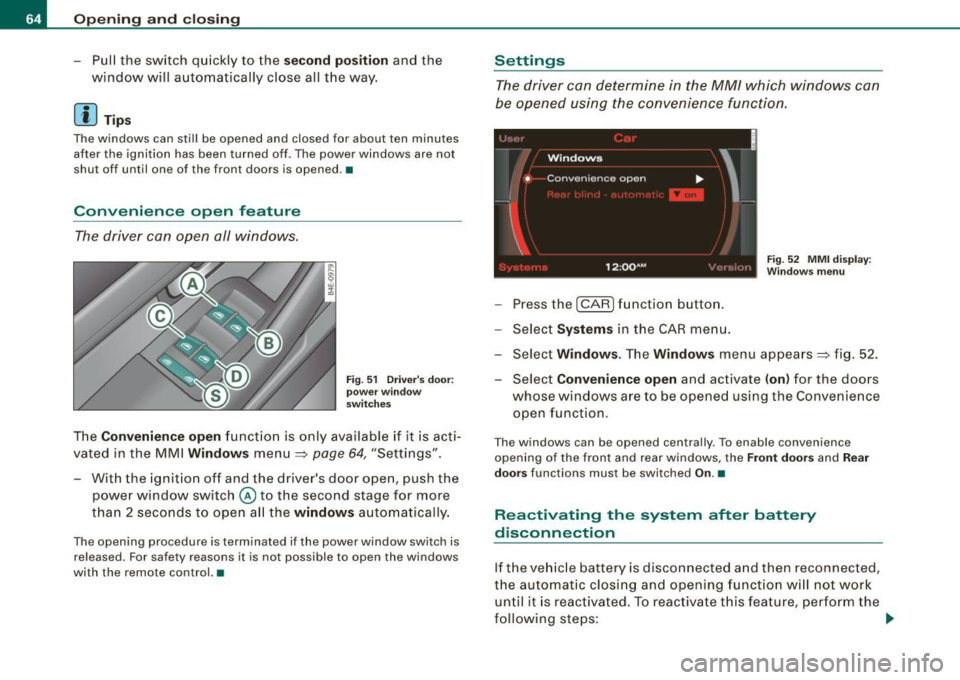
Settings
The driver con determine in the MM/ which windo ws co n
be opened using the convenience function.
F ig . 5 2 MMI displa y:
Wi ndows menu
- Pressthe [CAR )funct ion button.
- Sele ct Sy stem s in the CAR me nu.
- Select Windows. The Windows menu appears => fig. 52.
- Select Convenience open and activate (on ) for the doors
whose windows a re to be opened using the Convenience
open function.
T he windows can be opened centra lly . To enable convenience
opening of the front and rear windows, the
Front door s and Rear
doo rs
functions must be switched On.•
Reactivating the system after battery
disconnection
If the ve hicle battery is disconnected a nd then reconnected,
the au tomatic closing and opening functio n w ill not w ork
un til it is reactivated. To reac tiv ate t his fea ture, per form the
f o llo wing steps: _,.
Page 77 of 408
- Press the (D button to turn on the interior lights. If you
press the button a second time, the interior lights in the
rear are also turned on.
Reading lights ~
- Press the switch to turn the right or left reading light on
or off=>
page 74, fig. 64.
With the door contact circuit, 00 the interior lights turn on as soon
as you unlock the vehicle or open the doors. The interior lights are
also turned on when the ignition key is removed. The light goes out
about 2 minutes after the doors are closed. When the vehicle is
locked or when the ignition is turned on , the interior lights are
turned off.
When a door is open, the interior lights are turned off after about 10
minutes to prevent draining the battery .
[ i) Tips
The interior lights can be dimmed by holding the (D switch pressed
down. If the interior lights in the rear were turned on by pressing the
switch twice, the rear interior lights are also dimmed .•
Con tro ls and eq uip
ment
Clear vision
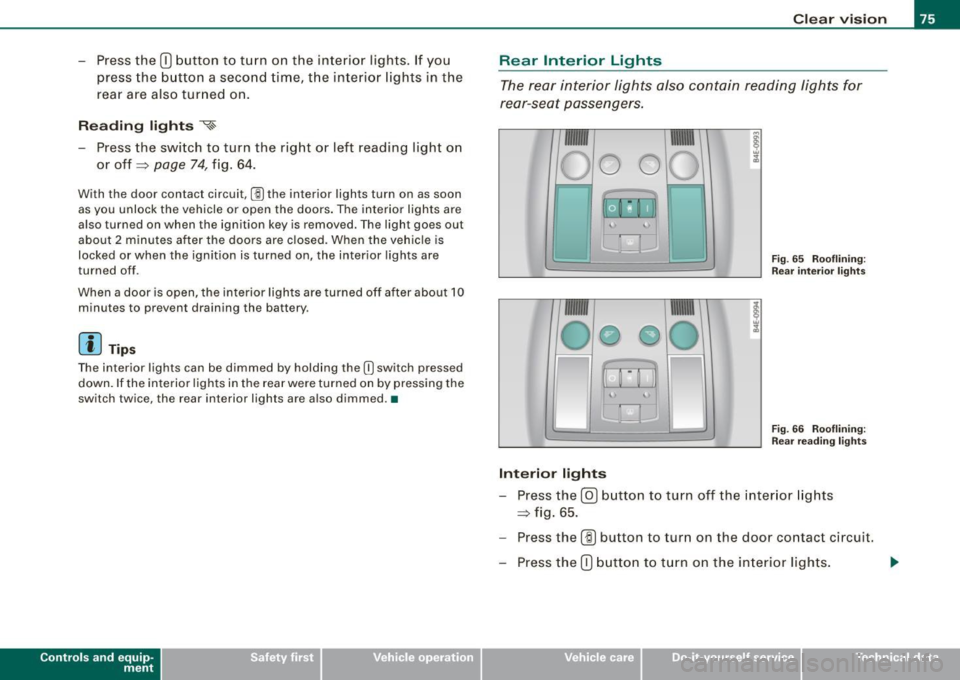
Rear Interior Lights
The rear interior lights also contain reading lights for
rear-seat passengers.
Fig . 65 Rooflining:
Rear interior lights
4
Fig. 66 Rooflining:
Rear reading lights
Interior lights
- Press the@) button to turn off the interior lights
=> fig. 65.
- Press the
(ID button to turn on the door contact circuit.
- Press the
(D button to turn on the interior lights.
Vehicle care I I irechnical data
Page 78 of 408
Clear vision
Reading lights
~
- Press one of the switches to turn the right or left reading
l ight on or off~
page 75, fig. 66.
With the door contact circuit, (ID the interior lights turn on as soon
as you unlock the vehicle or open the doors. The interior lights are
also turned on when the ignition key is removed . The light goes out
about 2 minutes after the doors are closed. When the vehicle is
locked or when the ignition is turned on, the interior lights are
turned off.
When a door is open, the interior lights are turned off after about 10
minutes to prevent draining the battery .
[ i J Tips
• By pressing the safety switch ©~ page 61, fig. 48 , the function
of some switches in the rear can be turned off. If the symbol in
the safety switch illuminates, the window regulators in the rear
doors, the switches for the interior lights and the switch for the elec
tric sun shade* are inoperative .
• The interior lights can be dimmed by holding the
(I] switch
pressed dow n.•
A pp lies to veh ic les : w ith back groun d lig ht in g
Background lighting
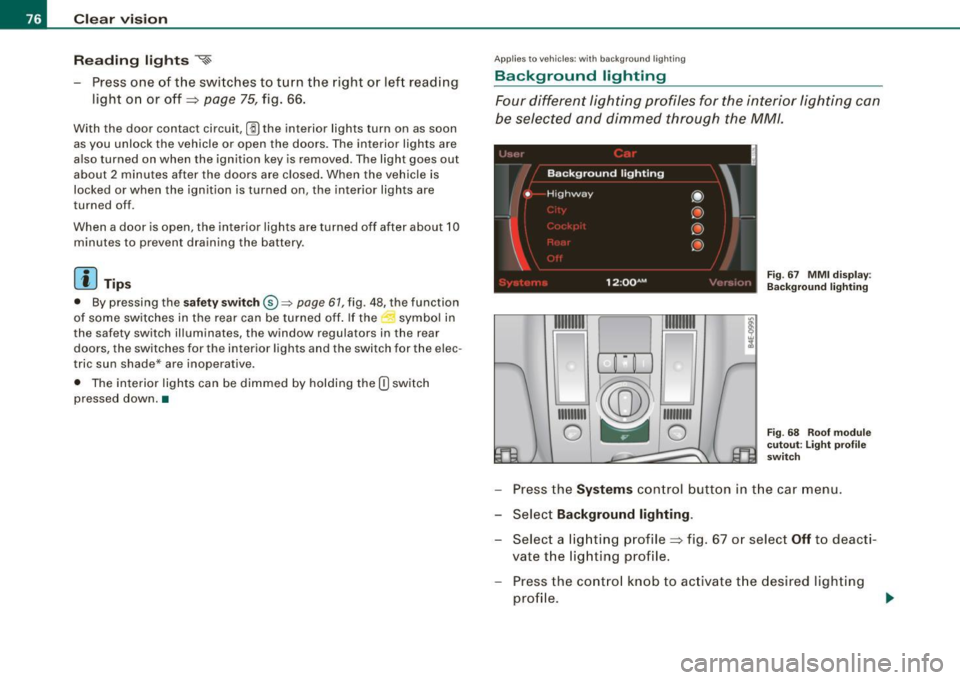
Four different lighting profiles for the interior lighting can
be selected and dimmed through the MM/ .
1t® ~i=-=
1111111
1
~ 111 111111
0 -- 0
Fig. 67 MMI display :
Background lighting
Fig. 68 Roof module
cutout: Light profile
switch
- Press the Systems control button in the car menu.
- Select
Background lighting .
-Select a lighting profile~ fig . 67 or select Off to deacti-
vate the lighting profile.
- Press the control knob to activate the desired lighting
profile .
Page 110 of 408
• ..__S_ e_a _ t_ s_ a_ n_ d_ s_t _o _r_ a-' g==- e ________________________________________________ _
-Plug in applian ce to be u se d.
The soc ket of t he ci gare tte l ighter may be used for 12 -vo lt appli
ances with maximum cons umption of u p to 100 watts, such as a
fl as h lig ht, small vacuum c leane r, etc .
Before you purchase any accessories , always read and fo llow th e
i nfo rm ati on in
=> p age 384 , "Add itio nal ac ce ssor ies a nd pa rts
replacement".
& WARNING
Improper use of the cigarette lighter can cause serious injury or
start a fire .
• Be careful when us ing the cigarette lighter . If you do not pay
attention to what you are doing when you are u sing the cigarette
lighter you can burn yourself .
• The cigarette lighter and socket remain functional even if the
ignition is switched off or the ignition key is removed . Never leave
children inside the vehicle without supervision.
0 Note
• To av oid damagi ng the so ck et, o nly u se p lug s th at fit pr oper ly.
• Only use the cigarette lighter socket as a power source for elec
tr ical acc esso ries f or s hor t durations. Use the s ock ets in the vehi cle
when a power source is needed for longer durations .
[ i J Tips
When the engine is off and accessories are sti ll plugged in and are
on, th e vehi cle battery ca n still be draine d.•
Long center console
Ap plies to veh icles : w it h lon g cen ter co nso le
Overview
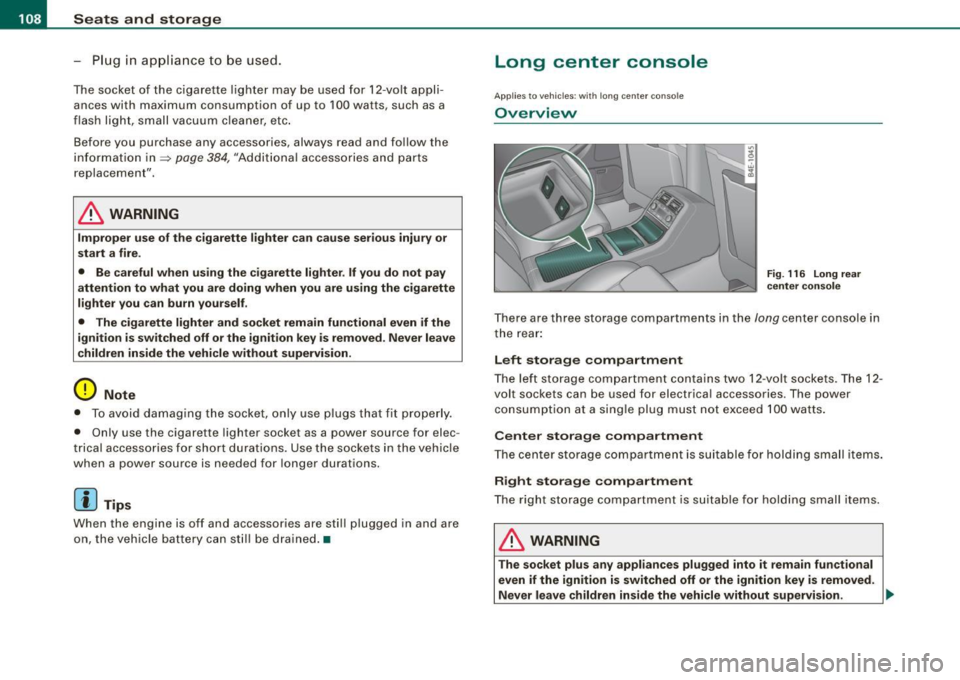
F ig . 116 Long rear
center con sole
T here a re thre e storage co mpartments in th e lon g center co nsole in
t he rear :
Left storage compartment
The lef t st orage c om partm ent co ntain s two 12 -v o lt so cke ts . The 12 -
volt sockets can be used for elect rica l accessories . T he power
co nsump tion a t a sing le plug mu st no t exceed 100 wa tts.
Center storage compartment
The ce nter st orag e compa rtmen t i s s uita ble fo r hol ding small it em s.
Right storage compartment
The right st orage co mpart ment is s uit a bl e for hold ing sma ll items.
& WARNING
The socket plus any appliances plugged into it remain functional
even if the ignition is switched off or the ignition key is removed.
Never leave children inside the vehicle without supervision. ..
Page 111 of 408
![AUDI S8 2009 User Guide ________________________________________________ S_ e_ a _ t_ s _a_ n_d _ s_t _o _ r_ a...: g==-- e __ llffllJI
0 Note
To avoid damaging the socket, only use plugs that fit properly.
[ i]](/img/6/57618/w960_57618-110.png "AUDI S8 2009 User Guide ________________________________________________ S_ e_ a _ t_ s _a_ n_d _ s_t _o _ r_ a...: g==-- e __ llffllJI
0 Note
To avoid damaging the socket, only use plugs that fit properly.
[ i]")
________________________________________________ S_ e_ a _ t_ s _a_ n_d _ s_t _o _ r_ a...: g==-- e __ llffllJI
0 Note
To avoid damaging the socket, only use plugs that fit properly.
[ i] Tips
When the engine is off and accessories are still plugged in and are
on, the vehicle battery can still be drained. •
Storage
General overview
There are numerous places to store items in your vehicle.
Glove compartment
Storage compartment
Pockets in the front seats*
Compartments in the door trim panels
Compartments in the rear doors* :::::,
page 109
=:> page 11 O
=:> page 110
=:> page 111
Left side storage compartment in the :::::, page 112
trunk
- -Right side storage compartment in the :::::, page 113
trunk
Emergency warning triangle
Umbrella holder
& WARNING
=:> page 350
• Always remove objects from the instrument panel. Any items
not stored could slide around inside the vehicle while driving or
Controls and equip
ment
& WARNING (continued)
when accelerating or when applying the brakes or when driving
around a corner.
• When you are driving make sure that anything you may have
placed in the center console or other storage locations cannot fall
out into the footwells. In case of sudden braking you would not be
able to brake or accelerate.
• Any articles of clothing that you have hung up must not inter
fere with the driver's view. The coat hooks are designed only for lightweight clothing . Never hang any clothing with hard, pointed
or heavy objects in the pockets on the coat hooks. During sudden
braking or in an accident -especially if the airbag is deployed -
these objects could injure any passengers inside the vehicle. •
Glove compartment
Your Owner's Literature and the media player are stored
in the lockable glove compartment.
t--------------. l
i
I • •
Fig. 117 Glove
compartment
Page 115 of 408
Seats and storage -
-----------------=-----'
Right-side compartment
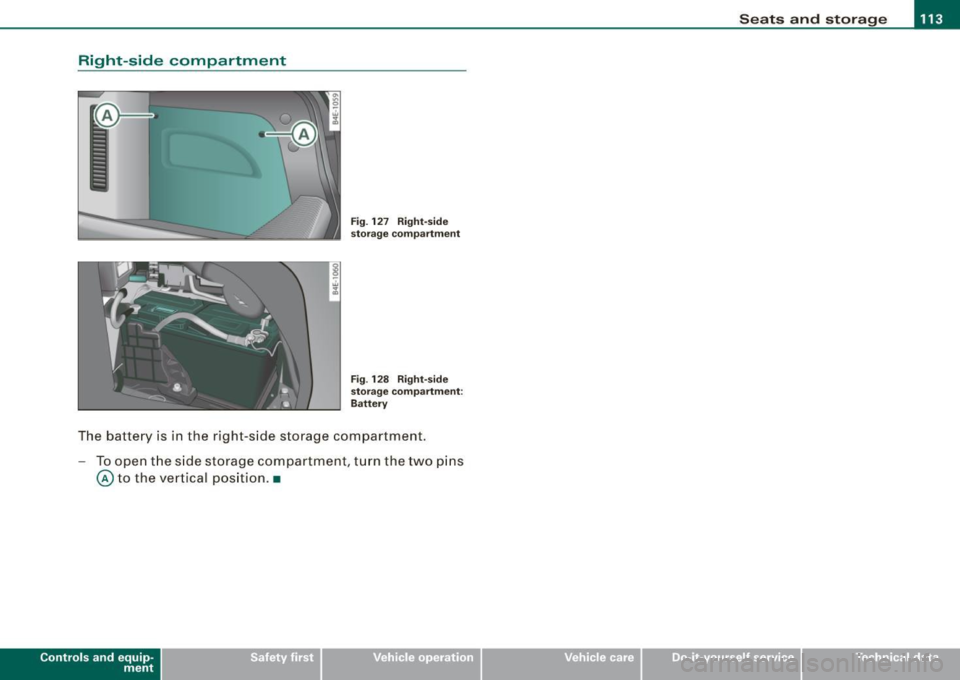
Fig. 127 Right-side
storage compartment
Fig . 128 Right-side
storage compartment:
Battery
The battery is in the right -side storage compartment.
- To open the side storage compartment , turn the two pins
@ to the vertical position. •
Contro ls and eq uip
ment Vehicle care I I irechnical data
Page 116 of 408
• .___w_ a_ rm __ a_ n_ d_ c_o _l_d ________________________________________________ _
Warm and cold
Climate controls
Description
The air conditioner is fully automatic and is designed to
maintain a comfortable and uniform climate inside the
vehicle.
We recommend the follow ing settings:
- Set the temperature to 75 °F (+23 °C).
- Press the !AUTO
I button.
With this setting, you attain maximum comfort in the least amount
of time. Change this setting, as desired, to meet your personal needs.
The climate controls are a combination of heating, ventilation and cooling systems, which automatically reduce humidity and cool the
air inside your vehicle.
The air temperature, air flow and air distribution are automatically
regulated to achieve and maintain the desired passenger compart
ment temperature as quickly as possible.
The system automatically compensates for changes in outside
temperature and for the intensity of the sunlight entering the
vehicle. We recommend you use the
Automatic mode=> page 117
for year-round comfort.
Please note the following:
Turn on the air conditioner to reduce humidity in the vehicle. This also prevents the windows from fogging up.
When the outside temperature is high and the air is very humid,
condensation from the evaporator may drip under the vehicle. This
is normal and does not indicate a leak. If the outside temperature is low,
the fan normally only switches to
a higher speed once the engine coolant has warmed up sufficiently.
The air conditioner temporarily switches off when you drive off from
a standstill using full throttle to save engine power.
The compressor also switches off if the coolant temperature is too
high, so that the engine can be adequately cooled under extreme
loads.
Air pollutants filter
The air pollutants filter (a combined particle filter and activated
charcoal filter) reduces or prevents outside air pollution (dust, or
pollen) from entering the vehicle.
The air pollutants filter must be changed at the intervals specified
in your Warranty
& Maintenance booklet, so that the air conditioner
can properly work.
If you drive your vehicle in an area with high air pollution, the filter
may need to be changed more frequently than specified in your
Audi Warranty
& Maintenance booklet. If in doubt, ask your autho
rized Audi Service Advisor for advice.
Key coded settings
The air conditioner settings selected are automatically stored and
assigned to the key being used. When the vehicle is started, the air
conditioner automatically selects the settings assigned to that key.
This way every driver will maintain his/her own personal settings
and does not have to reset them manually.
If a different driver uses your key and changes the air conditioner
settings, the latest adjustments will erase and replace the settings
you have stored.
Energy management
To prevent the battery from being discharged and to restore the
balance of energy, components which require large amounts of
Page 166 of 408
• .___A_ u_ d_ i_s_ i_ d _e_ a_ s_ s_is _ t __________________________________________________ _
objects (such as stic kers o r bicyc le rac ks) shou ld no t be attach ed to
th e ar ea on the rea r bump er where t he sen so rs ar e loca ted. I f side
assist functions are adve rsely aff ect ed, you will see this m essage in
th e ins trum ent clu ster dis pla y. Remove an ything that may be
blocking the sensors.
If no veh ic le is detected for a longer period of time while d riving,
s id e ass ist w ill a lso sw itc h off aut omat ica lly.
Audi side assist currently not available
If th ere is a tem porary prob le m (such as the veh ic le 's battery char ge
being low), side ass ist cannot be activated tem porar ily .
Audi side assist: system fault
Have the sys te m chec ked by an a uthorize d A udi dea ler o r qua lified
wor ks h op. •
App lies to veh icles : wi th side ass is t
Safety tips
The side ass is t de tect io n m ay be limi ted whe n driving a round
narrow s treet corners, on hilly streets, and under poor w eat he r
condit ions.
It is possibl e that the r ad ar sen so rs may also d etect oth er obje cts,
such as high or staggered guardrails.
Sid e assis t does no t measure ac tual lane w idth. The sys te m
assu mes a fixed lane widt h. D etect ion in the left and right lanes is
based on thi s assumed lane width . When driving on na rrow roads or
when driv ing to th e left or right of the c enter o f a trav el lane, it is
possible that veh ic les wi ll be detected that are
not in the lane next
to the l ane y ou are us ing .
& WARNING
• Improper reliance on the side assist system can cause colli
sions and serious personal injury:
& WARNING (continued)
- Never rely only on side assist when changing lanes .
- Always check rear view mirrors to make sure that it is safe to
change lanes .
• Side assist cannot detect all vehicles under all conditions
danger of accident !
• Side assist cannot detect vehicles
in time to alert you when
they approach from behind at very high speed , or fall drop back
very quickly.
• The radar sensor's
vision can be reduced or entirely blocked by
rain , snow , and heavy spray. This can result in side assist not
adequately detecting vehicles or, in some cases, not detecting
them at all . Always keep an eye on the direction you are traveling
and the relevant area around the vehicle .
• Please note that side assist indicates there are approaching
vehicles , or vehicles in your blind spot , only after your vehicle has
reached a driving speed of at least 19 mph (30 km /h) .
• Side assist signal does not work around tight corners (turning
radius less than 328 feet , or 100
ml.
• Side assist is no replacement for the driver's full attention. The
driver alone is responsible for lane changes and similar driving
maneuvers . Always keep an eye on the direction you are traveling
and the relevant area around the vehicle .
0 Note
To ensure that s ide assist is not adversely affected , you s hou ld not
block the area on the rea r bumper where the radar sensors a re
l ocated with fo rei gn ob jec ts (such as w ith sti ckers or b icycl e rac ks!. .,,_
Page 174 of 408
-Autom
atic tran smi ssi on
..__ ______________ _
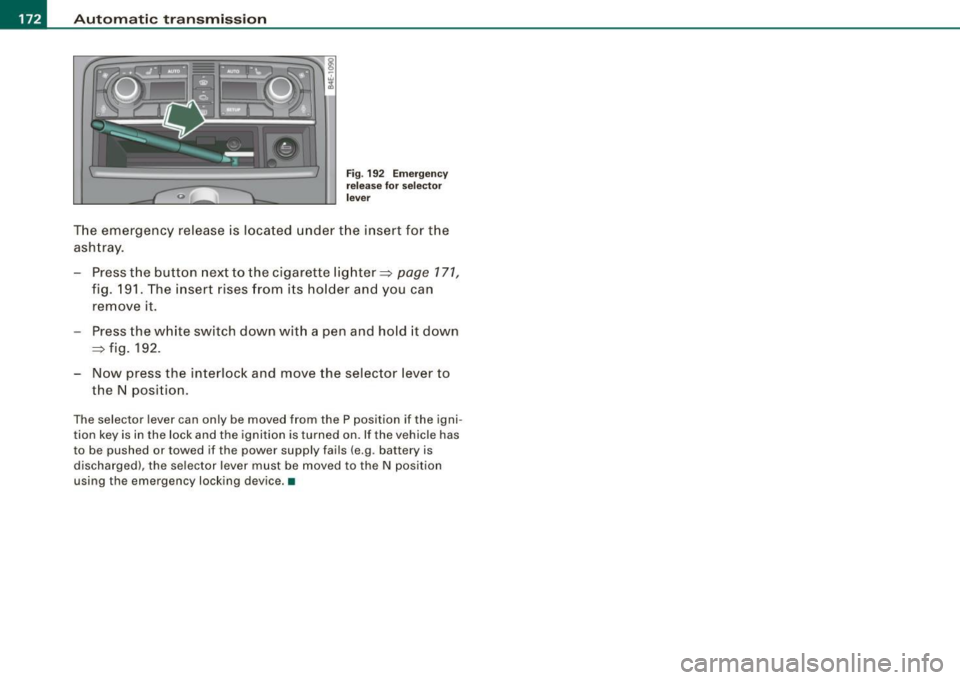
Fig. 192 E merge ncy
re lease for sel ecto r
l ever
T he emergency release is located under the insert for the
ashtray.
- Press t he button next to the cigarette lighter=>
page 171,
fig. 191 . The insert rises from its holder and you can
remove it .
Press the white switch down with a pen and hold it down
=> fig . 192.
- Now press the interlock and move the selector lever to
the N position.
The selector lever can only be moved from the P position if the igni
tion key is in the lock and the ignition is turned on. If the vehicle has
to be pushed or towed if the power supply fails (e.g . battery is
discharged), the selector lever must be moved to the N position
using the emergency locking device. •