rear view mirror AUDI S8 2009 User Guide
[x] Cancel search | Manufacturer: AUDI, Model Year: 2009, Model line: S8, Model: AUDI S8 2009Pages: 408, PDF Size: 91.63 MB
Page 185 of 408
____________________________________________ A_d_ v_ a_n_ c_ e_d _ P_a_ r_ k_ i_ n ..::g==-- S_ y=- s_t _e _m __ lllll
& WARNING (continued)
• Maintain plenty of distance from an obstacle, so that your
outside mirror or a corner of your vehicle does not collide with any
obstacles -danger of accident!
• The Audi parking system is not a substitute for being careful
and alert when backing up. Be especially careful during parking
and similar maneuvers. Always watch where you are driving and
make sure that nothing is in the way.
• When maneuvering or parking , do not only use the MMI Display
for orientation. Certain objects -depending on the screen resolu
tion -may not, or not entirely, be displayed; for example trailer
hitches , chains, narrow posts, or fences . •
Appl ies to vehicles: with Advanced Park ing System with rear view came ra a nd a trailer hitch
i nsta lle d acco rding to fac tory s pecif ications
Towing hitch
For vehicles with a trailer hitch installed according to factory speci
fications, the rear acoustic parking sensors are not activated when
the vehicle is put in reverse gear while an electrical connection to
the trailer socket* is established. No distance alert occurs in the rear
~ page 173. The rear-view camera picture~ page 176 is displayed
wi thou t orienta tion lines and without blu e surfaces .•
Controls and equip
ment
Settings in the MMI
A pplies to v ehicles: with Advanc ed Park ing System w ith rear view camera
Adjusting the chimes -option 1
The volume and the pitch (frequency) of the chimes can
be adjusted in the MM/.
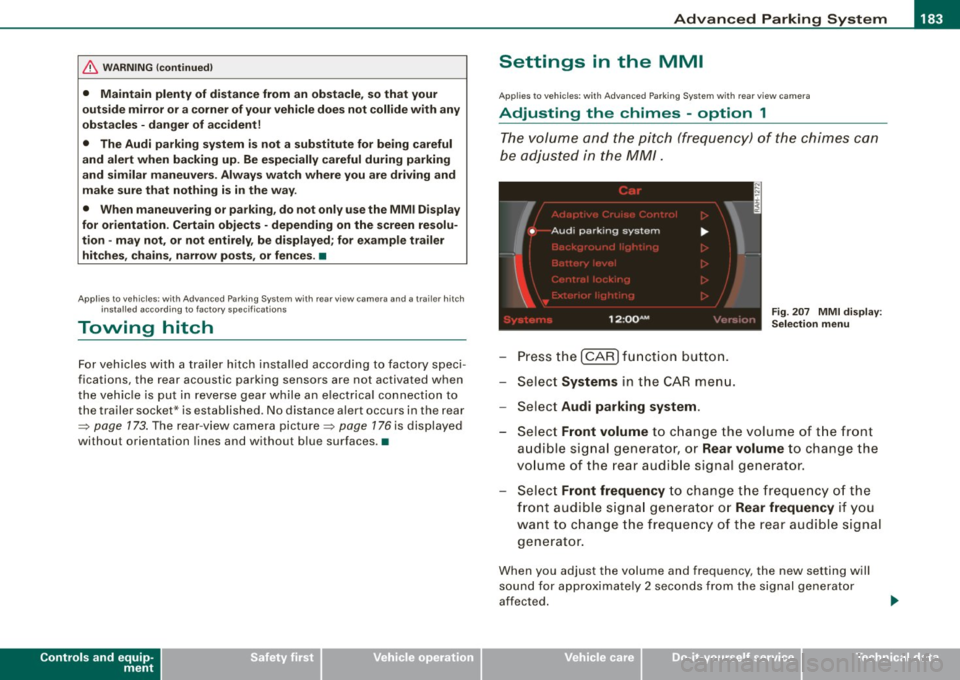
Press the [CAR] function button.
Select
Systems in the CAR menu.
- Select
Audi parking system .
Fig. 207 MMI display :
Selection menu
- Select Front volume to change the volume of the front
audible signal generator, or
Rear volume to change the
volume of the rear audible signal generator.
Select
Front frequency to change the frequency of the
front audible signal generator or
Rear frequency if you
want to change the frequency of the rear audible signal
generator.
When you adjust the volume and frequency, the new setting will
sound for approximately 2 seconds from the signal generator
affected.
I • •
Page 188 of 408
• .___A_ d_v_ a_ n_c_ e_ d_ P _a_r_k _i_ n -=g ,_ S-=y"- s_ t_ e_ m __________________________________________ _
"Off" sett ing
If you have set the off function, both the rear -view camera and the
visual display will be deac tiva ted . The acous tic pa rking assist
remains active .
[ i J Tip s
If you change the sett ings in the MM I, the new settings do not
become active unti l the parking assist is switched on aga in. •
Safety tips
Applie s to ve hic le s: wit h Advance d Par king Sy ste m wit h re ar vie w ca me ra
Acoustic parking system error message
If you hear a continuous tone for several seconds while the front
and back parking assist with visual display is activated and the LED
in the switch
P wA flashes when you engage the reverse gear , there is
a malfunction in the acoustic parking assist .
This system error is immediately output after: • Every manual activation via the switch
P wA ~ pag e 173,
• Reverse gear is engaged for the first time during an ign ition
cycle, or
• An error is detected during operation.
[ i J Tips
If the system reports an error, have an Audi dea ler or an authorized
dea le rship corr ect this system error. •
Applies to vehicles: w it h A dvanced Par king S ystem w it h rea r view ca mera
Rear-view camera tips
We recommend that you practice park ing with the rear -view camera
in a traffic -free location , or parking lot , to become familiar with the
system, the orientation lines, and their function . When doing this,
there should be good light and weather conditions .
I n the MM I Display, objects or vehicles appea r c loser or further away
if :
• you are driving in reverse g ear from a level surface onto an
incline, or a downward slope,
• you are driv ing in reverse gear toward protruding objects,
• the vehic le is carrying too much load in the rear.
T he accuracy of the orientation lines and b lue surfaces diminishes
if :
• the Adaptive Air Suspension is defective, or the dynamic or lift
mode is switched on,
• the rear -view camera does not provide a reliable image, for
example, in poor visibility condit ions or if the lens is d irty,
• the image on the screen is not visible due to sun glare and reflec
tion .
Car ing for the rear- vie w c amera l en s:
• Damp en the lens with a hous ehold a lcohol -based glass cleaner,
and c lean the lens w ith a dry cloth.
• Remove snow with a hand brush.
• Remove ice , preferably with de -icing spray~
0.
ln. WARNING
• The rear-view ca m era doe s not replace the view to the rear and
the rear view mirror s.
• The rea r-view camer a - be cause of t echni cal limit ation s - does
not show the ent ire area behind the vehicle
~ page 17 7, fig. 199. ~