ECO mode AUDI S8 2009 Owner's Manual
[x] Cancel search | Manufacturer: AUDI, Model Year: 2009, Model line: S8, Model: AUDI S8 2009Pages: 408, PDF Size: 91.63 MB
Page 129 of 408
_________________________________________________ w_ a_ r_ m __ a_n_ d_ c_ o_ld __ !II
the outside air drops, fresh air is supp lied to the veh icle interior
again .
In the event that the windows fog up during automatic air recircula
tion, you must press the@ button immediately.
Under certa in operating cond itions, automatic air recirculation is
switched off automatically. With outside temperatures below about
-8 °C and in the ECON mode, automatic air recirculation is limited to
15 seconds. •
Synchronization
One climate control setting for all seats .
With synchronization active, the driver's or the passenger's settings
are adopted for the other seats . All the other settings that were
made are transferred to the other seats. This includes all the climate
control settings right down to the heated seats .
If a different setting is selected at a "synchron ized seat", synchroni
zation is cancelled. •
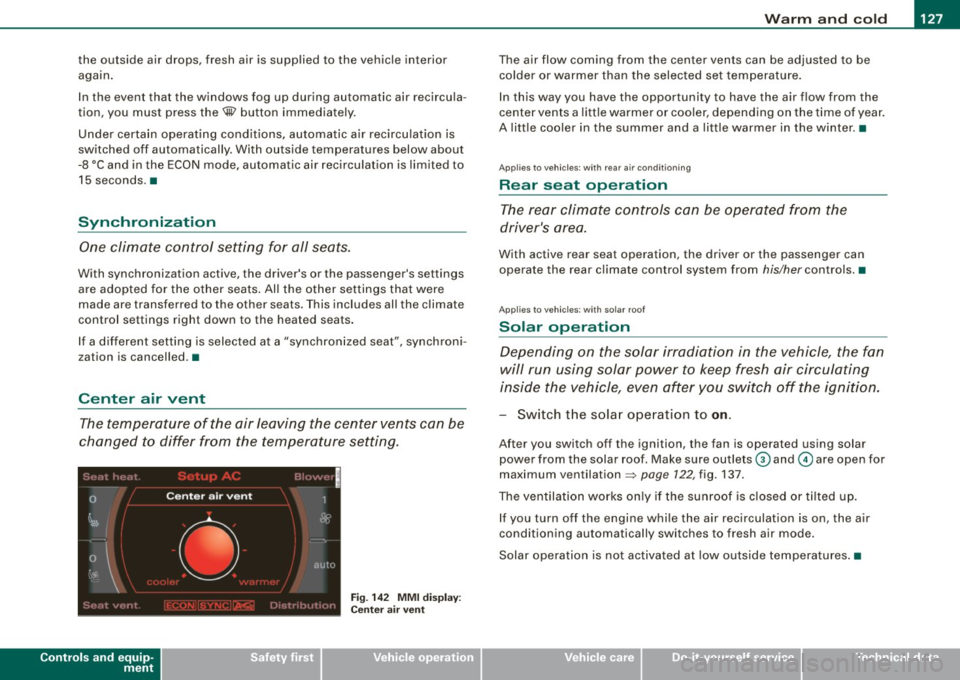
Center air vent
The temperature of the air leaving the center vents can be
changed to differ from the temperature setting .
Controls and equip
ment
Fig . 14 2 MMI di spl ay :
Ce nte r air ve nt
The air flow coming from the center vents can be adjusted to be
colder or warmer than the selected set temperatu re.
In this way you have the opportunity to have the a ir flow from the
center vents a little warmer or coo ler, depending on the time of year .
A litt le cooler in the summer and a little warmer in the winter. •
Applies to vehic les : with rear air condition in g
Rear seat operation
The rear climate con trols can be op erated from the
driver's area.
With active rear seat operation, the driver or the passenger can
operate the rear climate control system from
his/her controls. •
Applies to vehicles : w ith so lar roof
Solar operation
Depending on the solar irradiation in the vehicle, the fan
will run using solar power to keep fresh air circulating
inside the vehicle, even af ter you switch off the ignition.
- Switch the solar operation to on.
After you switch off the ignition, the fan is operated using solar
power from the solar roof. Make sure outlets
G) and © are open for
maximum ventilation =>
page 122, fig. 137.
The ventilation works on ly if the sunroof is closed or t ilted u p.
If you turn off the engine whi le the air recirculation is on, the air
conditioning automatically switches to fresh air mode.
Solar ope ration is not activated a t low outside tempe ratures .•
I • •
Page 132 of 408
• ..__O_ n_ t_h _ e_ r_ o_ a_ d ____________________________________________________ _
[ i J Tip s
• If you release the ignition key in positions G) , @ or G), the key
automat ically returns to pos ition @.
• If you open the driver 's door when the ignition is switched on , a
buzzer sounds and the message
Ignition i s on appears in the instru
ment cluster display. Please switch the ignition off .•
Ignition key safety lock
The igni tion key can only be remove d when the selector
lever is in the "P" (Park) posi tion.
After turning off the ignition , the igni tion key can only be removed
from the ignition lock when the selector lever is in the "P" (Park)
position . Af ter you have removed the key, the selector lever is locked
and cannot be moved .•
Starting and stopping the engine
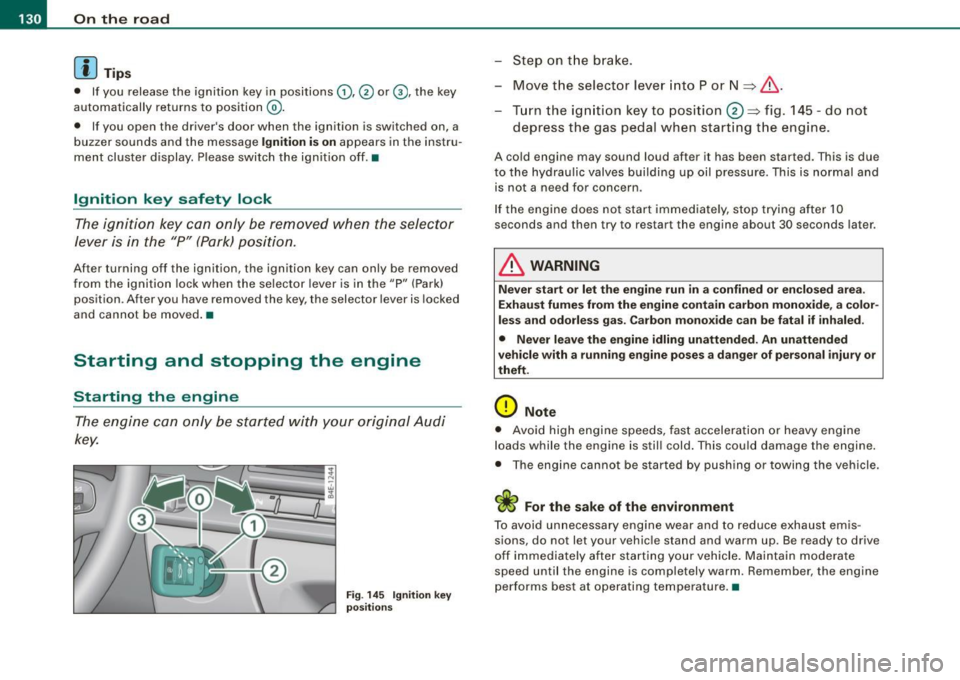
Starting the engine
The engine ca n only be started with your original Audi
key.
Fig. 145 Ignitio n ke y
po sitions
Ste p on the brake.
- Move t he selector lever into P or N
~ &.
Turn the ign ition key to position 0 ~ fig . 145 -do not
depress the gas pedal when s tarting the engine .
A cold engine may sound loud after it has been started . This is due
to the hydrau lic valves building up oil pressure. This is normal and
is not a need fo r concern .
I f the engine does not start immediately, stop t rying after 10
seconds and then try to restart the engine about 30 seconds later .
& WARNING
Never sta rt or let the engine run in a confined or en clo sed are a.
Exhaust fumes from the engine contain carbon monoxide, a color
less and odorle ss gas. Carbon mono xide can be fatal if inhaled.
• Never leave the engine idling unattended. An unattended
vehicle with a running engine po ses a d ange r of person al injury or
theft.
0 Note
• Avoid high e ngine speeds, fast acceleration or heavy eng ine
loads while the engine is still cold. This could damage the engine.
• The eng ine cannot be s tarted by push ing or towi ng the vehicle.
c£> For the sake of the environment
To avoid unnecessary engine wear and to reduce exhaust emis
sions, do not let your vehic le stand and warm up. Be ready to drive
off im mediately after starting your vehicle . Maintain moderate
speed until the engine is completely warm . Remember , the engine
performs best at operating temperature. •
Page 136 of 408
• ..__O_ n_ t_ h _e _ ro_ a_d __________________________________________________ _
Electromechanical parking brake
Operation
The electromechanical parking brake replaces the hand
brake.
F ig. 148 Cen ter
co nso le: P arki ng br ake
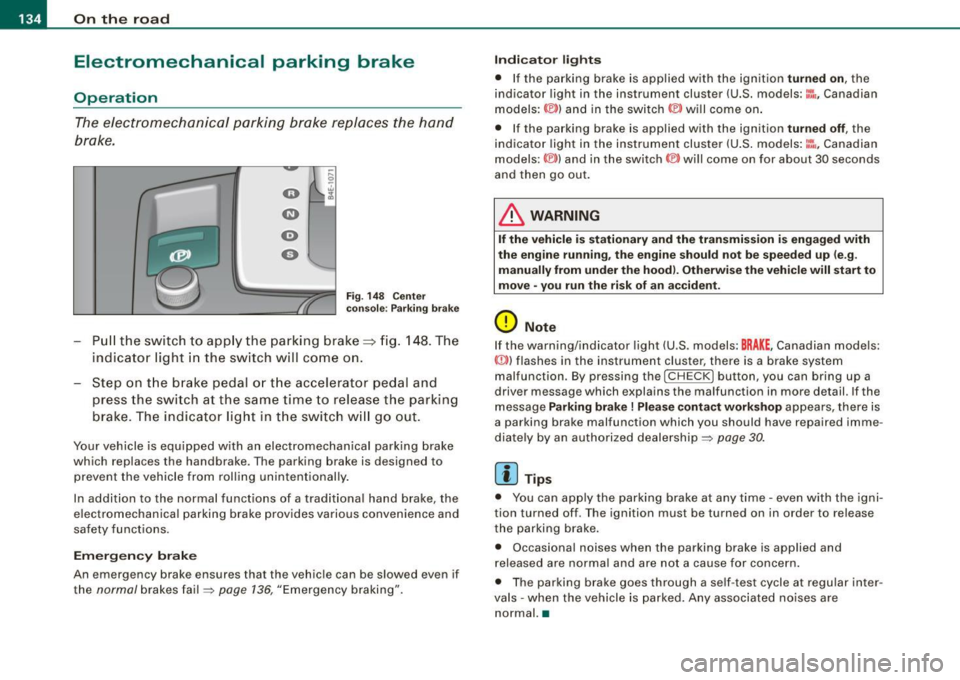
Pu ll the switch to app ly the parking brake==> fig. 148 . The
indicator light in the sw itch will com e on.
Step on t he brake ped al o r th e accelerat or pedal and
press the switch at the s am e time to rel eas e the parking
brake . The indicator light in t he switch w ill go out .
Your vehicle is equipped w ith an electromechanical parking brake
which replaces the handbrake . The parking brake is designed to
prevent the vehicle from rolling unintentionally .
In addition to the norma l functions of a trad itiona l hand brake, the
e lectromechanical parking brake provides various convenience and
safety functions.
Em erg en cy brake
An emergency brake ensures that the vehicle can be slowed even if
the
normal brakes fa il=> page 136, "Emergency braking".
Indi ca to r light s
• If the pa rking brake is app lied with the ignition turned on, the
indicator light in the instrument cluster (U.S. models:~-Canadian
models: ©) and in the switch © will come on .
• If the parking brake is applied with the ignition
turned off , the
indicator light in the instrument cluster (U .S . models :~~ , Canadian
models :(®) ) and in the switch(®) will come on for about 30 seconds
and then go out.
& WARNING
If the vehicle i s stationary and the transmis sio n i s e ngag ed with
the eng ine running , th e engine should n ot b e speeded up (e .g .
manu ally from under the ho od). Oth erw ise th e vehi cle will start t o
mo ve • you r un the ris k of an acc ident .
0 Note
If the warning/indicator light (U .S . models: BRAKE , Canadian models:
{(j))) flashes in the instrument cluster, there is a brake system
malfunction . By pressing the
I C HE CK] button , you can bring up a
driver message which explains the malfunction in more detail. If the
message
Parking brake ! Plea se conta ct w ork shop appears, there is
a parking brake malfunction which you should have repaired imme
diate ly by an authorized dealership=:>
page 30.
[ i ] Tips
• You can app ly the parking brake at any time -even with the igni
tion turned off . T he ignition mus t be turned on in order to release
the parking brake.
• Occasional noises when the parking brake is applied and
released are norma l and are not a cause for concern .
• The parking brake goes through a se lf -test cycle at regular inter
va ls - when the vehicle is parked. Any associated no ises are
normal. •
Page 178 of 408
• ..__A_ d_v _ a_ n_c _e _ d_ P_ a_r _k _in ---== g'-- S...:y _ s_ t_ e_ m ___________________________________________ _
• Keep the sensors in the rear bumper and the rear-view camera
lens clean and free of snow and ice, so that the Audi parking system
can work properly. P lease follow the additional notes on
=>
page 186 . •
Ap plie s to v ehic les: wit h Advance d Par kin g Syst em w it h re ar v ie w c am era
Rear -view camera (Rear View)
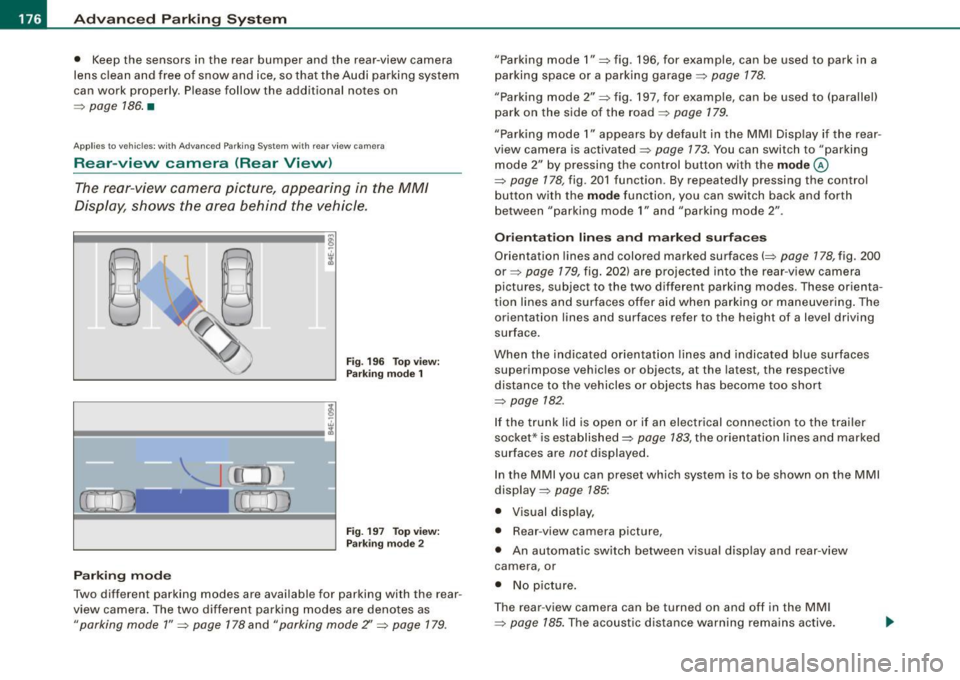
The rear -vie w camera picture, appearing in the MM/
Dis play, sh ows the area behind the vehicle .
Fig . 19 6 Top view:
Par king mode 1
Fig. 19 7 To p view:
P arki ng m od e 2
Parking m od e
Two different parking modes are available for parking with the rear
view camera . The two different parking modes are denotes as
"parking mode 1 " => page 178 and "parking mode Z' => page 179.
"Parking mode 1 " => fig . 196, for example, can be used to park in a
parking space or a parking garage=>
page 178.
"Parking mode 2" => fig . 197, for example, can be used to (parallel)
park on the side of the road =>
page 179.
"Parking mode 1" appears by default in the MM I Disp lay if the rear
view camera is activated=>
page 173. You can switch to "parking
mode
2" by pressing the control button with the mode ©
=> page 178, fig . 201 function. By repeated ly pressing the control
bu tton with the
mode function, you can switch back and forth
between "parking mode
1" and "parking mode 2" .
Or ientat ion lines and marked surface s
Orientation lines and colored marked surfaces(=> page 178, fig. 200
or=> page 179 , fig. 202) are projected into the rear -view camera
pictures , subject to the two different parking modes . These orienta
t ion lines and surfaces offer aid when parking or maneuvering . The
orientation lines and surfaces refer to the height of a level driving
surface.
When the indicated orientat ion lines and indicated blue surfaces
superimpose vehicles or objects, at the latest, the respective
distance to the vehicles or objects has become too short
=>
page 782 .
If the t runk lid is open or if an electrical connection to the trailer
socket* is established=>
page 783, the orientation lines and marked
surfaces are notdisplayed .
In the MMI you can preset wh ich sys tem is to be shown on the MMI
display =>
page 785:
• Visual disp lay,
• Rear -view camera picture,
• An automatic sw itch between v isual disp lay and rear -view
camera , or
• No p icture .
T he rear -view camera can be turned on and off in the MM I
=>
page 185. The acoustic distance warni ng remains active.
Page 180 of 408

• ..__A_ d_v _ a_ n_c _e _ d_ P_ a_r _k _in ---== g'-- S...:y _ s_ t_ e_ m ___________________________________________ _
The rear-view camera section appearing in the MMI Display is
approximately the same as the coverage area represented in
~ page 177, fig. 198 or G) in ~ page 177, fig. 199. Objects located in
the rear -view camera's uncovered area
0 ~ page 177, fig. 199 or in
the close vicinity of the bumper are not recognized .
& WARNING
Please note that objects not touching the ground can appear to be
further away than they really are (for example, the bumper of a
parked vehicle, a trailer hitch, or the rear of a truck) . In this case,
you should not use the guide help lines to measure distance -
danger of accident! •
Applies to vehicles : with Advanced Parking Sys tem w it h rear view c ame ra
Parking mod e 1
"Parking mode 1" can aid when parking in a garage or
parking space, for example.
Fig. 200 MMI Display:
Aiming at the parking
spot by adjusting the
steering wheel angle Fig
. 201 MMI Display:
Orienting the vehicle
with aid of the blue
surface
- Before parking, switch on the Adaptive Air Suspension
=>
page 21 standard or automatic mode.
- Activate the Audi parking system=>
page 173. "Parking
mode 1" => fig. 200 is displayed by default. Dynamic
orange orientation lines
0 and a blue static surface G)
are projected into the rear-view camera picture.
- With the vehicle stationary, select the proper steering
wheel angle for the parking spot with the aid of the
orange orientation lines.
- While driving in reverse gear, adjust the steering wheel
angle to fit the parking space with the aid of the orange
orientation lines=>
0.
-Align your vehicle corresponding to the blue surface. The
blue surface should be parallel to the parking spot lines
=:> fig. 201.
G) Blue surface
The surface behind the vehicle, identified by various shades of blue,
represents an extension of the outer vehicle outline by approxi
mately 16 ft (5 m) to the rear. The transitions of the blue surfaces are
distanced approximately 3 ft (1 m), 6
ft (2 ml, and 16 ft (5 ml away
from the vehicle. .,
Page 188 of 408
• .___A_ d_v_ a_ n_c_ e_ d_ P _a_r_k _i_ n -=g ,_ S-=y"- s_ t_ e_ m __________________________________________ _
"Off" sett ing
If you have set the off function, both the rear -view camera and the
visual display will be deac tiva ted . The acous tic pa rking assist
remains active .
[ i J Tip s
If you change the sett ings in the MM I, the new settings do not
become active unti l the parking assist is switched on aga in. •
Safety tips
Applie s to ve hic le s: wit h Advance d Par king Sy ste m wit h re ar vie w ca me ra
Acoustic parking system error message
If you hear a continuous tone for several seconds while the front
and back parking assist with visual display is activated and the LED
in the switch
P wA flashes when you engage the reverse gear , there is
a malfunction in the acoustic parking assist .
This system error is immediately output after: • Every manual activation via the switch
P wA ~ pag e 173,
• Reverse gear is engaged for the first time during an ign ition
cycle, or
• An error is detected during operation.
[ i J Tips
If the system reports an error, have an Audi dea ler or an authorized
dea le rship corr ect this system error. •
Applies to vehicles: w it h A dvanced Par king S ystem w it h rea r view ca mera
Rear-view camera tips
We recommend that you practice park ing with the rear -view camera
in a traffic -free location , or parking lot , to become familiar with the
system, the orientation lines, and their function . When doing this,
there should be good light and weather conditions .
I n the MM I Display, objects or vehicles appea r c loser or further away
if :
• you are driving in reverse g ear from a level surface onto an
incline, or a downward slope,
• you are driv ing in reverse gear toward protruding objects,
• the vehic le is carrying too much load in the rear.
T he accuracy of the orientation lines and b lue surfaces diminishes
if :
• the Adaptive Air Suspension is defective, or the dynamic or lift
mode is switched on,
• the rear -view camera does not provide a reliable image, for
example, in poor visibility condit ions or if the lens is d irty,
• the image on the screen is not visible due to sun glare and reflec
tion .
Car ing for the rear- vie w c amera l en s:
• Damp en the lens with a hous ehold a lcohol -based glass cleaner,
and c lean the lens w ith a dry cloth.
• Remove snow with a hand brush.
• Remove ice , preferably with de -icing spray~
0.
ln. WARNING
• The rear-view ca m era doe s not replace the view to the rear and
the rear view mirror s.
• The rea r-view camer a - be cause of t echni cal limit ation s - does
not show the ent ire area behind the vehicle
~ page 17 7, fig. 199. ~
Page 189 of 408
__________________________________________ A_ d_v _a_ n_ c_e _d _ P_a_ r_ k_ i_n ..:g =-- S...:y:- s_ t_ e_ m ___ !II
& WARNING (continued )
Be especially careful to check for small children and animals
before backing up . Small children and animals will not always be
shown in the rear-view display .
• The Audi parking system is not a substitute for being careful
and alert when backing up . Be especially careful during parking
and similar maneuvers . Always watch where you are driving and
make sure that nothing is in the way .
• Do not allow yourself to be distracted from traffic by the rear
v iew camera pictures.
• When maneuvering or parking , do not only use the MMI Display
for or ientation . Certa in objects -depending on the screen resolu
tion -may not , or not entirely , be di splayed; for example trailer
hitches , chains , narrow posts , or fences .
• Only use the rear -view camera for aid if it shows a good, clear
picture . The image may be obscured , for example , by the sun
shining into the lens, dirt on the lens , or as the result of a defect ·
danger of accident!
• If the image is hazy when the MMI Display is switched on or the
area behind the vehicle is not visible (for example , as the result of
a dirty or defective lens ), the rear -view camera must not be used
for aid in maneuvering -danger of ac cident!
• The rear -view camera generates two -dimensional images . For
this reason, please note that recesses in the ground and
protruding parts on another vehicle , or protruding objects fixed to
the ground , will be more difficult or impossible to recognize on the
MMI Display, due to the missing spacial depth.
• If the position and the installation angle of the camera has
changed , for example, after a rear end collision, do not continue to
use the system for safety reasons . Have it checked by an autho
rized Audi dealer or qualified workshop .
• Only use the rear-v iew camera when the rear lid is fully closed.
Make sure that objects mounted on the rear are not obscuring the
camera v iew .
Controls and equip
ment
& WARNING (continued )
• Remove ice, preferably with de-icing spray .
0 Note
• Never use warm or hot water to remove snow or ice from the
rear -view camera lens -danger of crack format ion on t he lens!
• Whe n cleani ng t he le ns, neve r use care p ro d uc ts wi th a n abr a
s ive effect.
[ i ] Tips
The positio ns of t he orientation lines/ surfaces are disp laced up or
down if the par king p rocess is car ried out with the rear -view camera
i n A dap tive A ir Susp ens ion
=> p ag e 2 1 dyna m ic or lift mode. T here
fore , the accuracy is red uced. •
I • •
Page 191 of 408
____________________________________________ A_ d_a--' p=-- t_iv _e_ A_ ir_ S_u_ s-=- p_e _ n_ s _ io_ n __ JIIII
Chassis Controls
Four different driving modes can be set by the driver.
The automatic control processes are speed -and time -dependent.
For example, it is not possib le to raise the suspension to the lift
mode above certain speeds .
When a speed of about 75 mph ( 120 km/h) is exceeded for more than
30 seconds, the vehicle is automatically lowered approximately 1
inch (25 mm) to a level suitable for highway speeds, except in the
standard mode . Road holding is optim ized as a result of the lower
center of gravity and fue l consumption is reduced as a result of
reduced wind resistance .
Level adjustment
lift
automatic
dynamic
a utomati c Ground
clear ance
about 5 .7 inches (145 mm)
a bout 4.7 inches ( 120 mm)
about 4 .7 inches (120 mm)
about 3 .9 inches (100 mm)
Select the automatic mode if you prefer a suspension setting
e m phasizing comfort. Damping characteristics emphasizing
comfort are selected in this mode.
• Lower ing : When a speed of about 75 mph (120 km/h) is exceeded
for more than 30 seconds, the vehicle is automatically lowered by about 1 inch (25 mm) .
• Rais ing : The vehicle is automatically raised again if the speed
falls be low about 44 mph (70 km/h) for a period of 120 seconds. The
vehicle is raised immediately when speed falls below about 22 mph (35 km/h) .
dynami c
Select the sport mode if you prefer a sporty suspension setting. In
this mode, the vehic le is lowered whi le it is still stationary and
Controls and equip
ment
sporty damping characteristics are selected. The warning light ~
in the instrument cluster will come on for a few seconds just to
remind you of the reduced ground clearance .
I f you switch off the engine while the vehicle is in the dynamic mode
and then switch on the ignition once again, the~ warning light
wi ll also come on again for a few seconds.
• Lowering : When a speed of abou t 75 mph (120 km/h) is exceeded
for more than 30 seconds, the vehicle is automatically lowered by an addi tional 0 .2 in (5 mml.
• Raising : The vehicle is automatically raised again if the speed
falls bel ow about 44 mph (70 km/h) for a period o f 120 seconds . The
vehic le is raised immediately when speed falls below about 22 mph
(35 km/h).
s ta nd ard
Select the standard mode if you desire a suspension setting with a
special emphasis on comfort . In the standard mode there is
no
lowering o f the suspension. Even at high speeds, the veh icle stays
at the same level. Damping characteristics with a decided emphasis
on comfort are selected in this mode .
lift
Select the lift mode when you have to travel over poo r sections of
road (e .g . trai ls). In the lift mode, the vehic le is raised by 1 inch (25
mm) compared to norma l leve l while it is still stationary and
damping characteristics are adjusted to emphasize comfort.
The lift mode can be act ivated only at speeds be low 50 mph (80
km/h). When a speed of about 62 mph (100 km/h) is exceeded, the
system automatically leaves lift mode and the mode set previously
(standard, automa tic, dynamic) is activated again. •
I • •
Page 192 of 408
• .___A_ d_ a --=- p_t_ i_v _e _ A_ ir_ S_u_ s_,_ p_e_ n_ s_i o_ n _____________________________________________ _
Applies to vehi cles : wi th Ad aptive Air Sus pension -Sport
Sport Chassis Controls
Four different driving modes can be set by the driver.
The automatic control processes are speed -and time -dependent .
For example, it is not possible to raise the suspension to the lift
mode above certain speeds.
When a speed of about 75 mph (120 km/h) is exceeded for more than 30 seconds, the vehicle is automatically lowered approximately 0.2
inch (5 mm) to a level suitable for highway speeds, except in the
standard mode.
L e v el ad justm ent
lift
standard
automatic
aut om ati c Gr
ound clea ra nce
about 4 .9 inches (125 mm)
about 3 .9 inches (100 mm)
about 3.9 inches (100 mm)
about 3.9 inches (100 mm)
Select the automat ic mode if you prefer a sporty suspension
setting. Sporty damping characteristics are selected in this mode.
• Low erin g: When a speed of about 75 mph (120 km/h) is exceeded
for more than 30 seconds, the vehicle is automatically lowered by
about 0 .2 inch (5 mm) .
• Rais ing : The vehicle is automatically raised again if the speed
falls below about 44 mph (70 km/h) for a period of 120 seconds. The
vehic le is raised immediate ly when speed fa lls below about 22 mph
(35 km/h).
dy nami c
Select the dynamic mode if you prefer a firm suspension setting and
damping characteristics.
• Lo we ring : When a speed of about 75 mph (120 km/h) is exceeded
for more than 30 seconds, the vehicle is automatica lly lowered by an
additiona l 0.2 in (5 mm) .
• Rais ing: The vehic le is au tomatically raised again if the speed
falls below about 44 mph (70 km/h) for a period of 120 seconds. The
vehic le is ra ised immediate ly when speed fa lls below about 22 mph
(35 km/h) .
stand ard
Select the standard mode if you want a comfortab le suspension
setting. In the standard mode there is
no lowering of the suspen
sion. Even at high speeds, the vehicle stays at the same level.
Comfor table but firm damping characteristics are selected in this
mode.
lift
Select the lift mode when you have to travel over poor sections of
road (e.g. trails). In the lif t mode, the vehic le is raised by 1 inch (25
mm) compared to normal level and the setting goes to sporty
damping characteristics .
The lift mode can be activated only at speeds below 50 mph (80
km/h). When a speed of about 62 mph (100 km/h) is exceeded, the
system automatical ly leaves lift mode and the mode set previously
(standard, automatic, dynamic) is activated again. •
Page 196 of 408
• .___H_ o_ m _ e _L_i _ n _k _® ____________________________________________________ _
Homelink®
Universal remote control
Applies to vehic les: w ith Home link ® universal remote cont ro l
General information
The HomeLink® fe ature can le arn up to th ree r adio
fre quency codes for m ost c urrent transmitters used for
operating garage doors, es tate gates , home or outdoor
ligh ting sy stems, and other devices .
You m ust first pro gram the H omel in k® trans mitter befor e you can
use the system=>
page 195, "Programm ing th e Homelink® trans
m itter".
In order to pro gram t he Homelink® transmitter fo r devices utilizing
ro lling code, a second person on a ladder who can safe ly reach the
ga rage door o pene r m oto r is rec omm ended . It is also necessa ry to
locate the "learn" button on your garage door opener motor. Refer
to t he op era ting instructions for the opene r, as the loca tion and
co lor of this button may vary by manufacturer .
Y ou can still use the o rigina l remote c ontrol fo r th e dev ice at any
time.
& WARNING
• Never use the Homelinkl1JI transmitter with any garage door
opener that does have not the safety stop and reverse feature as
requ ired by federal safety standards . This in cludes any garage
door opener model manufactured before April 1, 1982.
• A garage door opener which cannot detect an object , signaling
the door to stop and reverse does not meet current federal safety
standards . Using a garage door opener without these features
increases risk of serious injury or death .
& WARNING (continued)
• For safety reasons never release the parking brake or start the
engine while anyone is standing in front of the vehicle.
• A garage door or an estate gate may sometimes be set in
motion when the Homelink ® remote control is being
programmed . If the devi ce is repeatedly activated , this can over
strain motor and damage its electrical components -an over
heated motor is a fire hazard!
• To avoid possible injuries or property damage , please always
make absolutely certain that no persons or objects are located in
the range of motion of any equipment being operated.
[ i ] Tips
• I f you wou ld l ik e mor e infor mation o n Hom elink®, w here to
purchase the Homelink ® compatib le products, or wou ld li k e to
pu rchase the Homeli nk® Home Ligh ting Package, please call t oll
free: 1 -8 0 0 -355 -3515.
• F or Dec lara tion of Compliance to U nite d Sta tes FCC an d Indu stry
C anada regulations=>
page 385 . •