steering AUDI S8 2009 Owner's Manual
[x] Cancel search | Manufacturer: AUDI, Model Year: 2009, Model line: S8, Model: AUDI S8 2009Pages: 408, PDF Size: 91.63 MB
Page 173 of 408
Automatic transmi ssio n -
------------------'
Applies to vehi cles : wi th tip troni c-st eerin g wh eel
Steering wheel with tiptronic ®
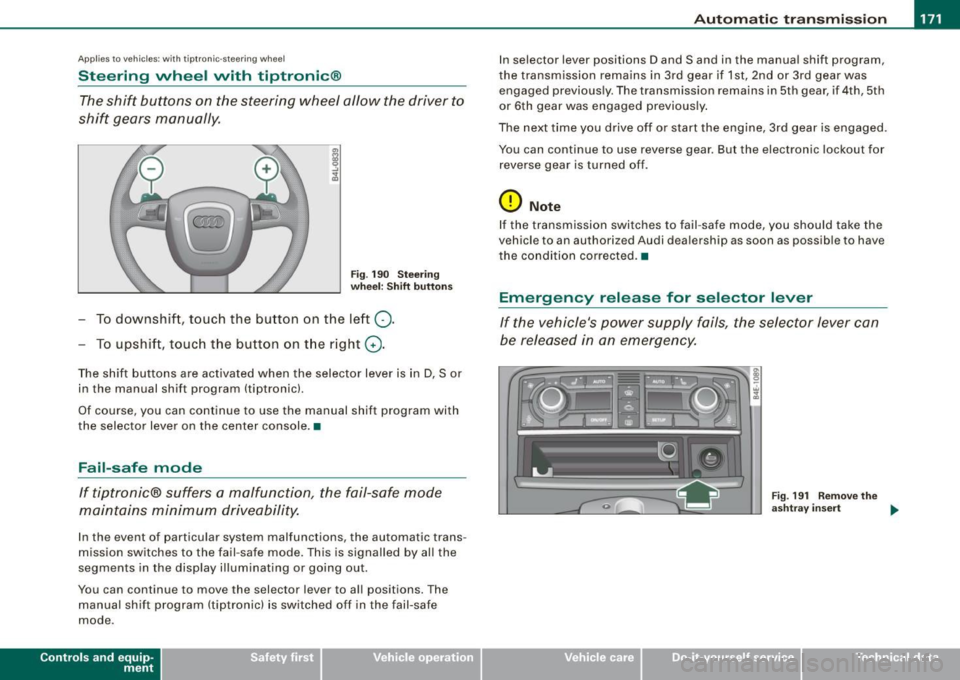
The shift buttons on the steering wheel allow the driver to
shift gears manually.
F ig . 190 Steering
whee l: S hift butt ons
- To downshift, touch the button on the left Q .
- To upshift , touch the button on t he right G) .
The shift buttons are activated when the selector lever is in D, Sor
in the manual shift program (tip tronic) .
Of course, you can continue to use the manual shift program with
the selector lever on the center console .•
Fail-safe mode
If tiptronic® suffers a malfunction, the fail-safe mode
maintains minimum driveability.
In the event of particular system malfunctions, the automatic trans
mission switches to the fail -safe mode. This is s ignalled by all the
segments in the display illuminating or going out .
You can continue to move the selector lever to all positions. The manual shift program (tiptronic) is switched off in the fail-safe
mode .
Contro ls and eq uip
ment
In selector lever positions D and Sand in the manual shift program ,
the transmission remains in 3rd gear if 1st, 2nd or 3rd gear was engaged previous ly. The transmission remains in 5th gear, if 4th, 5th
or 6th gear was engaged previously .
The next time you drive off or start the engine, 3rd gear is engaged .
You can continue to use reverse gear . But the electronic lockout for
reverse gear is turned off .
0 Note
If the transmission switches to fail -safe mode, you should take the
vehicle to an au thori zed Audi dea lership as soon as possib le to have
t he condition corrected .•
Emergency release for selector lever
If the vehicle's power supply fails, the selector lever can
be released in an emergency.
Fig . 19 1 Rem ove th e
as htray i nser t
~
Vehicle care I I Technical data
Page 180 of 408

• ..__A_ d_v _ a_ n_c _e _ d_ P_ a_r _k _in ---== g'-- S...:y _ s_ t_ e_ m ___________________________________________ _
The rear-view camera section appearing in the MMI Display is
approximately the same as the coverage area represented in
~ page 177, fig. 198 or G) in ~ page 177, fig. 199. Objects located in
the rear -view camera's uncovered area
0 ~ page 177, fig. 199 or in
the close vicinity of the bumper are not recognized .
& WARNING
Please note that objects not touching the ground can appear to be
further away than they really are (for example, the bumper of a
parked vehicle, a trailer hitch, or the rear of a truck) . In this case,
you should not use the guide help lines to measure distance -
danger of accident! •
Applies to vehicles : with Advanced Parking Sys tem w it h rear view c ame ra
Parking mod e 1
"Parking mode 1" can aid when parking in a garage or
parking space, for example.
Fig. 200 MMI Display:
Aiming at the parking
spot by adjusting the
steering wheel angle Fig
. 201 MMI Display:
Orienting the vehicle
with aid of the blue
surface
- Before parking, switch on the Adaptive Air Suspension
=>
page 21 standard or automatic mode.
- Activate the Audi parking system=>
page 173. "Parking
mode 1" => fig. 200 is displayed by default. Dynamic
orange orientation lines
0 and a blue static surface G)
are projected into the rear-view camera picture.
- With the vehicle stationary, select the proper steering
wheel angle for the parking spot with the aid of the
orange orientation lines.
- While driving in reverse gear, adjust the steering wheel
angle to fit the parking space with the aid of the orange
orientation lines=>
0.
-Align your vehicle corresponding to the blue surface. The
blue surface should be parallel to the parking spot lines
=:> fig. 201.
G) Blue surface
The surface behind the vehicle, identified by various shades of blue,
represents an extension of the outer vehicle outline by approxi
mately 16 ft (5 m) to the rear. The transitions of the blue surfaces are
distanced approximately 3 ft (1 m), 6
ft (2 ml, and 16 ft (5 ml away
from the vehicle. .,
Page 181 of 408
_________________________________________ ...:A...:.= d:..:v :..:a:..: n:...:..:: c.::e :.:d :....:.. P:..:a:..: r...: k:..: i.::n:.::g :!...::S:.Jy~ s:::. t:.: e::.: m:..:.:._..JIIIIII
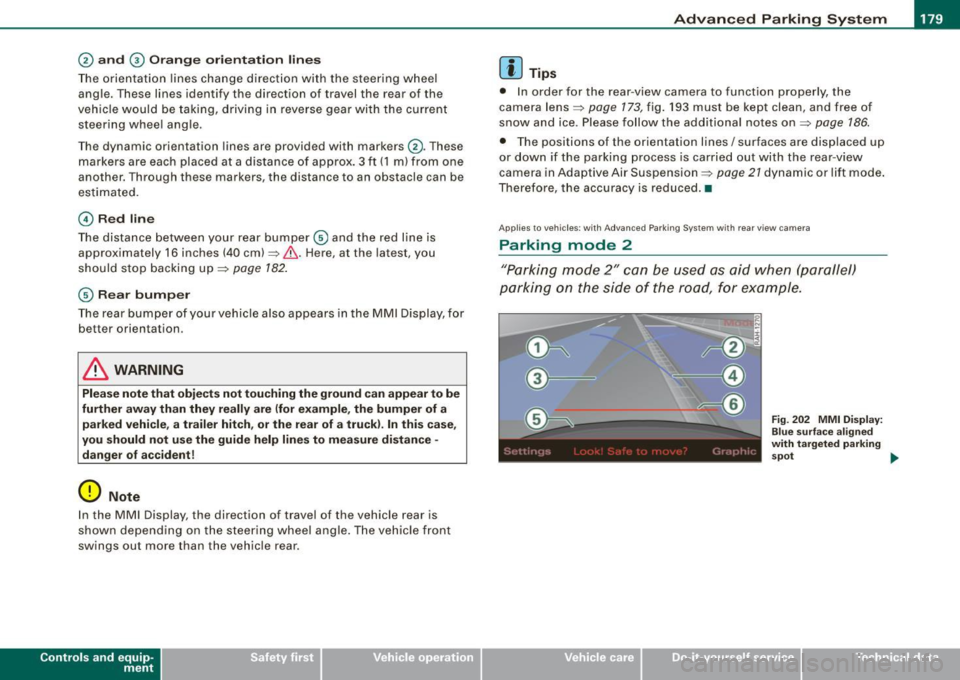
@ and 0 O ra ng e o rientati on line s
The orientation lines cha nge direction with the steering wheel
angle. These lines identify the direction of travel the rear of the
veh icle would be taking, d riving in reverse gear with t he current
steering whee l ang le.
T he dynamic orientation lines are provided with markers @. T hese
markers are each placed at a distance of app rox. 3 ft (1 ml from o ne
another. Through thes e markers, the distance to an obstacle can be
es timated .
©Redli ne
The distance between your rear bumper © and the red l ine is
approximately 16 inch es (40 cm)~& . Here, at the latest, you
should stop backing up~
page 182 .
© Rear bump er
The rear bumper of your vehicle also appears in the MMI Display, for
bett er orientation .
& WARNING
Please note that obje cts not touching the ground can appear to be
further away than they re ally are (for example , the bumper of a
parked vehicle , a trailer hitch , or the re ar of a truck ). In th is case ,
you should not use the guide help line s to mea sure distance -
danger of accident!
0 Note
I n the MMI Display, the direction of trav el of the vehicle rear is
shown depending on the steering wheel a ngle . The vehicle front
swings ou t more than the vehicle rear .
Contro ls and eq uip
ment
[ i ] Tips
• I n order for the rear -view camera to function properly, the
camera lens~
page 173, fig. 193 must be kept clean, and free of
snow and ice . Please follow the additional no tes on ~
page 186.
• The positions of the orientation lines / surfaces are disp laced up
or down if the parking process is car ried out with the rea r-view
camera in Adap tive Air Suspension ~
page 21 dynamic or lift mode .
Therefore , the accuracy is reduced. •
Applies to vehi cles : w ith Adva nce d Pa rki ng S yste m with rear view c amera
Parking mode 2
"P ar king m ode 2" ca n be u sed as aid when (pa rallel)
parki ng on the side of the r oad, for e xample.
Vehicle care I I
Fig . 2 02 MMI Di splay:
Blue surfa ce a ligned
with t argeted par king
s p ot ...
irechnical data
Page 182 of 408
• ..__A_ d_v _ a_ n_c _e _ d_ P_ a_r _k _in ---== g'-- S...:y _ s_ t_ e_ m ___________________________________________ _
Fig. 203 MM I D isp lay:
Co ntac t of th e bl ue
c ur ved line with th e
c ur b
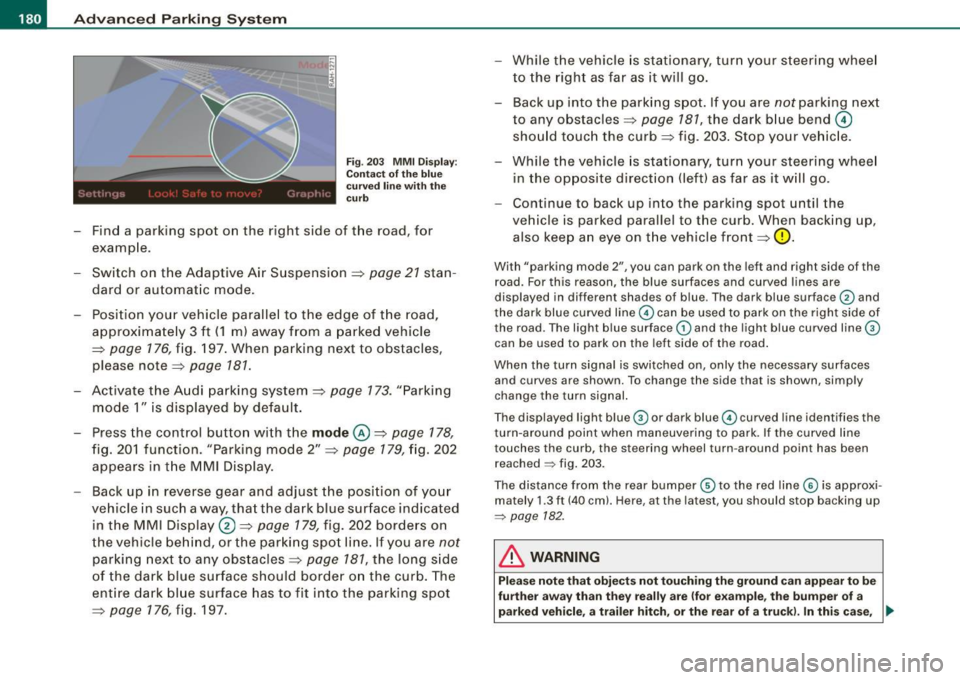
- Find a park ing spot on the right side of the road, for
examp le .
- Sw itch on the Adaptive Air Suspension=>
page 21 stan
dard or automat ic mode.
- Position your vehicle paralle l to the edge of t he road,
approximate ly 3 ft ( 1 m) away from a parked vehicle
=>
page 176 , fig. 197 . When parking next to obstacles ,
please note=:,
page 181.
-Activate the A udi p arking system => page 173. "Parking
mode 1" is displayed by default .
- Press the control butto n with t he
mode @=> pag e 178,
fig. 20 1 f uncti on. "Park ing mode 2" => page 179, fig. 202
appears in t he M M I Dis pla y.
- Back up in reverse gear and adjust the posi tion of your
vehicle in such a way, tha t the dark blue sur face indicated
in the MMI Display®=>
page 179, fig. 202 borde rs on
t he veh icle be hin d, o r the park ing spo t lin e. If you are
not
par king nex t to any obs tacles => page 781, the long s ide
of the dark blue surface shoul d border o n the curb. The
ent ire dark bl ue surface has to fit into the parking spot
=>
page 176 , fig. 197. While the vehicle
is stat io nary, tur n yo ur s teering whee l
to the righ t as far as it will g o.
- Back up into the parki ng spot. If you are
not parking next
to any obstacles =>
page 787, the dark b lue bend 0
sho uld touc h the curb => fig. 203 . Sto p your ve hic le.
- Wh ile t he vehicle is stationa ry, tur n your steering whee l
in the opposite direction (left) as far as it w ill go .
- Continue to bac k up into the parking spot until the
vehicle is parked parallel to the curb. When backing up,
also keep a n eye on t he vehicle front=>
0-
With "parking mode 2", you can park on the le ft and right sid e of the
road. For this reason, the blue surfaces and curved l ines are
displayed in differen t shades of blue . The dark blue surface
G) and
the dark blue curved line
G) can be used to park on the right side of
the road. The light b lue surface
G) and the light blue curved line®
can be used to park on the left side of the road .
When the turn signal is switched on, only the necessary surfaces and curves are shown. To change the side that is shown, simply
change the turn signal.
The displayed light blue ® or dark blue© curved line identifies the
turn -around point when maneuvering to park. If the curved lin e
touches the curb , the steering wheel turn -around point has been
reached
~ fig . 203.
The distance from the rear bumper ® to the red line © is approxi
mately 1.3 ft (40 cm). Here, at the latest, you should stop backing up
~ page 182.
& WARNING
Pl ea se note that obje cts not touching the ground can appea r to b e
fu rther awa y than the y re ally are (for e xample , the bumper of a
parked vehicl e, a trailer hitch, or the rear of a tru ck). In thi s cas e, •
Page 183 of 408
____________________________________________ A_d_ v_ a_n_ c_ e_d _ P_a_ r_ k_ i_ n ..::g==-- S_ y=- s_t _e _m __ ffllll
& WA RNIN G (continu ed )
you should not u se the guide help line s to mea sur e dist ance -
danger of accid ent !
0 Note
In the MMI Display, the direct ion of travel of the vehicle rear is repre
sented depending on the steering wheel angle. The vehic le front
swings out more than the vehic le rear.
[ i ] Tips
• I n order for the rear -view camera to function properly, the
camera lens=>
page 173, fig. 193 must be kept clean, and free of
snow and ice . P lease follow the additional notes on=>
page 186 .
• The positions of the orientation lines/ surfaces are disp laced up
or down if the parking process is carried ou t with the rear -view
camera in Adaptive Air Suspension=>
page 21 dynamic or lift mode .
Therefore, the accuracy is reduced .•
Controls and equip
ment
Special parking situations
Ap plies to vehicles: with Advance d Pa rk ing Sys tem w ith rear view came ra
Parking next to obstacles
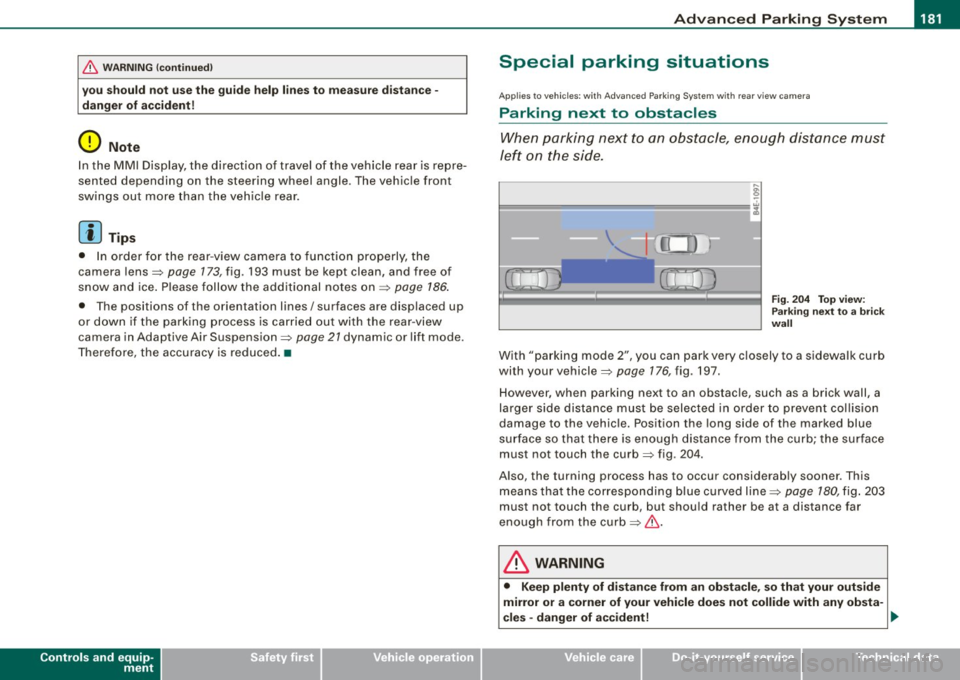
When parking next to an obstacle, enough distance must
left on the side.
Fig. 2 04 To p view:
P ark in g next t o a brick
w all
With "parking mode 2", you can park very c losely to a sidewalk curb
with your vehicle=>
page 176, fig. 197.
However, when parking next to an obstacle, such as a brick wall, a
larger side distance must be selected in o rder to prevent collision
damage to the vehicle. Position the long side of the marked blue
s u rface so that there is enoug h distance from the curb; the surface
must not touch the curb=> fig.
204.
Also, the turning process has to occur considerab ly sooner . This
means that the corresponding blue curved line=>
page 180, fig. 203
must not touch the curb, but shou ld rather be at a distance far
enough from the curb=>& .
& WARNING
• Keep plenty of di sta nce from an ob stacle , so that your out side
mirror or a corner of your vehi cle does not collide with any ob sta-
cle s -danger of a ccident!
~
I • •
Page 202 of 408
........ _o_ r_iv _i_ n""' g::;._ S_ a_f _e _ly =---------------------------------------------------
Driving Safely
General notes
Safe driving habits
Please remember -safety first!
This chapter contains important information , tips, instructions and
warnings that you need to read and observe for your own safety, the
safety of your passengers and others. We have summarized here
what you need to know about safety belts, airbags, child restraints as well as child safety. Your safety is for us
priority number 1. Always
observe the information and warnings in this section -for your own
safety as well as that of your passengers.
The information in this section applies to all model versions of your
vehicle. Some of the features described in this sections may be
standard equipment on some models, or may be optional equip
ment on others. If you are not sure, ask your authorized Audi dealer.
& WARNING
• Always make sure that you follow the instructions and heed
the WARNINGS in this Manual. It is in your interest and in the interest of your passengers.
• Always keep the complete Owner's Literature in your Audi
when you lend or sell your vehicle so that this important informa
tion will always be available to the driver and passengers.
• Always keep the Owner's literature handy so that you can find
it easily if you have questions. •
Safety equipment
The safety features are part of the occupant restraint
system and work together to help reduce the risk of injury
in a wide variety of accident situations.
Your safety and the safety of your passengers should not be left to
chance. Advances in technology have made a variety of features
available to help reduce the risk of injury in an accident. The
following is a list of just a few of the safety features in your Audi:
• sophisticated safety belts for driver and all passenger seating
positions,
• safety belt pretensioners,
• safety belt force limiters for the front seats,
• safety belt height adjustment systems for the front seats,
• front airbags,
• knee airbags for the front seats
• side airbags in the front seats and outer rear seats,
• side curtain airbags,
• special LATCH anchorages for child restraints,
• head restraints for each seating position,
• adjustable steering column.
These individual safety features, can work together as a system to
help protect you and your passengers in a wide range of accidents.
These features cannot work as a system if they are not always correctly adjusted and correctly used.
Safety is everybody's responsibility! •
Page 204 of 408
-Driving Safely --=------'---------------
Proper occupant seating positi
·ons
Proper seating position for the driver
The proper driver seating position is important for safe,
relaxed driving.
"' N
;
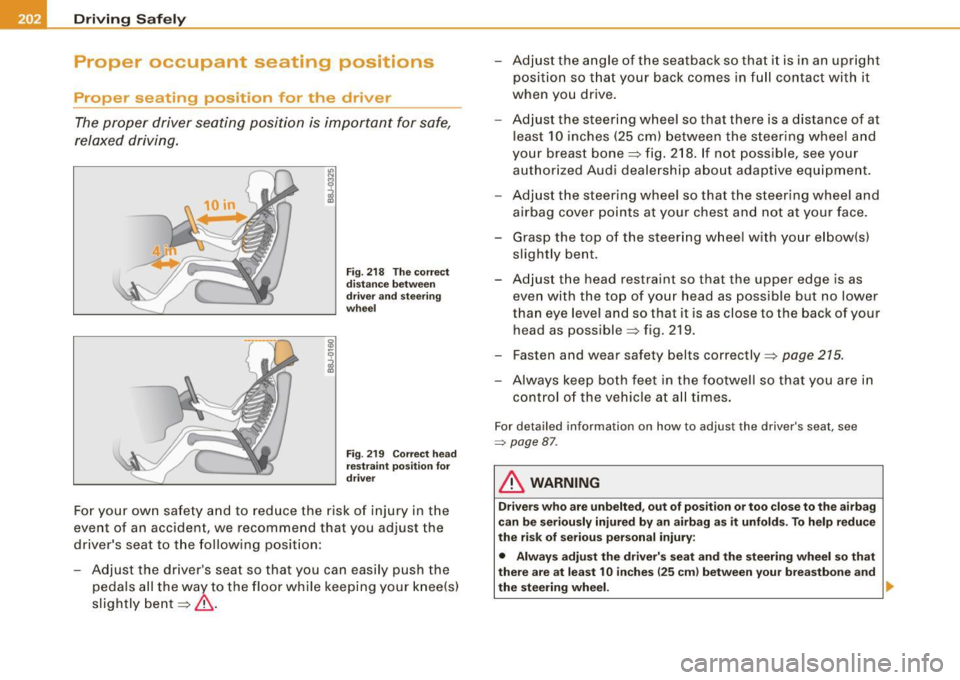
Fig. 218 The correct
distance between
driver and steering
wheel
Fig . 219 Correct head
restraint position for
driver
For your own safety and to reduce the risk of injury in the
event of an accident, we recommend that you adjust the
driver's seat to the following position:
- Adjust the driver's seat so that you can easily push the
pedals all the way to the floor while keeping your knee(s)
slightly bent=:>& . - Adjust the angle of the seatback so that it is in an upright
position so that your back comes in full contact with it
when you drive.
- Adjust the steering wheel so that there is a distance of at
least 10 inches (25 cm) between the steering wheel and
your breast bone=:> fig. 218. If not possible, see your
authorized Audi dealership about adaptive equipment.
- Adjust the steering wheel so that the steering wheel and
airbag cover points at your chest and not at your face.
- Grasp the top of the steering wheel with your elbow(s)
slightly bent.
- Adjust the head restraint so that the upper edge is as even with the top of your head as possible but no lower
than eye level and so that it is as close to the back of your
head as possible =:> fig . 219.
- Fasten and wear safety belts correctly=:>
page 215.
- Always keep both feet in the footwell so that you are in
control of the vehicle at all times.
For detailed information on how to adjust the driver's seat, see
=> page 87 .
& WARNING
Drivers who are unbelted, out of position or too close to the airbag
can be seriously injured by an airbag as it unfolds. To help reduce
the risk of serious personal injury:
• Always adjust the driver's seat and the steering wheel so that
there are at least 10 inches
125 cm) between your breastbone and
the steering wheel. ..
Page 205 of 408
________________________________________________ D_r_iv _ i _n_ g~ S_ a_ fe_ ly __ l!III
& WARNING (continued)
• Always adjust the driver's seat and the steering wheel so that
there are at least 4 inches (10 cm) between the knees and the
lower part of the instrument panel.
• Always hold the steering wheel on the outside of the steering
wheel rim with your hands at the 9 o'clock and 3 o'clock positions
to help reduce the risk of personal injury if the driver's airbag inflates .
• Never hold the steering wheel at the 12 o'clock position or with
your hands at other positions inside the steering wheel rim or on
the steering wheel hub. Holding the steering wheel the wrong way
can cause serious injuries to the hands, arms and head if the
driver's airbag inflates
• Pointing the steering wheel toward your face decreases the
ability of the supplemental driver's airbag to protect you in a colli
sion .
• Always sit in an upright position and never lean against or
place any part of your body too close to the area where the airbags
are located.
• Before driving, always adjust the front seats and head
restraints properly and make sure that all passengers are properly
restrained .
• Never adjust the seats while the vehicle is moving. Your seat
may move unexpectedly and you could lose control of the vehicle.
• Never drive with the backrest reclined or tilted far back! The
farther the backrests are tilted back, the greater the risk of injury due to incorrect positioning of the safety belt and improper
seating position.
• Children must always ride in child seats
=> page 245. Special
precautions apply when installing a child seat on the front
passenger seat
=> page 220. •
Controls and equip
ment Safety first
Vehicle operation
Proper seating position for the front
passenger
The proper front passenger seating position is important
for safe, relaxed driving.
For your own safety and to reduce the ris k of injury in the
event of an accident, we recommend that you adjust the
seat for the front passenger to the following pos ition:
- Move the front passenger seat back as far as possible.
There must be a minimum of 10 inches (25 cm) between
the breastbone and the instrument panel =>
&.
- Adjust the angle of the seatback so that it is in an upright
position and your back comes in full contact with it
whenever the vehicle is moving.
- Adjust the head restraint so that the upper edge is as
even with the top of your head as possible but not lower
than eye level and so that it is as close to the back of your
head as possible =>
page 205.
-Keep both feet flat on the floor in front of the front
passenger seat.
- Fasten and wear safety belts correctly=:>
page 215.
For detailed information on how to adjust the front passenger's
seat, see => page 86.
& WARNING
Front seat passengers who are unbelted, out of position or too
close to the airbag can be seriously injured or killed by the airbag
as it unfolds. To help reduce the risk of serious personal injury : .,
Vehicle care Do-it-yourself service Technical data
Page 215 of 408
Because the passengers of this vehicle are not using safety belts
=:>
page 212, fig. 222, they will keep moving at the same speed the
vehicle was moving just before the crash, until something stops
them -here, the wall =:>
page 272, fig. 223.
The same principles apply to people sitting in a vehicle that is involved in a frontal collision. Even at city speeds of 20 to 30 mph
(30 to 50 km/h), the forces acting on the body can reach one ton
(2,000 lbs, or 1,000 kg) or more. At greater speeds, these forces are
even higher.
People who do not use safety belts are also not attached to their
vehicle. In a frontal collision they will also keep moving forward at
the speed their vehicle was travelling just before the crash. Of course, the laws of physics don't just apply to frontal collisions, they
determine what happens in all kinds of accidents and collisions. •
What happens to occupants not wearing
safety belts?
In crashes unbelted occupants cannot stop themselves
from flying forward and being injured or killed. Always
wear your safety belts!
Safety first
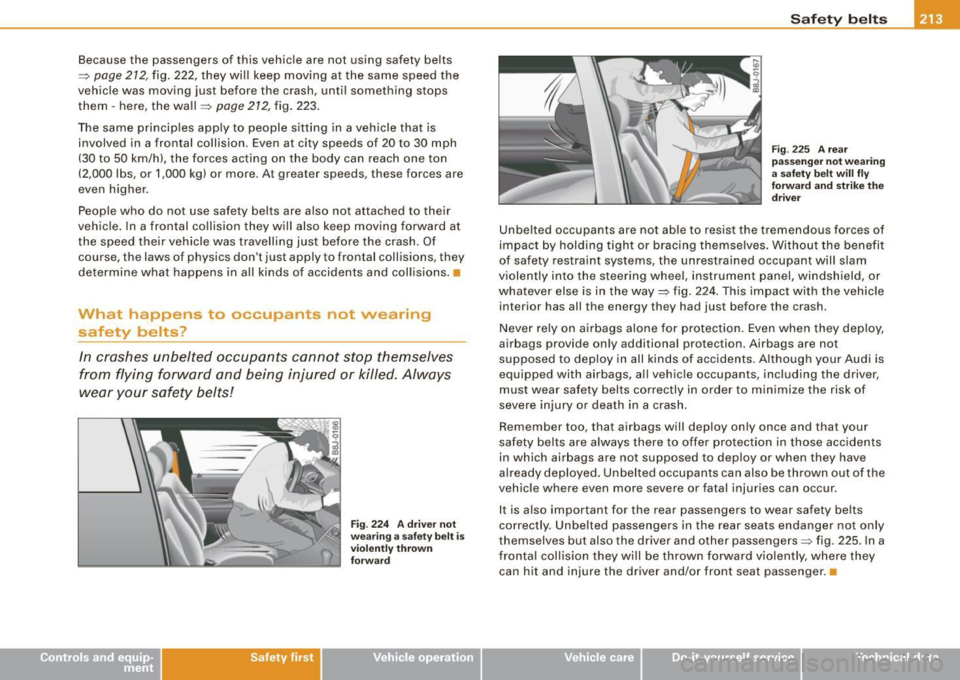
Fig . 224 A driver not
wearing a safety belt is
violently thrown
forward
Safety belts
Fig . 225 A rear
passenger not wearing
a safety belt will fly
forward and strike the
driver
Unbelted occupants are not able to resist the tremendous forces of
impact by holding tight or bracing themselves. Without the benefit
of safety restraint systems, the unrestrained occupant will slam
violently into the steering wheel, instrument panel, windshield, or
whatever else is in the way=:> fig. 224. This impact with the vehicle
interior has all the energy they had just before the crash.
Never rely on airbags alone for protection. Even when they deploy,
airbags provide only additional protection. Airbags are not
supposed to deploy in all kinds of accidents. Although your Audi is
equipped with airbags, all vehicle occupants, including the driver,
must wear safety belts correctly in order to minimize the risk of
severe injury or death in a crash.
Remember too, that airbags will deploy only once and that your
safety belts are always there to offer protection in those accidents
in which airbags are not supposed to deploy or when they have
already deployed. Unbelted occupants can also be thrown out of the
vehicle where even more severe or fatal injuries can occur.
It is also important for the rear passengers to wear safety belts
correctly . Unbelted passengers in the rear seats endanger not only
themselves but also the driver and other passengers=:> fig. 225. In a
frontal collision they will be thrown forward violently, where they can hit and injure the driver and/or front seat passenger. •
Vehicle care I I Technical data
Page 222 of 408
___ A_ ir_ b_ a-g _ s_y _s_ t_ e_ m _________________________________________________ _
Airbag system
Important things to know
Importance of wearing safety belts and
sitting properly
Airbags are only supplemental restraints. For airbags to
do their job, occupants must always properly wear their
safety belts and be in a proper seating position.
For your safe ty a nd the safety of your passengers, before
driving o ff, a lways:
- Adjust the driver's seat and steering wheel properly
~ page 202,
-Adjust the front passenger's seat properly~ page 87,
- Wear safety belts properly~ page 214,
-Always properly use the proper child restraint to pro tect
children~
page 245 .
In a collision, airbags must inflate within the blink of an eye and w ith
considerable force. The supplemental airbags can cause injuries if
the driver or the front seat passenger is not seated properly. There
fore in order to help the airbag to do its job, it is important, both as
a driver and as a passenger to sit properly at all times.
By keep ing room between your body and the steering wheel and the
front of the passenger compartment, the airbag can inflate fu lly and
comp letely and prov ide supplementa l protection in certain frontal
collisions =>
page 202, "Proper occupant seating positions". For
detai ls on the operation of the seat adjustment controls=>
page 87.
It's especially important that children are properly restrained
=>
page 245 .
There is a lot that the driver and the passengers can and must do to
help the individual safety features installed in your Audi work
together as a system.
P roper seating position is important so that the front airbag on the
driver side can do its job. I f you have a physical impairment or
condition that prevents you from sitting properly on the driver seat
with the safety belt properly fastened and reaching the pedals, o r if
you have concerns with regard to the function or operation of the
Advanced Airbag System, p lease contact your authorized Audi
dea ler or qua lif ied workshop, or call Audi Customer CARE at 1-800-
822 -2834 for possib le modifications to your vehicle.
When the airbag system deploys, a gas generator wi ll fill the
airbags, break open the padded covers, and inflate between the
steering wheel and the driver and be tween the instrument panel
and the front passenger. The airbags wil l deflate immediate ly after
deployment so that the front occupants can see through the wind
shield again without interruption.
A ll of this takes p lace in the b link of an eye, so fast that many people
don't even rea lize that the airbags have dep loyed . The airbags also
inflate with a great deal of force and nothing should be in their way
when they dep loy. Fron t airbags in combination wi th properly worn
safety belts slow down and limit the occupant's forward movement.
T ogether they help to prevent the driver and front seat passenger
from hitting parts of the inside of the vehicle while reducing the
forces acting on the occupant during the c rash. In this way they he lp
to reduce the r isk of injury to the head and upper body in the crash.
Airbags do not protect the arms or the lower parts of the body .
Both front airbags w ill not in flate in al l fro ntal col lisions . The trig
gering of the airbag system depends on the vehic le decelerat ion
r ate caused by the colli sion and registe red by the electronic contro l
unit. If this rate is below the reference value programmed into the
cont rol unit, the airbags w ill not be t riggered, even though the car
may be bad ly damaged as a result of the collision. Vehicle damage, .,,,.