warning lights AUDI S8 2009 Owner's Manual
[x] Cancel search | Manufacturer: AUDI, Model Year: 2009, Model line: S8, Model: AUDI S8 2009Pages: 408, PDF Size: 91.63 MB
Page 83 of 408
ture on the windshield. The rain sensor wiper intervals depend on
t he sensi tivi ty setting as well as vehic le speed . Dur ing brief s tops,
wiper motion wil l adjust in re lation to the amount of rain on the
windsh ield .
During br ief stops, e.g. at a red ligh t, wiper mot ion wil l automa ti
cal ly be reduced to the next lower speed . Wipers a lready turning at
low speed. cha nge to i ntermittent w ip ing.
When the ignition is turned on, the washer jets are heated .
With the low beam headlights switched on, p ull the wiper lever
towards you only
briefly t o clean the windshield. Ho lding the wiper
lever wou ld a lso engage the headlight washer system each time you
clean the w indsh ie ld and wou ld dra in the washer fluid reservoir
pr ematurely.
& WARNING
• Wiper blades are crucial for safe driving! Only when they are in
good condition are they able to clear the windows properly to
provide uncompromising visibilit y. Worn or damaged wiper blades
are a safety hazard
=> page 82 , "In stalling new wiper blade s"!
• The rain sensor is only designed to assist and support the
driver . It remains entirely the driver' s respon sibility to monitor
out side weather condit ions and to manually acti vate the wipers as
soon as rain or drizzle reduces visibility through the windshield.
• The windshield must not be treated with water-repellent mate
rial s. They can increa se glare under poor visibility conditions such
as wetness , darkness , or when the sun is low on the horizon. In
addition , they can cau se the wind shield wipers to chatter.
0 Note
In freezi ng or near freezing conditions:
• Always check that the wiper blades are not frozen to the glass
be fore you turn the w ipe rs on. Loose n a wiper b lade wh ich is fro zen
Controls and equip
ment
Cl ea r vision
in place before operating the wipers to prevent damage to the wiper
blade or the wiper motor.
• Do not use the wipers to clear a frosted window. Using the
wipers as a convenient ice scraper will des troy the wiper blades .
• Before you take your vehic le to an automatic car wash, make sure
you have the w indshield w iper system switched o ff (lever in p ositi on
Ol, otherwise the windshield wiper system could get damaged in the
car was h if it should suddenly co me on .
[ i ] Tips
• Make sure th e washer fluid reservoir in the engin e compart men t
is topped off before going on a long trip . Look up=>
page 325 for
check ing and fi lling t he washer conta iner.
• I f you switch off the ignition with the windshield wiper lever still
in the inte rval wi pe positio n and t hen come ba ck a while la ter and
drive off, the rain sensor will reactivate itself after the vehicle speed
has exceeded
4 mph (6 km/h) .
• Worn or dirty windshie ld wiper b lades cause smearing which
can aff ect t he opera tion of the rai n senso r. Check the c ondi tion of
your windshield wiper b lades regu lar ly . •
Headlight washer system
The hea dligh t washer s ys tem cle ans the he adlig hts.
Opera te the win dshi eld w iper/was her sy stem @wit h th e
h eadl igh ts t urned o n by ho ld in g the lev er fo r lo nge r than
one s eco nd
~ page 80, fig. 76 .
The washer je ts extend forward out of the fron t bumper driven by
water pressure to spray the front head lights with water .
You should inspect the head lights regu lar ly (for examp le when refu -
e ling) a nd c lean o ff any solid dirt or insects from the lenses. _,.
I • •
Page 85 of 408
Rem oving a wip er blad e
-Bring the windshield wipers to the service position
~ page 82.
-Lift the wiper arm away from t he windshield.
- Pu sh t he locking piece on the wip er blade in the direction
of the arrow @~ page
82, fig. 78. Hold the wiper blade
firmly.
- Remove the wiper b lade @.
Inst alling wiper bl ad e
- Place the new wiper blade in the retainer on the wiper
arm ©~ page
82, fig. 79.
- Pu sh t he locking piece on the wiper blade in the direction
of the arrow@ until you feel it click into place on the
wiper arm .
Clean your wiper blades regularly with a windshield washer solution
to prevent streaking . If the bla des are very dirty, for example with
insects, carefully clean the b lades with a sponge or a soft brush.
I f the wiper b lades begin to s treak the windshie ld, this could be
caused by residue left on the windshield by automatic car washes.
Fill the windshield washer container with a special solution avail
able at your authorized Audi deale r to remove the residue .
& WARNING
Be sure to in spect the cond itio n of your wiper blade s regula rly . See
y our authori zed Audi de aler f or repla ceme nt bl ade s.
0 Note
To prevent damage to the wiper system:
Controls and equip
ment
Cl ea r vision
• Always loosen blades which are frozen to the windshield before
operat ing wipers.
• Do not use gaso line, kerosene, paint thinner, or other solvents on
or near the wiper blades .
• Do not attempt to move the wipers by hand.
[ i ] Tip s
Commercial hot waxes applied by automatic car washes affect the
c leanabi lity of the windshield .•
Mirrors
Rear view mirror
When the ignition is on, the interior mirror will darken automatically
depending on the amount of light striking the mirror (such as head
lights shining into the vehic le from the rearl. The mirror will retu rn
to the origina l state (anti -glare off) when you move the manual gear
shift/gear selector lever into
Reverse or when you turn on the inte
rior lights.
[ i ] Tips
The automatic anti-g lare feature on the mirror will not operate prop
erly if the light shining on the inside mirror is b locked by other
objects. •
I • •
Page 140 of 408
• .___O_ n_ t_h _e _ r_o _a_ d __________________________________________________ _
& WARNING (continued)
• Please note that inadvertently "resting" your foot on the accel
erator pedal causes the cruise control not to brake . This is because
the cruise control is overridden by the driver's acceleration.
[ i J Tips
The brake lights illuminate as soon as the brakes decelerate
automatically. •
Changing speed
-Press lever in the 0 or O direction => page 137, fig. 149
to increase or decrease your speed.
- Release the lever to save that speed.
Change speed in increments of 1 mph (1 km/h) by lightly pressing
the lever . If you keep the lever pressed down, you will alter your
speed in 5 mph (10 km/h) increments.
You can also press the accelerator pedal down to increase your
speed, e.g . if you want to pass someone. The speed you saved
earlier will resume as soon as you release the accelerator pedal.
If, however, you exceed your saved speed by 5 mph (10 km/h) for
longer than 5 minutes, the cruise control will turn off temporarily.
The green symbol in the display=>
page 137, fig. 150 is rep laced
with a white symbol. The saved speed remains the same. •
Presetting your speed
You can preset your desired speed while the vehicle is not
moving.
- Turn on the ignition. -
Pull lever into position
G) => page 137, fig. 149.
- Press the lever in the
0 or O direction to increase or
decrease your speed.
- Release the lever to save that speed.
This function makes it possible, for example, to save the speed you
want before driving on the highway. Once on the highway, activate
the cruise control by pulling the lever toward
(D. •
Switching the system off
Temporary deactivation
- Press the brake pedal, or
- Press the lever into position
0 (not clicked into place)
=> page 137 , fig. 149, or
- Drive for longer than 5 minutes at more than 5 mph
(10 km/h) above the stored speed.
Switching off completely
-Press lever into position 0 (clicked into place), or
- Switch the ignition off.
The system retains the saved speed if you deactivate the cruise
control temporarily . To resume the saved speed, release the brake
pedal and pull the lever to position
(D .
Switching the ignition off erases the saved speed.
& WARNING
You should only return to the saved speed if it is not too fast for
the current traffic conditions -risk of an accident! •
Page 148 of 408

-Adaptive Crui se Control .._ _ ______,:,...._ _________________________________________ _
Driver information
App lies to veh icles: with Adapt ive Cruise Cont ro l
Displays in the instrument cluster
Depending on the driving situation, driver information is
displayed in the instrument cluster.
@ Primary display in the speedometer.
Fig. 158 Ove rv iew
instrument clu ste r
@ Supplementary display in the instrument c luster.
© Message in the instrument cluster display.
@ Prim ary display
Important information concerning vehic le operation with Adaptive
Cruise Control is shown in disp lay area @. T he desired speed yo u
set is highlighted in the speedometer and the warning lights show
whether adjustments are being made fo r an object ahead .
This information is always disp layed. Display area @is therefore
called the
primary display.
@ Supplementary disp lay
In display area@ infor mation fro m the navigation sys te m and the
trip computer is displayed in addition to information about Adaptive
Cruise Control. You can select among
the different information by repeated brief
t aps on the RESET b utto n on the w indshield wiper lever ~
page 40,
"Operation" .
P articularly on your first trips with Adaptive Cruise Control, the
supplementary display should be turned on.
@ Message
The information in area © is not d isp layed permanently. Informa
tion is displayed on ly if you change the time interva l, if there is a
malfunction or if the Adaptive Cruise Contro l is turned off. •
Applies to veh icles : w ith Adaptive Cruise Contro l
Primary display in the speedometer
Desir ed sp eed
Fig . 159 Primary
d is play in th e speed
omete r
The desired speed set by the driver is disp layed wi th a red LED .
The system al lows only speeds from 20 to 95 mph (30 to 150 km/h)
to be se t. This s peed range is fain tly i lluminated in the spee dometer.
Warning lights (symbols )
• ""c:::, Open road : Th e war ning lig ht ""c:::, sh ows that ACC is active
and that no moving vehicle has been detected with in range of the
ra dar senso r up ahead in yo ur l ane of travel. The se t speed is main -
tained. .,
Page 170 of 408
• ..__A_ u_ t _o_ m_ a_ t_ i_ c _ t_r _a _n_ s_ m_ is_ s_io _ n ________________________________________________ _
Select R only when the vehicle is at a full stop and the engine is
running at idle speed=>
& in "Driving the automatic transmission"
on
page 166.
Before you move the selector lever to R, press both the button in the
handle of the selector lever
and the brake pedal at the same time.
When the ignition is on, the backup lights illuminate when the
selector lever is moved into
R.
N -Neutral
The transmission is in neutral in this position. Shift to this position
for standing with the brakes applied =>
page 168 .
When the vehicle is stationary or at speeds below 3 mph (5 km/h),
you must always apply the footbrake before and while moving the
lever out of
N.
D -Normal position for driving forward
Position Dis for normal city and highway driving. It ranges from zero
to top speed and all six gears shift automatically, depending on
engine load, driving speed and automatically selected shift
programs.
When the vehicle is stationary or at speeds below 3 mph (5 km/h),
you must always apply the foot brake before and while moving the
lever to
D out of N.
In certain circumstances it may be advantageous to temporarily
switch to the manual shift program to manually select gear ratios to
match specific driving conditions=>
page 170.
S -Sport position
Select this position for sportier performance. In this position, the
transmission will not upshift as soon, allowing the vehicle to use the increased power available at higher engine speeds to achieve live
lier acceleration.
When the vehicle is stationary or at speeds below 3 mph (5 km/h),
you must always apply the foot brake before and while moving the lever to
S out of N.
& WARNING
Read and follow all WARNINGS => & in "Driving the automatic
transmission" on
page 166.
0 Note
Coasting downhill with the transmission in N and the engine not
running will result in damage to the automatic transmission and
possibly the catalytic converter. •
Automatic Shift Lock (ASL)
Automatic shift lock prevents you from accidentally
shifting into a forward gear or into reverse, thus causing the vehicle to move unintentionally.
Fig. 187 Shift gate
selector lever lock
positions and interlock
button highl ighted
The selector lever lock is released as follows:
- Turn the ignition on.
Step on the brake pedal.
At the same time press and hold
the lock button on the side of the gear selector knob
=> fig. 187 with your thumb until you have moved the
selector lever to the desired position.
~
Page 176 of 408
• .___A_ d_v_ a_ n_c_ e_ d_ P _a_r_k _i_ n -=g,_ S-=y"- s_ t_ e_ m __________________________________________ _
-Press the sw itch PJJJ! in the cente r console ~ page 173,
fig . 194 t o activate the A udi pa rking system m anually .
Activation of the acoustic parking system is confirmed by
a brief acknowledgement sound . The indicator lig ht in
the switch lights up.
D ea ctivation
If you drive forwards faster tha n approx. 6 mph (10 km/h),
or
- if you switch the ign ition off, the entire acoustic parking
assist is automatically deactivated, or
- you can press the sw itch
P111! i n the center console
=> page 173, fig. 194 to deact ivate the Audi parking
system. The indicator light in the switch goes out.
You have to turn on the acoustic parking assist m anuall y if you wish
to park the vehicle forwards or if you w ish to approach an obstacle
forwards and want a distance warning .
The range at which the sensors start to measu re is
about:
Front
Rear
W arning ton es side
cen
te r
side
cen ter 3 ft (0
.90 ml
4ft
(1.20 ml
2 ft (0.60 ml
5 .2 ft (1.60 ml
Distance warning is given by chimes which are generated by a
signal generator . The volume and the pitch of the chimes can be
adjusted in the MMI => page
183.
Mute
In the case of vehic les with automa tic transmission, an acoustic
distance warning is discontinued when the transmission selector l
ever is moved to the P position. However, the system remains
active . As soo n as the selector lever is moved from the
P posi tion
and the vehicle approaches an obstacle, the acoustic distance
warning resumes .
Dri ving fo rward/ba ckvv ard
Distance warning when driving forward/backward is based o n
detection of an obstacle in the range of the parking assist . As the
distance dec reases, the time interval between the audible tones
becomes shorter.
When the distance is less than approx . 1 ft (0.30 m), the tone
becomes continuous. At this point you shou ld s top backing up or
driving forward .
If the distance to an obstac le remains the same, the vo lume of the
distance warning is gradually reduced after about
4 seconds (does
not app ly to the zone for the cont inuous tone). If you sta rt to
approach the detected obstacle again, the distance warning will
sound at the normal volume again .
P a rk ing
When you selec t ano ther gear when parki ng (e .g . reverse/forward),
the warning tones are temporarily suppressed, but the visual display remains on the MMI display . If you start approaching a
detected obstacle again, the distance warning wi ll sound at the
normal vo lume again .
Visual disp lay
T he segments on the MMI display indicate a change in the distance
between the vehicle and an obstacle . The number of segments
displayed depends on the obstacles in front of or behind the
vehic le. The c loser the vehic le comes to the obstacle, the closer the
segments approach the vehic le => page
173 , fig. 195. When the
segment before last is disp layed, the veh icle has reached the colli
sion zone. At this point you should stop backing up or driving
forward =>
&,. ..,.
Page 203 of 408
__________________________________________________ D _r_iv _ in_ g~ S_ a_f _e _l_ y __ llll
Important things to do before driving
Safety is everybody's job! Vehicle and occupant safety
always depends on the informed and careful driver.
For your safety and the safety of your passengers, before
driving always:
-Make sure that all lights and signals are operat ing
correctly.
- Make sure that the tire pressure is correct.
- Make sure that all windows are clean and afford good
visibility to the outside.
- Secure all luggage and other items carefully~
page 109.
-Make sure that noth ing can interfere w ith the pedals.
- Adjust front seat, head restraint and mirrors correctly for your height .
- Instruct passengers to adjust the head restraints
according to their height.
- Make sure to use the right ch ild restraint correctly to
protect children ~
page 245, "Child Safety ".
- Sit properly in your seat and make sure that your passen
gers do the same~
page 86, "General recommenda
tions".
- Fasten your safety belt and wear it p roperly. Also instruct
your passengers to fasten the ir safety belts properly
~ page 217. •
Controls and equip
ment Safety first
Vehicle operation
What impairs driving safety?
Safe driving is directly related to the condition of the
vehicle, the driver as well as the driver's ability to concen
trate on the road without being distracted.
The driver is responsible for the safety of the vehicle and all
of its occupants. If your ability to drive is impaired, safety
risks for everybody in the vehicle increase and you also
become a hazard to everyone else on the road ~& .There
fore:
Do not let yourself be distracted by passengers or by
using a cellular telephone .
NEVER drive when your driving ability is impaired (by
medications, alcohol, drugs, etc.).
- Observe all traffic laws, rules of the road and speed limits
and plain common sense .
- ALWAYS adjust your speed to road, traffic and weather
conditions.
- Take frequent breaks on long trips. Do not drive for more
than two hours at a stretch.
- Do NOT drive when you are tired, under pressure or when
you are stressed .
& WARNING
Impaired driving safety increases the risk of serious personal
injury and death whenever a vehicle is being used. •
Vehicle care Do-it-yourself service Technical data
Page 214 of 408
-S
afe ty b elts ----=-----------------
- Make sure that your passengers also b uckle up and prop
erly wea r th eir sa fety belts.
Protect children wit h a child restraint system appropriate
for the size and age.
The warning light i in the instrument cluster lights up when the
ignition is switched on as a reminder to fasten the safety belts. In
addition , you will hear a warning tone.
After the ignition is switched on, the warning light in the instrument cluster will a lways come on for about 6 seconds and if the driver has
not fastened the safety belt, a warning tone will also sound for
about 6 seconds . As soon as the driver has fastened the safety belt,
the warning tone will stop and the warning light will go out .
If the driver or front seat passenger have not buckled -up within
about 10 seconds after the warning tone has stopped and the
vehicle is moving faster than about 15 mph, the warning tone will
sound again for about 6 seconds and then stop for 24 seconds and
then repeat this reminder sequence for a maximum of 2 minutes. At
speeds be low 5 mph, the warning tone will not sound.
Fa sten your safe ty belt and m ake su re that your p assengers also
properl y put on th eir s afet y belts .
& WARNING
• Safety belt s are the single mo st effective mean s available to
reduce th e risk of ser ious injur y and death in a utomobile acci
dent s. For your prote ction and th at of your pas senger s, alwa ys
c orre ctl y we ar safety belt s when t he vehicle is moving .
• Failure t o pay att ention to th e warning light that co me on,
c ould lead to per sonal injury .•
Why safety belts?
Frontal co11isions and the law of physics
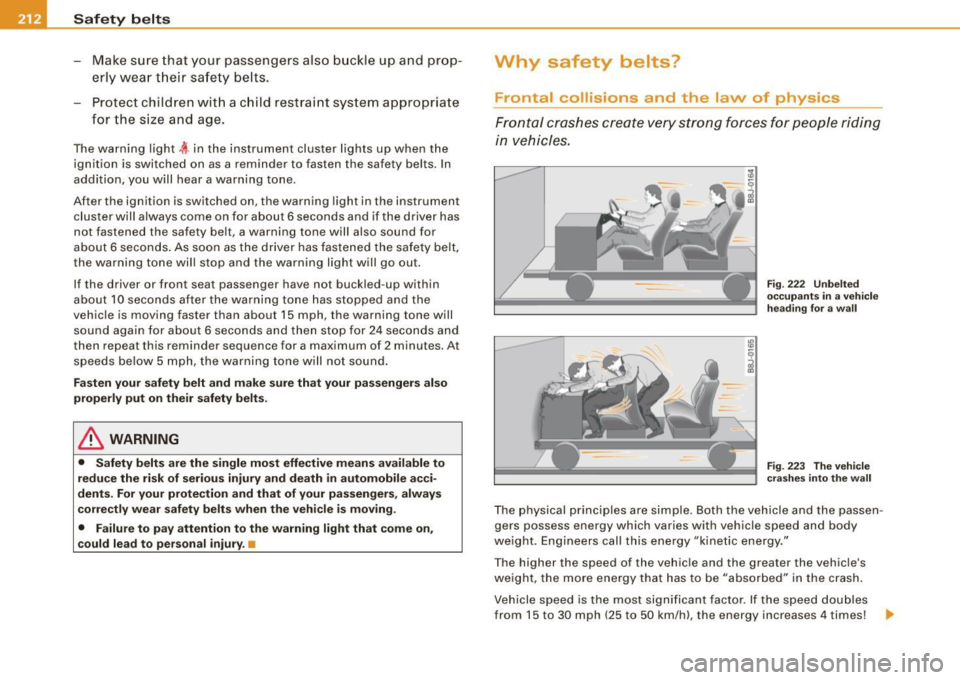
Front al crashes create very strong forces for pe ople riding
in vehicles.
F ig. 222 U nbel ted
o cc up ants i n a ve hicle
he ading for a wa ll
Fi g. 223 T he vehicle
c ras hes in to t he wa ll
The physical principles are simple. Both the vehicle and the passen
gers possess energy which varies with vehicle speed and body
we ight . Engineers cal l this energy "kinetic energy ."
T he higher the speed of the vehicle and the greater the vehic le's
we ight, the more energy that has to be "absorbed" in the crash .
Vehicle speed is the most significan t factor. If the speed doubles
from 15 to 30 mph (25 to 50 km/h), the energy increases 4 times! .,
Page 284 of 408
___ D_ r_i v_ in_... g"'- a_ n_ d_ e_ n_ v_i_r _ o _n_ m __ e_n _ t _______________________________________________ _
one half. Never drive faster than the posted speed limit and weather
conditions permit. •
Reducing unnecessary =citing
Even when your car is just idling it burns up fuel.
- Shut the eng ine off when you are not driving the vehicle .
- Do not warm up the vehicle by letting the engine run at
idle.
It makes sense to shut off the engine in traffic jams, when waiting
for trains to pass at rai lroad crossings , or at traffic lights that have
long waits on red. Turning the engine off for just 30 -40 seconds
saves more fuel than is burned starting the engine again .
It takes a long time for the engine to warm up fu lly when it is
running at idle. However, wear and noxious emissions are especially
high when the engine is warming up. So you should drive away as
soon as you start the engine and avoid running at high rpms while
the engine is still warming up.
0 Note
Do not leave engine idling unattended after starting . If warning
lights should come on to indicate improper operation, they would
go unheeded. Extended idling also produces heat, which could result in overheating or other damage to the vehicle or other
property .•
Regu1ar ma1--.tenance
A badly tuned engine unnecessarily wastes a lot of fuel.
-Have your vehic le serviced at regular intervals .
By having your vehicle regularly serviced by an Audi dealer helps to
ensure that it runs properly and economically. The condition of your
vehic le not only affects its safety and abi lity to hold its value, it also
affects
fuel con sumpt ion.
C hec k your o il e ach time you fill your t ank.
The amount of oil used is related to engine load and speed.
It is norma l for the oil consumption of a new engine to reach its
lowest va lue after a certain mileage has been driven.
You must drive your vehicle about 3,000 miles (5,000 kilometers) before you can properly assess oil consumption .
This also applies to fuel consumption and engine output .
0 Note
• Have your vehicle maintained properly and in accordance with
the service recommendations in your Warranty
& Maintenance
booklet. Lack of proper ma intenance as well as improper use of the
vehic le wi ll impair the function of the emission control system and
cou ld lead to damage.
• Do not alter or remove any component of the Emission Control
System unless approved by the manufacturer.
• Do not alter or remove any device, such as heat shields,
switches, ignition wires, valves, which are designed to protect your
vehicle's Em ission Control System and other important vehicle
components .•
Fewer short tr ips
Fuel consumption will always be relatively high on short
trips.
- Try to avoid driving short dista nces wi th a cold engine. _,
Page 286 of 408

___ T_ r _a_ il_e _r_ t_ o_ vv_ in__... g,_ __________________________________________________ _
Trailer towing
Driving with a trailer
General information
Your Audi was designed primarily for passenger transpor
tation.
If you plan to tow a trailer, please remember that the additional load
wi ll affect durability, economy and performance.
Trai ler towing not on ly p laces more stress on the vehicle, it a lso ca lls
for more concentration from the driver.
For this reason, always fol low the operating and driving instructions
provided and use common sense.
0 Note
If you are going to tow a trai ler, you must activate the trailer opera
tion mode =>
page 192, "Towing a Trailer".
Technical requirements
Tra iler hitch
Use a weight-carrying hitch conforming to the gross trailer weight .
The hitch must be suitable for your vehicle and trailer and must be
mounted secure ly on the ve hicle's chass is at a
technically sound
location. Use only a trailer hitch with a removable ball mount.
Always check with the trai ler hitch manufacturer to make sure that
you are using the correct hitch .
Do not use a bump er hit ch.
The hitch must be installed in such a way tha t it does not interfere
with the impact-absorbing bumper system. No modifications should be made to the vehic le exhaust and brake systems. From time to time, check that all hitch mounting bolts remain securely
fastened.
When you are no
t towing a trailer, remove the traile r hitch ball
mount. This prevents the hitch from causing damage shou ld your
vehic le be struck from behind=>& .
Traile r br akes
If your trailer is equipped with a braking system, check to be sure
that it conforms to al l regu lations .
The trai ler hydraulic brake system must no t be direct ly connected to
the vehicle's hydraulic brake system.
S afet y c hains
Always use safety chains between your vehicle and the trailer.
Trailer light s
Trailer lights must meet all regulations. Be sure to check with your
Audi dealer for correc t wiring, swi tches and relays .
Mirrors
If you are unable to see the traf fic behind you using the regu lar
outside mirrors, then you
must install extended mirrors. It is impor
tant that you
always have c lear vision to the rear.
& WARNING
After rem oving the tr aile r hitch , do not store it in your vehi cle. In
ca se of sudde n braking , the hit ch co uld fl y for ward and injure you
or your p asseng ers. a