warning lights AUDI S8 2009 User Guide
[x] Cancel search | Manufacturer: AUDI, Model Year: 2009, Model line: S8, Model: AUDI S8 2009Pages: 408, PDF Size: 91.63 MB
Page 24 of 408

Instruments and warning/indicator lights
Malfun cti on in the ele ctronic differ ential lo ck (EDL )
The
ED L works t oget her with the ABS. T he ABS warning light w ill
come on if there is a ma lfunction in the
ED L system=> page 271 . See
your au thorized A ud i dea ler as soon a s possible.
& WARNING
• If the ,..,1 (USA models )/;:_,,. (Canada models) warning light
does not go out , or if it comes on while driving , the ABS system is
not working properly. The vehicle can then be stopped only with
the standard b rake s (w ithout ABS ). You will not have the p rotec
tion ABS provides . Contact your Audi de aler a s soon as po ssible .
• USA model s: If the BRAKE warning l ight , the < warning light and
the warning light come on together , the rear wheels could
lock up first under hard braking . Rear wheel lock -up can cause lo ss
of vehicle control and an accident . Have your vehicle repaired
immediately by your authorized Audi dealer or a qualified work
shop . Drive slowly and avoid sudden , hard brake applications .
• Canada models : If the brake warning light (CD), the ., warning
light and the ABS warning light come on together , the rear
wheels could lock up fir st under hard br aking. Rear wheel lock -up
c an cause loss of vehicle control and an accident . Have your
vehicle repaired immediately by your authorized Audi dealer or a qualified workshop . Drive slowly and avoid sudden, hard br ake
appli cation s.•
Electromechanical parking brake
~[ (USA models)
/(®) (Canada models)
T he warnin g/in dic ator l igh t m on it ors the electromech an
i c a l p arking brake.
With the parking brake applied and the ignition turned on, the
war ning/ ind icator lig ht illu min a te s. After the ig nition has been
turned off, the warning/indicator light continues to i llum inate for
abo ut 3 0 seconds. If the parking bra ke is applied with the ignition turned off,
the warning/indicator light i lluminates for about 30
s e co nd s.
Th e warning/ind icator light wi ll go out when the parking brake is
r eleased .
I f the warn ing/indica tor l ight flas hes con tinuously
after applying the
par king brake, bra king force is not sufficient to prevent the vehicle
from rol ling uni nten tional ly . T h is can h appen if the brak es bec ome
too hot . Please note the fol lowing :
• I f the slope of the g round is too steep to pa rk the ve hicle, the
addi tiona l dr ive message a ppears
Caution: Vehicle parked too
steep.
• I n the event of a parking brake malfunction , the yel low symbol
appea rs in the instrument c luster display and the driver mes sage
Parking brake malfunction ! is d isplayed . Have the mal fu nct io n
r epaired as soon as poss ib le by a qualified Audi deale rship .•
Brake system BRAKE (USA models) / ((J)) (Canada
models)
The warning/indicator light fl ash es if bra ke fluid level is
low, if there is an A BS sys tem mal function or a parking
brake malfun ctio n.
T he li ght illu minates w hen t he ignitio n is tur ned on. It goes out afte r
the engine has been started . T his indicates that the brake warning
li ght is fu nctioni ng prope rly.
If the brake warning light does not light up when the engine is
cranking , there may be a malfunction in the electrical system. In this
case , contact your Audi dealer.
If the brake system warning/indicator light flashes, there is a brake
syste m malfunct ion . By press ing the
!CHECK ] button, you can bring
up a driver message which exp lains the ma lfunction in more detail
=>
p age 30. ~
Page 25 of 408
If the ABS, ESP and brake force distribution fail, the ABS indicator
l ig ht (USA models)/ ~ (Canada models) and the ESP ind ica tor
light
~ come on along with the brake system ma lfunction light
BRAKE (USA mode ls)/ (@ (Canada models). The message Brake fault !
Drive carefully to nearest workshop appears in the instrument
cluster disp lay and three consecutive wa rning tones so und =>& .
(USA models) : If th e warning light
BRAKE and t he wa rn ing lig ht ......
illuminate together, immediately contact your authorized Audi
dea ler o r qua lified works hop to have a ll brake pads inspec ted
=> page
34.
When the lig ht co mes on , an audible wa rning signal is also given.
& WARNING
• USA models: If the BRAKE warning light , the ~ warning light and
the , warning light come on together , the rear wheels could
lock up first under hard braking . Rear wheel lock-up can cause loss
of vehicle control and an accident . Have your vehicle repaired
immediately by your authorized Audi dealer or a qualified work
shop. Drive slowly and avoid sudden , hard brake application s.
• Canada models:
If the brake warning light CCD>, the ., warning
light and the ABS warning light come on together , the rear
wheels could lock up fir st under hard braking . Rear wheel lock-up
can cau se loss of vehicle control and an accident. Have your
vehicle repaired immediately by your authorized Audi dealer or a
qualified workshop. Drive slowly and avoid sudden, hard brake
appli cations.
• If the brake warning /indicator light does not go out after a few
seconds and the parking brake released , or lights up while you are
driving , the fluid level in the brake fluid reservoir i s too low. If you
believe that it is safe to do so , proceed immediately at low speed
to the nearest authorized Audi dealer or qualified repair facility and have the brake system inspected .
• Always keep in mind that after several brake applications, you
will need greater pressure on the brake pedal to stop your vehi cle.
Do not rely on strained brakes to respond with maximum stopping
Controls and equip
ment
Instruments and warning /indi cator lights
& W ARNING (continued )
power in critical situations . You must allow for in creased brak ing
distances. The extra di stance used up by fading brakes could lead
to an accident . •
I • •
Page 29 of 408
& WARNING !continued)
• Work with due care when handling the high-voltage section of
gas discharge (xenon) lights. Failure to do so could result in death
or serious injury.
[ i J Tips
Have the bulb replaced or the connection repaired by your autho
rized Audi Service department. •
Service interval display
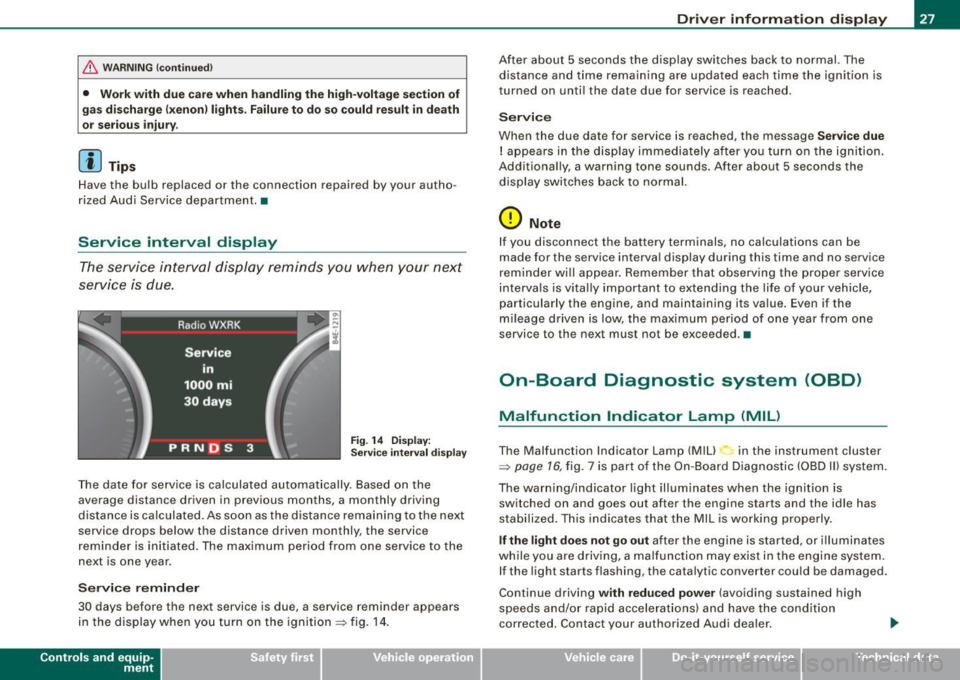
The service interval display reminds you when your next
service is due.
Fig. 14 Display:
Service interval display
The date for service is calculated automatically. Based on the
average distance driven in previous months, a monthly driv ing
distance is calculated . As soon as the distance remaining to the next
service drops below the distance driven monthly, the service
reminder is initiated. The maximum period from one service to the
next is one year.
Service reminder
30 days b efore the next service is due, a service reminder appears
in the display when you turn on the ignition => fig. 14.
Contro ls and eq uip
ment
Driver information display
After about 5 seconds the display switches back to normal. The
distance and time remaining are updated each time the ignition is
turned on until the date due for service is reached .
Service
When the due date for service is reached, the message Service due
! appears in the display immediately after you turn on the ignition.
Additionally, a warning tone sounds . After about 5 seconds the
display switches back to normal.
0 Note
If you disconnect the battery terminals, no calculations can be
made for the service interval display during this time and no service
reminder will appear . Remember that observing the proper service
intervals is vitally important to extending the life of your vehicle,
particularly the engine, and maintaining its value . Even if the
mileage driven is low, the maximum period of one year from one
service to the next must not be exceeded. •
On-Board Diagnostic system (OBD)
Malfunction Indicator Lamp (MIL)
The Malfunction Indicator Lamp (Mill in the instrument cluster
=>
page 16, fig. 7 is part of the On -Board Diagnostic (OBD II) system.
The warning/indicator light illuminates when the ignition is switched on and goes out after the engine starts and the idle has
stabilized. This indicates that the MIL is working properly.
If the light does not go out after the engine is started, or illuminates
while you are driving, a malfunction may exist in the engine system. If the light starts flashing , the catalytic converter could be damaged .
Continue driving
with reduced power (avoiding sustained high
speeds and/or rapid accelerations) and have the condition
corrected. Contact your author ized Audi dealer .
Vehicle care I I irechnical data
Page 34 of 408

Driver information display
-Pull off the road.
- Stop the veh icle.
- Turn off the engine.
- Check coolant level~
page 317.
-Add coolant if necessary ~ page 318.
-Continue dr iving only after the eng ine coolant
warning/ indicator light goes out .
- Contact your authorized Audi dealer for assistance if
necessary .
If the engine coolant le ve l is correct, then the radiator fan may be
the cause of the malfunction.
If the generator warning/indicator light should also illuminate
~ page 18, then the fan belt may be damaged.
& WARNING
• If your vehicle should break down for mechanical or other
reasons, park at a safe distance from moving traffic, turn off the
engine and turn on the hazard warning lights
~ page 73, "Emer
gency flasher
A".
• Never open the hood if you see or hear steam or coolant
escaping from the engine compartment -you risk being scalded.
Wait until you can no longer see or hear steam or coolant escaping.
• The engine compartment of any vehicle is a dangerous area.
Before you perform any work in the engine compartment, turn of
the engine and allow it to cool. Follow the warning stickers
~ page 301, "Engine compartment".
0 Note
Do not continue driving if the -~- symbol illuminates. There is a
malfunction in the engine cooling system -you could damage your
engine. •
Engine oil pressure malfunction "t=:?:
The red engine oil pressure warning symbol requires
immediate service or repair. Driving with a low -oil -pres
sure indication is likely to inflict severe damage to the
engine.
If the ~ symbol appears in the display and blinks, the oil
pressure is too low. An additional driver message can also
be displayed by pressing the
I CHECK] button:
Switch off engine and check oil level
Immediate actions
- Pull off the road.
- Stop the vehicle.
- Turn off the eng ine.
- Check the engine oil level
with the dipstick~ page 313.
Dipstick readings checks too low
- Top off oil to the proper level~ page 314.
-Make sure that the oil pressure warning symbol~
appears no longer in the display before you start driving
again. .,,,
Page 51 of 408
Battery operation in the master key is monitored by a check light .
The check light flashes when one of the buttons on the master key
is pressed . If the check light does not flash, the battery is dead and
has to be replaced .
In addition, when the battery is dead the symbol appears in the
instrument cluster display as well as the message :
Please ch ange key battery
We recommend having the battery changed by an Audi Dealer .•
Electronic immobilizer
T he immob ili z er helps to prevent unauthorized use of
y o ur vehicle.
A computer chip inside your key automatically deactivates the e lec
tr onic im mob ilizer when you insert the key in the ign iti on lock, or on
vehic les with Convenience key*, when the key is inside the vehicle .
When you remove the key from the ignition lock, or on vehicles with
Convenience key, when you remove the key from the vehicle, the
e lectronic immobilizer is automatica lly activated once again.
If an unauthor ized key was used,
SAFE is disp layed continuously in
the odometer disp lay field.
& WARNING
Always take the key w ith you when you leave the vehicle. The key
c an disarm the electronic engine immob ilizer and permit an unau
thori zed person to start the engine and enable oper atio n of the
vehicle sy stem s such a s power window or power sunroof leading
to s eriou s personal injury .
[ i ] Tip s
• Your engine can on ly be started using the factory-equipped key.
Controls and equip
ment
Opening and clo sing
• You may not be ab le to start your vehic le if an ignition key of a
different ve hicle make is a lso l oca ted on your set of keys .
• F or Dec laration of Comp liance to United States FCC and Industry
Canada regulations =>
page 385 . •
Power locking system
General description
T he power locking system locks or unlocks all doors and
the rear lid simultaneousl y.
The power loc kin g system in your veh ic le incorporates the following
functions:
• Central locking function
• Selective unlock feature=>
page 52
• Remo te contro l fea ture => page 48
• Convenience key*=> page 58
• Ant i-theft a larm system => page 60
All the doors and the rear lid are locked by the central locking
system when you lock the v ehicle. You can set whether general ly
only the driver's door or all doors and the rear lid should be
unlocked when you open t he vehic le in the MM I menu
Central
loc king
to suit your individua l desires=> page 52.
Unlocking the vehicle
You can un lock the vehic le from outside either by using the remote
co ntrol
or by tur ning the key i nside the driver's door lock. When you
unlo ck your vehic le:
• The anti -theft ala rm system is deactivated briefly .
• The vehicle interior lights i lluminate for approximately 30
sec ond s.
• All turn signal lights wi ll flash twice when the car is unlocked. .,,_
I • •
Page 52 of 408
Openin g a nd clo sin g
• After un locking the vehicle, you have 60 seconds to open a door
or the rear lid. After 60 seconds, the vehicle automatically locks and
the anti-theft a larm system activates again .
The rear lid can be locked or unlocked either by using the remote
control
or by turning the key ins ide the driver's door lock. Unlocking
the vehicle with the remote control will on ly
unlock the rear lid, to
open it, the lid handle needs to be pressed .
Lock ing t he ve hicle
You can lock the vehicle from outside either by using the remote
control
o r by turning the key inside the drivers's door lock . When
you
l o ck the vehic le :
• All doors and the rear lid are locked .
• All turn signal lights will flash once when the car is locked.
• The anti -theft alarm system is activated. The horn of the anti
t heft alarm system wi ll sound and the anti-theft alarm system readi
ness light, located in the upper part of the driver's door panel, will
start to blink.
• The vehicle interior lights turn off.
Unlo ck ing and lo ckin g th e ve hicle using th e
C onven ien ce key *
The Con ve nie n ce key* feature is a keyless system which al lows you
to unlock the vehicle via sensors in the door handle . Lock ing is like
wise
keyless using a lock button. Each door is equipped with a
sensor and lock button.
P ower s ide door clo ser*
The vehicle is equipped with a power side door closer . When closing
a door, you simply need to gently push on the door. The door wil l
then automatically close by itself ~
page 53 .
Autom atic lockin g
The automatic locking feature locks a ll the veh ic le doors and the
rear lid when you drive faster than 9 mph (15 km/h). This function can be turned on and off in the
MMI C
entral lo cking Menu
~ page 52.
You can unlock the vehicle from the inside by:
• removing the key from the ignition switch (the vehicle wi ll auto
matically unlock itself) or
• pressing the unlock part of the power lock switch
ffi or
pulling the door handle (once to open the door).
& WARNING
• When you lock your veh icle from o utside, nobod y -espec iall y
c h ildr en -should rem ain in sid e the vehicle . R emember , when you
lo ck the vehicle from the out side the window s ca nnot be opened
from t he in side .
• When you l eav e the vehi cle , al ways remove th e ign ition key and
take it with you . Thi s w ill prevent pa ssenger s (childr en , for
exampl e) from acciden tally being locked in the vehicle should they
a cc ident ally p re ss th e p ower lo cking s witch in the door s.
• Do not lea ve children in side the vehi cle un supe rvis ed. In an
e merg ency i t would be impos sible t o ope n th e door s from the
out side wi thou t the key.
[ i ] T ips
• In the event of a crash with a irbag deployment all locked doors
wi ll be automatically un locked to give access to the vehic le occu
pants from the outside .
• If the power locking system should malfunction, you can lock
each door individually using the vehicle key~
page 54.
• If the power locking system should fail, you can still open the
fue l tank flap in an emergency ~
page 307.
• You are well advised not to keep valuables inside an unattended
vehic le, visib le or not. Even a properly locked vehic le cannot provide
the security of a safe .•
Page 53 of 408
Unlocking and locking the vehicle with the remote control
How the remote control works .
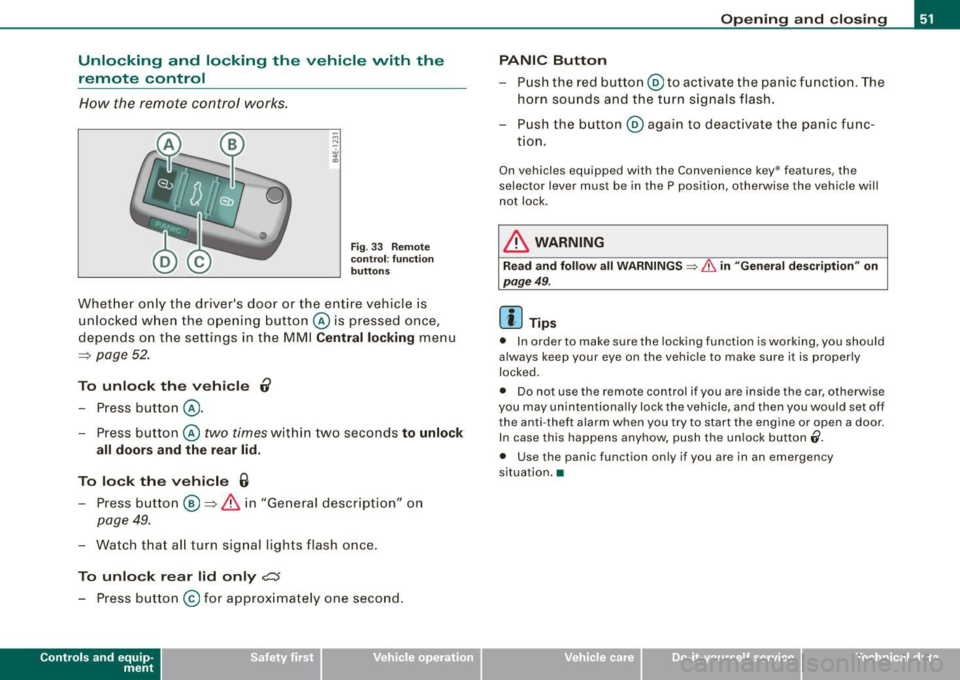
Fig . 33 Re mote
co ntr ol: fu nctio n
bu tton s
Whet her o nly the driver's door or the entire vehicle is
unlocked w hen the opening butt on @ is pressed once,
depends on the settings in the MMI
Centr al locking menu
=:> page 52 .
To unlo ck th e ve hicle 0
- Press button @.
- Press button @
two times within two seconds to unlock
all doors and the r ear lid .
To lock th e vehi cle 6
- Press button @ =:> & i n "General description" on
page 49.
- Watch that a ll turn sig nal lights flash once.
To unlo ck r ear lid only
c:s
- Press button @for approximately one second.
Con tro ls and eq uip
ment
Op ening and clo sing
PANIC Button
- Push the red button @to ac tivate the panic function . The
horn sounds and the turn signals flash.
- P ush the button @again to deact ivate the panic func-
t ion.
On vehicles equ ipped with the Convenience key* features, the
selector lever must be in the P position, otherwise the vehicle will
not lock .
& WARNING
Rea d and foll ow all WARNINGS => & in "Gene ral de scription " on
pag e 49 .
[ i ] Tips
• In order to make sure the locking function is working, you should
always keep your eye on the vehicle to make sure it is proper ly
locked.
• Do not use the remote control if you are inside the car, otherwise
you may unintent iona lly lock the vehicle , and then you would set off
the anti -theft alarm when you try to start the engine or open a door.
In case this happens anyhow, push the un lock button
(i .
• Use the panic function only if you are in an emergency
s ituation .•
Vehicle care I I irechnical data
Page 62 of 408
Opening and closing
• Again, to conserve battery power so that you can start the
vehicle after it has been standing for a long period, the vehicle's
energy management system will switch off any convenience
features not necessary. You will not be able to unlock your vehicle
using the keyless system. •
Applies to vehicles: wi th Conven ience key
Locking the vehicle
You can lock the doors and rear lid without using the
remote control.
Move the selector lever into P.
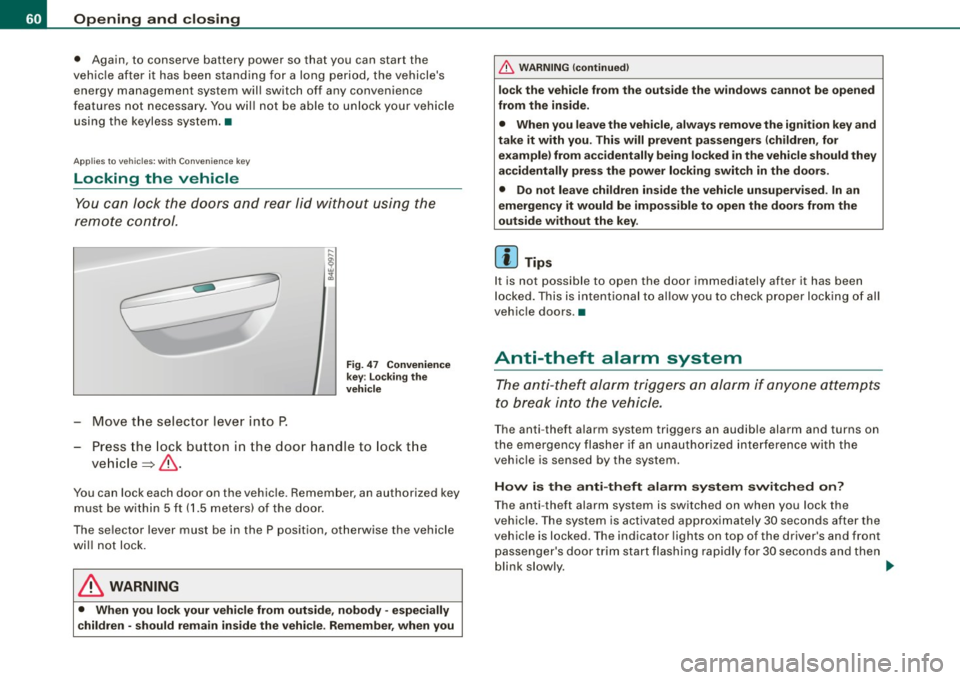
Fig. 47 Convenience
key: locking the
vehicle
- Press the lock button in the door handle to lock the
vehicle ~& .
You can lock each door on the vehicle. Remember, an authorized key
must be within 5 ft (1.5 meters) of the door.
The selector lever must be in the P position, otherwise the vehicle
will not lock.
& WARNING
• When you lock your vehicle from outside, nobody -especially
children -should remain inside the vehicle. Remember, when you
& WARNING (continued)
lock the vehicle from the outside the windows cannot be opened
from the inside.
• When you leave the vehicle, always remove the ignition key and
take it with you. This will prevent passengers (children, for example) from accidentally being locked in the vehicle should they
accidentally press the power locking switch in the doors.
• Do not leave children inside the vehicle unsupervised. In an
emergency it would be impossible to open the doors from the
outside without the key.
[ i] Tips
It is not possible to open the door immediately after it has been
locked. This is intentional to allow you to check proper locking of all
vehicle doors .•
Anti-theft alarm system
The anti-theft alarm triggers an alarm if anyone attempts
to break into the vehicle.
The anti-theft alarm system triggers an audible alarm and turns on
the emergency flasher if an unauthorized interference with the
vehicle is sensed by the system .
How is the anti-theft alarm system switched on?
The anti-theft alarm system is switched on when you lock the
vehicle. The system is activated approximately 30 seconds after the
vehicle is locked . The indicator lights on top of the driver's and front
passenger's door trim start flashing rapidly for 30 seconds and then
blink slowly. ._
Page 71 of 408
Clear vision
Lights
Switching the headlights on and off ·'t!-·
In the "AUTO " position, a light sensor automatically
s w itches t he head- and tailligh ts on and off in response to
l ight con ditio ns.
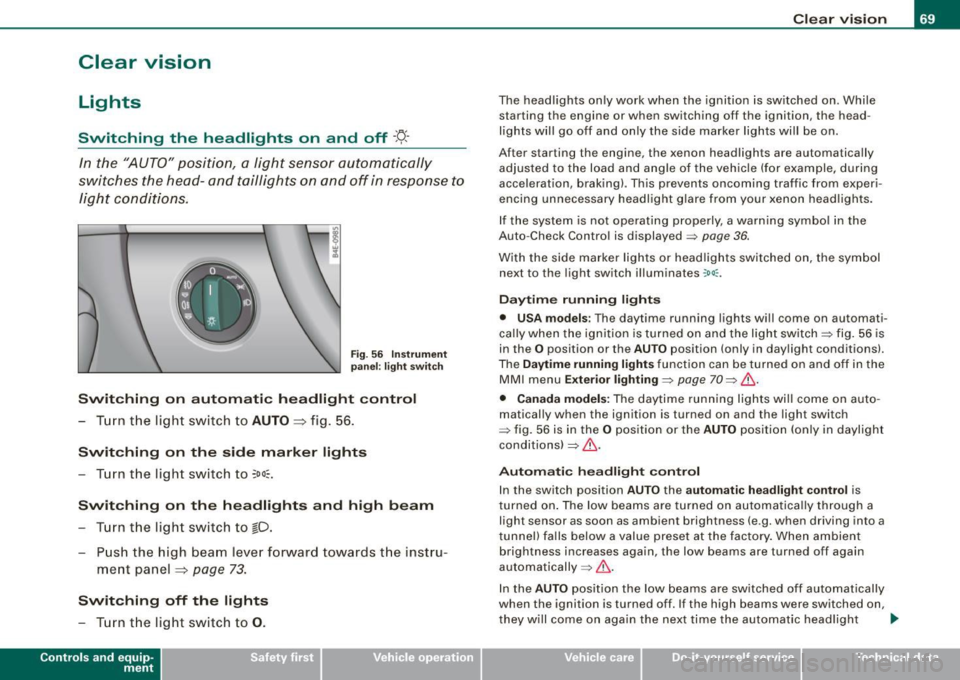
Fig . 56 Instrument
p an el: light switch
Switching on automatic headlight control
- T urn th e lig ht switch to AUTO => fig. 56 .
Switching on the side marker lights
- T urn the light switch to ~oo~.
Switching on the headlights and high beam
- T urn th e li ght swit ch to fD.
- Pu sh the high beam leve r forw ard towa rds t he instru -
m ent panel
=> page 73 .
Switching off the lights
- T urn t he light switch to 0 .
Con tro ls and eq uip
ment
Clear vision
The headlights only work when the ignition is switched on . While
starting the engine or when switching off the ignition, the head
lights will go off and only the side marker lights will be on.
After starting the engine, the xenon headlights are automa tically
adjus ted to the load and a ngle of the vehic le (for example, during
acceleration , braking) . This prevents oncoming traffic from exper i
encing unnecessary headl ig ht g la re from your xenon head ligh ts .
If the system is not operating properly, a warning symbol in the
Auto -Check Contro l is displayed => page
36.
With the side marke r lights or head ligh ts switched on, the sym bol
next to the light switch illuminates
:oo:.
Daytime running lights
• USA models : The daytime running lights wi ll come on automati
ca lly when the ig nition is turned on and the ligh t swi tch => fig. 56 is
in the
O position or the AUTO position (only in daylight conditions).
The
Daytime running lights func tio n can be tur ned on and off in the
MMI menu
E xterior lighting => page 70 => & .
• Canada models: The dayti me ru nn ing lights wi ll come on au to
matically when the ignition is turned on and the light switch
=> fig. 56 is i n the
O po sitio n or the AUTO po siti on (only in dayligh t
condi tions) => & .
Automatic headligh t control
In the switch posi tion AUTO the automatic headlight cont ro l is
t urned on . The low beams are turned on automa tica lly through a
light sensor as soon as ambient brightness (e .g . when driving into a
t unnel) fa lls below a value preset at the factory . When ambient
brightness increases again, the low beams are turned off again
aut omatically =>& .
I n the
AUTO posit io n the low beams are switched off automatically
when the ignition is turned off. If the high beams were switched on,
they w ill come o n again the ne xt time the a utomatic head ligh t
~
Vehicle care I I irechnical data
Page 72 of 408
Clear vision
control is activated. The high beam function must first be switched
on in the MMI
=> page 70 .
Light Se nsor M alfu nction
In the event of a ligh t sensor mal funct ion, the driver is notified in the
instrument cluster display:
~ Autom atic headlights /aut om atic wipers defe ctive
For safety reasons the low beams are turned on permanently wit h
the switch in
AUTO . However, you can continue to turn the lights on
and off using the light switch . Have the light sensor checked as soon
as possible at a dealership.
& WARNING
• Never use d aytime running lights to see where you are going .
The y are not bright enough and will not let you see f ar enoug h
ahead for s afet y, espe cially at du sk or when it is dark. Alw ays
switch on the low beams at du sk or when i t is dark .
• Autom ati c he adli ght s are onl y intended to as sist the dr iver .
The y do not relie ve the d riv er of his re spon sib ility to che ck the
he adlights and to turn them on manuall y according to t he current
ligh t and vi sibility conditions . For example , fog and ra in cannot be
dete cted by the light sen sor s. S o alw ays switch on the he adlights
under these weather con dition s and when dr iving in the dark
gD .
• Cras hes ca n happen when you c annot s ee the ro ad ahe ad and
when you cannot be seen by other motor ists .
- Alw ays turn on the headlight s so that you can see ahe ad and
s o that others can se e your c ar from th e ba ck.
[ i J Tips
• With the switch in AUTO front fog lights and rear fog lights
cannot be turned on in addition. • I
f you remove the ignition from the ignition lock while the head
l ights are s till on, a bu zzer w ill sound as long as the driver's door is
open to remind you to turn off the l ights .
• Always observe the specific local regulations for your area as to
when to use your lights. •
Adjusting exterior lighting
The functions are set in the MM/.
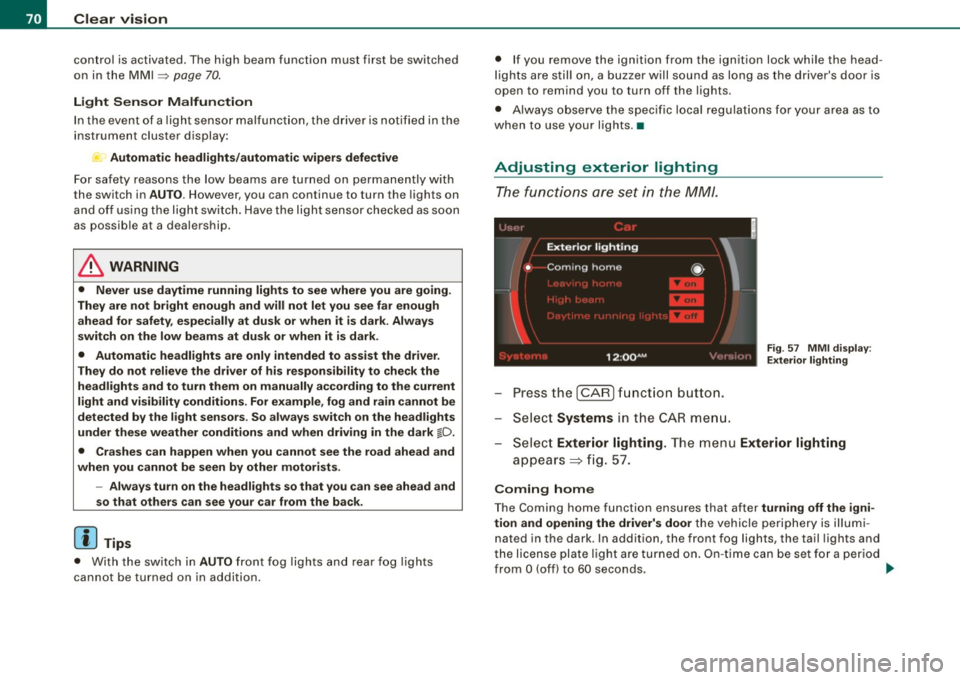
Press the I CAR] function button.
- Select
Systems in the CA R menu.
Fig. 57 MM I dis pla y:
E xt eri or ligh ting
- Sele ct Exterior lighting. The menu Exterior lighting
appears => fig . 57.
C oming h ome
The Coming home function ensures that after tu rni ng off the igni
tion and open ing the driv er's d oor
the vehicle periphery is illum i
nated in the dark . In addition, the front fog lights, the tail lights and
the license plate light are turned on . On -ti me can be set fo r a per iod
from
O (off) to 60 seconds. ~