key AUDI S8 2009 Workshop Manual
[x] Cancel search | Manufacturer: AUDI, Model Year: 2009, Model line: S8, Model: AUDI S8 2009Pages: 408, PDF Size: 91.63 MB
Page 197 of 408
___________________________________________________ H_ o_m _ e_ L_ i_ n _k_ @_R _ __.111
Ap plies to vehic les: with Hom elin k® un iversal remote contro l
Programming the Homelink ® transmitter
The transmitter is programmed in two phases. For rolling
code transmitters, a third phase is also necessary.
~------------ ~ ~--~--------~--- J, iii
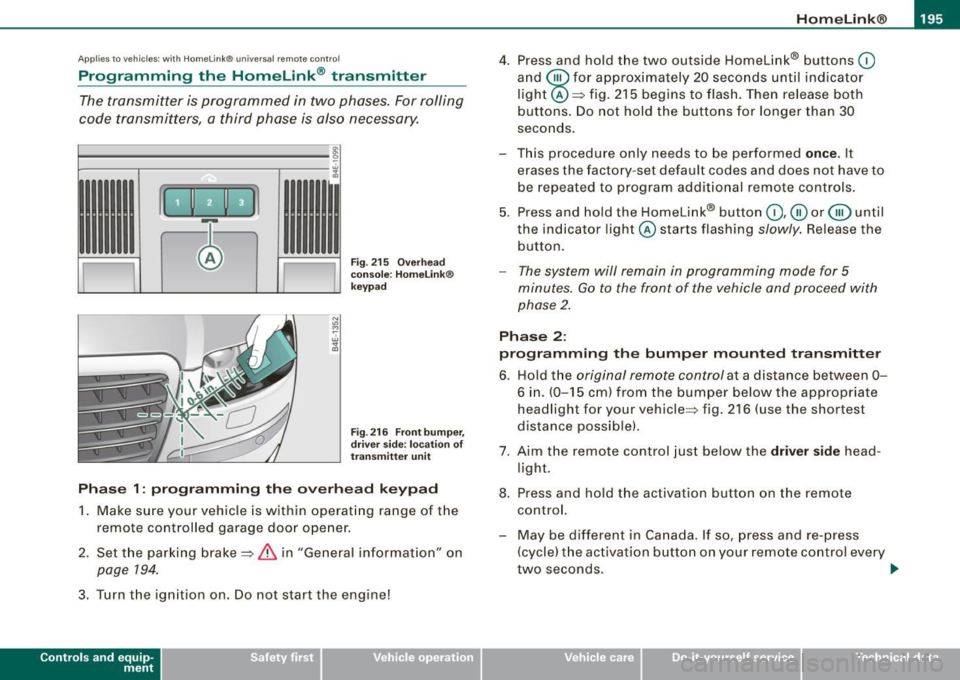
Fig. 215 Overhead
console: HomeLink®
keypad
Fig . 216 Front bumper,
driver side: location of
transmitter unit
Phase 1: programming the overhead keypad
1. Make sure your vehicle is within operating range of the
remote controlled ga rage door opener .
2. Set the parking brake==>
& in "General information" on
page 194.
3. Turn the ignition on. Do not start the eng ine!
Con tro ls and eq uip
ment
4. Press and hold the two outside Homelink® buttons 0
and @for approximately 20 seconds until ind icator
light @==> fig.
215 begins to flash. Then release both
buttons. Do not hold the buttons for longer than 30
seconds.
- This procedure only needs to be performed
once. It
erases the factory-set default codes and does not have to
be repeated to program additional remote controls.
5. Press and hold the Homelink® button
0 ,@ or @ until
the indicator l ight @starts flashing slowly. Release the
button.
- The system will remain in programming mode for 5
minutes.
Go to the front of the vehicle and proceed with
phase 2.
Phase 2:
programming the bumper mounted transmitter
6. Hold the original remote control at a distance between
0-
6 in. (0-15 cm ) from the bumper below the appropriate
headlight for your vehicle=:> fig .
216 (use the shortest
distance possible) .
7. Aim the remote control just below the
driver side head
light.
8. Press and hold the activation button on the remote control.
- May be different in Canada. If so, press and re-press
(cycle) the activation button on your remote control every
two seconds. .,_
Vehicle care I I irechnical data
Page 198 of 408
• .___H_ o_m_ e_ L_ i _n_ k_ ® __________________________________________________ _
9 . The emergency flashers will flash
thre e tim es (after
about 15-60 seconds) when the programming is
successful. Release the button on the remote control.
- To program more devices, repeat steps 4 to 9.
10. Press and hold the trained Homelink® button and
observe the indicator light @=>
page 195, fig. 215.
- If the indicator light is solid/continuous, programming is
complete and your device should act ivate when you
press and release the trained Homelink® button.
- If the indicator light b links rapidly for 2 seconds and is
then a solid/continuous light, proceed with phase 3 to
program a rolling code device .
Phas e 3: rollin g code pro gra mming
- A second person on a ladder who can safely reach the garage door opener motor is recommended.
11. Locate the "learn" button on the garage door opener
motor (refer to the operating instructions for the opener,
as the location of this button may vary by manufacturer).
1 2. Press and release the learn button on the garage door
opener motor.
- Note: once the button is pressed, the re are 3 0 seconds in
which to initiate the next step.
1 3 . On the Homelink® keypad inside the vehicle, firmly
press and hold the Homelink® button previously
programmed in phases 1 and 2 for two seconds and
release. Repeat this sequence
tw ice.
- Some vehicles may require the press/ho ld/release
sequence up to three times to comple te the tra ining
process .
-Homelink® should now activate your rolling code
equipped device.
If the 5 minute time limit is exceeded, the em erge ncy flas hers will
fl as h one time
to indicate that the process has been terminated. In
this case, repeat steps 4 through 9.
If the emergency flashers do not flash
three times (after about 15 -
60 seconds), programming was not successful. In this case, repeat
steps 4 through 9.
Remote control units for garage door openers in Canada are set to
stop transmitting radio frequency s ignals after two seconds. This
time may not be sufficient for the HomeLink® system to learn the
radio frequency signal. Perform a ll other s teps as described
above. •
Applies to vehicles: with Homelink® unive rsa l remote contro l
Operating the Homelink ® transmitter
The Homelink® transmitter works in the same manner as
the original handheld remote control that came with the
system.
,..
"' N
-
~
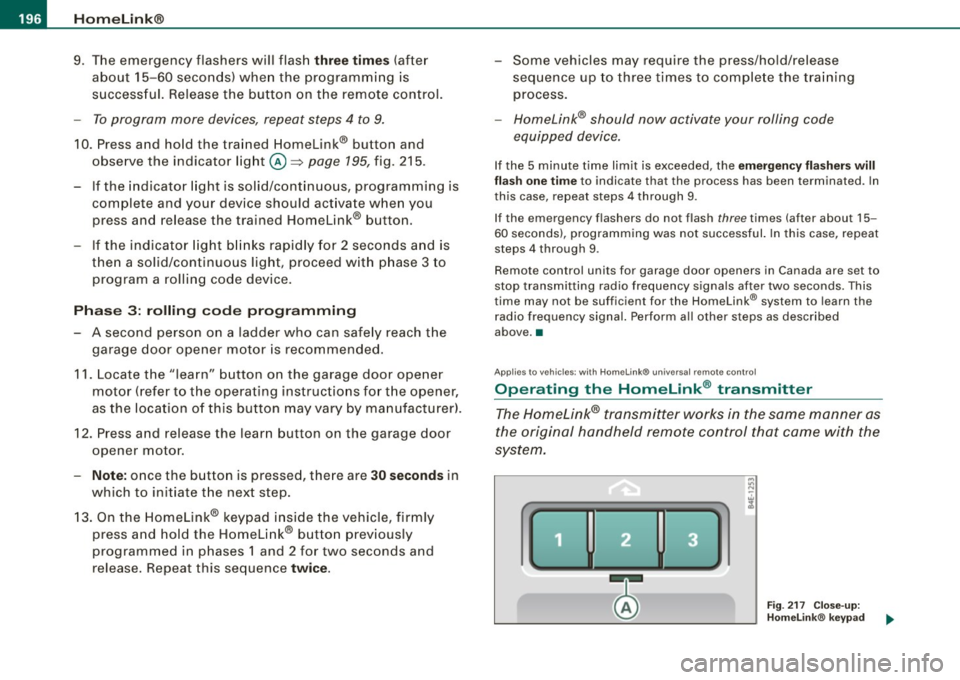
F ig . 2 17 C lose- up:
H omelink® keypad
Page 199 of 408
___________________________________________________ H_ o_m....:..: e:..; L::. i;,,;. n.;,,; k;,,;. ®.:. R __ ,n
- Press the appropriate programmed button G),@ or @
to activate the desired remote control function~
& in
"General information" on
page 194. •
Applies t o ve hicl es: wit h Hom elin k® universal re mote co nt ro l
Reprogramming a single button
A Homelink ® button can be reprogrammed individually
without affecting the other button a/locations.
Programming the overhead keypad
- Press the appropriate Homelink® button unt il the indi
cator light begins flashing slowly.
Programming the bumper mounted transmitter
1. Hold the original remote control at a distance between 0-
5 in. (0-13 cm) from the bumper below the appropriate
headlight for your vehicle (use the sho rtest distance
possible) .
2. Aim the remote control just below the
driver side head
light.
3. Press and hold the activation button on the remote control.
4. The emergency flashers will flash
three times (after
about
15-60 seconds) when the programm ing is
successful. Now release the button on the remote
control.
- If the device ut ilizes a rolling code, please follow phase 3
of ~
page 195, "Programming the Homelink® trans
mitter" for rolling code programming.
Controls and equip
ment This procedure
will cause
the existing programming on the
Homelink ® button to be erased! •
App lies t o ve hicles : with Homeli nk® universa l re m ote contro l
Erasing the programming of the Homelink ®
transmitter
When you erase the programming , the programming on
all three of the transmitter channels with be lost!
- Perform steps 1 to 4 as descr ibed on~ page 195, "Phase
1: programm ing the overhead keypad ".
When completed , the Homelin k® system will be in the program
ming mode and is then ready to learn the cod es for remote
controlled devices.
(I) Tips
• Programmed buttons cannot be erased individually.
• For security reasons you ar e advis ed to erase the programming
of the Homelink ® system befo re you sell your vehicle. •
I • •
Page 217 of 408
& WARNING !continued)
• Never let any person ride with their feet on the instrument
panel or sticking out the window or on the seat.
• Never remove a safety belt while the vehicle is moving. Doing
so will increase your risk of being injured or killed.
• Never wear belts twisted.
• Never wear belts over rigid or breakable objects in or on your
clothing, such as eye glasses, pens, keys, etc. , as these may cause
injury .
• Never allow safety belts to become damaged by being caught
in door or seat hardware.
• Do not wear the shoulder part of the belt under your arm or
otherwise out of position.
• Several layers of heavy clothing may interfere with correct posi
tioning of belts and reduce the overall effectiveness of the system.
• Always keep belt buckles free of anything that may prevent the
buckle from latching securely.
• Never use comfort clips or devices that create slack in the
shoulder belt. However, special clips may be required for the
proper use of some child restraint systems.
• Torn or frayed safety belts can tear , and damaged belt hard
ware can break in an accident . Inspect belts regularly . If webbing,
bindings, buckles, or retractors are damaged, have belts replaced
by an authorized Audi dealer or qualified workshop .
• Safety belts that have been worn and loaded in an accident
must be replaced with the correct replacement safety belt by an
authorized Audi dealer. Replacement may be necessary even if
damage cannot be clearly seen. Anchorages that were loaded
must also be inspected.
• Never remove, modify, disassemble, or try to repair the safety
belts yourself.
Safety first
Safety belts
& WARNING !continued)
• Always keep the belts clean. Dirty belts may not work properly
and can impair the function of the inertia reel~
page 301, "Safety
belts" .•
Safety belts
Fastening safety belts
Seat first -everybody buckle up!
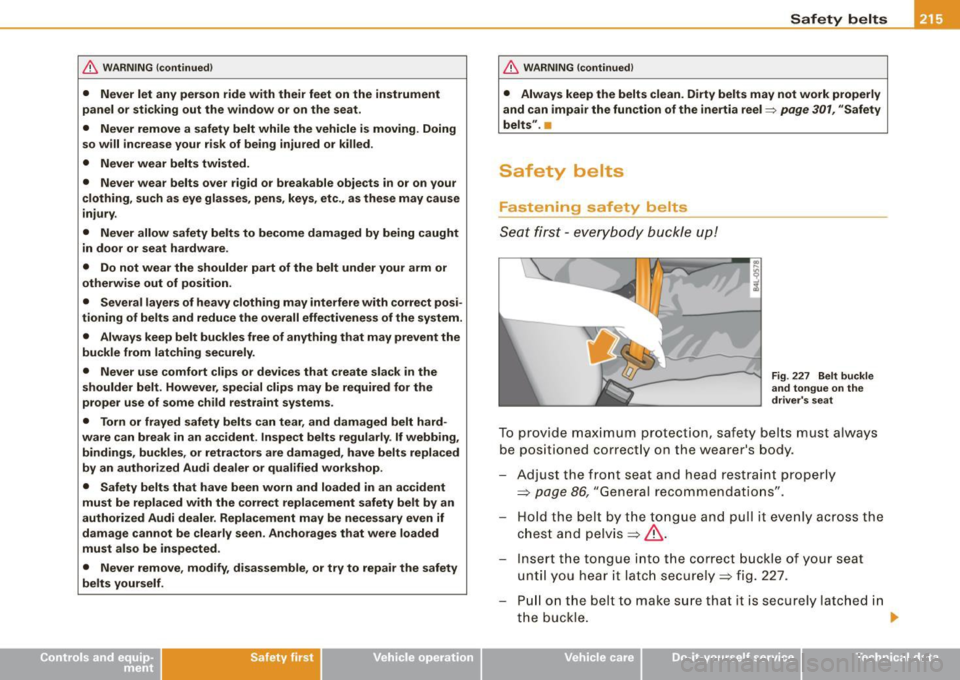
Fig. 227 Belt buckle
and tongue on the
driver's seat
To provide maximum protection, safety belts must always
be positioned correctly on the wearer's body.
Adjust the front seat and head restraint properly
=>
page 86, "General recommendations" .
Hold the belt by the tongue and pull it evenly across the
chest and pelvis=>& .
Inse rt the tongue into the correct buckle of your seat
until you hear it latch securely=> fig. 227.
Pull on the belt to make sure that it is securely latched in
the buckle. _.
Vehicle care I I irechnical data
Page 218 of 408
-Safety belts -----=-----------------------------------------
Automatic safety belt retractors
Every safety belt is equipped with an automatic belt retractor on the
shoulder bel t. This featu re locks the bel t when the belt is pulled out
fast, during hard braking and in an accident. The belt may also lock
when you drive up or down a steep hill or through a sharp curve. During normal driving the bel t lets you move freely.
Safety belt pretensioners
The safety belts are equipped with a belt pretensioner that helps to
tighten the safety belt and remove slack when the pretensioner is
activated. The function of the pretensioner is monitored by a
warning light=> page
19.
Switchable locking feature
Every safe ty belt excep t the one on the driver seat is equipped with
a switchable locking feature that
must be used when the safety belt
is used to attach a child seat. Be sure to read the important informa
tion about this feature => page
255.
& WARNING
Improperly positioned safety belts can cause serious injury in an
accident=>
page 216, "Safety belt position" .
• Safety belts offer optimum protection only when the seat back
is upright and belts are properly positioned on the body.
• Never
attach the safety belt to the buckle for another seat.
Attaching the belt to the wrong buckle will reduce safety belt
effectiveness and can cause serious personal injury.
• A passenger who is not properly restrained can be seriously
injured by the safety belt itself when it moves from the stronger
parts of the body into critical areas like the abdomen.
• Always lock the convertible locking retractor when you are
securing a child seat in the vehicle => page
257. •
Safety belt position
Correct belt position is the key to getting maximum
protection from safety belts.
Fig . 228 Head restraint
and safety belt posi
tion as seen from the
side
Use the height adjustment to change the position of the shoulder
belt of the front safety belts.
& WARNING
Improperly positioned safety belts can cause serious personal
injury in an accident .
• The shoulder belt portion of the safety belt must be positioned
over the middle of the occupant's shoulder and never across the
neck or throat.
• The safety belt must lie flat and snug on the occupant's upper
body => fig. 228. Pull on the belt to tighten if necessary.
• The lap belt portion of the safety belt must be positioned as
low as possible across pelvis and never over the abdomen. Make
sure the belt lies flat and snug => fig. 228. Pull on the belt to
tighten if necessary.
• A loose-fitting safety belt can cause serious injuries by shifting
its position on your body from the strong bones to more vulner -
able, soft tissue and cause serious injury.
~
Page 279 of 408
vidual components. It regulates consumption, so that more elec
trical energy is not being used than is being genera ted and ensures
an optimal state of charge for the battery.
[ i ] Tips
• But even energy management cannot negate the limits of
physics. Consider that the power and life of a battery are limited.
• If starting ability is threatened, you are informed by a warning
~ page 277, "Driver notification in the instrument cluster
display". •
What you should know
The highest priority is given to maintaining starting capa
bility.
The battery is severely taxed in short -distance driving, in city traffic
and during the cold time of year . Abundant electrical energy is
required, but only a little is generated . It is also critical if the engine
is not running and e lectrical components are turned on. In this
instance energy is being consumed but none is being generated .
It is in precisely these situations that you wi ll notice energy manage
ment actively regulating the distribution of energy.
Vehicle stands for an extended period
If you do not drive your vehicle over a period of several days or
weeks, electrical components are gradually cut back or switched off.
This reduces energy consumption and maintains starting capability
over a longer period.
Be aware that when you unlock your vehicle, some of the conve
nience functions may not operate, such as the Convenience key, the
remote control or the power seat adjustment. The convenience
functions will be available again when you turn on the ignition and start the engine.
Controls and equip ment Safety first Vehicle operation
Intelligent technology
With the
engine turned off
If you listen to the radio, for examp le, with the engine turned off or
use other MMI functions, the battery is being discharged.
If starting capability is jeopardized due to energy consumption, the
following warning appears in the MMI display:
Please start engine, otherwise system will switch off in 3
minutes .
The warning indicates that the system wi ll be turned off automati
cal ly after 3 minutes. If you wish to continue using the functions,
you have to start the engine .
With the engine running
Although e lectrica l energy is generated when the vehicle is being
driven, the battery can become discharged. This happens mostly
when little energy is being generated and a great deal consumed
and the battery's state of charge is not optimal.
To bring the energy balance back into equi librium , consumers
which require especia lly large amounts of energy are temporarily
cut back or switched off. Heating systems in particular require a
great deal of energy. If you notice, for example, that the heated
seats* or the heated rear window are not heating, they have been
temporarily cut back or switched off. These systems will be available
again as soon as the energy balance has been restored.
You wil l also notice that engine idle speed has been increased
s lightly . This is norma l and not a cause for concern . By increasing
engine idle speed the additiona l energy required is generated and
the battery is charged. •
Driver notification in the instrument cluster
display
If the battery's state of charge is not in the optimal range, this driver
notification appears in the instrument cluster display:
Low battery charge: battery will be charged while driving ~
Vehicle care Do-it-yourself service Technical data
Page 304 of 408
___ C_ le_ a _ n_i_n ~g _ a_ n_ d __ p_r _o _t _e _c_ t_ i_o _n ___________________________________________ _
essential to have a long-lasting corrosion protection reapplied to al l
s urf aces, sea ms, joi nts a nd compo nents i n th e en gine c om par t
m ent .
& WARNING
Be aware: The engine compartment of any motor vehicle is a
potentially hazardous area.
• Before working in the engine compartment , be sure to read the
information =>
page 301.
• Before reaching into the front plenum panel, always remove the
ignition key . Otherwise, the windshield wipe r system could unin
tentionally be switched on , possibly causing personal in jury from
the moving wiper linkage .
• Never reach into the area around or touch the radiator fan . The
auxiliary fan is temperature controlled and can switch on suddenly
- even when the ignition is off.
• Do not wash, wax or dry the engine with the engine running .
Moving or hot parts could injure you .
• Do not clean the underside of the chassis , fenders, wheel
covers, or other hard to reach parts without protecting your hands
and arms. You may cut yourself on sharp -edged metal parts.
• Always read and heed all WARNINGS and other information
=>
page 290 . •
Page 311 of 408
_____________________________________________ C_ h_ e .=....= c..:..k :..:.in :....:..:= g:.....= a..:..n .:....:d::......:. f.:..:il .:..:li ..:..n ::.:g:!....-_11111
•
Closing the engine hood
- Pull the hood down until the pressure from the struts is
reduced .
- Let the hood
drop down and latch in place. Do not try to
push it shut;
it may fail to engage => &.
& WARNING
A hood that is not completely latched could fly up and block your
view while driving.
• When you close the engine hood, check it to make sure the
safety catch has properly engaged. The hood should be flush with
the surrounding vehicle body parts.
• If you notice while driving that the hood is not secured prop
erly, stop at once and close it. •
Working in the engine compartment
Be especially careful whenever you work in the engine
compartment.
Whenever you must perform any work in the engine compartment,
for example checking and filling different fluids, there is a risk of injury, burns and accidents. To prevent personal injury always
observe the following WARNINGS. The engine compartment of any
vehicle is a hazardous area
~ & .
& WARNING
To help avoid injury, before you check anything under the hood :
• Turn off the engine.
• Remove the ignition key.
• Apply the parking brake .
& WARNING (continued)
• Move selector lever to "P" (Park).
• Always let the engine cool down. Hot components will burn
skin on contact.
• To reduce the risk of being burned, never open the hood if you
see or hear steam or coolant escaping from the engine compart
ment. Wait until no steam or coolant can be seen or heard before
carefully opening the hood.
• Keep children away from the engine compartment .
• Never spill fluids on hot engine components. They can cause a
fire.
• Never touch the radiator fan. The auxiliary electric fan is
temperature controlled and can switch on suddenly.
• Never open the coolant reservoir cap when the engine is still
warm . The coolant system is pressurized and hot coolant could
spray out.
• Protect your face, hands and arm from steam or hot engine
coolant by placing a thick rag over the cap when you open the
coolant reservoir.
• If work on the fuel system or the electrical system is necessary :
- Always disconnect the battery.
- Never smoke or work near heaters or open flames . Fluids in
the engine compartment could start a fire.
- Keep an approved fire extinguisher immediately available.
• To avoid electrical shock and personal injury while the engine
is running or being started, never touch:
- Ignition cables
- Other components of the high voltage electronic ignition system.
• If you must perform a check or repair with the engine running: -First, fully apply the parking brake, move selector lever to "P"
(Park). .,
Vehicle care
I t •
Page 323 of 408
Checking and filling -
---------------------=----"=---------
checked by a service facility. The electrolyte level should also be
checked each time the battery is charged =>
page 323.
Have the battery checked when you take your vehicle in for service.
You are well advised to replace a battery that is older than 5 years.
With certain types of airbag deployment, the battery is discon
nected from the vehicle electrical system for safety reasons=>.& in
"Repair, care and disposal of the airbags" on
page 234.
Disconnecting the battery terminals
Some vehicle functions (power window regulators, for example) are
lost if the battery terminals are disconnected. These functions have
to be relearned after the battery terminals are connected again. To
prevent this, the battery should only be disconnected from the
vehicle electrical system when absolutely necessary for repairs .
Vehicles not driven for long periods If you do not drive your vehicle over a period of several days or
weeks, electrical components are gradually cut back or switched off.
This reduces energy consumption and maintains starting capability
over a longer period
=> page 276.
Be aware that when you unlock your vehicle, some of the conve
nience functions may not operate, such as the Convenience key*,
the remote control or the power seat adjustment. The convenience
functions will be available again when you turn on the ignition and
start the engine.
Winter operation During the winter months, battery capacity tends to decrease as
temperatures drop. This is because more power is also consumed
while starting, and the headlights, rear window defogger, etc., are
used more often.
Avoid unnecessary power consump tion, particularly in city traffic or
when traveling only short distances. Let your authorized Audi dealer
check the capacity of the vehicle battery before winter sets in
=> page 323. A well charged battery will not only prevent starting
problems when the weather is cold, but will also last longer.
[ i] Tips
If your vehicle is left standing for several weeks at extremely low
temperatures, the vehicle battery should be removed and stored
where it will not freeze. This will prevent it from being damaged and
having to be replaced.•
Working on the battery
Be especially careful when working on or near the battery.
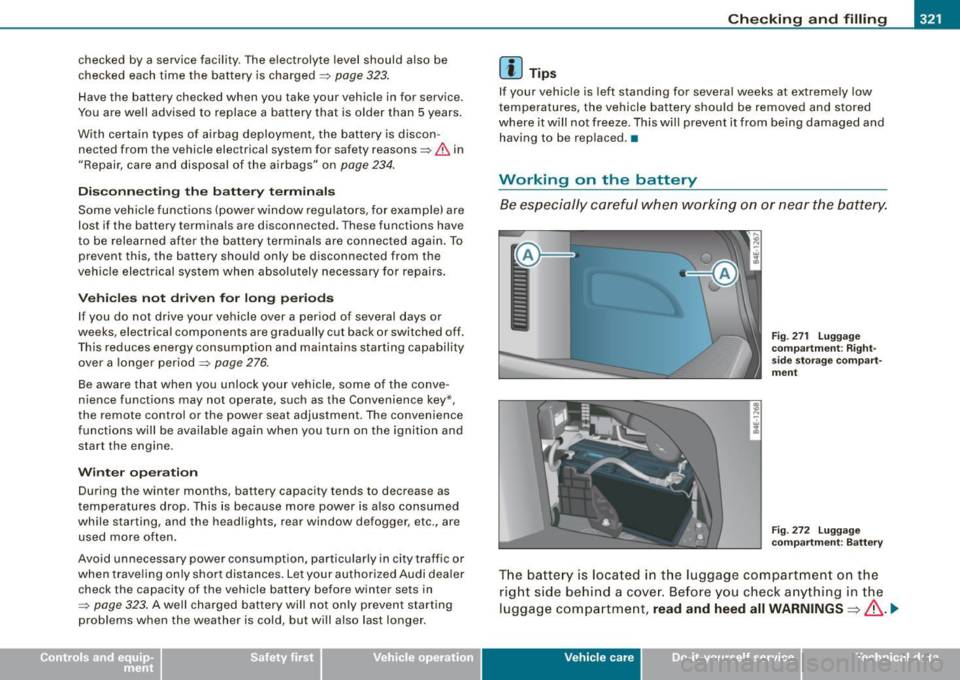
Fig . 271 Luggage
compartment: Right·
side storage compart
ment
Fig . 272 Luggage
compartment : Battery
The battery is located in the luggage compartment on the
right side behind a cover. Before you check anything in the
luggage compartment,
read and heed all WARNINGS=>& . .,_
Vehic le care I I irechnical data
Page 362 of 408
111'1...__F_ u_ s_ e_s _ a_n _ d_ b_ u_lb _ s _______________________________________________ _
Fuses and bulbs
Fuses
Replacing a fuse
A problem in the electrical system may be caused by a
blown fuse.
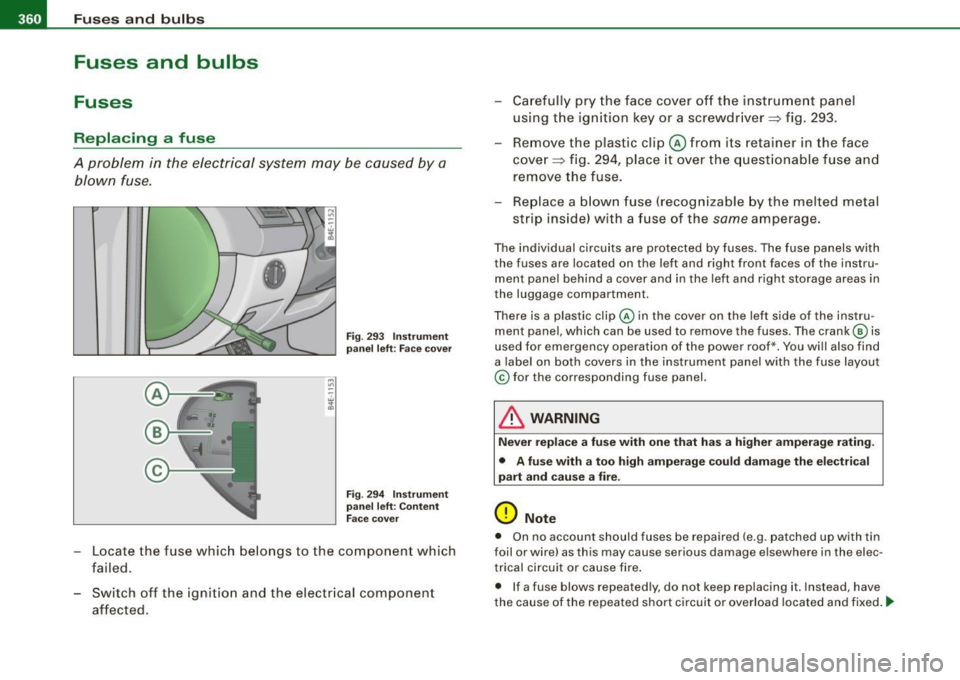
Fig. 293 Instrument
panel left: Face cover
Fig . 294 Instrument
panel left: Content
Face cover
-Locate the fuse which belongs to the component which
failed.
Switch off the ignition and the electrical component
affected. -
Carefully pry the face cover off the instrument panel
using the ignition key or a screwdriver~ fig. 293.
- Remove the plastic clip@ from its retainer in the face
cover~ fig. 294, place it over the questionable fuse and
remove the fuse.
- Replace a blown fuse (recognizable by the melted metal
strip inside) with a fuse of the
same amperage.
The individual circuits are protected by fuses. The fuse panels with
the fuses are located on the left and right front faces of the instru
ment panel behind a cover and in the left and right storage areas in
the luggage compartment.
There is a plastic clip@ in the cover on the left side of the instru
ment panel, which can be used to remove the fuses. The crank © is
used for emergency operation of the power roof*. You will also find
a label on both covers in the instrument panel with the fuse layout
© for the corresponding fuse panel.
& WARNING
Never replace a fuse with one that has a higher amperage rating.
• A fuse with a too high amperage could damage the electrical
part and cause a fire.
(D Note
• On no account should fuses be repaired (e.g. patched up with tin
foil or wire) as this may cause serious damage elsewhere in the elec
trical circuit or cause fire.
• If a fuse blows repeatedly, do not keep replacing it. Instead, have
the cause of the repeated short circuit or overload located and fixed . .,_