trip computer AUDI S8 2009 Owners Manual
[x] Cancel search | Manufacturer: AUDI, Model Year: 2009, Model line: S8, Model: AUDI S8 2009Pages: 408, PDF Size: 91.63 MB
Page 4 of 408
Table of contents
Table of contents
Vehicle literature ........ .
About this Owner's Manual .............. ...... . .
Controls and
equipment .. .. .... ..... ... . .
Inst rumen ts and con trols ..... .
Genera l ill ustration ............. .
Instruments and
warning/indica tor lig hts ....... .
Instruments .............. ..... .
Warning/indicator lights ........ .
Driver in forma tio n d isplay ..... .
Introduct ion ............... .... .
On-Board Diagnostic system (OBD)
Auto Check Control ............ .
Speed warning system ... .... .. .
Trip computer ..... ... .. ..... .. .
Tire pressure monitoring system ..
Opening and closing .......... .
Keys ...... ...... ... .. . ··· ·· ··· ·
Powe r locking system .......... .
Rear lid/Trunk lid ............. .. .
Ch ild safe ty lock . ... ..... ... ... . 5 Convenience key
.............. .
Anti-theft a larm system ..... ... .
Power w indows ... ... ... .... . .
S lid ing/ti lt ing power sunroof ... .
6 Clear vision ... .... .. ... .. .... . .
9
11
1 1
12
12
1 6
24
2 4
27
28
37
38
41
47
47
49
54
57 Lights
... ............. .. .. .. .. .
Interior lights ...... ... .. ... ... .
V is ion ................. .... ... .
W iper and washer system ...... .
Mirrors .... ... ......... ..... . . .
Seats and sto rage ..... .... ... .
Genera l recommendat ions ..... .
Powe r seat . ... ... ......... ... .
Head restraints ....... ....... . .
Arm rest .................... . .
Seat memory ... .. ... ... ... ... .
Rear sea ts . ... ... . .. ... ... .. .. .
Ind ividua l rear seats ........ ... .
Luggage compartment ..... •.. .
Roof rack ........... .... ... ... .
Cupho lder .................... .
As htray . ... ... ... ......... ... .
Cigarette lighter/socket ........ .
Long center console ........... .
Storage . ... ..... ... ... .. ... .. .
Warm and cold ............... .
Climate controls .............. .
W indshield defogging/defrosting .
Rear climate controls .. .. ... ... .
Basic settings .............. ... .
On the road ... ... . .. ... .. ... .. .
Stee ring . ...... .... ........ ... .
Ignition lock and ignition switch .
Starting and stopping the engine 58
Starting and stopping the engine
60 using the Conven ience key ... .. .
61 Electromechanical parking brake .
65 Cru ise control ....... ... ....... .
69
Adapt ive Cruise Control ....... .
131
134
137
139
69 Speed and distance control system 139
74 Drive r informat ion . . . . . . . . . . . . . . 146
77 System limita tions . . . . . . . . . . . . . . 150
80
Audi lane assist . . . . . . . . . . . . . . . . 153
83 Lane assist . . . . . . . . . . . . . . . . . . . . 153
86
A udi side assist . . . . . . . . . . . . . . . . 156
86
87
91
93
9 4
96
97
100
103
105
106
107
108
109
1 14
11 4
123
125
126
128
128
129
130 Lane Change
Assistant ......... .
No tes ........ ...... ........ .. .
Automatic transmission ....... .
tiptron ic® (6-speed automatic
transm ission) ................. .
Advanced Parking System .... .
Advanced Parking System with rear
v iew camera .................. .
Specia l parking situations .... .. .
Towing hitch ......... ... ...... .
Settings in the MM I .. ... .. .... . .
Safety t ips .............. ...... .
Adaptive Air Suspension ...... .
Adaptive Air Suspension and
Damping ..... ................ .
Homelink® .................. .. .
Universa l remote control ....... . 156
163
166
166
173
173
181
183
183
186
188
188
19
4
19 4
Page 13 of 408
Instruments and controls
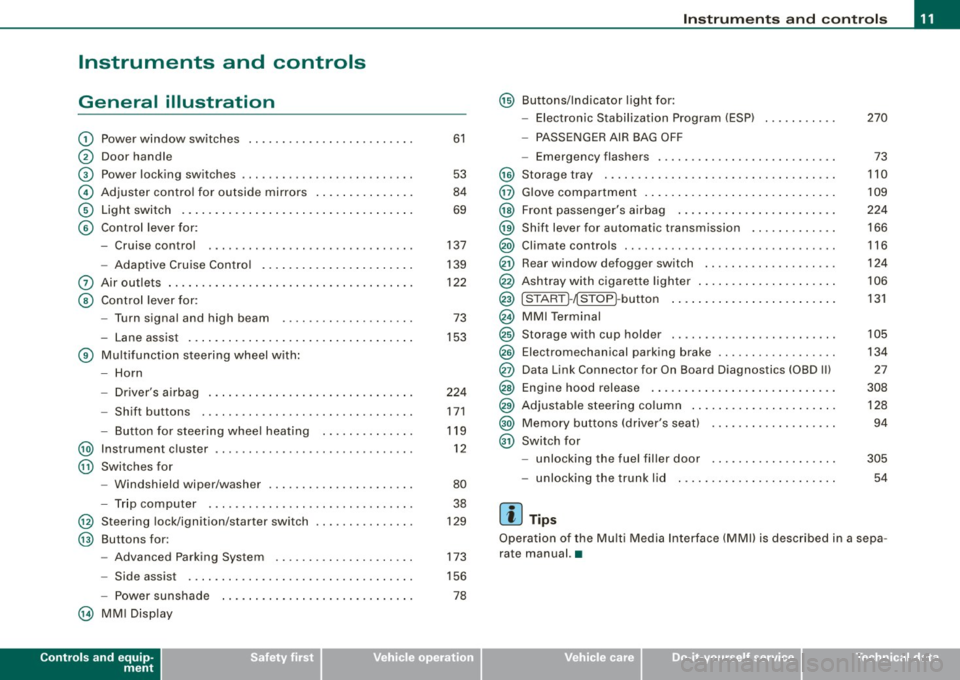
General illustration
G) Power window switches .. ...... .... ... .. ....... .
0 Door handle
G) Pow er locking switches ... .... .... .... ... ....... .
© Adjuster control for outside mirrors ............. . .
© Light switch .... .... ....... ... ... .. .... .. ..... .
© Control lever for:
- Cruise control .... .... ... .... .... .... ... .... .
- Adaptive Cruise Control .. ... ....... .......... .
0 Air outlets ...... .............................. .
@ Control lever for:
- Turn signal and high beam ....... ... .... ..... .
- Lane assist .. .... ..................... ... ... .
® Multifunction steering wheel with :
- Horn
- Driver's airbag .. ...... ...... ....... ...... ... .
- Shift buttons ........... .... ... .. .... .... ... .
Button for steering wheel heating ..... .. .. .... .
@ Instrument cluster .................... .... ..... .
@ Swi tches for
- Windshield wip er/ washer ............. ... .. ... .
- Trip computer ..... ... ... .... .... ... ... ... .. .
@ Steering lock/ignition /starter switch
@ Buttons for :
- Advanced Parking System .. .... .... .... .... .. .
- Side assist ..... .. .. ... ..... .... ... .. .... ... .
- Power sunshade
@ MMI Display
Controls and equip
ment
61
53
84
69
137
139
122 73
153
224 171
119 12
80 38
129
173
156
78
Instruments and controls
@ Buttons/Indicator light for:
- Electronic Stabilization Program (ESP) 270
- PASSENGER AIR BAG OFF
- Emergency flashers . . . . . . . . . . . . . . . . . . . . . . . . . . . 73
@ Storage tray . . . . . . . . . . . . . . . . . . . . . . . . . . . . . . . . . . . 110
@ Glove compartment . . . . . . . . . . . . . . . . . . . . . . . . . . . . . 109
@ Front passenger's airbag . . . . . . . . . . . . . . . . . . . . . . . . 224
@) Shift lever for automatic transmission . . . . . . . . . . . . . 166
@ Climate controls . . . . . . . . . . . . . . . . . . . . . . . . . . . . . . . . 116
@ Rear window d efogger switch . . . . . . . . . . . . . . . . . . . . 124
@ Ashtray with cigarette lighter . . . . . . . . . . . . . . . . . . . . . 106
@ ISTART ]-~STOP ~button . . . . . . . . . . . . . . . . . . . . . . . . . 131
@ MMI Terminal
@ Storage w ith cup holder . . . . . . . . . . . . . . . . . . . . . . . . . 105
@ Electromechanical parking brake . . . . . . . . . . . . . . . . . . 134
@ Data Link Connector for On Board Diagnostics (OBD Ill 27
@ Engine hood release . . . . . . . . . . . . . . . . . . . . . . . . . . . . 308
@ Adjustable steering column . . . . . . . . . . . . . . . . . . . . . . 128
@) Memory buttons (driver's seat) . . . . . . . . . . . . . . . . . . . 94
@ Switch for
- unlocking the fuel filler door . . . . . . . . . . . . . . . . . . . 305
- unlocking the trunk lid 54
[ i ] Tips
Operation of the Multi Media Interface (MMI) is described in a sepa
rate manual. •
I • •
Page 26 of 408

Driver informati on displ ay
Driver information display
Introduction
General notes
The driver information display inside the instrument
cluster provides you, the driver, with much useful infor
mation.
Fig . 8 Inst rum ent
c lu ster : cente r dis pl ay
Information from the Driver Information System is shown in the
display in the cen ter of the instrument clust er.
When you turn on the ignition and while you are driving, some func
tions and vehicle components are scanned for their operating status. Malfunctions or required service procedures are signalled
audibly and shown by red and yellow ligh ted symbols and
reminders to the driver in the display.
The driver is also shown information about radio and CD operation and directions fo r the navigation system . You can find additional
information on these subjects in the MMI manual.
The Driver Information System provides the fol lowing functions : Sound system display
~ page25
Outside air temperature ~ page25
Digital speedometer ~ page25
Door open indicator ~ page26
Defective light bulb ~ page26
Service interval display ~ page27
Au
to Check syst em ~ page28
Driver information ~ page29
Speed limiter ~ page28
Trip computer ~ page38
Tire pressure monito ring* ~ page 41
Selector lever pos ition ~ page 167
[ i ] Tips
In the event of a malfunction either a red or yellow icon appears in
the display. Red symbols indicat e
Danger ~ page 30. Yellow
symbols ind icate a
Warning ~ page 34. •
Page 40 of 408
Driver informati on displ ay
The speed warning symbol 8 (USA models)/ 0 (Canada models) will
appear briefly in the display when you release the button to indicate
that the maximum speed has been stored successful ly .
The maximum speed remains stored until it is changed by pressing
t he button again briefly or unti l it is deleted by a lengthy push on the
button. •
Speed warning 2: setting a speed limit
Warning threshold 2 is set, changed and deleted in MM/.
t _i•,,( '1
Instrument cluster
• Speed warning
I .
12:QQAM
i
'
@
\_:'.' '' :, ) ..
Fig. 20 MMI d ispl ay :
Set w arning thr esho ld
2
Switching sp eed warning on and off
- Press the (CARI fun ction button .
- Select
Systems in the CA R menu.
- Select
Instrument cluster . The Instrument cluster menu
appears=> fig. 20 .
- Select Speed warn ing
On to switc h on the warning
thresho ld or
Off to tur n off the warning th reshold.
Setting and adjusting the warning thr eshold
- Press the (CARI function butto n.
- Select
Systems in the CAR menu. -
Selec t
Instrument clu ster. T he In strument clu ster menu
appears.
- Selec t th e seco nd item in the
Speed warning menu. The
submenu
Speed threshold appears=> fig. 20.
- Set the warning th reshold you want.
Warning threshold 2 can only be set in a speed range from 20 to
150 mph (30 to 240 km/h). •
Trip computer
Introduction
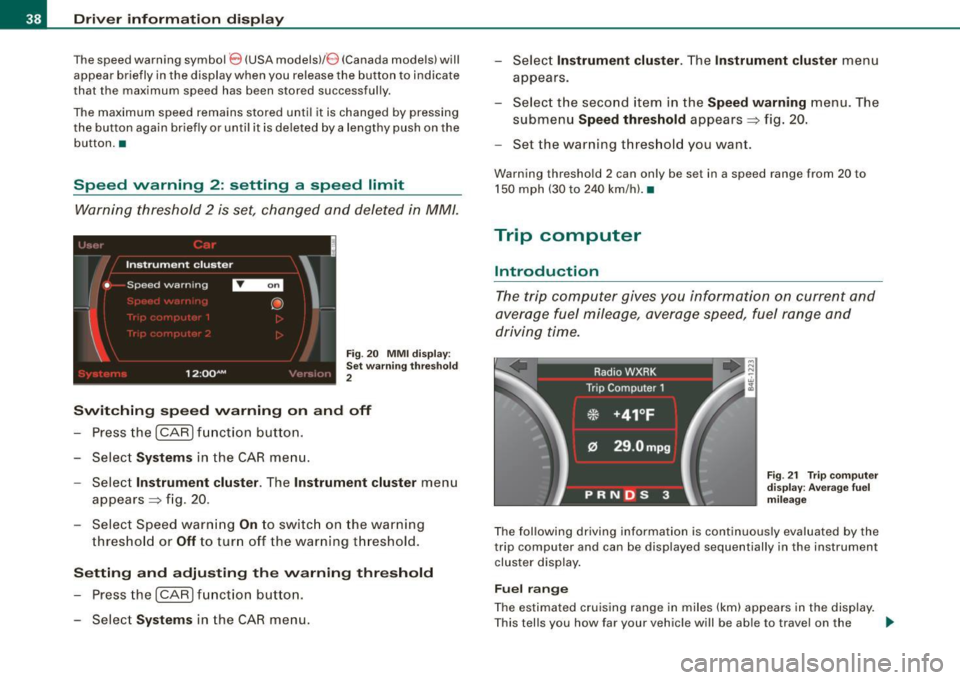
The trip computer gives you information on current and
average fuel mileage, average speed, fuel range and
driving time.
F ig . 2 1 Trip co m pute r
d is pl ay : Ave ra ge fuel
mil eag e
The fol lowing driving information is continuously evaluated by the
trip computer and can be displayed sequentially in the instrument
cluster display .
Fuel range
The estimated cruising range in miles (km) appears in the display .
T his tells you how far your vehic le will be ab le to travel on the _.,
Page 41 of 408
current tank of fuel and with the same driving style. The display
changes in increments of 6 miles (10 km).
The cruising range is calculated based on the fuel consumption for
the last 18 miles (30 kml. If you drive conservatively, the cruising
range will increase.
Average fuel mileage
The average fuel economy in MPG (1/100 km) since you last c leared
the memory appears in this display . You can use this display to
adjust your driving technique to achieve a desired mileage.
Current fuel mileage
The instantaneous fuel consumption in miles per gallon (1/100 km)
is shown in this display. You can use this display to adjust your
driving technique to achieve a desired mileage.
Fuel consumption is recalculated at intervals of 33 yards (30
metres). When the vehic le is sta tionary, the most recent fuel
consumption is displayed.
Average speed
The average speed in mph (km/h) since the last time the display was
reset appears in the display.
Elapsed time
The length of time that you have been driving since you last reset
the memory appears in this display.
[ i ] Tips
• Fuel consumptions (average and current) , range and speed are
displayed in metric units on Canad ian models .
• All stored values wil l be lost if the vehicle battery is
disconnected .•
Con tro ls and eq uip
ment
Driver information display
Memori es
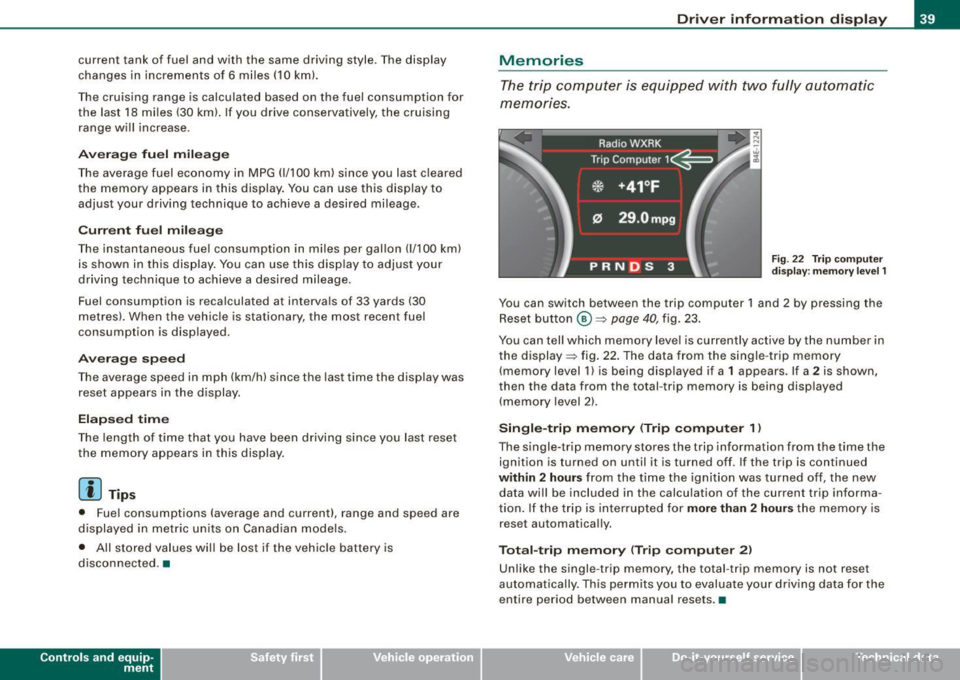
The trip computer is equipped with two fully automatic
memones.
Fig . 22 Trip computer
display: memory level 1
You can switch between the trip computer 1 and 2 by pressing the
Reset button
@ ~ page 40, fig. 23.
You can tell which memory level is currently active by the number in
the display ~ fig . 22. The data from the single -trip memory
(memory level 1) is being displayed if a
1 appears . If a 2 is shown ,
then the data from the total -trip memory is being disp layed
(memory level 2).
Single-trip memory (Trip computer 1 )
The single-trip memory stores the trip information from the time the
ignition is turned on until it is turned off. If the trip is continued
within 2 hours from the time the ignition was turned off, the new
data will be included in the calculation of the current trip informa
tion. If the trip is interrupted for
more than 2 hours the memory is
reset automatically.
Total-trip memory (Trip computer 2)
Unlike the single -trip memory, the total -trip memory is not reset
automatically . This permits you to evaluate your driving data for the
entire period between manual resets .•
Vehicle care I I irechnical data
Page 42 of 408

Driver informati on displ ay
Operation
The trip computer is controlled by two switches on the
windshield wiper lever.
N co
"' w ;g
F ig . 23 W inds hield
w ip er l ever : c on trol s
fo r the t rip com puter
Push the function selecto r switch up or down @
=> fig . 23. This will cause t he five distinct trip c ompu ter
functions to be displayed o ne after another.
The trip computer only operates when the ignition is on. When you
turn on the ignition , the function that was in use when you last
turned the ignition off will be displayed .
In addition to the trip computer information (memory level 1 or 2),
navigation information and Adaptive Cruise Control * information
can be displayed. To switch the display between the different
systems, tap the Reset button
© briefly.
S ett ing values t o ze ro
To delete
o ne current value from the trip computer , se lect the
desired funct ion and press the Reset button
@ for at least one
second. The following values can be set to zero
indi vidu ally using
t he Reset button:
• elapsed time
• average fuel mi leage
• average speed In addition
,
all the values in the single-trip or the total -trip memory
can be de leted simultaneous ly .
Ii ] Tips
All stored values will be lost if the vehicle bat tery is disconnected .•
MMI settings
Basic settings for the trip computer can be made in the
MM/.
F ig . 2 4 MMI display :
Trip co m put er
Setting values to zer o
- Pressthe (CAR )function button.
- Select
Syst em s in the CAR me nu.
- Select
Instrum ent clust er.
- Select Trip computer 1 or Trip computer 2.
- Select Reset to delete all the values in the memory
~ fig. 24 .
Displaying and hiding driver information
- Pressthe (CAR )fu nct io n butto n.
Page 43 of 408
-Select System s in the CAR menu .
- Selec t
Instrument cluster .
-Select Trip computer 1 or Trip computer 2 .
-Select, for examp le, Fuel range On to turn on the display
or
Off to turn the disp lay off.
All values in the single -trip or the total -trip memory can be reset to
zero simultaneously in MMI. In addition you can determine what
driving information from the trip computer should be shown in the
instrument cluster display. If one of the pieces of driver information
is turned off, that driver information will not be shown in the display .
The information will continue to be calcu lated by the trip computer
and can be turned back
on at any time. •
Tire pressure monitoring system
Applies t o vehi cle s: with n re pre ss ure moni toring sys te m
General notes I)
Each tire, including the spare (if provided}, should be checked
month ly when cold and inflated to the inflation pressure recom
mended by the vehicle manufacturer on the vehicle placard or tire
inflation pressure label. (If your vehicle has tires of a different size
than the size indicated on the vehicle placard or tire inflation pres
sure label, you should determine the proper tire inflation pressure
for those tires.}
As an added safety feature, your vehicle has been equipped with a
tire pressure monitoring system (TPMSl that illuminates a low tire pressure tellta le when one or more of your tires is significantly
under-inflated . Accordingly, when the low tire pressure te lltale i llu
minates, you should stop and check your tires as soon as possible,
and inflate them to the proper pressure. Driving on a significantly
under -inflated tire causes the tire to overheat and can lead to tire
Controls and equip
ment
Dr ive r informat ion di spl ay
failure . Under -inflation also reduces fuel efficiency and tire tread
life, and may affect the vehicle's handling and s topping ability.
Please note that the TPMS is not a substitute for proper tire mainte
nance, and it is the driver 's responsibility to maintain correct tire
pressure, even if under-inflation has not reached the leve l to trigger
illumination of the TPMS low tire pressure te lltale.
Your vehic le has a lso been equipped with a TPMS malfunction indi
cator to indicate when the system is not operating proper ly. The
TPMS ma lfunction indicator is combined w ith the low ti re p ressure
tel ltale . When the system detects a malfunction , the telltale wil l
flash for approximately one minute and then remain continuously
il luminated . This sequence will cont inue upon subsequent vehicle
start -ups as long as the malfunction exists.
When the ma lfunction indicator is illuminated, the system may not
be able to detect or signal low tire pressure as intended . TPMS
mal functions may occur for a variety of reasons, including the
insta llation of replacement or alternate tires or wheels on the
vehic le that prevent the TPMS from funct ioning properly. A lways
check the TPMS malfunction tellta le after replacing one or more
tires or whee ls on your vehicle to ensure that the replacement or
alternate tires and wheels allow the TPMS to continue to function
properly. •
Applies t o vehic les : w ith Tire press ure mon itoring sy stem
Introduction
The tire pressure monitoring system moni tors air pressure
in all four roa d wheels and the spare tire* while the
vehicle is moving.
As soon as the tire pressure monitoring system senses a significant loss of air pressure in one o r severa l tires, text messages and yellow
symbo ls appear in the instrument cluster display to alert the driver.
The L warni ng light in the instrument cluster comes on when the
tire is significantly underinflated
=> page 20. _,,
I • •
Page 148 of 408

-Adaptive Crui se Control .._ _ ______,:,...._ _________________________________________ _
Driver information
App lies to veh icles: with Adapt ive Cruise Cont ro l
Displays in the instrument cluster
Depending on the driving situation, driver information is
displayed in the instrument cluster.
@ Primary display in the speedometer.
Fig. 158 Ove rv iew
instrument clu ste r
@ Supplementary display in the instrument c luster.
© Message in the instrument cluster display.
@ Prim ary display
Important information concerning vehic le operation with Adaptive
Cruise Control is shown in disp lay area @. T he desired speed yo u
set is highlighted in the speedometer and the warning lights show
whether adjustments are being made fo r an object ahead .
This information is always disp layed. Display area @is therefore
called the
primary display.
@ Supplementary disp lay
In display area@ infor mation fro m the navigation sys te m and the
trip computer is displayed in addition to information about Adaptive
Cruise Control. You can select among
the different information by repeated brief
t aps on the RESET b utto n on the w indshield wiper lever ~
page 40,
"Operation" .
P articularly on your first trips with Adaptive Cruise Control, the
supplementary display should be turned on.
@ Message
The information in area © is not d isp layed permanently. Informa
tion is displayed on ly if you change the time interva l, if there is a
malfunction or if the Adaptive Cruise Contro l is turned off. •
Applies to veh icles : w ith Adaptive Cruise Contro l
Primary display in the speedometer
Desir ed sp eed
Fig . 159 Primary
d is play in th e speed
omete r
The desired speed set by the driver is disp layed wi th a red LED .
The system al lows only speeds from 20 to 95 mph (30 to 150 km/h)
to be se t. This s peed range is fain tly i lluminated in the spee dometer.
Warning lights (symbols )
• ""c:::, Open road : Th e war ning lig ht ""c:::, sh ows that ACC is active
and that no moving vehicle has been detected with in range of the
ra dar senso r up ahead in yo ur l ane of travel. The se t speed is main -
tained. .,
Page 149 of 408
_____________________________________________ A_ d_a ...: p_ t_ i_ v _e_ C_ ru_ is_ e_ C_ o_n _ t_ r_o _ l _ __._
• "°" ""° D riv ing in traffi c: The warning light "°"""° shows that a
vehic le moving in your lane of travel has been de tected up front in
your lane of travel. Your speed is adjusted according to the speed of
the vehicle up front. ACC accelerates and brakes automatical ly
within the system's capabilities.
• "°" ""°
Reque st f or driver to a ssume control: The red flashing
warning light
G'.'.::> 1,.,<:Q means R equ est fo r d riv er to assume control.
You as the driver must slow the vehicle with the foot brake. The
symbo l "°""G'.'.::l tells you that the Adaptive Cruise Control is not able
to slow the vehicle down enough to keep a enough distance to the
vehicle in front of you . A warning tone signal wi ll also sound when
the symbol appears .
& WARNING
Improper use of the Adaptive Cruis e Control f eatures and inatten
ti on c an lead to an cra sh a nd s erio us per sonal injury .
• Never allo w the c losing speed between you and other v ehicles
to be so high t hat th e Adap tive Cru is e Control ma y not be abl e to
slow your vehi cle safel y. If closing speed i s too high , you must
apply the brake s yourself to r ed uc e the ri sk of a r ear-end cra sh .
• Alway s sele ct a greater follow ing di stance to th e vehi cle up
a he ad on w et ro ad s th an on dr y roa ds.
• Alway s read and he ed the inf ormation and WARNINGS~
& in
" De scription " on
pag e 139 .
[ i J Tips
• If the Adaptive Cruise Control initiates braking, the hydraulic
brake system is under pressure . Therefore, the brake peda l distance
is shorter and the pedal feels "harder".
• If you use the accelerator to go faster than the speed of the
vehicle ahead of you, the driver intervention prompt wi ll not be
accompanied by a warning tone.
• If the speed you previously set is exceeded, the indicator light in
the speedometer wi ll switch o ff.•
Con tro ls and eq uip
ment
Ap plies to vehi cle s: wi th Ad apt ive Crui se Co ntro l
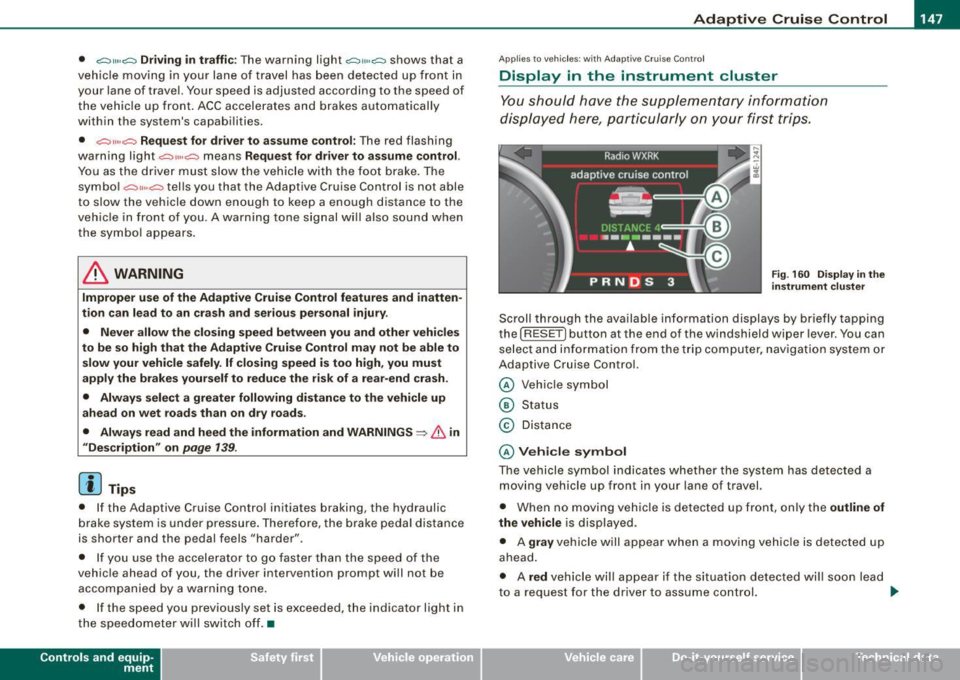
Display in the instrument cluster
You should hove the supplementary information
displayed here, p articularly on your first trips.
Fig. 160 D ispla y in th e
i n strum ent cl uste r
Scroll th rough the available information displays by briefly tapping
the ( RESET] button at the end of the windshield wiper lever . You can
se lect and information from the trip computer, naviga tion syste m or
Adaptive Cruise Control.
@ Veh icle symbol
@ Status
© Distance
@ V ehi cle sym bol
The vehicle symbol indicates whether the system has detected a
moving vehicle up front in your lane of travel.
• When no moving vehic le is detected up front, on ly the
outline of
the vehicle
is displayed.
• A
gra y vehicle will appear when a moving vehic le is detected up
ahead.
• A
red vehicle will appear i f the situation detected will soon lead
to a request for the driver to assume control. .,,_
Vehicle care I I irechnical data
Page 404 of 408
___ A_l.:. p _h_ a_ b_e _t _ic _ a_l _in _ d_e _x ____________________________________________ _
Transmission
See Automatic transmission . . . . . . . 166
Transport Canada . . . . . . . . . . . . . . . . . . . 210
Transporting your vehicle . . . . . . . . . . . . 371
Tr ead Wear Indicator (TWll ........... 337
Trip computer
V
Vanity mirror front ... ... .... ................ .. 77
rear . . . . . . . . . . . . . . . . . . . . . . . . . . . . . 79
Vehicle electrical system .. ..... .. .... . 18 Ti
re pressure monitoring system .... 20
Turn signals ... .... .... ... .... .... 19
Warranty coverages .... .... .. .... ... 382
Washer reservoir ... .... ..... .. ...... 325
Washing . .... .... .... .... ... .... ... 290
Automatic car wash ... ... ... .. ... 291
Fuel consumption ...... .... ... ... . 38
Vehic le ide ntification labe l .... ... .... 376
by hand .................... .. ... 291
Mi leage ...... ............ ....... 38
Sing le -trip memory .. ...... ...... .. 39
Total -trip memory .. .... ... .... .... 39
Trip odometer . . . . . . . . . . . . . . . . . . . . . . . 14
What does it mean when dEF appears in the trip odometer display? ....... . 14
Trunk
See Rear lid . .............. ....... 54
Trunk escape handle ................ 350
furn signals ........................
73
Warning/indicator lights ........... 19
u
Undercoating . . . . . . . . . . . . . . . . . . . . . . 296
Unfastening safety belts ...... ...... . 217
Un idirectiona l tires ..... ... ... ... .... 326
Uniform tire quality grading .......... 342
Un locking
Power locking switch . . . . . . . . . . . . . . 53
Rear lid/trunk lid ...... .... ...... .. 54
Remote control .. ...... ...... .... . 51
Using the key ..... .... .... ...... .. 52 Vehic
le Identification Number (VIN) .... 376
Vehic le jack .......... .... .... .. 351, 356
Vehic le literature .......... ... .... .... . 5
Vehic le transport . .................. 371
Vehic le -care products . . . . . . . . . . . . . . . 290
Venti lated seats .................... 118
w
Warning/indicator ligh ts . .... ....... .. 16
Adaptive Air Suspension ........ 20, 21
Adaptive Cruise Control . . . . . . . . . . . 146
Airbag system . . . . . . . . . . . . . . . . . . . . 19
Anti- lock brake system (ABS) . . . . . . . . 21
Brake system . . . . . . . . . . . . . . . . . . . . . 22
Cruise con tro l . . . . . . . . . . . . . . . . . . . . 21
Electromechanica l parking brake .... 22
Electronic power control ...... .... . 18
Electronic stabilization program (ESP) 18
Fog lights ........................ 19
Generator . . . . . . . . . . . . . . . . . . . . . . . . 18
High beam . . . . . . . . . . . . . . . . . . . . . . . 19
Instrument cluster. . . . . . . . . . . . . . . . . 12
Malfunction Indicator Lamp (MIU .. .. 20 with a power washer
... ... ....... . 292
Washing the vehicle ....... ... ... ... . 290
Waxing .. .... .... .... .... ... .... ... 293
Wear indicator ......... ............ . 337
Weatherstrips .... .... .... ... .... ... 295
Weights ....................... .... 377
What happens if you wear your safety belt too loose? ........... .... ..... .. ... 216
What happens to unbelted occupants? . 213
What impairs driving safety? .......... 201
What should I do after changing a wheel?
334
What should I do after replacing wheels?
334
Wheel bolts Torque ..... ...... .... ....... ... 345
Wheels .. .... .... .... .... ... .... ... 326
Cast alloy ....................... 295
Checking tire pressure .. .... ...... 333
Co ld tire inflation pressure ........ 330
General notes ... ........... .... .. 326
G lossary of tire and loading termino logy .
327
New tires and wheels ............. 338
Rear fog lights .... .... ...... ... · · · 19 T" d h. I I d
1· ·t 335
ires an ve Ic e oa Im1 s ... ... .
Safety be lt . . . . . . . . . . . . . . . . . . . . . . . 20 .,
214
When must a safety belt be replacedr . .