brake light AUDI S8 2010 User Guide
[x] Cancel search | Manufacturer: AUDI, Model Year: 2010, Model line: S8, Model: AUDI S8 2010Pages: 384, PDF Size: 90.95 MB
Page 34 of 384
Driver information displ ay
Yellow symbols
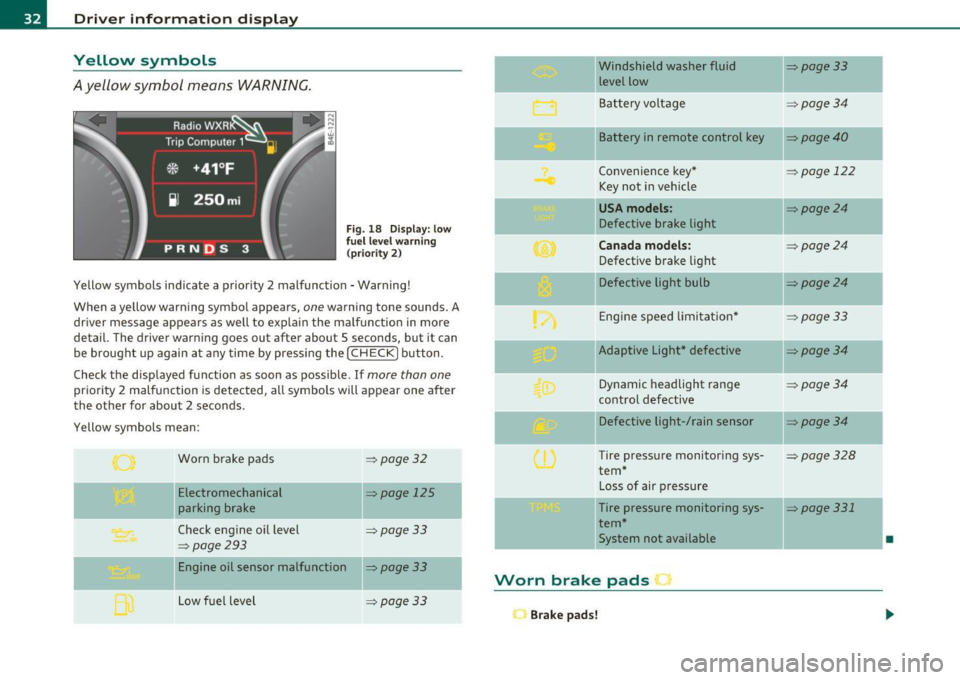
A yellow symbol means WARNING.
Fig . 18 Display: low
f ue l level warn ing
(priority 2)
Yellow symbols ind icate a prior ity 2 malfunction -Warning!
When a yellow warning symbo l appears,
one warning tone sounds. A
dr iver message appears as well to explain the ma lfunction in more
detail. The driver warning goes out after about 5 seconds, but it can
be brought up again at any time by pressing the
I CHECK] button .
Check the displayed function as soon as possible.
If more than one
priority 2 malfunction is detected, all symbols will appear one after
the other for about 2 seconds .
Yellow symbols mean:
Worn brake pads
=> page 32
Electromechanical => page 125
parking brake
Check engine oil level
=> page 33
=> page 293
Engine oil sensor malfunction => page 33
-
Low fuel level =>page33
Windshield washer fluid =>page33
level low ~
Bat tery voltage =>page34
-
II Battery in remote control key =>page40
Convenience key * =>page 122
Key not in veh icle
USA models: => page24
Defective brake light
Can ad a mod els : =>page24
Defect ive brake light
Defective light bulb
=>page24
E ng ine speed limitat ion* => page33
-
IIAdaptive Light* defective =>page34
Dynamic headlight range => page 34
contro l defective
Defective light-/rain sensor
=> page34
Tire pressure monitoring sys-=>page328
tern *
Loss of air p ressure
-Tire pressure monitoring sys-=> page331
tern*
11System not available •
Worn brake pads •
Brake pa ds!
Page 35 of 384
If the warning light illum inates, immediately contact your authorized
Audi dea ler or qu alified wor kshop to h ave all b rake pads insp ecte d.
On USA mode ls the warn ing light comes on together w it h the
warning light
BRAKE . Both sets of brake pads on an axle must a lways
be rep laced at the same time.
& WARNING
Driving w ith bad brakes can cause a collision and serious personal
injury .
• If the w arning light
ii and the warning light BRAKE1> with the
me ssage Brake pads! com es on in the in strument clu ster di splay,
immediately contact your author ized Aud i dealer or qualified
workshop t o have all brake pads che cked or replaced if
necessary. •
Checking the engine oil level ~
.... ,. Pleas e check oil level
W hen the symbol i lluminates, check the engine oi l level as soon as
poss ible=>
page 293. Add oil if necessary=> page 294. •
Engine oil sensor defective
~ Oil level ! sensor d efective
If the symbo l illuminates, contact your authorized Audi dealer and
have t he o il senso r in spec ted . U ntil yo u have this do ne, check the oil
level each time you refue l just to be on the safe side=>
page 293. •
ll BRAKE: USA mode ls on ly
Controls and equip
ment Safety first
Driver information display
A
pp lies to vehi cles : w ith engine s peed lim it a tion
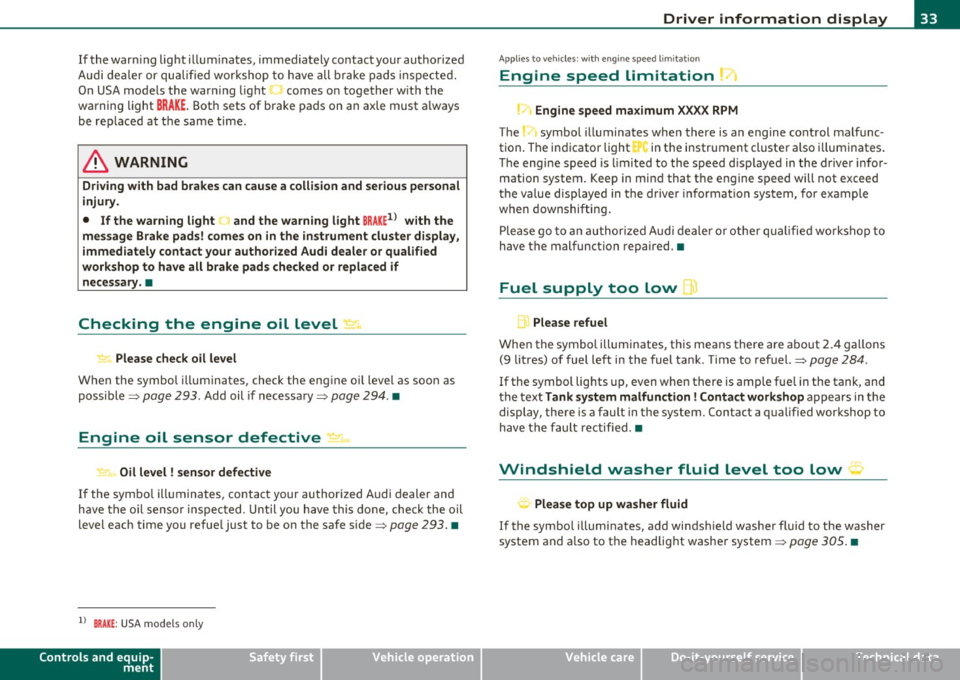
Engine speed limitation
!.-• Engine speed maximum XXXX RPM
The symbol illuminates whe n there is an engine co ntrol malfunc
tion. The in dicator light in the instrument cluste r a lso i lluminates .
T he engi ne speed is limited to the speed d isp layed in the driver infor
mation system . Keep in mind that t he engine speed will not exceed
t he va lue disp layed in the d rive r in format ion sys tem, for example
when downshifting .
P lease go to an a uthor ized A udi deale r o r ot her qualifie d wo rk shop to
have the malfunction repa ired .•
Fuel supply too low w
A Please refuel
When the symbol illuminates, th is means there are about 2.4 ga llons
(9 litres) of fuel left in the fuel tank . Time to refuel.=>
page 284.
If
the symbol lig hts up, even when there is ample fue l in the tank, and
t he text
Tank sy stem m alfunction! Contact workshop appears in t he
display, there is a fa ult in the system. Con tact a qual ified workshop to
h ave the fault re ctified. •
Windshield washer fluid level too low ;>
Please top up washer fluid
If the symbo l illuminates, add windshield washe r fluid to the washer
system and a lso to the headlig ht washe r system =>
page 305. •
Vehicle care Technical data
Page 101 of 384

& WARNING (continued)
when accelerating or when applying the brakes or when driving
around a corner.
• When you are driving make sure that anything you may have
placed in the center console or other storage locations cannot fall
out into the footwells. In case of sudden braking you would not be
able to brake or accelerate.
• Any articles of clothing that you have hung up must not inter
fere with the driver's view. The coat hooks are designed only for
lightweight clothing. Never hang any clothing with hard, pointed
or heavy objects in the pockets on the coat hooks. During sudden
braking or in an accident -especially if the airbag is deployed -
these objects could injure any passengers inside the vehicle. •
Glove compartment
Your Owner's Literature and the media player are stored
in the lockable glove compartment.
i-----..,--------- l
i
Contro ls a nd e quip
m en t
Fig . 106 Glove
compartment
Vehicle OP-eration
Seats and storage
-- -- ·· - - -J
-
-
To open glove compartment
Fig. 107 Glove
compartment: CD
changer
- Pull the handle in the direction of the arrow and swing the
cover down to open =:> fig. 106.
To close glove compartment
-Push the glove compartment lid up until the lock engages.
In the glove compartment lid you will find a place to store a pen and
a pad of paper.
& WARNING
To reduce the risk of personal injury in an accident or sudden stop,
always keep the glove compartment closed while driving. •
Vehicle care Do-it-yourselt service iTechnical data
Page 122 of 384

1111..__0_ n_ t_h _e_ r_o _ a_ d _________________________________________________ _
Stopping the engine
-Turn the ignition key to position @::::} page 119, fig. 132.
& WARNING
• Never turn off the engine until the vehicle has come to a
complete stop.
• The brake booster and servotronic only work when the engine
is running. With the ignition turned off, you have to apply more
force when steering or braking. Since you cannot steer and stop
normally, this can lead to accidents and serious injuries.
• The radiator fan can continue to run for up to 10 minutes even
after you have turned off the engine and removed the ignition key.
The radiator fan can also turn on again if the engine coolant heats up because of intense sunlight or heat build-up in the engine
compartment.
0 Note
Do not stop the engine immediate ly after hard or extended driving .
Keep the engine running for approximately two minutes to prevent
excessive heat build-up. •
Starting and stopping the engine
using the Convenience key
Applies to veh icles: with Conven ience ke y
Starting the engine using the [START]
button
Using this button, you can switch on the ignition and start
the engine.
C,
0
Fig. 133 Convenience
key :
START button
The [ST ART] button has a two position feature. ::::} fig . 133.
Switching on the ignition
- Press the [ST ART ) button to the first position. Only the
ignition switches on.
Starting the engine
- Depress the foot brake.
- Move the selector lever into the P or N position ~,& .
- Press the
[ST ART ) button to the second position. The
engine starts.
Page 124 of 384
-On the road •m ___________________ _
& WARNING (continued)
• The brake booster and the servotronic only work when the
engine is running. If you turn off the engine, more force will be
required to steer or brake the vehicle. If you are not prepared, this
could result in a collision and serious personal injury.
• For your safety, move the selector lever to the P position, then
turn off the engine. Otherwise the vehicle could inadvertently roll
away.
• After turning off the engine, the radiator fan can come on and
run for up to 10 minutes -even if the ignition is switched off. Like
wise, the fan could come on if the temperature in the engine
compartment raises due to heat build up or if you leave the vehicle
standing in direct sunlight.
0 Note
After driving at high engine load, heat can build up in the engine
compartment after you have turned off the engine. This can damage
t he engine. Let the vehicl e stand and run in idl e for about 2 minutes
before turning off the engine. •
App lies to ve hicles : w ith Conve nie nc e key
Driver's messages in the instrument
cluster
Messages appear in the instrument cluster to let the
driver know if something is missing or if something must
be done.
No key identified
This message appears when you press the [START) button, but there
is no remote contro l key inside the vehicle or if the system does not
recognize the key. For example, if your key is
shielded by an object or
encased, i .e . in side an aluminum briefcase, the signal from the key cannot be detected
. Electron ic devices such as cell phones can also
in terfere w ith the radio signal.
Press brake pedal to start engine
This message appears when you press the !S T ART ) butto n when
starting the engine but you have not depressed the brake pedal.
Engage N or P to start engine
This message appears when you start the engine but the selector
lever is not in the P or N position . The engine can be started only if the
selector lever is in one of these two positions .
Key not in vehicle
This message appears together with the 7 symbol when the remote
control key is removed from the vehicle while the engi ne is running.
Th is is to remind you that you should not cont inue your tr ip without
your key.
If the key is no longer inside the vehicle when you turn off the engine,
you will not be able to switch on the ignition or restart the engine.
Also, you will not be able to lock the vehicle from the outs ide .
Shift to P, otherwise vehicle can roll away. Doors do not lock if lever
is not in P.
Thi s message appears for your safety together with an audible
warning signal when you press the
[STOP) button but the selector
lever is not in the P position and you open the driver's door. Move the
selector leve r in to P, otherwise the vehicle could roll away. I n addi
tion, you will not be able to lock the ve hicle with either the lock
button located on the door hand le or the remote control.
To engage steering lock, press and hold STOP button
Th is message appears for your personal safety if you switch off the
engine and the ignition by pressing the
[STOP) button and then open
the driver's door. In this case, the steering will still not be locked. The
steering wheel will lock:
• If you press the
I STO P I button for longer than 1 second.
• If you lock the vehicle from the outside .•
Page 125 of 384

On the road -
----------------
Electromechanical parking brake
Operation
The electromechanical parking brake replaces the hand
brake.
Fig. 135 Center
console: Parking brake
- Pull the switch to apply the parking brake~ fig. 135. The
indicator light in the switch will come on.
- Step on the brake pedal or the accelerator pedal and press
the switch at the same time to release the parking brake.
The indicator light in the switch will go out.
Your vehicle is equipped with an electromechanical parking brake
which replaces the handbrake. The parking brake is designed to
prevent the vehicle from rolling unintentionally.
In addition to the normal functions of a traditional hand brake, the
electromechanical parking brake provides various convenience and
safety functions.
Emergency brake
An emergency brake ensures that the vehicle can be slowed even if
the normal brakes fail~ page 125, "Emergency braking".
Controls and equip
ment Safety first
Indicator lights
•
If the parking brake is applied with the ignition turned on, the
indicator light in the instrument cluster (U.S. models:=.., Canadian
models: ©) and in the switch
«el) will come on.
• If the parking brake is applied with the ignition turned off, the
indicator light in the instrument cluster (U.S. models:=., Canadian
models: ©) and in the switch
«fl) will come on for about 30 seconds
and then go out.
& WARNING
If the vehicle is stationary and the transmission is engaged with
the engine running, the engine should not be speeded up (e.g.
manually from under the hood). Otherwise the vehicle will start to
move -you run the risk of an accident.
0 Note
If the warning/indicator light (U.S . models: BRAKE, Canadian models:
«I» ) flashes in the instrument cluster, there is a brake system
malfunction . By pressing the [CHECK! button, you can bring up a
driver message which explains the malfunction in more detail. If the
message
Parking brake ! Please contact workshop appears, there is
a parking brake malfunction which you should have repaired immedi
ately by an authorized dealership~ page 28.
[ i] Tips
• You can apply the parking brake at any time -even with the igni
tion turned off . The ignition must be turned on in order to release the
parking brake.
• Occasional noises when the parking brake is applied and released
are normal and are not a cause for concern.
• The parking brake goes through a self-test cycle at regular inter
vals -when the vehicle is parked. Any associated noises are normal. •
Vehicle care Technical data
Page 128 of 384

1111..__0_ n_ t_h _e_ r_o _ a_ d _________________________________________________ _
0 Note
If the warn in g/i nd icator lig ht ( U.S . models: BRAKE , Canadia n mode ls:
«D> ) flashes in the instrument cluster, t here is a b rake system
ma lf u nct ion. By p ress ing t he [
C H E CK i button, yo u can br ing up a
dr iver message which explains the ma lfunction in more detail. If the
mes sage
Parking brake ! Please conta ct work shop appe ars, there is
a park ing brake ma lfunction which you s hou ld have repaired immedi
a tely by an au thor ized deale rship =>
page 28. •
Cruise control
Switching the system on
The cruise contr ol syst em makes it possib le to drive at a
constant speed starting at 2 0 m ph ( 30 km/h).
Fig. 136 Co ntrol lever
w ith set button Fig. 137 D
ispl ay:
Se lec ted speed
- Pull the lev er to positio n (D ~ fig. 136 to switc h th e
syst em on.
- Drive at th e speed you wis h to s et.
- Press button
© to set t hat speed .
The display => fig. 137 will show the set speed. The d isp lay may vary
depe nding on the ty p e of displa y in yo ur vehicle. The indica to r li gh t
CRUISE (US mode l)/ 0 (Canadian mode l) wi ll also light up in the
in st rumen t clu ste r.
T he speed is kept constant via an eng ine output adjustment or act ive
brake intervention.
& WARNING
• Alway s pay attention to traffic even when the cruise control i s
switched on. You are always responsible for your speed and the
di stan ce between your vehicle and other vehicles.
• For safety r easons , the cruise control should not be used in the
city, in stop-and-go traffic , on twisting roads and when road
conditions are poor ( such as ice , fog, gravel, heavy rain and hydro
planing ) -risk of accident .
• Turn off the cruise control temporarily when enter ing turn
lanes , highway exit lane s or in construction zone s.
Page 129 of 384

_________________________________________________ O_ n_t_ h _ e_ ro_ a_d __ ffllll
& WARNING (continued)
• Please note that inadvertently "resting" your foot on the accel
erator pedal causes the cruise control not to brake. This is because
the cruise control is overridden by the driver's acceleration.
[ i] Tips
The brake lights illuminate as soon as the brakes decelerate automatically. •
Changing speed
-Press lever in the
0 or O direction=> page 126, fig. 136
to increase or decrease your speed.
- Release the lever to save that speed.
Change speed in increments of 1 mph (1 km/h) by lightly pressing the
lever. If you keep the lever pressed down, you will alter your speed in
S mph (10 km/h) increments.
You can also press the accelerator pedal down to increase your speed,
e.g. if you want to pass someone. The speed you saved earlier will
resume as soon as you release the accelerator pedal.
If, however, you exceed your saved speed by S mph (10 km/h) for
longer than S minutes, the cruise control will turn off temporarily .
The green symbol in the display~
page 126, fig. 13 7 is replaced with
a white symbol. The saved speed remains the same.•
Presetting your speed
You can preset your desired speed while the vehicle is not
moving .
-Turn on the ignition.
Controls and equip
ment Safety first
- Pull lever
into position ©=> page 126, fig. 136.
- Press the lever in the
0 or O direction to increase or
decrease your speed.
- Release the lever to save that speed .
This function makes it possible, for example, to save the speed you
want before driving on the highway. Once on the highway, activate
the cruise control by pulling the lever toward
(D . •
Switching the system off
Temporary deactivation
- Press the brake pedal, or
- Press the lever into position@ (not clicked into place)
=> page 126, fig. 136, or
- Drive for longer than 5 minutes at more than 5 mph
(10 km/h) above the stored speed.
Switching off completely
- Press lever into position @ (clicked into place), or
- Switch the ignition off .
The system retains the saved speed if you deactivate the cruise
control temporarily. To resume the saved speed, release the brake
pedal and pull the lever to position
(D.
Switching the ignition off erases the saved speed.
& WARNING
You should only return to the saved speed if it is not too fast for
the current traffic conditions -risk of an accident! •
Vehicle care Technical data
Page 133 of 384

Adaptive Cruise Control -____________ ___,__ __ ____.
Switching the system off
-Press the lever to position@ (latched). •
Applies to v ehi cle s: w ith Ad ap tiv e Cruis e Cont ro l
How is the speed stored?
Fig . 141 Control
leve r: Stor in g spee d
With the system sw itched on the speed is stored as follows:
- Drive at the speed you want. The speed must be between
20 and 95 mph (30 and 150 km/h) .
- Press the SET button to store the desired speed .
After the [SE TI button is released, the current speed is stored and
ma intained .
The ins trument clus ter displ ay show s the stored speed wi th a red
ind icator light~
page 135.
(I] Tips
For safety reasons, the stored speed is erased when the ig nit ion or
the ACC is turned off .•
Con tro ls a nd e quip
m en t Vehicle
OP-eration
Applies to vehicles : w ith A dapt ive Cruise Cont rol
Changing stored speed
Speed can be changed without touching the accelerator
or brake pedal .
Increasing speed
...
"' M
w .., a,
Fig. 142 Con tro l
lever: Chan ging spee d
-Press the lever briefl y upwards G). USA models: Speed
increases by about 2.5 mph. Canada models: speed will
increase by one mark on the speedometer scale.
- Press the lever upwards
0 and hold it. As long as you hold
the lever up, the light diode display in the speedometer
LED display moves forward and the speed is increased .
Reducing speed
-Press the lever briefly downwards Q. Speed decreases by
2.5 mph. Canada models: speed will decrease by one mark
on the speedometer scale.
- Press the lever downwards
O and hold it. As long as you
hold the lever down, the light diode display in the speed
ometer LED display moves backward and the speed is reduced .
~
Vehicle care Do-it-yourselt service iTechnical data
Page 136 of 384
1111....__A_ d_ a_,_ p_t _i_ v _e _ C_r_ u_ i_ s_ e_ C_ o_ n_ t_ r_ o_ l __________________________________________ _
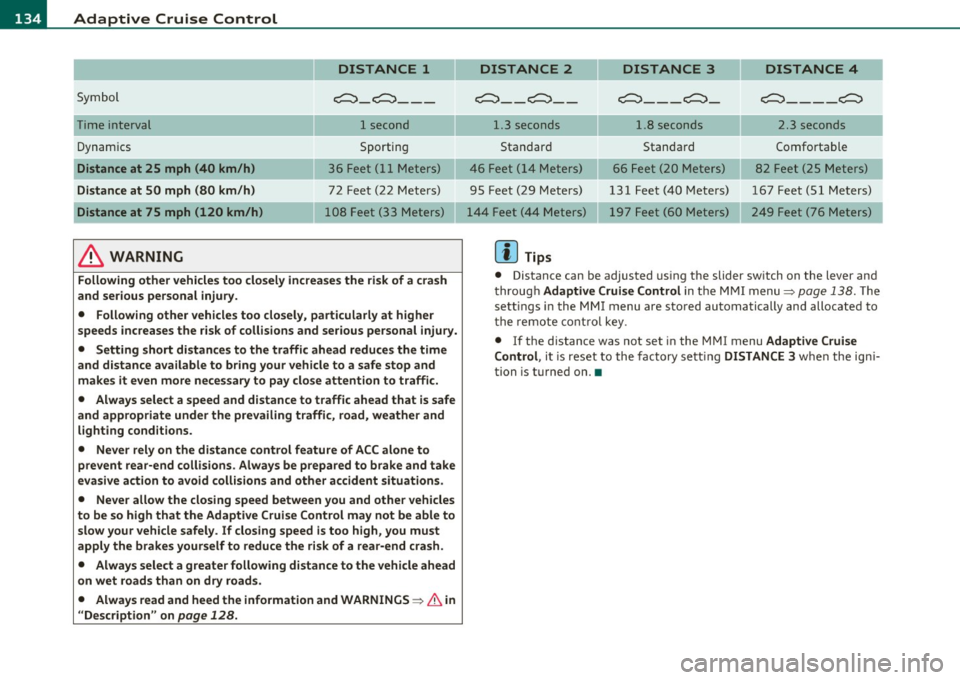
DISTANCE 1
Symbol ~-~---
Time interval 1 second
Dynamics Sporting
Distance at 25 mph (40 km/h ) 36 Feet (11 Meters)
Distance at SO mph (80 km /h ) 72 Feet (22 Meters)
Distance at 75 mph (120 km /h) 108 Feet (33 Meters)
& WARNING
Following other vehicles too closely increase s the risk of a crash
and ser ious personal injury.
• Following other vehicles too closely, particularly at higher
speeds inc reases the r isk of collisions and serious personal injury.
• Setting short distances to the traffic ahead redu ce s the time
and d istance available to br ing your vehicle to a safe stop and
make s it even more ne ce ss ary to pay clo se attention to traffi c.
• Always select a speed and distance to traffic ahead that is safe
and appropriate under the prevailing traffi c, road, weather and
lighting cond itions.
• Never rely on the distance control feature of ACC alone to
prevent rear -end collisions . Always be prepared to b rake and take
ev asive action to avoid collisions and other accident situ ations .
• Never allow the closing speed between you and other vehicles
to be so high that the Adaptive Cruise Contr ol may not be able to
slow your vehicle safely . If closing speed is too high , you must
apply the brake s yourself to reduce the ri sk of a rear -end cra sh.
• Always select a g reate r following di stance to the vehicle ahead
on wet road s than on dry road s.
• Always read and heed the information and WARNINGS~
& in
" Description " on
page 128 .
DISTANCE 2 DISTANCE 3 DISTANCE 4
c::::::> __ c::::::> __ ~---~- ~----~
1.3 seconds 1.8 seconds 2.3 seconds
Standard Standard Comfortable
46 Feet ( 14 Meters) 66 Feet (20 Meters) 82 Feet (25 Meters)
95 Feet (29 Meters) 131 Feet (40 Meters) 167 Feet (51 Meters) 197 Feet (60 Meters) 249 Feet (76 Meters)
[ i ] Tips
• Distance can be adjusted us ing the slider sw itch on the leve r and
throug h Adaptive Crui se Control in the M MI menu~
page 138. The
sett ings in the MMI menu are sto red automatically and allocated to
t he remote cont ro l key .
• If the distance was not set in the MMI menu Adapt ive Cruise
Control , it is reset to the factory sett ing DISTANCE 3 when the ign i
tion is turned on. •