instrument cluster AUDI S8 2010 User Guide
[x] Cancel search | Manufacturer: AUDI, Model Year: 2010, Model line: S8, Model: AUDI S8 2010Pages: 384, PDF Size: 90.95 MB
Page 30 of 384
Driver information displ ay
Red symbols
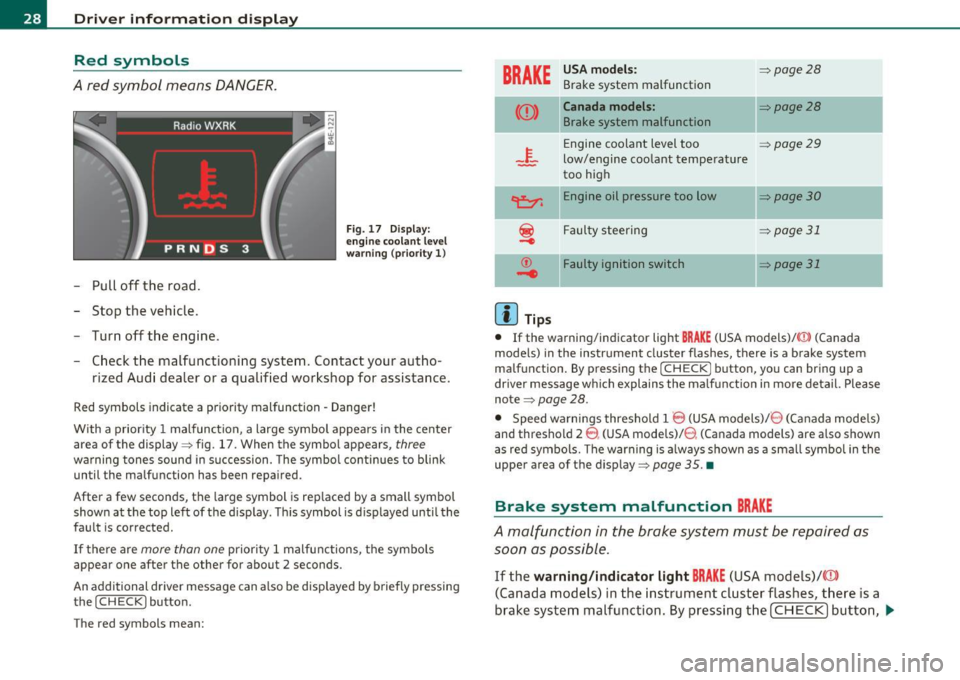
A red symbol means DANGER.
-Pull off the road.
- Stop the vehicle.
- Turn of f the engine .
Fig . 1 7 Display:
en gine coo lant le v el
w arning (pr ior ity 1)
- Check the malfunctioning system. Contact your autho -
rized Audi dealer or a qualified workshop for assistance .
Red symbols indicate a priority malfunction -Danger !
With a prior ity 1 malfunction , a large symbo l appears in the center
area of the display => fig . 17 . When the symbol appears,
three
warning tones sound in succession. The symbol co ntinues to blink
until the malfunction has been repaired.
After a few seconds, the large symbol is replaced by a small symbol
shown at the top left of the display. This symbol is d isp layed unti l the
fault is corrected.
If there are more than one priority 1 malfunctions, the symbols
appear one after the other for about 2 seconds .
An additional driver message can a lso be displayed by b riefly pressing
the
! CHECK ] button.
The red symbols mean:
BRAKE
USA mod els:
Brake system malfunction =>
page28
((D) Canada models:
Brake system malfunction
ll
=>page28
Engine coolant level too => page 29
low/engine coo lant temperature
too high
~ E ngine oil pressure too low
-
~ Faulty steering
~
© Faulty ignition switch
.....
(I) Tips
]I=> page 30
=> page 31
::::> page31
• If the warning/indicator light BRAKE (USA models)/ CCD) (Canada
mode ls) in the instrument cluster flashes, there is a b rake system
malfunction . By pressing the [
CHECK] button, you can bring up a
driver message w hich explains the ma lf u nction in more detail. Please
note=>
page 28 .
• Speed wa rnings threshold 1 8 (USA models)/ 8 (Canada models)
and threshold 2
8 , (USA models)/ 8. (Canada models) are also shown
as red symbols. The warning is always shown as a sma ll symbo l in the
upper area of the disp lay=>
page 35. •
Brake system malfunction BRAKE
A malfunction in the brake system must be repaired as
soon as possible.
If the warning /ind icator light BRAKE (USA models)/ (CD)
(Canada models) in the instrument cluster flas hes, there is a
brake system malfunction . By pressing th e [
CHECK] bu tton, ~
Page 38 of 384
Driver information displ ay
The speed warn ing symbol 8 (USA models)/ 0 (Canada models) will
appear briefly in the display when you release the button to indicate
that the maximum speed has been stored successfully.
The max imum speed remains stored until it is changed by pressing
the button again briefly or unt il it is deleted by a lengthy push on the
button. •
Speed warning 2: setting a speed limit
Warning threshold 2 is set, changed and deleted in /11/111.
Switching speed warning on and off
- Select: Function button I CAR]> System s> Instrument
cl uster .
- Select Speed warning On to switch on the warning
threshold or
Off to turn off the warning threshold.
Setting and adjusting th e warning threshold
- Select : Function button! CAR ]> S ystems > Instrument
c luster.
- Select the second item in the Speed warning menu . The
submenu
Speed thre shold appears .
- Set the warning threshold you want.
Warning threshold 2 can only be set in a speed range from 20 to
150 mph (30 to 240 km/h). •
Trip computer
Introduction
The trip computer gives you information on current and
average fuel mileage, average speed, fuel range and
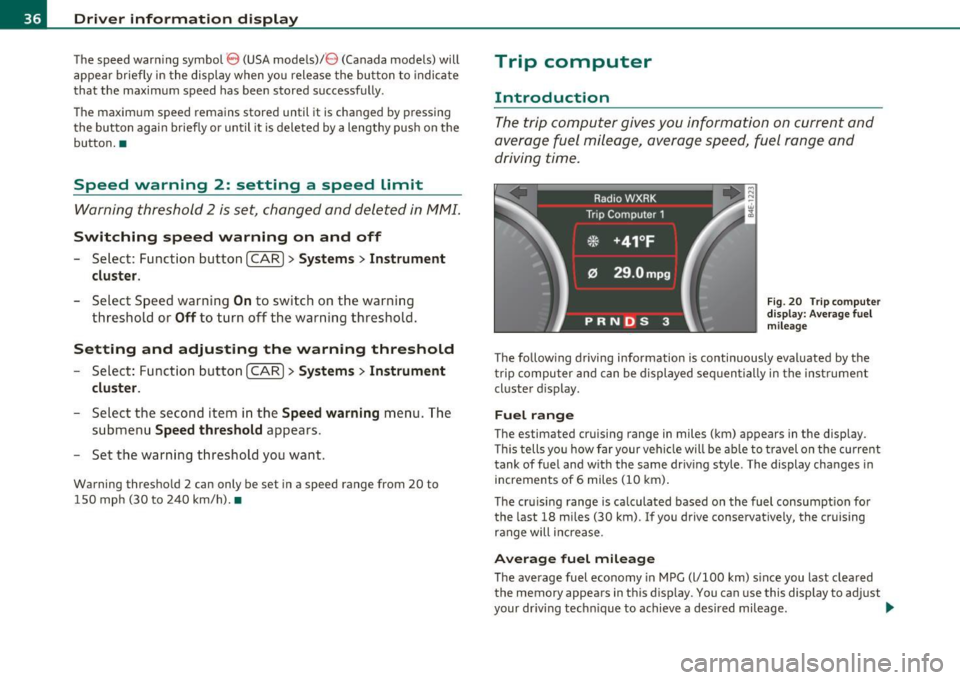
driving time.
F ig . 2 0 Tri p com puter
d is pl ay: Ave ra g e fuel
mil eage
The follow ing driving information is continuously evaluated by the
trip computer and can be displayed sequen tially in the inst rument
cluster d isplay.
Fuel range
The estimated cruising range in miles (km) appears in the display .
T his tells you how far your vehicle w ill be ab le to travel on t he cu rre nt
tank of fuel and w ith the same driv ing style. The display changes in
increments of 6 miles
(10 km) .
The cru is ing range is ca lculated based on the fuel consumpt ion for
the last 18 miles
(30 km). If you drive conservatively, the cruising
range will increase .
Average fuel mileage
The average fuel economy in MPG (l/100 km) s ince you last clea red
the memory appears in this disp lay. You can use this display to adjust
your dr iv ing techn ique to achieve a desired mileage. ..,
Page 40 of 384
Driver info rmation d isplay
Operation
The trip computer is controlled by two switches on the
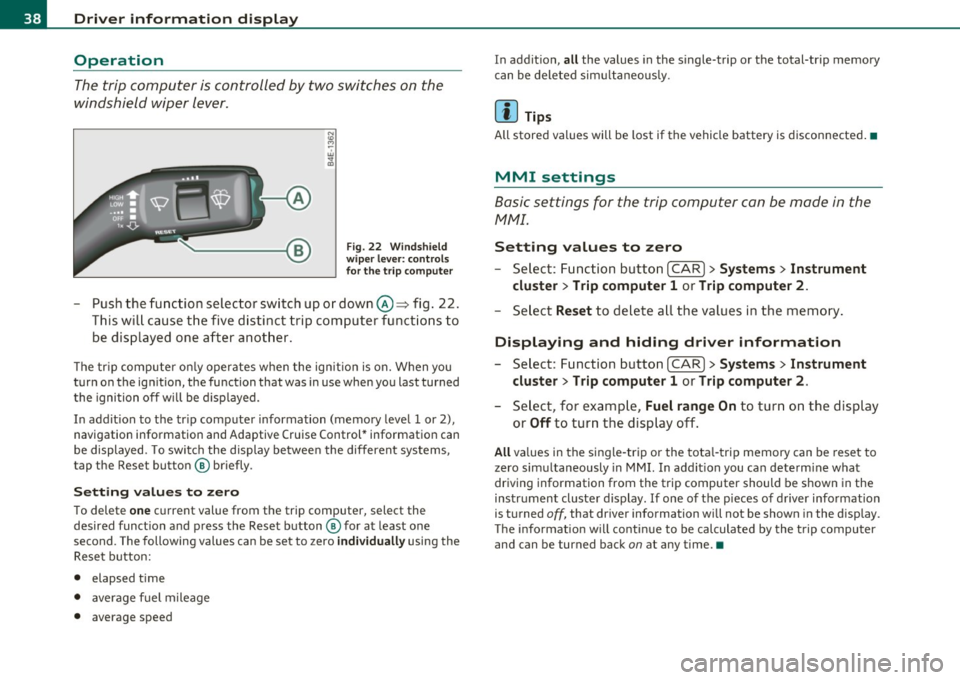
windshield wiper lever.
Fig. 22 Wi ndshi eld
wi per leve r: contr ols
for th e t rip co mputer
- Push the function selector switch up or down@~ fig . 22.
This will cause the five distinct trip computer functions to
be displayed one after another .
The tr ip computer only operates when the ignition is on. When you
turn on the ignition, the function that was in use when you last turned
the ignition off will be d isplayed.
In addit ion to the trip computer information (memory level 1 or 2),
navigation information and Adaptive Cruise Control* information can
be displayed. To switch the display between the different systems,
tap the Reset button ® briefly .
Sett ing values to zero
To delete one current value from the trip computer, select the
desired funct ion and press the Reset button ® for at least one
second. The following values can be set to zero
individu ally using the
Reset button:
• elapsed time
• average f uel mileage
• average speed In addit
ion,
all the values in the single-trip or the total-trip memory
can be deleted sim ultaneous ly .
[ i ] Tips
All stored values will be lost if the vehicle battery is disconnected.•
MMI settings
Basic settings for the trip computer can be made in the
MMI.
Setting values to zero
---Select: Function button I CAR ]> Systems > Inst rument
clust er > Trip comput er 1 or Trip computer 2 .
Selec t Reset to dele te all the values in the memory .
Displaying and hiding driver information
- Select: Function button I CAR ]> Sy stem s> Instru ment
clu ster > Trip computer 1 or Trip computer 2 .
-Select, for example, Fuel rang e On to turn on the d isplay
or
Off to turn the display off.
All values in the single -trip or the tota l-trip memory can be reset to
zero simu ltaneously in MMI. In add it ion you can determine what
driving information from the trip computer should be shown in the
instrument cluster display. If one of the p ieces of driver information
is turned
off, that dr iver information will not be shown in the display.
T he information will cont inue to be calculated by the trip computer
and can be turned back
on at any time. •
Page 43 of 384

Battery operation in the master key is monitored by a check light . The
check light flashes when one of the buttons on the master key is
pressed. If the check light does not flash, the battery is dead and has
to be replaced .
In add ition , when the battery is dead the ..: symbol appears in the
instrument cluster display as well as the message:
Please change key battery
We recommend having the battery changed by an Audi Dealer .•
Electronic immobilizer
The immobilizer helps to prevent unauthorized use of
your vehicle.
A computer chip inside your key automatically deactivates the elec
tronic immobilizer when you insert the key in the ignition lock, or on
vehicles with Convenience key*, when the key is inside the vehicle.
When you remove the key from the ign it ion lock , or on veh icles with
Convenience key, when you remove the key from the vehicle, the elec
tronic immobilizer is automatically activated once again.
& WARNING
Always take the key with you when you leave the vehicle. The key
can disarm the electronic engine immobilizer and permit an unau
thorized person to start the engine and enable operation of the
vehicle systems such as power window or power sunroof leading
to serious personal injury .
(I) Tips
• The immobilizer prevents unauthorized use of the vehicle. The
vehicle cannot be sta rted if an unauthorized key is used. The vehicle
may not start if another radio device such as a key for another vehicle
or a transponder is located on the key ring.
Controls and equip
ment Safety first
Opening and closing
•
For Declaration of Compliance to United States FCC and Industry
Canada regulations=>
page 364. •
Power locking system
General description
The power locking system locks or unlocks all doors and
the rear lid simultaneously.
The power locking system in your vehicle incorporates the following
functions:
• Central locking function
• Selective unlock feature~
page 44
• Remote control feature ~ page 40
• Convenience key*=> page 50
• Anti -theft alarm system ~ page 52
All the doors and the rear lid are locked by the central locking system
when you lock the veh icle. You can set whether generally only the
dr iver's door or all doors and the rear lid should be unlocked when you
open the vehicle in the MMI menu
Central locking to suit your indi
vidual desires~
page 44.
Unlocking the vehicle
You can unlock the vehicle from outside either by using the remote
control
or by turning the key inside the driver's door lock. When you
unlock your vehicle:
• The anti-theft alarm system is deactivated briefly .
• The vehicle interior lights illuminate for approximately 30
seconds.
• All turn signal lights will flash twice when the car is unlocked .
• After un locking the vehicle, you have 60 seconds to open a door or
the rear lid. After 60 seconds, the vehicle automatically locks and the
anti-theft alarm system activates again. ..,
Vehicle care Technical data
Page 63 of 384
control is activated. The high beam function must first be sw itched on
in the MMI
~ page 61.
Light Sensor Malfunction
In the event of a light sensor malfunct ion, the driver is notified in the
instrument cluster display:
~- Automatic headlights/automatic wipers defective
For safety reasons the low beams are turned on permanently with the
switch in
AUTO. However, you can continue to turn the lights on and
off using the light switch. Have the light sensor checked as soon as
possible at a dealership.
& WARNING
• Never use daytime running lights to see where you are going.
They are not bright enough and will not let you see far enough
ahead for safety, especially at dusk or when it is dark . Always
switch on the low beams at dusk
or when it is dark.
• Automatic headlights are only intended to assist the driver .
They do not relieve the driver of h is responsibility to check the
headlights and to turn them on manually according to the current
light and visibility conditions. For example, fog and rain cannot be
detected by the light sensors. So always switch on the headlights
under the se weather conditions and when driving in the dark
io.
• Crashes can happen when you cannot see the road ahead and
when you cannot be seen by other motorists.
- Always turn on the headlights so that you can see ahead and
so that others can see your car from the back.
[I) Tips
• With the switch in AUTO front fog lights and rear fog l ights cannot
be turned on in addition.
Controls and equip
ment Safety first
Clear vision
•
If you remove the ignition from the ign ition lock wh ile the head
ligh ts are still on, a buzzer will sound as long as the driver's door is
open to remind you to turn off the lights.
• Always observe the specific local regulations for you r area as to
when to use your lights .•
Adjusting exterior Lighting
The functions are set in the MMI.
-Select: Function button [CAR]> Systems > Exterior
lighting.
Coming home
The Com ing home function ensures that after turning off the igni
tion and opening the driver's door
the vehicle periphery is illum i
nated in the dark . In addition, the front fog lights, the tail lights and
the license plate light are turned on . On-time can be set for a per iod
from O (off) to 60 seconds .
Leaving home
The Leaving home functions ensures that when unlocking the vehicle
periphery is illuminated in the dark. In addi tion, the front fog lights,
the tail lights and the license plate light are turned on. This function
can be turned on and off.
High beam
With the switch in the AUTO position, the high beams can be t urned
on o nly if the function is turned
on .
Daytime running lights
USA models: The daytime runn ing lights can be turned on or off using
this function.
Canada models: The function cannot be turned off. It is act ivated
automatically each time the ignition is t urned on. This men u item is
shown "g reyed out". •
Vehicle care Technical data
Page 66 of 384
Clear vision
(I) Tips
You should t urn on the emergency flashe rs when:
• you are the last vehicle standing in a traffic jam so that any other
vehicles coming can see you, or when
• your vehicle has broken down or yo u are in an emergency situa
tion, or when
• your vehicle is being towed by a tow truck or if you are towing
another vehicle behind you. •
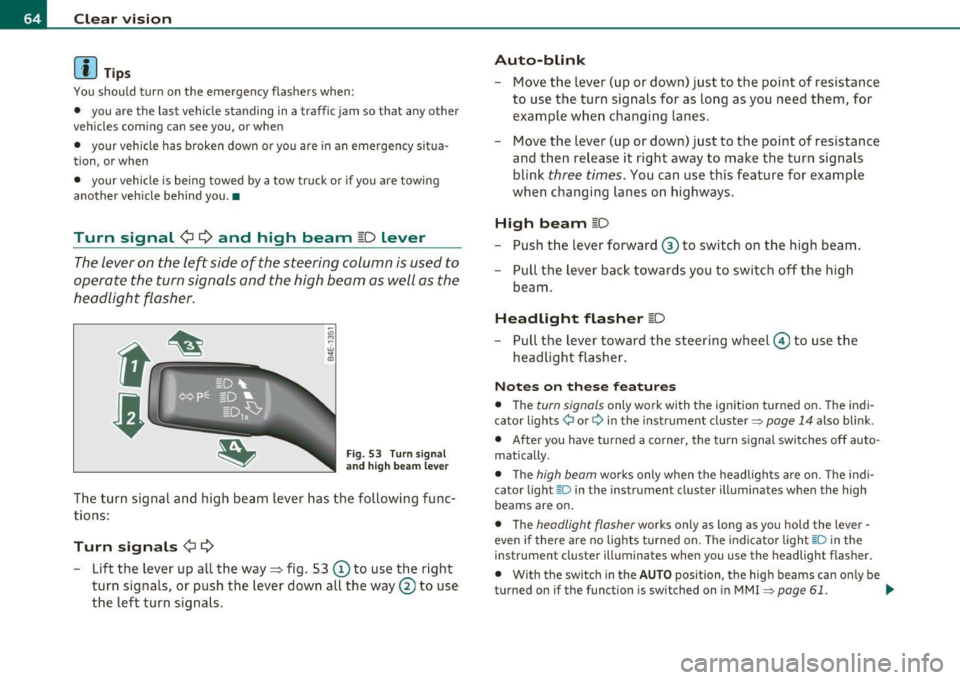
Turn signal ¢¢ and high beam ~D Lever
The lever on the left side of the steering column is used to
operate the turn signals and the high beam as well as the
headlight flasher.
F ig. 53 Turn s ig nal
a n d hig h beam le ve r
The turn signa l and high beam lever has the following fu nc
tions:
Turn signals ¢¢
-Lift the lever up all the way~ fig. 53 © to use the right
turn signals, or push the lever down all the way
0 to use
the left turn signals.
Auto -blink
- Move the lever (up or down) just to the point o f resistance
to use the turn signa ls for as long as you need them, for
example wh en changi ng lanes.
- Move the lever (up or down) just to the point of resistance
and then release it right away to make the turn signals
blink
three times . You can use this feature for example
when changing lanes on highways.
High beam [D
- Push t he lever forward ® to switch on the high beam .
- Pull the lever back towards you to switch off the high
beam .
Headlight flasher [D
Pull the lever toward the steeri ng w heel © to use t he
headlight flasher.
Not es on these feature s
• The turn signals only work with the ignition turned on. T he indi
cator lights ¢ or¢ in the inst rument cluster~
page 14 also blink .
• After you have t urned a co rner, the tu rn s ignal switc hes off auto
matically.
• T he
high beam works only when the headligh ts ar e o n. Th e indi
cator light [D in the instrument cluster illuminates when the high
beams are on .
• The
headlight flasher works only as long as you hold the lever -
even if there are no lights turned on. The indi cato r light aD in the
instrument cluster illuminates when you use the headlight flasher.
• With the swi tc h in the
AUTO posi tion, the high beams can o nly be
turned on if the funct ion is switched on in MMI
~ page 61. ..,_
Page 110 of 384

ffl..__w __ a _r _m __ a_n _ d_ c_ o_ ld ________________________________________________ _
Applie s to veh icles : wi th heated rear seats
Heated rear seats
The seat cushions and seat backs of the two outer rear
seats can be heated electrically.
Fig. 121 Ce nter
conso le rear: Heated
seats
- Rotate the thumb wheel@ to turn on and adjust the
heating for the left rear seat.
- Rotate the thumb wheel ® to turn on and adjust the
heating for the right rear seat.
With the thumb wheel in the O position, heating for the seats is
turned off . The range of adjustment is from 1 to 6 .
The rear seat heating operates only when the seats are occupied. If
there is no one sitt ing in the rear, you should switch off the seat
heating.
0 Note
To avoid damage to the heating elements in the seats, do not kneel
on the seats o r place heavy loads on a small area of the seat. •
App lies to vehicl es : wi th s teering whe el heat ing
Steering wheel heating @
The steering wheel can be heated electrically .
Fig. 122 Multifunc
t ion s teeri ng w heel:
B u tton fo r steering
w hee l heati ng
- Press the (q/1!] button to turn the steering wheel heating on
and off~ fig. 122 . The message
Steering wheel heat ing on ! or
Steering wheel he atin g off ! appears in the instrument
cluster display .
When the steering wheel heat ing is switched on, the steer ing wheel
is heated to about
82°F (28°() and held there .
T he last setting se lected for the steer ing wheel heating (on or off) is
automatically saved when the vehicle is shut off and is assigned to the
remote key.•
Page 124 of 384
-On the road •m ___________________ _
& WARNING (continued)
• The brake booster and the servotronic only work when the
engine is running. If you turn off the engine, more force will be
required to steer or brake the vehicle. If you are not prepared, this
could result in a collision and serious personal injury.
• For your safety, move the selector lever to the P position, then
turn off the engine. Otherwise the vehicle could inadvertently roll
away.
• After turning off the engine, the radiator fan can come on and
run for up to 10 minutes -even if the ignition is switched off. Like
wise, the fan could come on if the temperature in the engine
compartment raises due to heat build up or if you leave the vehicle
standing in direct sunlight.
0 Note
After driving at high engine load, heat can build up in the engine
compartment after you have turned off the engine. This can damage
t he engine. Let the vehicl e stand and run in idl e for about 2 minutes
before turning off the engine. •
App lies to ve hicles : w ith Conve nie nc e key
Driver's messages in the instrument
cluster
Messages appear in the instrument cluster to let the
driver know if something is missing or if something must
be done.
No key identified
This message appears when you press the [START) button, but there
is no remote contro l key inside the vehicle or if the system does not
recognize the key. For example, if your key is
shielded by an object or
encased, i .e . in side an aluminum briefcase, the signal from the key cannot be detected
. Electron ic devices such as cell phones can also
in terfere w ith the radio signal.
Press brake pedal to start engine
This message appears when you press the !S T ART ) butto n when
starting the engine but you have not depressed the brake pedal.
Engage N or P to start engine
This message appears when you start the engine but the selector
lever is not in the P or N position . The engine can be started only if the
selector lever is in one of these two positions .
Key not in vehicle
This message appears together with the 7 symbol when the remote
control key is removed from the vehicle while the engi ne is running.
Th is is to remind you that you should not cont inue your tr ip without
your key.
If the key is no longer inside the vehicle when you turn off the engine,
you will not be able to switch on the ignition or restart the engine.
Also, you will not be able to lock the vehicle from the outs ide .
Shift to P, otherwise vehicle can roll away. Doors do not lock if lever
is not in P.
Thi s message appears for your safety together with an audible
warning signal when you press the
[STOP) button but the selector
lever is not in the P position and you open the driver's door. Move the
selector leve r in to P, otherwise the vehicle could roll away. I n addi
tion, you will not be able to lock the ve hicle with either the lock
button located on the door hand le or the remote control.
To engage steering lock, press and hold STOP button
Th is message appears for your personal safety if you switch off the
engine and the ignition by pressing the
[STOP) button and then open
the driver's door. In this case, the steering will still not be locked. The
steering wheel will lock:
• If you press the
I STO P I button for longer than 1 second.
• If you lock the vehicle from the outside .•
Page 125 of 384

On the road -
----------------
Electromechanical parking brake
Operation
The electromechanical parking brake replaces the hand
brake.
Fig. 135 Center
console: Parking brake
- Pull the switch to apply the parking brake~ fig. 135. The
indicator light in the switch will come on.
- Step on the brake pedal or the accelerator pedal and press
the switch at the same time to release the parking brake.
The indicator light in the switch will go out.
Your vehicle is equipped with an electromechanical parking brake
which replaces the handbrake. The parking brake is designed to
prevent the vehicle from rolling unintentionally.
In addition to the normal functions of a traditional hand brake, the
electromechanical parking brake provides various convenience and
safety functions.
Emergency brake
An emergency brake ensures that the vehicle can be slowed even if
the normal brakes fail~ page 125, "Emergency braking".
Controls and equip
ment Safety first
Indicator lights
•
If the parking brake is applied with the ignition turned on, the
indicator light in the instrument cluster (U.S. models:=.., Canadian
models: ©) and in the switch
«el) will come on.
• If the parking brake is applied with the ignition turned off, the
indicator light in the instrument cluster (U.S. models:=., Canadian
models: ©) and in the switch
«fl) will come on for about 30 seconds
and then go out.
& WARNING
If the vehicle is stationary and the transmission is engaged with
the engine running, the engine should not be speeded up (e.g.
manually from under the hood). Otherwise the vehicle will start to
move -you run the risk of an accident.
0 Note
If the warning/indicator light (U.S . models: BRAKE, Canadian models:
«I» ) flashes in the instrument cluster, there is a brake system
malfunction . By pressing the [CHECK! button, you can bring up a
driver message which explains the malfunction in more detail. If the
message
Parking brake ! Please contact workshop appears, there is
a parking brake malfunction which you should have repaired immedi
ately by an authorized dealership~ page 28.
[ i] Tips
• You can apply the parking brake at any time -even with the igni
tion turned off . The ignition must be turned on in order to release the
parking brake.
• Occasional noises when the parking brake is applied and released
are normal and are not a cause for concern.
• The parking brake goes through a self-test cycle at regular inter
vals -when the vehicle is parked. Any associated noises are normal. •
Vehicle care Technical data
Page 127 of 384

On the road ---------------~:..:.....__
Starting off with a trailer
To prevent rolling back unintentionally on an incline, do
the following:
- Keep the switch pulled and depress the accelerator. The
parking brake stays applied and p reve nts the vehicle from
rolling backward .
- You can release t he switch once you are sure t hat you are
deve loping enough forward momentum at the whee ls as
you depress the acce lerator .
Depending on the we ight of the rig (vehicle and trailer) and the
severity of the incline, yo u may roll backwards as you start. You can
prevent rol ling backwards by holding the park ing bra ke sw itch pulled
out and accelerating -just as you wou ld when starting on a hill with a
conventional hand brake .•
Emergency braking
In the event that the conventional brake system fails or
locks.
- P ull the swi tch and cont inue to pull it to s low your veh icle
with the parking brake in an emergency .
- As soon as you re lease the sw itc h or accelerate, the
braking process stops .
If you pull the switch and hold it above a speed of abou t 5 mp h (8
km/h), the emergency braking function is init iated. The vehicle is
bra ked at all fou r wheels by activat ing the hydraulic b rake system.
Brake performance is s imilar to making an emergency stop~,&.
So that emergency braking is not activated by mistake, an audible
warning tone (buzzer) sounds when the switch is pulled . As soon as
Controls and equip
ment Safety first
the switch is released, or the accelerator pedal is depressed, emer
gency braking s tops.
& WARNING
Em erg ency braking should only be u sed in an emergen cy, wh en
the no rmal foot brake ha s failed o r the brake pedal i s obstructed.
U sing the park ing b rake to perform emerg ency braking will slow
your vehicl e as if you had made a full brake application . The laws
of phy sic s c annot be su spen ded even wi th ESP and it s ass ociated
c omponents (ABS, ASR , ED S). In corn ers and when r oad or
weather condit ion s are bad , a full brake application can cause the
ve hicl e to sk id or the rear end to br eak away- r isking an accid ent .•
Driver messages in the instrument cluster
C aution : Vehicle park ed too steep
Th is message appears when the pa rking brake is applied on an incline
that exceeds abo ut 30%.
In this case the braking power of the parking brake may
not be
adequate
t o p revent the vehicle from rolling un intentionally.
Plea se release parking b rake
Thi s message appears, when a gear is se lected and the accelerato r
pedal is depressed -release the parking brake.
Pre ss brake p edal to relea se park ing brake
T his driver message appea rs when the switch to release the parking
bra ke was pressed. The par king brake can only be released if you press
the brake or accelerator pedal and press the switch at the same time.
.1 Par king bra ke mal funct ion !
T his driver message appears together w ith the yellow symbol
when there is a parking brake malfunct ion.
Vehicle care Technical data