instrument cluster AUDI S8 2010 Owner's Manual
[x] Cancel search | Manufacturer: AUDI, Model Year: 2010, Model line: S8, Model: AUDI S8 2010Pages: 384, PDF Size: 90.95 MB
Page 128 of 384

1111..__0_ n_ t_h _e_ r_o _ a_ d _________________________________________________ _
0 Note
If the warn in g/i nd icator lig ht ( U.S . models: BRAKE , Canadia n mode ls:
«D> ) flashes in the instrument cluster, t here is a b rake system
ma lf u nct ion. By p ress ing t he [
C H E CK i button, yo u can br ing up a
dr iver message which explains the ma lfunction in more detail. If the
mes sage
Parking brake ! Please conta ct work shop appe ars, there is
a park ing brake ma lfunction which you s hou ld have repaired immedi
a tely by an au thor ized deale rship =>
page 28. •
Cruise control
Switching the system on
The cruise contr ol syst em makes it possib le to drive at a
constant speed starting at 2 0 m ph ( 30 km/h).
Fig. 136 Co ntrol lever
w ith set button Fig. 137 D
ispl ay:
Se lec ted speed
- Pull the lev er to positio n (D ~ fig. 136 to switc h th e
syst em on.
- Drive at th e speed you wis h to s et.
- Press button
© to set t hat speed .
The display => fig. 137 will show the set speed. The d isp lay may vary
depe nding on the ty p e of displa y in yo ur vehicle. The indica to r li gh t
CRUISE (US mode l)/ 0 (Canadian mode l) wi ll also light up in the
in st rumen t clu ste r.
T he speed is kept constant via an eng ine output adjustment or act ive
brake intervention.
& WARNING
• Alway s pay attention to traffic even when the cruise control i s
switched on. You are always responsible for your speed and the
di stan ce between your vehicle and other vehicles.
• For safety r easons , the cruise control should not be used in the
city, in stop-and-go traffic , on twisting roads and when road
conditions are poor ( such as ice , fog, gravel, heavy rain and hydro
planing ) -risk of accident .
• Turn off the cruise control temporarily when enter ing turn
lanes , highway exit lane s or in construction zone s.
Page 137 of 384

--------------------------------------------=A~ d:..: a=. p !::...: t~iv .:.. e =-- C=-=- r=u :.:.is =-:: e_C=.:: o:.:n..:. t.:: r:..: o:::.:. L _..J_
Driver information
Applies to veh icles: with A daptive C ruise Cont ro l
Displays in the instrument cluster
Depending on the driving situation, driver information is
displayed in the instrument cluster .
@ Primary d isp lay in the speedometer .
Fig. 145 O vervi ew
in strume nt clu ster
@ Supplementary display in the instrument cluster .
© Message in the instrument cluster d isp lay.
@ Primary display
Important information concerning vehicle operation with Adaptive
C rui se Con trol i s shown in display area @ . T he desired speed you set
is highlighted in the speedometer and the warning lights show
whet her adjustments are being made for an object ahe ad.
T hi s information is always displayed. Display area@ is the refore
called the
primary di splay.
@ Supplementary display
In d isp lay area @ information from the navigation system a nd the
trip computer is displayed in addit ion to information about Adapt ive
Cru ise Control.
Con tro ls a nd e quip ·
m en t Vehicle
OP-eration
You can select among the different information by repeated brief
ta ps o n the R ES ET button on the windshield wiper lever =>
page 38,
"Operatio n".
Particularly on your first trips with Adaptive Cruise Control, the
s upplementar y display should be tur ned on .
© Message
The information in a rea © is not displayed permanently . Informat ion
is displayed on ly if you c hange the time interval, if there is a malfunc
tion or if the Adapt ive Cru ise Contro l is turned off .•
A p plies to v ehicles : wi th Adaptive C ru ise Cont ro l
Primary display in the speedometer
Desired speed
Fi g. 14 6 Pr im ary
d is p lay
i n the spe ed ·
o m et er
Th e desi red speed set by the d river is displayed wi th a red L ED .
T he system a llows only speeds from 20 to 95 mph (30 to 150 km/h)
to be set . This speed range is faint ly illumina ted in the speedometer.
Warning lights (symbols)
• ""c::;, Open road: T he wa rning lig ht ""c::;, shows that AC C is active
and that no moving vehicle has been detected with in range of the
ra dar senso r up ahead in your lane of travel. The set speed is main-
tained . _,,,
Vehicle care Do-it-yourselt service iTechnical data
Page 138 of 384

lffll..__A_ d_a_ p,__ t_iv _ e_ C_r _u _ i_ s _e _ C_ o_ n_t _ r_ o _ L ___________________________________________ _
• -0,11,c::::, Driving in tr affic: The warning light c:::::,11 .. -::::::, shows that a
vehicle moving in yo ur lane of travel h as been de tecte d up fron t in
your lane o f travel. Your speed is adjusted accord ing to the speed of
the vehicle up front. ACC accelerates an d brakes automat ically within
the system's capabil ities .
• -011 ,,-0 Request for driver to assume control : The re d flashing
warning light
c:::::, 11 .. c::::, means Request for driver to assume control.
Yo u as the driver must slow the vehicle with the foot brake . T he
symbo l
-::::::,11,, c::::, t el ls you that the Adapt ive Cr uise Contro l is not able
to slow the vehicle down e nough to keep a enoug h distance to the
vehicle in front of you. A wa rning to ne signa l will a lso sound w hen the
symbol appears .
& WARNING
Improper use of the Adaptive Cruise Control features and inatten
tion can lead to an crash and serious personal injury.
• Never allow the closing speed between you and other vehicles
to be so high that the Adaptive Cruise Control may not be able to
slow your vehicle safely. If closing speed is too high , you must
apply the brakes yourself to reduce th e risk of a rear-end crash.
• Always sele ct a greater following di stance to the vehicle up
ah ead on w et roads than on dry roads.
• Always read and heed the information and WARNINGS~
& in
" Description " on
page 128.
[ i J Tips
• If the Adapt ive Cruise Control in itiates braking, the hydraulic
bra ke system is under pressure . Therefore, t he b rake pedal distance
is shorter and the pedal feels "harde r" .
• If yo u use the acceler ator to go f aster th an the speed o f the
vehicle ahead of yo u, the d river intervention prompt will not be
accompanied by a warning to ne.
• If the speed you previously set is exceeded, t he indicato r light in
t he speedomete r will sw itch o ff. •
A ppli es to veh icles : w ith Adaptive Cruise Co ntrol
Display in the instrument cluster
You should hav e the supplementary information
displayed here, p articularly on your first trips .
Fig. 147 Displ ay i n
t he in strument clu ste r
Scr oll throug h the av ail able inform ation dis plays by br ie fl y t appi ng
the (RESE T) button at the end of the windshield w iper lever . You can
sele ct a nd information from the trip comp ute r, navigation sys tem or
Adaptiv e Cr uise Control.
© Vehicle sy mbol
® St atu s
© Distan ce
© Vehicle symbol
Th e veh icle symbol indicates whe ther the sy stem has de te cted a
moving veh icle up front in your lane of travel.
• When no moving ve hicle is detected up fro nt, only the
outline of
the vehicle
is d isp laye d.
• A
gray vehicle wi ll appear when a moving vehicle is de tected up
ahead .
• A
red vehicle will appea r if th e s itua tio n de te cted will s oo n l ead to
a requ est for the driver to assume contro l. .._
Page 144 of 384
lll'L_!_A~u~d~i~l!:!a~n~e '...:a~s~s:!:is~t ~--------------------------------------------
Aud i Lane assist
Lane assist
Applies to veh icles : w ith lane assist
Description
Lane assist helps you keep your vehicle in your lane.
Lane assist uses a camera to detect lane boundary lines. If the system
detects that your vehicle is about to leave a lane boundary line, the
steering wheel
vibrates to alert the driver. If lane assist detects
boundary lines on both sides o f the veh icle's lane, the system enters
act ive standby mode, which is indicated by t he gree n indicator light
/: on the instrument cluster .
If the system is in active standby mode and the turn signal is acti
vated before driving over the boundary line , the warning does not
occur sinc e th e system allows for in tention al lane changes.
The system is designed for driving on freeways and expanded high
ways and th us works only at speeds of 40 mph (65 km/h) or more.
& WARNING
• Lane assist will not keep your vehicle in your lane. The system
only warns the driver when the vehicle is leaving the lane. The
driver is always responsible for keeping the vehicle in the lane.
• The camera is not able to detect all lane boundary lines and in
some cases might also detect lane structures or objects as
boundary lines. This can lead to incorrect warnings or warnings
that fail to go off at all.
• The camera's visibility can be impaired by vehicles ahead of
you, for instance, or by rain, snow, heavy spray or light shining
into the camera lens. This can cause lane assist to fail to detect
boundary lines. •
Applies to veh icles: wit h lane assist
Activating and deactivating
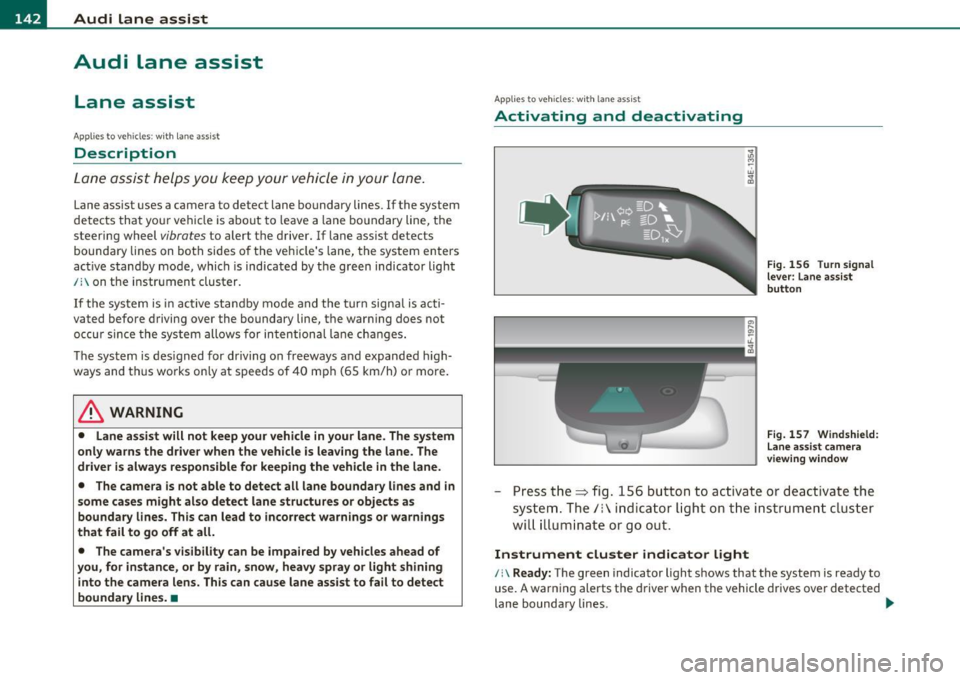
Fig. 156 Turn signal
lever: Lane assist
button
Fig. 157 Windshield:
Lane assist camera
viewing window
-Press the=> fig . 156 button to act ivate or deactivate the
system. The/: ind icator light o n the instrument cluster
will illumi nate or go out.
Instrument cluster indicator light
/:\Ready: The green indicator light shows that the system is ready to
use. A warning alerts the driver when the vehicle drives over detected
lane boundary lines . -.,
Page 145 of 384

_________________________________________________ A_u_ d_i_ l_ a_ n_ e_ a_s _s_ i_s _t __ _
Not read y: The yellow indicator light shows that the system is
turned on but unable to send a warning. T his can be due to the
following:
• T here are no boundary lines, or there is only one boundary line
present.
• The boundary lines are not detected (e .g . due to snow, dirt, wet
conditions or light shining into the camera lens) .
• More than two boundary lines (such as at const ruct ion sites) are
located in the vehicle's lane .
• T he veh icle's speed is below the speed needed to ac tivate it, which
is about 40 mph (65 km/h) .
• T he lane is narrowe r than about 8
ft . (2.5 m), or wider than about
16 ft. (5 m).
• Th e curve is too sharp.
Note s on the in strum ent clust er displa y
When the lane assist turns off automat ica lly, the instrument cluster
indicator goes out and one of the fo llowing messages appears on the
display :
Aud i lane ass is t not av ailable: Cur rentl y n o sens or v ision
T his message appears when the camera can no longer function
because it cannot detect the boundary lines. This may be due to the
following:
• T he exte rior side of the came ra viewing window =>
page 142,
fig. 157 is covered with dirt or ice. Clean this part of the windsh ield.
• Th e came ra viewing window is fogged up on the inside. In this
case, wait until the fog d isappears before turning lane assist on
again.
• T he system was unable to detect bo undary lines over an extended
period of time due to road co nd it ions (such as snow-cove red lanes) .
Do not turn lane assist on aga in until the lines can be more easily
detected .
Aud i lane a ssist n ot availabl e
Controls and equip
ment Safety first
A temporary malfunction is preventing lane assist from operating
.
Tr y turning on lane assist aga in at a later time.
Au di l ane a ssist: system fault
The system shou ld be checked by an authorized Audi dealer or other
qualified wo rkshop.
[ i ] Tips
• Make su re that the camera view ing window => page 142, fig. 157
is not covered by stickers or similar objects .
• Always keep the came ra v iewing w indow clean. This can us ually be
done by operating the windshie ld wipers .•
App lies to vehic les : wi th la ne ass ist
MMI settings
You can use the fv1fv1I to adjust the warning time and
steering wheel vibration .
Setting the warning time
Select: Function button I CAR]> Sy stems > Audi lane ass ist>
Warning early , adaptive or late .
Setting th e st eering wheel vibration
Select : Function button I CAR ]> Systems > Audi lane ass ist >
Steering vibration weak , medium or strong .
Setting the w arning tim e
Earl y: This setting wa rns the dr iver befo re a wheel touches the
detected lane boundary line . The warning depends on the veh icle 's
angle as it approaches the boundary line . If you app roach a bounda ry
line gradually, the warn ing will occur earlier . If you approach the
boundary line at a very sharp angle, the warning will occur just before
a whee l touches the li ne . .,._
Vehicle care Technical data
Page 154 of 384

-Audi side assist •m ___________________ _
Notes
Applies to vehicles: w it h side ass ist
Messages in instrument cluster display
If side assist turns off automatically, the indicator light on the button
w ill go out and you w ill see a message in the instrument cluster
display:
Audi s ide ass ist not available: sensors possibly blocked
T he side ass ist senso rs a re bu ilt into the rear bumpe r on the left and
r ight (not v is ible on the outside)=>
page 145, fig. 158 . To ensu re
that yo u do not adversely affect the way side assist functions, foreign
objects (such as st ickers or bicycle racks) should not be attached to
the area on t he rear bumper whe re the sensors are located. If side
ass ist f unctions are adve rsely affec ted, you will see this mes sage in
the instrument cluster d isp lay. Remove anyth ing that may be
blo ckin g the sensors .
If no vehicle is detected for a longer period of t ime w hile driving, side
assist w ill also sw itch
off automatica lly .
Audi s ide ass ist currently not available
If the re is a tempo rary p ro blem (such as the vehicle 's ba tte ry c har ge
being low), s ide assist ca nnot be act ivated temporar ily .
Audi side a ssist: system fault
Have the system checked by an authori zed Audi dealer or qualified
work sho p.•
Ap plies to ve hicles : w it h sid e ass ist
Safety tips
The s ide assist detection may be limited when driving aro und narrow
s tr eet corners, on hilly st ree ts, an d un der poo r wea ther condit ions. It is possib
le that the radar sensors may also detect other objects,
s uch a s high or s taggere d guardrails.
Side assis t does not measure ac tual lane wid th . The system assumes
a fixed la ne w idth . Detection in the left and rig ht lanes is based on
th is assu m ed lane w id th . W hen drivi ng on nar row ro ads or w hen
driving to the left or r ight of the cente r of a t ravel lane, it is possib le
th at vehicles will be de te ct ed tha t are
no t in the la ne next to t he lane
you are us ing.
& WARNING
• Improper reliance on the side assist system can cause collisions
and serious personal injury:
-Never rely only on s ide assist when changing lanes.
- Always check rear view mirrors to make sure that it is safe to
change lanes.
• Side assist cannot detect all vehicles under all conditions
danger of accident!
• Side assist cannot detect vehicles in time to alert you when
they approach from behind at very high speed , or fall drop back
very quickly .
• The radar sensor's
vision can be reduced or entirely blocked by
rain, snow, and heavy spray. This can result in side assist not
adequately detecting vehicles or, in some cases , not detecting
them at all . Always keep an eye on the direction you are traveling
and the relevant area around the vehicle .
• Please note that side assist indicates there are approaching
vehicles , or vehicles in your blind spot , only after your vehicle has
reached a driving speed of at least 19 mph (30 km/h) .
• Side assist signal does not work around tight corners (turning
radius less than 328 feet, or 100 m) .
• Side assist is no replacement for the driver's full attention . The
driv er alone is responsible for lane changes and similar driving
maneuvers . Always keep an eye on the direction you are traveling
and the relevant area around the vehicle .
~
Page 157 of 384

Automatic transmission Ill
----------------
The selector lever must be in Nor P . If one o f the dr iv in g positions is
e n gag ed a saf ety s witch will prev ent th e engin e from b eing sta rt e d.
S ee also~
page 119.
Be fore you move t he se lecto r lever from t he P position , yo u m ust
a lw ay s a ppl y the b rake pedal before and while depr ess ing the bu tton
in t he handle of the selector lever.
_& WARNING
• Unintended vehicle movement can cause serious injury.
- When the selector lever is
in a driving position, the vehicle
may creep, even at idle speed. Therefore do not release the
parking brake or foot brake until you are ready to move,
because power is transmitted to the wheels as soon as a driving
position is engaged.
- Do not accelerate while selecting a driving position. At this
time the engine must be at idle speed so that undue stress is
not placed on the clutches in the transmission.
- Remember : · even when stopped briefly with the automatic
transmission in "D" or "R", engine power is being transmitted
to the wheels. Your vehicle could "creep " forward or backward.
When stopped, keep the brake pedal fully depressed and use
the parking brake if necessary to keep the vehicle from rolling.
• If the selector lever is unintentionally moved into N while you
are driving, take your foot off the accelerator pedal and wait for
the engine to return to idle speed before selecting a driving posi
tion .
• Never shift into "R" or "P" when the vehicle is in motion.
• Never get out of the driver's seat when the engine is running.
• If you must get out of the vehicle , move the selector lever
securely into the P position and apply the parking brake firmly.
• If the engine must remain running, never have any driving
position engaged when checking under the hood. Make sure the
selector lever has securely engaged and is locked in "P" with the
parking brake firmly set~
page 281, "Engine compartment ".
Controls and equip
ment Safety first
& WARNING
(cont inued)
Otherwise, any increase in engine speed may set the vehicle in
motion, even with the parking brake applied. •
Selector lever positions
This section descr ibes the select or lever posi tions and
dr iv ing ranges .
Fig. 169 Display in
the instrument cl uster :
selector lever
in posi
tion D
Th e sele cto r lever p osition eng ag ed a ppe ars n ext to t he se le cto r lever
as well as in the i nstr ument cluster display. A lso, the cur rent gear
en gage d is s hown i n positions D a nd 5.
P -Park
In t his se le cto r lever p osit io n th e tran smi ssion i s m ec hanicall y
loc ked. Engage
P o nly when the vehicle is completely stopped~ &
in "Driving the autom ati c transmis sion " on page 154.
To shift in o r o ut of position P , yo u must first pre ss and hold the brake
peda l
and then press t he release button in t he se lecto r leve r hand le
while moving the sel ecto r le v e r to or fro m
P. Y ou ca n shift out of this
posit ion on ly with t he i gnit io n on .
R -Reverse
Th e transm ission wi ll automat ica lly se lect t he lowest gear ratio w hen
you s hift in to reverse . ..,_
Vehicle care Technical data
Page 159 of 384

______________________________________________ A_ u_ t_ o _ m_ a_ t_ ic_ t_r_a _ n_ s_m_ i_ s _s_ i_ o _ n __ ffllll
Automatic selector lever lock
The se lector lever is locked in the P and N positions when the ignition
is turned on. To move the lever from these posit ions the driver must
depress the brake pedal. As a reminder to the driver, the following
warning appears in the instrument cluster display when the selector
is in
P and N:
When stationary apply foot brake while selecting gear
A time delay element prevents the selector lever from lock ing when
it is moved through the
N position (going from R to D). The locking
element will lock the selector lever if the lever is left in N (Neutra l) for
more than approximately
l second, w ithout the brake pedal being
pressed.
At speeds above about 3 mph (5 km/h) the Automat ic Shift Lock is
automatically deactivated in the
N position.
Interlock button
The lock button o n the selector lever prevents the lever from being
accidentally shifted into certain positions. Pressing this button deac
tivates the selector lever lock . Depending on the direction of the
shift, the selector lever locks at different positions . The pos itions are
highlighted in the illustration ~
page 156, fig. 170.
Ignition key safety interlock
The key cannot be removed from the ignition un less the selector lever
is in the
P park position. When the ignition key is removed, the
selector lever will be locked in the
P position.•
Kick-down
The kick-down feature allows the vehicle to generate
maximum acceleration.
When you press the accelerator pedal beyond the resistance point
that is reached at full throttle, the transmission will select a lower
gear ratio based on vehicle speed and engine RPM. The engine RPM
will be controlled to produce maximum vehicle acceleration as long
Controls and equip
ment Safety first
as you cont
inue to press the accelerator pedal beyond this resistance
point.
& WARNING
Be careful when using the kick -down feature on slippery roads.
Rapid acceleration may cause the vehicle to skid. •
Dynamic shift program (DSP)
The automatic transmission is electronically controlled.
The transmission is self adapting and will automatically select the
best sh ift p rogram su ited to the driv ing cond it ions and driving style.
The transmission will select one of the
economy programs when you
drive at a steady speed or a gradually changing speed without heavy
acceleration . This ach ieves optimum fuel efficiency, with early
upshifting and delayed downshifting.
Th e transmission will automatically select the
sporty shift programs
when you dr ive at higher speeds, or w ith heavy acceleration and
frequently changing speeds. Upshifts are delayed to make full use of
engine power . Downshifting takes place at higher engine speeds than
in the economy programs .
The select ion of the most suitable shift program is a cont inuous,
automatic p rocess. The driver can also make the transmission switch
t o a spo rty program by
quickly pressing down the gas pedal.
Th is causes the transmission to shift down to a lower gear to achieve
rap id acceleration, e.g . for quickly passing another vehicle. Yo u do
not need to press the gas pedal into the kick -down range . After the
transmission has upshifted, the original program is selected
according to your driving style.
An additional shift program allows the automatic transmission to select the proper gear for uph ill and downhill gradients.
Th is prevents the transmission from upshifting and downshifting
unnecessari ly on hills. The transmission will shift down to a lower _,.
Vehicle care Technical data
Page 179 of 384
____________________________________________ A_ d_a_ p ,_ t_iv _ e_ A _ i_ r _ S_ u_s_, p __ e_n _ s_ i _o_ n __ ffllll
Chassis Controls
Four different driving modes can be set by the driver .
The automatic control processes are speed- and time-dependent . For
example, it is not poss ible to raise the suspension to the lift mode
above certain speeds .
When a speed of about 75 mph (120 km/h) is exceeded for more than 30 seconds, the vehicle is automatically lowered approximately 1
inch (25 mm) to a level suitable for highway speeds, except in the
standard mode . Road ho ldi ng is opt imized as a result of the lowe r
center of gravity and fue l consumption is reduced as a result of
reduced wind resistance.
Level adjustment
lift
automatic
dynamic
automatic Ground clearance
about 5. 7 inches (145 mm)
about
4. 7 inches (120 mm)
about 4. 7 inches (120 mm)
about 3.9 inches (100 mm)
Select the automatic mode if you prefer a suspension setting empha
sizing comfort. Damping characteristics emphasizing comfort are
selected in this mode .
• Lowering : When a speed of about 75 mph (120 km/h) is exceeded
for more than 30 seconds, the vehicle is automatically lowered by about 1 inch (25 mm).
• Raising: The vehicle is automatically ra ised aga in if the speed falls
below about 44 mph (70 km/h) for a period of 120 seconds. The
vehicle is ra ised immediately when speed falls below about 22 mph
(35 km/h).
dynamic
Select the sport mode if you prefer a sporty suspension setting . In
this mode, the vehicle is lowered wh ile it is st ill stationary and sporty
Controls and equip
ment Safety first
damping characteristics are selected
. The warning light c.::> in the
instrument cluster will come on for a few seconds just to remind you
of the reduced ground clearance.
If you switch off the engine whi le the vehicle is in the dynamic mode
and then switch on the ignition once aga in, the
c.::> warning light will
also come on again for a few seconds.
• Lowering : When a speed of about 75 mph (120 km/h) is exceeded
for more than 30 seconds, the vehicle is automatically lowered by an
additional 0.2 in (5 mm) .
• Raising: The vehicle is automatically raised again if the speed falls
below about 44 mph (70 km/h) for a period of 120 seconds. The
vehicle is ra ised immediately when speed falls below about 22 mph
(35 km/h).
standard
Select the standard mode if you desire a suspension sett ing with a
special emphasis on comfort . In the standard mode there is
no
lower ing of the s uspens ion. Even at high speeds, the vehicle stays at
the same level. Damping characteristics with a decided emphasis on
comfort are selected in this mode.
lift
Select the lift mode when you have to travel over poor sections of
road (e .g . trails) . In the lift mode, the vehicle is raised by 1 inch (25
mm) compared to normal level while it is still stationary and damping
characterist ics are adjusted to emphasize comfort .
The lift mode can be activated only at speeds below 50 mph (80 km/h). When a speed of about 62 mph (100 km/h) is exceeded, the
system automatica lly leaves lift mode and the mode set previously
(standard, automatic, dynamic) is activated again .•
Vehicle care Technical data
Page 181 of 384

____________________________________________ A_ d_a_ p ,_ t_iv _ e_ A _ i_ r _ S_ u_s_, p __ e_n _ s_ i _o_ n __ _
Setting the Driving Modes
The driving modes are set in MMI.
Fig. 1 94 MMI d isplay:
Se tti ngs
The ignition must be switched on to set the driving modes.
- Press the [ CAR]function button. The main menu
Adaptive
Air Suspension
appears::::> fig. 194.
- Select the desired mode with the control knob .
Please note that not every driving mode can be selected in every
driving situation . For examp le, it is not possible to switch to lift mode
at speeds above 50 mph (80 km/h). This mode is shown
greyed out in
the MMI display.
For additiona l information on the driving modes=>
page 177,
"Chass is Controls" . •
Jacking Mode When Changing a Flat Tire
This mode must be activated before raising the vehicle
with a vehicle jack .
Switching jacking mod e on and off
- Select: Function button [CAR]> Adaptive Air Suspension
> function button [SETUP].
Controls and equip
ment Safety first
-
Turn the control knob to Veh icl e jac k mode and select on
or off as desired.
The vehicle jack mode must be act ivated before changing a whee l so
that the automatic control processes for the air suspension do not
make lifting with the vehicle jack more difficult.
In the veh icle jack mode the indicator light in the instrument cluster
w v illuminates.
& WARNING
The hei ght of the parked vehi cle ca n c hange due to te mp erature
fluc tu at ions or c ha ng es in l oad .
[I) Tips
The vehicle jack mode is switched off automatically at speeds above 9
mph (15 km/h). •
Towing a Trailer
Automatic lowering is not desirable when towing a
trailer.
If you are going to tow a trailer, you must activate the tra iler
towing mode .
Switching the trail er towing mode on and off
manually
- Select: Function buttont( CAR]> function button [SETUP].
- Select Trailer towing mode on or off as desired .
Level Adjustm ent when T ow ing a Trail er
The following applies to vehicles with Adaptive Air Suspension:
Vehicle care Technical data