wheel AUDI S8 2010 Owner's Manual
[x] Cancel search | Manufacturer: AUDI, Model Year: 2010, Model line: S8, Model: AUDI S8 2010Pages: 384, PDF Size: 90.95 MB
Page 157 of 384

Automatic transmission Ill
----------------
The selector lever must be in Nor P . If one o f the dr iv in g positions is
e n gag ed a saf ety s witch will prev ent th e engin e from b eing sta rt e d.
S ee also~
page 119.
Be fore you move t he se lecto r lever from t he P position , yo u m ust
a lw ay s a ppl y the b rake pedal before and while depr ess ing the bu tton
in t he handle of the selector lever.
_& WARNING
• Unintended vehicle movement can cause serious injury.
- When the selector lever is
in a driving position, the vehicle
may creep, even at idle speed. Therefore do not release the
parking brake or foot brake until you are ready to move,
because power is transmitted to the wheels as soon as a driving
position is engaged.
- Do not accelerate while selecting a driving position. At this
time the engine must be at idle speed so that undue stress is
not placed on the clutches in the transmission.
- Remember : · even when stopped briefly with the automatic
transmission in "D" or "R", engine power is being transmitted
to the wheels. Your vehicle could "creep " forward or backward.
When stopped, keep the brake pedal fully depressed and use
the parking brake if necessary to keep the vehicle from rolling.
• If the selector lever is unintentionally moved into N while you
are driving, take your foot off the accelerator pedal and wait for
the engine to return to idle speed before selecting a driving posi
tion .
• Never shift into "R" or "P" when the vehicle is in motion.
• Never get out of the driver's seat when the engine is running.
• If you must get out of the vehicle , move the selector lever
securely into the P position and apply the parking brake firmly.
• If the engine must remain running, never have any driving
position engaged when checking under the hood. Make sure the
selector lever has securely engaged and is locked in "P" with the
parking brake firmly set~
page 281, "Engine compartment ".
Controls and equip
ment Safety first
& WARNING
(cont inued)
Otherwise, any increase in engine speed may set the vehicle in
motion, even with the parking brake applied. •
Selector lever positions
This section descr ibes the select or lever posi tions and
dr iv ing ranges .
Fig. 169 Display in
the instrument cl uster :
selector lever
in posi
tion D
Th e sele cto r lever p osition eng ag ed a ppe ars n ext to t he se le cto r lever
as well as in the i nstr ument cluster display. A lso, the cur rent gear
en gage d is s hown i n positions D a nd 5.
P -Park
In t his se le cto r lever p osit io n th e tran smi ssion i s m ec hanicall y
loc ked. Engage
P o nly when the vehicle is completely stopped~ &
in "Driving the autom ati c transmis sion " on page 154.
To shift in o r o ut of position P , yo u must first pre ss and hold the brake
peda l
and then press t he release button in t he se lecto r leve r hand le
while moving the sel ecto r le v e r to or fro m
P. Y ou ca n shift out of this
posit ion on ly with t he i gnit io n on .
R -Reverse
Th e transm ission wi ll automat ica lly se lect t he lowest gear ratio w hen
you s hift in to reverse . ..,_
Vehicle care Technical data
Page 161 of 384

______________________________________________ A_ u_ t_ o_ m_ a_ t_ ic_ t_r _a _n_ s_m _ i_s _s_ i_o _n _ ___._
Appli es to ve hic les : wi th tip tro nic -st ee rin g w he el
Steering wheel with tiptronic ®
The shift buttons on the steering wheel allow the driver to
shift gears manually.
Fig. 173 Steering
wheel: S hift buttons
-To downshift, touch the button on the left 0-
- To upshift, touch the button on the right G).
The shift b uttons are activated when the selector lever is in D, Sor in
the manual shi ft program (tiptronic) .
Of course, you can continue to use the manual shift program with the
selector lever on the center console .•
Fail-safe mode
If tiptronic® suffers a malfunction, the foil-safe mode
maintains minimum driveobility .
In the event of particular system malfunctions, the automatic trans
mission switches to the fail-safe mode. This is signalled by all the
segments in the display illuminating or going out.
You can continue to move the selector lever to all positions . The
man ual shift prog ram (tiptronic) is switched off in the fail-safe mode.
Con tro ls a nd e quip
m en t Vehicle
OP-eration
In selector lever positions D and Sand in the manual shift program,
the t ransm ission remains in 3rd gea r if 1st, 2nd or 3rd gear was
engaged previously. The transm ission remains in 5th gear, if 4th, 5th
or 6th gear was engaged previously.
T he next time you dr ive off or start the engine, 3rd gear is engaged.
You can cont inue to use reverse gear . But the electronic lockout for
reve rse gear is turned off.
0 Note
If the transmission switches to fail -safe mode, you should take the
vehicle to an authorized Audi dealership as soon as possible to have
the cond ition corrected .•
Emergency release for selecto r Lever
If the vehicle's power supply foils, the selector lever con
be released in on emergency .
Fig. 174 Remo ve the
as htray inse rt
~
Vehicle care Do-it-yourselt service iTechnical data
Page 168 of 384

llffl..__A_ d _ v_a_ n_ c_e _d _ P_ a_ r_ k_ i _n_ g:- S_,,_ y_s _t _e _m ________________________________________ _
The rear-view camera section appearing in the MMI Display is approx
imately the same as the coverage area represented in=>
page 165,
fig. 181 or© in=> page 165, fig. 182. Objects located in the rear
view camera's uncovered area@=>
page 165, fig. 182 or in the close
vicinity of the bumper are not recognized .
& WARNING
Please note that objects not touching the ground can appear to be
further away than they really are (for example, the bumper of a
parked vehicle, a trailer hitch, or the rear of a truck). In this case,
you should not use the guide help lines to measure distance -
danger of accident! •
Applies to veh ic les : w ith Advan ced Parking System with rear v iew camera
Parking mode 1
"Parking mode 1" can aid when parking in a garage or
parking space, for example.
Fig. 183 MMI Display:
Aiming at the parking
spot by adjusting the
steering wheel angle Fig. 184 MMI Display:
Orienting the vehicle
with aid of the blue
surface
- Before parking , switch on the Adaptive Air Suspension
=> page 18 standard or automatic mode .
- Activate the Audi parking system=>
page 161. "Parking
mode 1"
=;, fig. 183 is displayed by default. Dynamic
orange orientation lines ® and a blue static surface ©
are projected into the rear-view camera picture.
- With the vehicle stationary, select the proper steering
wheel angle for the parking spot with the aid of the orange orientation lines.
- While driving in reverse gear, adjust the steering wheel
angle to fit the parking space with the aid of the orange
orientation lines =>
0.
- Align your vehicle corresponding to the blue surface. The
blue surface should be parallel to the parking spot lines
=> fig.
184.
© Blue surface
The surface behind the vehicle, identified by various shades of blue,
represents an extens ion of th e outer vehicle outline by approximately
16
ft (5 m) to the rear . The transitions of the blue surfa ces are
distanced approximately 3
ft (1 m), 6 ft (2 m), and 16 ft (5 m) away
from the vehicle. .,
Page 169 of 384

_______________________________________ ..:.A ..:. d=...::. v..=a :.:n..:..: c::.: e=. d=-..: P:....= a..:.r .:.:k ..:..:in :....:.2 9~ S ::.:l: y..:s :.:t :.:e :.:m..:....:...__Jffl11
@ and @ Orange orientation lin es
The orientation lines change d irect ion with the steer ing wheel angle .
T hese lines identify the direction of t ravel the rear of the ve hicle
would be taking, driving in reverse gea r with the current stee ring
w heel ang le .
The dynamic orientation lines are provided with markers @. These
ma rkers are each pla ced at a d ista nce of app rox . 3 ft (1 m) from o ne
another. Th rough these markers, the distance to an obstacle can be
es tim ated .
© Redline
The dista nce between your rear b umpe r© and the red line is approx
imate ly 16 inches (40 cm)=>& . Here, at the latest, you should stop
ba ckin g up =>
page 170 .
© Rear bumper
The rear bumpe r of your ve hicle also appea rs in the MM I Display, for
better or ientation.
& WARNING
Please note that objects not tou ching the ground can appear to be
further away than they really are (for example, the bumper of a
parked vehicle, a trailer hit ch , or the rear of a truck). In this case,
you should not use the guide help line s to measure di stance -
danger of accident!
0 Note
In the MMI D isplay, the direction of travel of the vehicle rear is shown
depe nd ing on the stee ring whee l angle . T he ve hicle front swi ngs out
more than the vehicle rear.
Con tro ls a nd e quip
m en t Vehicle
OP-eration
(I) Tips
• In order for the rear-view came ra to func tion p roperly, the came ra
lens =>
page 161, fig. 176 must be kept clean, and free of snow and
i c e. Please follow t he addit ional no tes on =>
page 174 .
• T he positions of the orientat ion lines /surfaces are displaced up
or dow n if the par king p ro cess is car ried ou t with the rea r-view
camera in Adaptive Air Suspension=>
page 18 dynamic or lift mode.
Th erefore, the ac curacy is red uced. •
App lies to veh icl es : w it h A dvance d Park ing Sys tem w ith rea r view ca mera
Parking mode 2
"P arking mode 2" ca n be used as aid when (parallel)
parking on the side of the road , for e xample .
Vehicle care
Fig. 185 MMI Di spl ay:
Blue su rface aligned
with targeted p arking
s p ot ...
Do-it-yourselt service iTechnical data
Page 170 of 384

ffl..__A_ d _ v_a_ n_ c_e _d _ P_ a_ r_ k_ i _n_ g:- S_,,_ y_s _t _e _m ________________________________________ _
Fig. 186 MMI Display:
Contac t of the b lue
curved line wi th the
curb
- Find a parking spot on the right side of the road, for
example.
- Switch on the Adaptive Air Suspension=>
page 18 stan
dard or automatic mode.
- Position your vehicle parallel to the edge of the road, approx imately 3
ft (1 m) away from a parked vehicle
=> page 164, fig . 180. When par king next to obstacles,
please note=>
page 169.
-Activate the Aud i parking system=> page 161. "Parking
mode 1" is displayed by default .
- Press the control button with the
mode © => page 166,
fig. 184 function. "Parking mode 2" => page 167, fig. 185
appears in the MMI Display .
- Back up in reverse gear and adjust the position of your vehicle in such a way, that the dark blue surface indicated in the MMI Display@=>
page 167 , fig. 185 borders on
the vehicle behind, or the parking spot line. If you are
not
parking next to any obstacles=> page 169, the long side
of the dark blue surface should border on the curb. The
entire dark blue surface has to fit into the park ing spot
=>
page 164, fig . 180. -
Whi le the vehicle is stationary, turn your steering wheel to
the right as far as it will go.
- Back up into the parking spot. If you are
not parking next
to any obstacles =>
page 169, the dark blue bend©
should touch the curb=> fig. 186 . Stop your vehicle .
- While the vehicle is stationary, turn your steering wheel in the opposite direction (left) as far as it wil l go .
- Continue to back up into the parking spot until the vehicle
is parked parallel to the curb. When backing up, also keep
an eye on the vehicle front=>
0.
With "parking mode 2", you can park on the left and right side of the
road. For this reason, the b lue surfaces and curved lines are displayed
in different shades of blue . The dark blue surface @and the dark blue
curved line © can be used to park on the right s ide of the road . The
light blue surface
(D and the light blue curved line® can be used to
park on the left side of the road.
When the tur n signal is sw itched on , only the necessary s urfaces and
curves are shown. To change the side that is shown , simply change
t he tu rn s ignal.
T he disp layed light blue® or dark blue © curved line identif ies the
turn-around po int when maneuvering to park. If the curved line
touches the curb, the steer ing wheel turn-around point has been
reached => fig .
186.
The d istance from the rear bumper © to the red line@ is app roxi
mately
1.3 ft (40 cm) . Here, at the latest, you should stop backing up
=>
page 170 .
& WARNING
Please note th at obje cts not tou chin g th e g ro und can app ear t o be
further away than they rea lly are (fo r exa mp le, the bumpe r of a
parked vehi cle, a traile r hit ch , or the r ear of a truck ). In thi s ca se, •
Page 171 of 384

_________________________________________ A_ d_v _ a_ n_ c_e _d _ P_ a_ rk_ in_ g =- S -.:.y_s _t _e _ m ___ _
& WARNING (co ntinued )
you should not use the guide help lines to measure distance -
danger of accident!
0 Note
I n the MM I Dis p lay, the direction o f travel o f the ve hicle re ar is rep re
sented depend ing on the steeri ng wheel angle. The vehicle front
swi ngs ou t mo re than t he ve hicle re ar.
[ i ] Tips
• In or der f or the rear -v iew camera to function prope rly, the camera
lens~
page 161, fig. 176 must be kept clean, and free of snow and
ice. Please follow the ad ditiona l notes on~
page 174 .
• The positions of the orientatio n lines/ surfaces are displaced up
or down if the par king process is carr ie d out wi th t he rear -view
camera in Adapt ive A ir Suspension=> page 18 dynamic or lift mode.
Th erefo re, t he acc uracy is reduced. •
Controls and equip
ment Safety first
Special parking situations
App
lies to vehicles: w ith Advanced Parking System w ith rear v iew camera
Parking next to obstacles
W hen parking next to an obstacle, en ough distance must
left on th e side.
Fig. 187 Top view:
P a rk ing ne xt t o a br ic k
wall
With "pa rking mode 2", yo u can park very close ly to a sidewa lk cur b
with your vehicle~
page 164, fig. 180.
However, whe n pa rking next to an obstacle, s uch as a brick wa ll, a
large r side dis ta nce mus t be se lec ted in order to pr even t collision
damage to the ve hicle. Pos ition the lo ng side of the marked b lue
su rfa ce so th a t there is eno ugh dis ta nce from the cu rb; the surface
must not touc h the curb~ fig. 187 .
Also, the turning process has to occur considerab ly sooner. Th is
me ans th at t he cor respond ing blue curve d line~
p age 168, fig . 186
must not to uch the c urb, but should rather be at a distance far
en ough fr om the cur b~ & .
& WARNING
• Keep plenty of distance from an obstacle, so that your outside
mi rror or a corner of your vehicle does not collide with any obsta-
cle s -danger of accident!
~
Vehicle care Technical data
Page 190 of 384
___ D_ r_ i_ v _i_n _.g"-- S_ a_ f_ e__. LY.__ _____________________________________________ _
Proper occupant seating positions
Proper seating position for the driver
The proper driver seating position is important for safe,
relaxed driving.
1.1'1 N
;
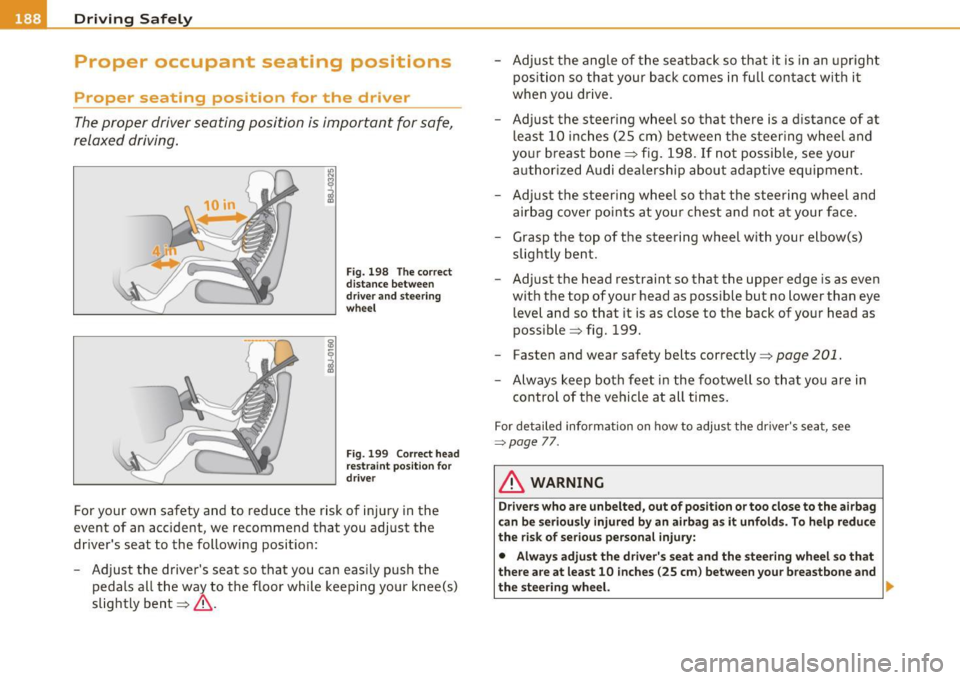
Fig. 198 The correct
distance between
driver and steering
wheel
Fig . 199 Correct head
restraint position for
driver
For your own safety and to reduce the risk of injury in the
event of an accident, we recommend that you adjust the
driver's seat to the following position:
- Adjust the driver's seat so that you can easily push the
pedals all the way to the floor while keeping your knee(s)
slightly bent==>& . -
Adjust the angle of the seatback so that it is in an upright
position so that your back comes in full contact with it
when you drive.
- Adjust the steering wheel so that there is a distance of at least 10 inches (25 cm) between the steering wheel and
your breast bone==> fig. 198. If not possible, see your
authorized Audi dealership about adaptive equipment.
- Adjust the steering wheel so that the steering wheel and airbag cover points at your chest and not at your face.
- Grasp the top of the steering wheel with your elbow(s) slightly bent.
- Adjust the head restraint so that the upper edge is as even
with the top of your head as possible but no lower than eye
level and so that it is as close to the back of your head as
possible ==> fig. 199.
- Fasten and wear safety belts correctly=>
page 201.
-Always keep both feet in the footwell so that you are in
control of the vehicle at all times.
For detailed information on how to adjust the driver's seat, see
=:>page 7 7.
& WARNING
Drivers who are unbelted, out of position or too close to the airbag
can be seriously injured by an airbag as it unfolds. To help reduce
the risk of serious personal injury:
• Always adjust the driver's seat and the steering wheel so that
there are at least 10 inches (25 cm) between your breastbone and
the steering wheel. ..
Page 191 of 384

______________________________________________ D_ ri_v _ i_n _,,g ,c.._ S_a_ f_ e_ l..:: y __ _
& WARNING (continued)
• Always adjust the driver's seat and the steering wheel so that
there are at least 4 inches (10 cm) between the knees and the
lower part of the instrument panel.
• Always hold the steering wheel on the outside of the steering
wheel rim with your hands at the
9 o'clock and 3 o'clock positions
to help reduce the risk of personal injury if the driver's airbag inflates.
• Never hold the steering wheel at the
12 o'clock position or with
your hands at other positions inside the steering wheel rim or on
the steering wheel hub. Holding the steering wheel the wrong way can cause serious injuries to the hands, arms and head if the
driver's airbag inflates
• Pointing the steering wheel toward your face decreases the
ability of the supplemental driver's airbag to protect you in a colli
sion.
• Always sit in an upright position and never lean against or
place any part of your body too close to the area where the airbags
are located.
• Before driving, always adjust the front seats and head
restraints properly and make sure that all passengers are properly
restrained.
• Never adjust the seats while the vehicle is moving. Your seat
may move unexpectedly and you could lose control of the vehicle .
• Never drive with the backrest reclined or tilted far back! The
farther the backrests are tilted back, the greater the risk of injury
due to incorrect positioning of the safety belt and improper
seating position.
• Children must always ride
in child seats ::::;, page 231. Special
precautions apply when installing a child seat on the front
passenger seat ::::;,
page 206. •
Controls and equip
ment Safety first Vehicle operation
Proper seating position for the front
passenger
The
proper front passenger seating position is important
for safe, relaxed driving.
For your own safety and to reduce the risk of injury in the
event of an accident, we recommend that you adjust the seat
for the front passenger to the following position:
- Adjust the angle of the seatback so that it is in an upright
position and your back comes in full contact with it when
ever the vehicle is moving.
- Adjust the head restraint so that the upper edge is as even
with the top of your head as possible but not lower than
eye level and so that it is as close to the back of your head
as possible =>
page 191.
-Keep both feet flat on the floor in front of the front
passenger seat.
- Fasten and wear safety belts correctly=>
page 201.
For detailed information on how to adjust the front passenger's seat,
see::::;,
page 76 .
& WARNING
Front seat passengers who are unbelted, out of position or too
close to the airbag can be seriously injured or killed by the airbag
as it unfolds. To help reduce the risk of serious personal injury:
• Passengers must always sit in an upright position and never
lean against or place any part of their body too close to the area
where the airbags are located.
• Passengers who are unbelted, out of position or too close to
the airbag can be seriously injured by an airbag as it unfolds with
great force in the blink of an eye. ..
Vehicle care Do-it-yourself service Technical data
Page 201 of 384

Because the passengers of this vehicle are not using safety belts
=> page 198, fig. 202, they will keep moving at the same speed the
vehicle was moving just before the crash, until something stops them
- here, the wall =>
page 198, fig. 203.
The same principles apply to people sitting in a vehicle that is
involved in a frontal collision. Even at city speeds of 20 to 30 mph (30
to SO km/h), the forces acting on the body can reach one ton (2,000
lbs, or 1,000 kg) or more. At greater speeds, these forces are even
higher.
People who do not use safety belts are also not attached to their
vehicle. In a frontal collision they will also keep moving forward at
the speed their vehicle was travelling just before the crash. Of course,
the laws of physics don't just apply to frontal collisions, they deter
mine what happens in all kinds of accidents and collisions.•
What happens to occupants not wearing
safety belts?
In crashes unbelted occupants cannot stop themselves
from flying forward and being injured or killed. Always
wear your safety belts!
Safety first
Fig. 204 A driver not
wearing a safety belt is violently thrown
forward
Vehicle OP-eration
Safety belts
Fig. 205 A rear
passenger not wearing
a safety belt will fly
forward and strike the driver
Unbelted occupants are not able to resist the tremendous forces of
impact by holding tight or bracing themselves. Without the benefit
of safety restraint systems, the unrestrained occupant will slam
violently into the steering wheel, instrument panel, windshield, or
whatever else is in the way=> fig. 204. This impact with the vehicle
interior has all the energy they had just before the crash.
Never rely on airbags alone for protection. Even when they deploy,
airbags provide only additional protection. Airbags are not supposed
to deploy in all kinds of accidents. Although your Audi is equipped
with airbags, all vehicle occupants, including the driver, must wear safety belts correctly in order to minimize the risk of severe injury or
death in a crash.
Remember too, that airbags will deploy only once and that your
safety belts are always there to offer protection in those accidents in
which airbags are not supposed to deploy or when they have already
deployed. Unbelted occupants can also be thrown out of the vehicle
where even more severe or fatal injuries can occur.
It is also important for the rear passengers to wear safety belts
correctly . Unbelted passengers in the rear seats endanger not only
themselves but also the driver and other passengers=> fig . 205. In a
frontal collision they will be thrown forward violently, where they can
hit and injure the driver and/or front seat passenger. •
Vehicle care Do-it-yourselt service iTechnical data
Page 208 of 384
ffl..,___A_ i_rb _ a_,g,:;._ s_, y'- s_ t_e _m ________________________________________________ _
Airbag system
Important things to know
Importance of wearing safety belts and
sitting properly
Airbags are only supplemental restraints. For airbags to
do their job, occupants must always properly wear their
safety belts and be in a proper seating position.
For your safety and the safety of your passengers, before
driving off, always:
- Adjust the driver's seat and steering wheel properly
~ page 188,
-Adjust the front passenger's seat properly~ page 77,
- Wear safety belts properly~
page 200,
- Always properly use the proper child restraint to protect
children~
page 231.
In a collision, airbags must inflate within the blink of an eye and with
considerable force. The supplemental airbags can cause injuries if the
driver or the front seat passenger is not seated properly. Therefore in
order to help the airbag to do its job, it is important, both as a driver
and as a passenger to sit properly at all times.
By keeping room between your body and the steering wheel and the
front of the passenger compartment, the airbag can inflate fully and
completely and provide supplemental protection in certain frontal
collisions =>
page 188, "Proper occupant seating positions". For
details on the operation of the seat adjustment controls=>
page 77.
It's especially important that children are properly restrained
=>
page 231.
There is a lot that the driver and the passengers can and must do to help the individual safety features installed in your Audi work
together as a system.
Proper seating position is important so that the front airbag on the
driver side can do its job. If you have a physical impairment or condi
tion that prevents you from sitting properly on the driver seat with
the safety belt properly fastened and reaching the pedals, or if you
have concerns with regard to the function or operation of the
Advanced Airbag System, please contact your authorized Audi dealer
or qualified workshop, or call Audi Customer CARE at 1-800-822-
2834 for possible modifications to your vehicle.
When the airbag system deploys, a gas generator will fill the airbags,
break open the padded covers, and inflate between the steering
wheel and the driver and between the instrument panel and the front
passenger . The airbags will deflate immediately after deployment so
that the front occupants can see through the windshield again
without interruption.
All of this takes place in the blink of an eye, so fast that many people don't even realize that the airbags have deployed. The airbags also
inflate with a great deal of force and nothing should be in their way
when they deploy. Front airbags in combination with properly worn
safety belts slow down and limit the occupant's forward movement.
Together they help to prevent the driver and front seat passenger
from hitting parts of the inside of the vehicle while reducing the
forces acting on the occupant during the crash. In this way they help
to reduce the risk of injury to the head and upper body in the crash .
Airbags do not protect the arms or the lower parts of the body.
Both front airbags will not inflate in all frontal collisions. The trig
gering of the airbag system depends on the vehicle deceleration rate
caused by the collision and registered by the electronic control unit.
If this rate is below the reference value programmed into the control
unit, the airbags will not be triggered, even though the car may be
badly damaged as a result of the collision. Vehicle damage, repair .,,,.