wheel AUDI S8 2010 User Guide
[x] Cancel search | Manufacturer: AUDI, Model Year: 2010, Model line: S8, Model: AUDI S8 2010Pages: 384, PDF Size: 90.95 MB
Page 119 of 384
_________________________________________________ O_ n_ t_ h_ e_ r _o_ a_d _ __.fflll
On the road
Steering
Adjusting steering wheel position
The steering wheel position can be adjusted for height
and reach.
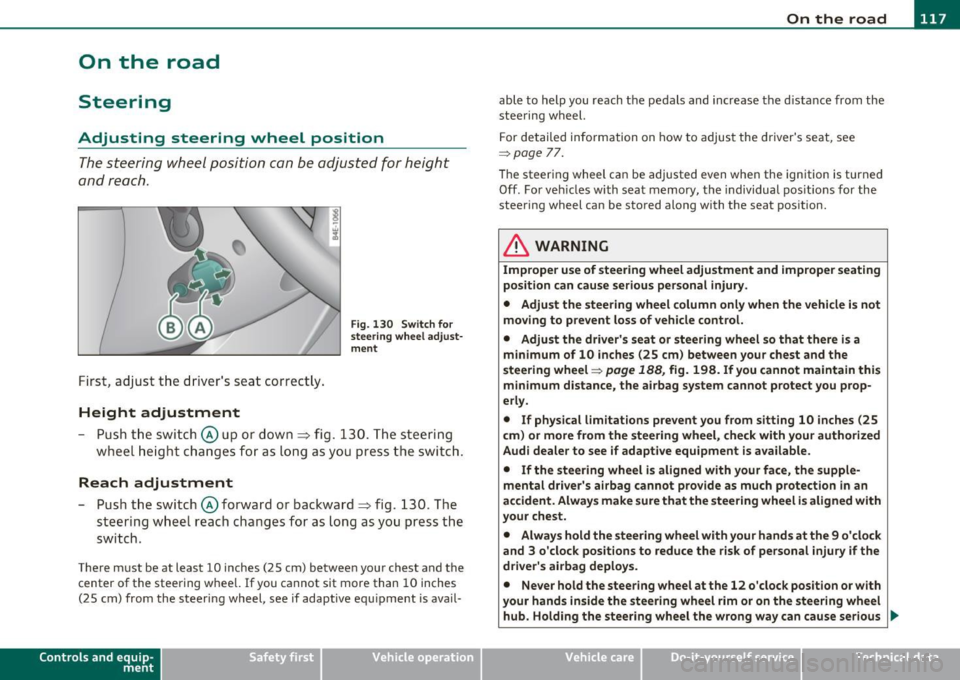
First, adjust t he driver's se at correct ly.
Height adjustment
Fig . 13 0 Swit ch f or
steering whee l adjust
m ent
- P ush t he swi tch © up or down ~ fig. 130. The st e e ring
whe el h eig ht chang es f or as l ong as y ou press t he swi tch .
Reach adjustment
- Push the switc h@ forward or backward~ fig. 130 . T he
steering w heel reach changes for as long as you press the
switch .
There m ust be at least 10 inches (25 cm) between your chest and the
center of the steering whee l.
If you cannot sit more than 10 inches
(25 cm) from the steer ing wheel, see if adaptive equ ipment is ava il-
Cont rols a nd e quip
m en t Vehicle
OP-eration
able to help you reach the pedals and increase the d istanc e from the
stee ring wheel.
F or detailed info rmation on how to adjus t the d river' s se at, see
~ page 77.
Th e stee ring wheel ca n be adjusted even when the ign ition is turned
Off . For veh icles with seat memory, the individual pos it io ns for the
steering wheel can be stored along with the seat pos ition.
& WARNING
Improper use of steering wheel adjustment and improper seating
position can cause serious personal injury .
• Adjust the steering wheel column only when the vehicle is not
moving to prevent loss of vehicle control. • Adjust the driver 's seat or steering wheel so that th ere is a
minimum of 10 inches (25 cm ) between your chest and the
steering wheel~
page 188, fig. 198. If you cannot maintain this
m inimum distance, the airbag system cannot protect you prop
erly.
• If physical l imitations p revent you from sitting 10 inches (25
c m ) or more from the steering wheel, che ck with your authorized
Audi dealer to see if adapt ive equipment is a vailable.
• If the steering wheel is aligned with your face, the supp le
mental dri ver 's ai rbag cannot prov ide as much protection in an
accident . Always make sure that the steering wheel i s aligned with
your chest.
• Always hold the steering wheel with your hands at the 9 o 'clock
and 3 o 'clock posit ions to reduce the risk of personal injury if the
driver's airbag deploys .
• Never hold the steering wheel at the 12 o'clock position or with
your hands inside the steering wheel rim or on the steering wheel
hub. Holding the stee ring wheel the wrong way can cause serious
~
Vehicle care Do-it-yourselt service iTechnical data
Page 120 of 384

llffl..__O_ n_ t_h _e_ r_o _ a_ d _________________________________________________ _
& WARN ING (con tinu ed)
inju ries to the hands, arms and head if the d river 's airbag
deploy s.•
Easy entry feature
The easy entry feature makes it easier to enter and exit
the vehicle by autom atically adjusting the steering
w heel .
Press the button @=> page 11 7, fig. 130 to turn t he easy
en try featur e on or off.
W hen the easy entry fea ture is tu rned on ( button depre ssed) , the
steering wheel moves up to the parked position w hen the ignition is
tu rned off. After you ente r the vehicle, the steerin g wheel moves to
the stored pos ition as soon as you turn on the ign ition .•
Ignition Lock and ignition switch
Ignition key positions
The e ngine can be started or turned off with the ignition
key .
Fig . 131 Ig nition
swit ch posit ions
Position @
The ig nit io n key can be inserted into the ignition switc h in this posi
ti on . This automatically unloc ks the steer ing co lumn lock. When the
ig nition key is removed, the steer ing colum n lock is a utomat ically
locked~ &-
Ignition on (D
Turn t he ignit ion key to this position and re lease it.
Starting the engine@
The engine starts w ith the key in this position . Major electr ical loads
are te mpora rily tur ned off .
Ignition off 0
Turn the ignit ion key to this position and re lease i t.
& WARNING
• Never remove the key from the ignition lock while the vehicle
is moving . The steering wheel will lock , causing loss of control.
• If you have to leave your vehicle, even for just a minute, always
remove the ignition key and take it with you. This is especially
important if you are going to leave children unattended in the
vehicle. The children could start the engine or use other vehicle
controls . Unsupervised use of vehicle controls (for example, power
windows ) can cause serious personal injuries.
(D Note
• If the i symbol in the display blinks, there is a mal function in t he
elec tronic s tee ring co lumn lock. Follow the in struc tions in
~ page 31 , "Steer ing malfunction~" .
• If th e ~ sy m bol in the d is pla y blink s, t here i s a m alf unc tion in the
electronic ignition lock. Follow t he inst ru ctions in =>
page 31, "Igni-
t io n lock mal fu nctio n
.:2.". .,
Page 124 of 384
-On the road •m ___________________ _
& WARNING (continued)
• The brake booster and the servotronic only work when the
engine is running. If you turn off the engine, more force will be
required to steer or brake the vehicle. If you are not prepared, this
could result in a collision and serious personal injury.
• For your safety, move the selector lever to the P position, then
turn off the engine. Otherwise the vehicle could inadvertently roll
away.
• After turning off the engine, the radiator fan can come on and
run for up to 10 minutes -even if the ignition is switched off. Like
wise, the fan could come on if the temperature in the engine
compartment raises due to heat build up or if you leave the vehicle
standing in direct sunlight.
0 Note
After driving at high engine load, heat can build up in the engine
compartment after you have turned off the engine. This can damage
t he engine. Let the vehicl e stand and run in idl e for about 2 minutes
before turning off the engine. •
App lies to ve hicles : w ith Conve nie nc e key
Driver's messages in the instrument
cluster
Messages appear in the instrument cluster to let the
driver know if something is missing or if something must
be done.
No key identified
This message appears when you press the [START) button, but there
is no remote contro l key inside the vehicle or if the system does not
recognize the key. For example, if your key is
shielded by an object or
encased, i .e . in side an aluminum briefcase, the signal from the key cannot be detected
. Electron ic devices such as cell phones can also
in terfere w ith the radio signal.
Press brake pedal to start engine
This message appears when you press the !S T ART ) butto n when
starting the engine but you have not depressed the brake pedal.
Engage N or P to start engine
This message appears when you start the engine but the selector
lever is not in the P or N position . The engine can be started only if the
selector lever is in one of these two positions .
Key not in vehicle
This message appears together with the 7 symbol when the remote
control key is removed from the vehicle while the engi ne is running.
Th is is to remind you that you should not cont inue your tr ip without
your key.
If the key is no longer inside the vehicle when you turn off the engine,
you will not be able to switch on the ignition or restart the engine.
Also, you will not be able to lock the vehicle from the outs ide .
Shift to P, otherwise vehicle can roll away. Doors do not lock if lever
is not in P.
Thi s message appears for your safety together with an audible
warning signal when you press the
[STOP) button but the selector
lever is not in the P position and you open the driver's door. Move the
selector leve r in to P, otherwise the vehicle could roll away. I n addi
tion, you will not be able to lock the ve hicle with either the lock
button located on the door hand le or the remote control.
To engage steering lock, press and hold STOP button
Th is message appears for your personal safety if you switch off the
engine and the ignition by pressing the
[STOP) button and then open
the driver's door. In this case, the steering will still not be locked. The
steering wheel will lock:
• If you press the
I STO P I button for longer than 1 second.
• If you lock the vehicle from the outside .•
Page 126 of 384

1111....__0_ n_ t_h_ e_ r_ o_ a _ d _________________________________________________ _
Parking
To p revent a parked vehicle from rolling away, there are
a fe w things you should do.
When you park your vehicle , do the following
- Stop t he veh icle us ing the bra ke pedal.
- Pull the switch to apply t he electromechanica l parking
brake .
- Move th e se lector lev er in to the
P position ~& .
- Switch off the e ngine and remove the ignition key from
the ignition lock.
When you park your vehicle on hills, do the
following
- Stop the veh icle us ing the bra ke pedal.
- Pull the switch to apply t he e lectromechanica l parking
brake .
- I f you a re parkin g h eaded
downhill , turn the front w heels
toward th e curb .
- I f you are parking headed
uphill , turn t he fro nt wh eels
away from t he curb.
- M ove the selector lever into the
P position.
- Switch off the e ngine and remove the ign it ion key from
the ignition lock.
& WARNING
Thi s is how you can reduce the risk of injury when lea ving your
vehicle.
& W ARNING (continued )
• Never park the vehicle where it can come in contact with dry
grass , spilled fuel or any other flammable material s.
• When parking on hills, always turn the wheel s so that the front
wheel s will fir st roll into the curb, if the vehicle should start to
roll.
• Never allow anyone · especially small children· to remain in
the vehicle when it i s locked. Locked door s make it more difficult
fo r rescu ers to acce ss the passenger compartment in the event of
an emergency. Danger to life!
• Never leave children unsuperv ised in the vehicle. Ch ildren
could relea se the parking brake or move the gear shift lever out of
gear. The vehicle could start to roll away and cau se an accident .
• No matter what the season i s, the temperature
in a parked
v ehicle can reach dangero us le vels .
0 Note
• Please exercise care when you pa rk your veh icle in parking areas
w ith park ing barriers o r cur bs. Parking barriers and curbs vary in
he ight and could damage your bumpe r and related components as
the front of your vehicle moves over a ba rrier or curb that is too high,
as you park or as you back out of a pa rking spot. In order to be sure
that no such damage can occur, yo u may wish to stop short of having
t he fro nt t ires of you r car touch t he p arking bar rie r or curb.
• Please a lso exerc ise except iona l care when you drive up or down
steep ramps or drive over curbs or o ther obstacles, for which the
vehicle is not des igned, because components of the vehicle close to
t he ground, s uch as bumpe r covers, spoilers and suspension and
exhaust system components, may become damaged. •
Page 127 of 384

On the road ---------------~:..:.....__
Starting off with a trailer
To prevent rolling back unintentionally on an incline, do
the following:
- Keep the switch pulled and depress the accelerator. The
parking brake stays applied and p reve nts the vehicle from
rolling backward .
- You can release t he switch once you are sure t hat you are
deve loping enough forward momentum at the whee ls as
you depress the acce lerator .
Depending on the we ight of the rig (vehicle and trailer) and the
severity of the incline, yo u may roll backwards as you start. You can
prevent rol ling backwards by holding the park ing bra ke sw itch pulled
out and accelerating -just as you wou ld when starting on a hill with a
conventional hand brake .•
Emergency braking
In the event that the conventional brake system fails or
locks.
- P ull the swi tch and cont inue to pull it to s low your veh icle
with the parking brake in an emergency .
- As soon as you re lease the sw itc h or accelerate, the
braking process stops .
If you pull the switch and hold it above a speed of abou t 5 mp h (8
km/h), the emergency braking function is init iated. The vehicle is
bra ked at all fou r wheels by activat ing the hydraulic b rake system.
Brake performance is s imilar to making an emergency stop~,&.
So that emergency braking is not activated by mistake, an audible
warning tone (buzzer) sounds when the switch is pulled . As soon as
Controls and equip
ment Safety first
the switch is released, or the accelerator pedal is depressed, emer
gency braking s tops.
& WARNING
Em erg ency braking should only be u sed in an emergen cy, wh en
the no rmal foot brake ha s failed o r the brake pedal i s obstructed.
U sing the park ing b rake to perform emerg ency braking will slow
your vehicl e as if you had made a full brake application . The laws
of phy sic s c annot be su spen ded even wi th ESP and it s ass ociated
c omponents (ABS, ASR , ED S). In corn ers and when r oad or
weather condit ion s are bad , a full brake application can cause the
ve hicl e to sk id or the rear end to br eak away- r isking an accid ent .•
Driver messages in the instrument cluster
C aution : Vehicle park ed too steep
Th is message appears when the pa rking brake is applied on an incline
that exceeds abo ut 30%.
In this case the braking power of the parking brake may
not be
adequate
t o p revent the vehicle from rolling un intentionally.
Plea se release parking b rake
Thi s message appears, when a gear is se lected and the accelerato r
pedal is depressed -release the parking brake.
Pre ss brake p edal to relea se park ing brake
T his driver message appea rs when the switch to release the parking
bra ke was pressed. The par king brake can only be released if you press
the brake or accelerator pedal and press the switch at the same time.
.1 Par king bra ke mal funct ion !
T his driver message appears together w ith the yellow symbol
when there is a parking brake malfunct ion.
Vehicle care Technical data
Page 130 of 384
"" Adaptive Cruise Control .._ _ ____:.. ___ __::_....::...:;..:...:....:.:-=...:.. ____________________________ _
Adaptive Cruise Control
Speed and distance control system
Applies to veh icles : w it h Adap tive Cru ise Cont ro l
Description
Th e Adaptiv e Cruis e Control driver a ssistanc e program is
a co mbine d speed and d istan ce contr ol s ys tem.
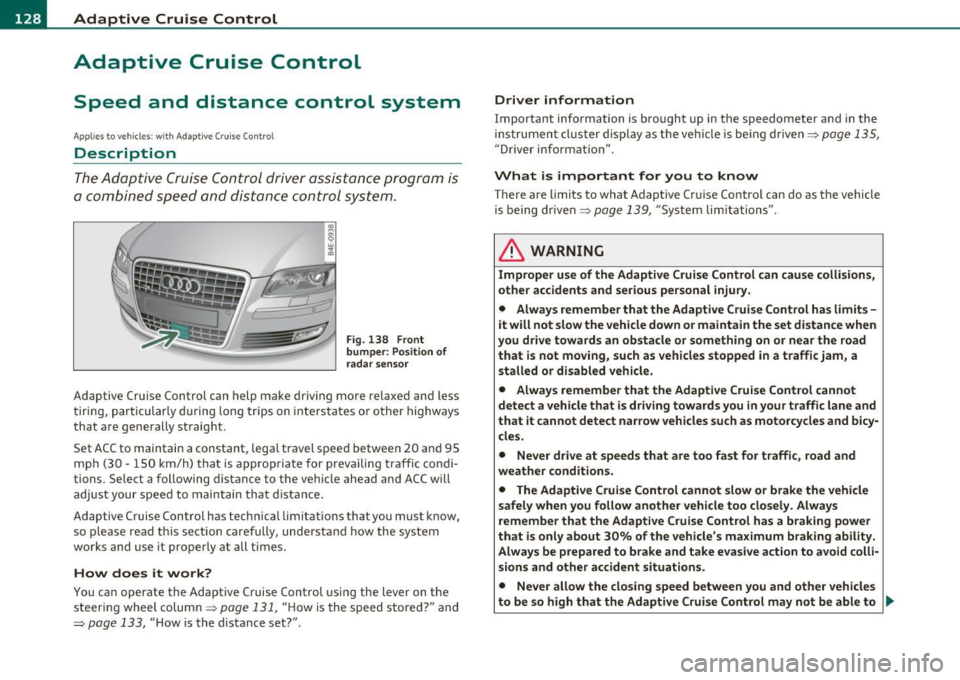
Fig . 138 Front
bumper: Po sition of
rada r sensor
Adaptive Cru ise Cont rol can h elp ma ke driving mo re relaxed and less
t iri ng , par ticularly d uring lon g trips on i nte rs t a tes o r oth er hig hways
that a re generally st raig ht.
Set ACC to maintain a constan t, lega l travel spee d between 20 and 95
m ph (3 0 · 150 k m/h) t hat is approp riat e f or preva iling traf fic co ndi
tions. Select a following distance to t he ve hicle ahead and ACC w ill
adjus t your speed to maintai n that d istance.
Adaptive Cruise Control has technica l limitations that you must k now,
so p le a se read this sectio n carefully, understa nd how the sy stem
works and use it p ro p erly at all ti mes.
How does it work?
You ca n op erate the Adaptive Cruise Control usi ng the lever on the
s teer ing wheel column ~
page 13 1, " H ow is the speed sto red?" and
~ page 133, " H ow is the distance set?" .
Driver information
Important information is bro ught up in the s peedometer and in the
i nst rumen t clust er displa y as the ve hicl e is be ing drive n~
pa ge 135,
"Driver informat io n".
What is important for you to know
T here are limits to what Adaptive Cr uise Contro l can do as the vehicle
is being drive n~
page 139 , "Sys tem lim itations".
& WARNING
Improper use of the Adaptive Cruise Control can cause collisions,
other accidents and serious personal injury.
• Always remember that the Adaptive Cruise Control has limits -
it will not slow the vehicle down or maintain the set distance when
you drive towards an obstacle or something on or near the road
that is not moving, such as vehicles stopped in a traffic jam , a
stalled or disabled vehicle.
• Always remember that the Adaptive Cruise Control cannot
detect a vehicle that is driving towards you in your traffic lane and
that it cannot detect nar row vehicles such as motorcycles and bicy
cles.
• Never drive at speeds that are too fast for traffic, road and
weather conditions.
• The Adaptive Cruise Control cannot slow
or brake the vehicle
safely when you follow another vehicle too closely. Always
remember that the Adaptive Cruise Control has a braking power
that is only about 30% of the vehicle 's maximum braking ability .
Always be prepared to brake and take ev asive action to avoid colli·
sions and other accident situations.
• Never allow the closing speed between you and other vehicles
to be so high that the Adaptive Crui se Control may not be able to .,
Page 142 of 384
IIII..__A_ d_a_ p,__ t_iv _ e_ C_r _u _ i_ s _e _ C_ o_ n_t _ r_ o _ L ___________________________________________ _
Entering a curve
When entering a curve, the Adaptive cruise control may react to a
vehicle in the next lane and apply the brakes in your vehicle
=>
page 139, fig. 149. The braking action can be overridden by
depressing the accelerator pedal.
Leaving a curve
At the end of very long curves, ACC's predictive lane reading can cause
ACC to react to another vehicle in the next lane and apply the brakes
on your vehicle=>
page 139, fig. 150. The braking action can be over
ridden by depressing the accelerator pedal. •
Applies to veh icles : w ith Adaptive Cru ise Con tro l
Vehicles offset to one side
I ,L
F===============;~
Fig. 151 Vehicle trav
eling ahead outside
the detection range of
the radar sensor
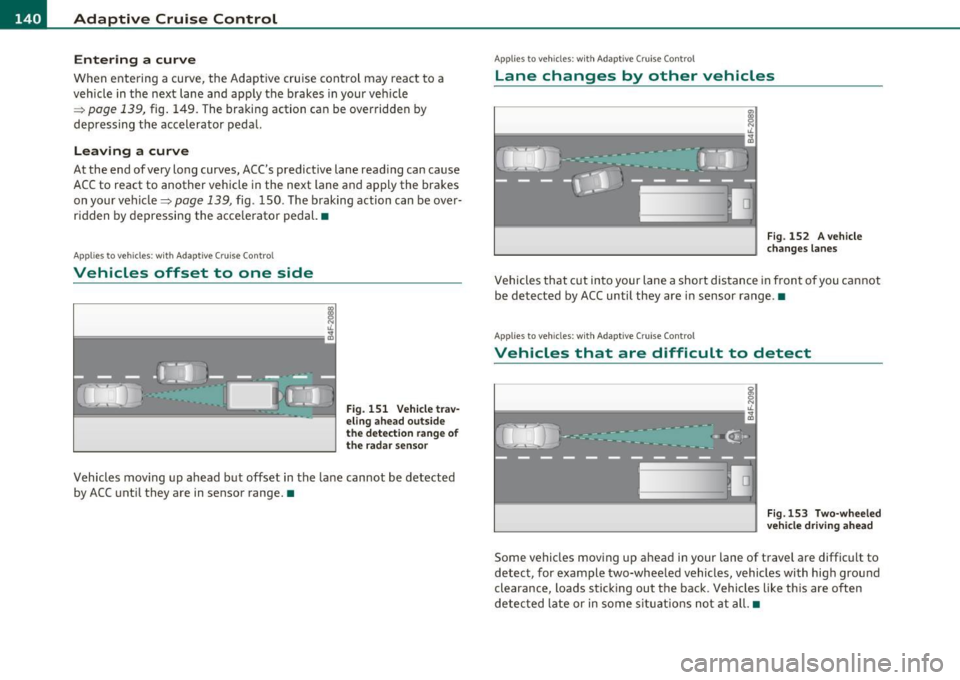
Vehicles moving up ahead but offset in the lane cannot be detected
by ACC until they are in sensor range. •
Applies to veh icles : w ith Ada ptive Cruise Control
Lane changes by other vehicles
Fig. 152 A vehicle
changes lanes
Vehicles that cut into your lane a short distance in front of you cannot
be detected by ACC until they are in sensor range .•
Applies to veh icles: w ith Ada ptiv e Cruise Contro l
Vehicles that are difficult to detect
Fig.153 Two-wheeled
vehicle driving ahead
Some vehicles moving up ahead in your lane of travel are difficult to
detect, for example two-wheeled vehicles, vehicles with high ground
clearance, loads sticking out the back. Vehicles like this are often
detected late or in some situations not at all. •
Page 144 of 384
lll'L_!_A~u~d~i~l!:!a~n~e '...:a~s~s:!:is~t ~--------------------------------------------
Aud i Lane assist
Lane assist
Applies to veh icles : w ith lane assist
Description
Lane assist helps you keep your vehicle in your lane.
Lane assist uses a camera to detect lane boundary lines. If the system
detects that your vehicle is about to leave a lane boundary line, the
steering wheel
vibrates to alert the driver. If lane assist detects
boundary lines on both sides o f the veh icle's lane, the system enters
act ive standby mode, which is indicated by t he gree n indicator light
/: on the instrument cluster .
If the system is in active standby mode and the turn signal is acti
vated before driving over the boundary line , the warning does not
occur sinc e th e system allows for in tention al lane changes.
The system is designed for driving on freeways and expanded high
ways and th us works only at speeds of 40 mph (65 km/h) or more.
& WARNING
• Lane assist will not keep your vehicle in your lane. The system
only warns the driver when the vehicle is leaving the lane. The
driver is always responsible for keeping the vehicle in the lane.
• The camera is not able to detect all lane boundary lines and in
some cases might also detect lane structures or objects as
boundary lines. This can lead to incorrect warnings or warnings
that fail to go off at all.
• The camera's visibility can be impaired by vehicles ahead of
you, for instance, or by rain, snow, heavy spray or light shining
into the camera lens. This can cause lane assist to fail to detect
boundary lines. •
Applies to veh icles: wit h lane assist
Activating and deactivating
Fig. 156 Turn signal
lever: Lane assist
button
Fig. 157 Windshield:
Lane assist camera
viewing window
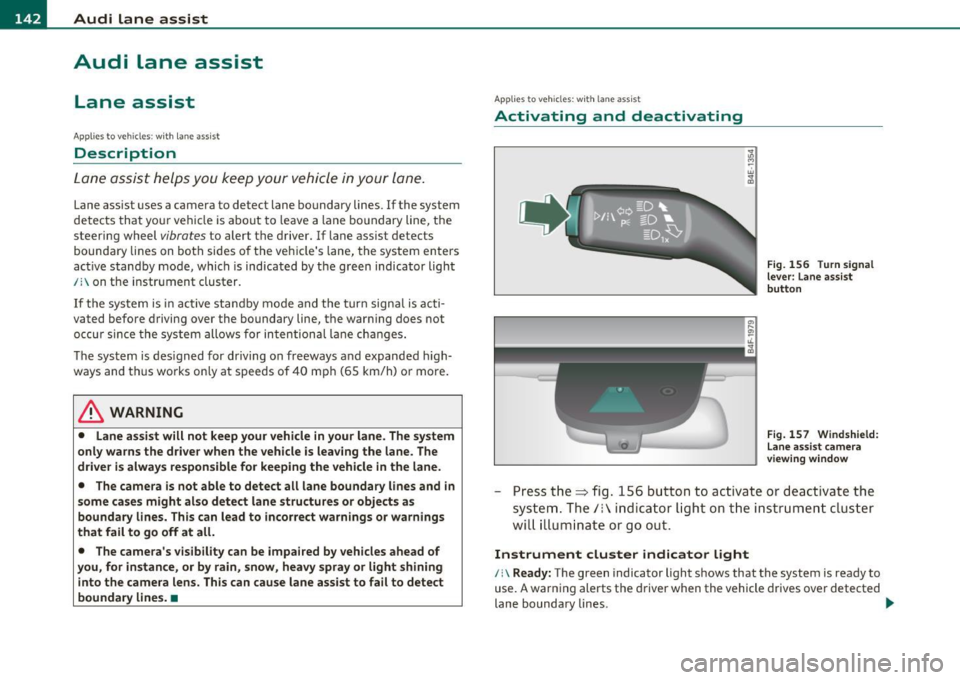
-Press the=> fig . 156 button to act ivate or deactivate the
system. The/: ind icator light o n the instrument cluster
will illumi nate or go out.
Instrument cluster indicator light
/:\Ready: The green indicator light shows that the system is ready to
use. A warning alerts the driver when the vehicle drives over detected
lane boundary lines . -.,
Page 145 of 384

_________________________________________________ A_u_ d_i_ l_ a_ n_ e_ a_s _s_ i_s _t __ _
Not read y: The yellow indicator light shows that the system is
turned on but unable to send a warning. T his can be due to the
following:
• T here are no boundary lines, or there is only one boundary line
present.
• The boundary lines are not detected (e .g . due to snow, dirt, wet
conditions or light shining into the camera lens) .
• More than two boundary lines (such as at const ruct ion sites) are
located in the vehicle's lane .
• T he veh icle's speed is below the speed needed to ac tivate it, which
is about 40 mph (65 km/h) .
• T he lane is narrowe r than about 8
ft . (2.5 m), or wider than about
16 ft. (5 m).
• Th e curve is too sharp.
Note s on the in strum ent clust er displa y
When the lane assist turns off automat ica lly, the instrument cluster
indicator goes out and one of the fo llowing messages appears on the
display :
Aud i lane ass is t not av ailable: Cur rentl y n o sens or v ision
T his message appears when the camera can no longer function
because it cannot detect the boundary lines. This may be due to the
following:
• T he exte rior side of the came ra viewing window =>
page 142,
fig. 157 is covered with dirt or ice. Clean this part of the windsh ield.
• Th e came ra viewing window is fogged up on the inside. In this
case, wait until the fog d isappears before turning lane assist on
again.
• T he system was unable to detect bo undary lines over an extended
period of time due to road co nd it ions (such as snow-cove red lanes) .
Do not turn lane assist on aga in until the lines can be more easily
detected .
Aud i lane a ssist n ot availabl e
Controls and equip
ment Safety first
A temporary malfunction is preventing lane assist from operating
.
Tr y turning on lane assist aga in at a later time.
Au di l ane a ssist: system fault
The system shou ld be checked by an authorized Audi dealer or other
qualified wo rkshop.
[ i ] Tips
• Make su re that the camera view ing window => page 142, fig. 157
is not covered by stickers or similar objects .
• Always keep the came ra v iewing w indow clean. This can us ually be
done by operating the windshie ld wipers .•
App lies to vehic les : wi th la ne ass ist
MMI settings
You can use the fv1fv1I to adjust the warning time and
steering wheel vibration .
Setting the warning time
Select: Function button I CAR]> Sy stems > Audi lane ass ist>
Warning early , adaptive or late .
Setting th e st eering wheel vibration
Select : Function button I CAR ]> Systems > Audi lane ass ist >
Steering vibration weak , medium or strong .
Setting the w arning tim e
Earl y: This setting wa rns the dr iver befo re a wheel touches the
detected lane boundary line . The warning depends on the veh icle 's
angle as it approaches the boundary line . If you app roach a bounda ry
line gradually, the warn ing will occur earlier . If you approach the
boundary line at a very sharp angle, the warning will occur just before
a whee l touches the li ne . .,._
Vehicle care Technical data
Page 146 of 384
1111....__A_ u_ d_i_ l_ a_ n_ e_ a_s_ s_ is_t _________________________________________________ _
Adaptive: In this sett ing, the warning time ad justs to the characte r
is tic s of th e road and t he ve hicle speed. The w arning oc curs lat er fo r
cu rves and occurs ear lier for stra ight st retches of road . The warning
occurs later on narrow roads than on wide roads.
Late : This sett ing warns the drive r whe n a whee l dr ives over the
detected lane boundary line .
Setting the steering wheel vibration
When a dju sti ng the steering wheel v ibration, the steer ing whee l
vibrates so that you can check the in tensi ty you have set.
rn Tips
• When mak ing t he a dju stme nt, lane assis t is not a ct iva ted. The
steer ing wheel v ibrates briefly only to ass ist you in chang ing the
s e tt ing.
• Your settings a re automatically stored and assigned to the remote
c ont rol key being used .•