seats AUDI S8 2010 Repair Manual
[x] Cancel search | Manufacturer: AUDI, Model Year: 2010, Model line: S8, Model: AUDI S8 2010Pages: 384, PDF Size: 90.95 MB
Page 248 of 384
___ C_h _i_ld _ S_ a_ f_ e_ t_,, y'-----------------------------------------------
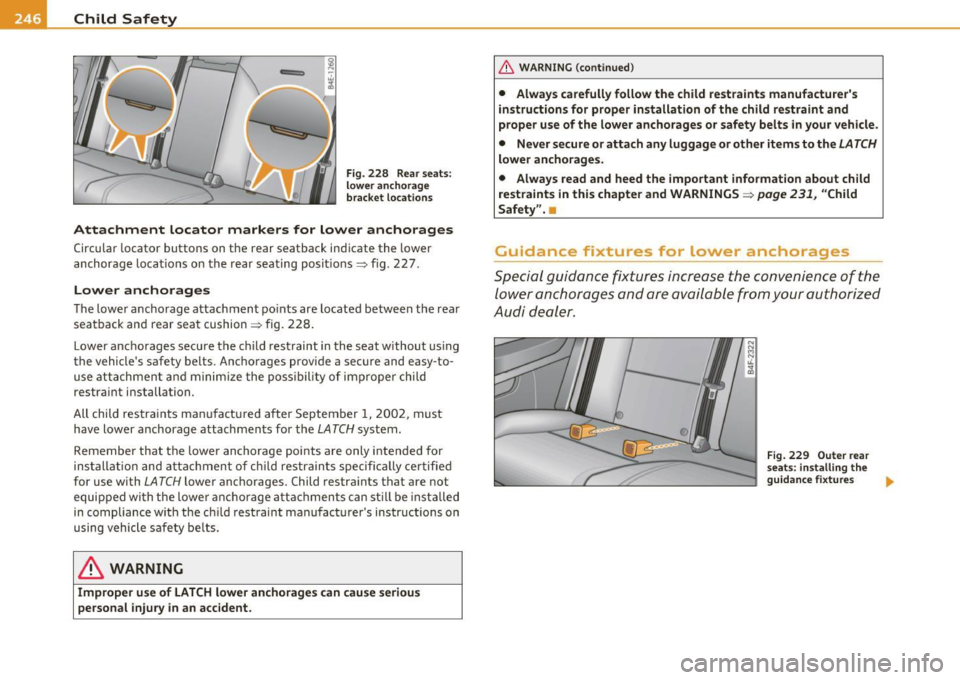
Fig. 228 Rear seats :
lower anchorage
bracket lo cation s
Attachment locator markers for lower anchorages
Circular locator buttons on the rear seatback indicate the lowe r
anchorage loca tions on th e r ear seating positions~ fig. 227.
Lower anchorages
T he lower ancho rage a ttachm ent po ints are located between t he rea r
sea tback and rear sea t cushi on
~ fig. 228.
Lower a nch o rage s se cu re the chi ld rest raint in the seat withou t us ing
the vehicle 's safety be lts. Anc ho rages prov ide a secure and easy-to
u se at ta ch men t and mini miz e the pos sibil ity of im proper child
restra int i nstallation.
All child restra in ts ma nufact ured after Septem ber 1, 2 002, must
have low er anchorage attachmen ts for the
L ATCH system .
Remember that the lower anchorage points a re only intended for
ins tallati on and attachm ent of chil d restrain ts s peci ficall y ce rti fie d
for use with
L A TCH lowe r ancho rages. Child restra ints that are not
equi pped wi th the lowe r anchor age a tta ch me nt s ca n s till be ins tal led
in compliance w it h th e c hild restraint manu fac turer 's instructions on
using vehi cle s afety be lts.
& WARNING
Improper use of LATCH lower anchorages can cause seriou s
personal injury in an accident .
& WARNING (co ntinued )
• Always carefully follow the child restraints manufacturer's
instructions for proper installation of the child restraint and
proper use of the lower anchorages or safety belts in your vehicle .
• Never secure or atta ch any luggage or other items to the
LATCH
lower anchorages .
• Always read and heed the important information about child
restraints in this chapter and WARNINGS~
page 231, "Child
Safety ".•
Guidance fixtures far lower anchorages
Sp ecial guid ance fixt ures incr ea se the c on ve ni ence of the
lo we r an cho rages a nd a re avai la b le fro m you r a utho rized
Au di deal er.
Fig. 229 Outer rear
seats : in stalling the
guidance fixture s ..
Page 249 of 384

___________________________________________ C_ h_il _d _ S_a _f _e _t =c,. y __ fl'II
Fig. 230 Close-up:
fitting the guidance
fixture over the lower
anchorage bracket
The lower anchorage attachment points are located on the
rear seats between the seatback and the seat cushion.
Special guidance fixtures increase the convenience of the
lower anchorages and help protect the seat material from
possible damage when installing child restraints.
Installing the guidance fixtures
-Push down on the seat cushion so that the lower anchor
ages are visible.
- Hold the guidance fixture with the part number facing
downward and push it in the direction of the arrow onto
the anchorage ~ fig. 230.
- Make sure that each of the two guidance fixtures per seat
snaps into place.
Removing the guidance fixtures
- Remove the child restraint according the child restraint
manufacturer's instructions.
- Push down on the seat cushion so that the lower anchor
ages are visible.
- Pull off the guidance fixtures from the lower anchorages.
Controls and equip
ment Safety first Vehicle operation
-
Always remove the guidance fixtures and keep them in a
safe place when not in use.
You may find it easier to install child restraints equipped with hooks
attached to straps without the guidance fixtures in place. If this is the
case, remove the guidance fixtures by pulling them off the anchor
ages. However, the guidance fixtures can help you to locate the
LATCH anchorages.
& WARNING
Improper use of tether anchorages or lower anchorages can cause
serious personal injury in a crash.
• Always carefully follow the child restraint manufacturer's
instructions for proper installation and use of child restraint
systems.
• Never use the
LATCH or tether anchorages to attach safety
belts or other kinds of occupant restraints.
• Child restraint tether attachments and lower attachments are
only designed to secure a child restraint that has been equipped to
use these anchorages.
• Tether anchorages and lower anchorages are designed to with
stand only those loads imposed by correctly fitted child restraints.
Under no circumstances can they be used safely for adult or child
safety belts or harnesses.
• Never mount more than one child restraint to a single tether or
to a lower anchorage point. Attaching two child restraints to a single anchorage point can cause the anchorage to fail and cause
serious personal injury in a crash.
0 Note
• Remove the guidance fixtures before folding the rear seatback to
prevent damaging the seat cushion .
• If you leave the guidance fixtures installed for several days, they
could leave a mark on the upholstery on the seat cushion and backrest _.,
Vehicle care Do-it-yourself service Technical data
Page 250 of 384
• .___C_ h_ il_d _ S_a _ f_ e _ t--= y '------------------------------------------------
in the area that the guidance fixtures were installed . The upholstery
would also be permanently stretched around the guidance fixtures.
This applies especially to leather seats .•
Installing a child restraint with LATCH
lower anchorages
Whenever you install a child restraint always follow the
child restraint manufacturer's instructions.
Mounting
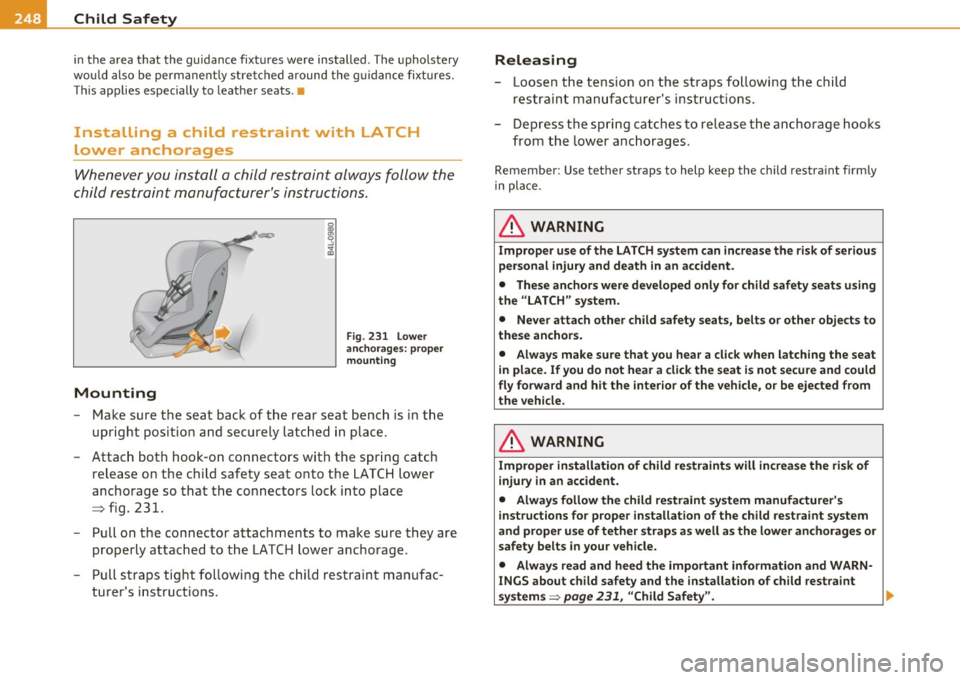
Fig. 231 Lower
anchorages: proper
mounting
- Make sure the seat back of the rear seat bench is in the
upright position and securely latched in place.
- Attach both hook-on connectors with the spring catch
release on the child safety seat onto the LATCH lower
anchorage so that the connectors lock into place
~ fig. 231.
- Pull on the connector attachments to make sure they are
properly attached to the LATCH lower anchorage.
- Pull straps tight following the child restraint manufac
turer's instructions.
Releasing
- Loosen the tension on the straps following the child
restraint manufacturer's instructions.
- Depress the spring catches to release the anchorage hooks
from the lower anchorages.
Remember: Use tether straps to help keep the child restraint firmly
in place.
& WARNING
Improper use of the LATCH system can increase the risk of serious
personal injury and death in an accident.
• These anchors were developed only for child safety seats using
the "LATCH" system.
• Never attach other child safety seats, belts or other objects to
these anchors.
• Always make sure that you hear a click when latching the seat
in place. If you do not hear a click the seat is not secure and could
fly forward and hit the interior of the vehicle, or be ejected from
the vehicle.
& WARNING
Improper installation of child restraints will increase the risk of
injury in an accident.
• Always follow the child restraint system manufacturer's
instructions for proper installation of the child restraint system
and proper use of tether straps as well as the lower anchorages or
safety belts in your vehicle.
• Always read and heed the important information and WARN
INGS about child safety and the installation of child restraint
systems ~
page 231, "Child Safety". _,
Page 251 of 384

0 Note
On vehicles with power ind iv id ual rear seats * some criteria mu st be
observed when attaching the child restraint using the
LATCH system:
• To attach the c hild restraint secu rely, the seat must be moved to
the farthest rear position, the seat heig ht set to the lowest pos it io n
and the head res tra int must be adj usted to the ve rt ica l posit io n
=> page 87.
• If a ch ild safe ty seat is attached to one of the rear seats, th is seat
must not be adjusted using the powe r contro ls under a ny circum
st ances. The easy en try fu nction for this se at must a lso be dea cti
vated i n th e M MI
=> page 89. The c hild safety seat as well as the rear
se at can be dam aged by the adjus tment proce ss. •
Tether anchors and tether straps
Fig . 232 Tethe r
anc hors : recess flaps
behind the rear seat
backs
Th e te ther anchors for t he t hree rear se ating p osit io ns a re loca ted in
recesses in the rear window shelf=> fig. 232. Vehicles with power
ind iv id ual rear sea ts* are equippe d wit h two te ther anchors .
A tethe r is a straight o r V-s ha ped strap that att aches the top part of
a ch ild rest raint to special anchorage points in the vehicle .
Th e purpose of the te th er is to reduce the fo rw ar d move men t of the
child rest raint in a crash, in order to help reduce the risk of head injury
th at could be cause d by strik in g th e ve hicle in ter io r.
Safety first Vehicle OP-eration
Child Safety
Forward fac ing ch ild restraints manufactured after September 1,
1 999, are required by U.S. feder al regul ations to comp ly wi th new
child head moveme nt pe rformance requ ireme nts . These new per for
mance re quirements ma ke a tether necessary on most new child
safety seats.
& WARNING
Improper installation of child restra ints will increase the risk of
injury and death in a crash.
• Always follow the instructions provided by the manufacturer
of the child restraint you intend to install in your Audi.
• Improper use of child restraint anchors (including tether
an chor s) can lead to injury in a collision . The anchors are designed
to withstand only those loads imposed by cor rectly fitted child
restraints.
• Never mount two child restraint systems on one LATCH lower
an chor point .
• Never attach two child restraint systems to one tether strap or
tether anchorage .
• Never attach a tether strap to a tie-down hook
in the luggage
c ompartment.
• Never use child restraint tether anchorages to secure safety
belts or other kinds of occupant restraints .
• Never se cure or atta ch any luggage or other items to the LATCH
lower anchorages or to the tether anchors.
• If a tether or other strap is used to attach a child restraint to
the front passenger seat, make sure that it is not so tight , that it
causes the weight-sensing mat to measure more weight than is
actually on the seat .
• The heavier weight registered can make the Advanced Airbag
System work as though an adult were on the seat and deploy the
Advanced Airbag when it must be suppressed causing serious or
even fatal injury to the child .
"°
Vehicle care Do-it-yourselt service iTechnical data
Page 252 of 384
...,. Child Safety Pfl'I ____ _,.__ __________________________ _
& WARNING (continued)
• If you must install a rearward facing child safety seat on the
front passenger seat because of exceptional circumstances and
the PASSENGER AIR BAG OFF light does not come on and stay on,
immediately install the rear-facing child safety seat in a rear
seating position and have the airbag system inspected by your
Audi dealer. •
Installing the upper tether strap on the
anchorage
Installing the tether strap
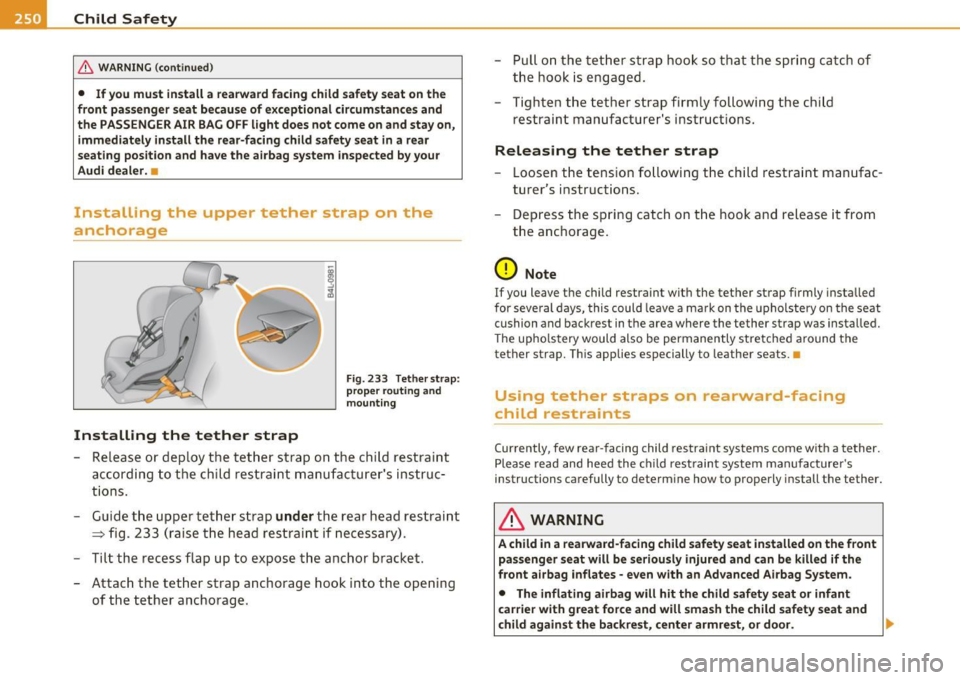
Fig. 233 Tether strap:
proper routing and
mounting
- Release or deploy the tether strap on the child restraint
according to the child restraint manufacturer's instruc
tions.
- Guide the upper tether strap
under the rear head restraint
=> fig. 233 (raise the head restraint if necessary).
- Tilt the recess flap up to expose the anchor bracket.
- Attach the tether strap anchorage hook into the opening
of the tether anchorage. -
Pull on the tether strap hook so that the spring catch of
the hook is engaged.
- Tighten the tether strap firmly following the child
restraint manufacturer's instructions.
Releasing the tether strap
-Loosen the tension following the child restraint manufac
turer's instructions.
- Depress the spring catch on the hook and release it from
the anchorage.
0 Note
If you leave the child restraint with the tether strap firmly installed
for several days, this could leave a mark on the upholstery on the seat
cushion and backrest in the area where the tether strap was installed.
The upholstery would also be permanently stretched around the
tether strap. This applies especially to leather seats.•
Using tether straps on rearward-facing
child restraints
Currently, few rear-facing child restraint systems come with a tether.
Please read and heed the child restraint system manufacturer's
instructions carefully to determine how to properly install the tether.
& WARNING
A child in a rearward-facing child safety seat installed on the front
passenger seat will be seriously injured and can be killed if the
front airbag inflates -even with an Advanced Airbag System.
• The inflating airbag will hit the child safety seat or infant
carrier with great force and will smash the child safety seat and
child against the backrest, center armrest, or door.
~
Page 261 of 384

_________________________________________ I_ n_ t_ e_ ll_,igent technology ,__E~-
vidual components. It regulates consumption, so that more electrical
ene rgy is not being used than is being generated and ensures an
optimal state of charge for the battery.
[I] Tips
• But even energy management cannot negate the limits of physics.
Consider that the power and life of a battery are limited.
• If starting ability is threatened, you are informed by a warning
~ page 259, "Driver notification in the instrument cluster display" .•
What you should know
The highest priority is given to maintaining starting capa
bility.
Th e battery is severely taxed in short-distance driving, in city tra ffic
and during the cold time of year. Abundant electrical energy is
required, bu t on ly a little is generated .
It is also critical if the engine
is not running and electrical components are turned on. In this
instance energy is being consumed but none is being generated.
It is in prec isely these situations that you will notice energy manage
ment actively regulating the distribution of energy.
Vehicle stands for an extended period
If you do not drive your vehicle over a period of several days or weeks,
electrical components are gradually cut back or switched off. This
reduces energy consumption and maintains starting capability over a
longer period.
Be aware that when you unlock your vehicle, some of the convenience
functions may not operate, such as the Convenience key, the remote
control or the power seat adjustment. The convenience functions will
be available aga in when you turn on the ignition and start the eng ine.
Controls and equip
ment Safety first Vehicle operation
With the
engine turned off
If you listen to the radio, for example, with the engine turned off or
use other MMI functions, the battery is being discharged .
If starting capab ility is jeopardized due to energy consumption, the
following warning appears in the MMI display:
Please start engine, otherwise system will switch off in 3
minutes.
The warning indicates that the system will be turned off automati
cally after 3 minutes. If you wish to continue using the functions, you
have to start the engine.
With the engine running
Although electrical energy is generated when the vehicle is being
driven, the battery can become discharged . This happens mostly
when little energy is being generated and a great dea l consumed and
the battery's state of charge is not optimal.
T o bring the energy balance back into equilibrium, consumers which
require especially large amounts of energy are temporarily cut back
or switched off. Heating systems in particular require a great deal of
energy . If you notice, for example, that the heated seats* or the
heated rear window are not heating, they have been temporarily cut
back or switched off . These systems w ill be ava ilable again as soon as
the energy balance has been restored.
You will also notice that engine idle speed has been increased
slightly. This is normal and not a cause for concern . By increasing
engine idle speed the additional energy required is generated and the
battery is charged. •
Driver notification in the instrument
cluster display
If the battery's state of charge is not in the optimal range, this driver
no tifi cation appears in the instrument cluster display:
Low battery charge: battery will be charged while driving ~
Vehicle care Do-it-yourself service Technical data
Page 279 of 384

____________________________________________ C_l_e _a_ n_ in--= g=-- a_n_ d_ p ,__r_o _t_ e_ c_ t _ io_ n __ ,n
Your authorized Audi dealer can provide cleaning products that have
bee n tested and approved for your veh icle. •
Care of interior
MMI display
- Clean the MMI display with a soft clean cloth and an LCD
cleaner .
The MMI display can be cleaned with a professionally available "LCD
cleaner". The cloth should be slightly dampened with the cleaning
fluid to clean the d isp lay .
0 Not e
To avoid scratching the MMI display, you should never clean it dry. •
MMI terminal
- First clean the MMI terminal with a brush to remove dust
from the housing.
- Then wipe the MMI terminal with a clean, soft, slightly
damp c loth .
The MMI te rmi nal shou ld be cleaned with a b rush first so that no di rt
is trapped between the buttons and the housing. We recommend
giving the MM I termina l a final wipe w ith a cloth moistened with
water and dish wash ing detergent .
0 Note
To prevent damage, make sure that no fluid ever gets into the MMI
terminal. •
Safety first
Aluminum trim
Use only neutral-pH products to remove spots and deposits from
al uminum surfaces. Ch rome care prod ucts and al kaline cleaners w ill
attack aluminum surfaces and can damage them over t ime .
& WARNING
Alw ay s re ad and heed all WARNING S and other information
~ page 2 70. •
Fabrics and fabric coverings
Fabrics and fabr ic coverings (e .g . seats, door trim panels, etc.) should
be clean ed at regular interva ls with a vacuum cl eaner . T his removes
surfa ce di rt pa rt icl es which co uld become embedded in the fabr ic
through use . Steam cleaners should not be used, because the steam
tends to push the d irt deeper into the f abric and lock it there.
Norm al clean ing
Genera lly, we recommend using a soft sponge or a li nt-free
microfiber cloth to the clean fabric. Brushes should on ly be used for
ca rpets and floor mats , since other fab ric surfaces could be ha rmed
by brushes.
No rma l sur face sta ins can be cleaned us ing a commercially avai lab le
foam cleaner. Spread the foam on the surface of the fabr ic with a soft
sponge and work it in gently . Do not saturate the fabric. Then pat the
foam dry using absorbent , dry cloths (e .g. microfiber cloth) and
vacuum it after it has dried comp letely.
Clean ing stains
Sta ins caused by beverages (e .g. coffee, fruit juice, etc.) can be
treated with a mild detergent solut ion. Apply the detergent solut ion
with a sponge . In the case of stubborn stains, a detergent paste can
be applied directly to the stai n and worked into the fabric . After
wards, use copious amounts of clean water to remove the remaining .,.
Vehicle care Technical data
Page 281 of 384

____________________________________________ C_l_e _a_ n_ i n--= g=--- a_n_ d----' p,__ r_o _t_ e_ c_ t_ i _o_ n __ _
consider if childre n, animals or other factors might prove to be partic
ularly hard on the leathe r.
By contrast, leather types that are covered by a colored fin ish layer
are more durable . This has a positive effect on the leath er's resistance
to wear and so iling in daily use. On the othe r hand, the typical charac
teristics of natura l leathe r are barely or not apparent . However, this
does not mean that the leathe r itself is of infer io r quality.
C are and handling
Because of the exclusive nature of the types of leather that Audi uses
and the ir unique p roperties (such as sensitivity to oils, grease, so iling,
etc.), yo u will need to be somewhat ca refu l with these leat he rs , a nd
a certain type of care is required. For example, dark clothing mate
r ials ca n disco lor leather seats (especially if such clothi ng is d amp and
was not dyed correctly) . Dust and dirt particles in pores, folds, and
seams can have an abrasive effect and c an damage the le athe r
surface as well as weaken seams .
The leather s houl d be cleaned regularly as needed . After having been
used for a relatively long time, your leather sea ts w ill acquire a rich
aged finis h. This is a characteristic of natura l leather and a sign of
true quality.
I n order to maintain the value of this natural product over the life of
your vehicle, you sho uld fo llow the recommendations below :
0 Note
• To keep you r leather from b leaching out, do not allow it to be
exposed to bright sunl ight for long periods of time . If you have to
leave t he veh icle parked outside for long pe riods, cover the leather to
protect it from direct exposure to sunlig ht.
• Sharp objects on clothing, such as zippers, rivets or sha rp pieces
on belts can leave permanent scratches or scrape marks on the
s u rface of the leather.
Safety first
(I] Tips
• After each time you clean the leathe r and at regular inte rvals , u se
a leather preservative creme that contains UV-blockers and that
works into the leather. This creme will nou rish and mo istur ize the
leather, helping it to breathe and stay supp le. It also helps to build up
a p ro tect ive coa ting on the surfa ce.
• Clean the leather every 2 -3 months, and clean any areas that get
soiled.
• Remove fresh marks made by ballpoint pens, ink, lipstick, shoe
polish, etc. as soon as poss ible.
• Preserve the color of t he leather as needed by using a specia l
co lored leather ca re creme to touch up areas of uneven color .•
Ap plies to vehi cles : w it h nat ural leat her
Cleaning and caring for leather upholstery
and trim
Natural leather requires special care and attention.
Normal cleaning
- Clean so iled areas wit h a slightly mois tened cotton or
woolen cloth .
More stubborn dirt
-More stubborn d irt can be removed using a clot h satu
rated w ith a mild soap solution (2 ta blespoons m ild liq ui d
soap) .
- Never allow the soap solution to saturate the leather, and
make certa in that no water soaks i nto the seams .
- Wipe off the soap solution w ith a soft, dry c loth. .,,
Vehicle care Technical data
Page 345 of 384
![AUDI S8 2010 Repair Manual ________________________________________________ F_ u_s _e_ s_ a_ n_ d_ b_u_ lb_ s _ __.1111
(]] Tips
You a re well adv ised to keep a supply of spare fuses in your veh icle .
Fuses with](/img/6/57617/w960_57617-344.png "AUDI S8 2010 Repair Manual ________________________________________________ F_ u_s _e_ s_ a_ n_ d_ b_u_ lb_ s _ __.1111
(]] Tips
You a re well adv ised to keep a supply of spare fuses in your veh icle .
Fuses with")
________________________________________________ F_ u_s _e_ s_ a_ n_ d_ b_u_ lb_ s _ __.1111
(]] Tips
You a re well adv ised to keep a supply of spare fuses in your veh icle .
Fuses with the proper ampere ratings are avai lab le at your Audi
dealer. •
Fuse Location, Instrument Panel left
Fig. 2 78 Fuse pa nel
la you t
Some of the equ ipment items listed a re opt io na l o r only availab le on
certain model configurations.
Note that the following table i s accu rate at the time of going to
pre ss and is subject to change . In the event of di scr epancie s, th e
label on the in side of the cover always takes precedence.
T he power wi ndows and the power seats are p rotected by cir cuit
breakers ,
which automatically reset after a few seconds after the
overlo ad -for e xamp le if a window is fro zen - has bee n remed ie d.
Equipment Amps
1 Garage door opener (Homelink) 5
Parking assist system 5
3
Pa rking assist sy stem 5
4
Headlight range control/light control devic e 10
Vehicle OP-eration
No.
5
6
7
8
9
10
11
1 2
13
14
1 5
16
17
1 8
19
20
2 1
22
23
24
25
26
27
28 29
Equipment Amps
Instrument cluster 5
Steering column electronics system control 10
Diagnostic co nnector 5
Diagnostic connector/oil level sensor 5
ES P contro l uni t/steer ing angle se nsor 5
Instrum ent cluster 5
Au di lane ass ist 10
B ra ke ligh t switch 5
Telephone/ cell phone 10
Vacant
Acces s/ st art cont rol m odul e
5
RSE system 10
Adaptive C ruise Control 5
Hea ted w asher je ts 5
Vacant
Tire pressure monitoring system *
5
Vacant
Bra ke light switch
5
Ce ll phone preparation 5
Horn 15
Wi ndshie ld wipe r system 4 0
Vacant
E le ctronic Stabilizati on Pro gram (E SP)
2 5
Vacant
Sw itch illumination
1
Vehicle care Do-it-yourself service iTechnical data
Page 346 of 384

lffll.,___F_ u_ s_e _ s_ a_n_ d_ b_u _ l_ b_ s _______________________________________________ _
No. IIEquipment
30 Vacant
31
32
33
34
35
36
37
38
39
4 0
41
42 Onboard power s
upply, light contro l (r ight
headlight)
Vacant L eft rea r footwell heate r
Vacant
Vaca nt
A udi si de assist
Coo ler
Onboard power supply, light control (left head
light)
Door control un it, dr iver's side
Power steerin g column adjustmen t
Door control unit, rear left
Access/start control module
4 3 Adaptive L ight, le ft
--44 Adap tive Light, righ t
Amps
30
25
5
15
30
7 .5
25
7 .5
25
10
10
•
Fuse Location, Instrument Panel right
Fig. 279 Fuse panel
la yout
Some of the equipment items listed are optiona l or only availab le on
certain mode l configurations .
Note that the following table is accurate at the time of going to
press and is subject to change. In the event of discrepancies , the
label on the in sid e of the cover alway s take s precedence .
The power window regu lators and the power seats are protected by
circuit breakers , which automatically reset after a few seconds after
the overload -for examp le if a window is frozen -has been remedied .
No. Equipment
1 Parking br ake
2 A ir cond ition ing
3 Shift gate
4 Vacan t
5
6
7
---· 8
Eng ine contro l
Oxygen sensor before the three-way
cat alytic converter
Oxygen sensor behind the three -way
catalytic converte r
E ngine control, auxiliary w ater pump
Amps
5
10
5
15
15
15
1 0