climate control AUDI S8 2010 Owners Manual
[x] Cancel search | Manufacturer: AUDI, Model Year: 2010, Model line: S8, Model: AUDI S8 2010Pages: 384, PDF Size: 90.95 MB
Page 4 of 384
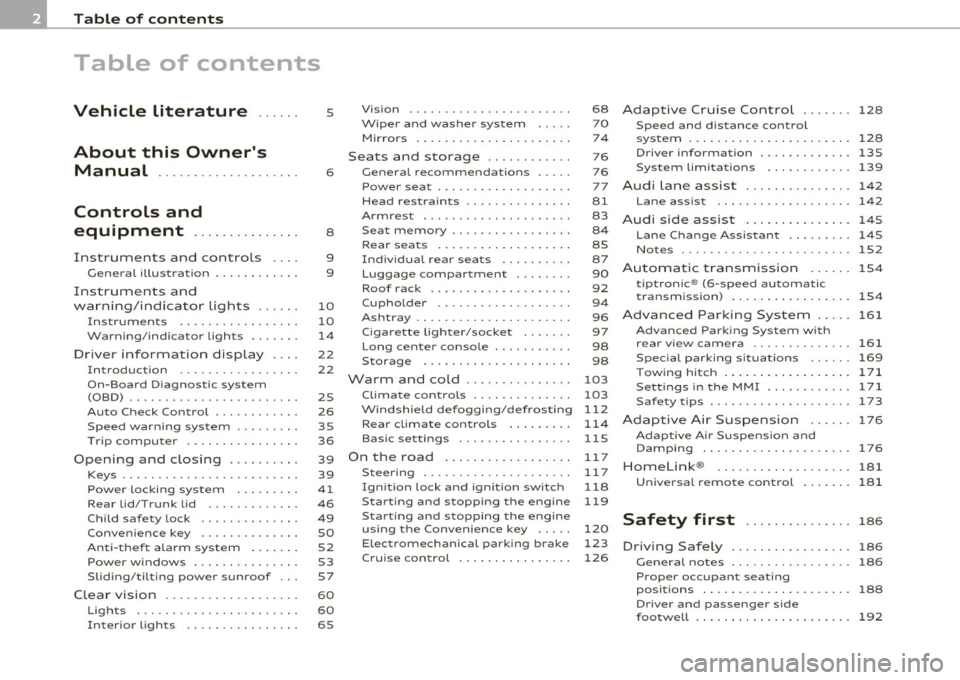
Table of contents
Table of contents
Vehicle literature
About this Owner's Manual ............. ...... .
Controls and
equipment .............. .
Instruments and controls ... .
General illustration ........... .
Instruments and
warning/indicator Lights ..... .
Instruments ................ .
Warning/indicator ligh ts ...... .
Driver information display ... .
Introduction ............ ... . .
On-Board Diagno stic system
(OBD) ....................... .
Auto Ch eck Control ........... .
Speed warning system ........ .
Tr ip computer ............... .
Opening and closing ......... .
Keys ........................ .
Power locking system ........ .
Rear lid/Trunk lid ......... ... .
Child safety Lock ............. .
Convenience key ............. .
Anti-theft alarm system ...... .
Power windows .............. .
Sliding/tilting power sunroof .. .
Clear vision .. ................ .
Lights ....... ......... ...... .
Interior ligh ts ........ ....... .
5
6
8
9
9
10
10
14
22
22
25
26
35
36
39
39
41
46
49
so
52
53
57
60
60
65 Vi
sion
Wiper and washer system
Mirrors
Seats and storage ........... .
General recommendations .... .
Power seat ....... ........... .
Head restraint s .... .......... .
Armr est ................. ... .
Seat memory ................ .
Rear seats ............. ..... .
Indiv idual rear seats ......... .
Luggage compartment .. ..... .
Roof rack ................... .
Cupho lder .................. .
Ashtray ..................... .
Cigarette Lighter/socket ...... .
Long cente r console .... ...... .
Storage ............. ....... .
Warm and cold ........... ... .
Climat e controls ...... ... .. .. .
W ind shield defogging/defrosting
Rear climate controls ........ .
Basic settin gs ............... .
On the road ................. .
s . teenng .................... .
I gn ition lock and ign ition switch
S tarti ng and stopping the en gine
Starting and stopping the engine
us ing the Convenience ke y .....
Electromechanical park ing brake
C ru ise control ............... . 68
70
7
4
76
76
77
81
83
8 4
85
87
90
92
9 4
96
97
98
98
103
103
112
114
115
11 7
11 7
118
119
120
123
126
Adaptive Cruise Control ....... 128
Speed and distance control
system
Driver information .......... .. .
System Limitation s ........... .
A d' l . u I ane assist ............. . .
128
135
139
142
Lane assist . . . . . . . . . . . . . . . . . . . 142
Audi side assist ............... 145
Lane Change Assistan t . . . . . . . . . 145
No tes ..... ......... .......... 152
Automatic transmission 154
tiptronic ® (6-speed automatic
transmission ) . . . . . . . . . . . . . . . . . 1 54
Advanced Parking System ..... 161
Advanced Parking System with
rear view camera .............. 161
Specia l park ing situat ions . . . . . . 169
Tow ing hitch ........... ....... 1 71
Settings in the MMI ......... ... 171
Saf ety tips .... ................ 173
Adaptive Air Suspension 176
Adaptiv e Air Suspens ion and
Damp ing . . . . . . . . . . . . . . . . . . . . . 176
Homelink ® ............. ...... 181
Universal remote control
181
Safety first ............... 186
Driving Safely ................. 186
General notes . . . . . . . . . . . . . . . . . 186
Proper occupan t seating
positions . . . . . . . . . . . . . . . . . . . . . 188
Driver and passenger side
footwell . . . . . . . . . . . . . . . . . . . . . . 192
Page 11 of 384
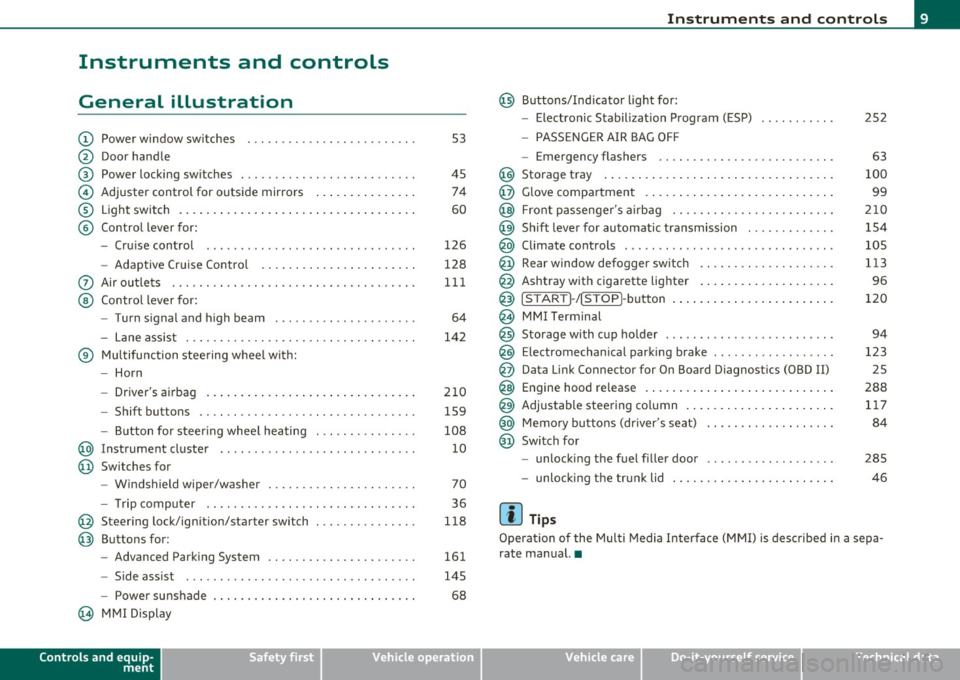
Instruments and controls
General illustration
(D Power window switches . .. .. .. ... .. ... .. ... ... . .
@ Door handle
@ Power locking switches . .. .. ......... .. .. .... ... .
© Adjuster control for outside mirrors .............. .
® Light switch ............... . ... ..... ....... ... .
© Control lever for:
- Cruise contro l ............ .... ... . ... ....... .
- Adaptive Cruise Control . ................... .. .
0 Air outlets .... .... .. .. .. ... ... ............. .. .
@ Control lever for:
- Turn signal and high beam .................... .
- Lane assist ................ ...... .. .. .. .. ... .
® Multifunction steering wheel with:
- Horn
- Driver's airbag ....................... ....... .
- Shift buttons .... .. .. .. .. .... ............... .
- Button for steer ing whee l heating . .. .. ... ...... .
@ Instrument cluster .................. .... ... ... .
@ Switches for
- Windshield wiper/washer ................ .. ... .
- Tr ip computer .. .......... . .. .... .. .. .... ... .
@ Steering lock/ignition/starter switch .............. .
@ Buttons for:
- Advanced Parking System .... .. .... .. ...... ... .
- Side ass ist ........... ........ ... ..... ... ... .
- Power sunshade
@ MMI Display
Controls and equip
ment Safety first
53
45 74
60
126
128
111
64
142
210 159
108 10
70
36
118
161
145
68
Instruments and controls
@ Buttons/Indicator light for:
- Electronic Stabilization Program (ESP)
- PASSENGER AIR BAG OFF
- Emergency flashers .. .. .. .. .. .... .. ......... .
@ Storage tray .................. .. .. .. ......... .
@ Glove compartment .... .... .. .. .... ........... .
@ Front passenger 's airbag .................... .. . .
@ Sh ift lever for automatic transmission ........... . .
@ Climate controls . .. .................... .... ... .
@ Rear window defogger switch .. .. .. .. .. .... ..... .
@ Ashtray with cigarette lighter ................... .
@ IS TART ]-/IS TOP]-button . ... ................ ... .
@ MMI Terminal
@ Storage with cup holder ..... .. .. .. ............. .
@ Electromechanical parking brake ... .. ...... ..... . .
@ Da ta Link Connector for On Board Diagnostics (OBD II)
@ Engine hood release ........................... .
@ Adjustable steering column ..................... .
@ Memory buttons (driver's seat) .................. .
@ Switch for
- unlock ing the fuel filler door ....... ....... .... .
- unlock ing the trunk lid
[ i ] Tips
252
63
100
99
210
154
105
113
96
120
94
123 25
288 117
84
285
46
Operation of the Multi Media Interface (MMI) is described in a sepa
rate manual. •
Vehicle care Technical data
Page 42 of 384

Opening and closing Master key with remote control
The remote control allows you to lock or unlock the
vehicle electronically.
Fig. 24 Fold-up
master key with
remote control
- To fold the key out and back in place, press the release
button~ fig. 24.
The transmitter and battery are located in the head of the remote
control. The receiver is located inside the vehicle. The maximum
effective range depends on several things. Remember, if the battery
is weak, the effective range decreases.
If you need to replace the remote contro l, or if you need to have it
repaired, you must see you r author ized Aud i dealer. Only then can you
use the key again.
Personalizing the master key
When the ignition is turned off or when the vehicle is locked, vario us
convenience sett ings are stored automatically and assigned to the
key that was used. The sett ings assigned to the key are automatically
recalled w ith you unlock the vehicle or when you open a door or when
you switch on the ignition .
• Climate control
• Centra l locking
• Windows and rear window sun blind •
Background lighting*
• Seat memory
• Adaptive Cru ise Contro l*
• Audi lane and s ide assist*
• Adva nced Parking System*
The
Remote control key f un ction must be activated in MMI
=> page 85, so that the settings for the driver's seat (including the
sett ings for the head restraint, steering column, safety belt height
and exterior mirrors) are saved on the master key through the seat
memory when the vehicle is locked, and are set automat ica lly when
the vehicle is unlocked.
[ i ] Tips
• If the ign it ion is switched on, the remote control system is deacti
va ted .
• The remote control system can be affected by other systems oper
ating in the same frequency range close to the vehicle, such as mobile
telephones, te lev ision broadcasting stations, etc.
• For Declaration of Compliance to United States FCC and Industry
Canada regulations =>
page 364. •
Battery replacement, master key
. w ',!
Fig. 25 Check light in
the master key ..
Page 52 of 384

Open ing and closing
- To swi tch on the child safety lock, turn the ignition key in
the direction of the arrow .
- To
switch off the child safety lock, turn the ignition key in
the opposite direc tion to the arrow.
The child safety lock prevents the doors from be ing opened from the
inside when you have small children sitting in the rear. •
Appli es to ve hicles : with pow er child safety loc k in th e rea r d oo rs
Power child safety lock for the rear doors t
The power child safety lock prevents the rear doors from
being opened from the inside.
F ig. 38 Section from
driver's door: controls
The rear doors are equipped with a power child safety lock . It
is operated with the two safety buttons(!) in the driver's door
~ fig. 38.
-Press the left and/or right safety button to disable the
rear power window(s) and prevent the respective rear door
from being opened from the ins ide . The LED in the button
will light up when the child safety lock is turned
o n .
- Press the illuminated button again to turn the child safety
features
off.
When the child safety lock is activated, the interior door opening
lever is inope ra tive; the door can only be opened from the o utside. In
addition, the window regulator for that door is also inoperative when
the chi ld safety lock is activated .
If the child safety lock has been activated on both the left and r ight
side, then the following features are switched off : the buttons for the
inter io r lights, the sun blind* in the rea r window and the buttons for
the power sun blinds* in the side windows. In addition to this, the
rear climate contro l* is set to the
PAS SIVE mode. Th is means that the
climate controls in the front adjust the heating and ventilat ion in the
rear of the vehicle=>
page 114.
[ i ] Tips
• In order to activate the child safety lock on the left and the right
side, you have to press the two safety buttons in succession.
• Make certain that the indicator light in the corresponding sa fety
button illum inates when the ch ild safety lock is activated .•
Convenience key
A pplies to veh icles : with Conven ience key
Description
Opening your vehicle and starting the engine with the key
still in your pocket.
The Convenience key features is a keyless system which gives you the
possibility to lock and un lock your veh icle, as well as to start the
eng ine without having to use your key.
It does not matte r if you have your key in your jacket pocket or in your
briefcase . As soon as you get within a certain distance to the vehicle,
the system senses that your are approaching, it makes a quick check
to see if you are "authorized" and then it does the following:
• unlocks the vehicle =>
page 51. .,
Page 57 of 384

Switching the power to the rear windows on
or off on vehicles with power child safety lock
-Press the left 00 button~ page 53, fig. 42 to switch off
the power window in the left door only. The LED in the
button illuminates .
- Press the right 00 button to
switch off the power window
in the
right door only . The LED in the button illuminates.
- Press the00button again to switch the power back on. The
LED in the button will go off.
By pressing the safety switch ®=> page 53, fig. 41, the function of
some switches in the rear can be turned off. When the / symbol in
the safety switch illuminates, the following functions are switched
off:
• The power w indows in the rear doors .
• Th e buttons for the interior lights.
• The buttons for the power sun blinds* in side windows.
• Th e button fo r the power sun blind* in the rear window.
• In veh icles with rear climate control * the
PASSIVE mode is acti
vated . In this mode the rear air conditioning can be operated only
from contro ls in the driver's area=>
page 114.
This feature has been prov ided for the safety of small children riding
in the rear of the vehicle.
On vehicles with the
power child safety lock*=> page 53, fig . 42
these features can likewise be switched off . Both
00 buttons ® must
be pressed.
• If
only the left (I) button is pressed, then only the rear left door
power window is switched off and the door is locked.
• If
only the right 00 button is pressed, then only the rear right
door
power window is sw itched off and the door is locked.
Controls and equip
ment Safety first
Opening and closing
(I] Tips
• Th
e windows can st ill be opened and closed for about ten minutes
after the ignition has been turned off . The power windows are not
shut off until one of the front doors is opened.
• To switch on the child safety lock in both rear doors, you must
press both ch ild safety switches . Make sure the LEDs in the switches
are illuminated .•
Switch in the front passenger 's door and on
the rear doors
Fig. 43 Switch loca
tion front passengers door
The power window switch has a two-position function:
Opening the windows
- Press the switch to the first position and hold it unt il you
have opened the window as far as you want .
- Press the switch quickly to the
second position and the
window will automatically open all the way.
Closing the windows
-Pull the switch to the first position and hold it until you
have closed the window as far as you want. ..,_
Vehicle care Technical data
Page 59 of 384

Sliding/tilting power sunroof
How the power sunroof works
Fig. 45 Sect ion of the
h ea dli ner: s unroof
sw itch positions
The roof will slide open or t ilt up at the rear as requ ired. When the
ignition is on, you can slide the roof open or close it to the desired
position by turning the rota ry control sw itch located ove rhead next to
the interior light. The roof is tilted open or closed by pressing or
pulling the contro l switch at position@~ fig. 45.
You can still close or open the sunroof for up to ten minutes after you
have switched off the ignition with the key remaining in the ignition
lock. If either door is opened, powered operation of the sunroof will
be deactivated.
S olar roof*
The solar cells in the roof provide energy to operate the ventilation
system for the climate control. It is activated automatically after the
vehicle is parked. Depending on solar irradiation, the interior temper
ature of the vehicle is lowered in the summer, in the winter the inte
r ior is dehumidif ied.
Sola r prot ection with sliding gl ass sun roof
The sliding glass sun roof is equipped with an adjustab le sunshade to
reduce the effects of strong sunlight. The solar protection can be
moved at the recessed handle to open and close it. To prevent the
Con tro ls a nd e quip
m en t Vehicle
OP-eration
Opening and closing
vehicle interior from heat ing up, you shou ld close the solar protection
when you park your vehicle in the s un .
When the roof is
s lid open , the sunshade is opened a utomat ically .
When the roof is closed, the sunshade can be closed manually.
When the roof is
t ilte d op en , the closed s unshade is also ra ised at the
rear edge . But it can still be slid open or closed.
0 Note
You should always closed the sliding/t ilting sunroof when you leave
your vehicle. Sudde n rain can drench the interior equipment a nd
damage the electronic conven ience features in your vehicle.
(I] Tips
If you park your vehicle in the sun, we recommend that you close the
s u nshade .•
Sliding/tilting the power sunroof open
Tilting the roof open
- Turn the rotary switch to position ®·
- In position @, briefly
press th e control to tilt the roof up
completely.
- To tilt the roof open to any intermediate position
press
and hold the sw itch until the roof reaches the desired
position .
Sliding the roof open
-Turn the switch to position © to open the roof all the way.
- Turn the switch to any other position to open the roof to
any intermediate position . ._
Vehicle care Do-it-yourselt service iTechnical data
Page 105 of 384
_________________________________________________ W_.;,. a_r _m __ a_n .;,. d:.;__ c::.. o.::..:. ld.:.:..._fflll
Warm and cold
Climate controls
Description
The air conditioner is fully automatic and is designed to
maintain a comfortable and uniform climate inside the
vehicle.
We recommend the following settings:
- Set the temperature to 75
°F (+23 °C).
- Press the
[AUTO] button.
With this setting, you attain maximum comfort in the least amount
of time. Change this setting , as desired , to meet your personal needs.
The climate controls are a combination of heating, ventilation and cooling systems, which automatically reduce humidity and cool the
air inside your vehicle .
The air temperature, air flow and air distribution are automatically regulated to achieve and maintain the desired passenger compart
ment temperature as quickly as possible.
The system automatically compensates for changes in outside
temperature and for the intensity of the sunlight entering the
vehicle. We recommend you use the
Automatic mode ~ page 106
for year-round comfort .
Please note the following:
Turn on the air conditioner to reduce humidity in the vehicle. This also
prevents the windows from fogging up.
When the outside temperature is high and the air is very humid,
condensation from the evaporator may drip under the vehicle . This is
normal and does not indicate a leak.
Controls and equip
ment Safety first
If the outside temperature is
low, the fan normally only switches to a
higher speed once the engine coolant has warmed up sufficiently .
The air conditioner temporarily switches off when you drive off from
a standstill using full throttle to save engine power.
The compressor also switches off if the coolant temperature is too
high, so that the engine can be adequately cooled under extreme
loads.
Air pollutants filter
The air pollutants filter (a combined particle filter and activated char
coal filter) reduces or prevents outside air pollution (dust, or pollen)
from entering the vehicle.
The air pollutants filter must be changed at the intervals specified in
your Warranty
& Maintenance booklet, so that the air conditioner can
properly work.
If you drive your vehicle in an area with high air pollution , the filter
may need to be changed more frequently than specified in your Audi
Warranty
& Maintenance booklet. If in doubt, ask your authorized
Audi Service Advisor for advice.
Key coded settings
The air conditioner settings selected are automatically stored and
assigned to the key being used. When the vehicle is started, the air
conditioner automatically selects the settings assigned to that key.
This way every driver will maintain his/her own personal settings and
does not have to reset them manually.
If a different driver uses your key and changes the air conditioner
settings, the latest adjustments will erase and replace the settings
you have stored.
Energy management
To prevent the battery from being discharged and to restore the
balance of energy, components which require large amounts of
Vehicle care Technical data
Page 107 of 384

_________________________________________________ W_ a_ r_m _ a_ n_d_ c_ o_ ld _ ___.llfflll
Controls
This overview will help you to familiarize yourself with the
air conditioning controls.
Fi g. 11 8 Air cond itioning con tro l ele m en ts
T he left display indicates the tempe rat ure sele cted fo r the driver 's
side, the r ight d isplay ind icates the temperature se lected for the
passenger's side .
T he sett ings you make are show n in the MMI display fo r a few se conds
when MMI is turned on.
Each func tion is turned on or off by briefly press ing the corresponding
button. The indicato r light in the button illuminates when the func
tion is act ive.
Con tro ls a nd e quip
m en t Vehicle
OP-eration
But- Function Page
ton(s)
ION/O FF) Tur ning on and off => page 106
!AUTO) Automatic mode => page 106
Cont rol Temperatu re selection => page 106
knob
Heated seats*
(W Ventilated sea ts * => page 107
ffi Air distribution => page 109
~ D efrost => page 109
=> page 112
@ Fan => page 109
~ Manual rec irculat io n => page 109
~ Heated rear window => page 113
!SETU P] Basi c settings => page 115
(I) Tips
• Residual heat: With the ignition turned off, you can activate the
resid ua l heat f unct ion by p ressing the
I ON/OFF) bu tto n. T he resid ua l
heat from the coolant can be used to heat the vehicle interior. The
resid ual he at func tion is tu rned off automat ica lly a fter 30 m inutes.
• Synchron izing climate control: By press ing and hold ing the
cont rol knob on the driver's side, the temperatu re setting on the
dr iver's side can be sw itched to the passenger's side, and v ice versa.
In the case of veh icles wi th rear a ir condition ing *, the se lec ted
temperature set ting is also app lied to the outer rear seats. The new
temperature is shown in the disp lay. •
Vehicle care Do-it-yourselt service iTechnical data
Page 108 of 384
![AUDI S8 2010 Owners Manual 1111....__w __ a _r_ m __ a_n_ d_ c_ o _ l_d _______________________________________________ _
Turning on and off
I ON/OFF]
Turning the air conditioning on
- Press!ON/OFF],or
- Press !](/img/6/57617/w960_57617-107.png "AUDI S8 2010 Owners Manual 1111....__w __ a _r_ m __ a_n_ d_ c_ o _ l_d _______________________________________________ _
Turning on and off
I ON/OFF]
Turning the air conditioning on
- Press!ON/OFF],or
- Press !")
1111....__w __ a _r_ m __ a_n_ d_ c_ o _ l_d _______________________________________________ _
Turning on and off
I ON/OFF]
Turning the air conditioning on
- Press!ON/OFF],or
- Press !AUTO
J .
Turning th e air conditioning off
- Press I ON/OFF] to turn the air conditioner off and block
outside air from entering the vehicle.
T he air cond itioner turns back on if you press one of the control
buttons or the contro l knob.
[ i J Tips
Residu al h eat: With the ignition turned off, you can activate the
res idual heat function by p ressing the [
ON/OFF) button. The res idual
heat from the coolant can be used to heat the vehicle interior. The
resid ual heat funct ion is t urned off automatically after 30 m inutes. •
Automatic mode [AUTO I
The automatic mode is the standard setting for all
seasons.
Turning on AUTO
- Select temperatur e between 60 °F (+16 °() and 84 °F
(+28
°().
- Press!AUTO]=>page 105, fig. 118.
Automatic operation ensures constant temperatures in the interior
and dehumidifies the air inside the veh icle . Air temperature, volume
and distribution are controlled automatica lly to reach or maintain the
desired interior temperature as q uickly as possible . Fl uctuations in exterior temperature and the effects of temperature from the pos
i
t ion of the s un a re compensa ted for automatically.
T hi s operating mode works only in the adj ustab le temperature range,
from 60 °F ( +16 °C) to 84 °F ( +28 °C) . If a temperature below 60 °F
(+ 16 °C) is se lec ted, LO appea rs in the disp lay. At temperatu res above
84 °F (+28 °C),
HI is displayed. At both extreme settings, climate
cont rol r uns continuously at max imum coo ling o r heat ing power.
There is no temperature regulation. •
Setting the temperature
Separate temperatures can be selected for the driver's
and front passenger's side.
- Rotate the contro l knob to t he left to reduce the temper-
ature, or to the right to inc rease the temperature.
[ i J Tips
• When you press the contro l knob fo r choosing the tempera ture,
the temperature you choose will also appear in the MMI display.
• Synchr onizing clim ate control : By pressing and ho ld ing the
control knob on the driver's side, the temperature setting on the
dr iver's side can be switched to the passenger's side, and vice ve rsa.
In the case of vehicles with rear a ir condit ion ing*, the selected
t empe ra ture se tt ing is also applied to the outer rear seats . The new
temperature is shown in the display .•
Page 109 of 384
_______________________________________________ W_ a _r_m _ a_ n_d _ c_o _l_ d _ __.ffl'I
A pp lies to vehicl es: wi th ele ctr ically heated s eats
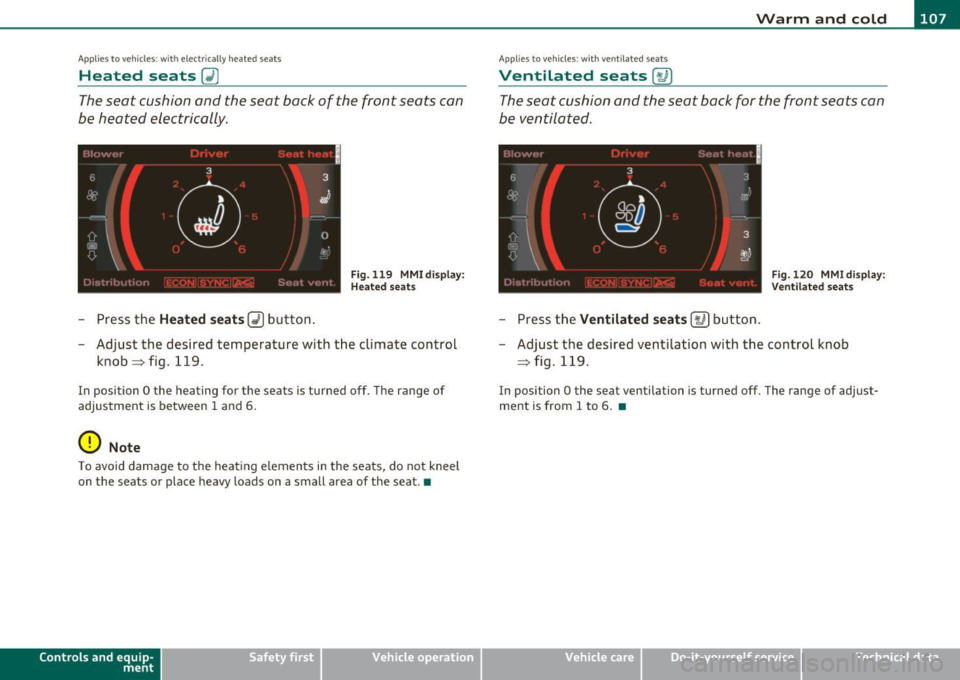
Heated seats~
The seat cushion and the seat back of the front seats can
be heated electrically.
Fig. 119 MMI dis p lay :
H ea ted s eats
- Press the Heated seats~ button .
- Adjust the desired temperature with the climate control
knob~fig .119 .
In position O the heating for the seats is turned off. The range of
adjustment is between 1 and 6.
0 Note
To avoid damage to the heating elements in the seats, do not kneel
on the seats or place heavy loads on a small area of the seat.•
Controls and equip
ment Vehicle
OP-eration
Ap plie s to vehicl es: wi th ve ntil at ed seats
Ventilated seats [,u ]
The seat cushion and the seat back for the front seats can
be ventilated.
'' I
6 3
-t'
I oa
iJ
m
~·-~.
OD
c::::::i
.,
3 .
(.,? a,J
= Fig. 120 MMI di splay: : j ' ''' '. V en til ated seats
- Press the Ventilated seats [t.6 ] button .
- Adjust the desired ventilation with the control knob
~ fig . 119.
In position O the seat ventilation is turned off . The range of adjust
ment is from 1 to 6 . •
Vehicle care Do-it-yourselt service iTechnical data