clock AUDI S8 2010 Owners Manual
[x] Cancel search | Manufacturer: AUDI, Model Year: 2010, Model line: S8, Model: AUDI S8 2010Pages: 384, PDF Size: 90.95 MB
Page 13 of 384

If the indicator goes all the way to the right side inside the coolant
t empe ra tu re ga uge, the n th e eng ine cool ant tempe rature is too high.
Pull off the road to saf e location , turn off the engine and let it cool
down.
If the warning lig ht comes o n aga in after yo u have driven a
short distance, contact a qualified workshop.
& WARNING
• Always observe the warning in ::::> page 281 , "Engine compart
ment ", before opening the hood and checking the engine coolant
l e vel.
• Never open the engine hood if you see or hear steam, or if you
see engine coolant dripping from the engine compartment. You
c ould burn yourself. Let the engine cool off first so that you cannot
hear or see any steam or engine coolant .
0 Note
• Mounting additiona l lights or accessories in front of the a ir in lets
reduces the cooling effect of the radiator. At high outside tempe ra
tu res o r high engine load, the e ng ine could ove rheat .
• T he front spoi le r has bee n designed to properly distribu te the
cooling air when the vehicle is moving . If the spoiler is damaged, this
co uld reduce the coo ling effect and the eng ine could then overheat.
Ask your author ized A udi deale r for assistance. •
Tachometer (engine rev counter)
The tac home te r indicates the engine RPM (revoluti ons
pe r minu tes) .
The tachometer @::::> page 10, fig. 2 is the left of t he two large clock
type displays .
Th e eng ine tu rns at a speed
1,000 times t h e si ng le dig it in t he
display, e .g. if the need le is pointing at the "2" the engine is tu rning
at 2, 000 R PM.
Controls and equip
ment Safety first
Instruments and warning
/indicator lights
If e ngine RPM drops below 1,500, you s hould dow nsh ift to t he next
lower ge ar. T he re d area at t he e nd of the s cale i ndic ates m aximum
permissible e ngine RPM after the break-in per iod . Before reaching
this area, move the selector lever to posit ion "D (Drive)" or ease yo ur
foot off the accelerator pedal.
0 Note
The tachome ter needle s houl d not move in to the red range. If it does,
then only fo r a very short period of time . You could damage your
e n g in e by driv ing at h igh RPM .
c£> For the sake of the environment
Upshifting early saves fuel a nd reduces e ngine noise. •
Digital clock with date display
Date and time of day can be set in MMI.
Fig. 3 Instrumen t
cluster with digital
clock
Th e da te, time o f day , an d time and date form at can be se t in MM I.
You can find out more in the MMI manual. ..,.
Vehicle care Technical data
Page 14 of 384
![AUDI S8 2010 Owners Manual Instruments and warning/indicator lights
(I] Tips
• The dig ital clock and the odometer are turned on for about 30
seconds when the drivers door is opened.
• When the ign it](/img/6/57617/w960_57617-13.png "AUDI S8 2010 Owners Manual Instruments and warning/indicator lights
(I] Tips
• The dig ital clock and the odometer are turned on for about 30
seconds when the drivers door is opened.
• When the ign it")
Instruments and warning/indicator lights
(I] Tips
• The dig ital clock and the odometer are turned on for about 30
seconds when the driver's door is opened.
• When the ign ition is turned off, the odometer read ing and the
digital clock with date display can be switched on for about
30 seconds by press ing the
I CH ECK I button::::> page 13, fig. 5. •
Speedometer with odometer
The speedometer shows you the vehicle speed, and the
odometer shows you how many miles (kilometers) you
have driven.
Fig. 4 Instrume nt
cluster Odometer and res et button
The odometer and trip odometer are located inside the speedometer .
• USA models -Miles
• Canada models -Kilometers
You can switch the display from miles to kilometers and vice versa via
the MMI.
Lower odometer
The lower odometer shows the total number of mi les (kilometers)
driven.
Upper odometer (trip odometer)
The upper odometer shows the total number of miles (ki lometers)
dr iven since you last reset the odometer to zero . You can use th is
odometer when you want to keep track of how many m iles (kilome
ters) you have dr iven for a single trip or errand. The last digit indicates
1/10 of a mile (100 meters) .
You can reset the trip odometer to zero by pressing the Reset button
[0.0].
Malfunction message
If there is a malfunction somewhere in the instrument cluster, dEF
will appear in the trip odometer and will stay on. Contact your autho
rized Audi dealer to have the problem corrected.
Immobilizer
When you switch on the ign ition, the data chip inside the key is "read"
by the immobilizer system.
If an unauthori zed key is inserted into the ignition lock, the word
SAFE will come on and stay on . You will not be able to start the
vehicle=> page
41.
[ i ] Tips
• The digita l clock and the odometer are turned on for about 30
seconds when the driver's door is opened.
• When the ignition is turned off, the odometer reading and the
digital clock with date display can be switched on for about
30 seconds by pressing the [
CHECK] button::::> page 13, fig. 5. •
Fuel gauge
The fuel gauge only works when the ignition is on .
Th e fuel tank holds about 23.8 ga llons (90 liters). When the need le
reaches the reserve mark, the::::> page
33 ) symbol appears in the
instrument cluster display as well as the message
Please refuel. .,_
Page 15 of 384
There is still approximately 2.4 gallons (9 liters) of fuel left. This message is meant to remind you to
refuel.
(D Note
Never run the tank completely dry. An irregular supply of fuel can
cause engine misfiring and fuel could enter the exhaust system. The
catalytic converter could then overheat and be damaged. •
[CHECK) button
You can perform different functions with this button.
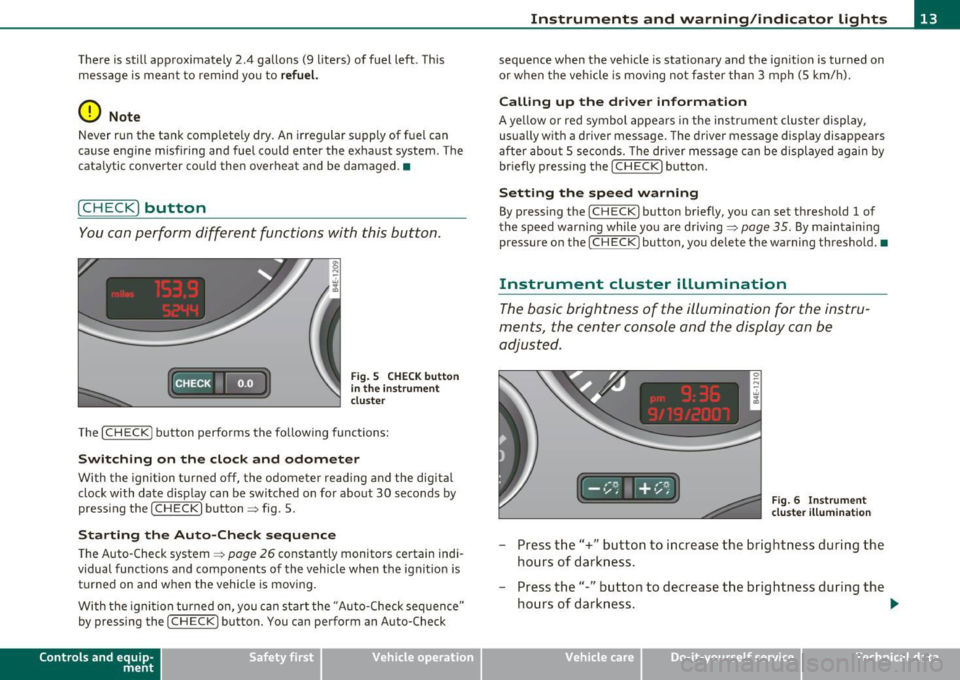
Fig. S CHECK button
in the instrument
cluster
The [ CHECK] button performs the following functions:
Switching on the clock and odometer
With the ignition turned off, the odometer reading and the digital
clock with date display can be switched on for about 30 seconds by
pressing the [
CHECK] button~ fig. 5.
Starting the Auto-Check sequence
The Auto-Check system~ page 26 constantly monitors certain indi
vidual functions and components of the vehicle when the ignition is turned on and when the vehicle is moving.
With the ignition turned on, you can start the "Auto-Check sequence"
by pressing the
(CHECK) button. You can perform an Auto-Check
Con tro ls a nd e quip
m en t Vehicle
OP-eration
Instruments and warning/indicator lights
sequence when the vehicle is stationary and the ignition is turned on
or when the vehicle is moving not faster than 3 mph (5 km/h).
Calling up the driver information
A yellow or red symbol appears in the instrument cluster display,
usually with a driver message. The driver message display disappears
after about 5 seconds. The driver message can be displayed again by
briefly pressing the [
CHECK) button.
Setting the speed warning
By pressing the [ CHECK] button briefly, you can set threshold 1 of
the speed warning while you are driving ~
page 35. By maintaining
pressure on the [
CHECK ) button, you delete the warning threshold.•
Instrument cluster illumination
The basic brightness of the illumination for the instru
ments, the center console and the display can be
adjusted.
Fig. 6 Instrument
cluster illumination
- Press the"+" button to increase the brightness during the
hours of darkness.
- Press the"-" button to decrease the brightness during the
hours of darkness. .,.
Vehicle care Do-it-yourselt service iTechnical data
Page 41 of 384

Opening and closing
Keys
Key set
Fig. 23 Key set
© Ma ster key with remote control
You can centrally lock a nd u nlock your ve hicle and start the eng ine
with the master key with remote contro l.
® Emergency key
The emergency key is only for tempo rary use if the vehicle key sho uld
be lost or misplaced~ &.
@ Valet key
The valet key f its only the driver's door and the ignition lock. If you
have to le ave t he key with somebody else, you are we ll-advised to
turn over the va let key on ly .
Be aware that the rear lid can be opened from inside the vehicle wit h
the remote rear lid release located in the dr iver's door. Before you
t u rn over the va let key you should therefore lock the rear lid mechan
ically w it h the mas ter key .
Turn t he master key
clockwise to the horizontal position and pull it
o ut . This has two effects:
Controls and equip
ment Safety first
Opening and closing
•
the remote rear lid release is deactivated ,
• the lid will remain locked when the power lock ing system is actu
ated .
In this state the rear lid can be unlocked only with the remote cont rol
unlo ck button ~ on the mas ter key.
Key replacement
If yo u lose a key, contact your a utho riz ed A udi dea ler immedia tely to
have t he
lost key disabled . Be sure to bring all your keys with yo u.
& WARNING
• Do not leave your vehicle unattended with the key in the igni
tion lock. Entry by unauthorized persons could endanger you or
result in theft or damage the vehicle. Always lock all doors and
take the key .
• Do not leave children unattended in the vehicle, especially with
ac ces s to v ehicle key s. Unguarded access to the keys provides chil
dren the opportunity to start the engine and/or activate vehicle
s ystems such as the power windows etc . Unsupervised operation
of any vehicle sy stem by child ren can result in serious injury.
(I) Tips
• If you open the dr iver's door with the key left in the ignit ion lock,
a ch ime will sound. This is your reminde r to remove t he key and lock
the door.
• For sec urity reasons, rep lacement keys a re only availab le from
Audi dealers. •
Vehicle care Technical data
Page 50 of 384

Opening and closing
To unlock the rear lid
-Turn the key to the Left to the opening position @
~ page 47, fig. 34. The rear Lid opens .
To lock the rear lid
-Pull t he rear Lid dow n and slam it closed gently~&.
Turning the key co unter-clockwi se to posit io n @ will release the rear
lid and cause it to rise slightly . In this pos ition the key cannot be
pulled out of the lock cylinder .
T urning the key
clockwi se to t he ho rizon tal posit io n ® and pu lling it
out w ill cause the
lid to rema in locked when the power locking
system is act uated.
I n this state the rear lid can only be unlocked with the unlock button
,c:::j on the remote control. On vehicles equipped w ith the Conven ience
key* feature, press the hand le on the rear lid to unlock the luggage
compartment =>
page 47, fig. 33.
After you t urn the key
counter -clo ckwi se ba ck to the ver tic al pos i
tion, the rear l id will aga in respond to the power locking system.
& WARNING
Read and follow all WARNINGS => & in "Opening and closing rear
lid " on
page 46. •
Appli es to veh icles : w ith aut omat ic r ea r lid /trunk lid ope ration
Automatic rear lid /trunk lid operation
The trunk lid con be opened and closed automatically.
Opening rear lid/trunk lid
Fig . 35 Trun k lid
h andl e
Fig. 36 Locking switch
in lugg age comp art
ment
- Press the hand le on the rear Lid/trunk Lid~ fig. 35, or
- Press t he mid dle bu tton
c:J on t he remote cont rol master
key ,or
- Press the re le as e bu tto n
c:J in the d riv er 's doo r
~ page 46, fig . 3 2 .
Page 69 of 384

Applies to vehicles: with background lighting
Background lighting
Four different lighting profiles for the interior lighting
con be selected and dimme d through the
MMI.
111111111
0
{m\ \1-=---.=J
~ "'"""
~o
Fig. 58 MMI di splay:
B ac kg round lighting
Fig . 59 Roo f mod ule
c ut out: Ligh t prof ile
s wit ch
-Press the Systems control but ton in the car menu .
- Selec t
Background lighting .
-Select a lighti ng profile => fig . 58 or select Off to deact i-
vate the lighting profile.
- Press the co ntrol knob to activate the des ired lig hting
profile.
Con tro ls a nd e quip
m en t Vehicle
OP-eration
Clear vision
- Rotate the control knob clockwise to increas e the bright
ness, and
- Rotate the control knob
counterclockwise to reduce the
brigh tness.
Whe n the vehicle is unlocked, the sta ndard lighting turns on a uto
matically and dims after approx. 2 minutes, and when the ignition is
turned on i t sw itches off immediate ly.
A background lighting prof ile can be switched on manually us ing the
ligh t profile switch => fig. 59. This w ill turn off a utomat ica lly aft er 30
m inutes when the ig nitio n is off . To reactivate, press the lighting
profile sw itch .
L ighting profi les that were selected while driving rema in act ive
dur ing the course of travel.
The following lighting profil es can be adjusted and
dimmed in the MMI:
Lighting profile Highway City Cockpit Rear
Drive r's side footwell X
Passenger's side foot-X X well
Rear footwell
X X
Front door trim panel X X X
Rear door trim panel X X X X
F ront int erior lighting X X
Rear interior light ing X X
II) Tips
Lighting profiles are stored on the remote control key being used .•
Vehicle care Do-it-yourselt service iTechnical data
Page 119 of 384
_________________________________________________ O_ n_ t_ h_ e_ r _o_ a_d _ __.fflll
On the road
Steering
Adjusting steering wheel position
The steering wheel position can be adjusted for height
and reach.
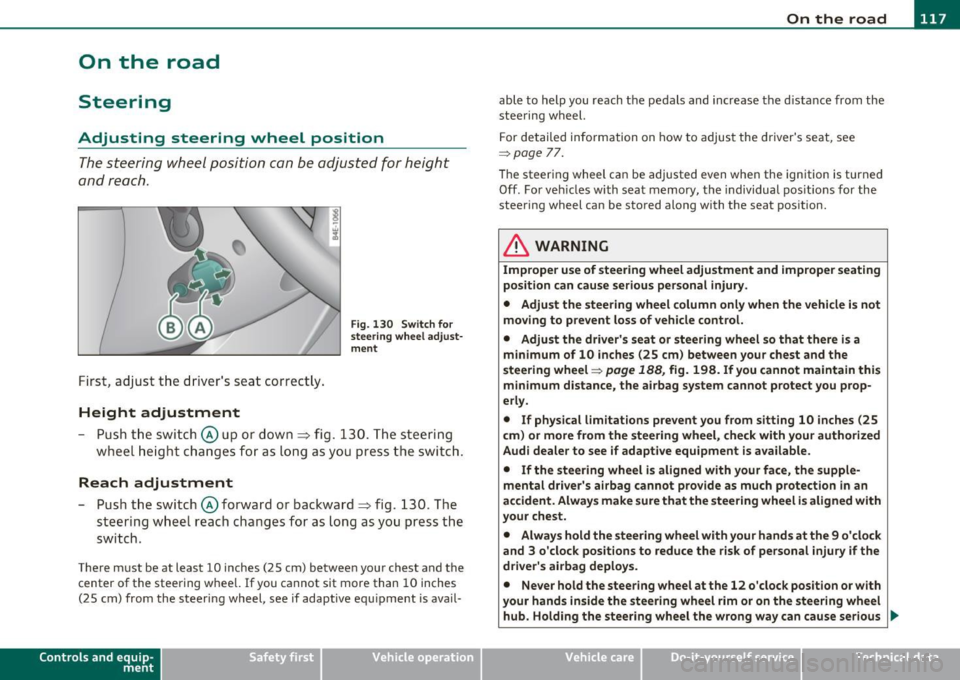
First, adjust t he driver's se at correct ly.
Height adjustment
Fig . 13 0 Swit ch f or
steering whee l adjust
m ent
- P ush t he swi tch © up or down ~ fig. 130. The st e e ring
whe el h eig ht chang es f or as l ong as y ou press t he swi tch .
Reach adjustment
- Push the switc h@ forward or backward~ fig. 130 . T he
steering w heel reach changes for as long as you press the
switch .
There m ust be at least 10 inches (25 cm) between your chest and the
center of the steering whee l.
If you cannot sit more than 10 inches
(25 cm) from the steer ing wheel, see if adaptive equ ipment is ava il-
Cont rols a nd e quip
m en t Vehicle
OP-eration
able to help you reach the pedals and increase the d istanc e from the
stee ring wheel.
F or detailed info rmation on how to adjus t the d river' s se at, see
~ page 77.
Th e stee ring wheel ca n be adjusted even when the ign ition is turned
Off . For veh icles with seat memory, the individual pos it io ns for the
steering wheel can be stored along with the seat pos ition.
& WARNING
Improper use of steering wheel adjustment and improper seating
position can cause serious personal injury .
• Adjust the steering wheel column only when the vehicle is not
moving to prevent loss of vehicle control. • Adjust the driver 's seat or steering wheel so that th ere is a
minimum of 10 inches (25 cm ) between your chest and the
steering wheel~
page 188, fig. 198. If you cannot maintain this
m inimum distance, the airbag system cannot protect you prop
erly.
• If physical l imitations p revent you from sitting 10 inches (25
c m ) or more from the steering wheel, che ck with your authorized
Audi dealer to see if adapt ive equipment is a vailable.
• If the steering wheel is aligned with your face, the supp le
mental dri ver 's ai rbag cannot prov ide as much protection in an
accident . Always make sure that the steering wheel i s aligned with
your chest.
• Always hold the steering wheel with your hands at the 9 o 'clock
and 3 o 'clock posit ions to reduce the risk of personal injury if the
driver's airbag deploys .
• Never hold the steering wheel at the 12 o'clock position or with
your hands inside the steering wheel rim or on the steering wheel
hub. Holding the stee ring wheel the wrong way can cause serious
~
Vehicle care Do-it-yourselt service iTechnical data
Page 191 of 384

______________________________________________ D_ ri_v _ i_n _,,g ,c.._ S_a_ f_ e_ l..:: y __ _
& WARNING (continued)
• Always adjust the driver's seat and the steering wheel so that
there are at least 4 inches (10 cm) between the knees and the
lower part of the instrument panel.
• Always hold the steering wheel on the outside of the steering
wheel rim with your hands at the
9 o'clock and 3 o'clock positions
to help reduce the risk of personal injury if the driver's airbag inflates.
• Never hold the steering wheel at the
12 o'clock position or with
your hands at other positions inside the steering wheel rim or on
the steering wheel hub. Holding the steering wheel the wrong way can cause serious injuries to the hands, arms and head if the
driver's airbag inflates
• Pointing the steering wheel toward your face decreases the
ability of the supplemental driver's airbag to protect you in a colli
sion.
• Always sit in an upright position and never lean against or
place any part of your body too close to the area where the airbags
are located.
• Before driving, always adjust the front seats and head
restraints properly and make sure that all passengers are properly
restrained.
• Never adjust the seats while the vehicle is moving. Your seat
may move unexpectedly and you could lose control of the vehicle .
• Never drive with the backrest reclined or tilted far back! The
farther the backrests are tilted back, the greater the risk of injury
due to incorrect positioning of the safety belt and improper
seating position.
• Children must always ride
in child seats ::::;, page 231. Special
precautions apply when installing a child seat on the front
passenger seat ::::;,
page 206. •
Controls and equip
ment Safety first Vehicle operation
Proper seating position for the front
passenger
The
proper front passenger seating position is important
for safe, relaxed driving.
For your own safety and to reduce the risk of injury in the
event of an accident, we recommend that you adjust the seat
for the front passenger to the following position:
- Adjust the angle of the seatback so that it is in an upright
position and your back comes in full contact with it when
ever the vehicle is moving.
- Adjust the head restraint so that the upper edge is as even
with the top of your head as possible but not lower than
eye level and so that it is as close to the back of your head
as possible =>
page 191.
-Keep both feet flat on the floor in front of the front
passenger seat.
- Fasten and wear safety belts correctly=>
page 201.
For detailed information on how to adjust the front passenger's seat,
see::::;,
page 76 .
& WARNING
Front seat passengers who are unbelted, out of position or too
close to the airbag can be seriously injured or killed by the airbag
as it unfolds. To help reduce the risk of serious personal injury:
• Passengers must always sit in an upright position and never
lean against or place any part of their body too close to the area
where the airbags are located.
• Passengers who are unbelted, out of position or too close to
the airbag can be seriously injured by an airbag as it unfolds with
great force in the blink of an eye. ..
Vehicle care Do-it-yourself service Technical data
Page 287 of 384

In order to fill the tank properly while protecting the environment,
please follow this refueling procedure carefully.
& WARNING
Under normal operating conditions, never carry additional fuel
containers in your car. Gas canisters and other containers used to
transport fuel can be dangerous. Such containers, full or empty,
may leak and could cause a fire in a collision. If you must transport
fuel to use for your lawn mower, snow blower, etc., be very careful
and always observe local and state laws regarding the use, trans
portation and storage of such fuel containers. Make certain the
container meets industry standards (ANSI /ASTM F852 -86).
0 Note
Never drive your vehicle until the fuel tank is completely empty . The
irregular supply of fuel can cause misfiring. Gasoline could enter the
exhaust system and damage the catalytic converter. •
Refuelling
The fuel filler flap is unlocked from a button in the
driver's door.
Fig . 235 Driver's
door: Unlock ing fuel
filler flap
Vehicle OP-eration
Fuel supply and filling your fuel tank
Fig. 236 Fuel cap
hooked on the opened
f uel filler flap
When adding fuel , the ignition and any cellular phones in the
vehicle must be switched
off.
Taking the fuel cap off
- To open the fuel filler flap, press the button~ fig. 235.
- Unscrew fuel filler cap counter-clockwise and hang it on
the fuel filler flap~ fig . 236.
Refuelling procedure
- Insert the fue l nozzle from the gasoline pump into the
fuel filler neck as far as it will go.
- Select a medium refuelling rate so that the nozzle
switches off automatically when the tank is full.
Putting the fuel cap back on
- After filling your tank, twist the fuel filler cap clockwise
until you hear a definite click .
- Close the fuel filler flap.
To avo id fuel spi lling or evaporating from the fuel tank always close
fuel filler cap properly and completely . An improperly closed fuel
filler cap may also cause the MIL lamp~
page 25 to come on. ._.
Vehicle care Do-it-yourselt service iTechnical data
Page 300 of 384
lffll __ C_ h_ e_c _k _i _ n _g ~ a_n _d_ f_il _l_in _ g _________________________________________ _
& WARNING (conti nu ed )
• Protect your f ace, hand s and arms from e scaping fluid and
s team by covering the cap with a larg e, thick rag.
• Turn the cap slowl y and ver y ca refull y in a counter-clockwise
direct ion while applying light, downward pre ssure on the top of
the cap.
• To avoid being burned , do not spill antifreeze or coolant on the
exhaust system or hot engine part s. Under certain conditions, the
ethylene glycol in engine coolant can catch fire.
0 Note
Do not add any type of radiator leak sealant to yo ur vehicle's engine
coo lant. Adding radiator repair fluid may adverse ly affect the func
t ion and perfo rmance of your cooling system and could result in
damage not covered by your New Vehicle Limited Warranty .
[ i J Tips
On vehicles with the 12-cylinder engine, the expansion tank is located
unde r a cover. •
Adding coolant
Be very careful when adding engine coolant.
Before you check anything in the eng ine compartment,
always read and heed all WARNINGS~ & in "Working in
t h e e ngine compar tment" on
page 289 .
-Tur n off the eng ine.
- Let t he engi ne cool down. -
Place a t hick rag over the coolant ex pansio n tank
~ page 297, fig . 247 and carefully twis t the ca p counte r
clockw ise
~ & .
- Add coo lant.
- Tw ist t he cap on agai n
tightly.
Replacement eng ine coolant must conform to exact specificat ions
=> p age 2 96, "Coolan t". Even in an emergency, if coolan t ad di tive
Gl2 ++, Gl2+ or Gl2 is not available, do
not use a d ifferent addit ive.
Use plain water instead until you can get the correct additive a nd can
restore the correct ratio . This s hou ld be done as soon as possible .
If you have lost a conside rable amount of coolant , then you sho uld
add co ld a ntifree ze a nd cold water only when t he e ngine is cold .
Always use
new engine coo lant when refilling.
Do not fill coolant above t he "MAX" mark. Excess coo lant wi ll be
forced out t hrough the p ressure relief va lve in the cap w hen the
eng ine becomes hot.
& WARNING
• The cooling system is under pressure and can get very hot.
Reduce the risk of scalding from hot coolant by following these
steps.
- Turn off the engine and allow it to cool down .
- Protect your face , hands and arms from escaping fluid and
steam by covering the cap with a large, thick rag.
- Turn the cap slowly and very carefully in a counter-clockwise
direction while applying light, downward pressure on the top
of the cap.
- To avoid being burned , do not spill antifreeze or coolant on
the exh aust system or hot engine parts. Under certain condi-
tions, the ethylene gly col in engine coolant can catch fire. .,