horn AUDI S8 2010 Owners Manual
[x] Cancel search | Manufacturer: AUDI, Model Year: 2010, Model line: S8, Model: AUDI S8 2010Pages: 384, PDF Size: 90.95 MB
Page 11 of 384
Instruments and controls
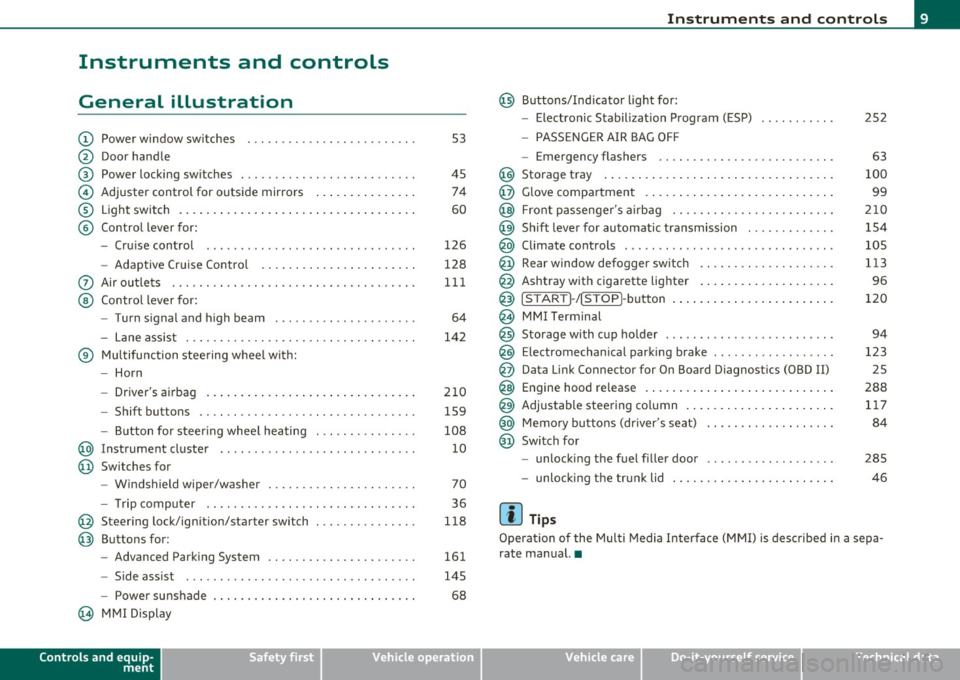
General illustration
(D Power window switches . .. .. .. ... .. ... .. ... ... . .
@ Door handle
@ Power locking switches . .. .. ......... .. .. .... ... .
© Adjuster control for outside mirrors .............. .
® Light switch ............... . ... ..... ....... ... .
© Control lever for:
- Cruise contro l ............ .... ... . ... ....... .
- Adaptive Cruise Control . ................... .. .
0 Air outlets .... .... .. .. .. ... ... ............. .. .
@ Control lever for:
- Turn signal and high beam .................... .
- Lane assist ................ ...... .. .. .. .. ... .
® Multifunction steering wheel with:
- Horn
- Driver's airbag ....................... ....... .
- Shift buttons .... .. .. .. .. .... ............... .
- Button for steer ing whee l heating . .. .. ... ...... .
@ Instrument cluster .................. .... ... ... .
@ Switches for
- Windshield wiper/washer ................ .. ... .
- Tr ip computer .. .......... . .. .... .. .. .... ... .
@ Steering lock/ignition/starter switch .............. .
@ Buttons for:
- Advanced Parking System .... .. .... .. ...... ... .
- Side ass ist ........... ........ ... ..... ... ... .
- Power sunshade
@ MMI Display
Controls and equip
ment Safety first
53
45 74
60
126
128
111
64
142
210 159
108 10
70
36
118
161
145
68
Instruments and controls
@ Buttons/Indicator light for:
- Electronic Stabilization Program (ESP)
- PASSENGER AIR BAG OFF
- Emergency flashers .. .. .. .. .. .... .. ......... .
@ Storage tray .................. .. .. .. ......... .
@ Glove compartment .... .... .. .. .... ........... .
@ Front passenger 's airbag .................... .. . .
@ Sh ift lever for automatic transmission ........... . .
@ Climate controls . .. .................... .... ... .
@ Rear window defogger switch .. .. .. .. .. .... ..... .
@ Ashtray with cigarette lighter ................... .
@ IS TART ]-/IS TOP]-button . ... ................ ... .
@ MMI Terminal
@ Storage with cup holder ..... .. .. .. ............. .
@ Electromechanical parking brake ... .. ...... ..... . .
@ Da ta Link Connector for On Board Diagnostics (OBD II)
@ Engine hood release ........................... .
@ Adjustable steering column ..................... .
@ Memory buttons (driver's seat) .................. .
@ Switch for
- unlock ing the fuel filler door ....... ....... .... .
- unlock ing the trunk lid
[ i ] Tips
252
63
100
99
210
154
105
113
96
120
94
123 25
288 117
84
285
46
Operation of the Multi Media Interface (MMI) is described in a sepa
rate manual. •
Vehicle care Technical data
Page 44 of 384

Opening and closing
The rear lid can be locked or unlocked either by using the remote
con trol
or by turning the key inside the dr ive r's door loc k. Unl ocking
the vehicle w ith the remote control will only
unlock the rear lid, to
open it, the lid handle needs to be pressed.
Lock ing the vehicle
You c an lock t he veh icle from o uts ide eithe r by using the remote
control
or by turning t he key inside the drivers's door lock . When you
lock the vehicle :
• All doors and the rear lid are locked.
• All turn signa l lights will flash once when the car is locked .
• The anti-theft alarm system is activated . The horn of the anti
t heft ala rm system w ill sound and the a nti -t heft alarm system readi
ness lig ht, located in the upper part of the dr iver's door panel, w ill
start to blink.
• The veh icle inter ior lights turn off.
Unlocking and locking the vehicle using the
Convenience key*
Th e Convenience key * feature is a keyless system wh ich all ows yo u to
unlock the vehicle via sensors in the door handle. Loc king is likewise
keyless using a lock b utton. Each door is equipped w it h a sensor and
lock button.
Power side door closer*
The ve hicle is equipped with a power side door closer. When closing a
door, yo u simp ly need to gen tly push on the door. The door wi ll the n
automatically close by itself~
page 45.
Automatic locking
The automat ic lock ing feature locks all the vehicle doors and the rear
lid when you d rive faste r than 9 mph (15 km/h). This fun ction can be
turned on and off in the MMI
Central locking Menu~ page 44.
Yo u can unlock the vehicle from the ins ide by :
• removing the key from the ignit ion sw itch (the ve hicle w ill au to
matically un lock itself) or •
pressi ng the unloc k part of the power lock sw itch @or
pulling t he door handle (once to open the door).
& WARNING
• When you lock your vehicle from outside, nobody -especially
children -should remain inside the vehicle . Remember, when you
lo ck the vehicle from the out side the windows cannot be opened
from the inside .
• When you leave the vehicle, always remove the ignition key
and tak e it with you. This will prevent passenge rs (children, for
example) from accidentally being locked in the vehicle should
they accidentally pre ss the power lo cking switch in the doors .
• Do not leave children ins ide the vehicle unsupervised . In an
emergency it would be impossible to open the doors from the
out side without the key .
[ i ] Tips
• In the event of a crash w it h ai rbag deployme nt all locked doo rs
w ill be automat ically u nlocked to give access to the vehicle occupants
from the outside.
• If the powe r lock ing system s hou ld malfunction, you ca n lock each
door indiv idually using the ve hicl e key ~
page 46.
• If the power locking system should fail, yo u can still open the fuel
t ank flap in an emergen cy ~
page 287 .
• You are well advised not to keep valuables ins ide an unattended
veh icle, v is ib le or no t. Even a prope rly loc ked vehi cle c anno t provide
the security of a safe .•
Page 45 of 384

Unlocking and locking the vehicle with the
remote control
How the remote control works.
Fig. 26 Remot e
con trol: fu ncti on
butt ons
Whether only th e driver's door or the entire vehicle is
unlocked when the opening button @ is pr essed once,
de pends on the settings in the MMI
Central locking menu
=:> page 44 .
To unlock the vehicle 0
- Press button @.
- Press button @
two times within two seconds to unlock
all doors and the rear lid .
To lock the vehicle 6
- Press button@=:> & in "Ge neral descr ipt ion" on
page 41 .
- Watch that all turn signal lights flash once .
To unlock rear lid only c:5
-Press button @for approximately one second.
Con tro ls a nd e quip
m en t Vehicle
OP-eration
Opening and closing
PANIC Button
- Push the red button @to activate the panic function. The
horn sounds and the turn signa ls flash .
- Push the button @ again to deactivate t he panic f unction.
On vehicles equipped with the Conven ience key* features, the
selector leve r must be in the P position, othe rwise the vehicle will not
lock .
& WARNING
Read and follow all WARNINGS=> & in "General de sc ription " on
page 41.
(I] Tips
• In orde r to make sure the locking func tion is wor king , you shou ld
always keep your eye on the vehicle to ma ke sure it is properly locked .
• Do not use the remote control if you are ins ide the car, otherwise
you may unintentionally lock the vehicle, and then yo u would set off
the ant i-theft alarm when you try to start the eng ine or open a door.
I n case this happens any how, push the unlock button
0.
• Use the panic function o nly if you are in an emergency situat ion. •
Vehicle care Do-it-yourselt service iTechnical data
Page 55 of 384

How is the anti-theft alarm system switched off?
The anti-theft alarm system is switched off only when you unlock your
vehicle .
If you do not open a door within 60 seconds after you have
unlocked with the remote control, the vehicle will lock itself again
automatically.
When will the anti-theft alarm system be
triggered?
When the vehicle is locked, the alarm system monitors and protects
the following parts of the veh icle:
• engine compartment
• luggage compartment
• doors
• ignition
When the system is activated, the alarm will be triggered if one of the
doors, the engine hood or the rear lid are opened, or if the ignit ion is
turned on. The anti-theft alarm system will also go off when the
battery is disconnected.
Unlocking the rear lid by inserting and turning the key inside the rear
lid locking cylinder will trigger the optical and acoustic alarm.
You can also trigger the alarm by pressing the PANIC button on your remote control. This will alert other peop le in case of emergency.
Press the PANIC button again to turn off the alarm.
How is the anti-theft alarm switched off when
tr igg ered?
The alarm system is switched off when you un lock the vehicle or when
the ignition is switched on . The alarm will also switch itself off when
it comes to the end of its cycle .
Emergency flasher and horn
The emergency flasher will blink br iefly and the horn sounds when
the doors, engine hood and rear lid are properly closed .
If the emergency flashers do not blink, or the horn does not sound,
check the doors, engine hood and rear lid to make sure they are prop-
Con tro ls a nd e quip
m en t Vehicle
OP-eration
Opening and closing
erly closed. If you close a door, the hood or the rear lid with the anti
theft alarm switched on, the emergency flashers will blink and the
horn w ill sound only after you have closed the door or lid .
(I] Tips
For the anti-theft alarm system to function properly, make sure all
vehicle doors and windows are closed before leaving the vehicle. •
Power windows
Controls
Fig. 41 Driver's door:
power window
switches
Fig.
42 Driver's door:
Switches (vehicles
with power child safety
lock) ..
Vehicle care Do-it-yourselt service iTechnical data
Page 222 of 384
........ _A_ i_rb _ a_,g,:;._ s_, y'- s_ t_e _m ________________________________________________ _
& WARNING (conti nued)
position and have the airbag system inspected by your Audi
deal er.
• A tight tether or othe r strap on a rearward-facing child
restraint attached to the front passenger seat can put too much
pressure on the weight-sensing mat in the seat and register more
weight than i s actually on the seat. The heav ier weight registered
can make the system work as though an adult were on the seat
and deploy the Advanced Airbag when it must be suppressed
causing serious or even fatal injury to the child .
• If, in ex ceptional circumstances, you must install a forward·
facing child restraint on the front passenger seat, always move
the seat into i ts rearmo st po sition in the seat's fore and aft adjust ·
ment range, as far away from the airbag as possible . The backrest
must be adjusted to an upright position. Make sure that the
PASSENGER AIR BAG OFF light comes on and stays on all the time
whenever the ignition is switched on.
& WARNING
• If the PASSENGER AIR BAG OFF light do es not go out when an
adult is sitting on the front passenger seat after taking the steps
de scribed above, make sure the adult i s properly seated and
restrained at one of the rear seating positions.
• Have the airbag system inspected by your Audi dealer before
transporting anyone on the front passenger seat .
[ i ] Tips
If the we ight-sens ing mat in the front passenger seat detects an
empty seat, the front a irbag on the passenger side w ill be t urne d off,
and the PASSENGER
AIR BAG OFF light w ill stay on .•
Repair, care and disposal of the airbags
Parts o f the a irbag system are installed at many different p laces on
your Audi. Install ing, remov ing, servic ing or repa iring a part in an
area of the ve hicle can damage a part of an airbag system and preve nt
t ha t system from working pro perl y in a coll is ion.
T here are some important thi ngs you have to know to make sure that
the effectiveness of the system will not be impa ired and that
discarded components do no t cause injury or poll ute the enviro n
ment .
& WARNING
Improper care , servicing and repair procedures can increase the
risk of personal injury and death by preventing an airbag from
deploying when needed or deploying an airbag unexpectedly:
• Never cover, obstruct , or change the steering wheel horn pad or
airbag cover or the instrument panel or modify them in any way.
• Never attach any objects such as cup holders or telephone
mountings to the surfaces covering the airbag unit s.
• For cleaning the horn pad or instrument panel, use only a soft,
dry cloth or one moistened with plain water. Solvent s or cleaners
could damage the airbag cover or change the stiffness or strength
of the material so that the airbag cannot deploy and protect prop·
erly .
• Never repair, adjust, or change any part s of the airbag system .
• All work on the steering wheel, instrument panel , front seats
or electrical sy stem (including the installation of audio equip·
ment , cellular telephones and CB radios, etc .) must be performed
by a qualified technician who ha s the training and special equip ·
ment necessary .
• For any work on the airbag system, we strongly re commend
that you see your autho rized Audi dealer o r qualified workshop.
• Never modify the front bumper or parts of the vehicle body.
liJ,,
Page 345 of 384
![AUDI S8 2010 Owners Manual ________________________________________________ F_ u_s _e_ s_ a_ n_ d_ b_u_ lb_ s _ __.1111
(]] Tips
You a re well adv ised to keep a supply of spare fuses in your veh icle .
Fuses with](/img/6/57617/w960_57617-344.png "AUDI S8 2010 Owners Manual ________________________________________________ F_ u_s _e_ s_ a_ n_ d_ b_u_ lb_ s _ __.1111
(]] Tips
You a re well adv ised to keep a supply of spare fuses in your veh icle .
Fuses with")
________________________________________________ F_ u_s _e_ s_ a_ n_ d_ b_u_ lb_ s _ __.1111
(]] Tips
You a re well adv ised to keep a supply of spare fuses in your veh icle .
Fuses with the proper ampere ratings are avai lab le at your Audi
dealer. •
Fuse Location, Instrument Panel left
Fig. 2 78 Fuse pa nel
la you t
Some of the equ ipment items listed a re opt io na l o r only availab le on
certain model configurations.
Note that the following table i s accu rate at the time of going to
pre ss and is subject to change . In the event of di scr epancie s, th e
label on the in side of the cover always takes precedence.
T he power wi ndows and the power seats are p rotected by cir cuit
breakers ,
which automatically reset after a few seconds after the
overlo ad -for e xamp le if a window is fro zen - has bee n remed ie d.
Equipment Amps
1 Garage door opener (Homelink) 5
Parking assist system 5
3
Pa rking assist sy stem 5
4
Headlight range control/light control devic e 10
Vehicle OP-eration
No.
5
6
7
8
9
10
11
1 2
13
14
1 5
16
17
1 8
19
20
2 1
22
23
24
25
26
27
28 29
Equipment Amps
Instrument cluster 5
Steering column electronics system control 10
Diagnostic co nnector 5
Diagnostic connector/oil level sensor 5
ES P contro l uni t/steer ing angle se nsor 5
Instrum ent cluster 5
Au di lane ass ist 10
B ra ke ligh t switch 5
Telephone/ cell phone 10
Vacant
Acces s/ st art cont rol m odul e
5
RSE system 10
Adaptive C ruise Control 5
Hea ted w asher je ts 5
Vacant
Tire pressure monitoring system *
5
Vacant
Bra ke light switch
5
Ce ll phone preparation 5
Horn 15
Wi ndshie ld wipe r system 4 0
Vacant
E le ctronic Stabilizati on Pro gram (E SP)
2 5
Vacant
Sw itch illumination
1
Vehicle care Do-it-yourself service iTechnical data