reset AUDI S8 2010 Owners Manual
[x] Cancel search | Manufacturer: AUDI, Model Year: 2010, Model line: S8, Model: AUDI S8 2010Pages: 384, PDF Size: 90.95 MB
Page 12 of 384

Instruments and warning /indicator lights
Instruments and warning/indicator lights
Instruments
Instrument cluster and controls
The instrument cluster is your central source of informa
tion.
Fi g. 2 O ver view of th e in stru men t clust er
© Coolant temperature gauge . . . . . . . . . . . . . . . . . . . . . . 10
@ Tachometer with t ime and date d isplay . . . . . . . . . . . . 11, 11
® Warning/indicator lights . . . . . . . . . . . . . . . . . . . . . . . . 14
© Driver information system . . . . . . . . . . . . . . . . . . . . . . . 22
© Speedomete r with odometer . . . . . . . . . . . . . . . . . . . . . 12
© Fuel gauge . . . . . . . . . . . . . . . . . . . . . . . . . . . . . . . . . . . . 12
(j) Reset button for tr ip odomete r . . . . . . . . . . . . . . . . . . . 12
@ !CHECK] button .... ...... ..... ......... ...... .
® Instrument cluster illumination ................. .
(I) Tips 13
1
3
The illum inat ion for the instrument cluster lights up whenever you
switch o n the ignition with the
vehicle headlight s off. As the daylight
fades, the instrument cluste r illum ination likewise d ims automati
cally and w ill go out completely when the outside light is very low .
T his featu re is mean t to remind you to switch on the headligh ts when
outs ide light conditions become poor .•
Engine coolant temperature gauge
The engine coo lant gauge ~ fig . 2 © only works when the ignition is
on. To p revent damage to yo ur engine, ple ase note the following
important po ints:
Engine cold
As long as the need le remains at the le ft end of the gauge, the engine
st ill has not re ached its operating tem perature. Avoid high eng ine
speeds, heavy engine loads and heavy throttle applicat ions.
Normal temperature
When the eng ine has reached its ope rating temperature, the needle
w ill move into the midd le of the gauge and remain t he re.
If the
eng ine is working hard at high outs ide temperatures, the needle may
go furthe r to the right. This is no need to wo rry as long as the _JL
wa rning light in t he instrument cluster does not illuminate .
Warning light in the instrument cluster -t
When the _ L warning light starts to flash, this ca n mean one of two
t hings: e ither the cool ant
temperature is too h igh, or the coolant
level is too low=> page 29. _,.
Page 14 of 384
![AUDI S8 2010 Owners Manual Instruments and warning/indicator lights
(I] Tips
• The dig ital clock and the odometer are turned on for about 30
seconds when the drivers door is opened.
• When the ign it](/img/6/57617/w960_57617-13.png "AUDI S8 2010 Owners Manual Instruments and warning/indicator lights
(I] Tips
• The dig ital clock and the odometer are turned on for about 30
seconds when the drivers door is opened.
• When the ign it")
Instruments and warning/indicator lights
(I] Tips
• The dig ital clock and the odometer are turned on for about 30
seconds when the driver's door is opened.
• When the ign ition is turned off, the odometer read ing and the
digital clock with date display can be switched on for about
30 seconds by press ing the
I CH ECK I button::::> page 13, fig. 5. •
Speedometer with odometer
The speedometer shows you the vehicle speed, and the
odometer shows you how many miles (kilometers) you
have driven.
Fig. 4 Instrume nt
cluster Odometer and res et button
The odometer and trip odometer are located inside the speedometer .
• USA models -Miles
• Canada models -Kilometers
You can switch the display from miles to kilometers and vice versa via
the MMI.
Lower odometer
The lower odometer shows the total number of mi les (kilometers)
driven.
Upper odometer (trip odometer)
The upper odometer shows the total number of miles (ki lometers)
dr iven since you last reset the odometer to zero . You can use th is
odometer when you want to keep track of how many m iles (kilome
ters) you have dr iven for a single trip or errand. The last digit indicates
1/10 of a mile (100 meters) .
You can reset the trip odometer to zero by pressing the Reset button
[0.0].
Malfunction message
If there is a malfunction somewhere in the instrument cluster, dEF
will appear in the trip odometer and will stay on. Contact your autho
rized Audi dealer to have the problem corrected.
Immobilizer
When you switch on the ign ition, the data chip inside the key is "read"
by the immobilizer system.
If an unauthori zed key is inserted into the ignition lock, the word
SAFE will come on and stay on . You will not be able to start the
vehicle=> page
41.
[ i ] Tips
• The digita l clock and the odometer are turned on for about 30
seconds when the driver's door is opened.
• When the ignition is turned off, the odometer reading and the
digital clock with date display can be switched on for about
30 seconds by pressing the [
CHECK] button::::> page 13, fig. 5. •
Fuel gauge
The fuel gauge only works when the ignition is on .
Th e fuel tank holds about 23.8 ga llons (90 liters). When the need le
reaches the reserve mark, the::::> page
33 ) symbol appears in the
instrument cluster display as well as the message
Please refuel. .,_
Page 37 of 384
Speed warning system
Overview
The speed warning system helps you to keep your driving
speed below a set speed limit.
T he speed warning system warns the driver if he exceeds a previously
s tored maximum spee d. A w arning tone will sound as soon as the
vehicle speed exceeds the set speed by about 3 mph (3 km/h) . A t the
same time, a warning symbol appears in t he disp lay .
Th e spee d wa rn ing system has
two warning threshold s that function
independently of each other and that have somewhat di fferent
purp oses:
Speed warning 1 8 (USA models) /8 (Canada
models)
You can use speed warn ing 1 to set the max imum speed w hile you are
driv ing. This setting will remain in effect until yo u turn off the igni
tion, assum ing that yo u have not changed or reset the setting .
Th e spee d warn ing symbo l
B (USA models)/ 0 (C anad a mode ls) in
t he warning 1 display appears when you exceed the maxim um speed .
It goes out when the speed falls be low the stored maximum speed .
Th e spee d warn ing sy mbo l w ill also go o ut if t he speed
exceeds the
sto red maxim um speed by more than about 25 mph
(40 km/ h) for at
least
10 sec onds . H oweve r, th is doe s not rese t the stored maxim um
speed.
Setting spee d warning 1
=> page 35.
Speed warning 2 0 (USA models) /0 , (Canada
models)
Storing warn ing 2 is recommended if you always want to be reminded
o f a ce rtain speed, fo r example when yo u are traveling in a co untr y
that has a genera l maximum speed lim it, or if you do not want to
exceed a specified speed for winter tires.
Controls and equip
ment Safety first
Driver information display
T
he speed warning 2 symbol, 8 (U SA models)/ 0, (Canada models)
appe ars in t he displ ay whe n you exceed the sto red speed limi t. Un like
warning 1, it will not go out unt il the vehicle speed drops below the
stored speed limit.
Setti ng spee d wa rn ing 2
::::> page 36 .
[I) Tips
Eve n th oug h your veh icle is eq uipped wi th a speed war ning sys tem,
you shou ld st ill watch the speedometer to make sure you are not
dr iv ing fast er than t he spee d lim it. •
Speed warning 1: setting a speed Limit
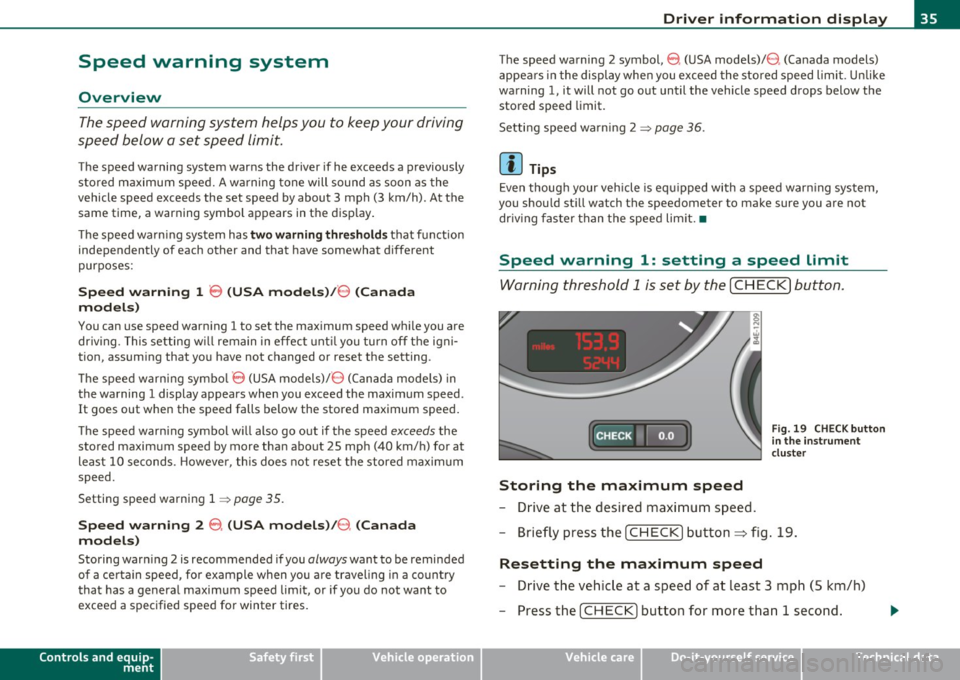
Warning thr eshold 1 is s et by th e [ C HE CK] button.
:c: HECK •F F ig . 19 CHE CK button
in t he in strume nt
clu st e r
Storing the maximum speed
- Drive at the desired maxi mum s pee d.
- Brie fly pre ss the [C H ECK] butto n:=> fig .19.
Resetting the maximum speed
- Drive the veh icle a t a spee d of a t leas t 3 mph ( 5 km /h)
- Press the [ CHECK] b utton for more t han 1 seco nd.
Vehicle care Technical data
Page 39 of 384
Current fuel mileage
T he instantaneous fuel consumption in miles per ga llon (l/100 km) is
show n in this disp lay. You can use this d isp lay to adjust you r driv ing
technique to achieve a desired m ileage .
Fuel consumption is recalculated at inte rvals of 33 ya rds (30 metres).
When the vehicle is stat ionary, the most recent fuel consumption is
displ ayed.
Average speed
Th e average speed in mph (km/h) since the last time the display w as
reset appears in the display.
Elapsed time
The length of time that you have been driving since you last reset the
memory appea rs in t his display.
rn Tips
• Fuel consumptions (average and cu rrent), ra nge a nd speed are
displayed in metr ic units on Canadian models.
• All s tored values will be lost if the vehicle battery is
disconnected. •
Contro ls a nd e quip
m en t Vehicle
OP-eration
Driver information display
Memories
The trip comp uter is equ ippe d wi th two fully auto matic
memones.
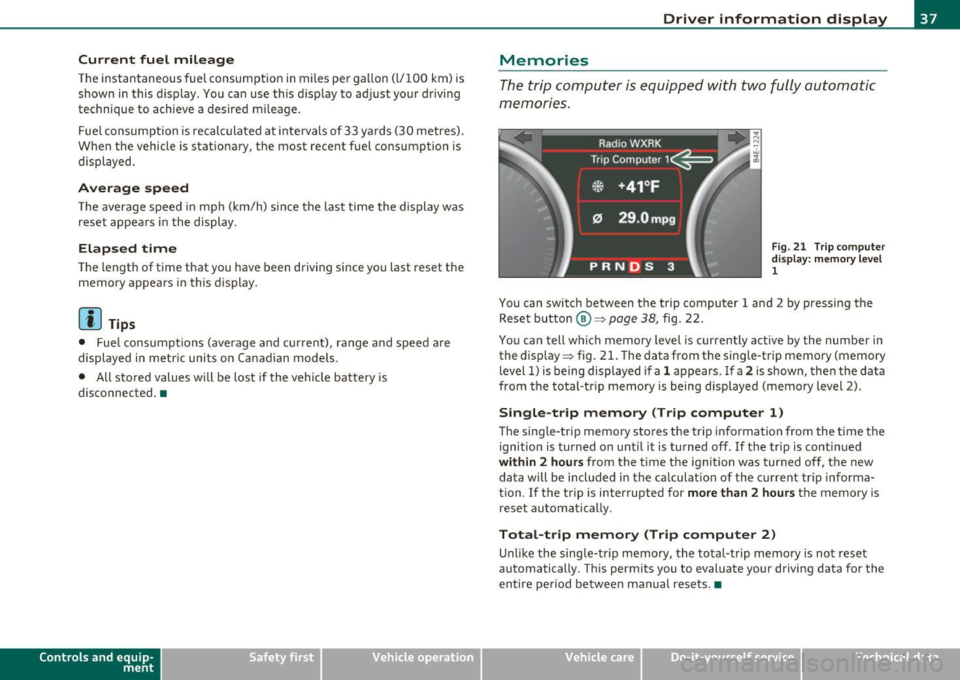
Fig . 2 1 Trip co mpute r
di sp lay: m emory l ev e l
1
You can switch between the t rip computer 1 and 2 by pressing the
Rese t button
® ~page 38, fig. 22.
You ca n tell which memory level is curren tly active by the number in
the disp lay ~ fig. 21. The data from the sing le -trip memory (memory
level 1) is being displayed if a
1 appears . If a 2 is shown, the n the data
from t he total-tr ip memory is being displayed (memory level 2).
Single-trip memory (Trip computer 1)
Th e sing le -t rip memory sto res t he tri p inf ormation from the ti me the
ignitio n is turned on unti l it is t urned off . If th e tr ip is contin ued
within 2 hours from the t ime the ignit ion was turned off, the new
data will be included in the ca lculat ion of the c urrent tr ip informa
tion. If the trip is interrupted for
more than 2 hours the memory is
reset au toma tic ally.
Total-trip memory (Trip computer 2)
Unli ke the single -t rip m emo ry, th e total-trip memo ry is not rese t
automatically. Th is permits you to evaluate your driving data for the
entire pe riod be twee n man ual rese ts. •
Vehicle care Do-it-yourselt service iTechnical data
Page 40 of 384
Driver info rmation d isplay
Operation
The trip computer is controlled by two switches on the
windshield wiper lever.
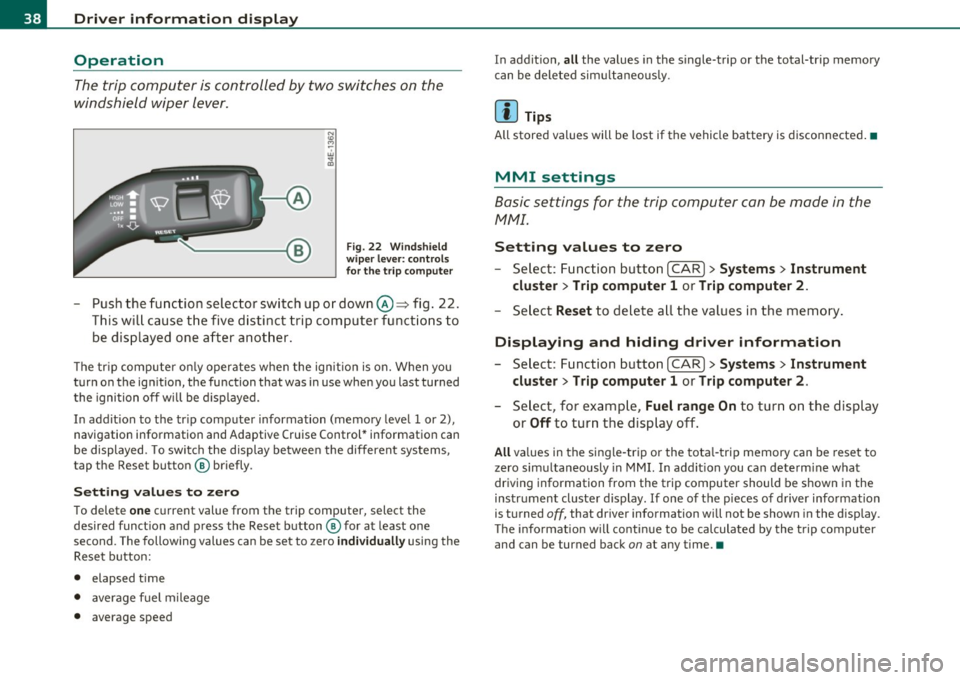
Fig. 22 Wi ndshi eld
wi per leve r: contr ols
for th e t rip co mputer
- Push the function selector switch up or down@~ fig . 22.
This will cause the five distinct trip computer functions to
be displayed one after another .
The tr ip computer only operates when the ignition is on. When you
turn on the ignition, the function that was in use when you last turned
the ignition off will be d isplayed.
In addit ion to the trip computer information (memory level 1 or 2),
navigation information and Adaptive Cruise Control* information can
be displayed. To switch the display between the different systems,
tap the Reset button ® briefly .
Sett ing values to zero
To delete one current value from the trip computer, select the
desired funct ion and press the Reset button ® for at least one
second. The following values can be set to zero
individu ally using the
Reset button:
• elapsed time
• average f uel mileage
• average speed In addit
ion,
all the values in the single-trip or the total-trip memory
can be deleted sim ultaneous ly .
[ i ] Tips
All stored values will be lost if the vehicle battery is disconnected.•
MMI settings
Basic settings for the trip computer can be made in the
MMI.
Setting values to zero
---Select: Function button I CAR ]> Systems > Inst rument
clust er > Trip comput er 1 or Trip computer 2 .
Selec t Reset to dele te all the values in the memory .
Displaying and hiding driver information
- Select: Function button I CAR ]> Sy stem s> Instru ment
clu ster > Trip computer 1 or Trip computer 2 .
-Select, for example, Fuel rang e On to turn on the d isplay
or
Off to turn the display off.
All values in the single -trip or the tota l-trip memory can be reset to
zero simu ltaneously in MMI. In add it ion you can determine what
driving information from the trip computer should be shown in the
instrument cluster display. If one of the p ieces of driver information
is turned
off, that dr iver information will not be shown in the display.
T he information will cont inue to be calculated by the trip computer
and can be turned back
on at any time. •
Page 62 of 384

Clear vision
Clear vision
Lights
Switching the headlights on and off ·"ti-·
In the "AUTO" position, a light sensor automatically
switches the head- and taillights on and off in response to light condi tions.
Fig . 48 In st rum ent
p ane l: light switch
Switching on automatic headlight control
- Tur n the lig ht sw itch to AUTO => fig. 48 .
Switching on the side marker Lights
-Turn the lig ht sw itch to ;oo~.
Switching on the headlights and high beam
- Tur n th e lig ht sw itch to fD.
- Push th e high beam leve r forward towards the instrument
panel =>
page 64.
Switching off the Lights
- Tur n the lig ht sw itch to 0.
The headligh ts only work when the ignition is switched on. Whi le
starting the engine or when switc hing off the ignition, the headlights
w ill go off and o nly the s ide mar ker lights will be on.
After start ing the eng ine, the xenon headlights are automatically
ad jus ted to the load an d ang le of the vehicle (for examp le, during
acceleration, braking). T his prevents oncom ing traff ic from experi
encing unnecessary head ligh t glare from your xe non headlights .
If the system is not operat ing properly, a warning symbol in the Auto
Check Control is displayed~
page 34.
With the side marker lights o r headligh ts swi tche d on, the symbol
next to the light switch i llum inates
oooc .
Daytime running lights
• USA model s: The daytime running lights will come on automati
cally when the ign it ion is turned on and the light switch ~ fig . 48 is
in the
O position or the AUTO pos ition (only in daylight conditions).
T he
Daytime running lights f u nction can be turned on and off in the
M MI menu
Exterior lighting~ page 61 ~ /.1.
• Canada model s: The day time ru nning l igh ts wi ll come o n auto
matically when the ignit ion is turned on and the light switch~ fig. 48
is in the
O position or the AUTO position (on ly in dayligh t conditions)
~ & -
Automatic headlight control
In the switch pos ition AUTO t h e automat ic headlight cont ro l is
tu rn ed on. The low beams are tu rned o n automa tically th rough a light
sensor as soon as ambient bright ness (e .g . when driving into a
tunnel) falls be low a val ue preset at the factory . When ambient
brigh tness increases again, the low beams are t urned off again auto
matically ~
/.1.
In the AUTO pos ition t he low beams a re switched off automa tically
w hen the ign it ion is turned off. If the h igh beams were sw itched on,
th ey will come on again the nex t time the au tom atic headlight .,,_.
Page 105 of 384
_________________________________________________ W_.;,. a_r _m __ a_n .;,. d:.;__ c::.. o.::..:. ld.:.:..._fflll
Warm and cold
Climate controls
Description
The air conditioner is fully automatic and is designed to
maintain a comfortable and uniform climate inside the
vehicle.
We recommend the following settings:
- Set the temperature to 75
°F (+23 °C).
- Press the
[AUTO] button.
With this setting, you attain maximum comfort in the least amount
of time. Change this setting , as desired , to meet your personal needs.
The climate controls are a combination of heating, ventilation and cooling systems, which automatically reduce humidity and cool the
air inside your vehicle .
The air temperature, air flow and air distribution are automatically regulated to achieve and maintain the desired passenger compart
ment temperature as quickly as possible.
The system automatically compensates for changes in outside
temperature and for the intensity of the sunlight entering the
vehicle. We recommend you use the
Automatic mode ~ page 106
for year-round comfort .
Please note the following:
Turn on the air conditioner to reduce humidity in the vehicle. This also
prevents the windows from fogging up.
When the outside temperature is high and the air is very humid,
condensation from the evaporator may drip under the vehicle . This is
normal and does not indicate a leak.
Controls and equip
ment Safety first
If the outside temperature is
low, the fan normally only switches to a
higher speed once the engine coolant has warmed up sufficiently .
The air conditioner temporarily switches off when you drive off from
a standstill using full throttle to save engine power.
The compressor also switches off if the coolant temperature is too
high, so that the engine can be adequately cooled under extreme
loads.
Air pollutants filter
The air pollutants filter (a combined particle filter and activated char
coal filter) reduces or prevents outside air pollution (dust, or pollen)
from entering the vehicle.
The air pollutants filter must be changed at the intervals specified in
your Warranty
& Maintenance booklet, so that the air conditioner can
properly work.
If you drive your vehicle in an area with high air pollution , the filter
may need to be changed more frequently than specified in your Audi
Warranty
& Maintenance booklet. If in doubt, ask your authorized
Audi Service Advisor for advice.
Key coded settings
The air conditioner settings selected are automatically stored and
assigned to the key being used. When the vehicle is started, the air
conditioner automatically selects the settings assigned to that key.
This way every driver will maintain his/her own personal settings and
does not have to reset them manually.
If a different driver uses your key and changes the air conditioner
settings, the latest adjustments will erase and replace the settings
you have stored.
Energy management
To prevent the battery from being discharged and to restore the
balance of energy, components which require large amounts of
Vehicle care Technical data
Page 111 of 384

_______________________________________________ W_ a _r_m _ a_ n_d _ c_o _l_ d _ __.ffl'I
Air distribution 00
The automatically controlled air distribution can be
changed manually .
Fig. 123 MMI display:
A ir dis tri bu tion
- Press the Distribution (!) button.
- Rotate the cont rol knob to the desired setting==> fig. 123.
You can adj ust the a ir c irculation so that air flows from spec ific vents .
In position
-0 air flows only to the windows, in pos ition @ID to the
dr iver or passenger and in position{} to the footwell. There are addi
tional comb inations available to adjust air distribution as needed .
To reg ulate air dist ribution automatically, switch to
[AUTO]. •
Defrosting !@]
The windshield and side windows are rapidly defrosted or
defogged.
- To turn o n the defogger/defroster, p ress the [@ I button
==> page 105, fig. 118.
Press
I ® I again or press [A UTO ] to turn off the
defogger/defroster .
Contro ls a nd e quip
m en t Vehicle
OP-eration
The temperature is automat ically controlled . Ma ximum airflow is
pr imar ily blown in through outlets
(D and @=> page 111 .
By press ing !@], both a ir recirculation and ECON are switc hed off .
(I) Tips
When the ou ts ide temperature is low, p ressing the [@I button tur ns
on the windshield defroster* automatically =>
page 112. •
Fan ~
The automatically preset fan speed can be reduced or
increased .
- Press the Fan (~] button.
Rotate the c limate contro l knob to the desired fan speed .
The climate cont rol system automatica lly reg ulates fan speed
depending o n interio r temperatu re. You can adjust the volume of air
pro duced by the fan to your own req uirements .•
Manual air circulation I~]
Air recirculation prevents e xhaust fumes or other pollu
tion from entering the vehicle.
Turning on air recirculation
- Press [G,I==> page 105 , fig. 118 => &
Turning off air recirculation
- Press~ again, or
press
I AUTO], or
- press(@) .
Vehicle care Do-it-yourselt service iTechnical data
Page 129 of 384

_________________________________________________ O_ n_t_ h _ e_ ro_ a_d __ ffllll
& WARNING (continued)
• Please note that inadvertently "resting" your foot on the accel
erator pedal causes the cruise control not to brake. This is because
the cruise control is overridden by the driver's acceleration.
[ i] Tips
The brake lights illuminate as soon as the brakes decelerate automatically. •
Changing speed
-Press lever in the
0 or O direction=> page 126, fig. 136
to increase or decrease your speed.
- Release the lever to save that speed.
Change speed in increments of 1 mph (1 km/h) by lightly pressing the
lever. If you keep the lever pressed down, you will alter your speed in
S mph (10 km/h) increments.
You can also press the accelerator pedal down to increase your speed,
e.g. if you want to pass someone. The speed you saved earlier will
resume as soon as you release the accelerator pedal.
If, however, you exceed your saved speed by S mph (10 km/h) for
longer than S minutes, the cruise control will turn off temporarily .
The green symbol in the display~
page 126, fig. 13 7 is replaced with
a white symbol. The saved speed remains the same.•
Presetting your speed
You can preset your desired speed while the vehicle is not
moving .
-Turn on the ignition.
Controls and equip
ment Safety first
- Pull lever
into position ©=> page 126, fig. 136.
- Press the lever in the
0 or O direction to increase or
decrease your speed.
- Release the lever to save that speed .
This function makes it possible, for example, to save the speed you
want before driving on the highway. Once on the highway, activate
the cruise control by pulling the lever toward
(D . •
Switching the system off
Temporary deactivation
- Press the brake pedal, or
- Press the lever into position@ (not clicked into place)
=> page 126, fig. 136, or
- Drive for longer than 5 minutes at more than 5 mph
(10 km/h) above the stored speed.
Switching off completely
- Press lever into position @ (clicked into place), or
- Switch the ignition off .
The system retains the saved speed if you deactivate the cruise
control temporarily. To resume the saved speed, release the brake
pedal and pull the lever to position
(D.
Switching the ignition off erases the saved speed.
& WARNING
You should only return to the saved speed if it is not too fast for
the current traffic conditions -risk of an accident! •
Vehicle care Technical data
Page 136 of 384
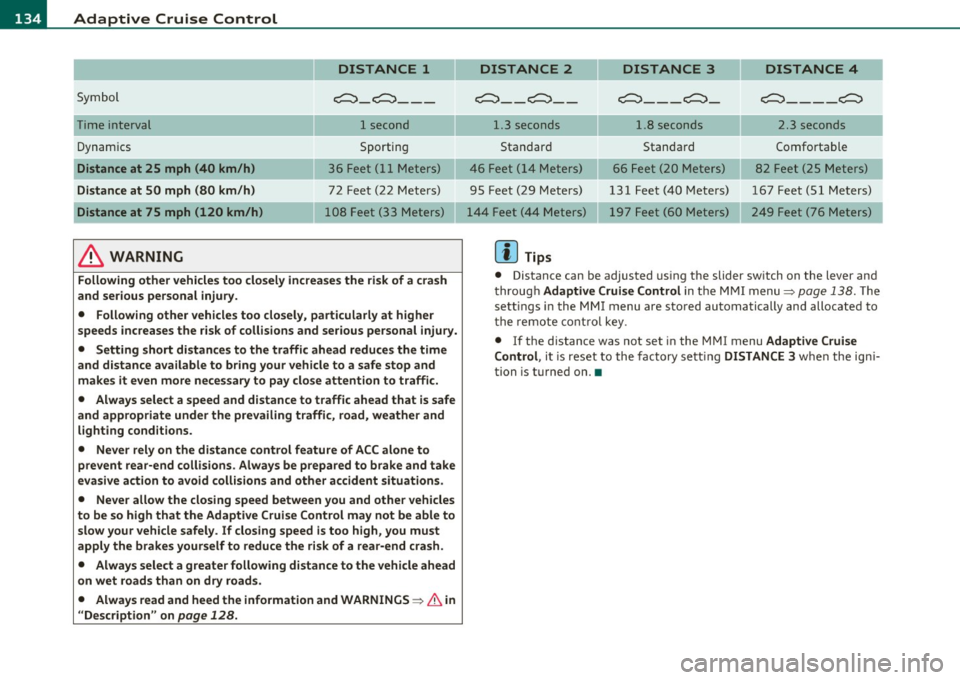
1111....__A_ d_ a_,_ p_t _i_ v _e _ C_r_ u_ i_ s_ e_ C_ o_ n_ t_ r_ o_ l __________________________________________ _
DISTANCE 1
Symbol ~-~---
Time interval 1 second
Dynamics Sporting
Distance at 25 mph (40 km/h ) 36 Feet (11 Meters)
Distance at SO mph (80 km /h ) 72 Feet (22 Meters)
Distance at 75 mph (120 km /h) 108 Feet (33 Meters)
& WARNING
Following other vehicles too closely increase s the risk of a crash
and ser ious personal injury.
• Following other vehicles too closely, particularly at higher
speeds inc reases the r isk of collisions and serious personal injury.
• Setting short distances to the traffic ahead redu ce s the time
and d istance available to br ing your vehicle to a safe stop and
make s it even more ne ce ss ary to pay clo se attention to traffi c.
• Always select a speed and distance to traffic ahead that is safe
and appropriate under the prevailing traffi c, road, weather and
lighting cond itions.
• Never rely on the distance control feature of ACC alone to
prevent rear -end collisions . Always be prepared to b rake and take
ev asive action to avoid collisions and other accident situ ations .
• Never allow the closing speed between you and other vehicles
to be so high that the Adaptive Cruise Contr ol may not be able to
slow your vehicle safely . If closing speed is too high , you must
apply the brake s yourself to reduce the ri sk of a rear -end cra sh.
• Always select a g reate r following di stance to the vehicle ahead
on wet road s than on dry road s.
• Always read and heed the information and WARNINGS~
& in
" Description " on
page 128 .
DISTANCE 2 DISTANCE 3 DISTANCE 4
c::::::> __ c::::::> __ ~---~- ~----~
1.3 seconds 1.8 seconds 2.3 seconds
Standard Standard Comfortable
46 Feet ( 14 Meters) 66 Feet (20 Meters) 82 Feet (25 Meters)
95 Feet (29 Meters) 131 Feet (40 Meters) 167 Feet (51 Meters) 197 Feet (60 Meters) 249 Feet (76 Meters)
[ i ] Tips
• Distance can be adjusted us ing the slider sw itch on the leve r and
throug h Adaptive Crui se Control in the M MI menu~
page 138. The
sett ings in the MMI menu are sto red automatically and allocated to
t he remote cont ro l key .
• If the distance was not set in the MMI menu Adapt ive Cruise
Control , it is reset to the factory sett ing DISTANCE 3 when the ign i
tion is turned on. •