light AUDI S8 2011 Owners Manual
[x] Cancel search | Manufacturer: AUDI, Model Year: 2011, Model line: S8, Model: AUDI S8 2011Pages: 302, PDF Size: 76.07 MB
Page 235 of 302
@ For the sake of the environment
Because of the problem of proper disposa l
of brake fl uid as we ll as the special tools
requ ired and the necessary expert ise, we
recommend that you have t he brake fluid
changed by your author ized Audi dealer .
Battery
General information
Under normal operating conditions, the bat
tery in your Audi does not need any mainte
nance. With
high outside temperatures or
long daily dr ive s we recommend that you have
the electro lyte level checked by a service fa
cility . The electrolyte level shou ld a lso be
checked each time the battery is charged
¢ page 235.
Have the battery checked when you take your
ve hicle in for service . Yo u are well adv ised to
replace a battery that is older than 5 yea rs .
W ith certa in types of a irbag deployment, t he
b attery is d isconnected from the vehicle elec
tr ica l system for safety reasons¢.&.
in Re
pair, care and disposal of the airbags on
page 159.
Disconnecting the battery terminals
Some vehicle functions (power w indow regu
lators , for example) are lost if the battery ter
m inals a re d isconnected. These func tions have
to be re lea rned after the batte ry term inals a re
connected agai n. T o prevent this , the bat tery
should only be d isconnec ted from the vehicle
e lec tric al system when absolu tely necessa ry
for repairs .
Vehicles not driven for long periods
If you do not drive you r vehicle over a period
of severa l days or weeks, elec trical compo
nen ts are gr adually cut b ack o r swi tched off .
This redu ces energy cons umption and main
tains starting capab ility over a longer per io d
¢ page 195.
Be aw are tha t when you unlock yo ur vehicle ,
some of the conven ien ce f unct ions may no t
Checkin g and fillin g 233
opera te , such as the Conven ience key*, the re
mote control or the power seat adjustment .
T he convenience functions will be ava ilab le
again when you switch on the ign ition and
start the eng ine.
Winter operat ion
D uring the w inte r mon ths, bat tery capacity
tends to dec rease as temperatures drop . This
is beca use more power is a lso consumed wh ile
starting, and the headlights, rear window de
fogger, etc., are used more often.
Avoid unnecessary powe r consum ptio n, pa r
ticu lar ly in city traffic or when traveling only
short distances. Let your autho riz ed Audi
dealer check the capacity of the vehicle bat
te ry before w inter sets in¢
page 235 . A well
c h arged battery will not on ly prevent s tarti ng
problems w hen the weather is cold, but wi ll
also last longer.
(D Tips
If you r vehicle is left s tandi ng for seve ral
weeks at extremely low temperatures, the
vehicle ba ttery s hould be removed an d
s to red w here i t w ill not fr eeze . T his w ill
p revent it from be in g damaged and having
to be replaced.
Working on the battery
Be especially careful when working on or near
the bat tery.
T he battery is lo cated in the l uggage compa rt
ment unde r the floo r. B efo re you che ck a ny
thi ng in the luggage com partmen t,
read and
heed all WARNINGS
¢ .&, .
Alw ays heed t he safety warning s, when work
ing on the vehicle b atte ry or the vehicle e lec -
t rical system to prevent i njury. .,..
•
•
Page 236 of 302

234 Check ing and filling
Th e following WARNINGS are very
impo rtant when w ork ing on the b att ery :
Alwa ys hee d the fo llo w ing WARNING SYM
BOLS and safety precaution s when working
o n the battery .
®
@
®
Always w ear eye prot ection.
Batter y acid cont ain s sulfu ric acid.
Alwa ys wear glo ves and e ye p rote c
tion.
No
• sparks
-flames
- smoking.
When a batt ery is charged, it produ
ces hydrog en ga s whi ch i s e xplo sive
a nd could cau se p ers on al injury .
Always keep the battery well out of reach of children .
.8, WARNING
Whenever working on the battery or on
the electrical system, there is the r is k of
inju ry, acc ident and even fire. Read and
heed the following WARNINGS:
- Always wea r eye protection. Do not let
battery acid or any lead particles get on
yo ur skin or clothing. Shield your eyes.
Explosive gases can cause blindness or
other injury .
- Battery acid contains sulfuric acid. Sulfu
ric acid can cause blindness and severe
burns.
- Always wear gloves and eye p rotection .
Do not tilt the battery because ac id
could lea k out of the vent ilation open
ings.
- I f you get battery acid in your eyes or
on your sk in , immediately rinse with
cold water for severa l m inutes and get
medical attention.
- If you should ingest any battery acid ,
seek medical attention immediately .
- Do not expose the battery to an open
flame, electric sparks or an open light .
- Do not smoke. -
Do not interchange the positive and neg
ative cables.
- When working on the battery, be s ure
not to short-circu it the terminals with
too ls or other metal objects. This would
cause the battery to heat up very quickly,
which could lead to damage or explosion and pe rsonal injury.
- When a battery is charged, it produces
hydrogen gas which is explosive and
could cause personal in jury.
-Always keep the battery well out of the reach of children .
- Before work is done on the electrical sys
tem, disconnect the negat ive ground ca
b le .
- Before performing any work on the e lec
tr ical system, switch off the engine and
ignit ion as well as any electrical equip
ment. The negative cable on the battery
m ust be disconnected.
If yo u are just go
ing to replace a light bulb, then it is
enough to switch off the lights .
- Before disconnec ting the bat tery, switch
off the anti -theft alarm system! Other
wise you wi ll set off the alarm.
- When disconnecting the battery, f irst
disconnect the negative cab le and then
the positive cab le .
- Before reconnecting the batte ry, ma ke
sure all e lectr ica l consumers are sw itch
ed off . Reconnect the positive cable first
and then the negative cable . Never inter
change the cables - this could start a fire!
- Never charge a frozen or a thawed-out
battery . It could exp lode! If a battery has
frozen, then it must be replaced. A dis
charged batte ry can freeze over at 32 °F
(0 °() .
-Make sure the vent hose is always attach
ed to the opening on the s ide of the bat
tery .
- Never use batteries which are damaged.
There is the danger of an explosion! Al ways rep lace a damaged battery .
Page 238 of 302
236 Checking and filling
-Never charge a frozen battery. It may ex
plode because of gas trapped in the ice.
Allow a frozen battery to thaw out first.
- Do not reuse batteries which were fro
zen. The battery housing may have cracked and weakened when the battery
froze .
- Charge the battery in a well ventilated
area . Keep away from open f lame or elec
trical spark . Do not smoke. Hydrogen gas
generated by the battery is exp losive.
- To reduce the danger of explosion, never
connect or disconnect charger cables
wh ile the charger is operating.
- Fast charg ing a battery is dangerous and
should only be attempted by a compe
tent technician with the proper equip
ment.
- Battery acid that may spill during charg
ing should be washed
off with a solution
of warm water and bakin g soda to neu
tralize the acid.
Never use a fast charger as a booster to
start the engine. This will se riously dam
age sensitive electronic components, such
as control units, relays, radio, etc., as we ll
as the battery charger .
Battery replacement
The new battery must have the same specifi
cations and dimensions as the original equip
ment battery.
I ntell igent energy management in your vehi
cle is respo nsible for distributing the electr i
cal energy throughout your vehicle
c::> page 195. The intelligent energy manage
ment system wi ll keep the engine battery
charged better than vehicles without this sys
tem. To make sure the additional electrical en
ergy is available once again after you have
changed the battery, we recommend that you install batte ries of the same type and man u
facture only (the same as those installed at
the time your vehicle was delivered). Specifi- cations are listed on the
battery housing. Your
authorized dealer must code the battery in
the energy management system to enab le you
to use the energy management functions cor
rectly after replacing the battery.
T he new battery must have the same capacity,
voltage (12 volts), amperage, construction and plug sealing .
When installing the battery, make sure the ig
nition and all electrical consumers are switch
ed off.
(D Note
Make sure the ventilation hose on the side
of the battery is connected, otherwise
fumes or battery acid can leak out .
@ For the sake of the environment
Because of the prob lem of proper disposal
of a battery, we recommend your author
i zed Audi dealer change the battery for
you. Batteries contain sulfuric acid and
lead and must always be disposed of prop
erly in compliance with a ll environmental
regulations. Disposing of veh icle batter ies
improperly is very dangerous to the envi
ronment .
Windshield/headlight
washer container
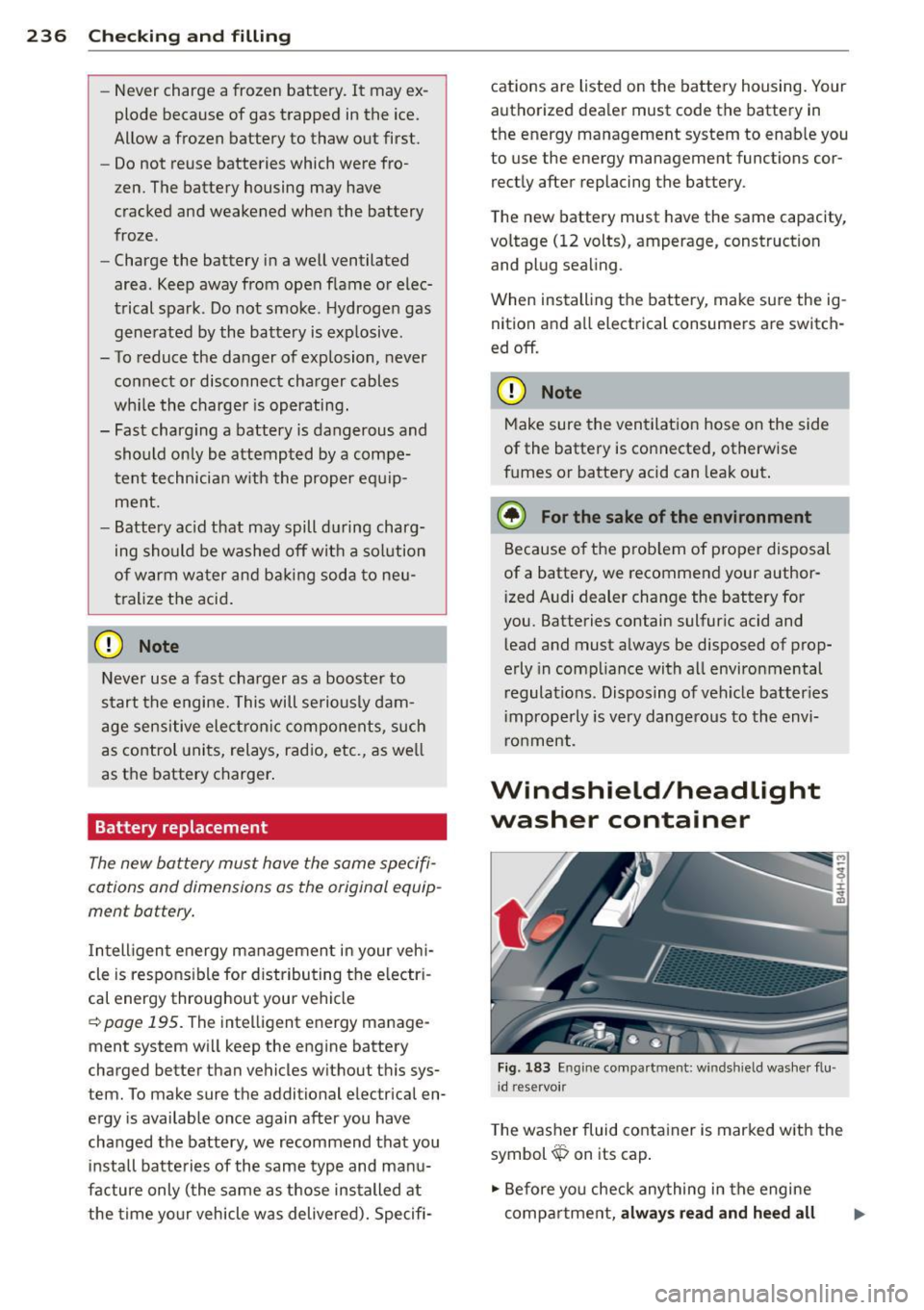
Fig. 183 En g in e compa rtm ent: w indshi eld washe r flu
i d reservo ir
T he washer fluid conta iner is marked w ith the
symbol~ on its cap .
.,. Before you check anything in the engine
compartment,
always read and heed all
Page 244 of 302
242 Tires and wheels
Cold tire inflation pressure
Tire pressure affects the overall handling, performance and safety of a vehicle .
I ± ...
"'
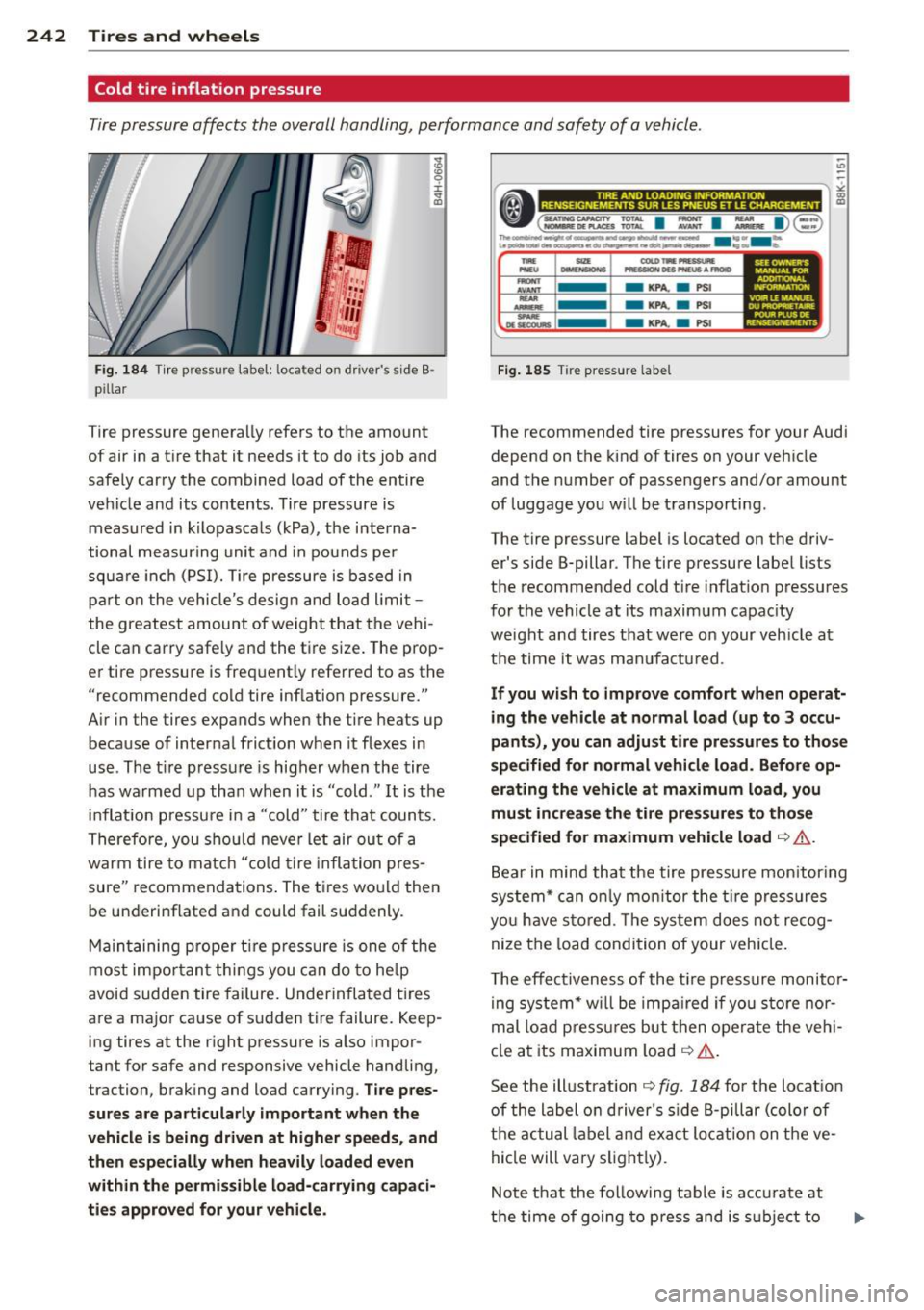
Fig. 184 Tire pressure label: located on driver's side B ·
pillar
Tire pressure generally refers to the amount
of air in a tire that it needs it to do its job and
safely carry the combined load of the entire
vehicle and its contents. Tire pressure is measured in kilopascals (kPa), the interna·
tional measuring unit and in pounds per
square inch (PSI). Tire pressure is based in
part on the vehicle's design and load limit
the greatest amount of weight that the vehi·
cle can carry safely and the tire size. The prop·
er tire pressure is frequently referred to as the
"recommended cold tire inflation pressure."
A ir in the tires expands when the tire heats up
because of internal friction when it flexes in
use. The t ire pressure is higher when the tire
has warmed up than when it is "cold ." It is the
inflation pressure in a "cold " tire that counts.
Therefore, you should never let air out of a
warm tire to match "cold tire inflat ion pres
sure" recommendations. The tires would then
be underinflated and could fail suddenly.
Maintaining proper tire pressure is one of the
most important things you can do to help
avoid sudden tire failure. Underinflated tires
are a major cause of sudden tire failure. Keep
ing tires at the right pressure is also impor
tant for safe and responsive vehicle handling,
traction, braking and load carrying .
Tire pres
sures are particularly important when the
vehicle is being driven at higher speeds, and
then especially when heavily loaded even
within the permissible load -carrying capaci
ties approved for your vehicle.
------------------.. ,;
•(=~: I : I :,.. I)@ ~
The~-----~---w-o- ....... -e.....i -·· - u ........ -.-..,.0, ... -....,.,...tot~---....... ._.,. -..
....
-..... ...........
- KPA. a PSI
- KPA.
a PSI
-KPA. a PSI
Fig. 185 Tir e pressure label
SU OWNER'S MANUAl FOR AD0"10NAL l10N VOl!ILEMANU£1. DU _,...,
POUR Pl.US DE
REHSEKi.\'IEME NTS
The recommended tire pressures for your Audi
depend on the kind of tires on your veh icle
and the number of passengers and/or amount
of luggage you will be transporting .
The tire pressure label is located on the driv
er's side B-pillar . The tire pressure label lists
the recommended cold t ire inflation pressures
for the vehicle at its maximum capac ity
we ight and tires that were on your veh icle at
the time it was manufactured.
If you wish to improve comfort when operat
ing the vehicle at normal load (up to 3 occu
pants), you can adjust tire pressures to those
specified for normal vehicle load. Before op
erating the vehicle at maximum load, you
must increase the tire pressures to those
specified for maximum vehicle load
c::> .&,.
Bear in mind that the tire pressure mon itor ing
system* can only monitor the tire pressures
you have stored. The system does not recog
nize the load condition of your vehicle.
T he effectiveness of the tire pressure monitor
ing system* will be impa ired if yo u store nor
mal load pressures but then operate the vehi
cle at its maximum load
c::> .&..
See the ill ustration c::> fig. 184 fo r the locat ion
of the label on driver's side B-pillar (color of
the actua l lab el and exact lo cation on the ve
hicle will vary slightly).
Note that the following table is accurate at
the time of going to press and is subject to
Page 259 of 302

remain continuously illuminated. This se
quence will continue upon subsequent vehicle
start-ups as long as the malfunction exists.
When the malfunction indicator is illuminat
ed, the system may not be able to detect or
signal low tire pressure as intended . TPMS
malfunct ions may occur for a variety of rea
sons, including the installation of replace ment or alternate tires or wheels on the vehi
cle that prevent the TPMS from functioning
properly . Always check the TPMS malfunct ion
tellta le after replacing one or more t ires or
wheels on your vehicle to ensure that the re
placement or alternate tires and wheels allow
the TPMS to continue to function properly.
Tire pressure indicator appears
Applies to vehicles: with tire pressure monitoring system
The tire pressure indicator in the instrument
cluster informs you if the tire pressure is too
low or if there is a system malfunction.
Fig. 189 Display : underinflatio n warning
Fig. 190 Display: System malfu nctio n
Using the ABS sensors, the tire pressure moni
toring system compares the tire tread circum
ference and vibration characteristics of the in
dividual tires . If the pressure decreases in one
or more tires, this is indicated in the instru-
Tires and wheels 257
ment cluster with a warning symbol [I) and a
message
r::!) fig. 189.
The tire pressure monitoring system must be
reset via MMI each t ime the pressures are ad
justed (e.g. when switching between partial
and full load pressure) or after changing or re
placing a tire on your vehicle
r::!) page 258. You
can find the recommended tire pressures for
your vehicle on the label on driver's side 8-pil
lar
r::!) page 242 .
Tire tread circumference and vibration charac
teristics can change and cause a tire pressure
warning if:
- the tire pressure in one or more tires is too
low,
- the tire has structural damage,
- the tir e pressure was changed, wheels rotat-
ed or replaced but the TPMS was not reset
r::!) page 258 .
Warning symbols
[I) Loss of pressure in at least one tire co& .
Check the tire or tires and replace or repa ir if
necessary. The indicator light
[I) in the instru
ment cluster also illuminates
r::!) page 11.
Check/correct the pressures of all four tires
and resetTPMS via MMI.
lli§ffl (Tire Pressure Monitoring System) Tire
pressure! System malfunction.
If llilffl appears after switching the ignition
on or while driving co
fig. 190 and the indica
tor light
[I) in the instrument cluster blinks
for approximately one minute and then stays
on, there is a system malfunction . See your
authorized Audi dea ler as soon as possible .
A WARNING
-If the tire pressure indicator appears in
the instrument cluster display , one or
more of your tires is significant ly under
inflated . Reduce your speed immediately
and avoid any hard steering or braking
maneuvers. Stop as soon as possible and
check the tires and their pressures . In
flate the tire pressure to the proper pres-
sure as indicated on the vehicle's tire .,.
Page 265 of 302
other warning devices to alert other mo
torists.
- Make sure that passengers wait in a safe
place away from the vehicle and well
away from the road and traffic.
- To help prevent the vehicle from moving
suddenly and possibly slipping off the
jack, always fully set the parking brake
and block the wheel diagonally opposite
the wheel being changed. When one
front wheel is lifted off the ground, plac
ing the Automatic Transmission in "P"
(Park) will
not prevent the vehicle from
moving.
- Before you change a wheel, be sure the
ground is level and firm. If necessary,
use a sturdy board under the jack.
- After installing the spare wheel, make
sure that you replace the flat tire/wheel
in its storage area properly and tighten
the knurled retaining screw securely.
@ Tips
Before changing the wheel, you must acti·
vate the jacking mode, so that the auto
matic controls for the Adaptive Air Sus
pension do not make it more difficult to
lift the vehicle with the jack ¢
page 265.
Changing a wheel
When you change a wheel, follow these
quence described below step-by-step and in
exactly that order.
1. Activate the vehicle jack mode
¢ page 265.
2. Remove the decorative wheel cover*. For
more details see also¢
page 264, Deco
rative wheel covers
or ¢ page 264,
Wheels with wheel bolt caps.
3 . Loosen the wheel bolts¢ page 264 .
4. Locate the proper mounting point for the
jack and align the jack below that point
¢page 265.
5. Raise the car with the jack¢ page 265.
6. Remove the wheel with the flat tire and
then install
the spare ¢ page 266.
What do I do now? 263
7. Tighten all wheel bolts lightly.
8.
Lower the vehicle with the jack.
9. Use the wheel bolt wrench and
firmly
tighten all wheel bolts¢ page 264.
10. Replace the decorative wheel cover*.
11. Deactivate the vehicle jack mode in the
MMI:
ICARI function button > Car systems
control button > Servicing & checks> Air
susp.: jack mode> Off .
The vehicle jack mode switches off automati
cally at speeds above 10 km/h .
A WARNING
Always read and follow all WARNINGS and
information¢ .&
in Raising the vehicle on
page 265
and ¢ page 267.
After changing a wheel
A wheel change is not complete without the
doing the following.
.. Store and secure the wheel you replaced in
the spare wheel well.
.. Replace the tools and the jack in their prop
er location.
.. Check the
tire pressure on the spare wheel
immediately after mounting it.
.. As soon as possible, have the
tightening
torques
on all wheel bolts checked with a
torque wrench. The correct tightening tor
que is 90
ft lb (120 Nm).
.. Have the flat tire
replaced as soon as possi
ble .
(D Tips
-If you notice that the wheel bolts a re
corroded and difficult to turn while
changing a tire, they should be replaced
before you check the tightening torque.
- Drive at reduced speed until you have the
tightening torques checked.
•
•
Page 268 of 302
266 What do I do now ?
-Make sure that passengers wait in a
safe p lace away from the vehicle and
well away from the road and traffic.
- Make sure jack position is correct, ad
just as necessary and then continue to ra ise the jack.
- Changes in temperature or load can af
fect the height of the vehicle.
@ Tips
The vehicle jack mode switches off auto
matica lly at speeds above 10 km/h.
Taking the wheel off/installing the spare
Follo w thes e instruct ions st ep-by -step for
changing th e wh eel .
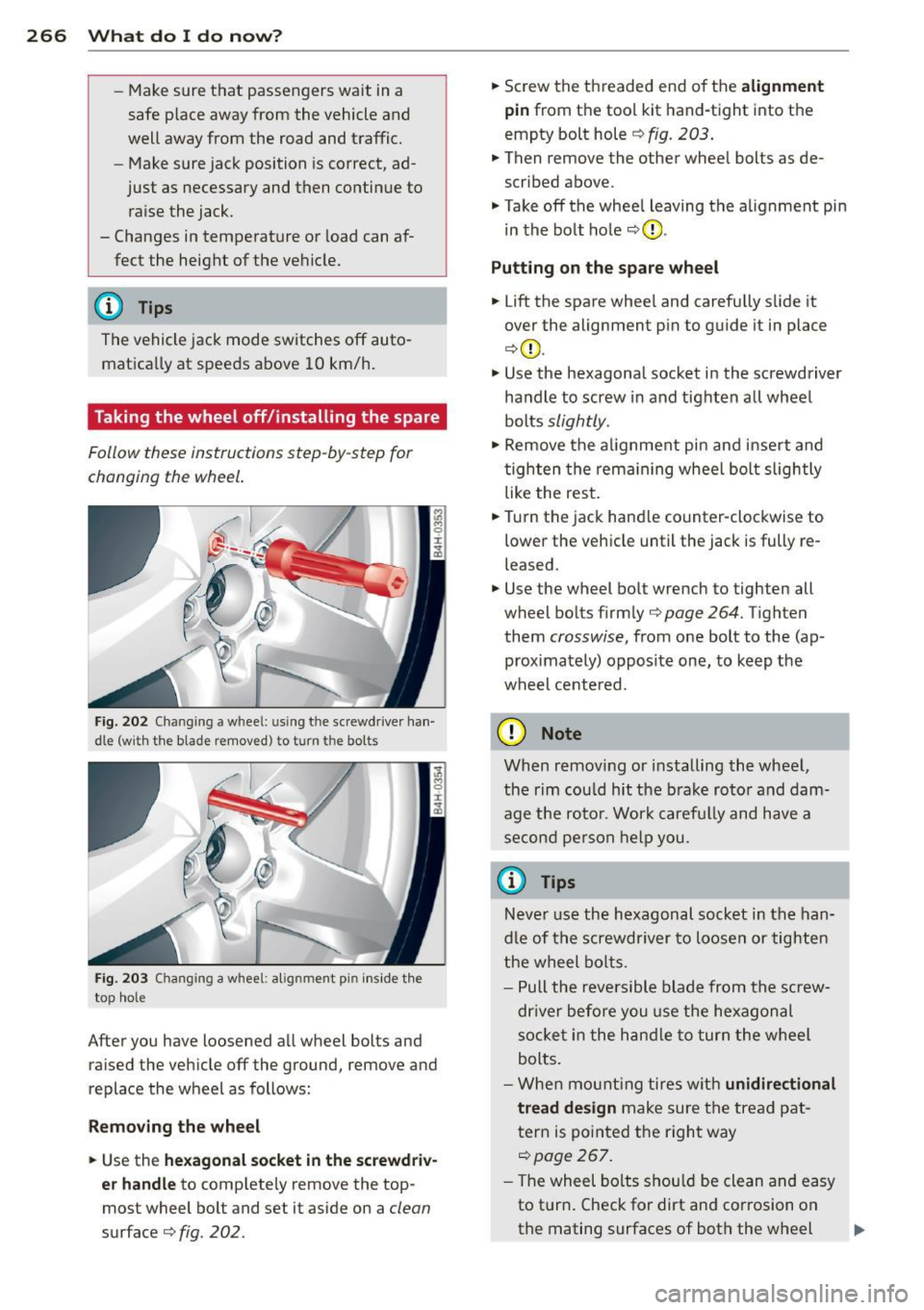
Fig. 2 02 Chan gin g a w hee l: u sing t he sc rewdr ive r ha n
dl e (w it h th e bla de r emoved ) to tu rn th e bolts
Fi g. 20 3 Changin g a w heel : a lignm en t pin inside th e
t o p hole
After you have loosened a ll wheel bolts and
ra ised the vehicle off the ground, remove and
replace the wheel as follows:
R emoving the wheel
• Use the hexagonal socket in the screwd riv
e r handle
to comp lete ly remove the top
most wheel bolt and set it aside on a
clean
surface ¢fig. 202.
• Sc rew the th readed end of the alignment
pin
from t he tool k it hand-tight into t he
empty bolt hole
r::;, fig . 203 .
• Then remove the other whee l bolts as de
scribed above.
• Takeoff the whee l leaving the a lignment pin
in the bo lt hole
r::;, (D .
Putting on the spare wheel
• Lift the spare whee l and carefu lly s lide it
over the alignment p in to g uide it in place
¢ (D .
.,. Use the hexagonal socket in the screwdriver
ha ndle to screw in and tighten a ll whee l
bolts
slightly .
.,. Remove the alignment pin and inse rt and
tighten the rem aining wheel bol t slightly
like the res t.
• Turn the jack hand le co unter-clockwise to
lower the veh icle until the jack is fully re
leased .
.,. Use the wheel bo lt wrench to tighten all
wheel bolt s firm ly
r::;, page 264 . Tigh ten
them
crosswise, from one bolt to the (ap
proximately) opposite one, to keep the
wheel cente red .
(D Note
When remov ing or installing the whe el,
the rim cou ld hit the b rake roto r and dam
age t he ro to r. Wor k caref ully and have a
s eco nd pers on h elp you.
{i) Tips
Neve r use the hexagonal socket in the han
dle of t he s crewdr iver to lo ose n or t igh ten
t he wheel bo lts .
- P ull the revers ible blade from the screw
dr iver be fore y ou use the hexagon al
so cket in the han dle to tur n the w heel
bolts.
- W he n m oun tin g ti res w ith
unidirectional
tread design
make sure t he trea d pat
t ern is poin ted t he righ t way
r::;, page267.
- T he wheel bolts shou ld be clean and easy
to t urn. Check for dirt an d corrosion on
the mating surfaces of both the w heel .,,.
Page 271 of 302
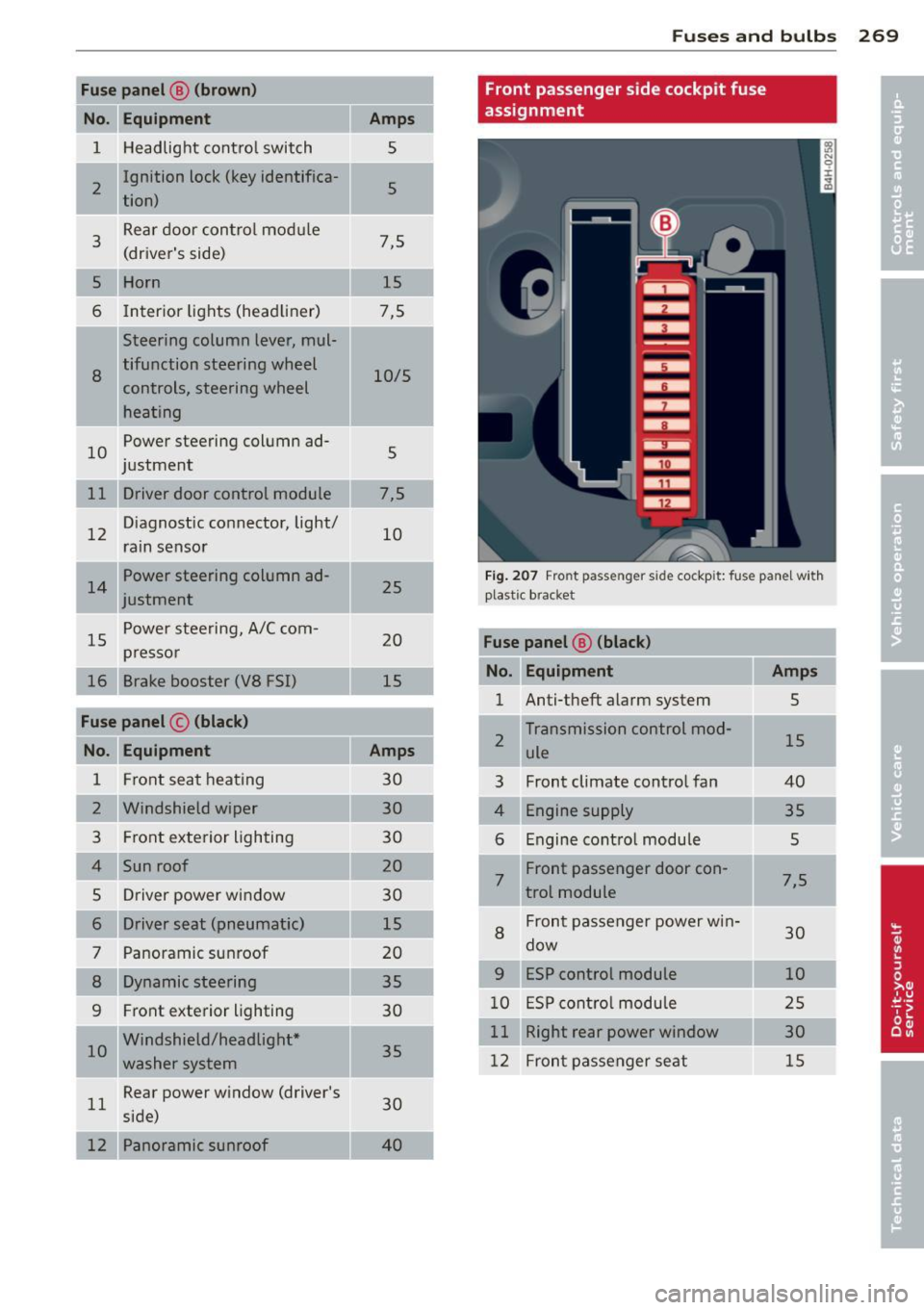
Fuse panel@ (brown)
No. Equ ipment
1 H eadlight contro l switch
I 2
Ignition lock (key identifica-
tion)
3
Rear door control mod ule
(driver's side)
5 Horn
6 Interior lights (head liner)
Steering column lever, mul-
8
tifunction steering wheel
controls, steering wheel
heating
10
Power steering column ad-
j ustment
11 Driver door control module
12
D iagnostic co nnector, light/
rain sensor
Power steering column ad-
justment
15
P ower stee ring, A/C com-
pr esso r
16 Brake booster (VS FSI)
Fuse panel © (black )
No. Equipment
1 F ront seat heating
2 Windshield wiper
3 Fr ont exterior lighting
4 Sun roof
5 Dr iver power window
6 Driver seat (pneumatic)
7 Panoramic sunroof
8 Dynamic steering
9 Fr
ont exterior lighting
I 10
Windshield/headlight *
washe r system
11
Rear power w indow (driver's
side)
12 Panoramic sunroof
Amp s
5
5
7,5 15
7,5
10/5
5
7,5 10
25
20
15
Amps
30 30
30
20
30
15
20 35
30
35
30
4 0
Fu se s and bulb s 269
Front passenger side cockpit fuse
assignment
Fi g. 2 07 Fro nt passe nger s id e co ckpit: f use pa nel w it h
plast ic brac ket
Fuse panel ® (black)
No . Equipment Amps
1 Anti-theft alarm system 5
2
Transmission control mod-
15 ule
3 Front climate control fan 40
4
Engine supply 35
6
Engine cont ro l module 5
7
Front passenger door con-7,5
t rot module
8
Fron t passe nger power w in-
30 dow
9 ESP control module 10
1 0
E S P cont ro l modu le 2 5
11
Right rear power window 30
12
Fron t passe nger seat 15
Page 272 of 302
2 70 Fu ses and bulb s
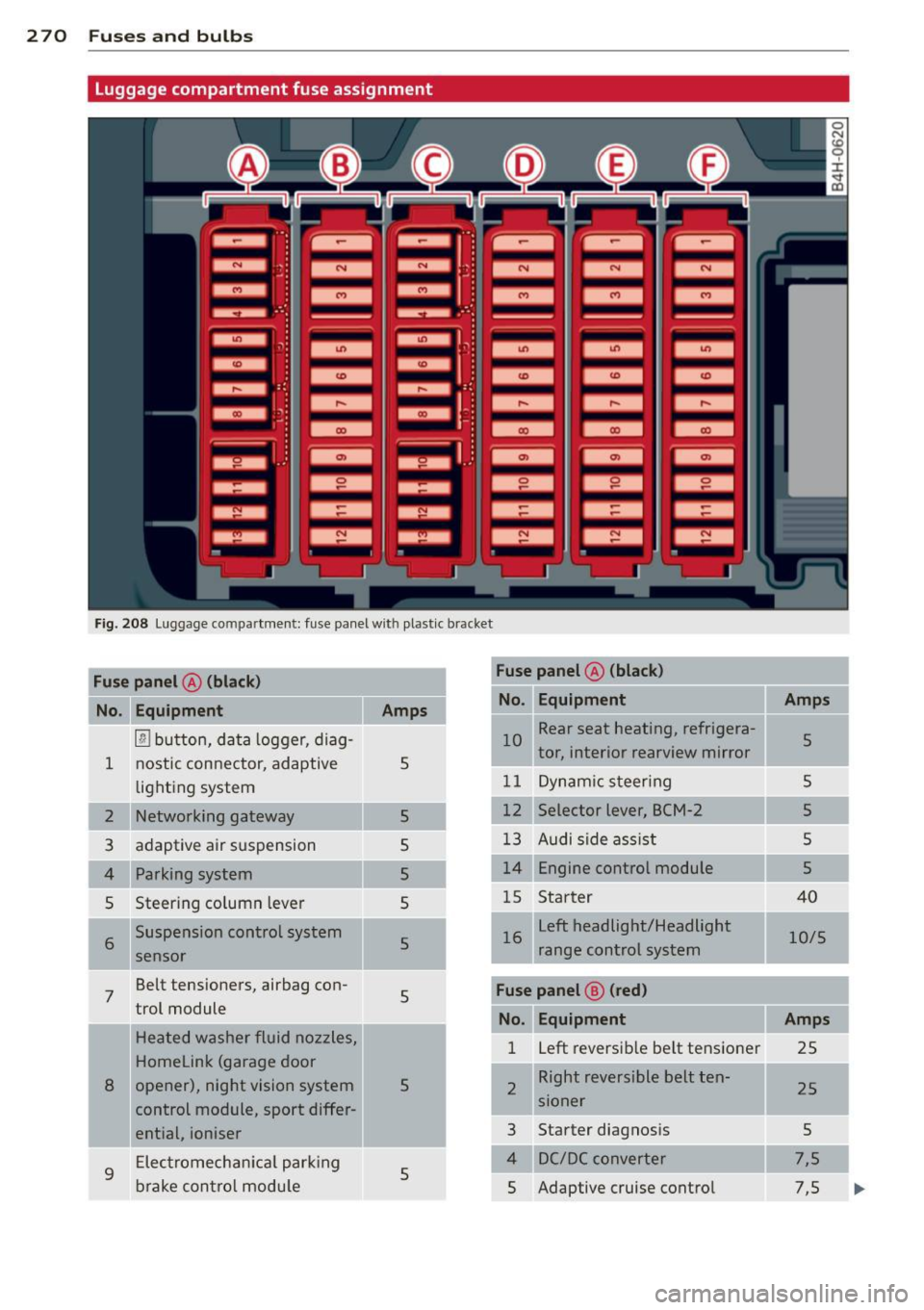
Luggage compartment fuse assignment
Fig. 208 Luggage co mpar tment: fuse panel with plastic b racket
Fu se pan el A (black ) Fuse panel
@ (b lac k)
I
No.
Equ ipment Amps No
. Equipment
Amps .
l!l button, data logger, diag-
1 nostic con
nector, adaptive
5 10
Rear seat heating, refrigera-
5 j tor, interior rearview mirror
lighting system 11 Dynam
ic steer ing 5
2 Networking gateway
5 12
Selector lever, BCM-2
5
3 adaptive air suspension
5 13 Audi side ass
ist 5
4 Parking system 5 14 Engine control module
5
5 Steering column
lever
5 1
5 Starter 40
I 6 Suspension control system
5
sensor left headlight/Headlight
'
16
10/5
range control system
.
7 Belt tensioners, airbag con-
5
trol module Fuse pan el@ (red)
No. Equipment Amps
Heated washer fluid nozzles,
Homelink (garage door
8 opener), night vision system
5
control module, sport differ- 1
left reversib
le be lt tens ioner
25
2 II
R_ight reversible belt ten-
25
s1oner
ential, ioniser 3
Starter diagnos
is
5
9
Electromechan ica l park ing
5
brake con tro l module 4 DC/DC converter
7,5
5 Adaptive cruise control 7,5
Page 273 of 302

Fuse panel@ (red)
No. Equipment
= '
I 6 Right headlight (headlight
with adaptive light)
I
7 ESP control module
8
9 Adaptive cruise control
Transmission control mod-
10 ule
11 Climate control system sen
sors
Fuse panel @ (brown)
No
. II Equipment
Electromechan ical parking
1 brake
2 Suspension control system
sensor
Right rear door control mod-
3 ule
4 Smart-Modul Tank
5 Front climate control system
controls
6 Rear climate control system
controls
7 Networking gateway
8 Refrigerator
Interface for spec ial func-
9 tions
12 Selector lever
13 Ambient lighting
14 Rear exterior lighting
15 Fuel pump
16 Electromechanical parking
brake
Fuse panel @ (black)
Equipment
3 Rear sockets*
5 adaptive air suspension
6 115-V socket
7 Electromechanical parking
brake
II
Amps
10
s
5
10
5
5
Amps
5
5
7,5 5
15
10 5
15
5
10
10
20
25
30
Amps
20
15
25
30
=
Fuses and bulbs 271
Fuse panel @ (black)
No. Equipment
8 Rear seat heating
9 Rear exterior lighting
10 Rear
climate control system
blower
Rear sun shade, closing aid,
11 luggage compartment lock,
keyless
go/entry, fuel filler
door
12 luggage compartment lid
control module
Fuse panel E (red)
No. Equipment
1 Rear
seat adjustment but-
tons
3 Left rear seat
(pneumatics)
5 Trailer hitch control modu le*
6 Left rear seat
7 Right rear seat
8 Trailer hitch control module*
9 Trailer hitch control module*
10 Right rear seat (pneumatics)
Fuse panel ® (brown)
No. Equipment
1 Radio receiver/sound ampli-
fier
Sound amplifier, Bang&
2 Olufsen Advanced Sound
System
Rear Seat Enterta inment, ra-
3 dio receiver/sound amplifier
Automatic dimming interior
5 rearview mirror, rearview
camera (parking aid)
6 DVD changer
7 TV tuner
8 MMI unit/drives
9
Instrument cluster, analog
clock
10 MMI Display
Amps
25
20
20
20
30
Amps
s
7,5
20
30
30
20
15
7,5
30
30 10
5
5
5
7,5
5
5
•
•
....