parking brake AUDI S8 2011 User Guide
[x] Cancel search | Manufacturer: AUDI, Model Year: 2011, Model line: S8, Model: AUDI S8 2011Pages: 302, PDF Size: 76.07 MB
Page 96 of 302

94 Adaptive cruise control and braking guard
The road exceeds the maxim um possible an
gle for proper adaptive cruise contro l opera
tion. Adaptive cruise control is sw itched off .
ACC: only selector lever positions D, S or M
available
Select the D, Sor M selector lever position.
ACC: unavailable at this time. Parking brake
set
The adaptive cruise control system switches
off automatically if the parking brake is set .
ACC: unavailable at this time. ESP interven
tion
This message appears if the Electronic Stabili
zation Program (ESP) is working to he lp stabi
lize the vehicle. In this case, adaptive cruise
control switches off automatically.
ACC : Please take over
This message appears when adapt ive cr uise
control can not set the parking brake. Press
the brake pedal to prevent the vehicle from
r olling .
•••
Three wh ite dots appear if a setting cannot be
selected with the operat ing lever . For exam
ple, this happens if adaptive cru ise control
cannot resume driving in stop-and-go traffic
because one of the conditions required for
ACC to wor k is not prese nt.
Door open
The adaptive cruise control system cannot
switch on when a door is open.
Stationary object ahead
This message appears if you wou ld like to
switch adaptive cruise control on and there is
a stationary veh icle or obstacle directly ahead
of your vehicle.
Page 115 of 302
~ You may need to release the selector lever
lock depending on which se lector lever posi
t ion is selected and which one you would
like to select ¢
page 113, Selector lever
lock .
~ To engage the nearest selector lever posi
t ion, move the selector lever forward/back
until you feel the first pressure po int. The
selector lever will return to its original posi
tion.
~ T o skip over one (or two) se lector lever posi
tions, move the se lector lever past the first
(and second) pressure point into the desired
pos it ion. The selector lever will return to its
original position.
F or example, to move directly from the
D se
lector lever position to
P when stopping the
vehicle, you can shift past the
N and R selec
tor lever positions.
Selector lever lock
The selector lever lock prevents you from se
lecting a position unintentionally, causing the
vehicle to roll. When engaging some selector
lever positions, you must press the button on
the selector lever¢
fig. 119 and/or press the
brake pedal.
You must press the brake pedal to engage a
selector lever position when the engine is run
ning while the vehicle is stationary. The ar
rows ¢
fig. 120 indicate when you need to
press the button on the selector lever.
The selector lever does not lock if you shift from
D to R within one second. This allows
you to "rock" the vehicle to free it when it is
stuck .
P- Park
The whee ls are locked in this position. Only
shift into park when the vehicle is stationary
¢ & .To engage the
P selector lever position,
press the button on the selector lever and
shift into the
P position .
You can only shift out of park when the eng ine
is running and you are pressing the brake ped
al. Press the button on the selector lever to
Automatic Transmission 113
release the parking lock and select the desired
selector lever position.
P engages automatically when you switch the
engine off while
D, Sor R is engaged or in
manua l mode .
If you switch the eng ine off whe n N is engag
ed, the transmission remains in
N for approxi
mately 30 minutes and then Pis engaged.
You must use the emergency release proce
dure to release the parking lock before towing
the vehi cle ¢
page 116.
R- Reverse
The reverse gear is engaged in this pos it ion .
Only select reverse when the vehicle is sta
tionary and the engine is running at id le speed
¢ & -To engage the
R selector leve r position,
press the button on the selector lever, press
the brake pedal and move the selector lever
into the
R position.
T he back-up lights turn on when you select
the
R selector lever position while the engine
' ' 1s ru nning .
N -Neutral
The transmission is in idle in this pos it ion. To
engage the
N selector lever position, press
the button on the selector lever and shift int o
the
N posi tion.
If you switch the engine off whe n N is engag
ed, the transmission remains in
N for approxi
mately 30 minutes and then Pis engaged.
The vehicle cannot be locked when the selec
tor lever is in the
N position .
When dr iving through an automat ic car wash,
first select the
N position and then switch the
engine off¢
page 207.
D - Drive
In this position, the transmission shifts up
and down automatically depending on engine load, veh icle speed and the dynamic shift pro-
gram (DSP) .
IJJ,,
Page 116 of 302

114 Automatic Tran sm iss io n
To shift from N to D when traveling at speeds
be low S km/h, press the brake pedal and se
lect the
D se lector lever posit ion ¢ & .
Under certain condi tions such as driving in the
mountains or when towing a trailer , it may be
he lpful to switch to manual mode temporarily
to sh ift
manually to adapt to the driv ing con
d itions
¢ page 115.
S · Sport
The S pos it ion can be selected for sporty driv
ing . Upshifting at a higher RPM makes full use
of the engine's power .
You can on ly select the
S se lector lever posi
tion when Dis engaged. Move the selector
l ever back to engage the
S se lector lever posi
tion . To select the
D selector lever position
again when
S is engaged , move the selector
lever back¢ &.
The
S selector lever position engages auto
matica lly when you select the dynamic mode
in Audi drive select .
A WARNING
-Never engage R or P while driving. It
cou ld cause a crash.
-
- Power is st ill transmitted to the whee ls
when the eng ine is running at idle. To
prevent the vehicle from "creeping", you
must keep your foot on the b rake in all
selector lever positions except
P and N
when the eng ine is running. Do not inad
vertent ly press the accelerator pedal
when the veh icle is stationary . Otherwise
the vehicle will start to move immediate
ly . T his cou ld happen even if the parking
brake is activated.
- Before opening the hood, select the
P se
lector lever position and set the parking
brake. Th is reduces the risk of a crash . Al
ways read and follow the applicable
warnings¢
page 216, Engine compart
ment .
-Never get out of the driver's seat when
the engine is runn ing . -
If you must get out of the vehicle, move
the selector lever secure ly into the P po
sition and apply the parking brake firmly.
@ Tips
- If you unintentionally shift into the N se
lector lever position whi le driving, take
your foot off the accelerator pedal and
wa it for the engine to slow down until it
is idling before you sh ift into Dor
S.
Driving tips
The gears shif t au toma tically.
Sta rting from a stop
.. Press and hold the brake peda l.
.. Start the engine ¢
page 79.
.. Press the b utton on the selector lever and
select the
D , Sor R selector lever position
¢page 112.
.. Wait a moment until the transmission
shifts . You will notice a slight movement
when the gear engages .
.. Release t he b rake peda l and press the acce l
erator pedal ¢,& .
Stopping temporarily
.. Press the brake pedal to stop the veh icle, for
example at a traffic l ight . Do not press the
accelerator peda l when do ing th is .
.. To prevent the vehicle from ro lling when you
s tart dr iving, set the par kin g b rake when
s topping on la rge incl ines ¢
A_.
.. The parking brake will release automatica lly
and the vehicle will start moving once you
press the acce lerator pedal.
Parking
.. Press and hold the bra ke peda l¢ ,& .
.. Set the parking brake .
.. To engage the
P selector leve r position,
press the button on the selector leve r and
shift into the
P position ¢ page 112.
When park ing on a level su rface, simp ly place
the se lector lever in the
P position. On slopes,
activate the par king brake first and then move
Iii>
Page 117 of 302
the selector lever to the P position. This p re
vents too much stress from being placed on
the locking mechanism .
.&_ WARNING
Read and follow all WARNINGS c> .&. in Se
lecting a selector lever position on
page
114 .
-Do not press the accelerator pedal when
changing the selector lever pos ition
wh ile the vehicle is stat ionary and the
engine is running . This could result in a
crash .
- Never engage
R or P while dr iving . It
cou ld cause a crash .
- Power is still transmitted to the wheels when the eng ine is running at idle. To
prevent the vehicle from "creep ing", you
must keep your foo t on the b rake in all
selector lever positions ex cept
P and N
when the engine is running . Do not inad
vertent ly press the accelerator pedal
when the vehicle is stationary. Otherwise
the vehicle will start to move immediate
ly, even if the parking brake is set. This
cou ld result in a crash .
Kick-down
Kick-down enables maximum acceleration.
When you press the accelerator pedal down
beyond the resistance point, the automatic
transmission downshifts into a lower gear, d e
pending on vehicle speed and engine RPM. It
shift s up into the next higher gear once the
maximum specified engine RPM is reached .
.&_ WARNING
Please note that the wheels could spin on
slick or slippery roads when kick-down is
act ive .
Autom atic Tra nsmi ssi on 115
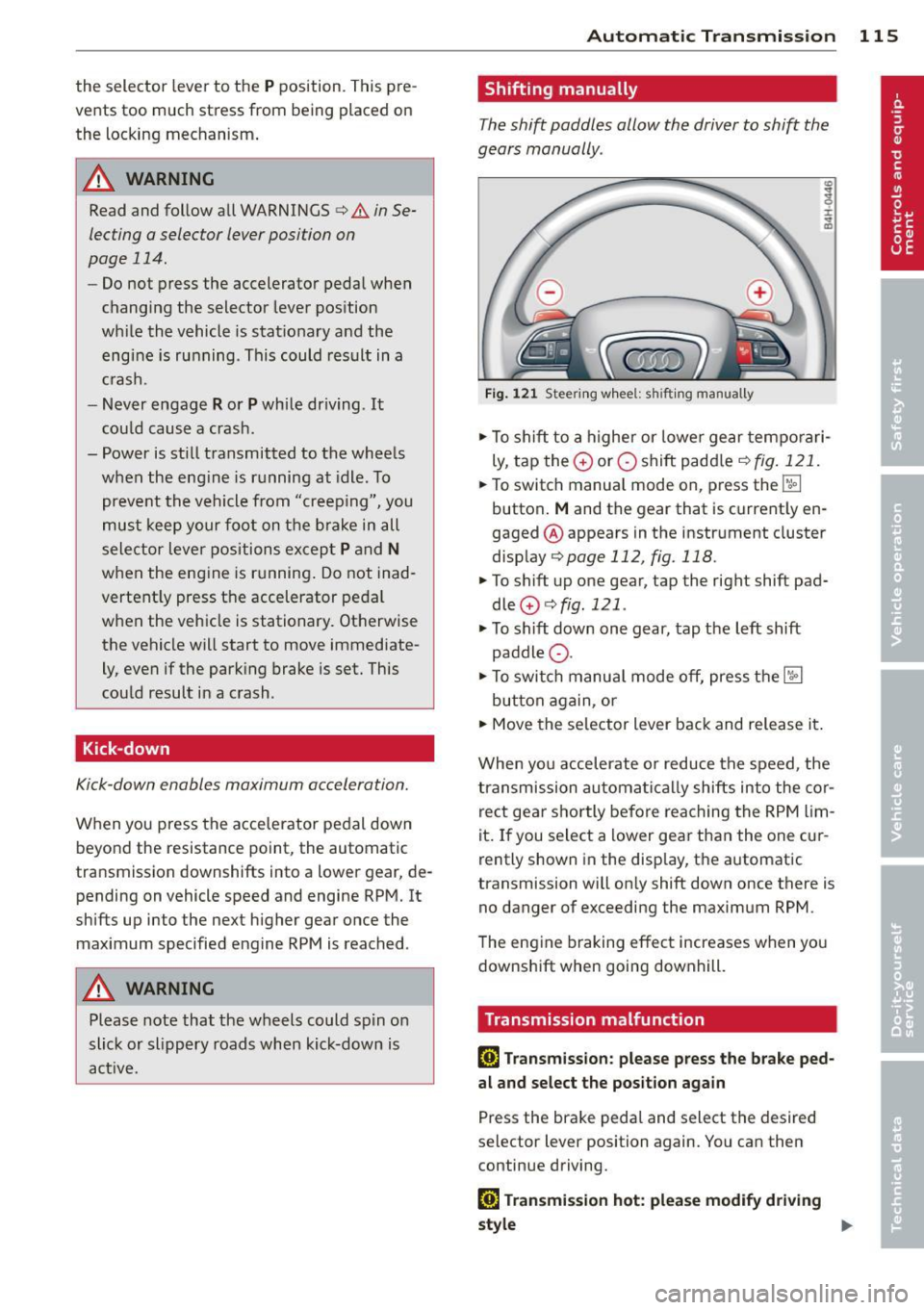
Shifting manually
T he shift paddles allow the driver to shift the
gears manually .
Fig . 1 21 Steer ing w hee l: s hifting man ually
... To shift to a higher or lowe r gear temporari
ly , tap the
0 or O shift padd le c> fig. 121 .
... To switch manua l mode on, press the~
button .
M and the gear that is current ly en
gaged @appears in the instrument cluste r
display
c> page 112, fig. 118.
... To shift up one gear, tap the righ t shift pad
dle
0 c> fig . 121 .
... To sh ift down one gear, tap the left shift
paddle Q .
... To swi tch manua l mode off, press the~
button aga in , or
... Move the selector lever back and release it .
When you accelerate o r reduce the speed, the
transmission automa tical ly shifts into the cor
rect gear sho rtly before reaching the RPM lim
it. If you select a lower gear than the one c ur
rently shown in the display, the automatic
transmiss ion will on ly shift down once there is
no danger of exceeding the maximum RPM .
T he engine braking effect increases when yo u
downshift when going downhill.
Transmission malfunction
[G) Transmiss ion : please press the brake ped
a l and select the po sit ion again
Press the brake pedal and select the desired
selector lever position again. You can then
continue driving.
[G] Tran smi ssion h ot: plea se m odify driving
~le
~
Page 118 of 302
116 Automatic Transmission
The transmission temperature has increased
significantly due to the sporty driving manner.
Drive in a less sporty manne r until the tem
perat ure returns to the norma l range and the
indicator light switches of.
[O] Gearbo x malfunction: you can continue
driving
T here is a sys tem m alfu nction in the tr ansmis
sion. You may continue driving. Drive to your
authorized Audi dealer or qualified repair fa
cility soon to have t he mal function corrected .
[o]tli] Gearbox malfunction: you can contin
ue driving in D only until engine is off
There is a sy stem ma lf u nction in t he transmis
sion . T he tra nsmi ssion i s sw itch ing t o emer
gency mo de. If yo u t urn t he eng ine off, you
will not be a ble to se lect any other se lector
leve r positions after starting the engine again .
Drive to yo ur autho rized Audi dealer o r quali
f ied repair fac ility immediately to have the
malfunction cor rected.
[O] Gearbox malfunction: you can continue
driving (limited fun ction ality )
There is a sys tem m alfu nction in the tr ansmis
sion. The transmission is sw itching to emer
gency mo de. Th is mode only shifts into cer
tain gears or will not longer shift at all . The
engine may sta ll. Drive to your authori zed Au
d i dea ler or qualified repa ir facility immed i
ately to have the malfunction corrected.
[ojtli] Gea rbox malfunction: no reverse gear
(you can continue driving)
There is a sys tem ma lf u nction in t he transmis
sion. The transm issi on is sw itchi ng to emer
gency mode. Th is mode only sh ifts into cer
tain gea rs or will not longer sh ift at a ll. You
cannot engage the reverse gear . Drive to y our
author ized Audi dealer immed iately to have
the m alfu nct ion co rrected .
[O] Vehicle may roll! Cannot sh ift to P. Please
apply parking brake
- The pa rking lock was released using t he
eme rgency release
c:> page 116. Or -
The parking b rake canno t engage au toma ti
cally . Drive to yo ur a uth o rize d Audi deale r or
qua lified repair fac ility immediately to have
the ma lfu nction corrected .
[O] Gearbox malfunction: Stop and shift to P
Do not con tinue dr iving . S e lect the P sele ctor
l ever p osition and see your auth o riz ed A udi
de aler or qua lifi ed rep air fac ility for ass is
tance .
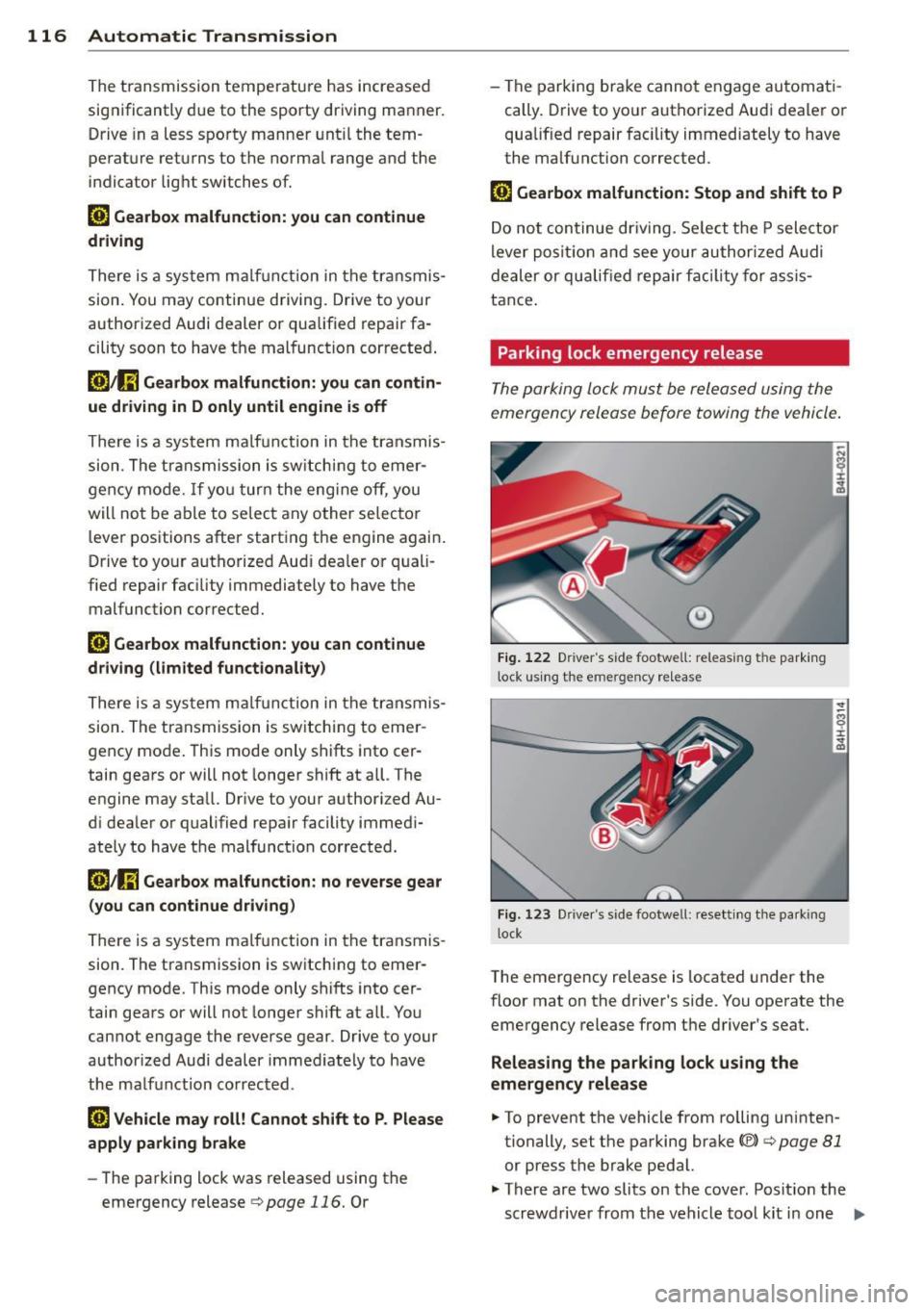
Parking lock emergency release
The p ark ing lock mu st be relea sed using the
emerge ncy release before towing the vehicle .
@)
Fig. 122 Driver 's s ide footwell: releas ing t he pa rk in g
l ock u sin g the eme rge ncy re lease
Fig . 1 2 3 Drive r's side foo twell: rese tt in g t he park ing
l ock
T he eme rgency release is located under the
floor mat on t he driver's side . You operate the
emergency release from t he d river 's seat.
Releasing the parking lock us ing the
emergency release
.. To prevent the vehicle from ro lling uninten
tionally, set the parking brake(®)
c:> page 81
or press t he brake pedal.
.. There are two slits on the cover. Posit io n the
scr ewdrive r from the vehicle too l kit i n one
IJI,
Page 119 of 302
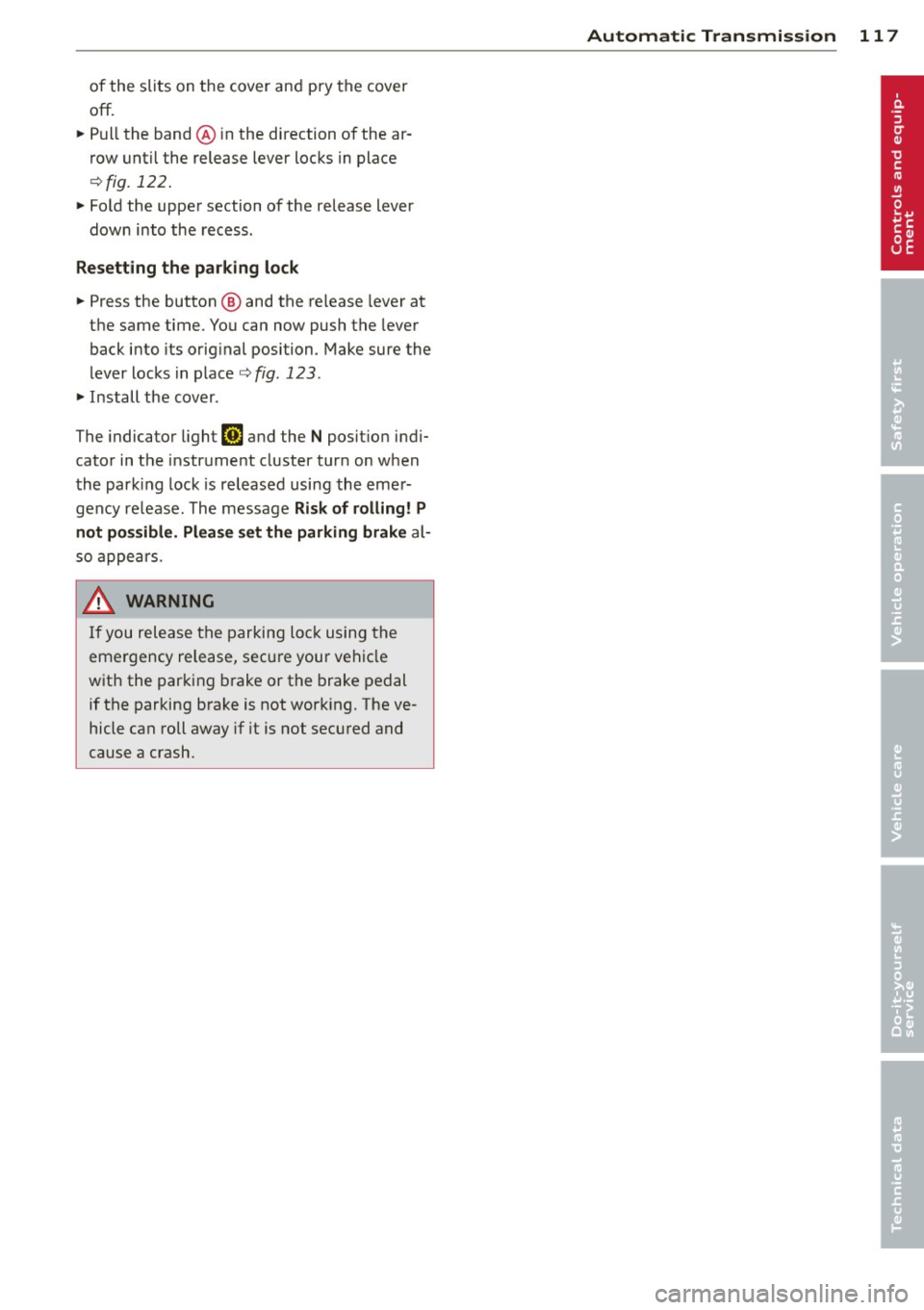
of the slits on the cover and pry the cover
off.
~ Pull the band @ in the direction of the ar
row until the release lever locks in place
¢fig . 122.
~ Fold the upper section of the release lever
down into the recess .
Resetting the parking lock
~ Press the button @ and the release lever at
the same time. You can now push the lever
back into its original position . Make sure the
lever locks in place
¢fig. 123 .
~ Install the cover .
The indicator light
[O] and the N position indi
cator in the instrument cluster turn on when
the park ing lock is released using the emer
gency re lease . The message
Risk of rolling! P
not possible. Please set the parking brake
al
so appears.
_& WARNING
If you release the parking lock using the
emergency release, secure your vehicle
with the parking brake or the brake pedal
if the parking brake is not working. The ve
hicle can roll away if it is not secured and
cause a crash.
-
Automatic Transmission 11 7
Page 126 of 302
124 Homelink®
Homelink®
Universal remote
control
General information
Applies to vehicles: with Home link® universal remote
control
The Homelink universal remote control can
be programmed with hand -held transmitters
from existing equipment.
Using the Homelink universal remote control,
you can operate equipment such as garage
doors, property gates and house lights from
ins ide your vehicle .
Using the Homelink universal remote control,
you can replace up to three separate hand
held transmitters for equipment on your
property with just one universal remote con
trol. Most of these transmitters are used to
ope rate ga rage doo rs and property gates. The
individual transmitters are programmed at
the front bumper. That is where the control
module is located.
The transmitters must be programmed first in
order to operate systems using the Homelink
universal remote control.
.&_ WARNING
-
-Never use the Homelink ® transmitter
with any garage door opener that does have not the safety stop and reverse fea
ture as required by federal safety stand
ards . This includes any garage door open
er model manufactured before April 1, 1982.
- A garage door opener which cannot de
tect an object, signa ling the door to stop
and reverse does not meet current feder
al safety standards . Using a garage door
opener witho ut these features increases
risk of serious injury or death.
- For safety reasons never release the
parking brake or start the engine while
anyone is standing in front of the vehicle .
- A garage door or an estate gate may
sometimes be set in motion when the Homelink
® remote control is being pro
grammed. If the device is repeatedly ac
tivated, this can overstrain motor and
damage its electrical components - an
overheated motor is a fire hazard!
- To avoid possible injuries or property
damage, please always make absolutely
certain that no persons or objects are lo
cated in the range of motion of any
equ ipment being operated.
(D Tips
- If you would like additional information
on the Homelink ® Universal Transceiver,
Homelink compatible products, or to
purchase other accessories such as the
Homelink ® Light ing Package, please
contact Homelink at 1-800 -355-3515 o r
on the Internet at www.homelink .com.
- For Declaration of Comp liance to United
States FCC and Industry Canada regula
tions ¢
page 286.
Page 127 of 302
Programming transmitters
Applies to vehicles: with Horne link
You con program the buttons in the Home
Link universal remote control located in the
vehicle headliner.
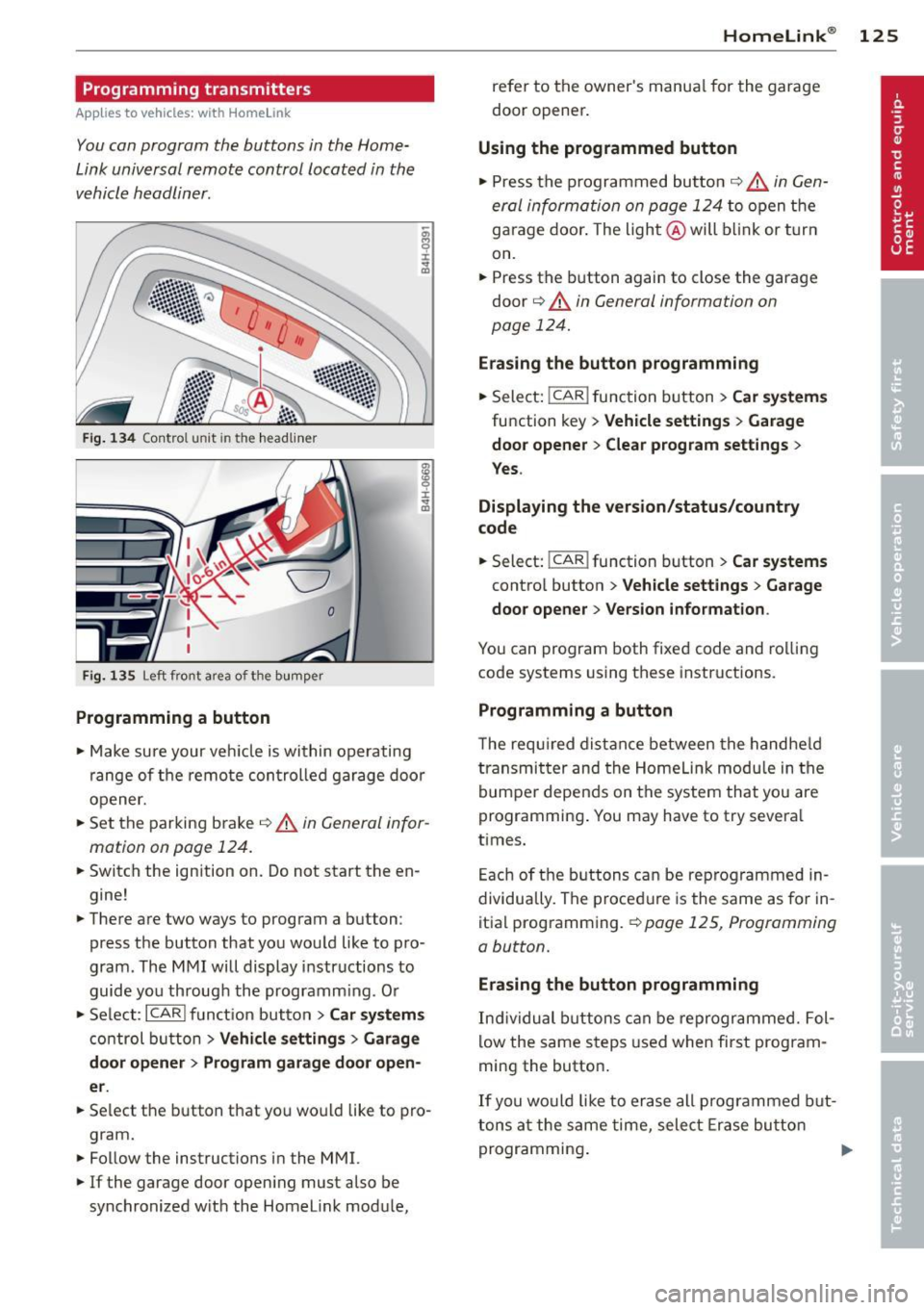
F ig. 1 34 Co ntro l u ni t in th e headlin er
Fi g. 1 35 Left front a rea of t he b um per
Programming a button
• Make sure your veh icle is within operating
range of the remote controlled garage door
opener.
• Set the parking brake¢&.
in General infor
mation on page 124.
• Switch the ign ition on. Do not start the en
gine!
• There are two ways to program a button :
press the button that you wou ld like to pro
gram . The MMI will display instructions to
guide you through the programm ing . Or
• Se lect :
I CAR I funct ion but ton> Car system s
control button > Vehi cle setting s > Garage
door opener > Program gar age d oor op en
er .
• Se lect the b utton that you wo uld like to pro
gram.
• Follow the instructions in the MMI.
• If the garage door open ing must also be
synchronized w it h the Homelink module,
Homelink ® 125
refer to the owner's manua l for the garage
door opener .
Using the programmed button
• Press the p rogrammed butto n c;;> 6_ in Gen
eral information on page 124
to open the
garage door . The light @will b link or turn
on.
• Press the button again to close the garage
door
¢ &. in General information on
page 124.
Erasing the button programming
• Select: I CAR I function button > Car sy ste m s
function key > Vehicle setting s > Garage
doo r opener
> Clear p rogr am sett ings >
Y e s.
Displaying the ver sion /status /country
code
• Select: !CAR ! function button > Car systems
contro l button > V ehicle settings > Garage
door ope ner > V ersion in form ation .
You can program both fixed code and rolling
code systems using these instructions.
Programming a button
The requ ired distance between the handhe ld
transmit ter and the Homeli nk modu le in the
bumpe r depends on the system that you are
programming . You may have to try severa l
times.
Each of the buttons can be reprogrammed in
dividually. The procedure is the same as fo r in
itia l programming.
r::!:> page 125, Programming
a button.
Erasing the button programming
Ind ividual buttons can be reprogrammed. Fol
low the same steps used when first program
ming the button.
If you would like to erase all prog rammed but
t ons at the same time, sele ct Erase bu tton
programming .
Page 196 of 302
194 Intelligent technology
been damaged, the brake pedal must be
pressed considerably harder to make up
for the lack of booster assistance.
Servotronic ® -
advanced power
steering system
The power steering systems use the power of
the running engine to allow precise steering
with little effort .
The advanced Servotronic® power steering
system senses the road speed and e lectroni
cally adjusts power assistance to prov ide com
fortable and safe steering response exactly
matched to the veh icle speed.
Power steering w ill not work if the eng ine is
off . As a result, the steering whee l wi ll be hard
to turn.
The power steering fluid level is checked dur
ing the scheduled maintenance serv ices.
([) Note
If there is an electronic malfun ct ion, ser
votronic
w ill still f unction like a conven
tional power steer ing system, providing a
constant steering support force that is no
longer proportionate to the vehicle speed.
This is most noticeab le when turning the
steer ing whee l at low speeds (for examp le
when parking), - more effo rt will be re
qui red than usua l.
- Be aware of the different than usual
stee ring response and adjust yo ur stee r
i ng fo rce accord ingly.
- Have the p roblem checked and set rig ht
by an Aud i deale r as soon as possib le.
(D Tips
- When the engine is runn ing, never hold
t h e steer ing whee l turned all the way to
the right or to the left for longer than 15
se conds. The power steer ing p ump w ill
ove rhe at the hydr aulic flu id if you keep
ho ld ing the steering whee l turned all the way
. This is likely to damage the power
steering system .
- If the powe r steering system sho uld fai l
entirely, o r if the engine is not runn ing
(for examp le, whi le being towed), you
w ill sti ll be able to steer the veh icle.
However,
considerably more effort will
be required to do so.
- If the power steering system sho uld
have a leak, or is not functioning proper
ly, contact your author ized Audi dealer
immed iately.
- The power steering system requ ires a
specially fo rmu lated hydraulic fluid. The
powe r stee ring fluid reservoir is locat ed
in the engine compartment
Q page 224.
T he corre ct fl uid level i n the reservoir is
impo rta nt fo r proper fu nctioning of the
powe r stee ring .
Driving with your
quattro ®
With All Wheel Drive, all four wheels are driv
en .
Gen eral information
With A ll W heel Drive, power is distributed to
all four wheels. This happens automatically
depending on your driving style and the road
condit ions at the time. See also
Q page 190.
With the sport different ial*, powe r distribu
tion to the rear wheels is variable and can be
adjusted with Audi drive select*
Q page 106 .
Winter tires
When driving in the winter, yo ur vehicle with
All Wheel D rive has an advantage, even w ith
r egular tires . In wi nter road conditions it may
be advisable to mount winter tires (or all-sea
son tires) for improved driveability and brak
i ng : these tires must be mo unted o n
all four
wheel s. See also q page 253, Winter tires.
Tire chains
Where tire chains are mandatory on certa in
roads, this no rma lly also app lies to veh icles
with All Wheel D rive
q page 254, Snow
chains .
Page 207 of 302
Parking on a slope
Do not pork on a slope with a trailer. If it can
not be avoided, do so only ofter doing the fol
lowing:
When parking:
.. Apply the foot brake .
.,. Have someone place chocks under both the
vehicle and the trailer wheels .
.,. With chocks in place, slowly release the
brakes until the whee l chocks absorb the
load .
.. Turn the wheels towa rds the curb .
.. Apply the parking brake .
.. Se lect the
P se lector lever position.
When restarting after parking:
.. Apply the foot brake .
.,. Start the engine .
.. Select the
D se lector lever position .
.. Release the parking brake and slowly pull
out and away from the wheel chocks .
.. Stop and have someone retrieve the wheel
chocks.
If you move the selector lever of the auto
matic transmission to
P before applying
the parking brake and before blocking the
wheels, you may have to use more force
later to move the lever out of the
P posi
tion .
Trailer towing 205
•
•