light AUDI S8 2011 Owner's Guide
[x] Cancel search | Manufacturer: AUDI, Model Year: 2011, Model line: S8, Model: AUDI S8 2011Pages: 302, PDF Size: 76.07 MB
Page 42 of 302
40 Opening and closing
Valet parking
The valet parking feature protects the lug
gage comportment from unauthorized ac
cess .
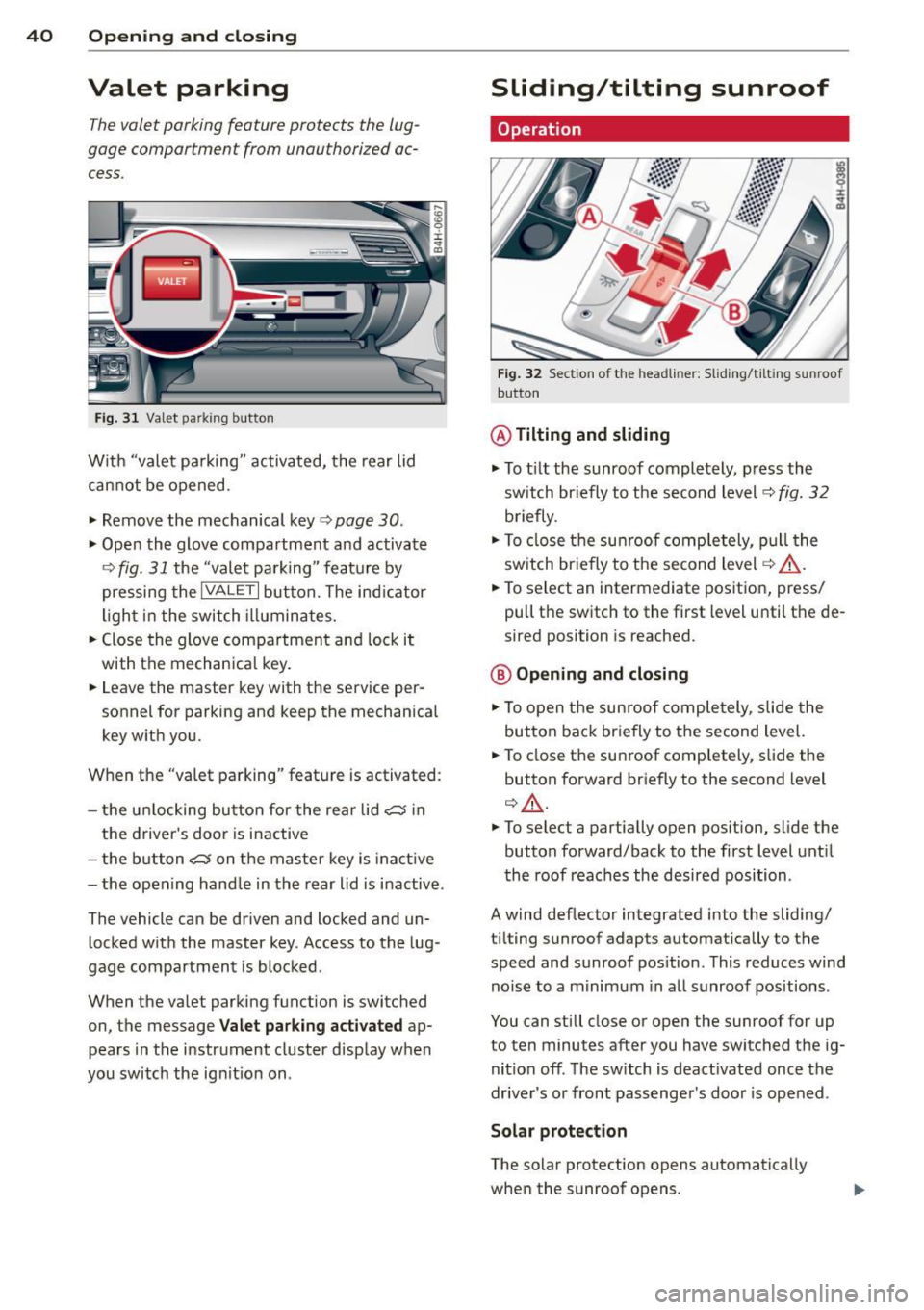
Fig. 31 Valet park ing button
With "valet pa rking" activated, the rear lid
cannot be opened.
.. Remove the mechanical key
c:> page 30 .
.,. Open the glove compartment and activate
¢
fig. 31 the "valet parking" feature by
pressing the
I VALET I button. The ind icator
light in the switch illuminates.
.,. Close the glove compartment and lock it
with the mechanical key .
.. Leave the master key with the service per
sonnel
for parking and keep the mechanical
key with you .
When the "valet parking" feature is activated :
- the u nlocking button for the rear lid
c:5 in
the driver's door is inactive
- the butt on
c:5 on the master key is inac tive
- the opening hand le in the rear lid is inactive.
The vehicle can be driven and locked and un locked w ith the master key. Access to the lug
gage compartment is blocked.
When the valet parking function is switched
on, the message
Valet parking activated ap
pears in the instrument cluster display when
you switch the ign it ion on .
Sliding/tilting sunroof
Operation
Fig. 32 Section of the headl iner: Sliding/t iltin g sunroof
button
@ Tilting and sliding
.,. To t ilt the sunroof completely, press the
sw itch br iefly to the second level¢
fig. 32
briefly .
.. To close the sunroof completely, pull the
sw itch briefly to the second level¢,&. .
.. To select an intermediate position, press/
pull the switch to the first level until the de
sired position is reached .
@ Opening and closing
.,. To open the sunroof completely, slide the
button back briefly to the second level.
.. To close the sunroof completely, slide the
button forward briefly to the second level
q ,&..
.. To select a partially open pos ition, slide the
button forward/back to the first level until
the roof reaches the desired position.
A wind deflector integrated into the sliding/
t il ting sunroof adapts automatically to the
speed and sunroof pos ition . This reduces wind
noise to a m inimum in all sunroof positions .
You can still close or open the sunroof for up
to ten minutes after you have switched the ig
nition off . The switch is deact ivated once the
driver's or front passenger's door is opened.
Solar protection
The solar protection opens automatically
when the sunroof opens.
Page 45 of 302

Clear vision Lights
Switching the headlights on and off
Fig . 35 Instrument pane l: lig ht sw itc h wit h all -weath
er ligh ts•
The headlights only wo rk when the ignition is
switched on. Wh ile start ing the eng ine o r
when switching off the ign ition, the head
lights will go off and on ly the side marker
lights will be on .
If the system is not operating p roperly, a
war ning symbol in the dr iver information dis
p lay is d isplayed
c::, page 21 .
Light switch ·'ti- -
Tu rn the switch c::> fig . 35 to the correspond ing
position . When the lights are switched on, the
:oo: symbo l tu rns on .
0 · The lig hts are off or the dayt ime runn ing
lights are on:
- USA models: The daytime running lights
will come on automatically when the igni
t ion is on and the light switch
c::, fig . 35 is in
the
O posit ion or the AUTO position (only in
daylight cond itions). The
Daytime running
light s
function can be turned on and off in
t h e M MI
c::> page44, c::>A .
-Canada model s: The daytime running lig hts
will come on automa tically when the igni
t ion is on and the light switch
c::> fig . 35 is in
the
O position, the : oo: pos ition or the AUTO
position (only in daylight conditions) c::> A .
AUTO -Automatic headlights swi tch on and
off depend ing o n brightness, for example i n
tw ilight, during rain or in tunnels
c::, &. .
Clear vision 43
:oo: -Parking lig hts
gD -Low beam headlights
~ -All-weather lig hts* (vehicles with LED
headlights *)
c::, fig. 35
@!] -Rear fog lights*. When the rear fog lights
are on, the symbol
0$ on the switch will illu
minate .
All-weather lights*
In vehicles with all-weather lights, the front
lights are ad justed automatically so that you
are less like ly to see glare from your own
headlights, for example when dr iving on a wet
road.
Automat ic dynamic headlight range
con trol*
Your vehicle is equipped with a headlight
range cont ro l system so that the headlights
do not bl ind oncoming traff ic if the vehicle
load cha nges. The headlight range a lso ad
justs au toma tic ally when braking and acceler
at ing .
Light funct ions
The following light funct ions are availab le de
pend ing on vehicle equipment and on ly func
tion when the light switch is in the AUTO posi
t ion. You can dea ctivate these functions i n the
MM I under
Audi adaptive light c::>page 44.
Static corn ering light * (vehicles with LED
headlights o r adaptive light) - the corner ing
ligh t sw itches on automa tically w hen the
stee ring wheel is turned at a ce rtain angle at
speeds up to approximately 4 4 mph (70 km/
h) and when the turn signal is activated at
speeds up to approximate ly 25 mph (40 km/
h). The area to the s ide of the vehicle is illumi
nated better when turn ing .
Dynamic cu rve light* (vehicles with adaptive
li ght) - the curve light only functions at
speeds between approximately 6 mph (10
km/h) and 110 km/h and adapts itself to the
curves in the road.
Page 46 of 302
44 Clear vision
Highway light function*
(vehicles with LED
headlights) -this function adapts the lighting
for highway driving based on vehicle speed.
.&_ WARNING
- Automatic headlights are only intended
to assist the driver . They do not relieve
the driver of his responsibility to check the headlights and to turn them on man
ually according to the current light and
visibility conditions . For example, fog
cannot be detected by the light sensors.
So always switch on the headlights §,0
under these weather conditions and
when driving in the dark.
- Crashes can happen when you cannot see the road ahead and when you cannot be seen by other motorists. Always turn on
the headlights so that you can see ahead
and so that others can see your car from
the back .
(D Note
The rear fog lights should only be turned
on in accordance with traffic regulation, as
the lights are bright for following traffic.
(D Tips
- In the event of a light sensor malfunc
tion, the driver is notified in the instru
ment cluster display
q page 21 .
-You will hear a warning tone if you open
the driver door when the exterior lights
are switched on.
- Please observe legal regulations when
using the lighting systems described .
Emergency flasher
The emergency flasher makes other motorists
aware that you or your vehicle ore in on emer
gency situation .
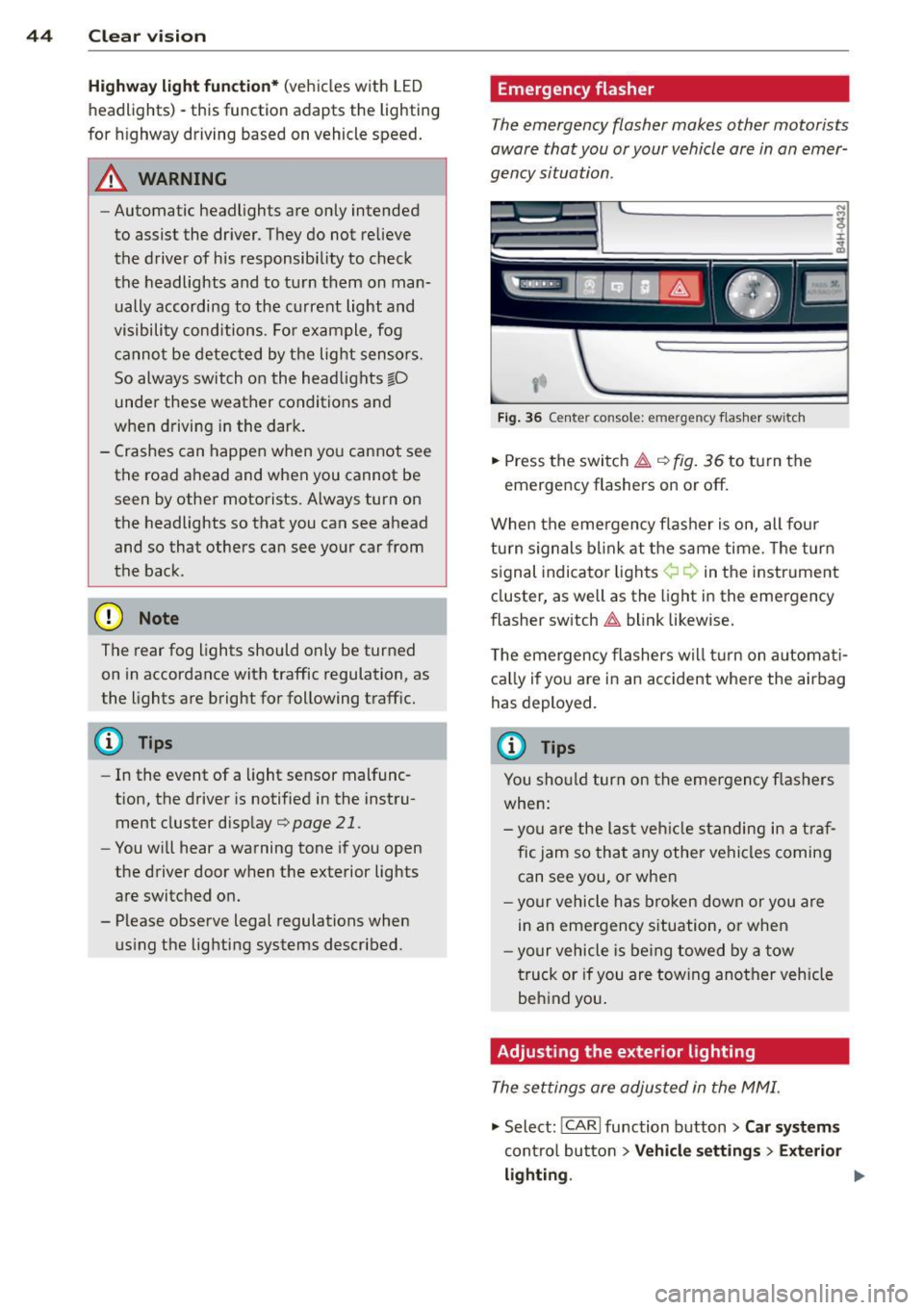
Fig. 36 Ce nte r co nso le: em erg en cy flash er sw itch
.,. Press the switch~ c:> fig. 36 to turn the
emergency flashers on or off.
When the emergency flasher is on, all four
turn signals blink at the same time. The turn
signal indicator lights¢¢ in the instrument
cluster, as well as the light in the emergency
flasher switch
~ blink likewise.
The emergency flashers will turn on automati
cally if you are in an accident where the airbag
has deployed.
@ Tips
You should turn on the emergency flashers
when:
- you are the last vehicle standing in a traf
fic jam so that any other vehicles coming
can see you, or when
- your vehicle has broken down or you are
in an emergency situation, or when
-your vehicle is being towed by a tow
truck or if you are towing another vehicle
behind you.
Adjusting the exterior lighting
The settings ore adjusted in the MMI.
"'Select: !CARI function button> Car systems
control button > Vehicle settings > Exterior
lighting. ""
Page 47 of 302
Automatic headlights
You can adjust the following settings in the
Automatic headlights menu:
Headlights activation time -You can adjust if
the headlights switch on
Early, Med . or Late
according to the sensitivity of the light sensor.
Audi adaptive light* -You can switch adaptive
light
On and Off.
Daytime running lights
USA models:
You can switch the dayt ime run
n ing lights
on and off .
Canada models :
The function cannot be
turned off . It is activated automatically each
time the ignition is switched on. This menu
item is shown "greyed out".
Coming home, Leaving home
The coming home function illuminates the
area outside the vehicle when you switch the
ignition off and open the driver's door. To turn
the function on, select
Lights when leaving
car > On .
The leaving home function illuminates the
area outside the vehicle when you un lock the
vehicle. To turn the funct ion on, select
Lights
when unlocking car > On .
The coming home and leaving home functions
only operate when it is dark and the light
switch is in the
AUTO pos ition. Clear
vision 45
Turn signal lever
The lever on the left side of the steering col
umn is used to operate the turn signals and
the high beam as well as the headlight flash
er.
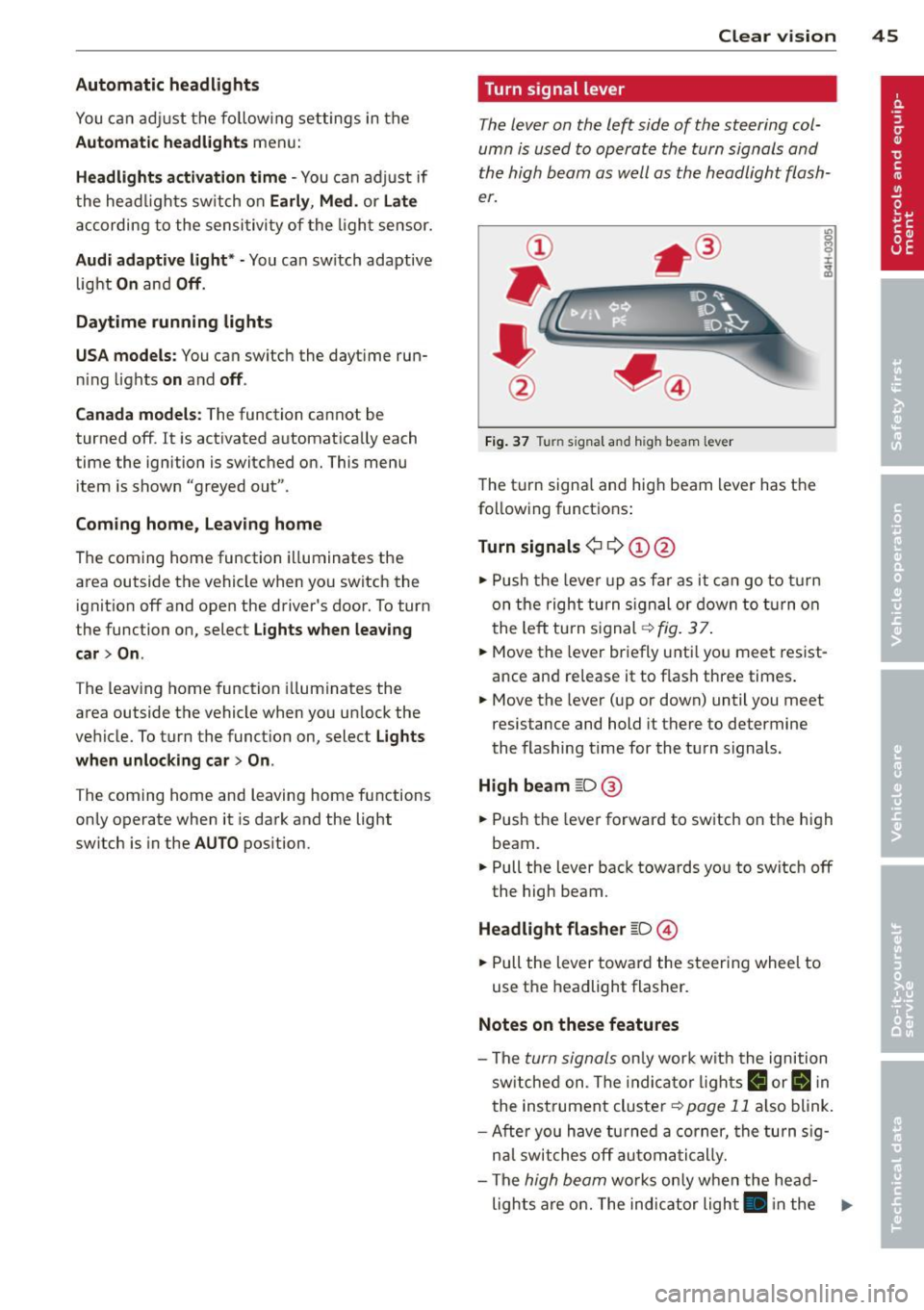
Fig. 37 Tu rn signal and high beam lever
The turn signa l and high beam lever has the
following funct ions :
Turn signals ¢ 9 ©@
.,. Push the lever up as fa r as it can go to turn
on the right turn signa l or down to turn on
the left tu rn s ignal ¢
fig. 3 7.
... Move the lever briefly unti l you meet resist
ance and re lease it to flash three times.
.,. Move the lever (up or down) until you meet
resistance and hold it there to determine
the flashing time for the turn signals.
High beam ~D @
... Push the lever forward to switch on the high
beam .
.,. Pull the lever back towards you to switch
off
the high beam.
Headlight flasher ~D ©
... Pull the lever toward the steering wheel to
use the headlight flasher.
Notes on these features
-The turn signals on ly work w ith the ignition
sw itched on. The indica tor l ights
R or II in
the instrument cluster
¢page 11 also blink.
-Aft er you have turned a corner, the turn sig-
nal switches
off automatically.
- The
high beam works only when the head-
lights are on. The indicator light . in the .,.
Page 48 of 302

46 Clear vision
instrument cluster illuminates when the
high beams are on.
- The
headlight flash er works only as long as
you hold the lever - even if there are no
lights turned on. The indicator light. in
the instrument cluster illuminates when you
use the headlight flasher.
(D Note
Do not use the high beam or headlight
flasher if you know that these could blind
oncoming traffic .
Interior lights
Front and rear interior lighting
Fig. 38 Headliner: Front interior l ig hts
Fig. 39 Rear headliner : Reading light
Press the appropriate button ¢ fig. 38:
§} -Interior lighting on/off
I]-Door contact switch. The interior lighting
turns on automatically when you unlock the
vehicle, open a door or switch the ignition off.
The interior lighting turns off several seconds
after you close the doors, when you lock the
vehicle or when you switch the ignition on.
When a door is open, the light turns off after
a few minutes.
L:!l -Reading lights on/off
~ - Switching the rear reading lights on/off
from the cockpit.
IREAR MODEt* - Sw itch ing the rear reading
lights on/off from the cockpit : press the
I REAR MODE i button and then the appropriate
button
L:!l in the cockpit .
Ambience lighting
Applies to vehicles: wi th ambience lig htin g
You can select a color profile and brightness
for the ambience lighting in various areas of
the vehicle, called zones.
Turning ambience lighting on
.,. Select in the MMI: ICARI function button >
Car systems control button > Vehicle set
tings > Interior lighting > On.
Adjusting/turning off the brightness
.,. Select in the MMI: ICARlfunction button>
Car systems control button > Vehicle set
tings > Interior lighting
> Brightnes s .
.,. Turn the knob to the desired vehicle area
and press the knob. The bar that appears in
dicates the selected brightness .
.,. To increase or reduce the brightness, turn
the knob and press it.
Selecting a color profile*
.,. Select in the MMI: ICARlfunction button>
Car systems control button > Vehicle set
tings > Interior lighting > Color profile.
The ambience lighting turns on when the
function is activated in the MMI and when you
turn the headlights on while the ignition is switched on.
Adjusting the brightness
You can adjust the brightness for the four
zones
Front top, Front footwell, Rear top and
Rear footwell or for All areas at the same
time . ..,.
Page 49 of 302

Selecting a color profile
You can select from the Ivory , Polar and Ru
b y/ Pol ar
color profiles .
(D Tips
The settings are automa tically sto red and
assigned to the remote con tro l key that is
in use.
Instrument illumination
You con adjust the brightness of the instru
ment and display illumination .
Fig . 40 In strument ill um ination
• Press the knob to release it.
• Turn the knob toward"-" or"+" to reduce or
increase the brightness .
• Press the knob again to return it to it s or ig i
nal position .
Q Tips
The instrument illumination (for dials and
needles) lights on when the ig nitio n is
sw itched on and the vehicle lights are
turned off. As the daylight fades, the illu
m ina tion of the dials likewise dims auto
mat ically and wi ll go out com plete ly when
t he o utside light is very low . This fea ture is
meant to remind you to switch on the
headlights when o utside light conditions
become poor. Clear vi
sion 4 7
Vision
Sun visors
E J
Fig . 4 1 S un viso r
The sun visors for the driver and passenger
can be re leased from their bracke ts and
turned toward the doors
c:> fig. 41 (D . They
can a lso be moved back and forth lengthwise
in th is position .
The m irror light switches on when the cover
ove r the vanity m irror @opens.
T here is a shade between the dr iver 's and pas
senger's s un visors that can be used to cover
the gap above the rearview mirror.
. Sun Shade
Fi g. 42 Cock pit: Sun shade swit ch
F ig. 4 3 Rear doo r: S un s had e butto n
Page 50 of 302

48 Clear vis ion
Extending /retracting th e rear window
sh ad e*
• To extend or retract the sun shade fr om the
cockpit ,
press the~ button in the center
console
¢ fig . 42 .
• To extend or retract the sun shade
from th e
r e ar of th e vehicle,
press the liiil button in
the door
¢ fig . 43 .
Extending the rear door sun shade s
• Close the window in the rear door.
• To extend the sun shade
from the d riv er 's
s eat ,
pull the left/right rear power window
switch ~ in the dr iver's door .
• To extend the sun shade from the
rear of
th e v ehi cle,
pull the power window sw itch
~ i n the left/right rear door.
Retr acting the re ar doo r sun shades*
• To retract the sun shade from th e dri ver 's
sea t,
press the left/right rear power window
switch~ in the driver's door.
• To retract the sun shade from the
re ar of the
vehicle ,
press the power window switch~
in the left/right rear door.
You can adj ust the settings for the rear sun
sh ade so the shade ret ra cts automatica lly
when you selec t the reve rse gear. Select:
CAR
function button > Ca r sys tems control button
> Vehicle settings > Automatic rear blind >
On. T he sett ings are automat ica lly stored and
assigned to the remote control key. The sun
shade extends again as soon as the vehicle be
g ins traveling forward at a speed greater than
9 mph (1S km/h), as long as the ignition has
not been switched off in the meantime .
& WARNING
When lowe ring or raisi ng the sunshade,
make s ure there is no thing in its way a nd
t ha t it has a free path to trave l. This could
cause personal injury.
{D) Tips
- If the sun shade is operated repeatedly
wi thin a sho rt time, the bui lt-in overload
protection circui t may be tr ipped. If this occurs, you will have to wait briefly be
fore yo u can operate the shade again.
- Because of the decrease in the f lexibility
of the shade materia l at temperatures
below freezing, the electrica l circuit
which operates the shade shuts off when
the temperature in the vehicle falls be
low
14 °F ( - 10 °C). The shade cannot be
operated until the passenger compart
ment warms up above this temperature.
Vanity mirror in the rear
App lies to veh icles: w ith vanity mir rors in th e rea r
Fig. 44 Rear headliner : van ity mirro r
• Press the button to fold the mirror open.
The mirror light ing turns on automatically.
• To change the mirror's ang le, move it for
ward/back w ith your hand .
Wiper and washer
system
Switching the windshield wipers on
F ig . 4 5 Winds hield w iper lever
Move the windshie ld w iper lever to the corre
sponding position:
@ -Windshield wipe rs off
Page 51 of 302

(!)-Rain s ensor mode. The windshield wipers
switch on once the vehicle speed exceeds ap proximately 2 mph (4 km/h) and it is raining.
The higher the rain sensor sensitivity is set (switch @to the right), the earlier the wind
shield wipers react to moisture on the wind
shield. You can deactivate ra in sensor mode in
the MMI, which will then activate intermittent mode. Select:
ICARI function button> Car sys
tems
control button > Driver assist > Rain
se nsor
> Off. In intermittent mode, you can
adjust the interval time using the switch @.
@-Slow wiping
®-Fast wiping
@ -Single wipe. If you hold the lever in this
position longer, the wipers switch from slow
wiping to fast wiping.
® -Clean the windshield. The wipers wipe
one time after several seconds of driving to
remove water droplets. You can switch this
f unction
off by moving the lever to position ®
within 10 seconds after the afterwipe . The af
terwipe function is reactivated the next time
you switch the ignition on .
Cleaning the headlights. The headlight wash
er system* only functions when the lights are
switched on. The headlights and the night vi
sion system camera* are cleaned automatical ly the first time the lever is press in position
® and every 8 times it is pressed after that.
They are also cleaned every time you hold the lever in position ® for longer than 8 seconds.
A WARNING
-The rain sensor is only designed to assist
and support the driver. It remains entire
ly the driver's responsibility to monitor
outside weather conditions and to man
ually activate the wipers as soon as rain
or drizzle reduces visibility through the
windshield .
- The windshield must not be treated with
water-repellent materials . They can in
crease glare under poor visibility condi
tions such as wetness, darkness, or when
the sun is low on the horizon. In addi-
Clear vision 49
tion, they can cause the windshield wip
ers to chatter.
- Properly functioning windshield wiper
blades are required for a clear view and
safe driving
c:::> page SO, Replacing
windshield wiper blades.
([) Note
-In the case of frost, check whether the
windshield wiper blades are frozen to
the windshield. Switching on the wind
shield wipers can damage the wiper
blades!
- Prior to using a car wash, the windshield
wiper system must be switched
off (lever
in position 0) . This helps to prevent unin
tentional switching on and damage to
the windshield wiper system.
- Do not use the wipers to clear a frosted
window. Using the wipers as a conven ient ice scraper will destroy the wiper
blades .
(D Tips
- The windshield wipers are switched off
when the ignition is off. Activate the
windshield wipers after the ignition is
switched back on by moving the wind
shield wiper lever to any position.
- Worn or dirty windshield wiper blades
result in streaking. This can affect the
rain sensor function . Check your wind
shield wiper blades regularly .
- The washer fluid nozzles of the wind
shield washer system are heated at low
temperatures when the ignition is on.
- When stopping temporarily, e.g. at a
traffic light, the set speed of the wind
shield wipers is automatically reduced by
one speed.
Page 53 of 302
Mirrors
Adjusting the exterior mirrors
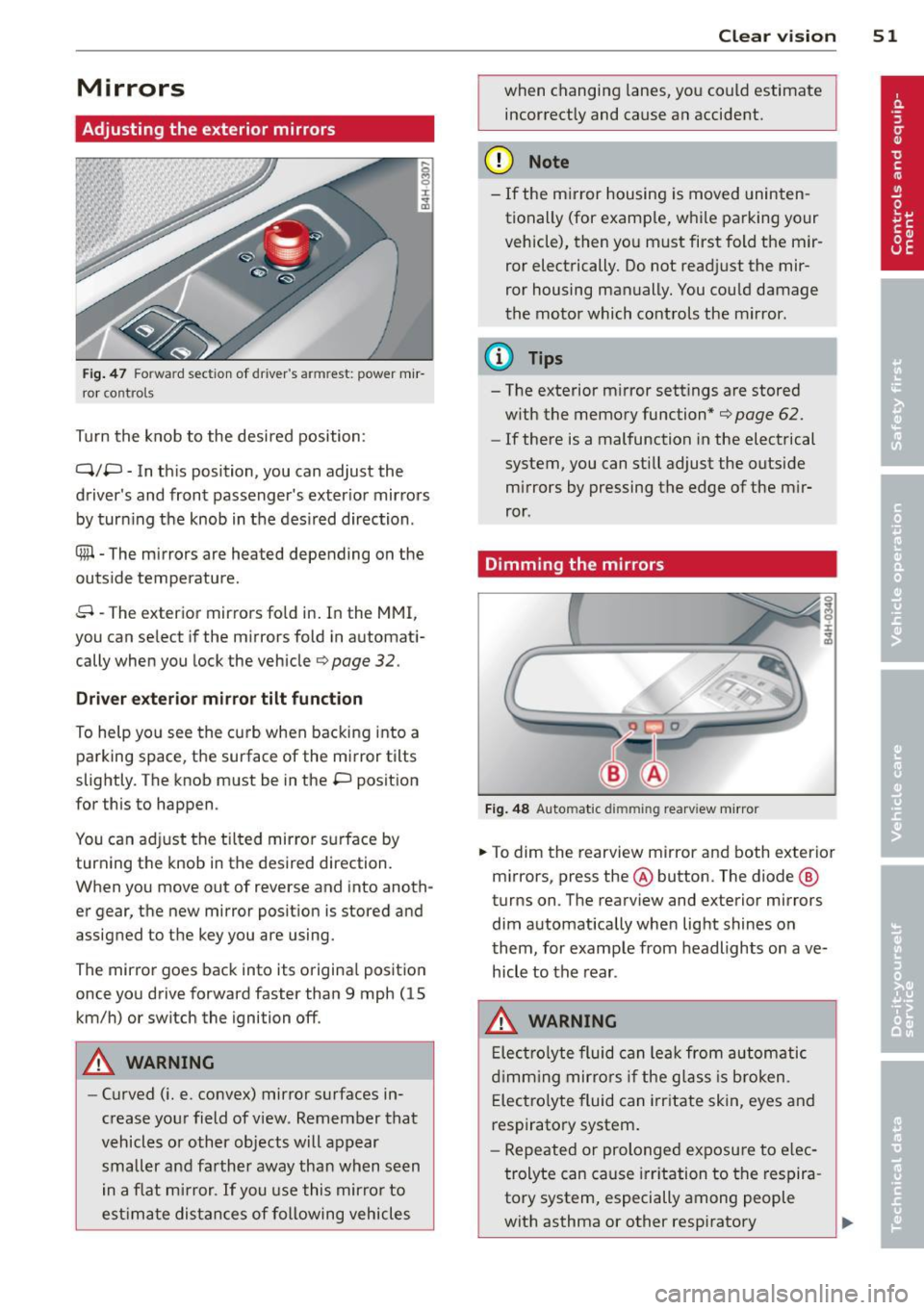
Fig . 47 Fo rw ar d section of driver's armrest: powe r m ir
r or co nt rols
Turn the knob to the desi red position :
Q/P -In th is position, you can adjust the
driver's and front passenger's exter ior mir rors
by turn ing the knob in t he des ired direction .
® -The m irrors are heated depending on the
out side temperature .
8 -The exterior mirrors fo ld in. In the MMI,
you c an se lect if the m irro rs fold in automat i
cally when you lock the vehicle
¢ page 32 .
Driver exter io r mi rro r tilt funct ion
To help yo u see the curb when backing into a
parking space, the surface of the mirror tilts
slightly. The knob must be in the P position
for this to happen .
You can ad just the tilted mirror s urface by
turning the knob in the desired direction.
When you move out of reverse and into anoth
er gear, the new mirror position is stored and
assigned to the key you a re using.
The mirror goes back into its origina l posit io n
once yo u dr ive forward faster than 9 mph (15
km/h) or switch the ignition off .
A WARNING
-Curved ( i.e. convex) mirror s urfaces in
crease your field of view . Remember that
vehicles or other objects will appear
small er and farther away than when seen
in a f lat m irror .
If you use this mirro r to
est imate distances of following vehicles
.
Clear vi sion 51
when changing lanes, you co uld estimate
incor rectly and cause an accident.
(D Note
- If the m irror housing is moved uninten
tionally (for examp le, w hile pa rking your
vehicle), then yo u must first fold the mir
ror electrically. Do not read just the mir
ror housing man ually. You cou ld damage
the motor which controls the mirror.
(D Tips
- The exterior m irror settings are stored
w ith the memory function*
¢ page 62.
- If there is a malfunction in the electrical
system, you can still adjust the outside
mi rrors by pressing the edge of the m ir
ror .
Dimming the mirrors
Fig . 48 Automatic dimming rearview mirro r
.. To dim the re arview mirror and both exterior
m irrors, press the@ button . The diode ®
turns on. T he rearv iew and exterior mirrors
dim automatically whe n light shines o n
t hem, for examp le from headlights on ave
hicle to the rear .
A WARNING
Elect ro lyte fluid can lea k from au to matic
d imm ing mir rors if the g lass is b roken .
E lec tro lyte fluid can irr itate skin, eyes and
respiratory system.
- Repeated or prolonged exposu re to e lec
trolyte can cause irritation to the respira
tory system, especially among people
with asthma or other resp iratory
.
Page 54 of 302
52 Clear vis ion
condit ions. Get fresh a ir immediately by
leaving the vehicle or, if that is not possi
ble, open windows and doors all the way.
- If electrolyte gets into the eyes, flush
them thoroughly with large am ounts of
clean water for at least 15 m in utes;
med ica l attent ion is recommended .
- If electrolyte contacts sk in, flush affect
ed area with clean water for at least 15
m in utes and then was h affec ted area
with soap and wat er; medical atten tion
is re commen ded . Th oroug hly wash af
fec ted clot hing and sh oes bef ore reu se .
- If swa llowed and person is conscious,
r in se mouth w it h wate r fo r at le ast 15
min utes . Do no t induc e vom itin g un less
ins truc ted to do so by medica l professio
nal. Get medical attention immediately.
(D Note
Liquid ele ct ro lyte leaking from broken mir
ror g la ss will dam age a ny p lastic surf aces
it comes in contact w ith . C lean up s pille d
e lectro lyte immediately with clean water
and a sponge.
(D Tips
- Switching off the dimming function of
the inside rear view mirror also deacti
vates the automatic dimming function
of the e xterior mirrors .
-Automatic dimmi ng for the m irror only
ope rates properly i f th e sun shade * fo r
the rea r window is not in use or the light
strik ing the ins ide mirro r is not hindered
by other objects . - T
he automatic dimming mi rrors do not
dim when the inte rior lighting is turned
on or the reve rse gear is selected .
Digital compass
Switching the compass on and off
Applies to vehicles: wit h digital compass
T he compass direction is shown in the rear
view mirror .
J
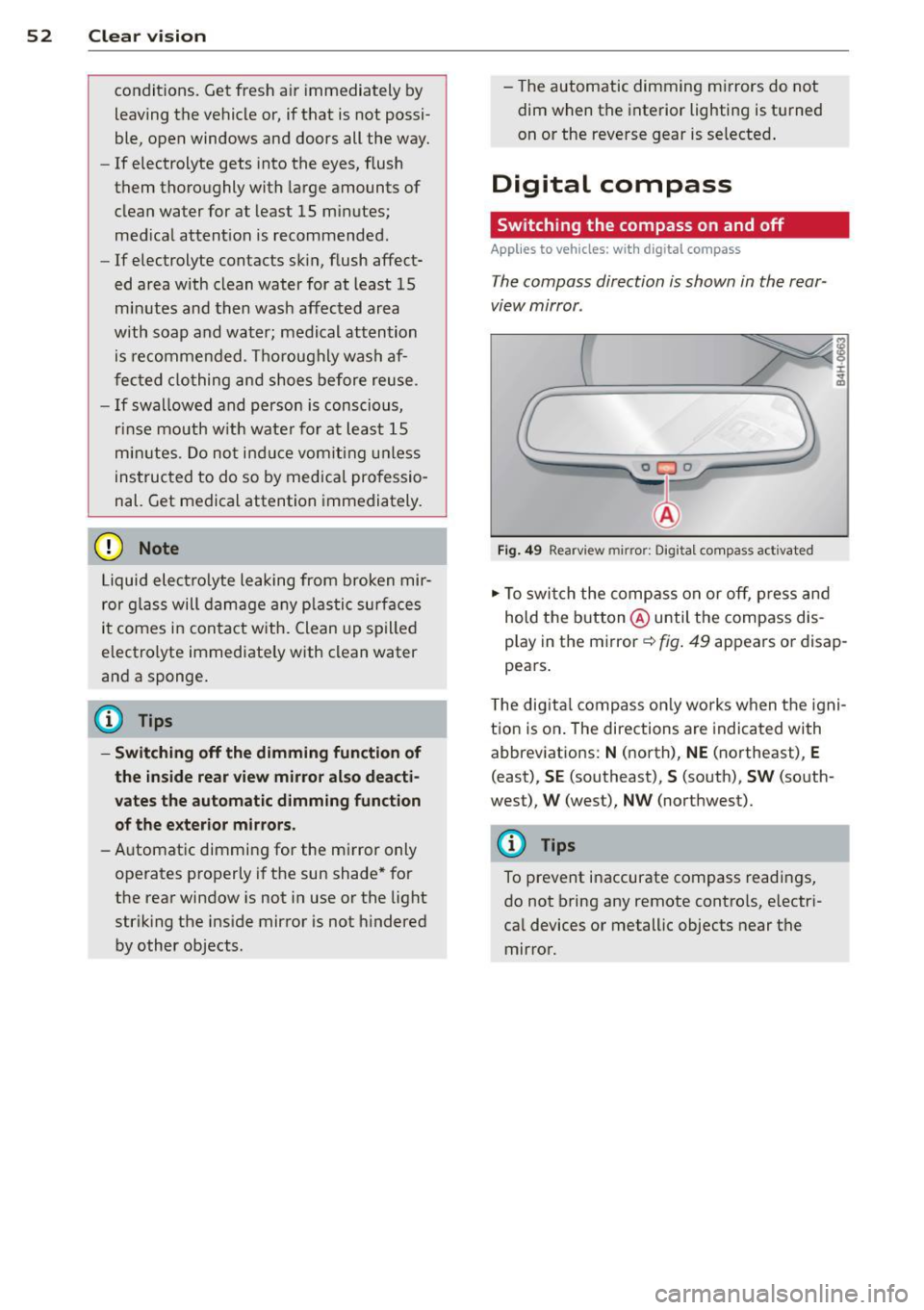
Fig . 49 Rearv iew mirr or: Digi tal compass act ivated
.,. To swi tch the comp ass o n or off, p ress an d
hold the b utt on @ until the compass dis
p lay in the mirror
c::> fig . 49 appears o r disap
pea rs .
T he dig ita l compass o nly works when the igni
tion is o n. The directions are indica ted with
abbrev iat ions:
N ( n orth) , NE (northeast), E
(east), SE (southeast), S (so uth), SW (south
west) ,
W (west), NW (northwest).
@ Tips
To prevent inaccurate compass readings,
do not bring any remote cont ro ls, e lectr i
ca l devices or metallic objects near t he
mir ro r.