parking brake AUDI S8 2013 User Guide
[x] Cancel search | Manufacturer: AUDI, Model Year: 2013, Model line: S8, Model: AUDI S8 2013Pages: 318, PDF Size: 79.34 MB
Page 102 of 318
100 Audi adaptive cruise control and braking guard
(end of a traffic jam or vehicle that has
broken down in traffic).
- Always remember that the radar sensor
for the braking guard works only within
defined detection and range limits that
may prevent the proper detection of oth
er vehicles.
- The radar sensor's function and range
can be reduced by rain, snow and heavy
spray. Moving vehicles up ahead may not
be promptly detected or may not be de
tected at all.
- Reflective surfaces including crash barri
ers or tunnel entrances may impair the
function of the radar sensor.
(D Tips
- You can cancel the braking with increas
ing force that is initiated by the system
by braking yourself, by accelerating no
ticeably or by swerving.
- Braking guard error messages
r::> page 100.
-Keep in mind that braking guard can
brake unexpectedly . Always secure any
cargo or objects that you are transport
ing to reduce the risk of damage or in
jury.
Settings in the MMI
Applies to vehicles: with Audi adaptive cruise control
• Select: ICARI function button > Car systems
control button > Driver assist > Audi brak
ing guard.
System -
Switch braking guard On and Off.
When you switch the ignition on, the message
Audi braking guard off appears if the system
is switched off.
Early warning -The distance and approach
warnings in the display can be switched
On/
Off.
Tips
- Your settings are automatically stored
and assigned to the remote control key being used at the time the settings are
made.
- If you switch the ESC to sport mode,
braking guard switches off automatically
~page 200.
- Switch braking guard off when you are
loading the vehicle onto a vehicle carrier,
train, ship or other type of transporta
tion. This can prevent undesired warn
ings from the braking guard system.
Messages
Applies to vehicles: with Aud i adapt ive cru ise contro l
ACC unavailable
ACC and braking guard: unavailable
The system cannot detect moving vehicles up
ahead correctly and is switched off. The sen
sors have been displaced or are not working
properly. The Audi pre sense functions may al
so be affected. Drive to your authorized Audi
dealer or authorized Audi service facility im
mediately to have the malfunction corrected.
ACC: unavailable at this time. No sensor vi
sion
ACC and braking guide: unavailable at this
time. No sensor vision
This message appears if the sensor view is ob structed, for example by leaves, snow, heavy
spray or dirt . Clean the sensors
r:> page 93,
fig. 93.
ACC: unavailable at this time. Incline too
steep
The road exceeds the maximum possible an
gle for proper adaptive cruise control opera
tion. Adaptive cruise control is switched off .
ACC: only selector lever positions D, S or M
available
Select the D, Sor M selector lever position.
ACC: unavailable at this time. Parking brake
set
The adaptive cruise control system switches
off automatically if the parking brake is set. .,.
Page 103 of 318
Audi adaptive cruise control and braking guard 101
ACC: Currently unavailable. Stabilization
control (ESC ) input
This me ssage appea rs if the Ele ct ron ic Stab ili
z ation Contro l (ES C) is work ing to help st abi
li ze the vehicle. In this case, adaptive cruise
contro l sw itches off automatically .
ACC: Please take over
This message appea rs whe n adapt ive cr uise
con trol cannot set t he parking b ra ke . P ress
the brake pedal to preve nt the vehicle from
r olling .
•••
Three wh ite dots appear if a setting cannot be
se lected with t he se lecto r lever . Fo r example,
this happens if adapt ive cr uise c ontrol can not
resume dr iv ing in stop-and -go traff ic because
one of the conditions required for ACC to wor k
i s not p resent.
Door open
The adaptive c ruise control system cannot
sw itch on when a d oor is open .
Stationary object ahead
This message appea rs if you would li ke to
sw itch ad aptive cr uise con trol o n and t here is
a sta ti onar y ve hicle or obs tacle direc tly ah ea d
of yo ur vehicle.
Page 118 of 318
116 Automatic Transmission
Selector lever lock
The selector lever lock prevents you from se
l ecting a position unintentionally, causing the
vehicle to roll. When engaging some selector lever positions, you must press the button on
the selector lever<=>
fig. 123 and/or press the
brake pedal.
You must press the brake pedal to engage a
selector lever position when the engine is run
n ing while the vehicle is stationary. The ar
rows¢
fig. 124 indicate when you need to
press the button on the selector lever.
The selector lever does not lock if you shift
from D to R within one second . This allows
you to "rock" the vehicle to free it when it is
stuck.
P - Park
The whee ls are locked in this position. Only
shift into park when the vehicle is stationary
¢ & .To engage the P selector lever position,
press the button on the selector lever and
shift into the P position.
You can only shift out of park when the eng ine
is running and you are pressing the brake ped
al. Press the button on the selector lever to
release the park ing lock and select the des ired
selector lever posit ion.
P engages automatically when you switch the
engine off while D, Sor R is engaged or in
manual mode.
If you switch the engine off when N is engag
ed, the transmission remains in N for approxi
mately 30 minutes and then Pis engaged.
You must use the emergency release proce
dure to release the parking lock before towing
the vehicle
¢ page 120.
R - Reverse
The reverse gear is engaged in this position.
Only select reverse when the vehicle is sta
tionary and the engine is running at idle speed
¢ & .To engage the R se lector lever position,
press the button on the selector lever, press the
brake pedal and move the selector lever
into the R position.
T he back-up lights turn on when you select
the R selector lever position while the engine
is running .
N -Neutral
The transmission is in idle in this position. To
engage the N selector lever position , press
the button on the selector lever and shift int o
the N position.
If you switch the engine off when N is engag
ed, the transmission remains in N for approxi
mately 30 min utes and then Pis engaged.
You cannot select the N position when the ig
nition is switched off . When driving through
an automat ic car was h, first select the N posi
tion and then switch the engine off
¢page 216.
The vehicle cannot be locked when the selec
tor leve r is in the
N position.
D/S - Position for driving forward
In the D/S pos ition, the transmission can be
operated either in the normal mode Dor in
the sport mode S. You can only select the S se
lector lever position when Dis engaged. Move
the selecto r lever back to engage the S selec
tor lever position. To select the D selector lev
er position again when S is engaged, move the
selector lever back¢& . To shift from
N to D
when traveling at speeds below 1 mph (2km/
h), press the brake pedal and select the D se
lector lever position ¢
&.
In the normal mode D, the transmission auto
matically selects the suitable gear ratio.
It de
pends on engine load, vehicle speed and driv
ing style.
Select the
sport mode S for sporty driving.
T he vehicle makes full use of the engine's
power. Shift ing may become noticeab le when
acce lerat ing.
The S selector lever position engages auto
matically when yo u select the dynamic mode
in Audi drive select.
...
Page 119 of 318

& WARNING
-Never engage R or P wh ile driving. It
cou ld cause a crash .
-
-Power is sti ll transmitted to the whee ls
when the engine is running at idle. To prevent the vehicle from "creeping", you
must keep your foot on the brake in all
selector lever positions except P and N
when the engine is running. Do not inad
vertent ly press the accelerator pedal
when the veh icle is stationary . Otherwise
the vehicle will start to move immediate ly. This cou ld happen even if the parking
brake is activated.
- Before opening the hood, select the P se
lector lever position and set the par king
brake. This reduces the risk of a crash. A l
ways read and follow the applicable
warnings
¢page 226, Engine comport
ment.
- Never get out of the driver's seat when
the engine is running.
- If you must get out of the vehicle, move
the se lector lever securely into the P po
sit ion and apply the park ing brake .
@ Tips
-If you un intentionally shift into the N se
l ector lever position while dr iving, take
your foot off the accelerator pedal and
wait for the engine to slow down until it is idling before you shift into Dor S.
Driving tips
The gears shift outomoticolly .
Starting from a stop
"' Press and ho ld the brake pedal.
.,. Start the eng ine
q page 83.
"' Press the button on the se lector lever and
select the D, S or R selector lever position
¢ page 115.
"' Wait a moment until the transmission
shifts. You w ill not ice a slight movement
when the gear engages .
"' Re lease the brake pedal and press the accel
erato r peda l¢ _& .
Aut omat ic Tr ans missio n 11 7
Stopping temporarily
"' Press the b rake pedal to stop the veh icle,
for examp le at a traffic light . Do not press
the acce lerator pedal when doing this .
"' To prevent the vehicle from rolling when
you start driving, set the parking brake
when stopp ing on large inclines¢_& .
"' The parking brake will release automat ically
and the vehicle will start mov ing once you
press the acce lerator pedal.
Parking
If the selector lever is not in the P position
when you open the driver's door, the veh icle
could roll. The message
Transmission: Car
may roll! Shift to park !
appears.
"' Press and hold the brake pedal¢ _& .
"' Set the park ing brake.
"' To engage the P se lector lever position,
press the button on the selector lever and
shift into the P posit ion ¢
page 115 .
Under certa in conditions such as dr iv ing in the
mountains or when towing a trailer, it may be
helpful to switch to manual mode temporarily
to shift
manually to adapt to the dr iving con
ditions
¢ page 118.
On slopes, activate the parki ng brake first and
then move the selecto r leve r to the P position .
T his prevents too much st ress from be ing
placed on the locking mechanism.
& WARNING
Read and follow all WARNINGS ¢ .&. in Se
lecting o selector lever position on
page 117.
- The vehicle can also roll when the engine
is stopped.
- Do not press the accelerator pedal when
changing the selec tor lever position
while the vehicle is stationary and the engine is running . This could result in a
crash.
- Never engage R or P while driving . It
could cause a crash.
- Power is still transmitted to the wheels
when the engine is running at idle. To ..,.
Page 121 of 318
![AUDI S8 2013 User Guide A WARNING 1=
Please note that the wheels could spin on
slick or slippery roads when kick-down is
act ive.
Transmission malfunction
[O] Transmission: please pre ss the brake ped
a](/img/6/57614/w960_57614-120.png "AUDI S8 2013 User Guide A WARNING 1=
Please note that the wheels could spin on
slick or slippery roads when kick-down is
act ive.
Transmission malfunction
[O] Transmission: please pre ss the brake ped
a")
A WARNING 1=
Please note that the wheels could spin on
slick or slippery roads when kick-down is
act ive.
Transmission malfunction
[O] Transmission: please pre ss the brake ped
al and select the position again
Press the brake pedal and select the des ired
selector lever pos it ion again. You can then
continue dr iv ing .
[O] Transmission hot: please modify driving
style
The transmission temperature has increased
significantly due to the sporty driving manner. Drive in a less sporty manner until the tem
perature returns to the normal range and the
in dicator light switches of .
[O] Gearbox malfunction: you can continue
driving
There is a system ma lfunction in the transmis
sion. You may continue driving. Drive to your
authorized Audi dealer or qualified repair fa
cility soon to have the malfunction corrected.
l'§J/1;1 Gearbox malfunction: you can contin
ue driving in D only until engine is off
There is a system malfunction in the transmis
sion. The transmission is switching to emer
gency mode. If you turn the engine off, you
will not be able to select any other selector
lever positions after start ing the engine again.
Drive to your authorized Aud i dealer or quali
fied repair facility immediately to have the
malfunction corrected.
[O] Gearbox malfunction: you can continue
driving (limited functionality)
There is a system ma lfunction in the transmis
sion. The transmission is switching to emer
gency mode. This mode only shifts into cer
tain gears or will not longer shift at all. The
engine may stall. Dr ive to your authorized
Aud i dealer or qualified repair facility immedi
ately to have the malfunction corrected.
Automatic Transmission 119
[o];ffl Gearbox malfunction: no reverse gear
(you can continue driving)
The re is a system malfunction in the transmis
s ion. The transmission is switching to emer
gency mode. This mode on ly shifts into cer
tain gears or will not longer shift at a ll. You
cannot engage the reverse gear . Dr ive to your
authorized Aud i dea ler immediately to have
the malfunction corrected.
[O] Vehicle may roll! Cannot shift to P. Please
apply parking brake
-The parking lock was released using the
emergency release ¢
page 120. Or
- The parking brake cannot engage automati
cally . Drive to your authorized Audi dea ler o r
qualified repair facility immediately to have
the malfunction corrected.
[O] Gearbox malfunction: Stop and shift to P
Do not continue dr iving . Select the P selector
lever position and see your authorized Audi
dealer or qualified repair facility for assis
tance.
Page 122 of 318
120 Automatic Transmission
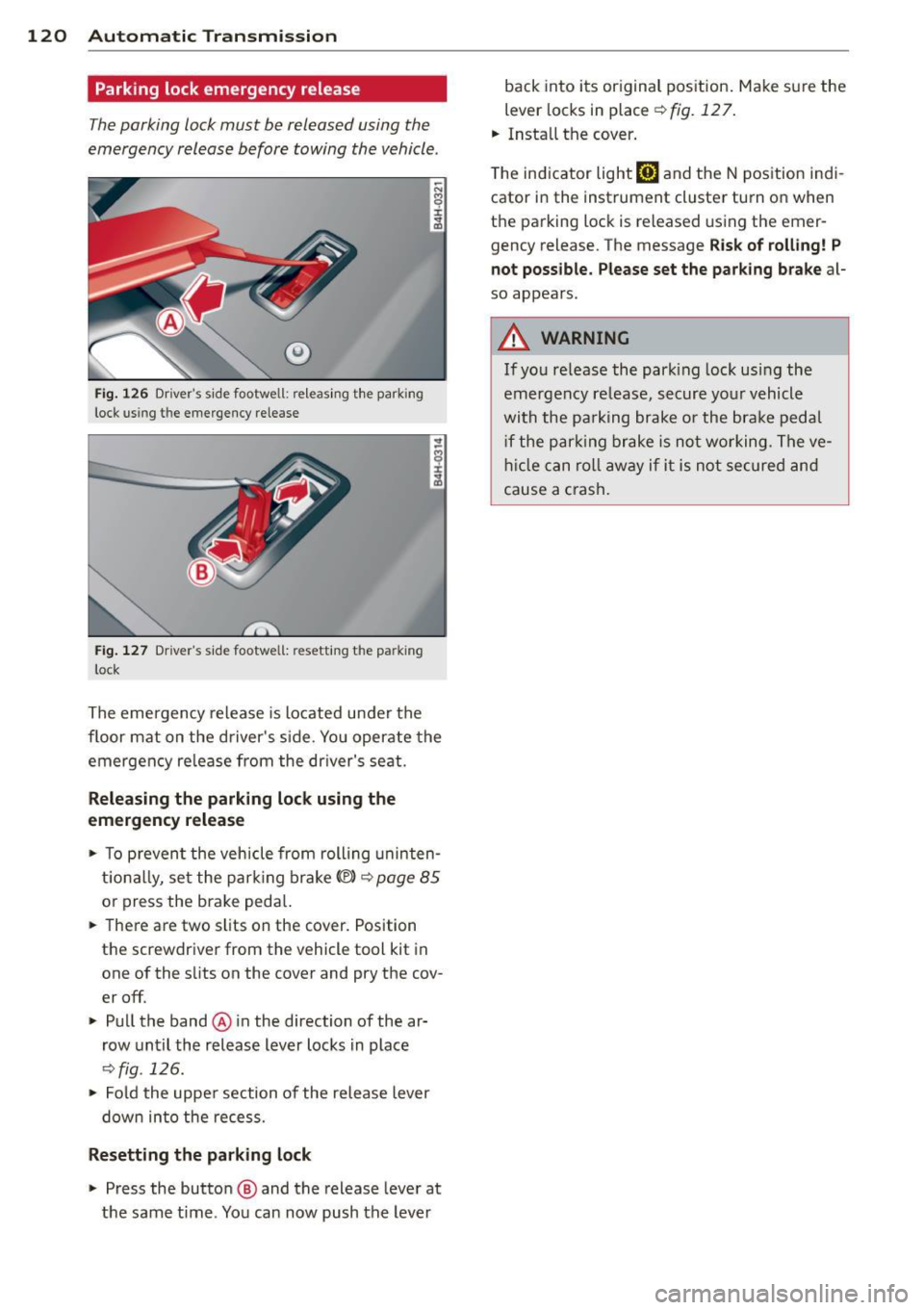
Parking lock emergency release
The parking lock must be released using the
emergency release before towing the vehicle .
@
Fig. 126 Dr iver's side footwell: releasing t he park ing
lock us ing t he emergency release
Fig. 127 Drive r's s ide footwe ll: resetting th e pa rking
l ock
The emergency release is located under the
floor mat on the driver's side. You operate the
emergency re lease from the dr iver's seat.
Releasing the parking lock using the
emergency release
• To prevent the vehicle from rolling uninten
tionally, set the park ing brake© ¢
page 85
or press the brake peda l.
.. There are two slits on the cover. Position
the screwdriver from the vehicle tool kit in
one of the s lits on the cover and pry the cov
er off.
• Pull the band@ in the direction of the ar
row until the release lever locks in place
¢ fig . 126.
• Fold the uppe r section of the release lever
down into the recess.
Resetting the parking lock
• Press the button @ and the release lever at
the same time . You can now push the lever back into its original pos
ition . Make sure the
lever locks in place
¢fig. 127.
.. Install the cover .
T he indicator light
[O] and the N position indi
cator in the instrument cluster turn on when
the parking lock is released using the emer
gency release . The message
Risk of rolling! P
not possible . Please set the park ing brake
a l
so appears.
A WARNING
If you release the park ing lock using the
emergency release, secure your vehicle
with the pa rking brake or the brake pedal
i f the parking brake is not working. The ve
hicle can roll away if it is not secured and
cause a crash.
Page 134 of 318

132 Homelink®
Homelink®
Universal remote
control
General information
Applies to vehicles: with Homelink® universal remote
control
The Homelink universal remote control can
be programmed with hand-held transmitters
from existing equipment.
Using the Homelink universal remote control
you can operate equipment such as garage doors, property gates and house l ights from
ins ide your vehicle . '
Using the Homelink universal remote control '
you can replace up to three separate hand-
held transmitte rs for equipment on your
property with just one universal remote con
trol. Most of these transmitters a re used to
ope rate ga rage doo rs and property g ates. The
individua l transmitters are programmed at
the front bumper. That is where the control
module is located.
The transmi tters must be p rogrammed first in
orde r to operate systems using the Homelink
universal remote control.
A WARNING
- Never use the Homelink ® transmitter
with any garage door opener that does have not the safety stop and reverse fea
ture as requ ired by federa l safety stand
ards . T his includes any garage door open
er model manufact ured before April 1,
1982.
- A garage door opener which cannot de
tect an object, signaling the door to stop
and reverse does not meet current feder
al safety s tandards . Us ing a ga rage doo r
opener witho ut these fea tures increases
risk of serious injury or death.
- For safety reasons never release the
parking brake or start the engine while
anyone is standing in front of the vehicle .
- A garage door or an estate gate may
sometimes be set in motion when the Homelink
® remote control is being pro
grammed. If the device is repeatedly ac
tivated, th is can overstrain motor and
damage its e lectrica l components - an
overhea ted mo tor is a fire hazard !
- To avo id possib le injuries or property
damage, please always make absolutely
certa in that no persons or ob jects are lo
cated in the rang e of motion of any
eq uipme nt bei ng ope rated.
(0 Tips
- If you would like add itional information
on the Hom e Link ® Unive rsal Transce iver
'
Home link compatib le p rod ucts, or to
pur chase other acce ssories s uch as the
Homel ink® Light ing Package, please
contact Homelin k at 1-800 -355 -3515 o r
on the Internet at www.homelink .com.
- For Declaration of Comp liance to Unite d
States FCC and Ind ustry Canada reg ula
tions ¢
page 299.
'Operation
Applies to vehicles: with Homelink
F ig. 151 Contro l u ni t in the head liner
-"' 8 ± .. .,
Requi rement: The buttons must be program
med
¢ page 133.
'" Press the p rogrammed button¢&_ in Gen
eral information on page 132
to open the
ga rage door. The light @will blink or turn
on.
'" Press the b utton again to close the garage
door ¢
&. in General information on
page 132.
~
Page 135 of 318
@ Tips
To open the garage door, press the button,
but do not press it for longer ten seconds
or the Homelink modu le w ill switch to
programming mode .
Programming transmitters
Applies to vehicles : wit h Home link
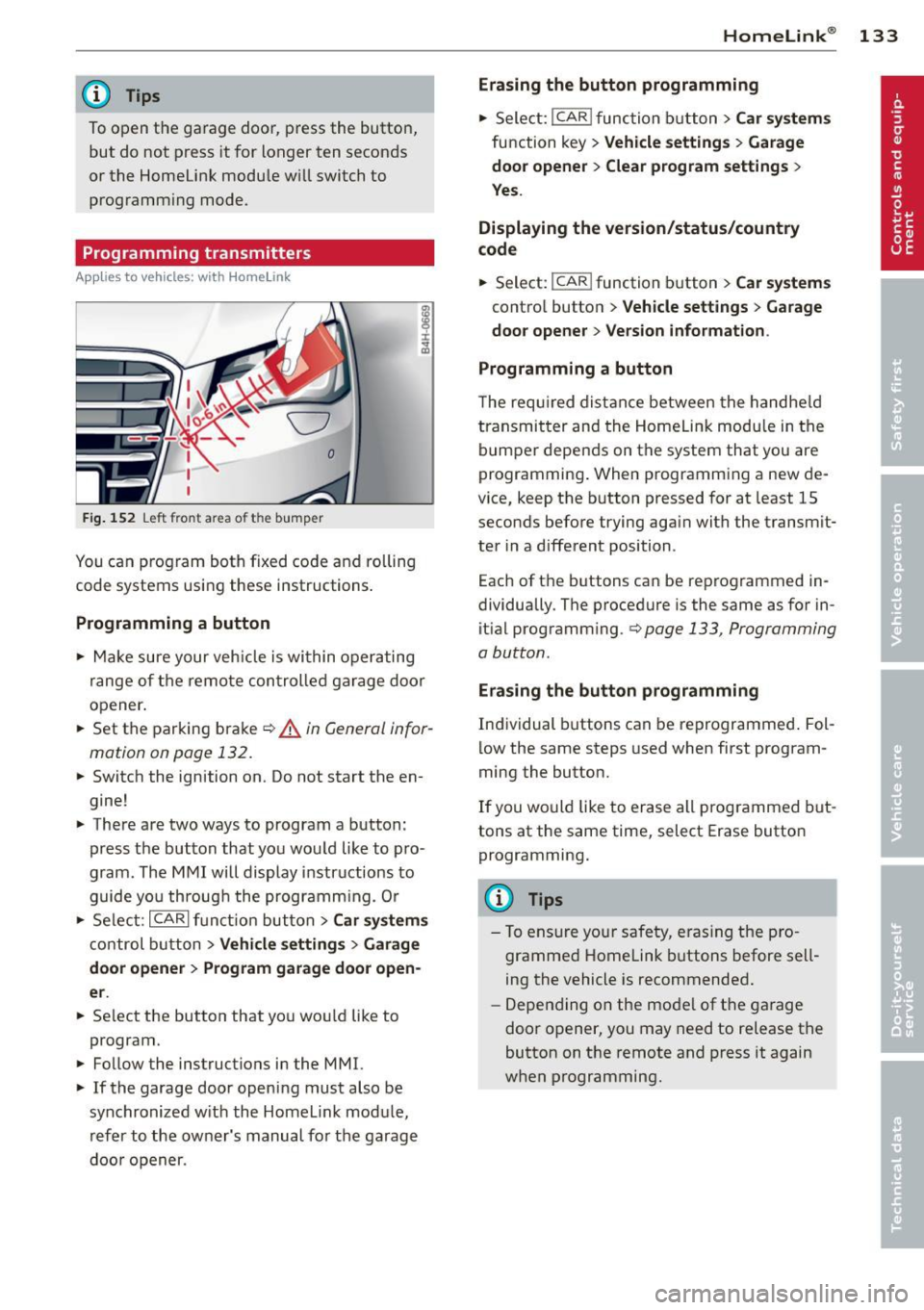
Fig. 152 Left front a rea o f the bum per
You can program both fixed code and rolling
code systems using these instructions .
Programming a button
.,. Make sure your veh icle is within operating
range of the remote control led garage door
opener.
.,. Set the parking brake
¢ A in General infor
mation on page 132.
.,. Switch the ignition on . Do not start the en
gine!
.,. There are two ways to program a button :
press the button that you would like to pro
gram . The MMI will display instructions to
guide you throug h the programm ing. Or
.,. Select :
I CAR I function button > Car systems
control button > Vehicle settings > Garage
door opener> Program garage door open
er .
.,. Se lect the button that you wou ld like to
program.
.,. Follow the instructions in the MMI.
.,. If the garage door opening must also be
synchronized w ith the Homelink module ,
refer to the owner's manual for the garage
doo r opener .
Homelink ® 133
Erasing the button programming
.,. Select: !CAR lfunction button> Car systems
function key> Vehicle settings > Garage
door opener
> Clear program settings >
Yes.
Displaying the version/status/country
code
.,. Select: I CAR ! function button > Car systems
control button > Vehicle settings > Garage
door opener > Version information .
Programming a button
T he requ ired distance between the handheld
transmitter and the Homelink modu le in the
bumper depends on the system that you are
programming . When programming a new de
vice, keep the button pressed for at least 15
seconds before trying again with the transm it
ter in a different position .
Each of th e buttons can be reprogrammed in
dividually . The procedure is the same as for in
itial programm ing .¢
page 133 , Programming
a button .
Erasing the button programming
Individual buttons can be reprogrammed. Fol
low the same steps used when first program
ming the button .
If you would like to erase all prog rammed but
tons at the same time, select Erase button
programming.
@ Tips
- To ensure your safety, eras ing the pro
grammed Homelink buttons before sell
ing the vehicle is recommended.
- Depending on the mode l of the garage
door opener, you may need to release the
button on the remote and press it again
when programming .
Page 215 of 318

drive at the maximum permissible speed. Re
duce your speed even more if load, weather or
wind condit ions are unfavorable -part icularly
when going downhill.
Reduce vehicle speed
immediatel y if the trail
er shows the slightest sign of swaying .
Do not
try to stop the swaying by accelerating.
Observe speed limits . In some areas, speeds
for vehicles towing trailers are lower than for
regular vehicles .
A lways app ly brakes early. When driving
downhill, shift into a lower gear to use the en
gine braking effect to slow the vehicle . Use of
the brakes a lone can cause them to overheat
and fail.
Coolant temperature
The coolant temperature gauge c:> page 10
must be observed carefully. The coo lant tem
perature can increase if you drive on long in
clines in a low gear at high engine speeds. Re
duce your speed immed iate ly if the L EDs in
the top part of the display turn on.
F or more information about indicator lights,
refer to. ~
page 16.
A WARNING
Anyone not properly restrained in a mov
ing vehicle is at a much greater risk in an
accident . Never let anyone r ide in your car
who is not properly wear ing the restra ints
provided by Aud i.
Trailer towing tips
Important to know
Your veh icle hand les different ly when tow ing
-
a trailer because of the addit ional weight and
d ifferent weight distribution . Safety, perform
ance and economy will greatly depend on how
carefully you load your trailer and operate
your ng .
Before you actually tow your trailer, practice
turning, stopping and backing up in an area
away from traffic. Keep practicing until you
Trailer towing 213
have become completely familiar with the way
your vehicle-trai ler combination behaves and
responds.
Backing up is difficult and requires practice .
Backing up with a t railer generally requires
steering action opposite to that when backing
up your vehicle without a tra iler.
Maintain a greater distance between your ve
hicle and the one in front of you . You wi ll need
more room to stop. To compensate for the
trailer, you w ill need a larger than normal
turning radius.
When passing, remembe r that you cannot ac
ce lerate as fast as you norma lly would be
cause of the added load. Make sure you have
enough room to pass. After passing, allow plenty of room for your trailer before chang
ing lanes again.
Avoid jerky starts, sharp turns or rapid lane changes.
(D Tips
- Do not tow a trailer during the break-in
period of your vehicle.
- If you tow a trailer, your Audi may re
quire more frequent maintenance due to
the extra load
c:> page 296.
Parking on a slope
Do not park on a slope with a trailer. If it can
not be avoided, do so only a~er doing the fol
lowing:
When parking:
.,. App ly the foot brake.
.,. Have someone p lace chocks under both the
vehicle and the trailer wheels .
.,. With chocks in place, slowly release the
brakes until the wheel chocks absorb the
load.
.,. Turn the wheels towards the curb .
.,. Apply the parking brake .
.,. Select the P selector lever posit ion .
When restarting after parking:
.,. Apply the foot brake.
•
•
Page 234 of 318
232 Checking and filling
Checking and filling Engine hood
Releasing the engine hood
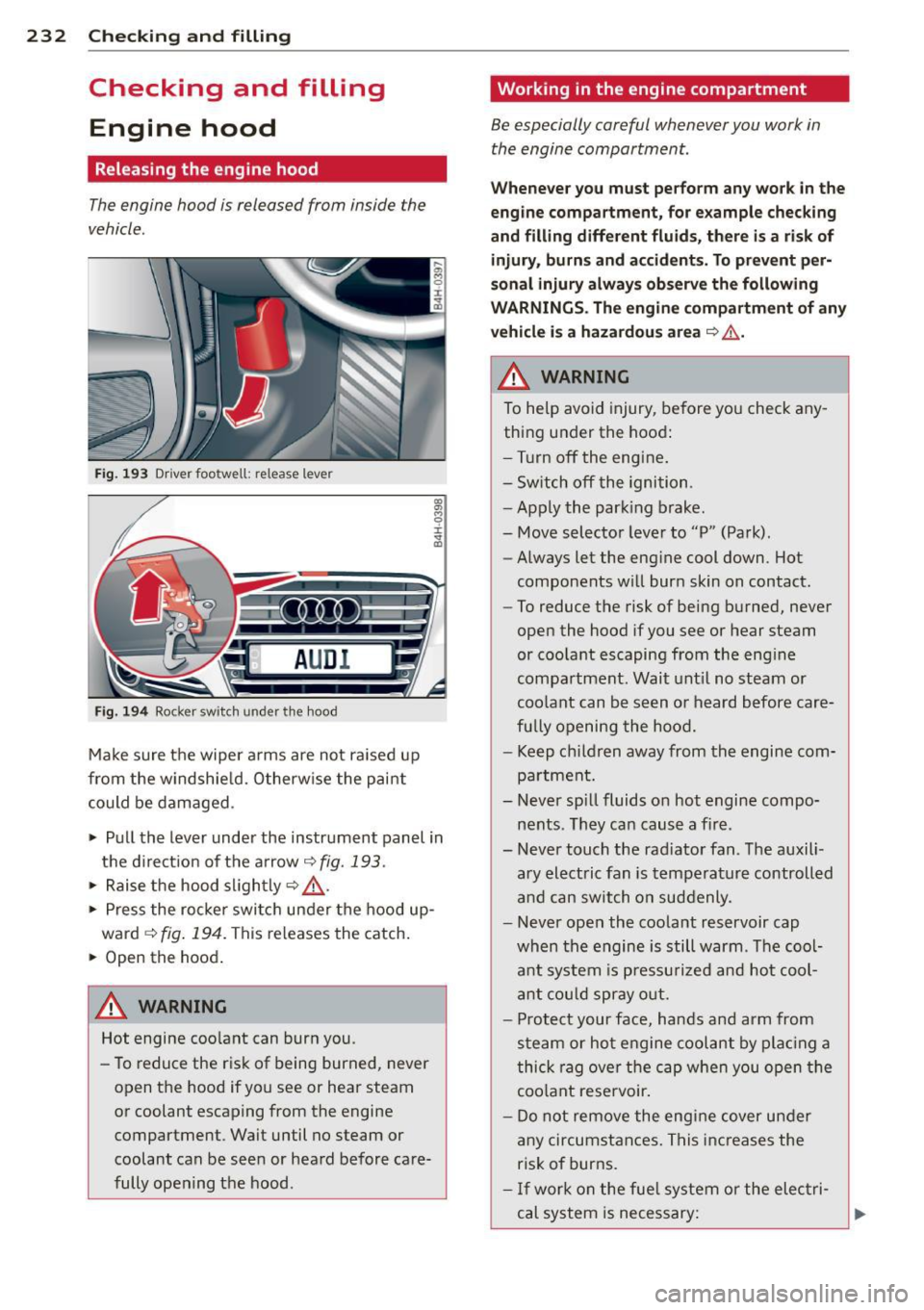
The engine hood is released from inside the
vehicle .
Fig. 193 Driver foo twell: release lever
AUD I
Fig. 194 Rocker switch un der the hood
Make sure the wiper arms are not raised up
from the windshield. Otherwise the paint
could be damaged .
.,. Pull the lever under the instrument panel in
the direction of the arrow
~ fig. 193.
.,. Raise the hood slightly~,&. .
... Press the rocker switch under the hood up
ward
~ fig. 194. This releases th e catch.
... Open the hood.
&_ WARNING
Hot engine coolant can burn you.
- To reduce the risk of being burned, never
open the hood if you see or hear steam
or coolant escaping from the engine compartment . Wait until no steam or
coolant can be seen or heard before care
fully opening the hood .
' Working in the engine compartment
Be especially careful whenever you work in
the engine compartment.
Whenever you must perform any work in the
engine compartment, for example checking
and filling different fluids, there is a risk of injury, burns and accidents. To prevent per
sonal injury always observe the following
WARNINGS. The engine compartment of any
vehicle is a hazardous area
~ ,&. .
A WARNING
To help avoid injury, before you check any
thing under the hood:
- Turn off the engine.
- Switch off the ignition .
- Apply the parking brake.
- Move selector lever to "P" (Park) .
- Always let the engine cool down. Hot
components will burn skin on contact.
- To reduce the risk of being burned, never
open the hood if you see or hear steam
or coolant escaping from the engine
compartment. Wait until no steam or
coolant can be seen or heard before care
fully opening the hood.
- Keep children away from the engine com
partment.
- Never spill fluids on hot engine compo
nents . They can cause a fire .
- Never touch the radiator fan. The auxili
ary electric fan is temperature controlled
and can switch on suddenly .
- Never open the coolant reservoir cap
when the engine is still warm . The cool
ant system is pressurized and hot cool
ant could spray out.
- Protect your face, hands and arm from
steam or hot engine coolant by placing a
thick rag over the cap when you open the
coolant reservoir.
- Do not remove the engine cover under
any circumstances. This increases the
risk of burns.
- If work on the fuel system or the electri
cal system is necessary: