instrument cluster AUDI S8 2014 User Guide
[x] Cancel search | Manufacturer: AUDI, Model Year: 2014, Model line: S8, Model: AUDI S8 2014Pages: 314, PDF Size: 78.47 MB
Page 45 of 314
.. Leave the master key with the service per
sonnel for park ing and keep the mechanica l
key w ith you.
When the "valet parking" feature is activated:
- the un locking button for the luggage com
partment lid~ in the d river's door is inac
t ive
- the button~ on the master key is inactive
- the opening handle in the luggage compart-
ment lid is inactive .
The vehicle can be driven and locked and un locked with the master key . Access to the lug
gage compartment is blocked .
When the valet parking function is switched on, the message
Valet parking activated ap
pears in the instrument cluster display when
you switch the ign it ion on .
Sliding/tilting sunroof
Operation
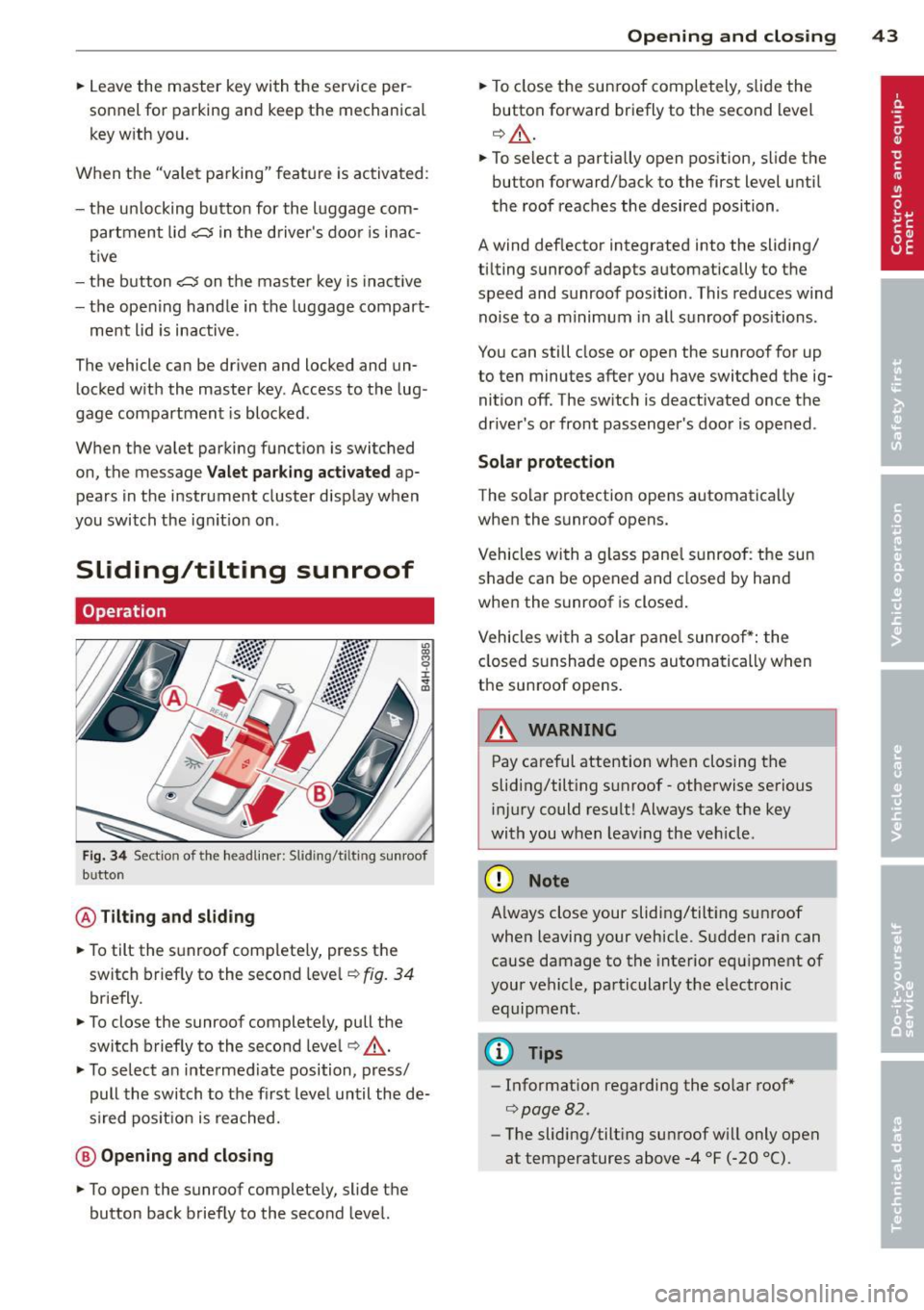
Fig. 34 Sectio n of the headliner: Slid ing/t ilting sunroof
b utto n
@ Tilting and sliding
.. To tilt the sunroof complete ly, press the
switch briefly to the second leve l¢
fig. 34
briefly.
.. To close the sunroof completely, pull the
switch brief ly to the second leve l¢ ,&. .
.. To select a n intermediate position, press/
pull the switch to the first level until the de
s ir ed pos it ion is reached.
@ Opening and closing
.. To open the sunroof completely, slide the
button back briefly to the second level.
Opening and closing 43
.. To close the sunroof completely, slide the
button forward briefly to the second level
¢ ,&. .
.. To select a partially open position, slide the
button forward/back to the first level until
the roof reaches the desired position .
A wind deflector integrated into the sliding/
t ilting sunroof adapts automatically to the
speed and sunroof pos ition . This reduces wind
noise to a minimum in all sunroof positions .
You can still close or open the sunroof for up
to ten minutes after you have switched the ig nition off . The sw itch is deactivated once the
driver's or front passenger's door is opened .
Solar protection
The solar protection opens automatically
when the sunroof opens.
Vehicles with a glass pane l sunroof : the sun
shade can be opened and closed by hand
when the sunroof is closed.
Vehicles with a solar pane l sunroof*: the
closed sunshade opens automatically when
the sunroof opens.
A WARNING
-Pay careful attention when closing the
sliding/tilt ing sunroof -otherwise serious
injury could result! Always take the key
with you when leav ing the veh icle .
(D Note
-
Always close your sliding/tilting sunroof
when leaving your vehicle. Sudden rain can
cause damage to the interior equipment of
your vehicle, particularly the electronic equipment .
@ Tips
-Information regarding the so lar roof*
¢page 82 .
-The sliding/tilt ing sunroof w ill only open
at temperatures above -4 °F
(-20 °() .
Page 49 of 314
Highway light function* (vehicles with LED
headlights) - this function adapts the lighting
for highway driving based on vehicle speed.
.&_ WARNING
-Automatic headlights are only intended
to assist the driver. They do not relieve
the driver of his responsibility to check
the headlights and to turn them on man ually according to the current light and
visibility conditions. For example, fog
cannot be detected by the light sensors.
So always switch on the headlights
~D
under these weather conditions and
when driving in the dark.
- Crashes can happen when you cannot see the road ahead and when you cannot be
seen by other motorists. Always turn on
the headlights so that you can see ahead and so that others can see your car from
the back.
- Please observe legal regulations when
using the lighting systems described.
(D Note
The rear fog lights should only be turned
on in accordance with traffic regulation, as
the lights are bright for following traffic.
(D Tips
- The light sensor* for automatic dynamic
headlight range control* is located in the
rear view mirror mount. You should
therefore not apply any stickers to the
windshield in this area in order to pre
vent malfunctions or failures.
- In the event of a light sensor malfunc
tion, the driver is notified in the instru
ment cluster display~
page 22.
- You will hear a warning tone if you open
the driver door when the exterior lights
are switched on.
- In cool or damp weather, the inside of
the headlights, turn signals and tail
lights can fog over due to the tempera
ture difference between the inside and
outside. They will clear shortly after Clear vision 4
7
switching them on. This does not affect
the service life of the lighting.
Emergency flasher
Th e emergency flasher makes other motorists
oware that you or your vehicle are in on emer
gency situation.
'1'.r-- ~·
~ ·--~. -~ -..... -._.. l'
1
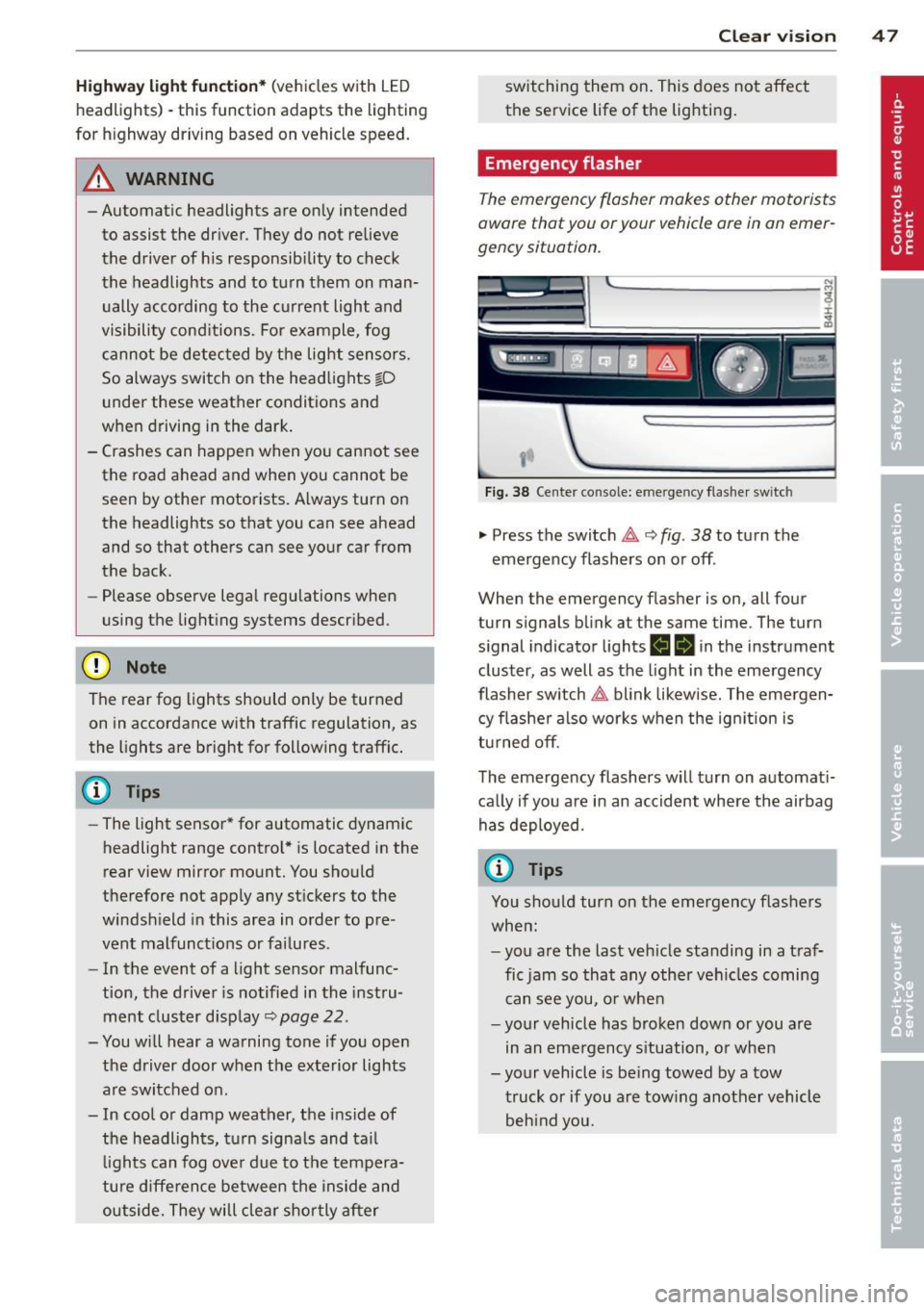
Fig. 38 Center console: emergency flasher switc h
.,. Press the switch ~ 9 fig. 38 to turn the
emergency flashers on or off .
When the emergency flasher is on, all four
turn signals blink at the same time. The turn
signal indicator lights
H Iii in the instrument
cluster, as well as the light in the emergency
flasher switch~ blink likewise. The emergen
cy flasher also works when the ignition is
turned
off.
The emergency flashers will turn on automati
cally if you are in an accident where the airbag
has deployed.
@ Tips
You should turn on the emergency flashers
when:
-you are the last vehicle standing in a traf
fic jam so that any other vehicles coming
can see you, or when
- your vehicle has broken down or you are
in an emergency situation, or when
-your vehicle is being towed by a tow truck or if you are towing another vehicle behind you.
Page 50 of 314
48 Clear vision
Adjusting the exterior lighting
The settings are adjusted in the MMI.
• Se lect : I CAR ! function button > Car systems
control button > Vehicle settings > Exterior
lighting .
Automatic headlights
You can adjust the following settings in the
Automatic headlights menu:
Headlights activation time -You can adjust if
the head lights switch on
Early, Med. or Late
according to the sensitivity of the light sensor .
Audi adaptive light * -You ca n sw itch adaptive
l ight
On and Off.
Automatic high beams*
You can switch the high beam ass ist on and
off .
Daytime running lights
USA models :
You can switch the dayt ime run
ning lights
on and off .
Canada models:
The function cannot be
turned off .
It is activated a utomat ica lly each
time the ign ition is switched on. This menu
item is shown "greyed out".
Coming home, Leaving home
The coming home function illuminates the
area outside the vehicle when yo u switch the
ignition off and open the driver's door. To turn
the function on, select
Lights when leaving
car > On .
The leaving home function illuminates the
area outside the vehicle when you un lock the
ve hicle. To turn the funct ion on, select
Lights
when unlocking car > On .
The coming home and leaving home functions
only operate when it is dark and the light
switch is in the
AUTO position.
Turn signal and high beam lever
The lever on the left side of the steering col
umn is used to operate the turn signals and
the high beam as well as the headlight flash
er.
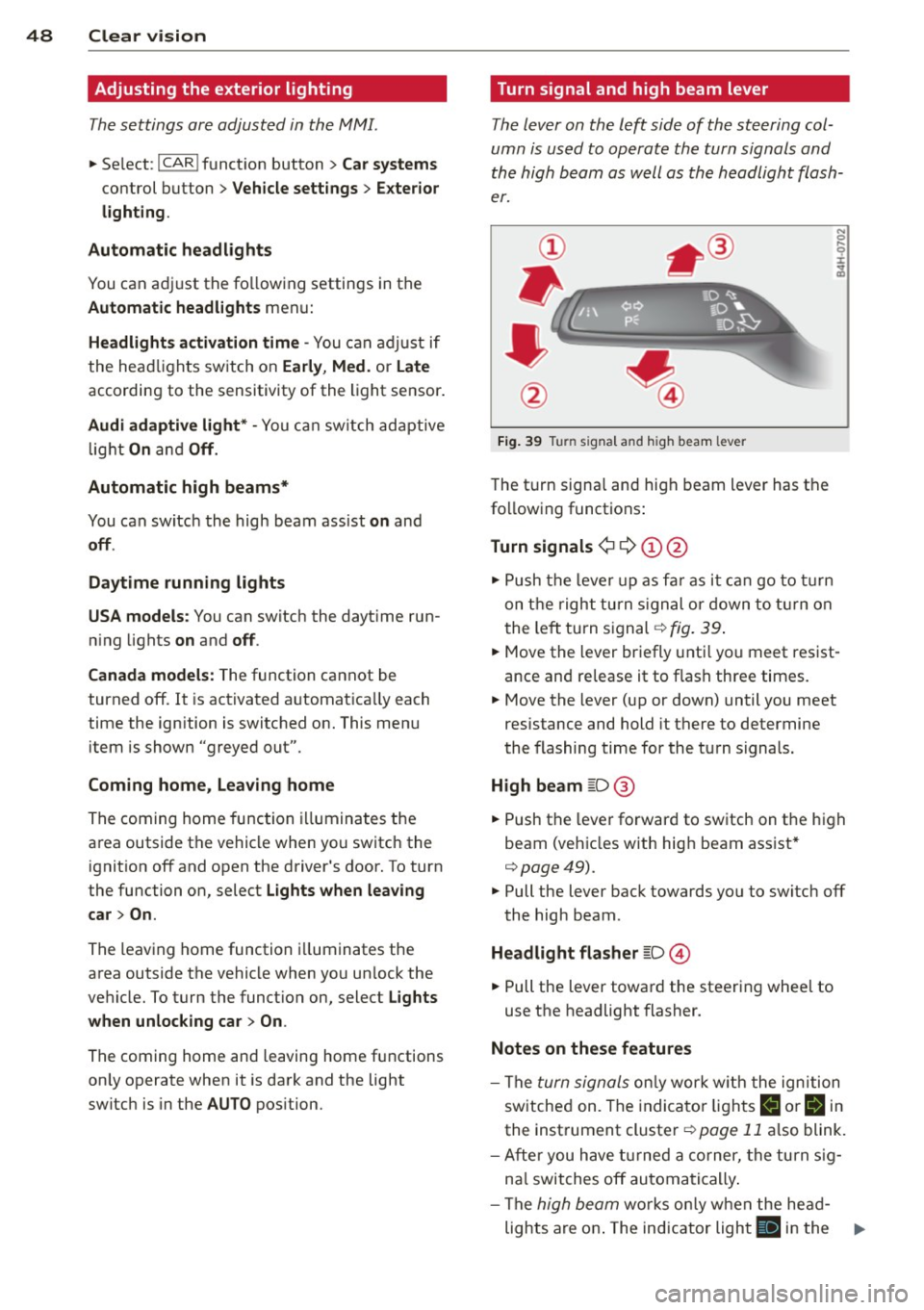
Fig. 39 Tu rn signal and high beam lever
The turn signa l and high beam lever has the
following functions:
Turn signals ¢ 9 (D@
• Push the lever up as far as it can go to turn
on the right turn signal or down to turn on
t he left turn signal¢
fig. 39.
N 0 ... 'i' :r
~
• Move the lever briefly unti l you meet res ist·
ance and re lease it to flash three times.
• Move the lever (up or down) until you meet
resistance and hold it there to determine
the flashing time for the turn signals.
High beam [D @
• Push the lever forward to switch on the high
beam (vehicles with high beam assist*
¢ page49).
• Pull the lever back towards you to switch off
the high beam .
Headlight flasher [D ©
• Pull the lever toward the steering wheel to
use the headlight flasher.
Notes on these features
- The turn signals only work w ith the ignition
switched on. The indicator lights
II or Bin
the instrument cluster¢ page 11 also blink.
- After you have turned a corner, the turn sig-
na l switches off automatically.
- The
high beam works only when the head-
lights are on . The indicator light
II in the ..,.
Page 51 of 314
instrument cluste r ill uminates when the
high beams are on.
- T he
headlight flasher works only as long as
you hold the lever -even if there are no
li ghts turned o n. The indicator light
El in
the instr ument cluster illuminates when you
use the head light flasher.
A WARNING
Do not use the hig h beam or headlight
flasher if you know that these could blind
oncoming traffic.
High beam assist
Applies to vehicles: with high beam ass ist
The high beam assist automatically switches
the high beams on or off, depending on the
surroundings and traffic conditions .
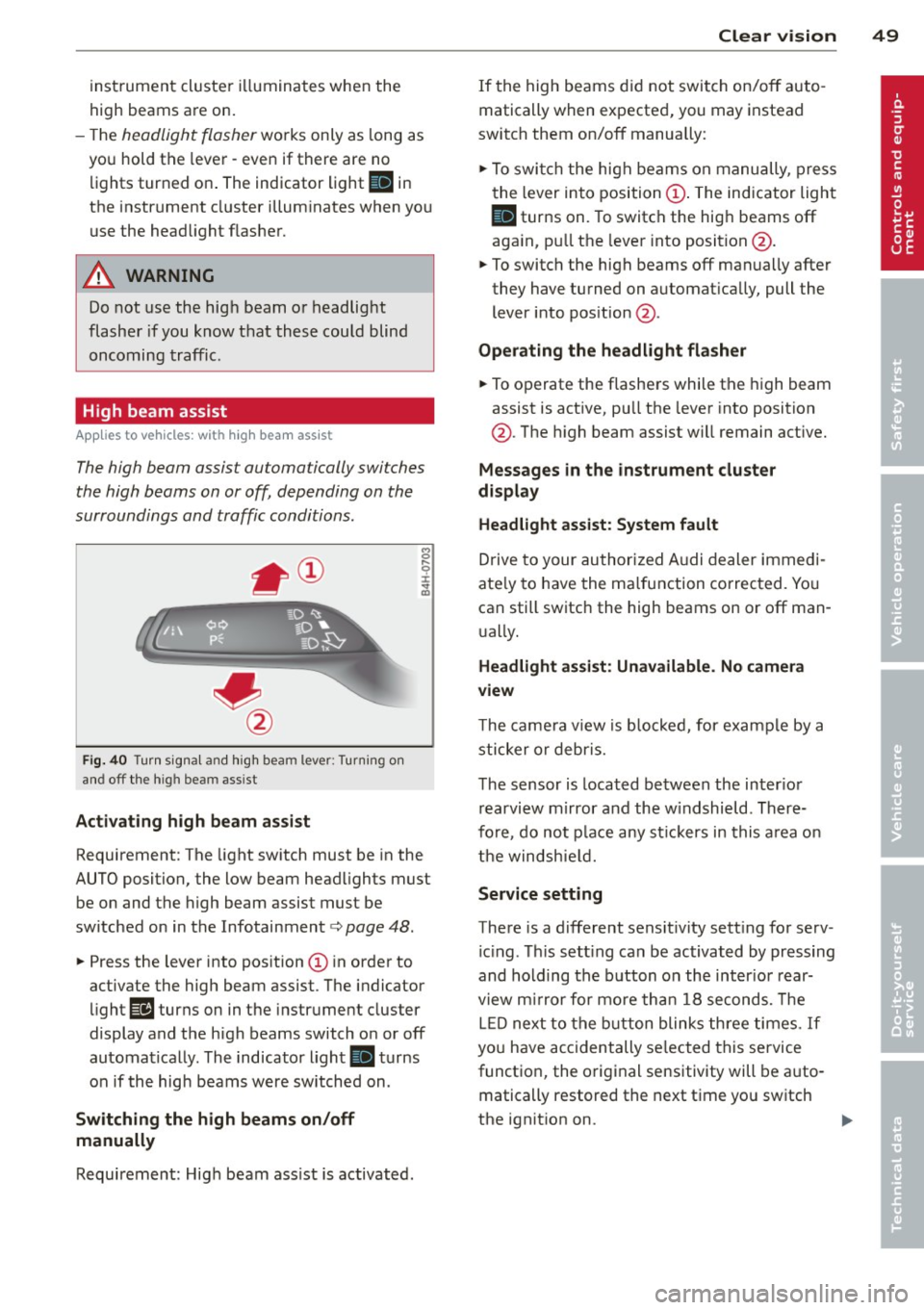
Fig. 40 Turn sig na l and high beam lever: Turning on
and off the high beam ass ist
Activating h igh beam a ssi st
8 .... 0 :i: ;g
Requirement: The light sw itch must be in the
AUTO position, the low beam head lights must
be on and the high beam assist must be
switched on in the Infotainment¢
page 48.
~ Press the lever into position @ in order to
activate the high beam assist. T he indicator
light
Ill turns on in the instrument cluster
display and the high beams switch o n or off
automatically . The indicato r light
II turns
on if the high beams w ere switched on .
Switching the high beams on /off
manually
Requirement: Hig h beam ass ist is activated.
Clear vis ion 49
If the high beams d id not swi tch on/off auto
matically when expected, you may instead
switch them on/off manua lly:
~ To swi tch the high beams on manually, press
the lever into position@. The indicator light
II turns on. To switch the hig h beams off
aga in, p ull the leve r into position @.
~ To switch the high beams off manually after
they have turned on a utomat ica lly, pull the
lever i nto pos ition @.
Oper ating the headlight fla sher
~ To operate the flashe rs while the high beam
assist is act ive, pu ll the lever into position
@ . T he high beam assist will remain act ive.
Messag es in the instrument cluster
di spl ay
Headlight assist: System fault
Drive to your authorized A udi dealer immed i
ate ly to have the ma lfunction corrected. Yo u
can still switch the high beams on or off man
u ally.
Headlight a ssi st: Unavailable . No camera
view
T he came ra v iew is b locked, for example by a
sticker o r debr is.
The sensor is loca ted be tween the inter io r
r earvi ew mirror and the w indshield . There
fo re, do no t place any st ic kers in this a rea on
th e windsh ie ld .
Service setting
There is a d ifferent sens it ivity sett ing for serv
ic ing . Th is sett ing can be activated by pr essing
and hold ing the b utton on the int erio r r ear
view m irror for mo re tha n 1 8 seconds. The
L E D next to the button blinks th ree times.
If
yo u have accidentally se lec ted this service
funct io n, the origi nal sensitivity will be a uto
matically restored the next t ime yo u sw itch
the ignit ion on.
Page 87 of 314
Stee ring lock
The stee ring locks when you t urn the engine
off us ing the
I S TAR T ENGINE STOP! button
and open the driver 's door . The locked steer
i ng he lps pr event ve hicle theft.
E mergenc y off
If necessary , the eng ine can be sw itched off
with the selector leve r in the R, Dor S pos i
tions . The engine stops i f you press the
I S TART ENGINE STOP! button at speeds below
6 mph (10 km/h) .
.&_ WARNING
- Never turn off the eng ine before the ve
hicle has come to a complete stop. The
full function of the brake booster and the power steering is not quaranteed. You
must use mo re force to turn or brake if
necessary. Because you cannot steer and
brake as you usua lly would, this could
lead to crashes and serious injur ies.
- For safety reasons, you shou ld always
par k your vehicle with the se lector lever
in P. Otherwise, the veh icle co uld inad
vertent ly roll away .
- After the engine has been switched off,
the radiator fan can continue to r un for
up to 10 mi nutes -even with the ignition
switched off.
It can a lso switch on aga in
after some time if the coolant tempera
ture rises as the result of a heat buildup
or if the engine is hot and the engine
compartment is addit ionally heated by
the sun's rays .
0 Note
Do not stop the engine immed iate ly after
hard or extended dr iving . Keep the engine
r u nning for approximately two minutes to
prevent excessive heat build-up.
Driver message in the instrument
cluster display
Turn off ignition before leaving car
On th e ro ad 85
This message appears and a warning tone
sounds if you open the driver's door when the
ignition is sw itched on.
Pre ss brak e pedal t o sta rt engine
This message appears if yo u press the
I STAR T ENG IN E S TOP I button to start the en
gine and do not dep ress the br ake pedal. The
engine can only be s tarte d if the brake pedal
is depressed.
I!! I s key in th e vehi cle?
If the indicator light turns on and the mes
sage appears, the remote control key was re
moved from the vehicle whi le the engine was
run ning . If the ignition key is not in the veh i
cl e you will not be able to swi tch on the igni
tion or res tart the engine after i t has been
switched off. You will a lso not be able to lock
the ve hicle from the outsid e.
Shift to P, oth erwi se v ehicle can roll aw ay.
Do ors d o n ot lo ck if lever is not in P .
This dr iver message appears for safety rea
sons if the transmission has not bee n shifted
to the P position when you switc h the ign ition
off . Move the selec to r l ever to the P posi tion .
Otherwise the vehicle is not protected from
ro lling and cannot be locked.
fl Key is not r ecognized. Hold back of key
again st marked area . See ow ner' s m anu al.
If the indicato r light turns on and this mes
sage appea rs, there is a malfunct ion
~ page 86.
Turn off ign ition before lea ving ca r. Battery
is d is c harging
This message appears if the driver's door is
opened wh ile the ignition is switched on . Al
ways switch off the ign it ion if you a re leav ing
the ve hicle . See also
Q page 90 .
Shift to P and turn off ignition before lea v
ing car, otherwi se v ehicle can roll away
T his messag e app ears if the driver's door is
opened wh ile the ignition is switched on and
the selector lever is not in the P posit ion. Shift
the selecto r lever into the P pos ition and .,..
Page 89 of 314

Emergency brake function
An emergency brake ensures that the vehicle
can be slowed down even if the
normal brakes
fail
c::> page 88, Emergency broking.
Ind icator light s
-If the par king b rake is closed w ith the igni
t ion
s wit ched on the indicator lights come
on - (USA models)/ . (Canada models)
in the instrument cluster and in the switch.
- If the par king brake is closed w ith the igni
tion
s witc hed off the indicator lights come
on - (USA models)/ . (Canada models)
in the instr ument cluster and in the switch
for about 20 seconds.
A WARNING
Do not press the accelerator peda l inadver
tently if the vehicle is stat ionary but the
eng ine is running and a gear is selected.
Otherw ise the vehicle will start to move
immediately and cou ld result in a crash.
(D Note
If the symbol . in the display or the ind i
cato r light
1111 (USA models) . (Cana
da models) in the instrument cluster flash
es, the re is a malfunction in the bra ke sys
tem. Please refer to t he detai led descr ip
t ion of the indicator lights¢
page 14.
- If the indicato r light - (USA mod-
els) . (Canada mode ls) or
IIJ t ur ns
on, there may be a malfunction in the
parking brake
r=> poge 15.
@ Tips
-You can apply the pa rking brake at any
time -even w ith the ignition swi tched
off. The ignition must be on and the
brake pedal must be pressed in order to
release the parking brake.
- Occasiona l noises when the parking
brake is applied and re leased are norma l
and are not a ca use for concern.
- When the vehicle is parked, the parking
brake goes through a se lf-test cycle at
On th e ro ad 87
regular inte rva ls. Any associated noises
are normal.
· Parking
.. Press the brake pedal to stop the veh icle.
.. Pull the switch(®) to set the parking brake.
.. Select the P selector lever posit io n
c::> poge 116.
.. Tu rn the engine off c::> .&_ .
.,. When on inclines o r declines, tur n the steer
ing wheel so that your veh icle w ill ro ll into
t he c urb if it beg ins to move.
A WARNING
-==
- When you leave your vehicle -even if on-
ly briefly -always take the ignition key
with you. This applies particularly when
children remain in the vehicle. Otherwise
the children cou ld start the engine, re
lease the parking brake or operate elec
trical equipment (e.g. powe r wi ndows).
T here is the r is k of an accident.
- When the veh icle is locked, no one -par
ticularly not children should rema in in
the vehicle. Locked doors ma ke i t mo re
diff icult for emergency wo rke rs to ge t in
to the veh icle -putt ing lives at risk.
Starting from rest
The starting assist function ensures that the
parking broke is released automatically upon starting.
Stopping and applying park ing brake
.. Pull the sw itch(®) to apply the parking
brake .
Starting and automatic ally releasing the
parking brake
.. When you sta rt to dr ive as usual, the park
ing brake is automatically released and your
veh icle begi ns to move.
When stopping at a traffic signal or stopping in city traff ic, the parking brake can be ap-
plied . The vehicle does not have to be he ld
IJ>-
Page 91 of 314

Basic requirements for the Start-Stop
mode
-The driver's door is closed .
- The driver' seat belt is latched.
- The hood is closed.
- The vehicle must have been driven faste r
than 2.5 mph (4 km/h) since the last stop .
- A tra ile r is not hitched to the veh icle.
& WARNING
- Never let the vehicle roll with the engine
switched off. You could lose contro l
over
the vehicle. This can lead to a collision
and serious injuries.
- T he brake booster and the steering sup
port do not work wh ile the engine is
switched off. More force is required to
stop and to steer the vehicle.
- To reduce the risk of injuries, make sure
that the Start-Stop-System is turned off
when working in the engine compart ment¢
page 90.
(D Note
Always switch off the Start -Stop -System
when driving through water¢
page 90.
Starting/stopping the engine
Applies to vehicles: with Start-Stop-System
Fig. 88 In st rum en t cluster : engi ne switc hed off (stop
phase)
.. Slow the vehicle to a stop using the brake
and keep pressing the brake pedal. The en
gine will switch off. The
[I] indicator light
appears in the information line in the instru
ment cluster d isplay.
On the road 89
.. When you take your foot off the brake ped
al, the engine restarts. The indicator light
turns off.
Additional information
The engine will switch off in the P, D, N and S
pos itions as well as in manual mode. In the P
position, the engine will also remain off if you
take your foot off the brake pedal. The engine
starts again when you select another selector lever position and take your foot off the brake
pedal.
If you se lect the R position during a Stop
phase, the engine will start again.
S hi ft from D to P quickly to prevent the engine
from starting unintentionally when shifting
through R .
You can determine for yourself if the engine
will stop or not by reducing or increasing the
amount of force you use to press the brake
pedal. For example, if you only lightly press
on the brake pedal in stop-and and-go traffic
or when turning, the engine will not switch off
when the vehicle is stationary. As soon as you
press the brake down harder, the engine will
switch off.
General information
Applies to vehicles: with Start-Stop-System
The standard Start-Stop-mode can be cancel
led for different system-related reasons.
Fig. 89 Instrument cluster: engine -Stop temporarily
unavailable
Page 93 of 314
(D Tips
If you switch the system off during a stop
phase, the engine will start again auto
mat ically.
Messages in the instrument cluster
display
App lies to vehicles: with Start -Stop-System
Start-Stop system deactivated: Please re
start engine manually
This message appears when specific condi
tions are not met dur ing a stop phase and the
Start-Stop-System will
not be able to restart
the engine.
If the Dor R selector lever posi
tions were engaged, P will be selected auto
matica lly. The engine must be sta rted with
the
! S TAR T ENGINE ST OPI button.
Start-Stop system: System fault! Function
unavailable
There is a malfunct ion in the Start-Stop-Sys
tem . Dr ive the veh icle to an authorized repair
fac ility for servicing as soon as possible to cor
r ect the malfunction.
Speed warning system
Introduction
The speed warning system helps you to stay
under a specified maximum speed.
The speed warning system warns you if you
are exceeding the maximum speed that you
have set. You will hear a warning tone when
your speed exceeds the stored value by ap prox imately 3 mph (3 km/h) . An indicator
light . (USA models)/ . (Canada models) in
the instrument cluster display also turns on at
the same time . The indicator light ••
turns off when the speed decreases below the
stored maximum speed.
Sett ing a thresho ld is recommended if you
wou ld like to be reminded when you reach a
cer tain maximum speed. Situations where you
may want to do so include driving in a country
On the road 91
with a general speed limit or if there is a
specified max imum speed for winter tires .
@ Tips
Even though your vehicle is eq uipp ed w ith
a speed warning system, you should still
watch the speedometer to make sure you
are not dr iv ing faster than the speed limit.
Setting the threshold
You can set, change and delete the threshold
in the MMI.
.. Select: !CAR I function button> Car systems
cont rol button > Driver assist > Speed warn·
ing .
You can set any threshold between 20 mph
(30 km/h) and 150 mph (240 km/h) . Sett ings
can each be ad justed in increments of 5 mph
(10 km/h).
Cruise control
Switching on
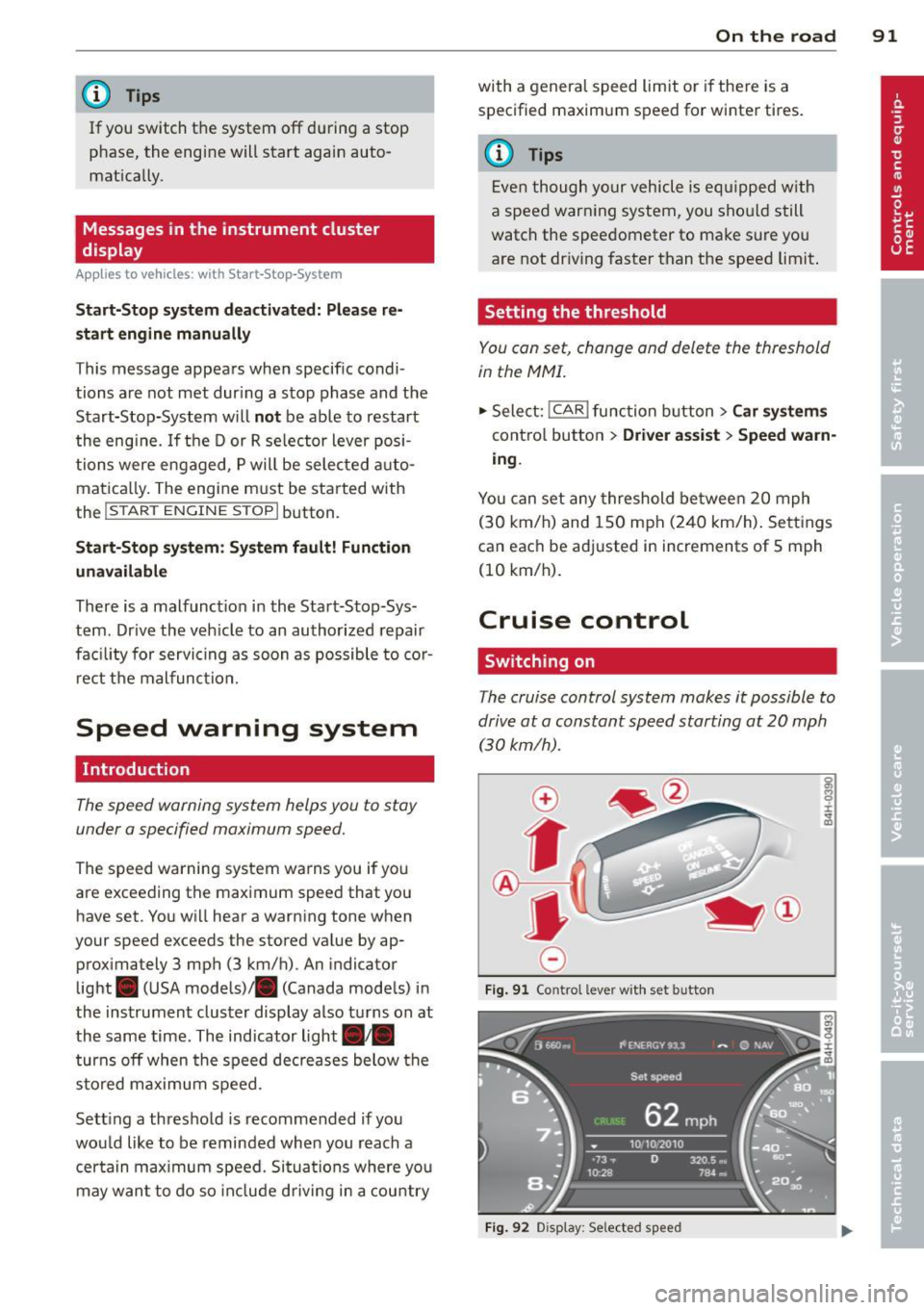
The cruise control system makes it possible to
drive at a constant speed starting at 20 mph (30 km/h) .
0
f
~
0
Fig. 91 Contro l le ver with s et bu tto n
Fig. 92 Disp lay: Se lecte d speed
Page 94 of 314
92 On the road
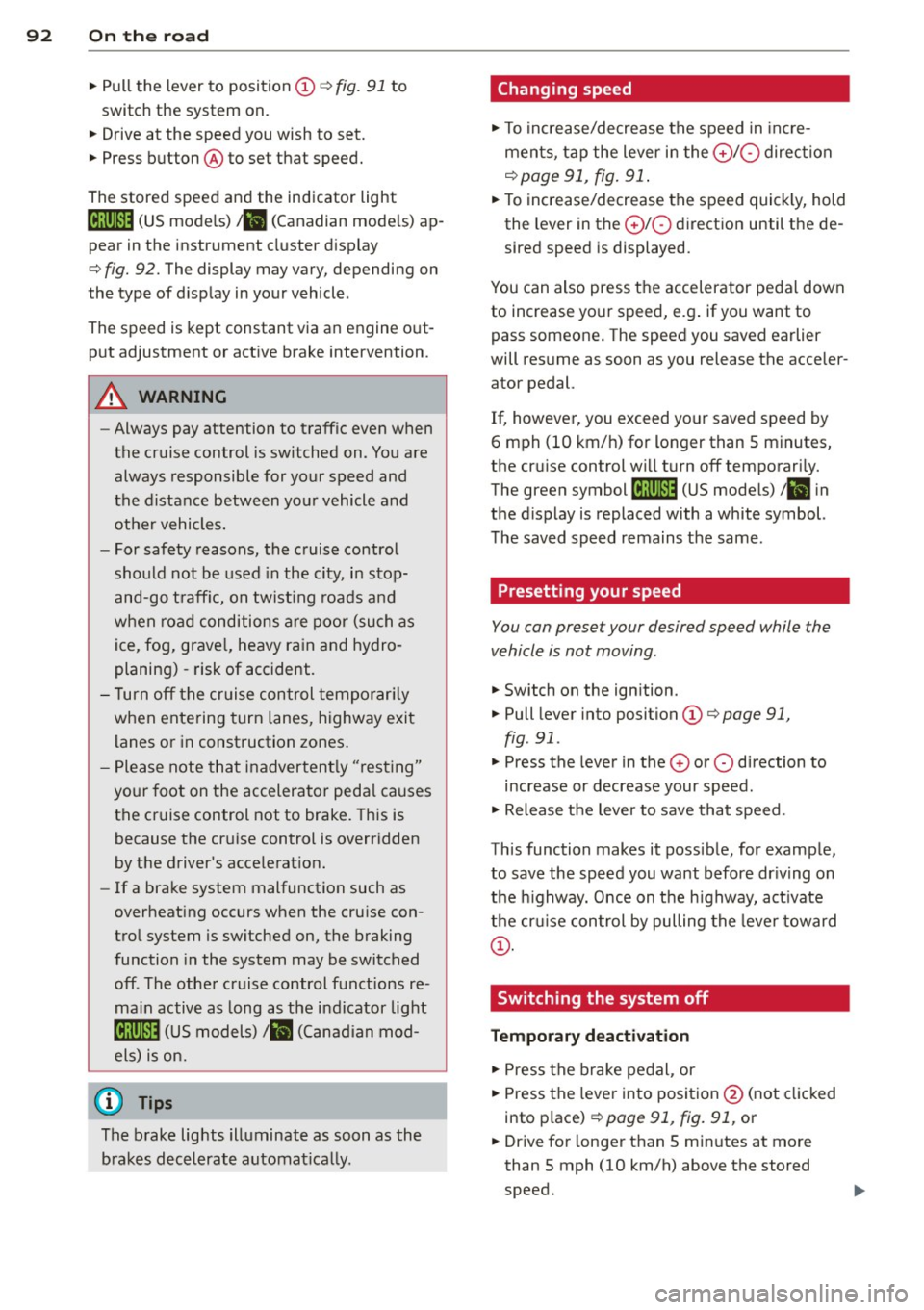
• Pull the lever to position CD ¢ fig . 91 to
switch the system on.
• Drive at the speed you wish to set .
• Press button @to set that speed.
The stored spee d and the ind icator light
[ij;(i)~i~ (US mode ls) ,ii (Canadian mode ls) ap
pear in the instrument cluster d isplay
¢ fig. 92. The display may vary, depending on
the type of d isplay in your vehicle .
The speed is kept constant via an engine o ut
p ut adjustment or act ive brake intervention .
A WARNING
-Always pay attention to traffic even when
the cruise control is switched on . You are
always responsible for your speed and
the distance between your vehicle and other vehicles.
- For safety reasons, the cruise control
should not be used in the city, in stop
and-go t raff ic, on twist ing roads and
when ro ad conditions are poor (such as
ice , fog, grave l, heavy rain and hydro
planing) -risk of accident.
- T urn off the cruise control tempor aril y
when entering turn lanes, highway exit lanes or in construction zones.
- Please note tha t inadvertent ly "rest ing"
yo ur foot on the accelerator peda l causes
the cruise control not to brake. This is
because the cr uise control is overridden
by t he driver 's acce lerat ion.
- If a brake system malfunction such as
overheat ing occurs when the cru ise con
tro l system is sw itched on, the braking
function in the system may be switched
off . The other cruise control functions re
ma in active as long as t he indicator light
[ij;rn~i~ (US models) Iii.I (Canad ian mod
els) is on.
(D Tips
The b rake lights illuminate as soon as the
brakes decelerate automat ica lly.
Changing speed
• To increase/decrease the speed in inc re
men ts, tap the lever in the
0 10 direction
¢ page 91, fig. 91 .
• To increase/decrease the speed quick ly, hold
the lever in the
0 10 direction until the de
sired speed is displayed.
You can also press the accelerator pedal down
to increase yo ur speed, e.g . if you want to
pass someone . The speed you saved earlier
will res ume as soon as you release the acce ler
ator pedal.
If, however, you exceed your saved speed by
6 mph (10 km/h) for longer than 5 minutes,
the cr uise control w ill turn off temporari ly.
The green symbol
[ij;(l)~i~ (US mode ls) ,ii in
the d isplay is replaced with a white symbol.
T he saved speed remains the same .
Presetting your speed
You can preset your desired speed while the
vehicle is not moving.
• Switch on the ign ition.
• Pull lever into position
CD ¢ page 91,
fig . 91 .
• Press the lever in t he 0 o r 0 direction to
increase or decrease your speed .
• Release t he lever to save that speed .
Th is function makes it possib le, for examp le,
to save the speed you want before dr iv ing on
the highway. Once on the h ighway, act ivate
the cr uise con trol by pulling the leve r toward
CD -
Switching the system off
Temporary deactivation
• Press the brake pe dal , or
• Press the lever into posi tion @(not cl icked
into p lace)
¢ page 91, fig. 91, or
• Drive for longer t han S m in utes at more
than 5 mph (10 km/h) above the stored
speed.
Page 101 of 314
Audi adaptive cruise control and braking guard 99
then maintains the stored distance. If the ve
hicle ahead accelerates, adaptive cr uise con
trol will also accelerate up to the stored
speed.
The higher the speed, the greater the distance
in yards (meters) ¢.&. . The
Distance 3 setting
is recommended .
The distances prov ided are spec ified values.
Depending on the driving situation and the
how the vehicle ahead is driving, the actual
d istance may be more or less than these tar
get distances.
The various symbols for the time increments
appear briefly in the information line @
¢ page 96, fig. 98 when you change the set
tings.
~ -~ --- Distance 1: This setting corre
sponds to a distance of 92 feet/28 meters
when traveling at 62 mph (100 km/h), or a
time interva l of
l second.
~ -- ~-- Distance 2: This setting corre
sponds to a distance of 118 feet/36 meters
when traveling at 62 mph (100 km/h), or a
time interva l of 1.3 seconds .
~--- ~-Distance 3: This setting corre
sponds to a distance of 164 feet/SO meters
when traveling at 62 mph (100 km/h), or a
time interva l of 1.8 seconds .
~---- ~ Distance 4: This setting corre
sponds to a distance of 210 feet/64 meters
when traveling at 62 mph (100 km/h), or a
time interva l of 2.3 seconds .
A WARNING
Following other vehicles too closely in
creases the risk of collisions and serious
personal injury.
- Setting short distances to the traffic
ahead reduces the time and distance
available to br ing your vehicle to a safe
stop and makes it even more necessary
to pay close attention to traffic.
- Always obey applicable traffic laws, use
good judgment, and select a safe follow- ing distance
for the traffic, road and
weather conditions.
@ Tips
- Distance 3 is set automatically each time
you switch the ignition on.
- Your standard settings are automatically
stored and assigned to the remote con
tro l key being used.
Selecting the driving mode
Applies to vehicles: with Aud i adapt ive c ruise contro l
.,. Select the desired driving mode in drive se
lect¢
page 110.
(0 Tips
Your settings are automat ica lly stored and
assigned to the remote control key being
used.
Prompt for driver intervention
Applies to vehicles: with Audi adapt ive cru ise contro l
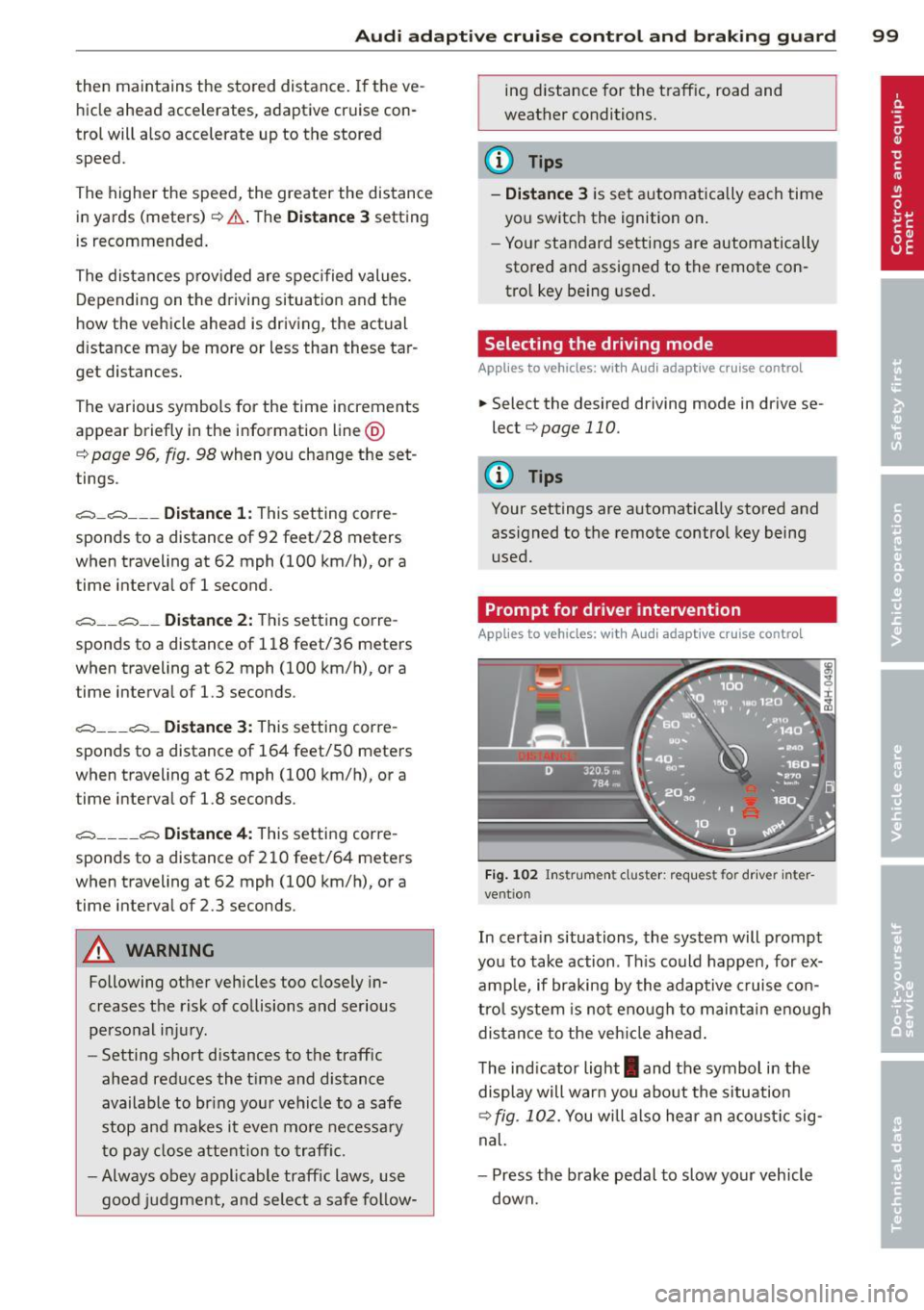
Fig. 102 Instrument cluster: request fo r drive r in ter
vent ion
In certa in situations, the system will prompt
you to take action . Th is could happen, for ex
amp le, if braking by the adaptive cruise con
trol system is not enough to maintain enough
distance to the vehicle ahead.
The indicator light
I and the symbol in the
display will warn you about the situation
¢ fig. 102. You will also hea r an acoustic sig
nal.
- Press the brake pedal to slow your vehicle
down.