instrument cluster AUDI S8 2014 Owner's Manual
[x] Cancel search | Manufacturer: AUDI, Model Year: 2014, Model line: S8, Model: AUDI S8 2014Pages: 314, PDF Size: 78.47 MB
Page 105 of 314
Audi lane assist Lane assist
De script ion
App lies to vehicles: with la ne ass ist
Lane assist helps you keep your vehicle in your
lane.
Lane assist detects lane marker lines within
the limits of the system using a camera in the
windshield. If you are approaching a detected
lane marker line and it appears likely that you
will leave the lane, the system will warn you
with a light vibration . Lane assist is operable
when the line marking the lane is detected on
at least one s ide of the vehicle.
The system will not warn you before crossing
a lane marker line if you have activated the
turn signal. In th is case, it assumes that you
are changing lanes intent ionally.
The system is designed for driv ing on free
ways and expanded highways and thus works only at speeds of 40 mph (65 km/h) o r more .
_& WARNING
-Lane assist will not keep your veh icle in
your lane. The system only warns the
driver w hen the veh icle is leaving the
lane. The driver is always responsible for
keeping the vehicle in the lane.
- The camera is not able to detect all lane
boundary lines and in some cases might
also detect lane structures or objects as
boundary lines. This can lead to incorrect
warnings or warnings that fail to go off
at all.
- The camera's visibility can be impaired by
vehicles ahead of you, for instance, or by
rain, snow, heavy spray or light shin ing
in to the camera lens. This can ca use lane
assist to fa il to detec t boundary li nes.
-
Audi lane a ssis t 10 3
Act ivating and deactivating
App lies to vehicles: wit h lane assist
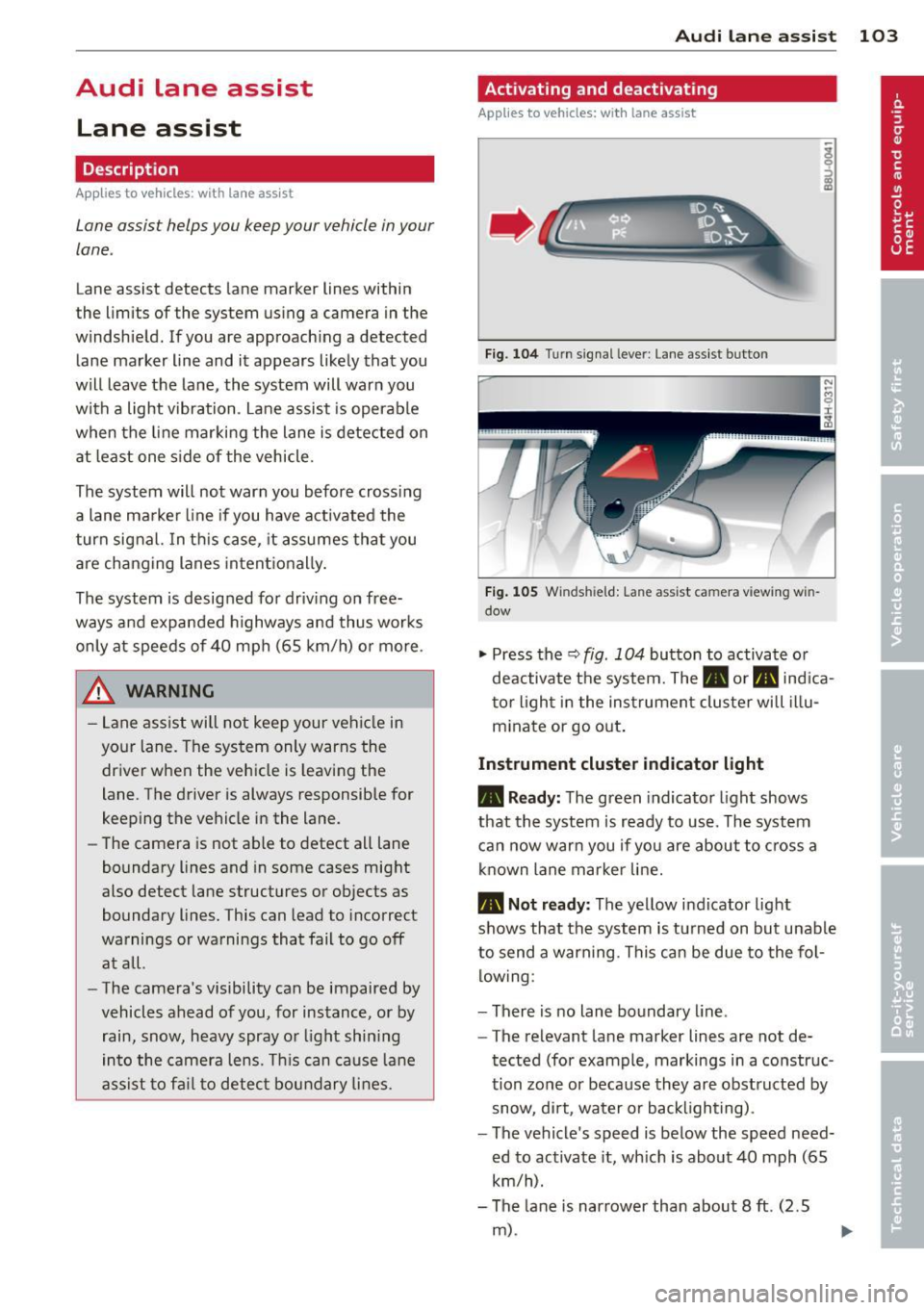
Fig. 104 Turn s igna l lever: Lane assist button
Fig . 105 Windsh ield: Lane assist ca mera view ing win
dow
"' Press the Q fig . 104 button to activate or
deactivate the system. The. or. indica
tor l ight in the instrument cluster will il lu
m inate or go out .
Instrument cluster ind icator light
• Read y:
The green indicator light shows
that the system is ready to use. The system
can now war n you if you are about to c ross a
known lane marker line.
• Not ready : The yellow indicator light
shows that the system is t urned on but unable
to send a warning. This can be due to the fol low ing:
- There is no lane boundary line .
- The relevant lane marker lines are not de-
tected (for example, markings in a construc
tion zone or because they are obstructed by
snow, di rt, water or backlighting) .
- The vehicle's speed is below the speed need ed to activate it, wh ich is about 40 mph (65
km/h).
- The lane is narrower than about 8 ft. (2.5
m) .
Page 106 of 314
104 Audi la ne ass is t
- The curve is too sharp.
(1_) Tips
Make sure the camera's fie ld of view
c::> fig. 105 is not obstr ucted by st ickers,
deposits or anything else. For in formation
on cleaning, refer to
c::;, page 216.
Lane assist display in the instrument
cluster
Ap plies to vehicles: with la ne ass ist
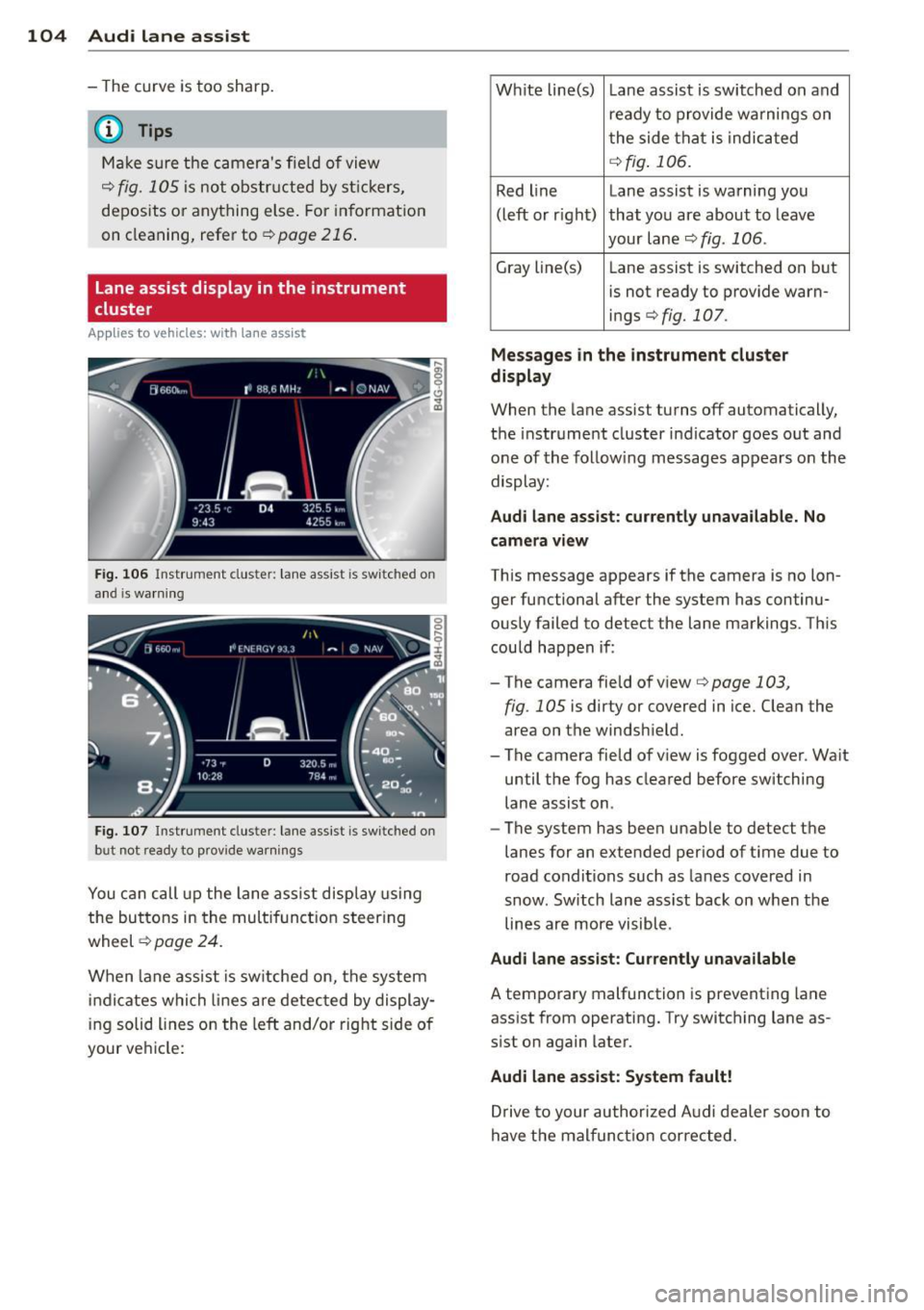
Fig . 106 Instrument clus te r: lane assist is switc hed on
a nd is wa rning
Fig. 107 Instrument cluste r: lane assist is switched on
but not ready to prov ide warnings
You can call up the lane assist display using
the buttons in the mult ifunction steering
wheel
c::> page 24.
When lane assist is sw itched on, the system
i ndicates which lines are detected by display
ing solid lines on the left and/or right side of
your ve hicle: Wh
ite line(s) Lane assist is switched on and
ready to provide warnings on
the side that is indicated
<=:> fig . 106.
Red line Lane assist is warning you
(left or rig ht) that you are about to leave
your lane
c::;, fig. 106 .
Gray line(s)
Lane assist is switched on but
is not ready to provide warn-
ings
c::;, fig. 107.
Mess ages i n the in strum ent clu ster
di spl ay
When the lane assist turns off automatically,
the instrument cluster indicator goes out and
one of the follow ing messages appears on the
display:
Aud i lane a ssis t: cu rrently un availa ble . No
cam era v iew
This message appears if the camera is no lon
ger functional after the system has continu
ously failed to detect the lane markings. This
could happen if :
-The camera field of view
c::;, page 103,
fig . 105 is dirty or covered in ice. Clean the
area on the windshield.
- The camera field of view is fogged over. Wa it
until the fog has cleared before switching
lane assist on.
- The system has been unable to detect the
lanes for an extended period of ti me due to
road conditions such as lanes covered in
snow. Sw itch lane assist back on when the
lines are more visible.
Audi lane assis t: Cu rren tly una vailabl e
A temporary malfunction is preventing lane
assist from operating. Try switching lane as
sist on again later.
Audi lane assis t: Sys te m f ault !
Drive to your author ized Audi dealer soon to
have the malfunct ion corrected.
Page 111 of 314

@ Tips
-Side assist is not active while you are
making the adjustment.
- Your settings are automatically stored
and assigned to the remote control key
being used.
Driver messages
Applies to vehicles: with side assist
If side assist switches off by itself, the LED in
the button turns off and a message will ap
pear in the instrument cluster display:
Audi side assist: Currently unavailable. No
sensor vision
The radar sensors' vision is affected. Do not
cover the area in front of the sensors with bike
wheels, stickers, dirt or other objects. Clean
the area in front of the sensors, if necessary
c> page 107, fig. 111 .
Audi side assist: Currently unavailable
Side assist cannot be switched on temporarily
because there is a malfunction (for example,
the battery charge level may be too low).
Audi side assist: System fault!
The system cannot guarantee that it will de
tect vehicles correctly and it is switched off .
The sensors have been displaced or are faulty.
Have the system checked by an authorized
Audi dealer or authorized Audi Service Facility
soon.
Audi side assist: Unavailable when towing.
Side assist switches off automatically when a
factory-installed trailer hitch is connected to
the electrical connector on the trailer. There is
no guarantee the system will switch off when
using a retrofitted trailer hitch. Do not use
side assist when towing a trailer.
Audi side assist 109
Page 115 of 314

Night vision assistant
Description
Appl ies to vehicles: with night v isio n ass istant
Fig. 114 Display: night v ision assistan t
"Night vis ion assistant with pedestrian detec
tion" uses an infrared camera to mon itor the
area in front of your vehicle at night . Within
the limits of the system, it can display objects
up to about 1000 feet (300 mete rs) away. The
h eat image of a pedestrian detected by the
camera is shown in the instrument cluster dis
p lay
¢ fig. 114. Warm areas appear lighter
and cold areas appear darker.
Pedestrian detection
Applies to vehicles: with night v isio n ass istant
Fig. 115 D isplay: yellow pedestrian marking
Fig. 116 Display: symbol when in frared image is not
v is ibl e
Night vision assistant 113
Night vision assistant can detect pedestrians
that are between about 50 and 300 feet (15
and 90 meters) in front of the vehicle, under
ideal conditions . If a pedestrian is detected
when it is dark outside and the vehicle head
light s are switched on, the pedestrian is high
lighted in yellow
~ fig. 115, ¢page 114,
General information .
If another display such
as navigat ion replaces the image from the
night vis ion assistant , the symbo l~,, appears
in a tab
¢fig. 116.
(D Tips
If the night v is ion assistant image does
not appear when the system is switched
on, you can access it with the buttons on
the mu ltifunction steering wheel
¢ page 25.
Pedestrian warning
Applies to vehicles: wit h night vision assistan t
Fig.117 D isp lay: pedestr ian wa rning
Fig. 118 Disp lay : pedestrian warnin g wit h anot her dis
play
If a pedestr ian is detected in an area in front
of the vehicle that the system considers criti
cal, the pedestrian is highlighted in red
¢fig . 117 and a warning tone sounds. This
area is based on the vehicle speed and
Page 123 of 314
Parking lock emergency release
The parking lock must be released using the
emergency release before towing the vehicle .
®
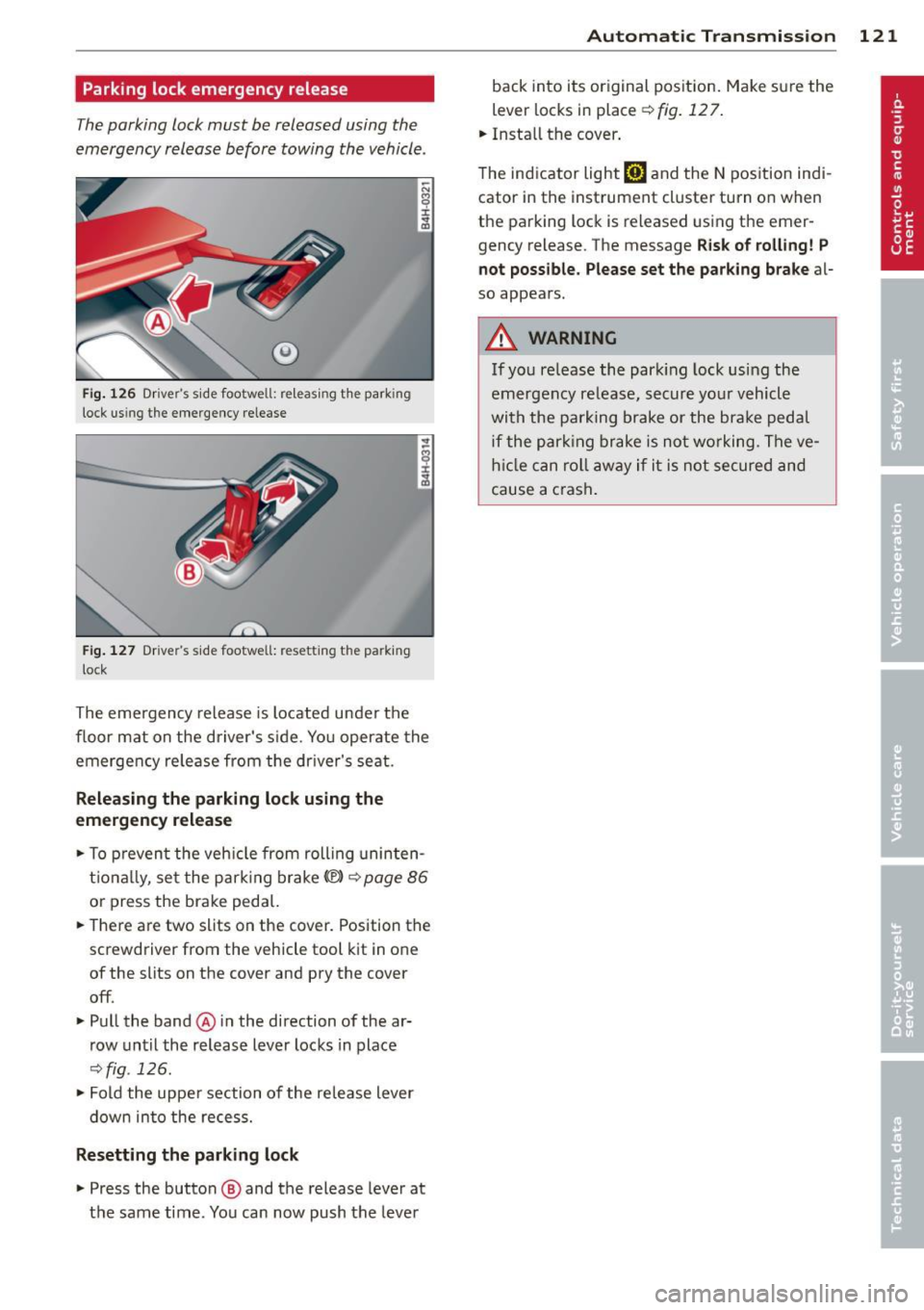
Fig. 126 Driver's s ide footwell: re lea sing t he park ing
lock us ing the emergency release
Fig. 127 Drive r's s ide footwell: resettin g th e pa rk ing
lock
The emergency release is located under the
f loor mat on the driver's s ide. You operate the
emergency re lease from the driver's seat.
Releasing the parking lock using the
emergency release
.,. To prevent the vehicle from rolling uninten
tionally, set the parking brake
«e)) q page 86
or press the brake peda l.
.,. There are two slits on the cover. Position the
screwdriver from the vehicle tool kit in one
of the slits on the cover and pry the cover
off .
.,. Pull the band@ in the direction of the ar
row until the release lever locks in place
qfig . 126 .
.,. Fold the uppe r section of the re lease lever
down into the recess.
Resetting the parking lock
.,. Press the button @ and the release lever at
t h e same time. You can now push the lever
Automatic Transmission 121
back into its original position. Make sure the
lever locks in place ~
fig. 12 7.
.,. Install the cover .
T he indicator light
[O] and the N position indi
cator in the instrument cluster turn on when
the parking lock is released using the emer
gency release. The message
Risk of rolling! P
not possible. Please set the parking brake
al
so appears .
.&_ WARNING
If you release the park ing lock using the
emergency release, secure your vehicle
with the parking brake or the brake pedal
i f the parking brake is not working. The ve
hicle can roll away if it is not secured and
cause a crash .
Page 147 of 314

Safety belts
General notes
Always wear safety belts!
Wearing safety belts correctly saves lives!
This chapter explains why safety belts are nec
essary, how they work and how to adjust and
wear them correctly.
~ Read all the information that follows and
heed all of the instructions and WARNINGS.
A WARNING
Not wearing safety belts or wearing them
improperly increases the risk of serious
personal injury and death .
- Safety belts are the single most effective
means available to reduce the risk of se
rious injury and death in automobile acci
dents . For your protection and that of
your passengers, always correctly wear
safety belts when the vehicle is moving.
- Pregnant women, injured, or physically
impaired persons must also use safety
belts. Like all vehicle occupants, they are
more likely to be seriously injured if they
do not wear safety be lts . The best way to
protect a fetus is to protect the mother -
throughout the entire pregnancy.
Number of seats
Your Audi has a total of five seating positions:
two in the front and three in the rear. In some
vehicles, there are four seat ing positions : two
in the front and two in the rear. Each seating
position has a safety belt .
A WARNING
Not wearing safety belts or wearing them
improperly increases the risk of serious
personal injury and death .
- Never strap more than one person, in
cluding small chi ldren, into any belt. It is
especially dangerous to place a safety
belt over a child sitting on your lap.
Safety belts 145
-Never let more people ride in the vehicle
than there are safety belts available.
- Be sure everyone riding in the vehicle is
properly restrained with a separate safe
ty belt or child restraint.
~-Safety belt warning light
Your vehicle has a warning system for the
driver and front seat passenger to remind you
about the importance of buckling-up.
Fig. 155 Safety bel t warning light in the instrument
cl uster -enla rged
Before driving off, always:
~ Fasten your safety belt and make sure you
are wearing it properly .
~ Make sure that your passengers also buck le
up and properly wear their safety belts.
~ Protect children with a child restraint sys-
tem appropriate for the size and age.
The warning light . in the instrument cluster
lights up when the ignition is on as a reminder
to fasten the safety belts. In addition, you will
hear a warning tone for a certain period of
time .
Fasten your safety belt and make sure that
your passengers also properly put on their
safety belts.
A WARNING
- Safety belts are the single most effect ive
means available to reduce the risk of se
rious inju ry and death in automobile acci
dents. For your protection and that of
your passengers, always correctly wear
safety belts when the vehicle is moving. •
•
Page 162 of 314

160 Airbag sys te m
- Always make su re the forward-facing
seat has been des igned and certified by
its manufacturer for use on a front seat
with a passenger front a nd side airbag .
- Never put the forward- facing child re
straint up aga inst or very near the instru
ment panel.
- Always move the passenger seat into its
rearmost position in the seat's fore and
aft adjustment range, as far away from
the a irbag as poss ible, before insta lli ng
the fo rward-facing chi ld restraint. The
b ackres t must be adjusted to an upr igh t
posit ion.
- Make su re that the
PASSENGER AIR BAG
OFF
light co m es on and s tays on all the
t ime whenever the ignition is switched
on.
Advanced Airbag System components
The front passenger seat in your vehicle has a lot of very important parts of the Advanced
Airbag System in it. These parts include the
weight-sens ing mat, sensors, wiring, brack
ets, and more . The function of the system in
the front passenger seat is checked by the
e lectronic control u nit when the ignit ion is on.
The control unit mo nitors the Advanced Air
bag Sys tem and turns the airbag indicator
light on when a ma lfunction in the system
components is detected . The function of the
ai rbag ind icator light is described in greater
detai l below. Because the front passenger
seat contains important parts of the Ad
vanced A irbag System, you must take care to
prevent it from be ing damaged . Damage to
the seat may prevent the Advanced A irbag for
the front passenger seat from doing its job in
a cra sh .
The front Advanced Airbag System
consists of the following:
- Crash senso rs in the front of the veh icle that
measu re ve hicle ac celera tion/de ce le ra ti on
to provide information to the Advanced Air bag System abo ut the severity of the crash . -
An elect ronic contro l unit, with integrated
crash sensors for front and side impacts .
The control un it "decides" whether to fi re
the front a irbags based on the informat ion
received from the crash sensors. The contro l
un it also "decides" whether the safety belt
prete nsioners shou ld be act ivated .
- An Advanced A irbag w ith gas generator and
cont ro l valve for the driver ins ide the steer
ing wheel hub .
- An Advanced A irbag w ith gas generator and
cont ro l valve inside the inst rument panel for
the front passenger .
- A we ight-sensing mat under the up ho lstery
padding of the front passenge r seat cushion
that measures the total weight o n the seat.
The info rma tion reg iste red is sent continu
ously to the elec troni c control un it to regu
la te deployment o f the front Advanced Air
bag on the passenger side .
- An airbag monitor ing sys tem and indicator
light in t he instr ument cluster ¢
page 164.
-A sensor in each front se at regis ters the dis
t ance between the respec tive seat and the
steering whee l o r instrument panel. The in
formation registered is sent continuo usly to
the electron ic contro l unit to regulate de
ployment of the front Adv a need A irbags .
- The
PASSENGER AIR BAG OFF light comes
on and stays on in the center of the instr u
ment panel ¢
page 164, fig. 168 and tells
you whe n the front Advanced Airbag on the
passe nger side has been turned off .
- A sensor below the safety be lt latch for the
front seat passe nger to measure the tension
on t he safety be lt . The tension on the safety
be lt and the weight registered by t he
weight-sens ing mat he lp the control uni t
"de cide" whe ther the front airbag fo r the
front passenge r seat should be turned off or
not ~
page 155 , Child restraints on the
front seat -some important things to
know.
- A sensor in the safety belt latch fo r th e d riv
er and for the front seat passenger that
senses whether that safety belt is latched or not and transmits this information to the
electronic control un it .
Page 168 of 314
166 Airbag sys te m
- a safety be lt extender has not been left in
the safety be lt latch for the front passenger
seat .
I n addi tion to the
P A SS ENGER AIR BA G OFF
light in the center of the instrument panel ,
the message
PASSENGER AIR BAG OFF or
PASSENGER AIR BAG ON will briefly appear
in the instrument cluster display . Th is is to in
form the driver of the current front passenger
a irbag status .
Important safety instructions on
monitoring the Advanced Airbag System
A WARNING
An airbag system that is not functioning
properly cannot provide supplemental pro
tect ion in a frontal crash.
- If the airbag indicator light
c:> page 18
comes when the vehicle is be ing used,
have t he system inspected immediate ly
by you r authorized Aud i dea le r.
It is pos
s ible that the a irbag will inflate when it
is not s upposed to, or w ill not inflate
w hen it sho uld.
A WARNING
If the front air bag infla tes, a c hild wi tho ut
a chil d restra int, or in a rearward-fac ing
child safety seat, or in a forward-facing
child rest raint that has not been prope rly
installed will be serious ly injured and can
be killed.
- Even though your ve hicle is equipped
with an Advanced Airbag System, make certain that all children, especially 12
years and younger, a lways ride on the
back seat properly restra ined fo r the ir
age and size .
- Always insta ll forward or rea r-facing
child seats on the rea r seat -even w ith
an Advanced Airbag System.
- If you must install a rearward-fac ing
child seat on the front passenge r seat
because of except io na l circumstances
and the
PASSENGER AIR BAG OFF ligh t
does not appe ar and stay on, imme diate- ly insta
ll the rear-facing child seat in a
rear seat ing pos ition and have the airbag
system inspected by your Audi dealer.
- A t ight tether or other strap on a rear
ward-facing child restraint attached to
the front passenger seat can put too
much p ressu re on the weight-sensing
mat in the seat and reg iste r mor e we ight
than is actually on the seat. The heavie r
weight regis tered can make the sys tem
wo rk as though an adult we re on the seat
and deploy the Advanced Airbag when it
m ust be suppressed causing serious or
even fata l injury to t he chi ld .
- If, in exceptiona l circumstances, you
m ust install a forward-facing c hild re
straint on the front passenger seat, al
ways move the seat into its rearmost po sition in the seat's fore and aft ad just
ment range, as far away from the a irbag
as poss ible. The backrest mus t be ad just
ed to an upright pos ition. Make su re that
the
PASSENGER AIR BAG OFF light
comes on and st ays o n all the time when
eve r the ignit ion is swit ched on .
A WARNING
- If the PASSENGER AIR BAG OFF light
does not go o ut when an a dult is sitting
on the front passenger seat after taking
the steps described above, make sure the
adu lt is properly seated and restra ined at
one of the rear seat ing pos itions.
- Have the airbag system inspected by
your Aud i dealer before transporting
a nyo ne on the front passenger seat .
(D Tips
If the weight-sensing mat in the front pas
senger seat detects an empty seat, the
front airbag on the passenger side will be
turned off, and the
PASSENGER AIR BAG
OFF
light will stay on.
Repair , care and disposal of the airbags
Pa rts of the airbag system are installed at
many different places on your Aud i. Insta lling, ..,.
Page 173 of 314
of the passenger seat. If the airbag de
ploys, this can result in serious or fatal
injuries.
- Never carry objects of any kind in the
footwell area in front of the driver's or passenger's seat. Bulky objects (shop
ping bags, for example) can interfere
with or prevent proper deployment of
the airbag. Small objects can be
thrown through the vehicle if the air bag deploys and injure you or your pas
sengers.
- Make sure there are no cracks, deep
scratches or other damage in the area of
the instrument panel where the knee air
bags are located.
- If children are incorrectly seated, their
risk of injury increases in a collision
¢ page 177, Child Safety.
Side airbags
Description of side airbags
The airbag system can provide supplemental
protection to properly restrained occupants.
---
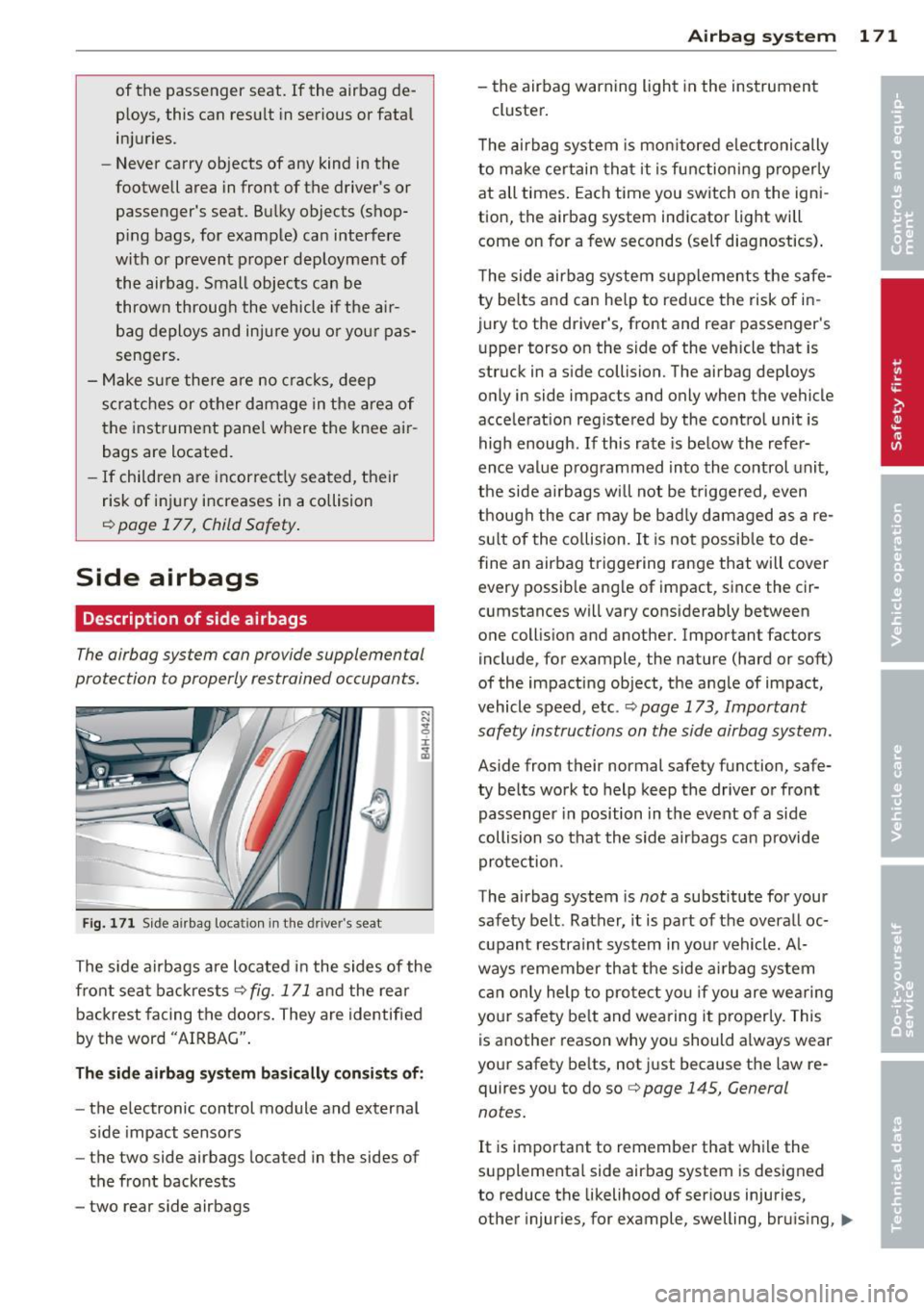
Fig. 171 Side airbag location in the driver's seat
The side airbags are located in the sides of the
front seat backrests
¢fig. 171 and the rear
backrest facing the doors. They are identified
bytheword "AIRBAG".
The side airbag system basically consists of:
-the electronic control module and external
side impact sensors
- the two side airbags located in the sides of
the front backrests
- two rear side airbags
Airbag system 1 71
- the airbag warning light in the instrument
cluster.
The airbag system is monitored electronically
to make certain that it is functioning properly
at all times. Each time you switch on the igni
tion, the airbag system indicator light will
come on for a few seconds (self diagnostics).
The side airbag system supplements the safe
ty belts and can help to reduce the risk of in
jury to the driver's, front and rear passenger's
upper torso on the side of the vehicle that is
struck in a side collision. The airbag deploys
only in side impacts and only when the vehicle
acceleration registered by the control unit is
high enough.
If this rate is below the refer
ence value programmed into the control unit,
the side airbags will not be triggered, even
though the car may be badly damaged as a re
sult of the collision.
It is not possible to de
fine an airbag triggering range that will cover every possible angle of impact, since the cir
cumstances will vary considerably between
one collision and another. Important factors include, for example, the nature (hard or soft)
of the impacting object, the angle of impact,
vehicle speed, etc. ¢
page 173, Important
safety instructions on the side airbag system.
Aside from their normal safety function, safe
ty belts work to help keep the driver or front
passenger in position in the event of a side
collision so that the side airbags can provide
protection.
The airbag system is
not a substitute for your
safety belt . Rather, it is part of the overall oc
cupant restraint system in your vehicle. Al
ways remember that the side airbag system
can only help to protect you if you are wearing
your safety belt and wearing it properly. This
is another reason why you should always wear
your safety belts, not just because the law re
quires you to do so¢
page 145, General
notes.
It is important to remember that while the
supplemental side airbag system is designed
to reduce the likelihood of serious injuries,
other injuries, for example, swelling, bruising,
IIJ>,
Page 201 of 314
Intelligent technology Notice about data
recorded by vehicle
control modules
Your vehicle is not equipped with an Event Da
ta Recorder (EDR), installed by some manu
facturers for the express purpose of capturing
data for retrieval after an accident or crash
event. EDR's are sometimes called "crash re
corders".
Some state laws restrict the retr ieval or down
loading of data stored by EDR's that were in
stalled in a vehicle for the express purpose of
retrieving data after an accident or crash
event without the owner's consent.
Although your vehicle is not equipped with an
EDR, it is equipped with a number of electron
ic control modules for various vehicle systems
such as, for examp le, engine function, emis
sion control, as well as for the airbags and
safety belts.
These electronic control modules also record
vehicle-related data during norma l vehicle op
eration for diagnostic and repair purposes.
The recording capacity of the electronic con
trol modules is limited to data (no sound is re
corded) and only a small amount of data is ac
tually recorded over a very limited period of
time and stored when a system fault or other
condition is sensed by a control unit. Some of
the data then stored may relate to vehicle
speed, direction, braking as we ll as restraint
system use and performance in the event of a
crash or other condition. Stored data can only be read and downloaded with special equip
ment.
Electronic Stabilization
Control (ESC)
Description
ESC helps to improve road holding and vehicle
dynamics to help reduce the probability of
skidding and loss of veh icle control. It works
only when the engine is running. ESC detects
Intelligent technology 199
certain difficult driving situations, including
when the vehicle is beginning to spin (yaw)
out of control and helps you to get the veh icle
back under control by se lectively braking the
wheels, and/or reducing engine power and
providing steering ass istance to help hold the
vehicle on the driver's intended course. The in
dicator light
JjJ in the instrument cluster
blinks when ESC is taking action to help you
control the vehicle.
ESC has limitations .
It is important to remem
ber that ESC cannot overcome the laws of
physics.
It will not always be able to help out
under all conditions you may come up against.
For example, ESC may not always be able to
help you master situations where there is a
sudden change in the coefficient of friction of
the road surface. When there is a section of dry road that is suddenly covered with water,
slush or snow, ESC cannot perform the same
way it would on the dry surface. If the vehicle
hydroplanes (rides on a cushion of water in
stead of the road surface), ESC will not be
able to help you steer the vehicle because con
tact with the pavement has been interrupted
and the vehicle cannot be braked or steered .
During fast cornering, particularly on winding
roads, ESC cannot always deal as effectively
with difficult driving situations than at lower
speeds. When towing a trailer, ESC is not able
to help you regain control as it would if you
were not tow ing a trailer.
A lways adjust your speed and driving style to
road, traffic and weather conditions. ESC can
not override the vehicle's physical limits, in
crease the available traction, or keep a vehicle
on the road if road departure is a result of
driver inattention. Instead, ESC improves the
poss ibility of keeping the vehicle under con
trol and on the road dur ing extreme maneu
vers by using the driver's steering inputs to
help keep the vehicle going in the intended di
rection. If you are traveling at a speed that
causes you to run off the road before ESC can
provide any assistance, you may not experi
ence the benefits of ESC.
•
•