Child AUDI S8 2014 Owners Manual
[x] Cancel search | Manufacturer: AUDI, Model Year: 2014, Model line: S8, Model: AUDI S8 2014Pages: 314, PDF Size: 78.47 MB
Page 4 of 314
2 Table of contents Vehicle literature .. .. .. .. .. ... .
5
About this Owner's Manual . . . 6
Controls and equipment .. ... .
Ins truments and controls .. . .
General illustration ......... .. ... .
Instruments and warning /
indicator lights ........ .. .. .. . .
Instruments ............ ... .. ... .
Warning/indicator lights .......... .
Driver information display .. .. .. ... .
On-Board Diagnostic system (OBD) . . .
Opening and closing .. .. .... . .
Keys .. ...... ........... .. .. ... .
Power locking system ..... .. .. .. . .
Luggage compartment lid .. .. .. .. . .
Child safety lock . .......... ... .. . .
Power windows . .......... ... .. . .
Valet park ing . ........... .. .. ... .
Sliding/tilting sun roof ... .. .. .. .. . .
Panoramic sunroof ........ .. .. ... .
Clear vision .. ........ .. .. .. .. . .
Lights . .. .. ............. .. .. .. . .
I nterior lights .............. .. ... .
V1s1on ..... ... .... ......... .... .
Wiper and washer system ... ... .. . .
Mirrors ................. .. .. ... .
Digital compass .......... .... ... .
Seats and storage ....... .. .. . .
General recommendations ..... .. . .
Front seats ... ........... .... ... .
Rear seats .. ... .... ...... .. .. .. . .
H ead restraints .............. .. . .
Seat memory . ... ..... ... .. .. .. . .
Full-length center console .... .. ... .
L uggage compartment .. .. .. .. ... .
Pass-through with ski sack ........ .
Roof rack ....... ......... ... ... .
12-vo lt sockets ........ ... .. .. ... .
Storage .. .. .. . .......... .. .. ... .
Cooler ... .. .................... . 8
8
8
1 0
10
11
24
29
3 1
31
33
37
4 1
41
42
43
44
4 6
46
so
51
53
55
56
58
58
59
61
65
66
68 70
71
72
74
75
76
Warm and cold .......... ..... .
Climate controls . ............. ... .
79
79
On the road . . . . . . . . . . . . . . . . . . . 8 3
Steering . . . . . . . . . . . . . . . . . . . . . . . . 83
Starting and stopping the engine . . . . 84
E lectromechanical parking brake . . . . 86
Start-Stop-System . . . . . . . . . . . . . . . . 88
Speed warning system . . . . . . . . . . . . . 91
Cruise control . . . . . . . . . . . . . . . . . . . . 91
Audi adaptive cruise control
and braking guard . . . . . . . . . . . .
94
Introduction . . . . . . . . . . . . . . . . . . . . . 94
Genera l information . . . . . . . . . . . . . . 94
Audi adaptive cruise control . . . . . . . . 96
Audi braking gua rd . . . . . . . . . . . . . . . 100
Messages . . . . . . . . . . . . . . . . . . . . . . . 101
Audi lane assis t . . . . . . . . . . . . . . . 103
Lane assist . . . . . . . . . . . . . . . . . . . . . . 103
Audi side assist . . . . . . . . . . . . . . . 106
Lane Change Assistant. . . . . . . . . . . . . 106
Audi drive select . . . . . . . . . . . . . . 110
Driving settings . . . . . . . . . . . . . . . . . . 110
Raising/lowering the vehicle..... .. . 112
Driver messages . . . . . . . . . . . . . . . . . . 112
Night vision assistant . . . . . . . . . 113
Description . . . . . . . . . . . . . . . . . . . . . . 113
Pedestrian detection . . . . . . . . . . . . . . 113
Pedestrian warning . . . . . . . . . . . . . . . 113
General information . . . . . . . . . . . . . . 114
Switching on and off . . . . . . . . . . . . . . 114
Settings in the MMI . . . . . . . . . . . . . . . 115
D river messages .. ................ 115
Automatic Transmission . . . . . . 116
t iptron ic (8-speed transmission) . . . . . 116
Parking systems . . . . . . . . . . . . . . 122
General information . . . . . . . . . . . . . . 122
Advanced parking system with rear
view came ra . . . . . . . . . . . . . . . . . . . . . 123
Peripheral cameras . . . . . . . . . . . . . . . 127
Page 5 of 314
Adjusting the disp lay and the warning
tones. . . . . . . . . . . . . . . . . . . . . . . . . . . 132
Er ror messages . . . . . . . . . . . . . . . . . . 132
Trailer hitch . . . . . . . . . . . . . . . . . . . . . 132
Homelink . . . . . . . . . . . . . . . . . . . . . 133
Universal remote control ..... .. .. . .
Safety fir st ..... .... ... .. .. .. . .
Driving Safely ................ .
General notes ............ .. .. .. . .
Proper occupa nt seating positions . . .
Driver and passenger side footwell .. .
Pedal area .. ................. .. . .
Stowing luggage .......... ... .. . .
Report ing Safety Defects ... .. .. .. . .
Safety belt s ... .. ... ... .. .. .. . .
Gene ral notes ............ .... .. . .
Why s afety belts? ........ .... .. . .
Safety belts . ... .. .... ... .. .. ... .
Safety belt pretens ioners . ... .. .. . .
Airbag system ................ .
Important things to know . ... .. .. . .
F ront airbags ... ...... ... .. .. .. . .
Monitoring the Advanced Airbag
System ........................ .
Knee airbags ............. .... .. . .
Side airbags ................ .. .. .
Side curta in a irbags ........ ...... .
Child Safety ..... ..... ..... .. . .
Important th ings to know ...... .. . .
C hi ld safety seats ................ .
I nstall ing a chi ld safety seat .. .. .. . .
L A TC H L ower ancho rages and tethe rs
for chi ld ren . ............. .... .. . .
Addit ional Information
Audi pre sense ........ .. .. .. . .
Preventat ive passenger p rotec tion 133
135
135
135
136
140
140
141
1 4 3
145
1 4 5
146
1 48
15 1
153 153
157
164
168 171
174
177
177
183
187
190 196
197 19 7
Vehi cle operation . . . . . . . . . . . . . 199
Intelligent technology .. .. .. .. 199
Notice about data recorded by vehicle
control modules . . . . . . . . . . . . . . . . . . 199
Electronic Stabilization Control (ESC) . 199
Table of contents 3
Bra ki ng . . . . . . . . . . . . . . . . . . . . . . . . . 201
Servotronic -advanced power steering
system . . . . . . . . . . . . . . . . . . . . . . . . . 203
Driving with your quattro . . . . . . . . . . 204
Energy management . . . . . . . . . . . . . . 204
Driving and environment .... .
The first 1,000 miles (1,500 km) and
afterwards .. .. .... ..... ..... ... .
Catalytic converter .. . .. .... ...... .
D iesel pa rticulate filter ........... .
S h utting down veh icle ............ .
Avoid damaging the vehicle ........ .
Driving throug h water on ro ads .... .
Operate your vehicle economically and
minimize poll ution . .. .. .. ..... ... .
Trailer towing ... . .. .. ..... ... .
Driving with a trailer . .. ..... ... .. .
Trai ler towing tips
Vehicle care ..... . .. .. ..... ... .
Vehicle care and cleaning .. .. .
General information ............. .
Car washes .. .. .. .. ............. .
Cleaning and care information ..... .
Fuel supply and filling your
fuel tank ... .. .. ... ............ .
Gasoline ........ .. ............. .
Diesel fuel ....... .............. .
Fuel tank .. ... .... .............. .
Se lective ca ta lytic reduction ....... .
Checking and filling .......... .
Engine hood . .. .. ............... .
E ngine compartment ............. .
Engine o il ... .. .. .. ............. .
Engine cooling system .. ..... ... .. .
Brake fluid . ... .. .. . ... ...... ... .
Battery ... .. .. .. .. . .. ... .... ... .
Windsh ie ld/headlight washer 207
207
208
208
2
09
209
2 09
209
212
212
214
2 16
216
216
216
217
222
222
223
224
2 27
231
2 31
2 33
2 34
239
242
243
container . . . . . . . . . . . . . . . . . . . . . . . 247
Tires and wheels . . . . . . . . . . . . . . 248
Tires . . . . . . . . . . . . . . . . . . . . . . . . . . . 248
Tire pressure monitoring system . . . . 266
•
•
Page 33 of 314
Opening and closing Keys
Key set
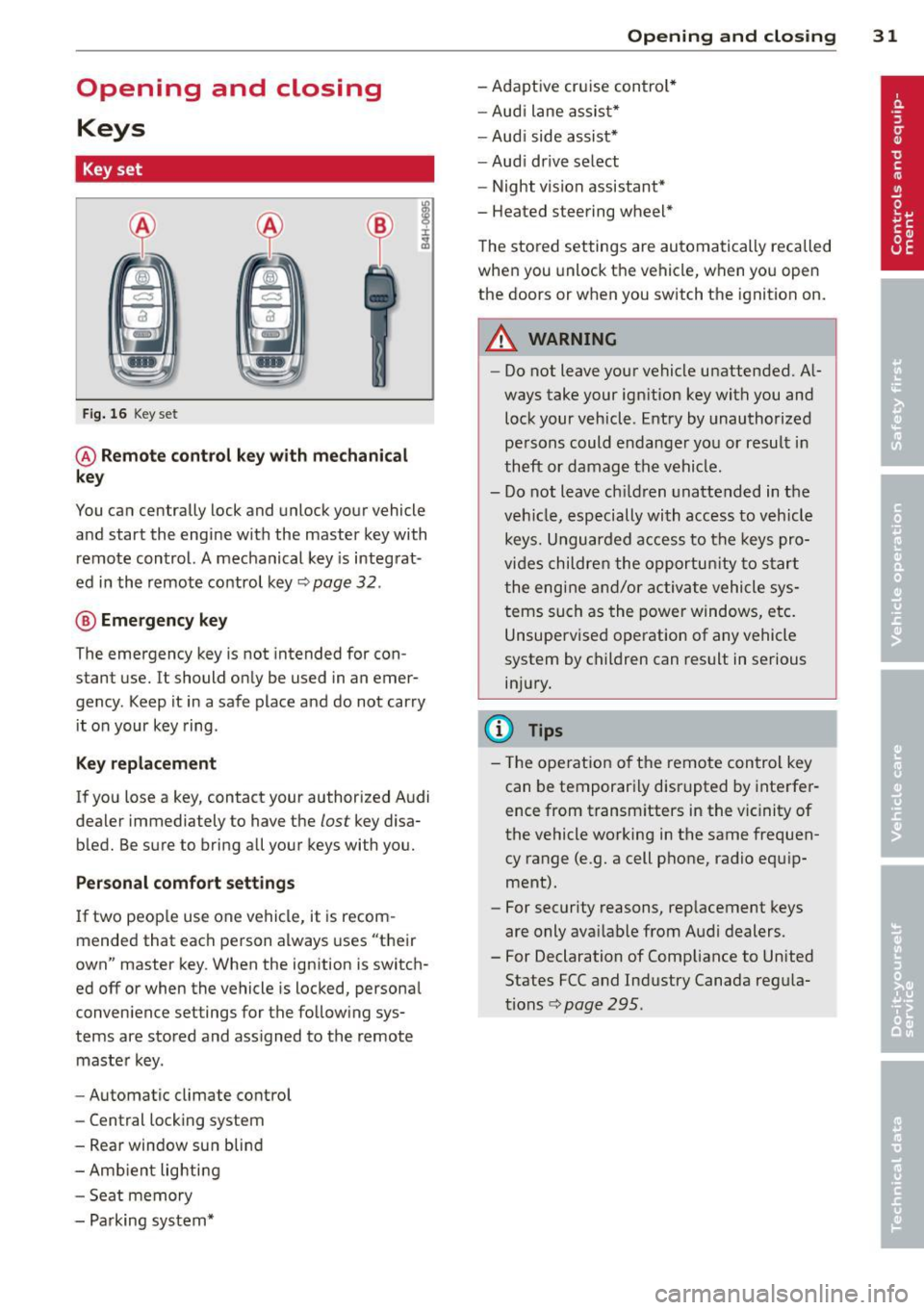
Fig. 16 Key set
@ Remote control k ey with mechanical
key
You can centrally lock and unlock your vehicle
and start the engine with the master key with
remote control. A mechanical key is integrat
ed in the remote control key¢
page 32.
® Emergency key
The emergency key is not intended for con
stant use.
It should only be used in an emer
gency. Keep it in a safe place and do not carry
it on your key ring .
Key replacement
If you lose a key, contact your authorized Audi
dealer immed iately to have the
lost key disa
bled. Be sure to bring all your keys with you.
Personal comfort settings
If two peop le use one vehicle, it is recom
mended that each person always uses "their
own" master key. When the ignition is switch
ed
off or when the vehicle is locked, personal
conven ience settings for the following sys
tems are stored and ass igned to the remote
master key.
- Automatic climate control
- Central locking system
- Rear window sun blind
- Amb ient lighting
- Seat memory
- Parking system*
Opening and closing 31
- Adaptive cruise control*
- Audi lane assist*
-Audi side assist*
-Audi drive select
- Night vision assistant*
- Heated steering wheel*
The stored settings are automatically recalled
when you unlock the vehicle, when you open
the doors or when you switch the ignition on.
A WARNING
---Do not leave your vehicle unattended. Al-
ways take your ignition key with you and
lock your vehicle . Entry by unauthorized
persons could endanger you or result in
theft or damage the vehicle.
- Do not leave ch ildren unattended in the
veh icle, especially with access to vehicle
keys. Unguarded access to the keys pro
vides children the opportun ity to start
the engine and/or activate vehicle sys
tems such as the power windows, etc.
Unsupervised operation of any vehicle
system by children can result in serious
injury.
(!} Tips
- Th e operation of the remote control key
can be temporarily disrupted by interfer
ence from transm itters in the vic inity of
the vehicle working in the same frequen
cy range (e.g. a cell phone, radio equip
ment).
- For security reasons, replacement keys
are only ava ilable from Audi dealers.
- For Declaration of Compliance to United States FCC and Industry Canada regula
tions¢
page 295.
Page 36 of 314
34 Openin g and clo sing
A WARNING
- When you lock your ve hicle from outside,
nobody -especially children -should re
ma in ins ide th e veh icl e. Rememb er,
when you lock the ve hicle from the out
side the windows cannot be opened from
the inside .
- When you leave the vehicle, always take
the ignition key with you. This will pre
vent passengers (ch ildren, for example)
from accidentally being locked in the ve
hicle should they accidentally press the
power locking switch in the doors.
- Do not leave children inside the vehicle
unsupervised . In an emergency it would
be impossible to open the doors from
the outside w ithout the key.
- Applies to vehicles with power side door
closer*:
- When closing a door, make sure noth
ing can interfere w ith the doo r. T his
could cause ser ious personal in jury.
- You can stop the door from clos ing at
any time by pulling on the inside or
outside door handle.
@ Tips
- In the event of a crash with airbag de
ployment all locked doors will be auto
matically unlocked to g ive access to t he
vehicle occupants from the outside.
- If the power lock ing system should ma l
funct ion, you can lock the dr iver's door
u sing the mechanical key
~ page 3 7.
- If the power lock ing system should fail,
you can still open the fue l tank flap in an
emergency<=>
page 227 .
-You are we ll advised no t to keep valua
bles insi de an unattended vehicle, visib le
or not. Even a properly locked vehicle
cannot provide the sec urity of a safe.
- If the L ED in the upper edge of the d riv
er's door panel comes on fo r abo ut 30
seconds afte r the vehicle is locked, there
i s a ma lfunction in the power locking or
the anti-theft warning system. Have the malfunction corrected by an author ized Audi dealership or qualified repair facili
ty
.
Setting power locking
The driver can determine the functions for
power locking in the MMI.
.,. Select: I CAR I function button > Car sy ste m s
contro l bu tton > Vehicle setting s > (Central
locking ).
Lock wh en driving -
If you sele ct On, the vehi
cle locks automa tica lly when driv ing. A ll of
the doors and luggage compartment lid lock.
Central locking
Unlock door s -
You can dec ide if All doo rs or
o n ly the
Driver shou ld unloc k. The l uggage
compartment lid a lso un locks when
All is se
l ected. If you sele ct
Driv er in a ve hicle w it h a
convenience key* , on ly the door whose handle
you pull will un lock.
If you se lect Driver , all t he doors and luggage
compartment lid will un loc k if you press the@
button on the remote con trol master key
twice.
L ock exterior trunk handle -If you select On ,
the luggage compar tment lid handle is
locked. In this case the luggage compar tment
lid can be opened with the button
e:5 on the
master key or with the
e:5 b utton * in the driv
er's door. In ve hicles w ith a convenience key*,
you can st ill open the luggage compartment
lid using the handle if an authorized master
key is near the proxim ity sensor .
Fold mirrors* -If you select On, the exterior
rearview mirrors fold in automatically when
you press the
ffJ button o n the remote control
master key or touch the sensor * in the handle.
Tone when locking -When you select On, a
confirmat ion tone sounds when you lock the
vehicle .
Page 39 of 314
-Front doors: you can un lock and open the
doors from the inside by pulling on the door
handle.
- Rear doors: pu ll the door handle
once to re
lease the lock. Pull the hand le
again to open
the doo r.
- If you have a crash and the airbag is activat
e d, the doors automatically unlock .
,&. WARNING
- The power locking switch works with the
ignition off and automatically locks the
entire vehicle whe n it is actuated .
- On a vehicle locked from the outside the
power locking system switch is inopera
tive.
- Locked doors make it more difficult for
emergency workers to get into the vehi
cle, which puts lives at risk . Do not leave
anyone behi nd in the veh icle, especially
children.
@ Tips
Your vehicle is locked automatically at a speed of 9 mph (15 km/h)
~ page 33. You
can unlock the vehicle again using the
open ing function in the power locking sys
tem switch .
Emergency locking
Each door must be locked separately if the
power locking system fails.
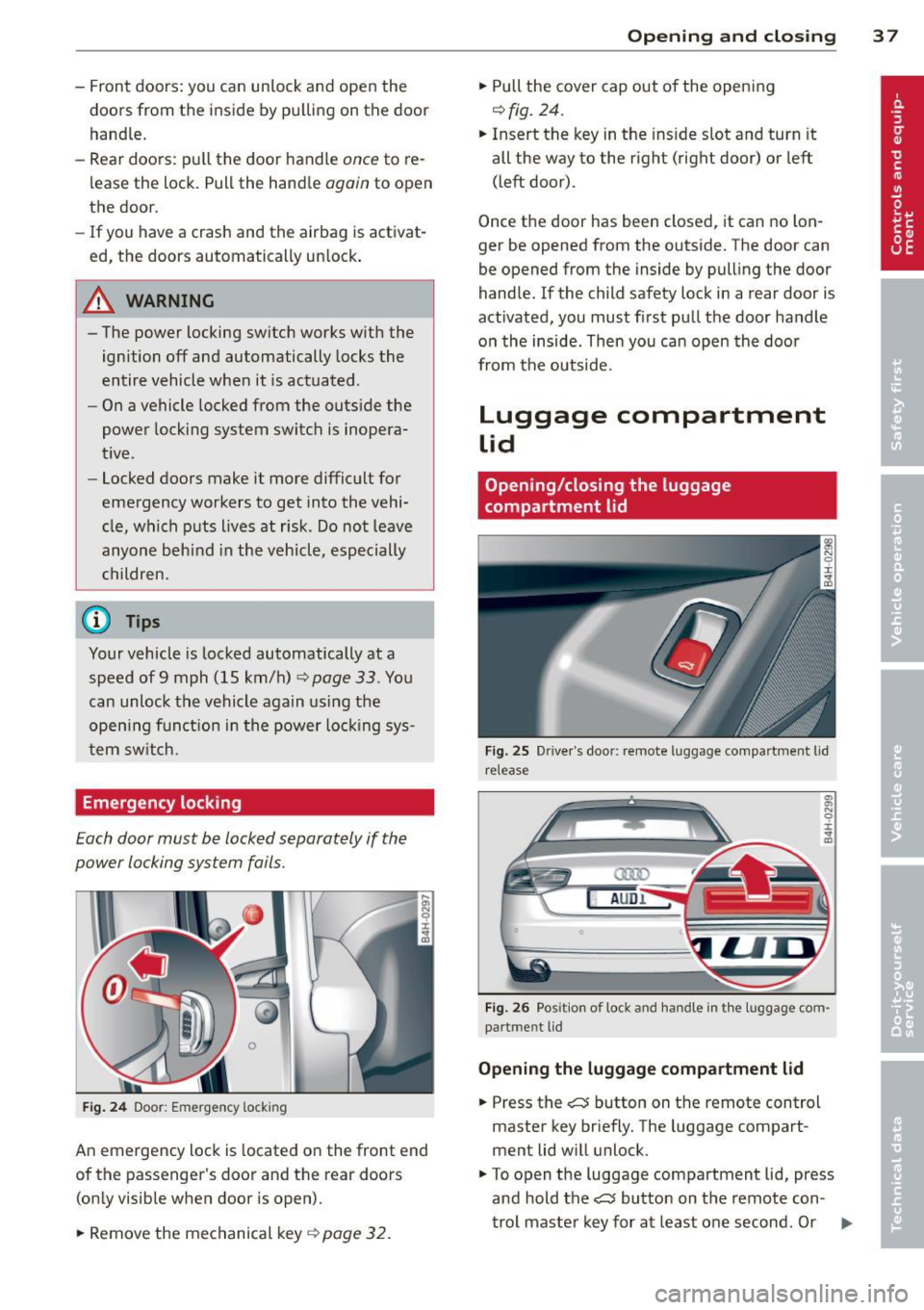
Fig. 24 Doo r: Emer gen cy lock ing
An emergency lock is located on the front end
of the passenger 's door and the rear doors
(on ly visible when door is open).
"' Remove the mechanical key~
page 32.
Opening and closing 3 7
... Pull the cover cap out of the opening
r=> fig. 24.
... Insert the key in the inside slot and turn it
all the way to the right (right door) or left
(left door) .
Once the door has been closed, it can no lon
ger be opened from the outside. The door can
be opened from the inside by pulling the door
handle .
If the child safety lock in a rear door is
activated, you must first pull the door handle
on the inside . Then you can open the door
from the outside.
Luggage compartment
Lid
Opening/closing the luggage
compartment lid
Fig. 25 D river 's doo r: remote luggage comp art m en t lid
re lea se
A U Dl
Fig. 26 Pos ition of lock and handle in the l uggage com
part men t lid
Opening the luggage compartment lid
... Press the c::s button on the remote control
master key briefly. The luggage compart
ment lid will unlock .
... To open the luggage compartment lid, press
and hold the
c::s button on the remote con-
trol master key for at least one second . Or
IJJ,,
Page 40 of 314
38 Openin g and clo sing
• Pull the button C:5 in the driver's door
¢
fig. 25 briefly . Or
• Press the handle in the luggage compart
ment lid ¢
fig. 26.
Clos ing th e lu ggag e compartm ent lid
• Pull the luggage compartment lid down and
allow it to drop gently. The lid is then closed
automatically ¢.&_ .
The settings in the MM I determ ine if the lug
gage compartment lid can be opened using
the handle ¢
page 34.
A WARNING
-After closing the luggage compartment
lid, a lways pull up on it to make sure that
it is properly closed. Otherwise it could
open suddenly when the veh icle is mov
ing .
- To help prevent poisonous exhaust gas
from being drawn into the vehicle, al
ways keep the luggage compartment lid
closed while driving. Never transport ob
jects large r than those which fit com
pletely into the luggage area, because
then the luggage compartment lid can
not be fu lly closed.
- Never leave your vehicle unattended es
pecially with the luggage compartment
lid left open . A child cou ld crawl into the
car thro ugh the luggage compartment
and pull the lid shut, becom ing trapped
and unable to get out. To reduce the risk
of personal injury, never let ch ildren play
in or around your vehicle. Always keep
the luggage compartment lid as we ll as
the vehicle doors closed when not in use.
(i) Tips
When the veh icle is locked, the luggage
compa rtment lid can be un locked sepa
rately by pressing the button
C:5 on the
maste r key. W hen the luggage compart
ment lid is closed again, it locks automati
cally.
Power opening/closing luggage
compartment lid
Applies to vehicles: with power opening/closing luggage
compartment lid
The luggage compartment lid can open and
close electrically .
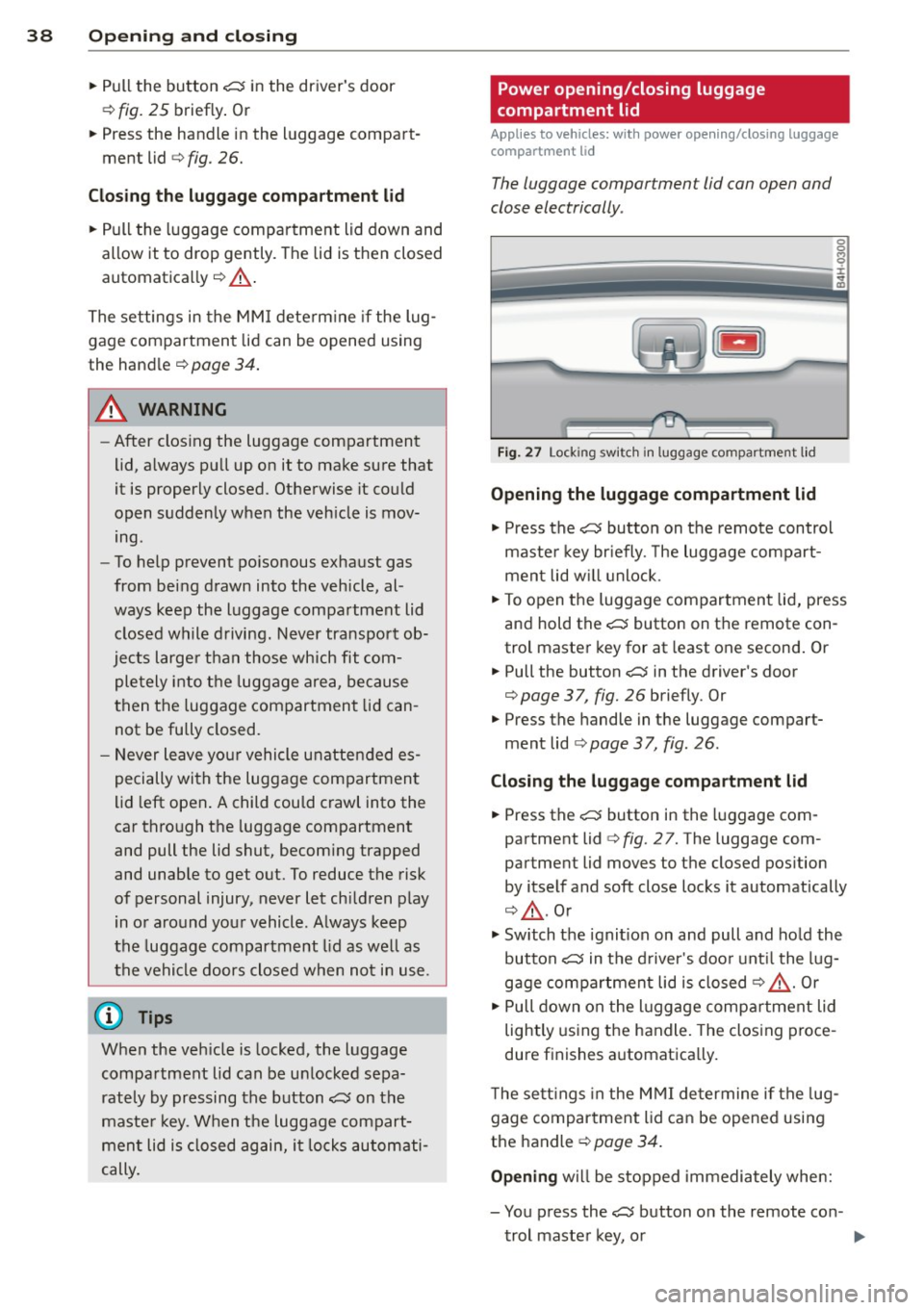
Fig. 27 Lock ing sw itc h in luggage compartment l id
Opening the luggage compartment lid
• Press the C:5 button on the remote control
maste r key br iefly. The luggage compart
ment lid w ill unlock .
• To open the luggage compartment lid, press
and hold the
C:5 button on the remote con
trol master key for at least one second . Or
• Pull the button C:5 in the driver's door
¢
page 37, fig. 26 briefly. Or
• Press the handle in the luggage compart
ment lid
¢ page 37, fig . 26.
Closing th e luggage compartment lid
• Press the C:5 button in the luggage com
partment lid
c:> fig. 27. The luggage com
partment lid moves to the closed pos ition
by itself and soft close locks it automatically
c:> .&_ . Or
• Switch the ignit ion on and pull and ho ld the
button
C:5 in the d river 's doo r unt il the lug
gage compartment lid is closed¢.&_. Or
• Pull down on the l uggage compar tment lid
lightly us ing the handle. The closing proce
dure f inishes a utomatica lly.
T he sett ings in the M MI determine if the lug
gage compartment lid can be opened using
the handle ¢
page 34.
Opening will be stopped immediately whe n:
- You press the
C:5 button on the remote con -
trol master key, o r
Page 41 of 314
-You press the e:5 button in the luggage
compartment lid, or
- You push the handle in the luggage com
partment lid, or
- You pull the
e:5 button in the driver's door ,
or
- When something blocks the luggage com
partment lid or makes it difficult for the lid
to move.
If you press one of the buttons e:5 now, the
luggage compartment lid will either open or
close, depending on its angle .
If you pull lightly on its handle, the luggage
compartment lid will close.
Closing will be stopped immediately when :
- You p ress the
e:5 button in the luggage
compartment lid, or
- You push th e handle in the luggage com
partment lid, or
- You release the
e:5 button on the driver's
door, or
- When something blocks the luggage com
partment lid or makes it difficult for the lid
to move.
If you press one of the buttons
e:5 now, the
luggage compartment lid will either close or
open, depending on its angle.
If you pull lightly on its handle, the luggage
compartment lid will close.
You can manually stop the automatic open ing/closing of the luggage compartment lid.
The automatic closing process begins if you push down on the luggage compartment lid.
A WARNING
-After closing the luggage compartment
lid, always pull up on it to make sure that
it is properly closed. Otherwise it could
open suddenly when the vehicle is mov
ing.
- To help prevent poisonous exhaust gas from being drawn into the vehicle, al
ways keep the luggage compartment lid closed while driving. Never transport ob-
Opening and closing 39
jects larger than those which fit com
pletely into the luggage area, because
then the luggage compartment lid can not be fully closed.
- Never leave your vehicle unattended es
pecially with the luggage compartment
lid left open . A child could crawl into the
car through the luggage compartment
and pull the lid shut, becoming trapped
and unable to get out. To reduce the risk
of personal injury, never let children play
in or around your vehicle. Always keep
the luggage compartment lid as well as
the vehicle doors closed when not in use.
- Never close the luggage compartment
lid inattentively or without checking
first . Although the closing force of the
luggage compartment lid is limited, you
can still seriously injure yourself or oth
ers .
- Always ensure that no one is within
range of the luggage compartment lid
when it is moving, in particular close to the hinges and the upper and lower
edges - fingers or hands can be pinched.
- Never try to interfere with the luggage
compartment lid or help it when it is be
ing opened or closed automatically.
(D Tips
- If there is a mechanical problem with au
tomatic closing for the luggage compart
ment lid or there is an obstruction, it
opens again immediate ly. Check to see
why the luggage compartment lid could
not be closed before attempting to close
it again.
- The following applies to vehicles equip
ped with the Convenience key* feature: if
the remote control key is left in the lug
gage compartment, luggage compart
ment will automatically unlock itself af
ter you lock the vehicle. This prevents
you from unintentionally locking your
key in the luggage compartment.
- When the vehicle is locked, the luggage
compartment lid can be unlocked sepa
rately by press ing the button
e:5 on the
Page 43 of 314
Child safety lock
Mechanical child safety lock in the rear
doors
The child safety lock prevents the rear doors
from being opened from the inside.
Fig. 30 Rear doors: child safety lock
The child safety lock is visible only when the
door is open.
• Remove the mechanical key<>
page 32.
• To switch on the child safety lock, turn the
key in the direction of the arrow .
• To switch
off the child safety lock, turn the
key in the opposite direction to the arrow.
When the child safety locks are activated, the
inside door handles do not work and the doors
can only be opened from the outside .
Power child safety lock for the rear
doors
Applies to vehicles: with power c hild safety lock in the
rea r doo rs
The power child safety lock t prevents the
rear doors from being opened from the in
side.
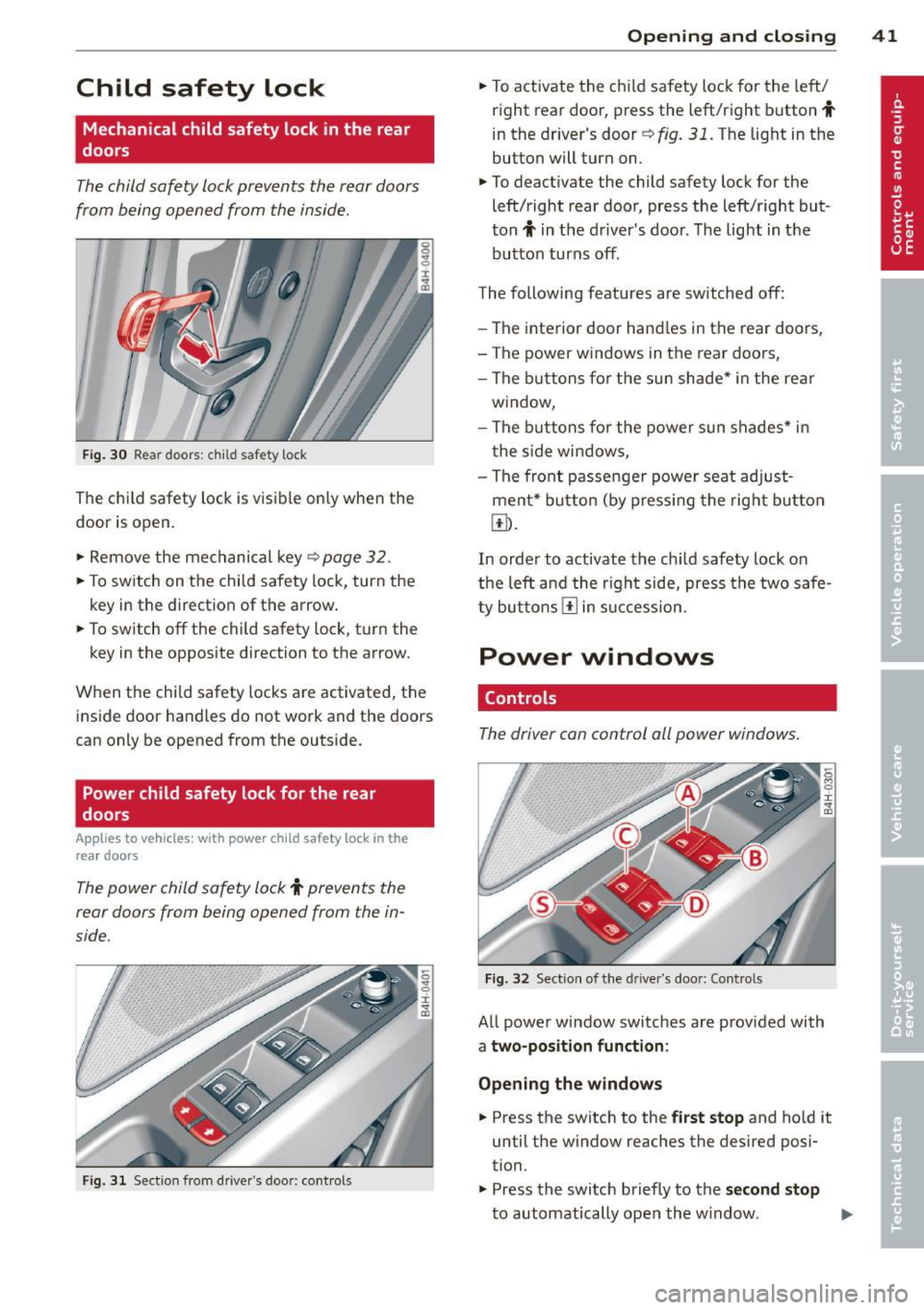
Fig. 31 Section from drive r's door: co ntrols
Opening and closing 41
• To activate the child safety lock for the left/
right rear door, press the left/right button
t
in the driver's door r=> fig. 31. The light in the
button will turn on .
• To deactivate the child safety lock for the
left/right rear door, press the left/right but
ton
t in the driver's door. The light in the
button turns
off.
The following features are switched off:
- The interior door handles in the rear doors,
- The power windows in the rear doors,
- The buttons for the sun shade* in the rear
window,
- The buttons for the power sun shades* in
the side windows,
- The front passenger power seat adjust
ment* button (by pressing the right button
Ii]).
In order to activate the ch ild safety lock on
the left and the right side, press the two safe
ty buttons
I!] in succession.
Power windows
Controls
The driver can control all power windows.
Fig. 32 Section of the driver's door: Controls
All power window switches are provided with
a two-position function :
Opening the windows
• Press the switch to the first stop and ho ld it
until the window reaches the desired posi
tion.
• Press the switch briefly to the
second stop
to automatically open the window. Ill-
Page 44 of 314
42 Opening and closing
Closing the windows
.,. Pull the switch to the first stop and hold it
until the window reaches the desired posi
tion .
.,. Pull the switch briefly to the
second stop to
automatically close the window.
Power window switches
@ Driver's door
@ Passenger's door
© Left rear door
@ Right rear door
® Safety button (or two safety buttons in
vehicles w ith power child safety locks
c:> page 41)
Child safety lock
When the safety button® c:> fig. 32 is press
ed, the LED in the button lights up. The fol
lowing features are switched off:
- The power windows in the rear doors,
- The buttons for the power sun shades * in
the side windows,
- The buttons for the power sun shade* in the
rear window,
- Front passenger power seat adjustment*
button.
&_ WARNING
- When you leave your veh icle - even if on
ly brief ly - always take the ignition key
with you. This applies particularly when children remain in the veh icle. Otherwise
the chi ldren could start the engine or op
erate electrical equipment (e.g. power
w indows). The power windows are func
tional until the driver's door or passeng
er's door has been opened .
- Be careful when closing the windows.
C heck to see that no one is in the way, or
serious injury could result!
- When locking the vehicle from outside,
the vehicle must be unoccupied since the
windows can no longer be opened in an
emergency.
(D Tips
- The driver can lower or raise the power
sun shades* in the s ide windows by using
switches © and @.
- After the ignition has been switched
off,
the windows can sti ll be opened or
closed for about 10 minutes. The power
w indows are not switched off until the
dr iver's door or passenger's door has
been opened .
What to do after a malfunction
The one-touch open and close function must
be reactivated if the battery has been discon
nected .
.,. Pull and hold the power window switch until
the window is fully closed .
.,. Release the sw itch and then pull it again for
at least one second.
Valet parking
The valet parking feature protects the lug
gage compartment from unauthorized ac
cess .
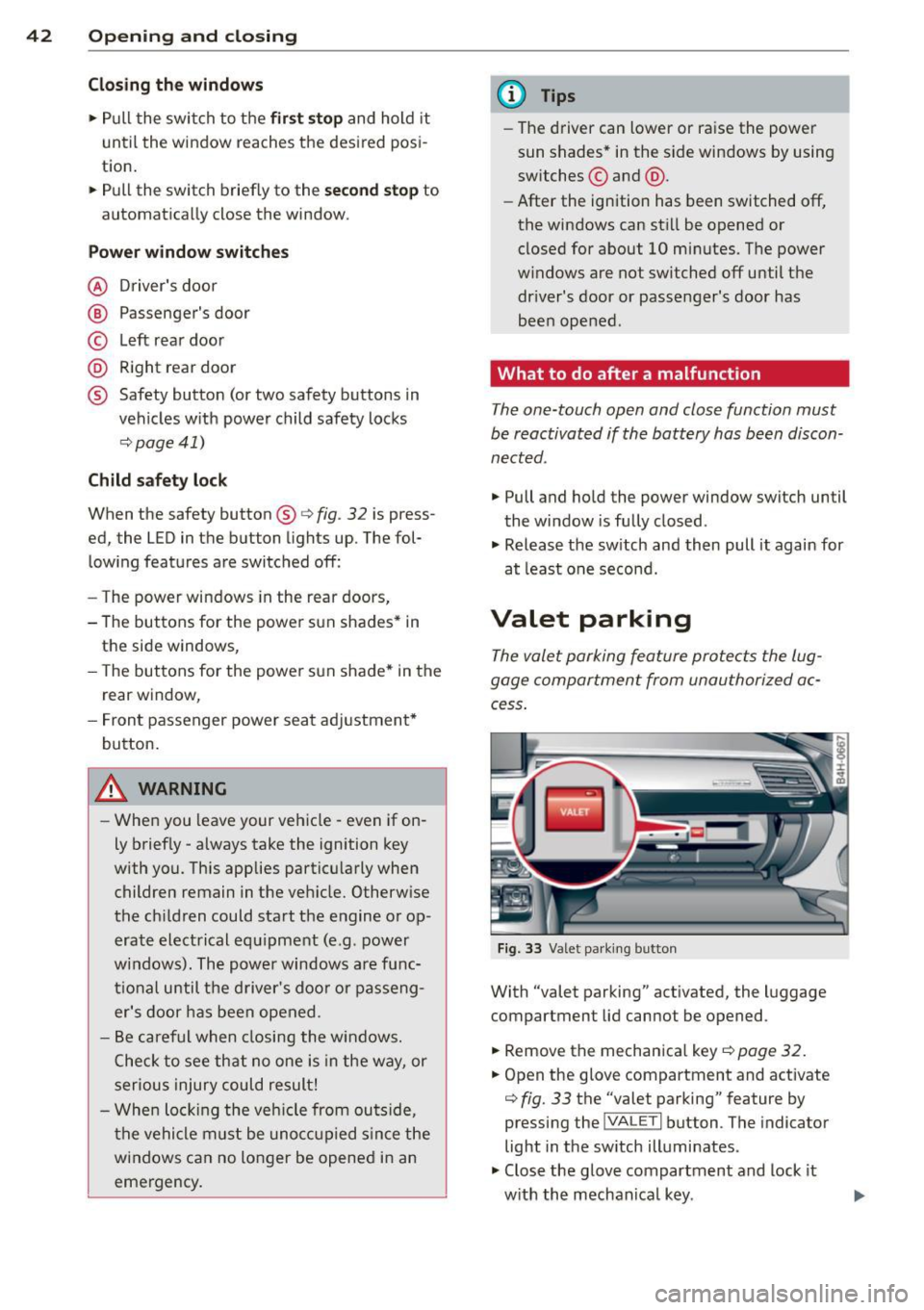
Fig. 33 Valet parking button
With "valet parking" activated , the luggage
compartment lid cannot be opened .
.,. Remove the mechanica l key
¢ page 32.
.,. Open the glove compartment and activate
c:> fig. 33 the "valet parking" feature by
pressing the
j VA LETi button . The indicator
light in the sw itch illuminates .
.,. Close the glove compartment and lock it
w ith the mechanical key . .,.
Page 60 of 314
58 Seat s a nd s tor ag e
Seats and storage
General recommen
dations
Why is your seat adjustment so
important?
The safety belts and the airbag system can
only provide maximum protection if the front
seats are correctly adjusted.
There are various ways of adjust ing the front
seats to provide safe and comfortable support
for the driver and the front passenger . Adjust
you r seat prope rly so that :
- you can easily and quick ly reach all the
switches and controls in the instrument
panel
-your body is prope rly supported thus reduc
ing physical stress and fatigue
- the safety be lts and a irbag system can offer
maximum protection
¢ page 153 .
In the following sec tions, you will see exactly
how you can best adjust you r seats .
There are special regulations and instructions
for insta lling a child seat on the front pas
senger's seat. Always fo llow the information
regarding ch ild safety provided in
q page 177, Child Safety.
A WARNING
Incorrect seating position of the driver and
all other passengers can result in serious
personal in jury.
- Always keep your feet on the floor when
the vehicle is in motion -never p ut your
f eet on top of the instrument panel, out
of the w indow or on top of the seat cush
ion . Th is app lies especially to the passen
gers .
If your seating position is incorrect,
yo u increase the r isk of injury in the case
of sudden braking or an acc ident.
If the
a irbag infla tes and the seating positio n
is incorrect, this could result in personal
injury o r even death.
- It is import ant for bo th the driver and
front passenger to keep a distance of at least 10 inches (25 cm) between them
selves and the steering wheel and/or in
strument panel. If you're s itting any
closer than th is, the a irbag system can
not protect you properly . In addition, the
front seats and head restraints must be
adjusted to your body height so that they
can give you max imum protect ion.
- Always try to keep as much distance as
possible between yourself and the steer
ing wheel o r inst rument pane l.
- Do not adjust the driver's o r front pas
senger's seat whi le the vehicle is moving.
Your sea t may move unexpected ly, caus
ing sudden loss of vehicle cont rol and
personal injury . If you adjust yo ur seat
while the veh icle is moving, yo u are out
of posit ion.
Driver's seat '
The correct seat position is important for safe
and relaxed driving.
We recommend tha t you adjus t the dr iver's
seat in the fo llowing manner :
.,. Adjust t he seat in fore and aft direction so
t ha t you can eas ily push the peda ls to the
floor w hile keeping your knees sl igh tly bent
q A in Why is your seat adjustment so im
portant? on page 58.
.. Adjust the backrest so that when you sit
w ith your back against t he backrest, you can
still grasp the top of the steering wheel.
.. Adjust the head restraint so the upper edge
is as even as poss ible with the top of your
head . If that is not poss ible , try to adjust
t he head restraint so that it is as close to
t his pos it ion as possib le
q page 65.
A WARNING
Neve r place any objects in the dr iver's foot
well. An object could get into the pedal
a rea and interfere with pedal function . In
case of sudden braking or an acc ident, you
would not be able to brake or accelerate .