Child AUDI S8 2014 User Guide
[x] Cancel search | Manufacturer: AUDI, Model Year: 2014, Model line: S8, Model: AUDI S8 2014Pages: 314, PDF Size: 78.47 MB
Page 61 of 314
Front passenger's seat
Always move the front passenger seat into the rearmost position .
To avoid contact with the airbag while it is de
ploying, do not sit any closer to the instru
ment panel than necessary and always wear
the three-point safety belt provided adjusted correctly . We recommend that you adjust the
passenger's seat in the following manner:
.. Bring the backrest up to an (almost) upright
pos it ion .
Do not ride with the seat reclined .
.. Adjust the head restraint so the upper edge
i s as even as possib le wit h the top of you r
head .
If that is not possib le, try to adjust
the head restraint so that it is as close to
this position as possible ¢
page 65.
.. Place your feet on the floor in front of the
passenger's seat.
Front seats
Controls
Moving the seat forward or back and adjust
ing the height , backrest angle and seat an
gle.
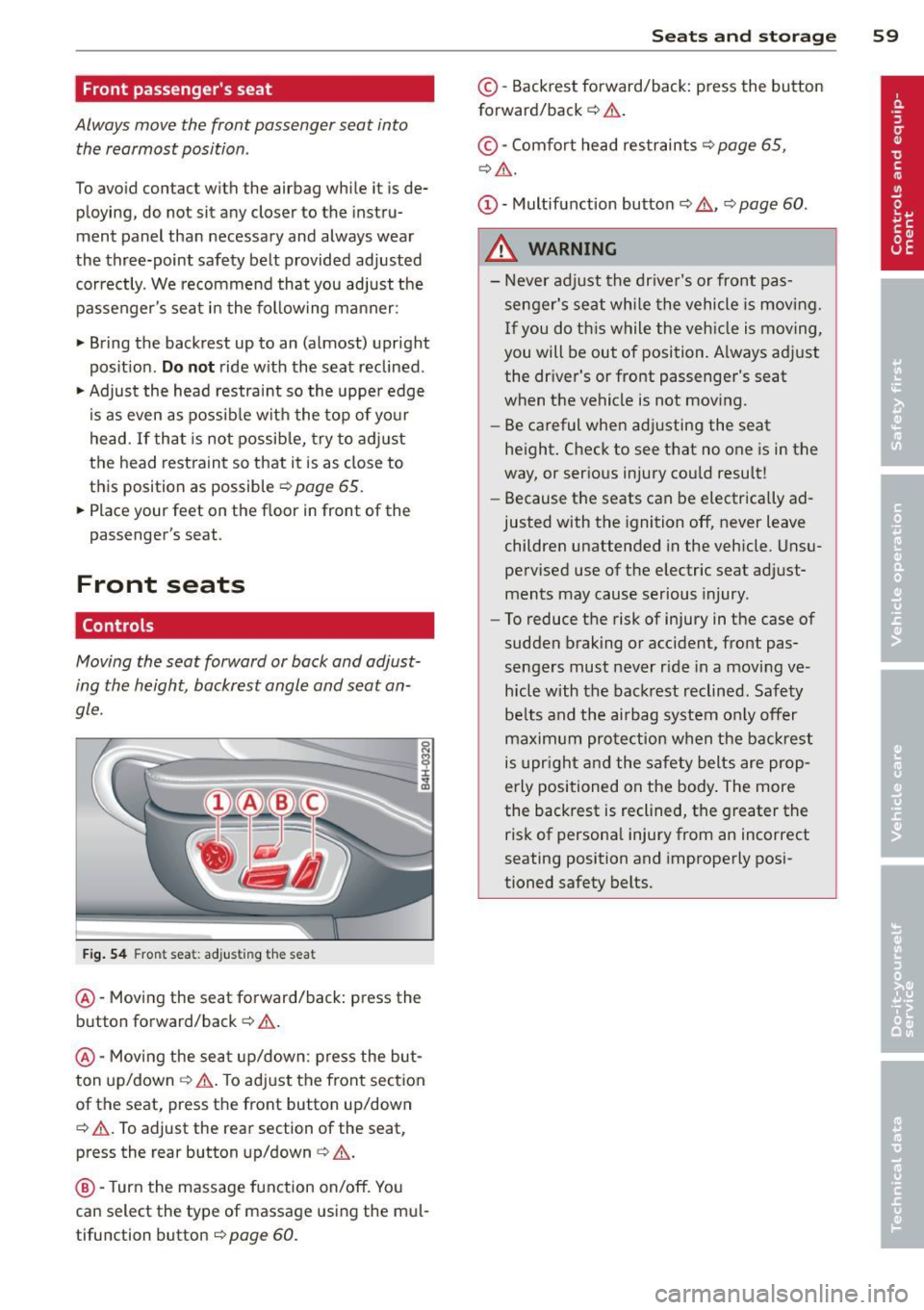
F ig . 54 Fron t seat: adju sting th e seat
@ -Mov ing the seat forward/back: press the
button forward/back ¢ .&, .
@ -Mov ing the sea t up/down : p ress the but
ton up/down ¢& . To ad just the front sect ion
of the seat, press the front button up/down
¢ .&, .To adjust the rear sect ion of the seat,
press the rea r button up/down
c> ,& .
@ -Turn the massage function on/off. You
can select the type of massage using the mu l
tifunct ion button
c> pag e 60.
Sea ts a nd s to rage 59
© -Backrest forward/back: press the button
forward/back ¢ .&, .
©-Comfort head restraints¢ page 65,
¢ ,& .
(D -Multifunction button ¢,& , ¢page 60.
A WARNING
-Never adjust the driver's or front pas
senger's seat whi le the vehicle is moving.
If you do th is while the veh icle is moving,
you will be out of position. A lways adjust
the dr iver's or front passenger's seat
when the vehicle is not moving.
- Be ca reful when adj usting the seat
height. Check to see that no one is in the
way, or serious injury cou ld resu lt!
- Because the seats can be electrically ad
justed with the ignition off, never leave children unattended in the vehicle . Unsu
pervised use of the electric seat adjust
ments may cause serious injury.
- To reduce the risk of injury in the case of
sudden braking or accident, front pas
sengers must never ride in a moving ve
hicle with the backrest reclined . Safety
be lts and the airbag system on ly offer
maximum protection w hen the backrest
is upr ight and the safety belts are prop
erly positioned on the body . The more
the backrest is reclined, the greater the risk of persona l injury from an incorrect
seating position and improperly posi
tioned safety belts.
Page 62 of 314
60 Seats and st o rage
Multifunction button
App lies to vehicles: wit h memory fu nctio n
You can adjust the massage function, upper
section of the backrest, lumbar support, side
bolsters, seating surface and safety belt
height using the multifunction button.
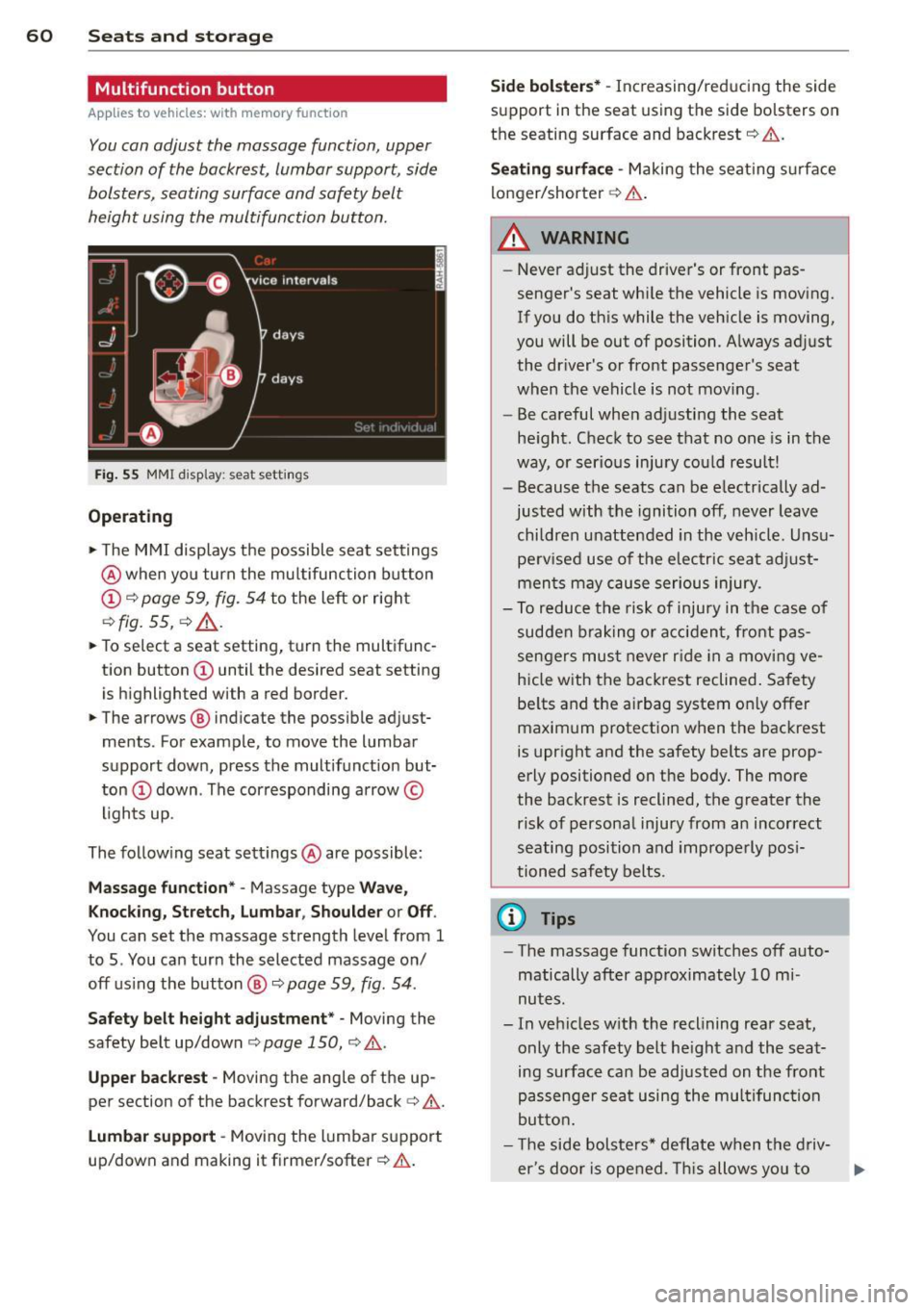
F ig. 55 MMI display : seat settings
Operating
• The M MI displays the possible seat sett ings
@ when yo u turn the mu ltifunction button
CD c:> page 59, fig. 54 to the left or right
c:> fig. 55, c:> .&_ .
• To select a seat setting, turn the multifunc
tion button
CD until the desired seat setting
is h ighlighted with a red border.
• The arrows ® indicate the possible adjust
ments . For example, to move the lumbar
support down, press the multifunct ion but
ton
CD down . The cor responding arrow ©
l ights up .
The following seat settings @are possible:
Mas sage funct ion * -Massage type Wave,
K nock in g, Stretch, Lumbar , Shoulder or Off .
You can set the massage strength level from 1
to 5 . You can turn the selected massage on/
off us ing the button ®
c:> page 59, fig. 54 .
Safety belt h eight adju stment * -Moving the
safety belt up/down
c:> page 150, c:> .&..
Upper backre st -Moving the ang le of the up
per section of the backrest forward/back
c:> &.
Lu mb ar support -Moving the lumbar support
up/down and making it firme r/softer
c:> .&. .
Side bol ster s* -Increasing/reducing the side
support in the seat using the side bolsters on
the seating surface and backrest
c:> &.
Seat ing surfa ce -Making the seat ing s urface
longer/shorter
c:> A .
A WARNING
-
-Never ad just the driver's or front pas
senger's seat whi le the vehicle is moving.
If you do this while the vehicle is moving,
you will be out of position. A lways adjust
the dr iver's or front passenge r's seat
when the vehicle is not mov ing.
- Be careful when adjusting the seat
he ight . Check to see that no one is in the
way, or serious injury cou ld result!
- Because the seats can be electrically ad
justed with the ignition off, never leave
children unattended in the veh icle. Unsu
perv ised use of the e lectr ic sea t adj ust
men ts may cause serious injury.
- To reduce the risk of injury in the case of
sudden b raking or acc iden t, front pas
sengers mus t never r ide in a movi ng
ve
hicle with the backrest reclined . Safety
be lts and the airbag system only offer
maximum protection when the backrest
is upright and the safety belts are prop
erly positioned on the body . The more
the backrest is reclined, the greater the risk of personal injury from an incorrect
seating position and improperly pos i
tioned safety belts .
@ Tips
-The massage function switches off auto
matically after approximately 10 mi
nutes.
- In vehicles w ith the reclining rear seat,
only the safety belt he ight and the seat
ing surface can be adjusted on the front
passenge r sea t using the mul tifunc tion
butto n.
- T he side bolsters * deflate when t he d riv-
er's doo r is ope ned. This allows you to ..,_
Page 64 of 314
62 Seats and storage
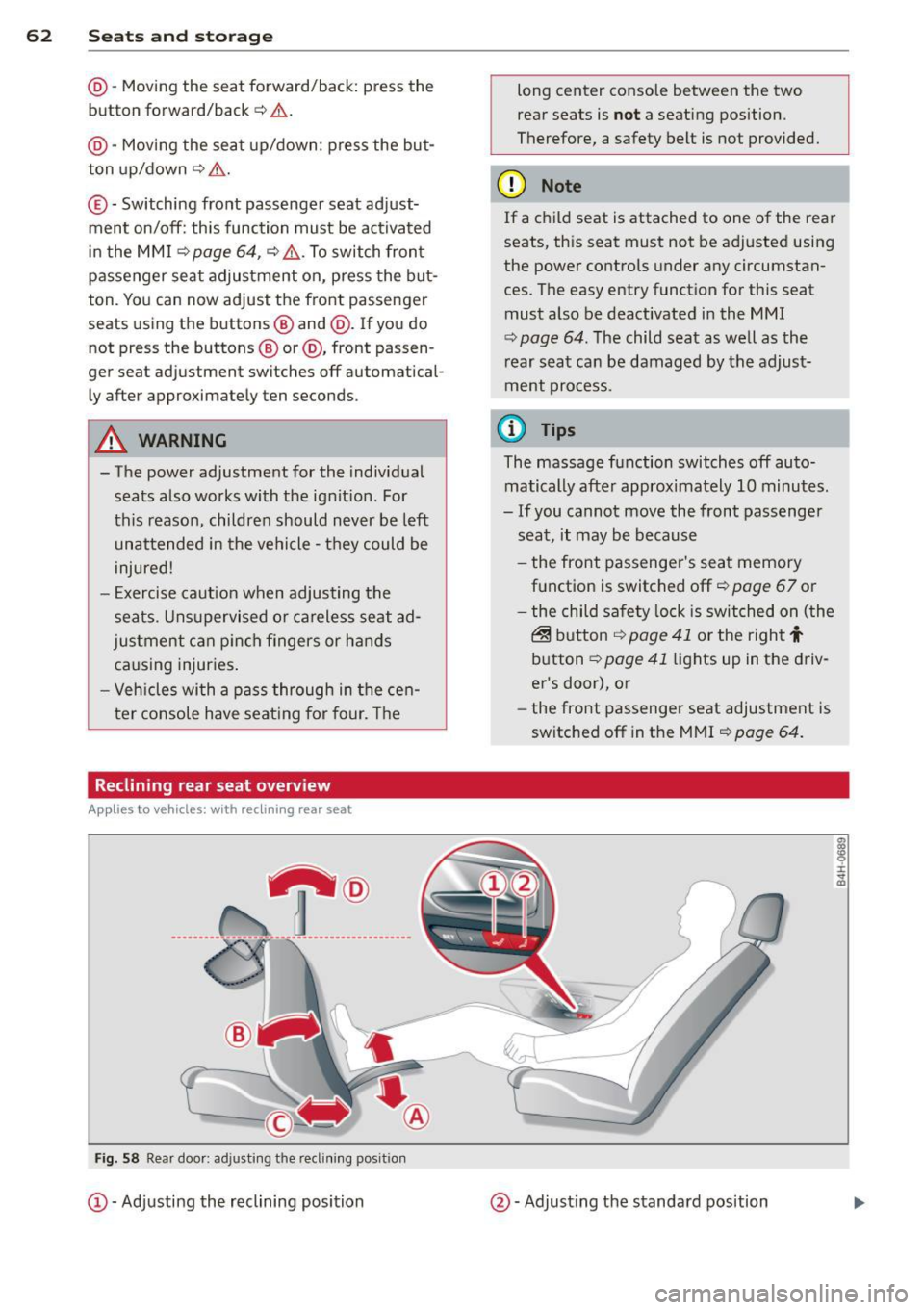
@-Moving the seat forward/back: press the
button forward/back
r=:, .&. .
@ -Moving the seat up/down: press the but
ton up/down~ &..
©-Switching front passenger seat adjust
ment on/off: this function must be activated
in the MMI
<=:> page 64 , <=:> &, .To switch front
passenger seat adjustment on, press the but
ton. You can now adjust the front passenger
seats using the buttons @and @. If you do
not press the buttons ® or@ , front passen
ger se at adjustment switche s off automatical
ly after approximately ten seconds.
A WARNING
- The power adjustment for the individual seats also works with the ignition. For
this reason, children should never be left
unattended in the vehicle -they could be
injured!
- Exercise caution when adjusting the
seats . Unsupervised or careless seat ad
justment can pinch fingers or hands causing injuries.
- Vehicles with a pass through in the cen
ter console have seating for four. The
Reclining rear seat overview
Applies to vehicles: with reclining rear seat
,-@
_____ ___ ., ------- ---- ·-------- ----- ------
-
Fig. 58 Rear door : ad justing t he reclining po sit ion
CD -Adjusting the reclining position long center console between the two
rear seats is
not a seating position.
Therefore, a safety belt is not provided.
(D Note
If a child seat is attached to one of the rear
seats, this seat must not be adjusted using
the power controls under any circumstan
ces. The easy entry function for this seat
must also be deactivated in the MMI
<=:> page 64. The child seat as well as the
rear seat can be damaged by the adjust
ment process.
(D Tips
The massage function switches off auto
matically after approximately 10 minutes.
- If you cannot move the front passenger
seat, it may be because
- the front passenger's seat memory
function is switched off
r=;, page 67 or
- the child safety lock is switched on (the
@ button ¢ page 41 or the right t
button <=:> page 41 lights up in the driv
er's door), or
- the front passenger seat adjustment is
switched off in the MMI
r=;, page 64.
@ -Adjusting the standard position
Page 66 of 314
64 Seats and storage
@ Tips
If you cannot move the seat into the re
clining position, it may be because
- the front passenger's seat memory func
tion is switched off¢
page 67 or
- the child safety lock is switched on (the
~ button ¢ page 41 or the right t but
ton ¢
page 41 light s up in the driver's
door), or
- the front passenger seat adjustment is
switched off in the MMI ¢
page 64.
Massage function remote control
Applies to vehicles: with reclining rear seat an d massage
fu nct ion
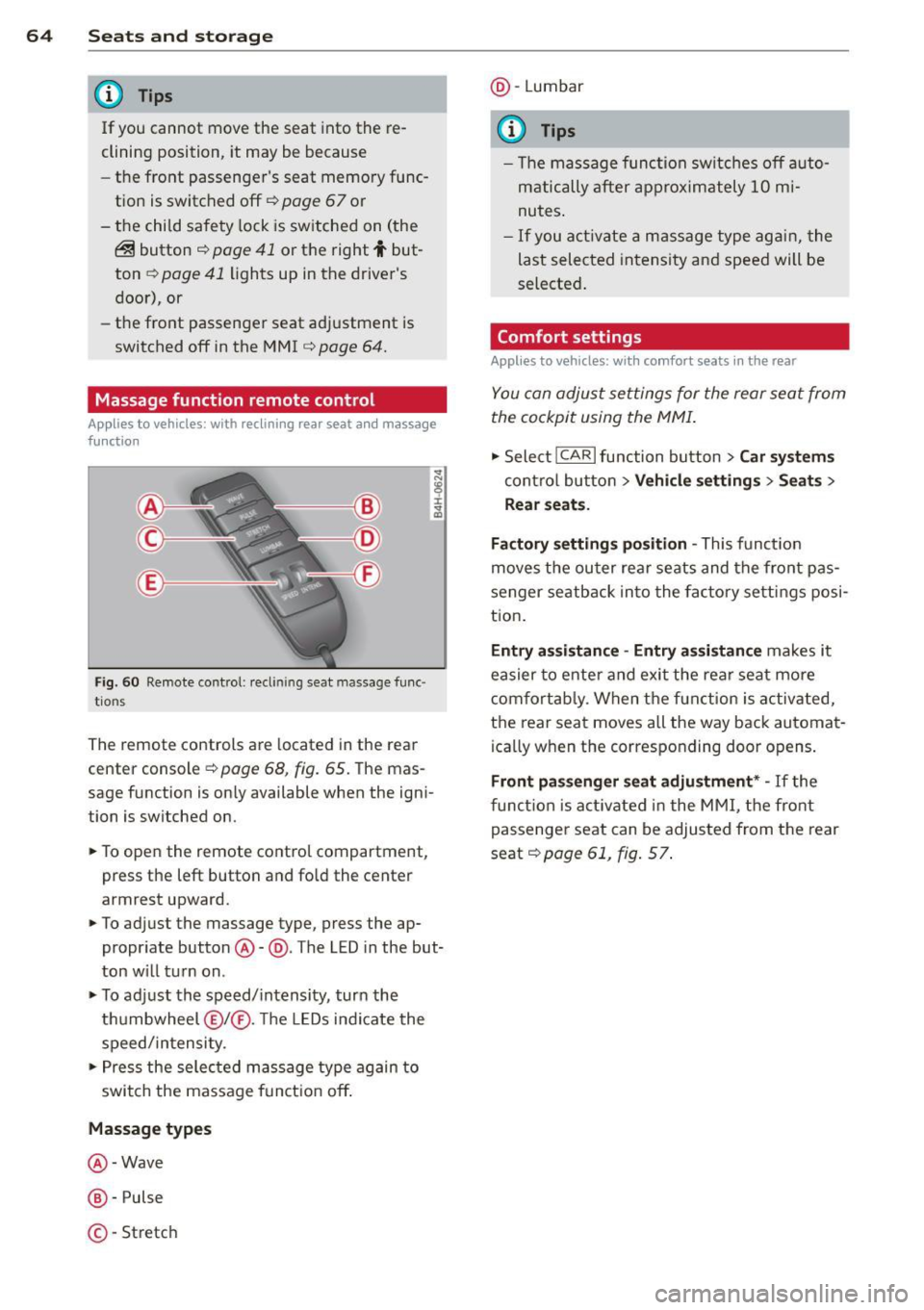
Fig . 60 Remote control: reclining seat massage func
tions
The remote controls are located in the rear
center console¢
page 68, fig. 65. The mas
sage function is on ly available when the igni
tion is switched on.
• To open the remote control compartment,
press the left button and fold the center
armrest upward.
• To adjust the massage type, press the ap
propriate button@-@ . The LED in the but
ton will turn on.
• To adjust the speed/intensity, turn the
thumbwheel @I® . Th e LEDs indicate the
speed/intensity.
• Press the selected massage type again to
switch the massage function off.
Massage types
@ -Wave
@-Pulse
©-Stretch @
-Lumbar
© Tips
- The massage function switches off auto
matically after approximately 10 mi
nutes.
- If you activate a massage type again, the
last selected intensity and speed will be
selected.
Comfort settings
Applies to vehicles: wit h comfort seats in the rear
You can adjust settings for the rear seat from
the cockpit using the MMI.
• Select !CARlfunction button> Car systems
control button > Vehicle settings > Seats >
Rear seats.
Factory settings position -
This function
moves the outer rear seats and the front pas
senger seatback into the factory settings posi
tion.
Entry assistance -Entry assistance makes it
easier to enter and exit the rear seat more
comfortably. When the function is activated,
the rear seat moves all the way back automat
ica lly when the corresponding door opens.
Front passenger seat adjustment* -If the
function is activated in the MMI, the front
passenger seat can be adjusted from the rear
seat¢
page 61, fig. 57.
Page 70 of 314
68 Seats and storage
Full-length center
console
Overview
Appl ies to vehicles: with full-len gth ce nter console
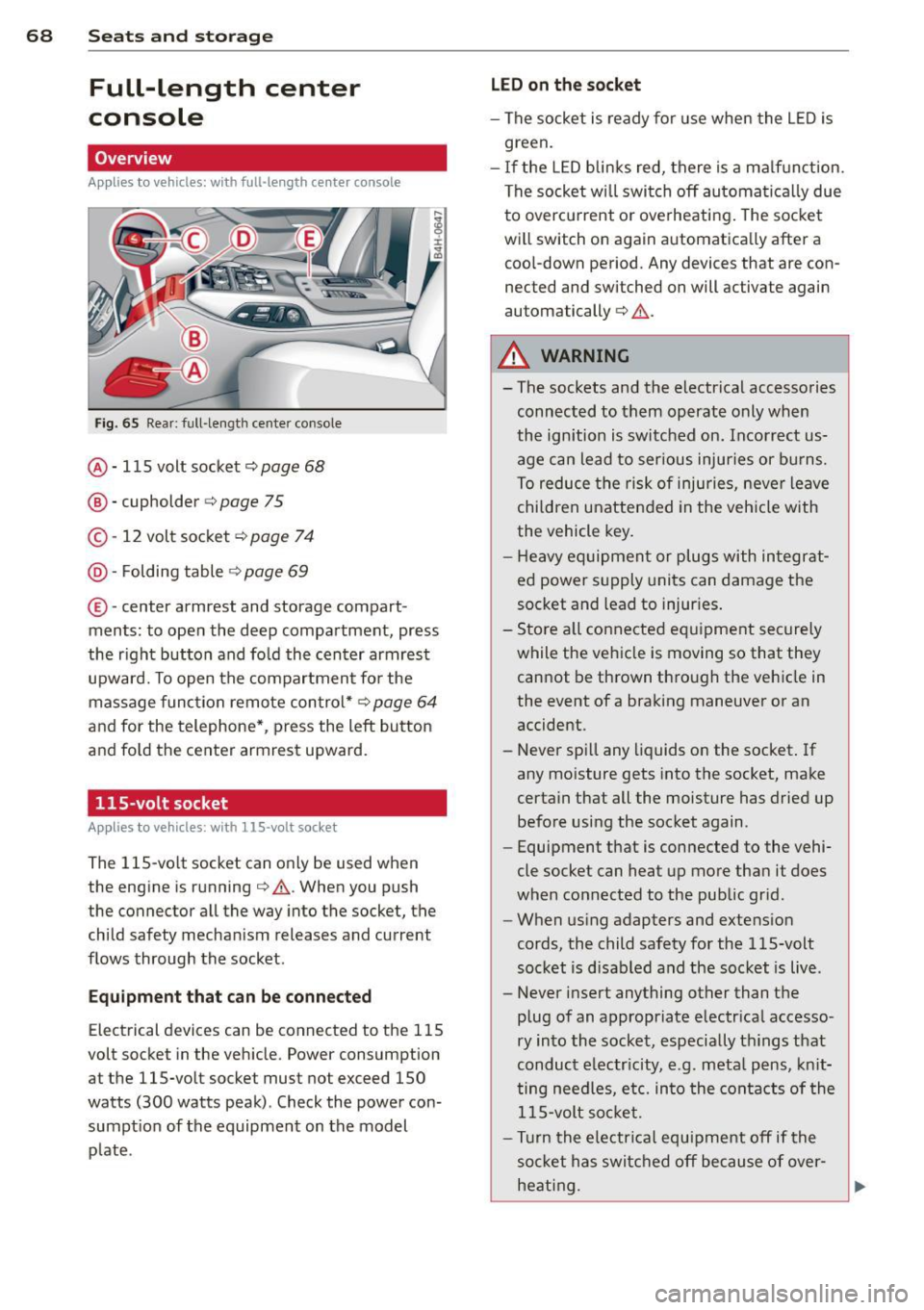
Fig. 65 Rear: full -length center console
@ · 115 volt socket ¢ page 68
@ · cupholder <=> page 75
© · 12 volt socket c:> page 7 4
@ · Folding table ¢ page 69
® ·center armrest and storage com part ·
ments: to open the deep compartment, press
the r ight button and fo ld the center armrest
upward. To open the compartment fo r the
massage func tion remote con trol*
c:> page 64
and fo r the telephone* , press the left button
and fo ld the center armrest upward.
115-volt socket
App lies to vehicles: with 115 -vo lt socket
The 115-vo lt socket can only be used when
the engine is running¢
A. When you push
the connector all the way into the socket, the
child safety mechan ism releases and current
flows through the socket .
Equipm ent that can be conn ected
Electrical devices can be connected to the 115
volt socket in the veh icle. Power consumption
at the 115-volt socket must not exceed 150
watts (300 watts peak) . Check the power con·
sumpt ion of the equipment on the model
p late .
LED on th e socket
- The socket is ready for use when the L ED is
green.
- If the LED blin ks red, there is a ma lf u nction.
The socket wi ll swi tch off automa tica lly due
to overcu rrent or overheating. The socke t
will switch on again automatica lly after a
coo l-down period. Any devices that are con
nected and switched on will activate again
automatically
c:> A .
A WARNING
-
- The sockets and the electr ical accessories
connec ted to them operate only when
the ignition is switched on. Incorrect us
age can lead to ser ious injuries or burns.
To reduce the risk of injuries, neve r leave
chi ldren unattended in the veh icle with
the vehicle key .
- H eavy equipment or plugs with in tegrat
ed power s upply units can damage the
socket and lead to injur ies .
- Sto re a ll connected e quipment securely
while the veh icle is moving so that they
cannot be thrown through the veh icle in
the event of a braking maneuver or an
accident.
- Never sp ill any liquids on the socket . If
any mo isture gets into the socket, make
certain that all the moisture has dried up before using the socket again.
- Equipment that is connected to the vehi·
cle socket can heat up more than it does
when connected to the public gr id .
- When us ing adapters and extens ion
cords, the child safety for the 115-volt
socket is d isabled and the socket is live.
- Never insert anything other than the
p lug of an appropriate e lectr ical accesso·
ry in to the socket, especially th ings that
conduct e lectr icity, e.g . meta l pens, kn it
ting needles, etc. in to the cont acts of the
1 15-volt so cket.
- Turn the electrical equ ipment off if the
socket has switc hed off because of over·
heat ing.
Page 89 of 314

Emergency brake function
An emergency brake ensures that the vehicle
can be slowed down even if the
normal brakes
fail
c::> page 88, Emergency broking.
Ind icator light s
-If the par king b rake is closed w ith the igni
t ion
s wit ched on the indicator lights come
on - (USA models)/ . (Canada models)
in the instrument cluster and in the switch.
- If the par king brake is closed w ith the igni
tion
s witc hed off the indicator lights come
on - (USA models)/ . (Canada models)
in the instr ument cluster and in the switch
for about 20 seconds.
A WARNING
Do not press the accelerator peda l inadver
tently if the vehicle is stat ionary but the
eng ine is running and a gear is selected.
Otherw ise the vehicle will start to move
immediately and cou ld result in a crash.
(D Note
If the symbol . in the display or the ind i
cato r light
1111 (USA models) . (Cana
da models) in the instrument cluster flash
es, the re is a malfunction in the bra ke sys
tem. Please refer to t he detai led descr ip
t ion of the indicator lights¢
page 14.
- If the indicato r light - (USA mod-
els) . (Canada mode ls) or
IIJ t ur ns
on, there may be a malfunction in the
parking brake
r=> poge 15.
@ Tips
-You can apply the pa rking brake at any
time -even w ith the ignition swi tched
off. The ignition must be on and the
brake pedal must be pressed in order to
release the parking brake.
- Occasiona l noises when the parking
brake is applied and re leased are norma l
and are not a ca use for concern.
- When the vehicle is parked, the parking
brake goes through a se lf-test cycle at
On th e ro ad 87
regular inte rva ls. Any associated noises
are normal.
· Parking
.. Press the brake pedal to stop the veh icle.
.. Pull the switch(®) to set the parking brake.
.. Select the P selector lever posit io n
c::> poge 116.
.. Tu rn the engine off c::> .&_ .
.,. When on inclines o r declines, tur n the steer
ing wheel so that your veh icle w ill ro ll into
t he c urb if it beg ins to move.
A WARNING
-==
- When you leave your vehicle -even if on-
ly briefly -always take the ignition key
with you. This applies particularly when
children remain in the vehicle. Otherwise
the children cou ld start the engine, re
lease the parking brake or operate elec
trical equipment (e.g. powe r wi ndows).
T here is the r is k of an accident.
- When the veh icle is locked, no one -par
ticularly not children should rema in in
the vehicle. Locked doors ma ke i t mo re
diff icult for emergency wo rke rs to ge t in
to the veh icle -putt ing lives at risk.
Starting from rest
The starting assist function ensures that the
parking broke is released automatically upon starting.
Stopping and applying park ing brake
.. Pull the sw itch(®) to apply the parking
brake .
Starting and automatic ally releasing the
parking brake
.. When you sta rt to dr ive as usual, the park
ing brake is automatically released and your
veh icle begi ns to move.
When stopping at a traffic signal or stopping in city traff ic, the parking brake can be ap-
plied . The vehicle does not have to be he ld
IJ>-
Page 124 of 314

122 Parking system s
Parking systems
General information
Applies to vehicles: with parking system plus/rear view
camera/peripheral cameras
Depending on your vehicle's equ ipment, vari
ous parking a ids wi ll help yo u when pa rk ing
and maneuve ring.
The
advanc ed park ing sy stem with r ear vi ew
cam era
ass ists you when parking by aud ibly
and v isua lly indicating objects detected
in
front of
and behind the veh icle. The rear view
camera shows the area behind the vehicle i n
the Infotainment disp lay. This disp lay assists
you when you are cross or parallel parking
co page 123.
The peripheral camera s assist yo u with pa rk
ing and maneuvering . You are aided by various
cameras depending on the vehicle equipment
leve l
co page 127. In add it ion, you are assist
ed by the functions from the sensors
co page 123, Sensors, co page 125, Visual
display.
A WARNING
- Always look fo r traff ic and check the area
around you r vehicle by looking at it di
rect ly as we ll. The parking sys tem canno t
rep lace t he drive r's a ttent ion. The dr iver
is a lways respons ible for safety during
par king and for all other maneuvers.
- Please note tha t some sur faces, such as
clothing, are not detected by the system .
- Sensors and cameras have blind spots in
wh ich peop le and objects cannot be de
tected . Be especially cautious of children
and animals.
- The sensors can be displaced by impacts or damage to t he radiato r grille, bumpe r,
wheel housing and the underbody. The park ing systems may become impaired
as a result. Have your authorized Audi
dealer or qualified workshop check their
f unction.
- Make sure the sensors are not covered by
stickers, deposits or any othe r obstruc
t ions as it may impair the senso r func- tion. Fo
r informat ion on cleaning, refe r
to
co page 216.
@ Note
- Some objects are not detected by the
system under certain ci rcumstances:
- Objects such as barrie r chains, trailer
draw bars, vertical poles or fe nces
- Objects above the sensors such as wall
extensions
- Objects w ith specific surfaces or struc
tures such as chain link fences or pow
de r snow.
- If you conti nue driving closer to a low- ly
ing object, it may disappea r from the
sensor range. Note that you w ill no lon
ger be warned about this obstacle.
0) Tips
- The system may provide a warning even
tho ugh there are no obstacles in the cov
erage a rea in some situations, such as:
- certain road s urfaces or for long grass .
- ex terna l ult raso nic sources e.g. from
cleaning vehi cles.
- h eavy ra in, s now or thick ve hicle ex
ha ust.
- We recommend tha t yo u pr actice park
ing in a t raff ic-free loca tion or par king
lot to become familiar w it h the system.
Whe n doi ng this, the re should be good
light and weathe r cond itions.
- Yo u can change the vo lume and pitch of
the s ignals as we ll as the disp lay
co page 132.
-Please refer to the instr uctions for tow
ing a t railer
co page 132.
-W hat appea rs in the infotainment dis
play is somewhat time-delayed.
Page 137 of 314
Driving Safely
General notes
Safe driving habits
Please remember -safety first!
This chapter contains important information,
tips, instructions and warnings that you need
to read and observe for your own safety, the
safety of your passengers and others . We have
summarized here what you need to know
about safety belts, airbags, ch ild restra ints as
well as child safety. You r safety is for us
priori
ty number 1.
Always observe t he information
a nd warn ings in th is se ct ion - for yo ur own
safety as well as that of your passengers .
The information in this se ction applies to all
model ve rsion s of your veh icle . Some of the
feat ures descr ibed in th is sec tions may be
standa rd equipment on some models, or may
be optional equipment on others . If you are
not sure, ask yo ur authorized Aud i dea ler.
A WARNING
- Always make sure that you follow the in
st ruct ions and heed the WARNINGS i n
this Manual. It is in your interest and in
the inte rest of you r passengers.
- Always keep the complete Owne r's Liter
at ure in your Audi when you lend or sell
yo ur vehicle so that this important info r
mation will always be ava ilable to the
dr iver and passenge rs.
- Always keep the Owner's literature handy
so that you can find i t eas ily if you have
ques tion s.
Safety equipment
The safety features are part of the occupant
restraint syst em and work togeth er to help
redu ce the risk of injury in a wide variety of
accident situations .
Your safety and the safety of your passenge rs
should not be left to chance. Advances in
t echnology have made a var iety o f fea tures
avai lable to he lp red uce the risk of i njury in an
Dr iving Safel y 135
accident . The following is a list of just a few of
the safety features in yo ur Audi :
- sophis tic ated s afety be lts fo r driver and a ll
passenger sea ting posit ions,
- s afety bel t prete nsio ners ,
- safety belt force lim ite rs fo r the front sea ts,
- safety belt he ight adjustment systems for
the front seats ,
- front airbags,
- knee airbags for the front seats - side airbags in the front seats and outer rea r
seats,
- side c urtain airbags ,
- specia l LATCH anchorages for child re-
straints,
- he ad restr aints for each sea ting pos it ion,
- adj ustab le steeri ng colum n.
These ind iv idual safety features, can work to
ge ther as a system to he lp protect you and
you r passenge rs in a wide rang e of accide nts .
T hese features canno t wo rk as a system if
they are not always cor re ct ly adjus ted and co r
re ct ly used.
Safety is everybody's responsibil ity!
Important things to do before driving
Safety is everybody 's job! Vehicle and occu
pant safety always depends on the informed and careful driver .
For yo ur safety and the safety of your passen
gers,
before d riving always:
.. Make s ure that all lig hts and signa ls are op
erating correctly .
.,. Make sure that the tire pressure is correct .
.. Make s ure that all w indows are clean and a f
ford good vis ibility to the outs ide .
.,. Se cure all luggage a nd o ther items caref ully
I::!) page 70, I::!) page 75 .
.. Ma ke s ure that no thing can inte rfere wi th
the peda ls .
.. Adj ust front seat, head restraint and mirrors
correctly for your height.
.. Instruct passengers to adjust the head re-
straints according to the ir height . .,.. •
•
Page 138 of 314
136 Driving Safel y
• Make sure to use the right child restraint
correct ly to protect children¢
page 177,
Child Safety.
• Sit properly in your seat and make sure that
your passengers do the same
¢ page 58,
General recommendations.
• Fasten your safety belt and wear it properly .
Also instruct your passengers to fasten their
safety belts proper ly
r::::> page 145.
What impairs driving safety?
Safe driving is directly related to the condi
tion of the vehicle, the driver as well as the
driver 's ability to concentrate on the road
without being distracted.
The driver is respons ible for the safety of the
vehicle and all of its occupants.
If you r ability
to drive is impa ired, safety r isks for everybody
i n the vehicle increase and yo u also become a
hazard to everyone else on the road
r:::;, .&_ .
Therefore:
• Do no t let yourself be distracted by passe n
gers or by using a cellular telephone.
• NEV ER drive when your driving ability is im
paired (by medications, alcohol, drugs, etc.).
• Observe all traffic laws, rules of the road
and speed limits and plain common sense .
• ALWAYS adjust your speed to road, traffic
and weather condit ions .
• Take frequent breaks on long trips . Do not
dr ive for more than two hours at a stretch.
• Do NOT drive when you are t ired, under
pressure or when you are stressed.
_8. WARNING
Impaired driving safety increases the risk
of serious personal injury and death when
ever a vehicle is being used.
Proper occupant
seating positions
Proper seating position for the driver
The proper driver seating position is impor
tant for safe, relaxed driving.
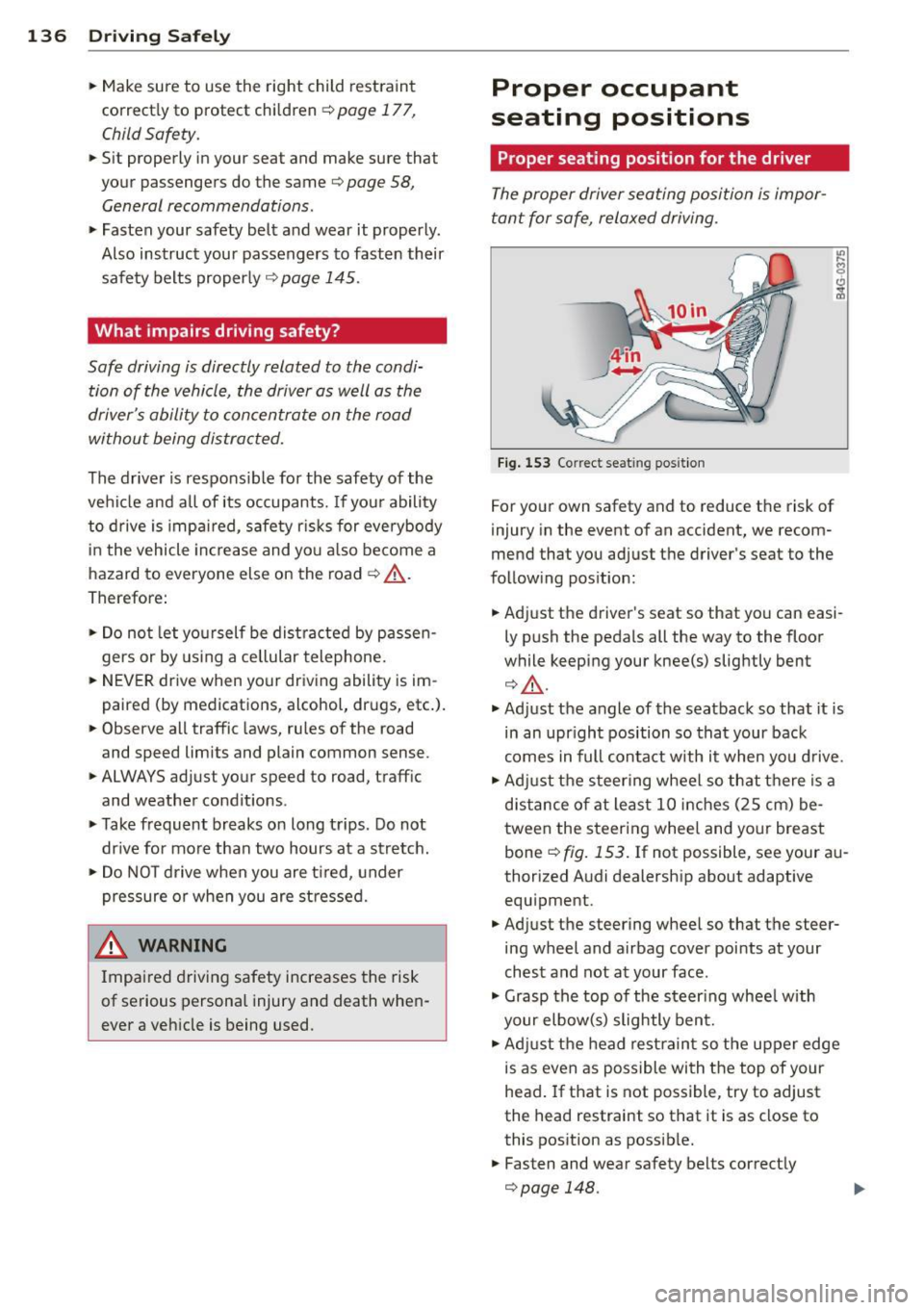
Fig. 153 Co rrect seat ing posit ion
For your own safety and to reduce the risk of
injury in the event of an accident, we recom
mend that you adjust the driver's seat to the
following position:
• Adjust the driver's seat so that you can easi
ly push the pedals all the way to the floor
while keeping your knee(s) slightly bent
r:::;, A.
• Adjust the angle of the seatback so that it is
in an upr ight position so that your back
comes in full contact with it when you drive.
• Adj ust the steering wheel so that there is a
distance of at least 10 inches (25 cm) be
tween the steering wheel and your breast
bone
r:::;, fig. 153. If not possible, see your au
thorized Audi dealership about adaptive equipment.
• Adjust the steering wheel so that the steer
ing wheel and airbag cover points at your
chest and not at your face .
• Grasp the top of the steer ing wheel with
your elbow(s) slightly bent.
• Adjust the head restraint so the upper edge
is as even as possible with the top of your
head.
If that is not possible, try to adjust
the head restraint so that it is as close to
this position as possib le.
• Fasten and wear safety belts correctly
r::::>page 148.
Page 139 of 314
~ Always keep both feet in the footwell so
that you are in control of the vehicle at all
times.
For detailed information on how to adjust the
driver's seat, see
c';> page 59.
A WARNING
Drivers who are unbelted, out of position
or too close to the airbag can be seriously
injured by an airbag as it unfolds. To help
reduce the risk of serious personal injury:
- Always adjust the driver's seat and the
steering wheel so that there are at least
10 inches (25 cm) between your breast
bone and the steering wheel.
- Always adjust the driver's seat and the
steering wheel so that there are at least
4 inches (10 cm) between the knees and
the lower part of the instrument panel.
- Always hold the steering wheel on the
outside of the steering wheel rim with
your hands at the 9 o'clock and 3 o'clock positions to help reduce the risk of per
sonal injury if the driver's airbag inflates.
- Never hold the steering wheel at the
12 o'clock position or with your hands at
other positions inside the steering wheel
rim or on the steering wheel hub. Hold
ing the steering wheel the wrong way
can cause serious injuries to the hands,
arms and head if the driver's airbag in
flates.
- Pointing the steering wheel toward your
face decreases the ability of the supple
mental driver's airbag to protect you in a
collision .
- Always sit in an upright position and nev
er lean against or place any part of your
body too close to the area where the air
bags are located.
- Before driving, always adjust the front
seats and head restraints properly and make sure that all passengers are prop
erly restrained.
- Never adjust the seats while the vehicle
is moving. Your seat may move unexpect-
Driving Safely 137
ed ly and you could lose control of the ve
hicle.
- Never drive with the backrest reclined or
tilted far back! The farther the backrests
are tilted back, the greater the risk of in
jury due to incorrect positioning of the safety belt and improper seating posi
tion .
- Children must always ride in child seats
c';> page 177. Special precautions apply
when installing a child seat on the front passenger seat¢
page 153.
Proper seating position for the front
passenger
The proper front passenger seating position
is important for safe, relaxed driving.
For your own safety and to reduce the risk of
injury in the event of an accident, we recom
mend that you adjust the seat for the front
passenger to the following position :
~ Adjust the angle of the seatback so that it is
in an upright position and your back comes
in full contact with it whenever the vehicle is
moving.
~ Adjust the head restraint so the upper edge
is as even as possible with the top of your
head. If that is not possible, try to adjust
the head restraint so that it is as close to
this position as possible¢
page 139.
~ Keep both feet flat on the floor in front of
the front passenger seat .
~ Fasten and wear safety belts correctly
¢page 148.
For detailed information on how to adjust the
front passenger's seat, see ¢
page 58.
A WARNING
Front seat passengers who are unbelted,
out of position or too close to the airbag
can be seriously injured or killed by the air
bag as it unfolds. To help reduce the risk of
serious personal injury:
•
•