warning lights AUDI S8 2016 Owner's Manual
[x] Cancel search | Manufacturer: AUDI, Model Year: 2016, Model line: S8, Model: AUDI S8 2016Pages: 302, PDF Size: 75.68 MB
Page 51 of 302

.... N
cluster illuminates when the high beams are
on.
- The
headlight flash er works only as long as you
hold the lever -even if there are no lights
turned on. The indicator light
& in the instru
ment cluster illum inates when you use the
headlight flasher.
A WARNING
Do not use the high beam or headlight flasher
if you know that these could bl ind oncoming
traffic.
High beam assist
App lies to: vehicles with high beam assist
The high beam assist automatically switches the
high beams on or off, depending on the sur
roundings and traffic conditions.
Fig. 45 Turn s ignal and h igh bea m lever : Turning on and
off the high beam assist
Activating high beam assist g
,.._ 0 ± .,. a,
Requirement:
The light switch must be in the AU
TO pos ition, the low beam headlights must be on
and the high beam assist must be switched on in
the Infota inment ~
page 47 .
.. Press the lever forwards (Din order to activate
the high beam assist. The indicator light
II
turns on in the instrument cluster display and
the high beams switch on or off automatically.
T he ind icator light
B turns on if the high
beams were switched on.
Switching the high beams on/off manually
a Requirement: High beam ass ist is activated . J:
'SI: ....
If the high beams did not switch on/off automat
ica lly when expected, you may instead switch
them on/off manually:
.. To switch the high beams on manually, press
the lever forwards (D. The indicator light
II
turns on.
.. To switch the high beams off manually, pull the
lever backwards @. The high beam assist is de
activated.
Operating the headlight flasher
.. To operate the flashers while the high beam as
sist is active and the high beams are switched
off, pull the lever into position@. The high
beam ass ist will remain active.
Messages in the instrument cluster display
Headlight assist: System fault
Drive to your authorized Audi dealer immediate ly
to have the malfunction corrected. You can still
switch the high beams on or off manually .
Headlight assist: Unavailable . No camera view
The camera view is blocked, for example by a
sticker or debris.
The sensor is located between the interior rear
view m irror and the windshield. Therefore, do not
place any stickers in this area on the windshield .
Service setting
There is a different sensitivity setting for servic
ing. This setting can be activated by pressing and
ho lding the button on the interior rearview mir
ror for more than 18 seconds. The LED next to
the button blinks three times. If you have acci dentally selected th is service function, the origi
nal sens itiv ity will be automat ically restored the
next t ime you sw itch the ignition on.
A WARNING
High beam assist is only intended to assist
the driver. The driver is still responsible for
controlling the headlights and switching the
high beams on and off manua lly depending
on traffic, lighting and visibility conditions.
Fail ure to intervene manually may lead to r isk
Ill>-
49
Page 53 of 302
Adjusting the brightness
You can adj ust the brigh tness for the four zones
Front top , Front f ootwell , Rea r top and Rear
footwell
or for All area s at the same time.
Selecting a color profile
You can se lect from the Ivory , Polar and Rub y/
Polar
color profi les.
@ Tips
The settings are automatically stored and as
sig ned to the remo te control key that is in
use .
Instrument illumination
You can adjust the brightness of the instrument
and display illumination as well as the Head-up
Display* .
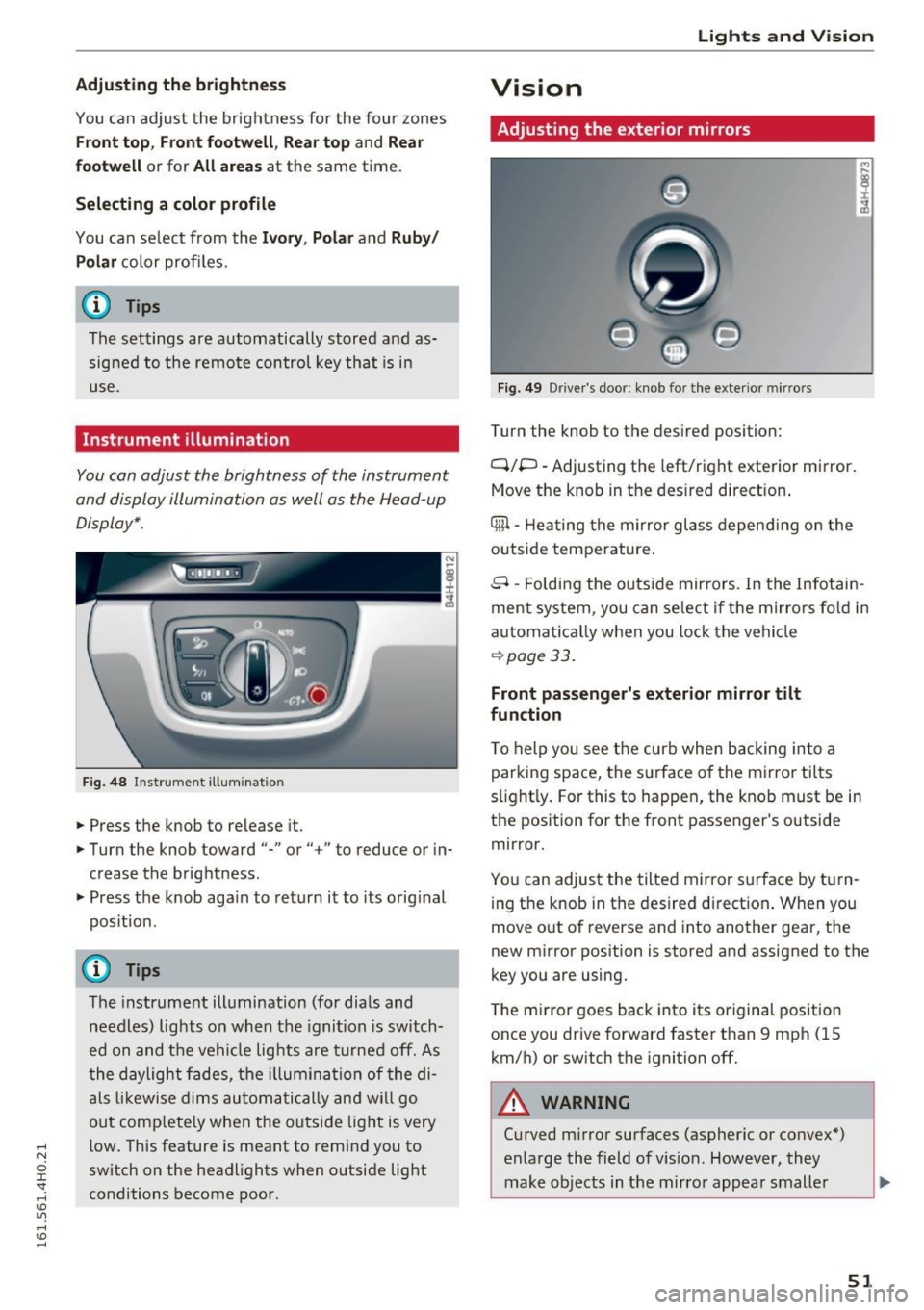
Fig . 4 8 Instr ument ill um ination
.. Press the knob to release it.
.. Turn the knob toward"-" or"+" to reduce or in
crease the brightness .
.. Press the knob aga in to return it to its orig inal
pos itio n.
(D Tips
The instrument ill umination (for dia ls and
needles) lights o n when the igni tion is switch
ed on and t he ve hicle lights are tu rned off. As
t he daylight fade s, the illum ina tion of the di
a ls likewi se dims au tom atic ally a nd w ill go
ou t comp lete ly when the outsi de light is very
low. This feature is meant to rem ind you to
sw itch on the head lights when o utside light
conditions become poor.
Lights and V ision
Vision
Adjusting the exterior mirrors
Fig. 4 9 Driver 's doo r: knob fo r the exte rio r mirr ors
Turn the knob to the des ired position:
Q/P -Adjusting the left/right e xterior mirror.
Move the knob in t he des ired direct ion .
Qill -Hea ting the mir ror glass depend ing o n the
outside tempe rature .
8 -Foldi ng the o utside mir ro rs . In the Infotai n
ment system , you can se le ct if t he m irro rs fo ld in
a utomat ically when you lock the vehi cle
~ page 33.
Front passenger 's exterior mirror tilt
function
T o help you see the curb when backing into a
parking space, the su rface o f the mirro r tilts
s li ght ly . For this to happen, the knob must be in
the position for the front passenger's outside
mirror .
Yo u can adjus t the tilted mir ro r sur face by turn
i ng the knob in the desired d irect ion . When you
move out of reverse and into another gea r, the
new m irror position is stored and assigned to the
key you are using.
T he m irror goes back into its or iginal pos ition
once you drive forward faster t han 9 mph (15
km/h) or sw itch the ignition off.
A WARNING
-Cu rved m irror surfaces (aspher ic or convex *)
enlarge the field of v is ion . However, they
make objects in the mirro r appea r small er
51
Page 54 of 302
Lights and Vision
and farther away. Your may estimate incor
rectly when you use these mirrors to gauge
your distance from the vehicles behind you
when changing lanes, which increases the risk of an accident .
CD Note
-If the mirror housing was moved by outside
forces (such as an impact when maneuver
ing), you must use the power folding func
tion to fold the mirror all the way out. The
mirror housing must not be moved back in
to place by hand because this would impair
the function of the mirror mechanism.
- If you wash the vehicle in an automatic car
wash, you must fold the exterior mirrors in
to reduce the risk of damage to the mirrors.
Never fold power folding exterior mirrors by
hand. Only fold them in and out using the
power controls.
@ Tips
- If the power adjusting function malfunc
tions, the glass in both mirrors can be ad
justed by pressing on the edge of it by hand.
- The exterior mirror settings are stored with
the memory function"~
page 65.
Dimming the mirrors
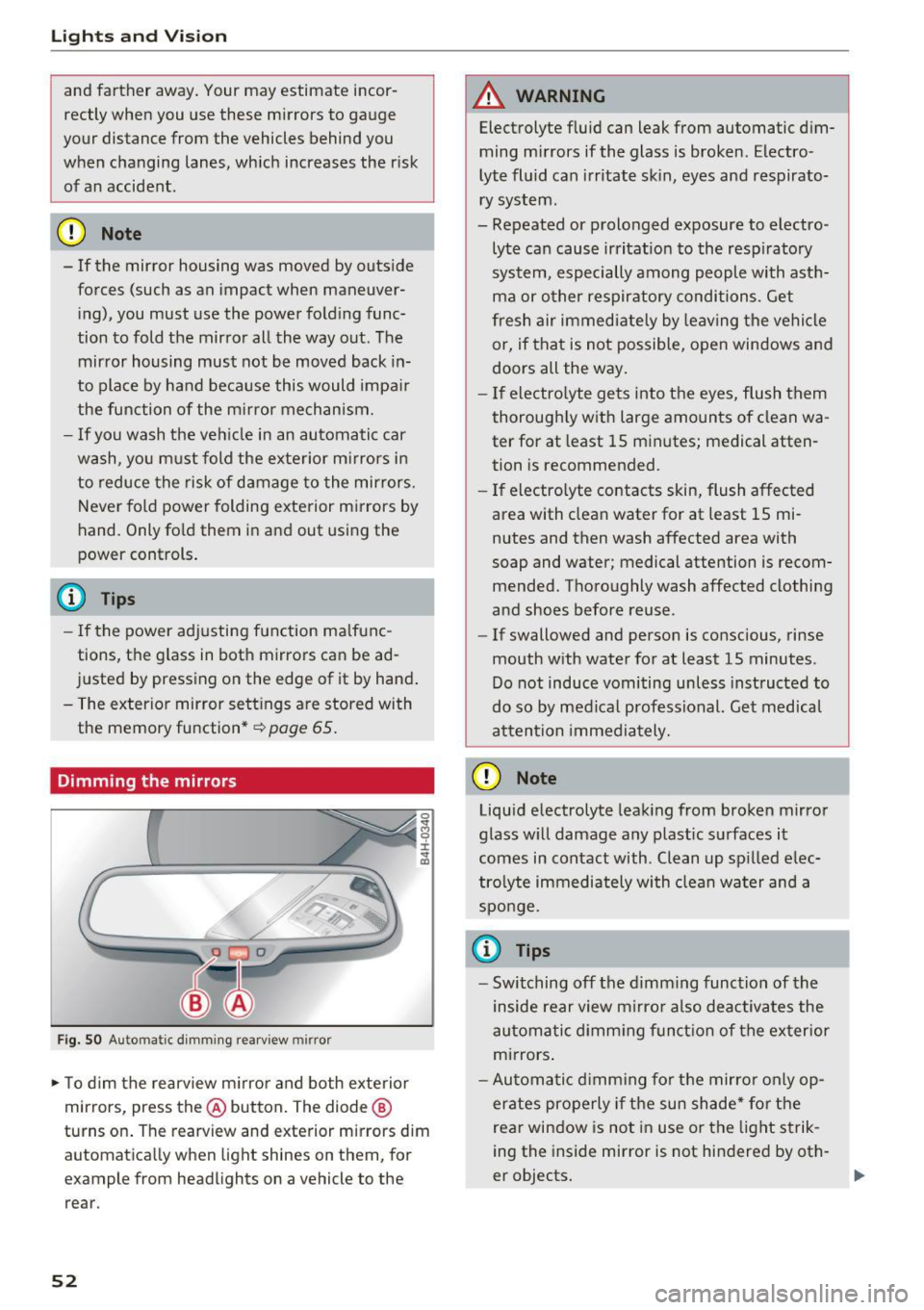
Fig. SO Automa tic dimming rearview mirror
0 ... M 9 :x:
~
~ To dim the rearview mirror and both exterior
m irrors, press th e@ button. The diode ®
turns on. The rearview and exterior mirrors dim
automatically when light shines on them, for
example from headlights on a vehicle to the rear .
52
A WARNING
Electrolyte fluid can leak from automatic dim
ming mirrors if the glass is broken. Electro
lyte fluid can irritate skin, eyes and respirato
ry system .
- Repeated or prolonged exposure to electro
lyte can cause irritation to the respiratory
system, especially among people with asth
ma or other respiratory conditions. Get
fresh air immediately by leaving the vehicle
or, if that is not possible, open windows and
doors all the way.
- If electrolyte gets into the eyes, flush them
thoroughly with large amounts of clean wa
ter for at least 15 minutes; medical atten
tion is recommended .
- If electrolyte contacts skin, flush affected
area with clean water for at least 15 mi
nutes and then wash affected area with
soap and water; medical attention is recom
mended. Thoroughly wash affected clothing
and shoes before reuse .
- If swallowed and person is conscious, rinse
mouth with water for at least 15 minutes .
Do not induce vomiting unless instructed to
do so by medical professional. Get medical
attention immediately.
CD Note
Liquid electrolyte leaking from broken mirror
glass will damage any plastic surfaces it
comes in contact with . Clean up spilled elec
trolyte immediately with clean water and a
sponge.
(0 Tips
- Switching off the dimming function of the
inside rear view mirror also deactivates the
automatic dimming function of the exterior
mirrors.
- Automatic dimming for the mirror only op
erates properly if the sun shade* for the
rear window is not in use or the light strik
ing the inside mirror is not hindered by oth-
er objects.
II>
Page 56 of 302
Lights and Vision
_&. WARNING
When lowering or raising the sunshade, make
sure there is nothing in its way and that it has
a free path to travel. This could cause person
al injury .
{!) Tips
-Pressing the button Ii.!.) several times con
secutively can trigger the overload protec
tion . The sun shade can only be extended/
retracted again after a brief wa iting period .
- The rear window sun shade only functions
when the vehicle interior is warmer than
14°F (-10°C).
Vanity mirror in the rear
Applies to: vehicles with vanity mirrors in the rear
Fig. 54 Rear he ad lin er : vanity mirro r
• Press the button to fold the m irror open. The
mirror lighting turns on automat ically .
a, N
i
• To change the mirror's ang le, move it forward/
bac k with your hand .
Windshield wipers
Switching the windshield wipers on
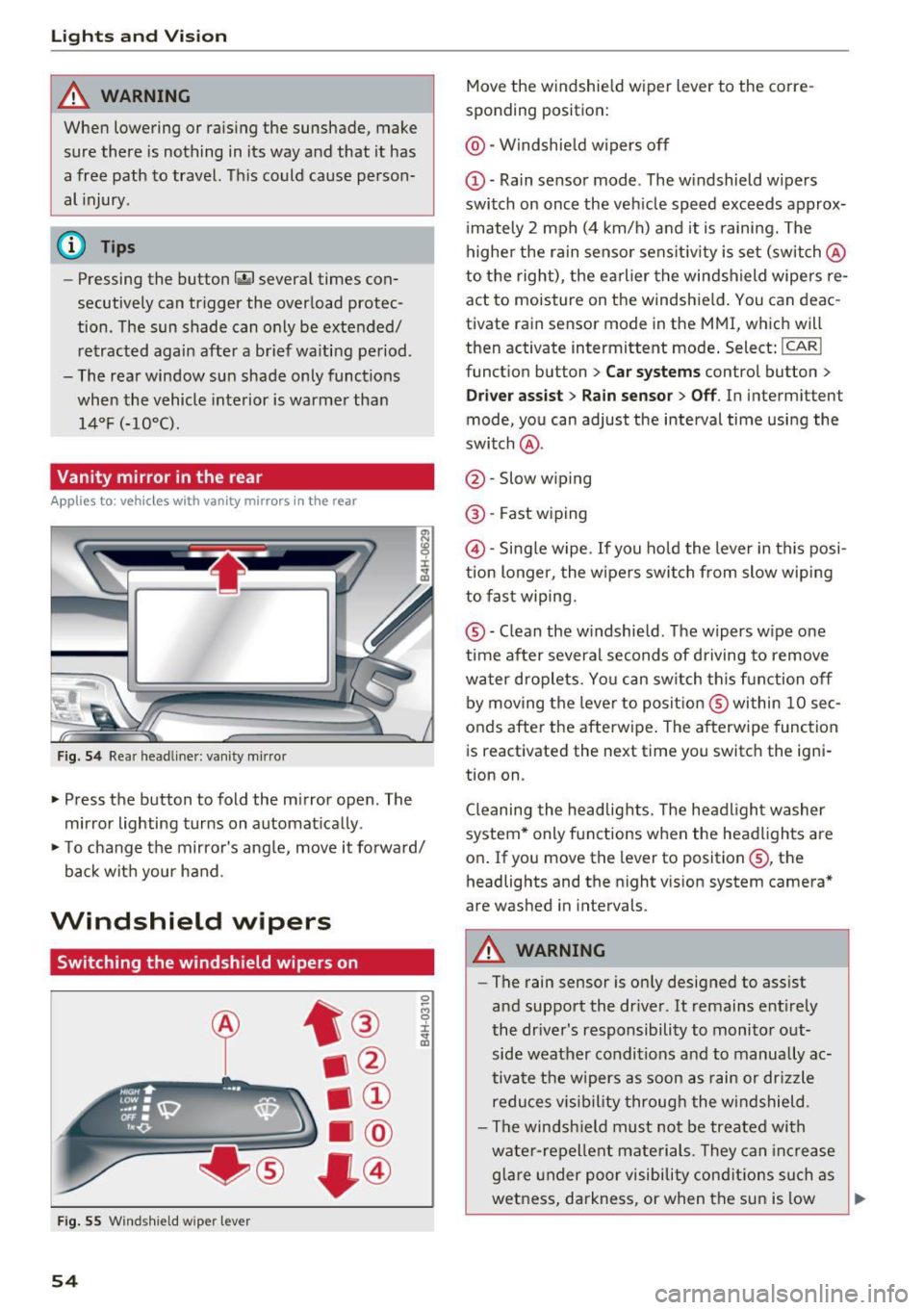
Fig. 55 Windshield wip er le v er
54
Move the windshield wiper lever to the corre
sponding position:
@ -Windshield wipers off
(D -Rain sensor mode . The windshield w ipers
switch on once the vehicle speed exceeds approx
i mately 2 mph (4 km/h) and it is raining. The
higher the rain sensor sensit iv ity is set (switch @
to the right) , the earlier the windshield wipers re
act to moisture on the windshield . You can deac
t ivate rain sensor mode in the MMI, which will
then activate intermittent mode . Select:
!CAR I
function button > Car systems control button >
Driver assist> Rain sensor> Off. In intermitten t
mode, you can adjust the interval time using the
switch @.
@ -Slow wiping
@-Fast wiping
@-Single wipe. If you hold the lever in this posi
tion longer, the wipers switch from slow wiping
to fast wiping.
® -C lean the windshield . The wipers wipe one
time after several seconds of driving to remove
water droplets . Yo u can sw itch this function off
by moving the lever to position ® within 10 sec
onds after the afterwipe . The afterwipe function
is r eactivated the next time you switch the igni
tion on .
Cleaning the headlights. The headlight washer
system* only functions when the headlights are
on . If you move the lev er to position ®, the
headlights and the night v ision system camera*
are washed in intervals.
_&. WARNING
-The rain sensor is on ly designed to assist
and support the dr iver . It remains entirely
the driver's responsibility to monitor out
side weather conditions and to manually ac
tivate the wipers as soon as rain or drizzle
reduces vis ibility through the windshield.
- The windsh ield must not be treated with
water-repellent materials. They can increase
glare under poor visibility cond itions such as
wetness, darkness, or when the sun is low
Page 57 of 302
..... N
0 J:
'SI: .....
the windshield wipers to chatter.
- Properly functioning windshield wiper
blades are required for a clear view and safe
driving
c=> page 55, Replacing windshield
wiper blades.
- In the case of frost, check whether the
windshield wiper blades are frozen to the
windshield. Switching on the windshield
wipers can damage the wiper blades!
- Prior to using a car wash, the windshield wiper system must be switched off (lever in
position @). This helps to prevent uninten
tional switching on and damage to the
windsh ield wiper system.
- Do not use the wipers to clear a frosted win dow . Using the wipers as a convenient ice
scraper will destroy the wiper blades.
@ Tips
- The windshield wipers are switched off
when the ignition is off. Activate the w ind
sh ield wipers afte r the ignit ion is switched
back on by moving the windshield wiper lev
er to any position.
- Worn or dirty windshield wipe r blades result
in streaking . This can affect the rain sensor
function. Check your windshield wipe r
blades regu larly .
- The washer fluid nozzles of the windshield
washer system are heated at low tempera
tures when the ignition is on.
- When stopping temporarily, e.g. at a traffic
light, the set speed of the windshield wipers
is automatically reduced by one speed.
Cleaning windshield wiper blades
Clean the windshield wiper blades when they be
gin to leave streaks. Use a soft cloth and glass
cleaner to clean the windshield wiper blades.
.,. Place the windshield wiper arms in the service
position. Refer to
c=> page 55.
.,. lift the wiper arm away from the front window .
Lights and Vision
A WARNING
Dirty windshield wiper blades can impair your
view. This can lead to accidents .
Replacing windshield wiper blades
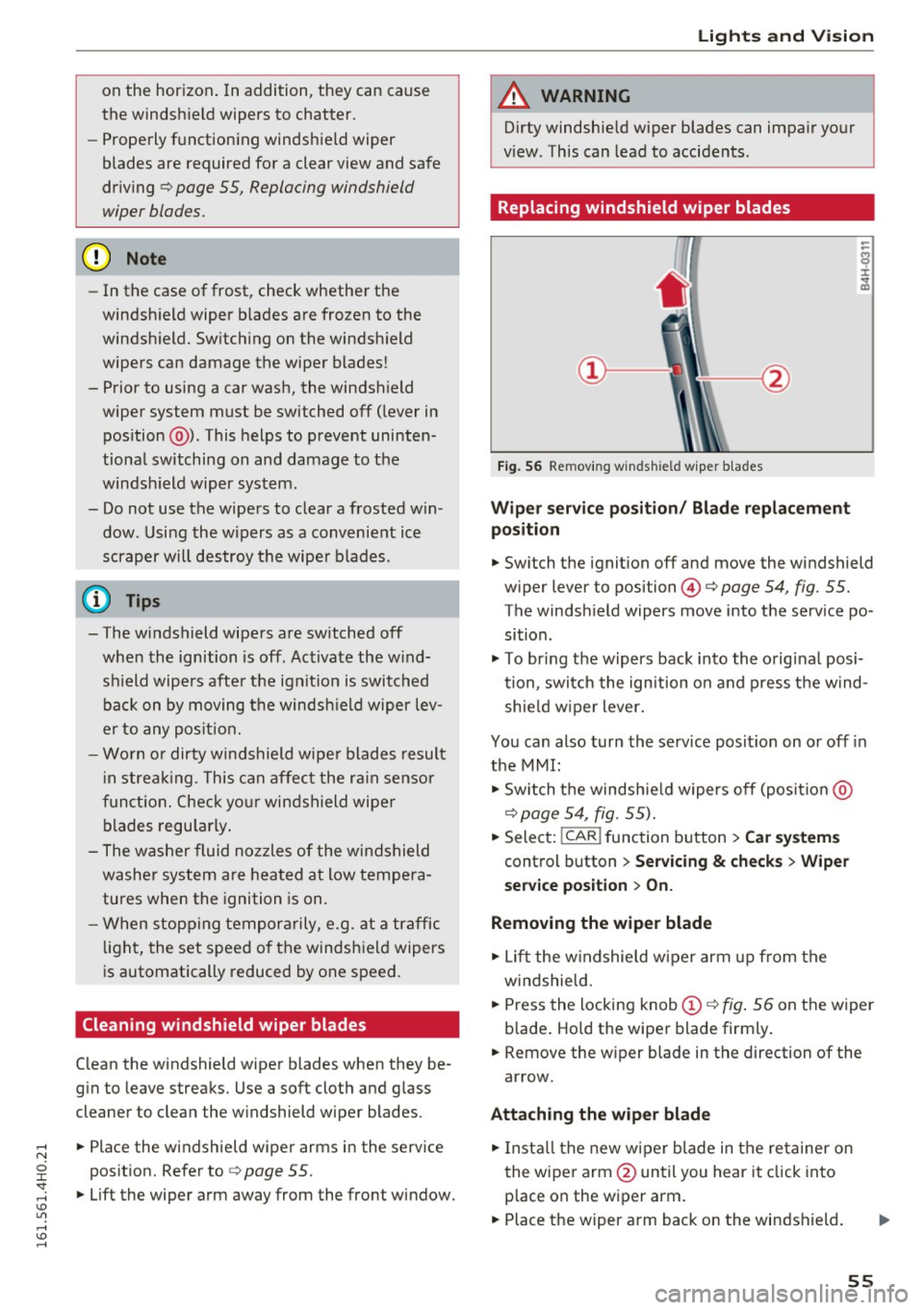
Fig. 56 Remov ing w indsh ield wiper blades
Wiper service position/ Blade replacement
position
.,. Switch the ignition off and move the windshield
wiper lever to position@¢
page 54, fig. 55.
The windsh ield wipers move into the service po
sition .
.,. To bring the wipers back into the original posi
tion, switch the ignition on and press the wind
shie ld wiper lever.
You can also turn the service posit ion on or off in
the MMI:
.,. Switch the windshie ld wipers off (posit io n @
c=> page 54, fig. 55).
.,. Select: !CAR ! function button > Car systems
control button > Servicing & checks > Wiper
service position > On.
Removing the wiper blade
.,. Lift the windshie ld wiper arm up from the
w indshie ld .
.,. Press the locking knob
(D c=> fig. 56 on the wiper
b lade . Hold the wiper blade firmly .
.,. Remove the w iper blade in the direction of the
arrow.
Attaching the wiper blade
.,. Install the new wiper blade in the re tainer on
the wiper arm @until you hear it click into
p lace on the wiper arm .
.,. Place the wiper arm back on the windshield. ..,.
55
Page 58 of 302
Lights and Vision
.. Turn the service position off.
_& WARNING
For your safety, you should replace the wiper
blades once or twice a year. See your author
ized Audi dealer for replacement blades.
- The windshield wiper blades must only be
folded away when in the serv ice position!
Otherwise, you risk damaging the paint on
the hood or the windshield wiper motor.
- You should not move your vehicle or press
the windshield wiper lever when the wiper
arms are folded away from the windshield.
The windshield wipers would move back in
to their original position and could damage
the hood and windshield.
- To help prevent damage to the wiper sys
tem, a lways loosen blades which are frozen
to the windshield before operating wipers.
- To help prevent damage to wiper blades, do
not use gasoline, kerosene, paint thinner, or
other solvents on or near the w iper blades.
- To help prevent damage to the wiper arms
or other components, do not attempt to move the wipers by hand.
(D Tips
- Commercial hot waxes applied by automat ic
car washes affect the cleanability of the
windsh ield.
- You can also use the serv ice position, for ex
ample, if you want to protect the windsh ield
from icing by us ing a cover.
- You cannot activate the service position
when the hood is open.
56
Digital compass
Switching the compass on and off
Applies to: vehicles with digital compass
The compass direction is shown in the rearview
mirror.
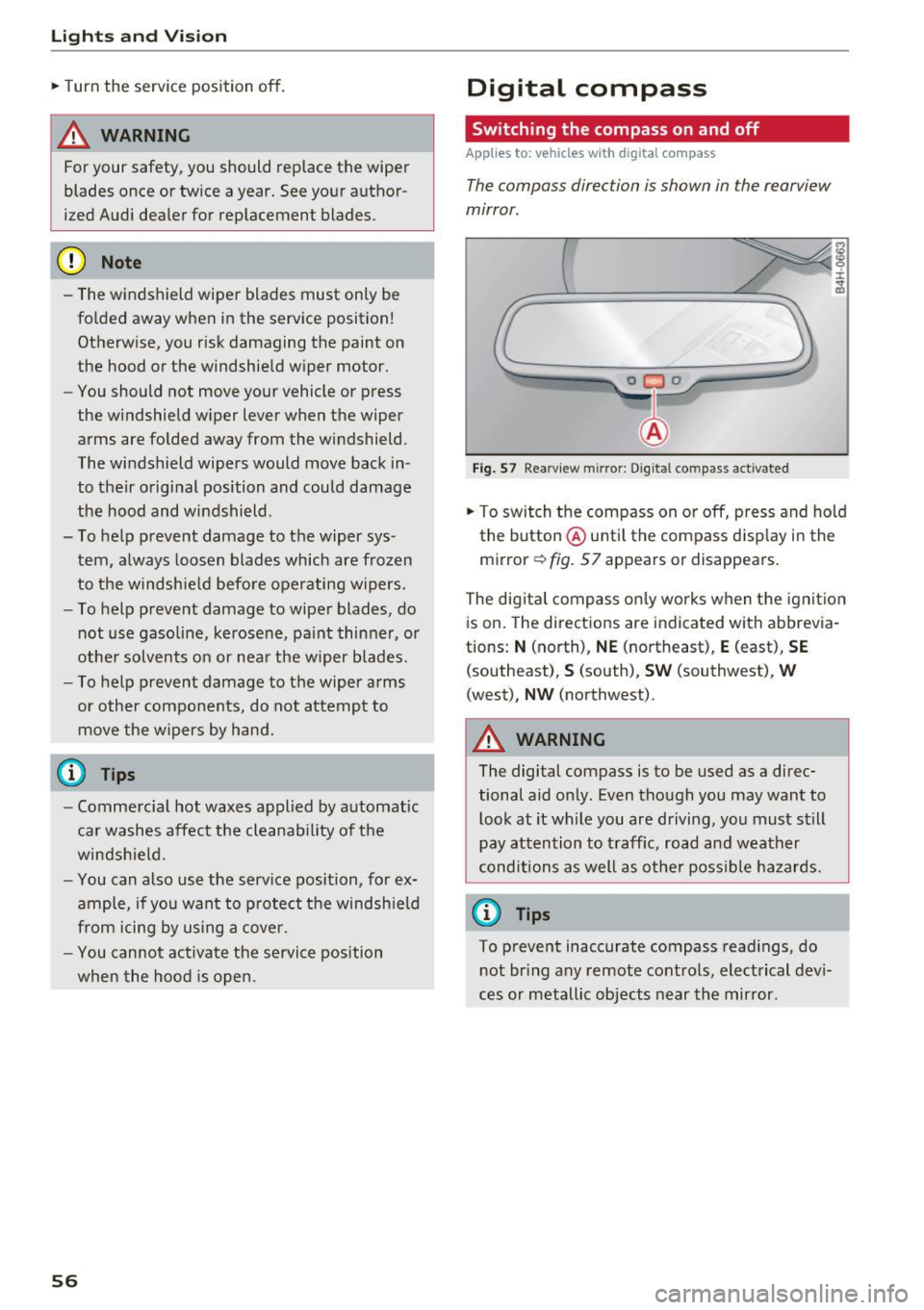
[ j
Fig . 57 Rearv iew m irror: Digital compass activated
the button @until the compass display in the
mirror
c:!:> fig. 57 appears or disappears.
The dig ital compass only works when the ignit ion
is on. The directions are indicated with abbrevia
tions:
N (north), NE (northeast), E (east), SE
(southeast), S (south), SW (southwest), W
(west), NW (northwest).
_& WARNING
The digital compass is to be used as a direc
tional aid only. Even though you may want to
look at it while you are driving, you must still
pay attention to traff ic, road and weather
conditions as well as other possible hazards.
(0 Tips
To prevent inaccurate compass readings, do
not bring any remote controls, electrical devi
ces or metallic objects near the mirror.
-
Page 59 of 302
Adjusting the magnetic zone
Applies to: vehicles with digital compass
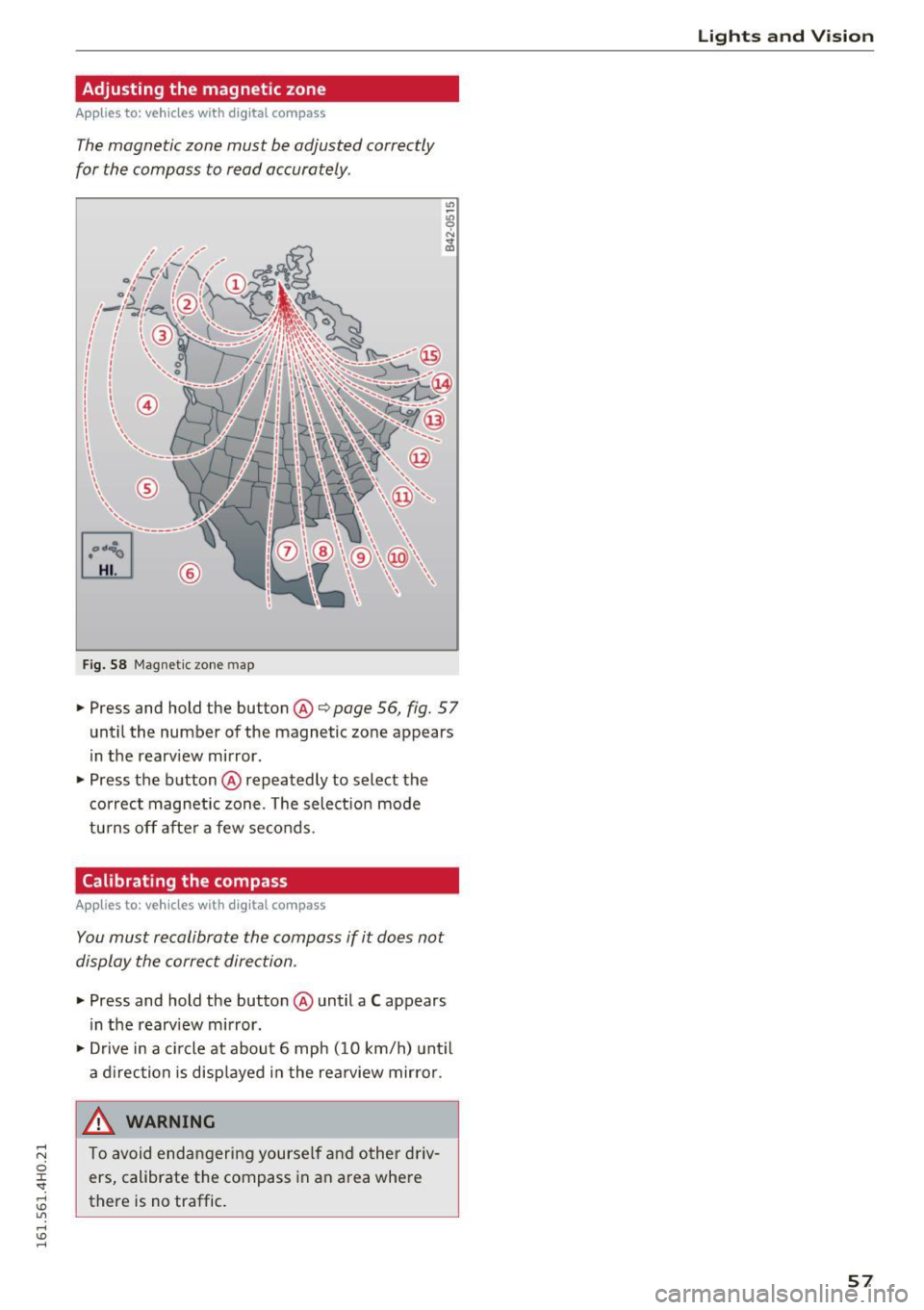
The magnetic zone must be adjusted correctly
for the compass to read accurately .
®
Fig. 58 Magnetic zone map
• Press and hold the button @i=> page 56, fig. 57
until the number of the magnetic zone appears
in the rearv iew mirror.
• Press the button @repeatedly to select the
correct magnetic zone. The select ion mode
tu rns off after a few seconds.
Calibrating the compass
Applies to: vehicles with digital compass
You must recalibrate the compass if it does not
display the correct direction .
• Press and hold the button @until a C appears
in the rearv iew mirror.
• Drive in a c ircle at about 6 mph ( 10 km/h) until
a direction is disp layed in the rearview mirror.
_& WARNING ,___
To avoid endangering yourself and other driv
ers, calibrate the compass in an area where
there is no traffic.
Lights and V ision
57
Page 68 of 302
Seats and storage
Memory buttons
Applies to: vehicles w ith memory funct ion
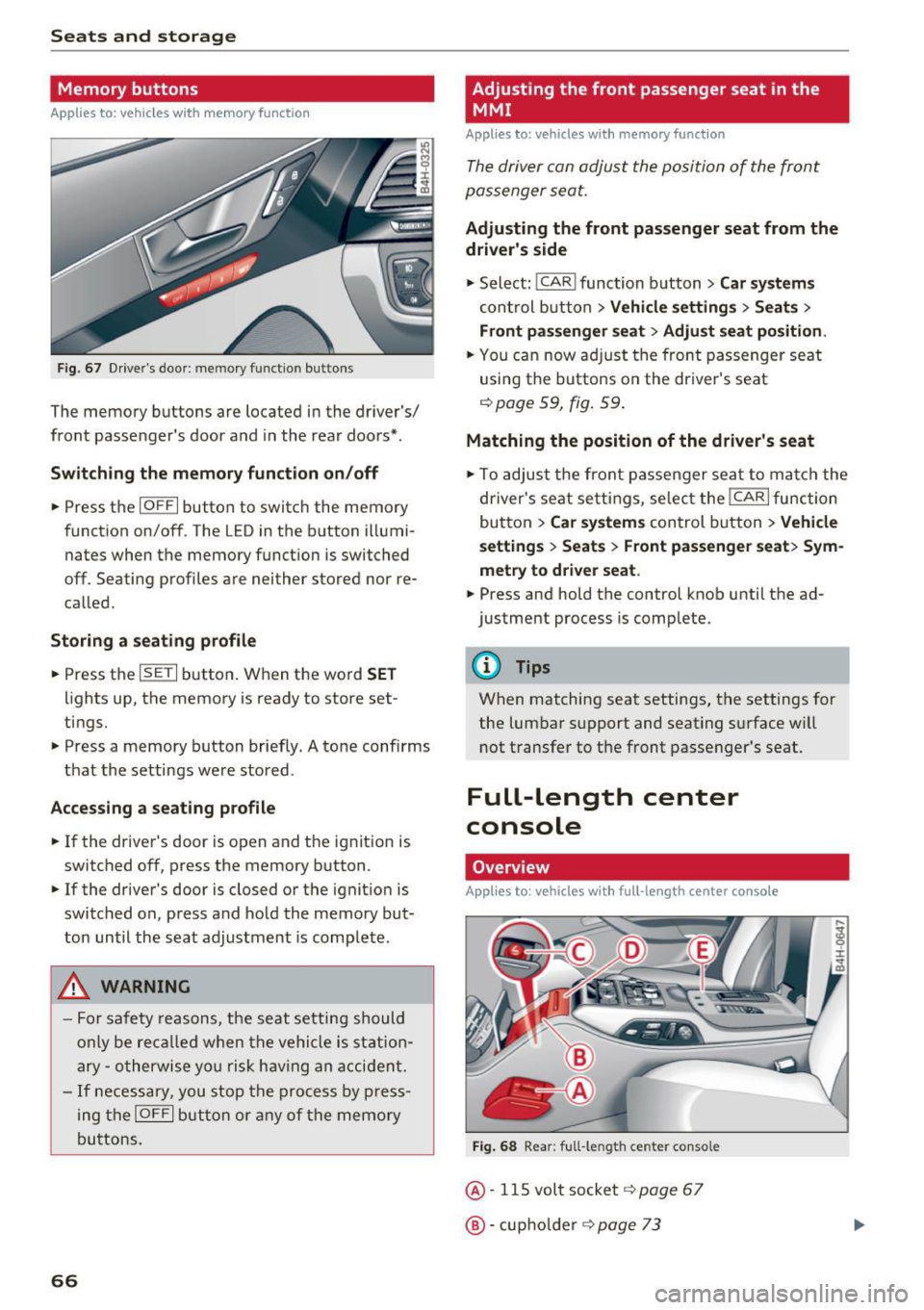
F ig. 67 Driver's door: memory function buttons
The memory buttons are located in the driver's/
front passenger's door and in the rear doors*.
Switch ing the memory function on /off
• Press the IOFFI button to switch the memory
function on/off. The LED in the button illumi
nates when the memory funct ion is switched
off. Seating profiles are neither stored nor re
called .
Storing a seating profile
• Press the ISETI button . When the word SET
lights up, the memory is ready to store set
tings.
• Press a memory button briefly. A tone confirms
that the settings were stored .
Accessing a seating profile
• If the driver's door is open and the ignit ion is
switched off, press the memory button .
• If the driver's door is closed or the ignition is
switched on, press and hold the memory but
ton until the seat adjustment is complete.
A WARNING
-For safety reasons, the seat setting should
only be recalled when the vehicle is station
ary -otherwise you r isk having an accident.
- If necessary, you stop the process by press
ing the
IOFF I button or any of the memory
buttons.
66
Adjusting the front passenger seat in the
MMI
Appl ies to : vehicles wi th memo ry funct ion
The driver con adjust the position of the front
passenger seat.
Adjusting the front passenger seat from the
driver's side
• Select: I CAR I function button > Car systems
control button > Vehicle settings > Seats >
Front passenger seat> Adjust seat position .
• You can now adjust the front passenger seat
using the buttons on the driver's seat
¢page 59, fig. 59 .
Matching the position of the driver's seat
• To adjust the front passenger seat to match the
driver's seat settings, select the
I CAR I function
button
> Car systems control button > Vehicle
settings > Seats > Front passenger seat> Sym
metry to driver seat.
• Press and hold the control knob unti l the ad
justment process is complete.
@ Tips
When matching seat settings, the settings for
the lumbar support and seating surface w ill
not transfer to the front passenger's seat.
Full-Length center
console
Overview
Applies to: vehicles wit h ful l- length center co nsole
Fig. 68 Rear: full-le ngth center console
@· 115 volt socket i=> page 67
@·cup holder i=> page 73
Page 86 of 302
Driving
E m erg ency b ra ke function
An emergency b rake ensures that the veh icle can
be slowed down even if the
normal brakes fai l
¢ page 85, Emergency broking.
.&_ WARNING
-
Do not press the accelerator pedal inadver
tently if the vehicle is stationary but the en
gine is runn ing and a gear is selected. Other
w ise the vehicle will start to move immediate
ly and could result in a crash.
(D Tips
- If the parking brake is app lied with the igni
tion switched off, the indicator lights in the
switch and -(USA models)/ . (Cana-
da models) in the instrument cluster will go
out after a ce rtain per iod of t ime.
- Occasional noises when the parking brake is applied and released are normal and are not
a cause for conce rn.
- When the vehicle is parked, the park ing
brake goes thro ugh a self-test cycle at regu
l a r i ntervals. Any associa ted noises a re nor
mal.
Parking
" Press the brake ped al to stop the vehicle.
" Pull the switch
«el} to set the parking brake .
" Se lect the P selector lever position
c:> poge 112.
"Turn the eng ine off c> &_ .
"When on incl ines or declines, turn the steering
wheel so that your vehicle will roll into the c urb
if it beg ins to move .
.&_ WARNING
-When you leave your vehi cle -even if on ly
br iefly -always ta ke the ignition key with
yo u. This applies par ticularly when children
remain in the vehicle . Otherwise the chil
dren could start the engine, release the
parking b rake o r operate elect rical eq uip
ment (e.g . power windows). There is the r isk
of an accident.
84
-
- When the veh icle is locked, no one -pa rtic u
larly not chi ldren should rema in in the vehi
cle. Locked doors make it more d ifficult for
emergency workers to get into the vehicle -
putting lives at risk .
Starting from rest
The starting assist function ensures that the
parking broke is released automatically upon starting.
Stopping and applying park ing brake
" Pull the switch
C®l to apply the parking brake .
Starting and automatically releasing the
park ing bra ke
" When you sta rt to drive as usua l, the par king
brake is automatically released and your vehicle
beg ins to move.
When stopping at a traffic signa l or stopping in
city traffic, the parking brake can be applied. The
vehicle does not have to be held with the foot
brake . The parking brake eliminates the tendency
to creep w ith a dr ive range engaged. As soon as
you drive off as usual, the parking brake is re
leased a utomat ically and the vehicle starts to
move .
Starting on slopes
When starting on incl ines, the sta rting assist pre
vents the vehicle from un intent iona lly rolling
back. The braking force of t he parking brake is
not released u nti l sufficient dr iv ing force has
been built up at t he wheels .
(D Tips
Fo r safety reasons, the park ing brake is re
l eased automatically only when the driver's
safety be lt is e ngaged in the b uck le.
Page 89 of 302
-The windshield is being defrosted~ page 79.
-The brake pedal is pressed sever al t imes in a
row .
- T he battery charge level becomes too low .
- High power cons umption .
Switching the ignition off automa tic ally
To prevent the battery from dra ining, the ignition
will sw itch off
auto mati call y when all of the fol
lowing cond itions have been met:
- The vehicle has already been driven.
- The eng ine has been turned
off by the Start-
Stop -System*.
- The driver's door is opened .
- The driver's seat bel t is removed.
- The brake pedal is not p ressed down.
- The veh icle is stationary.
In this case, the activated low beam will be re
p laced by the s ide marker lights. The side marker
lights will switch
off after appro ximately 30 mi
nutes or when you lock the veh icle.
If the Start-Stop System has
not turned off the
engine or if you have sw itched the Start-Stop sys
tem
off manually , the ignition will not be auto
mat ica lly switched
off and the engine w ill contin
ue to run~& .
& WARNING
Never allow the engine to r un in confi ned
spaces - da nger o f as phyxia tio n.
(D Tips
-
If you shift in to the D, Nor S posit ions after
shifti ng into reve rse, the veh icle must be driv
en faster th an 6 mph (10 km/h) in order for
t he eng ine to swi tc h
off aga in.
D rivi ng
Switching the Start-Stop-System on/off
manually
Applies to: vehicles with Start-Stop-System
If you do not wish to use th e system, you can
switch it off manually.
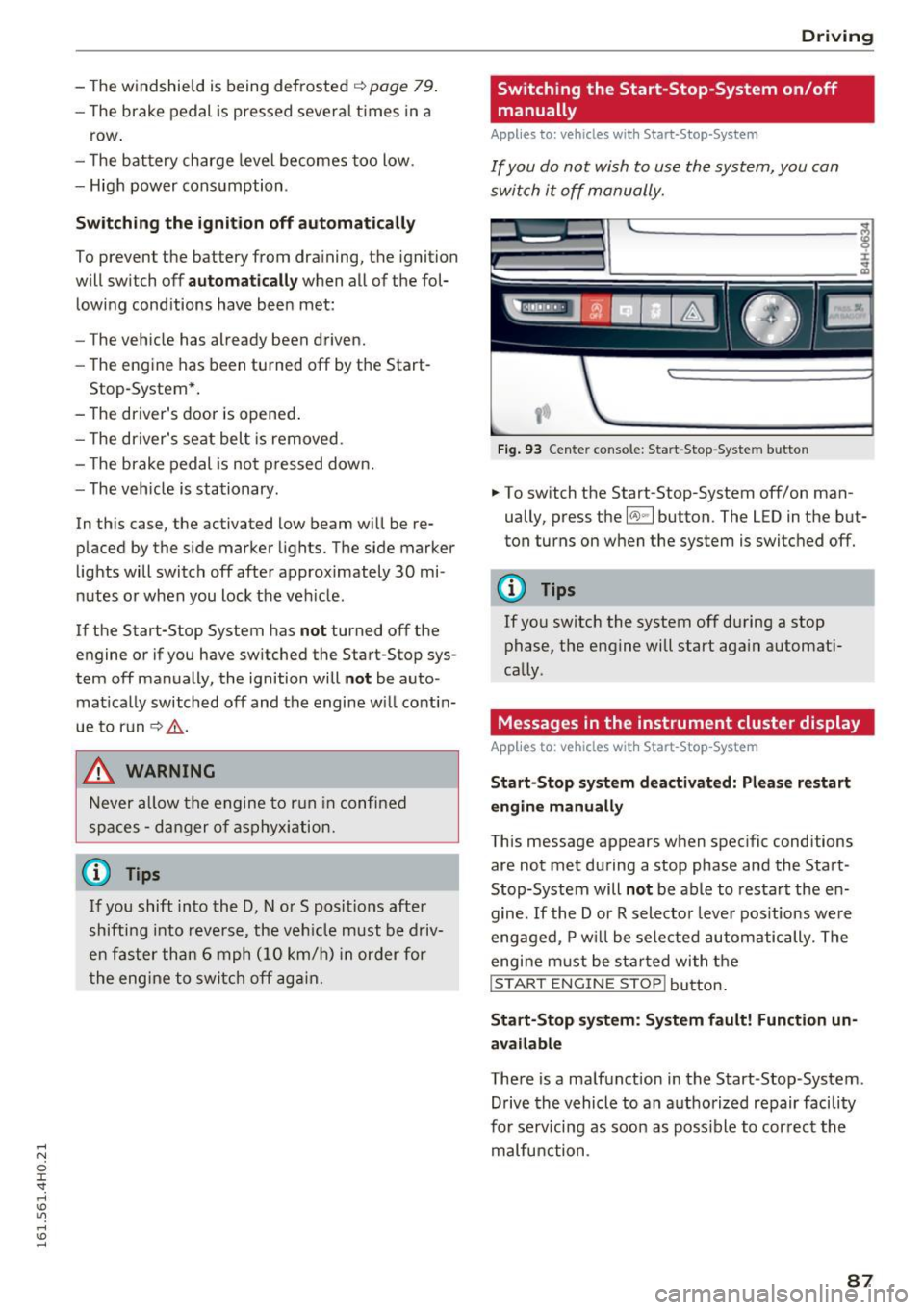
Fi g. 93 Center console: Start-Stop -System button
.. To switch the Start-Stop-System off/on man
ually, press the
l(A) ~ I button. The LED in the but
ton turns on when the system is switc hed
off.
(D Tips
If you sw itch the system off during a stop
phase, the engine will start aga in automati
cally .
Messages in the instrument cluster display
Applies to: vehicles with Start-Stop -System
Start-Stop system deactiv ated: Plea se restart
engin e manually
This message appears when spec ific conditions
are not met during a stop phase and the Start
Stop-System will
not be able to resta rt the en
gine.
If the Dor R selector leve r pos itions we re
engaged, P w ill be sele cted automatically. The
engi ne m ust be st arted wi th t he
I START ENGINE STOP! button .
Start-Stop s yst em : S y stem fault! Function un
available
There is a malfunction in the Start-Stop-System.
Drive the vehicle to an a uthorized repair facility
for serv icing as soo n as poss ible to cor rec t the
malfunction .
87