ECO mode AUDI TT 2013 Owner´s Manual
[x] Cancel search | Manufacturer: AUDI, Model Year: 2013, Model line: TT, Model: AUDI TT 2013Pages: 262, PDF Size: 65.91 MB
Page 36 of 262
34 Opening and closing
Power locking system
General description
The power locking system locks or unlocks all
doors simultaneously.
The power lock ing system in your ve hicle in
corporates the fo llow ing funct ions:
- Central locking function
- Remote con tro l feature q page 33 .
- Anti -Theft Alarm Sys tem q page 38.
A ll the doors and the rear lid are locked by the
centra l locking system when you lock the vehi
cle.
The unlocking a nd lock ing mode * can be
changed in t he d river i nfo rmation system
qpage24.
Unlocking the vehicle
You can un lock the vehicle from outs ide e ither
by using the remote control
or by insert ing
a nd turning the key in t he driver's door lock.
When you
unlock your veh icle:
- The anti-theft alarm system is deactivated br iefly.
- The veh icle inter ior lights ill uminate for ap
proximate ly 30 seconds.
- All turn signa l lights will f lash twice w hen
the car is unlocked.
- After unlock ing the vehicle, yo u have 30 sec
onds to open a door or the rear lid. After 30
seconds, the vehicle automatically locks and
the ant i-theft a larm system activates again.
The rear lid can be locked or un locked either
by using the remote control
or by insert ing
a nd turning the key in the driver's door lock.
Unlock ing the ve hicle w ith the remote co ntrol
c::::5 will only unlock the rear lid, to open it, the
lid handle needs to be p ressed .
Locking the vehicle
You can lock the vehicle from o utside e ither by
using the remote control
or by insert ing and
turning the key in the drivers's door lock.
When you
lo ck the vehicle:
- All doors and the rear lid are locked. -
All turn signal lights wi ll flash once when
the car is loc ked .
- The ant i-theft a larm system is ac tiva ted.
The ho rn of the anti -theft alarm system wi ll
sound and t he anti-theft a la rm system read
iness light, located in the center of the in
strument panel be low the w indshield on the
r ight side of the air vent, will start to blink.
- The vehicle interior lights turn off.
Automat ic lock ing*
T he au tom atic locking fea ture locks a ll the ve
hicle doors an d the rear lid when you drive
faster than 9 m ph (15 km/h).
You can unlock t he vehi cle from the i nside by:
- remov ing the key from the igni tion swi tc h
(the vehi cle w ill automatically u nlock itself)
or
- pressi ng the un loc k pa rt of the power lock
sw itch
ll:D or
pull ing the door ha ndle (to open the doo r).
If you wish, yo u can have an a utho rized Aud i
dealer convert your power doo r lock system to
automat ic locking.
Unintentionally locking yourself out
T he veh icle does not lock with t he centra l
l ocking switch
¢ page 3 6 if the driver's door
is open .
D o no t lock your ve hicle w ith the
remote mas
ter key
un til a ll doo rs and t he rea r lid are
cl osed. In this way yo u avoid locking yourse lf
o ut accidentally .
_& WARNING
- When you loc k yo ur vehicle from o utside,
nobody- espec ia lly children -shou ld re
main inside the vehicle. Remember,
when yo u lock the vehicle from the out
side th e wi ndows cannot be o pened from
the inside.
- Wh en you leav e th e ve hicle, always re
move the ign ition key and take it w ith
you. This will preven t passe ngers (chil
d ren, f or example) from acci denta lly be
i n g loc ke d in the vehicle s hould they
Page 48 of 262
46 Clear vision
The brightness of the lights is controlled au
tomatically by a dimmer when they are
switched on and
off.
Instrument panel illumination
The illumination of the instruments , displays
and the center console can be adjusted.
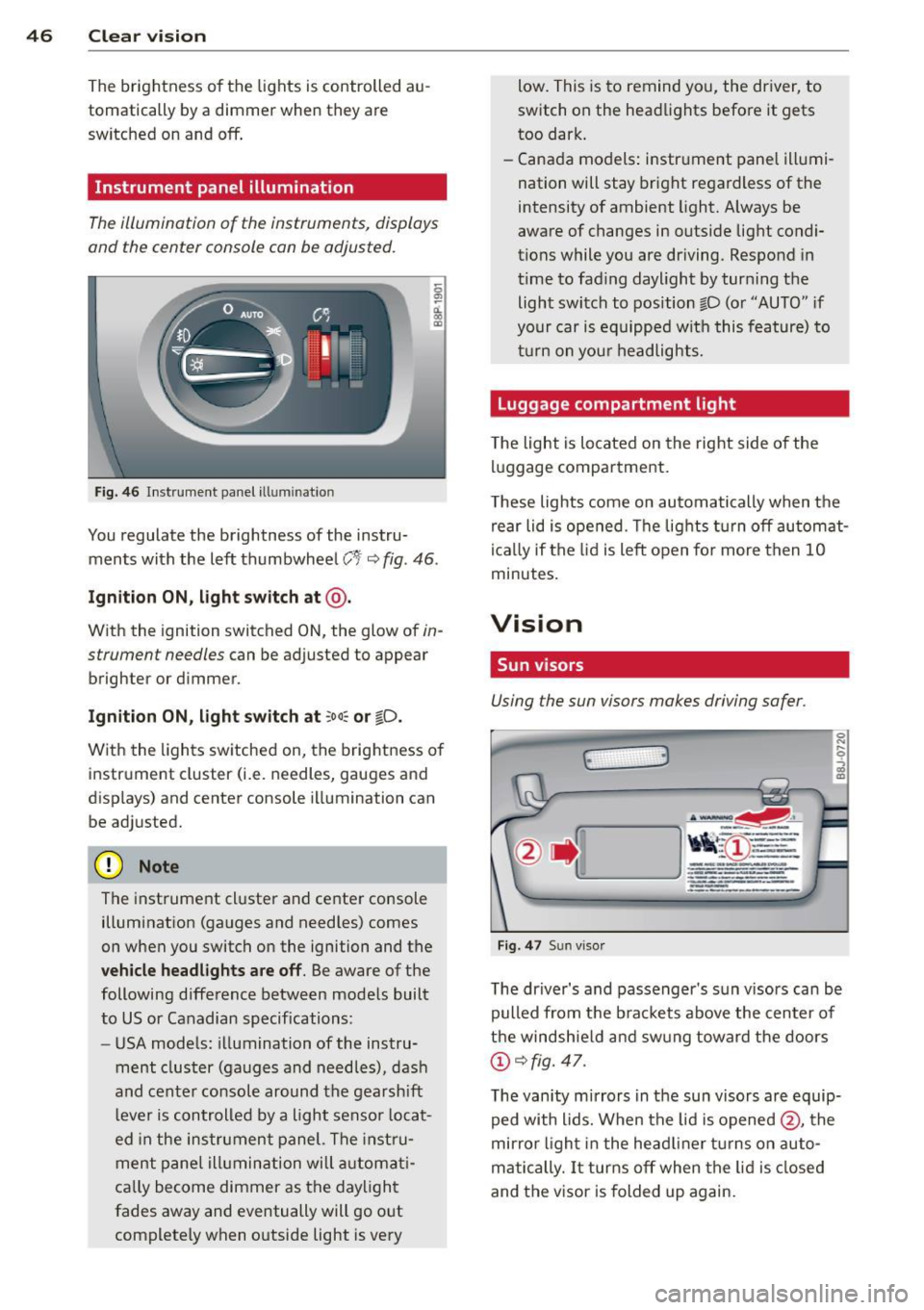
Fig. 46 Instrument panel ill um inat io n
0 ~ d. 00 m
You regulate the brightness of the instru
ments with the left thumbwheel
C t<=:> fig . 46 .
Ignition ON, light switch at@ .
With the ignition switched ON, the glow of in
strument needles
can be adjusted to appear
brighter or dimmer.
Ignition ON, light switch at ~oo:c or io.
With the lights switched on, the brightness of
instrument cluster (i.e. needles, gauges and
displays) and center console illumination can
be adjusted.
(D Note
The instrument cluster and center console
illumination (gauges and needles) comes
on when you switch on the ignition and the
vehicle headlights are off. Be aware of the
following difference between models built
to US or Canadian specifications :
- USA models: illumination of the instru
ment cluster (gauges and needles), dash
and center console around the gearshift
lever is controlled by a light sensor locat
ed in the instrument panel. The instru
ment panel illumination will automati
cally become dimmer as the daylight
fades away and eventually will go out
completely when outside light is very low.
This is to remind you, the driver, to
switch on the headlights before it gets
too dark.
- Canada models: instrument panel illumi
nation will stay brig ht regardless of the
intensity of ambient light. Always be
aware of changes in outside light condi
tions while you are driving. Respond in
time to fading daylight by turning the
light switch to position fD (or "AUTO" if
your car is equipped with this feature) to
turn on your headlights.
Luggage compartment light
The light is located on the right side of the
luggage compartment.
These lights come on automatically when the
rear lid is opened. The lights turn
off automat
ically if the lid is left open for more then 10
minutes.
Vision
, Sun visors
Using the sun visors makes driving safer .
(· 3
Fig. 47 Sun visor
The driver's and passenger's sun visors can be
pulled from the brackets above the center of
the windshield and swung toward the doors
(!)<=:>fig. 47.
The vanity mirrors in the sun visors are equip
ped with lids. When the lid is opened
@, the
mirror light in the headliner turns on auto
matically. It turns
off when the lid is closed
and the visor is folded up again.
Page 54 of 262
52 Clear vis ion
- To help prevent damage to the wiper sys
tem, a lways loosen blades which are fro
zen to the windsh ield before operat ing
wipers.
- To he lp prevent damage to w iper blades,
do not use gasoline, kerosene, pa int
thinner, or other solvents on or near the
wiper blades.
- To he lp prevent damage to the wiper
arms or other components, do not at
tempt to move the wipers by hand .
(D Tips
-Commercial hot waxes applied by auto
matic car washes affect the cleanability
of the glass surface .
- The front wiper blades are different
l engths; the blade on the driver's s ide is
l onger .
Digital compass
Activating or deactivating the compass
Applies to vehicles: with digital compass
The direction is displayed on the interior rear
view mirror.
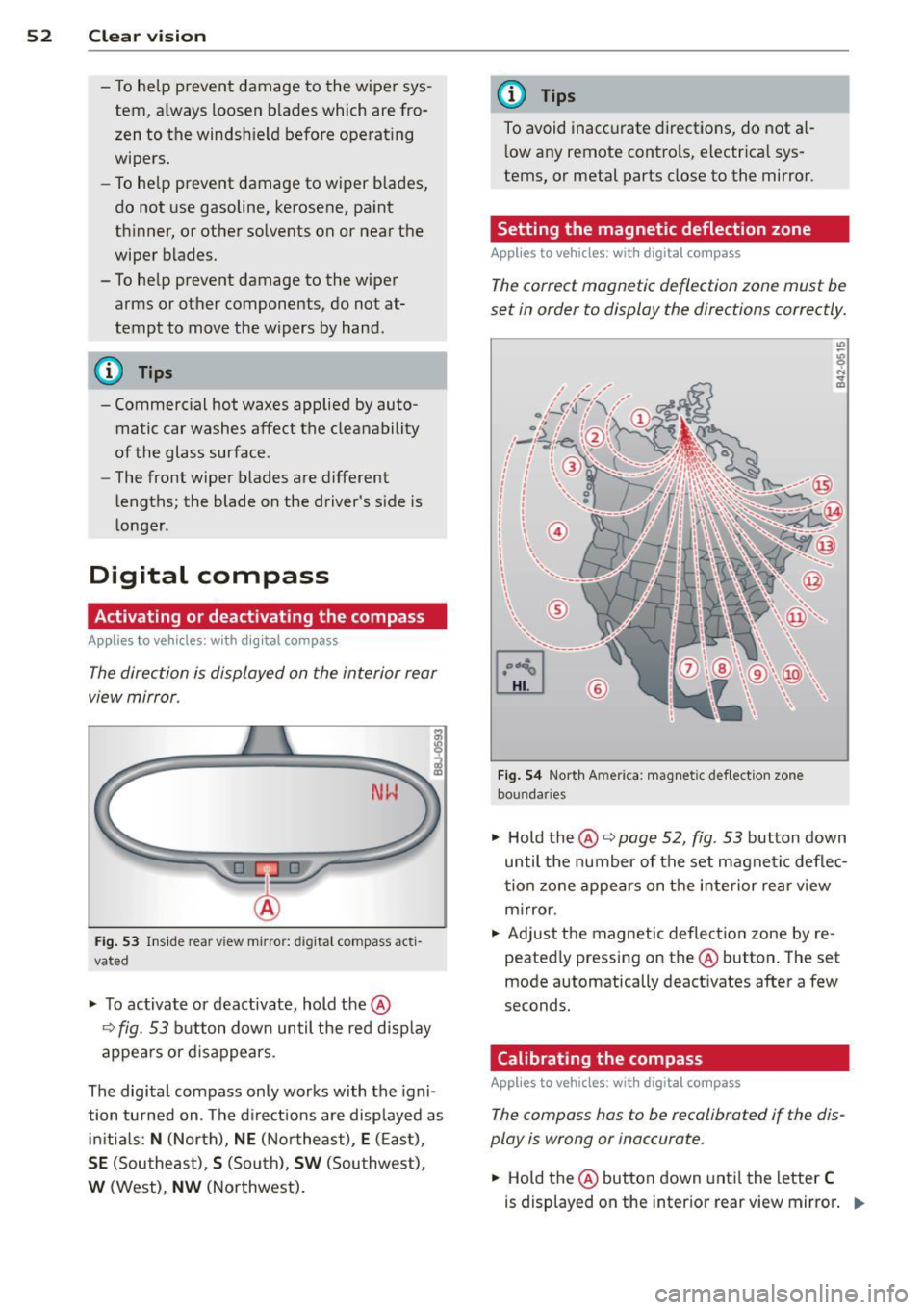
Fig . 53 In side rea r vi ew m irro r: digi tal compass ac ti
v at ed
.. To activate o r deactivate, hold the@
c::> fig. 53 b utton down until the red disp lay
appe ars or d is a ppears.
The digital compass only works with the igni
tion tu rned on . T he d irect io ns are displayed as
ini tia ls :
N (North), NE (No rthe ast) , E (E as t),
SE (Southe ast), S (Sou th), SW (Southwest),
W (West) , NW (Northwest).
(D Tips
To avoid inaccurate directions, do not al
l ow any remote contro ls, electr ica l sys
tems, or metal parts close to the mirror .
Setting the magnetic deflection zone
Applies to vehicles: with digita l compass
The correct magn etic deflection zon e must be
set in order to display the dire ctions correctly.
©
Fi g. 54 North A meric a: magne tic def le ction zo ne
bo un daries
" Ho ld th e@ c::> page 52, fig . 53 button down
until the number of the set magnetic deflec
t ion zo ne appe ars on the inte rior re ar v iew
m irror.
.. Adjust the magnetic de flect ion zone by re
peated ly pressing on the @button . The set
mode automatically deact ivates after a few
seconds.
Calibrating the compass
Applies to vehicles: with digita l compass
The compass has to b e recalibrated if the dis
play is wrong or inaccurate.
.. Hold the @button down unti l th e letter C
is displayed on the inter ior rear view mirror . ..,.
Page 57 of 262
Front passenger's seat
Always move the front passenger seat into the rearmost position .
To avoid contact with the airbag while it is de
ploying, do not sit any closer to the instru
ment panel than necessary and always wear
the three-point safety belt provided adjusted
correctly . We recommend that you adjust the
passenger's seat in the following manner:
.. Bring the backrest up to an (almost) upright
pos it ion .
Do not ride with the seat reclined .
.. The idea l posit ion for the head restraint is
with the upper edge of the restraint level
with the top of your head
¢ page 5 7. You
shou ld
not lower the top of the restraint be
low the level of your eyes .
.. Place your feet on the floor in front of the
passenger's seat.
Adjusting front seats manually
Adjustment controls
Applies to vehicles: with manual seat adjustme nt
Various controls on the manual seats provide
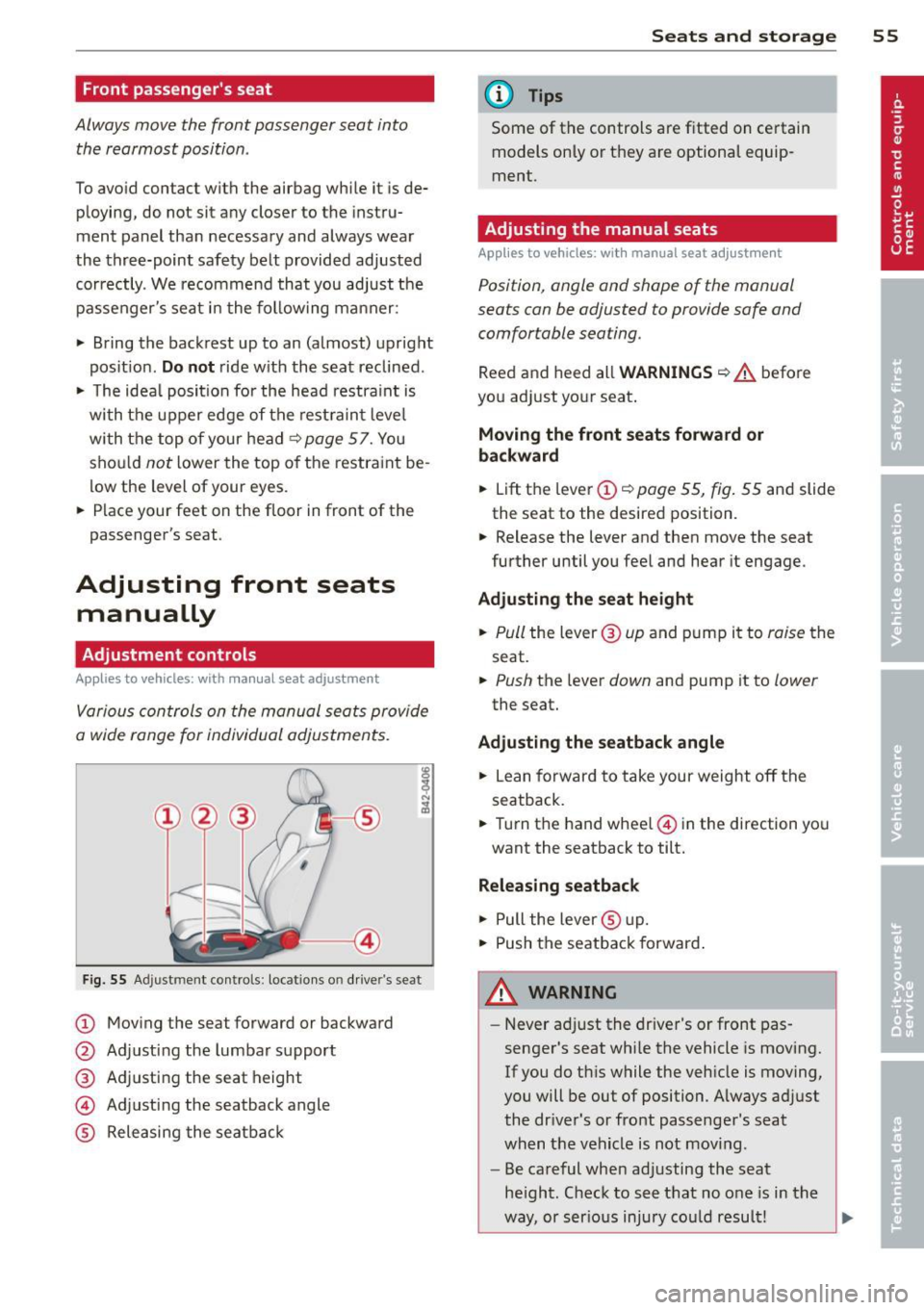
a wide range for individual adjustments.
Fig. S5 Ad just men t contro ls : locat ions o n drive r's seat
CD Moving the seat forward or backward
@ Adjusting the lumbar support
@ Adjusting the seat height
@ Adjusting the seatback angle
® Releasing the seatback
Seats and storage 55
@ Tips
Some of the controls are fitted on certain
models only or they are optional equip
ment .
Adjusting the manual seats
Applies to vehicles: with manual seat adjustment
Position, angle and shape of the manual
seats can be adjusted to provide safe and
comfortable seating .
Reed and heed all WARNINGS ¢.&. before
you adjust your seat .
Moving the front seats forward or
backward
.. Lift the lever CD¢ page 55, fig. 55 and slide
the seat to the desired position.
.. Release the lever and then move the seat
further until you feel and hear it engage.
Adjusting the seat height
.. Pull the lever ® up and pump it to raise the
seat .
.. Push the lever down and pump it to lower
the seat.
Adjusting the seatback angle
.. Lean forward to take your weight off the
seatback .
.. Turn the hand wheel@ in the direction you
want the seatback to tilt.
Releasing seatback
.. Pull the lever ® up .
.. Push the seatback forward.
WARNING
-Never adjust the driver's or front pas
senger's seat while the vehicle is moving.
If you do this while the vehicle is moving,
you will be out of position. Always adjust
the dr iver's or front passenger's seat
when the vehicle is not moving .
- Be careful when adjusting the seat
he ight. Check to see that no one is in the
way, or serious injury cou ld result!
Page 62 of 262
60 Seats and st o rage
about 200 lbs (90 kg). One can easi ly imagine
the injuries that an item of that weight flying
freely through the passenger compartment can cause in a co llision at a speed considered
relative ly low .
A WARNING
Weak, damaged or improper straps used
to secure items to t ie-downs can fail du r
ing hard b rak ing or in a col lision and cause
ser ious personal inju ry.
- Always use suitable mounting straps and
properly secure i tems to the tie-downs in
the luggage compar tment to help pre
vent items from shifting or flying for
wa rd as dangerous missiles .
- When the rear seat back rest is folded
down, always use su itab le mount ing
st raps and proper ly secure items to the
t ie-downs in the luggage compartment
to help prevent items from flying for
ward as dangerous miss iles into the pas
senger compartment.
- Never attach a child safety seat tether strap to a tie-down.
Luggage compartment cover removal
and installat ion
The luggage compar tment cover preven ts
people from looking into the luggage com
partment.
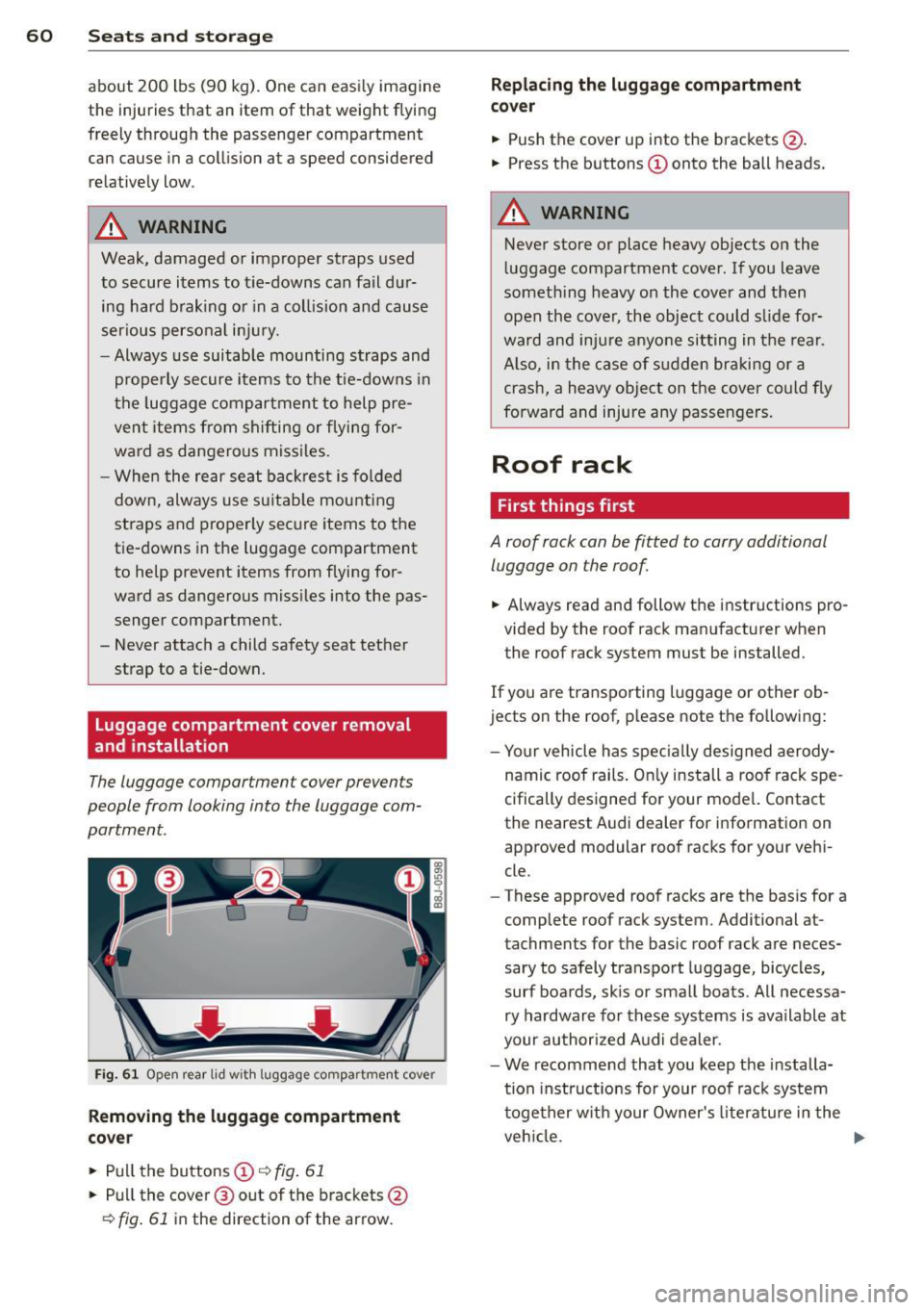
Fi g. 61 O pen rear lid w it h l uggage co m partment cove r
Removing the luggage compartment
co ve r
• Pu ll the buttons (D r::;, fig. 61
• Pull the cover @out of the brackets @
r::;, fig. 61 in the direction of the arrow.
Repl acing the luggage compartment
co ve r
• Push the cover up into the brackets @.
• Press the buttons
(D onto the ball he ads.
A WARNING
-Never store or place heavy objects on the
luggage compartment cover . If you leave
somet hing heavy o n the cove r and then
open the cover, the object could s lide fo r
ward and inju re anyo ne sit ting in t he rea r.
A lso, in the case of s udden br aking or a
crash, a heavy object on the cover could fly
fo rward and injure any passen gers.
Roof rack
First things first
A roof rack can be fitted to carry additional
luggage on the roof
• Always read and follow the instructions pro
vided by the roof rack man ufacturer when
the roof rack sys tem must be installed.
If you are transporting luggage or other ob
jects on the roof, p lease note the fo llowing:
- Yo ur vehicle has spec ially designed aerody-
namic roof rails . On ly install a roof rack spe
cifically designed for your model. Contact
the nearest Aud i dealer for information on
approved modul ar roo f racks for your vehi
cle .
- T hese approved roof racks are the basis for a
comp lete roof rack system . Additional at
tachments for the basic roof rack are neces sary to safely tran spo rt luggage, bicycles,
surf boards, skis or small boats. All necessa ry hardwar e fo r these syst ems is available at
your authorized A udi dealer.
- We recommend that you keep the installa
tion instruct ions for your roof rac k system
together w ith your Owner's literatu re i n t he
veh icle. .,.
Page 68 of 262
66 Warm and cold
Warm and cold
Climate controls
Controls
The air conditioning automatically maintains the selected temperature in the vehicle interior
throughout each season .
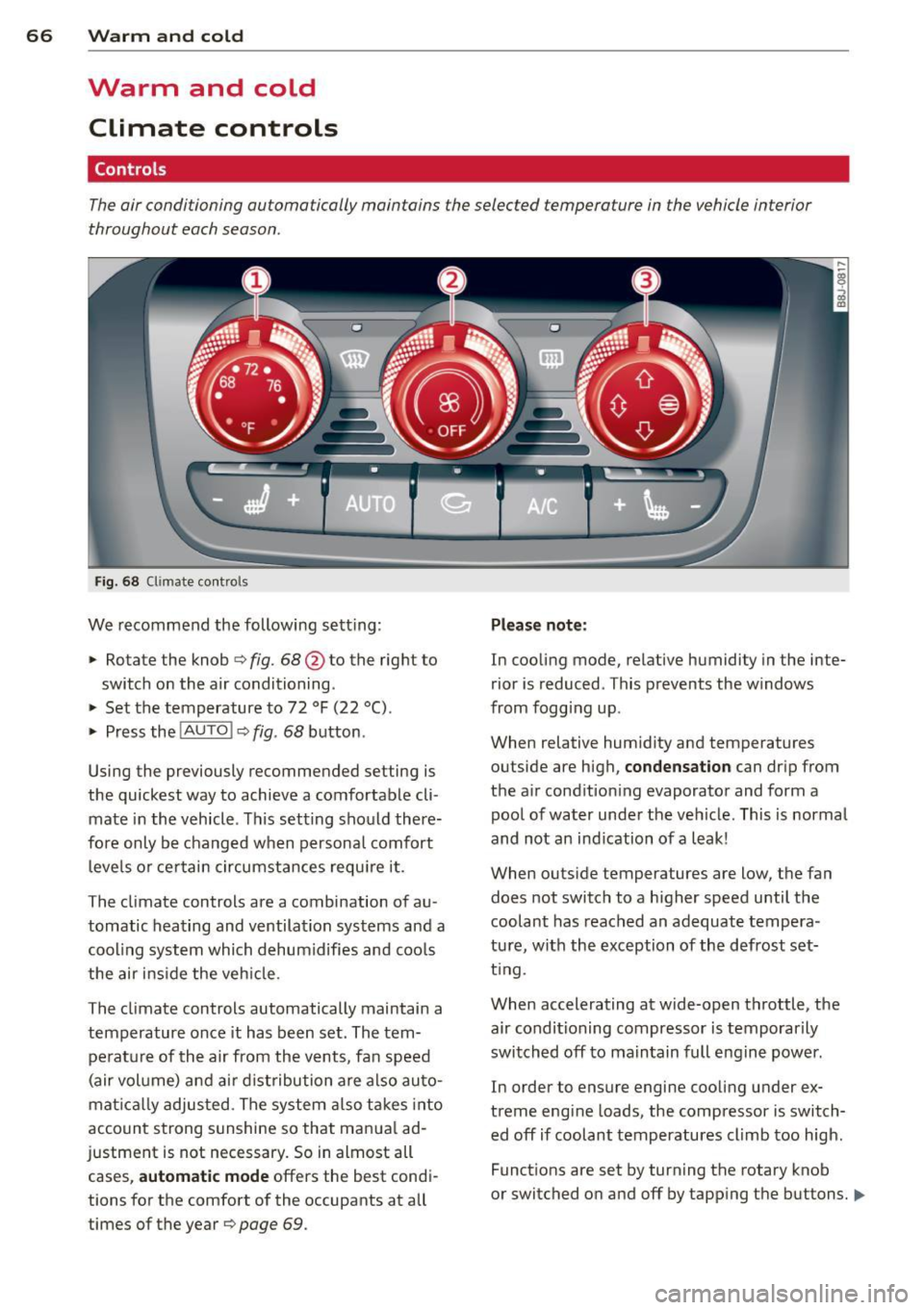
Fig. 68 Climate contro ls
We recommend the following sett ing :
> Rotate the knob ¢ fig. 68 @to the right to
switch on the air conditioning .
> Set the temperature to 72 °F (22 °() .
> Press the !AUTO I ¢ fig . 68 button .
Using the previously recommended setting is
the quickest way to achieve a comfortable cli
mate in the vehicle . This setting should there
fore only be changed when persona l comfort
l eve ls or ce rtain circumstances requi re it .
The climate controls are a combination of au
tomatic heating and ventilation systems and a
coo ling system which dehumidifies and coo ls
the air ins ide the veh icle.
The climate controls automatically maintain a temperature once it has been set . The tem
perat ure of the air from the vents, fan speed
(air vol ume) and ai r d ist ribution are also auto
mat ical ly adjusted . The system also takes into
account strong s unshine so that manua l ad
justment is not necessary. So in almost all cases,
a ut om at ic mode offers the best cond i
tions for the comfort of the occupants at all
times of the year ¢
page 69.
Please not e:
In cooling mode , relative humidity in the inte
rior is reduced . This prevents the w indows
from fogg ing up.
When relative hum idity and temperatures
outside are high ,
conden sati on can drip from
the a ir condition ing evaporator and form a
pool of water under the vehicle. This is normal
and not an ind ication of a leak!
When outs ide temperatures are low, the fan
does not switch to a higher speed until the
coolant has reached an adequate tempera
tu re, with the exception of the defrost set
t ing.
When accelerating at wide-open throttle, the air conditioning compressor is temporarily
switched off to ma intain full engine power .
In order to ensure engine cooling under ex
treme engine loads, the compressor is switch ed off if coolant temperatures climb too high.
Funct ions are set by turning the rotary knob
or switched on and off by tapp ing the buttons.
II>
Page 71 of 262
Defrost~
The windshield and side windows ore defrost
ed or cleared of condensation as quickly as
possible .
.,. To turn on the defogger/defroster, press the
~button <=>
page 66, fig. 68 .
.,. To turn the defogger/defroster off, press
the ~ button aga in, or the
! AUTO ! button.
T emperature is controlled automatically . T he
maximum amount of a ir flows mainly from
vents 1
¢ page 68 .
A small amoun t of air flows from vents 2 -if
they are open <=>
page 68.
Pressing the~ button switches off recircula
tion mode.
Automatic operation ~
Standard operating mode at all times of the
year.
Turnin g on autom atic operation
.,. Set the temperature you want .
.,. Press the
!AUTO I button <=> page 66, fig. 68 .
Automatic operation ensu res constant tem
perat ures in the inter ior and dehum idifies the
air inside the vehicle . Air temperature, vol
ume , and distribution are controlled automat
ically to reach or maintain the desired interior
temperature as quickly as possib le. Fluctua
tions in exterior temperature and the effects
of temperature from the posi tion o f the sun
are compensated for automat ically.
Manual air recirculation mode~
The recirculation mode prevent s polluted out
side air from entering the vehicle interior .
Swit c hi ng on air r ecircu lat ion
.,. Press the button~<=> page 66, fig. 68
¢ _&. .
Sw itching off air r ecir culation
.,. Press the but ton ~ again, or
.,. Press the
!AUTO I button, or
Warm and c old 69
.,. Press the~ button .
In recircu lation mode, air is drawn from the
vehicle interior, filtered, and recirculated . We
recommend that yo u se lect reci rculation
mode
briefly <=>.& under the fo llowing condi
tions:
When dr iv ing thro ugh a tunnel or in a traffic
jam so that exhaust fumes and odors cannot enter the vehicle interior .
_&. WARNING ~
You should not use the recirculation mode
for an extended period s ince no fresh air is
drawn in, and with the air condit ioning
switched off the windows can fog up -th is
increases the r isk of an accident!
A/C operation ~
Switching on A /C
.,. Press the !A/Cl button <=> page 66, fig. 68 .
Switching A/C off
.,. Press the IA/C l butto n again .
T he air is not coo led and humidity is not re
moved when cooling mode is switched off.
This can cause fog on the windows. Cooling mode switches off automatically when the
outside temperature is be low zero .
(D Tips
If the LED in the switch stays on after A/C
ope ration has been switched off(= switch
i ng the A/C off), there is a fault in an air
cond itioning component. Please consult
an authorized Audi dealer when there is an
operat ing problem.
Using the climate controls economically
Economical use of the clima te controls helps
to save fuel .
When climate control is working in cooling
mode, engine performance is reduced and
fuel consumpt ion is affected . To keep the time.,.
Page 75 of 262
CD Note
-Avoid high engine speeds, fast accelera
tion or heavy engine loads whi le the en
gine is still cold. This could damage the
engine.
- The engine cannot be started by pushing or towing the veh icle.
@) For the sake of the environment
To avoid unnecessary engine wear and to
reduce exhaust emissions, do not let your
veh icle stand and warm up. Be ready to
drive off immediately after starting your
veh icle. Maintain moderate speed until the
eng ine is completely warm . Remember,
the engine performs best at operating
temperature .
Stopping the engine
~ Turn the ign ition key to position @
~page 71, fig. 71.
_& WARNING
-Never turn off the engine before the ve
hicle has come to a complete stop. The
full function of the brake booster and the
power steering is not guaranteed . You
must use more force to turn or brake if
necessary. Because you cannot steer and
brake as you usually would, this could
lead to crashes and serious injur ies.
- The radiator fan can continue to run for
up to 10 minutes even after you have
turned
off the engine and removed the
ignition key . The radiator fan can also
turn on again if the engine coolant heats
up because of intense sunlight or heat
build-up in the engine compartment.
CD Note
Do not stop the engine immed iate ly after
hard or extended driving. Keep the engine
running for approximately two minutes to
prevent excessive heat build-up.
On the road 73
Parking brake
Parking brake
When the parking brake is set, it prevents the
vehicle from rolling away unintentionally .
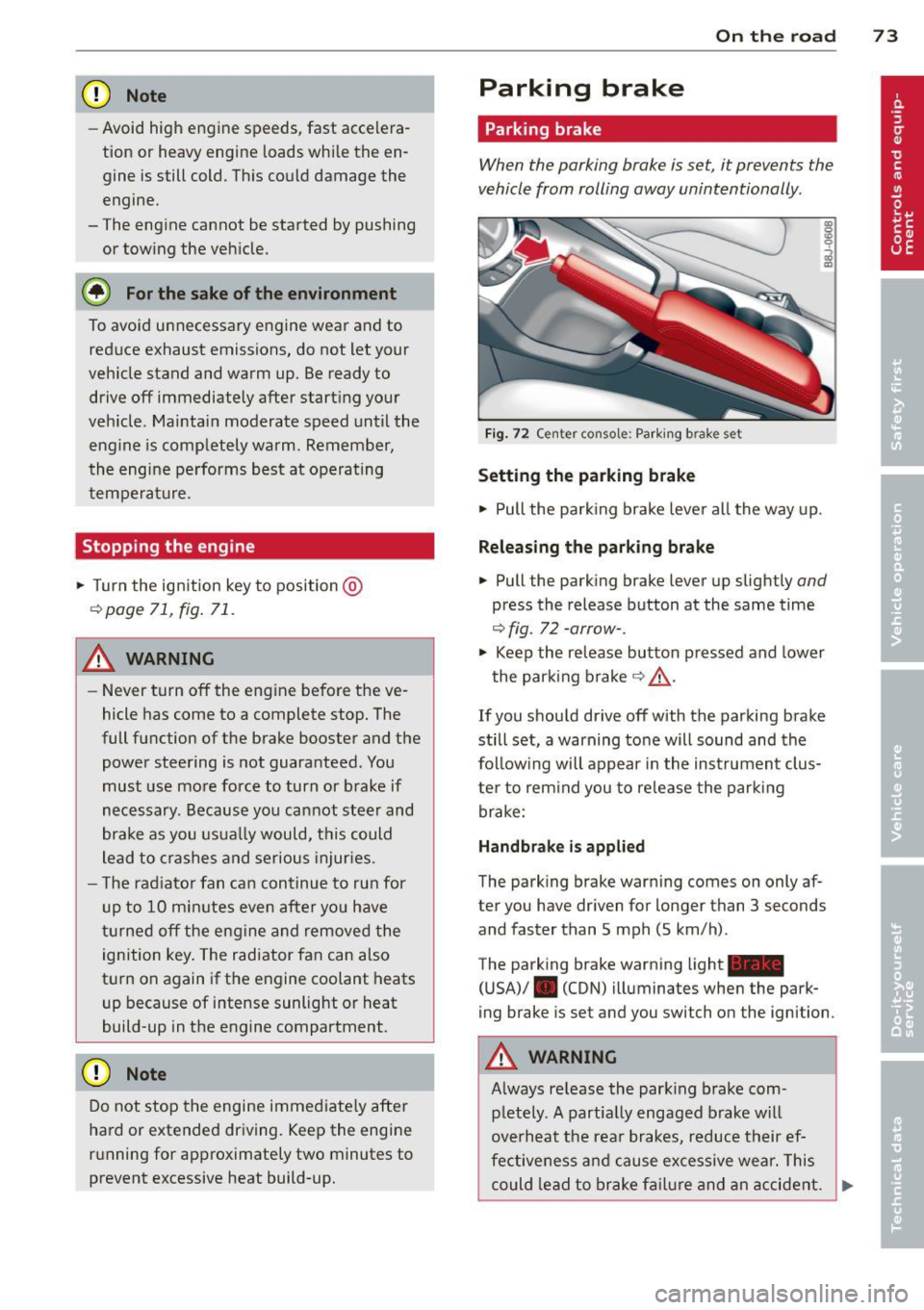
Fig. 72 Center console: Parki ng b rake set
Setting the parking brake
~ Pull the park ing brake lever all the way up.
Releasing the parking brake
~ Pull the parking brake lever up slightly and
press the release button at the same time
~ fig. 72 -arrow-.
~ Keep the release button pressed and lower
the parking brake~&_ .
If you should drive
off with the parking brake
still set, a warning tone will sound and the
follow ing will appear in the instrument clus
ter to rem ind you to release the parking
brake:
Handbrake is applied
The parking brake warning comes on only af
ter you have driven for longer than 3 seconds
and faster than 5 mph (5 km/h) .
The parking brake warning light_
(USA)/ . (CON) illuminates when the park
ing brake is set and you switch on the ignition .
A WARNING
Always re lease the park ing brake com -
pletely. A partially engaged brake will
overheat the rear brakes, reduce their ef
fectiveness and cause excessive wear. This
could lead to brake failure and an accident. .,.
Page 77 of 262
The speed warning system has two warning
thresholds
that function independently of
each other and that have somewhat different
purposes:
Speed warning 1
You can use speed warn ing 1 to set the maxi
mum speed while you are driving. This setting
will remain in effect until you turn
off the igni
tion, assuming that you have not changed or
reset the setting.
The speed warning symbo l
(mj (USA models)/
(SJ (Canada models) in the warning 1 display
appears when you exceed the maximum
speed.
It goes out when the speed falls below
the stored max imum speed.
The speed warning symbo l wi ll also go out if
the speed exceeds the stored maximum speed
by more than about 2S mph (40 km/h) for at
least 10 seconds. The stored maximum speed
is deleted.
Setting speed warning l <=:> page
75.
Speed warning 2
Stor ing warn ing 2 is recommended if you al
ways want to be reminded of a certa in speed,
for example when you are traveling in a coun
try that has a general maximum speed limit,
or if you do not want to exceed a spec ified
speed for winter tires.
The speed warning 2 symbol,
(zj
(•j (Canada models) appears in the dis
p lay when you exceed the stored speed lim it.
Unlike warning 1, it will not go out until the
vehicle speed drops below the stored speed limit .
Sett ing speed warning 2 <=:>page 76.
@ Tips
Even though your vehicle is equipped with
a speed wa rning system, you should sti ll
watch the speedometer to make sure you
are not driving faster than the speed lim it.
On the road 75
Speed warning 1: setting a speed limit
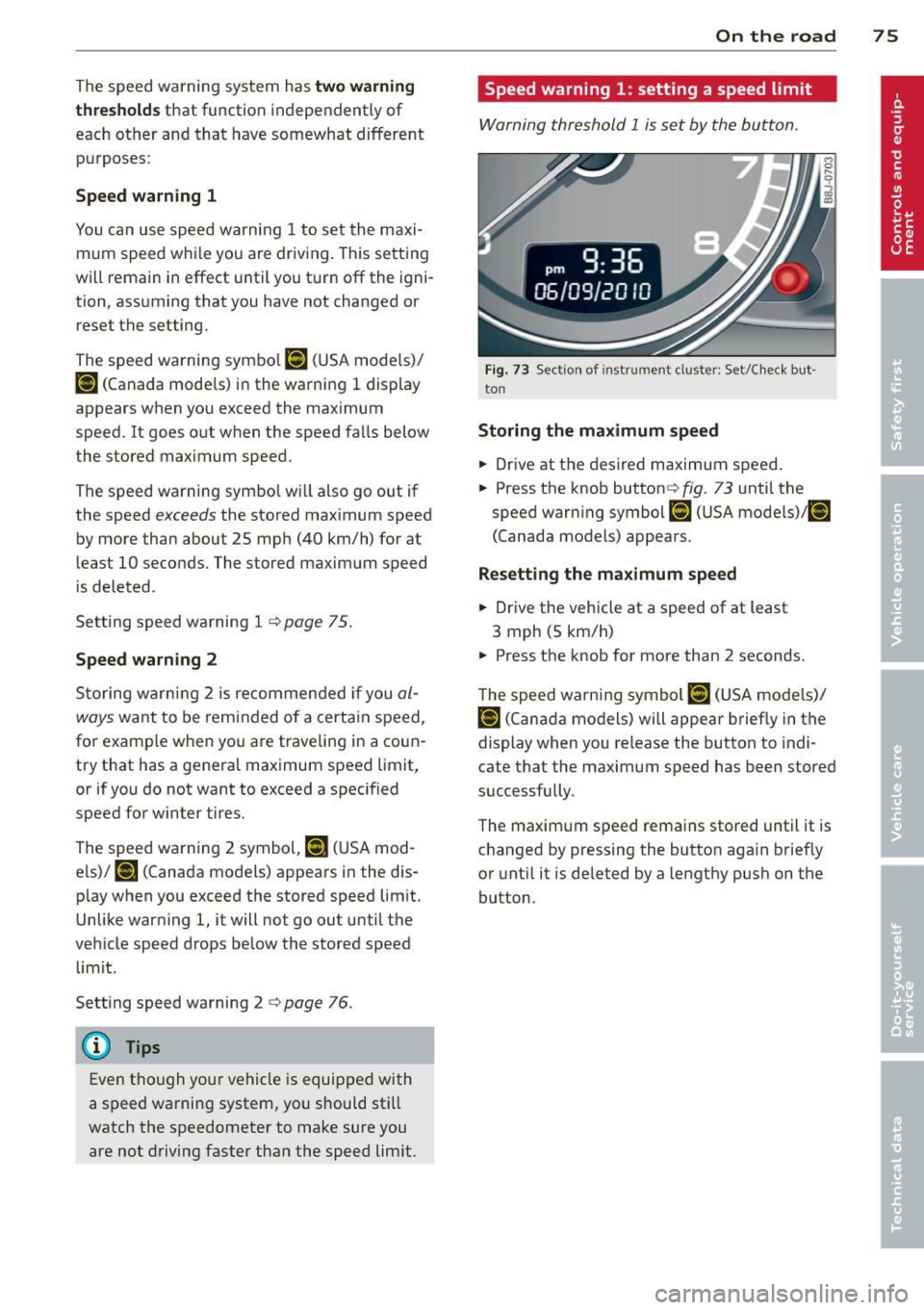
Warning threshold 1 is set by the button.
Fig. 73 Sect ion of instrument clus ter: Set/C heck but ·
ton
Storing the maximum speed
.,. Drive at the des ired maximum speed .
.,. Press the knob buttonr=:>fig .
73 unti l the
speed warning symbol
[iJ (USA models)/ ~
(Canada models) appears.
Resetting the maximum speed
.,. Drive the vehicle at a speed of at least
3 mph (5 km/h)
.,. Press the knob for more than 2 seconds.
The speed warning symbol
(G:l (USA models)/
i•j rcanada models) will appear briefly in the
display when you release the button to indi
cate that the maximum speed has been stored
successfully .
The maximum speed remains stored until it is
changed by pressing the button aga in brief ly
or until it is deleted by a lengthy push on the
button.
Page 78 of 262

76 On the road
Speed warning 2: setting a speed limit
Switches in the wiper arm are used to operate
warning threshold
2 .
'----I ®
Fig. 74 Wiper lever: Tr ip computer con trols
To store maximum speed
> Turn off the ignit ion.
> Briefly press the button in the instrument
cl uster ¢
page 75, fig. 73. The odometer
and the digital clock are now illuminated .
> Press the button for at least 2 seconds. The
currently stored maximum speed appears in
the display
or the crossed out symbol for
warning threshold 2, if no max imum speed
was set previously.
> Press the function selector sw itch in the
wipe r lever @¢
fig. 74 up or down to
change the set value. Values run up or dow n
i n steps of 6.2 mph (10 km/h).
To delete maximum speed
> Turn off the ignit ion .
> Briefly press the button in the instrument
cluster ¢
page 75, fig . 73. T he odometer
and the digital clock are now illumi nated.
> Press the button for at least 2 seconds . Th e
cu rrently stored maxim um speed appears in
the display.
> Press the reset button in the wiper lever ®
¢fig . 74 until the crossed out speed warn
ing symbol for warning threshold 2 appears
i n the display.
A few seconds after the adjustment is com
pleted, the illumination for the odometer and
the dig ital clock will go out.
(D Tips
This warning threshold can a lso be con
trolled thro ugh the tr ip computer
¢ page 25, Navigating the menu.
Cruise control
Switching the system on
The cruise control system makes it possible to
drive at a constant speed starting at 20 mph (30 km/h) .
®-
Fig. 75 Contro l leve r with set b utton
Fig. 76 D isplay : Se lecte d speed
> Pull the lever to position (D ¢ fig. 75 to
switch the system on.
> Dr ive at the speed you w is h to set.
> Press button @ to set that speed.
.., ....
i
The display ¢ fig. 76 will show the set speed .
The display may vary depending on the type of
display in your vehicle. The indicator light
M;ll)~14 (US model)/ . (Canadian model) will
also light up in the instrument cluster .
A WARNING
- Always pay attention to traffic even when
the cruise control is switched on. You are
always responsib le for your speed and