ECO mode AUDI TT 2013 Owner´s Manual
[x] Cancel search | Manufacturer: AUDI, Model Year: 2013, Model line: TT, Model: AUDI TT 2013Pages: 262, PDF Size: 65.91 MB
Page 86 of 262
84 Transmission
tiptronic operation
Applies to vehicles: with S tron ic
Tiptronic allows the driver to shift gears man
ually.
--
-
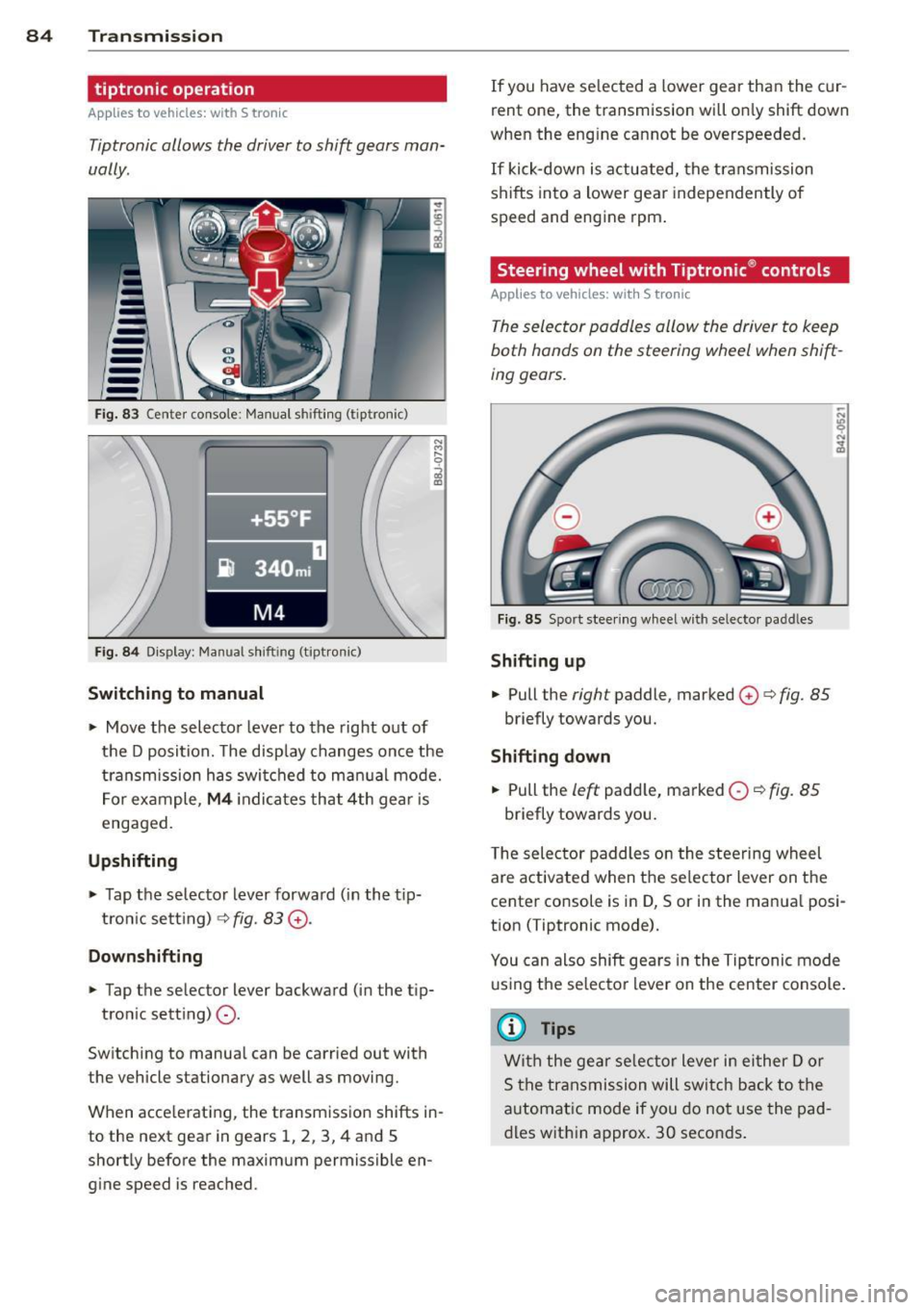
Fig. 83 Center conso le : Manual shift in g (tiptronic)
Fig . 84 Display : Manual sh ift ing (tipt ron ic)
Switching to manual
.,. Move the selector lever to the right out of
the D position. The disp lay changes once the
transmission has switched to manual mode.
For example,
M4 indicates that 4th gear is
engaged.
Upshifting
.,. Tap the selecto r lever forward (in the tip
tron ic setting)
¢ fig. 83 G).
Downshifting
.,. Tap the selector lever backward (in the t ip-
tron ic sett ing)
0-
Switching to manual can be carried out with
the vehicle stationary as well as moving.
When accelerat ing, the transmission shifts in
to the next gear in gears 1, 2, 3, 4 and 5
shortly before the maximum permissible en
gine speed is reached. If
you have selected a lower gear than the cur
rent one, the transmission will only shift down
when the eng ine cannot be overspeeded.
If kick-down is act uated, the transmission
shifts into a lower gear independently of
speed and engine rpm.
Steering wheel with Tiptronic ® controls
Applies to vehicles: with S tronic
The selector paddles allow the driver to keep
both hands on the steering wheel when shift
ing gears.
Fig . 85 Sport steering wheel with selecto r padd les
Shifting up
.,. Pull the right paddle, marked 0 ¢ fig. 85
briefly towards you .
Shifting down
.,. Pull the left padd le, marked 0 ~ fig. 85
briefly towards you.
T he selector paddles on the steering wheel
are activated when the se lecto r lever on the
center co nsole is in D, Sor in the manua l posi
tion (Tiptronic mode).
You can also shift gears in the Tiptronic mode
using the selector lever on the center console .
@ Tips
With the gear selector lever in either Dor
S the transmission will switch back to the
automatic mode if you do not use the pad
dles within approx. 30 seconds.
Page 87 of 262
Kick-down feature
Applies to vehicles: with S tron ic
The kick-down feature allows maximum ac
celeration .
If you depress the accelerator pedal fully be
yond the full-throttle position, the transmis sion automatically downshifts one gear, de
pending on vehicle speed and engine rpm . The
upsh ift into the next higher gear takes place
as soon as the max imum specified engine
speed is reached.
A WARNING
Please note that the drive wheels can spin
if the kick-down is used on a smooth s lip
pery road - risk of skidding!
Launch Control Program
Applies to vehicles: with S tron ic
The Launch Control Program permits maxi
mum acceleration .
In o rder to u se La unch Control, the ASR (An ti
Slip Reg ulation) mus t be d is a b led. When ASR
is disab led, the ESC wa rning/ind icator light
IJ
in the inst rument cluster illuminates . So that
L aunch Cont ro l can be used, the engine must
be at operating temperature and the steer ing
wheel must not be turned.
~ With the eng ine running , brief ly press the
ESC button . The message "Stabilization pro
gram off" or "Sport control Warning! Re
stricted stability" in the driver information
system d isplay.
~ Sh ift the gear lever to "S" or the tiptronic ®
pos it ion .
~ Step on the b ra ke peda l w ith your left foot
and keep the bra ke peda l fully depressed for
at leas t one second .
~ With your right foot, step on the acce lera
tor to the w ide-open throttle position o r
K ickdown . The engine speed settles at about
3,200 rpm.
~ Take your left foot off the brake .
Transm iss ion 85
A WARNING
-Always adapt your dr iving to the traffic
f low.
- Onl y use Launch Control when road and
traffic cond itions allow it and other dr iv
ers will not be endangered or annoyed by
your driving and th e acce le rat ion of the
veh icle.
- Ma ke sure that ESC remains enab led.
With the ESC disab led, th e vehicle could
b ra ke away, part icularly on a s lick and
slippe ry ro ad - ris k of skid ding!
- Once acceleration is fi nished, switch AS R
on agai n by br iefly pushing t he ESC bu t
ton.
Back-up program
Applies to vehicles: with S tronic
In the event of a system malfunction, there is
a back-up program.
In the event of system ma lfunction, the auto
matic transmission switches to the fai l-safe
mode. All of t he se lector lever position d is
plays for the au tomatic tra nsmission a re hi gh
li gh ted wi th a light b ackgro und in t he i nstr u
ment cluster d isp lay . In some cases you can
not use reverse gea r any more.
If the t ransmission swi tches to fail-safe
mode, yo u should t ake the ve hicle to an au
t horized Audi dea le rship as soon as possib le
to have the condition corrected.
Clutch is overheating
Applies to vehicles: with S tronic
• Clutch is overheating ! Please stop veh i
cle!
If the symbols a re i lluminated, the clutch is
ove rheating a nd could be damaged if you con
tin ue to drive. Stop the vehicle and a llow the
transmission to cool with the se lector lever in
the P posit ion while the engine runs at idle. If
the warn ing does not turn off, do not continue
dr iv ing . See your author ized A udi dealer or
i,..
Page 89 of 262
Homelink®
Universal remote
control
General information
The HomeLink universal remote control can
be programmed with hand-held transmitters
from existing equipment.
You must first program the Homelink ® trans
mitter before you can use the system
~ page 87, Programming the HomeLink ®
transmitter .
In order to program the Home Link ® transmit
ter for devices utilizing rolling code, a second
person on a ladder who can safely reach the
garage door opener motor is recommended.
It is also necessary to locate the "learn" but
ton on your garage door opener motor . Refer
to the ope rating inst ructions for the opener ,
as the location and color of this bu tton may
vary by manufacturer .
You can still use the origina l remote control
fo r the device at any time.
A WARNING
-
- Never use the Homelink® transmitter
with any garage door opener that does
have not the safety stop and reverse fea
ture as requ ired by federal safety stand
ards. This includes any garage door open
er model man ufactured before April 1,
1982.
- A garage door opener which cannot de
tect an object, signaling the door to stop
and reverse does not meet current feder
al safety standards. Using a garage door
opener without these features increases
risk of serious injury or death.
- For safety reasons never release the
parking brake or start the engine while
anyone is standing in front of the vehicle.
- A garage door or an estate gate may
sometimes be set in motion when the Homelink ® remote control is being pro
grammed. If the device is repeatedly ac-
Homelin k® 87
tivated, this can overstrain motor and
damage its e lectrical components -an
overheated motor is a fire hazard!
- To avoid possible injuries or property
damage, please always make abso lutely
certain that no persons or objects are lo
cated in the range of motion of any
equipment being operated.
{!) Tips
- If you would like more information on
Homelink ®, where to purchase the
Homelink ® compatible products, or
would like to purchase the Homelink®
Home Lighting Package, please cal l to ll
free: 1-800-355-3515.
- For Declaration of Compliance to United
States FCC and Industry Canada regula
tions~
page 246.
Programming the Homelink ®
transmitter
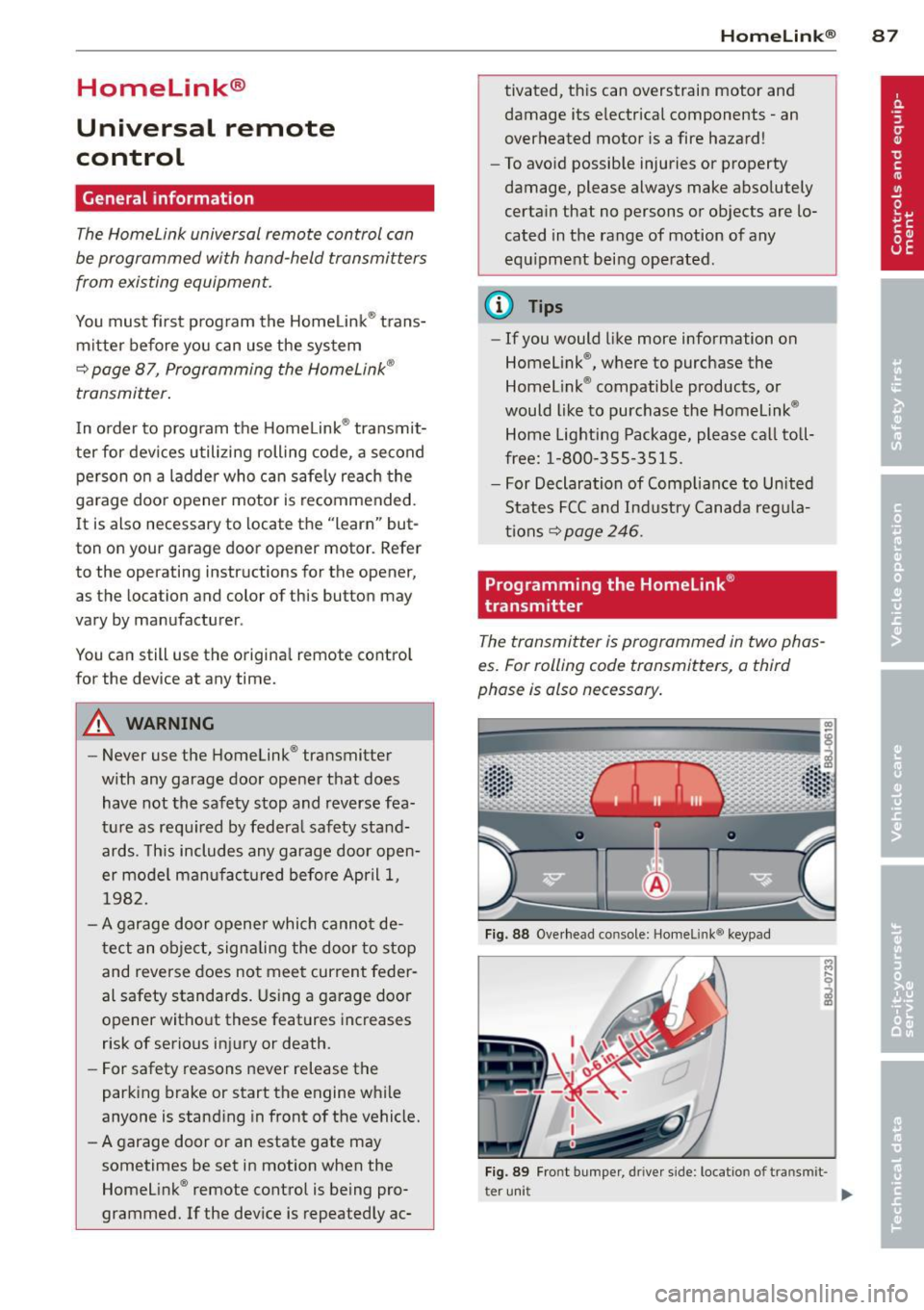
The transmitter is programmed in two phas
es. For rolling code transmitters, a third
phase is also necessary.
Fig . 88 Ove rhead co nsole: Homelink ® keypad
Fig. 89 Fro nt b umper , driver side : locatio n of tran smi t-
t er uni t
II>
Page 90 of 262
88 Homelink®
Pha se 1:
p rogramming th e ove rhead k eypad
1. Make sure yo ur vehicle is wit hin operating
range of the remote controlled garage
door opener .
2. Set the parking brake¢.&. in General in
formation on page 87 .
3. Tur n the ignition on . Do not start the en
g ine!
4 . Press and hold the two outs ide Home
L ink ® buttons
(D a nd @ for approx i
mately
20 seconds until indicator light @
¢fig . 88 begins to flash . The n re lease
both buttons. Do not hold the buttons for
longer than
30 seconds .
.,. This procedure only needs to be performed
once . It erases the factory-set default codes
and does not have to be repeated to pro
gram add it ional remote controls .
5. Press and hold the Home Link ® button (D ,
® or @ until the indicator light @
starts flashi ng
slowly. Re lease the bu tton.
.,. The system will remain in programming
mode for 5 minutes .
Co to the front of the
vehicle and proceed with phase 2 .
Phase 2:
programming the bumper mounted tran s
m itter
6 . Hold the original remote control at a dis
tance between
0 -6 in . (0 -15 cm) from the
bumper below the appropriate head light
for you r vehicle ¢
fig. 89 (use the shortest
d istance possible).
7 . Aim the remote control just below the
driver sid e head light.
8 . Press and hold the activation button on
the remote contro l.
.,. May be different in Canada.
If so, press and
re-press (cycle) the activation button on your
remote control every two seconds.
9 . The emergency flashers will flash
thre e
tim es
(after about 15-60 seconds) when
the programm ing is successful. Release
the butto n on the remote control.
.,. To program more devices, repeat steps 4 to
9.
10. Press and ho ld the tra ined Homelink ®
button and observe the indicator light @
¢fig. 88.
.,. If the ind icator light is solid/continuous,
programm ing is comp lete and your device
should activate when you press and release
the tra ined Homel ink ® button .
.,. If the ind icator light blinks rapidly fo r
2 sec
onds and is the n a sol id/continuous ligh t,
proceed w ith phase
3 to progr am a roll ing
code device.
Phase 3: rolling code pr ogramming
.,. A second pe rson o n a ladder who ca n safely
reach the garage door opene r motor is rec
ommended .
11. Loca te the "learn" b utton on the ga rage
doo r opener motor ( re fer to the operating
instructions for the opener, as the loca
tion of this button may vary by manufac
turer).
12. Press and release the learn button on the
garage door opener motor .
.,. Not e: once the button is pressed, there are
30 second s in which to in it iate the next
step.
13. On the Homelink ® keypad inside the vehi
cle , fi rm ly press and hold the Homel ink ®
bu tton prev ious ly programmed in phases
1 and 2 for two seconds and release. Re
peat this sequence
twice.
.,. Some vehicles may require the press/hold/
release sequence up to three times to com
plete the trai ning process .
.,. Homelink ® should now activate your rolling
code equipped device .
If the 5 minute time limit is exceeded , the
emergency flash ers will flash one time to in
dicate that the process has been term inated .
In this case, repeat steps 4 through 9.
If the emergency flashers do not flash
three
t imes (after about 15 -60 seconds) , program
ming was not successful. In this case, repeat
steps 4 through 9 .
Remote contro l units for garage door openers
in Canada are set to stop transmitting radio
frequency sig nals afte r two seconds. This t ime ..,.
Page 91 of 262
may not be sufficient for the Homelink® sys
tem to learn the radio frequency signal. Per form all other steps as described above .
Operating the Homelink® transmitter
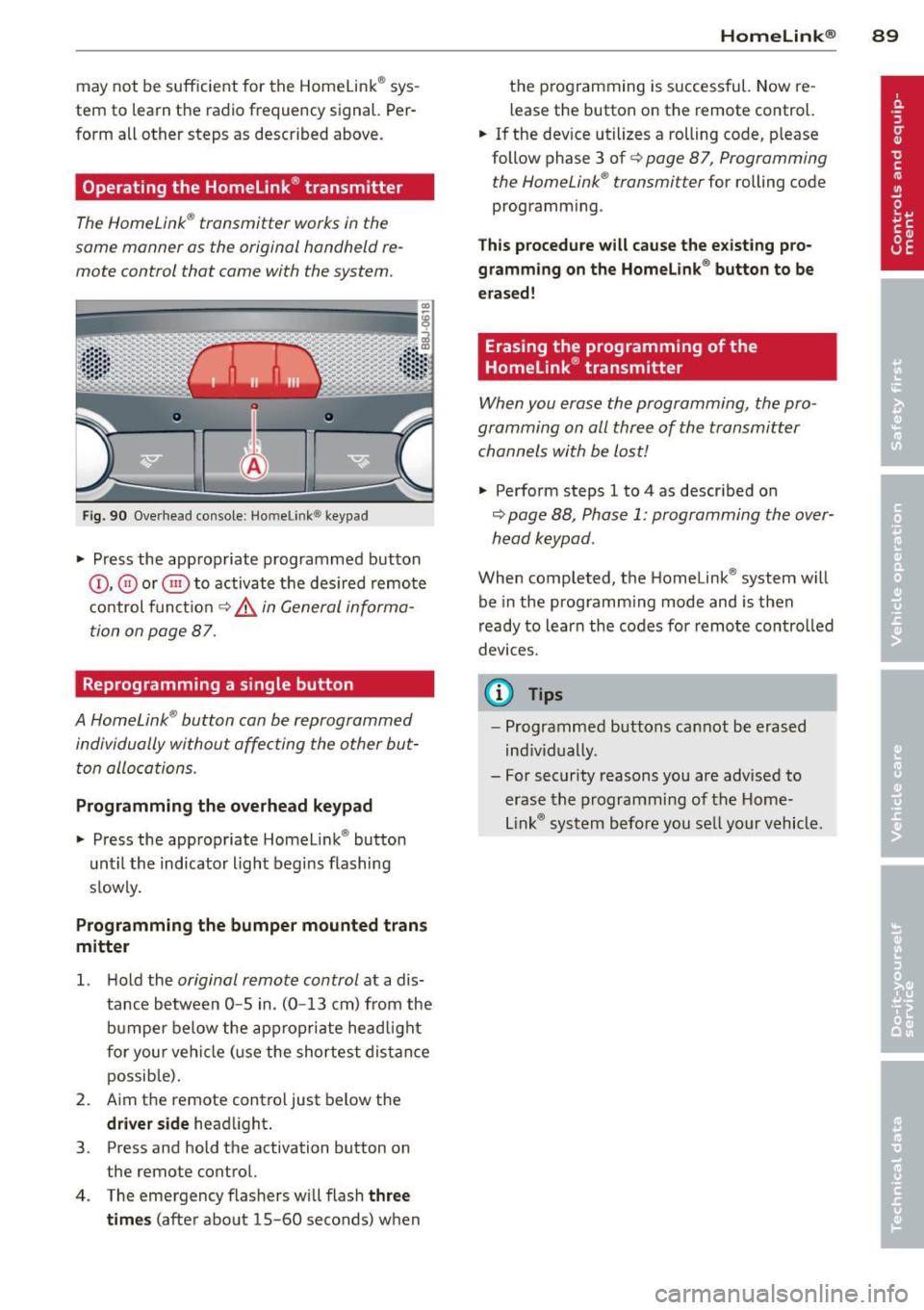
The HomeLink ® transmitter works in the
same manner as the original hand held re
mote control that came with the system.
Fig . 9 0 Overhead co nsole: Ho melin k® key pad
• Press the appropriate programmed button
©, @ or@ to activate t he des ired remote
co ntrol funct io n
¢ &. in General informa
tion on page 87.
Reprogramming a single button
A HomeLink ® button can be reprogrammed
individually without affecting the other but t on allocations.
Programming the overhead keypad
• Press the app ropriate Homeli nk® button
unt il the indicator light begins flashing
s low ly.
Programming the bumper mounted trans
mitter
1. H old the original remote control at a dis
tance between
0 -5 in . (0 -13 cm) from the
b umper below the ap prop ria te head light
fo r your vehi cle (use the shortest dis tan ce
possib le) .
2 . Aim the remote control just be low the
driver side head light .
3 . Press and hold the activation button on
the remote control.
4 . The emergency flashers w ill flash
three
times
(afte r about 15 -60 seconds) when
Homelin k® 89
the programming is successful. Now re
l ease the button on the remote control.
• If the dev ice utilizes a rolling code, p lease
follow phase 3 of ¢
page 8 7, Programming
t he HomeLink ® transmitter
for rolling code
programm ing .
Th is p rocedure will cause the e xisting pro ·
gramming on the Homelink ® button to be
erased!
Erasing the programming of the
Homelink ® transmitter
When you erase the programming, the pro ·
gramming on all three of the transmitter channels with be lost!
• Perfo rm steps 1 to 4 as descr ibed on
~ page 88, Phase 1: programming the over
head k eypad .
When completed, t he Homelink ® system will
be in the prog ramm ing mode and is then
r eady to learn the codes fo r remote controlled
devices.
(D Tips
- Programmed buttons can not be erased
ind iv idually.
- For security reasons you are advis ed to
erase the programming of the Home
Lin k® system before you se ll yo ur vehicl e.
Page 92 of 262
90 Driving Safel y
Driving Safely
General notes
Safe driving habits
Please remember -safety first!
This chapter contains important information,
tips, instructions and warnings that you need
to read and observe for your own safety, the
safety of your passengers and others . We have
summarized here what you need to know
about safety belts, a irbags, ch ild restra ints as
well as child safety. Your safety is for us
priori
ty number 1.
Always observe the info rmat ion
and warn ings in th is sect ion -fo r yo ur own
safety as well as for that of your passengers.
The information in this se ction app lies to all
model ve rsions of your veh icle . Some of the
feat ures desc ribed in this sec tions may be
standard equipment on some models, or may
be optional equipment on others . If you are
not sure, ask your authorized Aud i dealer.
A WARNING
- Make certain that you follow the instruc
t ions and heed the WARNINGS in this
Manual. It is in your interest and in the
interest of your passengers .
- Always keep the complete Owner's Liter
ature in your Audi when you lend or sell
yo ur vehicle so that this important info r
mation will a lways be ava ilable to the
dr iver and passenge rs.
- Always keep the Owner's literature handy
so that you can find i t eas ily if you have
ques tions.
Safety equipment
The safety features are part of the occupant
restraint system and work together to help
redu ce the risk of injury in a wide variety of
accident situations.
Your safety and the safety of your passenge rs
should not be left to chance. Advances in
technology have made a varie ty o f fea tures
avai la bl e to he lp re duce the risk of injury in an accident
. The following is a lis ting o f just a
few of the safety features in your Audi:
- sophis tic ated s afety be lts fo r drive r and a ll
passenger sea ting pos it ions,
- safety belt pre-tensione rs,
- fro nt airbags,
- knee airbags for the front seats,
- side airbags in the front seats,
- LATCH anchorages for child restraints,
- ad justab le steering column .
T hese ind iv idual safety features can wor k to
ge ther as a sys tem to he lp p rotec t you and
you r passengers in a wide range of accidents.
These features cannot wo rk as a system if
they are not always p roper ly adjusted and
properly used!
Safet y is everyb ody's re spon sibilit y!
Important things to do before driving
Safety is everybody's job! Vehicle and occu
pant safety always depends on the informed and careful driver.
For yo ur safety and the safety of you r passen
gers,
befor e driving alwa ys:
"' Make su re that all lig hts and signa ls a re op
erati ng correctly .
"' Ma ke s ure that the ti re p ressu re is co rrec t.
"' Mak e s ure th at all windows are clean and
afford good v is ibility to the o utside .
"' Secu re a ll luggage and other items caref ully
I:!) page 64.
"' Make s ure that nothing can interfere with
the pedals.
"' Adjust front seat, head restraint and mir
rors co rrectly for your height .
"' Instruct passenge rs to adjust the head re
st raints accord ing to the ir height .
"' Ma ke s ure to use the r igh t child re straint
correc tly to protect c hildren¢
page 130,
Child Safety .
"' Sit properly in your seat and make s ure that
your passengers do the same
I:!) page 54,
General recommendations. .,_
Page 124 of 262
122 Airbag system
Repair, care and disposal of the airbags
Parts of the airbag system are installed at
many different places on your Audi. Installing,
removing, servicing or repairing a part in an
area of the vehicle can damage a part of an
airbag system and prevent that system from
working properly in a collision.
There are some important things you have to know to make sure that the effectiveness of
the system will not be impaired and that dis
carded components do not cause injury or pol lute the environment.
A WARNING
Improper care, servicing and repair proce
dures can increase the risk of personal in
jury and death by preventing an airbag from deploying when needed or deploying
an airbag unexpectedly:
- Never cover, obstruct, or change the
steering wheel horn pad or airbag cover
or the instrument panel or modify them
in any way.
- Never attach any objects such as cup
holders or telephone mountings to the
surfaces covering the airbag units.
- For cleaning the horn pad or instrument
panel, use only a soft, dry cloth or one
moistened with plain water. Solvents or
cleaners could damage the airbag cover
or change the stiffness or strength of the material so that the airbag cannot de
ploy and protect properly.
- Never repair, adjust, or change any parts
of the airbag system.
- All work on the steering wheel, instru
ment panel, front seats or electrical sys
tem (including the installation of audio
equipment, cellular telephones and CB
radios, etc .) must be performed by a
qualified technician who has the training
and special equipment necessary.
- For any work on the airbag system, we
strongly recommend that you see your
authorized Audi dealer or qualified work
shop. -
Never modify the front bumper or parts
of the vehicle body.
- Always make sure that the side airbag
can inflate without interference:
- Never install seat covers or replace
ment upholstery over the front seat
backs that have not been specifically
approved by Audi.
- Never use additional seat cushions that
cover the areas where the side airbags inflate.
- Damage to the original seat covers or
to the seam in the area of the side air
bag module must always be repaired
immediately by an authorized Audi
dealer.
- The airbag system can be activated only
once. After an airbag has inflated, it
must be replaced by an authorized Audi
dealer or qualified technician who has
the technical information, training and
special equipment necessary.
- The airbag system can be deployed only
once. After an airbag has been deployed,
it must be replaced with new replace
ment parts designed and approved espe
cially for your Audi model version. Re
placement of complete airbag systems
or airbag components must be per
formed by qualified workshops only.
Make sure that any airbag service action
is entered in your Audi Warranty & Main
tenance booklet under
AIRBAG REPLACE
MENT RECORD.
- For safety reasons in severe accidents,
the alternator and starter are separated
from the vehicle battery with a pyrotech nic circuit interrupter.
- Work on the pyrotechnic circuit inter
rupter must only be performed by a
qualified dealer -risk of an accident!
- If the vehicle or the circuit interrupter
is scrapped, all applicable safety pre
cautions must be followed.
Page 134 of 262
132 Child Saf ety
seat. The weight of a child restraint and its
"footprint" vary for different kinds of chi ld re
straints and for the d ifferent models of the
same kind of child restraint offered by child
restra int manufacturers.
The weight ranges for the individual types,
makes and mode ls of ch ild restra ints that the
NHTSA has specified in the Safety Standard
together with the weight ranges of typical in
fants and typical 1 year-old child have been
stored in the control unit of the Advanced A ir
bag System. When a ch ild restrai nt is being
used on the front passenger seat with a typi
cal 1 yea r-old ch ild, the Advanced Airbag Sys
tem compares the we ight measured by the
weight sensing mat with the in formation stor
ed in the electronic control unit.
The ele ctron ic cont rol unit also registers the
tension on the front passenge r safety belt.
The tension on the safety be lt fo r the front
passenger seat will be different for an ad ult
who is properly using the safety belt as com
pared to the tension on the belt when it is
used to attach a child restraint to the seat.
The sensor below the latch for the safety belt
for the front seat passenger measu res the
tension on the be lt. The input from this sen
sor is then used with the we ight to "decide",
whe ther there is a ch ild restraint w ith a typ ica l
1 year-o ld child on the front passenger seat
and whether or not the airbag must be turned
off .
Child restraints and Advanced Airbags
Regardless of the child restraint that you use,
make sure that it has been certified to meet
United States Federal Motor Vehicle Safety
Standards a nd has been certified by its manu
facture r fo r u se w ith an airbag. Always be s ure
that t he ch ild res traint is p rope rly insta lled at
one o f th e rear seat ing pos itions. If in excep
tional c ircu mstances you must use it on the
front passenger seat, caref ully read all of the
info rmation on c hild safety and Advanced Air
bags and heed all of the applicable WARN
INGS. Make certain that the child restraint is
correctly recognized by the weig ht-sensing mat
inside the front passenger seat, that the
front passenger airbag is turned off and that
the a irbag stat us is always cor rect ly signa led
by the
PASSENGER AIR BAG OFF light.
Many types and models of child res traints
have been available over the years, new mod
els are introduced regu larly incorporating new
and improved des igns and older models are
taken out of product ion. Ch ild restraints are
not standard ized . Child restraints of the same
type typically have d ifferent weights and sizes
and diff erent 'footpr ints,' the s ize and shape
of the bo ttom of the ch ild restra int that sits
o n t he seat, when they a re inst alled on a vehi
cle sea t. Th ese d ifferences make it vir tually
impossible to certify compliance with the re
quirements for advanced airbags with eac h
and every child restra int that has ever been
sold in the past or will be sold over the course
of the useful life of your veh icle.
For th is reason, the United States National
Highway Traffic Safety Adm inistrat ion has
published a list of specific type, makes and
models of child restraints that must be used
to certify comp liance of the Advanced Airbag
System i n your veh icle w ith the suppression
requirements of Federal Motor Vehicle Safety
Standa rd 208. These chi ld restraints are:
Subpart A - Car bed child restraints
Model
Angel Guard Angel R ide AA 2403FOF
Manufactured on or
after
September 25, 200 7
Subpart B - Rear-facing child restraints
Model Manufactured on or
·
Century SmartFit
4543
Cosco Arriva
22-013PAW and base
22-999W HO
Evenf lo Discove ry Ad
just Right 212
after .
De cembe r 1, 1999
September 25, 2007
'
.
December 1, 1999 IJ>,
Page 163 of 262
the exhaust system and this could cause
the catalytic converter to overheat.
- Do not turn off the ignition while the ve
hicle is moving .
- Do not con tinue to operate yo ur vehicle
under these conditions, as otherwise fuel
can reach the cata lytic converter . This
could result in overheating of the con
verter, requ iring its replacement.
- To assure efficient operation of the Emis
sion Control System:
- Have your veh icle ma inta ined properly
and in acco rdance with the service rec
ommendations in your Wa rranty
&
Ma intenan ce booklet.
- Lac k of proper maintenance as well as
improper use of the vehicle will impa ir
t he funct ion of the emission control
system and cou ld lead to damage.
@ For the sake of the environment
Even when the Emission Contro l System is
operating p roperly, the exhaus t gas can
have a s ulfu r- like exhaust gas smell under
some operating states. This depends on
the s ulfur content o f the fue l being used.
Using a different brand of fuel may help,
or filling the tank w ith lead-free super
grade gasoline .
Operate your vehicle
economically and
minimize pollution
General
Your personal style of driving will determine
the economy of your vehicle, as well as ex
haust and noise levels .
Fuel economy, environmental impact, and
wear on your engine, brakes and t ires largely
depend on three factors :
- your persona l driving style
- operating conditions
- technical lim itations
I f you anticipate w hat you need to do nex t and
d rive economically, you can eas ily cut your
Dri vin g and en vironm ent 161
fuel consumption by 10 -15 percent. Th is sec
tion w ill give yo u some tips on how you can
help the env ironment and your pocketbook .
(D Tips
The cons umption estimates as published
by ENVIRONME NTAL PROTEC TION AGENCY
(EPA) and Transport Canada may not corre
spond to your actual consumption on the road, which will vary depending upon vehi
cle load and speed, road and weather con
dit ions, trip length, etc.
Drive smoothly and keep a lookout
ahead
Vehicles use the most fuel when they are ac
celerating.
Avoid unnecessary accelerat ing and braking .
Vehicles use the most fuel when they are ac
ce lerat ing . If you anticipate what is going to
happe n next, you will need to brake less and,
th us, accele rate less. Let the vehicle coast
whenever possible -for examp le when you see
that the next t raff ic light is red.
Avoid full throttle
Driving at moderate speeds saves fuel and
improves your mileage.
"' Try and keep well below your car's maxi -
mum speed.
Acce lerat ing gently reduces fue l consump
tion, eng ine wear, and does not disturb the
environment.
Fuel consumpt ion, exhaust emiss ions and en
gine noise increase disproportionately at high
speeds. If you drive at approximately three
quarte rs of top speed, fuel consumption w il l
be reduced by one half. Never drive faster
t h an the posted speed limit and weathe r con
ditions perm it.
•
•
Page 189 of 262
@ For the sake of the environment
- Before changing your oil, first make sure
you know where you can properly dispose of the used oil.
- Always dispose of used engine oil proper
l y. Do not dump it on garden soi l, wood
ed areas, into open streams or down
sewage drains.
- Recycle used engine oil by taking it to a
used engine oil collection facility in your
area, or contact a service station.
Engine cooling system
Coolant
The engine coolant performs two functions: it
keeps the engine from overheating and it pro
tects the engine from freezing in the winter.
The cooling system is sea led and generally re
qu ires little at tention.
The cooling system has been filled at the fac
tory with a permanent coolant which does not n eed to be changed. The coolant consists of a
mixture of wa ter and the man ufacturer's g ly
col-based coolan t addi tive Gl3 ant ifree ze
with ant icorrosion add itives (50% for USA
models; 60% for Canadian models) . This mix
ture both assures the necessary frost protec
tion and protects metal components in the
engine's cooling system from corrosion and
scaling. It also raises the boiling po int of the
coolant.
Do not reduce the concentration of the coo l
ant in the summer by adding plain water.
The
proportion of coolant add itive must be at
lea st 50°/4 but not more than 60°/4
to ma in
tain antifreeze protection and cooling efficien cy. If the coolant frost pro tect io n is too low,
the coolant cou ld freeze and dam age the veh i
cle heating and eng ine cooling system.
For year-round driving, antifreeze is added at
the facto ry for temperatures down to:
- -31°F( -35°C)USA
- -40 °F ( -40 °C) Canada.
Checkin g and fillin g 187
A WARNING
Before you c heck anything in the engine
compartment, always read and heed all
W ARNI NGS~ &.
in Working in the engine
comportment on page 180.
(D Note
- Before winter sets in, have the coolant
checked to see if the coolant additive in
your v ehicle is sufficient to meet the cli
mate conditions. This is especia lly impo r
t an t if you live in a region where t he win
t er is ex treme ly cold. If ne cessary, in
cr ease t he p ro portion of coo lant add itive
to 60%.
- Whe n adding cool ant additive to yo ur
c ooling sys tem, remember:
- We recommend us ing on ly coolant ad
d itive Gl2++ or Gl3 (check the labe l)
for your veh icle. This coolant additive is
ava ilable at autho rized Aud i dea le rs.
Othe r types of antifree ze can sig nifi
cantly reduce cor ros io n protec tion. The
res ulting co rrosion can cause a loss of
coolant an d serio us en gine damage.
- Do not add any type of rad iator le ak seal
ant to yo ur vehicle 's eng ine coolant .
Adding radiator repair flu id may adverse
ly affect the function and performance of
your cooling system and co uld resu lt in
damage not covered by you r New Ve hicle
Limited War ranty.
Checking the engine coolant level
The engine coolant level con be checked with
a quick glance.
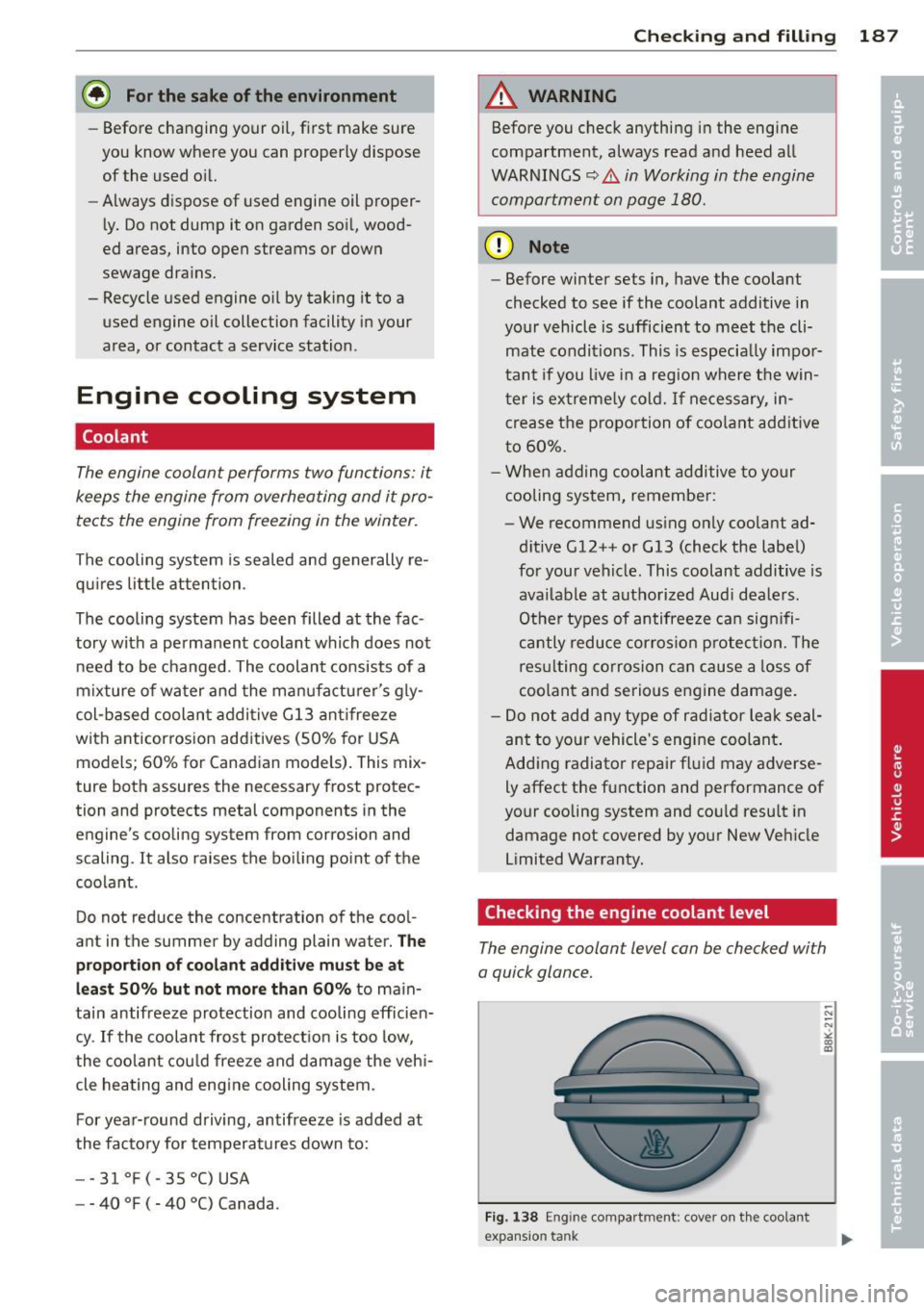
Fig. 138 Eng ine compa rtment : cove r on t he coola nt
expansio n tank