warning AUDI TT 2013 Owner´s Manual
[x] Cancel search | Manufacturer: AUDI, Model Year: 2013, Model line: TT, Model: AUDI TT 2013Pages: 262, PDF Size: 65.91 MB
Page 87 of 262
Kick-down feature
Applies to vehicles: with S tron ic
The kick-down feature allows maximum ac
celeration .
If you depress the accelerator pedal fully be
yond the full-throttle position, the transmis sion automatically downshifts one gear, de
pending on vehicle speed and engine rpm . The
upsh ift into the next higher gear takes place
as soon as the max imum specified engine
speed is reached.
A WARNING
Please note that the drive wheels can spin
if the kick-down is used on a smooth s lip
pery road - risk of skidding!
Launch Control Program
Applies to vehicles: with S tron ic
The Launch Control Program permits maxi
mum acceleration .
In o rder to u se La unch Control, the ASR (An ti
Slip Reg ulation) mus t be d is a b led. When ASR
is disab led, the ESC wa rning/ind icator light
IJ
in the inst rument cluster illuminates . So that
L aunch Cont ro l can be used, the engine must
be at operating temperature and the steer ing
wheel must not be turned.
~ With the eng ine running , brief ly press the
ESC button . The message "Stabilization pro
gram off" or "Sport control Warning! Re
stricted stability" in the driver information
system d isplay.
~ Sh ift the gear lever to "S" or the tiptronic ®
pos it ion .
~ Step on the b ra ke peda l w ith your left foot
and keep the bra ke peda l fully depressed for
at leas t one second .
~ With your right foot, step on the acce lera
tor to the w ide-open throttle position o r
K ickdown . The engine speed settles at about
3,200 rpm.
~ Take your left foot off the brake .
Transm iss ion 85
A WARNING
-Always adapt your dr iving to the traffic
f low.
- Onl y use Launch Control when road and
traffic cond itions allow it and other dr iv
ers will not be endangered or annoyed by
your driving and th e acce le rat ion of the
veh icle.
- Ma ke sure that ESC remains enab led.
With the ESC disab led, th e vehicle could
b ra ke away, part icularly on a s lick and
slippe ry ro ad - ris k of skid ding!
- Once acceleration is fi nished, switch AS R
on agai n by br iefly pushing t he ESC bu t
ton.
Back-up program
Applies to vehicles: with S tronic
In the event of a system malfunction, there is
a back-up program.
In the event of system ma lfunction, the auto
matic transmission switches to the fai l-safe
mode. All of t he se lector lever position d is
plays for the au tomatic tra nsmission a re hi gh
li gh ted wi th a light b ackgro und in t he i nstr u
ment cluster d isp lay . In some cases you can
not use reverse gea r any more.
If the t ransmission swi tches to fail-safe
mode, yo u should t ake the ve hicle to an au
t horized Audi dea le rship as soon as possib le
to have the condition corrected.
Clutch is overheating
Applies to vehicles: with S tronic
• Clutch is overheating ! Please stop veh i
cle!
If the symbols a re i lluminated, the clutch is
ove rheating a nd could be damaged if you con
tin ue to drive. Stop the vehicle and a llow the
transmission to cool with the se lector lever in
the P posit ion while the engine runs at idle. If
the warn ing does not turn off, do not continue
dr iv ing . See your author ized A udi dealer or
i,..
Page 88 of 262
86 Transmis sion
qualified repair facility for assistance. Other
wise serious transmission damage could re
sult . Once the indicator light has turned off,
drive to your authori zed Audi dealer or quali
fied repair facility immediately to have the malfunction corrected .
Selector lever emergency release
Applies to vehicles: with S tro nic
If the vehicle's power supply fails, the selec
tor lever can be released in an emergency.
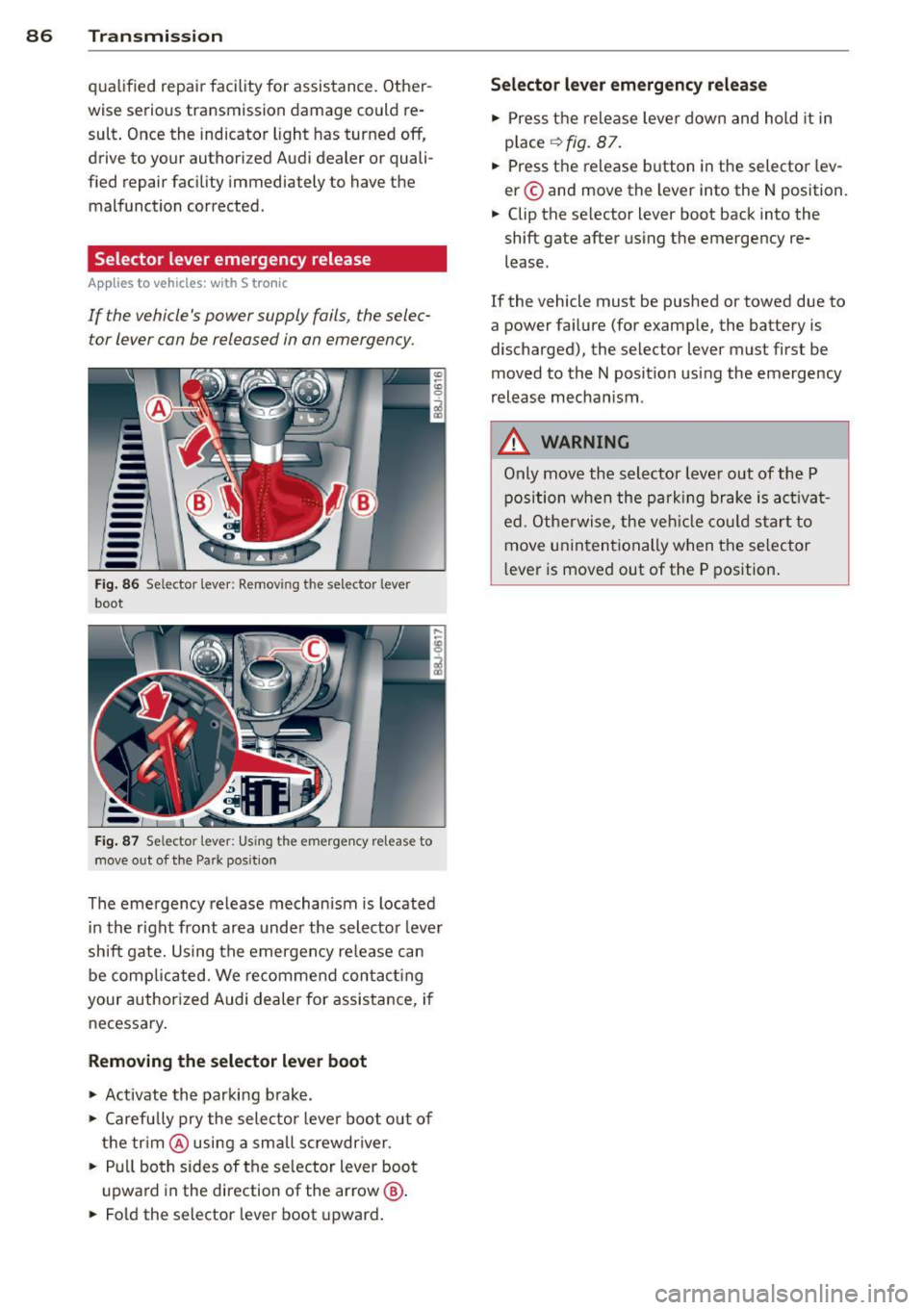
-----Fig. 86 Se lector lever : Remov ing th e selector lever
boot
Fig. 87 Se lector lever: Using the eme rgency re lease to
move out of the Park pos ition
The emergency release mechanism is located
in the right front area under the selector lever
shift gate. Using the emergency release can
be comp licated. We recommend contacting
your authorized Audi dealer for assistance, if
necessary.
Removing the selector lever boot
.,. Activate the parking brake .
.,. Carefully pry the selector lever boot out of
the trim @using a small screwdriver .
.,. Pull both sides of the selector lever boot
upward in the direction of the arrow @ .
.,. Fold the selector lever boot upward.
Selector lever emergency release
.,. Press the release lever down and hold it in
p lace
¢ fig. 87.
.,. Press the release button in the selector lev
er © and move the lever into the N position.
.,. Clip the selector lever boot back into the
shift gate after using the emergency re
lease .
If the vehicle must be pushed or towed due to
a power failure (for example, the battery is
discharged), the selector lever must first be
moved to the N position using the emergency
release mechanism .
A WARNING
-Only move the selector lever out of the P
position when the park ing brake is activat
ed. Otherwise, the veh icle could start to
move unintentionally when the selector
lever is moved out of the P position.
Page 89 of 262
Homelink®
Universal remote
control
General information
The HomeLink universal remote control can
be programmed with hand-held transmitters
from existing equipment.
You must first program the Homelink ® trans
mitter before you can use the system
~ page 87, Programming the HomeLink ®
transmitter .
In order to program the Home Link ® transmit
ter for devices utilizing rolling code, a second
person on a ladder who can safely reach the
garage door opener motor is recommended.
It is also necessary to locate the "learn" but
ton on your garage door opener motor . Refer
to the ope rating inst ructions for the opener ,
as the location and color of this bu tton may
vary by manufacturer .
You can still use the origina l remote control
fo r the device at any time.
A WARNING
-
- Never use the Homelink® transmitter
with any garage door opener that does
have not the safety stop and reverse fea
ture as requ ired by federal safety stand
ards. This includes any garage door open
er model man ufactured before April 1,
1982.
- A garage door opener which cannot de
tect an object, signaling the door to stop
and reverse does not meet current feder
al safety standards. Using a garage door
opener without these features increases
risk of serious injury or death.
- For safety reasons never release the
parking brake or start the engine while
anyone is standing in front of the vehicle.
- A garage door or an estate gate may
sometimes be set in motion when the Homelink ® remote control is being pro
grammed. If the device is repeatedly ac-
Homelin k® 87
tivated, this can overstrain motor and
damage its e lectrical components -an
overheated motor is a fire hazard!
- To avoid possible injuries or property
damage, please always make abso lutely
certain that no persons or objects are lo
cated in the range of motion of any
equipment being operated.
{!) Tips
- If you would like more information on
Homelink ®, where to purchase the
Homelink ® compatible products, or
would like to purchase the Homelink®
Home Lighting Package, please cal l to ll
free: 1-800-355-3515.
- For Declaration of Compliance to United
States FCC and Industry Canada regula
tions~
page 246.
Programming the Homelink ®
transmitter
The transmitter is programmed in two phas
es. For rolling code transmitters, a third
phase is also necessary.
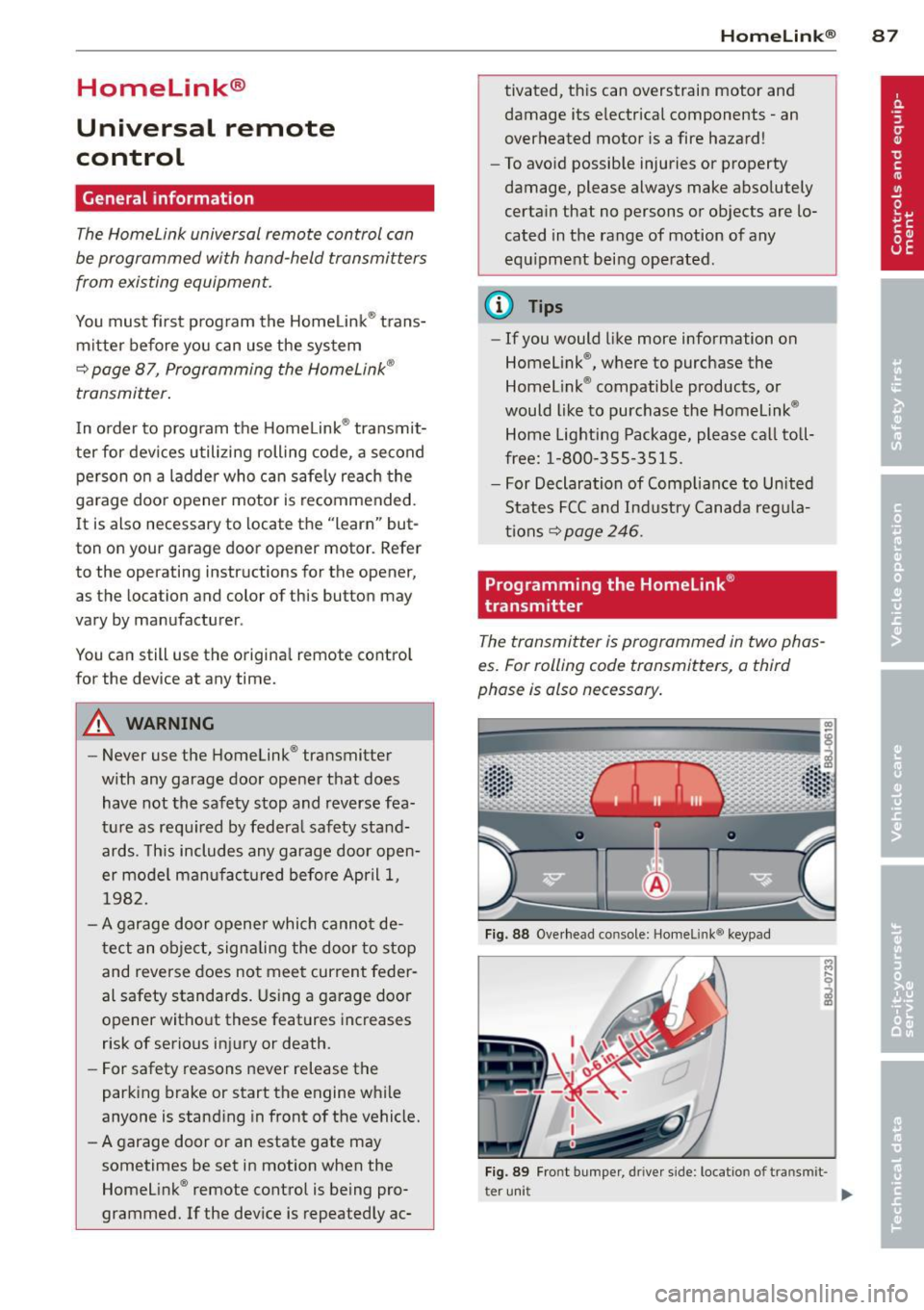
Fig . 88 Ove rhead co nsole: Homelink ® keypad
Fig. 89 Fro nt b umper , driver side : locatio n of tran smi t-
t er uni t
II>
Page 92 of 262
90 Driving Safel y
Driving Safely
General notes
Safe driving habits
Please remember -safety first!
This chapter contains important information,
tips, instructions and warnings that you need
to read and observe for your own safety, the
safety of your passengers and others . We have
summarized here what you need to know
about safety belts, a irbags, ch ild restra ints as
well as child safety. Your safety is for us
priori
ty number 1.
Always observe the info rmat ion
and warn ings in th is sect ion -fo r yo ur own
safety as well as for that of your passengers.
The information in this se ction app lies to all
model ve rsions of your veh icle . Some of the
feat ures desc ribed in this sec tions may be
standard equipment on some models, or may
be optional equipment on others . If you are
not sure, ask your authorized Aud i dealer.
A WARNING
- Make certain that you follow the instruc
t ions and heed the WARNINGS in this
Manual. It is in your interest and in the
interest of your passengers .
- Always keep the complete Owner's Liter
ature in your Audi when you lend or sell
yo ur vehicle so that this important info r
mation will a lways be ava ilable to the
dr iver and passenge rs.
- Always keep the Owner's literature handy
so that you can find i t eas ily if you have
ques tions.
Safety equipment
The safety features are part of the occupant
restraint system and work together to help
redu ce the risk of injury in a wide variety of
accident situations.
Your safety and the safety of your passenge rs
should not be left to chance. Advances in
technology have made a varie ty o f fea tures
avai la bl e to he lp re duce the risk of injury in an accident
. The following is a lis ting o f just a
few of the safety features in your Audi:
- sophis tic ated s afety be lts fo r drive r and a ll
passenger sea ting pos it ions,
- safety belt pre-tensione rs,
- fro nt airbags,
- knee airbags for the front seats,
- side airbags in the front seats,
- LATCH anchorages for child restraints,
- ad justab le steering column .
T hese ind iv idual safety features can wor k to
ge ther as a sys tem to he lp p rotec t you and
you r passengers in a wide range of accidents.
These features cannot wo rk as a system if
they are not always p roper ly adjusted and
properly used!
Safet y is everyb ody's re spon sibilit y!
Important things to do before driving
Safety is everybody's job! Vehicle and occu
pant safety always depends on the informed and careful driver.
For yo ur safety and the safety of you r passen
gers,
befor e driving alwa ys:
"' Make su re that all lig hts and signa ls a re op
erati ng correctly .
"' Ma ke s ure that the ti re p ressu re is co rrec t.
"' Mak e s ure th at all windows are clean and
afford good v is ibility to the o utside .
"' Secu re a ll luggage and other items caref ully
I:!) page 64.
"' Make s ure that nothing can interfere with
the pedals.
"' Adjust front seat, head restraint and mir
rors co rrectly for your height .
"' Instruct passenge rs to adjust the head re
st raints accord ing to the ir height .
"' Ma ke s ure to use the r igh t child re straint
correc tly to protect c hildren¢
page 130,
Child Safety .
"' Sit properly in your seat and make s ure that
your passengers do the same
I:!) page 54,
General recommendations. .,_
Page 93 of 262
.. Fasten your safety belt and wear it properly.
Also instruct your passengers to fasten their
safety belts properly ¢
page 100.
What impairs driving safety?
Safe driving is directly related to the condi
tion of the vehicle, the driver as well as the
driver's ability to concentrate on the road
without being distracted.
The driver is responsible for the safety of the
veh icle and a ll of its occupants . If your ability
to drive is impaired, safety risks for everybody
in the vehicle increase and you also become a
hazard to everyone else on the road ¢
,&..
Therefore:
.. Do not let yourself be distracted by passen
gers or by us ing a cellular telephone.
.. NEVER drive when your driv ing ability is im
paired (by medicat ions, alcohol, drugs, etc .) .
.. Observe all traffic laws, rules of the road
and speed limits and plain common sense.
.. ALWAYS adjust your speed to road, traffic
and weather condit ions .
.. Take frequent breaks on long trips . Do not
drive for more than two hours at a stretch .
.. Do NOT drive when you are tired, under
pressure or when you are stressed.
A WARNING
Impaired driving safety increases the risk
of serious personal injury and death when
ever a vehicle is being used .
Driving Safely 91
Proper occupant
seating positions
Proper seating position for the driver
The proper driver seating position is impor
tant for safe, relaxed driving.
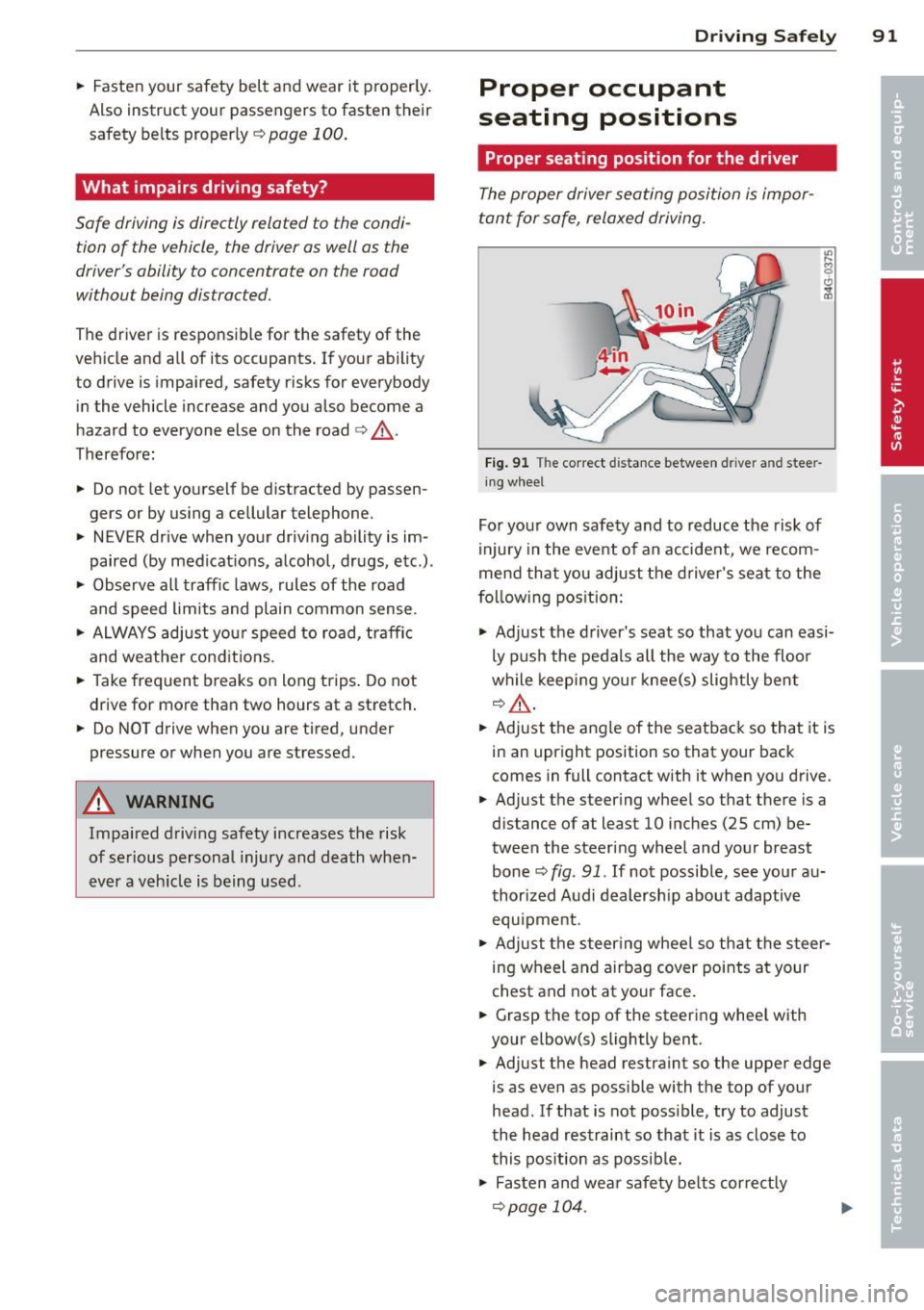
Fig. 91 The correct d istance between d river a nd stee r
in g whee l
For your own safety and to reduce the risk of
injury in the event of an accident, we recom
mend that you adjust the driver's seat to the
foll owing pos ition:
.,. Adjust the driver's seat so that you can easi
ly push the pedals all the way to the floor
while keeping your knee(s) slightly bent
q&_ ,
.. Adjust the angle of the seatback so that it is
in an upright position so that your back
comes in full contact with it when you drive.
.. Adjust the steering wheel so that there is a
distance of at least 10 inches (25 cm) be
tween the steering wheel and your breast
bone ¢
fig. 91. If not possible, see your au
thorized Audi dealership about adaptive
equ ipment .
.. Adjust the steer ing wheel so that the steer
ing wheel and airbag cover points at your
chest and not at your face .
.. Grasp the top of the steering wheel with
your elbow(s) slightly bent .
.. Adjust the head restraint so the upper edge
is as even as possible with the top of your
head . If that is not poss ible, try to adjust
the head restraint so that it is as close to
this position as possible .
.. Fasten and wear safety belts correctly
qpage 104.
Page 94 of 262
92 Driving Safely
• Always keep both feet in the footwell so
that you are in control of the vehicle at all
times.
For detailed information on how to adjust the
driver's seat, see
c::> page 55.
A WARNING
Drivers who are unbelted, out of position
or too close to the airbag can be seriously
injured by an airbag as it deploys. To help
reduce the risk of serious personal injury:
- Always adjust the driver's seat and the
steering wheel so that there are at least
10 inches (25 cm) between your breast
bone and the steering wheel.
- Always adjust the driver's seat and the
steering wheel so that there are at least
4 inches (10 cm) between the knees and
the lower part of the instrument panel.
- Always hold the steering wheel on the
outside of the steering wheel rim with
your hands at the 9 o'clock and 3 o'clock positions to help reduce the risk of per
sonal injury if the driver's airbag inflates.
- Never hold the steering wheel at the
12 o'clock position or with your hands at
other positions inside the steering wheel
rim or on the steering wheel hub. Hold
ing the steering wheel the wrong way
can cause serious injuries to the hands,
arms and head if the driver's airbag in
flates
- Pointing the steering wheel toward your
face decreases the ability of the supple
mental driver's airbag to protect you in a
collision.
- Always sit in an upright position and nev
er lean against or place any part of your
body too close to the area where the air
bags are located.
- Before driving, always adjust the front
seats and head restraints properly and
make sure that all passengers are prop
erly restrained.
- Never adjust the seats while the vehicle
is moving. Your seat may move unexpect- edly and you could lose control of the ve
hicle .
- Never drive with the backrest reclined or
tilted far back! The farther the backrests
are tilted back, the greater the risk of in
jury due to incorrect positioning of the safety belt and improper seating posi
tion .
- Children must always ride in child seats
c::> page 130. Special precautions apply
when installing a child seat on the front passenger seat¢
page 108.
Proper seating position for the front
passenger
The proper front passenger seating position
is important for safe, relaxed driving .
For your own safety and to reduce the risk of
injury in the event of an accident, we recom
mend that you adjust the seat for the front
passenger to the following position :
• Adjust the angle of the seatback so that it is
in an upright position and your back comes in full contact with it whenever the vehicle is
moving.
• Adjust the head restraint so that the upper
edge is as even with the top of your head as
possible but not lower than eye level and so
that it is as close to the back of your head as
possible
c::> page 94.
• Keep both feet flat on the floor in front of
the front passenger seat.
• Fasten and wear safety belts correctly
c::>page 104.
For detailed information on how to adjust the
front passenger's seat, see
c::> page 54 .
A WARNING
-
Front seat passengers who are unbelted,
out of position or too close to the airbag
can be seriously injured or killed by the air
bag as it unfolds. To help reduce the risk of
serious personal injury:
Page 95 of 262
-Passengers must always sit in an upright
position and never lean against or place
any part of their body too close to the
area where the airbags are located.
- Passengers who are unbelted, out of po
sition or too close to the airbag can be
seriously injured by an airbag as it un
folds with great force in the blink of an
eye .
- Always make sure that there are at least
10 inches (25 cm) between the front
passenger's breastbone and the instru
ment panel.
- Always make sure that there are at least
4 inches (10 cm) between the front pas
senger 's knees and the lower part of the
instrument panel.
- Each passenger must always sit on a seat
of their own and properly fasten and
wear the safety belt belonging to that
seat.
- Before driving , always adjust the front
passenger seat and head restraint prop
erly.
- Always keep your feet on the floor in
front of the seat. Never rest them on the
seat, instrument panel, out of the win
dow, etc. The airbag system and safety
belt will not be able to protect you prop
erly and can even increase the risk of in
jury in a crash .
- Never drive with the backrest reclined or
tilted far back! The farther the backrests are tilted back , the greater the risk of in
jury due to incorrect positioning of the
safety belt and improper seating posi
tion.
- Children must always ride in child seats
¢
page 130. Special precautions apply
when installing a child seat on the front
passenger seat¢
page 108.
Driving Safely 93
Proper seating positions for passengers
in rear seats
Rear seat passengers must sit upright with
both feet on the floor consistent with their
physical size and be properly restrained
whenever the vehicle is in use.
To reduce the risk of injury caused by an incor
rect seating position in the event of a sudden
braking maneuver or an accident, your pas
sengers on the rear bench seat must always
observe the following:
.,. Make sure that the seatback is securely
latched in the upright position¢
page 59.
.,. Keep both feet flat in the footwell in front
of the rear seat.
.,. Fasten and wear safety belts properly
¢page 104.
.,. Make sure that children are always properly
restrained in a child restraint that is appro
priate for their size and age¢
page 130.
A WARNING
Passengers who are improperly seated on
the rear seat can be seriously injured in a
crash.
- Each passenger must always sit on a seat
of their own and properly fasten and
wear the safety belt belonging to that
seat.
- Safety belts only offer maximum protec
tion when the seatback is securely latch
ed in the upright position and the safety
belts are properly positioned on the
body. By not sitting upright, a rear seat
passenger increases the risk of personal
injury from improperly positioned safety
belts!
•
•
Page 96 of 262
94 Driving Safel y
Proper adjustment of head restraints
Correctly adjusted head restraints are an im
portant part of your vehicle's occupant re
straint system and can help to reduce the risk of injuries in accident situations.
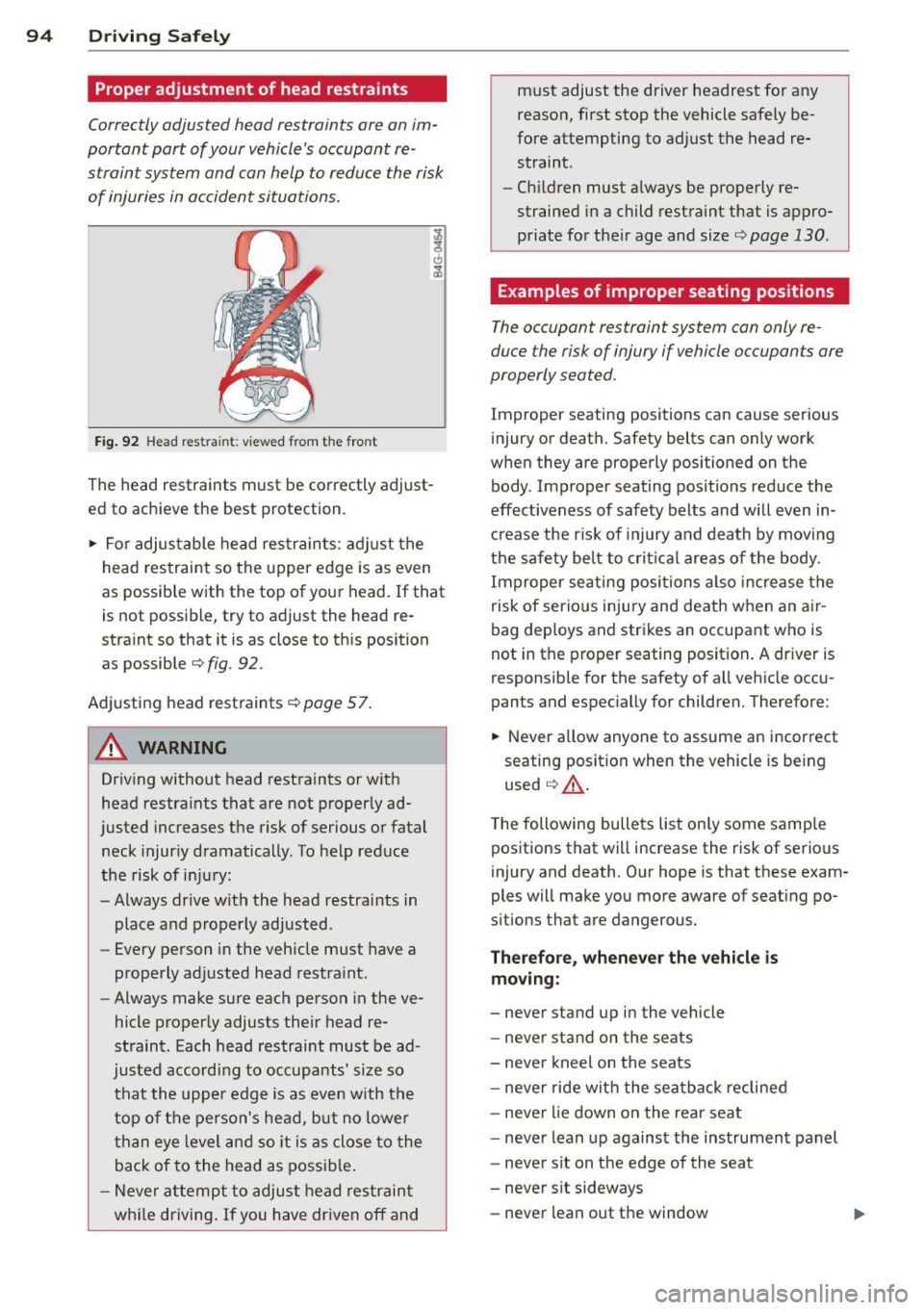
Fig. 92 Head restra int : viewed from t he fro nt
The head restraints must be correctly adjust
ed to achieve the best protection.
~ For adjustable head restraints: adjust the
head restraint so the upper edge is as even
as possible with the top of your head. If that is not possible, try to adjust the head re
straint so that it is as close to this position as possible
r:::> fig. 92 .
Adjusting head restraints r:::> page 57.
&_ WARNING
Driving without head restraints or with
head restraints that are not properly ad
justed increases the risk of serious or fatal
neck injuriy dramatically. To help reduce
the risk of injury:
- Always drive with the head restra ints in
place and properly adjusted.
- Every person in the vehicle must have a
properly adjusted head restraint.
- Always make sure each person in the ve
hicle properly adjusts their head re
straint. Each head restraint must be ad
justed according to occupants' size so
that the upper edge is as even w ith the
top of the person's head, but no lower
th an eye level and so it is as close to the
back of to the head as possible.
- Never attempt to adjust head restraint
wh ile driving. If you have driven
off and must adjust the driver headrest for any
reason, first stop the vehicle safely be
fore attempting to adjust the head re straint .
- Ch ildren must always be properly re
strained in a child restraint that is appro
priate for their age and size
c:> page 130.
· Examples of improper seating positions
The occupant restraint system can only re
duce the risk of injury if vehicle occupants are
properly seated .
Improper seating positions can cause serious
injury or death. Safety belts can only work
when they are properly positioned on the body . Improper seating positions reduce the
effectiveness of safety belts and will even in
crease the risk of injury and death by moving
the safety belt to critical areas of the body.
Improper seating posi tions also increase the
risk of serious injury and death when an air
bag deploys and strikes an occupant who is
not in the proper seating position . A dr iver is
responsible for the safety of all vehicle occu
pants and especially for children. Therefore :
~ Never allow anyone to assume an incorrect
seating position when the vehicle is being
used
c::> _& .
The following bullets list only some sample
positions that will increase the risk of serious
injury and death. Our hope is that these exam
ples will make you more aware of seating po
sitions that are dangerous.
Therefore , whenever the vehicle is
moving:
- never stand up in the vehicle
- never stand on the seats
- never kneel on the seats
- never ride with the seatback reclined
- never lie down on the rear seat
- never lean up against the instrument panel
- never s it on the edge of the seat
- never sit sideways
- never lean out the window
Page 97 of 262
-never put you r feet out the window
- never put your feet on the instrument panel
- never rest your feet on the seat cushion o r
back of the seat
- never ride in the footwe ll
- never ride in the cargo area
A WARNING
Imprope r seat ing positions increase the
r is k of se rious personal injury and death
whenever a veh icle is being used .
- Always make sure that all vehicle occu
pants stay in a proper seating pos it ion
and are properly restra ined whenever the
vehicle is be ing used .
Driver and passenger
side footwell
Important safety instructions
A WARNING
Always make sure that the knee airbag can
inflate without interference. Objects be
tween yourse lf and the airbag can increase
the risk of injury in an acc ident by interfer
ing w ith the way the a irbag deploys or by
being p ushed into you as the airbag de
ploys.
- No persons (ch ild ren) or animals should
ride in the footwell in front of the pas
senger seat. If the airbag deploys, t his
c an res ult in serious or fat al inju ries.
- No objects of any k ind shou ld be carried
in t he footwe ll area in front of the driv
er's or passenger's seat. Bul ky objec ts
(shopping bags, for example) can ham
per or prevent p roper deployment of the
airbag. Small objects can be thrown
thro ugh the vehicle if the airbag deploys
and injure you or your passengers.
-
Dr iving Safel y 95
Pedal area
Pedals
The pedals must always be free to move and
must never be interfered with by a floor mat
or any other object.
Make sure that a ll peda ls move free ly without
interfe rence and that nothing prevents them
from return ing to their orig inal positions .
Only use floor mats t hat Leave t he pedal area
free and can be secured with floor mat fasten ers .
If a brake circ uit fai ls, increased brake pedal
trave l is required to b ring the vehicle to a f ull
stop.
A WARNING
Pedals that cannot move free ly can cause
Loss of vehicle control and increase the risk
of ser ious injury.
- Never p lace any objects in the driver's
footwell. An object cou ld get into the
pe dal area and inte rfe re with pedal func
tion. In case of sudden brak ing o r an ac
cident, yo u wo uld not be able to b rake or
accelerate!
- Always ma ke sure tha t no thing can f all
or move into the driver's footwel l.
Floor mats on the driver side
Always use floor mats that can be securely
attached to the floor mat fasteners and do
not in terfere with the free movement of the
pedals.
"' Ma ke su re that the floor mats are prope rly
secured and cannot move and in terfere with
t he peda ls ¢ ..&_ .
U se only floor mats that leave the peda l area
u nobst ructed and th at are firmly secu re d so
that they c annot slip o ut o f posi tion. You c an
obta in suitab le floor mats from yo ur aut ho r
ized Audi Dealer.
Floor mat fastene rs a re in sta lled in your Aud i.
1111>
•
•
Page 98 of 262
96 Driving Safely
Floor mats used in your vehicle must be at
tached to these fasteners. Properly securing
the floor mats will prevent them from sliding into positions that could interfere with the
pedals or impair safe operation of your vehicle
in other ways .
A WARNING
Pedals that cannot move freely can result
in a loss of vehicle control and increase the
risk of serious personal injury .
- Always make sure that floor mats are
properly secured.
- Never place or install floor mats or other
floor coverings in the vehicle that cannot
be properly secured in place to prevent
them from slipping and interfering with
the pedals or the ability to control the
vehicle.
- Never place or install floor mats or other
floor coverings on top of already instal
led floor mats. Additional floor mats and
other coverings will reduce the size of
the pedal area and interfere with the pedals.
- Always properly reinstall and secure floor
mats that have been taken out for clean
ing.
- Always make sure that objects cannot
fall into the driver footwell while the ve
hicle is moving. Objects can become
trapped under the brake pedal and accel
erator pedal causing a loss of vehicle
control.
Stowing luggage
Loading the luggage compartment
All luggage and other objects must be prop
erly stowed and secured in the luggage com
partment.
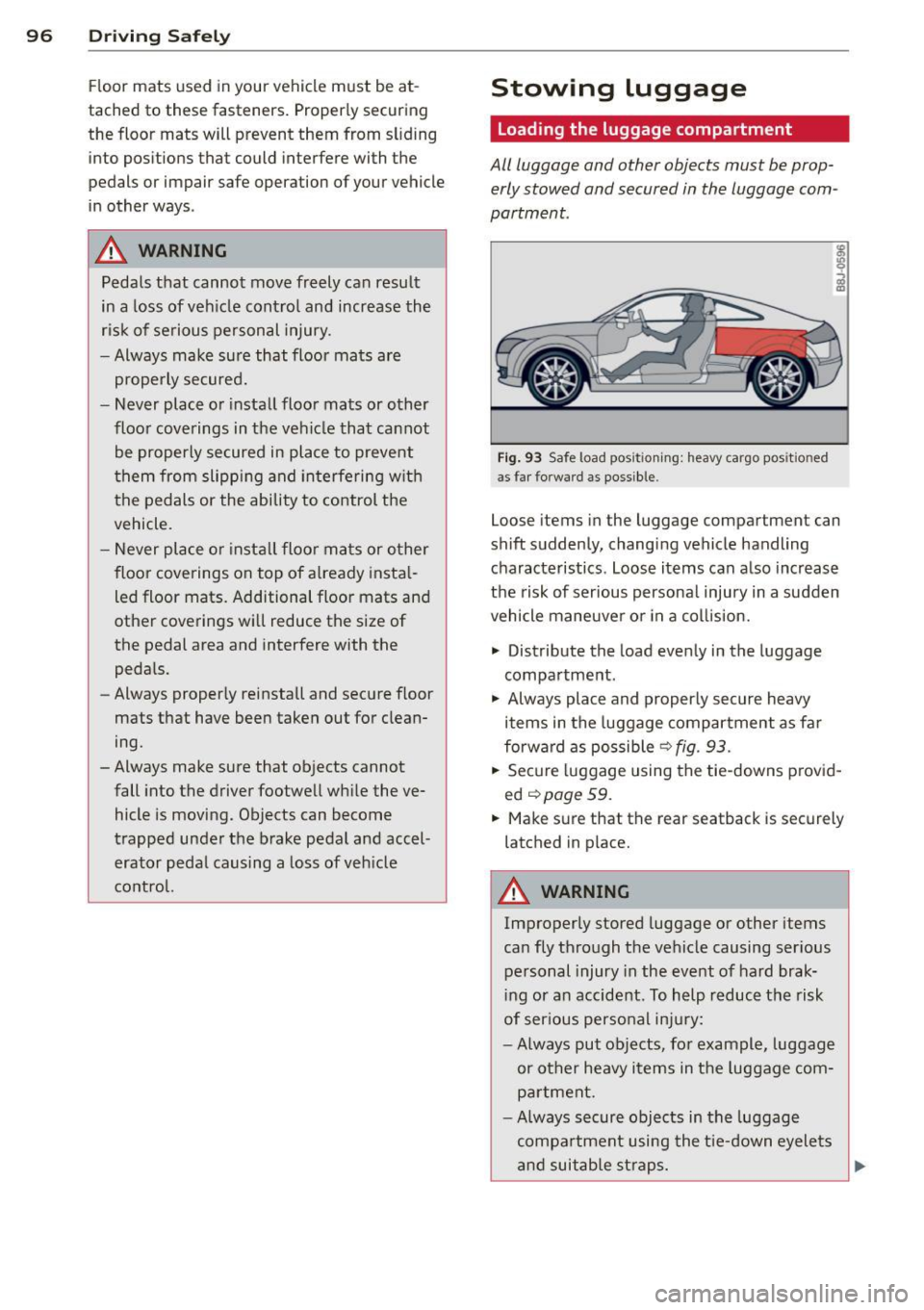
Fig. 93 Safe load posi tioning: heavy ca rgo pos it io ned
as far forwar d as possible.
Loose items in the luggage compartment can
shift suddenly, changing vehicle handling characteristics. Loose items can also increase
the risk of serious personal injury in a sudden
vehicle maneuver or in a collision.
.., Distribute the load evenly in the luggage
compartment.
.., Always place and properly secure heavy
items in the luggage compartment as far
forward as possible
r:::>fig . 93.
.,. Secure luggage using the tie-downs provid
ed
<:!) page 59.
... Make sure that the rear seatback is securely
latched in place.
A WARNING
-Improperly stored luggage or other items
can fly through the vehicle causing serious
personal injury in the event of hard brak
ing or an accident. To help reduce the risk
of serious personal injury:
- Always put objects, for example , luggage
or other heavy items in the luggage com
partment.
- Always secure objects in the luggage
compartment using the tie-down eyelets
and suitable straps.
~