clock AUDI TT 2013 Owner´s Manual
[x] Cancel search | Manufacturer: AUDI, Model Year: 2013, Model line: TT, Model: AUDI TT 2013Pages: 262, PDF Size: 65.91 MB
Page 13 of 262
Instrument s and warning /indicator lights 11
Digital clock with date display
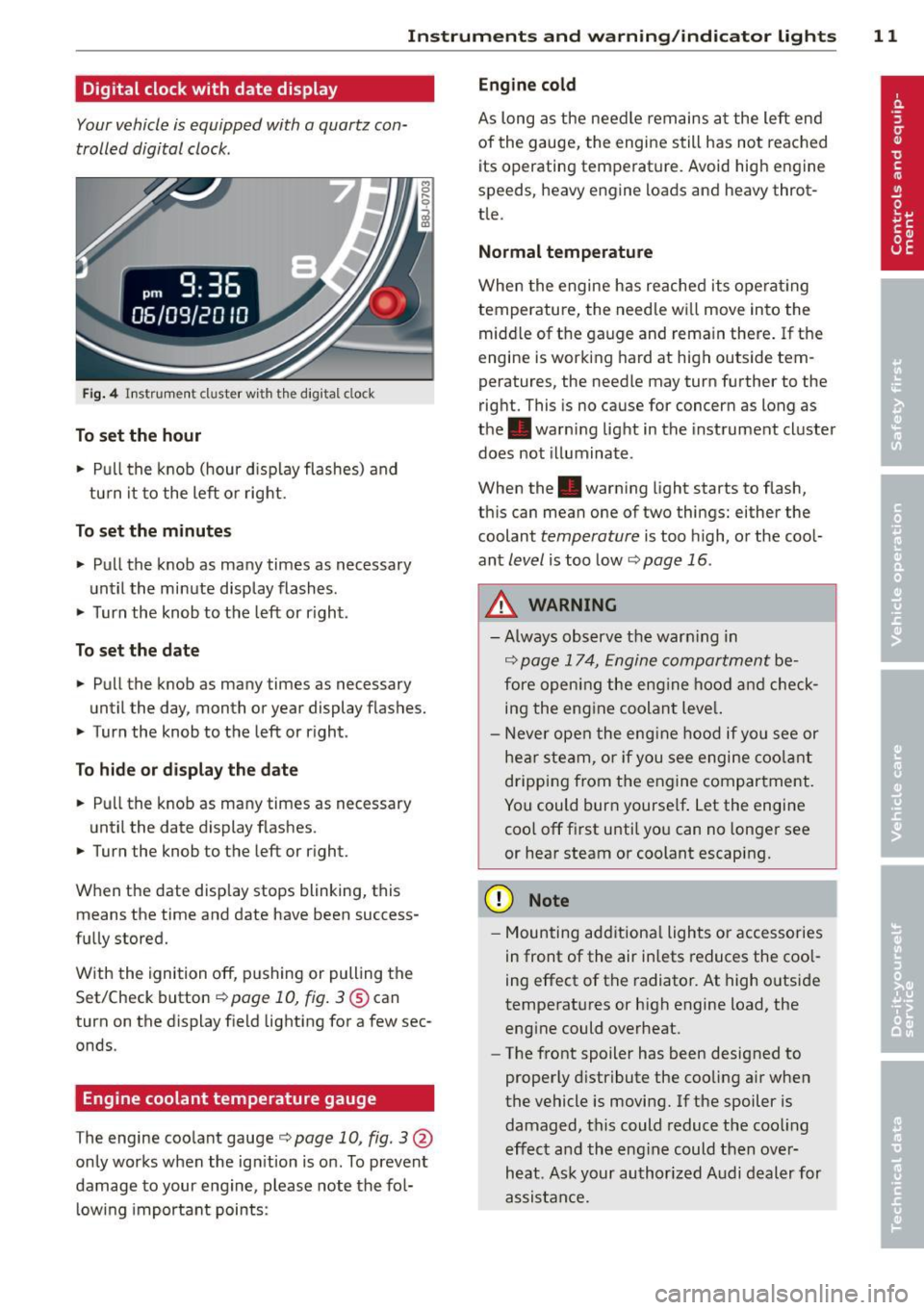
Your vehicle is equipped with a quartz con
trolled digital clock .
Fig. 4 In str um en t cl uste r w it h t he dig ita l cloc k
To set the hour
.. Pu ll t he knob (hour d isp lay flashes) and
tu rn it t o the left or rig ht.
To set the minutes
.. Pull the knob as ma ny times as necessary
un til the mi nute display flash es.
.. Turn the knob to the left or r ight .
To set the date
.. Pull the knob as many times as necessary
until the day, month or year display flashes.
.. Turn the knob to the left or right .
To hide or d isplay the d ate
.. Pull the knob as many times as necessary
unti l the date display flashes.
.. Turn the knob to t he left or r ight.
When the date disp lay stops blinking, this
means the time and date have been success
fu lly stored.
W ith the ignition off, pushing or pulling the
Set/Check button¢
page 10, fig . 3@ can
turn on the dis play f ie ld lighting for a few sec
onds .
Engine coolant temperature gauge
The engine coo la nt gauge ¢ page 10 , fig. 3@
only works when the ign ition is on. To prevent
damage to your e ngine, please note the fo l
l owing important points:
Engine cold
As long as the nee dle rem ains a t the left end
of the gauge, the engine s till h as not reac hed
its operating temperat ure. Avoid high engine
speeds, heavy engine loads and heavy throt
tle.
Normal temperature
W hen the engine has re ache d its ope rat ing
temperature, the need le w ill move into the
mid dle of t he gauge and rema in there .
If the
engine is working hard at high outside tem
peratures, the needle may turn fu rther to the
right. This is no cause for concern as long as
the . warni ng lig ht in the inst rument cl uster
does not illuminate .
When the. war ning light starts to flash,
th is can mean one of two thi ngs: either the
coolant
temperature is too high, o r the coo l
ant
level is too low ¢ page 16 .
A WARNING
--Always obs erv e th e warn ing in
¢ page 1 7 4, Engine compar tment be
fore opening the eng ine ho od and check
in g the eng ine coolan t leve l.
- N ever open t he eng ine hood if you see or
he ar ste am, or if you see engi ne coo lant
drippi ng from t he en gine compar tment .
You could bur n yourse lf . Let the en gin e
coo l off fi rst u ntil yo u can n o longe r see
or hear steam or coolant escap ing.
(D Note
- M ounting ad ditiona l lights or accessories
i n fr ont of the air inlets reduces the coo l
ing effect of t he radiato r. At high o utsi de
tempe rat ures or h igh engine load, the
eng ine could overheat.
- The front spoiler has been designed to
properly d istribute the cooling a ir when
the vehicl e is movi ng. If the spoiler is
damaged, this c ould reduce the coo ling
e ff ect a nd th e eng ine could then ove r
h eat . As k yo ur au thori zed A udi deal er for
a ssis tan ce.
Page 27 of 262
Each display type in the Start menu cont ains a
submenu with additional options.
Set Clock ¢ page 26
Compu ter ¢page 26
Acoust ic park assist*
¢page 78
Speed warning ¢ page 76
Language¢
page 26
Units (distance, fuel consump
tion, temperature) ¢
page 26
Tire pressure monitoring
¢page 214
Lap timer *¢ page 29
Lighting* ¢ page 42
Wiper (service position)
¢page SO
Window¢ page 40
Doors (unlocking and locking
mode, for example Auto-lock)
¢ page 34, ¢ page 34
Check Service ¢ page 2 8
Chassis number ¢page 238
Engine oil temperature*
¢ page 26, ¢ page 28
Registered keys ¢ page 32
Menu off All of the messages shown in
veh icles without menu display
appear on the disp lay s creen.
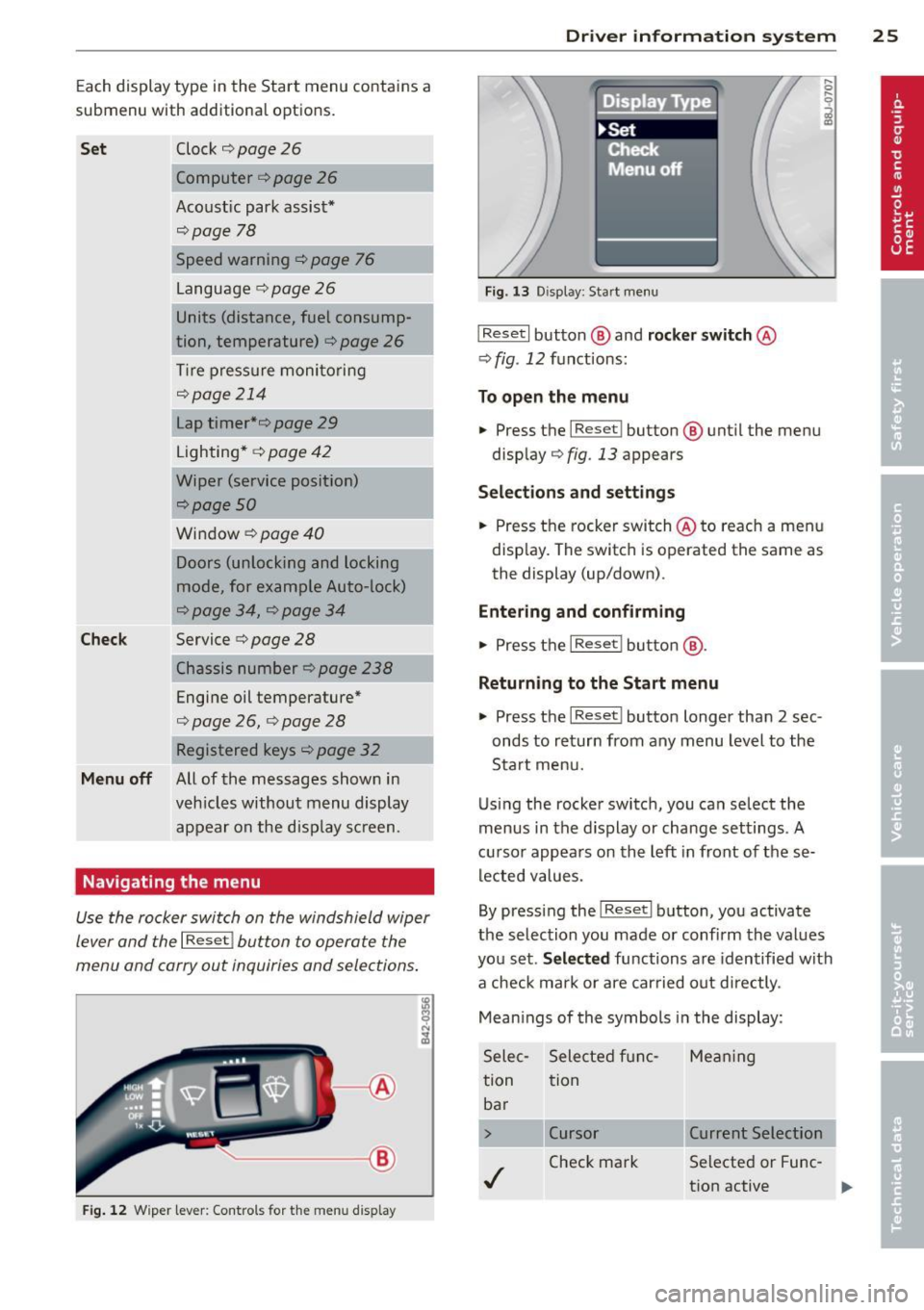
Navigating the menu
Use the rocker switch on the windshield wiper
lever and the
I Reset ! button to operate the
menu and carry out inquiries and selections .
l8
~ ;A
®
Fig. 12 W iper lever: Cont rols fo r th e me nu display
Dr iver in formation system 25
Fig. 13 D isplay: Start menu
I Reset I button @ and rocker switch @
¢ fig. 12 fu nctions:
To open the menu
.. Press t he I Reset I button @ until the menu
disp lay¢
fig . 13 appears
Sel ections and sett ing s
.. Press the rocker switch @to reac h a men u
disp lay. The switch is operated the same as
the display (up/down) .
Entering and confirming
.. Press t he I Reset ! butto n@ .
Returning to the Start menu
.. Press the I Reset I button longer than 2 sec
onds to return from any menu level to the
Start menu.
Using the rocker switc h, you can se lect the
menus in the d is p lay or change settings. A
cu rso r appears on th e left in front of these
lec ted values.
By pressing the
I Reset I button, you activate
the selection you made or confi rm the values
you set.
Selected functions are identified with
a check ma rk or are carried out d irectly .
Mean ings of the symbols in the display:
Sele c- Selected f unc- Me an ing
tion tion
ba r
> Cursor Current Selection
./
Check mark Selected or Fune
-
t ion active
...
Page 73 of 262
On the road
Steering
Adjusting the steering wheel column
The steering wheel position can be continu
ously adjusted in height and distance.
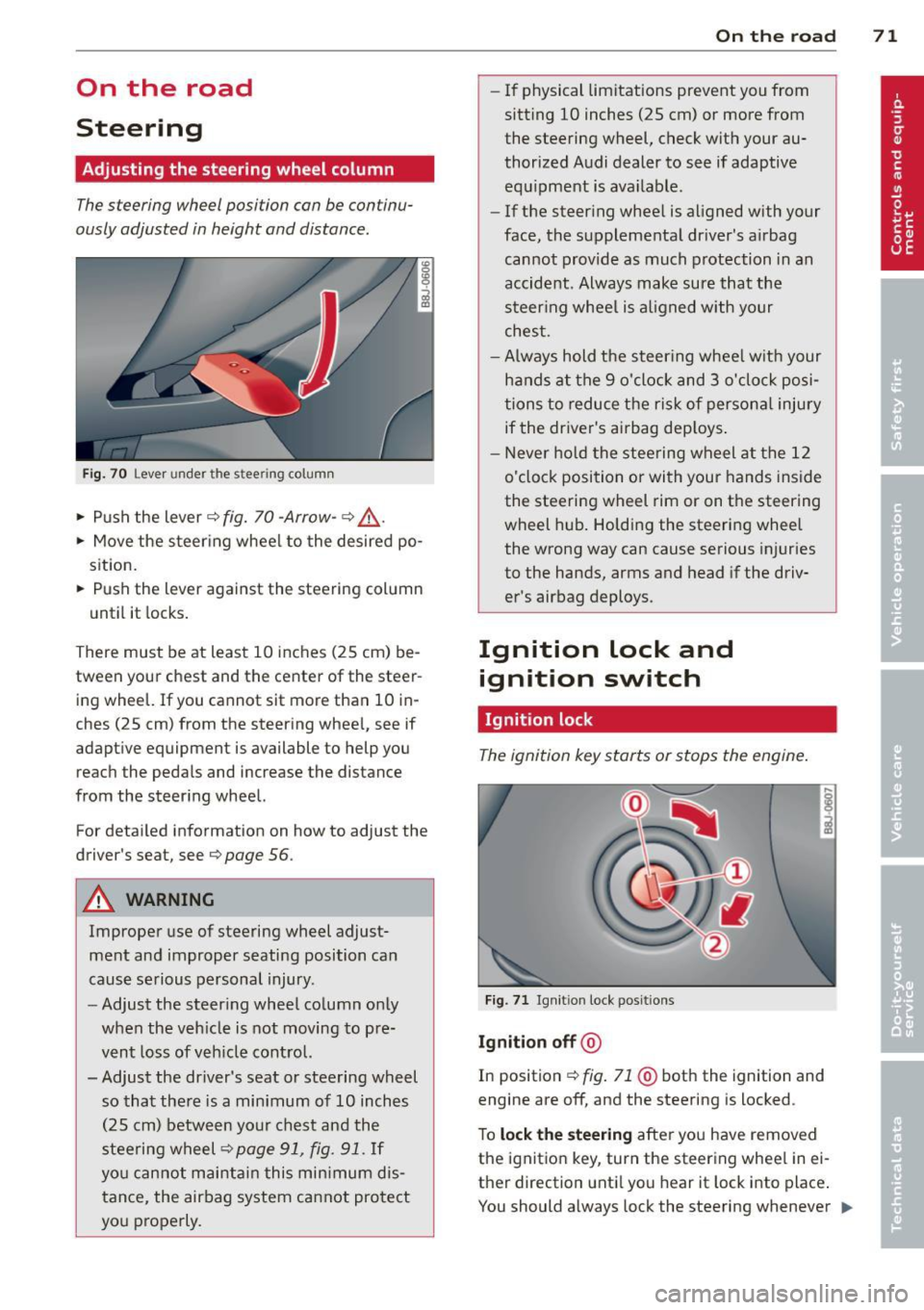
Fig. 70 Lever under the stee ring column
• Push the lever~ fig. 70 -Arrow-~ .&,..
• Move the steering wheel to the desired po
sition.
• Push the lever against the steering column
until it locks.
There must be at least 10 inches (25 cm) be tween your chest and the center of the steer
ing wheel. If you cannot sit more than 10 in
ches (25 cm) from the steering wheel, see if
adaptive equipment is available to help you
reach the pedals and increase the distance
from the steering wheel.
For detailed information on how to adjust the
driver's sea t, see
Q page 56 .
A WARNING
Improper use of steering wheel adjust
ment and improper seating position can
cause serious personal injury.
- Adjust the steering wheel column only
when the vehicle is not moving to pre
vent loss of vehicle control.
- Adjust the driver's seat or steering wheel so that there is a minimum of 10 inches
(25 cm) between your chest and the
steering wheel
~page 91, fig. 91. If
you cannot maintain this minimum dis
tance, the airbag system cannot protect
you properly.
On the road 71
-If physical limitations prevent you from
sitt ing 10 inches (25 cm) or more from
the steering wheel, check with your au
thorized Audi dealer to see if adaptive equipment is ava ilable .
- If the steering wheel is aligned with your
face, the supplemental dr iver 's airbag
cannot provide as much protection in an
accident. Always make sure that the
steering wheel is al igned with your
chest .
-Always hold the steer ing wheel w ith your
hands at the 9 o'clock and 3 o'clock posi
tions to reduce the risk of persona l injury
if the driver's airbag deploys .
- Never hold the steering wheel at the 12
o'clock position or with your hands inside
the steering wheel rim or on the steering
wheel hub. Holding the steering wheel
the wrong way can cause serious injuries
to the hands, arms and head if the driv
er's airbag deploys.
Ignition lock and ignition switch
Ignition lock
The ignition key starts or stops the engine.
Fig. 71 Ignit ion lock posit ions
Ignition off @
In position ~ fig. 71 @both the ignition and
engine are off, and the steering is locked .
To
lock the steering after you have removed
the ignition key , turn the steering wheel in ei
ther direction until you hear it lock into place .
You should always lock the steering whenever ..,.
Page 78 of 262

76 On the road
Speed warning 2: setting a speed limit
Switches in the wiper arm are used to operate
warning threshold
2 .
'----I ®
Fig. 74 Wiper lever: Tr ip computer con trols
To store maximum speed
> Turn off the ignit ion.
> Briefly press the button in the instrument
cl uster ¢
page 75, fig. 73. The odometer
and the digital clock are now illuminated .
> Press the button for at least 2 seconds. The
currently stored maximum speed appears in
the display
or the crossed out symbol for
warning threshold 2, if no max imum speed
was set previously.
> Press the function selector sw itch in the
wipe r lever @¢
fig. 74 up or down to
change the set value. Values run up or dow n
i n steps of 6.2 mph (10 km/h).
To delete maximum speed
> Turn off the ignit ion .
> Briefly press the button in the instrument
cluster ¢
page 75, fig . 73. T he odometer
and the digital clock are now illumi nated.
> Press the button for at least 2 seconds . Th e
cu rrently stored maxim um speed appears in
the display.
> Press the reset button in the wiper lever ®
¢fig . 74 until the crossed out speed warn
ing symbol for warning threshold 2 appears
i n the display.
A few seconds after the adjustment is com
pleted, the illumination for the odometer and
the dig ital clock will go out.
(D Tips
This warning threshold can a lso be con
trolled thro ugh the tr ip computer
¢ page 25, Navigating the menu.
Cruise control
Switching the system on
The cruise control system makes it possible to
drive at a constant speed starting at 20 mph (30 km/h) .
®-
Fig. 75 Contro l leve r with set b utton
Fig. 76 D isplay : Se lecte d speed
> Pull the lever to position (D ¢ fig. 75 to
switch the system on.
> Dr ive at the speed you w is h to set.
> Press button @ to set that speed.
.., ....
i
The display ¢ fig. 76 will show the set speed .
The display may vary depending on the type of
display in your vehicle. The indicator light
M;ll)~14 (US model)/ . (Canadian model) will
also light up in the instrument cluster .
A WARNING
- Always pay attention to traffic even when
the cruise control is switched on. You are
always responsib le for your speed and
Page 94 of 262
92 Driving Safely
• Always keep both feet in the footwell so
that you are in control of the vehicle at all
times.
For detailed information on how to adjust the
driver's seat, see
c::> page 55.
A WARNING
Drivers who are unbelted, out of position
or too close to the airbag can be seriously
injured by an airbag as it deploys. To help
reduce the risk of serious personal injury:
- Always adjust the driver's seat and the
steering wheel so that there are at least
10 inches (25 cm) between your breast
bone and the steering wheel.
- Always adjust the driver's seat and the
steering wheel so that there are at least
4 inches (10 cm) between the knees and
the lower part of the instrument panel.
- Always hold the steering wheel on the
outside of the steering wheel rim with
your hands at the 9 o'clock and 3 o'clock positions to help reduce the risk of per
sonal injury if the driver's airbag inflates.
- Never hold the steering wheel at the
12 o'clock position or with your hands at
other positions inside the steering wheel
rim or on the steering wheel hub. Hold
ing the steering wheel the wrong way
can cause serious injuries to the hands,
arms and head if the driver's airbag in
flates
- Pointing the steering wheel toward your
face decreases the ability of the supple
mental driver's airbag to protect you in a
collision.
- Always sit in an upright position and nev
er lean against or place any part of your
body too close to the area where the air
bags are located.
- Before driving, always adjust the front
seats and head restraints properly and
make sure that all passengers are prop
erly restrained.
- Never adjust the seats while the vehicle
is moving. Your seat may move unexpect- edly and you could lose control of the ve
hicle .
- Never drive with the backrest reclined or
tilted far back! The farther the backrests
are tilted back, the greater the risk of in
jury due to incorrect positioning of the safety belt and improper seating posi
tion .
- Children must always ride in child seats
c::> page 130. Special precautions apply
when installing a child seat on the front passenger seat¢
page 108.
Proper seating position for the front
passenger
The proper front passenger seating position
is important for safe, relaxed driving .
For your own safety and to reduce the risk of
injury in the event of an accident, we recom
mend that you adjust the seat for the front
passenger to the following position :
• Adjust the angle of the seatback so that it is
in an upright position and your back comes in full contact with it whenever the vehicle is
moving.
• Adjust the head restraint so that the upper
edge is as even with the top of your head as
possible but not lower than eye level and so
that it is as close to the back of your head as
possible
c::> page 94.
• Keep both feet flat on the floor in front of
the front passenger seat.
• Fasten and wear safety belts correctly
c::>page 104.
For detailed information on how to adjust the
front passenger's seat, see
c::> page 54 .
A WARNING
-
Front seat passengers who are unbelted,
out of position or too close to the airbag
can be seriously injured or killed by the air
bag as it unfolds. To help reduce the risk of
serious personal injury:
Page 180 of 262
1 78 Fuel supply and filling your fuel t ank
transport fue l to use for your lawn mower,
snow blower, etc., be very careful and al
ways observe local and state laws regard
ing the use, transportat ion and storage of
such fuel containers . Make certain the con
tainer meets industry standards (A NSI/
AS TM F852 -86) .
(D Note
Never drive your vehicle unti l the fuel tank
is completely d ry. The irreg ular s upply of
fuel can cause misfir ing. Gasoline cou ld
e nte r into the exhaust system and damage
t he cata lytic conve rter.
Refuelling
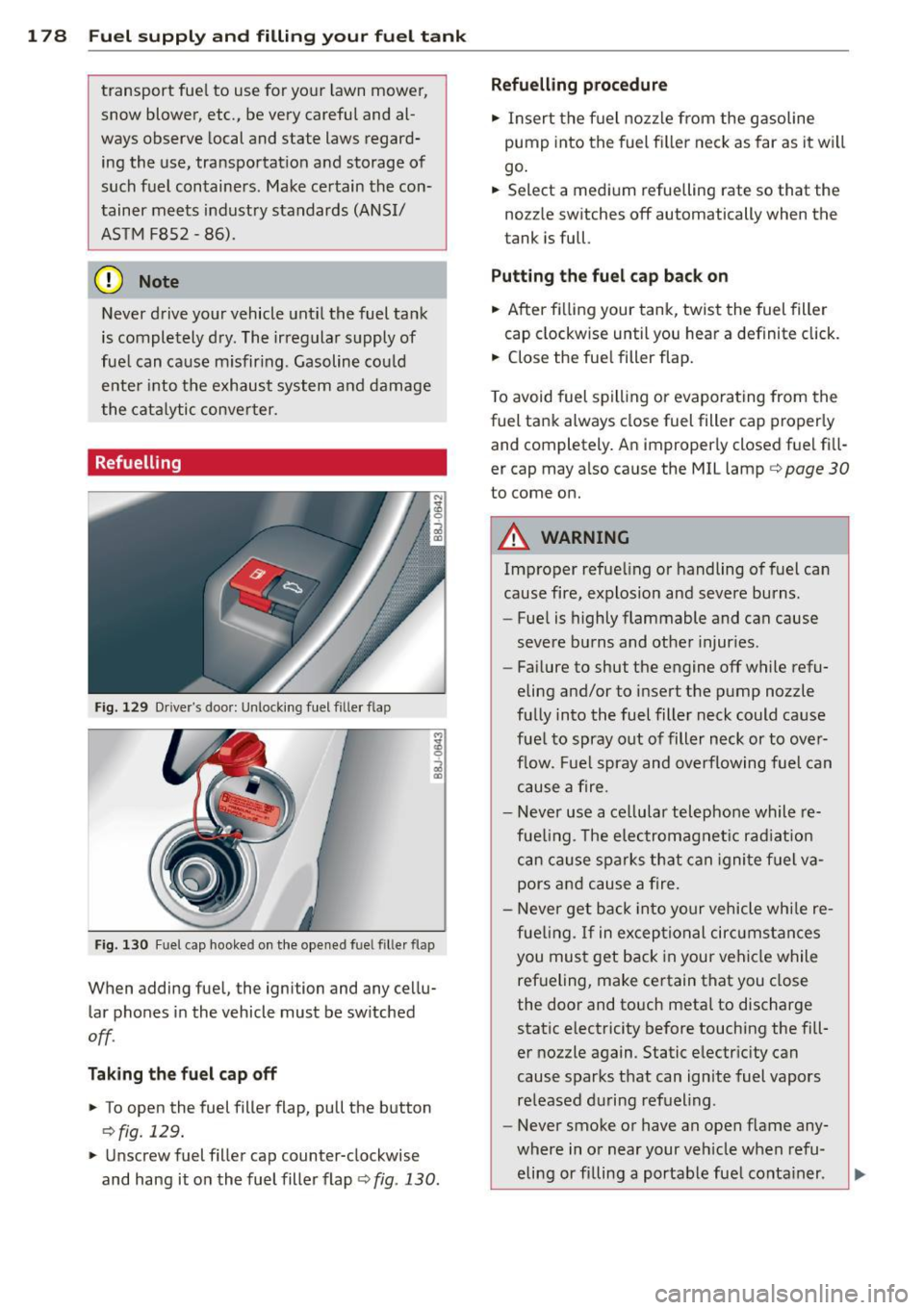
Fi g. 12 9 Drive r's doo r: Un lo cki ng fuel f ille r flap
Fi g. 130 Fu el cap hooke d on the opened fuel filler flap
When adding fue l, the ignition and any ce llu
lar phones in the vehicle must be sw itched
off .
Tak ing the fuel cap off
• To open the fuel filler flap, pull the button
r:> fig. 129.
• Unscrew fuel filler cap counter-clockwise
and hang it o n the fuel filler flap ¢
fig. 130 .
Refuelling procedure
• Insert the f uel no zz le from the gasoline
pump into the fuel fi ller neck as far as it w ill
go .
• Select a med ium refuelling rate so that the
no zz le sw itches off automatically when the
tank i s full.
Putting the fuel cap back on
• After fi lling your tank, twist the fuel filler
cap clockw ise until you hear a definite click.
• Close the fue l filler flap.
T o avoid fuel s pill ing or evaporating from the
fuel tank always close fuel filler cap properly and completely . An improperly closed fuel fi ll
er cap may also cause the MIL lamp¢
page 30
to come on.
A WARNING
Imp roper refue ling or handling of fuel can
cause fire, explosion and severe burns.
- Fue l is highly flammable and can cause
severe burns and other injur ies .
- Fai lure to shut the engine off while refu
eling and/or to insert the pump nozzle
fu lly into the fuel filter neck could cause
fuel to spray out of filler neck or to ove r
f low. Fuel spray and overflowing fuel can
cause a fire.
- Never use a ce llu lar telephone whil e re
fue ling . Th e e lec tromagnet ic radiat io n
can cause spa rks th at can igni te fuel v a
pors an d cause a fire.
- N ever get back in to your vehicle whi le re
fue ling.
If in excep tio nal cir cumstances
you must get back in your vehi cle while
ref ueling, make ce rtain that you close
the door and touch metal to discharge
static electricity be fore touching the fill
er nozzle again . Static e lectr icity can
cause sparks that can ignite fuel vapors
re leased d uring refueling .
- Never smoke or have an open f lame any
where in or near your ve hicle when refu
eling or fi lling a portable fue l conta iner .
Page 190 of 262
188 Checking and filling
Before you check anything in the engine com
partment,
alwa ys r ea d and heed all WARN
INGS ¢ A in Working in the engine compart
ment on page 180.
• Park your vehicle on a level surface.
• Switch the ignition off.
• Read the coolant level at the coolant expan
s ion tank ¢
page 182, fig . 134. With a cold
engine, it must be above the "min" mark .
With a hot engine, it ca n be a little above
the indicated range .
The location of the coolant expans ion tank
can be seen in the engine compartment illus
tration
¢ page 182.
To obtain an accurate read ing, the engine
must be switched off.
The expansion tank in yo ur vehicle is equipped
with an e lectric coolant level sensor .
When the coo lant level is too low, the warning
light in the A uto- Check System ¢
page 16 will
illuminate until yo u add coo lant and the level
has been restored to normal. Even though
there is an electric coo lant level sensor, we
still recommend you check the coolant leve l
from time to time .
Coolant loss
Coolant loss may indicate a leak in the cooling
system . In the event of coolant loss, the cool
ing system should be inspected immediately
by your author ized Audi dealer. It is not
enough merely to add coolant .
In a
sealed system, losses can occur only if
the boiling point of the coolant is exceeded as
a result of overheat ing.
(D Note
Do not add any type of radiator lea k seal
ant to your vehicle's eng ine coolant. Add
ing radiator repair f luid may adversely af
fect the function and performance of your
cooling system and could res ult in damage
not covered by your New Vehicle Limited
Warranty.
Adding coolant
Be very careful when adding engine coolant.
Before you check anyth ing in the engine com
partment,
always read and heed all WARN
INGS ¢ A in Working in the engine compart
ment on page 180 .
• Turn off the engine.
• Let the engine cool down.
• Place a thick rag over t he coo lant expansion
tank
¢ page 187, fig . 138 a nd carefully
tw ist the cap counter-clockwise ¢&_ .
• Add coo la nt.
• Twis t the cap on aga in
t ightly.
Replacement engine coolant must conform to
exact spec ificat ions ¢
page 18 7, Coolant.
Even in a n emerge ncy, if coolant add i-
t ive G1 2++, G12+ or G12 is not ava ilable , do
not use a d iffe ren t addit ive. Use plain water
instead unti l you can get the cor rect additive
and can restore the correct ratio . This sho uld
be done as soon as possible .
If you have los t a considerab le amount o f
coolant , then you sho uld add cold ant ifreeze
and co ld wate r on ly w hen the engine is cold.
Alw ays use
new engine coo la nt whe n refilling .
Do not fill coola nt above the "MAX" mark. Ex
cess coola nt wi ll be fo rced o ut through the
pressure relief valve in t he cap w hen the en
gine becomes hot.
,&. WARNING ~ -
- T he cooling system is under pressure and
can get very hot. Reduce the risk of
scalding from hot coolant by followi ng
these steps.
- T urn off the engine and allow it to coo l
down.
- Protect yo ur face, hands and arms from
escaping fluid and steam by covering
the cap w ith a large, t hick rag.
- T urn the cap s lowly a nd ve ry carefully
in a counter-clo ckwise direction while
applying light, downward pres sure on
the top of the cap.
Page 205 of 262
forget the spare tire. If the press ure in any tire
is too high when the tire is "cold," let air out
of the tire slowly with the edge of the t ire
gauge and keep checking the pressure until
you reach the pressure that is correct for the
load (passengers and luggage) and kind of
driving you plan to do .
If the pressure in any tire is too low, note the
d ifference between the pressure in the cold
tire and the pressure you need and add the a ir
that you need to reach the correct pressure for
the veh icle load (passengers and luggage) for
the tires on your veh icle as listed on the on
your ve hicle and in this manua l and the kind
of dr iving you p lan to do .
Never exce ed the ma ximum inflation pres
s ur e listed on t he tire s idewall for any re a
s on.
Remember that the vehicle manufacturer , not
the t ire manufacturer , determ ines the correct
tire pressure for the tires on your veh icle .
It is important to check the tire pressure when
the t ires a re cold .
- Read the req uired tire press ure from the tire
pressure label located on driver's s ide B-pil
l ar .
- Turn the valve stem cap counter-clockwise
to remove it from the tire valve .
- Place the air pressure ga uge on the valve.
- The tire pressures sho uld on ly be checked
and adjusted when the tires are cold . The
s light ly raised pressures of warm tires must
not be reduced.
- Adjust the tire pressure to the load you are
carrying.
- Re insta ll the va lve stem cap on the valve .
When should I check the tire pressure?
The correct tire pressure is espec ially impo r
tant at high speeds . The pressure sho uld
therefore be checked at least once a month
and a lways befo re starting a journey.
When should I adjust the tire pressures?
Adj ust the tire pressu re to the load you are
carry ing . After changi ng a wheel
or replacing
Tire s an d wheel s 203
whee ls yo u have to adjust the ti re p ressu res
o n all whee ls. In addition, yo u m ust then initi
a lize the new tire pressu res in the t ire pres
s u re monitoring system
Q page 214.
A WARNING
Incorrect tire pressures and/or underinfla
tion can lead sudden tire fa ilure, loss of
control, collision, serio us pe rsonal injury
or even death.
- When the warning symbol
[I] appears in
the instrument cluster, stop and inspect
the t ires.
- Inco rrect tire pressure and/or underinfla
tion can cause increased tire wea r and
can affect the handling of the vehicle and
stopping ability.
- Inco rrect tire pressures and/or underin
flation can a lso lead to sudden t ire fail
ure, including a blowou t and su dden de
flation, ca using loss of veh icle cont ro l.
- Th e drive r is responsi ble for the correc t
tire pressures for all tires on the veh icle.
The applicable pressure values a re locat
ed on a sticke r on the dr iver's side B-pil
lar.
- On ly when all tires on the vehicle are fil
led to the correct pressure, the t ire pres
sure mon itor ing system can work cor
rectly.
- The use of incorrect tire pressu re va lues
can lead to acc idents or other damage.
Therefore it is essential that the driver
observe the spec ified t ire pressure values
for the tires and the correct pressures for
the function of th e ti r e p ressu re monito r
ing system.
- Always inf late tires to the recommended
a nd correct t ire p ress ure before dr iv ing
off.
- Driving with unde rinflated tir es bend
mo re, letting t hem get too hot resulting
in tre ad separation, sudden tire f ailure
and loss of cont rol.
- Exces sive speed and/overloading can
cause he at bu ild- up, sudden tire failure
an d loss of cont rol. •
•
Page 226 of 262
224 What do I do now?
What should I be
aware of when
changing a tire?
General information
The following sections will provide you with
important information on how to change a
tire using the vehicle tool kit.
However, we recommend that you have a
qualified service center change the tire and
perform all work associated with changing it .
Wheels with cap-covered wheel bolts
Applies to vehicles: with cap-covered whee l bolts
The caps must be removed first from the
wheel bolts before the bolts can be un
screwed .
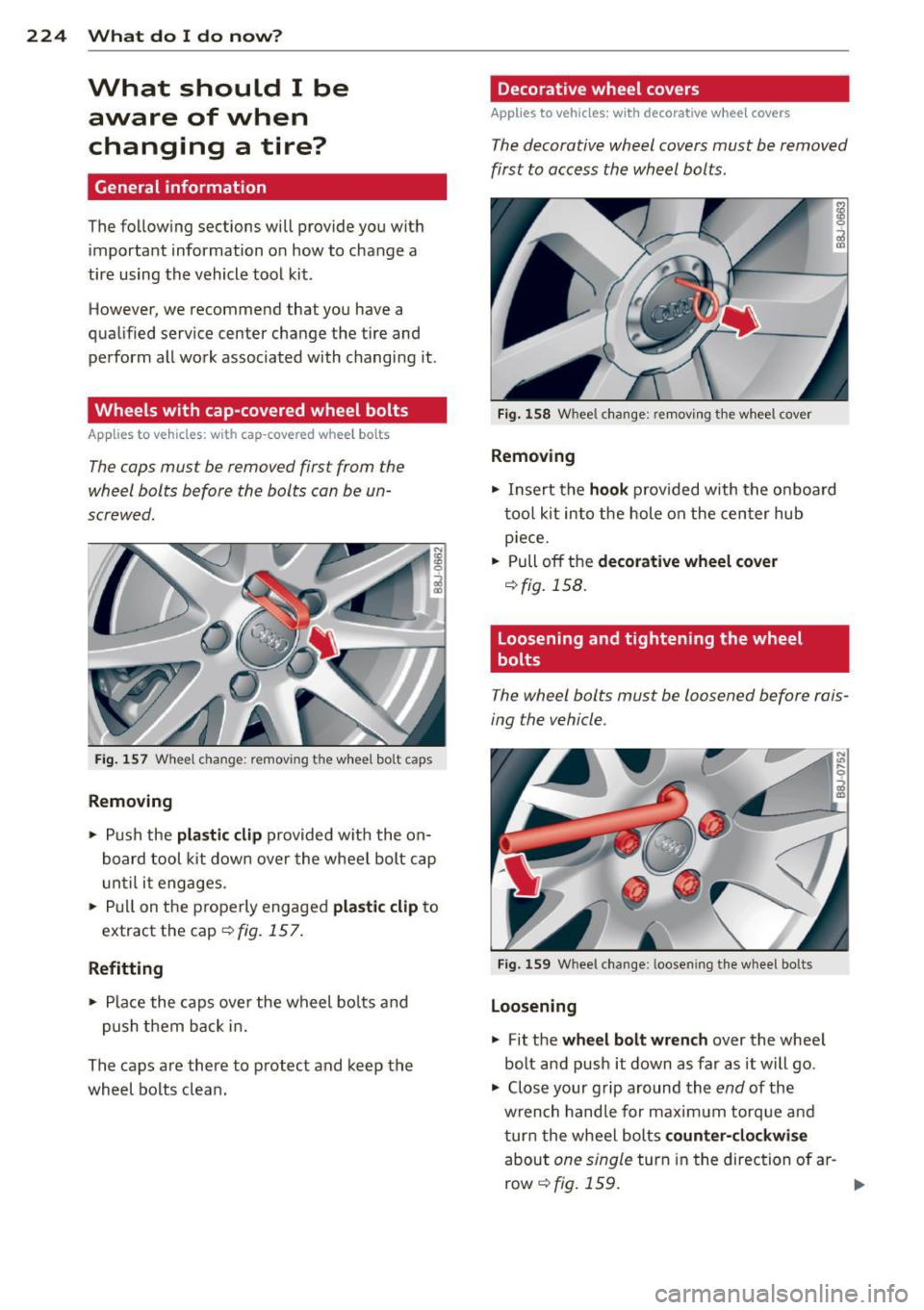
Fig. 157 Wheel change: removing the wheel bolt caps
Removing
• Push the plastic clip provided with the on
board tool kit down over the wheel bolt cap
u ntil it engages.
• Pull on the properly engaged
plastic clip to
extract the cap¢
fig. 157 .
Refitting
• Place the caps over the wheel bolts and
push them back in.
The caps are there to protect and keep the
wheel bolts clean.
Decorative wheel covers
Applies to vehicles: with decorative wheel covers
The decorative wheel covers must be removed
first to access the wheel bolts .
Fig. 158 Wheel change: removing the wheel cover
Removing
• Insert the hook prov ided with the on board
tool kit into the hole on the center hub
piece.
• Pull off the
decorative wheel cover
¢fig. 158.
Loosening and tightening the wheel
bolts
The wheel bolts must be loosened before rais
ing the vehicle.
Fig. 159 Wheel change: loosening the wheel bolts
Loosening
• Fit the wheel bolt wrench over the wheel
bolt and push it down as far as it will go.
• Close your grip around the
end of the
wrench handle for maximum torque and
turn the wheel bolts
counter-clockwise
about one single turn in the direction of ar -
row
r:!> fig. 159. .,..
Page 228 of 262
226 What do I do now ?
-Position the vehicle jack only at the
designated lifting points and align the
jack. Otherwise, the vehicle jack could slip and cause an injury if it does not
have sufficient ho ld on the vehicle.
- A soft or unstab le surface under the
jack may cause the vehicle to slip off the jack. Always prov ide a firm base for
the jack on the ground.
If necessary,
use a sturdy board un der the ja ck .
- On hard, slippery surfac e (such as tiles)
use a rubber mat o r similar to prevent
the j ack fr om s lipp ing.
- T o he lp p revent injury to yoursel f and
yo ur passenge rs:
- Do not raise the vehicle unti l yo u are
sure the jack is sec urely engaged.
- Passenge rs must not rema in in the ve
h icle when it is jac ked up .
- Make sure that passen gers wait in a
safe p lace away from the vehicle and
well away from the roadway and traffic.
- Make sure jack position is correct, ad
just as necessary and then contin ue to
ra ise the jack.
0 Note
A floor jack or the pads on the hoist arms
m ust
not be positioned at the points
shown
-arrows-.
Taking the wheel off
Follow these instructions step -by -step for
changing the wheel.
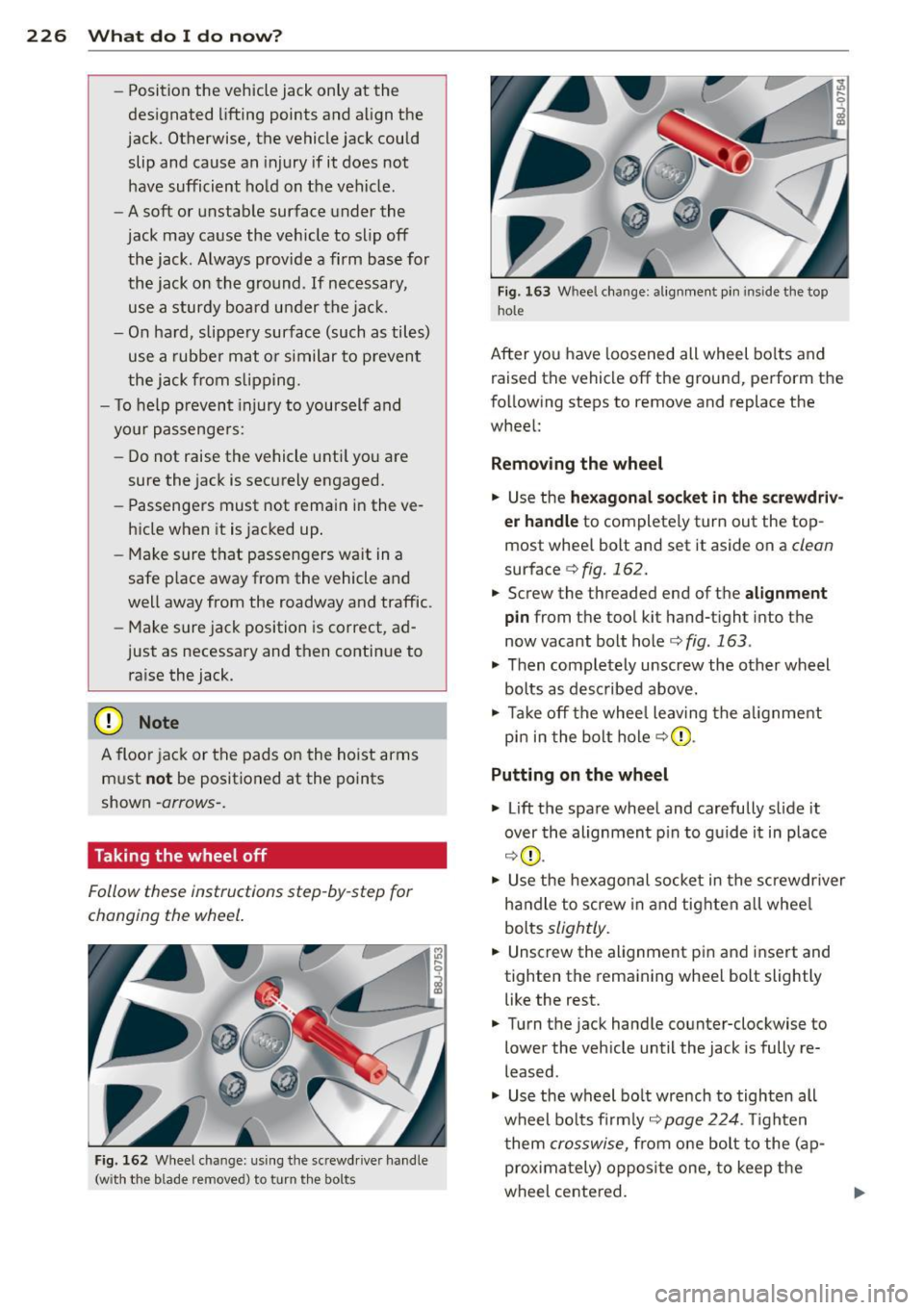
Fi g. 1 62 W heel change : us ing the screwd river ha ndle
(w ith the b lade removed) to turn the bolts
Fig. 163 Whee l cha nge : alig nme nt pin in side the top
hole
After you have loosened all wheel bo lts and
raised the vehicle off the ground, pe rform t he
fo llowing steps to remove and replace the
wheel:
Removing the wheel
.,. Use the
hexagonal s ocket in the screwdri v·
er handle
to completely tur n out the top
most whee l bolt and set it aside on a
clean
surface c;, fig. 162.
.,. Screw the threaded end of the alignment
pin from t he too l kit hand-t ight into t he
now vacant bolt hole
c:> fig. 163 .
.,. Then completely unscrew the other wheel
bolts as desc ribed above.
.,. Take off the whee l leav ing the a lignment
p in in the bo lt ho le
c;, (D .
Putting on the wheel
.,. Lift the spa re wheel and carefully s lide it
over the alignmen t pin to g uide it in place
c;, (D .
.,. Use the he xagonal socke t in the screwdr iver
h and le to screw in and tig hten all whee l
bolts
slightly .
.,. Unscrew the alignment pin and insert and
tighten the remaining whee l bolt slightly
like the rest .
.,. Turn the jack handle co unte r-clockwise to
lower the vehicle until the jack is fully re
leased .
.,. Use the wheel bo lt wrench to tighten all
wheel bo lts firm ly
c;, page 224 . Tighten
t hem
cro sswise, from o ne bol t to the ( ap
proxima tely) opposi te one, to keep the
wheel cente red.