mirror AUDI TT 2021 Owner´s Manual
[x] Cancel search | Manufacturer: AUDI, Model Year: 2021, Model line: TT, Model: AUDI TT 2021Pages: 280, PDF Size: 99.18 MB
Page 47 of 280
8S1012721BE
Sitting correctly and safely
Sitting correctly and
safely
Correct passenger
seating position
General information
As the driver, you are responsible for making sure
every passenger is sitting correctly in their seat
and maintaining this seating position while driv-
ing. Make sure that:
— Every passenger in the vehicle has adjusted his
or her seat correctly > page 45
— Applies to: Coupe: Passengers in the rear seats
must observe the height requirements and the
minimum distance between the head and the
rear window > page 48.
— The steering wheel is adjusted correctly
=> page 48
—The mirrors are adjusted so that there is a suffi-
cient view of the area around the vehicle
=> page 39
— Every passenger in the vehicle has his or her
safety belt fastened correctly > page 49
— The activation status of the front passenger's
airbag is suitable for the passenger in the front
passenger's seat > page 55
— Children are secured in suitable child safety
seats that are secured to appropriate vehicle
seats > page 57. Read and observe the impor-
tant safety information pertaining to the use of
child safety seats on the front passenger's seat
= A in General information on page 58.
Examples of incorrect seating positions
Safety belts can only provide its optimal protec-
tion when they are routed correctly. Incorrect
seating positions significantly reduce the protec-
tive functions of the safety belts and increase the
risk of injury due to incorrect belt routing.
The following list includes examples of seating
positions that could be dangerous for all vehicle
occupants. This is not a complete list. Audi would
simply like to increase your awareness of the top-
ic. The following points apply when the vehicle is
in motion:
— Never stand inside the vehicle.
— Never stand on the seats.
— Never kneel on the seats.
— Never tilt your backrest too far back.
— Never lean against the instrument panel.
— Never lie down on the rear bench seat.
— Never sit only on the front section of the seat.
— Never sit sideways on the seat.
— Never lean against the window.
— Never place your feet out of the window.
— Never place your feet on the instrument panel.
— Never place your feet on the seat cushion.
— Never ride in the footwell.
— Never sit on the armrest.
— Never drive or ride in a seat without fastening
your safety belt.
— Never ride in the luggage compartment.
ZA WARNING
Incorrect seating positions, failure to wear a
safety belt, or being too close to an airbag in-
crease the risk of serious or fatal injury to ve-
hicle occupants, especially if the airbags de-
ploy and come into contact with occupants
who are not seated correctly. Note the impor-
tant information and warnings in the chapters
for the topics given above.
G) Tips
— If physical circumstances do not allow you
to assume the correct seating position, con-
tact an authorized Audi dealer or authorized
Audi Service Facility.
— If you or other vehicle passengers have
physical limitations that prevent sitting in a
correct position, modifications to the vehi-
cle may be necessary. For more information,
contact an authorized Audi dealer or author-
ized Audi Service Facility, or call Audi cus-
tomer support at 1-800-822-2834.
Front seats
General information
Make sure that:
4s
>
Page 95 of 280

8S1012721BE
Assist systems
— If timing is paused, you can continue it later
even if you switch the ignition off.
— Saved lap times cannot be individually de-
leted from the total results.
— The saved lap timer values will remain after
switching the ignition off.
Audi side assist
Applies to: vehicles with Audi side assist
BFV-0079
Fig. 98 Diagram: coverage area of the sensors
BFV-0080
Fig. 99 Exterior mirror: display
Side assist helps you monitor your blind spot and
traffic behind your vehicle. Within the limits of
the system, it warns you about vehicles that are
coming closer or that are traveling with you with-
in sensor range @) > fig. 98: if a lane change is
classified as critical, the display @ in the exterior
mirror © fig. 99 turns on.
The display in the left exterior mirror provides as-
sistance when making a lane change to the left,
while the display in the right exterior mirror pro-
vides assistance when making a lane change to
the right.
Information stage
As long as you do not activate the turn signal,
side assist informs you about vehicles that are
detected and classified as critical. The display in
the mirror turns on, but is dim.
The display remains dim in the information stage
so that your view toward the front is not distur-
bed.
Warning stage
If you activate the turn signal, side assist warns
you about vehicles that are detected and classi-
fied as critical. The display in the respective mir-
ror blinks brightly. If this happens, check traffic
by glancing in the exterior mirrors and over your
shoulder > A\ in General information on
page 94.
You can adjust the brightness on of the dis-
play on the rearview mirror > page 95.
93
Page 96 of 280
Assist systems
General information
Applies to: vehicles with Audi side assist
BFV-0260
BFV-0082
Fig. 101 Rear of the vehicle: position of the sensors (exam-
ple)
Side assist functions at speeds above approxi-
mately 19 mph (30 km/h).
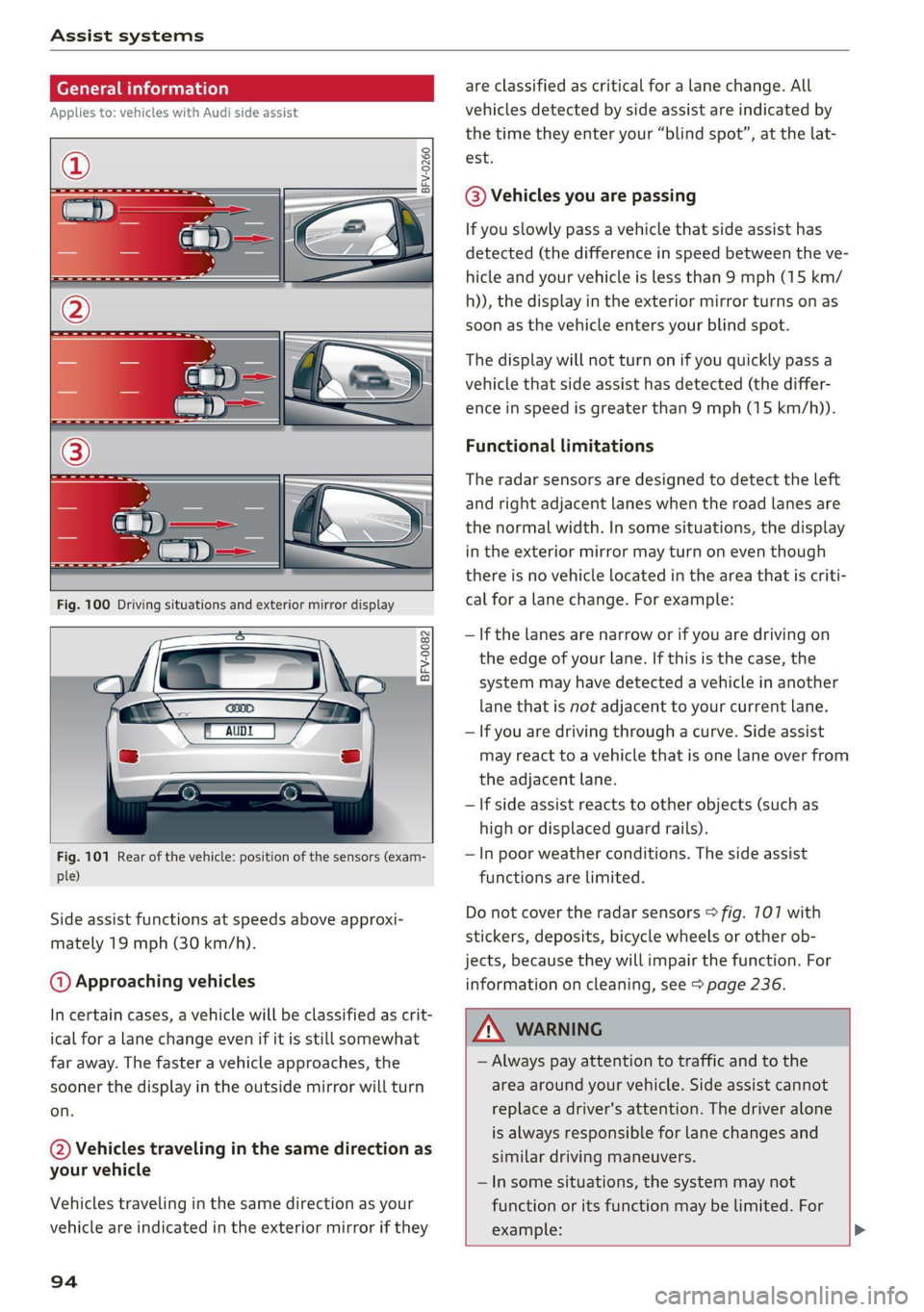
@ Approaching vehicles
In certain cases, a vehicle will be classified as crit-
ical for a lane change even if it is still somewhat
far away. The faster a vehicle approaches, the
sooner the display in the outside mirror will turn
on.
@ Vehicles traveling in the same direction as
your vehicle
Vehicles traveling in the same direction as your
vehicle are indicated in the exterior mirror if they
94
are classified as critical for a lane change. All
vehicles detected by side assist are indicated by
the time they enter your “blind spot”, at the lat-
est.
@ Vehicles you are passing
If you slowly pass a vehicle that side assist has
detected (the difference in speed between the ve-
hicle and your vehicle is less than 9 mph (15 km/
h)), the display in the exterior mirror turns on as
soon as the vehicle enters your blind spot.
The display will not turn on if you quickly pass a
vehicle that side assist has detected (the differ-
ence in speed is greater than 9 mph (15 km/h)).
Functional limitations
The radar sensors are designed to detect the left
and right adjacent lanes when the road lanes are
the normal width. In some situations, the display
in the exterior mirror may turn on even though
there is no vehicle located in the area that is criti-
cal for a lane change. For example:
— If the lanes are narrow or if you are driving on
the edge of your lane. If this is the case, the
system may have detected a vehicle in another
lane that is not adjacent to your current lane.
— If you are driving through a curve. Side assist
may react to a vehicle that is one lane over from
the adjacent lane.
—If side assist reacts to other objects (such as
high or displaced guard rails).
— In poor weather conditions. The side assist
functions are limited.
Do not cover the radar sensors > fig. 7107 with
stickers, deposits, bicycle wheels or other ob-
jects, because they will impair the function. For
information on cleaning, see > page 236.
ZA\ WARNING
— Always pay attention to traffic and to the
area around your vehicle. Side assist cannot
replace a driver's attention. The driver alone
is always responsible for lane changes and
similar driving maneuvers.
— In some situations, the system may not
function or its function may be limited. For
example: >
Page 97 of 280

8S1012721BE
Assist systems
— If vehicles are approaching or being left
behind very quickly. The display may not
turn on in time.
— In poor weather conditions such as heavy
rain, snow or heavy mist.
— On very wide lanes, in tight curves, or if
there is a rise in the road surface. Vehicles
in the adjacent lane may not be detected
because they are outside of the sensor
range.
() Note
The sensors can be displaced by impacts or
damage to the bumper, wheel housing and
underbody. This can impair the system. Have
an authorized Audi dealer or authorized Audi
Service Facility check their function.
@ Tips
— If the window glass in the driver's door or
front passenger's door has been tinted, the
display in the exterior mirror may be incor-
rect:
—The system complies with United States FCC
regulations and ISED regulations
=> page 261.
Sic Rema
Applies to: vehicles with Audi side assist
MENU > Select in the Infotainment system: but-
ton > Vehicle > left control button >Driver as-
sistance > Audi side assist
If the system is activated, the displays in the ex-
terior mirrors will turn on briefly when the igni-
tion is switched on.
Adjusting the display brightness
Applies to: vehicles with Audi side assist
The display brightness can be adjusted in the In-
fotainment system.
MENU > Select in the Infotainment system: but-
ton > Vehicle > left control button >Driver as-
sistance > Audi side assist
The display brightness adjusts automatically to
the brightness of the surroundings, both in the
information and in the warning stage. In very
dark or very bright surroundings, the automatic
adjustment will set the display to the minimum
or maximum level. In such cases, you may notice
no change when adjusting the brightness, or the
change may only be noticeable once the sur-
roundings change.
Adjust the brightness to a level where the display
in the information stage will not disrupt your
view
ahead. If you change the brightness, the dis-
play in the exterior mirror will briefly show the
brightness level in the information stage. The
brightness of the warning stage is linked to the
brightness in the information stage and is adjust-
ed along with the information stage.
(i) Tips
— Side assist is not active while you are mak-
ing the adjustment.
— Your settings are automatically stored and
assigned to the remote control key being
used.
Messages
Applies to: vehicles with Audi side assist
If the side assist switches off automatically, a
message appears in the Infotainment system dis-
play.
& Audi side assist: currently unavailable. Sen-
sor vision restricted due to surroundings. See
owner's manual
The radar sensor vision is impaired. Do not cover
the area in front of the sensors with bike wheels,
stickers, dirt or other objects. Clean the area cov-
ering the sensors, if necessary > page 94,
fig. 107.
Audi side assist: currently unavailable. See
owner's manual
Side assist cannot be switched on at this time be-
cause there is a malfunction (for example, the
battery charge level may be too low).
Audi side assist: malfunction! Please contact
Service
95
>
Page 103 of 280
8S1012721BE
Parking aid
General infor ion
Applies to: vehicles with rearview camera
© © 3 g
S £ 0
Fig. 108 Diagram: area covered (@) and area not covered @)
by the rearview camera.
Fig. 109 Luggage compartment lid: location of the rear-
view camera
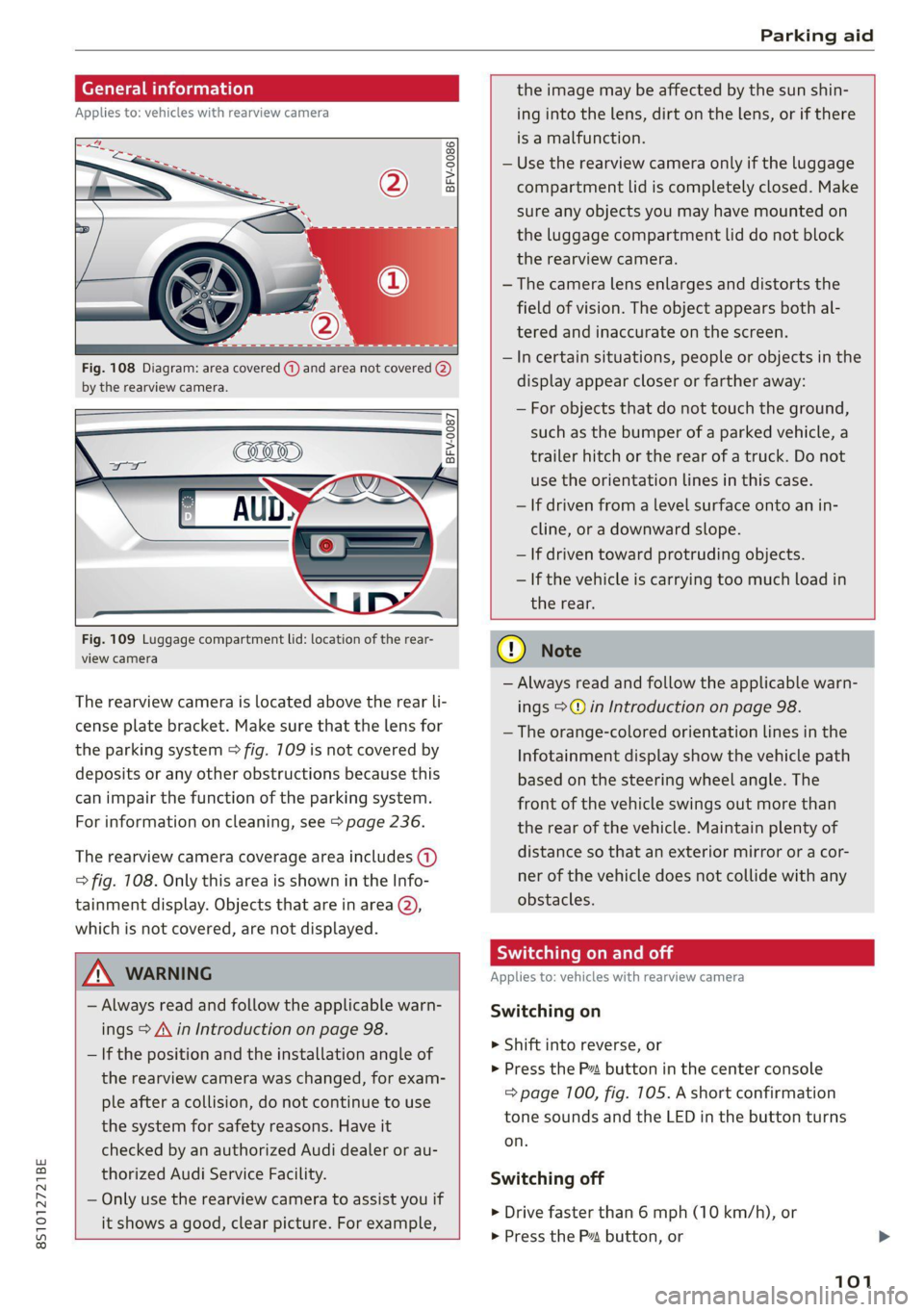
The rearview camera is located above the rear li-
cense plate bracket. Make sure that the lens for
the parking system > fig. 709 is not covered by
deposits or any other obstructions because this
can impair the function of the parking system.
For information on cleaning, see > page 236.
The rearview camera coverage area includes (1)
=> fig. 108. Only this area is shown in the Info-
tainment display. Objects that are in area (2),
which is not covered, are not displayed.
ZA\ WARNING
— Always read and follow the applicable warn-
ings > A\ in Introduction on page 98.
— If the position and the installation angle of
the rearview camera was changed, for exam-
ple after a collision, do not continue to use
the system for safety reasons. Have it
checked by an authorized Audi dealer or au-
thorized Audi Service Facility.
— Only use the rearview camera to assist you if
it shows a good, clear picture. For example,
the image may be affected by the sun shin-
ing into the lens, dirt on the lens, or if there
is a malfunction.
— Use the rearview camera only if the luggage
compartment lid is completely closed. Make
sure any objects you may have mounted on
the luggage compartment lid do not block
the rearview camera.
— The camera lens enlarges and distorts the
field of vision. The object appears both al-
tered and inaccurate on the screen.
—Incertain situations, people or objects in the
display appear closer or farther away:
— For objects that do not touch the ground,
such as the bumper of a parked vehicle, a
trailer hitch or the rear of a truck. Do not
use
the orientation lines in this case.
— If driven from a level surface onto an in-
cline, or a downward slope.
— If driven toward protruding objects.
— If the vehicle is carrying too much load in
the rear.
CG) Note
— Always read and follow the applicable warn-
ings >@ in Introduction on page 98.
— The orange-colored orientation lines in the
Infotainment display show the vehicle path
based on the steering wheel angle. The
front
of the vehicle swings out more than
the rear of the vehicle. Maintain plenty of
distance so that an exterior mirror or a cor-
ner of the vehicle does not collide with any
obstacles.
Sica Re moll
Applies to: vehicles with rearview camera
Switching on
> Shift into reverse, or
> Press the P button in the center console
=> page 100, fig. 105. A short confirmation
tone sounds and the LED in the button turns
on.
Switching off
> Drive faster than 6 mph (10 km/h), or
> Press the P button, or
101
Page 239 of 280
8S1012721BE
Care and cleaning
ZA WARNING
—To reduce the risk of accidents, only wash
the vehicle when the ignition is off and fol-
low the instructions from the car wash oper-
ator.
—To reduce the risk of cuts, protect yourself
from sharp metal components when wash-
ing the underbody or the inside of the wheel
housings.
— After washing the vehicle, the braking effect
may be delayed due to moisture on the
brake rotors or ice in the winter. This in-
creases the risk of an accident. The brakes
must be dried with a few careful brake appli-
cations.
() Note
— If you wash the vehicle in an automatic car
wash, you must retract the extendable rear
spoiler* if necessary, and fold the exterior
mirrors in to reduce the risk of damage.
Power folding exterior mirrors* must only
be folded in and out using the power folding
function.
—To reduce the risk of paint damage, do not
wash the vehicle in direct sunlight.
—To reduce the risk of damage, do not wash
decorative decals* with a pressure washer.
—To reduce the risk of damage, do not wash
the power top with a pressure washer.
—To reduce the risk of damage to the surface,
do not use insect removing sponges, kitchen
sponges, or similar items.
— When washing matte finish painted vehicle
components:
— To reduce the risk of damage to the sur-
face, do not use polishing agents or hard
wax.
— Never use protective wax. It can destroy
the matte finish effect.
— Do not place any stickers or magnetic
signs on vehicle components painted with
matte finish paint. The paint could be
damaged when the stickers or magnets
are removed.
(@) For the sake of the environment
Only wash the vehicle in facilities specially de-
signed for that purpose. This will reduce the
risk of dirty water contaminated with oil from
entering the sewer system.
Cleaning and care information
When cleaning and caring for individual vehicle
components, refer to the following tables. The
information contained there is simply recom-
mendations. For questions or for components
Exterior cleaning
that are not listed, consult an authorized Audi
dealer or authorized Audi Service Facility. Also
follow the information found in > A.
Component Situation Solution
Windshield wiper | Deposits Soft cloth with glass cleaner, > page 42
blades
Headlights/ Deposits Soft sponge with a mild soap solution®
tail lights
Sensors/ Deposits Sensors: soft cloth with a solvent-free cleaning product
camera lenses Camera lenses: soft cloth with an alcohol-free cleaning sol-
ution
Snow/ice Hand brush/solvent-free de-icing spray
Wheels Road salt Water
Brake dust Acid-free special cleaning solution >
237
Page 242 of 280
Care and cleaning
ZA\ WARNING
The windshield must not be treated with wa-
ter-repelling windshield coating agents. Un-
der unfavorable conditions, such as wetness,
darkness, and when the sun is low, these coat-
ings can cause increased glare, which increas-
es the risk of an accident. They can also cause
wiper blade chatter.
@) Note
— Headlights and tail lights
— Never clean the headlights or tail lights
with a dry cloth or sponge because the
lights could be damaged.
— Do not use any cleaning products that con-
tain alcohol, because they could cause
cracks to form.
— Wheels
— Never use any paint polish or other abra-
sive materials.
— Damage to the protective layer on the
rims, such as stone chips or scratches,
must be repaired immediately.
— Camera lenses
— Never use warm or hot water to remove
snow or ice from the camera lens. This
could cause the lens to crack.
— Never use abrasive cleaning materials or
alcohol to clean the camera lens. This
could cause scratches and cracks.
— Power top
— Remove bird droppings immediately.
— Never use gasoline, spot remover, ben-
zene, paint thinner or other solvents to re-
move.
— Door windows
— Remove snow and ice on windows and ex-
terior mirrors with a plastic scraper. To re-
duce the risk of scratches, move the scra-
per only in one direction and not back and
forth.
— Never remove snow or ice from door win-
dows and mirrors using warm or hot water
because this could cause cracks to form.
—To reduce the risk of damage to the rear
window defogger, do not apply any stick-
240
ers on the heating wires on the inside of
the window.
— Decorative parts and trim
— Never use chrome care or cleaning prod-
ucts.
— Paint
—To reduce the risk of scratches, the vehicle
must be free of dirt and dust before pol-
ishing or waxing.
— To prevent paint damage, do not polish or
wax the vehicle in direct sunlight.
— To reduce the risk of paint damage, do not
polish away rust spots.
— Remove cosmetics and sunscreen immedi-
ately because they could damage the
paint.
— Decorative decals
—To reduce the risk of damage, do not use
any rough powder or abrasive cleaning
products.
—To reduce the risk of damage, do not pol-
ish decorative decals that have a matte or
printed finish.
— Due to the risk of damage, do not use an
ice scraper to remove snow and ice on win-
dows with decorative decals on them.
— Instrument cluster
— Make sure that the instrument cluster is
switched off and has cooled off before
cleaning it.
—The instrument cluster and the trim sur-
rounding it must not be cleaned with dry
cleaning methods because they could get
scratched.
— Make sure no fluids enter the spaces be-
tween the instrument cluster and the
trim, because that could cause damage.
— Controls
— Make sure that no fluids enter the con-
trols, because this could cause damage.
— Safety belts
— Do not remove the safety belts to clean
them.
— Never clean safety belts or their compo-
nents with chemicals or with corrosive flu-
ids or solvents and never allow sharp ob-
jects to come into contact with the safety >
Page 256 of 280
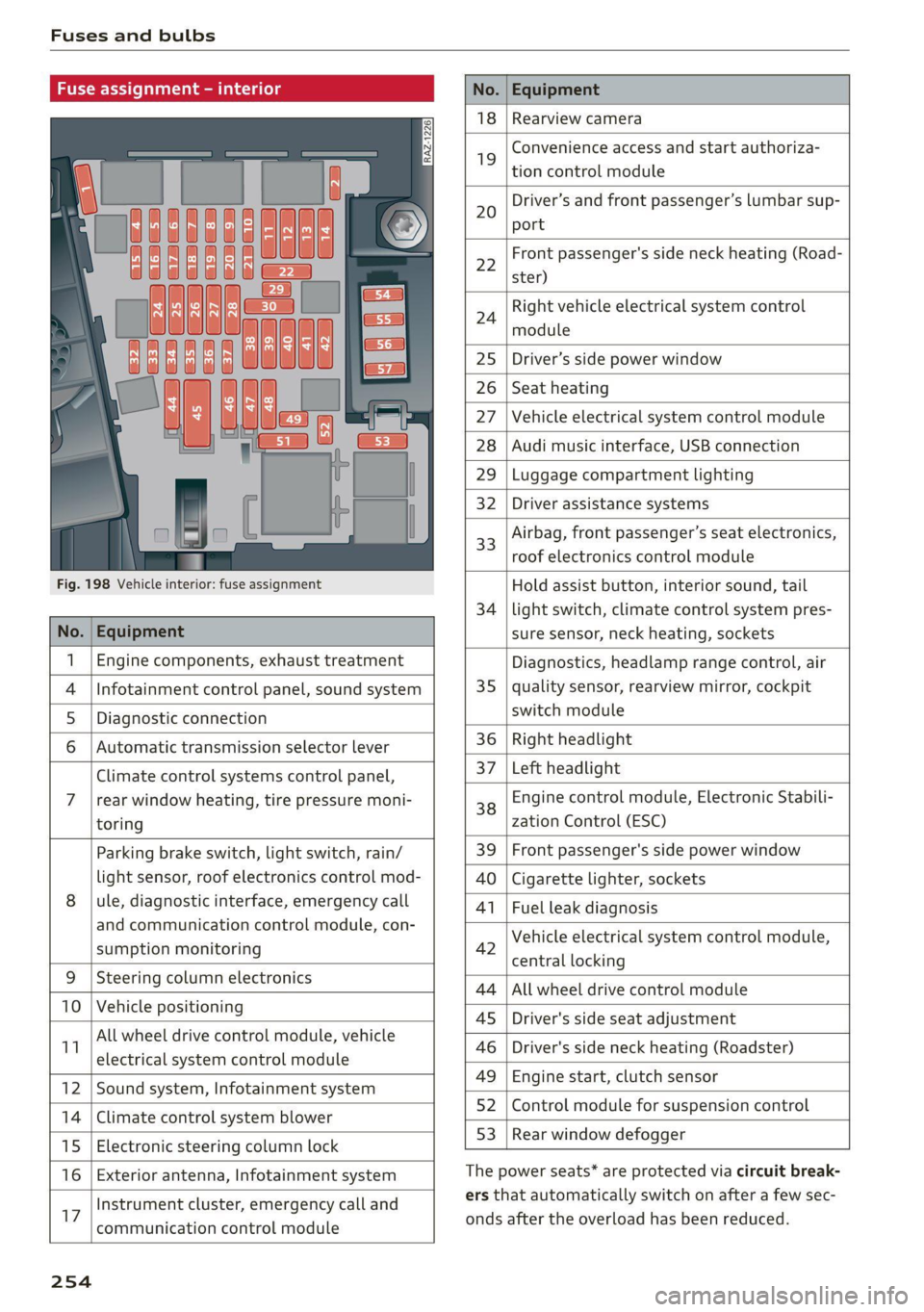
Fuses and bulbs
Fuse assign
No. Equipment
18 Rearview camera
19
Convenience access and start authoriza-
tion control module
20
Driver’s and front passenger’s lumbar sup-
port
Fig. 198 Vehicle interior: fuse assignment
22
Front passenger's side neck heating (Road-
ster)
24
Right vehicle electrical system control
module
25 Driver’s side power window
26 Seat heating
27 Vehicle electrical system control module
28 Audi music interface, USB connection
29 Luggage compartment lighting
32 Driver assistance systems
33
Airbag, front passenger’s seat electronics,
roof electronics control module
Hold assist button, interior sound, tail
34 | light switch, climate control system pres-
No. | Equipment sure sensor, neck heating, sockets
1 | Engine components, exhaust treatment Diagnostics, headlamp range control, air
4
|Infotainment control panel, sound system 35 | quality sensor, rearview mirror, cockpit
5 | Diagnostic connection switch module
6 |Automatic transmission selector lever 36 | Right headlight
Climate control systems control panel, 37 [Left headlight
7 |rear window heating, tire pressure moni- 38 Engine control module, Electronic Stabili-
toring zation Control (ESC)
Parking brake switch, light switch, rain/ 39 | Front passenger's side power window
light sensor, roof electronics control mod- AO | Cigarette lighter, sockets
8 |ule, diagnostic interface, emergency call 41 | Fuel leak diagnosis
and communication control module, con- 7 -
SUPADRIOR HIORIEOFIA 42 Vehicle electrical system control module,
P 9 central locking
9 |Steeri l lectroni
Sg CeIn ess 44 |All wheel drive control module
10 | Vehicle positionin : ;
P - g - 45 | Driver's side seat adjustment
11 aes oe 46 | Driver's side neck heating (Roadster)
49 | Engine start, clutch sensor
12 |Sound system, Infotainment system g
14 | Cimareconttol system Blower 52 | Control module for suspension control
53 | Rear window defogger
15 | Electronic steering column lock window 99°
16 | Exterior antenna, Infotainment system The power seats* are protected via circuit break-
Instrument cluster, emergency call and ers that automatically switch on after a few sec-
17 | -ommunication control module onds after the overload has been reduced.
254
Page 265 of 280
8S1012721BE
Technical data
Technical data
Identification data
Vehicle data label
XXX X= HKNK WOK XX
(Hae wrccnce XX XNKKKNKK
Frm XXX XX
2
3 }—— MOTORS / GET. 8
eco au cone XXX
LACKNR / INNENAUSS.
PANT NO, INTEROR XXXX [XXX XXX / XX
M. - AUSST. / OPTIONS
EOA 7D5 4UB 6XM 5SG
2EH
JOZ 1LB 1AS
3FC SMU 7X1
FOA 9G3 0G7 OYH OJF
TL6 3KA 8EH U1A X9B QZ7
1XW 8Q3 9Q8 8Z4 D2D
716 CV7 7KO 4X3 2K2
3L4 4KC 3Y0 413
1SA 7GB Q1A
RAZ-0668
XX XXXXXXX XX. X.X XX
XXX KW XXX
XXX XXX
SRW
1BA
SH
5D2
4GQ
ee
Fig. 201 Vehicle identification label
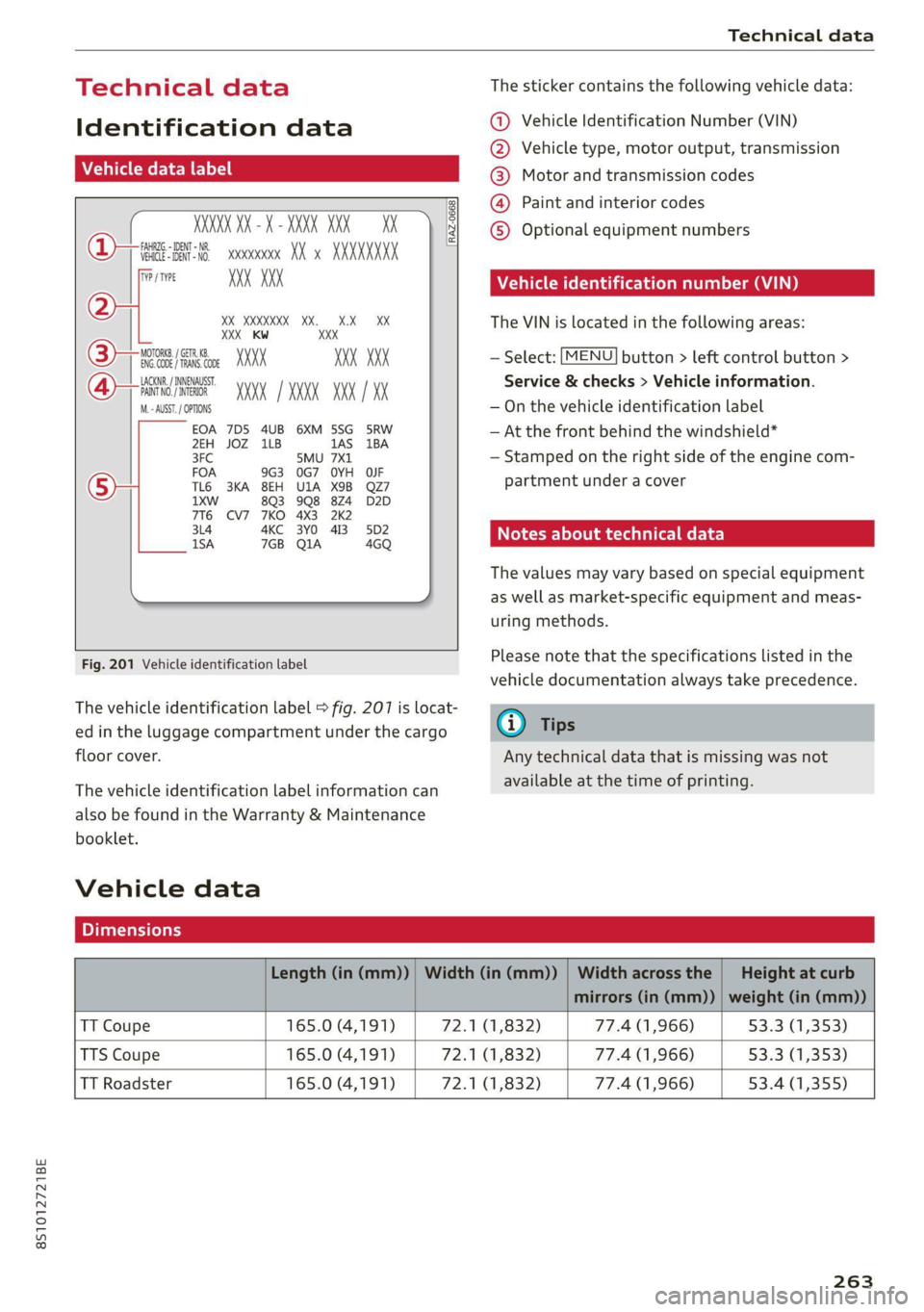
The vehicle identification label > fig. 207 is locat-
ed in the luggage compartment under the cargo
floor cover.
The vehicle identification label information can
also be found in the Warranty & Maintenance
booklet.
Vehicle data
The sticker contains the following vehicle data:
@ Vehicle Identification Number (VIN)
@ Vehicle type, motor output, transmission
® Motor and transmission codes
@) Paint and interior codes
© Optional equipment numbers
Vehicle identification number (VIN)
The VIN is located in the following areas:
MENU — Select: button > left control button >
Service & checks > Vehicle information.
— On the vehicle identification label
— At the front behind the windshield*
— Stamped on the right side of the engine com-
partment under a cover
Notes about technical data
The values may vary based on special equipment
as well as market-specific equipment and meas-
uring methods.
Please note that the specifications listed in the
vehicle documentation always take precedence.
G) Tips
Any technical data that is missing was not
available at the time of printing.
Length (in (mm)) | Width (in (mm)) | Width across the | Height at curb
mirrors (in (mm)) | weight (in (mm))
TT Coupe 165.0 (4,191) 72.1 (1,832) 77.4 (1,966) 53.3 (1,353)
TTS Coupe 165.0 (4,191) 72.1 (1,832) 77.4 (1,966) 53.3 (1,353)
TT Roadster 165.0 (4,191) 72.1 (1,832) 77.4 (1,966) 53.4 (1,355)
263
Page 269 of 280

8S1012721BE
Index
COMING HOME «2 esc = 2 crews =o weaves ov eres 38
Command (voice recognition system) ...... 122
Compartments: « s scsu ¢ ¢ ewe ay ewe ov eee 64
Compass: ithe Mirtor’s « esas < eae s 3 pew ss 43
Compliance: « swe = i ees s i Sows ¥ BoE es 261
Conference call... ..... cee eee eee eee 133
CONNECE. 6. Lee eee 141
Datta Privacy'os + « meen s x easy s wee s ee 257
Infotainment: seis oo sane oe coven a comme 2 141
Infotainment services............-0005 143
Connection manager...............005 190
Connections
refer to Media.............000005 169, 177
Connection settingS............0... eee 190
Consumer information.................% 258
Consumption
Reducing............. cece eee 74
Consumption (fuel) ................0000 15
COMEAGES smccoce 4 0 sxenens «mise om suanmce © oxenens 6 137
Additional directory................0- 191
Importing/exporting...............0.. 138
Memiorycapacityins. 2 6 ceca uo ncien © 6 omen © 139:
Searching... ......cc cece eee eee e ee eee 138
Showing details 5 osc. = s enya se eee se eee 138
Storing as destination................. 154
Gontrol: DuttOnstes « o sxsces 2 « semen ws were oo we 13
Control buttons (operating the MMI)...... 111
Control knob with joystick function....... 115
Convenience key.........---0 eee eee eee ee 19
Indicator ilighttics 5 & suse « x ina & 0 cone @ wane 76
Unlocking and locking............-...0. 22
Convenience opening and closing
Setting... ccc eee ee eee 27
WINDOWS ¢ sme + ¢ soyee x 2 gee 2 x cee oa 27
Cooling MOdGs: s escew s wewe s seems ee VERS 70
Cooling system
Adding
coolant 2 i: 6 scene 2 cen ee eee 208
Checking the coolant level............. 208
Coolant.................0.00 0c eee eee 207
Coolant temperature indicator........... 10
Crank (power top emergency operation) .... . 34
GrosshiairS:: = smax 2 s seme zs some : 2 ae Ee
Cruise control system
Cup holders........ 0... cee eee eee eee eee
Current fuel consumption................ 15
D
Data Privacy.................. 0000000. 257
Date... cece eee eee 189
Date display.................000200 08 189
Daytime running lights.................. 36
Declaration of compliance............... 261
Defrosting (windows) ................000 71
DEF (instrument cluster) s sewea ss veus a x owas 10
Deluxe automatic climate control.......... 70
Demo mode
refer to Presentation mode............ 155
Determining correct load limit........... 228
Digital: COMPASS saws ss oes ss ees Ge ewe ae 43
Digital Rights Management.............. 169
Dimensions............0.00 00 eee ee eee 263
Dimming the rearview mirror............. 40
Directory
refer to ContactS.......... cee eee eee 137
Display
Cleaning’: ¢ ¢ 2s ¢ 2 sees 2s wees es eewn 2 239
DiSpOSaliss » + saeas x = aces & 5 SGcas es Be Ee 258
Distance driven........... 0.0. e cece eee Is
Doors
Mechanically unlocking and locking....... 24
Driver information system................ 12
ENergyCOnsUINIels saves ¢ « wewn 2 » mown oo mew 15
On-board computer................-00. 15
Switching Views ........... eee e eee eee 13
Drives
Fefer to Mediates « e esas < ween + nee 169, 177
DiiVESOLECE’s = sags x x mere ee seuwe 5b aaron 3 2 ae 96
Driving through water...............200- 74
Driving time... 1.6... cece eee 15
Driving tips
Driving through water..............00-. 74
Efficient:driving « mcs se ace sa mwa se mere 74
Driving track secs = = secs se oes = + sows ee oes 81
Dust filter
refer to Pollutant filter. ............00.. 69
DVD drive (media drives) ................ 170
Dynamic volume
refer to System volume..............-. 193
E
Stiles & : ssonane v ceceimaes 2 amowems ev aneiios a x seinem 136