Brake assist AUDI TT 2021 Owner´s Manual
[x] Cancel search | Manufacturer: AUDI, Model Year: 2021, Model line: TT, Model: AUDI TT 2021Pages: 280, PDF Size: 99.18 MB
Page 211 of 280

8S1012721BE
Checking and Filling
@) Note
Do not continue driving if the coolant expan-
sion tank is empty. Do not add any coolant,
because air could enter the cooling system
and damage the engine. See an authorized
Audi dealer or authorized Audi Service Facility
for assistance.
Brake fluid
BFV-0229
Fig. 172 Motor compartment: cap on brake fluid reservoir
Observe the safety precautions > page 200, Gen-
eral information.
Checking the brake fluid level
> Read the brake fluid level on the brake fluid
reservoir > page 203, fig. 168. The brake fluid
level must be between the MIN and MAX mark-
ings > A\.
The brake fluid level is monitored automatically.
Message
EG / @® Brakes: stop vehicle and check brake
fluid level
Stop the vehicle and check the brake fluid level.
See an authorized Audi dealer or authorized Audi
Service Facility for assistance.
Changing the brake fluid
Brake fluid should be changed at regular inter-
vals. Have the brake fluid changed by an author-
ized Audi dealer or authorized Audi Service Facili-
ty. The authorized Audi dealer or authorized Audi
Service Facility will inform you of the replace-
ment intervals.
ZX WARNING
— If the brake fluid level is below the MIN
marking, it can impair the braking effect and
driving safety, which increase the risk of an
accident. Do not continue driving. See an au-
thorized Audi dealer or authorized Audi
Service Facility for assistance.
— If the brake fluid is old, bubbles may form in
the brake system during heavy braking. This
could impair braking performance and driv-
ing safety, which increases the risk of an ac-
cident.
— The brake fluid in your vehicle must meet
the standard VW 501 14 and is available at
an authorized Audi dealer or authorized
Audi Service Facility. If this brake fluid is not
available, another high-grade brake fluid of
equivalent quality may be used, and it must
meet the U.S. Federal Motor Vehicle Stand-
ard (FMVSS) 116 DOT 4, Class 6.
@) Note
— If the brake fluid level is above the MAX
marking, brake fluid may leak out over the
edge of the reservoir and result in damage
to the vehicle.
— Do not allow any brake fluid to come into
contact with the vehicle paint, because it
will corrode the paint.
Electrical system
If the fz or = indicator light turns on, there is a
malfunction in the generator, the battery, or the
vehicle electrical system.
= Electrical system: malfunction! Battery is
not being charged
Drive to an authorized Audi dealer or authorized
Audi Service Facility immediately. Turn off all un-
necessary electrical equipment because it will
drain the battery. See an authorized Audi dealer
or authorized Audi Service Facility if the battery
charge level is too low.
= Electrical system: low battery charge. Bat-
tery
will be charged while driving
The starting ability may be impaired.
209
Page 244 of 280
Emergency assistance
Emergency assistance
General information
> Park the vehicle as far as possible from moving
traffic in the event of a breakdown. In the event
of a flat tire, park the vehicle on a level surface.
If you are ona steep hill, be especially careful.
> Set the parking brake.
> Switch the emergency flashers on.
> Have the passengers exit the vehicle. They
should move to a safe place, for example be-
hind a guard rail.
ZA\ WARNING
Follow the steps given above. This is for your
protection and the for the safety of others on
the road.
Equipment
Vehicle tool kit/tire mobility
Pn eels
alae
B \V
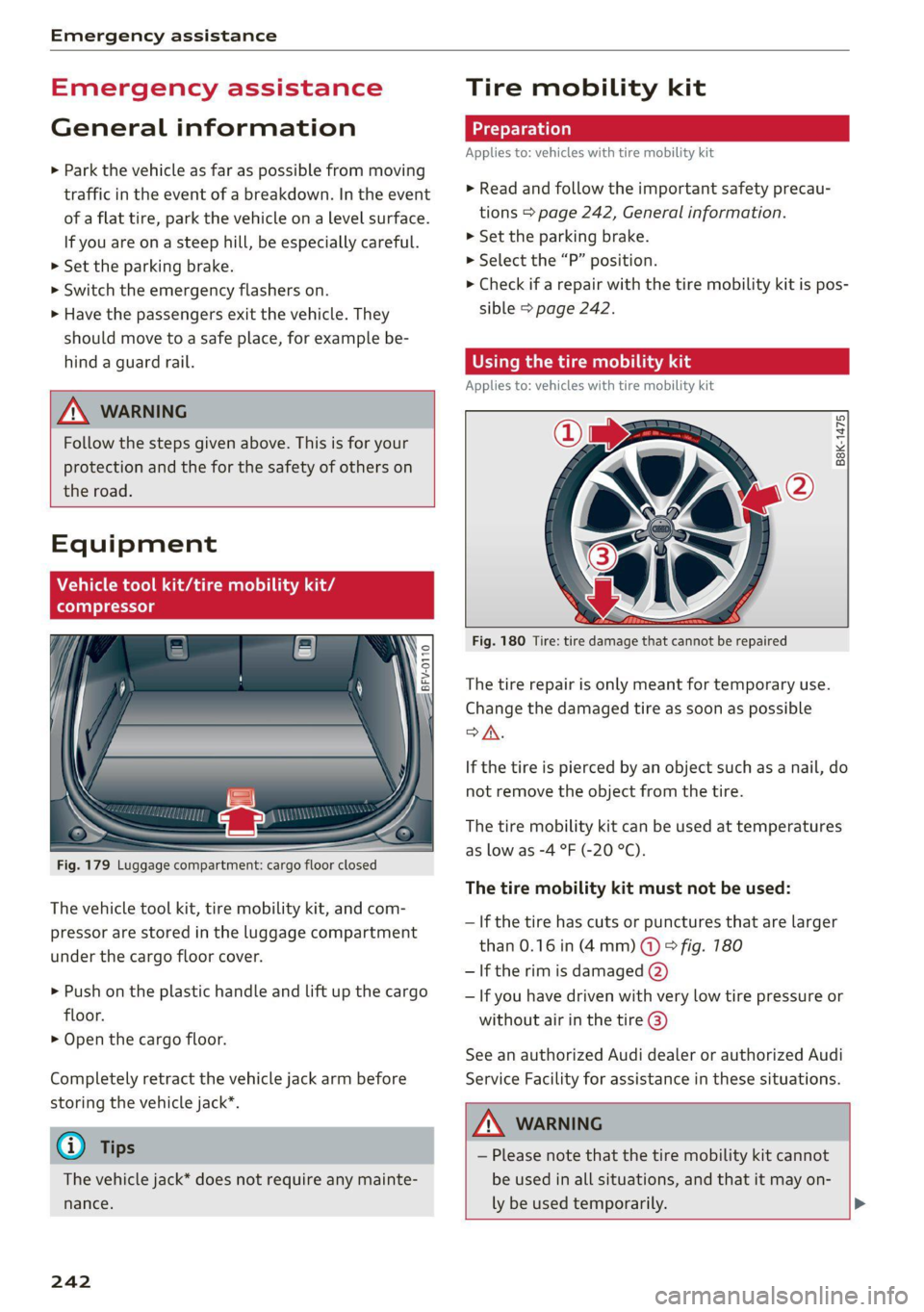
Fig. 179 Luggage compartment: cargo floor closed
The vehicle tool kit, tire mobility kit, and com-
pressor are stored in the luggage compartment
under the cargo floor cover.
> Push on the plastic handle and lift up the cargo
floor.
> Open the cargo floor.
Completely retract the vehicle jack arm before
storing the vehicle jack”.
G) Tips
The vehicle jack* does not require any mainte-
nance.
242
Tire mobility kit
Applies to: vehicles with tire mobility kit
> Read and follow the important safety precau-
tions > page 242, General information.
>» Set the parking brake.
> Select the “P” position.
> Check if a repair with the tire mobility kit is pos-
sible > page 242.
time) iS ads
Applies to: vehicles with tire mobility kit
B8K-1475
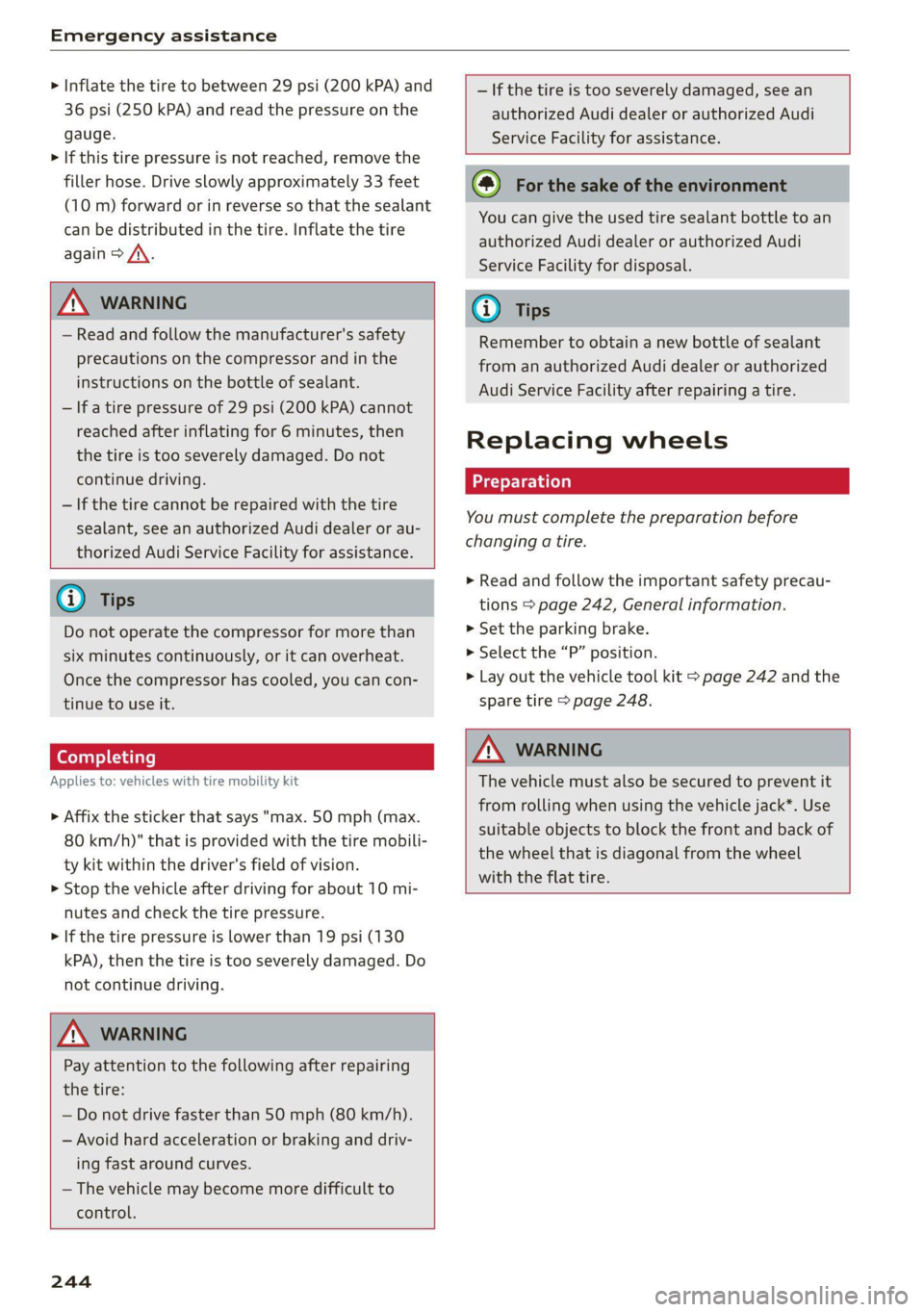
Fig. 180 Tire: tire damage that cannot be repaired
The tire repair is only meant for temporary use.
Change the damaged tire as soon as possible
SA.
If the tire is pierced by an object such as a nail, do
not remove the object from the tire.
The tire mobility kit can be used at temperatures
as low as -4 °F (-20 °C).
The tire mobility kit must not be used:
— If the tire has cuts or punctures that are larger
than 0.16 in (4mm) @ & fig. 180
— If the rim is damaged (2)
— If you have driven with very low tire pressure or
without air in the tire @)
See an authorized Audi dealer or authorized Audi
Service Facility for assistance in these situations.
ZA\ WARNING
— Please note that the tire mobility kit cannot
be used in all situations, and that it may on-
ly be used temporarily. >
Page 246 of 280
Emergency assistance
> Inflate the tire to between 29 psi (200 kPA) and
36 psi (250 kPA) and read the pressure on the
gauge.
> If this tire pressure is not reached, remove the
filler hose. Drive slowly approximately 33 feet
(10 m) forward or in reverse so that the sealant
can be distributed in the tire. Inflate the tire
again > A\.
ZX WARNING
— Read and follow the manufacturer's safety
precautions on the compressor and in the
instructions on the bottle of sealant.
— lf a tire pressure of 29 psi (200 kPA) cannot
reached after inflating for 6 minutes, then
the tire is too severely damaged. Do not
continue driving.
— If the tire cannot be repaired with the tire
sealant, see an authorized Audi dealer or au-
thorized Audi Service Facility for assistance.
@ Tips
Do not operate the compressor for more than
six minutes continuously, or it can overheat.
Once the compressor has cooled, you can con-
tinue to use it.
Completing
Applies to: vehicles with tire mobility kit
> Affix the sticker that says "max. 50 mph (max.
80 km/h)" that is provided with the tire mobili-
ty kit within the driver's field of vision.
> Stop the vehicle after driving for about 10 mi-
nutes and check the tire pressure.
> If the tire pressure is lower than 19 psi (130
kPA), then the tire is too severely damaged. Do
not continue driving.
ZA\ WARNING
Pay attention to the following after repairing
the tire:
— Do not drive faster than 50 mph (80 km/h).
— Avoid hard acceleration or braking and driv-
ing fast around curves.
— The vehicle may become more difficult to
control.
244
— If the tire is too severely damaged, see an
authorized Audi dealer or authorized Audi
Service Facility for assistance.
(@) For the sake of the environment
You can give the used tire sealant bottle to an
authorized Audi dealer or authorized Audi
Service Facility for disposal.
G) Tips
Remember to obtain a new bottle of sealant
from an authorized Audi dealer or authorized
Audi Service Facility after repairing a tire.
Replacing wheels
You must complete the preparation before
changing a tire.
> Read and follow the important safety precau-
tions > page 242, General information.
> Set the parking brake.
> Select the “P” position.
> Lay out the vehicle tool kit > page 242 and the
spare tire > page 248.
ZX WARNING
The vehicle must also be secured to prevent it
from rolling when using the vehicle jack”. Use
suitable objects to block the front and back of
the wheel that is diagonal from the wheel
with the flat tire.
Page 249 of 280
8S1012721BE
Emergency assistance
points on the side sill. Otherwise, your vehicle
could be damaged.
moving an unting a wheel
@ g + “
rood oO
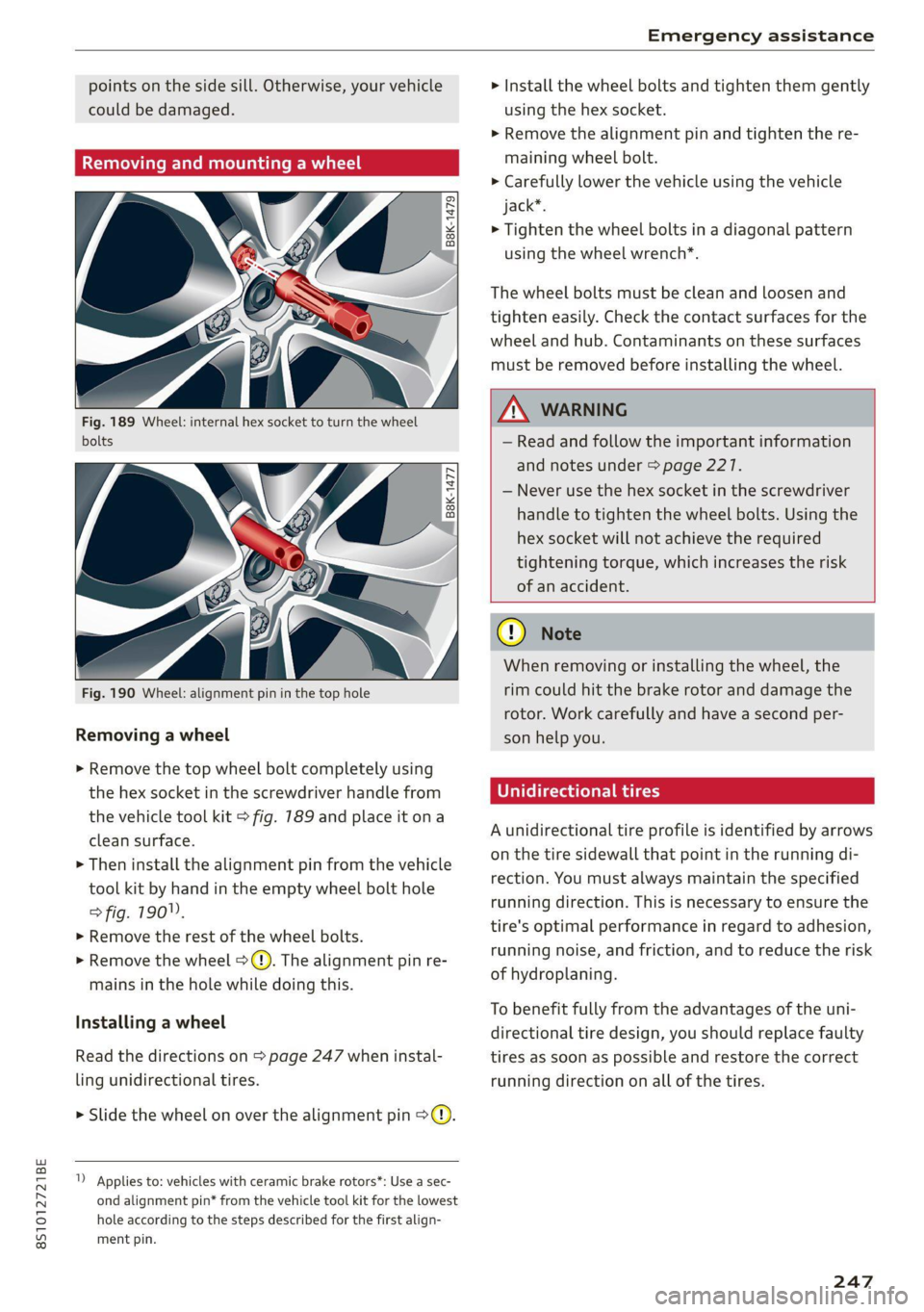
Fig. 189 Wheel: internal hex socket to turn the wheel
bolts
B8K-1477
Fig. 190 Wheel: alignment pin in the top hole
Removing a wheel
> Remove the top wheel bolt completely using
the hex socket in the screwdriver handle from
the vehicle tool kit > fig. 789 and place it ona
clean surface.
> Then install the alignment pin from the vehicle
tool kit by hand in the empty wheel bolt hole
> fig. 190".
> Remove the rest of the wheel bolts.
» Remove the wheel >(). The alignment pin re-
mains in the hole while doing this.
Installing a wheel
Read the directions on > page 247 when instal-
ling unidirectional tires.
> Slide the wheel on over the alignment pin >@.
1) Applies to: vehicles with ceramic brake rotors*: Use a sec-
ond alignment pin* from the vehicle tool kit for the lowest
hole according to the steps described for the first align-
ment pin.
> Install the wheel bolts and tighten them gently
using the hex socket.
> Remove the alignment pin and tighten the re-
maining wheel bolt.
> Carefully lower the vehicle using the vehicle
jack*.
> Tighten the wheel bolts in a diagonal pattern
using the wheel wrench*.
The wheel bolts must be clean and loosen and
tighten easily. Check the contact surfaces for the
wheel and hub. Contaminants on these surfaces
must be removed before installing the wheel.
ZA\ WARNING
— Read and follow the important information
and notes under > page 227.
— Never use the hex socket in the screwdriver
handle to tighten the wheel bolts. Using the
hex
socket will not achieve the required
tightening torque, which increases the risk
of an accident.
CG) Note
When removing or installing the wheel, the
rim
could hit the brake rotor and damage the
rotor. Work carefully and have a second per-
son help you.
U rectional tires
A unidirectional tire profile is identified by arrows
on the tire sidewall that point in the running di-
rection. You must always maintain the specified
running direction. This is necessary to ensure the
tire's optimal performance in regard to adhesion,
running noise, and friction, and to reduce the risk
of hydroplaning.
To benefit fully from the advantages of the uni-
directional tire design, you should replace faulty
tires as soon as possible and restore the correct
running direction on all of the tires.
247
Page 252 of 280
Emergency assistance
4. Attach the other end of the negative cable
(black) to the jump start connection @ on
the vehicle.
Starting the engine
> Start the engine in the vehicle giving the charge
and let it run at idle.
> Now start the engine in your vehicle, which has
the
drained battery.
> If the engine does not start, stop the starting
procedure after 10 seconds and then repeat it
after approximately 30 seconds.
> Turn on the rear window defogger in your vehi-
cle in order to reduce any voltage peaks that
may occur when disconnecting the jump start
cables. The headlights must be switched off.
> With the engines running, remove the cables in
reverse order of the way they were installed.
> Close the red cover on the positive terminal.
ZA\ WARNING
— Never connect the jump start cable directly
to your vehicle battery. Only use the connec-
tions in the engine compartment.
— Do not touch the non-insulated parts of the
terminal clamps. The cable must also not
come into contact with vehicle components
that conduct electricity when it is connected
to the positive vehicle battery terminal. This
can cause a short circuit.
— The locking bolts on the battery cells must
be tightened securely.
— Keep ignition sources (open flames, burning
cigarettes, etc.) away from the vehicle bat-
teries to reduce the risk of an explosion.
— Route the jump start cables so they cannot
get caught in the moving parts in the other
vehicle's engine compartment.
C) Note
Please note that the connecting process previ-
ously described for the jump start cables is in-
tended for when your vehicle is being jump
started.
250
G) Tips
Make sure that the connected jump start ca-
bles have sufficient contact with metal.
Towing
General information
You should only perform the steps that follow if
you have the necessary tools and technical ex-
pertise.
Towing requires a certain amount of practice.
Audi recommends contacting a towing company
to have the vehicle transported.
You should only have your vehicle towed by an-
other vehicle when disabled in exceptional cir-
cumstances. Inexperienced drivers should not
tow.
Notes on towing
When the engine is stopped, the transmission
will not be sufficiently lubricated if traveling at
high speeds and long distances:
— The maximum permitted towing speed is 30
mph (50 km/h).
— The maximum permitted towing distance is 30
miles (SO km).
Additional information on towing with a tow
truck
The vehicle may only be towed with the front axle
raised. Do not wrap any chains or cables around
the brake lines.
If the vehicle should be towed with the axle
raised, then the ignition must be switched off to
reduce the risk of damage to the drivetrain.
Tow bar and towing cable
The vehicle can be towed with a tow bar or tow-
ing cable. Both drivers should be familiar with
the special considerations when towing, especial-
ly when using a towing cable.
Always make sure the traction force does not ex-
ceed the permitted level and there are no shock
loading conditions. There is always the risk of the >
Page 253 of 280
8S1012721BE
Emergency assistance
coupling becoming overloaded when driving off-
road.
For the most safety and security, drive with a tow
bar. You should use a towing cable only if a tow
bar is not available. Use a towing cable made of
synthetic elastic cable similar elastic material.
ZA\ WARNING
— Towing highly increases the risk of an acci-
dent, for example from colliding with the
towing vehicle.
— To reduce the risk of an accident, do not al-
low anyone to remain inside the vehicle
when it is being transported by a tow truck
or a special transporter.
® Note
— If normal towing is not possible, for exam-
ple if the transmission is faulty or if the
towing distance is greater than 30 miles
(50 km), then transport the vehicle ona
special carrier.
— If the vehicle is towed by a tow truck at the
axle that is not permitted, this can cause se-
vere damage to the transmission.
— The vehicle must not be tow started for
technical reasons.
G) Tips
— If there is a power failure, the selector lever
will not move out of the "P" position. The
parking lock must be released using the
emergency release before towing the vehi-
cle > page 88.
— Follow the local legal regulations for tow-
ing.
Read and follow the important information un-
der > page 250.
Preparations
> Only secure the towing cable or tow bar at the
designated towing loops > page 2517,
=> page 252.
> Make sure the towing cable is not twisted. Oth-
erwise it could disconnect from the towing loop
while towing.
> Switch the emergency flashers on in both
vehicles > page 38. However, do not do this if it
prohibited by law.
Towing vehicle (front)
> Only start to drive when the towing cable is
taut.
> Be especially careful when accelerating.
» Avoid sudden braking or driving maneuvers.
Vehicle being towed (rear)
> Make sure the ignition is switched on so that
the steering wheel is not locked and so that you
can use the turn signals, the horn, and the
windshield wipers if needed > /A\.
> Switching it off before the vehicle has stopped
may impair the function of the brake booster
and power steering. You would then need to
use more force to steer and brake the vehicle.
> Release the parking brake > page 79.
> Select the “N” selector lever position.
> Make sure the towing cable is always taut.
ZA\ WARNING
— Never tow a vehicle using a tow bar or tow-
ing cable if the vehicle does not have electri-
cal power.
— If the vehicle runs out of power while it is
being towed, stop towing the vehicle imme-
diately and consult an authorized Audi deal-
er or qualified repair facility.
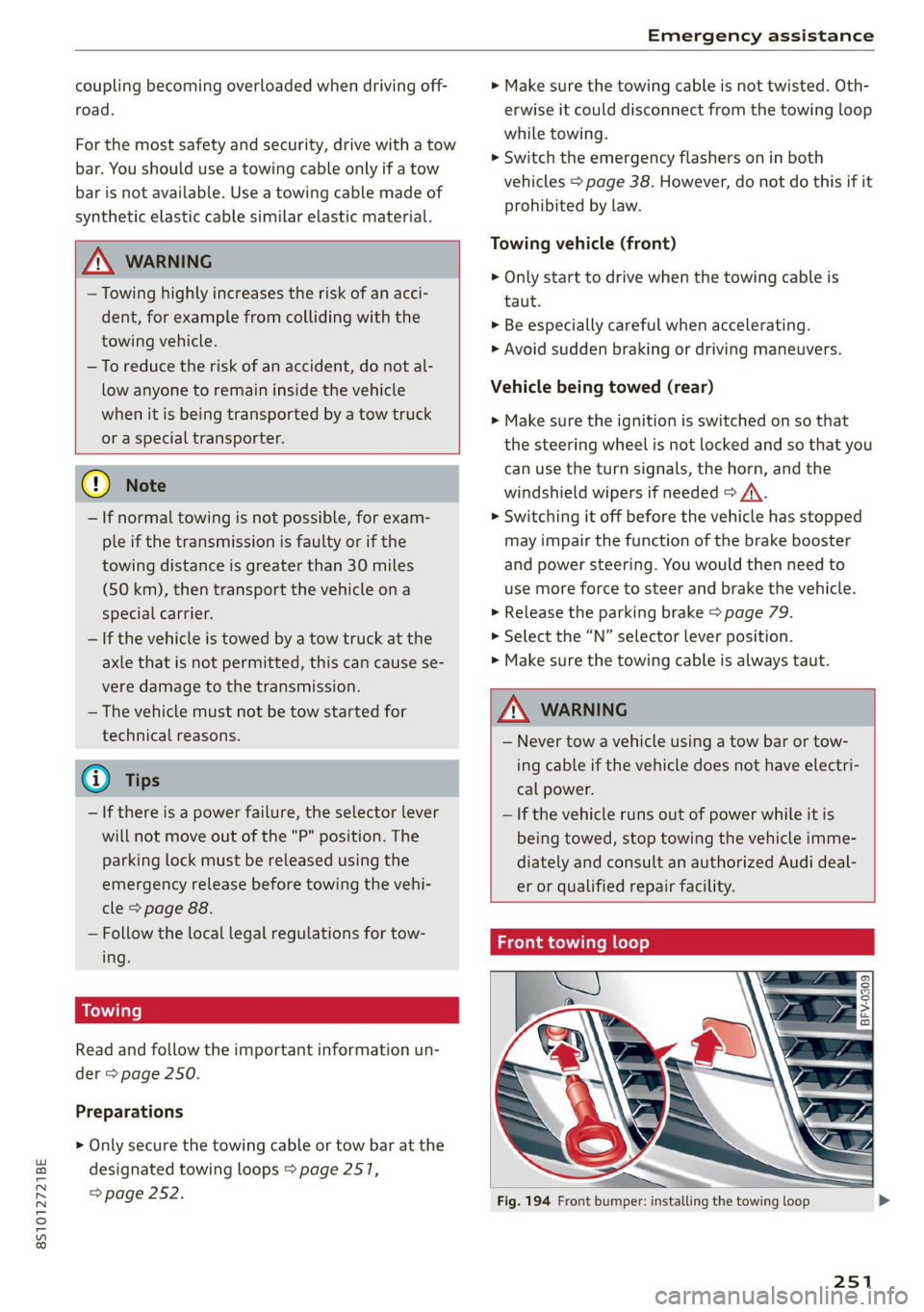
Front towing loop
Fig. 194 Front bumper: installing the towing loop
251
Page 256 of 280
Fuses and bulbs
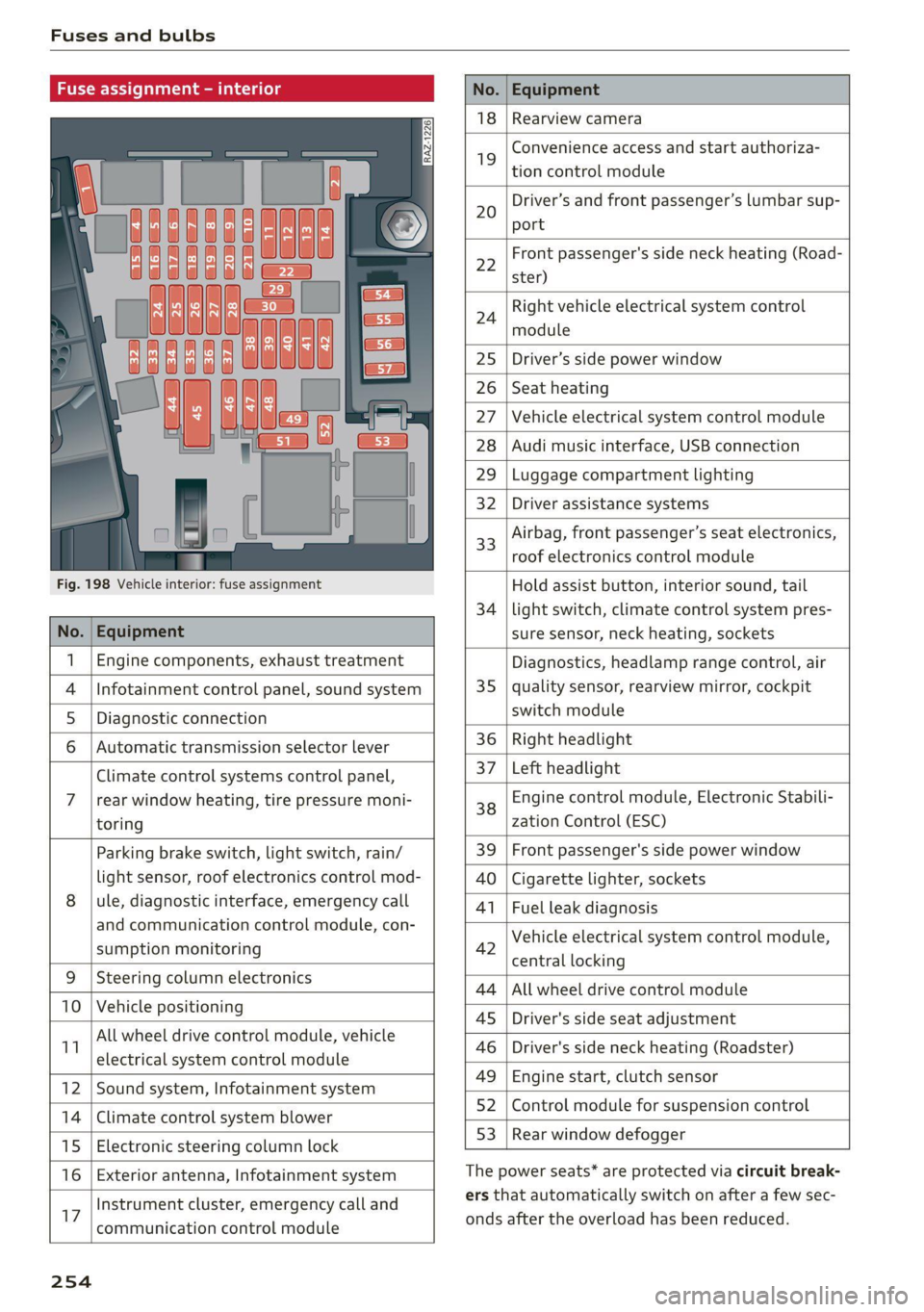
Fuse assign
No. Equipment
18 Rearview camera
19
Convenience access and start authoriza-
tion control module
20
Driver’s and front passenger’s lumbar sup-
port
Fig. 198 Vehicle interior: fuse assignment
22
Front passenger's side neck heating (Road-
ster)
24
Right vehicle electrical system control
module
25 Driver’s side power window
26 Seat heating
27 Vehicle electrical system control module
28 Audi music interface, USB connection
29 Luggage compartment lighting
32 Driver assistance systems
33
Airbag, front passenger’s seat electronics,
roof electronics control module
Hold assist button, interior sound, tail
34 | light switch, climate control system pres-
No. | Equipment sure sensor, neck heating, sockets
1 | Engine components, exhaust treatment Diagnostics, headlamp range control, air
4
|Infotainment control panel, sound system 35 | quality sensor, rearview mirror, cockpit
5 | Diagnostic connection switch module
6 |Automatic transmission selector lever 36 | Right headlight
Climate control systems control panel, 37 [Left headlight
7 |rear window heating, tire pressure moni- 38 Engine control module, Electronic Stabili-
toring zation Control (ESC)
Parking brake switch, light switch, rain/ 39 | Front passenger's side power window
light sensor, roof electronics control mod- AO | Cigarette lighter, sockets
8 |ule, diagnostic interface, emergency call 41 | Fuel leak diagnosis
and communication control module, con- 7 -
SUPADRIOR HIORIEOFIA 42 Vehicle electrical system control module,
P 9 central locking
9 |Steeri l lectroni
Sg CeIn ess 44 |All wheel drive control module
10 | Vehicle positionin : ;
P - g - 45 | Driver's side seat adjustment
11 aes oe 46 | Driver's side neck heating (Roadster)
49 | Engine start, clutch sensor
12 |Sound system, Infotainment system g
14 | Cimareconttol system Blower 52 | Control module for suspension control
53 | Rear window defogger
15 | Electronic steering column lock window 99°
16 | Exterior antenna, Infotainment system The power seats* are protected via circuit break-
Instrument cluster, emergency call and ers that automatically switch on after a few sec-
17 | -ommunication control module onds after the overload has been reduced.
254
Page 258 of 280
![AUDI TT 2021 Owner´s Manual Data privacy
Data privacy
Privacy notice
You can find information about responsibility for
data protection in the MMI.
Applies to: MMI: Select: [MENU] button > Audi
connect > right](/img/6/40287/w960_40287-257.png "AUDI TT 2021 Owner´s Manual Data privacy
Data privacy
Privacy notice
You can find information about responsibility for
data protection in the MMI.
Applies to: MMI: Select: [MENU] button > Audi
connect > right")
Data privacy
Data privacy
Privacy notice
You can find information about responsibility for
data protection in the MMI.
Applies to: MMI: Select: [MENU] button > Audi
connect > right control button > About Audi con-
nect.
Image recording
Surrounding area monitoring
Applies to: vehicles with surrounding area monitoring
Some vehicle functions require the vehicle’s path
to be detected and evaluated. This is done by
cameras installed permanently on the vehicle
that detect objects in the vehicle's surroundings
(such as obstacles or guard rails). The live images
from the cameras are transmitted to the applica-
ble control module.
The camera images are transmitted to the appli-
cable control module and stored for processing.
The control module analyzes the current camera
image using image evaluation software. This im-
age evaluation software detects anonymized
technical measurements, such as distances to ob-
jects. The control module evaluates these techni-
cal measurements and makes it possible for the
assist systems to control the vehicle, if necessary.
Data memories
~ 1p o
S| =z
x a.
Fig. 200 Driver's side footwell: connection port for the On
Board Diagnostic System (OBD)
Your vehicle is equipped with electronic control
modules for various vehicle systems such as the
256
airbags. These vehicle control modules store data
while driving normally that is required by an au-
thorized Audi dealer or authorized Audi Service
Facility for diagnosis and repair purposes. Only
certain types of data are recorded for a very short
period of time if a control module has detected a
system event. No noises, conversations, or im-
ages will be recorded in the vehicle.
The data may include information such as the ve-
hicle speed, the direction of travel, and informa-
tion about the brake system, or also the behavior
of the restraint system in the event of an acci-
dent. The stored data can be exported and down-
loaded with special devices, which must be con-
nected directly to the vehicle.
On Board Diagnostic System (OBD)
There is a diagnostic connector socket in the driv-
er's side footwell to read out the various control
modules and the event data recorder. Data re-
garding the function and condition of the elec-
tronic control modules is stored in the event
memory. Only have an authorized Audi dealer or
authorized Audi Service Facility read out and de-
lete the event memory.
ZA\ WARNING
— Incorrect use of the connection port for the
On Board Diagnostic System can cause mal-
functions, which can then result in accidents
and serious injuries.
— Only allow an authorized Audi dealer or au-
thorized Audi Service Facility to read out the
motor data.
rash data recorder
Crash data recorder/event data recorder
Your vehicle is not equipped with a crash data re-
corder.
Vehicle information is stored temporarily in a
crash data recorder. This provides detailed in-
sight into the circumstances of an accident. In
vehicles with an airbag system, accident-related
information such as impact speed, seat belt sta-
tus, seat positions and deployment times may be >
Page 268 of 280
Index
Balance:(SOund) cisco a cxavore a x assess « ¥ exeane 193
Band
refer to Frequency band............... 164
Bassi(SOUn) « semar » somone oa umes © a name © ee 193
Battery, secvos «x sxumes ow cxrnens w a aumees vo aston vo 210
Charging .... 0.0... cece cence eee eens 211
Winter Operation s « ween s » ewe « e eewe + we 210
Bluetooth
AUGIO player » secu ss mone oo oasna oo inane wo 172
Connecting a mobile phone............ 128
Settings...............00 000020000 192
BoOSt .. 6... eee eee eee 15
Boost pressure indicator................. 15
Brake fluid
Checking the brake fluid level........... 209
Brakes... eee ee 106
Brakeiassist: worn « : mann a ¢ mage se seme a a 104
Brake assist systeM............0--000. 104
Brake fluid... 0.6... cece eee eee 209
Electromechanical parking brake......... 79
Emergency braking function............. 79
New brake pads..............--.00000- 106
Braids. « scwens 1 « sneewes 4 sesuees «0 otoaets 0 6 ssenwen a 195
Break-in security feature..........0e. eee 24
Breaking in
New brake pads..............--00000- 106
Ne@Wtit@Sicic s esses » i ows 2 3 paoes se eer 5 221
Browser
refer to Media center..............44. 178
Bulb replacements: ss ease ss eeu 3 i owes s 255
Buttons
Controlpaneli(MMI):. « . ssssiss 6 a secunes os ames 110
Cc
Cable (USB adapter/AUX connector cable).. 175
California Proposition 65 Warning........ 201
Battery:specificien: 2 = cas 2 onsen = mesa x ex 210
GalLUst + sion os wri oo ewan vo enn e HeeN = 132
CalloptionSees « cams = 4 cape + eee & ¥ eee 139
Capacities
Fueltanks, « sess x x csosein oe mewe woo cone eve 264
Washer fluid reservoir..............--. 264
CAPEK Yeine 5 x cxowens « eaviece a 6 enzsite au use + 1 wens 19
CARWASH. & anasnos c+ wnscwns o esnarne > x camtene H axeee 236
Catalytic converter’. wei 6 ewe ve eww vv oe 200
CD drive (media drives)................. 171
266
Cell phone
refer to Telephone.............00 eee 128
Cell phone compartment
refer to Audi phone box............... 130
Center armrest ....... 00. c cece eee eee es 47
Central locking.................0 ese eeee 18
AUTO LOGK:: » cuoz = wees: = sem 4 s seu 2 mae 18
Conveniencerkey’s sic. zs suvses se sven « stamens 22
Convenience opening and closing......... 27
Mechanically unlocking and locking....... 24
Remote'control keyicssis so issn se aera s 6 oem 21
Setting. ........ 0.0... 23)
Central locking switch..............0.00. 23
Ceramic Drakes :.cvcr: 2 2 sweieue eo wane oo cxivaue a vs 106
Certiticationses «swans x x aveins a x cxmmve a x aeaoans 261
Changing light bulbs................... 255
Charging
refer to Power sourceS..........-0000005 63
Charging the battery (mobile devices). 130, 176
Child safety seats...............-.000065 57
Securing to the top tether anchor........ 62
Securing with a safety belt.............. 60
Securing with LATCH: « « suas: ss gee 2 x seem 60
GlaSSie VieWirs « = sccm & x news © 2 etme cg eee we 13
Cleaning... 2.2.2... eee eee eee eee 236
Cleaning Alcantara.............-..0000. 239
Cleaning artificial leather............... 239
Cleaning carbon components........ 238, 239
Cleaning Controls'. « sieve ee sree oo eevee + 0 we 239
Cleaning decorative parts andtrim... 238, 239
Cleaning exhaust tail pipes.............. 238
Cleaning plastic parts .;. 2s gcse ss qeam = soe 239
Cleaning tail lights................00.-. 237
Cleaning textiles.................0000. 239
Cleaning the wind deflector............. 238
Climate control system............-..0-- 69
Climate control system (automatic)
Drive select............ 0.0002 eee eee 96
Clock... eee eee eee eee eee 189
Closing
COnVENIENCE-ClOSING awe se sere = t means = x ow 27
HOOGs: 2 5 acs 2 2 wie os wena so mez wan 202
Luggage compartment lid............... 25
WINGWS%: 4 = sews 3s Saas 7 a Hees oa ee a Ad 27
Cockpit (overview) .............0000ee eee 6
Color code... . 6. cece eee ee eee eee eee 263
Page 270 of 280
Index
Economical, route « swiss 0 a sess x x aeamese ¥ savas 155
EDL
refer to Electronic Differential Lock...... 104
EDR
refer to Event Data Recorder (EDR)...... 256
Electrical system. ...........0.00200002 209
Electromechanical parking brake.......... 79
Electronic Differential Lock.............. 104
Electronic:immobilizeticiv oo scsi wo avers « wave 19
Electronic Stabilization Control (ESC)...... 104
INGIGATOR IGM Ecce » sxcnem ox saeeet oo suomi «© on 17
Sport mode............... cee eee eee 105
Emergency
refer to Making an emergency call....... 134
Emergency assistance.................. 242
Emergency braking function.............. 79
Emergency flashers.............--00000- 38
Emergency fueling.............-...2005 199
Emergency operation
DOOrs 1... eee eee 24
Luggage compartment lid............... 26
POWCrEOPins <2 meme 2 cme © meses ao Oe @ 8 33
Emergency release
Selector lever. .... 2... eee cece cece 88
Emissions control system.............. 200
Energy’COMSUMENS!. « «ere «2 came vs nares © os 15
Energy management................... 109
Engine
BrGakinggitt. 0 sseros « oxarennc + wacaene ¥ suena» nie 74
Coolant................0000. eee eee 207
JUMP SEARING « cose s ¢ way s o aeene s 5 eee 248
Start/Stop systeM.......... 0 eee e ee eee TT
Starting... 0... cece eee eee eee 75, 76
Starting and stopping................0- 76
Engine compartment
Safety precautions.................... 200
Engine control (indicator light)............ 17
Engine data
refer to Sport displays.............-.00 15
Engine oil
Adding ..... 0... c cece cece ee eee ee 203
Changing':< ; ese <= eeu ss meee ss eee ee 206
Checking oil level... 0.0... cece eee eee 203
Consumption...................02005 203
IngiGator.lightize: = sass a 2 seem sx Rea ee 204
268
Replacement interval................. 212
Temperature display...............0005 15
Engine Start/Stop mode
refer to Start/Stop system.............. 79
Enhanced view..........0eeeeeeeeeeeees 13
Entering characters/numbers (speller) ..... 117
Entering letters (speller)................ 117
Environment
Unleaded gasoline................200. 196
ESC
refer to Electronic Stabilization
Gomtroli(ES@)ii 2 x asus © area @ 2 anecsan eo mom 104
ESP
refer to Electronic Stabilization
Control (ESC)... 2... cece eee eee 104
Event Data Recorder (EDR).............. 256
Exterior lighting.................00-000 36
Exterior mirrors
Adjusting ..... 0.6... c cece eee 39
DINUMUNGs + scxce ¢ s wares os Haney & ¥ eG eg ee 40
Foldingisettings: nso « svasais ie « sauers + stevens i » 23
Heating ........ 0.0.00 c cece eee ee eee 39
External voice operation................ 127
FF
Factory default settings
Multi Media Interface................. 190
Fader (sound) ............00 eee eee eres 193
Fast forwarding and rewinding (audio/video
Tile) sce: s 2 ewes 2 o ews 5 » Rees se es eS 177
Fast forwarding (audio/video file)......... 77
Fast route....... 0... eee cece eee 155
Favorites
Me@did zz < + sees ¢ v sees ¢ ores © = eee & s eee 180
Navigationvsics «0 cess + 6 wesw +o mae + rem 150
Telephone............ 0. eee eee eee eee 134
Federal Communications Commission (FCC) . 261
File formats (media drives).............. 183
Fog lights/rear fog light(s)............... 36
Folding the rear seats...............00-5 66
FOOEWELLUGHEING cvs « x seus « « neume & & eaves a 39
For the sake of the environment
Disposing of engine oil................ 206
Fueling... 0.0... cece cece eee ees 197
LBAKS. ccoss & = acne & & Rois & E Baeee +E Bete Eee 202