phone AUDI TT 2021 Owner´s Manual
[x] Cancel search | Manufacturer: AUDI, Model Year: 2021, Model line: TT, Model: AUDI TT 2021Pages: 280, PDF Size: 99.18 MB
Page 194 of 280
System settings
Bluetooth settings
— Bluetooth: select and confirm a setting for the
Bluetooth connection visibility. Select Visible
for the MMI to be visible to other devices. Se-
lect Invisible for the MMI to not be visible to
other devices. However, it is still possible to es-
tablish a Bluetooth connection with paired de-
vices when the visibility is switched off. Select
Off to turn visibility off. Then a Bluetooth con-
nection is not possible.
— Bluetooth audio player: when this function is
switched on [M, the Bluetooth audio player is
available as a source in the Media menu.
— Bluetooth name: the MMI Bluetooth name (for
example "AUDI MMI") is displayed and can be
changed.
Online settings
— Data connection settings: see > page 145, Cell
phone network.
— Data usage counter: the amount of data pack-
ets that are sent and received through the MMI
is displayed. You can reset the data usage infor-
mation to zero using the Reset data counter
option.
— Network status: the mobile network provider
for data service as well as the network status
are displayed.
Wi-Fi settings
See > page 146.
SIM PIN settings
— Automatic PIN entry: when this function is
switched on [M, the SIM PIN is automatically
saved in the MMI after it is entered for the first
time. The SIM PIN for four different SIM cards
can be saved in the MMI. With the function
switched off |_J, the SIM PIN that is currently
stored will be deleted from the MMI. When the
automatic PIN entry is switched on, there are
no SIM PIN prompts.
— Disable PIN query: when switched on, there are
no SIM PIN queries. The automatic PIN entry is
not used in this case.
— Change PIN: you can change the PIN on your
SIM card. First enter the current SIM PIN. The
SIM PIN may only contain digits 0-9. The new
192
SIM PIN must be entered twice for security and
then it will be saved to the SIM card.
Apple CarPlay sound settings/Android Auto
sound settings
Applies to: vehicles with Audi smartphone interface
See > page 193.
About Apple CarPlay/About Android Auto
Applies to: vehicles with Audi smartphone interface
Here you will find legal information regarding
the use of Apple CarPlay or Android Auto and in-
formation about device-specific data exchange.
Delete Apple CarPlay device/Delete Android
Auto device
Applies to: vehicles with Audi smartphone interface
Requirement: your cell phone must not be con-
nected to the Audi music interface with a USB
adapter.
Select: Audi smartphone interface > a device
from the list > right control button.
To remove your mobile device from the list, se-
lect and confirm Delete Apple CarPlay device or
Delete Android Auto device.
Gi) Tips
Some SIM cards do not allow the SIM PIN
queries to be switched off.
System update
> Select: [MENU] button > Settings > left control
button > System maintenance.
— System update: insert the storage device with
the update data into the appropriate drive
= page 170. Select and confirm: the drive >
Start update. The length of the process de-
pends on the size of the update.
— Reset driver installation: the selected media
driver package is reset to the settings at the
time of delivery.
— Version information: information on the MMI
software version and the navigation database*
software version is displayed. The Software in-
formation function also provides information >
Page 195 of 280
8S1012721BE
System settings
on the software contained in the MMI and the
licensing agreement.
Sound settings
The sound distribution and volume of the MMI
can be adjusted individually. The settings depend
on the vehicle equipment.
> Select: [MENU] button > Sound > left control
button > Entertainment.
Treble/Bass
You can adjust the Treble and Bass settings by
turning the control knob. The changed settings
only apply for the audio source that is active at
the time. This allows you to adjust the sound set-
tings for each audio source separately.
Balance/fader (Sound focus)
— Adjusting the sound distribution to the left or
right: press the control knob. Turn the control
knob to the left or right to the desired position.
— Adjusting the sound distribution to the front
or rear: press the control knob again. Turn the
control knob to the left or right to the desired
position.
— Adjusting the sound distribution using the
MMI touch: move your finger on the MMI touch
control panel in the desired direction.
Sound effects
Select and confirm a Focus setting:
— All: all speakers in the vehicle are active (sym-
metrical sound distribution).
— Front: only the speakers in the front of the ve-
hicle are active.
Speed dependent volume control
Turn the control knob to adjust the playback vol-
ume to the noise inside the vehicle.
Volume settings
Adjusting the volume
The volume of an audio source or a system mes-
sage (for example, from the voice recognition
system*) can be adjusted directly while the sound
is playing using the On/Off knob.
> Increasing or decreasing the volume: turn the
On/Off knob (2) > page 170, fig. 175 to the
right or left.
> Muting or pausing: press the On/Off knob
briefly, or:
> Turn the On/Off knob to the left until the sym-
bol @ > page 779 appears. An active audio/
video source* is stopped.
> Unmuting or resuming: press the On/Off knob
briefly, or:
> Turn the On/Off knob to the right.
ZA\ WARNING
Adjust the volume of the audio system so that
signals from outside the vehicle, such as po-
lice and fire sirens, can be heard easily at all
times.
@ Tips
The volume is automatically adjusted to a pre-
set level when the MMI is switched on.
Adjusting the system volume
> Select: [MENU] button > Sound > left control
button.
Telephone
Applies to: vehicles with telephone
Mute telephone: messages and ringtones are set
to mute.
Ringtone: see > page 139, Ringtone and volume
settings.
Ringtone volume: you can adjust the volume of
the selected ringtone by turning the control
knob.
Message volume: you can adjust the volume of
the notification for an incoming text message by
turning the control knob.
Microphone input level: you can adjust the call
volume during a phone call by turning the control
knob.
Navigation
Applies to: vehicles with navigation system
Voice guidance: see > page 156.
193
Page 196 of 280
System settings
Voice guidance during phone call: see
=> page 156.
Voice guidance volume: you can adjust the voice
guidance volume by turning the control knob or
you can adjust it while route guidance is active by
turning the On/Off knob.
Entertainment fader: the volume of audio play-
back can be temporarily lowered when the park-
ing system or voice guidance is active.
Voice recognition system
Applies to: vehicles with voice recognition system
Short dialog: see > page 190.
Speech dialog system volume: see > page 190.
Parking aid*
You can adjust the volume of the signal tone by
turning the control knob.
— Adjusting the Front volume: select and con-
firm
High, Medium or Low.
— Adjusting the Rear volume: select and confirm
High, Medium or Low.
MMI touch*
Turn the control knob to adjust the volume of the
spoken prompts from the MMI touch*.
Audi Heartbeat
You can adjust the volume of Audi Heartbeat by
turning the control knob.
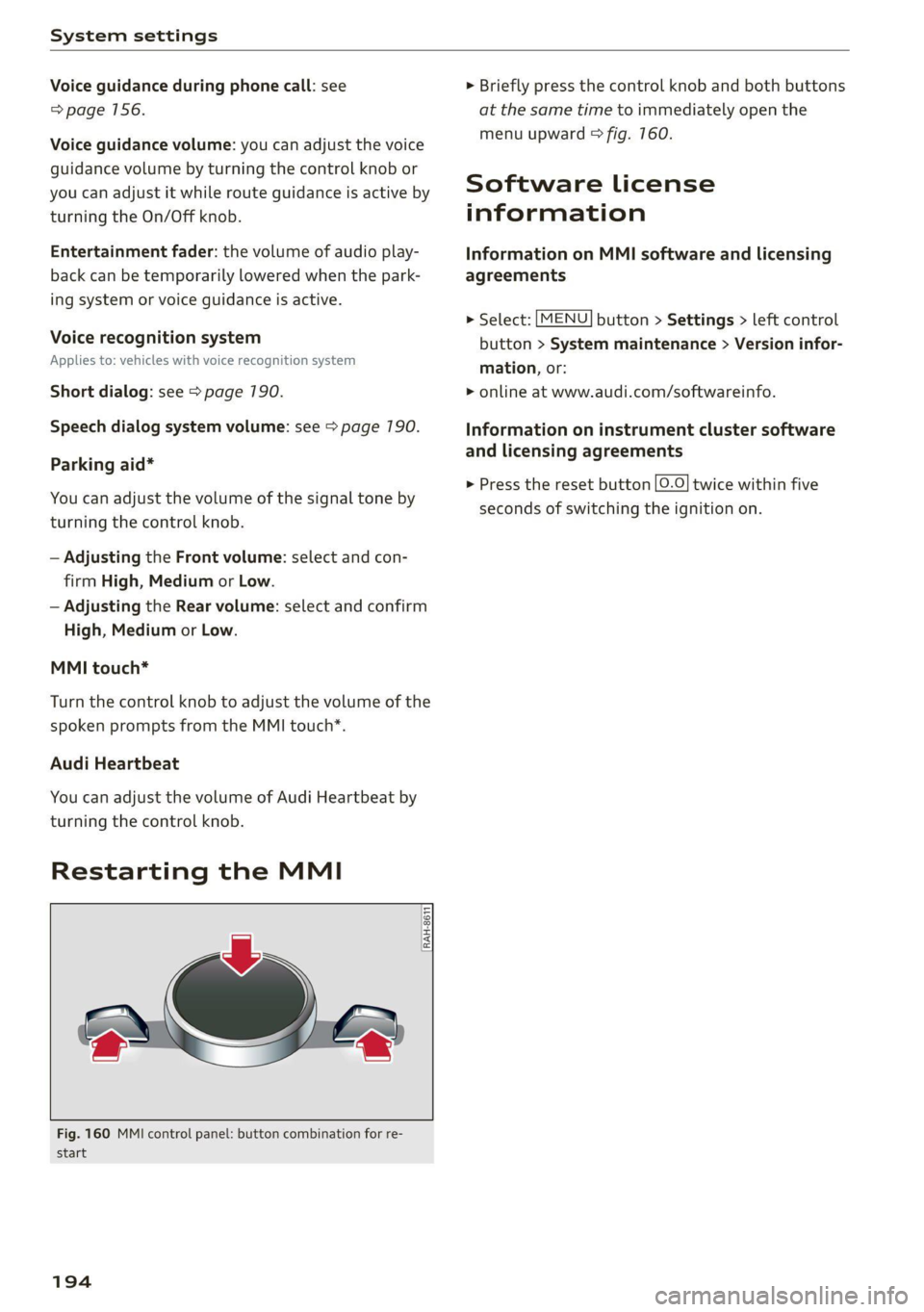
Restarting the MMI
RAH-8611
wv
= ‘=
Fig. 160 MMI control panel: button combination for re-
start
194
> Briefly press the control knob and both buttons
at the same time to immediately open the
menu upward > fig. 760.
Software License
information
Information on MMI software and licensing
agreements
> Select: [MENU] button > Settings > left control
button > System maintenance > Version infor-
mation, or:
> online at www.audi.com/softwareinfo.
Information on instrument cluster software
and licensing agreements
> Press the reset button |O.O} twice within five
seconds of switching the ignition on.
Page 197 of 280
8S1012721BE
Additional information
Additional information
Brands and licenses
This manual does not contain any symbols, such
as ® or ™, to identify trademarks or registered
trademarks. However, the absence of these sym-
bols does not constitute a waiver of any rights as-
sociated with these names.
Apple, iPhone, iPod, iPod shuffle, Apple CarPlay,
Lightning, and iTunes are trademarks of Apple
Inc.
10S is a trademark or, in the USA and other coun-
tries, a registered trademark of Cisco and is used
under license.
Other product and manufacturer names may be
trademarks of their respective owners.
195
Page 237 of 280

8S1012721BE
Wheels
ZA WARNING
Read and follow the important information
and notes > page 233.
Storing new tire pressures
Applies to: vehicles with tire pressure monitoring system
The tire pressure specifications must be stored
correctly for the tire pressure monitoring system
to function reliably.
It is always necessary to store the tire pressures
when the tire pressures are modified, for exam-
ple due to a change in load or when new sensors
are installed.
> Before storing the tire pressures, make sure the
tire pressures of all four tires meet the speci-
fied values and are adapted to the load
=> page 224, fig. 178. Only correct and store
the pressure in tires whose temperature is ap-
proximately the same as the ambient tempera-
ture. If the temperature of the tire is higher
than the ambient air temperature, the tire
pressure must be increased approximately
3.0 PSI (0.2 bar) above the value on the sticker.
> Switch the ignition on.
> Select in the Infotainment system: [MENU] but-
ton > Service & checks > Tire pressure monitor-
ing > Store tire pressure > Yes, store now. Af-
ter storing the tire pressures, the tire pressure
monitoring system measures the current pres-
sures while driving and stores them as the new
specified pressures.
> If the changed tire pressures are not displayed
in the Infotainment system, drive the vehicle
for approximately 10 minutes so that the sen-
sor signal from the wheels is received again.
During this adaptation phase, --.-- is displayed
for the pressure and temperature and the tire
pressure monitoring system is only partially
available. It only provides a warning if one or
more tire pressures is below the minimum per-
mitted specified pressure.
tire pressure: wheel change detected. Please
check all tires and store pressures in MMI
If the indicator light turns on and the message
appears, the system has detected that the loca-
tion of the sensors has changed due to a wheel
replacement, or new sensors have been installed.
Store the new tire pressures.
Z\ WARNING
Read and follow the important information
and notes > page 233.
Malfunctions
Applies to: vehicles with tire pressure monitoring system
a Tire pressure: malfunction! See owner's
manual
If the is indicator light appears after switching
the ignition on or while driving and the @ indi-
cator light also blinks for approximately one mi-
nute and then stays on, then there is system mal-
function. The following are examples of situa-
tions that could cause a malfunction:
— If the message appears at the end of the adap-
tation phase, the system may not detect one or
several of the wheel sensors necessary for pres-
sure monitoring. This may result from one or
more wheels without wheel sensors or with in-
compatible wheel sensors being installed.
—Awheel sensor or another component has
failed.
— Using snow chains can affect the function of
the system because of the shielding effect of
the chains.
—The tire pressure monitoring system is not
available due to a malfunction.
— Transmitters with the same frequency, such as
headphones or remote controlled devices, may
cause a temporary system malfunction due to
the strong electromagnetic field.
The ia indicator light and the message turn off
once the tire pressure monitoring system is avail-
able again. If you cannot correct the malfunction
and the iis indicator light stays on, drive imme-
diately to an authorized Audi dealer or author-
ized Audi Service Facility to have the malfunction
repaired.
235
Page 259 of 280

8S1012721BE
Data privacy
stored. The scope of information depends on the
particular manufacturer.
The owner must agree to the installation of any
such crash data recorder and it is regulated by
law in some countries.
Transmitted information
Privacy settings
Applies to: vehicles with Audi connect
> Select: [MENU] button > Audi connect > right
control button > Privacy.
Requirement: the ignition must be switched on.
Location, vehicle, and personal data are transmit-
ted when using Audi connect services.
Allowing sending of data
— Select and confirm Activate data connection.
The data module for the use of all Audi connect
services will be active.
Restricting sending of data
— Select and confirm Activate privacy. The data
connection is limited or deactivated depending
on the equipment. The majority of Audi connect
services will not be available.
@) Note
You are responsible for all precautions taken
for data protection, anti-virus protection, and
protection against loss of data on mobile de-
vices that are used to access the Internet
through the Wi-Fi hotspot.
G) Tips
— The following interfaces are not affected by
this setting: Bluetooth, Bluetooth Low Ener-
gy (BLE), Wi-Fi connection, Audi smart-
phone interface (ASI), Near Field Communi-
cation (NFC), charging communication
(high-voltage system), Electronic Toll Col-
lect (ETC), On-Board Diagnostic System
(OBD) if equipped.
— If the transmission of data is limited, data
will still be transmitted to verify subscrip-
tions.
Applies to: vehicles with Audi connect
Audi collects, uses, stores and shares your per-
sonal information, such as contact data, vehicle
data, usage data, driving data and precise geolo-
cation, in order to provide you with the products
and services you have purchased or requested,
and for a number of other purposes, for example,
to track quality issues, to performance and safe-
ty, to meet our internal compliance or legal re-
quirements and to market to customers and po-
tential customers. For a more complete list of
the data we collect, how we use it and with
whom we share it, please visit your Audi nation-
al/sales region website at www.audi.com.
The collection, use and sharing may vary depend-
ing on your model and model year, your subscrip-
tion status, or the service offering. For example,
collection, use and sharing may vary between
Audi connect services, if you have designated a
key user, or if you are driving a model equipped
with persistent data logging. Please review the
complete Privacy Statement to understand our
data handling practices with respect to a particu-
lar service.
You can find additional information about our da-
ta privacy practices in your MMI.
> Select: [MENU] button > Audi connect > right
control button > About Audi connect.
Information about our privacy practices in con-
junction with the mobile Audi connect applica-
tion can be found in the Application’s Privacy
Statement.
For additional information about the privacy
practices relating to Audi connect, myAudi, or
other websites, applications or online services as
well as your obligations with respect to using
these services, and for additional information re-
garding Audi connect terms and conditions,
please visit your Audi national/sales region web-
site at www.audi.com.
257
Page 262 of 280

Accessories and technical changes
@) Tips
Because of your vehicle's aluminum body de-
sign, all service and repair procedures affect-
ing the body should be performed by an au-
thorized Audi dealer or authorized Audi Serv-
ice Facility, who will perform the work accord-
ing to Audi factory specifications. Only Audi
Genuine Parts are used when Audi experts
perform repair or service procedures. Failure
to use Audi Genuine Parts or Audi Genuine Ac-
cessories or performing repairs incorrectly
may result in severe vehicle damage, such as
corrosion.
Accessories and parts
Consult with an authorized Audi dealer or author-
ized Audi Service Facility before purchasing ac-
cessories or replacement parts. Audi recom-
mends having your vehicle serviced by an author-
ized Audi dealer or authorized Audi Service Facili-
ty and using Audi Genuine Parts and Audi Genu-
ine Accessories.
Audi does not endorse the use of products and
accessories that it has not evaluated, even if the
product is approved by a certified testing agency
or government agency.
ZA\ WARNING
— Installing unapproved accessories or incor-
rect replacement parts can cause vehicle
damage and can increase the risk of an acci-
dent.
— Never attach accessories, such as telephone
holders or cup holders, to the airbag covers
or within the airbag deployment zone, be-
cause this increases the risk of injury if the
airbag deploys.
— On vehicles that have factory-installed li-
cense plate brackets on the front of the ve-
hicle, the brackets may only be replaced
with ones that are the same size and made
of the same material. Do not install any li-
cense plate brackets on the front of vehicles
that do not have factory-installed brackets.
Otherwise, the function of the system could
be impaired.
260
@) Note
A correctly-installed exterior antenna is re-
quired for operating radio equipment in the
vehicle. Otherwise, the increased electromag-
netic waves can cause malfunctions in the ve-
hicle. Observe the regulations in the country
where the vehicle is being operated and the
instructions from the radio equipment manu-
facturer.
Reporting Safety Defects
Applicable to U.S.A.
If you believe that your vehicle
has a defect which could cause a
crash or could cause injury or
death, you should immediately in-
form the National Highway Traffic
Safety Administration (NHTSA) in
addition to notifying
Audi of America, Inc.
2200 Ferdinand Porsche Drive
Herndon, VA 20171
If NHTSA receives similar com-
plaints, it may open an investiga-
tion, and if it finds that a safety
defect exists in a group of
vehicles, it may order a recall and
remedy campaign. However,
NHTSA cannot become involved in
individual problems between you,
your dealer, or Audi of America,
Inc.
Page 267 of 280
8S1012721BE
Index
A
A/C cooling mode.........-...--00e ee eee 70
A/C system refrigerant oil............... 264
ACCESSORIES 6 crccei
Adjusting air distribution (automatic climate
control system) .........2.-00 eee eee ee 70
Adjusting the additional display........... 14
Adjusting the blower (automatic climate con-
50) Dc 70
Adjusting the center console lighting....... 39
Adjusting the sound ................0005 193
Adjusting the temperature (automatic climate
control systeM) . 1.6... ce eee eee eee ees 70
Adjusting the vents...............00 eee 71
Airbagisystem « sacs + wemenn + apzeas « ¥ nrauien Wo 6 52
Alarm system
refer to Anti-theft alarm system.......... 24
Alignment pin (tire change).............. 242
All-weather lights: s+ nse ss « soni i agua 5 36
AlUSCAaSOM IFES sxc 5 coscene «armen wo eerie © ¥ os 229
All wheel drive
refer to quattro... 2... eee eee 108
Alternative
routes wiies i 6 ese ss cone oo scene 155
Ambientilighting)s « s iss so sen «6 aesue + wane 39
AMI
refer to Audi music interface....... 175,176
Android Auto
refer to Audi smartphone interface...... 187
Anti-freeze
Windshield washer system...........-. 212
Anti-lock braking system (ABS)........... 104
Anti-Slip Regulation...............-.05 104
Anti-theft alarm system................0. 24
Anti-theft wheel bolts.................. 245
Apple CarPlay
refer to Audi smartphone interface...... 187
Armrest... 2.0... 0.0 eee eee eee 47
Aspect ratio (video) ............00220008 180
ASR
refer to Anti-Slip Regulation............ 104
Audi adaptive light.................0005. 36
Audi connect
refer toconnect..............00 eee eee 141
Audi connect Infotainment
Personal hotspot..............00000ee 142
SEMICES OVENVIEW sx = gaeu ss eee ae ROE a 144
Audi drive select
refer to Drive select............--000005 96
Audi magnetic ride
refer to Suspension control.............. 96
Audi music interface..............00005 175
Audi music stream
refer to Wi-Fi..............0000- 146, 173
AUGIOMLESiesius 6s arava 6 w anew «0 weivana wo annem a 177
Audio player
Bluetooth audio player................ 172
Wi-Fi audio player a. « s swas ss sees de vee 173
Audio track. ...... cece eee eee 180
Audi phone box.............-.000 2200s 130
Audi side assist
refer to Side assist..... 0.0.0... eee eae 93
Audi smartphone interface.......... 187,191
Audi virtual cockpit
refer to Instrument cluster.............. 10
AUTO
Automatic headlights.................. 36
Climate control system .......... cee eee 70
Auto Lock (central locking) .............. 18
Automatic post-collision braking system... 104
Automatic transmission............-...5- 81
Driving tips... 2.0... eee eee ee eee 83
Emergency mode..............002-000- 87
Hilldescenticontrolsses « saws 4 2 aque 9 2 once 85
KICREP OW Miiiacs wo awoswiee w « ceevivae oo amine sw avon © 86
Malfunction ....... 0.00. cece eee eee ee 83
Selector lever emergency release......... 88
Selector lever: lOCK eis s+ esesos we + enon 0 saver 83
Selector lever positions................. 81
Shifting Manually « wees + xaes s 2 new so gee 85
Steering wheel with shift paddles........ 85
tiptronic... 2... ee eee eee 85
Automatic wiper/washer system........... 41
Automatic zoom (navigation) ............ 159
AUX IMPUt wscuses w 6 sseeees vo ssrome ws seems ww sue 176
Average fuel consumption................ 15
Average speed... . cece cece este eee enes 15
B
BACK BUttON ¢ seas so exes 5 e een oe ee see 110
Page 268 of 280
Index
Balance:(SOund) cisco a cxavore a x assess « ¥ exeane 193
Band
refer to Frequency band............... 164
Bassi(SOUn) « semar » somone oa umes © a name © ee 193
Battery, secvos «x sxumes ow cxrnens w a aumees vo aston vo 210
Charging .... 0.0... cece cence eee eens 211
Winter Operation s « ween s » ewe « e eewe + we 210
Bluetooth
AUGIO player » secu ss mone oo oasna oo inane wo 172
Connecting a mobile phone............ 128
Settings...............00 000020000 192
BoOSt .. 6... eee eee eee 15
Boost pressure indicator................. 15
Brake fluid
Checking the brake fluid level........... 209
Brakes... eee ee 106
Brakeiassist: worn « : mann a ¢ mage se seme a a 104
Brake assist systeM............0--000. 104
Brake fluid... 0.6... cece eee eee 209
Electromechanical parking brake......... 79
Emergency braking function............. 79
New brake pads..............--.00000- 106
Braids. « scwens 1 « sneewes 4 sesuees «0 otoaets 0 6 ssenwen a 195
Break-in security feature..........0e. eee 24
Breaking in
New brake pads..............--00000- 106
Ne@Wtit@Sicic s esses » i ows 2 3 paoes se eer 5 221
Browser
refer to Media center..............44. 178
Bulb replacements: ss ease ss eeu 3 i owes s 255
Buttons
Controlpaneli(MMI):. « . ssssiss 6 a secunes os ames 110
Cc
Cable (USB adapter/AUX connector cable).. 175
California Proposition 65 Warning........ 201
Battery:specificien: 2 = cas 2 onsen = mesa x ex 210
GalLUst + sion os wri oo ewan vo enn e HeeN = 132
CalloptionSees « cams = 4 cape + eee & ¥ eee 139
Capacities
Fueltanks, « sess x x csosein oe mewe woo cone eve 264
Washer fluid reservoir..............--. 264
CAPEK Yeine 5 x cxowens « eaviece a 6 enzsite au use + 1 wens 19
CARWASH. & anasnos c+ wnscwns o esnarne > x camtene H axeee 236
Catalytic converter’. wei 6 ewe ve eww vv oe 200
CD drive (media drives)................. 171
266
Cell phone
refer to Telephone.............00 eee 128
Cell phone compartment
refer to Audi phone box............... 130
Center armrest ....... 00. c cece eee eee es 47
Central locking.................0 ese eeee 18
AUTO LOGK:: » cuoz = wees: = sem 4 s seu 2 mae 18
Conveniencerkey’s sic. zs suvses se sven « stamens 22
Convenience opening and closing......... 27
Mechanically unlocking and locking....... 24
Remote'control keyicssis so issn se aera s 6 oem 21
Setting. ........ 0.0... 23)
Central locking switch..............0.00. 23
Ceramic Drakes :.cvcr: 2 2 sweieue eo wane oo cxivaue a vs 106
Certiticationses «swans x x aveins a x cxmmve a x aeaoans 261
Changing light bulbs................... 255
Charging
refer to Power sourceS..........-0000005 63
Charging the battery (mobile devices). 130, 176
Child safety seats...............-.000065 57
Securing to the top tether anchor........ 62
Securing with a safety belt.............. 60
Securing with LATCH: « « suas: ss gee 2 x seem 60
GlaSSie VieWirs « = sccm & x news © 2 etme cg eee we 13
Cleaning... 2.2.2... eee eee eee eee 236
Cleaning Alcantara.............-..0000. 239
Cleaning artificial leather............... 239
Cleaning carbon components........ 238, 239
Cleaning Controls'. « sieve ee sree oo eevee + 0 we 239
Cleaning decorative parts andtrim... 238, 239
Cleaning exhaust tail pipes.............. 238
Cleaning plastic parts .;. 2s gcse ss qeam = soe 239
Cleaning tail lights................00.-. 237
Cleaning textiles.................0000. 239
Cleaning the wind deflector............. 238
Climate control system............-..0-- 69
Climate control system (automatic)
Drive select............ 0.0002 eee eee 96
Clock... eee eee eee eee eee 189
Closing
COnVENIENCE-ClOSING awe se sere = t means = x ow 27
HOOGs: 2 5 acs 2 2 wie os wena so mez wan 202
Luggage compartment lid............... 25
WINGWS%: 4 = sews 3s Saas 7 a Hees oa ee a Ad 27
Cockpit (overview) .............0000ee eee 6
Color code... . 6. cece eee ee eee eee eee 263
Page 270 of 280
Index
Economical, route « swiss 0 a sess x x aeamese ¥ savas 155
EDL
refer to Electronic Differential Lock...... 104
EDR
refer to Event Data Recorder (EDR)...... 256
Electrical system. ...........0.00200002 209
Electromechanical parking brake.......... 79
Electronic Differential Lock.............. 104
Electronic:immobilizeticiv oo scsi wo avers « wave 19
Electronic Stabilization Control (ESC)...... 104
INGIGATOR IGM Ecce » sxcnem ox saeeet oo suomi «© on 17
Sport mode............... cee eee eee 105
Emergency
refer to Making an emergency call....... 134
Emergency assistance.................. 242
Emergency braking function.............. 79
Emergency flashers.............--00000- 38
Emergency fueling.............-...2005 199
Emergency operation
DOOrs 1... eee eee 24
Luggage compartment lid............... 26
POWCrEOPins <2 meme 2 cme © meses ao Oe @ 8 33
Emergency release
Selector lever. .... 2... eee cece cece 88
Emissions control system.............. 200
Energy’COMSUMENS!. « «ere «2 came vs nares © os 15
Energy management................... 109
Engine
BrGakinggitt. 0 sseros « oxarennc + wacaene ¥ suena» nie 74
Coolant................0000. eee eee 207
JUMP SEARING « cose s ¢ way s o aeene s 5 eee 248
Start/Stop systeM.......... 0 eee e ee eee TT
Starting... 0... cece eee eee eee 75, 76
Starting and stopping................0- 76
Engine compartment
Safety precautions.................... 200
Engine control (indicator light)............ 17
Engine data
refer to Sport displays.............-.00 15
Engine oil
Adding ..... 0... c cece cece ee eee ee 203
Changing':< ; ese <= eeu ss meee ss eee ee 206
Checking oil level... 0.0... cece eee eee 203
Consumption...................02005 203
IngiGator.lightize: = sass a 2 seem sx Rea ee 204
268
Replacement interval................. 212
Temperature display...............0005 15
Engine Start/Stop mode
refer to Start/Stop system.............. 79
Enhanced view..........0eeeeeeeeeeeees 13
Entering characters/numbers (speller) ..... 117
Entering letters (speller)................ 117
Environment
Unleaded gasoline................200. 196
ESC
refer to Electronic Stabilization
Gomtroli(ES@)ii 2 x asus © area @ 2 anecsan eo mom 104
ESP
refer to Electronic Stabilization
Control (ESC)... 2... cece eee eee 104
Event Data Recorder (EDR).............. 256
Exterior lighting.................00-000 36
Exterior mirrors
Adjusting ..... 0.6... c cece eee 39
DINUMUNGs + scxce ¢ s wares os Haney & ¥ eG eg ee 40
Foldingisettings: nso « svasais ie « sauers + stevens i » 23
Heating ........ 0.0.00 c cece eee ee eee 39
External voice operation................ 127
FF
Factory default settings
Multi Media Interface................. 190
Fader (sound) ............00 eee eee eres 193
Fast forwarding and rewinding (audio/video
Tile) sce: s 2 ewes 2 o ews 5 » Rees se es eS 177
Fast forwarding (audio/video file)......... 77
Fast route....... 0... eee cece eee 155
Favorites
Me@did zz < + sees ¢ v sees ¢ ores © = eee & s eee 180
Navigationvsics «0 cess + 6 wesw +o mae + rem 150
Telephone............ 0. eee eee eee eee 134
Federal Communications Commission (FCC) . 261
File formats (media drives).............. 183
Fog lights/rear fog light(s)............... 36
Folding the rear seats...............00-5 66
FOOEWELLUGHEING cvs « x seus « « neume & & eaves a 39
For the sake of the environment
Disposing of engine oil................ 206
Fueling... 0.0... cece cece eee ees 197
LBAKS. ccoss & = acne & & Rois & E Baeee +E Bete Eee 202