home AUDI TT 2021 Owner´s Manual
[x] Cancel search | Manufacturer: AUDI, Model Year: 2021, Model line: TT, Model: AUDI TT 2021Pages: 280, PDF Size: 99.18 MB
Page 4 of 280
Table of contents
About this Owner's Manual......
SUMIMAry: < = exe : eens: Seen cs sens
QutckeaeCe ssh: «i esis se ois a eaves @
Cockpit overview..............000005
Indicator lights overview...........-5.
Display and operation...........
Instrument cluster...............
Instrument cluster overview...........
Coolant temperature indicator.........
Tachometer........... 0c eee eee eee
Odometer as = s eees = games 2 geen as pews
Outside temperature display...........
Fuellevel.......... 0... eee
Multifunction steering wheel..........
Vehicle functions... cscs ve mews ve eee vs
MessageS ... 0... eee eee
Starting and driving.............
Opening and closing.............
Cental LOCKING sass = « sams 3 & eames + sees
Luggage compartment lid.............
Power windOWSio. ss seeeceewen enn
Garage door opener..................
POWEDr COPE « «cece. 6 cess so erereis + & onee
Automatic power top.................
Witid deflector ocax < x same 5s emis 5 o eee
Power top emergency operation........
Lights and Vision.................
Exterior lighting ssives « « snes 3% imams © & ware
Interior lighting..................0..
VISION s « = sas ss sees Fe eee Fo eS so eS
Windshield wipers...............0005
Digital compass...............00000.
Sitting correctly and safely......
Correct passenger seating position......
Front seats .......... 0.0 ccc eee eee ee
R@arseats case ss gece ¢ s geese seeea 2 gee
Steerimg'wheelressos «+ eau wv sons a sansvns
Safety belts...............0..00000-
Airbag SYStEM se. x & exw x © eeeeie =o veers =
Childisafety seatsicie. «6 ccs 6 cae 6 esis
NOD
OO
10
10 10
11 11 11
12 12 15
16
18
18
18
25
27 28
3]
31
33 33
36 36 39 39
41
43
45 45
45
48
48
49
52
Storage and convenience........ 63
Power SOUrceS......... 00. c ee eee eee 63
Cup Holders’s + seen ss sews + weve ¢ s eee 63
Storage areas and compartments....... 64
Luggage compartment............... 64
ROOF rack: « = wees « » yews 2 seme ty oes 68
Warm and cold................... 69
Climate control system............... 69
Deluxe automatic climate control....... 70
Adjusting the vents...............00. 71
Seat heating.................000000 71
Neck heating « eeu + eens se ree ce ees 72
Fluids in the A/C system.............. 72
DIVING): = secs & = gees < = eepes & = ows + 2 2 74
General information................. 74
Starting and stopping the engine....... 75
Start/Stop system...........--.0006- 77
Electromechanical parking brake....... 79
Starting to drive... 2.0.2... eee eee 80
Sporty CriVind sc « = wees se een cs ee ee 81
Automatic transmission.............. 81
Driver assistance................. 89
Assist systems................... 89
Speed warning system.............-.- 89
Cruise control system...........00005 89
LAP TIMER sem s » gay < cares x neem & & ROR 91
Audi Side ASSISBien: + scores ao stone om ove oo 93
Audi drive select (drive settings) ........ 96
Parkimepatied. «css sx sss 3 0 esses ov one 98
Introduction.............. 20.00.0000. 98
Rear parking system...........-..0-- 98
Parking system pluSiss «sn ¢ ¢ ces 6 om 99
Rearview camera... ... 0... cece eee eee 100
Adjusting the display and the warning
PONES ican ce nawwn 6 2 wave ov eR ow so Bo 8 102
Error messages..............2..000. 102
Intelligent Technology........... 104
Electronic Stabilization Control (ESC).... 104
Brakes... 2... eee eee 106
SU@Gring « ews 5 2 eee & x wows 5 ¢ pew so oe 107
All wheel drive (quattro).............. 108
Rear spoiler..... 0.0... 0.00 eee eee ee 108
Energy management................. 109
Page 5 of 280
8S1012721BE
Table of contents
Infotainment system............ 110
Multi Media Interface............ 110
Traffic safety information............. 110
Introduction sess x s eesia os woune ys mes vo 110
MMI On/Off knob with joystick function.. 110
MMUOpPeration ; xcsu « : wows & g eam 2 pe 111
MMIPtOUGR « sscsise oo score o oie oo mee 2 112
Control knob with joystick function..... 115
Letter/number speller................ 117
Free text search............22--0 eee 118
Menus and symbols.................. 119
Voice recognition system........ 122
Generalinformation................. 121
Operating......... 2... eee eee eae 122
Command overview information........ 123
COMAMMANES « ssssws = x csnawns » x contains © w emeoens a 123
Telephone....................-005 128
IMtrOdUCtION sevens & & ewe «8 wea oo wea oo 128
Setup... 2... eee eee eee 128
Using the Audi phone box............. 130
Using the telephone...............00- 132
Favorites 134
Messages 135
Listening to voicemail................ 137
Directory... . 0... ccc eee eee 137
Additional settings.................. 139
Troubleshooting « noas ss coos s ass as ners 140
Audi connect..................04. 141
General information................. 141
Audi connect Infotainment............ 141
Using a Wi-Fi hotspot................ 143
Audi connect Infotainment services..... 143
SOttinGSscves so seems 2 a seus wow sense oceans a 145
Troubleshooting ...............00000- 146
Navigation....................0008 148
Opening navigation.................. 148
Entering adestination................ 149
Home addressivici: < o sccna vs eecia ee ees « 154
FAVONIEES: scsane 6 9 sonics © wieneon ow eee aw otecmte 154
Directory contacts................... 154
Alternative routes). « ciss ss essa s se veess 155
Additional settings .................. 155
Map... cece cece eee eee eee 157
Satellite Map’: = « seas < s seee eee oe 160
Accessing traffic information.......... 161
Troubleshooting.............0e00ee ee 163
REGIE. wei ss tion a 2 aoe 6s maswa & & ease 164
Opening the radio................... 164
RadiGTUnctiOns ecas . wees as ewe ss ves 165
RadioiMeNy « « sess so soc & 2 sono + reve 166
Presets... 0.0... cee eee eee eee eee 166
Additional settings................0. 167
Troubleshooting seis ss news as eewa ae es 168
Media.......... 6.6.6. cece ee eee 169
IntrOduetion s sews 2 «gus + een x 2 meme as 169
INGEOS s suis wc inavins a a suncina a symrene ao atrrmns 169
Media drives........... 000 c eee eee eee 170
Bluetooth audio player............... 172
Wi-Fi audio player................... 173
Online media and Internet radio........ 174
Multimedia connections.............. 175
Playing media’. «+ sesso a x wees eo aman oo sew 177
Additional settings...............005 180
Supported media and file formats...... 183
Troubleshooting « wo sicc ss vices ss eens ov 184
Audi smartphone interface...... 187
SOtUD « saiex o & eam oo paws 2 oe REwS s Rees 187
OPerating is « a seseos « wanseee « canon « 6 were @ » 188
Troubleshooting ........--...0seeeee 188
System settings.................. 189
Setting the date andtime............. 189
MMIS@ttiNGS aes 5 ¢ seis s x saree so es 189
Connection manager...............5. 190
System update............0.--000 ee 192
Sound Settings sees < = sews sv een se eee 193
VOLUMEISEELINGS suisse & & susan 6 inane 6 3 snare 193
Restarting the MMI...............00. 194
Software license information.......... 154
Additional information.......... 195
Brands and licenses.................. 195
Maintenance and Care........... 196
Checking and Filling............. 196
Ful@lesas = 2 ewe @ anes 5 = siete ee norms Fe Ree 196
RETUCLINQ ais. ce cnciosis oo seevave wo arene © ¥ aoe 197
Emissions control system............. 200
Motor compartment..............5.. 200
Page 12 of 280
Instrument cluster
Instrument cluster
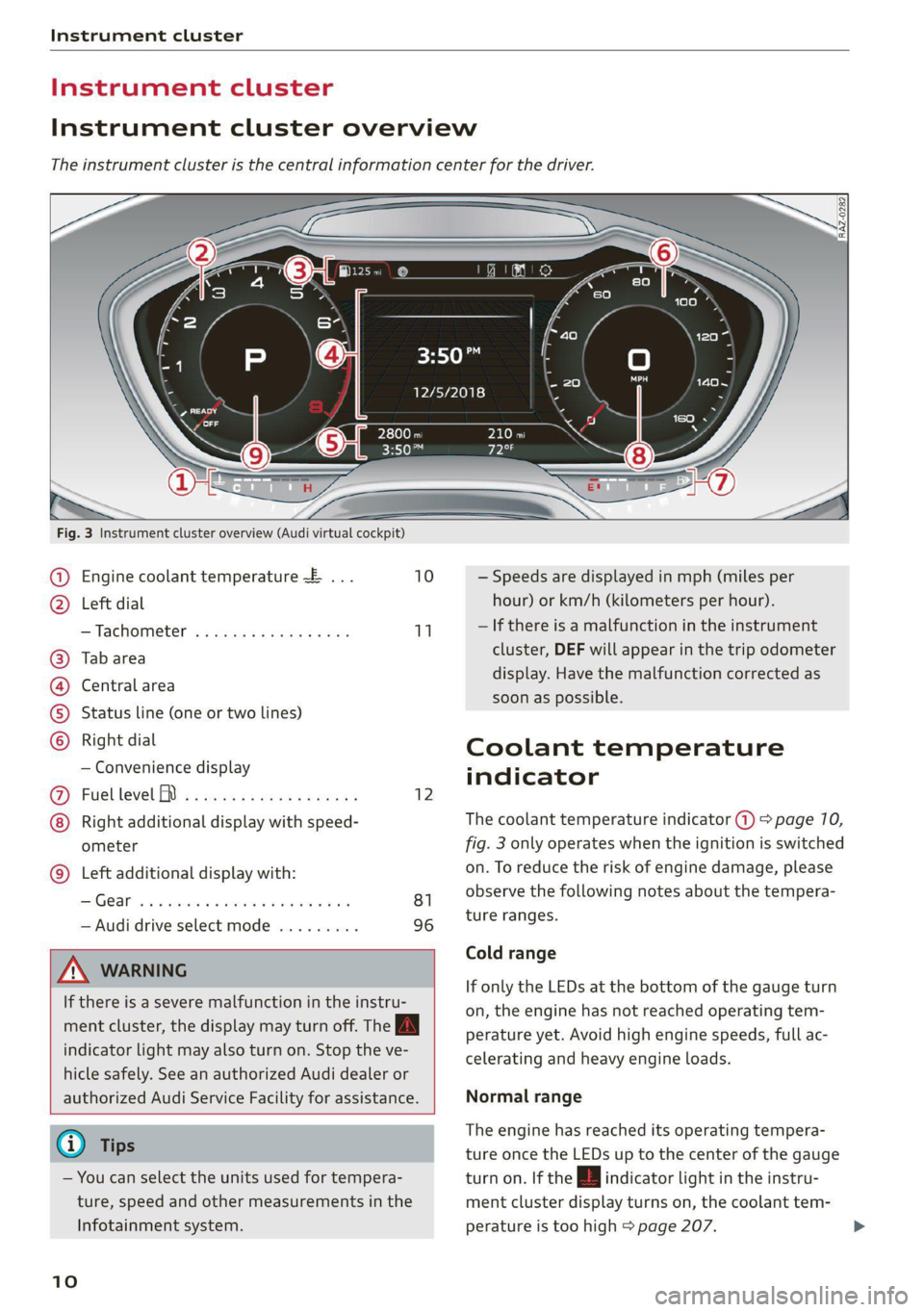
Instrument cluster overview
The instrument cluster is the central information center for the driver.
3:50™
12/5/2018
elo
a
Fig. 3 Instrument cluster overview (Audi virtual cockpit)
Engine coolant temperature ~E ... 10
Left dial
—Tachometer ..........-...00- 11
Tab area
Central area
Status line (one or two lines)
Right dial
— Convenience display
Fdel level A « « esas x + exes ¢ s exes 12
Right additional display with speed-
ometer
Left additional display with:
SIGCSE iss sucsins & sewers wn ora we 81
— Audi drive select mode ......... 96
©8
CHO
OO
©
ZA\ WARNING
If there is a severe malfunction in the instru-
ment cluster, the display may turn off. The A
indicator light may also turn on. Stop the ve-
hicle safely. See an authorized Audi dealer or
authorized Audi Service Facility for assistance.
G) Tips
— You can select the units used for tempera-
ture, speed and other measurements in the
Infotainment system.
10
— Speeds are displayed in mph (miles per
hour) or km/h (kilometers per hour).
— If there is a malfunction in the instrument
cluster, DEF will appear in the trip odometer
display. Have the malfunction corrected as
soon as possible.
Coolant temperature
indicator
The coolant temperature indicator @) > page 10,
fig. 3 only operates when the ignition is switched
on. To reduce the risk of engine damage, please
observe the following notes about the tempera-
ture ranges.
Cold range
If only the LEDs at the bottom of the gauge turn
on, the engine has not reached operating tem-
perature yet. Avoid high engine speeds, full ac-
celerating and heavy engine loads.
Normal range
The engine has reached its operating tempera-
ture once the LEDs up to the center of the gauge
turn on. If the |_| indicator light in the instru-
ment cluster display turns on, the coolant tem-
perature is too high > page 207.
Page 13 of 280
8S1012721BE
Instrument cluster
@) Note
— Auxiliary headlights and other accessories in
front of the air intake impair the cooling ef-
fect of the coolant. This increases the risk of
the engine overheating during high outside
temperatures and heavy engine load.
— The front spoiler also helps to distribute
cooling air correctly while driving. If the
spoiler is damaged, the cooling effect will
be impaired and the risk of the engine over-
heating will increase. See an authorized
Audi dealer or authorized Audi Service Fa-
cility for assistance.
Tachometer
The tachometer (2) > page 10, fig. 3 displays the
engine speed in revolutions per minute (RPM).
The beginning of the red zone in the tachometer
indicates the maximum permissible engine speed
for all gears once the engine has been broken in.
Before reaching the red zone, you should shift in-
to the next higher gear, choose the "D" or "S" se-
lector lever position, or remove your foot from
the accelerator pedal.
Engine speed limitation
Applies to: vehicles with center armrest
If the BB indicator light turns on, the engine will
be automatically limited to the RPM displayed in
the instrument cluster. This will protect the en-
gine components, for example during a cold start
or from overheating.
The engine speed limitation deactivates once the
engine is no longer in the critical temperature
range and you have released the accelerator ped-
al once.
If the engine speed limitation was activated by an
engine control malfunction, the B§ indicator
light also turns on. Make sure the engine speed
does not go above the speed displayed, for exam-
ple when downshifting. Drive to an authorized
Audi dealer or authorized Audi Service Facility im-
mediately to have the malfunction corrected.
CG) Note
The needle in the tachometer may only be in
the red area of the gauge for a short period of
time before there is a risk of damaging the
engine. The location where the red zone be-
gins varies depending on the engine.
Odometer
11:30"
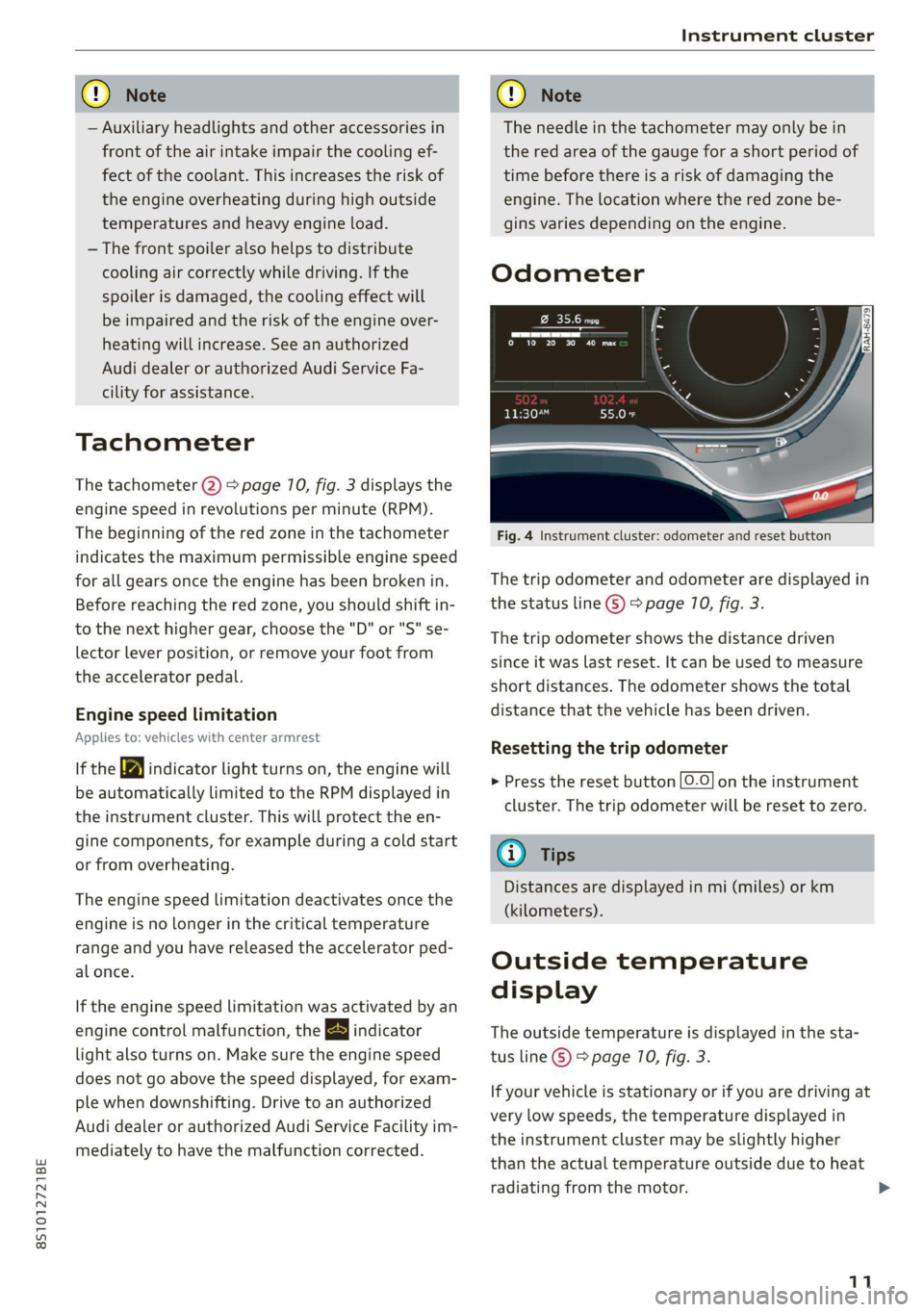
Fig. 4 Instrument cluster: odometer and reset button
The trip odometer and odometer are displayed in
the status line ©) > page 10, fig. 3.
The trip odometer shows the distance driven
since it was last reset. It can be used to measure
short distances. The odometer shows the total
distance that the vehicle has been driven.
Resetting the trip odometer
> Press the reset button [0-0] on the instrument
cluster. The trip odometer will be reset to zero.
(i) Tips
Distances are displayed in mi (miles) or km
(kilometers).
Outside temperature
display
The outside temperature is displayed in the sta-
tus line ©) > page 10, fig. 3.
If your vehicle is stationary or if you are driving at
very low speeds, the temperature displayed in
the instrument cluster may be slightly higher
than the actual temperature outside due to heat
radiating from the motor.
11
Page 17 of 280
8S1012721BE
Instrument cluster
Vehicle functions
On-board computer
Depending on the vehicle equipment, you may be
able to access the following information in this
order on the on-board computer > page 70,
fig. 3@:
—Time and date > page 189
— Average consumption
— Short-term memory overview
— Long-term memory overview
— Energy consumers > page 15
— Driver assistance
The short-term memory collects driving informa-
tion from the time the ignition is switched on un-
til it is switched off. If you continue driving within
two hours after switching the ignition off, the
new values are included when calculating the cur-
rent trip information.
Unlike the short-term memory, the long-term
memory is not erased automatically. You can se-
lect the time period for evaluating trip informa-
tion yourself.
Energy consumers*
The Energy consumers view lists other equip-
ment that is currently affecting fuel consump-
tion. The display shows up to three equipment
items. The equipment using the most power is
listed first. If more than three items using power
are switched on, the equipment that is currently
using the most power is displayed. A chart also
shows you the current total of all other consum-
ers.
Fuel consumption
The current fuel consumption can be shown us-
ing a bar graph. The average consumption stored
in the short-term memory is also displayed. If the
bar is green, your vehicle is saving fuel (for exam-
ple, using recuperation).
Engine oil temperature display and boost
indicator
Applies to: vehicles with engine oil temperature display/boost
indicator
The
engine oil temperature display and boost in-
dicator are only shown in the enhanced view or in
the sport view > page 73.
Engine oil temperature indicator
The engine has reached its operating tempera-
ture when the engine oil temperature is between
176 °F (80 °C) and 248 °F (120 °C) under normal
driving conditions. The engine oil temperature
may be higher if there is heavy engine load and
high temperatures outside. This is not a cause for
concern as long as the B or 2 indicator lights
do not turn on.
Boost indicator
The current engine load (meaning the current
boost pressure) is indicated by a bar.
Siam emcees
Applies to: vehicles with shift light indicator
The
shift light indicator informs the driver when
the RPM limit is reached.
Accessing the shift light indicator
Requirement: tiptronic mode must be activated
=> page 85.
> Select the sport view > page 13. The shift light
indicator is displayed with green, yellow and
red ranges in the upper areas of the tachome-
ter.
The shift light indicator will blink red when ap-
proaching the engine speed limit. Shift to the
next highest gear at the right time.
Syme ENT
Applies to: vehicles with Sport displays
Depending on the vehicle equipment, the sport
displays may include the G-meter, the engine da-
ta and the tire pressure monitoring system. You
can access the sport displays in the central area
or in the additional display in the driver informa-
tion system. >
15
Page 30 of 280
Opening and closing
Convenience closing with the convenience
key*
> Touch the sensor* on the door handle long
enough until all windows are closed. Do not
place your hand in the door handle when doing
this.
Setting convenience opening in the
Infotainment system
The function can be switched on/off in the Info-
tainment system > page 23.
ZA WARNING
— Never close the windows carelessly or in an
uncontrolled manner, because this increases
the risk of injury.
— For security reasons, the windows can only
be opened and closed with the remote con-
trol key at a maximum distance of approxi-
mately 6 feet (2 m) away from the vehicle.
When pressing the f button, always watch
the windows while they are closing so that
no one is pinched in the window. The closing
process will stop immediately when the &
button is released.
Correcting power window malfunctions
If necessary, you can reactivate the one-touch up/
down function if it malfunctions.
> Pull the power window switch up until the win-
dow is completely raised.
> Release the switch and pull it up again for at
least one second.
28
Garage door opener
Applies to: vehicles with garage door opener
——
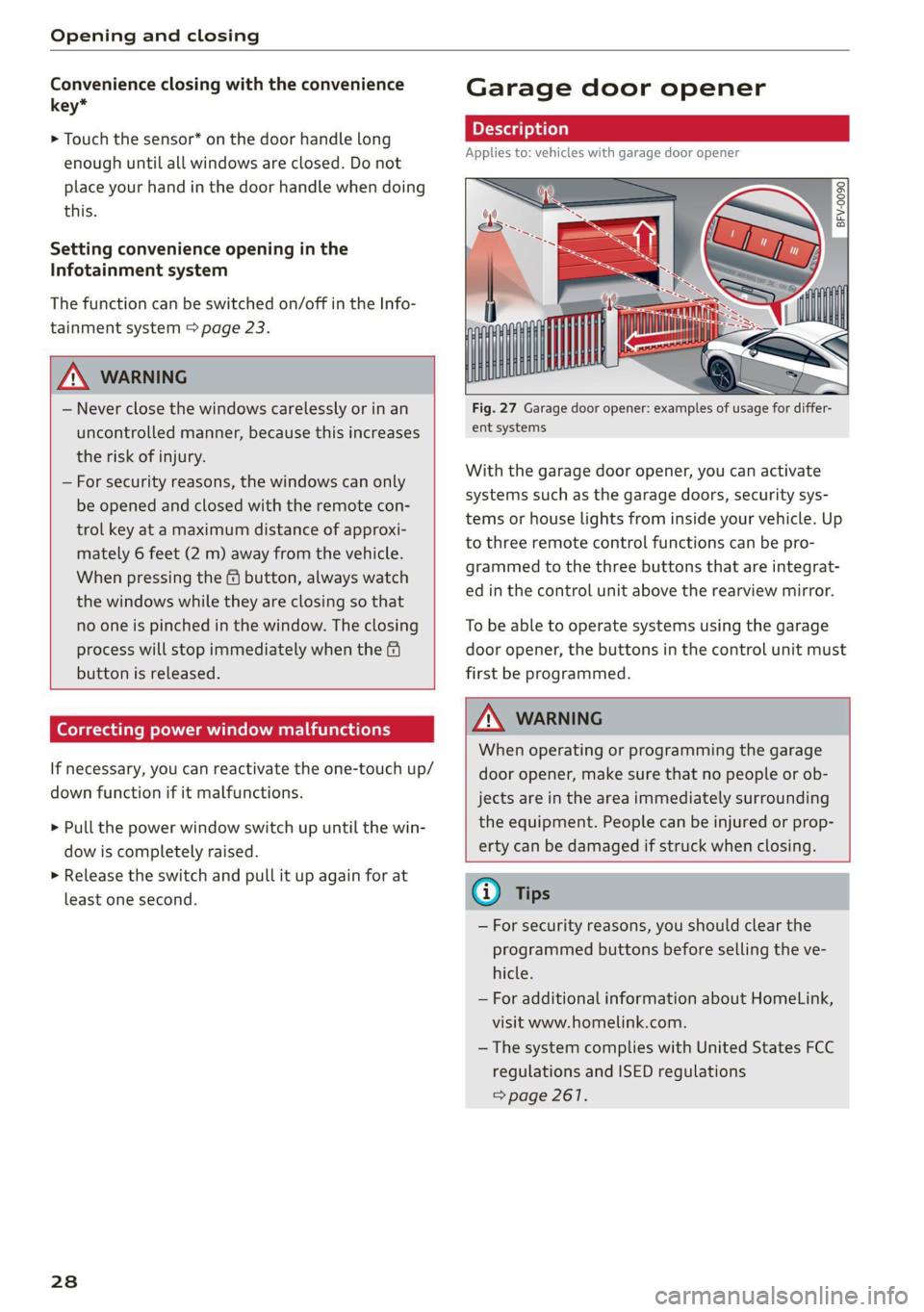
Fig. 27 Garage door opener: examples of usage for differ-
ent systems
With the garage door opener, you can activate
systems such as the garage doors, security sys-
tems or house lights from inside your vehicle. Up
to three remote control functions can be pro-
grammed to the three buttons that are integrat-
ed in the control unit above the rearview mirror.
To be able to operate systems using the garage
door opener, the buttons in the control unit must
first be programmed.
Z\ WARNING
When operating or programming the garage
door opener, make sure that no people or ob-
jects are in the area immediately surrounding
the equipment. People can be injured or prop-
erty can be damaged if struck when closing.
® Tips
— For security reasons, you should clear the
programmed buttons before selling the ve-
hicle.
— For additional information about HomeLink,
visit www.homelink.com.
—The system complies with United States FCC
regulations and ISED regulations
=> page 261.
Page 31 of 280
8S1012721BE
Opening and closing
2. Press both of the outer buttons on the con-
Applies to: vehicles with garage door opener trol unit > page 29, fig. 28 until the yellow
LED (2) turns off and the green LED (4) blinks.
This procedure clears the standard codes that
were set at the factory and does not need to
be repeated again to program the other but-
a gs S
= c 3
tons.
3. Briefly press the button in the control panel
that you want to program.
4. Wait until the yellow LED @) blinks. The pro-
gramming mode is active for five minutes.
5. Go in front of the vehicle with the original re-
Fig. 28 Control panel above the interior rearview mirror mote control transmitter for the system that
| . you are programming to the control panel
Requirement: the button in the control panel batten.
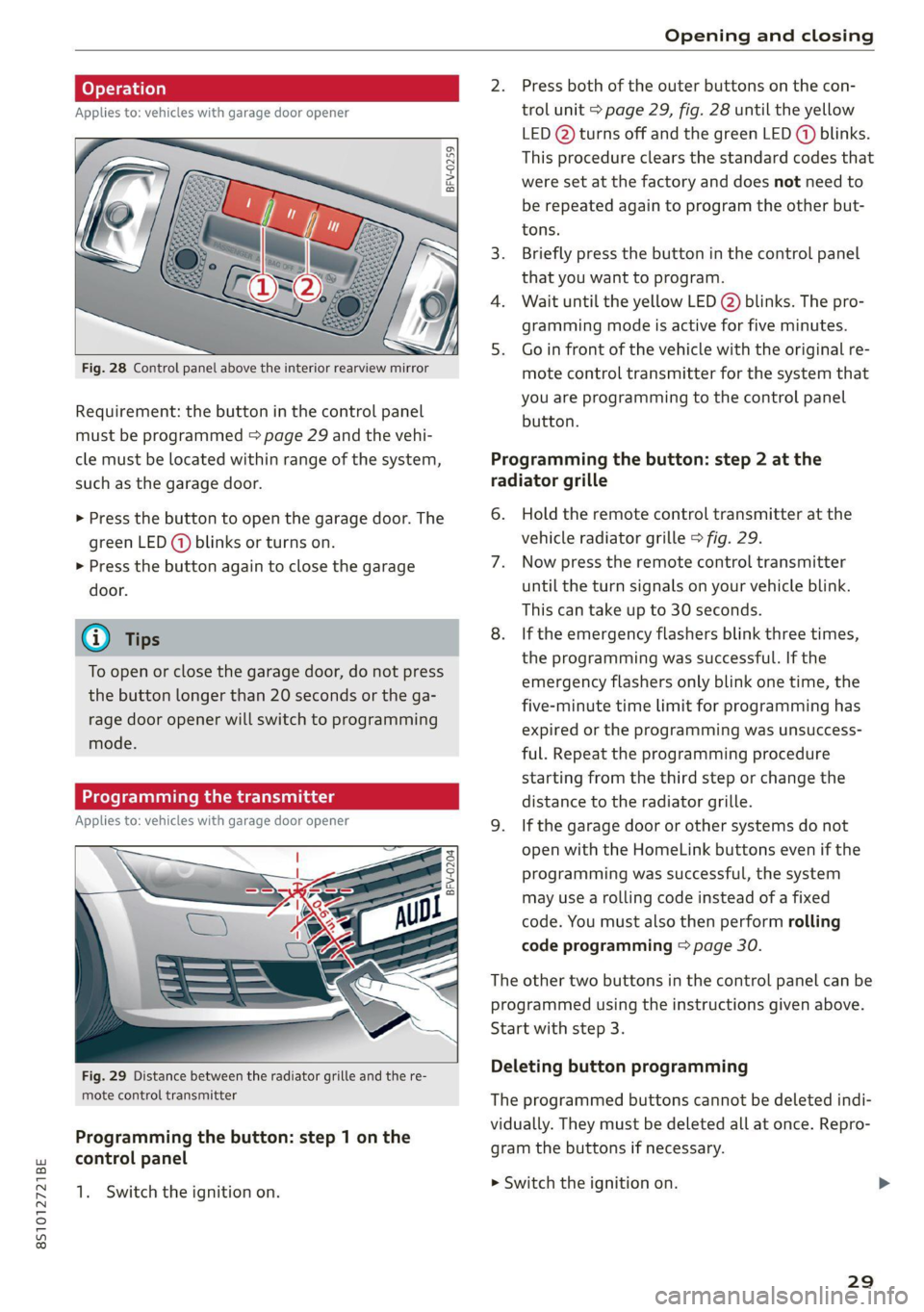
must be programmed > page 29 and the vehi-
cle must be located within range of the system, Programming the button: step 2 at the
such as the garage door. radiator grille
> Press the button to open the garage door. The 6. Hold the remote control transmitter at the
green LED (@) blinks or turns on. vehicle radiator grille > fig. 29.
> Press the button again to close the garage 7. Now press the remote control transmitter
door. until the turn signals on your vehicle blink.
This can take up to 30 seconds.
G) Tips 8. If the emergency flashers blink three times,
the programming was successful. If the
emergency flashers only blink one time, the
five-minute time limit for programming has
expired or the programming was unsuccess-
ful. Repeat the programming procedure
starting from the third step or change the
distance to the radiator grille.
Applies to: vehicles with garage door opener 9. Ifthe garage door or other systems do not
open with the HomeLink buttons even if the
programming was successful, the system
may use a rolling code instead of a fixed
code. You must also then perform rolling
code programming > page 30.
To open or close the garage door, do not press
the button longer than 20 seconds or the ga-
rage door opener will switch to programming
mode.
BFV-0204
The other two buttons in the control panel can be
programmed using the instructions given above.
Start with step 3.
Deleting button programming Fig. 29 Distance between the radiator grille and the re-
mote control transmitter The programmed buttons cannot be deleted indi-
vidually. They must be deleted all at once. Repro-
gram the buttons if necessary.
Programming the button: step 1 on the
control panel
1. Switch the ignition on. mowiteh the ignition on
29
Page 123 of 280
8S1012721BE
Multi Media Interface
BAR COMMANDS
RAH-8462|
* Telephone + Favorites
+ Audi connect * Call (XY)
* Navigation + Enter number
* Directory * Redial
* Radio * Read new text message
+ Media + Navigate to (XY)
* Sound + Enter address/destination
* Help + Online destinations
+ Help Speech dialog system * Cancel route guidance
* Help Telephone * Map
* Help Audi connect + Line (XY)
* Help Navigation * Next page / previous page
* Help Map * Cancel
* Help Radio * No, I meant (XY)
* Help Media * Correction
TELEPHONE, Zi
+ Enter number Call list a.
+ Delete number / correction Redial sie
+ Directory Call mailbox
* Call (XY) Enter PIN / delete PIN
* business / private / land line / mobile Telephone favorites
NAVIGATION i
+ Navigate to (XY) + Exclude next route section / Exclude
«Business address / Private address next street
+ Start / cancel route guidance * Route list
+ Directory * Calculate alternative routes
+ Last destinations * Online destinations
+ Navigation favorites * Special destination
+ Drive home
- Enter address
+ Enter country / town / street / state
+ Exclude route / Exclude route for (XY) km /m
MAP.
* Map
* Day map / Night map
* 2D driving position map / 2D north position map / 3D map / Destination map / Overview map
AUDI CONNECT
* Audi connect * Flight information / Train information
* Travel information / Parking information + City events
* Fuel prices * Online news
* Weather + Twitter
+ Radio presets « Jukebox rs}
+ Last stations * CD/DVD MEDIA
*FM + SDcard1/SDcard2
*FM/AM/ SIRIUS XM « Audi music interface / iPod / USB / Bluetooth /
+ Station (XY) / Frequency (XY) Wi-Fi / Medium (XY)
* Traffic announcement on / off * Media favorites / Artists / Albums / Genres /
Tracks / Playlists / Videos
* Folder up
* Random playback on / off
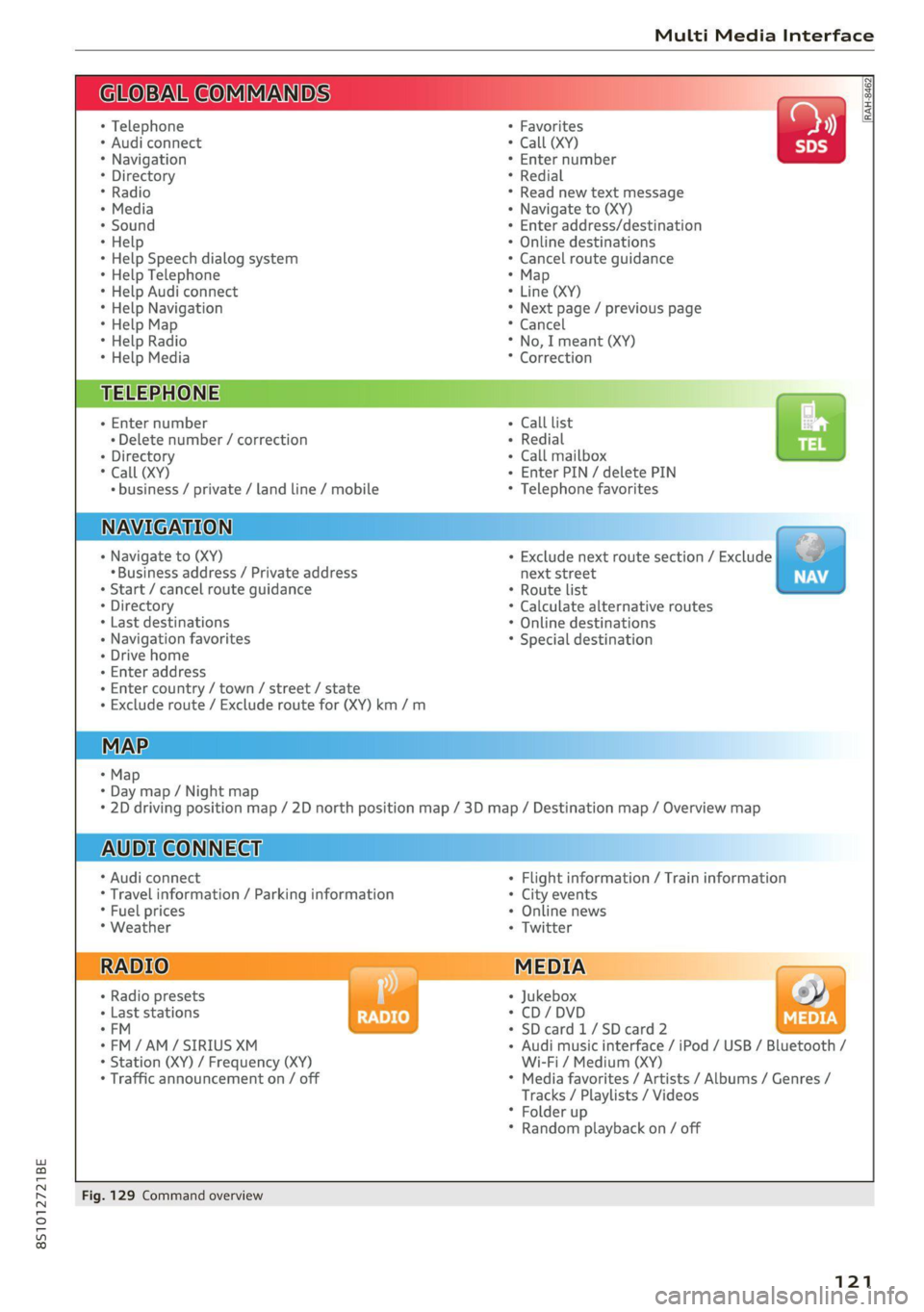
Fig. 129 Command overview
121
Page 127 of 280
8S1012721BE
Voice recognition system
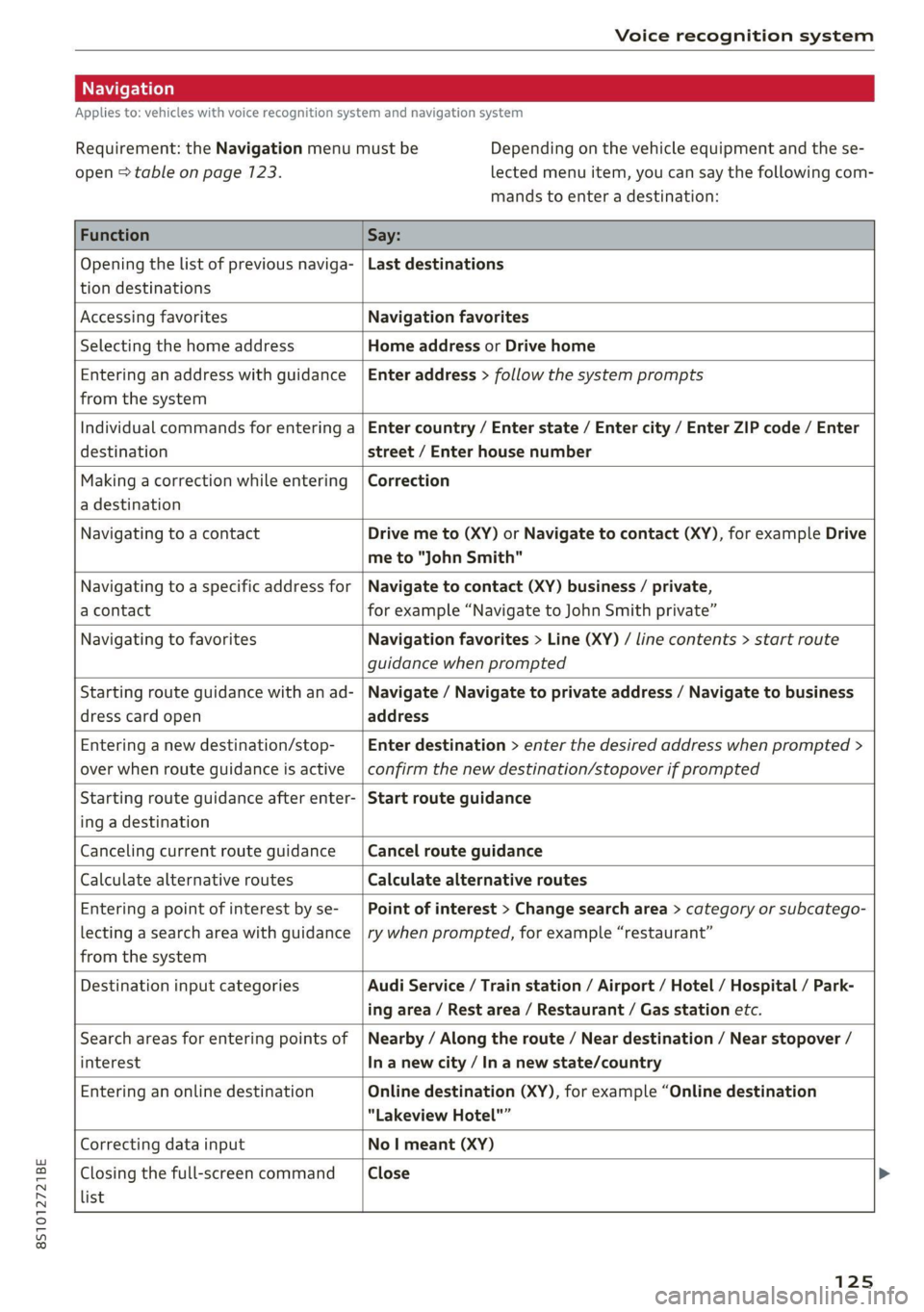
Applies to: vehicles with voice recognition system and navigation system
Requirement: the Navigation menu must be
open > table on page 123.
Depending on the vehicle equipment and the se-
lected menu item, you can say the following com-
mands to enter a destination:
Function Say:
Opening the list of previous naviga-
tion destinations
Last destinations
Accessing favorites Navigation favorites
Selecting the home address Home address or Drive home
Entering an address with guidance
from the system
Enter address > follow the system prompts
Individual commands for entering a
destination
Enter country / Enter state / Enter city / Enter ZIP code / Enter
street / Enter house number
Making a correction while entering
a destination
Correction
Navigating to a contact Drive me to (XY) or Navigate to contact (XY), for example Drive
me to "John Smith"
Navigating to a specific address for
a contact
Navigate to contact (XY) business / private,
for example “Navigate to John Smith private”
Navigating to favorites Navigation favorites > Line (XY) / line contents > start route
guidance when prompted
Starting route guidance with an ad-
dress card open
Navigate / Navigate to private address / Navigate to business
address
Entering a new destination/stop-
over when route guidance is active
Enter destination > enter the desired address when prompted >
confirm the new destination/stopover if prompted
Starting route guidance after enter-
ing a destination
Start route guidance
Canceling current route guidance Cancel route guidance
Calculate alternative routes Calculate alternative routes
Entering a point of interest by se-
lecting a search area with guidance
from the system
Point of interest > Change search area > category or subcatego-
ry when prompted, for example “restaurant”
Destination input categories Audi Service / Train station / Airport / Hotel / Hospital / Park-
ing area / Rest area / Restaurant / Gas station etc.
Search areas for entering points of
interest
Nearby / Along the route / Near destination / Near stopover /
In a new city / In a new state/country
Entering an online destination Online destination (XY), for example “Online destination
“Lakeview Hotel"”
Correcting data input No I meant (XY)
Closing the full-screen command
list
Close
125
Page 146 of 280
Audi connect
— Some Audi connect Infotainment services
must be activated at my.audi.com.
— To make logging in easier in the vehicle, you
will receive an 8-digit myAudi PIN as an al-
ternative to your myAudi password after you
have created a myAudi account.
— Depending on the country, you may be able
to use the myAudi app or my.audi.com.
— For detailed information on configuration,
visit my.audi.com.
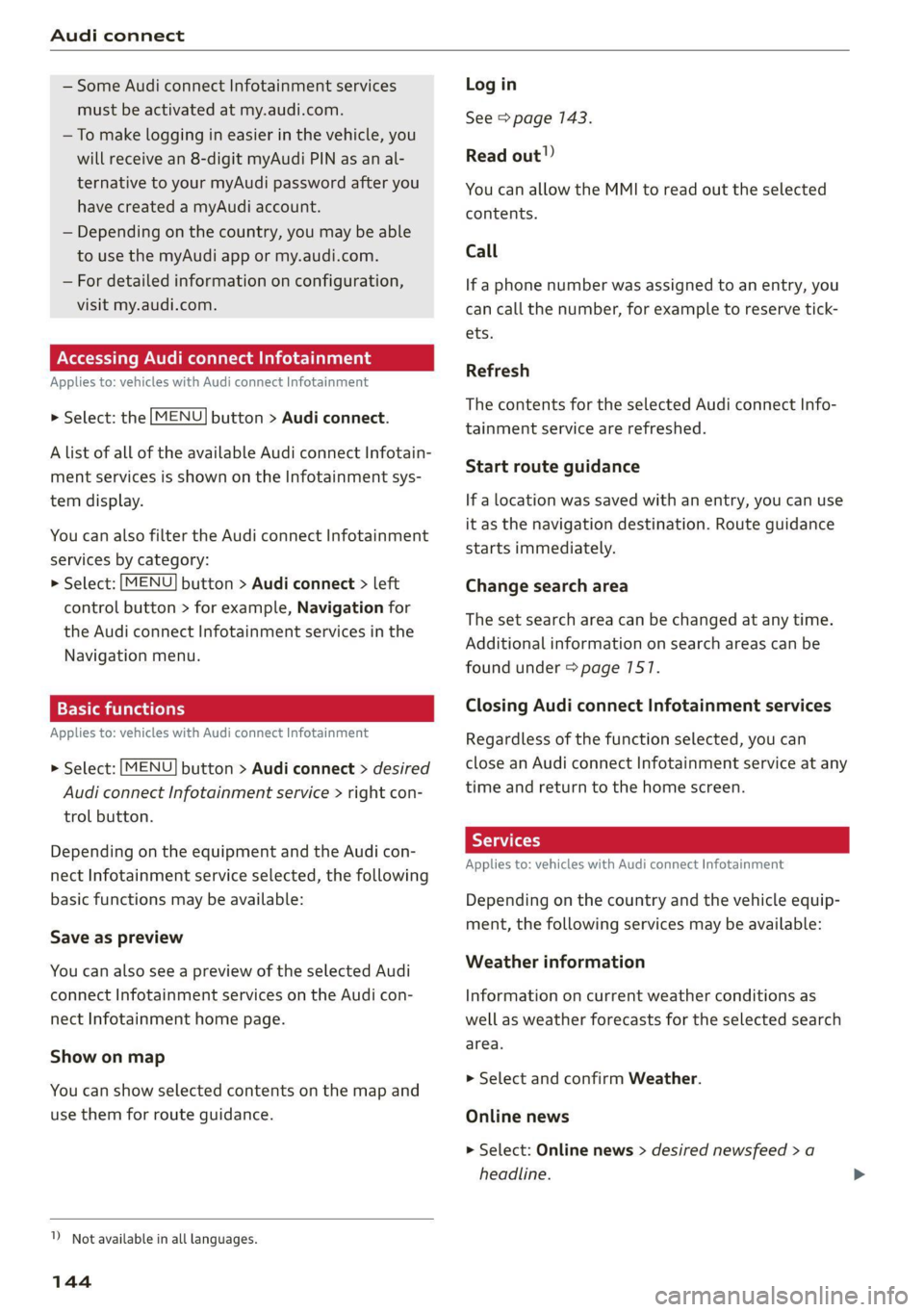
Accessing Audi connect Infotainment
Applies to: vehicles with Audi connect Infotainment
> Select: the [MENU] button > Audi connect.
A list of all of the available Audi connect Infotain-
ment services is shown on the Infotainment sys-
tem display.
You can also filter the Audi connect Infotainment
services by category:
> Select: [MENU] button > Audi connect > left
control button > for example, Navigation for
the Audi connect Infotainment services in the
Navigation menu.
Applies to: vehicles with Audi connect Infotainment
> Select: [MENU] button > Audi connect > desired
Audi connect Infotainment service > right con-
trol button.
Depending on the equipment and the Audi con-
nect Infotainment service selected, the following
basic functions may be available:
Save as preview
You can also see a preview of the selected Audi
connect Infotainment services on the Audi con-
nect Infotainment home page.
Show on map
You can show selected contents on the map and
use them for route guidance.
1) Not available in all languages.
144
Log in
See > page 143.
Read out!)
You can allow the MMI to read out the selected
contents.
Call
If a phone number was assigned to an entry, you
can call the number, for example to reserve tick-
ets.
Refresh
The contents for the selected Audi connect Info-
tainment service are refreshed.
Start route guidance
If a location was saved with an entry, you can use
it as the navigation destination. Route guidance
starts immediately.
Change search area
The set search area can be changed at any time.
Additional information on search areas can be
found under > page 7517.
Closing Audi connect Infotainment services
Regardless of the function selected, you can
close an Audi connect Infotainment service at any
time and return to the home screen.
Services
Applies
to: vehicles with Audi connect Infotainment
Depending on the country and the vehicle equip-
ment, the following services may be available:
Weather information
Information on current weather conditions as
well as weather forecasts for the selected search
area.
> Select and confirm Weather.
Online news
> Select: Online news > desired newsfeed > a
headline.