change time AUDI TT COUPE 2009 Owners Manual
[x] Cancel search | Manufacturer: AUDI, Model Year: 2009, Model line: TT COUPE, Model: AUDI TT COUPE 2009Pages: 316, PDF Size: 71.16 MB
Page 22 of 316
Instruments and warning/indicator lights
& W ARN ING (continued )
increased br aking dist ances . Trying to brake as quickly as usual
c ould lead to an a ccident. •
Anti-lock brake system , e (USA)/
(Canada)
T his war ning/ indic ator ligh t moni to rs the AB S and the
elect ronic diffe ren tial lock (EDL).
The J light wil l come on for a few seconds when the ignition is
swi tc hed on. The light w ill go out aft er a n aut omat ic check seque nce
is completed.
There is a malfunction in the
ABS when :
• T he warning/indicator light does not il luminate when you switch
on the ign ition.
• T he wa rning/indicator light does not go out after a few seconds.
• The wa rnin g/ind ica tor light il luminates wh ile driv in g.
The brake system will still respond even without the assistance of
the ABS system. See your authorized Audi dealer as soon as poss ible to restore full braking performan ce . For more information
regard ing the ABS ~ page 187.
The ABS warning light and the brake warning light come on
together . The ABS will not work and you will notice a change in
braking response and performance .
Malfunction in the brake system USA models: If both, t he
BRAKE warning light and the ,,[ warning
light co me on ~ page 79when the pa rking b ra ke is r eleased, there
may be a mal function in t he ABS , and t here may also be a malfunc
tion in the brake system itself ~ & .
Canada model s: If bo th, the b rake warn ing l ig ht
(Ci) and the ABS
warning light : come on~ page 79when the parking brake is released, there may be a malfunction in the ABS, and there may also
b e a ma lfunc tio n in t he b rake system itself~ & .
Malfun ction in the electronic differential lock (EDL )
T he two sys te m s ED L and ABS w ork together . The L warning ligh t
wi ll come on if there is a malfunction in the EDL system~ page 184.
See you r au thori zed A udi deale r as so on as possible.
& WARNING
• If the "warning light does not go out , or if it comes on while
driving , the ABS system is not working properly . The vehi cle can
then be stopped only with the brakes operating without ABS support . You will not have the protection ABS provides . Contact
your Audi dealer as soon as possible.
• USA models : If both , the
BRAKE w arning light and the
warning light come on at the same time, the rear wheels could lock up first under hard braking . Lock-up of the rear wheel brakes
can cause loss of vehicle control and an accident . Have your
vehicle repaired immediately by your authorized Audi dealer or a
qualified workshop. Drive slowly and avoid sudden, hard brake
appli cation .
• Canada models: If both, the brake warning light CCI» and the ABS
warning light come on at the same time , the rear wheels could
lock up first under hard braking. Lock -up of the rear wheel brakes
c an cause loss of vehi cle control and an a ccident . Have your
vehicle repaired immediately by your authorized Audi dealer or a
qualified workshop. Drive slowly and avoid sudden , hard bra ke
application •
Electro-mechanical power assist l / @
If the indicato r light i lluminates while you a re d riv ing, t here i s a
malfunction in the e lectro -mechanica l steering . If the indicator light
is showing , there may be a reduction in powe r stee ring assist. If
t h e ind icator light is show ing® , there may be a total loss o f power
~
Page 26 of 316
Driver information system
The service interval display determines when a service procedure is
needed for your vehicle . It operates in two stages:
• Service reminder : Before reaching a service event, this message
appears briefly when you switch on the ignition:
OIL CHANGE IN
1230 Ml (2000 KM) 150 DAYS.
• Service event: When the date for service is reached, the message
OIL CHANGE! appears. It is accompanied by an audible signal.
Display remaining distance
By briefly pulling the knob,@) ~ page 12 , fig. 2, the dis tance/time
remaining to the next service date is displayed with the ignition on.
The distance/ time remaining is updated every 300 miles (500 kml.
If the distance/time remaining is cal led up on new vehicles or after
service has been performed, the due date is always shown in the
display with
OIL CHANGE IN····· Ml (KMl··· DAYS within the first 300
miles (500 km).
To reset the displa y
The dealership performing the service resets the display when the
service has been completed . The display is resets as follows:
• Switch the ignition on.
• Pull the knob @)~
page 12 , fig. 2, this message appears : OIL
CHANGE!
• Pull the knob unti l the display OIL CHANGE IN····· Ml (KM)···
DAYS
appears in the display. If the reset button is not pulled within
5 seconds, the disp lay reset mode closes.
[ i J Tips
• If a malfunction is present (red symbol), the distance remaining
cannot be called up.
• Do not reset the display between service intervals. Doing so will
result in an incorrect display.
• If the battery is disconnected, the Service Interval Display values
are reta ined. •
On vehicles with the Driver Information System, you can also call
up the service interval display~
page 27.
• If service was not performed at the correct time or the service
interval display was not reset after service was performed, the addi
tional mileage driven or the elapsed days will be shown as negative
numbers. •
On-Board Diagnostic system (OBD)
On-Board Diagnostics
Fig. 10 Locat ion of
Data Link Connector
( DLC )
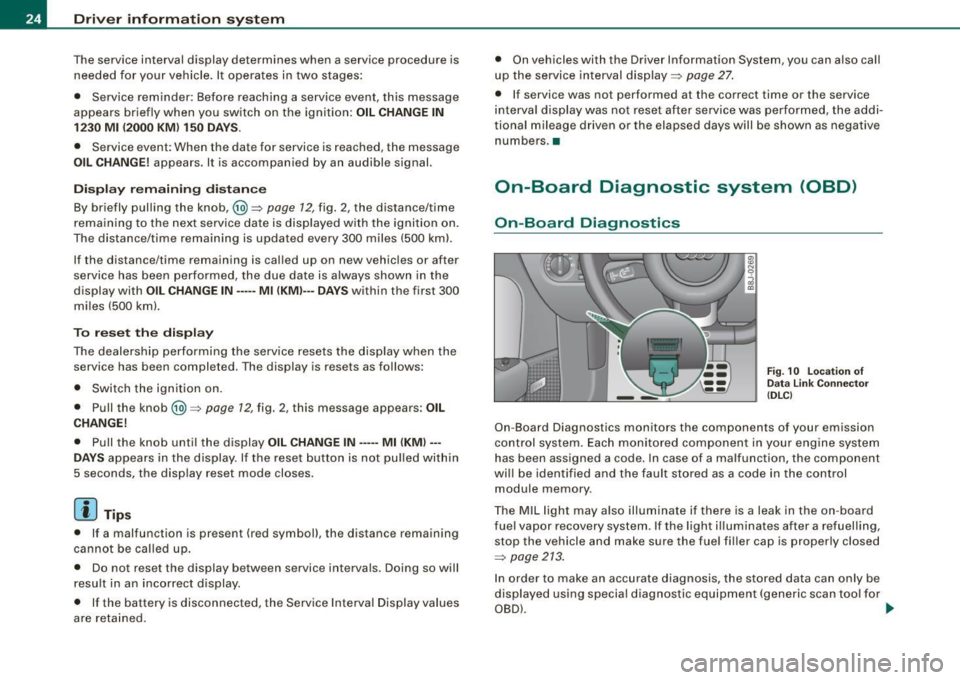
On-Board Diagnostics monitors the components of your emission
control system . Each monitored component in your engine system
has been assigned a code. In case of a malfunction, the component
wi ll be identified and the fault stored as a code in the control
module memory.
The MIL light may also illuminate if there is a leak in the on -board
fuel vapor recovery system. If the light ill uminates after a refuelling,
stop the vehicle and make sure the fuel fi ller cap is properly closed
~ page 213.
In order to make an accurate diagnosis, the stored data can only be
displayed using special diagnostic equipment (generic scan tool for
OBD) . ...
Page 28 of 316
Driver inf ormation sy ste m
You can tell which memory level is currently active by the number in
the display =>
page 25, fig. 11. The data from the single -trip memory
(memory level 1 l is being displayed if a
1 appears in the disp lay. If a
2 is shown, then the data from the total -trip memory is being
displayed (memory leve l 2l.
S in gle-trip m emor y (Trip c ompu ter 1 )
The single-trip memory stores the trip information from the time the
ignition is turned on until it is turned off . If the trip is con tinued
w ithi n 2 hour s from the time the ignition was turned off, the new
data will be included in the calculation of the current trip informa
tion. If the trip is interrupted for
more than 2 ho ur s the memory is
reset automatica lly.
T ot al-tr ip m em ory ( Trip co mpu te r 2)
Unlike the single -trip memory, the total -trip memory is no t reset
automatically . This permits you to evaluate your driving data for the
entire period between manua l resets.
F u el ra nge
The estimated cruising range in miles (km) appears in the display.
The display changes in increments of 6 miles (10 km) .
Avera ge fuel mil eage
The average fuel economy in MPG 0/100 km) since you last cleared
the memory appears in this display.
C ur rent f uel mileage
The instantaneous fuel consumption in mi les per ga llon (1/100 km)
is shown in this display. When the vehicle is stationary, the most
recent fuel consumption is displayed.
A ve ra g e sp eed
The average speed in mph (km/h) s ince the last time the display was
reset appears in the display.
El ap se d tim e
The length of time that you have been driving since you last rese t
the memory appears in this disp lay. The maximum time period that
can be recorded i s 999 hours and 59 minutes .
Distance
The elapsed distance since the last t ime the memory was cleared
appears in the display . The maximum distance that can be recorded
is 9,999 .9 mi les (9,999.9 kilometers).
[ i ] Tips
All stored values will be lost if the vehicle battery is disconnected .•
Op eration
The trip computer is controlled by two switches on the
windshield wiper lever.
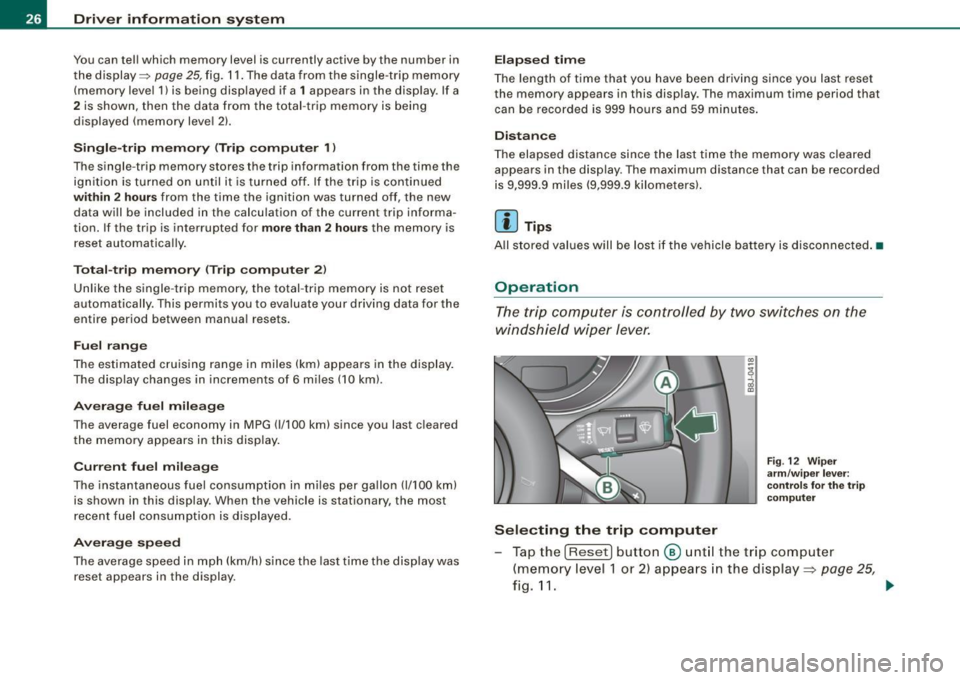
Sel ecting th e trip comput er
Fig . 12 Wip er
a rm /w ip er leve r:
co ntrols fo r the t rip
co mput er
Tap the [Reset) button @ unt il the trip computer
(memory level 1 or 2) appears in the display =:>
page 25,
fig.11. _.
Page 32 of 316
Driver inf ormation sy ste m
Speed warning system
Overview
The speed warning system helps you to keep your driving
speed below a set speed limit.
Fi g. 18 D isplay: s pee d
w arn in g sys tem
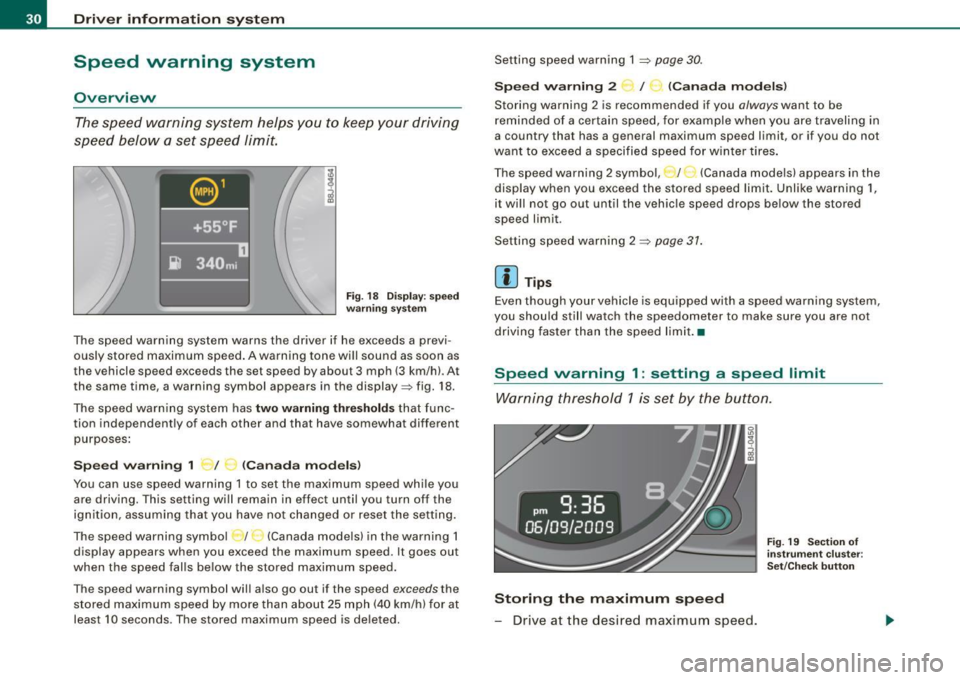
The speed warning system warns the driver if he exceeds a previ
ously stored maximum speed . A warning tone wi ll sound as soon as
the vehicle speed exceeds the set speed by about 3 mph (3 km/h). At
the same time, a warning symbol appears in the display=> fig. 18.
The speed warn ing system has
two warning thre shold s that func
tion independent ly of each other and that have somewhat different
purposes :
Speed w arnin g 1 _ / ~ (C ana da mod els)
You can use speed warning 1 to set the max imum speed whi le you
are driving. This setting wi ll remain in effect until you turn off the
ign ition, assuming that you have not changed or reset the setting .
The speed warning symbo l / (Canada mode ls) in the warning 1
display appears when you exceed the maximum speed. It goes out
when the speed falls be low the stored maximum speed.
The speed warning symbol will also go out if the speed
exceeds the
stored maximum speed by more than about 25 mph (40 km/h) for at
least 10 seconds. The stored maximum speed is de leted . Setting speed warning 1
~ page 30.
S
peed w arning 2 I (Canada m odel s)
Storing warning 2 is recommended if you always want to be
reminded of a certain speed, for example when you are traveling in
a country that has a general maximum speed limit, or if you do not
want to exceed a specified speed for winter tires .
The speed warning 2 symbol, _;_._ (Canada models) appears in the
display when you exceed the stored speed limit. Unlike warning 1,
it wi ll not go out until the vehic le speed drops be low the stored
speed limit .
Setting speed warning 2
~ page 31 .
[ i ] Tips
Even though your vehicle is equipped with a speed warning system,
you should still watch the speedometer to make sure you are not
driving faster than the speed limit .•
Speed warning 1 : setting a speed limit
Warning threshold 1 is set by the button .
Storing the maximum speed
- Drive at the desired maximum speed.
Fig . 19 Section of
i ns trum ent cl uster:
Set/C heck bu tton
Page 55 of 316

• Do not attach stickers to the windshie ld in front of the sensors as
this can disable the automatic head -and tail light control and the
automatic glare -dimming of the rearview mirror(s) .
• Always o bserve the spec ific loca l regu la tions f or your area when
to use your lights .
• I n the event of a light sensor mal function, the d river informa tion
display will show the symbol . If a light sensor malfunct ion is indi
ca te d , you must use the ligh t switch to turn the low beams on and
off .•
Daytime running lights (DRL ) (USA models )
The daytime running ligh ts are tu rne d o n auto maticall y
w hen t he ignit ion is s witche d on.
Activating functions
Fig . 41 Sw itch for
daytime running lights
- Move the right thumbwhee l@ "DR L" ~ fig. 41 to posi
t io n
(D .
Deactivating functions
- Mov e th e rig ht thum bwh eel "DR L" to posi tion @ .
Con tro ls and eq uip
ment
Clear vision
T he daytime running lights can be turned on or off using this func
t ion. If the f unc tion is active, the dayti me r unning ligh ts are turn ed
on automatically when the ignition is switched on .
The daytime running lights are activated
only when the light switch
=> fig . 4 1 @ is at the O or AUTO* position .
& WARNING
Never use daytime running lights to see where you are going . They
are not bright enough and will not let you see far enough ahead for
s afety , e speci ally at dusk o r when it is dark . Be aware of changes
in outside light conditions when you are driving and respond by
sw itching on your low beams
io.
0 Note
Alway s be aware of change s in outside light conditions while you
a re dr iving. Respond in time to fading daylight by turning the light
s witch to position
io (or "AUTO" if your car is equipped with this
feature)
to turn on your headlights .•
Daytime running lights (Canada models only)
W hen you turn on the ig nit io n the daytime running lights
will come on automatically.
The daytime running lights are activated only when the light switch
@ =>fig. 41 is e ither at the
O o r the :oo: position . When the ignition
is switched on, there is a difference between vehicles with bi -xenon
lig hts and ha logen lamps :
• On vehicles with bi -xenon lights only the daytime running lamps
in the headlights will c ome on.
• On vehicles with halogen lights the front fog lights, side marker
lights and tail ligh ts come on automatica lly
~
Vehicle care I I irechnical data
Page 56 of 316
Clear vision
& WARNING
Never use daytime running lights to see where you are going. They
are not bright enough and will not let you see far enough ahead for
safety , especially at dusk or when it is dark . Be aware of changes
in outside light conditions when you are driving and respond by
switching on your low beams
fD.
0 Note
• With the light switch at the O or ;:oo: position , only your front fog
lights remain turned on when it turns dark outside . Even though
your instruments appear well lit, the road ahead of you is not. The
light pattern provided by fog lights alone is not suffic ient for safe
driving in poor light or darknes s. Therefore:
• Always be aware of changes in outside light conditions while
you are driving. Respond in time to fading daylight by turning the
light swit ch to position @:D (or "AUTO" if your car is equipped with
th is feature) to turn on your headlights.
[ i ] Tips
The day tim e run ning lig ht s fu nct io n c annot b e tur ned off. •
Applies to vehicles: with Adap tive ligh t
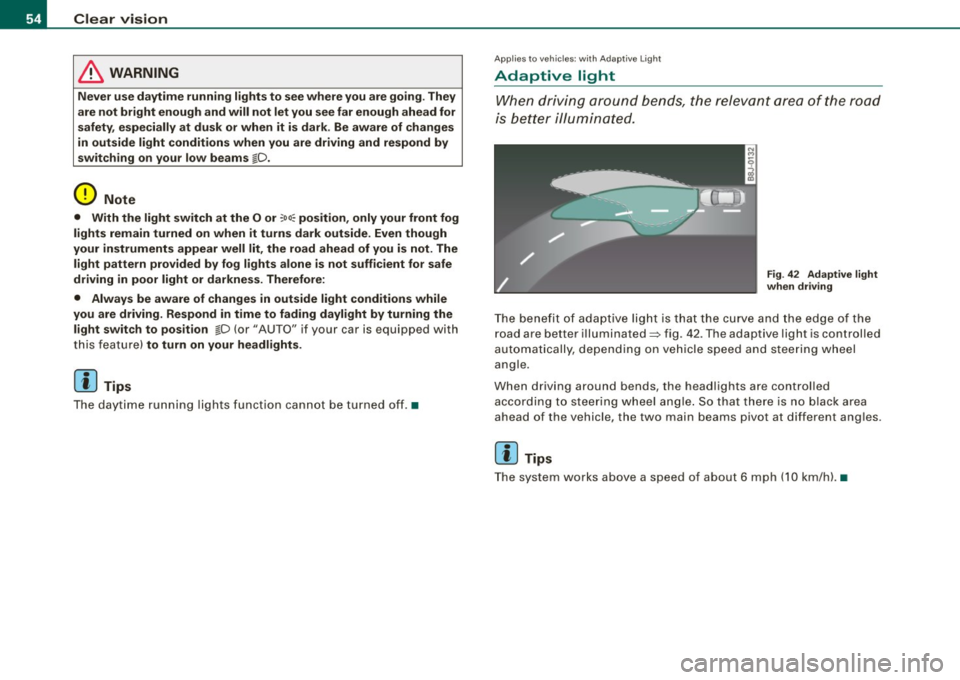
Adaptive light
W he n dri vin g around be nds , the r eleva nt area of the road
is b ette r illumin ated.
Fig . 42 Adapt ive light
when driving
T he bene fit of ada ptive lig ht is th at t he cu rve a nd the e dge of the
road are b etter illuminated=> fig. 42 . The adaptive light is controlled
a uto ma tically, de pendin g on ve hicle speed a nd s tee rin g w heel
angle.
When d riving around bends , the headlights are controlled
according t o steeri ng w heel angle. S o that ther e is no blac k ar ea
ahead of the veh icle, the two main beams pivot at different angles.
[ i ] Tips
T he system wor ks above a speed of about 6 mp h (10 km/ h). •
Page 60 of 316
Clea r vis io n
• your vehicle is being towed by a tow truck or if you are towing
another vehicle behind you. •
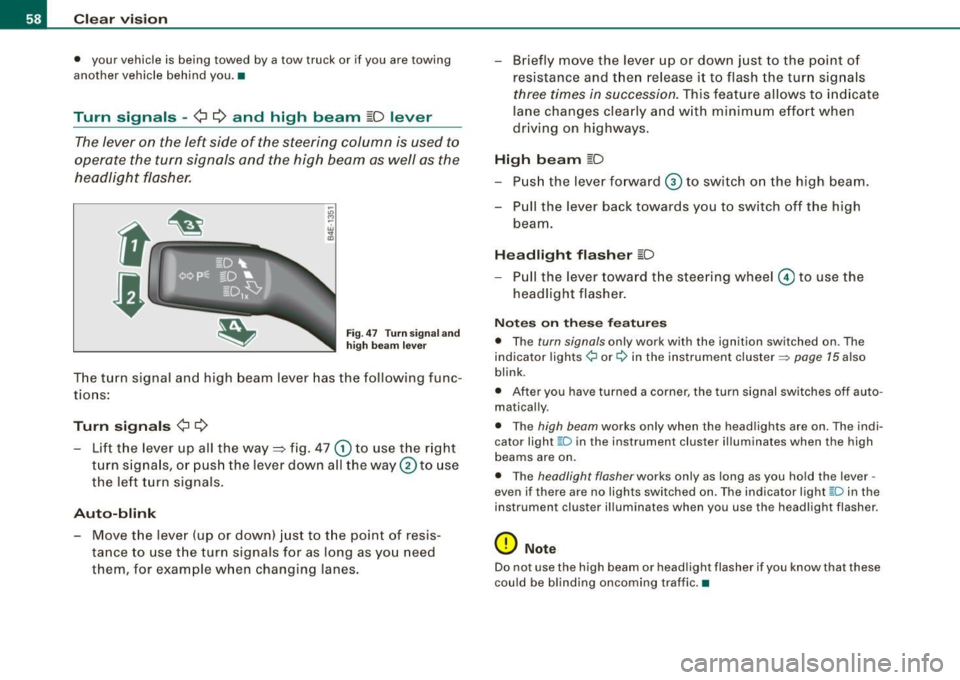
Turn signals -¢ ¢ and high beam ~D lever
The lever on the left side of the steering column is used to
operate the turn signals and the high beam as well as the
headlight flasher.
F ig. 47 Tu rn signa l a nd
h igh beam lever
The turn signal and high beam lever has the following func
tions:
Tu rn s ig na ls ¢ Q
- Lift the lever up all the way ::::, fig . 47 G) to use the right
turn s igna ls, or push the lever down all the way
0 to use
the le ft turn signals .
Auto-blink
- Move the lever (up or down) just to the point of resis
tance to use t he turn signals for as long as you need
them, for example when changing lanes. - Briefly move the
lever up or down just to the point o f
resistance and then release it to flash the turn signals
three times in succession. This feature allows to indicate
lane changes clearly and w ith minimum effort when
driving on highways.
Hi gh b eam [D
- Push the lever forward © to switch on the high beam.
- Pull the lever back towards you to switch off the high beam.
Headlight fl ash er [D
- P ull the lever toward the steering wheel© to use the
headlight flasher .
Notes o n these fea tures
• The turn signals only work with the ignition switched on . The
indicator lights ¢ or¢ in the instrument cluster => page 15 also
blink.
• After you have turned a corner, the turn signal switches off auto
matically.
• The high beam works only when the head lights are on. The indi
cator light ~D in the instrument cluster ill uminates when the high
beams are on.
• The headlight flasher works only as long as you hold the lever -
even if there are no lights switched on. The ind icator light ~D in the
instrument cluster illuminates when you use the headlight flasher.
0 Note
Do not use the high beam or head light flasher if you know that these
could be blinding oncoming traffic. •
Page 87 of 316
Warm and cold
Climate controls
Controls
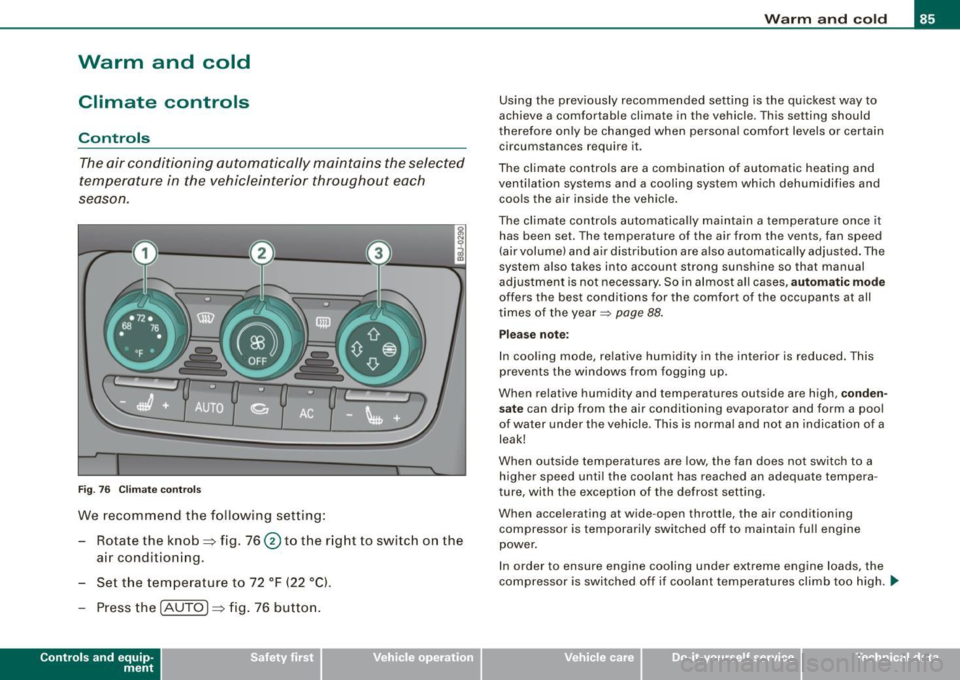
The air conditioning automatically maintains the selected
temperature in the vehicleinterior throughout each
se ason.
F ig. 76 C limate contro ls
We recommend the following setting:
- Rotate the knob~ fig. 76@ to the right to switch on the
ai r conditioning.
- Set the temperature to 72 °F (22 °C).
- Press the !AUTO
j ~ fig. 76 button.
Con tro ls and eq uip
ment
W arm and cold
Using the previously recommended setting is the quickest way to
achieve a comfortable climate in the vehicle. This setting should
therefore only be changed when personal comfort levels or certa in
circumstances require it.
The climate controls are a combination of automatic heating and
ventilation systems and a cooling system which dehumidifies and cools the air inside the vehic le .
The climate controls automatically maintain a temperature once it has been set. The temperature of the air from the vents, fan speed
(air volume) and air dist ribu tion are a lso automatically adjus ted . The
system also takes into account strong sunshine so that manual
adjus tment is not necessary. So in almost all cases,
a ut omatic mode
offers the best conditions for the comfort of the occupants at all
times of the year~
page 88.
Ple ase not e:
In cooling mode, relative humidity in the interior is reduced. This
prevents the windows from fogging up .
When relative humidity and temperatures outside are high,
conden
s ate
can drip from the air conditioning evaporator and form a pool
of water under the vehicle . This is normal and not an indication of a
leak!
When outside temperatures are low, the fan does no t switch to a
higher speed until the coolant has reached an adequate tempera
ture, with the exception of t he defrost setting .
When accelerating at wide-open throttle, the air conditioning compressor is temporarily switched off to maintain fu ll engine
power.
In order to ensure engine cooling under extreme engine loads, the
compressor is switched off if coolant temperatures climb too high ...
Vehicle care I I irechnical data
Page 151 of 316

__________________________________________________ A_ i_ r _b _a...; g::- s_ y=--- s_t _e _m __ lllll
& W ARNING (continued )
seating position and have the airbag system inspected by your
Audi dealer .
• A tight tether or other str ap on a rearward-fac ing child restr aint
attached to the front pas senger seat can put too much pressure
on the weight-sensing mat in the seat and reg ister more weight
than i s actually on the seat. The heavier weight registered can
make the system work as though an adult were on the seat and
deploy the Advanced Airbag when it must be suppressed causing
s erious or even fatal injury to the child .
• If, in exceptional circumstance s, you mu st in stall a forward
fac ing child restra int on the front passenger seat , always move the
seat into its rearmost position in the seat 's fore and aft ad just
ment range , as far away from the airbag a s possible . The backrest
must be adjusted to an upright position . Make sure that the
PASSENGER AIR BAG OFF light comes on and stay s on all the time
whenever the ignition is switched on .
& WARNING
• If the PASSENGER AIR BAG OFF light does not go out when an
adult is sitting on the front passenger seat after taking the steps
described above, make sure the adult is properly seated and
restrained at one of the rear seating positions .
• Have the airbag system inspected by your Audi dealer before
transporting anyone on the front passenger seat .
[ i ] Tips
If the weight -sensing mat in the front passenger seat detects an
e mp ty seat, the fro nt air b ag on the pa ssenge r sid e will be t urned
off, and PASSENGER AIR BAG OFF will stay on.•
Controls and equip ment Safety first
Vehicle operation
Repair, care and disposal of the airbags
Parts of the airbag system are insta lled at many different places on
your Au di. In sta ll in g, re moving, ser vic in g or re pair in g a part in an
area of the vehicle can damage a part of an a irbag system and
pre ven t that system fro m wo rki ng p rope rly in a co llision .
There are some important things you have to know to make sure
that the effectiveness of the system will not be impai red an d that
d iscarded components do not cause inju ry or po llute t he e nv iron
ment .
& WARNING
Improper care , servicing and repair procedures can increase the
risk of personal injury and death by preventing an airbag from
deploying when needed or deploying an airbag unexpectedly:
• Never cover , obstruct , or change the steering wheel horn pad
or airbag cover or the instrument panel or modify them in any way .
• Never attach any obje cts su ch as cup holders or telephone
mountings to the surfaces covering the airbag units.
• For cleaning the horn pad or instrument panel, use only a soft ,
dry cloth or one moi stened with plain water . Solvents or cleaners
c ould damage the airbag cover or change the stiffness or strength
of the material so that the airbag cannot deploy and protect prop
erly .
• Never repair , adjust , or change any parts of the airbag system.
• All work on the steering wheel , instrument panel , front seats or
electrical system (including the installation of audio equipment ,
c ellular telephones and CB radios , etc .I must be performed by a
qualified technician who has the training and special equipment
necessary .
• For any work on the airbag system , we strongly recommend
that you see your authorized Audi dealer or qualified workshop .
• Never modify the front bumper or parts of the vehicle body .
Vehicle care Do-it-yourself service Technical data
Page 214 of 316

-Fuel supply and filling your fuel tank
-----=--=----:.------=-=---------------
Blend of gasoline and ethanol
(grain alcohol or ethyl alcohol}
• Anti-knock index must be 87 AKI or higher.
• Blend must not contain more than
10% ethanol.
Blend of gasoline and MTBE
• Anti-knock index must be 87 AKI or higher.
• Blend must contain not more than
15% MTBE.
Seasonally adjusted gasoline
Many gasoline grades are blended to perform especially well for
winter or summer driving. During seasonal change -over, we suggest
that you fill up at busy gas stations where the seasonal adjustment
is more likely to be made in time.
0 Note
• Methanol fuels which do not meet these requirements may
cause corrosion and damage to plastic and rubber components in
the fuel system.
• Do not use fuels that fail to meet the specified criteria in this
chapter.
• If you are unable to determine whether or not a particular fuel
blend meets the specifications, ask your service station or its fuel
supplier.
• Do not use fuel for which the contents cannot be identified.
• Fuel system damage and performance problems resulting from
the use of fuels different from those specified are not the responsi
bility of Audi and are not covered under the New Vehicle or the
Emission Control System Warranties.
• If you experience a loss of fuel economy or driveability and
performance problems due to the use of one of these fuel blends,
we recommend that you switch to unblended fuel. •
Gasoline additives
A major concern among many auto manufacturers is carbon
deposit build-up caused by the type of gasoline you use.
Although gasoline grades differ from one manufacturer to another,
they have certain things in common. All gasoline grades contain
substances that can cause deposits to collect on vital engine parts,
such as fuel injectors and intake valves. Although most gasoline
brands include additives to keep engine and fuel systems clean,
they are not equally effective.
Audi recommends using TOP TIER Detergent Gasoline. For more
information on TOP TIER Detergent Gasoline, please go to the offi
cial website (www.toptiergas.com).
After an extended period of using inadequate fuels, built-up carbon
deposits can rob your engine of peak performance.
(D Note
Damage or malfunction due to poor fuel quality is not covered by
the Audi New Vehicle Limited Warranty. •
Fuel tank
Fuel filler neck
The fuel filler neck is located on the right rear side panel behind the
fuel filler flap.
If the unlocking system should fail, you can still open the flap manu
ally -for detailed instructions see=>
page 215.
You can find the fuel tank capacity of your vehicle in Technical Data
=> page 291. .,_