ECO mode AUDI TT COUPE 2014 User Guide
[x] Cancel search | Manufacturer: AUDI, Model Year: 2014, Model line: TT COUPE, Model: AUDI TT COUPE 2014Pages: 284, PDF Size: 34.42 MB
Page 61 of 284
Downloaded from www.Manualslib.com manuals search engine 0
N
co
....
\D L/'l
N
L/'l
.... Avoid
driving at high speed
Avoid travelling at top speed. Fuel consumption,
exhaust emissions and noise Levels all increase
very rapidly at higher speeds. Driving at moder
ate speeds will help to save fuel.
Do not let the engine idle for longer than
necessary
Engine idling periods are automatically reduced
on vehicles with start/stop system*. On vehicles
without start/stop system*, it is worthwhile
switching off the engine at Level crossings, for in
stance, or at traffic lights with a Long red phase.
The fuel saved after only 30 -40 seconds is great
er than the amount of fuel needed to restart the
engine.
The engine takes a very Long time to warm up
when it is running at idling speed. Mechanical
wear and pollutant emissions are also especially
high during this initial warm-up phase. It is
therefore best to drive off immediately after
starting the engine. Avoid running the engine at
high speed.
Regular ser vicing
Regular servicing can establish a basis for good
fuel economy before you start driving. A well
serviced engine gives you the benefit of im
proved fuel efficiency as well as maximum relia
bility and an enhanced resale value.
A poorly maintained engine can consume up to
ten percent more fuel than necessary.
Check the oil level when filling the tank. Oil con
su mption depends to a great extent on the en
gine load and engine speed. It is quite normal
that the oil consumption of a new engine only
reaches its lowest level after a certain mileage.
This means that the oil consumption can only be
properly assessed after about 5,000 km. Depend
ing on your personal driving style, oil consump
tion can be up to 0.5 Ltr./1,000 km.
Avoid short trips
The engine and emission control system need to
reach their proper working temperature in order
to minimise fuel consumption and emissions . Driving
A cold engine uses disproportionately more fuel.
The engine only reaches its working temperature
after about four kilometres, when fuel consump
tion will return to a normal level.
Check tyre pressures
Always make sure the tyres are inflated to the
correct tyre pressures to save fuel. If the tyre
pressures are just 0.5 bar too Low, this can in
crease the fuel consumption by as much as 5 %.
Due to the greater rolling resistance, under-infla
tion also increases tyre wear and impairs han
dling.
The tyre pressures should always be checked
when the tyres are cold.
Do not use winter tyres all through the year; they
will increase fuel consumption by up to 10 %.
Avoid carrying unnecessary loads
Every kilo of extra weight will increase the fuel
consumption, so it is worth checking the Luggage
compartment occasionally to make sure that no
unnecessary Loads are being transported.
Save electrical energy
The engine drives the alternator to generate elec
tricity. This means that fuel consumption rises
when more power is required for electrical equip
ment. Switch off electrical equipment when it is
not needed. Electrical equipment which uses a
Lot of electricity includes the blower (at a high
setting), the rear window heating and the seat
heating*.
59
Page 71 of 284
Downloaded from www.Manualslib.com manuals search engine 0
N
co
,-j
\D Lfl
N
Lfl
,-j hold
assist function tempt you into taking any
risks when driving -this can cause accidents.
- The hold assist cannot keep the vehicle sta-
tionary in all conditions on a gradient (e.g. if
the road is slippery or icy).
- Always ensure that the vehicle is stopped
properly and safely -risk of accident!
Switch off the hold assist function before
driving the vehicle into a car wash.
i Note
- The last setting of the hold assist (on/off} is
restored when the ignition is switched on.
The LED in the button is lit when the hold
assist is on.
- Automatic gearbox: When the hold assist
function is switched on, it stops the vehicle
from creeping forwards when you take your
foot off the brake pedal.
- In certain situations, the hold assist cannot
hold the vehicle. The LED in the button will
go out.
Hill hold assist
Applies to vehicles: with hill hold assist
The hill hold assist function makes it easier to
drive away on a slope.
Important: The driver's door must be closed, the
seat belt buckled and the engine running.
The system is activated when you press and hold
the brake pedal for a few seconds.
When you release the brake pedal the braking
force will be maintained for a moment in order to
hold the vehicle and make it easier for you to
drive away.
A WARNING
- The intelligent technology in the hill hold
assist function cannot defy the laws of phys
ics. Do not let the extra convenience affor
ded by the hill hold assist function tempt
you into taking any risks when driving -this
can cause accidents. Driving
- The hill hold assist function cannot keep the
vehicle stationary in all conditions on a gra
dient (e.g. if the road is slippery or icy).
-If you do not drive away immediately after
releasing the brake pedal the vehicle could
start to roll back. You should therefore im
mediately press the brake pedal or apply the
parking brake.
- If the engine should stall you must immedi
ately press the brake pedal or apply the
parking brake.
- If you are driving away on a slope in stop
and-go traffic press and hold the brake ped
al for a few seconds before driving off. This
will prevent the vehicle from rolling back
unintentionally.
(I) Note
To find out whether your vehicle is equipped
with the hill hold assist function please con
tact an Audi dealership or qualified workshop.
Kick-down feature
Applies to vehicles: with manual gearbox and efficiency mode
The kick-down feature is designed to give maxi
mum acceleration.
If you press the accelerator right down past the
point of resistance at full throttle when the drive
select* function is set to efficiency* mode
¢ page 91, the engine power is automatically
controlled to give your vehicle maximum acceler
ation.
A WARNING
Please note that if the road surface is slippery
or wet, the kick-down feature could cause the
driving wheels to spin, which could result in
skidding.
69
Page 72 of 284
Downloaded from www.Manualslib.com manuals search engine Automatic
gearbox
Automatic gearbox
S tronic
Introduction
Applies to vehicles: with S tronic gearbox
The vehicle is equipped with an electronically
controlled dual-clutch gearbox (S tronic). Torque
between the engine and the gearbox is transmit
ted via two independent clutches. They enable
smooth, uninterrupted acceleration of the vehi
cle.
The gearbox shifts up or down automatically and
continuously adapts the timing of the gear
changes to your driving style.
When you drive at moderate speeds the gearbox
will select the most economical shift programme.
It will then change up early and delay the down
shifts to give better fuel economy.
If you drive at higher speeds with heavy accelera
tion, if you open the throttle quickly, or if you use
the kick-down or the car's maximum speed, the
gearbox will automatically select the more "spor
ty" shift programmes.
If desired, you can also select the gears manually
(tiptronic mode).
Selector lever positions
Applies to vehicles: with S tronic gearbox
Fig. 76 Instrument cluster: Selector lever positions
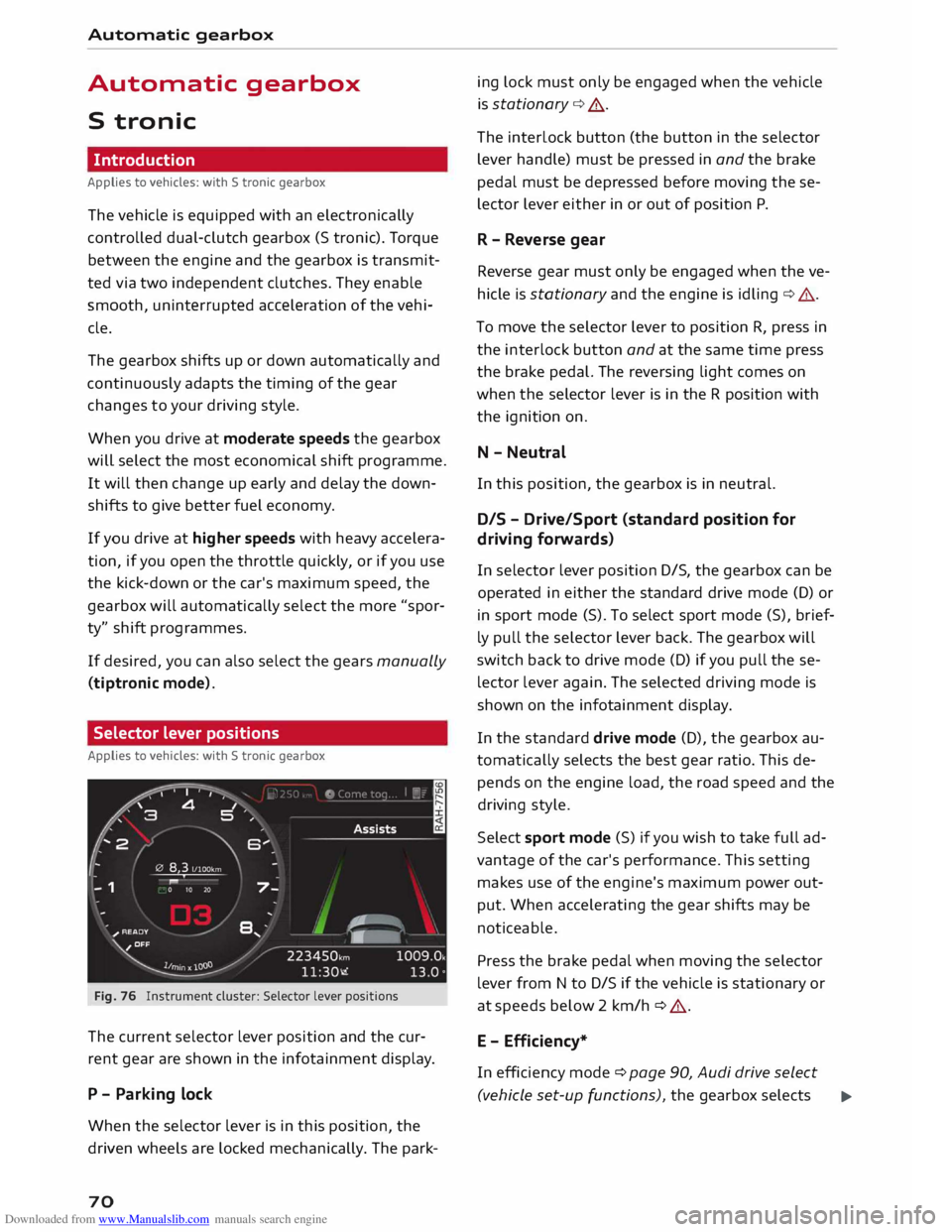
The current selector lever position and the cur
rent gear are shown in the infotainment display.
P - Parking lock
When the selector lever is in this position, the
driven wheels are locked mechanically. The park-
70 ing
lock must only be engaged when the vehicle
is stationary ¢.&. .
The interlock button (the button in the selector
lever handle) must be pressed in and the brake
pedal must be depressed before moving these
lector lever either in or out of position P.
R - Reverse gear
Reverse gear must only be engaged when the ve
hicle is stationary and the engine is idling ¢.&..
To move the selector lever to position R, press in
the interlock button and at the same time press
the brake pedal. The reversing light comes on
when the selector lever is in the R position with
the ignition on.
N - Neutral
In this position, the gearbox is in neutral.
DIS -Drive/Sport (standard position for
driving forwards)
In selector lever position D/S, the gearbox can be
operated in either the standard drive mode (D) or
in sport mode (S). To select sport mode (S), brief
ly pull the selector lever back. The gearbox will
switch back to drive mode (D) if you pull these
lector lever again. The selected driving mode is
shown on the infotainment display.
In the standard drive mode (D), the gearbox au
tomatically selects the best gear ratio. This de
pends on the engine load, the road speed and the
driving style.
Select sport mode (S) if you wish to take full ad
vantage of the car's performance. This setting
makes use of the engine's maximum power out
put. When accelerating the gear shifts may be
noticeable.
Press the brake pedal when moving the selector
lever from N to D/S if the vehicle is stationary or
at speeds below 2 km/h ¢ .&..
E - Efficiency*
In efficiency mode ¢ page 90, Audi drive select
(vehicle set-up functions), the gearbox selects ..,.
Page 73 of 284
Downloaded from www.Manualslib.com manuals search engine 0
N
co
....
\D L/'l
N
L/'l
.... the
next gear at lower engine speeds. Earlier up
shifts give improved fuel economy because the
full power reserves of the engine are not used.
In this mode, Eis shown on the display instead of
D ¢Fig. 76.
A WARNING
- The car can roll away even if the ignition is
switched off.
- Never move the selector lever to R or P
when driving, as this could cause an acci
dent.
- In all selector lever positions except P the
vehicle must always be held with the foot
brake when the engine is running. This is be
cause an automatic gearbox still transmits
power even at idling speed, and the vehicle
tends to "creep" -risk of accident!
- The accelerator pedal must on no account
be pressed inadvertently when a gear is en
gaged with the vehicle stationary . The vehi
cle could otherwise start moving immedi
ately (in some cases even if the parking
brake is engaged) and possibly cause an ac
cident.
- Do not press the accelerator while selecting
a gear with the vehicle stationary and the
engine running, as this could cause an acci
dent.
- The driver should never get out of the vehi
cle when the engine is running and a gear is
engaged. If you have to leave your vehicle
while the engine is running, you must apply
the parking brake and engage the parking
lock P.
- To avoid accidents, apply the parking brake
and put the selector lever in position P be
fore opening the bonnet and working on the
vehicle with the engine running. Please ob
serve the important safety warnings
¢ page 220, Working on components in
the engine compartment.
((D) Note
- Drive select: You can select the sport pro
gram for gear changes by activating the dy- Automatic
gearbox
namic mode. The infotainment display will
show S instead of D.
- If the lever is moved accidentally to N when
driving, take your foot off the accelerator
and let the engine speed drop to idling be
fore selecting Dor S again.
- It is not possible to move the selector lever
out of position P if the electrical power sup
ply fails. In this case, the selector lever can
be released manually. Left-hand drive
vehicles ¢ page 78, right-hand drive
vehicles ¢ page 79.
Selector lever lock
Applies to vehicles: with S tronic gearbox
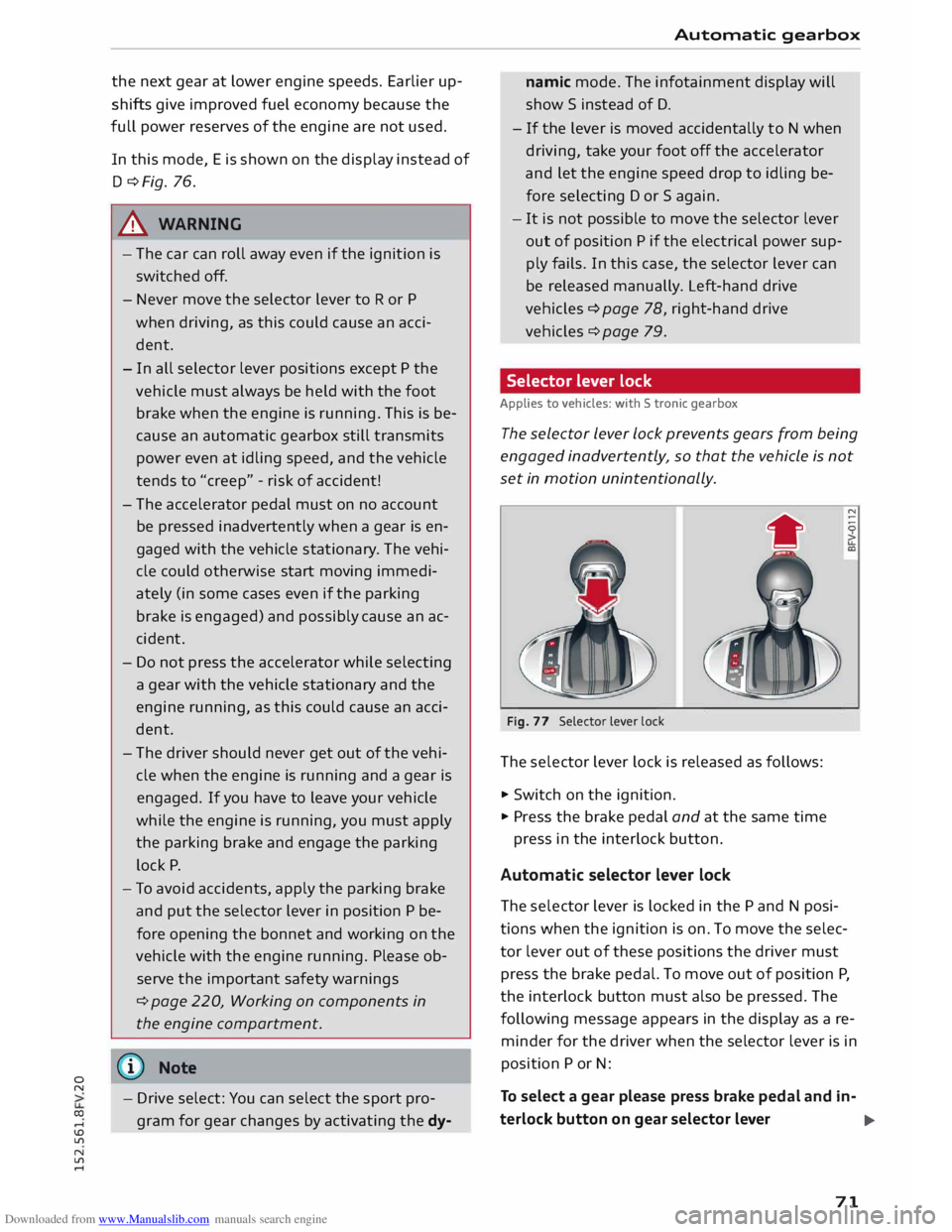
The selector Lever Lock prevents gears from being
engaged inadvertently, so that the vehicle is not
set in motion unintentionally.
•
Fig. 77 Selector lever lock
The sele ctor lever lock is released as follows:
... Switch on the ignition.
... Pr ess the brake pedal and at the same time
press in the interlock button.
Automatic selector lever lock
The sele ctor lever is locked in the P and N posi
tions when the ignition is on. To move the selec
tor lever out of these positions the driver must
press the brake pedal. To move out of position P,
the interlock button must also be pressed. The
following message appears in the display as a re
minder for the driver when the selector lever is in
position P or N:
To select a gear please press brake pedal and in-
terlock button on gear selector lever
..,.
71
Page 75 of 284
Downloaded from www.Manualslib.com manuals search engine 0
N
co
....
\D U'l
N
U'l
.... can
roll away. Doors do not lock if lever is not in
P appears on vehicles with convenience key*. A
buzzer will also sound.
,. Pr ess and hold the brake pedal¢ A_ .
,. Apply the parking brake.
,. Move the selector lever to P.
Stopping on a slope
,. Always keep your foot on the brake pedal to
hold the vehicle and prevent it from rolling
back down the slope ¢ A_ . Do not try to stop
the vehicle "rolling back" by increasing the en
gine speed when a gear is engaged ¢(D.
Driving away on a slope (vehicles without hill
hold assist* / Audi hold assist*)
,. Apply the parking brake.
,. Once you have engaged a gear press the accel
erator carefully. The parking brake will be re
leased automatically if you are wearing your
seat belt.
Driving away on a slope (vehicles with hill
hold assist*)
,. Once you have engaged a gear, release the foot
brake and press the accelerator ¢ page 69, Hill
hold assist.
Driving away on a slope (vehicles with hold
assist*)
,. Once you have engaged a gear, release the foot
brake and press the accelerator ¢ page 68,
Hold assist.
In some situations (such as when driving on
mountain roads) it can be advantageous to
switch temporarily to the manual shift pro
gramme so that the gear ratios can be selected
manually to suit the driving conditions
¢page 75.
On level ground it is sufficient to move the selec
tor lever to P. On a gradient the parking brake
should be applied first and the selector lever
should be moved to P ¢ page 66. This reduces
the load on the locking mechanism and makes it
easier to move the selector lever out of position
P Automatic
gearbox
_&. WARNING
- The driver should never get out of the vehi
cle when the engine is running and a gear is
engaged. If you have to leave your vehicle
while the engine is running, you must apply
the parking brake and engage the parking
lock P.
- If the engine is running and a gear is engag
ed {D/S or R) or the vehicle is in "tiptronic"
mode, you will need to hold the car with the
footbrake. Otherwise, the car will "creep"
forwards as the power transmission is not
fully interrupted even when the engine is
idling.
- The accelerator pedal must on no account
be pressed inadvertently when the vehicle is
stationary . The vehicle could otherwise start
moving immediately (in some cases even if
the parking brake is engaged) and possibly
cause an accident.
- Do not press the accelerator while selecting
a gear with the vehicle stationary and the
engine running, as this could cause an acci
dent.
- Never move the selector lever to R or P
when driving at normal speeds, as this could
cause an accident.
- Before you drive down a steep gradient, re
duce the speed and use "tiptronic" to select
a low gear.
- Never allow the brake to drag when driving
downhill and do not use the brake pedal too
often or for long periods. Constant braking
will cause the brakes to overheat and will
considerably reduce the effectiveness of the
brakes. It will increase the braking distance
and could cause the brake system to fail.
- To avoid rolling back on gradients always
hold the vehicle with the footbrake or park
ing brake if you have to stop.
- Never attempt to hold the vehicle with the
clutch when stopping on a gradient. The
clutch is disengaged automatically if it is
overloaded and becomes too hot -accident
risk! If the clutch is overloaded, the indica
tor lamp [!l will light up and a message will
appear¢ page 77.
�
73
Page 76 of 284
Downloaded from www.Manualslib.com manuals search engine Automatic
gearbox
CD CAUTION
- When you have stopped on a gradient, do
not try to stop the vehicle rolling back by ac
celerating when a gear is engaged. This
could cause the automatic gearbox to over
heat and become damaged. Apply the park
ing brake or press the brake pedal in order
to prevent the vehicle from rolling back.
- If you allow the car to roll with the selector
lever in position N with the engine switched
off, the automatic gearbox will be damaged
as it will not be lubricated.
- In certain driving and traffic conditions, for
instance in stop-and-go traffic, if you have
to pull away frequently or if the vehicle
creeps forwards over a long distance, the
gearbox can overheat and become dam
aged. If the warning lamp. lights up,
stop the vehicle at the first opportunity and
let the gearbox cool down ¢ page 77.
- In certain driving and traffic conditions, for
instance in stop-and-go traffic, if you have
to pull away frequently or if the vehicle
creeps forwards over a long distance, the
gearbox can overheat and become dam
aged. If the warning lamp� Lights up,
stop the vehicle at the first opportunity and
let the gearbox cool down ¢ page 77.
- If you allow the car to roll with the engine
switched off, the 5 tronic gearbox will be
damaged as it will not be lubricated
¢ page 250, Tow-starting I towing away.
(1) Note
For safety reasons the parking brake will only
release automatically if the driver's seat belt
is engaged in its buckle.
Downhill speed control
Applies to vehicles: with S tronic gearbox
The downhill speed control function helps the
driver when driving down steep gradients.
Downhill speed control is activated on a downhill
gradient when the selector lever is in 0/5 and the
driver presses the brake pedal. The gearbox auto
matically selects a suitable gear for the gradient.
74 The
downhill speed control function attempts to
maintain the speed at which the vehicle was trav
elling when the foot brake was applied (subject
to the laws of physics and technical limitations of
the power train). It may be necessary to adjust
the speed again using the foot brake. The down
hill speed control can change down to 3rd gear
but no further, so it may be necessary to change
to tiptronic mode on very steep gradients. In this
case, change down manually to 2nd or 1st gear in
tiptronic mode to use the engine braking effect
and reduce the load on the brakes.
Downhill speed control is deactivated as soon as
the road levels out again or you press the acceler
ator pedal.
On vehicles with cruise control system*
¢ page 80, downhill speed control is activated
when you set a cruising speed.
& WARNING
The downhill speed control function cannot
defy the laws of physics and may therefore
not be able to maintain a constant speed in
certain circumsta nces. Always be prepared to
use the brakes! -
Page 77 of 284
Downloaded from www.Manualslib.com manuals search engine 0
N
co
....
\D L/'l
N
L/'l
.... Manual
gear selection (tiptronic mode)
Applies to vehicles: with S tronic gearbox/paddle levers
The tiptronic feature allows the driver to also
change gears manually.
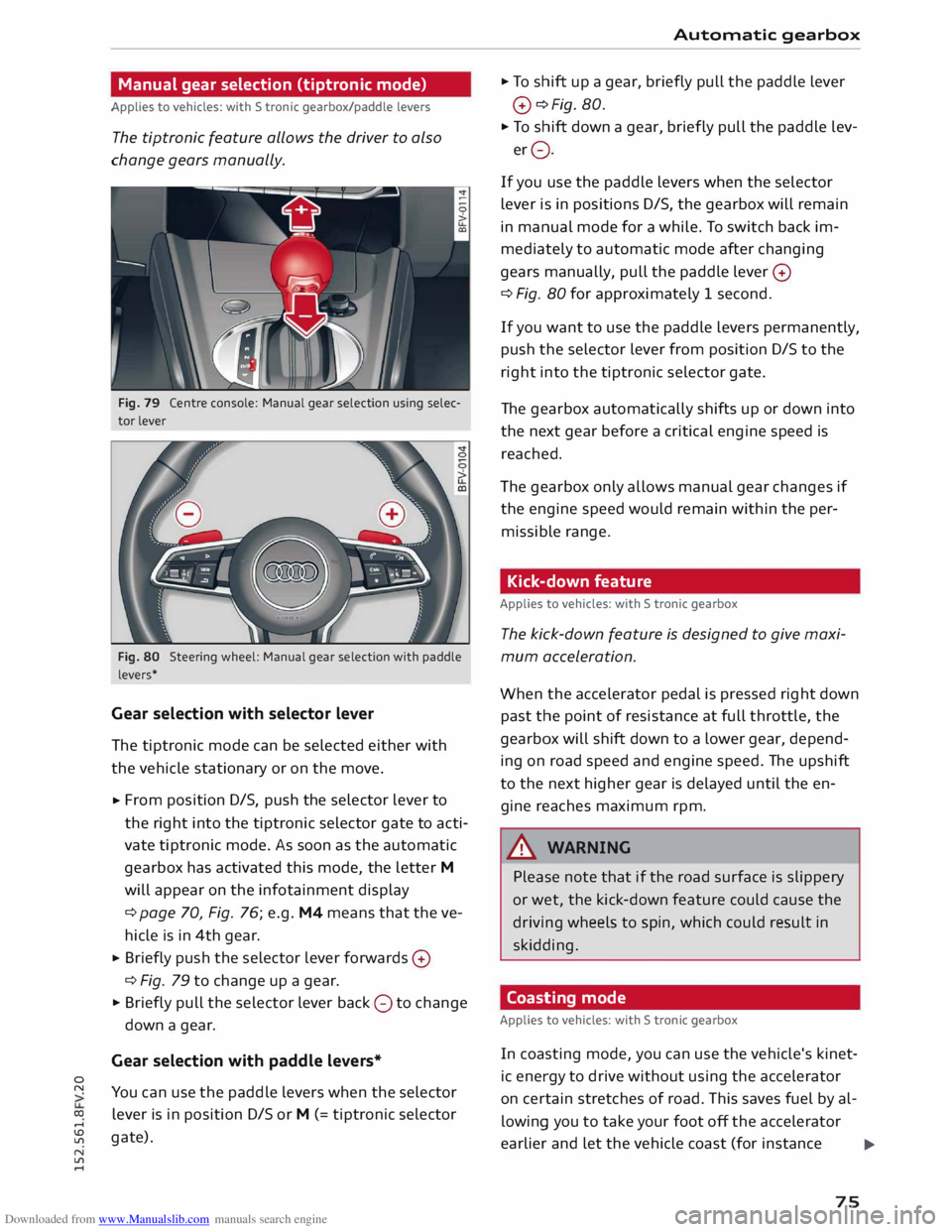
Fig. 79 Centre console: Manual gear selection using selec
tor lever
Fig. 80 Steering wheel: Manual gear selection with paddle
levers*
Gear selection with selector lever
The tiptronic mode can be selected either with
the vehicle stationary or on the move.
,.. From
position D/S, push the selector lever to
the right into the tiptronic selector gate to acti
vate tiptronic mode. As soon as the automatic
gearbox has activated this mode, the letter M
will appear on the infotainment display
¢ page 70, Fig. 76; e.g. M4 means that the ve
hicle is in 4th gear.
,.. Briefly
push the selector lever forwards 0
¢ Fig. 79 to change up a gear.
,.. Briefly pull the selector lever back 0 to change
down a gear.
Gear selection with paddle levers*
You can use the paddle levers when the selector
lever is in position D/S or M (= tiptronic selector
gate). Automatic
gearbox
,.. To shift up a gear, briefly pull the paddle lever
0 ¢Fig. 80.
,.. To shift down a gear, briefly pull the paddle lev-
er 0.
If you use the paddle levers when the selector
lever is in positions D/S, the gearbox will remain
in manual mode for a while. To switch back im
mediately to automatic mode after changing
gears manually, pull the paddle lever 0
¢ Fig. 80 for approximately 1 second.
If you want to use the paddle levers permanently,
push the selector lever from position D/S to the
right into the tiptronic selector gate.
The gearbox automatically shifts up or down into
the next gear before a critical engine speed is
reached.
The gearbox only allows manual gear changes if
the engine speed would remain within the per
missible range.
Kick-down feature
Applies to vehicles: with S tronic gearbox
The kick-down feature is designed to give maxi
mum acceleration.
When the accelerator pedal is pressed right down
past the point of resistance at full throttle, the
gearbox will shift down to a lower gear, depend
ing on road speed and engine speed. The upshift
to the next higher gear is delayed until the en
gine reaches maximum rpm.
A WARNING
Please note that if the road surface is slippery
or wet, the kick-down feature could cause the
driving wheels to spin, which could result in
skidding.
Coasting mode
Applies to vehicles: with S tronic gearbox
In coasting mode, you can use the vehicle's kinet
ic energy to drive without using the accelerator
on certain stretches of road. This saves fuel by al
lowing you to take your foot off the accelerator
earlier and let the vehicle coast (for instance
.,...
75
Page 78 of 284
Downloaded from www.Manualslib.com manuals search engine Automatic
gearbox
when approaching a speed restriction in a built
up area).
Switching on coasting mode
Important: Selector lever must be in D, gradient
must be less than 12 %.
"' Select efficiency mode in drive select*
9page 90 (you only have to do this once).
"' Ta ke your foot off the accelerator.
If you have selected the "on-board computer"
display, the message Coasting will then appear.
The gearbox automatically disengages the clutch
at speeds above 20 km/h and lets the vehicle
coast without the engine braking effect. The en
gine ticks over at idling speed while the vehicle is
coasting.
Stopping coasting mode
"' Press the brake pedal or accelerator.
To use the engine braking effect and overrun fuel
cut-off again, all you need to do is tap the brake
pedal briefly.
You can improve your fuel economy and help to
reduce emissions by using a combination of the
coasting mode (i.e. coasting with low fuel con
sumption on a longer stretch of road) and the
overrun fuel cut-off (i.e. using the engine brak
ing effect with no fuel consumption on a shorter
stretch of road).
A WARNING
- If you are approaching an obstruction when
coasting mode is switched on, please re
member that the vehicle will not slow down
as quickly as usual when you take your foot
off the accelerator -risk of accident!
- The vehicle can pick up speed if you are driv
ing down a slope in coasting mode -risk of
accident!
l l
The ESC lamp lights up permanently and the message
Stabilisation control (ESC): sport. Warning! Restricted
stability appears temporarily in the infotainment display
to indicate the deactivation status.
76 -
If other people are using your car, you
should draw their attention to the coasting
mode.
@ Note
- Coasting mode is only available in efficiency
mode (drive select*).
- The message Coasting only appears when
the current fuel consumption display is se
lected. The gear is no longer displayed when
you are in coasting mode (e.g. E instead of
E6).
- The coasting mode is deactivated tempora
rily on gradients of 15 % or greater.
' Launch control programme
Applies to vehicles: with S tronic gearbox and launch control
The launch control programme enables maxi
mum acceleration.
Important: The engine must be warm and the
steering wheel must be pointing straight-ahead.
"' Deactivate the start/stop system*¢ page 65.
The LED in the button l(A)'*'I will light up.
"' Deactivate the hold assist* ¢ page 68. The LED
in the button will go out.
"' Press the IJ'}OFF!
button once briefly while the
engine is running 1
).
"' Briefly pull the selector lever back from posi
tion D/S to select position S, or move the selec
tor lever to the right into the tiptronic gate, or
select dynamic mode in drive select*
¢page 90.
"' Press the brake pedal firmly with your left foot
and hold it down for at least one second.
"'At the same time, press the accelerator all the
way down with your right foot until the engine
revs are high and steady.
"' Ta ke your left foot off the brake.
�
Page 93 of 284
Downloaded from www.Manualslib.com manuals search engine 0
N
co
....
\D U'l
N
U'l
.... lower engine
speeds and the coasting mode is ac
tivated ¢ page 75. This helps to reduce fuel con
sumption.
Suspension control (Audi magnetic ride)*
The suspension control uses sensors to collect in
formation on steering movements, braking and
acceleration input by the driver, road surface
quality, road speed and vehicle Loading. With
drive select you can choose between dynamic and
comfort-oriented suspension set-ups (dynamic
and comfort modes), or opt for a more balanced
set-up (auto mode).
Steering
The degree of power assistance can be varied.
Various modes are possible ¢ page 92.
The steering response is even more agile on
vehicles with progressive steering*.
Air conditioner*
The air conditioner runs in a particularly econom
ical mode when the efficiency* setting is selec
ted. When this function is selected, eco* is shown
in the display of the automatic air conditioner.
Cruise control system*
The acceleration response is particularly econom
ical in efficiency* mode.
@ Note
- On vehicles with manual gearbox, an E ap
pears in the gear-change indicator when ef
ficiency* mode is activated.
- On vehicles with automatic gearbox, if you
select efficiency* mode when the selector
Lever is in position D, E will automatically
appear on the infotainment display. Driver
assist systems
Selecting the driving mode
Applies to vehicles: with Audi drive select
You can choose between efficiency*, comfort, au
to, dynamic and individual.
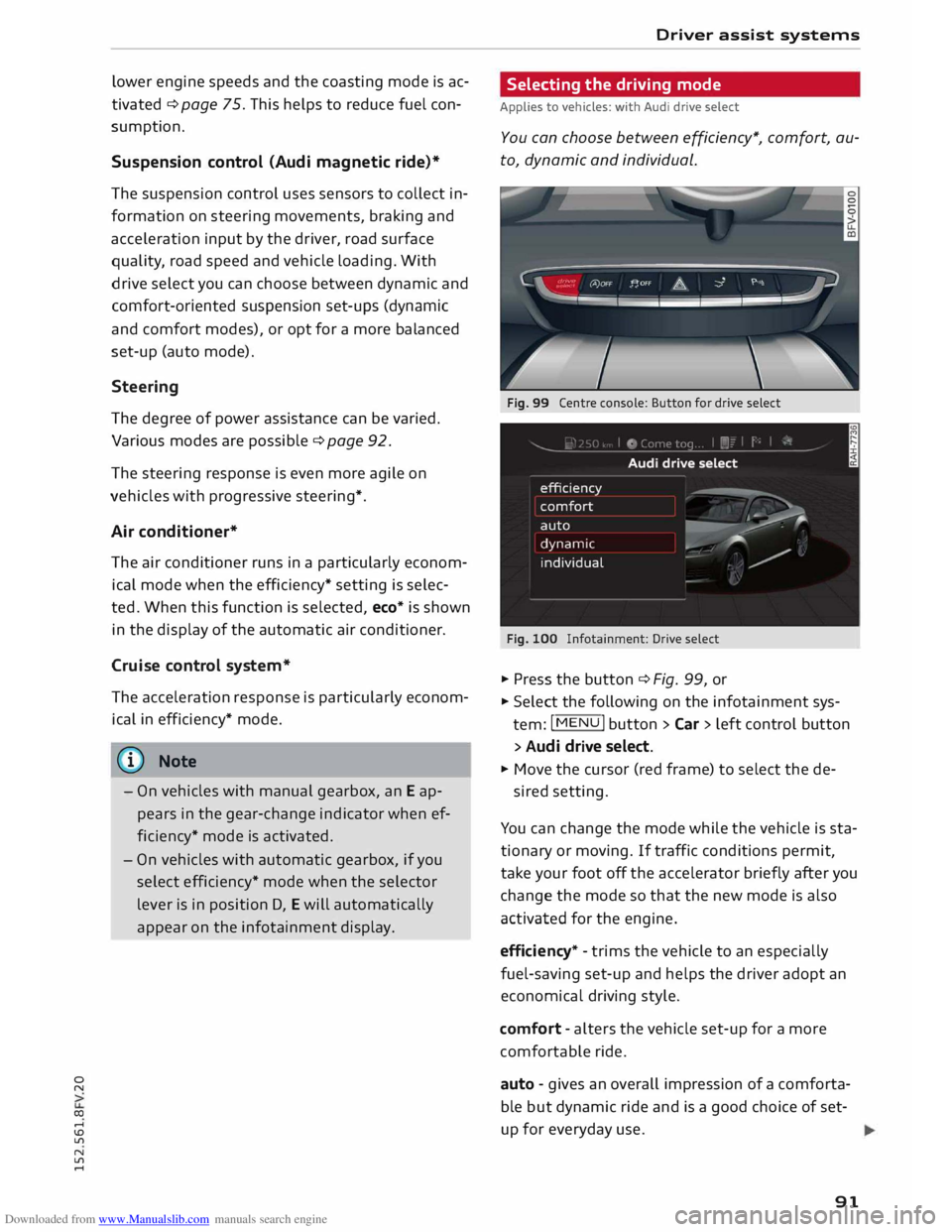
Fig. 99 Centre console: Button for drive select
Fig. 100 Infotainment: Drive select
� Press the button ¢ Fig. 99, or
� Select the following on the infotainment sys
tem: I MENU
I button >Car> Left control button
> Audi drive select.
� Move the cursor (red frame) to select the de-
sired setting.
You can change the mode while the vehicle is sta
tionary or moving. If traffic conditions permit,
take your foot off the accelerator briefly after you
change the mode so that the new mode is also
activated for the engine.
efficiency* -trims the vehicle to an especially
fuel-saving set-up and helps the driver adopt an
economical driving style.
comfort -alters the vehicle set-up for a more
comfortable ride.
auto -gives an overall impression of a comforta
ble but dynamic ride and is a good choice of set
up for everyday use .
91
Page 106 of 284
Downloaded from www.Manualslib.com manuals search engine Intelligent
technology
Switching on/off
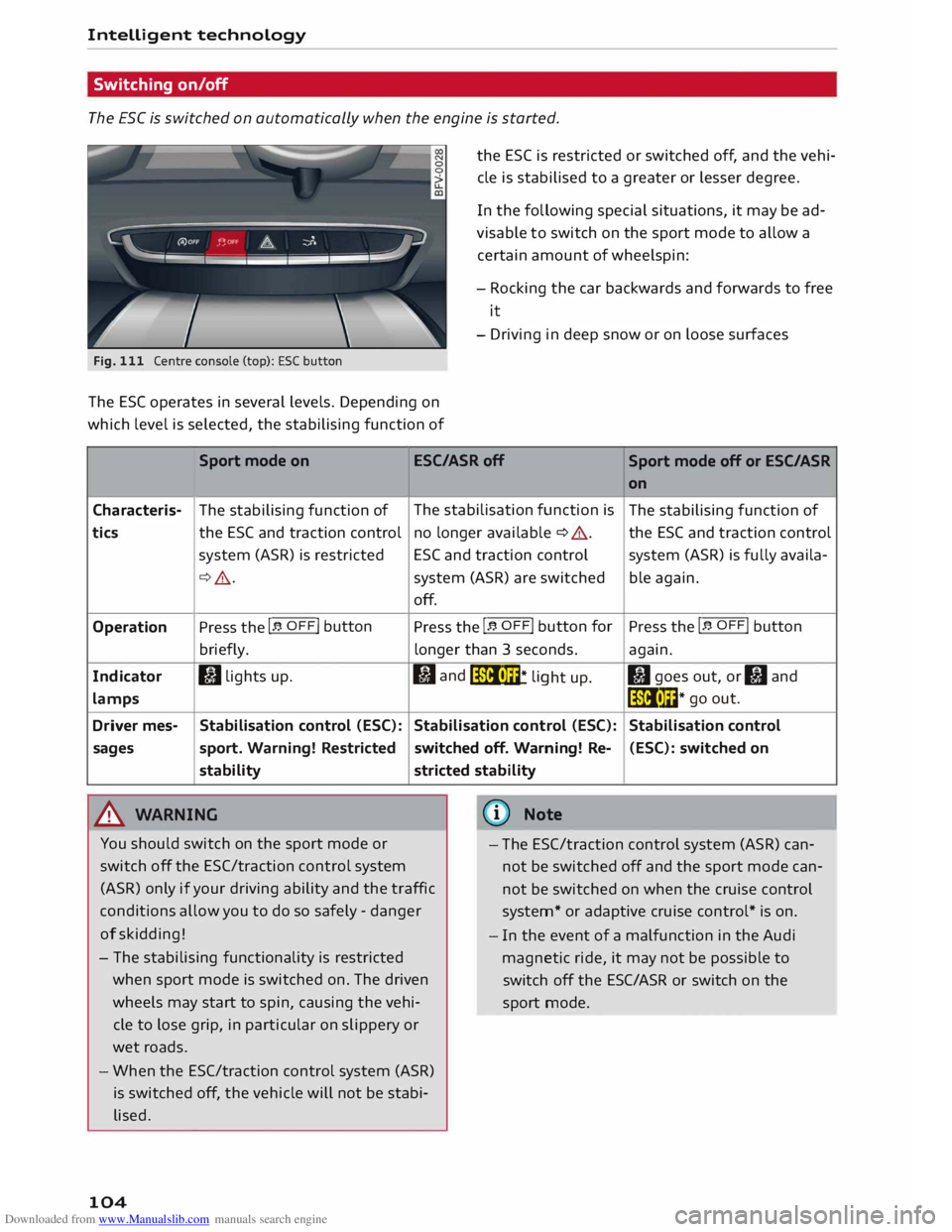
The ESC is switched on automatically when the engine is started.
Fig. 111 Centre console (top): ESC button
The ES( operates in several levels. Depending on
which level is selected, the stabilising function of the
ESC is restricted or switched off, and the vehi
cle is stabilised to a greater or lesser degree.
In the following special situations, it may be ad
visable to switch on the sport mode to allow a
certain amount of wheelspin:
- Rocking the car backwards and forwards to free
it
- Driving in deep snow or on loose surfaces
Sport mode on ESC/ASRoff
Sport mode off or ESC/ASR
Characteris-
tics
Operation
Indicator
lamps
Driver mes-
sages The
stabilising function of
the ESC and traction control
system (ASR) is restricted
¢ .&_.
Press the I� OFF! button
briefly.
I) lights up.
Stabilisation control (ESC):
sport. Warning! Restricted
stability
.&_ WARNING The
stabilisation function is
no longer available ¢ A.
ESC and traction control
system (ASR) are switched
off.
Press the I� OFF! button
for
longer than 3 seconds.
fl and
liiii• m
* li
ght up.
Stabilisation control (ESC):
switched off. Warning! Re-
stricted stability
@ Note on
The stabilising function of
the ESC and traction control
system (ASR) is fully availa-
ble again.
Press the I� OFF! button
again.
II goes out, or II and
liiii• l��* go
out.
Stabilisation control (ESC): switched on
You should switch on the sport mode or
switch off the ESC/traction control system
(ASR) only if your driving ability and the traffic
conditions allow you to do so safely -danger
of skidding! -
The ESC/traction control system (ASR) can
not be switched off and the sport mode can
not be switched on when the cruise control
system* or adaptive cruise control* is on.
- The stabilising functionality is restricted
when sport mode is switched on. The driven
wheels may start to spin, causing the vehi
cle to lose grip, in particular on slippery or
wet roads.
- When the ESC/traction control system (ASR)
is switched off, the vehicle will not be stabi
lised.
104 -
In the event of a malfunction in the Audi
magnetic ride, it may not be possible to
switch off the ESC/ASR or switch on the
sport mode.