air condition AUDI TT COUPE 2014 User Guide
[x] Cancel search | Manufacturer: AUDI, Model Year: 2014, Model line: TT COUPE, Model: AUDI TT COUPE 2014Pages: 284, PDF Size: 34.42 MB
Page 95 of 284
Downloaded from www.Manualslib.com manuals search engine 0
N
co
,-j
\D Lfl
N
Lfl
,-j Parking
aids
General notes
Applies to vehicles: with rear parking aid/parking system
plus/park assist
Various systems are available to help you when
parking or manoeuvring in tight spaces, depend
ing on the equipment fitted on your vehicle.
The rear parking aid gives an acoustic warning if
there are any obstacles behind the car
¢page 93.
When you are parking, the parking system plus
warns you acoustically and optically about obsta
cles detected in front of and behind the vehicle
¢ page 94. On vehicles with park assist, the
area detected at the side of the vehicle ®
¢page 94, Fig. 101 is also monitored.
The park assist helps you to find suitable parking
spaces, to manoeuvre the vehicle into spaces par
allel or perpendicular to the roadside and to drive
out of spaces parallel to the kerb ¢ page 95.
.&_ WARNING
- Always watch the road and the area sur
rounding the vehicle. The electronic systems
cannot replace the full concentration of the
driver. The driver is always responsible for
safety during parking and all other manoeu
vres.
- Please note that certain surfaces, such as
clothing fabrics, cannot be detected or dis
played by the system -risk of accident!
- Sensors have blind spots in which neither
people nor objects are registered. It is par
ticularly important to ensure that there are
no small children or animals near the vehi
cle -risk of accident!
- Always keep a close watch on the area
around the vehicle and make full use of the
rear-view mirrors.
CD CAUTION
- The system may not always be able to de
tect objects such as the following:
- Chains, trailer draw bars, posts or fences Parking
aids
- Objects above the sensors, such as wall
protrusions, etc.
- Objects with certain surfaces or struc
tures, such as wire fences or powder snow
- As your car moves closer to low obstacles,
they may disappear from the sensors' field
of vision. Please note that you will no longer
be warned about these obstacles.
- Impacts or damage to the radiator grille,
bumper, wheel arches or underbody can
cause misalignment of the sensors. This can
impair the effectiveness of the parking aids.
Have the systems checked by a qualified
workshop.
{D) Note
- In certain situations, a warning may be giv
en by the system even if there is no obstacle
within range of the sensors. This can be
caused by the following, for instance:
- Certain road surfaces or long grass
- External ultrasound sources, e.g. from
street cleaning vehicles
- Heavy rain or snow or dense exhaust
fumes
- To familiarise yourself with the system, we
recommend that you practise parking in a
quiet location or a car park. The weather
and light conditions should be good.
- You can adjust the volume of the beeps.
- To ensure that the acoustic parking aid
works properly, the sensors must be kept
clean and free of snow and ice.
- There is a slight delay in the picture display.
Rear parking aid
Description
Applies to vehicles: with rear parking aid
The rear parking aid is an acoustic parking sys
tem.
Description
Sensors are located in the rear bumper. When the
sensors detect an obstacle, you are alerted by
acoustic signals (beeps).
..,.
93
Page 98 of 284
Downloaded from www.Manualslib.com manuals search engine Parking
aids
out of spaces parallel to the kerb. The parking
space can be located between two vehicles or be
hind one vehicle. The park assist takes over the
steering while the driver is parking the vehicle in
the usual way.
The parking system plus is an integral compo
nent of the park assist ¢ page 94 and helps you
during the parking manoeuvre.
The park assist sensors are located on the sides
of the front and rear bumpers. Please ensure that
the sensors are kept free of stickers, deposits and
any other substances which could impair the
function of the system. Notes on cleaning
¢page 236.
In short parking spaces, the parking aid warning
tone will sound continuously when the vehicle is
less than approx. 0.20 m away from the obstacle.
Stop moving immediately!
A WARNING
- Please observe the safety warnings ¢ & in
General notes on page 93.
- Please note that the park assist only han
dles the steering. As the driver you are al
ways responsible for braking and accelerat
ing.
- It is the driver's responsibility to decide
whether a parking space shown in the dis
play is suitable for the vehicle.
- The front of the vehicle swings out during
the parking manoeuvre. Please take all nec
essary measures to ensure that other road
users are not endangered.
- The steering wheel turns rapidly on its own
when parking the vehicle and leaving the
space. Injury may result if a person reaches
between the spokes on the steering wheel
when it is turning.
CD CAUTION
- Please observe the safety warnings ¢0 in
General notes on page 93.
- In certain situations, the park assist will
guide the vehicle onto or across the kerb,
for instance if other vehicles are parked on
the kerb. You should always be ready to take
96 over
the steering wheel in order to prevent
damage to the tyres and/or wheel rims.
- Certain conditions in and around the park
ing space can cause unexpected results
when parking.
- Objects such as pillars, posts, etc.
Road surfaces such as loose gravel, snow,
ice, etc.
CD CAUTION
- The sensors may not always be able to de
tect objects such as trailer draw bars, thin
rails, fences, posts, waste bins and trees,
etc. This could result in damage to your car.
- Please note that the system may not always
be able to detect the surface of certain ob
jects or substances, such as wire fences or
powder snow, etc. You should therefore
check that the parking space is really large
enough before parking the vehicle.
- Please note that low obstacles detected by
the system may no longer be registered by
the sensors as the car moves closer, so the
system will not give any further warning.
Failure to respond to a parking system
warning can result in damage to your vehi
cle and other property. Please bear this in
mind, for example, when using the park as
sist to park behind a truck. Always keep a
close watch on the area in front of and be
hind the vehicle while parking, and inter
vene promptly if necessary.
- To prevent damage to the sensors when
washing the vehicle with a high-pressure
cleaner or a steam cleaner, do not hold the
cleaner less than 10 cm away from the sen
sors and do not keep the cleaner pointed di
rectly at the sensors.
({D Note
- The electronic stabilisation control (ES()
must not be switched off during the parking
manoeuvre ¢page 104.
- The park assist cannot be used to park the
vehicle on tight bends.
Page 103 of 284
Downloaded from www.Manualslib.com manuals search engine Intelligent
technology
Electro-mechanical
power steering
Electro-mechanical power steering assists the
driver when steering.
The degree of power assistance is adapted elec
tronically, depending on the speed.
If the power steering should fail at any time or
the engine is switched off (for instance when be
ing towed), the car can still be steered. However,
substantially more effort than normal will be re
quired to turn the steering wheel.
Warning/indicator lamps and driver
messages
• Steering: fault. Please stop vehicle
If the warning lamp lights up permanently and
the message appears, there may be a power
steering failure.
Do NOT drive on. Obtain professional assistance.
• Steering: fault. Please stop vehicle
There is a malfunction in the electronic steering
lock. The ignition can no longer be switched on.
Do not have the vehicle towed away, because you
won't be able to steer it. Obtain professional as
sistance.
G'!b Steering:
fault. You can continue driving
If the indicator lamp lights up, the steering re
sponse may be heavier or lighter than usual. In
addition, it is possible that the steering wheel
will be off centre when driving in a straight line.
Drive slowly to a qualified workshop and have the
fault rectified.
Ive Steering
lock: fault. Please contact work
shop
There is a malfunction in the electronic steering
lock.
� Drive
to a qualified workshop soon and have the
a: fault rectified.
....
\D Lfl
N
Lfl
.... Intelligent
technology
A WARNING
Have the system malfunction repaired by a
qualified workshop as soon as possible -risk
of accident!
«]} Note
You can drive on if the warning/indicator lamp
• or mJ lights up only briefly.
Brakes
New brake pads
New brake pads do not give full braking effect for
the first 400 km, they must first be "bedded in".
However, you can compensate for the slightly re
duced braking effect by applying more pressure
on the brake pedal. Avoid placing a heavy load on
the brakes during the running-in period.
Wear The rate of wear on the brake pads depends a
great deal on how you drive and the conditions in
which the vehicle is operated. Negative factors
are, for instance, city traffic, frequent short trips
or hard driving with abrupt starts and stops.
Noises Brake noise may develop in certain situations, de
pending on the speed, braking force and ambient
conditions (such as temperature and relative hu
midity).
Effect of moisture and salt
In certain conditions, such as in heavy rain, or af
ter washing the car or driving through water, the
full braking effect can be delayed by moisture (or
in winter by ice) on the discs and brake pads. The
brakes should be "dried" by pressing the pedal to
restore full braking effect.
When you are driving at higher speeds with the
windscreen wipers on, the brake pads are very
briefly brought into contact with the brake discs.
This automatic process which goes unnoticed by
the driver is carried out at regular intervals and is
intended to improve braking response in wet con-
ditions. ..,..
101
Page 105 of 284
Downloaded from www.Manualslib.com manuals search engine on
the brake pedal and do not pump the brakes.
You will feel the brake pedal pulsate while the
anti-lock brake system is working.
Brake assist system
The brake assist system can shorten the braking
distance. The braking force is automatically boos
ted if you press the brake pedal quickly in an
emergency. You must keep pressing the brake
pedal until the danger has passed.
Traction control system (ASR)
In the event of wheelspin, the traction control
system reduces the engine torque to match the
amount of grip available. This helps the car to
start moving, accelerate or climb a gradient.
Electronic differential lock (EDL)
When the EDL detects wheelspin, it brakes the
spinning wheel and directs the power to the oth
er driven wheel (or wheels on quattro* versions).
This function is not available at high speeds.
To prevent the disc brake of the braked wheel
from overheating, the EDL cuts out automatically
if subjected to excessive loads. The vehicle can
still be driven. The EDL will switch on again auto
matically when the brake has cooled down.
Steering recommendation
The ESC helps to stabilise the vehicle by changing
the steering wheel torque.
Selective wheel torque control
Selective wheel torque control intervenes when
cornering by braking the wheel(s) on the inside of
the bend individually as required. This enables
precision cornering. The relevant system may not
intervene in the wet or snow.
Multicollision brake assist system
The "multicollision brake assist system" can help
to reduce the risk of skidding and further colli
sions during an accident. If the airbag control
unit detects that a collision has taken place up-
� wards
of a certain speed, the vehicle is braked by
a'.: the ESC.
co
....
\D U'l
N
U'l
.... Intelligent
technology
The vehicle will not be braked automatically if:
- the driver presses the accelerator,
- the brake pressure applied by pressing the
brake pedal is higher than the brake pressure
initiated by the system,
- or the ESC, the brake system or the vehicle's
electrical system are not fully functional.
A WARNING
- The grip provided by the ESC and the inte
grated systems is still subject to the physi
cal limits of adhesion. Always bear this in
mind, especially on wet or slippery roads. If
you notice the systems cutting in, you
should reduce your speed immediately to
suit the road and traffic conditions. Do not
let the extra safety provided tempt you into
taking any risks when driving -this can
cause accidents.
- Remember that the accident risk always in
creases if you drive fast, especially in cor
ners or on a wet or slippery road, or if you
follow too close behind the vehicle in front
of you. Please bear in mind that even the
ESC and the integrated systems cannot
compe nsate for the increased accident risk.
- When accelerating on a uniformly slippery
surface (for instance all four wheels on ice
or snow), press the accelerator gradually
and carefully. The driven wheels may other
wise start to spin (in spite of the integrated
control systems), which would impair the
car's stability and could lead to an accident.
{D Note
- To ensure that the ABS and ASR systems
work properly, all four wheels must be fit
ted with identical tyres. Any differences in
the rolling radius of the tyres can cause the
system to reduce engine power when this is
not desired.
- The systems can make noises when they in
tervene.
- If the indicator lamp DJ orr§J appears,
there may be a malfunction ¢ page 14. -
103
Page 125 of 284
Downloaded from www.Manualslib.com manuals search engine 0
N
co
,-j
\D U'l
N
U'l
,-j Telephone
Introduction
Applies to vehicles: with telephone
Depending on your vehicle's equipment and the
number of functions available, you have different
options for making calls via the MMI:
Option 1
Connecting the mobile phone via Bluetooth. See
¢page 123.
Option 2
Using a separate SIM card in the SIM card read
er*. See¢ page 126.
,&. WARNING
- According to health organisations, mobile
phones may interfere with the function of
pacemakers. A minimum distance of 20 cm
should be kept between the mobile phone
aerial and the pacemaker.
- Do not carry a mobile phone in your breast
pocket directly over the pacemaker when
the phone is switched on.
- If you suspect interference, switch the
mobile phone off immediately.
-The speech dialogue system ¢page 116
must not be used in cases of emergency,
since the voice changes in stressful situa
tions. This could result in a failed or delayed
telephone connection. Always dial emergen
cy numbers manually!
-Switch off your mobile phones in all areas
where there may be a risk of explosion. Re
member that these areas may not always be
adequately marked. Such places are filling
stations, fuel and chemical storage facilities
or transport vehicles and other places where
fumes, chemicals (e.g. from leaking propane
or fuel vapours in vehicles or buildings) or
large quantities of dust particles (e.g. from
flour, wood or metal) could accumulate in
the air. This warning also applies to all other
places where you would normally switch off
your engine.
- To day's driving conditions require the full at
tention of drivers. Please see ¢page 192.-
Telephone
CD CAUTION
- Always obey the laws regulating the use of
telephones in vehicles.
- You must switch off the telephone in areas
where the use of mobile telephones is pro
hibited. Please observe all relevant caution
notices and regulations.
- The car telephone kit may be installed, serv
iced and repaired only by an Audi workshop
or other qualified workshop.
(D) Note
The maximum range of the Bluetooth connec
tion is limited to the interior of the vehicle.
The connection can be susceptible to interfer
ence from other electronic devices.
Connecting a telephone
Bluetooth profiles
Applies to vehicles: with telephone
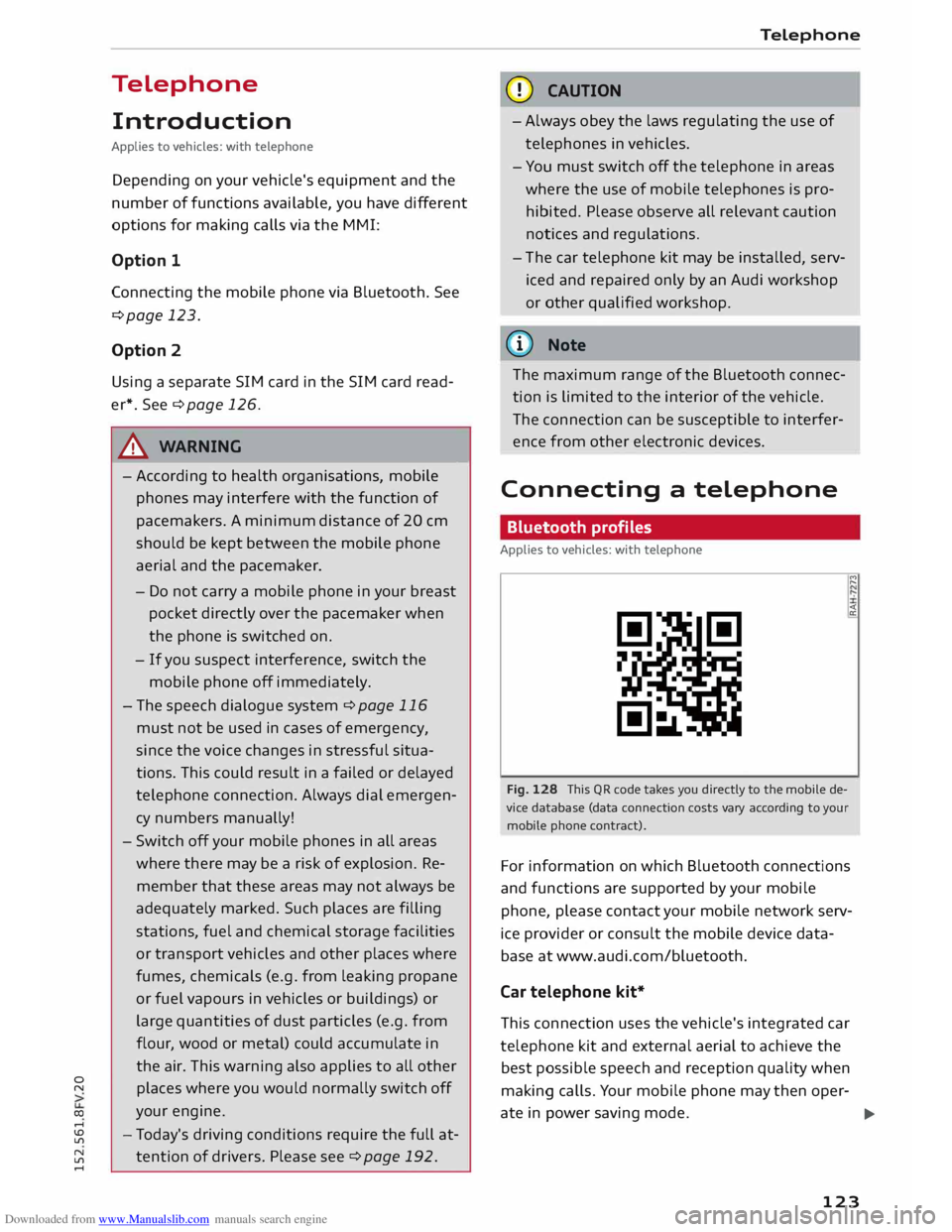
Fig. 128 This QR code takes you directly to the mobile de
vice database (data connection costs vary according to your
mobile phone contract). "'
,...
<
a:
For information on which Bluetooth connections
and functions are supported by your mobile
phone, please contact your mobile network serv
ice provider or consult the mobile device data
base at www.audi.com/bluetooth.
Car telephone kit*
This connection uses the vehicle's integrated car
telephone kit and external aerial to achieve the
best possible speech and reception quality when
making calls. Your mobile phone may then oper-
ate in power saving mode.
..,.
123
Page 177 of 284
Downloaded from www.Manualslib.com manuals search engine 0
N
co
....
\D L/'l
N
L/'l
.... Audi
music interface
Applies to vehicles: with Audi music interface
You can connect your mobile devices via the Audi
music interface in order to charge the battery
and operate the devices via the MMI.
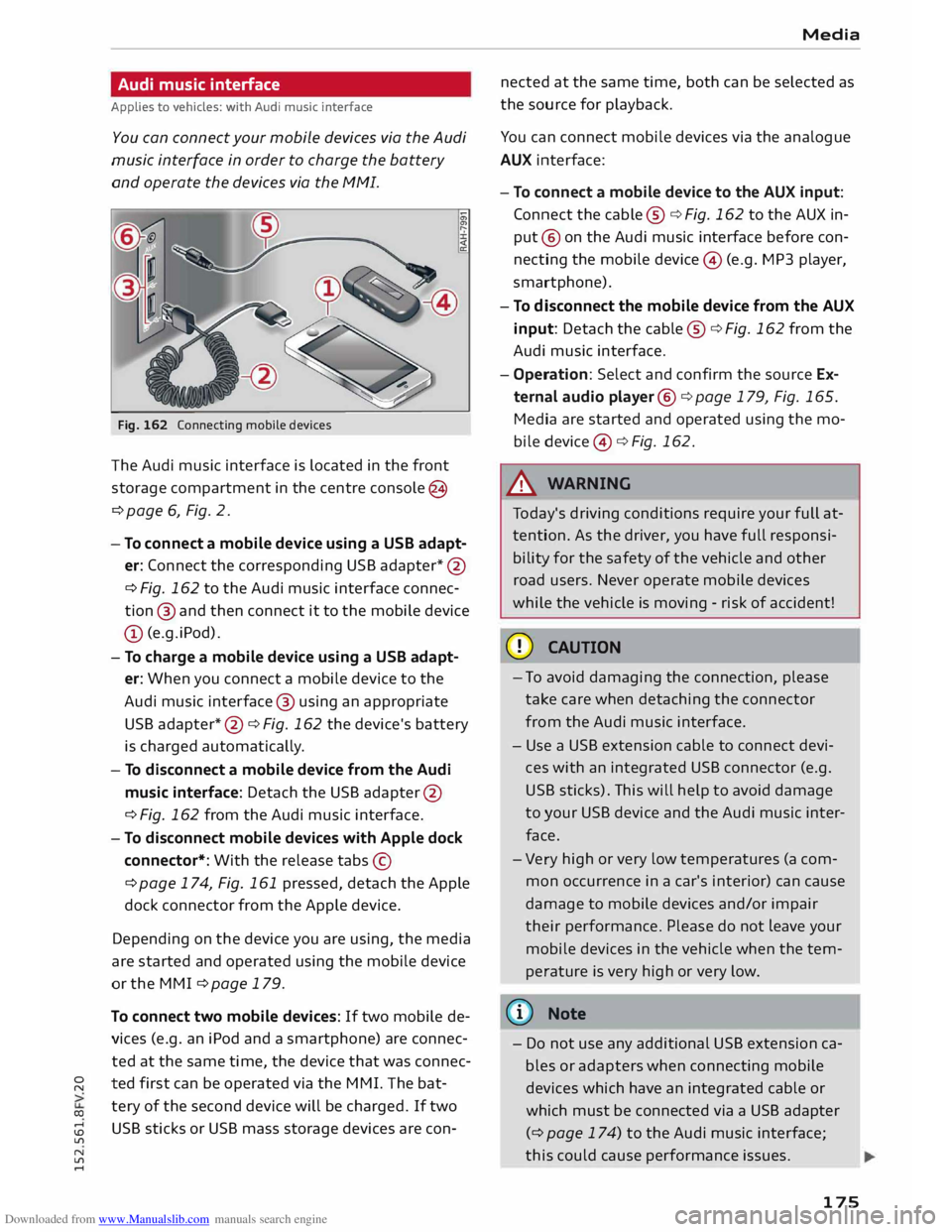
Fig. 162 Connecting mobile devices
The Audi music interface is located in the front
storage compartment in the centre console @
¢ page 6, Fig. 2.
- To connect a mobile device using a use adapt
er: Connect the corresponding USB adapter* @
¢ Fig. 162 to the Audi music interface connec
tion @ and then connect it to the mobile device
(D (e.g.iPod).
- To charge a mobile device using a use adapt
er: When you connect a mobile device to the
Audi music interface @ using an appropriate
USB adapter *@ ¢ Fig. 162 the device's battery
is charged automaticall y.
- To disconnect a mobile device from the Audi
music interface: Detach the USB adapter @
¢Fig. 162 from the Audi music interface.
- To disconnect mobile devices with Apple dock
connector*: With the release tabs©
¢ page 174, Fig. 161 pressed, detach the Apple
dock connector from the Apple device.
Depending on the device you are using, the media
are started and operated using the mobile device
or the MMI ¢ page 179.
To connect two mobile devices: If two mobile de
vices (e.g. an iPod and a smartphone) are connec
ted at the same time, the device that was connec
ted first can be operated via the MMI. The bat
tery of the second device will be charged. If two
USB sticks or USB mass storage devices are con- Media
nected at the same time, both can be selected as
the source for playback.
You can connect mobile devices via the analogue
AUX interface:
- To connect a mobile device to the AUX input:
Connect the cable ®¢ Fig. 162 to the AUX in
put @ on the Audi music interface before con
necting the mobile device© (e.g. MP3 player,
sma rtphone).
- To disconnect the mobile device from the AUX
input: Detach the cable ®¢ Fig. 162 from the
Audi music interface.
- Operation: Select and confirm the source Ex
ternal audio player@¢page 179, Fig. 165.
Media are started and operated using the mo
bile device @¢Fig. 162.
A WARNING
To day's driving conditions require your full at
tention. As the driver, you have full responsi
bility for the safety of the vehicle and other
road users. Never operate mobile devices
while the vehicle is moving -risk of accident!
CD CAUTION
- To avoid damaging the connection, please
take care when detaching the connector
from the Audi music interface.
- Use a USB extension cable to connect devi
ces with an integrated USB connector (e.g.
USB sticks). This will help to avoid damage
to your USB device and the Audi music inter
face.
- Very high or very low temperatures (a com
mon occurrence in a car's interior) can cause
damage to mobile devices and/or impair
their performance. Please do not leave your
mobile devices in the vehicle when the tem
perature is very high or very low.
{D) Note
- Do not use any additional USB extension ca
bles or adapters when connecting mobile
devices which have an integrated cable or
which must be connected via a USB adapter
(¢ page 174) to the Audi music interface;
this could cause performance issues.
175
Page 194 of 284
Downloaded from www.Manualslib.com manuals search engine Safe
driving
Safe driving
General notes
Safety is the first priority
Your safety is our first priority.
This chapter contains important information,
tips, suggestions and warnings that you should
read and observe for your own safety and the
safety of your passengers.
_&. WARNING
- The information in this chapter is important
for the driver of the vehicle and all passen
gers. The other chapters in this manual
(and, where applicable, in the other litera
ture supplied with the vehicle) contain fur
ther important notes which you should read
and observe for your own safety and that of
your passengers.
- Ensure that the complete vehicle wallet is
always in the vehicle. This is especially im
portant when you lend or sell the vehicle to
others.
Notes on traffic safety
You should only use certain infotainment system
functions, e.g. enter a navigation destination,
while the vehicle is stationary. Always be pre
pared to stop operating the infotainment system
in the interest of your own safety and that of oth
er road users.
_&. WARNING
- To day's driving conditions require your full
attention. As the driver, you have full re
sponsibility for the safety of the vehicle and
other road users. For this reason, only oper
ate the infotainment system when the traf
fic conditions allow you to do so safely and
when you can maintain proper control of
your vehicle - risk of accident!
- The volume of the audio sources (radio, CD
player, etc.) should only be set at a level
which enables you to hear distant police and
192 emergency
vehicles clearly-failure to do so
could result in an accident.
- Please observe the laws regulating the use
of telephones in vehicles.
Safety features
The safety features Listed here are part of the ve
hicle's occupant restraint system. They work to
gether to help reduce the risk of injury in a wide
variety of accident situations.
Your safety and the safety of your passengers
should not be left to chance. In the event of an
accident, the safety features incorporated in your
vehicle are capable of reducing the risk of injury.
These are just a few of the safety features in your
Audi:
- Seat belts for all seats
- Belt force limiters for all seats
- Belt tensioners for the front seats
- Front airbags
- Side airbags in the front seat backrests
- Head-protection airbags
- "ISO FIX" anchorages* for "ISO FIX" child seats
on the rear seats
-Adjustable steering column
These individual safety features are harmonised
to provide you and your passengers with the best
possible protection in accident situations. How
ever, they can only be effective if you and your
passengers sit in the correct position and adjust
and use the safety equipment properly.
For these reasons, this chapter explains why
these safety features are so important, how they
can protect you, what you need to remember
when using them, and how you and your passen
gers can gain the most benefit from them. There
are also a number of important safety warnings
which you and your passengers should always ob
serve in order to minimise the risk of injury.
Safety is everyone's responsibility!
Page 195 of 284
Downloaded from www.Manualslib.com manuals search engine Before
every trip
The driver is responsible for the safety of the
passengers and the safe operation of the vehicle
at all times.
For your own safety and the safety of your pas
sengers, always note the following points before
every trip:
.,. Make sure that all lights and turn signals are
working properly.
.,. Check the tyre pressures.
.,. Make sure that all windows are clean and give
good visibility to the outside.
.,. Secure all luggage and other items carefully
¢page 201.
.,. Make sure that no objects can interfere with the
pedals.
.,. Adjust
the mirrors and the front seat according
to your body height.
.,. Make sure that children are protected with suit
able safety seats and properly worn seat belts
¢page 195.
.,. Sit in the correct position in your seat. Make
sure that your passengers are sitting in the cor
rect positions ¢ page 46 .
.,. Fasten your seat belt correctly. Make sure that
your passengers do the same ¢page 204.
What factors can impair your safety?
Safety on the road is directly related to how you
drive, and can also be affected by the passengers
in the vehicle.
The driver is responsible for the safety of the ve
hicle and all its occupants. If your ability to drive
is impaired in any way, you endanger yourself and
other road users ¢& . Therefore:
.,. Do not let yourself be distracted by passengers
or by using a mobile phone, etc.
.,. Never drive when your driving ability is im
paired (by medication, alcohol, drugs, etc.).
.,. Obey all traffic regulations and speed limits
and always maintain a safe distance to the vehi-
� de
in front.
� .,.
Always adjust your speed to suit the road, traf-
� fie
and weather conditions.
U'l
N
U'l
.-1 Safe
driving
.,. Take frequent breaks on long trips. Do not drive
for more than two hours without a stop.
.,. If possible, avoid driving when you are tired or
stressed.
A WARNING
- Distractions while driving or any kind of im
pairment to your driving ability increase the
risk of accident and injury .
- Do not place loose objects on the dash pan
el. These objects could fly around the interi
or when the vehicle is moving (under accel
eration or whilst cornering) and distract the
driver -risk of accident!
Correct sitting positions
Correct driving position
The correct driving position is important for safe
driving.
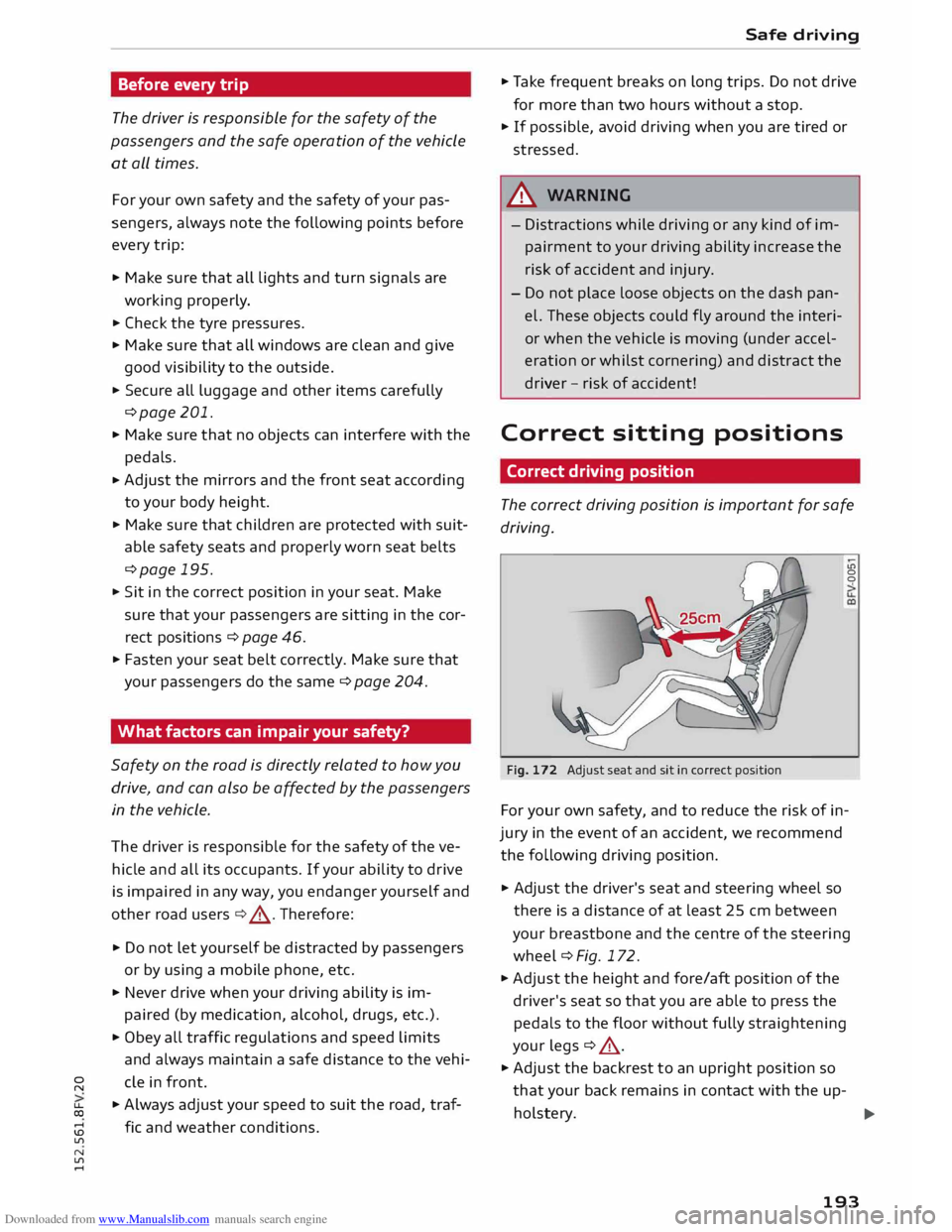
Fig. 172 Adjust seat and sit in correct position LO
0
0
For your own safety, and to reduce the risk of in
jury in the event of an accident, we recommend
the following driving position.
.,. Adjust the driver's seat and steering wheel so
there is a distance of at least 25 cm between
your breastbone and the centre of the steering
wheel¢ Fig. 172.
.,. Adjust the height and fore/aft position of the
driver's seat so that you are able to press the
pedals to the floor without fully straightening
your legs ¢ .&_ .
.,. Adjust the backrest to an upright position so
that your back remains in contact with the up-
holstery. ...,
193
Page 207 of 284
Downloaded from www.Manualslib.com manuals search engine 0
N
co
....
\D Lfl
N
Lfl
.... -
Do not wear the belt over hard or fragile ob
jects (such as glasses or pens, etc.) because
this can cause injuries.
- Loose, bulky clothing (such as an overcoat
over a jacket) impairs the proper fit and
function of the belts.
- The belts must be kept clean, otherwise the
retractors may not work properly
¢ tab. Cleaning the interior on page 238.
- The slot in the seat belt buckle must not be
blocked with paper or other objects, as this
can prevent the latch plate from engaging
properly.
- The latch plate of the belt must always be
engaged in the correct buckle for that seat,
otherwise the belt will not be fully effective.
- Check the condition of the seat belts at reg
ular intervals. If you notice that the belt
webbing, fittings, retractor mechanism or
buckle of any of the belts is damaged, the
belt must be replaced by a qualified work
shop.
- The seat belts must not be removed or
modified in any way. Do not attempt to re
pair a damaged belt yourself.
- Seat belts which have been worn in an acci
dent and stretched must be replaced by a
qualified workshop. The belt anchorages
should also be checked. Seat
belts
Forces acting in a
collision
The physical principles involved in a frontal
impact
Very large forces are generated during a colli
sion; these forces have to be absorbed.
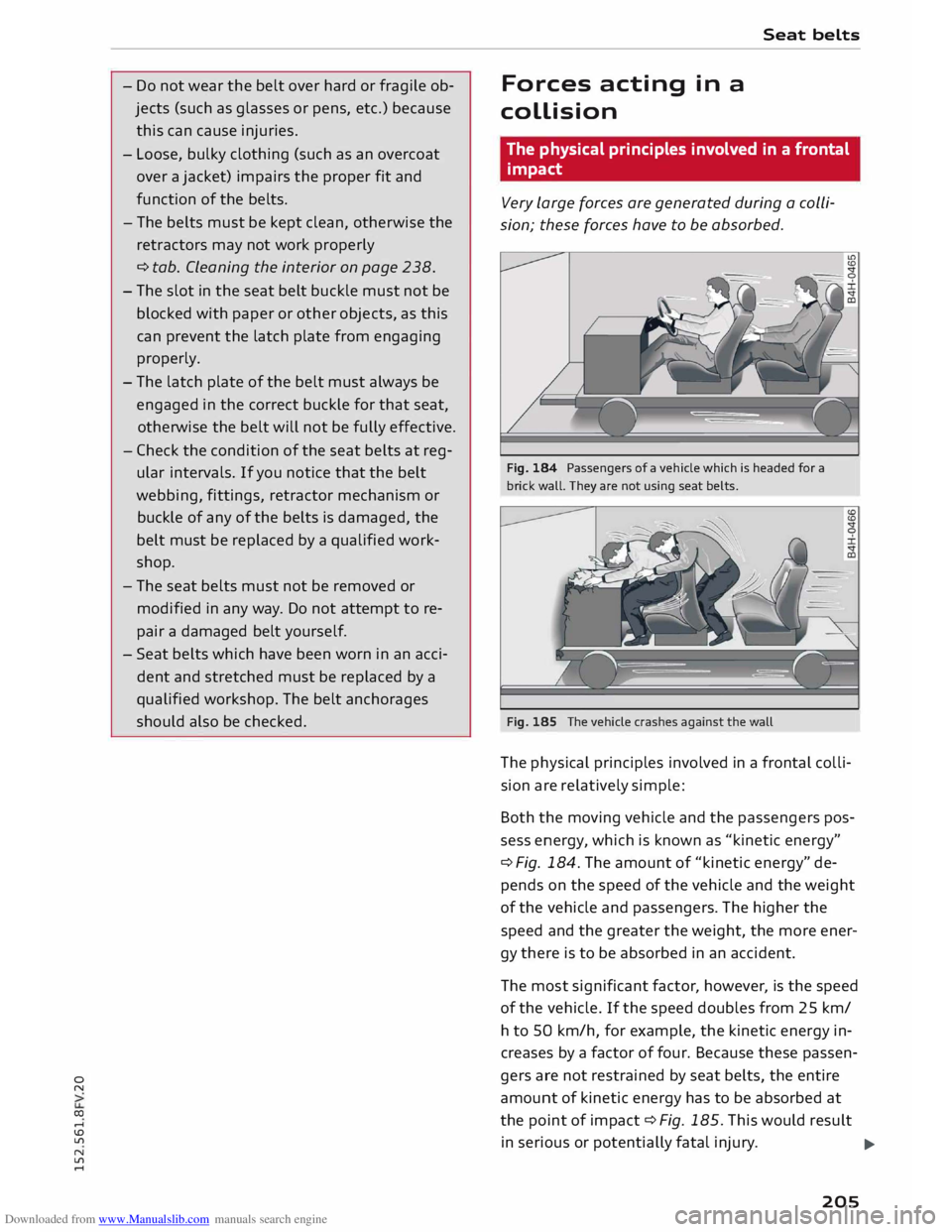
Fig. 184 Passengers of a vehicle which is headed for a
brick wall. They are not using seat belts.
Fig. 185 The vehicle crashes against the wall
The phys ical principles involved in a frontal colli
sion are relatively simple:
Both the moving vehicle and the passengers pos
sess energy, which is known as "kinetic energy"
¢ Fig. 184. The amount of "kinetic energy" de
pends on the speed of the vehicle and the weight
of the vehicle and passengers. The higher the
speed and the greater the weight, the more ener
gy there is to be absorbed in an accident.
The most significant factor, however, is the speed
of the vehicle. If the speed doubles from 25 km/
h to 50 km/h, for example, the kinetic energy in
creases by a factor of four. Because these passen
gers are not restrained by seat belts, the entire
amount of kinetic energy has to be absorbed at
the point of impact ¢ Fig. 185. This would result
in serious or potentially fatal injury.
..,.
205
Page 214 of 284
Downloaded from www.Manualslib.com manuals search engine Airbag
system
Description of front airbags
The airbag system is not a substitute for the seat
belts.
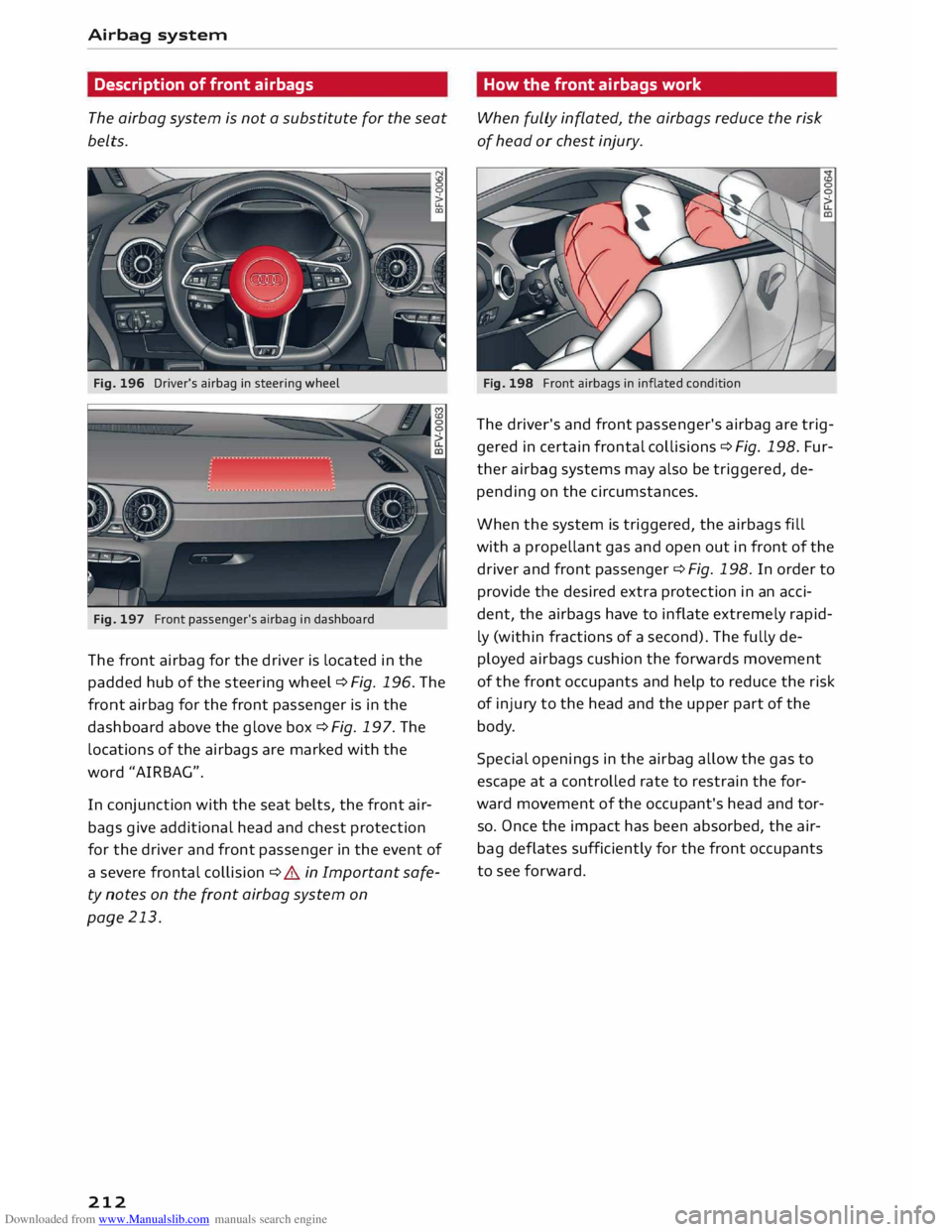
Fig. 196 Driver's airbag in steering wheel
Fig. 197 Front passenger's airbag in dashboard
The front airbag for the driver is located in the
padded hub of the steering wheel ¢Fig. 196. The
front airbag for the front passenger is in the
dashboard above the glove box ¢Fig. 197. The
locations of the airbags are marked with the
word "AIRBAG".
In conjunction with the seat belts, the front air
bags give additional head and chest protection
for the driver and front passenger in the event of
a severe frontal collision ¢ A in Important safe
ty notes on the front airbag system on
page 213.
212 How
the front airbags work
When fully inflated, the airbags reduce the risk
of head or chest injury.
Fig. 198 Front airbags in inflated condition
The driver's and front passenger's airbag are trig
gered in certain frontal collisions ¢Fig. 198. Fur
ther airbag systems may also be triggered, de
pending on the circumstances.
When the system is triggered, the airbags fill
with a prope llant gas and open out in front of the
driver and front passenger ¢ Fig. 198. In order to
provide the desired extra protection in an acci
dent, the airbags have to inflate extremely rapid
ly (within fractions of a second). The fully de
ployed airbags cushion the forwards movement
of the front occupants and help to reduce the risk
of injury to the head and the upper part of the
body.
Special openings in the airbag allow the gas to
escape at a controlled rate to restrain the for
ward movement of the occupant's head and tor
so. Once the impact has been absorbed, the air
bag deflates sufficiently for the front occupants
to see forward.