change wheel AUDI TT COUPE 2014 User Guide
[x] Cancel search | Manufacturer: AUDI, Model Year: 2014, Model line: TT COUPE, Model: AUDI TT COUPE 2014Pages: 284, PDF Size: 34.42 MB
Page 118 of 284
Downloaded from www.Manualslib.com manuals search engine Speech
dialogue system
Speech dialogue system
How to use the system
Applies to vehicles: with speech dialogue system
You can operate many infotainment functions
conveniently by voice.
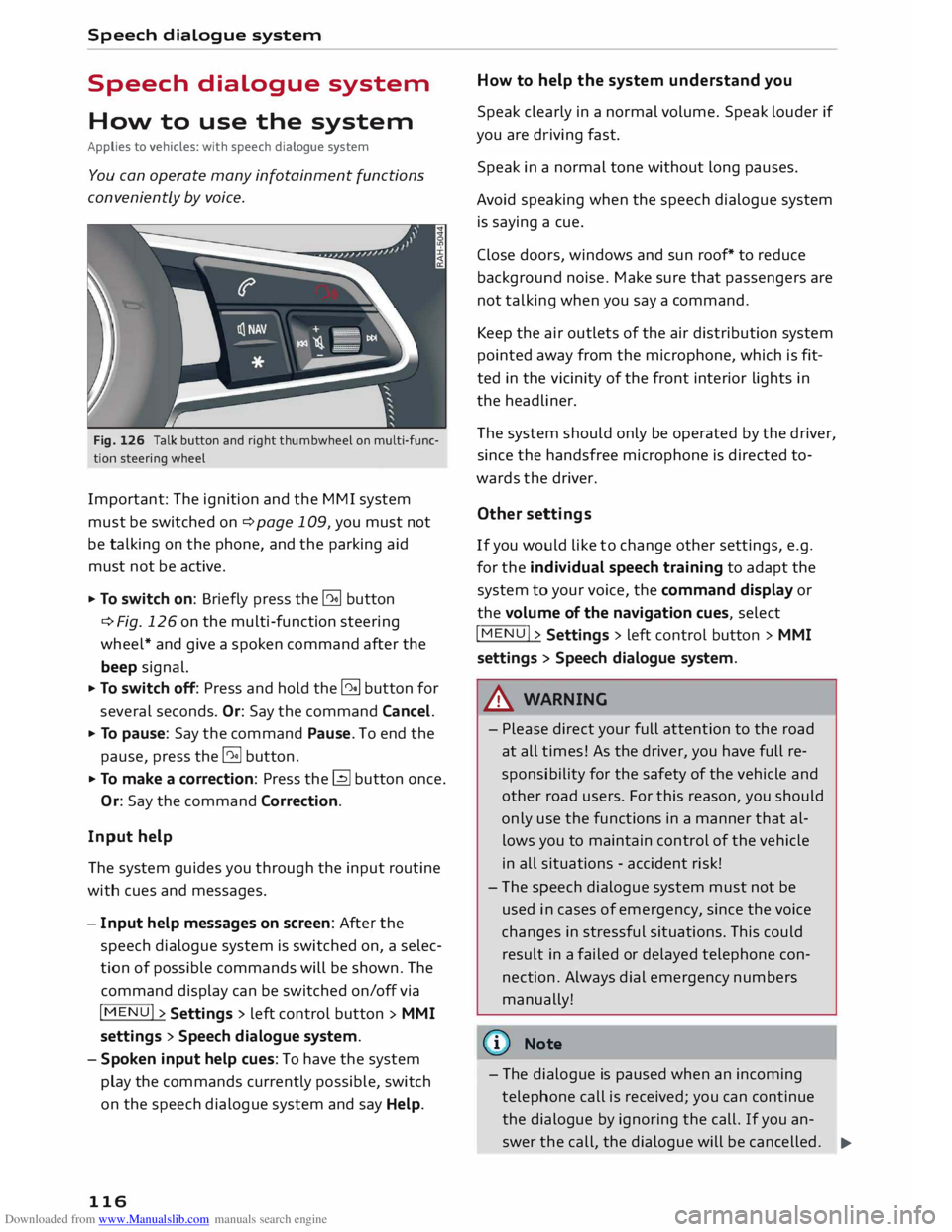
Fig. 126 Talk button and right thumbwheel on multi-func
tion steering wheel
Important: The ignition and the MMI system
must be switched on ¢page 109, you must not
be talking on the phone, and the parking aid
must not be active.
... To switch on: Briefly press the [2!] button
c:::> Fig. 126 on the multi-function steering
wheel* and give a spoken command after the
beep signal.
... To switch off: Press and hold the [2!] button for
several seconds. Or: Say the command Cancel.
... To pause: Say the command Pause. To end the
pause, press the l2!l button.
... To make a correction: Press the� button once.
Or: Say the command Correction.
Input help
The system guides you through the input routine
with cues and messages.
- Input help messages on screen: After the
speech dialogue system is switched on, a selec
tion of possible commands will be shown. The
command display can be switched on/off via
I MENU I>
Settings > left control button >
MMI
settings > Speech dialogue system.
- Spoken input help cues: To have the system
play the commands currently possible, switch
on the speech dialogue system and say Help.
116 How
to help the system understand you
Speak clearly in a normal volume. Speak louder if
you are driving fast.
Speak in a normal tone without long pauses.
Avoid speaking when the speech dialogue system
is saying a cue.
Close doors, windows and sun roof* to reduce
background noise. Make sure that passengers are
not talking when you say a command.
Keep the air outlets of the air distribution system
pointed away from the microphone, which is fit
ted in the vicinity of the front interior lights in
the headliner.
The system should only be operated by the driver,
since the handsfree microphone is directed to
wards the driver.
Other settings
If you would like to change other settings, e.g.
for the individual speech training to adapt the
system to your voice, the command display or
the volume of the navigation cues, select
I MENU I>
Settings > left control button >
MMI
settings > Speech dialogue system.
A WARNING
- Please direct your full attention to the road
at all times! As the driver, you have full re
sponsibility for the safety of the vehicle and
other road users. For this reason, you should
only use the functions in a manner that al
lows you to maintain control of the vehicle
in all situations -accident risk!
- The speech dialogue system must not be
used in cases of emergency, since the voice
changes in stressful situations. This could
result in a failed or delayed telephone con
nection. Always dial emergency numbers
manually!
{tI)) Note
- The dialogue is paused when an incoming
telephone call is received; you can continue
the dialogue by ignoring the call. If you an-
swer the call, the dialogue will be cancelled.
..,.
Page 234 of 284

Downloaded from www.Manualslib.com manuals search engine Wheels
and tyres
& WARNING
- Use only tyre/rim combinations and match
ing wheel bolts approved by Audi. Otherwise
damage to the vehicle and an accident could
result.
- For technical reasons, it is not possible to
use wheels from other vehicles. In certain
cases, it is not even possible to use wheels
from another vehicle of the same model.
- It is very important to ensure that the tyres
you have chosen have adequate clearance.
When selecting replacement tyres, do not
rely entirely on the nominal tyre size marked
on the tyre; with some makes of tyre the ef
fective tyre size can differ significantly from
the nominal dimensions, even though the
tyres have the same size designation. Inade
quate tyre clearance can result in damage to
the tyres or the vehicle, causing a serious
safety risk.
- Avoid running the car on tyres that are more
than 6 years old. If you have no alternative,
you should drive slowly and with extra care
at all times.
- The use of run-flat tyres on your vehicle is
NOT authorised! Unauthorised use can cause
an accident or damage your vehicle.
- If wheel trims are fitted after the car is pur
chased, ensure that there is an adequate
flow of air for cooling the brakes -risk of ac
cident!
Tyre wear / damage
Fig. 219 Tyre tread: Tread wear indicators
l l
Please observe the applicable regulations in the country in
which you are travelling.
232 Tyre
wear
Inspect the tyres regularly for damage.
- The wear on under or over-inflated tyres is sig
nificantly higher.
- Fast cornering, heavy acceleration and hard
braking all increase tyre wear.
- If you notice excessive tyre wear, have the
wheel alignment checked by a qualified work
shop.
- Have your tyres rebalanced if steering wheel vi
brations indicate an imbalance. Otherwise, the
tyres and other parts of the vehicle may wear
faster.
Tread wear indicators
The original tyres on your vehicle have 1.6 mm
high tread wear indicators ¢ Fig. 219 running
across the tread at regular intervals. The letters
"TWI" or triangles on the sidewall indicate the
positions of the tread wear indicators.
The minimum tread depth 1
) is reached at the lat
est when the tread is worn down to the tread
wear indicators. Replace the tyres with new ones
¢ ,&..
Changing wheels round
Wheels should be changed round regularly to en
sure that the wear is equal on all tyres. Fit the
wheels from the rear axle on the front axle and
vice-versa. All the tyres will then last for about
the same time.
On tyres with a directional tread pattern, note
the direction of rotation indicated on the sidewall
¢page 247.
Concealed damage
Damage to tyres and rims is often not readily visi
ble. If you notice unusual vibrations or the car
pulling to one side, this may indicate that one of
the tyres is damaged. Reduce your speed imme
diately. Inspect the tyres for damage. If no exter
nal damage is visible, drive slowly and carefully
to the nearest qualified workshop and have the
car inspected.
Page 236 of 284
Downloaded from www.Manualslib.com manuals search engine Wheels
and tyres
tread pattern), summer tyres give less grip on ice
and snow.
... Winter tyres must be fitted on all four wheels.
... Only use winter tyres of the correct type ap-
proved for your vehicle.
... Please
note that the maximum permissible
speed for winter tyres may be lower than for
summer tyres¢.&_ . Your specialist retailer can
advise you of the maximum speed for your
tyres.
... After fitting the wheels you must always check
the tyre pressures ¢page 233.
Winter tyres lose their effectiveness when the
tread is worn down to a depth of 4 mm. The per
formance of winter tyres is also severely impaired
by ageing, even if the tread is still much deeper
than 4 mm.
.&_ WARNING
- Never exceed the maximum approved speed
for your tyres. This causes the tyres to over
heat and can even result in a blow-out -risk
of accident!
- Always adapt your driving style to the pre
vailing road and traffic conditions. Drive
carefully and reduce your speed on icy or
slippery roads. Even winter tyres lose their
grip on black ice.
@) For the sake of the environment
Summer tyres should be fitted again as soon
as possible; they give better handling on
roads which are free of snow and ice. They are
quieter, do not wear so quickly and reduce
fuel consumption.
(Qj) Note
All-weather tyres can also be used instead of
winter tyres. Please note that winter tyres
with the & symbol are required by law during
the winter season in some countries.
Snow chains
Snow chains will improve braking ability as well
as traction in winter conditions.
234 ...
Snow chains can be used on the front wheels
only. This also applies to vehicles with four
wheel drive* .
... Check that the snow chains are correctly seated
after driving for a few yards; follow the instruc
tions given by the manufacturer .
... Keep your speed below 50 km/h. Please ob-
serve the applicable local regulations.
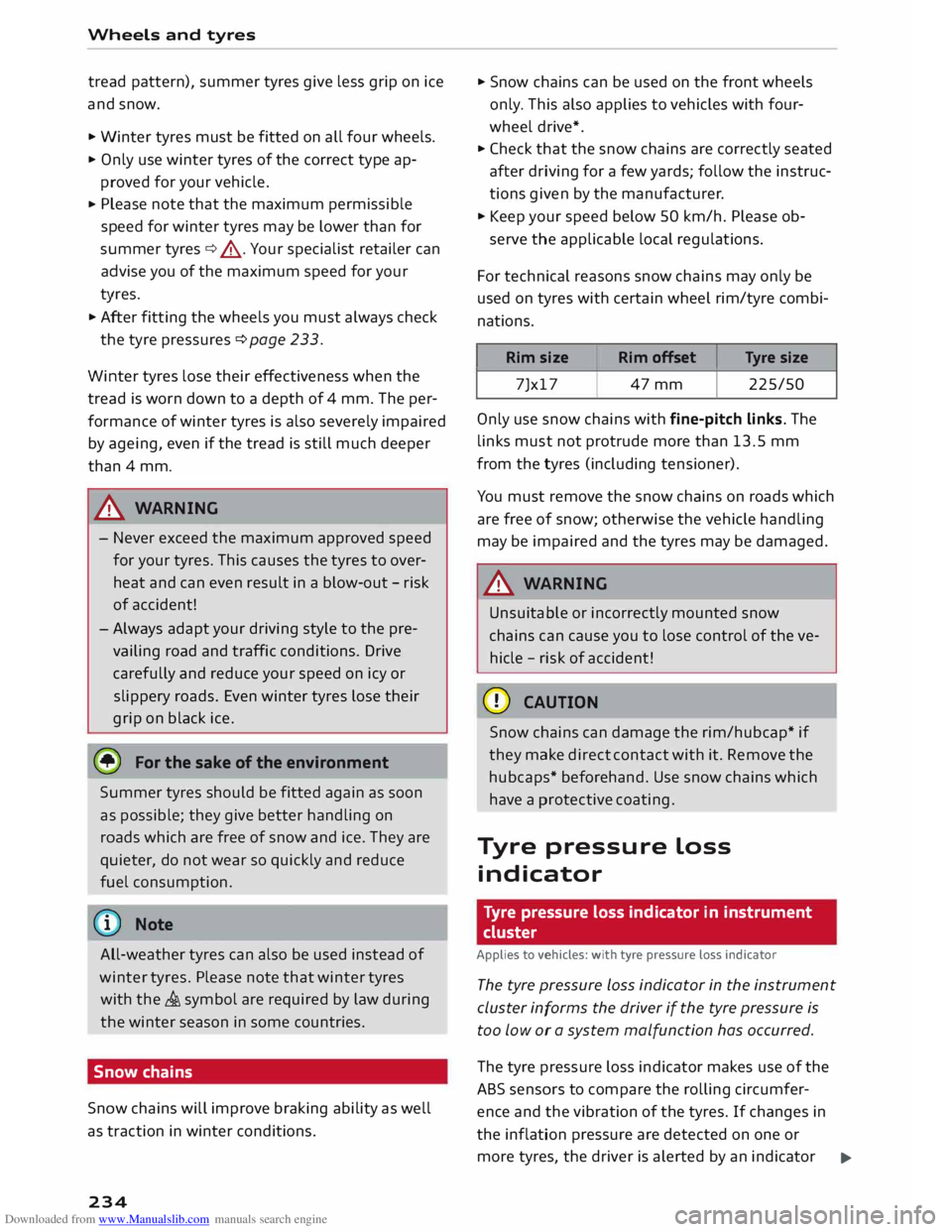
For technical reasons snow chains may only be
used on tyres with certain wheel rim/tyre combi
nations.
Rim size
Rim offset Tyre
size
7Jx17 47mm 225/50
Only use snow chains with fine-pitch links. The
links must not protrude more than 13.5 mm
from the tyres (including tensioner).
You must remove the snow chains on roads which
are free of snow; otherwise the vehicle handling
may be impaired and the tyres may be damaged.
.&_ WARNING
Unsuitable or incorrectly mounted snow
chains can cause you to lose control of the ve
hicle -risk of accident!
CD CAUTION
Snow chains can damage the rim/hubcap* if
they make direct contact with it. Remove the
hubcaps* beforehand. Use snow chains which
have a protective coating.
Tyre pressure Loss
indicator
Tyre pressure loss indicator in instrument
cluster
Applies to vehicles: with tyre pressure Loss indicator
The tyre pressure Loss indicator in the instrument
cluster informs the driver if the tyre pressure is
too low or a system malfunction has occurred.
The tyre pressure loss indicator makes use of the
ABS sensors to compare the rolling circumfer
ence and the vibration of the tyres. If changes in
the inflation pressure are detected on one or
more tyres, the driver is alerted by an indicator
..,.
Page 237 of 284
Downloaded from www.Manualslib.com manuals search engine 0
N
co
....
\D Lfl
N
Lfl
.... lamp
[Bl and a message on the infotainment dis
play. If only one tyre is affected, the display will
indicate its position.
Each time you change a tyre, change the wheels
round or change the tyre pressures on your vehi
cle (e.g. when switching from partial load to full
load and vice-versa), you must store the new tyre
pressures on the infotainment system
¢ page 235. Monitoring of the tyre pressures is
based on the tyre pressures you have stored. The
inflation pressures recommended for your vehicle
are given on the tyre pressure sticker
¢ page 233, Fig. 220.
The rolling circumference and vibration can
change and cause a tyre pressure warning if:
- The inflation pressure in one or more tyres is
too low.
- The tyre has suffered structural damage.
- The wheels were changed or the tyre pressures
were changed and the new tyre pressures were
not stored ¢ page 235.
- You are driving with the temporary spare
wheel*.
Indicator lamps
RI]- Loss of pressure on one or more tyres¢ A.
Check and change or repair the tyre(s). Check and
adjust the inflation pressures of all four tyres
again and store the new tyre pressures on the in
fotainment system¢ page 235.
ffim (Tyre Pressure Monitoring System) Tyre
pressure: fault. See owner's manual -If� ap
pears and the indicator lamp [Bl in the instru
ment cluster display flashes for approx. one mi
nute and then remains lit after you have switched
on the ignition or while you are driving, there is a
fault in the system. Try to store the correct tyre
pressures ¢ page 235. If the indicator lamp
does not go out or if it comes on again after a
short time, drive to a qualified workshop without
delay and have the fault rectified.
&_ WARNING
- If the tyre pressure loss indicator appears
on the display, slow down immediately and
avoid any severe braking or steering ma- Wheels
and tyres
noe uvres. As soon as you can do so safely,
stop and check the tyres and the tyre pres
sures.
- It is the driver's responsibility to ensure that
the tyre pressures are correct. For this rea
son you must check the tyre pressures regu
larly.
- Under certain conditions (e.g. driving at
high speeds, on ice and snow or on poor
road surfaces) the tyre pressure loss indica
tor may not appear immediately.
- Run-flat tyres* may only be used on vehicles
which were originally equipped with this
type of tyre.
- If a malfunction occurs in the ESC system,
the tyre pressure loss indicator may also be
out of action.
- When driving with snow chains, a system
malfunction can occur.
- The tyre pressure loss indicator on your Audi
is specially matched to tyres with the mark
ing "AO" or "RO" ¢ page 231. We recom
mend that you use these tyres.
Storing tyre pressure settings
Applies to vehicles: with tyre pressure loss indicator
When you change a tyre or the tyre pressure on
your vehicle, you must confirm the change on the
infotainment system.
� Before storing the new tyre pressures, check
that the current pressures on all four wheels
correspond to the specified values and adapt
the pressures to the current load ¢ page 232.
� Switch on the ignition.
� Select the
following on the infotainment sys
tem: I MENU I button >Car> left control button
> Servicing & checks > Tyre pressure loss indi
cator.
@ Note
Do not store the tyre pressures if you are driv
ing with snow chains. Otherwise, a system
malfunction may occur .
235
Page 244 of 284
Downloaded from www.Manualslib.com manuals search engine Mobility
Tool kit/tyre repair kit/compressor
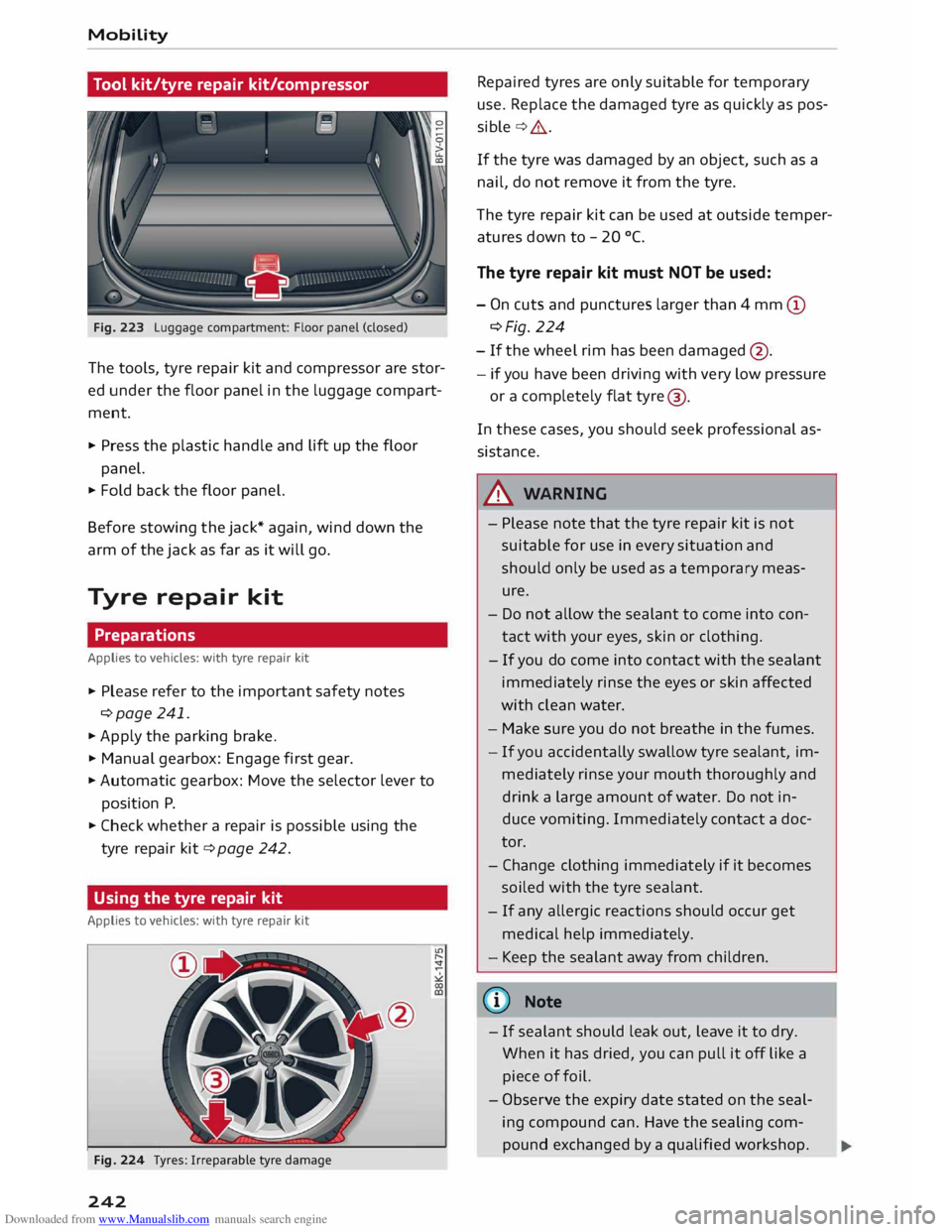
Fig. 223 Luggage compartment: Floor panel (closed)
The tools, tyre repair kit and compressor are stor
ed under the floor panel in the luggage compart
ment.
"' Press the plastic handle and Lift up the floor
panel.
"' Fold back the floor panel.
Before stowing the jack* again, wind down the
arm of the jack as far as it will go.
Tyre repair kit
Preparations
Applies to vehicles: with tyre repair kit
"' Please refer to the important safety notes
¢page 241.
"'Apply the parking brake.
"' Manual gearbox: Engage first gear.
"' Automatic gearbox: Move the selector lever to
position P.
"' Check whether a repair is possible using the
tyre repair kit¢ page 242.
Using the tyre repair kit
Applies to vehicles: with tyre repair kit
Fig. 224 Tyres: Irreparable tyre damage
242 Repaired
tyres are only suitable for temporary
use. Replace the damaged tyre as quickly as pos
sible ¢,&..
If the tyre was damaged by an object, such as a
nail, do not remove it from the tyre.
The tyre repair kit can be used at outside temper
atures down to - 20 °(.
The tyre repair kit must NOT be used:
- On cuts and punctures larger than 4 mm (D
¢Fig. 224
- If the wheel rim has been damaged @.
- if you have been driving with very low pressure
or a completely flat tyre@
.
In these cases, you should seek professional as
sistance.
A WARNING
- Pl ease note that the tyre repair kit is not
suitable for use in every situation and
should only be used as a temporary meas
ure.
- Do not allow the sealant to come into con
tact with your eyes, skin or clothing.
- If you do come into contact with the sealant
immediately rinse the eyes or skin affected
with clean water.
- Make sure you do not breathe in the fumes.
- If you accidentally swallow tyre sealant, im-
mediately rinse your mouth thoroughly and
drink a large amount of water. Do not in
duce vomiting. Immediately contact a doc
tor.
- Change clothing immediately if it becomes
soiled with the tyre sealant.
- If
any allergic reactions should occur get
medical help immediately.
- Keep the sealant away from children.
(©) Note
- If sealant should leak out, leave it to dry.
When it has dried, you can pull it off Like a
piece of foil.
- Observe the expiry date stated on the seal
ing compound can. Have the sealing com
pound exchanged by a qualified workshop.
Page 246 of 284
Downloaded from www.Manualslib.com manuals search engine Mobility
- If the tyre is too badly damaged, you should
seek professional assistance.
(f!j} For the sake of the environment
A used can of sealing compound can be re
turned to your qualified workshop for dispos
al.
ij) Note
After repairing a tyre, remember to buy a new
tyre sealant can at a qualified workshop.
Changing a wheel
Preparations
Certain preparations must be made before you
change the wheel.
� Please refer to the important safety notes
¢page 241.
� Apply the parking brake.
� Manual
gearbox: Engage first gear.
� Automatic gearbox: Move the selector lever to
position P.
� Take out the tools ¢ page 242 and spare wheel
¢page 247.
A WARNING
If you have to change the tyre on a gradient,
block the wheel opposite the wheel being
changed by placing a stone or similar object
under it to prevent the vehicle from rolling
away.
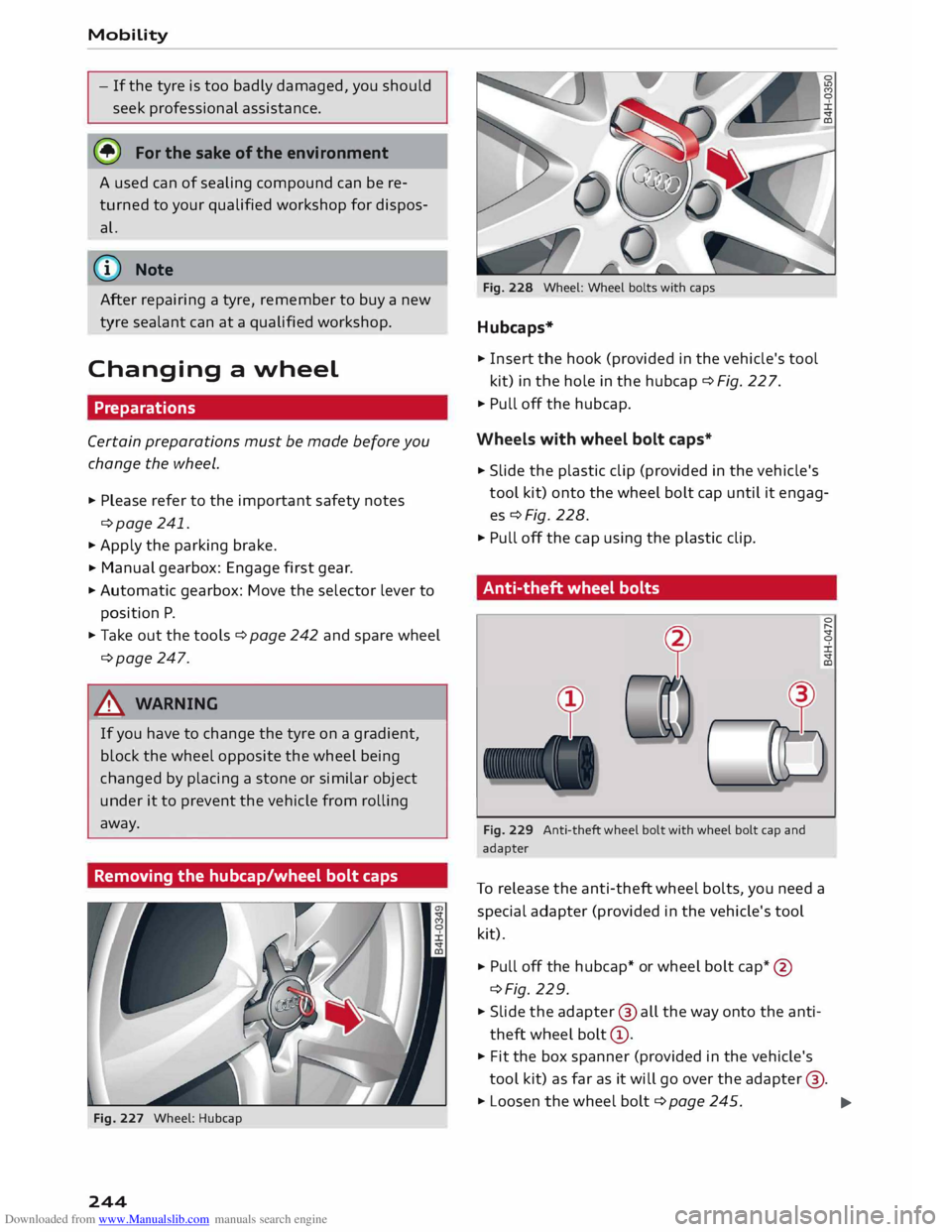
Removing the hubcap/wheel bolt caps
Fig. 227 Wheel: Hubcap
244 Fig.
228 Wheel: Wheel bolts with caps
Hubcaps*
� Insert the hook (provided in the vehicle's tool
kit) in the hole in the hubcap ¢ Fig. 22 7.
� Pull off the hubcap.
Wheels with wheel bolt caps*
� Slide
the plastic clip (provided in the vehicle's
tool kit) onto the wheel bolt cap until it engag
es¢ Fig. 228.
� Pull off the cap using the plastic clip.
Anti-theft wheel bolts
Fig. 229 Anti-theft wheel bolt with wheel bolt cap and
adapter
To release the anti-theft wheel bolts, you need a
special adapter (provided in the vehicle's tool
kit).
� Pull
off the hubcap* or wheel bolt cap*@
¢Fig. 229.
� Slide the adapter @ all the way onto the anti
theft wheel bolt@.
� Fit
the box spanner (provided in the vehicle's
tool kit) as far as it will go over the adapter @.
� Loosen the wheel bolt ¢page 245.
..,.
Page 247 of 284
Downloaded from www.Manualslib.com manuals search engine 0
N
co
,-j
\D L/'l
N
L/'l
,-j �
Note
Note the code number of the anti-theft wheel
bolt and keep it in a safe place -not in your
vehicle. If you need a replacement adapter,
give the code number to your Audi dealer.
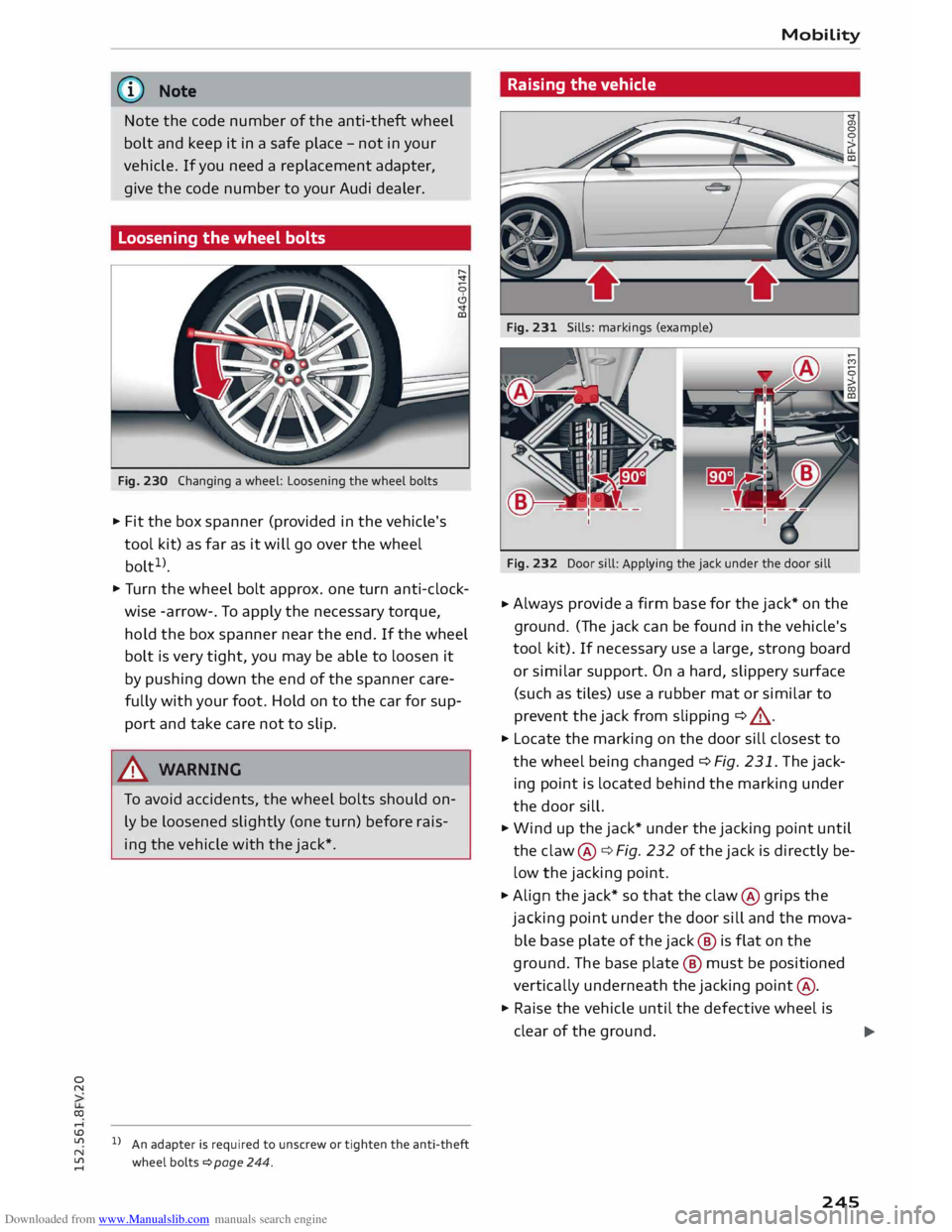
Loosening the wheel bolts
Fig. 230 Changing a wheel: Loosening the wheel bolts
.,. Fit the box spanner (provided in the vehicle's
tool kit) as far as it will go over the wheel
bolt 1
>.
.,. Turn the wheel bolt approx. one turn anti-clock
wise -arrow-. To apply the necessary torque,
hold the box spanner near the end. If the wheel
bolt is very tight, you may be able to loosen it
by pushing down the end of the spanner care
fully with your foot. Hold on to the car for sup
port and take care not to slip.
.&_ WARNING
To avoid accidents, the wheel bolts should on
ly be loosened slightly (one turn) before rais
ing the vehicle with the jack*.
l l
An adapter is required to unscrew or tighten the anti-theft
wheel bolts � page 244. Mobility
Raising the vehicle
Fig. 231 Sills: markings (example)
Fig. 232 Door sill: Applying the jack under the door sill
.,. Always
provide a firm base for the jack* on the
ground. (The jack can be found in the vehicle's
tool kit). If necessary use a large, strong board
or similar support. On a hard, slippery surface
(such as tiles) use a rubber mat or similar to
prevent the jack from slipping ¢ ,,&.
.,. Locate the marking on the door sill closest to
the wheel being changed ¢ Fig. 231. The jack
ing point is located behind the marking under
the door sill.
.,. Wind up the jack* under the jacking point until
the claw @¢ Fig. 232 of the jack is directly be
low the jacking point .
.,. Align the jack* so that the claw @ grips the
jacking point under the door sill and the mova
ble base plate of the jack @ is flat on the
ground. The base plate @ must be positioned
vertically underneath the jacking point@ .
.,. Raise the vehicle until the defective wheel is
clear of the ground.
.,.
245
Page 248 of 284

Downloaded from www.Manualslib.com manuals search engine Mobility
.&_ WARNING
- Make sure the jack* is stable. If the ground
underneath the jack* is slippery or soft, the
jack can slip or sink in -risk of injury!
- Use only the jack* supplied with your vehicle
to raise the vehicle. If you use a jack from a
different vehicle, your vehicle may slip off
the jack -risk of injury!
- Apply the jack* only at the jacking points Lo
cated behind the markings on the door sill
and align it properly. Otherwise there is a
risk of injury since the jack* can slip off sud
denly if it is not properly engaged.
- The height of the parked vehicle can change
as a result of variations in Loading.
- Never start the engine when the vehicle is
on the jack -risk of accident!
- If work has to be done under the vehicle, en
sure that it is safely supported on suitable
stands -risk of injury!
CD CAUTION
The vehicle must not be lifted up on its sills.
Only apply the jack* at the jacking points Loca
ted behind the markings on the door sill. Oth
erwise your vehicle could be damaged.
Taking off/ putting on the wheel
Fig. 233 Wheel: Hexagonal socket for turning wheel bolts
246 Fig.
234 Wheel: Mounting pin in wheel bolt hole nearest
to the top
Taking off the wheel
... Using the hexagonal socket in the screwdriver
handle {provided in the vehicle's tool kit), un
screw the top wheel bolt and place it on a clean
surface ¢ Fig. 233.
... Screw in the mounting pin (provided in the ve
hicle's tool kit) by hand in place of the wheel
bolt¢ Fig. 234.
.,. Then unscrew the other wheel bolts .
.,. Take off the wheel ¢(D
. The mounting pin
stays where it is.
Putting on the wheel
When putting on a tyre with directional tread
pattern, refer to ¢ page 247.
.,. Put on the wheel, using the mounting pin to
guide it into place ¢(D
.
.,. Screw in the wheel bolts and tighten them
lightly using the hexagonal socket .
... Then unscrew the mounting pin and tighten the
remaining wheel bolt lightly .
... Carefully lower the car with the jack* .
.,. Tighten the wheel bolts in diagonal sequence
with the box spanner.
The wheel bolts should be clean and turn easily.
Before putting on the wheel, inspect the condi
tion of the wheel and hub mounting surfaces.
These surfaces must be clean before mounting
the wheel.
.&_ WARNING
Do not use the hexagonal socket in the screw-
driver handle to tighten the wheel bolts. It is ..,.
Page 253 of 284
Downloaded from www.Manualslib.com manuals search engine 0
N
co
....
\D U'l ,&.
WARNING
There is a high risk of accidents when towing/
tow-starting, as the towed vehicle can easily
be driven into the towing vehicle.
CD CAUTION
- If it is not possible to tow the vehicle as de
scribed above (e.g. due to a gearbox failure
or if the vehicle has to be towed further
than 50 km), it must be transported on a
special car transporter or trailer.
- To wing a vehicle with the wrong axle raised
can cause serious damage to the gearbox.
@ Note
- Automatic gearbox: It is not possible to
move the selector lever out of position P if
the electrical power supply fails. Before the
vehicle can be recovered/manoeuvred you
must manually release the selector lever
¢page 78.
- Please observe the relevant regulations
when towing or tow-starting.
Towing away
Please observe the important safety warnings on
¢page 250.
Preparations
.. Attach the tow-rope or the tow-bar only to the
towing anchorages provided for this purpose
¢page 252, ¢page 252.
.. Please ensure that the tow-rope is not twisted
as it could otherwise become unscrewed from
the towline anchorage while the vehicle is being
towed.
.. The hazard warning lights of both vehicles
must normally be switched on ¢ page 40. How
ever, observe any regulations to the contrary.
Towing vehicle (front)
.. Ensure that the tow-rope is taut before you
drive off.
N
� l
l
Important: The battery must be adequately charged. Mobility
.. Engage the clutch very gently when starting to
move (manual gearbox) and press the accelera
tor slowly.
.. Avoid unnecessary braking and manoeuvres.
Vehicle being towed (rear)
.. Ensure
that the ignition is switched on, the
steering wheel is not locked, and that you can
operate the turn signals, horn or windscreen
wipers if
necessary ¢,& .
.. The
brake servo only works when the engine is
running. The power steering only works when
the ignition is on and the vehicle is moving 1
).
Otherwise you will need to press the brake ped
al significantly harder and apply more force to
move the steering wheel.
.. Please ensure that the steering wheel is un-
locked and that it moves freely.
.. Release
the parking brake ¢page 66.
.. Manual gearbox: Put the gear lever in neutral.
.. Automatic gearbox: Move the selector lever to
position N.
.. Ensure
that the tow-rope remains taut at all
times when towing.
,&. WARNING
If the vehicle has no electrical power, do NOT
use a tow-bar or tow-rope to tow the vehicle
@ Note
You can use the turn signals to indicate a
change of direction (or lane) even when the
hazard lights are on. The hazard lights will be
interrupted temporarily .
Tow-starting
Please observe the important safety warnings on
¢page 250.
Important: Your vehicle must be fitted with a
manual gearbox. If your vehicle has a petrol en
gine, it must not be towed further than SO me-
tres ¢(D.
.,.
251
Page 271 of 284
Downloaded from www.Manualslib.com manuals search engine 0
N
co
....
\D L/'l
N
L/'l
.... F
Facebook (Audi connect) . . . . . . . . . . . . . . . 141
Factory settings . . . . . . . . . . . . . . . . . . . . . .
186
Fader (sound) . . . . . . . . . . . . . . . . . . . . . . . .
190
FAME (fuel) .......................... 217
Fastening rings . . . . . . . . . . . . . . . . . . . . . . . 202
Fast forward/rewind (audio/video file) . . . . 179
Fast route
Favourite 155
Editing . . . . . . . . . . . . . . . . . . . . . . . . . . . . 153
Entering as
a destination . . . . . . . . . . . . . . 149
Storing . . . . . . . . . . . . . . . . . . . . . . . . . . . . 153
Favourites Adding as a destination . . . . . . . . . . . . . . . 119
Media . . . . . . . . . . . . . . . . . . . . . . . . . . . . .
182
Navigation . . . . . . . . . . . . . . . . . . . . . . . . .
149
Radio . . . . . . . . . . . . . . . . . . . . . . . . . . . . . 165
Telephone . . . . . . . . . . . . . . . . . . . . . . . . . . 129
File formats (media drives) . . . . . . . . . . . . . 177
Filling station message . . . . . . . . . . . . . . . .
153
Filling the tank . . . . . . . . . . . . . . . . . . . . . . .
218
Fuel gauge . . . . . . . . . . . . . . . . . . . . . . . . . . . 9
Opening fuel tank flap . . . . . . . . . . . . . . . .
218
Releasing tank flap manually . . . . . . . . . . 220
Tank capacity . . . . . . . . . . . . . . . . . . . . . . .
258
Using spare fuel canister . . . . . . . . . . . . . . 219
Finding entries
see Search function .......... 114, 163, 182
Fire extinguisher . . . . . . . . . . . . . . . . . . . . . .
241
First-aid kit . . . . . . . . . . . . . . . . . . . . . . . . . .
241
Fixed oil change service . . . . . . . . . . . . . . . . 223
Flexible oil change service . . . . . . . . . . . . . . 223
Flight information
(Audi connect) . . . . . . . . 141
Floor mats . . . . . . . . . . . . . . . . . . . . . . . . . . . 200
Fog lights . . . . . . . . . . . . . . . . . . . . . . . . . . . . 37
Footwell light . . . . . . . . . . . . . . . . . . . . . . . . . 40
Four-wheel drive . . . . . . . . . . . . . . . . . . . . . . 105
Frequency band
see Waveband
Front seats 163
see Seats . . . . . . . . . . . . . . . . . . . . . . . . . . . 46
Front window
see Windscreen . . . . . . . . . . . . . . . . . . . . . . 42
Fuel ................................ 217
Consumption . . . . . . . . . . . . . . . . . . . . . . .
257
Current fuel consumption . . . . . . . . . . . . . . 22 Index
Ethanol . . . . . . . . . . . . . . . . . . . . . . . . . . . . 217
Fuel gauge . . . . . . . . . . . . . . . . . . . . . . . . .
8, 9
Saving fuel . . . . . . . . . . . . . . . . . . . . . . . 58, 90
Tank capacity . . . . . . . . . . . . . . . . . . . . . . . 258
Warning light . . . . . . . . . . . . . . . . . . . . . . . . 16
Fuel economy
Coasting mode . . . . . . . . . . . . . . . . . . . . . . . 75
Recuperation . . . . . . . . . . . . . . . . . . . . . . . .
22
Fuel prices (Audi connect) . . . . . . . . . . . . . . 141
Fuel range . . . . . . . . . . . . . . . . . . . . . . . . . . . . 22
Fuses Changing . . . . . . . . . . . . . . . . . . . . . . . . . .
254
Fuse list . . . . . . . . . . . . . . . . . . . . . . . . . . . 255
In vehicle interior . . . . . . . . . . . . . . . . . . . .
254
G
Garage door opener (Homelink) . . . . . . . . . . 34
Gearbox malfunction (indicator lamp) 77
Generator see Alternator (warning lamp) . . . . . . . . . . 13
Global commands (speech dialogue system) ll 7
Glove box . . . . . . . . . . . . . . . . . . . . . . . . . . . . 49
Google Earth . . . . . . . . . . . . . . . . . . . . . . . . .
159
Google Street View . . . . . . . . . . . . . . . . . . . .
159
GPS (time) . . . . . . . . . . . . . . . . . . . . . . . . . . .
186
H
Handbook . . . . . . . . . . . . . . . . . . . . . . . . . . . 189
Handbrake see Parking brake . . . . . . . . . . . . . . . . . . . . . 66
Handsfree . . . . . . . . . . . . . . . . . . . . . . . . . . . 123
see also Telephone
Having text read out 123
Text message . . . . . . . . . . . . . . . . . . . . . . . 130
Traffic information . . . . . . . . . . . . . . . . . . .
160
Hazard warning lights . . . . . . . . . . . . . . . . . . 40
Indicator lamp . . . . . . . . . . . . . . . . . . . . . . .
17
Headlamp converter . . . . . . . . . . . . . . . . . . . .
40
Headlight range control . . . . . . . . . . . . . . . . . 37
Indicator lamp . . . . . . . . . . . . . . . . . . . . . . . 17
Headlights Headlight range control . . . . . . . . . . . . . . . 37
Washer system . . . . . . . . . . . . . . . . . . . . . . .
42
Washing . . . . . . . . . . . . . . . . . . . . . . . . . . . 237
269